

Page 1
EclypX & BasicX Keypad Access Control
System By Global Electronics Ltd.
Installation & User Manual
October 2011
Global Electronics, Ltd.
500 N 56th Street
Chandler, Arizona 85226
602-437-8005
COPYRIGHT 1995 – 2011 Global Electronics, Ltd.
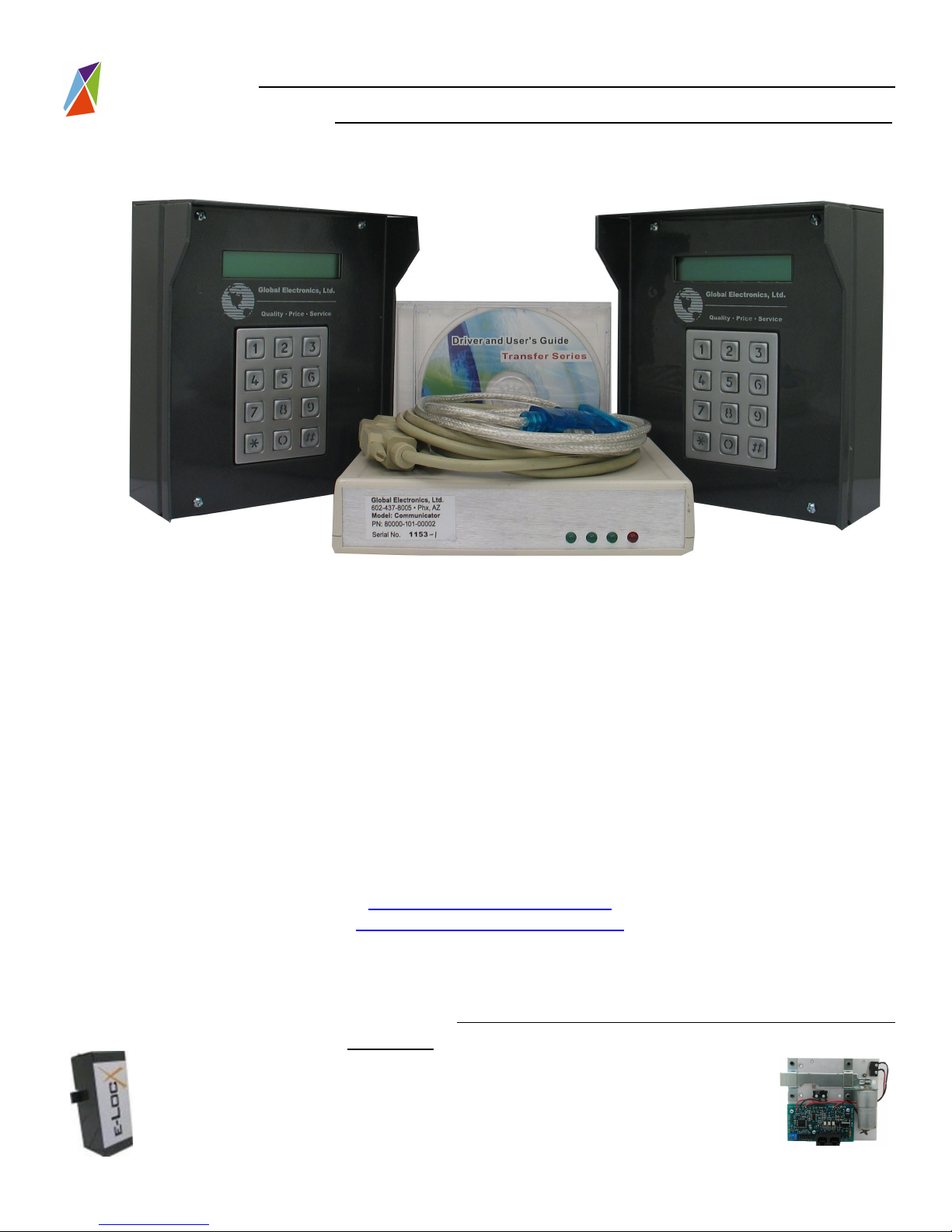
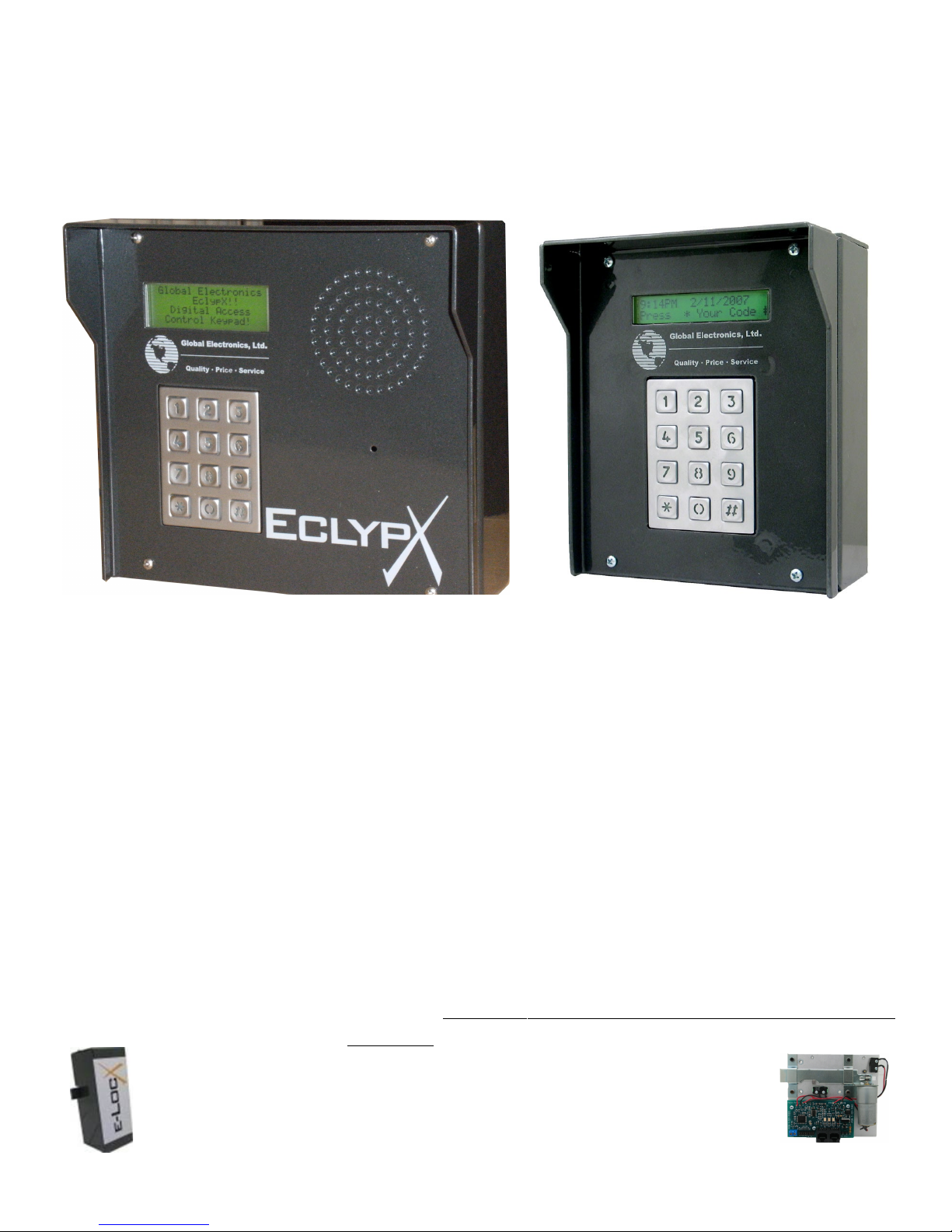
Preliminary EclypX and BasicX Digital Access Control Keypad
Global Electronics, ltd. is the Leader in Self Storage Automation and Security Technology!
e-LocX Automated Over Locking System
Axcys Integrated Over Locking Access Control and Security Software
Proxitrol Digital Individual Door Multiplexed Alarm System
EclypX Digital Access Control Keypad
US Patent No. 7221273 1 B1
1 Of 39
Page 2
PRELIMINARY VERSION – Eclypx and BasicX Keypad Access Controller User Manual
Every effort has been made to insure the accuracy of the information in this document. Global
Electronics, Ltd. assumes no liability for any inaccuracies contained herein. Global Electronics, Ltd.
reserves the right to change the information contained herein at any time and without notice.
Global Electronics, ltd. is the Leader in Self Storage Automation and Security Technology!
e-LocX Automated Over Locking System
1. Axcys Integrated Over Locking Access Control and Security Software
Proxitrol Digital Individual Door Multiplexed Alarm System
EclypX Digital Access Control Keypad
US Patent No. 7221273 1 B1
Preliminary EclypX and BasicX Digital Access Control Keypad
2 Of 39
Page 3

Table of Contents
About This Manual................................................................................................................5
Introduction............................................................................................................................5
Features and Benefits Summary............................................................................................................ 5
User Programmable features include:...............................................................................................................6
Technical Features ................................................................................................................................. 6
Axcys Software.................................................................................................................................................. 7
Firmware............................................................................................................................................................ 7
Optional Features.................................................................................................................................... 7
Electrostatic Discharge (ESD) precautions........................................................................8
Best Practices........................................................................................................................8
Connector Attachment .........................................................................................................9
In General............................................................................................................................................... 10
Polarity! ..............................................................................................................................10
Electrical Specs...................................................................................................................11
Power Supply Specifications.............................................................................................11
Power Supplies available..................................................................................................................... 11
Wiring Topography.............................................................................................................12
Recommended Wire Specifications..................................................................................13
In General............................................................................................................................................... 13
Data Wire Specifications:...................................................................................................13
Sources for Power & Data Wire.........................................................................................14
Board Elements...................................................................................................................15
Power/Data Connector.......................................................................................................................... 15
Gate Wire Connector............................................................................................................................. 15
Camera Power Connector.................................................................................................................... 15
Gate Position Detector.......................................................................................................................... 15
Door Position Detector......................................................................................................................... 15
Power Fuse............................................................................................................................................ 15
Gate Relay Fuse.................................................................................................................................... 15
Data Indicators...................................................................................................................................... 15
1 Send (Reply to the computer)........................................................................................................................ 15
2 Receive (Receive data from the computer)...................................................................................................15
3 Heartbeat – the keypads is alive and functioning..........................................................................................15
Contrast Adjustment (LCD Display).................................................................................................... 15
Comm Format Module Connections.................................................................................................... 15
Ribbon cable connection to Touchpad...............................................................................................15
Adjust LCD Contrast............................................................................................................................. 16
Mounting..............................................................................................................................16
Data Wire Installation..........................................................................................................17
Gate Motor Relay Installation.............................................................................................17
Installing Optional Pin Hole Camera.................................................................................18
Installing Optional Intercom Option..................................................................................18
Proper Earth Grounding.....................................................................................................19
Converting From MSTC Keypad .......................................................................................20
WARNING!............................................................................................................................................. 20
Preliminary EclypX and BasicX Digital Access Control Keypad
Global Electronics, ltd. is the Leader in Self Storage Automation and Security Technology!
e-LocX Automated Over Locking System
Axcys Integrated Over Locking Access Control and Security Software
Proxitrol Digital Individual Door Multiplexed Alarm System
EclypX Digital Access Control Keypad
US Patent No. 7221273 1 B1
3 Of 39
Page 4

Step 1. .................................................................................................................................................. 20
Step 2. ................................................................................................................................................... 20
Step 3. .................................................................................................................................................. 20
Step 4. .................................................................................................................................................. 20
............................................................................................................................................................... 22
What the lights mean............................................................................................................................ 23
Programming EclypX and BasicX Digital Access Control Keypad Address...............24
Programmable Features:....................................................................................................27
Date & Time Format ............................................................................................................................. 27
UK/EU Format................................................................................................................................................. 27
US Format....................................................................................................................................................... 27
Keypad Display Language.................................................................................................................... 27
User defined Keypad Display Messaging........................................................................................... 27
Response Messages....................................................................................................................................... 27
Instruction Messages....................................................................................................................................... 27
Line 2 Instruction............................................................................................................................................. 28
Pin Code Entry Instruction.............................................................................................................................. 28
Sending PIN Notification................................................................................................................................. 28
Security PIN Mask................................................................................................................................. 28
Set Display time..................................................................................................................................... 28
Automatically open the gate................................................................................................................ 28
Adjusting the Touch pad “Feel” .......................................................................................................... 28
KEY UP .................................................................................................................................................. 28
How long to wait.................................................................................................................................... 28
How long to wait for a user to finish.................................................................................................... 28
How often to check the gate monitor.................................................................................................. 28
Reset to factory default settings.......................................................................................................... 29
Communication Settings...................................................................................................................... 29
Reading Settings at the keypad........................................................................................................... 29
Reading Settings at the keypad.........................................................................................29
Special Functions.................................................................................................................................. 30
Special Functions................................................................................................................30
Display Settings ................................................................................................................................... 30
Release Disabled Touchpad ................................................................................................................ 30
General Operation...............................................................................................................30
Support.................................................................................................................................30
Replacing Fuses..................................................................................................................33
Replacing Components......................................................................................................33
Policies.................................................................................................................................35
Return Policy......................................................................................................................................... 35
Limited Warranty................................................................................................................................... 36
Not Covered..................................................................................................................................................... 36
Repairs.................................................................................................................................36
In Warranty Repairs.............................................................................................................................. 36
Out-of-Warranty Repairs....................................................................................................................... 37
FCC Advisory Statement....................................................................................................37
Contact Information ...........................................................................................................39
Global Electronics, ltd. is the Leader in Self Storage Automation and Security Technology!
e-LocX Automated Over Locking System
1. Axcys Integrated Over Locking Access Control and Security Software
Proxitrol Digital Individual Door Multiplexed Alarm System
EclypX Digital Access Control Keypad
US Patent No. 7221273 1 B1
Preliminary EclypX and BasicX Digital Access Control Keypad
4 Of 39
Page 5

Product Overview
About This Manual
This manual is intended to provide the user with an overview of EclypX and BasicX
features, benefits, specifications, set up/installation procedures and maintenance. It
also contains important safety information.
Introduction
The performance of the Axcys Integrated Security System Components is far
superior to any other product designed for the Self Storage Market today. Featuring
complete, closed loop acknowledgement between devices and the Host PC, Axcys
provides a unique, hi technology security and access control solution.
Ease of use and installation is the hallmark of the Axcys Integrated Security
System. Axcys Software is simple, reliable and easy to use. Inexpensive and free
support options are available. These options include Internet based support and
updating to your computer eliminating the necessity for outside technical support or
inconvenience to your manager.
The electronic hardware has been designed for years of trouble free service. If
replacement or upgrade becomes necessary, due to the modular design simply unplug a
card and replace with a new one – just like plugging in an electric appliance!
Both the BasicX and the EclypX Access Control Keypads are designed to be used both
indoor or outdoor. Their cases feature a Weather/Water resistant design as do the
electronics.
Always Observe local health, safety building and electrical code
requirements and guidelines for manual material handling and
installation!
Features and Benefits Summary
All Axcys Integrated Security System Components come standard with these features:
1. Perfect for Un-Attended and Manager-less site/store solutions
2. Support before, during, and after your purchase!
3. State Of the Art Technology
4. Vandal, Lightning and Water Resistant!
5. Cases and enclosures designed to resist water intrusion including horizontal
rain.
6. Expandable – Easily without specialty tools or skills.
7. Easily Upgradeable
8. Free Support options
9. Installation guide
10. Installers Available
Preliminary EclypX and BasicX Digital Access Control Keypad
Global Electronics, ltd. is the Leader in Self Storage Automation and Security Technology!
e-LocX Automated Over Locking System
Axcys Integrated Over Locking Access Control and Security Software
Proxitrol Digital Individual Door Multiplexed Alarm System
EclypX Digital Access Control Keypad
US Patent No. 7221273 1 B1
5 Of 39
Page 6

User Programmable features include:
1. Programmable Greeting [changeable a storagable list you can create!]
2. User settable messaging including:
1. Greeting
2. Lockout
3. Entry
4. Exit
5. Past Due
6. Invalid Code
7. Door Open
8. More....
1. Automatically open the gate after communication loss of x seconds [user
programmable]. The setting is in Seconds and user settable from 0 to 254 where
0 is disabled. Default setting is 0 (disable feature).
2. Change the amount of time the user has to hold the touchpad button for it to be
recognized. To increase the debounce setting, raise this value. This feature
allows customization to suit your tenants needs – such as the elderly who may
need more time.
3. How long to wait for a response from the host; displays no response from host
after this timeout.
4. How long to wait for a user to finish putting their code in the touchpad ( and hit
the Pound key). This feature allows customization to suit your tenants needs –
such as the elderly who may need more time.
5. How often to check the gate monitor. User settable from 2 to 254 seconds. This
optional feature allows the keypad to check the position of the gate and report it
to the Axcys Software, so even if you cannot “see” the gate, you know if it is open,
closed or in the middle.
Technical Features
o Closed loop system – all components send and receive information and acknowledge all
commands. No data loss due to one way communication – yields a SIGNIFICANT increase in
reliability and security!
o Latest Technology
o SMT Construction
o Designed by our Staff Engineers
o Manufactured at Global Electronics, Ltd.’s Phoenix Headquarters
o Expandable, Modular Design
o 16 Mhz 8 bit Microprocessor used throughout – as many as three depending on configuration
o Optically Isolated Communications - Lightening protection and data integrity!
o Extensive lightning TVS Protection
o Multiple LED Indicators
o Fully compatible with existing MSTC Brand equipment – add onto your site with Axcys’s
components
o Fast communications through high data rate and small packet size
o Fused at critical points with user replaceable fuses and automatic re-setting fuses
o 3 Different Communications formats –
Preliminary EclypX and BasicX Digital Access Control Keypad
Global Electronics, ltd. is the Leader in Self Storage Automation and Security Technology!
e-LocX Automated Over Locking System
1. Axcys Integrated Over Locking Access Control and Security Software
Proxitrol Digital Individual Door Multiplexed Alarm System
EclypX Digital Access Control Keypad
US Patent No. 7221273 1 B1
6 Of 39
Page 7

• 1200 Baud modem
• RS485 – fast, hard wired communications proven solid data transmission
method
• Wireless – 1 Watt Transceiver output 900 Mhz Frequency FHSS (frequency
hopping, Spread Spectrum) FH – Data Security SS – Communication Reliability
o Embedded Acknowledgement code – 2 layers when using wireless!
o Self Healing, Auto Routing ensures the highest reliability
o Weather & Water resistant NEMA 4 Style Enclosures
o Custom configurable Access Controllers Keypads
o Water resistant semi sealed case design
o Intercom Ready feature a waterproof speaker and sealed case design
o Optional Magnetic Card Reader
o Optional IC Card Reader
o Optional Weagand interfaces available
o Opional Touch Screen available
Axcys Software
• Built on Axcys Technology!
• Supports Windows XP
• USB Ready
• Includes a suite of prepared reports and a report writer
• Integrates with all major Management Software Systems
• Integrated Data Back Up.
• Integrated Power Back up system available
• Offsite Data Backup available
• Included DiagnostyX software included to aid in installation and hardware trouble shooting
Firmware
o Fast communications through high data rate and small packet size
o Checksum – Ensures Message Integrity and reliability
o Bi Directional Acknowledgement Code (Ack Code) –Ensures Communication Reliability and
Security
o User defined Addressing capabilities included
Optional Features
• Battery-backup
• Intelligent Power Supply
• RS485 Repeater modules
• 1200 Baud Modem, 9600 Wired RS-485 or Spread Spectrum, Frequency Hopping
wireless communication
• Gate Position Monitor (Open/Closed/Neither)
• Door Position Monitor (Open/Closed)
Preliminary EclypX and BasicX Digital Access Control Keypad
Global Electronics, ltd. is the Leader in Self Storage Automation and Security Technology!
e-LocX Automated Over Locking System
Axcys Integrated Over Locking Access Control and Security Software
Proxitrol Digital Individual Door Multiplexed Alarm System
EclypX Digital Access Control Keypad
US Patent No. 7221273 1 B1
7 Of 39
Page 8
Best Practices & Precautions!
Electrostatic Discharge (ESD) precautions
Before performing any set up or placement procedures, take the precautions outlined in this
section.
Be sure to take appropriate Electrostatic Discharge (ESD) precautions. Disconnect the
power source before moving, cabling, or performing any set up procedures.
Best Practices
Note
Always remove power whenever adding or replacing modules. Do NOT hot swap!
important
• Always observe your local laws and ordinances.
• Use non-plenum wire unless directed by local code.
• Always use a Regulated Power Supply!
• Use Industry standard Best Practices unless specifically directed to deviate by
Global Electronics, however always conform to any laws and ordinances.
• Beware Static! Always practice ESD Safe Handling
• Because each site is unique, we advise you consult with Global Electronics, Ltd.
for Power supply locations, size and voltage; wire gauge and data wire
specifications for YOUR unique site requirements
• Drain wire should be attached at the Keypad ground point end only. This should
only ever be attached this one end, never at the PC end or at another point . If
spices are made (not recommended) splice the drain wire also. Do not terminate
at the splice.
• Ground wire must be attached to the rear case stud. The case MUST be properly
earth grounded top prevent damage AND limit electrical shock hazard!
• An earth ground stake must located within 3 feet of each keypad and must be set
at least 18” or whatever your local ordinances require. Beware of other
underground objects from utilities etc. ALWAYS contact your local utilities
and/or Blue Stake BEFORE digging!
• Connector Attachment - How to attach connectors to circuit boards. The
connectors supplied may physically be attached in two different
Global Electronics, ltd. is the Leader in Self Storage Automation and Security Technology!
e-LocX Automated Over Locking System
1. Axcys Integrated Over Locking Access Control and Security Software
Proxitrol Digital Individual Door Multiplexed Alarm System
EclypX Digital Access Control Keypad
US Patent No. 7221273 1 B1
Preliminary EclypX and BasicX Digital Access Control Keypad
8 Of 39
Page 9
orientations. HOWEVER, one method is preferred over the other. If
you choose to use the NON-RECOMMENDED attachment, you may
have intermittent contact, yielding un-reliable results.
Connector Attachment
Quick release screw-down terminal block for the 18V power and power connections is
provided for easy connection to the external power supply. These connector block
(terminal blocks) are removable and do not require the removal of the wire(s) from them to
remove them from the circuit board.
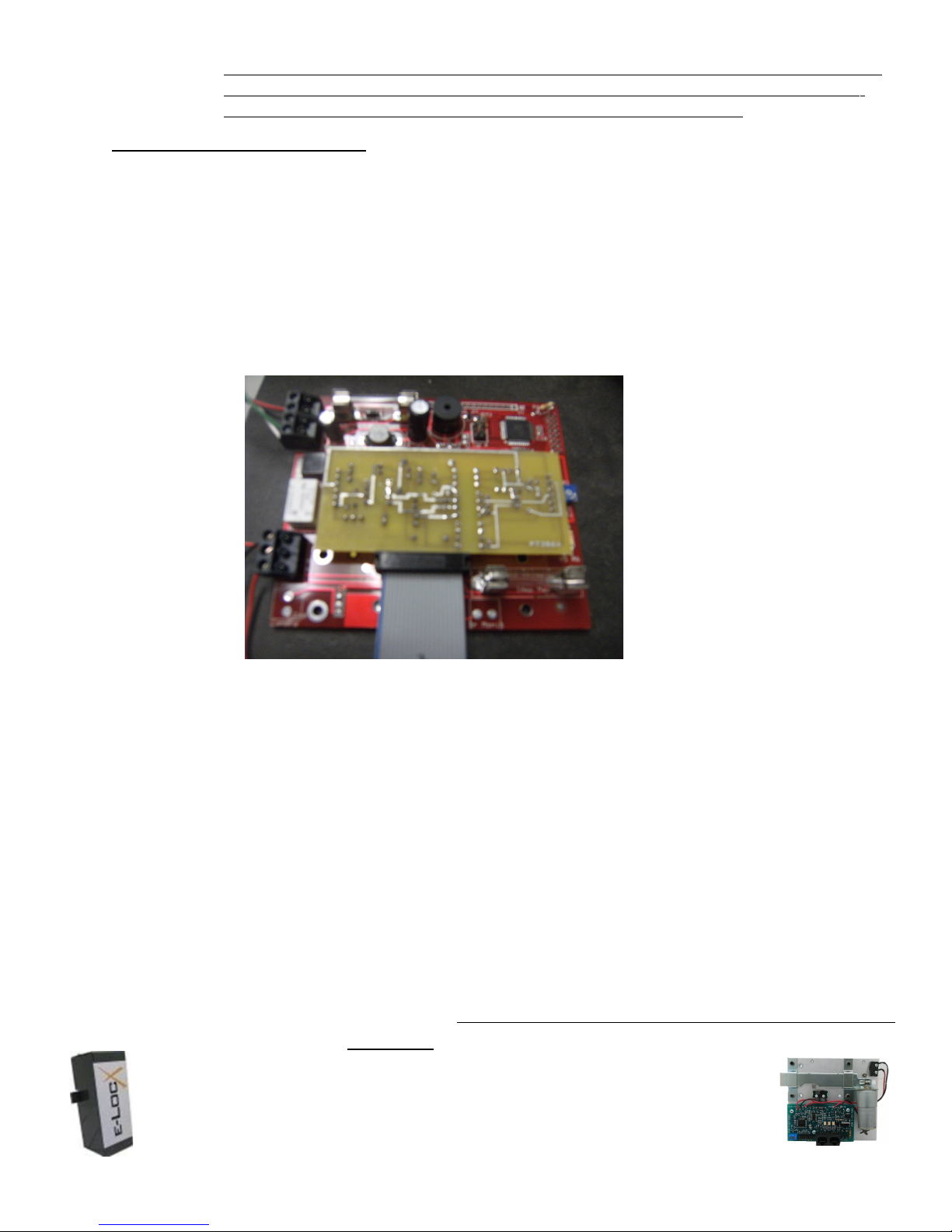
The connectors supplied may physically be attached in two different orientations.
HOWEVER, one method is preferred over the other. If you choose to use the NONRECOMMENDED attachment, you may have intermittent contact, yielding un-reliable
results.
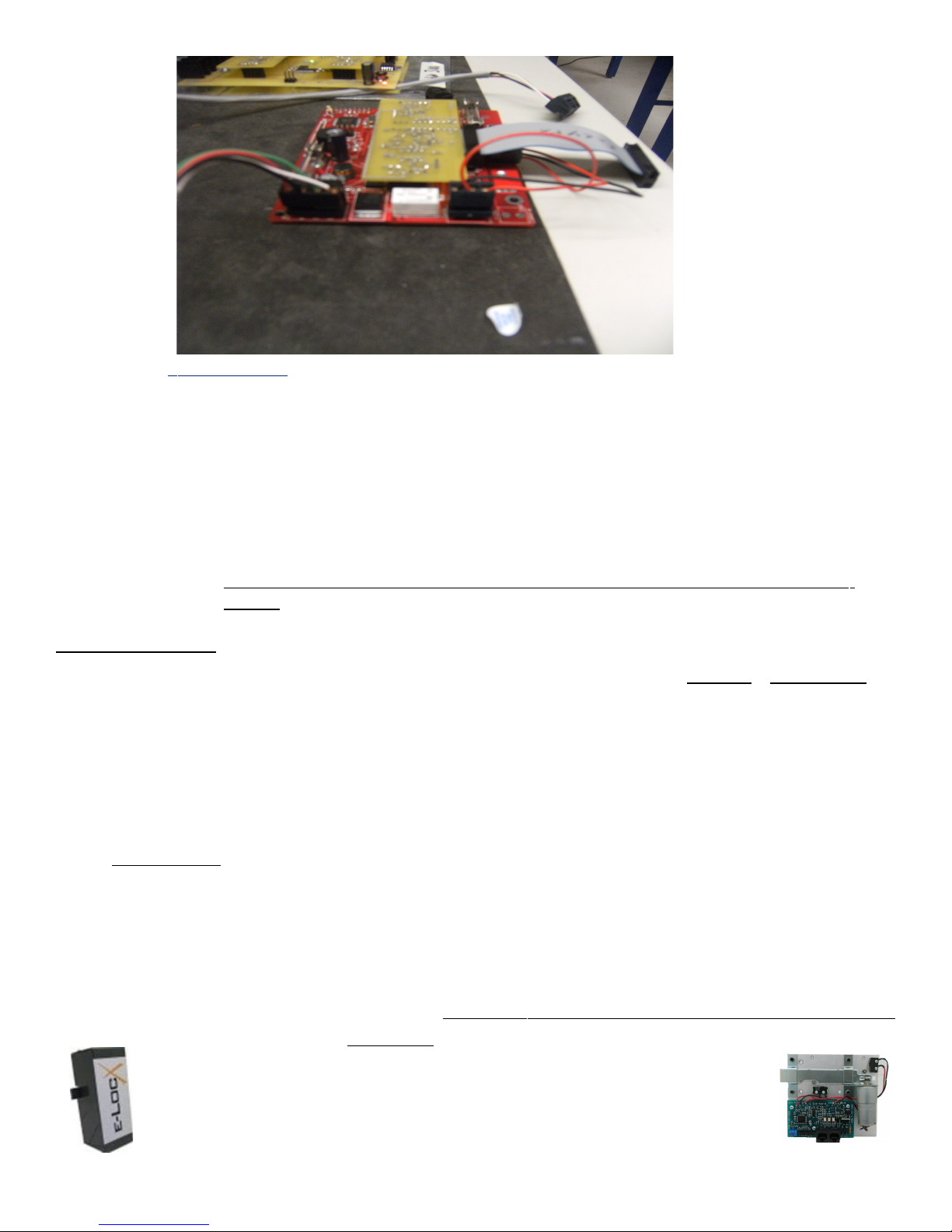
This is the preferred method over the non-recommended method. Note that the wires exit
the PCB parallel to the board. Not vertically.
This picture illustrates the NON-RECOMMENDED method for attachment.
Preliminary EclypX and BasicX Digital Access Control Keypad
Global Electronics, ltd. is the Leader in Self Storage Automation and Security Technology!
e-LocX Automated Over Locking System
Axcys Integrated Over Locking Access Control and Security Software
Proxitrol Digital Individual Door Multiplexed Alarm System
EclypX Digital Access Control Keypad
US Patent No. 7221273 1 B1
9 Of 39
Page 10
I n General
• Always use stranded wire.
• Always use cable that has a shield with a drain wire.
• Calculate voltage drops and select the correct gauge wire accordingly!
• Use 18AWG stranded wire for transmitting DC Power from keypad to keypad
• Use only RS485 Compatible wire. See the section entitled “Data Wire
• Use no less than 20AWG stranded cable the has a shield and drain wire when
• Attach the Drain wire to the appropriate ground wire on the Remote Device
Power Supply
Axcys EclypX and BasicX Digital Access Control Keypad require a regulated
18VDC @ 1000 mA (typical minimum). Details appear below. For new installations or rewiring, Global Electronics, recommends that you contact a certified installer, or Global to
provide specific power/communications details for your particular site. For a list of
certified installation companies, please contact Global Electronics, Ltd. directly.
Power wiring (and Data Wire) may be daisy chained but keep in mind distance vs. voltage
drop. Also the more remotes on the same power supply, the larger the wire must be and the
more current the supply must be capable of handling.
Specifications”
your keypads are equipped with a 1200 Baud Modem.
ONLY .
Polarity!
Be sure to attach the positive wire to the pin labeled + and the negative to the pin labeled -.
Reversing polarity may damage the unit.
Global Electronics, ltd. is the Leader in Self Storage Automation and Security Technology!
e-LocX Automated Over Locking System
1. Axcys Integrated Over Locking Access Control and Security Software
Proxitrol Digital Individual Door Multiplexed Alarm System
EclypX Digital Access Control Keypad
US Patent No. 7221273 1 B1
Preliminary EclypX and BasicX Digital Access Control Keypad
10 Of 39
Page 11
Note
Supply voltages over 18 VDC or under 12 VDC, at each device, may damage the
keypad or other devices!
Electrical Specs
1. 18V Regulated DC – All Axcys Remotes (EclypX and BasicX Access Controller Keypad,
ProXitrol Multiplexed Alarm System and Lock Controller)
2. Multiple (generally 2) EclypX and BasicX Digital Access Control Keypads can be
placed on same supply (consult Global for limit).
3. Because each site is unique, we advise you consult with Global Electronics, Ltd. for
Power supply locations, size and voltage; wire gauge and data wire specifications for
YOUR unique site requirements
Power Supply Specifications
Use only Global Electronics, Ltd.’s supplies. They have been selected, and the products
design has been based around, the power supplies that Global stocks and recommends.
Using a power supply not obtain from Global, and meeting Global’s exact specifications,
may result in un-satisfactory results including damage to your unit(s). Further this will
void the warranty.
Power Supplies available
1. 1A @ 18VDC
2. 2A @18VDC
3. 2.5A @ 18VDC
4. 4 Amp Intelligent Power Supply
Preliminary EclypX and BasicX Digital Access Control Keypad
Global Electronics, ltd. is the Leader in Self Storage Automation and Security Technology!
e-LocX Automated Over Locking System
Axcys Integrated Over Locking Access Control and Security Software
Proxitrol Digital Individual Door Multiplexed Alarm System
EclypX Digital Access Control Keypad
US Patent No. 7221273 1 B1
11 Of 39
Page 12
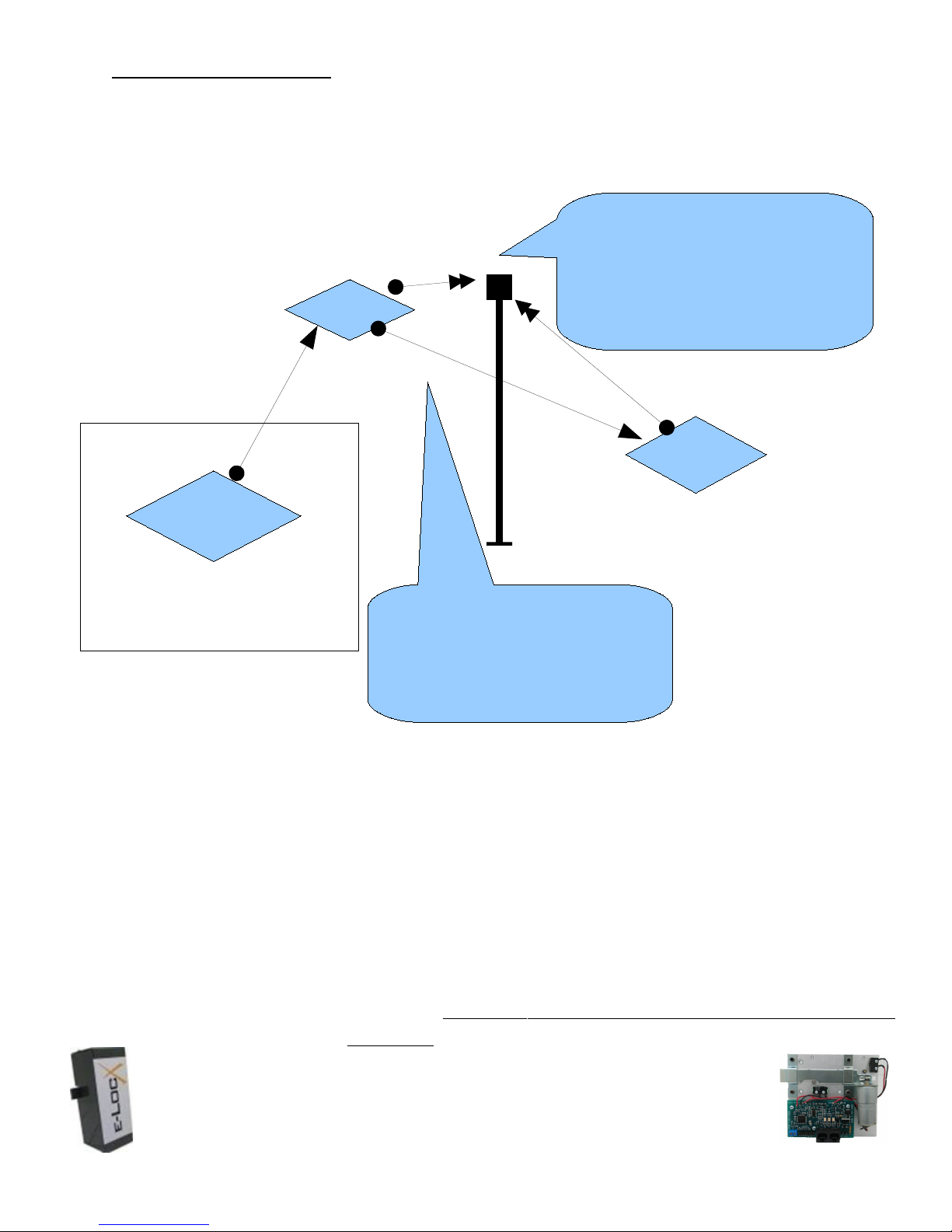
Wiring Topography
1. Power and Data wire may be run from device to device in parallel.
Each keypad must go to the
gate operator. See your Gate
Exit KP
Computer
Operator Manual for connection
Gate Operator
A pair of wires from
points
Entry
KP
Office
Power and Data wires come from
Office and can be paralleled
Together to each keypad.
Preliminary EclypX and BasicX Digital Access Control Keypad
Global Electronics, ltd. is the Leader in Self Storage Automation and Security Technology!
e-LocX Automated Over Locking System
1. Axcys Integrated Over Locking Access Control and Security Software
Proxitrol Digital Individual Door Multiplexed Alarm System
EclypX Digital Access Control Keypad
US Patent No. 7221273 1 B1
12 Of 39
Page 13

Wire Specifications
Best to request Globals’ engineering department to review your site plan, then advise you of
its recommendations for Power and Wire Size(s) etc. Various aspects must be considered
when designing the wiring topography for a particular installation. Many elements must be
taken into consideration including but not limited to:
1. Distance
2. Current Draw
3. Voltage Drop
4. Wire Gage (size)
5. Length
6. other...
Be sure to consider all of these elements when designing your installation. Consultation
may be available from Global upon request.
Recommended Wire Specifications
In General
• Always use stranded wire.
• Always use cable that has a shield with a drain wire.
• Calculate voltage drops and select the correct gauge wire accordingly!
• Use 18AWG stranded wire for transmitting DC Power from keypad to keypad
• Use only RS485 Compatible wire. See the section entitled “Data Wire
Specifications”
• Use no less than 20AWG stranded cable the has a shield and drain wire when
your keypads are equipped with a 1200 Baud Modem.
• Attach the Drain wire to the appropriate ground wire on the Remote
Device ONLY.
•
Data Wire Specifications:
For data wire, we recommend only wire that conforms to RS485 specifications. At
minimum, it must meet or exceed the RS485 spec, be twisted pair, stranded, shielded,
with a drain wire. Although most any size wire may be used for data, it is recommened
to use the largest guage possible (and reasonable) for your application. This will aid in
reducing wire breakage over time. Also consider the use of “direct burial” wire when
placing in old conduit.
18-02 OAS STR PVC Grn Stripe PN 014106-S
http://www.smartwire.com/PDF/014100.pdf
18-02 OAS STR PVC Pur Stripe PN 414105-B
http://www.smartwire.com/PDF/414100.pdf
Preliminary EclypX and BasicX Digital Access Control Keypad
Global Electronics, ltd. is the Leader in Self Storage Automation and Security Technology!
e-LocX Automated Over Locking System
Axcys Integrated Over Locking Access Control and Security Software
Proxitrol Digital Individual Door Multiplexed Alarm System
EclypX Digital Access Control Keypad
US Patent No. 7221273 1 B1
13 Of 39
Page 14
Part numbers are from Windy City Wire 1.800.379.1191
Also recommended is Belden 9841, Alpha 6412. These are 2 conductor, 24 Awg 300V
120 Ohm single, twisted pair wire – again for data wire only.
No matter which brand, data wire must meet or exceed the EIA 485 specifications. Use
of other type or brands of wire may result in unsatisfactory results.
Sources for Power & Data Wire
Your regular source for wire and cable may be able to help you, however these are some
alternates.
Windy City Wire 800.379.1191
Carlton Bates 888-280-7706
Note
Phone numbers, part numbers and other data listed here may change
without notice. Contact your local wire supply house or Global for more
information if required.
Global Electronics, ltd. is the Leader in Self Storage Automation and Security Technology!
e-LocX Automated Over Locking System
1. Axcys Integrated Over Locking Access Control and Security Software
Proxitrol Digital Individual Door Multiplexed Alarm System
EclypX Digital Access Control Keypad
US Patent No. 7221273 1 B1
Preliminary EclypX and BasicX Digital Access Control Keypad
14 Of 39
Page 15

Setup and Installation Instructions
NOTE:
On start up, each keypad will display only the DATE and TIME. It will scroll between date/time and a
BLANK screen. This will change only AFTER the computer sends the user defined GREETING to
the keypad.
Board Elements
The following picture shows the major board elements that the user may need to be aware of.
They include:
Power/Data Connector
Gate Wire Connector
Camera Power Connector
Gate Position Detector
Door Position Detector
Power Fuse
Gate Relay Fuse
Data Indicators
There are 3 LED indicators on the back of the board. From left to right these are
1Send (Reply to the computer)
2Receive (Receive data from the computer)
3Heartbeat – the keypads is alive and functioning.
Contrast Adjustment (LCD Display)
Comm Format Module Connections
Ribbon cable connection to Touchpad
Global Electronics, ltd. is the Leader in Self Storage Automation and Security Technology!
e-LocX Automated Over Locking System
Axcys Integrated Over Locking Access Control and Security Software
Proxitrol Digital Individual Door Multiplexed Alarm System
EclypX Digital Access Control Keypad
US Patent No. 7221273 1 B1
Preliminary EclypX and BasicX Digital Access Control Keypad
15 Of 39
Page 16
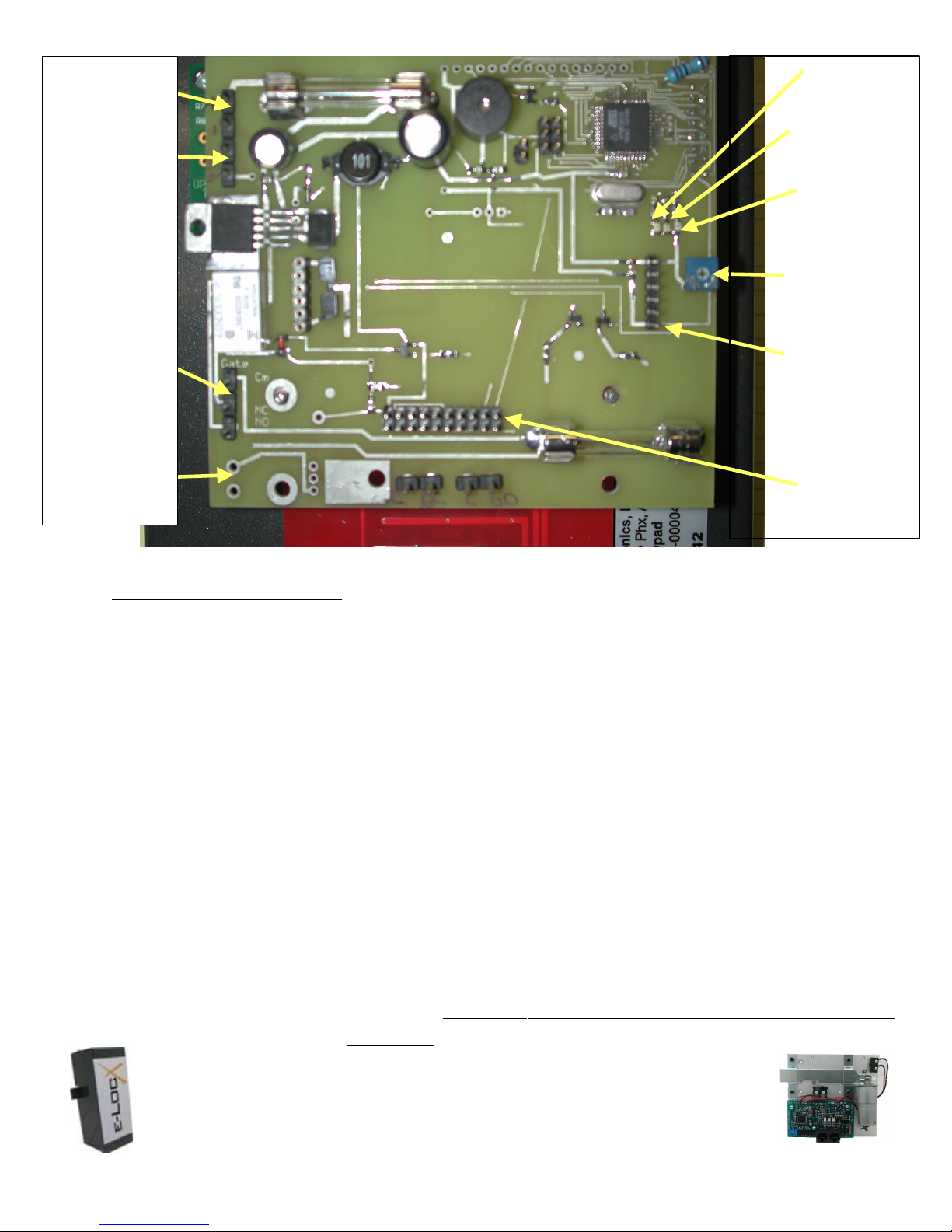
18VDC In
+
-
Txd
Rxd
Data I/O
+
-
Gate Relay
Common
N/C
N/O
Optional Pin
Hole Camera
Power N/O
+
-
Adjust LCD Contrast
Heartbeat
Contrast
Adjust
Comm
Format
Module
Connector
Touchpad
Connector
EclypX keypads are shipped with the LCD adjusted for best contrast. This however can
change due to temperature and humidity changes. To adjust this setting, using a small
screwdriver turn first one way, then the other to find the optimum setting.
Mounting
Mount the rear case to a goose next using your preferred mounting technique. Global installers
usually use #8 or #10 Self Tapping Tek Screws. Sometimes it is possible to use the 3 key
shaped holes in the rear of the case, other times, due to the mount supplied by the goose neck,
it is necessary to make new holes in the rear of the case for mounting. In either case, make
sure any unused holes are sealed using silicon to prevent water, bugs and other elements from
entering the case.
After all wires are connected and testing is complete, Global recommends a small bead of
silicone be placed on the top 3 surfaces (even though there is a gasket this is an extra step to
prevent intrusion).
Preliminary EclypX and BasicX Digital Access Control Keypad
Global Electronics, ltd. is the Leader in Self Storage Automation and Security Technology!
e-LocX Automated Over Locking System
1. Axcys Integrated Over Locking Access Control and Security Software
Proxitrol Digital Individual Door Multiplexed Alarm System
EclypX Digital Access Control Keypad
US Patent No. 7221273 1 B1
16 Of 39
Page 17

!Warning
Be certain to properly ground the keypad and the
goose neck (or other mounting provision) as shown in
the Earth Grounding Section!
!Warning
Be certain to firmly attach the supplied ground wire
from the Keypad face plate to the ground lug inside
the rear case.
Data Wire Installation
Data wires are attached the connector labeled J7 and Data. RS485 communication protocol
uses polarity sensitive wiring. Communication wiring must be to the specification listed
previously in this document. Attach the positive wire to the connector position Labeled
Data +, the negative to the position labeled Data – and the drain wire to the position labeled
GND.
At the Computer end, all data wires must be joined at a single location. Be sure to maintain
proper polarity throughout. Use a terminal block or barrier strip to accomplish this. From
the barrier strip, a single pair of wires need to make its way to the comunicator where it will
use the supplied green connector.
!Warning
A drain wire from the shield MUST be attached to the
GND Data Connector to protect the device from
Lightning! Only connect this to the remote (keypad)
end!
Gate Motor Relay Installation
Wiring to and from your gate motor must be attached to the connector block labeled Gate
Relay. Provided are 3 pins, Common, Normally Open and Normally Closed. The relay is
protected by a 1A fuse. Normal installation utilizes COM (Common) and NO (Normally
Open). However your particular installation may differ. Consult your Gate Operator
Manual.
Preliminary EclypX and BasicX Digital Access Control Keypad
Global Electronics, ltd. is the Leader in Self Storage Automation and Security Technology!
e-LocX Automated Over Locking System
Axcys Integrated Over Locking Access Control and Security Software
Proxitrol Digital Individual Door Multiplexed Alarm System
EclypX Digital Access Control Keypad
US Patent No. 7221273 1 B1
17 Of 39
Page 18

Installing Optional Pin Hole Camera
Pinhole cameras are supplied only as an option with EclypX model Keypads. They come
complete with mounting power connector (to the provided on-board power supply) and
a BNC video connector.
Installing Optional Intercom Option
The Intercom ready option only as an option with EclypX model Keypads. It includes
the necessary components to make the keypad a station ready to work with an Aiphone
Brand LEF system.
!Warning
The purchase of this option does NOT provide a complete Intercom.
The option requires the use of an Aiphone LEF Intercom system.
Global Electronics, ltd. is the Leader in Self Storage Automation and Security Technology!
e-LocX Automated Over Locking System
1. Axcys Integrated Over Locking Access Control and Security Software
Proxitrol Digital Individual Door Multiplexed Alarm System
EclypX Digital Access Control Keypad
US Patent No. 7221273 1 B1
Preliminary EclypX and BasicX Digital Access Control Keypad
18 Of 39
Page 19
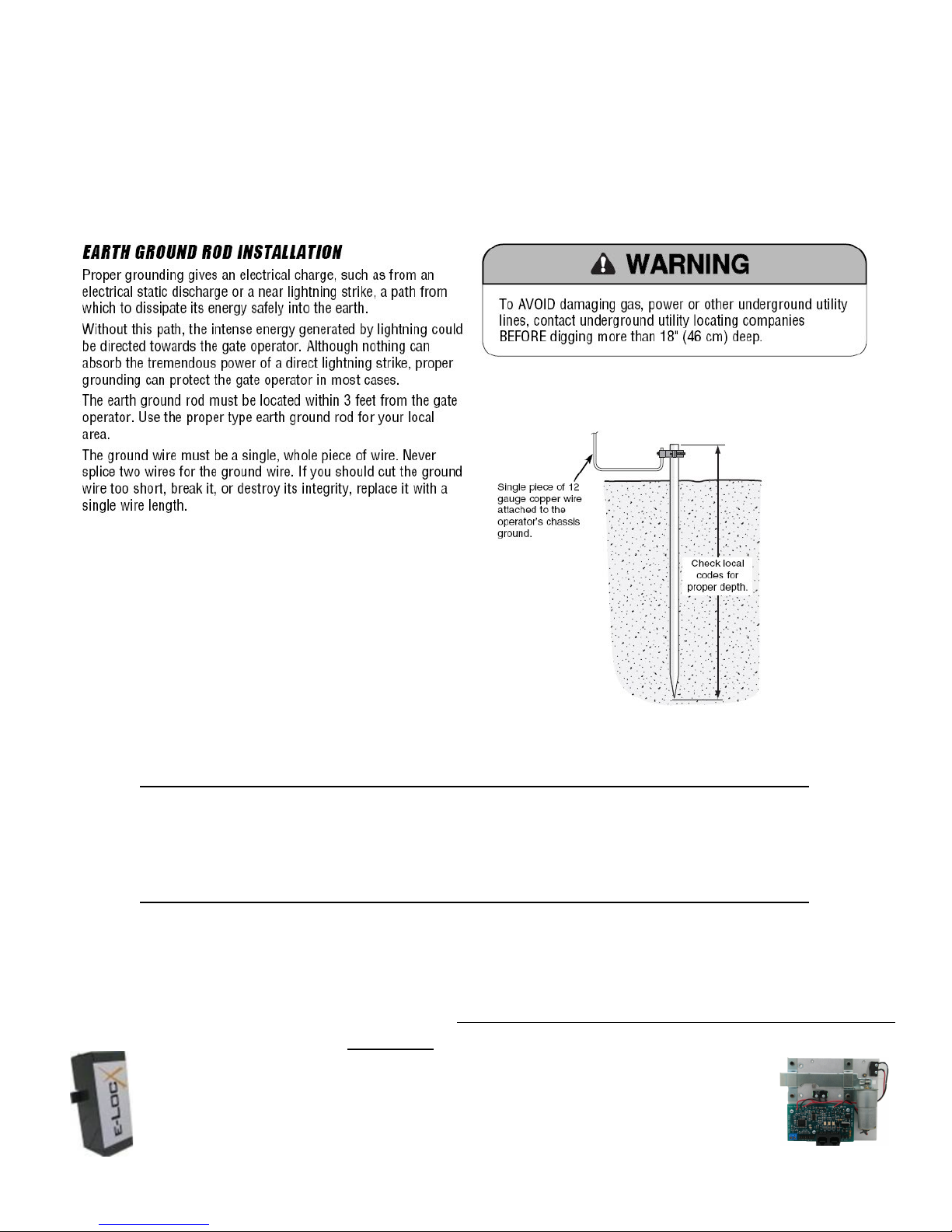
Proper Earth Grounding
A ground lug is provided on the inside rear enclosure. Additionally, a ground wire should
be attached from any available screw in the front enclosure housing to the rear enclosure
lug. Then a ground wire from the rear enclosure lug to earth ground. This will provide a
path for lightning and static electricity.
A proper Earth Ground Rod must be installed to ensure proper grounding and prevent
damage to keypads. You should use 1 ground rod for each keypad.
!Warning
Improper grounding may cause personal or property damage or
injury. Global not responsible for any injury or damage!
Global Electronics, ltd. is the Leader in Self Storage Automation and Security Technology!
e-LocX Automated Over Locking System
Axcys Integrated Over Locking Access Control and Security Software
Proxitrol Digital Individual Door Multiplexed Alarm System
EclypX Digital Access Control Keypad
US Patent No. 7221273 1 B1
Preliminary EclypX and BasicX Digital Access Control Keypad
19 Of 39
Page 20

Converting From MSTC Keypad
Replacing an MSTC keypad with a BasicX or EclypX keypad
NOTE:
On start up, each keypad will display only the DATE and TIME. It will scroll between date/time and a
BLANK screen. This will change only AFTER the computer sends the user defined GREETING to
the keypad.
WARNING!
Never plug in, unplug, remove PCB modules when the unit is powered on. You may unplug
only the power connector while power is turned on.
Step 1.
Remove the 4 pin black connector from the MSTC keypad by pulling the black connector
directly up from the board.
Step 2.
Remove the 7 position connector from the bottom of the MSTC board.
Step 3.
Rotate the 4 position black connect as shown (180 degrees from what it was before) then
and insert into the pins. Power should now be on.
Step 4.
Connect one of the wires from the 7 position connector on the MSTC keypad to the position
marked ‘C’ and the other wire to the position marked with a “NO”.
Preliminary EclypX and BasicX Digital Access Control Keypad
Global Electronics, ltd. is the Leader in Self Storage Automation and Security Technology!
e-LocX Automated Over Locking System
1. Axcys Integrated Over Locking Access Control and Security Software
Proxitrol Digital Individual Door Multiplexed Alarm System
EclypX Digital Access Control Keypad
US Patent No. 7221273 1 B1
20 Of 39
Page 21
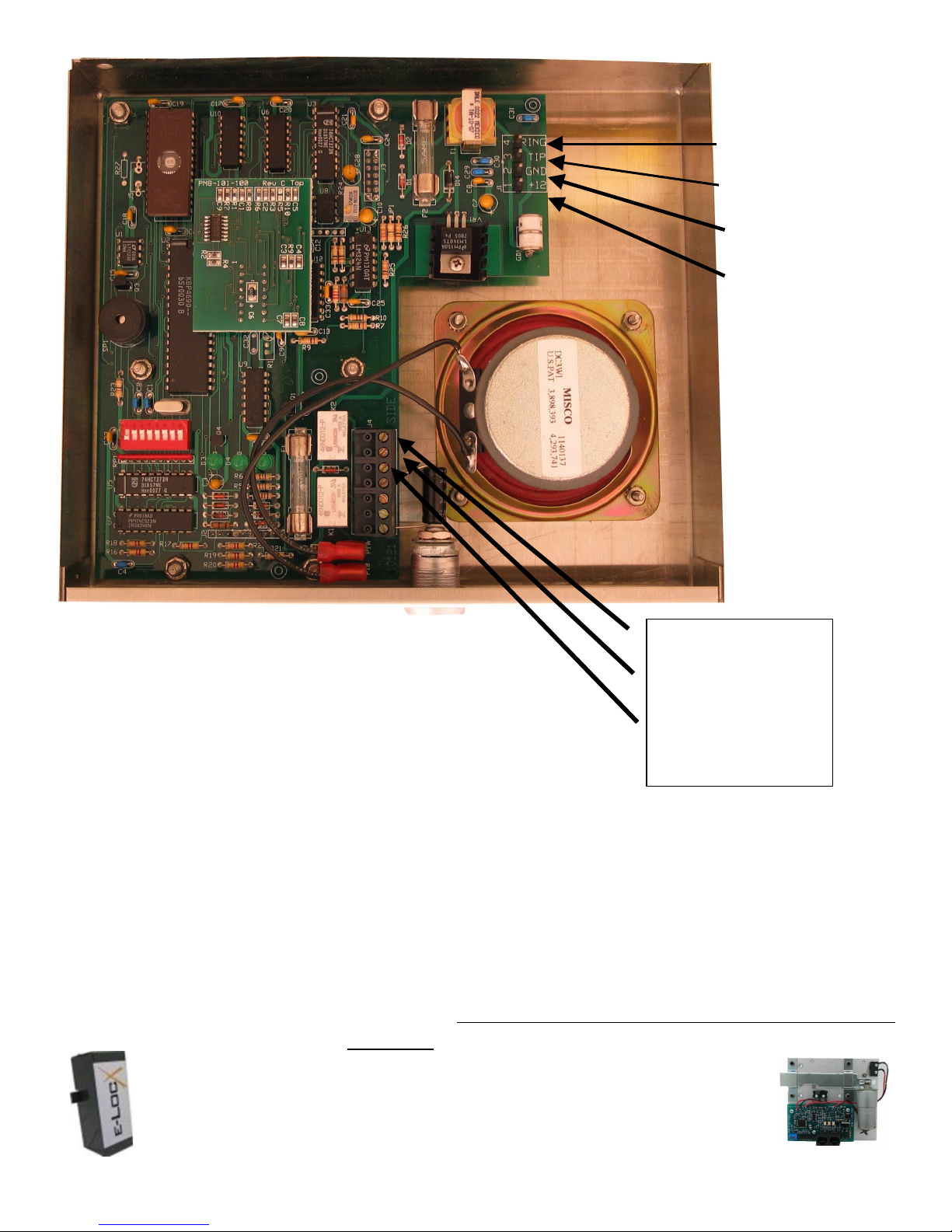
Power & Data
Connections
Pin 4 Data Line 1
Pin 3 Data Line 2
Pin 2 15 v PS Gnd
Pin 1 + 15v PS Supply
NC – no connect Pin7
NO Pin6
Gate Relay Common
Pin5
Preliminary EclypX and BasicX Digital Access Control Keypad
Global Electronics, ltd. is the Leader in Self Storage Automation and Security Technology!
e-LocX Automated Over Locking System
Axcys Integrated Over Locking Access Control and Security Software
Proxitrol Digital Individual Door Multiplexed Alarm System
EclypX Digital Access Control Keypad
US Patent No. 7221273 1 B1
21 Of 39
Page 22
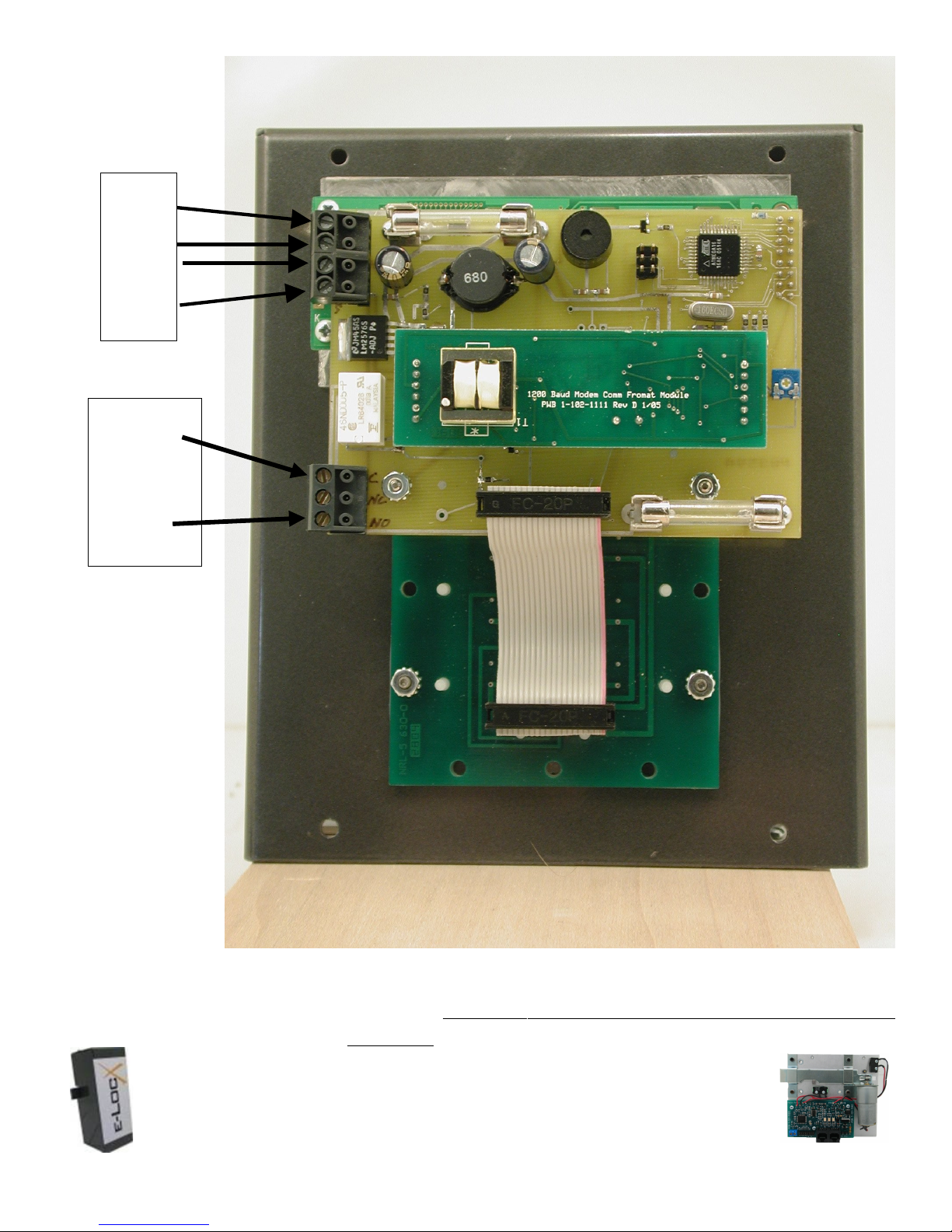
+18v
-18v
Data1
Data2
Gate Relay
Common
NC – no
connect
NO
Global Electronics, ltd. is the Leader in Self Storage Automation and Security Technology!
e-LocX Automated Over Locking System
1. Axcys Integrated Over Locking Access Control and Security Software
Proxitrol Digital Individual Door Multiplexed Alarm System
EclypX Digital Access Control Keypad
US Patent No. 7221273 1 B1
Preliminary EclypX and BasicX Digital Access Control Keypad
22 Of 39
Page 23
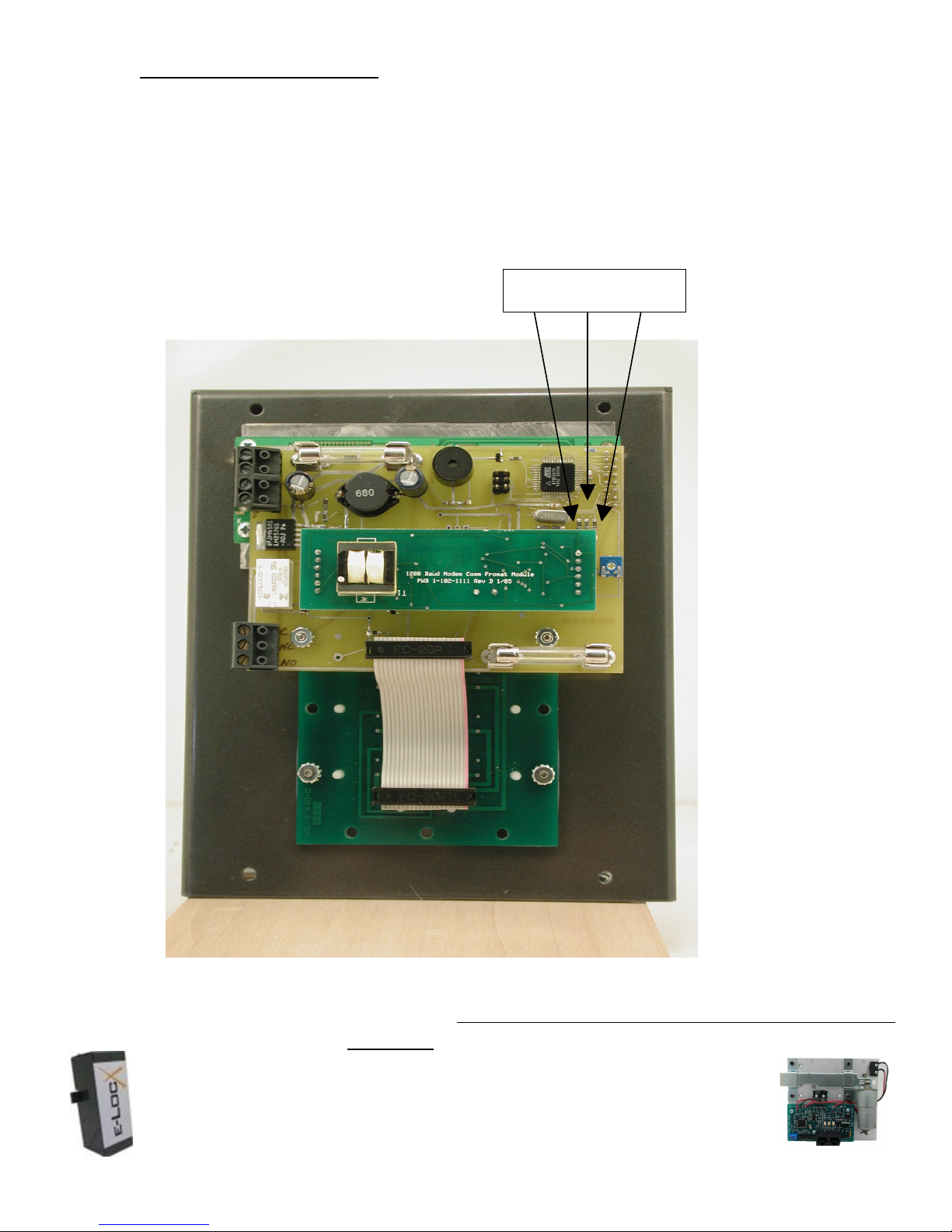
What the lights mean
There are 3 LED indicator lights.
1 – Heart Beat
2 – Receive Data
3 – Reply back to computer
When working properly the receive data LED will go on then immediately after the Reply LED will
go on. The heart beat blinks periodically to indicate that the brains are working.
3 2 1
Global Electronics, ltd. is the Leader in Self Storage Automation and Security Technology!
e-LocX Automated Over Locking System
Axcys Integrated Over Locking Access Control and Security Software
Proxitrol Digital Individual Door Multiplexed Alarm System
EclypX Digital Access Control Keypad
US Patent No. 7221273 1 B1
Preliminary EclypX and BasicX Digital Access Control Keypad
23 Of 39
Page 24
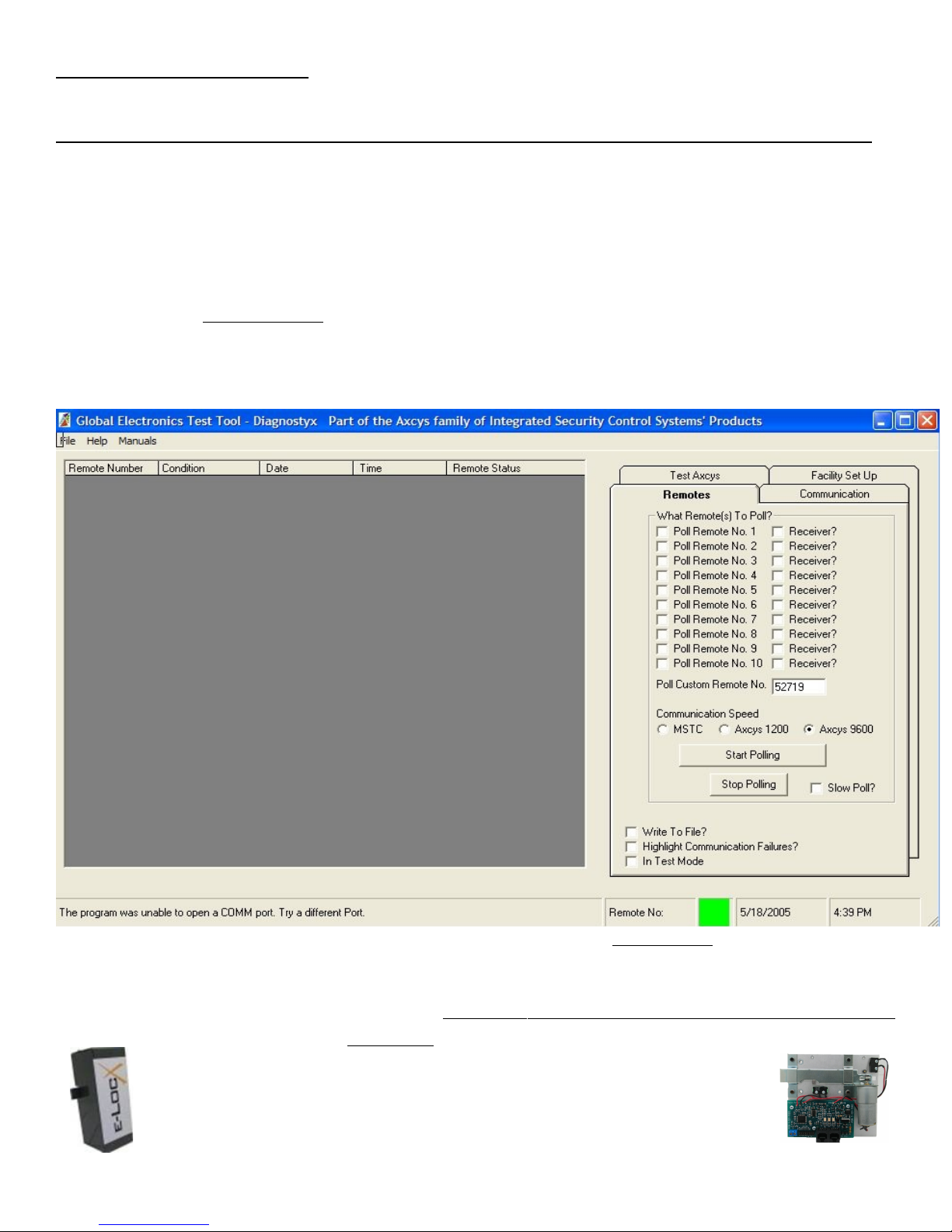
Getting Ready To Run!
Programming EclypX and BasicX Digital Access Control Keypad Address
Programming the address for each of your keypads must be done using our DiagnostyX
software. By default, the keypad is shipped with an address of 52719.
You MUST disconnect ALL other devices that are new and/or are on this address. If you do
not, they ALL will be changed! Disconnection can happen by either removing power or data
from those you do not want to program.
To change this set address, start DiagnostyX. Enter the address 52719 on the screen and click
the button Start Polling. You will see records appearing on the main screen showing good or
bad communication. Also the Red/Green box in the bottom of the screen will be green if good.
If you are not receiving good communication, go to the trouble shooting part of this document
for more help.
Once good polling is being achieved, click on the tab marked Test Axcys.
Global Electronics, ltd. is the Leader in Self Storage Automation and Security Technology!
e-LocX Automated Over Locking System
1. Axcys Integrated Over Locking Access Control and Security Software
Proxitrol Digital Individual Door Multiplexed Alarm System
EclypX Digital Access Control Keypad
US Patent No. 7221273 1 B1
Preliminary EclypX and BasicX Digital Access Control Keypad
24 Of 39
Page 25
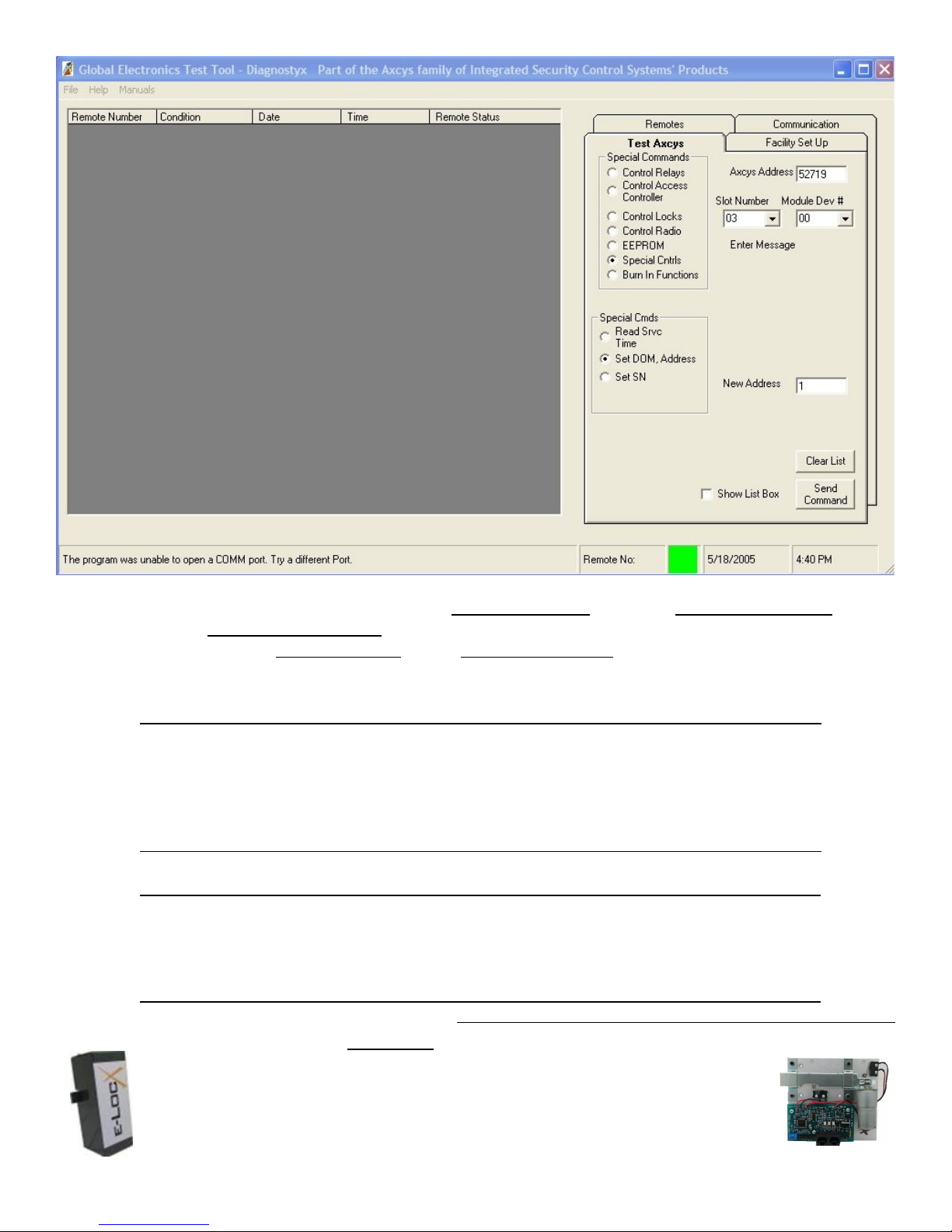
Enter the address 52719 into the field Axcys Address. Click on Special Controls. Then
click on Set DOM, Address. Enter the NEW address you want this device to be set at in
the field labeled New Address. Click Send Command button.
After setting the address, return to the remotes tab and click the Stop Polling button. It
will then be necessary to stop and re-start the program.
!Warning
DiagnostyX was NOT designed to be a commercial product. While we
have made every attempt to remove problems you may still encounter
Issues. Please forward any concerns to suggestions via email.
!Warning
It is possible to have more than one remote device installed with
identical addresses. Units normally ship with a default address of
Preliminary EclypX and BasicX Digital Access Control Keypad
Global Electronics, ltd. is the Leader in Self Storage Automation and Security Technology!
e-LocX Automated Over Locking System
Axcys Integrated Over Locking Access Control and Security Software
Proxitrol Digital Individual Door Multiplexed Alarm System
EclypX Digital Access Control Keypad
US Patent No. 7221273 1 B1
25 Of 39
Page 26

52719. However, we occasionally pre-set the addresses for units upon
request by the customer.
!Warning
Disconnect all remotes having the same address number from the
daisy chained line by either removing their power or data cable.
Global Electronics, ltd. is the Leader in Self Storage Automation and Security Technology!
e-LocX Automated Over Locking System
1. Axcys Integrated Over Locking Access Control and Security Software
Proxitrol Digital Individual Door Multiplexed Alarm System
EclypX Digital Access Control Keypad
US Patent No. 7221273 1 B1
Preliminary EclypX and BasicX Digital Access Control Keypad
26 Of 39
Page 27

Programmable Features:
important
Some features available only on models shipped after 3/09 – or
having been re-programmed after 3/09
Both the BasicX and EclypX models include programmable features to allow the user to customize the
look and feel of these keypads. These features are programmed using Diagnostics and and Axcys /
Axcys Embedded. All may be “reset” to factory using Diagnostyx. The features include:
1. Date & Time Format – User can select either US or UK/EU date and time formats.
1. UK/EU Format: Date: Day/Month/Year Time: Hrs: Minutes Hrs Example “19:50 Hrs”
2. US Format: Date: Month/Day/Year Time: Hrs: Minutes Am/Pm Example “7:50 PM”
2. Keypad Display Language – All Global Electronics' keypad products can be customized with
the users language. The user is able to “free-form” enter messages for the tenant to see and
understand in their own language. Certain characters however cannot be display such as
certain Russian and German characters.
3. play Messaging – There are several levels of display messaging available to the facility. The
two main types of messaging are Response Messages to tenant input, and Instruction
Messages. - NEW 10/10/11 Axcys Ver 5.1 and higher
**Note ** if you elect to use custom messaging, ALL messages must be used – you cannot use a
combination of custom and non-custom. Although, you CAN copy the standard messages and
utilize them if you like.
1. Response Messages – There are many available. The main Response Messages include
messages for “Locked out”, “Invalid Code”, “Greeting” and “Good Bye”. These are all set up
in the main software (Axcys or Axcys Embedded).
2. Instruction Messages – These are messages that are programmed into the Keypad.
Although all keypads are typically set up the same, each keypad can be differently but
requires a little more set up work to accomplish. Global recommends keeping all keypads
the same.
Instruction messages include *All are customizable with your language as you see fit. The following demonstrate
examples only.
*All but the second line of PIN Code Entry may have 20 Characters available. PIN code
entry may have at most 8 characters.
Preliminary EclypX and BasicX Digital Access Control Keypad
Global Electronics, ltd. is the Leader in Self Storage Automation and Security Technology!
e-LocX Automated Over Locking System
Axcys Integrated Over Locking Access Control and Security Software
Proxitrol Digital Individual Door Multiplexed Alarm System
EclypX Digital Access Control Keypad
US Patent No. 7221273 1 B1
27 Of 39
Page 28

Line 2 Instruction - The default for this instruction is: "Press * Your Code #". This
instruction appears under the Date and Time. It rotates with your greeting screen.
Pin Code Entry Instruction
1. Line 1 - "Enter access code "
2. Line 2 – "Code:"
Sending PIN Notification
1. Line 1 - "Sending access code "
1. Security PIN Mask Entry– The PIN code may be masked by any character the user desires OR
the actual PIN may be displayed. The default setting is to display the PIN on entry. Mask
characters include characters such as * & # $. However there is no limit to which character
may be chosen providing virtually all ASCII character, aside from special Russian, German or
Chinese characters.
2. Set Display time - Default is 3 Seconds per message. This number may be over ridden by user
action (a key press for example).
3. Automatically open the gate after communication loss of x seconds. Settings are between 0 and
254 seconds where 0 has the affect of disabling the option. The default is zero(0) – disabled. If
this is set to zero (0), the device will automatically re-start itself approximately every 120
seconds (added 9/28/09)
4. Adjusting the Touch pad “Feel” is accomplished by adjusting the interval in which the keypad
checks to see if a user is depressing a touchpad button. The setting is in milliseconds and user
settable from 0 to 65535. Default is 70mS. Making this value HIGHER will have the result of
lessening multiple entries for the same keypress (111, 22 etc). Making the value lower will have
the result of a more sensitive touchpad.
5. KEY UP – New 9/15/11 – KEY UP is a feature that combines “Touch pad Feel” with forcing the
user to release the touch pad Key before it is recognized. No audible “beep” or number will be
displayed on the LCD without the key being release. For those customers who have
particularly slow tenants, or are used to a “press and hold” configuration, this feature allows
you to adjust the keypad to your tenants particular taste. This feature is the default of the
keypad (beginning 9/15/11) and is coupled with the touch pad “feel” setting. Touch pad feel
settings below 2000 automatically incorporate KEY UP. Values over 2000 do not use KEY UP.
6. How long to wait for a response from the host; displays no response from host after this
timeout. Default is 15 seconds
7. How long to wait for a user to finish putting their code in the touchpad ( and hit the Pound
key). The default is 15 Seconds, maximum is 60 seconds.
8. How often to check the gate monitor. User settable from 0 to 254 seconds where 0 has the
affect of disabling the option. The default is disabled. This should only be used when the
Global Electronics, ltd. is the Leader in Self Storage Automation and Security Technology!
e-LocX Automated Over Locking System
1. Axcys Integrated Over Locking Access Control and Security Software
Proxitrol Digital Individual Door Multiplexed Alarm System
EclypX Digital Access Control Keypad
US Patent No. 7221273 1 B1
Preliminary EclypX and BasicX Digital Access Control Keypad
28 Of 39
Page 29

options have been purchased. Otherwise false signals may be sent to the
computer.
9. Reset to factory default settings. If you are using certain features, such as a gate or door
monitor, you will need to adjust these settings back to your preferences. The reset command
returns all saved EEPROM settings back to default
10. Communication Settings:
1. Beginning 10/20/09 both the BasicX and the EclypX have user programmable RTS delay
settings. These are used to customize the speed for polling and responding to the computer.
In some cases, such as a slower computer or older Communicator, may require these
settings to be altered from their factory settings in order to make communications solid
between the KP and the computer.
2. There are 3 settings, RTS1, RTS2 and RTS3.
1. RTS 1 is before replying to the computer and before setting the state of RTS
2. RTS2 is also before replying to the computer, but it is after setting the state of RTS.
3. RTS3 is after the reply is sent to the computer, and determines how long to hold the
state of RTS before changing it to be ready for the next poll by the computer
The factory defaults for the three settings are:
If Modem: RTS1 =30 RTS2= 90 and RTS3 = 25 'revised 5/4/10 from 30/30/25
If RS485: RTS1 = 0 RTS2= 90 and RTS3 = 5 (10 in the case of Muxes)
Use these in conjunction with Delay 1 for FSK Modem Communication settings. Lowering
Delay1 Setting to 50 mS may help speed up and better communication with modems.
!Warning
Changing these settings can cause the unit to NEVER respond! Make
changes in very small increments (like 1 or 2) and very carefully! If
communications are stopped, make the sum of RTS 1 and
RTS2 greater than 150 then follow the steps below.
Next turn off the power to the KP, wait 10 seconds, then turn power
back on. This will force these settings back to the original factory
settings. You may also use the “Re-Start Device” command within
DiagnostyX to perform a system re-start. This will accomplish the
same result.
Reading Settings at the keypad
Certain settings can be read at the keypad others require the use of the DiagnostyX Software.
However, all settings can be programmed (and RESET to factory default) and read using the
DiagnostyX Software. These are those that can be read on the keypad display. They can be
Preliminary EclypX and BasicX Digital Access Control Keypad
Global Electronics, ltd. is the Leader in Self Storage Automation and Security Technology!
e-LocX Automated Over Locking System
Axcys Integrated Over Locking Access Control and Security Software
Proxitrol Digital Individual Door Multiplexed Alarm System
EclypX Digital Access Control Keypad
US Patent No. 7221273 1 B1
29 Of 39
Page 30

displayed by entering * then # on the touchpad will provide information about the settings of
the KP including:
1. Comm Format = MDM, 485, Wireless
2. CE = Max User Time (from #4 above)
3. NP = No Poll(no comm setting #1 above)
4. TP = Touchpad Delay (#2 from above)
5. Adr= Address of device
6. Date and version of firmware.
Special Functions
Display Settings
Some programmable KP settings are visible by first pressing the Star (*) key then
immediately afterward pressing the Pound (#) key.
Release Disabled Touchpad
To prevent the user from entering two PINs prior to the Keypad receiving a response
from the computer, the touchpad is temporarily disabled. The amount of time to disable
the Touchpad is programmable (#3 from list above). However, this setting can be over
ridden by pressing the Star (*) key 5 times consecutively.
General Operation
All code entries MUST begin with the user pressing the Star (*) key. After the entry of the
user enters their PIN, the user MUST enter the Pound (#) key.
All PIN codes are an Integer Value – which means that they may only be WHOLE
numbers. Leading ZEROS are not counted in Integer values (the number 000999 IS the
number 999). Although it will not hurt the system to have LEADING zeros entered, they
will not count in the ultimate code. Therefore it is advised not to use them in the
management system since it would be possible to have 2 different tenants with the same
code!
Software and Support
Both the BasicX and the EclypX Access Control Keypads are designed to be used either
alone or in combination with existing MSTC brand Keypads. However both the BasicX and
the EclypX keypads require the use of Globals Axcys Gate and Security Software. Manuals
for installation, set up and configuring Axcys are available on line at
www.global-electronics.com
Support
Support is available from several sources. Some are pay for service others are free. Free
system software and documentation updates available on our web site and
Preliminary EclypX and BasicX Digital Access Control Keypad
Global Electronics, ltd. is the Leader in Self Storage Automation and Security Technology!
e-LocX Automated Over Locking System
1. Axcys Integrated Over Locking Access Control and Security Software
Proxitrol Digital Individual Door Multiplexed Alarm System
EclypX Digital Access Control Keypad
US Patent No. 7221273 1 B1
30 Of 39
Page 31

http://finance.groups.yahoo.com/group/Global-Electronics/
Pay for service available from our support by phone, fax, or email
Phone 602-437-8005
Trouble Shooting
I. First you must identify what the problem is, before a cause and solution may be found. There
are three basic causes for keypads not working
i. Power – revealed when the device appears off, without display and does not make any
noise when the touchpad is used.
ii. Data – revealed when looking at Axcys in the lower right corner of the screen, the
system shows Remote X where X is a number such as 1, 2, 3 etc. To the right of that is
either a RED or GREEN box. Green indicates the remote is responding to polls, having
good communication, RED indicates lack of communication. An occasional Red blink is
not cause for concern.
iii. Tenant Information (unit ID and/or PIN) - A PIN is entered in the keypad but the
computer rejects the PIN as an invalid code, invalid area or closed (time).
NOTE: Power and Data trouble shooting are handled together. Tenant Information is
handled separately.
iv. Gate Does Not Open - The Keypad Communicates properly and the PIN is accepted
(Keypad Screen Reads “Access granted” or your custom text message) , but the gate does
not open.
II. Tenant Information:
i. Invalid Code - When a PIN is entered in the keypad but the computer rejects the PIN as an
invalid code, verify that the PIN is properly set up in Axcys. On the main screen go to
Tenants->Accounts. Push F12, then type the PIN and press the enter key. If the record
shows up in the box, click on it. If not, the PIN has not been given to Axcys by the
management system OR has been improperly entered (NRC codes and users without
Management Systems).
ii. When a PIN is entered in the keypad but the computer rejects the PIN as closed (time), on
the main screen go to Tenants->Accounts. Push F12, then type the PIN and press the enter
key. If the record shows up in the box, click on it. Verify that the correct time permission
are set. For example if a tenant has 24 hour access, and they are set to standard gate hours,
this would be incorrect. Adjust the settings for this tenant in the Management System
iii. When a PIN is entered in the keypad but the computer rejects the PIN as an invalid area
this can be caused by:
1. A missing Unit ID (Tenant not assigned a unit)
Preliminary EclypX and BasicX Digital Access Control Keypad
Global Electronics, ltd. is the Leader in Self Storage Automation and Security Technology!
e-LocX Automated Over Locking System
Axcys Integrated Over Locking Access Control and Security Software
Proxitrol Digital Individual Door Multiplexed Alarm System
EclypX Digital Access Control Keypad
US Patent No. 7221273 1 B1
31 Of 39
Page 32
2. Keypad Zones set up and this Tenant is either not assigned any Zone or not assigned to
the correct zone(s).
On the main screen go to Tenants->Accounts. Push F12, then type the PIN and press the
enter key. If the record shows up in the box, click on it.
The Keypad ZONE number is listed top center of the screen. This zone number MUST
match the zone number assigned to the Keypad being used.
Note: Zone numbers are NOT mandatory!
To check on the Unit ID assignment, click on the button “Show Units Assigned to
Account ...” If no units appear,either the Tenant information was incorrectly set up, or,
when using a management system an information transfer failure occurred.
To correct, first try performing an initial load from your Management System (each
Management System provider calls this a different name. Some use initial load, others refer
to it as a full gate download). Once this is performed, recheck the tenant data in Axcys. If
still not working, consult your Management System Supplier or Global support for more
help.
Note
ALL changes to tenant information MUST be made in the Management
System. If made in Axcys, these changes will be over written by the
Management System during its next update to Axcys.
III. Power and Data trouble shooting
Note
If the receive LED goes on, but the Reply never goes on, either the data
wires are reversed polarity (RS485 only) or the keypad is not addressed
properly.
1. Does the Keypad have power? Generally, if the LCD is on, there is power to the
device.
If so go to #2
If not, check fuses, if fuses (1Amp) are good check the power supply with a Volt Ohm Meter
(VOM). The power should be 12VDC or Greater but not to exceed 18VDC.
If fuses are good and power supply is good, this unit will need to be returned to the factory
for repair.
2. Power cycle the device by removing power, wait 30 seconds, then apply power
again. Is the problem fixed? If not go to #3
Global Electronics, ltd. is the Leader in Self Storage Automation and Security Technology!
Preliminary EclypX and BasicX Digital Access Control Keypad
e-LocX Automated Over Locking System
1. Axcys Integrated Over Locking Access Control and Security Software
Proxitrol Digital Individual Door Multiplexed Alarm System
EclypX Digital Access Control Keypad
US Patent No. 7221273 1 B1
32 Of 39
Page 33

3. Is it communicating?
If so good - Go on to #4
If not, on the KP hit the * key then the # key. Read the top and bottom lines. The top should
say MDM or 485 Or 900 . The bottom line will have the address (Adr=) then the number (1
in your case). If other than 1, say 52719, this means that the address got scrambled from a
lightning strike or other power surge. We can re-program the address easily using Axcys
Support & DiagnostyX.
If the address is correct, then most likely it has suffered a more severe hit from the storm
and its on-board surge protectors need to be looked at. This will require a return to us.
4. At this point most common issues will have been addressed. If you have technical
support, please call our tech support at 602-437-8005.
I. Gate Does Not Open - The Keypad Communicates properly and the PIN is accepted
(Keypad Screen Reads "Access granted" or your custom text message) , but the gate does not
open.
i. There may be several causes for this problem including
1. Wires broken or otherwise disconnected from the keypad Gate Relay.
2. Gate fuse blown – use a volt/ohm meter to verify good or not.
3. Problem in the Gate Operator (part that moves the gate).
ii. To check these , you will need to remove the Keypad Cover from its rear case. On a BasicX
or EclypX keypad, the Gate wires should be in the first and third pins (labeled COM and
NO on the main board).
iii. You can also check the operation of the Gate Operator by shorting the two wires together
that go to the gate operator. Use a paper clip to touch the Comm and NO pins together. If
the Gate Operator is GOOD, the gate will open. If not the problem will lie somewhere in the
gate operator. Trouble shooting that aspect is out of the scope of this document.
Replacing Fuses
All fuses are 1Amp AGC type.
!Warning
Use ONLY fuses obtained from Global. Use of incorrect fuse may
damage the unit.
Using fuses NOT obtained by Global will result in a voided warranty!
Replacing Components
Preliminary EclypX and BasicX Digital Access Control Keypad
Global Electronics, ltd. is the Leader in Self Storage Automation and Security Technology!
e-LocX Automated Over Locking System
Axcys Integrated Over Locking Access Control and Security Software
Proxitrol Digital Individual Door Multiplexed Alarm System
EclypX Digital Access Control Keypad
US Patent No. 7221273 1 B1
33 Of 39
Page 34
FAQ’s
Environmental
To ensure optimum product operation you must maintain the operational environmental
specifications listed in the table below.
!Warning
There are No components available from sources other than Global
Electronics, Ltd. Use of components obtained from other sources
will void warranty!
Environmental
SpecificationsStan
dard Temp
Products
Ambient
Temperature0 to
70 C
The internal
temperature must
not exceed +70° C.
Relative
Humidity0 to 90%
relative humidity
Not to exceed 90%
noncondensing
Extended Temp Products
Extended temperature range is
optional
Note: Refer to your product manual,
or contact Customer Service at Global
Electronics if the environmental
temperature of the location is in doubt.
Not to exceed 90% noncondensing.
Global Electronics, ltd. is the Leader in Self Storage Automation and Security Technology!
e-LocX Automated Over Locking System
1. Axcys Integrated Over Locking Access Control and Security Software
Proxitrol Digital Individual Door Multiplexed Alarm System
EclypX Digital Access Control Keypad
US Patent No. 7221273 1 B1
Preliminary EclypX and BasicX Digital Access Control Keypad
34 Of 39
Page 35

Feedback and Updates to this manual
To help our customers make the most of our products, we are continually making additional
and updated resources available on the Global Electronics, Ltd. web site at
www.global-electronics.com
Check the support section
These include manuals, application notes, programming examples, and updated software
and firmware. Check in periodically to see what's new!
When we are prioritizing work on these updated resources, feedback from customers (and
prospective customers) is the number one influence. If you have questions, comments, or
concerns about your Axcys EclypX Digital Access Control Keypad, please let us
know. Details for contacting us are listed in the front of this manual.
Policies
Return Policy
There is NO refund or credit for Software, Support or Warranty products.
Unless a contract has been executed with the purchaser wherein specific return and/or refund
provisions are contained, Global Electronics, Ltd. will accept a return of Electronic Products only,
within the first 30 days from date of first shipment (Return Period). If there have been multiple
shipments, the Return Period begins from the date of the first shipment. All requests for return must
be made in writing and be received by Global Electronics prior to the expiration of the Return
Period. A Return Merchandise Authorization Number will be issued and must accompany all
returns. All returned material MUST be in its original packaging AND in saleable NEW/UNUSED
condition. In addition:
Equipment MUST be in the original, unopened, undamaged packaging
Equipment MUST be in new condition with NO evidence of use or installation
Equipment MUST be received by Global within 60 days of original purchase
Return AND credit must be approved by Global prior to return
Global Electronics, ltd. is the Leader in Self Storage Automation and Security Technology!
e-LocX Automated Over Locking System
Axcys Integrated Over Locking Access Control and Security Software
Proxitrol Digital Individual Door Multiplexed Alarm System
EclypX Digital Access Control Keypad
US Patent No. 7221273 1 B1
Preliminary EclypX and BasicX Digital Access Control Keypad
35 Of 39
Page 36
To effect a return and receive a credit, all accessories, Hardware, CD’s License Disks and
Instructions must be returned. The CREDIT amount is exclusive of freight and a 25%
restocking fee.
If contract has been executed, the terms of the contract shall govern returns.
Policies are subject to change without notice.
Limited Warranty
For warranty information, visit www.global-electronics.com
Not Covered
The limited warranty does not cover damages resulting from lighting or other
power surges, misuse, abuse, abnormal conditions of operation, or attempts to
alter or modify the function of the product. Items considered to be wear items,
such as touch pads are also not covered.
important
This warranty is limited to the repair or replacement of the defective
unit. In no event shall Global Electronics, Ltd. be liable or
responsible for any loss or damages, including but not limited to any
lost profits, incidental or consequential damages, loss of business, or
anticipatory profits arising from the use or inability to use this
product.
Repairs
If failure occurs during the products warranty period please call 602-437-8005 to obtain a
Repair Number. Upon receipt of your product, Global will examine and make a
determination as to the cause of the defect. If, in Globals sole discretion, it has been
determined that the product has failed from a defect, Global will repair or replace the part,
free of charge. Replacement parts may be either new or factory rebuilt. Replacement parts
are warranted only for the remaining portion of the original warranty period. Equipment
requiring warranty work must be returned to Global freight pre-paid. Return freight to you
will be by UPS ground (or equivalent) and will be paid by Global.
In Warranty Repairs
During this warranty period Global Electronics, Ltd. will repair or replace the defective unit
in accordance with the following process:
Preliminary EclypX and BasicX Digital Access Control Keypad
Global Electronics, ltd. is the Leader in Self Storage Automation and Security Technology!
e-LocX Automated Over Locking System
1. Axcys Integrated Over Locking Access Control and Security Software
Proxitrol Digital Individual Door Multiplexed Alarm System
EclypX Digital Access Control Keypad
US Patent No. 7221273 1 B1
36 Of 39
Page 37

A copy of the original invoice must be included when returning the defective unit to Global
Electronics, Ltd. at the address below.
Please contact Global Electronics, Ltd. to arrange for any repair service and to obtain repair
charge cost information.
Out-of-Warranty Repairs
Repairs made after the expiration of the warranty period are subject to a repair charge and
the cost of return shipping. Obtain a Repair Number PRIOR to shipment and include this
Repair Number clearly printed on your letterhead. Include your name, company, address
and telephone number.
Please contact Global Electronics, Ltd. to arrange for any repair service and to obtain repair
charge cost information.
FCC Advisory Statement
! Warning
This equipment generates, uses, and can radiate radio frequency energy and if not installed
and used properly (that is, in strict accordance with the manufacturer’s instructions), may
cause interference to radio and television reception. It has been type tested and found to
comply with the limits for a Class A computing device in accordance with the specifications
in Subpart J of Part 15 of FCC Rules, which are designed to provide reasonable protection
against such interference when operated in a commercial environment. Operation of this
equipment in a residential area is likely to cause interference, in which case the owner at his
own expense will be required to correct the interference.
If this equipment does cause interference, which can be determined by turning the unit on
and off, the user is encouraged to try the following measures to correct the interference:
Reorient the receiving antenna.
Global Electronics, ltd. is the Leader in Self Storage Automation and Security Technology!
e-LocX Automated Over Locking System
Axcys Integrated Over Locking Access Control and Security Software
Proxitrol Digital Individual Door Multiplexed Alarm System
EclypX Digital Access Control Keypad
US Patent No. 7221273 1 B1
Preliminary EclypX and BasicX Digital Access Control Keypad
37 Of 39
Page 38

Relocate the unit with respect to the receiver.
Plug the unit into a different outlet so that the unit and receiver are on different branch
circuits.
Ensure that mounting screws and connector attachment screws are tightly secured.
Ensure that good quality, shielded, and grounded cables are used for all data
communications.
If necessary, the user should consult the dealer or an experienced radio/television
technician for additional suggestions. The following booklets prepared by the Federal
Communications Commission (FCC) may also prove helpful:
How to Identify and Resolve Radio-TV Interference Problems
(Stock No. 004-000-000345-4)
Interface Handbook
(Stock No. 004-000-004505-7)
These booklets may be purchased from the Superintendent of Documents, U.S.
Government Printing Office, Washington, DC 20402
Global Electronics, ltd. is the Leader in Self Storage Automation and Security Technology!
e-LocX Automated Over Locking System
1. Axcys Integrated Over Locking Access Control and Security Software
Proxitrol Digital Individual Door Multiplexed Alarm System
EclypX Digital Access Control Keypad
US Patent No. 7221273 1 B1
Preliminary EclypX and BasicX Digital Access Control Keypad
38 Of 39
Page 39

Contact Information
Global Electronics, Ltd.
Quality ~ Price ~ Service
500 N 56th Street
Chandler, Arizona 85226
Phone: 602-437-8005
www.global-electronics.com
Global Electronics, ltd. is the Leader in Self Storage Automation and Security Technology!
e-LocX Automated Over Locking System
Axcys Integrated Over Locking Access Control and Security Software
Proxitrol Digital Individual Door Multiplexed Alarm System
EclypX Digital Access Control Keypad
US Patent No. 7221273 1 B1
Preliminary EclypX and BasicX Digital Access Control Keypad
39 Of 39
 Loading...