

Page 1

Quick Start Guide
B8402
Please Read Before Proceeding
Page 2
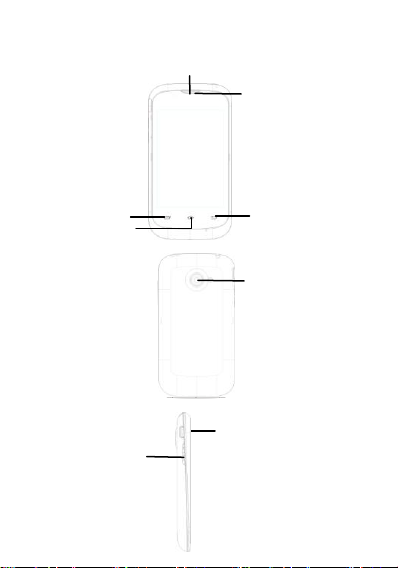
Phone Components
Receiver
Menu Key
Camera Lens
Volume Control Button
Back Key
Home Key
Speaker
USB Jack
Front Panel
Back Panel
Left, right panel
Page 3
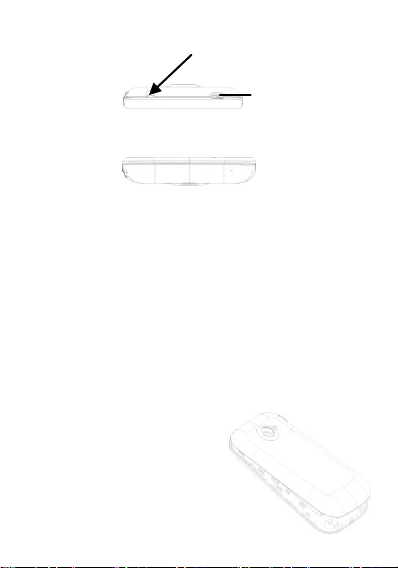
Headset Jack
Connect attached headset for hands-free audio media
Overhead view
Power Key
Bottom view
I. PHONE PACKING BOX
The phone packing box should contain the follow
-ing items and accessories:
Phone, Battery, Power Adapter, Quick Start Guide,
Wired Stereo Headset USB-Cable
II.INSTALLING SIM CARD, BATTERY AND
MEMORY CARD
Make sure to always turn off the power before
installing or replacing the SIM card and battery.
The back cover needs to be removed before
putting in the SIM card, battery, or memory card.
To remove the back
cover
1. Make sure your device
is turned off.
2. Hold the device carefully
with the front panel
facing down.
3. Pull lower half of back
Page 4
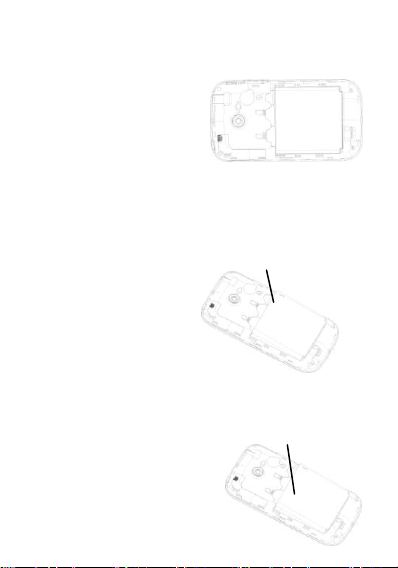
cover with your thumb or fingers. Remove it
The metal contacts
Small opening of
The battery compartment
from the opening.
SIM Card
The SIM Card contains
your phone number,
service details and the
phone-book/message
memory.
Install SIM Card
1. Make sure the phone is turned off.
2. Insert the SIM Card into the SIM Card slot gold
contacts facing down and cut-off corner facing
out.
Insert Battery
1. Align the battery’s
exposed copper
contacts with the
battery connectors
inside the battery
compartment.
2. Insert the contact’s side of the battery first and
then gently push the battery into place.
3. Close the back cover.
Remove Battery
1. Make sure the phone is
turned off.
2. Remove the back cover.
3. Remove the battery from
the small opening on top
side of the battery
Page 5
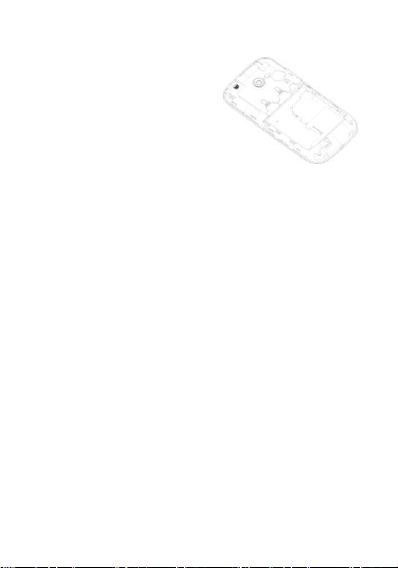
compartment.
Install Memory Card
Insert the micro SD-card
into the slot with its gold
contacts facing down.
Camera and photo
gallery application can
only be initiated after the
installation of the TF card.
Insert the TF card into the slot with its gold
contacts facing down.
III. INTERNET CONNECTION
Your device’s networking capabilities allow you to
access the Internet through WI-FI, GPRS/3G.
To turn Wi-Fi on and connect to a Wi-Fi
network
1. Tap home screen > settings >
wireless & networks.
2. Tap the check box for Wi-Fi to turn it on. Then
your phone will detect available wireless
networks.
3. Tap Wi-Fi settings, then detected Wi-Fi
networks will be listed.
4. Tap the Wi-Fi network you want to connect to. If
you selected an open (unsecured) network, you
are automatically connected to the network. If
you selected a secured network, enter the
security key to connect to network.
NOTICE:
Next time you use your device to detect Wi-Fi
networks, you will not be prompted to enter the
Page 6

network key of the previously accessed Wi-Fi
network (unless you perform a hard reset which
will erase custom settings on your device).
Wi-Fi networks are self-discoverable, which
means no additional steps are required for your
device to connect to a Wi-Fi network. It may be
necessary to provide a username and password
for certain closed wireless networks.
To check Wireless network status
You can check the current wireless connection
status as follows:
Status bar
When your phone is connected to a wireless
network, the Wi-Fi icon will be displayed in the
status bar along with the signal strength icon.
If the network notification is enabled within Wi-Fi
settings, the icon will be displayed in the status
bar when your phone has automatically detected
an available wireless network.
Wi-Fi
Select wireless networks>Wi-Fi settings.
Then tap the network to which you are currently
connected.
Using web browser
Start browser to surf the internet. The browser
has been optimized for making your internet
usage easy and enjoyable.
NOTICE: You can only access the internet with
either 3G, GPRS or Wi-Fi connection.
Opening the web browser
Tap on home screen>Menu
Then choose browser.
Page 7

Opening a webpage
1. Enter an URL in the browser window.
2. As you type, automatically possible addresses
will be displayed. You can tap an address to go
directly to that webpage or continue typing in
the address line.
Compliance information of FCC
Exposure to radio frequency signals
The Bitel device radio is a low power radio
transmitter and receiver. When the Bitel device
radio is turned on, it receives and also sends out
radio frequency signals. The Bitel device is
designed to comply with Federal
Communications Commission (FCC) guidelines
respecting safety levels of radio frequency
exposure for wireless devices, which in turn are
consistent with the following safety standards
previously set by FCC.
Specific absorption rate data (SAR data)
THIS WIRELESS DEVICE MODEL MEETS
GOVERNMENT REQUIREMENTS FOR
EXPOSURE TO RADIO WAVES WHEN USED
AS DIRECTED IN THIS SECTION.
Before a wireless device model is available for
sale to the public, it must be tested and certified
to the FCC that it does not exceed the limit
established by the government-adopted
requirement for safe exposure. The tests are
performed in positions and locations (for example,
at the ear and worn on the body) as required by
the FCC for each model.
Page 8
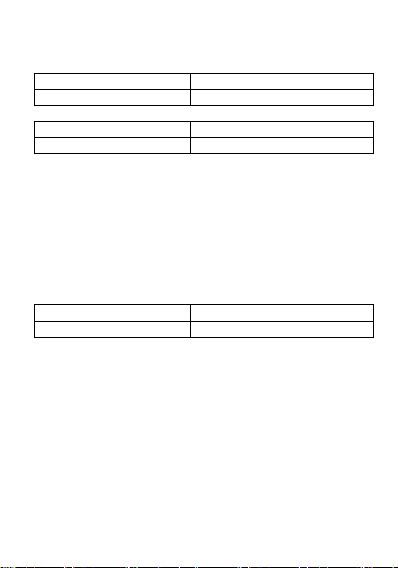
Commission (FCC) and the Industry Canada (IC)
Device
SAR (W/kg) for 1 g
Bitel B8402
0.556
Device
SAR (W/kg) for 1 g
Bitel B8402
1.442
Device
FCC ID
Bitel B8402
2ABZGB8402
for your Bitel device when tested for use at the
ear is outlined as follows:
and that when it is properly worn on the body is
Body-worn measurements differ among wireless
device and phone models, depending upon
available accessories and FCC requirements.
The FCC has granted an Equipment
Authorization for this wireless device model with
all reported SAR levels evaluated as in
compliance with the FCC radio frequency
emission guidelines when the Bitel device is used
as directed in this section.
FCC compliance statement
This device complies with part 15 of the FCC
Rules. Operation is subject to the following two
conditions:
(1) This device may not cause harmful
interference.
(2) This device must accept any interference
received, including interference that may cause
undesired operation.
Caution: Changes or modifications not expressly
Page 9

approved by the party responsible for compliance
could void the user's authority to operate the
equipment.
This equipment has been tested and found to
comply with the limits for a Class B digital device,
pursuant to part 15 of the FCC Rules. These
limits are designed to provide reasonable
protection against harmful interference in a
residential installation. This equipment generates
uses and can radiate radio frequency energy and,
if not installed and used in accordance with the
instructions, may cause harmful interference
to radio communications. However, there is
no guarantee that interference will not occur in a
particular installation. If this equipment
does cause harmful interference to radio
or television reception, which can be determined
by turning the equipment off and on, the user is
encouraged to try to correct the interference by
one or more of the following measures:
—Reorient or relocate the receiving antenna.
—Increase the separation between the
equipment and receiver.
—Connect the equipment into an outlet on a
circuit different from
that to which the receiver is connected.
—Consult the dealer or an experienced radio/TV
technician for help.
SAR tests are conducted using
standard operating positions accepted by the
FCC with the Phone transmitting at its highest
certified power level in all tested frequency bands,
although the SAR is determined at the highest
certified power level, the actual SAR level of the
Page 10

phone. While operating can be well below the
maximum value, in general, the closer you are to
a Wireless base station antenna, the lower the
power output. Before a new model phone is a
available for sale to the public, it must be tested
and certified to the FCC that it does not exceed
the exposure limit established by the FCC, Tests
for each phone are performed in positions and
locations (e.g. at the ear and worn on the body)as
required by the FCC.
For body worn operation, this model phone has
been tested and meets the FCC
RF exposure. Guidelines when used with
an accessory designated for this product or when
used with an accessory that Contains no metal
and that positions the handset a minimum of 1.0
cm from the body.
Non-compliance with the above restrictions may
result in violation of RF exposure guidelines.
Technical Specifications
· Dual SIM
· GSM/GPRS:850/900/1800/1900MHz
· UMTS :900/1900/2100 MHz
· Display:3.5’’ HVGA (320*480)
· TFT, capacitive multi-touch
· Dimension:119x62.8x11.4mm
Page 11

· OS: Android 4.2.2
· Processor:1.0GHz dual core MT6572M
· Memory: 512MB ROM + 256MB RAM
· Camera: Back camera 2 MPx
Front camera 0.3 MPx
· Battery Capacity: 1300mAh Li-ion
Warning and usage for battery and charger
Improper disposal may cause burns or explosion,
do not attempt to dismantle or repair the battery,
do not disassemble, crush, puncture, short circuit
the battery or put into the water, fire or expose to
high temperature over 60°C (140°F). Use
specified charger only when recharging.
The Travel Charger for this phone has met
applicable EU safety requirements. Please
adhere to the following safety instructions per UL
guidelines:
Failure to follow the instructions outlined may
lead to serious personal injury and possible
property damge.
Important safety instructions – save these
instructions.
Danger – to reduce the risk of fire or electric
shock, carefully follow these instructions.
For connection to a supply, please consider the
proper configuration outlet as below:
Page 12
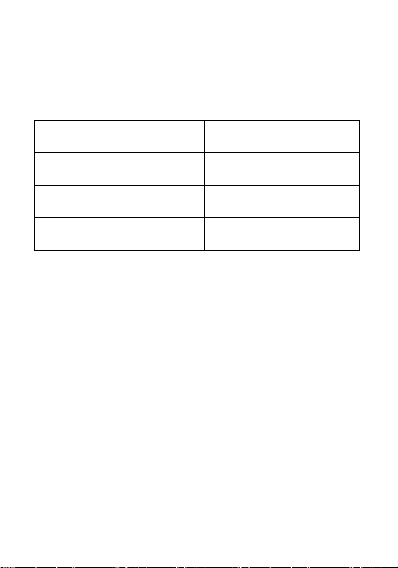
Input voltage: 100-240V, 50/60Hz, input current:
Operation Temperature
0oC ~ 55 oC
Operation Humidity
20% ~ 95%
Storage Temperature
-10 oC ~ 70 oC
Storage Humidity
10% ~ 95%
150 mA.
Output voltage: 5VDC, output current: 600mA
Ways of storage
Use or storage of your Bitel device or Bitel device
accessories outside of the recommended
temperature ranges could cause damage to your
Bitel device, Bitel device accessories, or
lithium-ion battery.
Keep your Bitel device or Bitel device accessories
away from heat sources, such as radiators,
heat registers, stoves, or other apparatus
(including amplifiers) that produce heat.
Page 13

Fabricant Information
Ginwave Mobile Group Limited
Address: Room 1605A, Ho King Commercial
Centre, 2-16, FaYuen Street, Mongkok,
Kowloon, Hong Kong.
Tel : 00852-8664-7560
Email :[email protected]
Website : http://www.gmgrouplimited.com
 Loading...