

Gigaset Elements elements alarm system S, elements alarm system M, elements alarm system L User Guide [ml]
Page 1

elements alarm system S/M/L
Einfache Installation in nur wenigen Schritten
Easy installation in just a few steps
Page 2

So installieren Sie Ihr
elements alarm system S/M/L
How to install your
elements alarm system S/M/L
Die Sensoren der Gigaset elements Sicherheitslösungen installieren Sie ohne Bohren und
Schrauben, ganz einfach plug + play. Bitte befolgen Sie die wenigen Schritte. Schon können
Sie Ihr Gigaset elements alarm system nutzen.
The sensors of Gigaset elements security solutions feature very simple plug + play
installation with no drilling or screws. Please follow the few steps to start using your
Gigaset elements alarm system.
S
m
e
t
s
y
s
m
r
a
l
a
s
t
n
e
m
e
l
e
siren
s
y
s
t
e
m
M
door
(universal)
motion
base
Bitte beachten Sie auch das beiliegende Informationsblatt „Wichtige Hinweise zum Gigaset elements alarm system S/M/L“
Please also observe the “Important information on the Gigaset elements alarm system S/M/L” sheet provided.
window
(universal)
window (universal)
smart camera
s
y
s
t
e
m
L
Page 3

base Step 1
Die Basisstation base verbindet die Sensoren mit der
Gigaset elements app und leitet alle Informationen
an Ihr Smartphone weiter.
Bitte installieren Sie zuerst base.
The base station base connects the sensors to the App
and relays all information to your smartphone.
Please install your base rst.
A B
› Netzteil mit base
verbinden und in
Steckdose stecken
› Oberste LED leuchtet
› Connect the mains
adapter to the base and
plug it into the socket
› The topmost LED lights
› LAN-Kabel mit Router und
base verbinden
› Mittlere LED leuchtet
› Connect the LAN cable to
the router and base
› The middle LED lights
C
› Für einen stabilen Stand
beigelegte Schrauben
und die Klemmleiste
verwenden
› For steady balance, use
the screws and terminal
strip provided
Page 4

Step 2
elements app
Damit Sie Gigaset elements nutzen können, laden Sie jetzt
die kostenlose Gigaset elements app aus dem Google Play
Store oder Apple iTunes Store herunter und legen einen
elements Account an, mit dem Sie base aktivieren.
To use Gigaset elements, download now the free
Gigaset elements app from the Google Play Store or
Apple iTunes Store and create an elements account
from where you can activate base.
A
› Pairing Button an
base drücken
› Untere LED blinkt
nun schneller
› Press the Pairing button
on base
› The lower LED now
ashes faster
push
› Aktivierungscode
der base in der App
eingeben
› Enter the activation code
of base in the app
CB
› Blende an der Rückseite
von base anbringen
› Die App führt durch die
letzten Schritte
› Fit the panel on the back
of base
› The app runs through
the nal steps
Page 5
A31008-N2530-B101-1-7419
*A31008-N2530-B101-1-7419*
Version: 15.04.2017
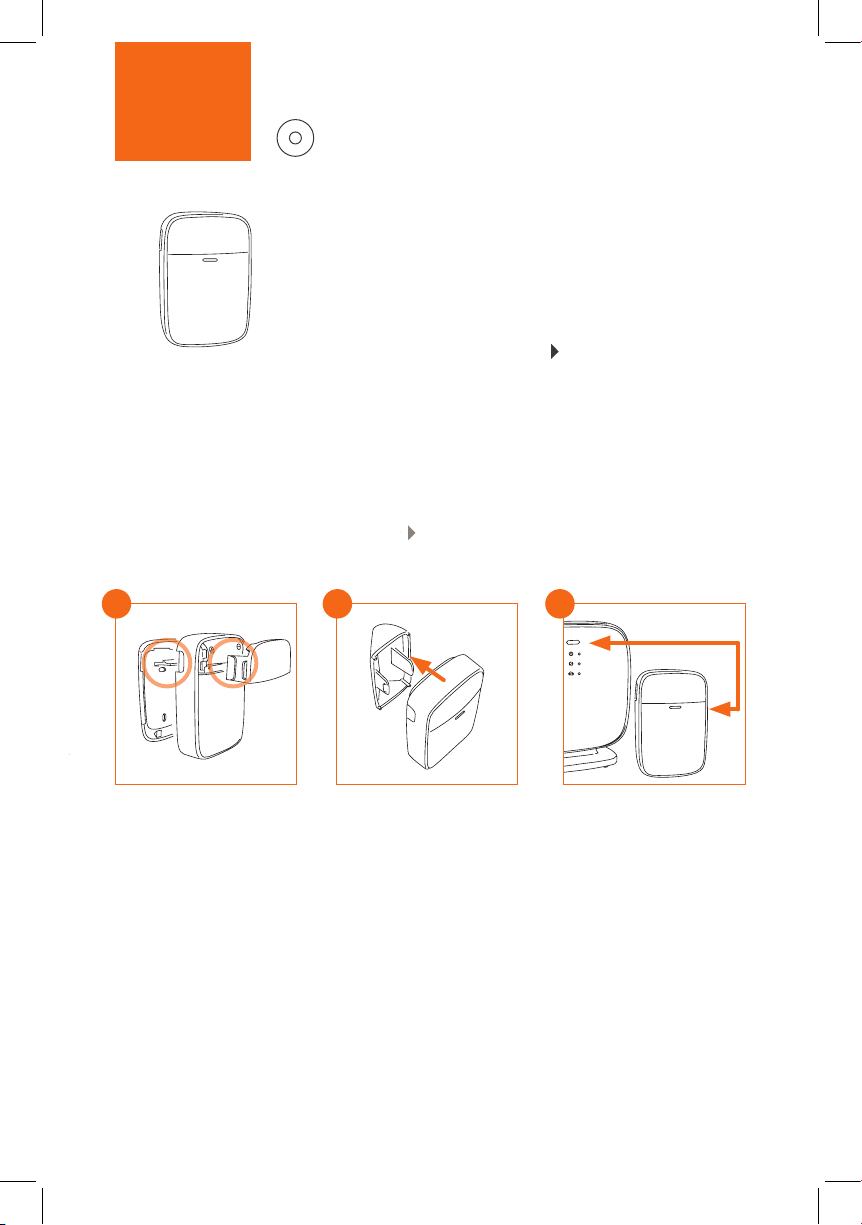
motionStep 3
Der Infrarot-Bewegungsmelder registriert sofort, wenn sich
jemand in Ihrem Zuhause bewegt. Dabei ist er immun gegen
kleine Haustiere bis etwa 25 kg. Die Informationen sendet motion
sicher an die Gigaset elements app auf Ihrem Smartphone.
Bauen Sie motion zuerst zusammen, bevor Sie ihn in der
App hinzufügen. Dafür auf „Elements“ „+“ drücken und den
Anweisungen in der App folgen.
The infrared motion detector registers immediately when
somebody moves in your house. It is immune to small pets
weighing up to about 25 kg. motion reliably sends the
information to the Gigaset elements app on your smartphone.
First assemble motion before adding it in the app. To do this,
press “Elements“ “+“ and follow the instructions in the app.
A
click click
› Batterie einlegen
› An der Vorderseite
kleinere Blende, an
der Rückseite größere
Blende anbringen
› Insert the battery
› Fit the smaller panel on
the front and the larger
one on the back
B
› Soll motion in einer Ecke
angebracht werden, Wandhalterung installieren. Wichtig:
Front muss Richtung Tür zeigen
› Soll motion auf dem Boden
stehen, Bodenhalterung
verwenden
› Install a wall holder if you want
to t motion in a corner.
Important: The front must be
pointing towards the door.
› Use a oor holder if you want
motion standing on the oor
C
press 5 sec
› motion mit der App
verbinden
› Pairing button an base
und motion
gleichzeitig drücken
und halten
› Connect motion to
the app
› Simultaneously press
and hold the Pairing
buttons on base and
motion
Page 6

Version: 15.04.2017
Wir sind gerne für Sie da.
We are here to help.
Sie haben Fragen oder wollen sich ausführlich über unsere Sicherheitslösungen informieren?
Wir freuen uns über Ihren Besuch auf www.gigaset.com.
Sie nden auch hilfreiche Videos auf YouTube oder unserer Facebook Präsenz.
Den Support erreichen Sie direkt aus der App oder auf www.gigaset.com/support.
Do you have any questions or want detailed information on our security solutions?
We look forward to welcoming you on www.gigaset.com.
Helpful videos are also on our YouTube and Facebook sites.
Support is available directly from the app and on www.gigaset.com/support.
Issued by
Gigaset Communications GmbH
Frankenstr. 2a, D-46395 Bocholt
Apple, das Apple Logo und iPhone sind Marken der Apple Inc., die in den USA und weiteren Ländern eingetragen sind.
App Store ist eine Dienstleistungsmarke der Apple Inc. Google, Android, Google Play und andere Marken sind Marken von Google Inc.
Apple, the Apple logo and iPhone are trademarks of Apple Inc. which are registered in the USA and other countries.
App Store is a service mark of Apple Inc. Google, Android, Google Play and other brands are trademarks of Google Inc.
*A31008-N2530-B101-1-7419*
A31008-N2530-B101-1-7419
© Gigaset Communications GmbH 2017
Subject to availability.
All rights reserved. Rights of modication reserved.
www.gigaset.com
Page 7
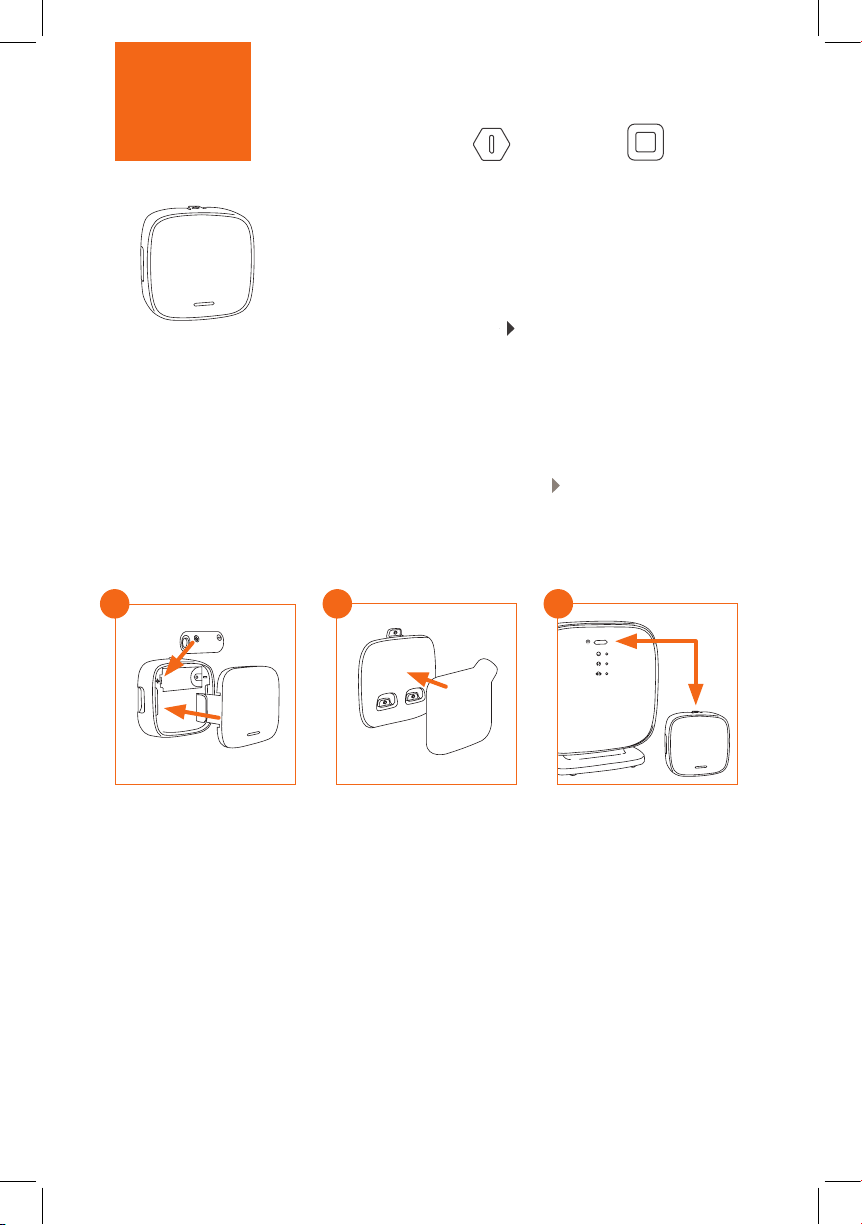
Step 4
universal als door und window
Der Türsensor door (universal) informiert Sie, wenn eine Tür
geönet oder geschlossen wird. Der Fenstersensor window
(universal) erkennt, ob ein Fenster auf, zu oder gekippt ist.
Einfach Batterie einsetzen und Sensoren mit der App verbinden. Dafür auf „Elements“ „+“ drücken und den Anweisungen in der App folgen.
The door (universal) door sensor informs you when a door
is being opened or closed. The window (universal) window
sensor detects whether a window is open, closed or tilted.
Simply insert the battery and connect the sensors to the
app. To do this, press “Elements“ “+“ and follow the
instructions in the app.
*
A
click
› Batterie einsetzen
› Blende einrasten
› Insert the battery
› Click panel into place
* Nur im Gigaset elements alarm system M und L enthalten * Only included with Gigaset elements alarm system M and L
B
press
› Klebestreifen mittig
auf die Rückseite der
Halterung platzieren
› Put the adhesive strip
onto the back of the
holder in the middle
C
press 5 sec
› universal door oder
window mit der App
verbinden
› base und Sensor gleich-
zeitig drücken und halten
› Connect universal door
or window to the app
› Press and hold base and
sensor at the same time
Page 8
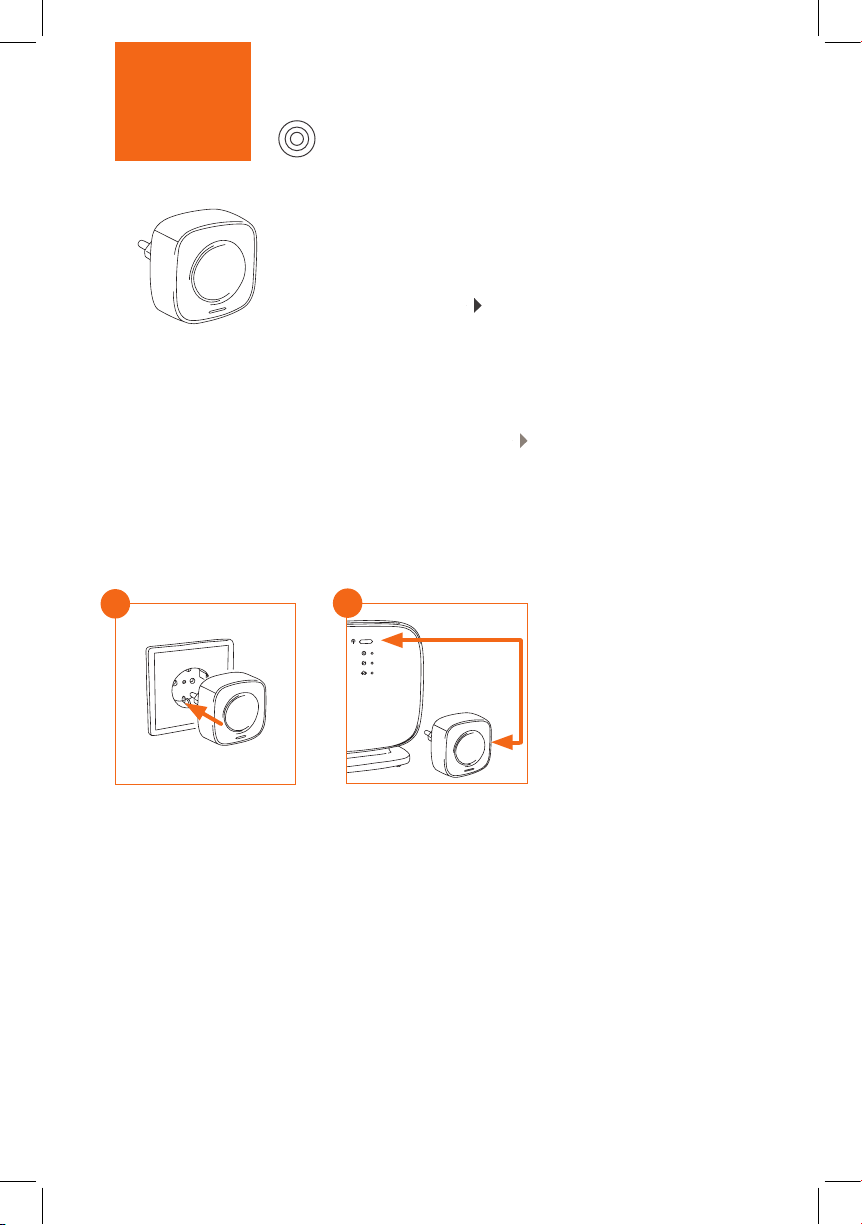
Step 5
siren
Die Alarmsirene siren informiert Sie zuverlässig bei Alarm.
Stecken Sie siren einfach in eine Steckdose nahe der base
und verbinden Sie sie mit der App.
Dafür auf „Elements“ „+“ drücken und den Anweisungen
in der App folgen.
The siren alarm siren reliably informs you in the event of
an alarm. Simply plug siren into a socket near base and
connect it to the app.
To do this, press “Elements“ “+“ and follow the instructions
in the app.
A
› siren in eine Steckdose
stecken und mit der App
verbinden
› Plug siren into a socket and
connect it to the app
B
press 5 sec
› Pairing-Knopf von base
und siren gleichzeitig
drücken und halten
› Simultaneously press and
hold the Pairing buttons
of base and siren
Page 9
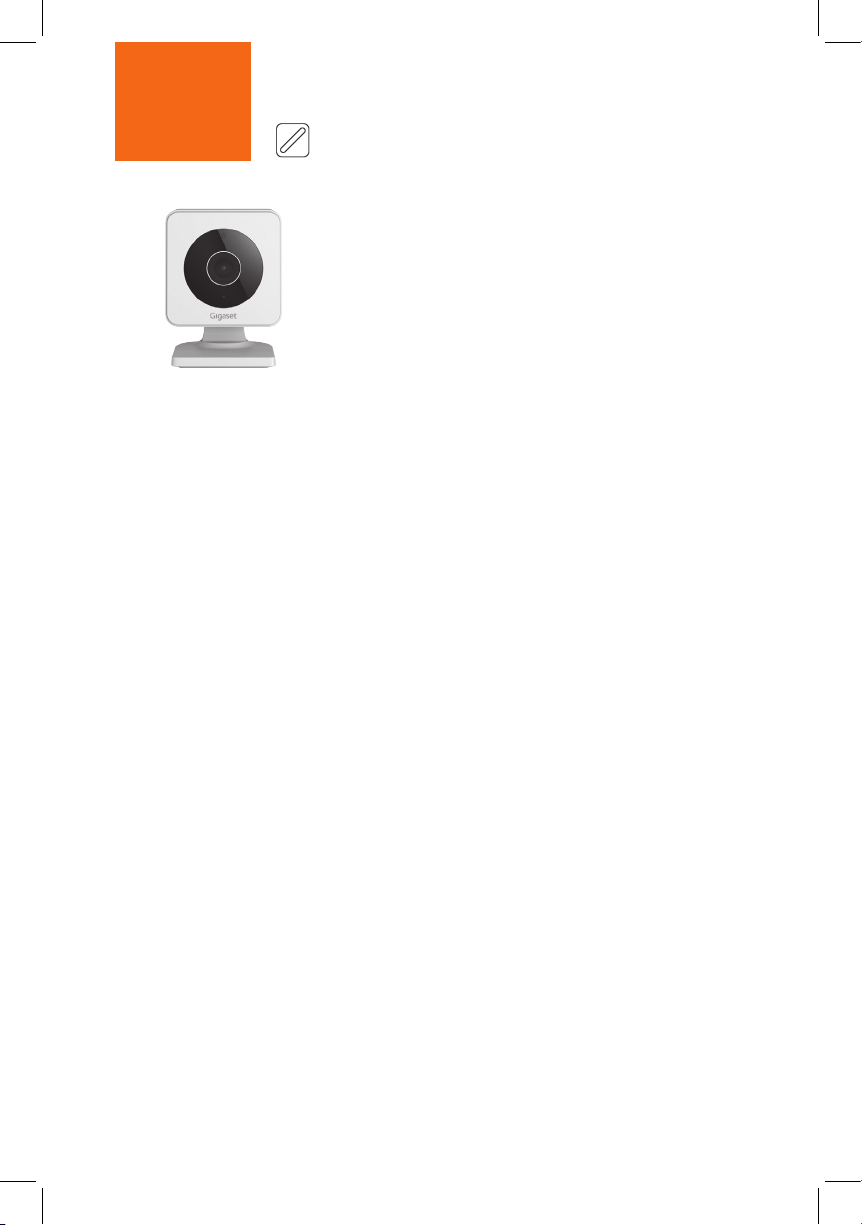
Step 6
smart camera
Hinweis: Wenn Sie das elements alarm system S oder M
besitzen, gehen Sie bitte direkt weiter zu Schritt 7.
Mit der Gigaset smart camera sehen Sie, was zuhause
gerade passiert. Die HD-Kamera ist einfach anzuschließen
und puert 20 Sekunden, damit Sie im Falle eines Einbruchs
sehen, wer durch die Tür gekommen ist. Bitte beachten Sie
die beigefügte Anleitung.
Note: If you have purchased the elements alarm system
S or M, please proceed directly to Step 7.
Gigaset smart camera enables you to see what is currently
happening at home. The HD camera is easy to connect and
buers 20 seconds - so you can see who broke through the
door. Please follow the instructions provided.
**
** Nur im Gigaset elements alarm system L enthalten ** Only included with the Gigaset elements alarm system L
Page 10
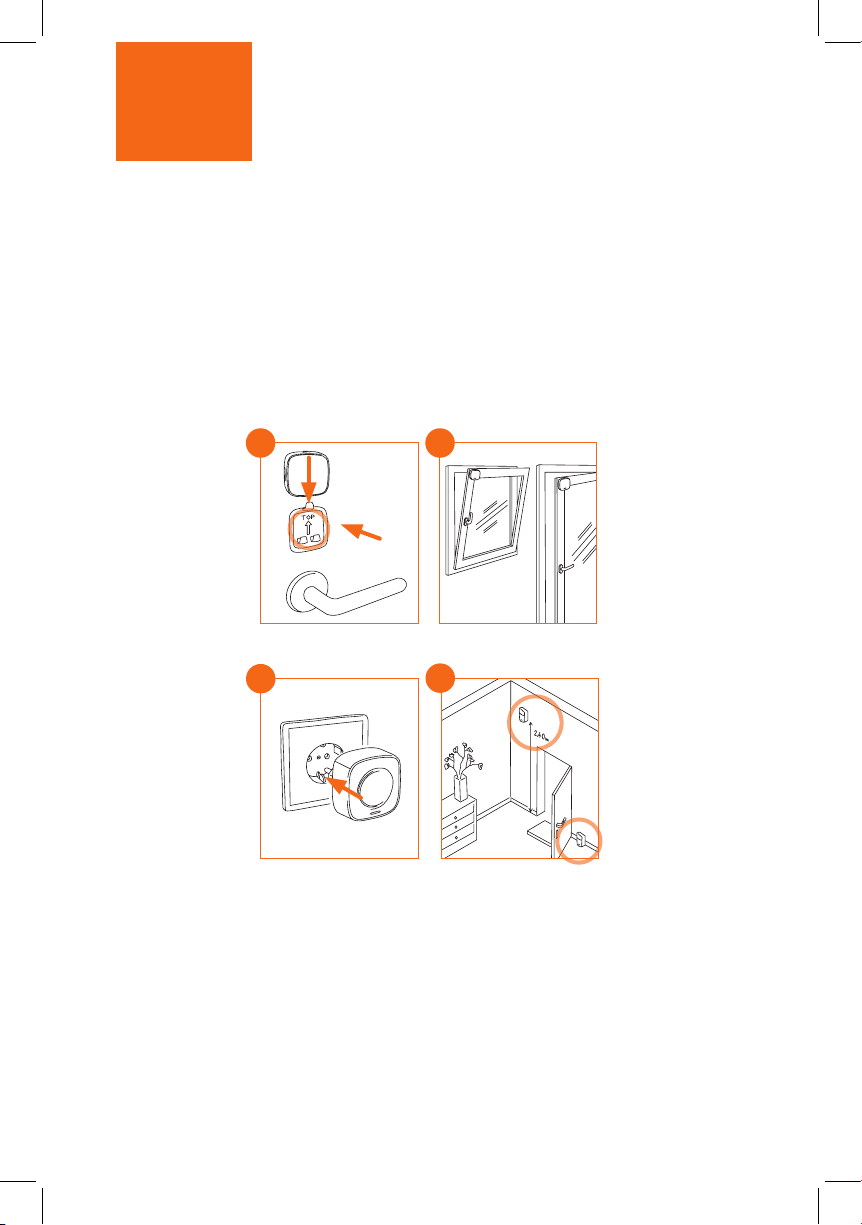
Step 7
Montage / Installation
Nachdem Sie alle Sensoren mit base verbunden
haben, positionieren Sie die Sensoren.
Once you have connected all sensors to base,
position the sensors.
› door innen an
der Eingangstür
über der Klinke
anbringen
› Fit door inside by
the entrance door
above the latch
› siren am besten
im Wohnzimmer
in eine Steckdose
stecken
› Preferably plug
siren into a socket
in the living room
door (universal)
A
click
C
press
15 sec
window (universal)
B
motionsiren
D
*
› window* an die obe-
re Ecke am Fenster
bzw. der Balkontür
anbringen
› Fit window* into
the top corner on
the window or
balcony door
› motion im Flur an
die Wand oder auf
dem Boden hinter
der Tür platzieren
› Position motion
in the hall on the
wall or on the oor
behind the door
Ihr elements alarm system ist jetzt einsatzbereit
Your elements alarm system is now ready to use
Page 11
Ready!
Kongurieren Sie Ihr elements alarm system
Congure your elements alarm system
Auf der ersten Seite der App steuern Sie die Sensoren und aktivieren oder deaktivieren den
Alarmmodus. In der Konguration passen Sie es Ihren Ansprüchen an. So können Sie Ihr
Alarmsystem zum Beispiel werktags zwischen 9 und 17 Uhr, wenn Sie außer Haus sind, aktivieren.
You control the sensors and enable/disable alarm mode from the rst screen of the app.
Tailor it to your needs from the Conguration screen. For example, you can enable your
alarm system on workdays between 9:00 and 17:00 when you are out of the house.
Erweitern Sie Ihr elements alarm system
Extend your elements alarm system
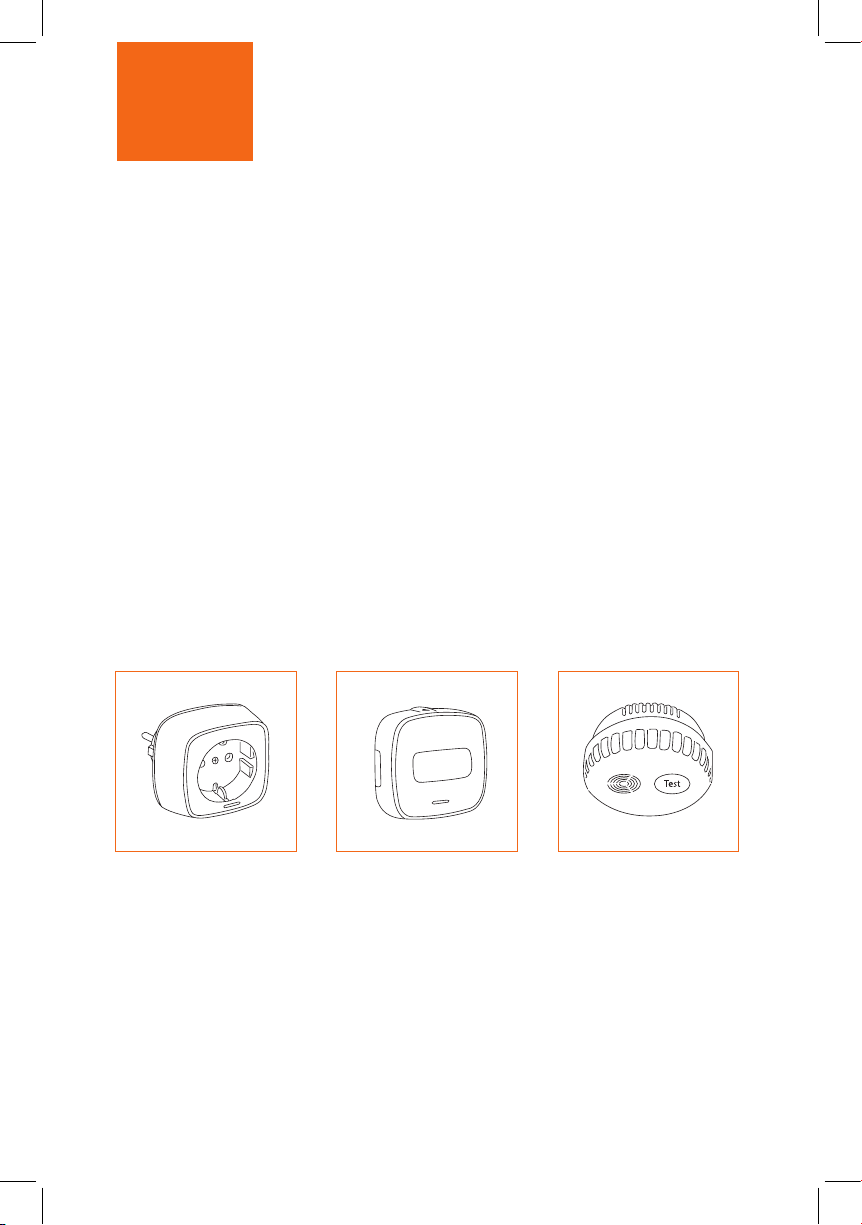
Mit der Schaltsteckdose
plug lassen sich elektrische
Geräte von überall an- und
ausschalten.
Use the plug intelligent
socket to switch on and
o electrical devices from
anywhere.
*** Verfügbar im www.gigaset.com Online Shop *** Available from the www.gigaset.com online shop
Mit dem Funktaster button
können Sie Ihr elements
alarm system ohne Smartphone scharf schalten.
The button wireless button
enables you to activate
your elements alarm system
without a smartphone.
Der Rauchwarnmelder
smoke schlägt bei Rauchentwicklung sofort und
eektiv Alarm.
The smoke smoke
detector raises the
alarm immediately and
eectively when smoke
builds up.
***
***
Page 12
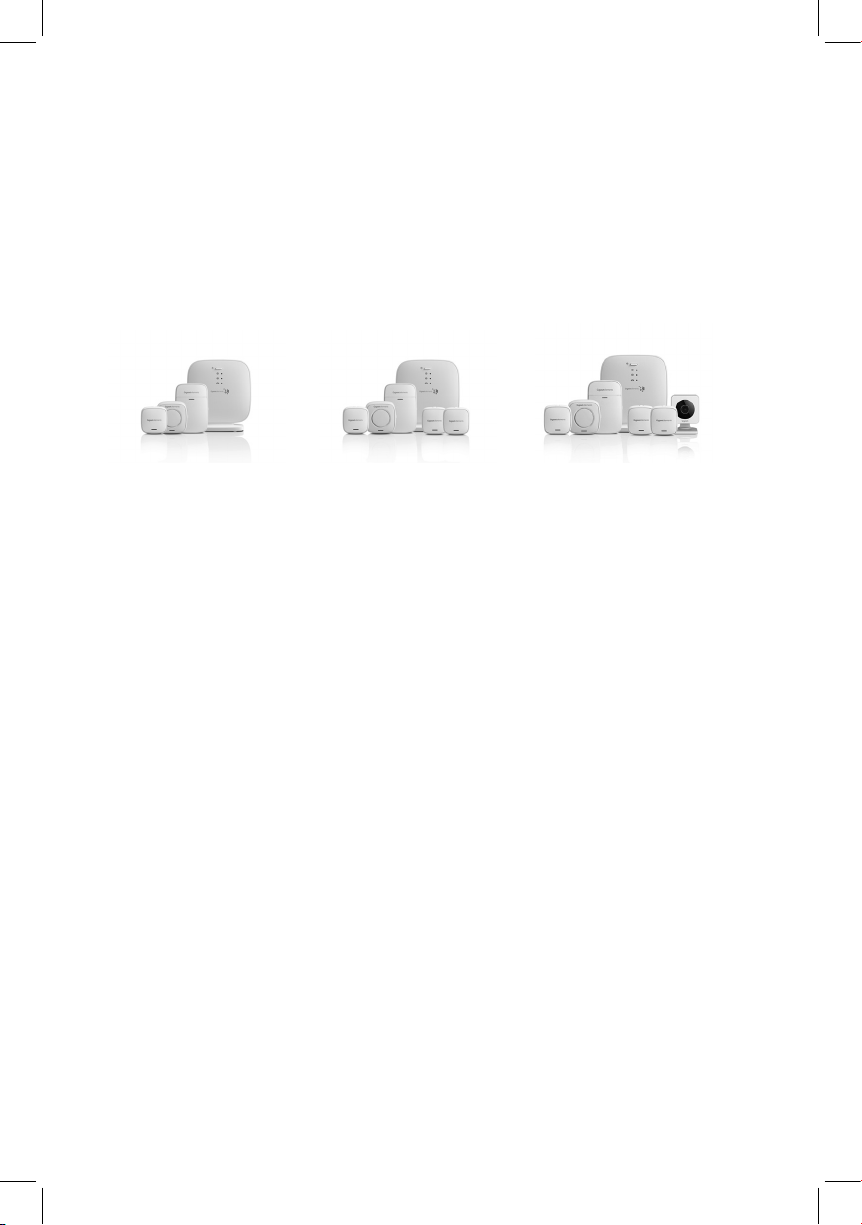
Das ist in Ihrem elements alarm system enthalten
Included with your elements alarm system
elements alarm system S elements alarm system M elements alarm system L
• 1 Basisstation base
• 1 Türsensor universal
• 1 Bewegungsmelder motion
• 1 Alarmsirene siren
• 1 Ethernetkabel
• 1 Steckernetzteil
• 2 3 Volt CR123A Lithium-Batterie
• 4 Klebestreifen
• 1 Standfuß
• 2 Wandhalterung
• 1 Kurzanleitung
• 1 Sicherheitsbroschüre
• 1 Basisstation base
• 1 Türsensor universal
• 1 Bewegungsmelder motion
• 2 Fenstersensor universal
• 1 Alarmsirene siren
• 1 Ethernetkabel
• 1 Steckernetzteil
• 4 3 Volt CR123A Lithium-Batterie
• 8 Klebestreifen
• 4 Wandhalterung
• 1 Standfuß
• 1 Kurzanleitung
• 1 Sicherheitsbroschüre
• 1 Basisstation base
• 1 Türsensor universal
• 1 Bewegungsmelder motion
• 2 Fenstersensor universal
• 1 Alarmsirene siren
• 1 WLAN-Indoor-Kamera smart
camera
• 1 Ethernetkabel
• 2 Steckernetzteil
• 4 3 Volt CR123A Lithium-Batterie
• 8 Klebestreifen
• 5 Wandhalterung
• 2 Standfuß
• 1 Kurzanleitung
• 1 Kurzanleitung (smart camera)
• 1 Sicherheitsbroschüre
• 1 base base station
• 1 universal door sensor
• 1 motion motion detector
• 1 siren alarm siren
• 1 Ethernet cable
• 1 mains adapter
• 2 3 Volt CR123A lithium batteries
• 4 adhesive strips
• 1 foot
• 2 wall holders
• 1 quick-start guide
• 1 safety brochure
• 1 base base station
• 1 universal door sensor
• 1 motion motion detector
• 2 universal window sensors
• 1 siren alarm siren
• 1 Ethernet cable
• 1 mains adapter
• 4 3 Volt CR123A lithium batteries
• 8 adhesive strips
• 4 wall holders
• 1 foot
• 1 quick-start guide
• 1 safety brochure
• 1 base base station
• 1 universal door sensor
• 1 motion motion detector
• 2 universal window sensors
• 1 siren alarm siren
• 1 smart camera WLAN indoor
camera
• 1 Ethernet cables
• 2 mains adapter
• 4 3 Volt CR123A lithium batteries
• 8 adhesive strips
• 5 wall holders
• 2 foot
• 1 quick-start guide
• 1 quick-start guide (smart camera)
• 1 safety brochure
 Loading...