

Page 1

This manual refers to the Easylon Router+
with one LON/IP and one LON/FT port.
Gesytec GmbH
Pascalstr. 6
52076 Aachen, Germany
Tel. + (49) 24 08 / 9 44-0
Fax + (49) 24 08 / 94 4-100
email: [email protected]
www.gesytec.com
Doc. ID: LVR2/UserDoc/Router/2-PortRouter+_2P_Manual-EN-v1.1.docx,
Version v1.1, 10.7.2012
Router+ 2-Port
User Manual
Page 2

Router+
i
LVR2/UserDoc/Router/2-PortRouter+_2P_Manual-EN-v1.1.docx
This Manual …
...describes set-up of and working with the Gesytec Easylon Router+ with 2
ports. Thereby the focus is set to an application oriented description of practical
procedures which are complemented, wherever possible, by notices related to
success indicators. This manual does not go into details related to theoretical
backgrounds of the related technologies. Please inquire the corresponding literature for further information. Backgrounds about LONWORKS® can be found on
the website www.echelon.com. Details describing the functionality of the router
as RNI interface can be found in the manual for the Gesytec Remote Network Interface that can be fetched from the website www.gesytec.com.
This manual is structured as follows:
Chapter 1 introduces the product.
Chapter 2 describes the connection of the router and the basic settings.
Chapter 3 describes the settings of the integrated Configuration Server.
In chapters 4 and 5 you learn how to use the individual functions of the device.
Miscellaneous service procedures are explained in chapter 6.
Chapter 7 shows how to localize and to resolve specific problems. Further information is finally included in chapter 8.
This documentation can be modified anytime without prior notification. Gesytec doesn’t take
over any responsibility for errors or inaccuracies in this documentation and possible resulting
outcome.
By no means Gesytec, its representatives and employees will be liable for possible failures, damages caused indirectly or from use, resulting from use or non-applicability of the software or the
accompanying documentation.
Easylon is a registered trademark of Gesytec GmbH. Echelon, LON, LONWORKS®, LonTalk and
Neuron are registered trademarks of Echelon Corporation. Windows, Vista and .NET are registered trademarks of Microsoft. Other names may be registered trademarks of the respective company.
Page 3

Router+
ii
LVR2/UserDoc/Router/2-PortRouter+_2P_Manual-EN-v1.1.docx
Contents
About Easylon Router
+
.....................................................................................................1 1
1.1 Functions ................................................................................................................1
1.2 Logical Configuration of Easylon Router+ with 2 Ports .......................................2
1.3 Remote Network Interface .....................................................................................2
1.4 LEDs, Buttons and DIL Switches ..........................................................................4
1.5 Important Notes .....................................................................................................6
Setting-Up the Device ........................................................................................................7 2
2.1 Connecting Cables .................................................................................................7
2.1.1 Power Supply .........................................................................................................7
2.1.2 Grounding Connections .........................................................................................7
2.1.3 LON/FT Interface ..................................................................................................7
2.1.4 LON/IP Interface ...................................................................................................7
2.2 Installing Software .................................................................................................8
2.3 Connecting to the Web Interface ...........................................................................8
2.4 Specifying the IP Address ....................................................................................11
2.5 Adapting the Time Settings .................................................................................12
2.6 Changing the Password, Managing Users ...........................................................14
Configuration Server .......................................................................................................15 3
3.1 Setting up the Configuration Server ....................................................................15
3.2 Manage Routers via the Configuration Server.....................................................17
3.3 Tips for Configuration Server Settings ................................................................19
Using the Router Functionality.......................................................................................21 4
4.1 Configuring the LON/IP Interface .......................................................................21
4.2 Setting-up the 2 Port Router (LonMaker) ............................................................25
4.2.1 Preparation ...........................................................................................................25
4.2.2 Commissioning ....................................................................................................30
4.3 Configuring the LON/FT Interface ......................................................................32
Using the RNI Functionality ...........................................................................................33 5
Performing Service Procedures ......................................................................................36 6
6.1 Restart Router ......................................................................................................36
6.2 Save and Load Configuration ..............................................................................36
Page 4

Router+
iii
LVR2/UserDoc/Router/2-PortRouter+_2P_Manual-EN-v1.1.docx
6.3 Firmware Update .................................................................................................37
6.4 Reset Router to Factory Defaults .........................................................................38
Solving Problems ..............................................................................................................39 7
7.1 Web Interface of the Router does not Open .........................................................39
7.2 DeviceFinder Does not Work with Certain DSL Routers ...................................40
7.3 LON LEDs Don’t Flicker ....................................................................................40
7.4 Communication Problems at the LON/IP Channel ..............................................42
7.5 Status and LON LEDs Momentarily Glow ..........................................................44
7.6 No Routing ...........................................................................................................44
7.7 The LonMaker Does not Receive the Service Pin Messages ..............................44
Annex ................................................................................................................................46 8
8.1 Survey of Node IDs .............................................................................................46
8.2 Technical Specifications ......................................................................................46
8.3 Echelon Configuration Server ..............................................................................48
Figures and Tables ...........................................................................................................49 9
9.1 Figures..................................................................................................................49
9.2 Tables ...................................................................................................................50
Index ..................................................................................................................................51 10
Page 5
Router+ About Easylon Router+
1
LVR2/UserDoc/Router/2-PortRouter+_2P_Manual-EN-v1.1.docx
About Easylon Router
+
1
1.1 Functions
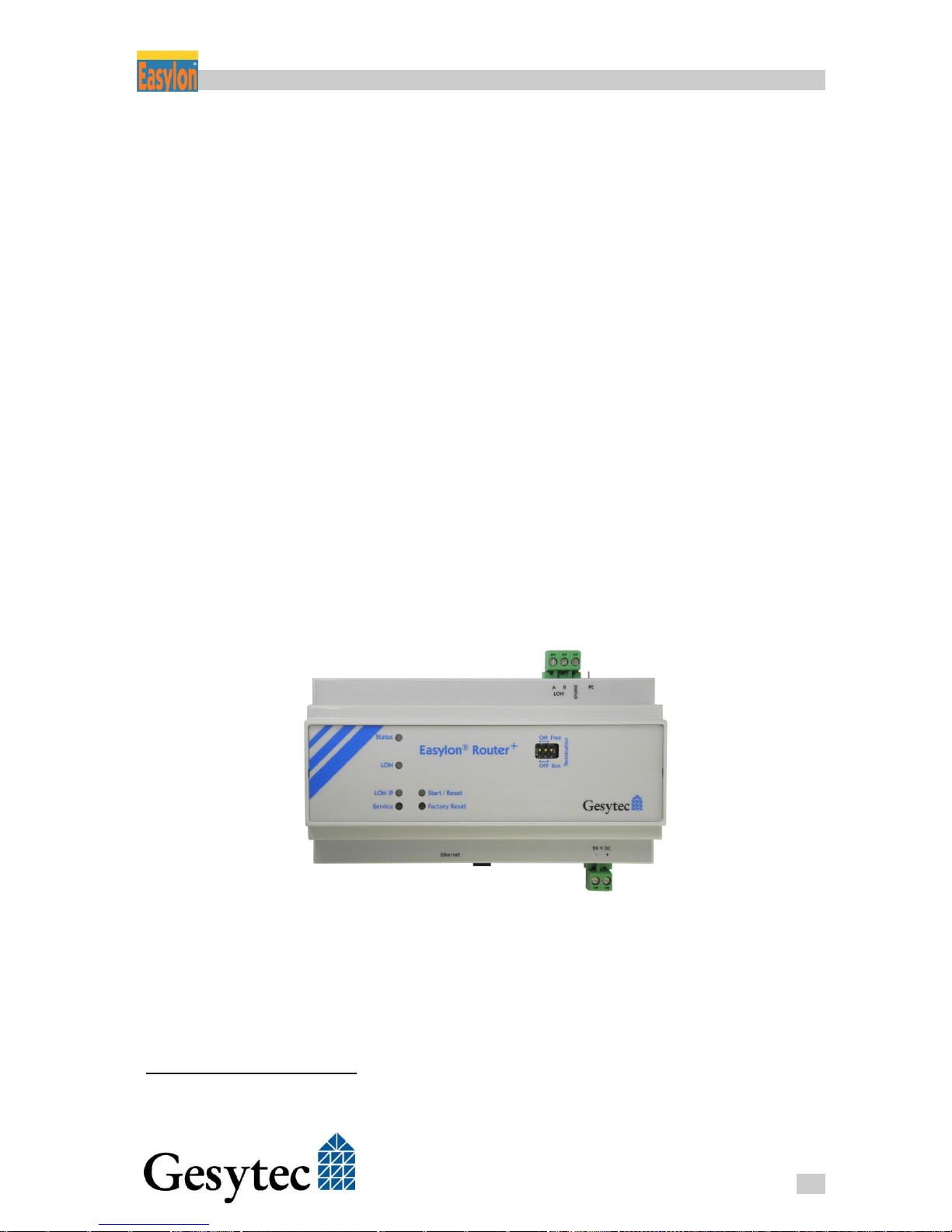
Easylon Router+ with 2 ports1 flexibly provides different functionalities within
the LONWORKS environment:
As router it connects a LON/FT (LONWORKS, CEA-709.3) network and
one CEA-852 (LON/IP) compatible network to each other.
As TCP/IP Remote Network Interface the device is suitable for VNI
and Layer-5 applications for remote access to LONWORKS networks.
An integrated time server (NTP) can bet activated for the connected
networks in order to synchronize the available devices to each other.
Configuration and diagnosis of the device are realized via an integrated Web Interface. LEDs at the front side of the housing indicate the current statuses of the
router interfaces. By means of buttons different service functions can be released
while a bus termination for the connected LON/FT segment can be set via DIL
switches.
Figure 1-1: Easylon Router+ with 2 Ports
1
There is also a version of the Easylon Router+ with one IP and two FT port available.
Page 6
Router+ About Easylon Router+
2
LVR2/UserDoc/Router/2-PortRouter+_2P_Manual-EN-v1.1.docx
1.2 Logical Configuration of Easylon Router+ with 2 Ports
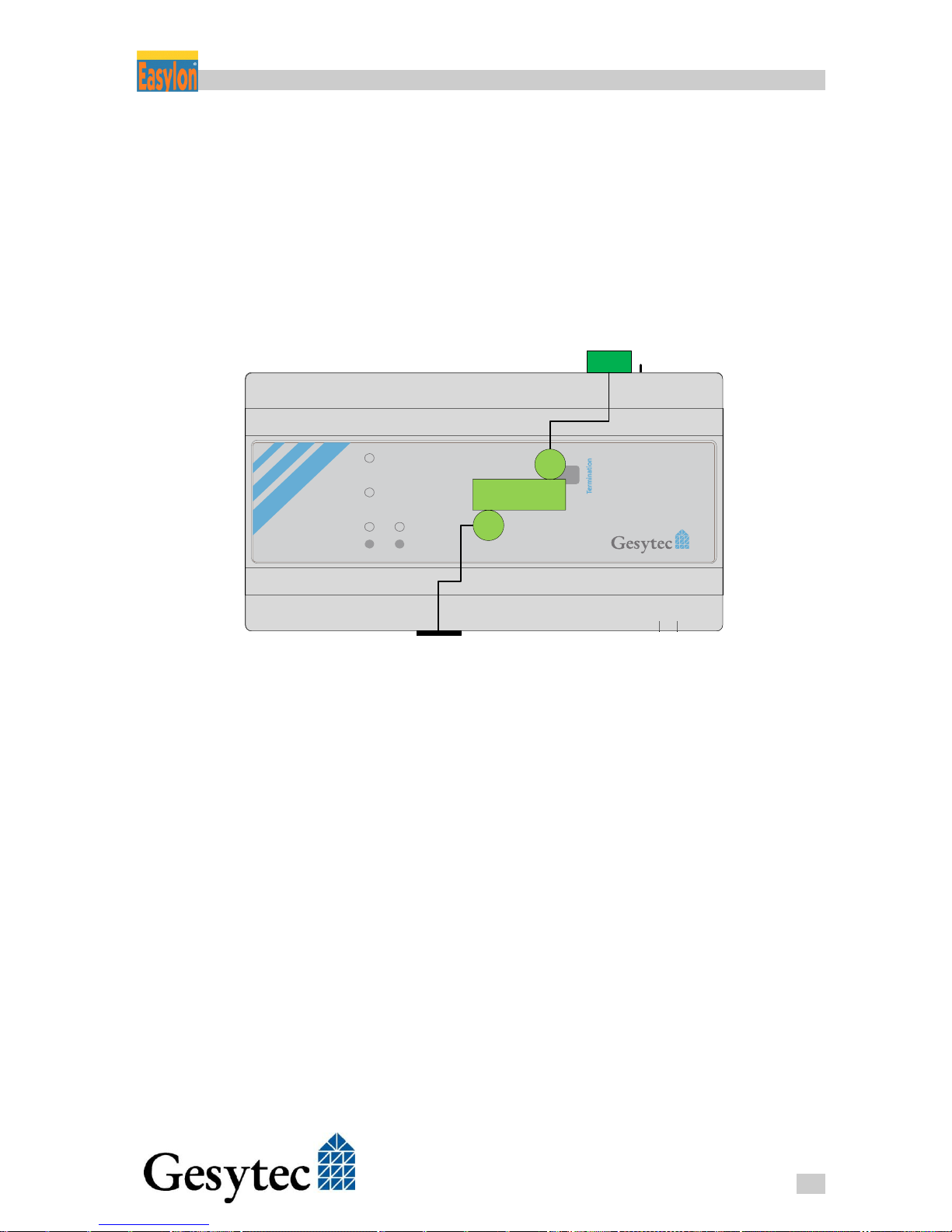
Physically the router consists of an FTT-10 transceiver for the LON/FT
LONWORKS network connection (CEA-709.3) and an Ethernet interface for
connection to a LON/IP LonWorks network (CEA-852).
The Easylon Router+ with 2 ports operates as any LONWORKS router. It can be
commissioned with any LNS based network management tools e.g the LonMaker by Echelon.
24 V DC
– +Ethernet
Easylon® Router
+
Status
LON
LON IP
Service
Start / Reset
Factory Reset
ON Free
OFF Bus
A B PE
LON
shield
LON / IP
Figure 1-2: Router Logic
1.3 Remote Network Interface
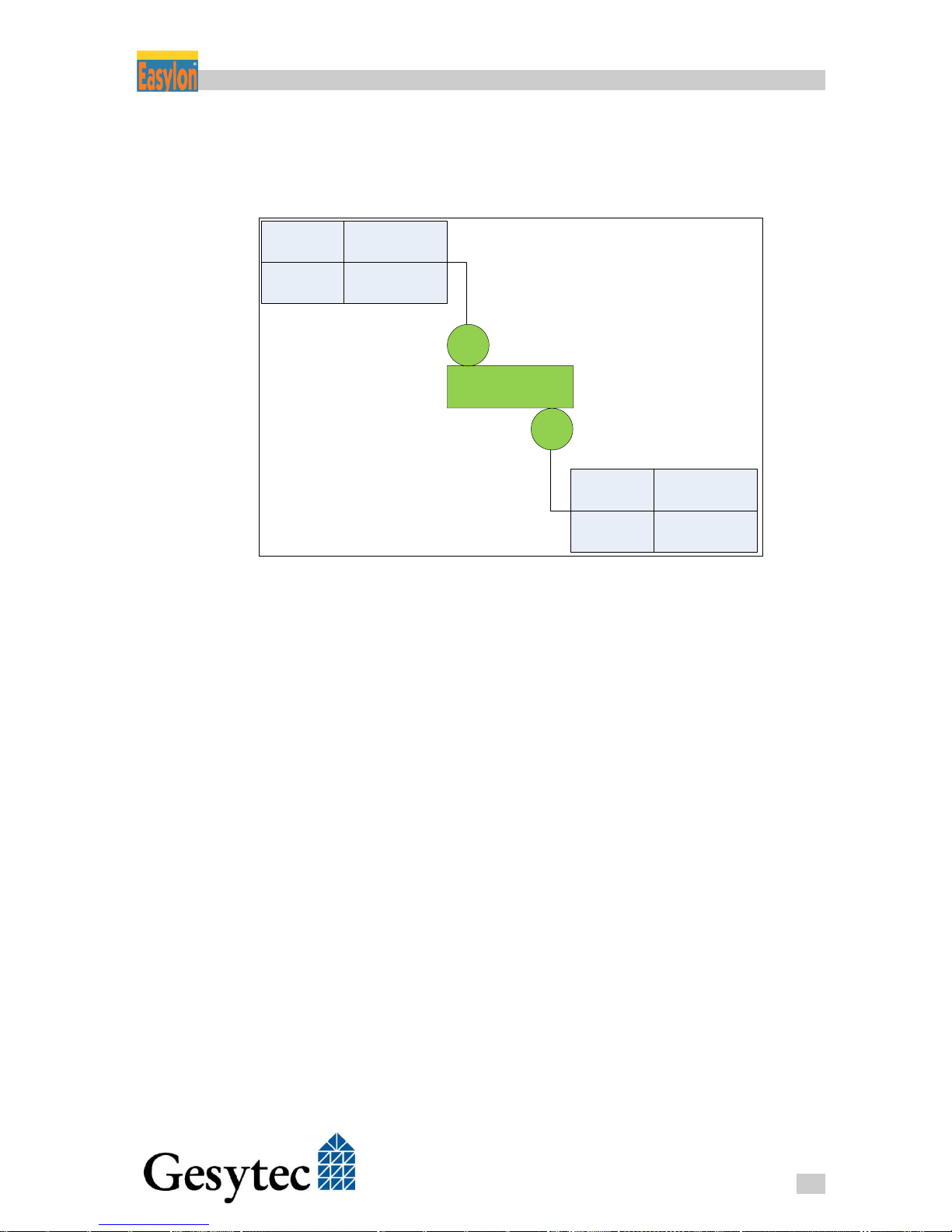
Using the Gesytec RNI technology a standard LONWORKS interface to access
each channel of the Easylon Router+ can be created, meaning that for the 2-port
router an access to the LON/IP channel, the LON/FT channel can be realized.
As a Remote Network Interface is available for each channel of the router, a
transparent access to the individual channels –such as for the common diagnosis
tools or the Easylon Analyzer software– can be used independent from the
LON/IP technology. The RNI driver by Gesytec provides an Echelon compatible
driver interface.
The access is available in both modes, VNI and MIP. Details related to address
generation of the specific Node IDs are included in chapter 8.1 “Survey of Node
IDs“. Chapter 4.3 informs about the RNI configuration to use the various connections.
Page 7
Router+ About Easylon Router+
3
LVR2/UserDoc/Router/2-PortRouter+_2P_Manual-EN-v1.1.docx
Please use an RNI driver for a MIP interface for normal LONWORKS applications. A VNI interface may only be used for applications explicitly supporting
the VNI technology, such as LNS.
Router
LON
LON IP
VNI
MIP
50001
50011
VNI
MIP
50000
50010
Figure 1-3: Assignment of the IP-Ports to the Router Channels
Page 8
Router+ About Easylon Router+
4
LVR2/UserDoc/Router/2-PortRouter+_2P_Manual-EN-v1.1.docx
1.4 LEDs, Buttons and DIL Switches
24 V D C
– +Ethernet
A B PE
LON
shield
X1 X2
X3 X4
Easylon® Router
+
Status
LON
LON IP
Service
Start / Reset
Factory Reset
ON Free
OFF Bus
1
2 3
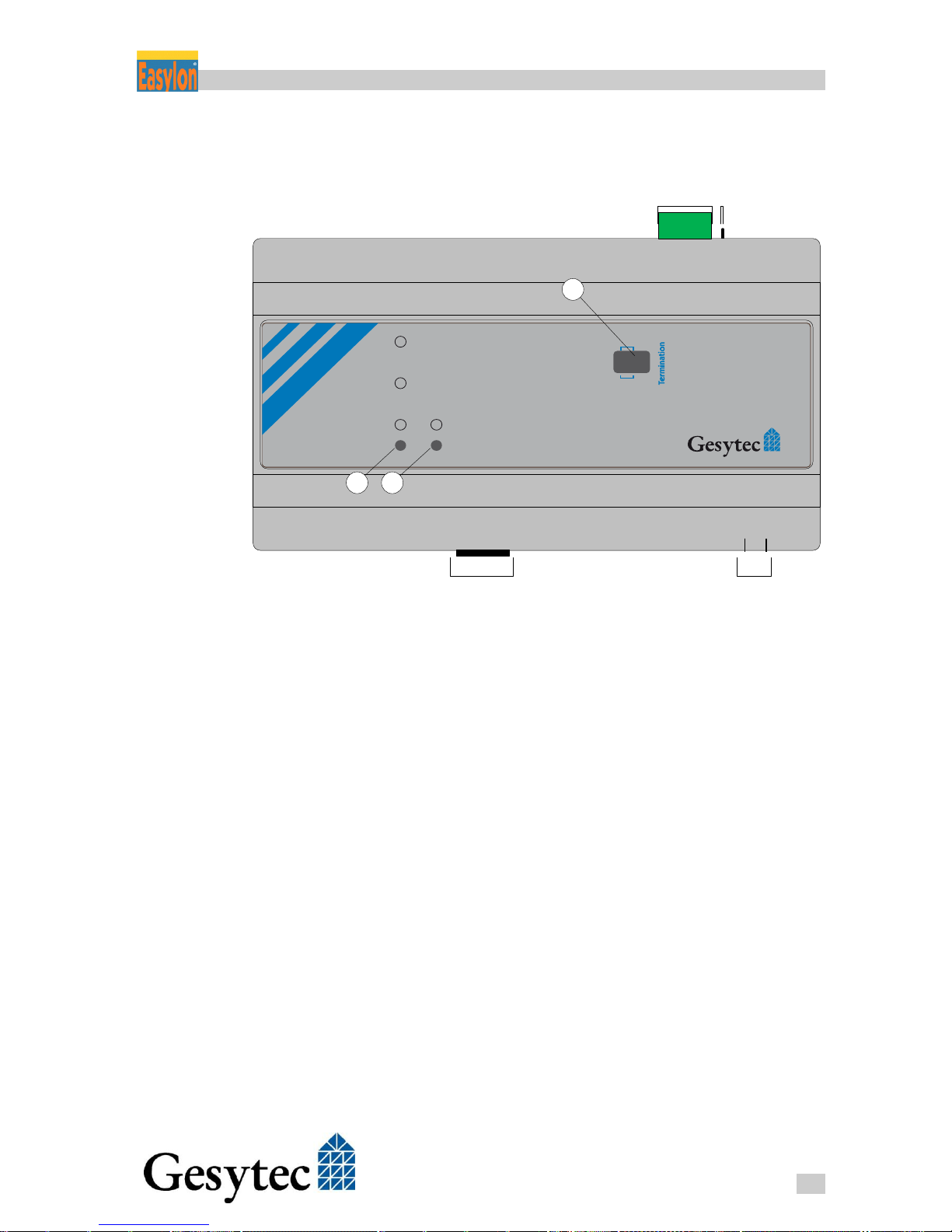
Figure 1-4: Control Elements and Connections
X1 LONWORKS connections, LON/FT (CEA-709)
X2 Protective earth
X3 Ethernet connection, LON/IP (CEA-852)
X4 Connection to power supply
Switches for bus termination setting
LON service button
Factory reset button
LEDs
The following LEDs are available at the front side of the housing and at the lateral RJ45 connector:
Status: After activation this LED initially glows red. As soon as the rout-
er is ready for operation it changes to green. If the device has discovered
an error, the LED constantly glows red. An overload situation on one of
the two channels will be visualized by a permanently red status LED and
activation of the respective channel LED for one second.
Page 9
Router+ About Easylon Router+
5
LVR2/UserDoc/Router/2-PortRouter+_2P_Manual-EN-v1.1.docx
If the device has no IP address2 the LED is flashing periodically red (or
green, if its base state is already red due to another condition).
LON and LON/IP: During the router’s initial phase those LEDs remain
disabled. The LEDs flicker during operation if data are transmitted via
the respective channel. In case of overload of a channel the appropriate
LED glows red for one second while the status LED is continuously set
to red.
Start / Reset: This LED glows green while the router is launched. During
a Factory Reset the LED gives different signals, cf. chap. 6.4.
When the router is running, this LED also shows the connection state to
the Configuration Server: LED on = connected to Configuration Server.
Ethernet: The RJ45 connector includes a green and a yellow LED. As
soon as a connection between an IP network has been established, the
green LED is glowing. While transmitting data packets, the green LED
flickers. The yellow LED indicates the connection speed. Is this LED illuminated, the speed is 100 Mbit/s, otherwise 10 Mbit/s.
Buttons
Furthermore the device is provided with two buttons:
Service: By pushing this button, service pin messages are sent out on
both LON interfaces and the LON and LON/IP LEDs give a are short
signal.
Factory Reset: This button sets the device back to the factory settings, as
described in chapter 6.4.
Via the DIL switches a topology dependent bus termination can be set for the
LON/FT segment:
Free / Bus: With the right switch of the block you specify if a termina-
tion is to be switched for free topology “Free“ ( 50 Ohm) or for a bus
topology “Bus“ ( 110 Ohm).
ON / OFF: The termination itself is switched “Off” and “On” by turning-
over both left switches.
Always switch over both left termination switches, which means they always
have to be set to OFF or ON together, but never oppositional.
2
This may be caused by missing Ethernet connection or a duplicate IP address may have been assigned.
Page 10
Router+ About Easylon Router+
6
LVR2/UserDoc/Router/2-PortRouter+_2P_Manual-EN-v1.1.docx
1.5 Important Notes
The designated use of the Easylon Router+ is the transmission of information between a LON/FT network and a LON/IP network, the function as Remote Net-
work Interface and the specification of a reference time (Time Server).
Only use main adapters for the power supply of the Router+ that are provided
with a SELV identification and a connecting cable with a maximum length of
1.5 m.
By default, the router is supplied with the preset, constant IP-Address
192.168.100.100. In order to avoid collisions, make sure that this IPAddress has not already been assigned to another device in your network.
To allow for access to the setting options of the router via the Web Interface, a
user with name „gesytec“ and password “admin“ is defined upon delivery.
Please immediately change the password after initial commissioning.
Page 11
Router+ Setting-Up the Device
7
LVR2/UserDoc/Router/2-PortRouter+_2P_Manual-EN-v1.1.docx
Setting-Up the Device 2
2.1 Connecting Cables
Concerning the connection of the device see Figure 1-4 on page 4.
2.1.1 Power Supply
Fix the Easylon Router+ to the top hat rail and connect the device (Figure 1-4,
X4) to a power supply with 24 V direct current (±20%) and at least 5W. When
completed, the Status-LED on the top side of the device glows.
Only use main adapters for the power supply of Router+ that are provided with
a SELV identification and a connecting cable with a maximum length of 1.5m.
2.1.2 Grounding Connections
The router is provided with a ground connection (Figure 1-4, X2) next to the
LONWORKS connector. Connect it to ground potential in order to enable discharge of over-voltage.
CAUTION:
The protective earth must NEVER be connected to the bus shield and to the
supply voltage (e.g. 0 V DC)!
2.1.3 LON/FT Interface
The Easylon Router+ is provided with a FTT-10 transceiver for connection with
a LON/FT LONWORKS network (CEA-709.3, Figure 1-4, X1). Connect the respective cables to the screw terminals. Once a connection has been successfully
established, the LON LED on the top side of the device flickers as soon as data
are transmitted.
It is also necessary to establish the connection to the shield at the third pin of
each of the LON screw terminal.
2.1.4 LON/IP Interface
The router is connected to a LON-over-IP network (CEA-852) via the RJ45 plug
(Figure 1-4, X3). Use a common Ethernet patch cable for connection. The port is
provided with an auto sense and auto speed function automatically determining if
an Ethernet connection is available and which speed (up to max. 100 MBit/s) is
Page 12
Router+ Setting-Up the Device
8
LVR2/UserDoc/Router/2-PortRouter+_2P_Manual-EN-v1.1.docx
used. As soon as a connection has been established, the LED glows green or yellow (during data transmission).
2.2 Installing Software
The data carrier supplied includes the Easylon Router+ documentation, a program to search for the device via Ethernet (DeviceFinder) and the software to use
the device as Remote Network Interface (RNI).
Only if you want to use the Easylon Router+ as Remote Network Interface (RNI)
software has to be installed. You will find further information in chapter 4.3,
where the appropriate functionality is described. Apart from that, all other settings can be performed via the router’s Web Interface.
2.3 Connecting to the Web Interface
Status information can be queried and further settings can be performed through
the Web Interface of the Easylon Router+. The Web Interface can be accessed by
entering the router’s IP address in the web browser of a computer connected to
the router. By default Easylon Router+ is delivered with the preset IP address
192.168.100.100 and the subnet mask 255.255.255.0.
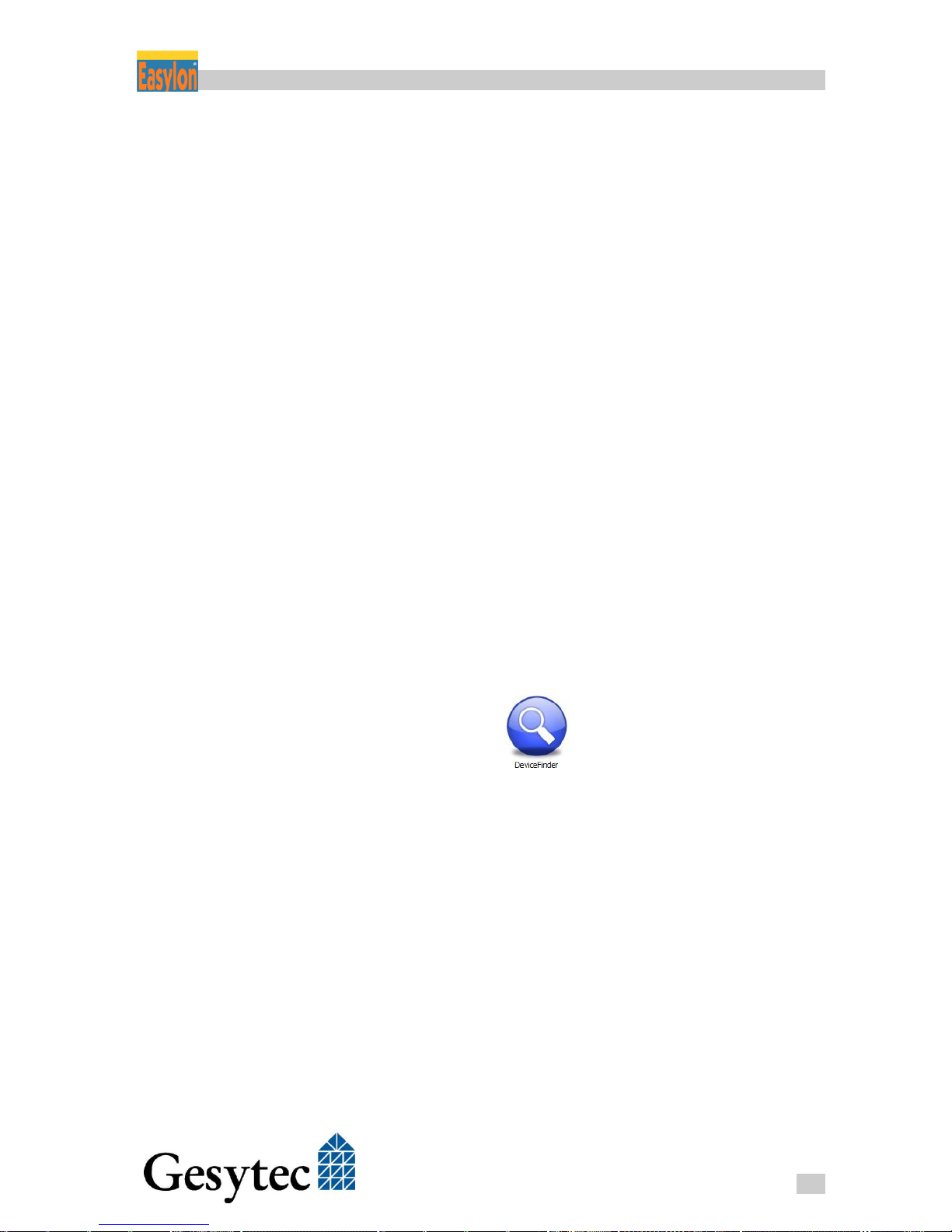
If the IP address of the device is unknown, launch the DeviceFinder program
from the provided data carrier.
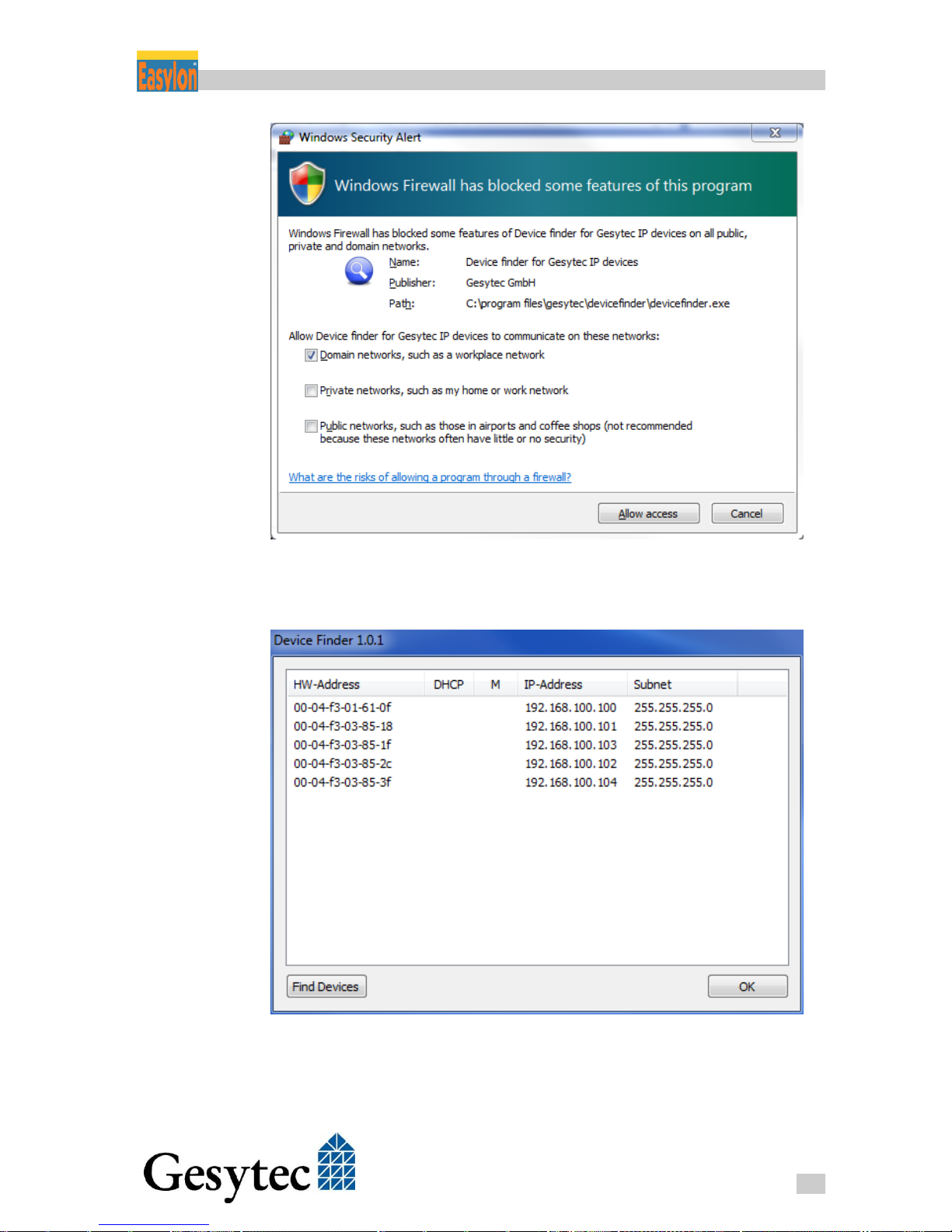
When starting the program, it has to be approved by the Windows Firewall.
Page 13
Router+ Setting-Up the Device
9
LVR2/UserDoc/Router/2-PortRouter+_2P_Manual-EN-v1.1.docx
After activation of the Find Devices button, the program searches the connected
network for Gesytec devices and displays them in a list.
The DeviceFinder displays the MAC address (HW-Address), the IP address and
the subnet mask. The sorting is performed according to the MAC address. The
column DHCP indicates if the IP address has been assigned by a DHCP Server.
In principle, Easylon Router+ supports the use of multiple IP addresses. An indi-
Page 14
Router+ Setting-Up the Device
10
LVR2/UserDoc/Router/2-PortRouter+_2P_Manual-EN-v1.1.docx
vidual entry is made in the list for each IP address and the column M displays the
index of the IP address.
We discourage from the use of multiple IP addresses.
In order to avoid collisions, make sure that the default IP-Address of the router
in your network has not already been assigned to another device in your network, as this could interfere the communication.
Is your PC located in a different subnet, you can access the router under Microsoft Windows XP, Vista or 7 using the following commands, without the
need to set a permanent new IP address in the network settings first. However,
this example will only work with devices in delivery status or after a factory reset:
To perform the following commands, administrator rights or an UAC authoriza-
tion are required.
For Windows XP
1. Open the Command Prompt (under All Programs > Accessories),
2. Enter the command route add 192.168.100.0 mask
255.255.255.0 %COMPUTERNAME%
3
.
For Windows Vista and 7
1. Open the Command Prompt by right-click the Start menu with the mouse and
select the option “Run as Administrator”4,
2. Enter the command ipconfig in order to query the current IP address of
your computer,
3. Enter the command route add 192.168.100.100 mask
255.255.255.255 xxx.xxx.xxx.xxx (where xxx.xxx.xxx.xxx
corresponds to the current IP address of your computer).
5
Now enter the IP address 192.168.100.100 in the address bar of your web
browsers in order to access the Web Interface for configuration of the router.
3
You can use the command described for Vista/7 as well. But the %COMPUTERNAME% part will not work
under Vista/7.
4
Alternatively you can click the Windows Start button, type “cmd” into the search area and hit the
shift+ctrl+enter keys.
5
route add 192.168.100.0 mask 255.255.255.0 xxx.xxx.xxx.xxx can be used as well.
Page 15
Router+ Setting-Up the Device
11
LVR2/UserDoc/Router/2-PortRouter+_2P_Manual-EN-v1.1.docx
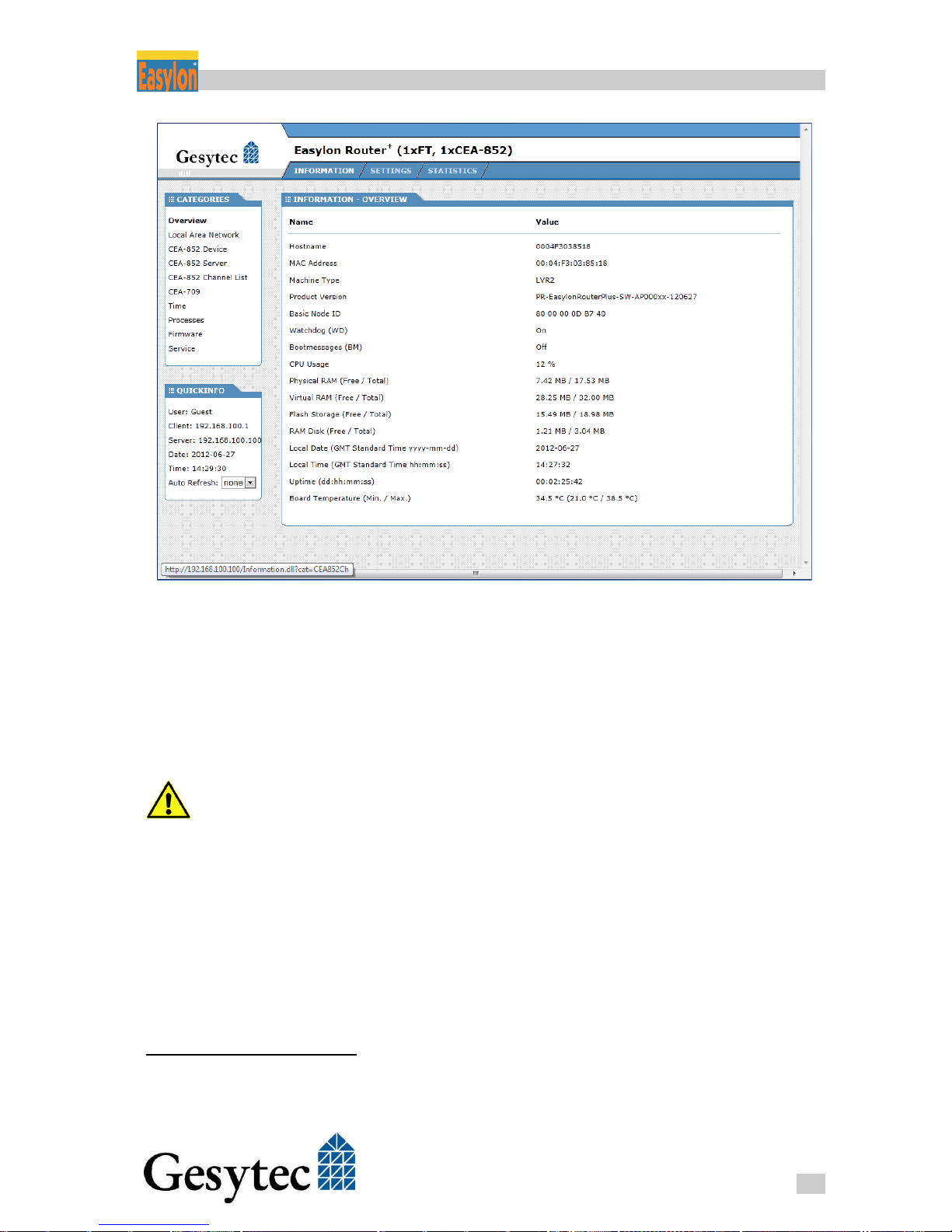
Figure 2-1: The Easylon Router+ Web Interface
See chapter 3 for further advices related to status query and device configuration.
2.4 Specifying the IP Address
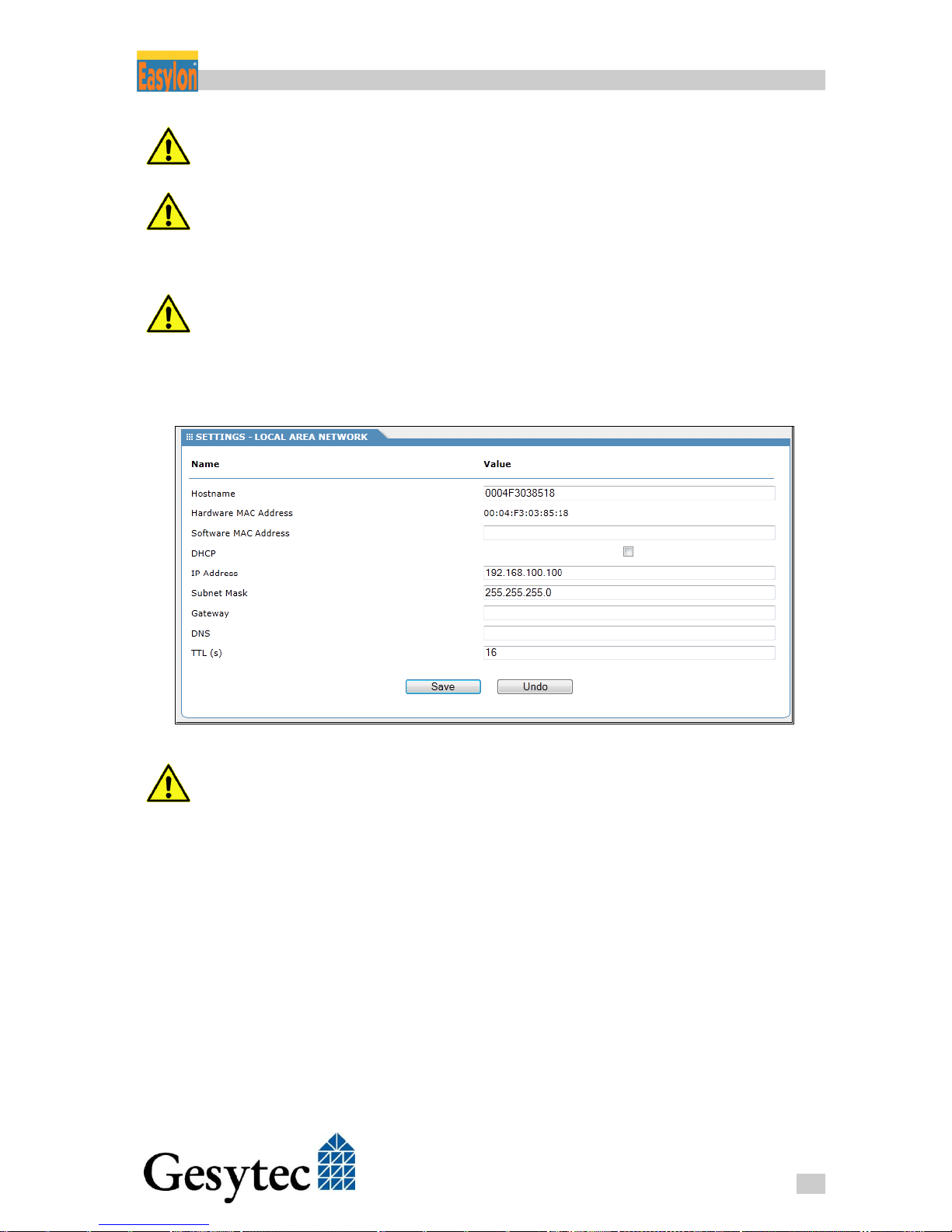
Open the SETTINGS tab and select Local Area Network from the CATEGORIES
on the left to change the IP settings.
To access the setting options of the router via the Web Interface, a user with
name “gesytec“ and password “admin“ is set upon delivery. Please immediately
change the password after initial commissioning.
The desired values can now be entered into the fields IP Address, Subnet Mask,
Gateway, DNS6 and TTL7. Alternatively you may specify the use of dynamic IP
address data via the DHCP checkbox. The settings will only be applied after
clicking the Save button.
6
More than one DNS server address can be entered by using comma for separation.
7
TTL, time to live, determines the lifespan of data in an IP network. Value is in seconds, the maximum is 255.
Page 16
Router+ Setting-Up the Device
12
LVR2/UserDoc/Router/2-PortRouter+_2P_Manual-EN-v1.1.docx
For static IP settings, the fields related to gateway and DNS server may also
remain empty. They will be required, however, if external NTP servers shall be
used or a remote maintenance is intended.
Keep in mind that upon modification of the router’s IP address the current con-
nection to the Web Interface will be lost, meaning it has to be newly established
afterwards. If DHCis used, the new IP address of the router has to be identified
first (for instance via the IP router or the DeviceFinder).
We discourage from the use of dynamic IP addresses for the router, as the rout-
ing will be interrupted for some time upon each change of address. This can be
avoided by setting the DHCP server to always assign the same DHCP lease with
the same IP address to Easylon Router+.
Figure 2-2: IP Settings
Use the Software MAC Address carefully. If specified it will replace the original
Hardware MAC Address of the device. Identical MAC addresses on different de-
vices can cause severe problems in a network.
2.5 Adapting the Time Settings
For a LON-over-IP network, the CEA-852 standard recommends synchronization of the routers in order to allow for detection of outdated messages. For this
purpose synchronization via the NTP protocol is recommended.
The Easylon Router+ integrates both, an NTP client and an NTP server, meaning
the device can retrieve current time information from one or several NTP servers
within the local network or from the Internet, but also act as time server within
the local network. A simultaneous operation is possible, meaning the router can
for example retrieve the exact time form a specific NTP server in the Internet
Page 17
Router+ Setting-Up the Device
13
LVR2/UserDoc/Router/2-PortRouter+_2P_Manual-EN-v1.1.docx
and make it simultaneously available to locally connected clients. If the option
NTP Client is switched-off, the router uses the integrated real-time clock as reference.
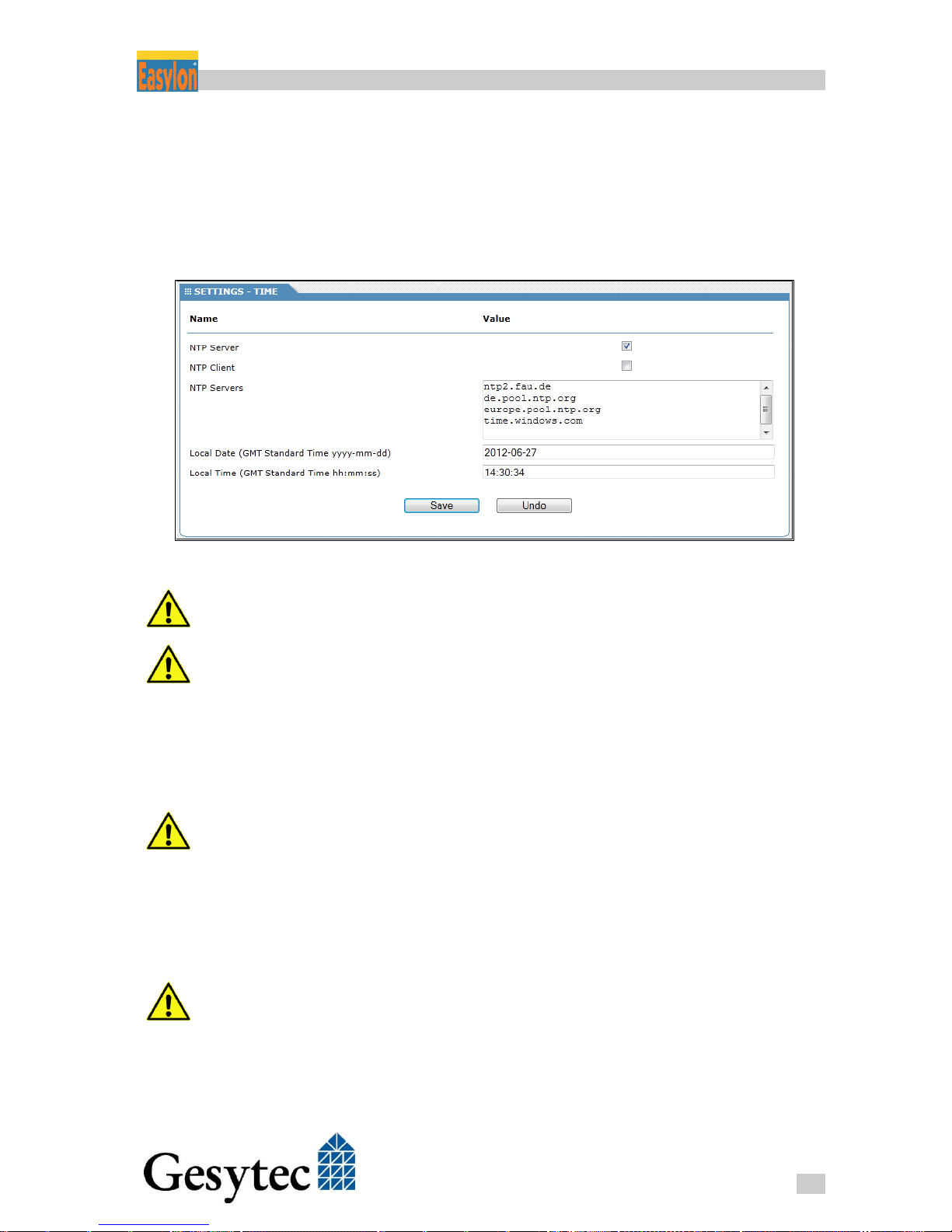
Open the SETTINGS tab and select Time from the CATEGORIES on the left to
perform settings.
Figure 2-3: Time Settings
You should make sure that all devices connected to the Easylon Router+ and the
router itself get time synchronized.
The integrated real-time clock is provided with a buffering of at least 36 hour . If
the router remains without power longer, the time has to be set once, either
manually or via NTP.
The particular operation is enabled or disable by clicking on the checkbox NTP
Server or NTP Client. Multiple time servers can be entered in the field NTP
Servers. Use an individual row for each server address.
Keep in mind to enter the details related to Gateway and DNS servers in the IP
Settings (see above) when using external time servers.
Under Local Date or Local Time you can as well enter the desired time or the desired date (in UTC/GMT) manually. In this case the operation as NTP Client
must not be selected as the time will be overwritten by NTP synchronization otherwise.
The time settings made here are overwritten, if the Configuration Server is set as
NTP server as well.
The settings shown in Figure 2-3 mean:
The router is NTP server for other devices
The time manually entered is used
Page 18
Router+ Setting-Up the Device
14
LVR2/UserDoc/Router/2-PortRouter+_2P_Manual-EN-v1.1.docx
The servers listed under NTP Servers are not used as the NTP Client is
not activated.
Click on the Save button to store the settings.
2.6 Changing the Password, Managing Users
Upon the first login, please change the password of the default user “gesytec”.
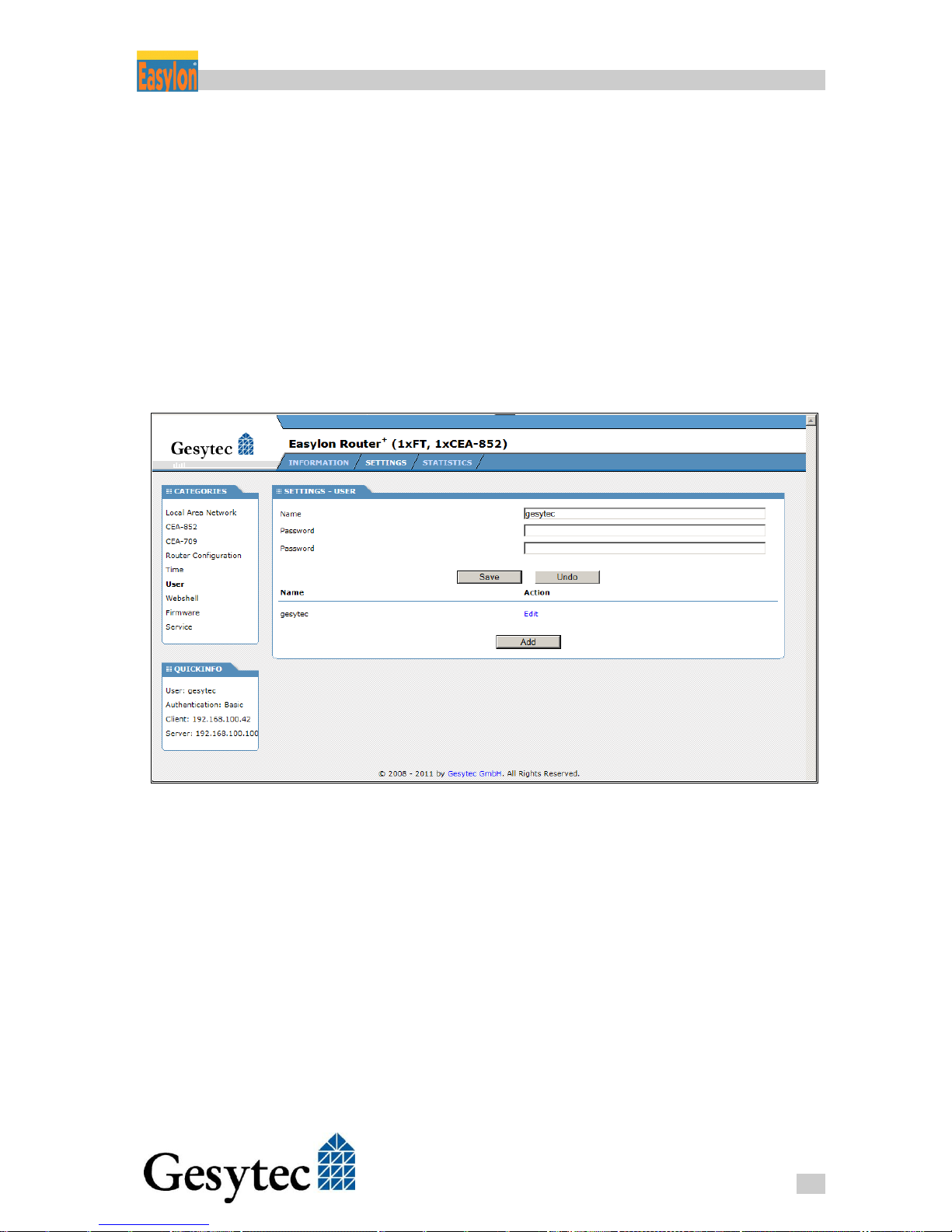
Select User in the SETTINGS tab under the CATEGORIES on the left. Click on
Edit and enter the desired new password twice in the following dialog.
In addition, you can also create new users with their own name and password or
delete existing ones. The last user in the list cannot be deleted.
Figure 2-4: Changing the Password
Page 19
Router+ Configuration Server
15
LVR2/UserDoc/Router/2-PortRouter+_2P_Manual-EN-v1.1.docx
Configuration Server 3
The Easylon Router+ comes with an integrated Configuration Server which administers information on all CEA-852 devices in the network. This refers to
routers, LON/IP network nodes or PC running CEA-852 software.
3.1 Setting up the Configuration Server
Activating the Configuration Server of an Easylon Router+ is done using its Web
Interface. Enter the IP address of the specific router in the address bar of a web
browser on a PC that is connected to the router. Select the SETTINGS tab and
then CEA-852 Server from the CATEGORIES.
There must only be a single Configuration Server in one LON/IP channel.
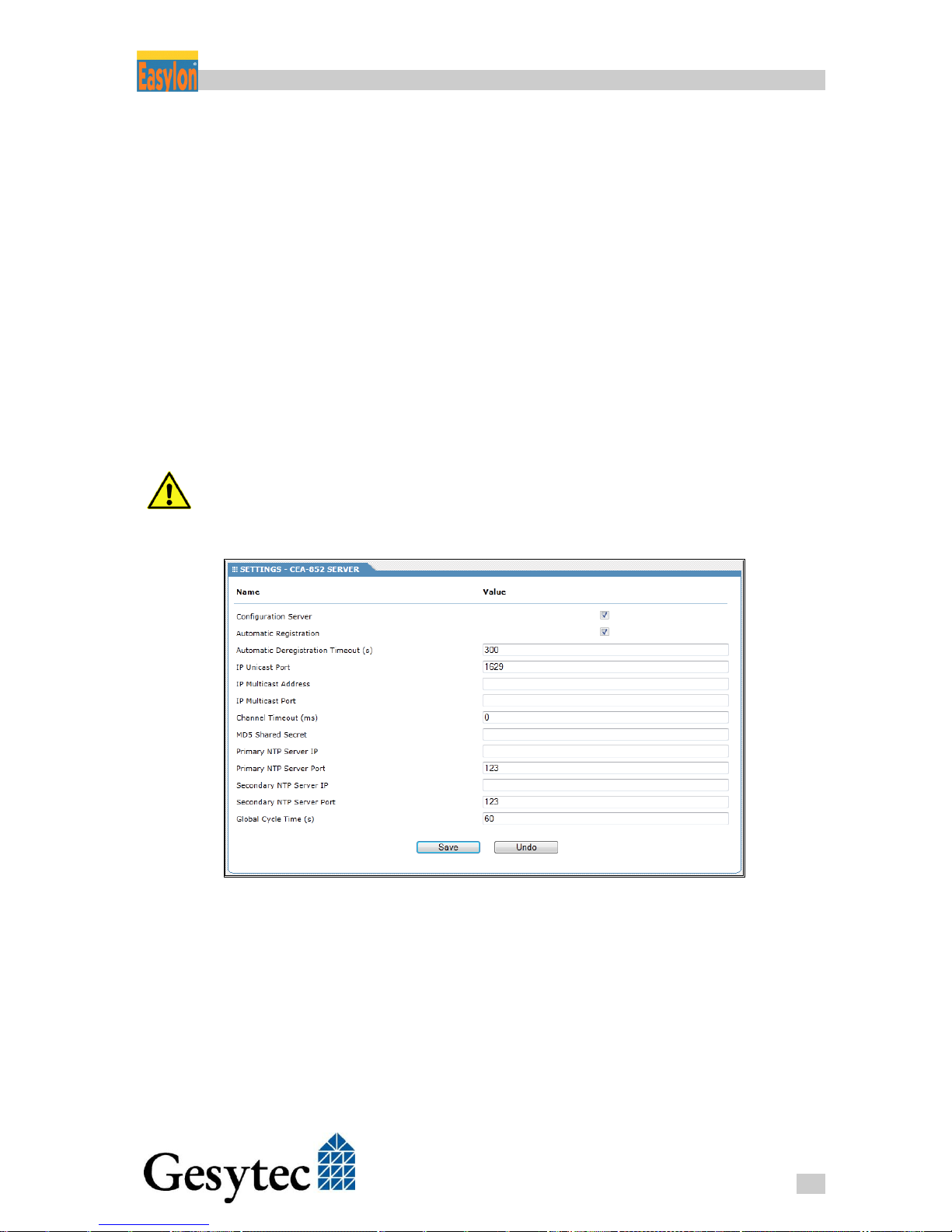
Figure 3-1: Configuration Server Settings
Activate the Configuration Server by checking the respective check box.
Automatic Registration: Selecting this mode will cause any connected
LON/IP device to be automatically added to the CEA-852 channel. These devices, however, will be removed again if no message
from them is received within the Automatic Deregistration
Timeout. This interval is set in seconds. (default = 300 s)
Page 20
Router+ Configuration Server
16
LVR2/UserDoc/Router/2-PortRouter+_2P_Manual-EN-v1.1.docx
IP Unicast Port: This is the port by which the Configuration Server is ac-
cessed (default = 1629, according to CEA-852 standard8).
If this value is be modified it has to be set identical to the same value for all
devices on the LON/IP channel.
If Unicast and Multicast addresses are set on the Configuration Server local
device settings are overwritten.
IP Multicast Address and Port: By means of IP Multicast addressing, LON
packets can be sent in parallel to multiple recipients of the
LON/IP channel. This considerably contributes to the reduction of
the network load. Multicast addressing is especially recommended if channel routing is not possible.
All participants of a LON/IP channel should use the same Multicast address and
the same port number.
Channel Timeout: This parameter serves to detect delayed IP packages. If
this value is used all devices in the network have to be synchronized in time. The value to be entered is in milliseconds from 1 to
1500. The default setting of “0” means turns this method off.
MD5 Shared Secret: If MD5 authentication9 is used this field provides the key.
An empty field means that no authentication is used. Using authentication requires all devices to support this.
NTP Server: Time consistency is mandatory for network operation. Therefore
usage of an NTP server is recommended. The Easylon Router+
can be used for it (cf. section 2.5). We recommend to use the device running the Configuration Server as NTP server as well. This
will ensure time synchronization without having each device to
access an internet time server.
If NTP servers shall be used their IP addresses have to be entered
here, even if the internal NTP server of the same device shall be
used. The NTP standard port is 123.
Global Cycle Time: The interval in seconds at which the LON/IP devices are
polled for availability (default = 60). Entering 0 will turn this off.
8
The corresponding client port is 1628.
9
A hexadecimal value of 16 bytes (32 characters) is required
Page 21
Router+ Configuration Server
17
LVR2/UserDoc/Router/2-PortRouter+_2P_Manual-EN-v1.1.docx
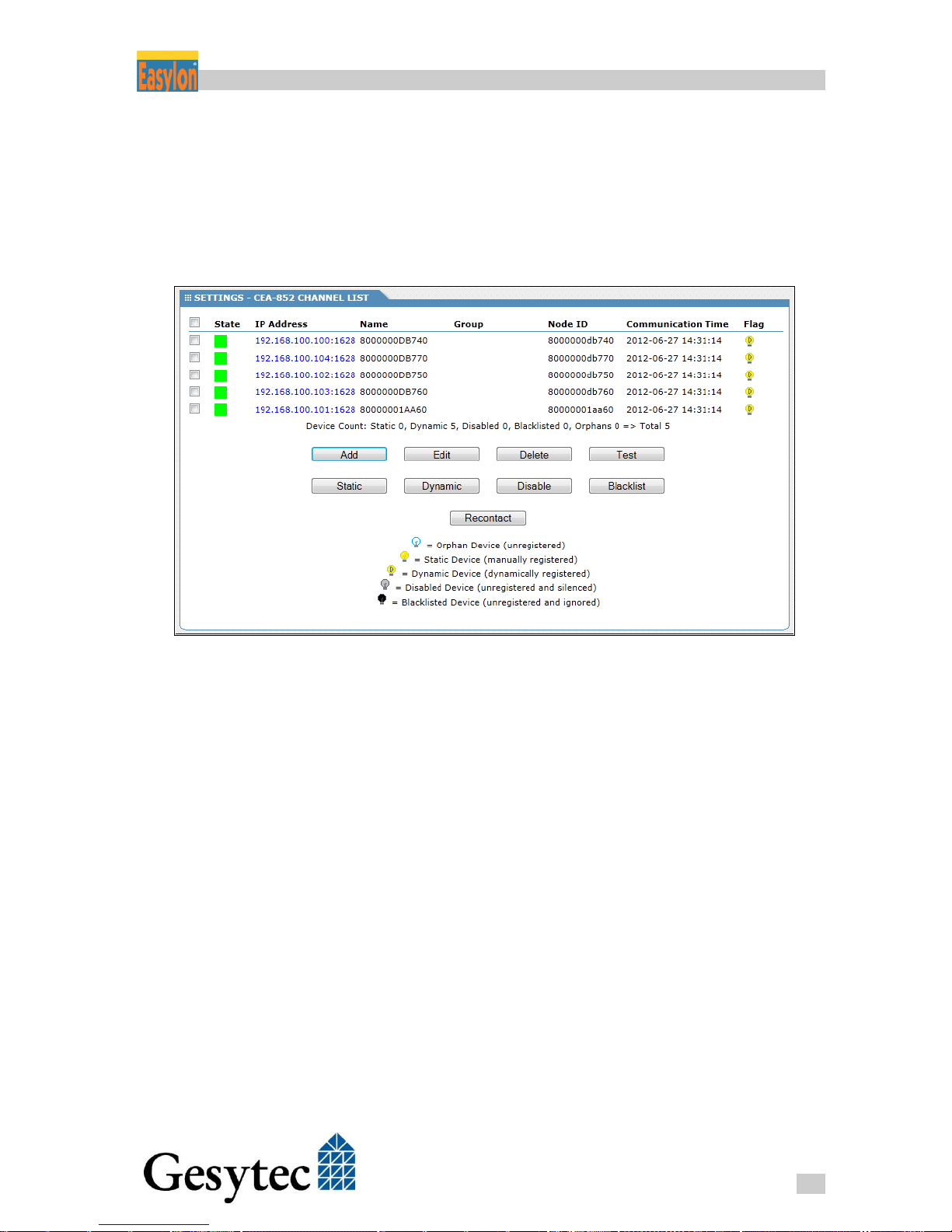
3.2 Manage Routers via the Configuration Server
If an Easylon Router+ is used as Configuration Server its clients can be accessed
from it, provided that these are Easylon Router+or devices offering a Web Inter-
face. Commands are available from SETTINGS > CATEGORIES > CEA-852
Channel List.
Figure 3-2: CEA-882 Channel List
The INFORMATION tab displays the same list without the commands.
The list can be sorted by clicking on the column headers.
Device status is signaled by colors as follows:
Green registered client
Yellow in process, e.g. is just registered
Red registered, but does not respond
Grey unregistered
Click on the IP address of a device to open its Web Interface (if available). The
settings on this device can then be modified.
Page 22
Router+ Configuration Server
18
LVR2/UserDoc/Router/2-PortRouter+_2P_Manual-EN-v1.1.docx
By default the Name column gives the basic node ID10 of the device. A more
telling name can be used, but it must be unique.
The Group column provides an additional classification criterion. It makes it easier to manage devices in long lists. For operation of the Configuration Server this
parameter is not needed.
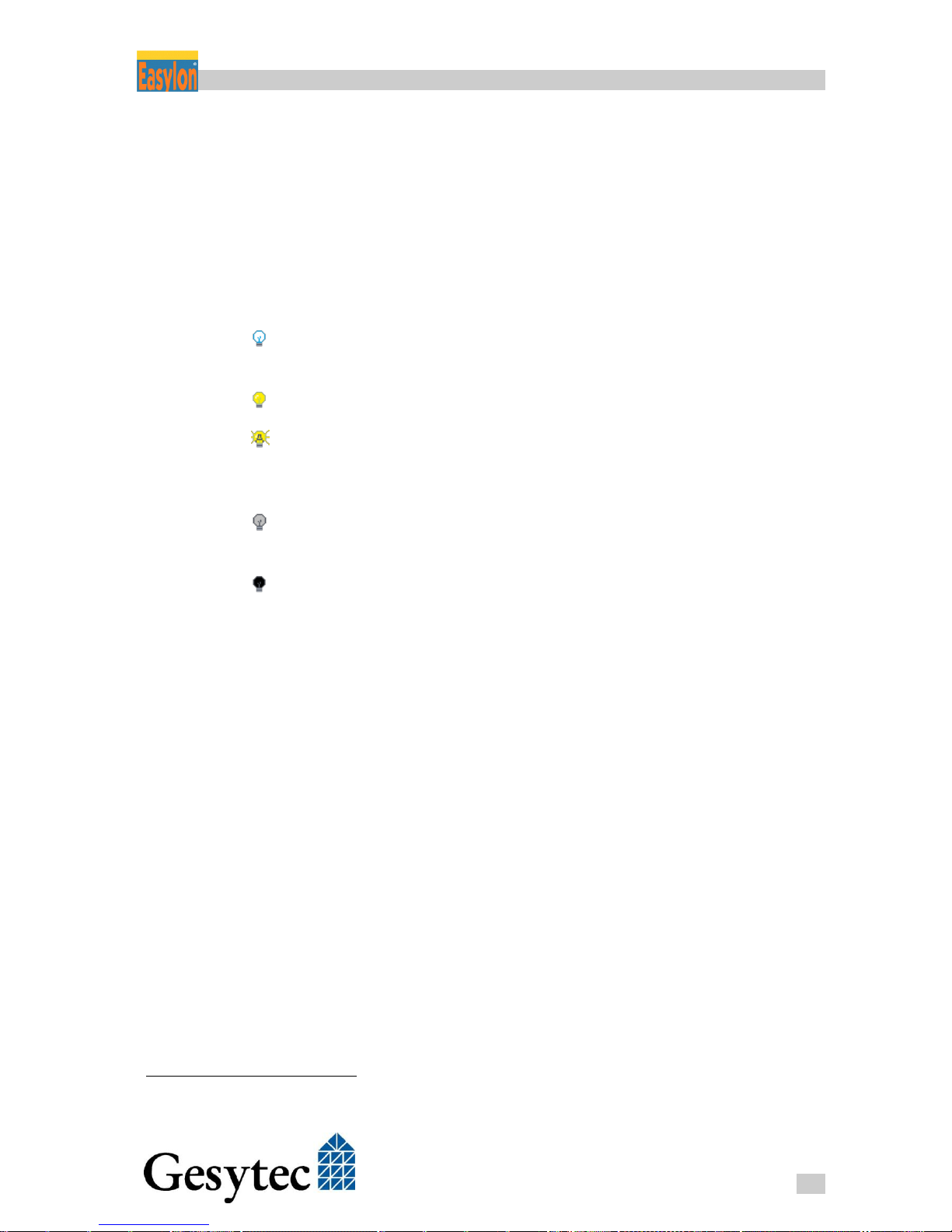
Symbols in the Flag column quickly signal the current device status with respect
to the Configuration Server.
Orphan Device: Device detected in the network, however not registered
yet.
Static Device: Device which was manually registered to be permanent.
Dynamic Device: Device, which registered itself at the Configuration Server
and may again be deregistered (cf. Automatic Registration in
chapter 3.1).
Disabled Device: Temporarily deactivated device, i.e. this device will not
receive messages through the CEA-852 channel.
Blacklisted Device: Device which was manually excluded from network op-
eration. Automatic registration will not be accepted and no information on other devices will be sent to it.
The command buttons beneath the list affect selected devices as follows:
Add A new router device can be added to the list.
Edit: IP address, port. name and group can be edited
Delete The device is removed from the list, i.e. it will receive no infor-
mation on other devices and will no longer take part in the communication.
Test The device status is tested and the result is displayed above the
list
Static Selected devices will be set as Static Devices. This is helpful with
devices showing up during network commissioning through Au-
tomatic Registration. Making them permanent, so that the deregistration timeout will not apply, is just a few clicks.
10
Easylon Router+ have several node IDs. For more information cf. 8.1
Page 23

Router+ Configuration Server
19
LVR2/UserDoc/Router/2-PortRouter+_2P_Manual-EN-v1.1.docx
Dynamic The device status becomes that of a device registered under Au-
tomatic Registration, i.e. it will be removed if no messages are received within the defined Automatic Deregistration Timeout.
Disable The CEA-852 channel communication of the device is temporari-
ly disabled. The device is still registered and will show that it is
communicating with the Configuration Server. The Static and
Dynamic commands are used to activate it again.
Blacklist Registrations from a device with this IP address will no longer be
accepted.
Recontact The Configuration Server will discard all existing data on the de-
vices and rebuild the list of registered devices including all data.
3.3 Tips for Configuration Server Settings
Channel Timeout, possible data loss
Channel Timeout should be turned off (= 0). If a too short time is set, data packets may be lost. Time synchronization between the Routers is important here: If,
e.g., the Channel Timeout is smaller than the possible time difference between
some devices data will surely be lost.
Multicast addressing, reducing the bus load
Having many devices on the network, Multicast addressing is the preferred
method, as the bus load will go down.
Another way to reduce the load is to use the Time To Live, or more precisely the
IP TTL, which can be set under CEA-852 Device. This value limits the number
of Router hops a message is allowed. Suitable values result from the network
structure (contact network administrator) or have to be assessed empirically.
Automatic Registration for fast commissioning
The easiest way to get all devices on the LON/IP network ist o use Automatic
Registration. Using the commands available under CEA-852 Channel List, the
device status can then be set to Static or devices can be excluded using the Disable or Blacklist commands. Afterwards Automatic Registration can be turned off
for normal operation.
Automatic Registration for normal operation
In case a remote LNS server is part of the network operation Automatic Registration should be used as normal operation mode. Other LON/IP devices then have
to be set to Static or excluded from communication by the Blacklist command.
Page 24

Router+ Configuration Server
20
LVR2/UserDoc/Router/2-PortRouter+_2P_Manual-EN-v1.1.docx
Disable or Blacklist
In Automatic Registration mode communication from Blacklisted devices will be
ignored. Disabled devices will not receive information, however, they are further
registered and the Automatic Deregistration Timeout will apply to them.
The Blacklist command can be used to exclude devices from the system. The
Disable command can be used, e. g. for testing, to temporarily turn off the IP
channel of the device from the system communication.
Page 25
Router+ Using the Router Functionality
21
LVR2/UserDoc/Router/2-PortRouter+_2P_Manual-EN-v1.1.docx
Using the Router Functionality 4
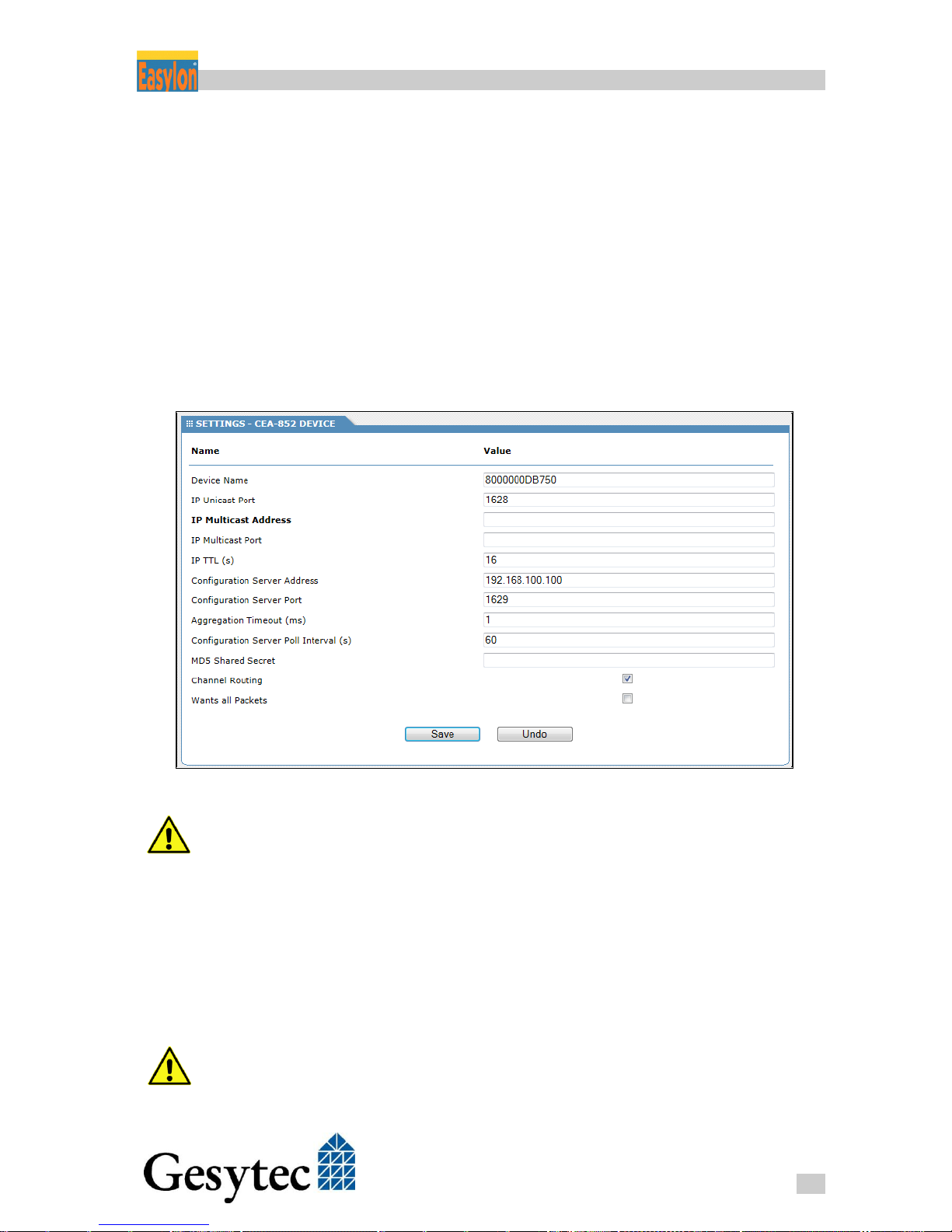
4.1 Configuring the LON/IP Interface
The configuration of the CEA-852 interface is realized via the Web Interface of
the Easylon Router+. Enter the IP address of the Router in the address bar of a
web browser on a PC that is connected to it. Select the SETTINGS tab and CEA-
852 Device from the CATEGORIES.
Figure 4-1: CEA-852 Settings
If the Easylon Router+ device is simultaneously used as Configuration Server
certain device settings (e.g. NTP Server, Unicast, Multicast addresses) are not
available here, as they are determined by the respective server settings.
Device Name
First assign a unique name for the device under Device Name. By default the
basic node ID of the device is used (cf. 8.1). With this name, the router registers
at the Configuration Server and identifies itself to other participants of the
LON/IP channel.
The device name has to be unique in the LON/IP network.
Page 26
Router+ Using the Router Functionality
22
LVR2/UserDoc/Router/2-PortRouter+_2P_Manual-EN-v1.1.docx
IP Unicast Port
If you want to assign a different port than the standard (port 1628) for the exchange of LON packets through the CEA-852 interface, enter it under the option
IP Unicast Port.
If Unicast and Multicast addresses are set on the Configuration Server device
settings are overwritten.
IP Multicast Address and Port
By means of IP Multicast addressing, LON packets can be sent in parallel to
multiple recipients of the LON/IP channel. This considerably contributes to the
reduction of the network load. Enter the values specified by the administrator
under IP Multicast Address and IP Multicast Port.
All participants of a LON/IP channel should use the same Multicast address and
the same port number.
IP TTL
The Time To Live entered here11 is the number of router hops a CEA-852 packet
is allowed in the network before being discarded. This can be used to limit the
propagation of messages, which reduces the overall bus load. Maximum value is
255 (default = 16).
Configuration Server
Usually a LON/IP channel is managed by a Configuration Server. Such is provided by the Easylon Router+. It is activated through the tab SETTINGS >
CATEGORIES > CEA-852 Server (cf. chapter 3).12
Enter the address of the Easylon Router+running the Configuration Server together with the port (1629 according to CEA-852 standard). If the Configuration
Server is running on the same device no entry can be made here.
By means of the following steps you can check if the Configuration Server assignment has been successful:
1. The Status/Reset LED is showing green.
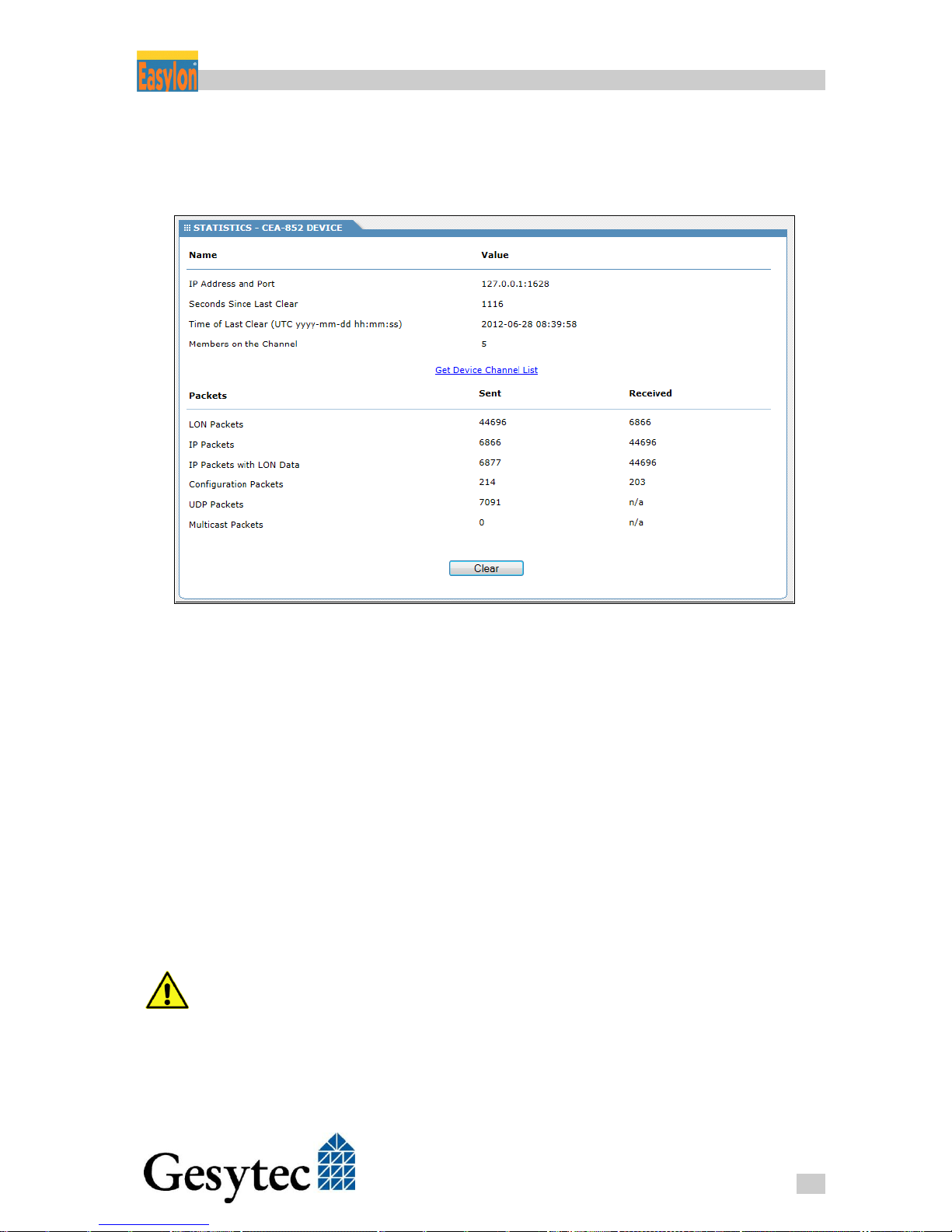
2. In the router’s Web Interface under STATISTICS > CEA-852 Device > Pack-
ets it can be observed that data and configuration packets are transmitted.
11
A general TTL can be entered in the Local Area Network settings.
12
Information concerning operation with the Echelon i.LON configuration server (ILCS) you will find in the An-
nex .
Page 27
Router+ Using the Router Functionality
23
LVR2/UserDoc/Router/2-PortRouter+_2P_Manual-EN-v1.1.docx
3. Members on the Channel shows the number of the other participants. A sur-
vey can be retrieved via the link Get Channel List.
4. Other devices can be accessed in the LON/IP network.
Figure 4-2: Statistical Data related to the LON/IP Interface
Aggregation Timeout
Usually LonWorks packets are short compared to the maximum length of an
Ethernet packet. Therefore LON/IP devices can collect LonWorks packets for a
short time to transmit them in a single Ethernet packet. The CEA-852 standard
calls this “Aggregation”. The Aggregation Timeout parameter sets the time for
which the Easylon Router+ collects LonWorks messages before they are transmitted in an Ethernet packet. However, if the maximum length of an Ethernet
packet is reached prior to that time limit the packet is sent immediately.
LonMark defines a value of 16 ms for the Aggregation Timeout. The value 0 will
turn this mechanism off. The parameter does not have to be the same on all devices. As the Aggregation Timeout will reduce Ethernet network load usage of
this feature is recommended.
In low traffic situations request/response cycles are increased by the Aggrega-
tion Timeout.
Page 28

Router+ Using the Router Functionality
24
LVR2/UserDoc/Router/2-PortRouter+_2P_Manual-EN-v1.1.docx
Configuration Server Poll Interval
The router will query the Configuration Server in the interval set here and use
the responses to ascertain the connection status.
MD5 Shared Secret
If MD5 authentication13 is used this field provides the key. An empty field
means that no authentication is used. Using authentication requires all devices on
the channel to support this.
Channel Routing
“Channel Routing” refers to a procedure described in the CEA-852 standard by
which LON/IP devices determine from the LonWorks addresses of a packet to
which other LON/IP devices the message has to be transmitted via Ethernet. For
this purpose the LON/IP devices provide lists containing the LonWorks addresses of the devices connected on the CEA-709 channel, i.e. domain, subnet IDs,
node IDs, group IDs and Neuron IDs. Using subnet/node addressing the message
will only refer to one device, with group or broadcast addressing several ones.
Channel Routing is another means to reduce network load. LON/IP devices will
only receive Ethernet packets they really have to process.
Therefore the Channel Routing is on by default. For diagnosis purposes it can be
switched off here.
Wants all Packets
A device on the LON/IP channel can tell other devices that it wants all messages,
regardless of any addressing or routing. This can be important in case of an Analyzer device. Check the Wants all Packets option to enable this mode for a device.
13
A hexadecimal value of 16 bytes (32 characters) is required
Page 29
Router+ Using the Router Functionality
25
LVR2/UserDoc/Router/2-PortRouter+_2P_Manual-EN-v1.1.docx
4.2 Setting-up the 2 Port Router (LonMaker)
Using the example of the Echelon LonMaker the following section describes
step-by-step how to set-up and use the Easylon Router+ with two ports.
Prior to any further steps, first make sure that the LonMaker actually can access
the LON/IP channel.
4.2.1 Preparation
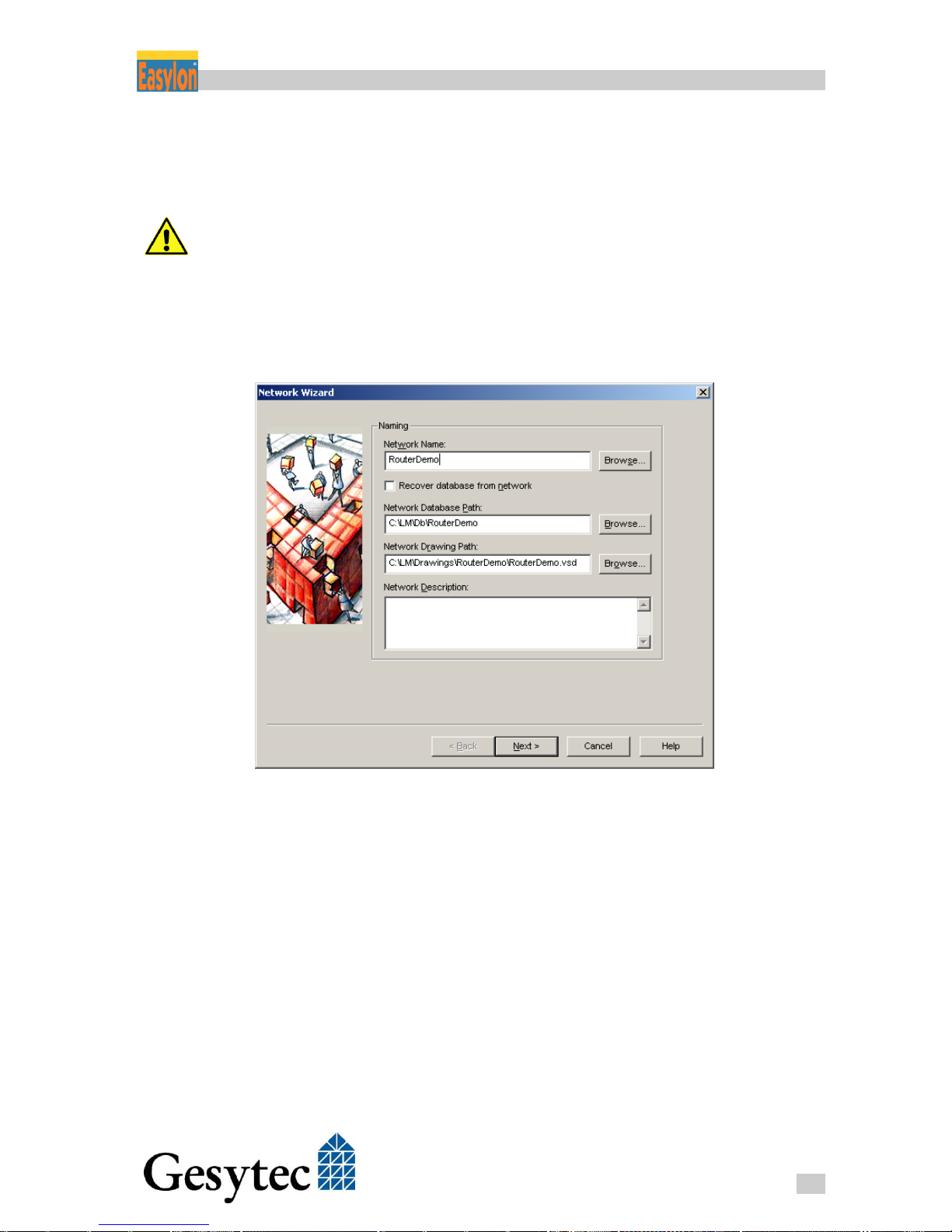
1. Open your LonMaker project or create a new one.
Figure 4-3: Creating a New LonMaker Project
Page 30
Router+ Using the Router Functionality
26
LVR2/UserDoc/Router/2-PortRouter+_2P_Manual-EN-v1.1.docx
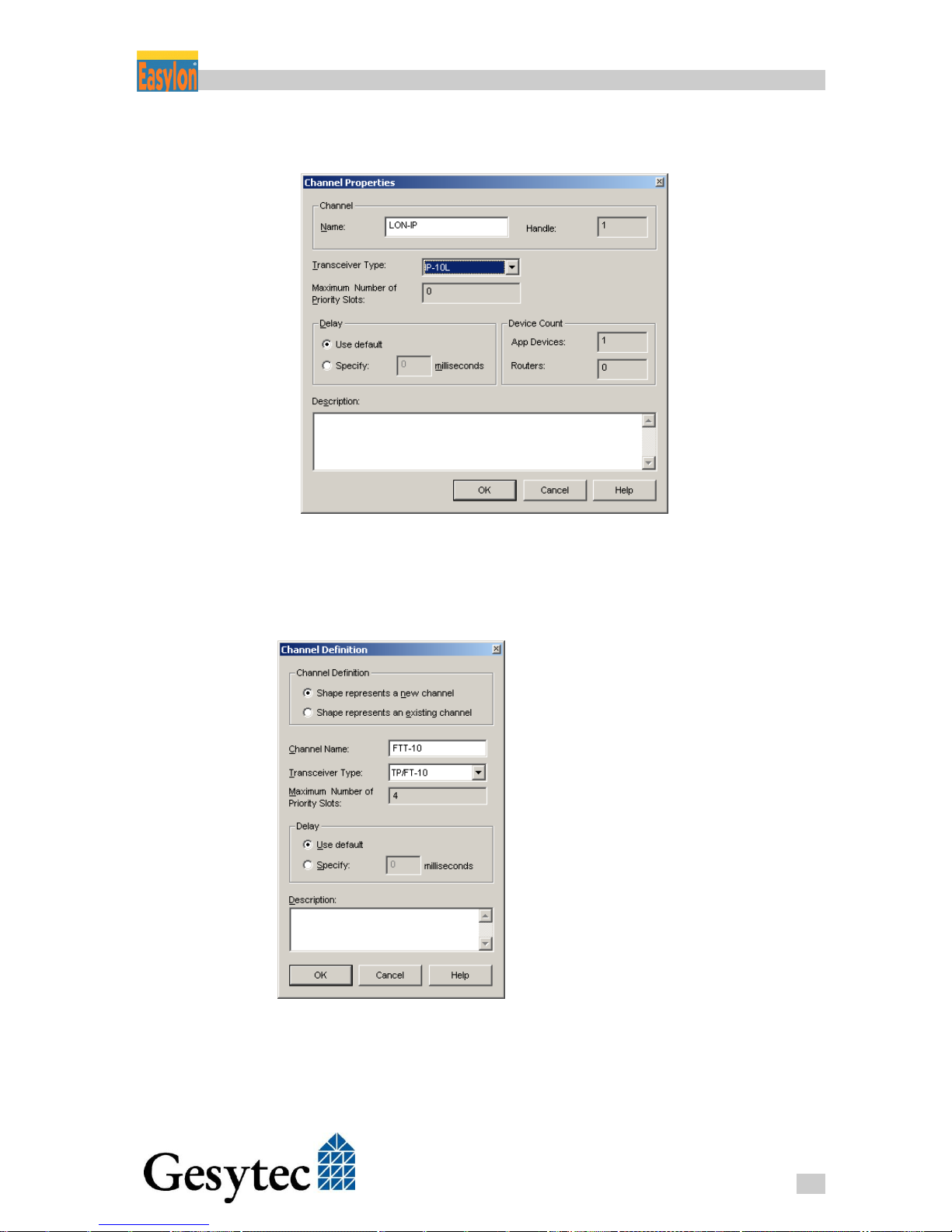
2. Create a type IP-10L channel where the LON/IP interface should be located.
Figure 4-4: Creating a Channel for the LON/IP Interface
3. Create another channel of FTT-10 type for the physical LONWORKS port
LON/FT.
Figure 4-5: Channel for the LON/FT Interface
Page 31
Router+ Using the Router Functionality
27
LVR2/UserDoc/Router/2-PortRouter+_2P_Manual-EN-v1.1.docx
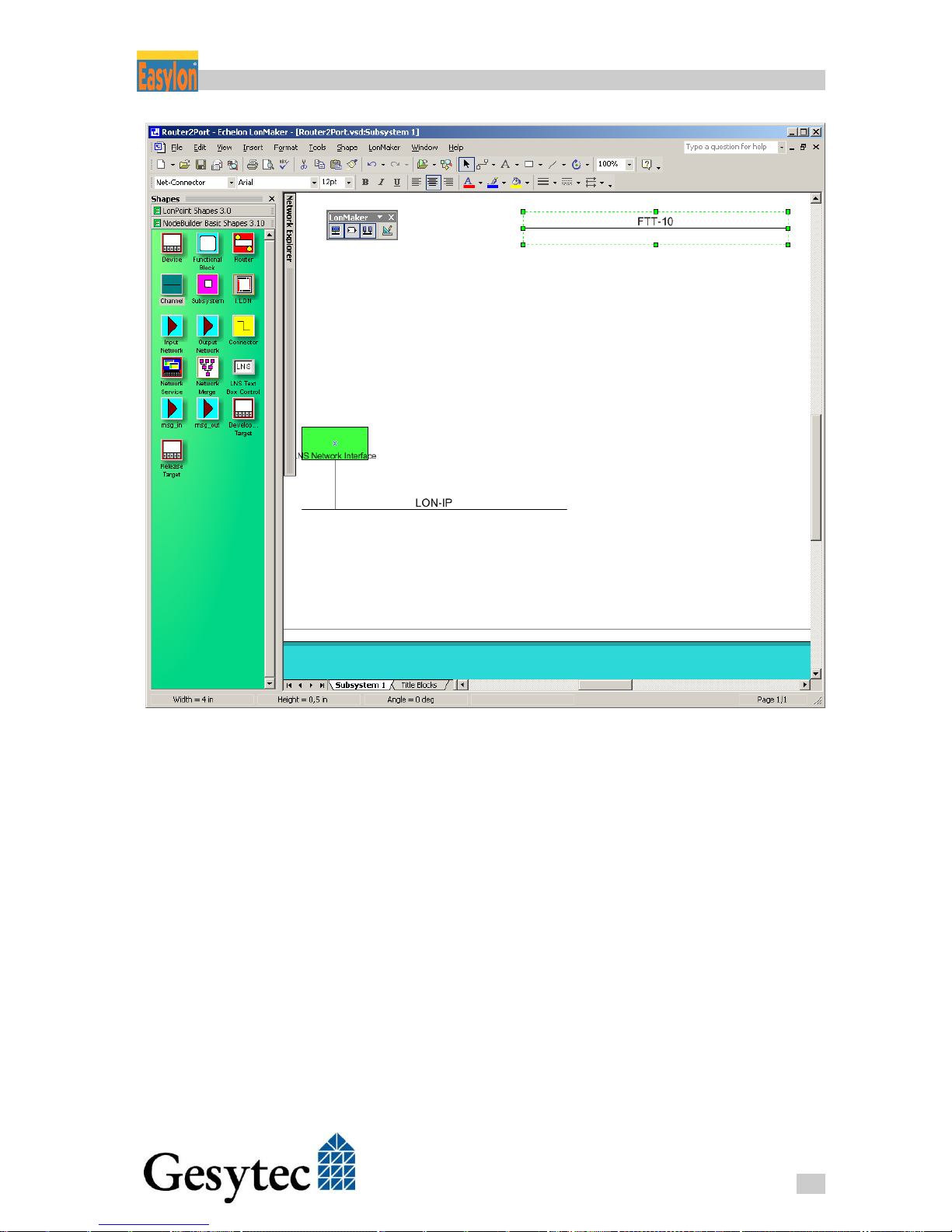
Figure 4-6: The two Channels in LonMaker
Page 32
Router+ Using the Router Functionality
28
LVR2/UserDoc/Router/2-PortRouter+_2P_Manual-EN-v1.1.docx
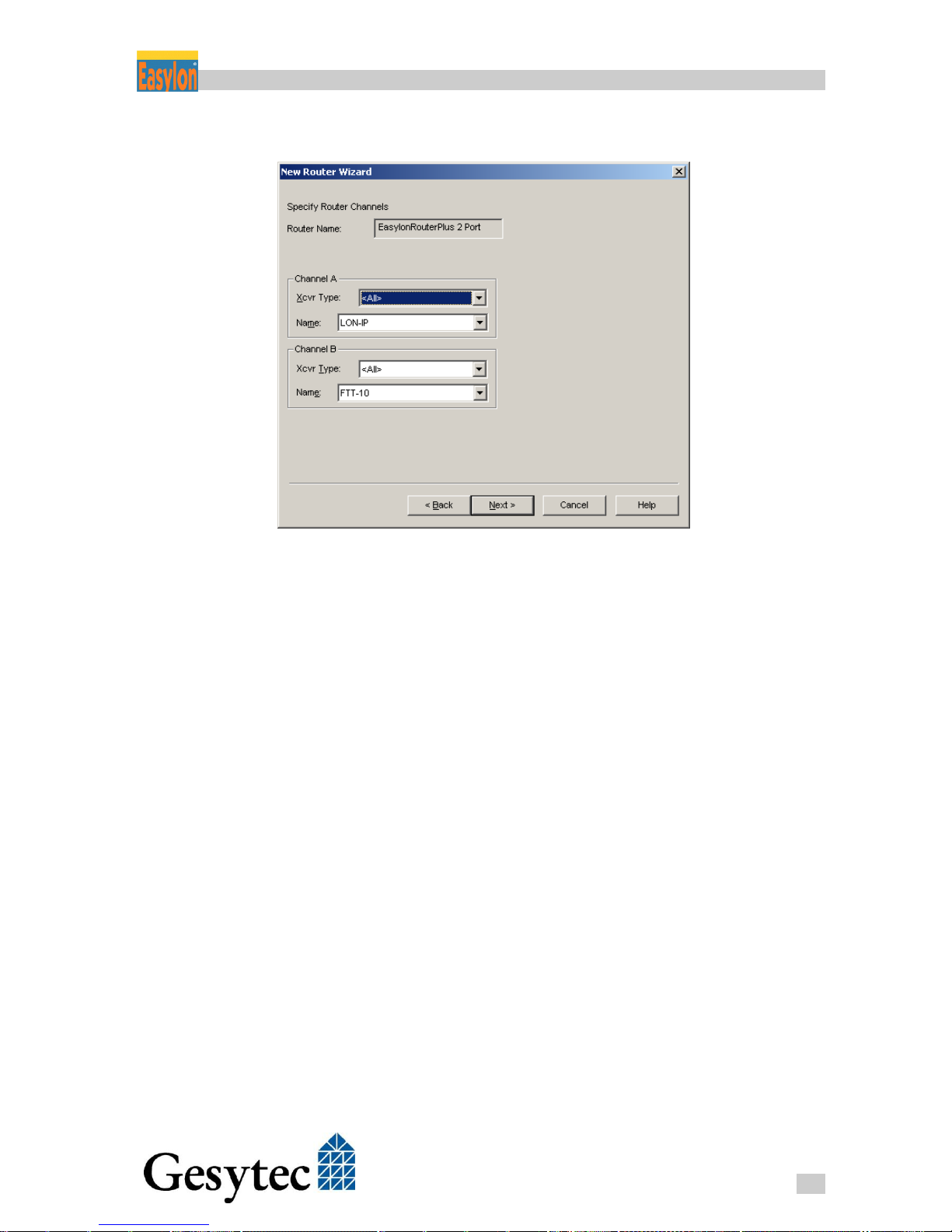
4. Now create a router shape for the channels LON/FT and LON/IP.
Figure 4-7: Creating the Router Shape
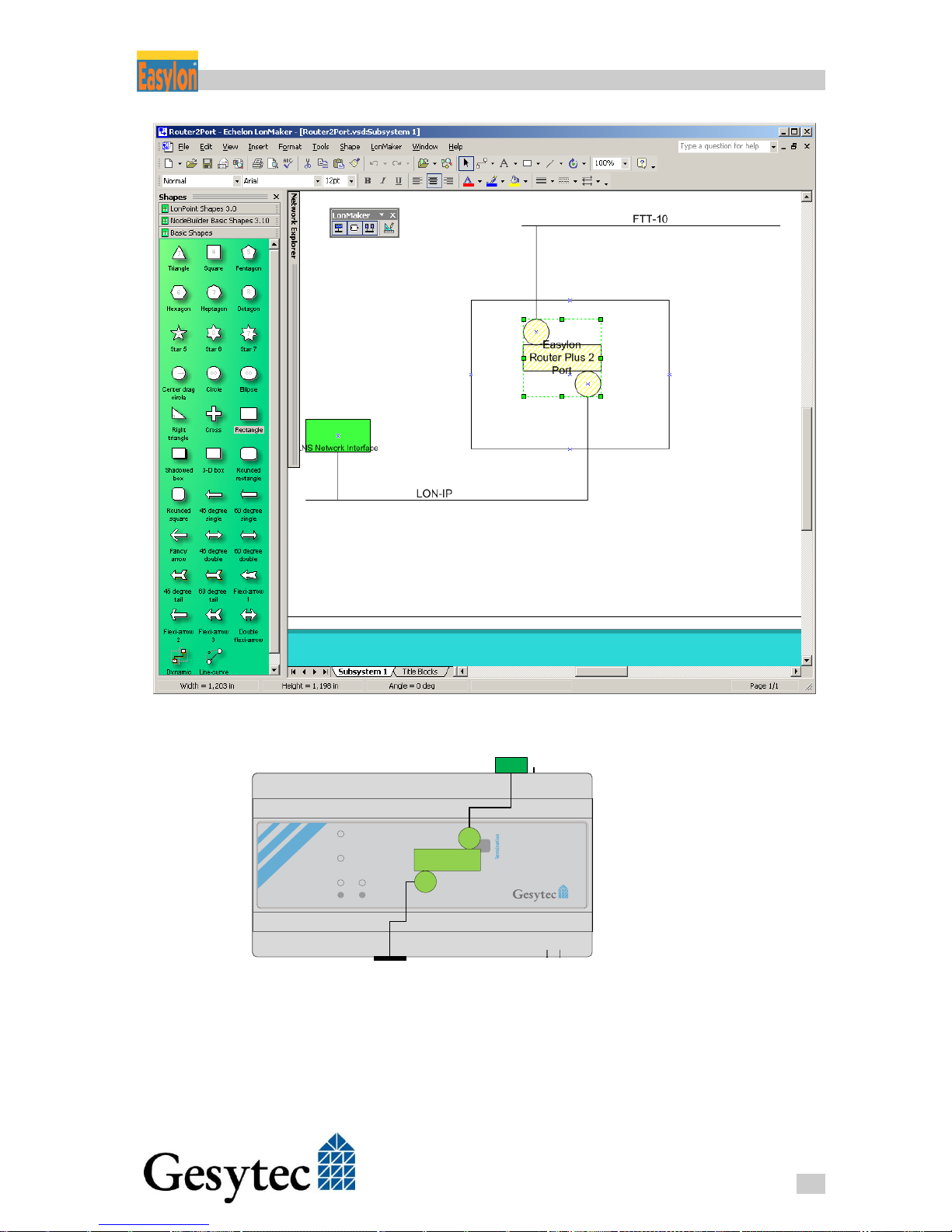
5. Connect one of the router shape to the existing LON/IP channel and the
LON/FT channel.
Page 33
Router+ Using the Router Functionality
29
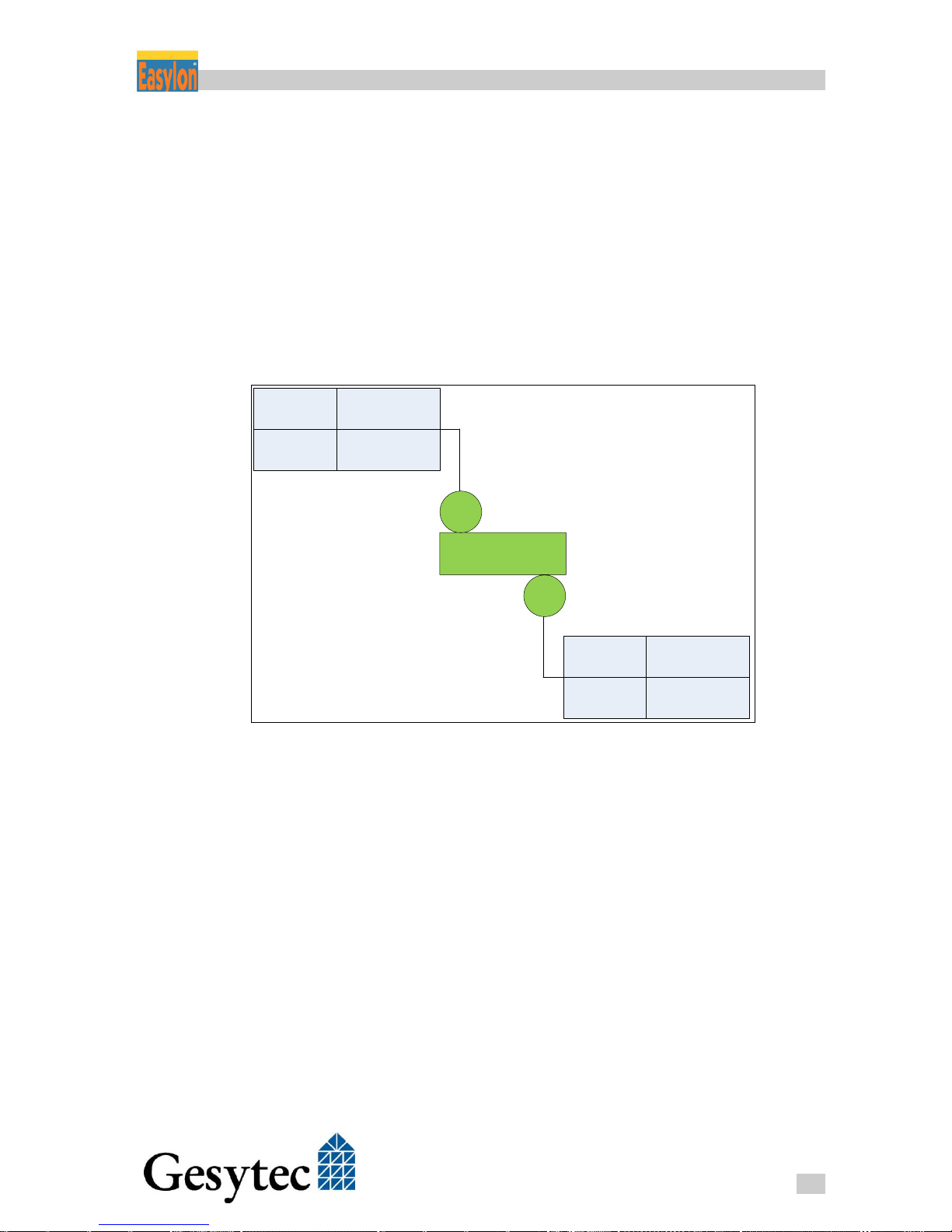
LVR2/UserDoc/Router/2-PortRouter+_2P_Manual-EN-v1.1.docx
Figure 4-8: Completed Presentation of the Easylon Router+ in LonMaker
24 V DC
– +Ethernet
Easylon® Router
+
Status
LON
LON IP
Service
Start / Reset
Factory Reset
ON Free
OFF Bus
A B PE
LON
shield
LON / IP
Figure 4-9: Schematic and Real Router
Thus the configuration of the router in the LonMaker is completed. The rectangle
in the figure above is merely designated to hint at the boundary of the physical
device; otherwise it has no function.
Page 34
Router+ Using the Router Functionality
30
LVR2/UserDoc/Router/2-PortRouter+_2P_Manual-EN-v1.1.docx
4.2.2 Commissioning
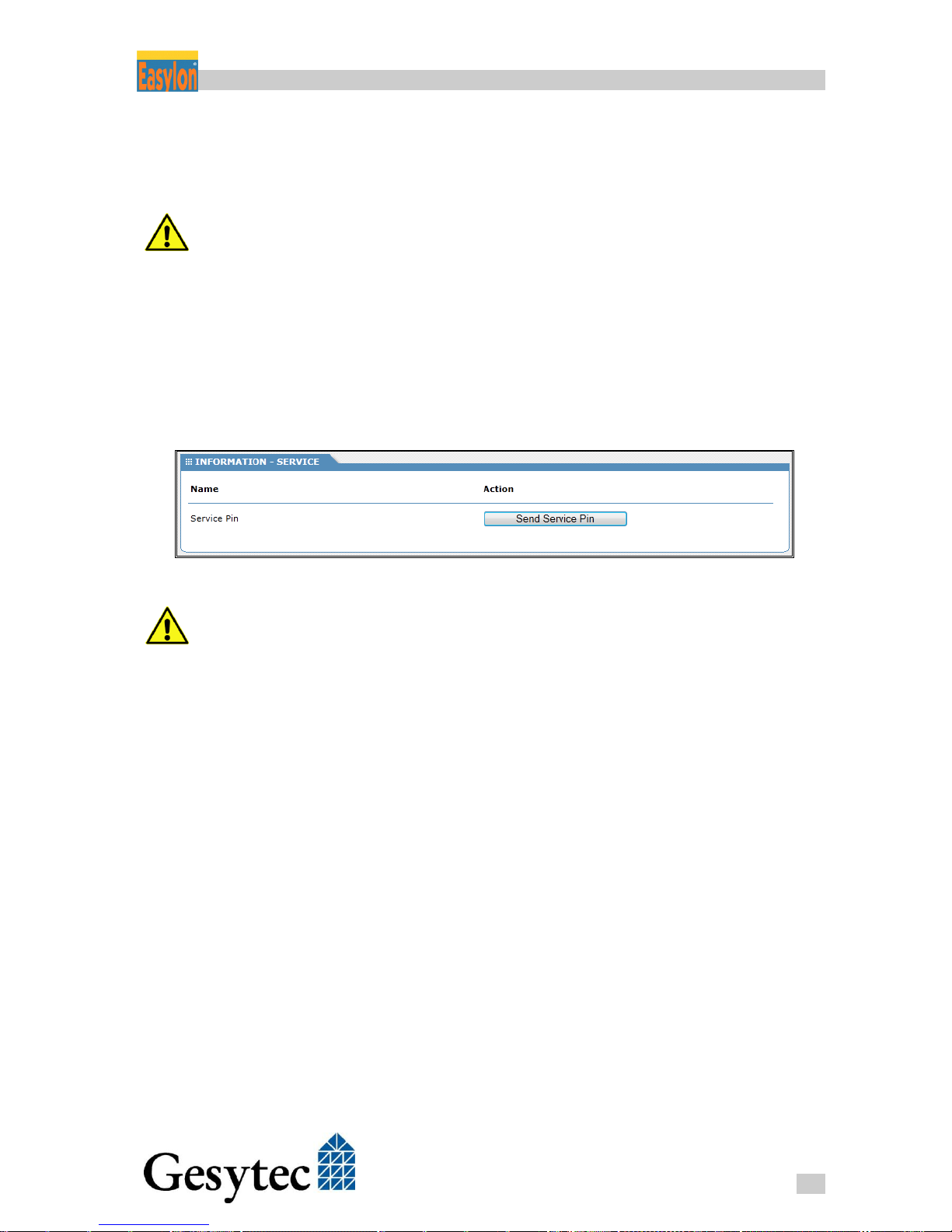
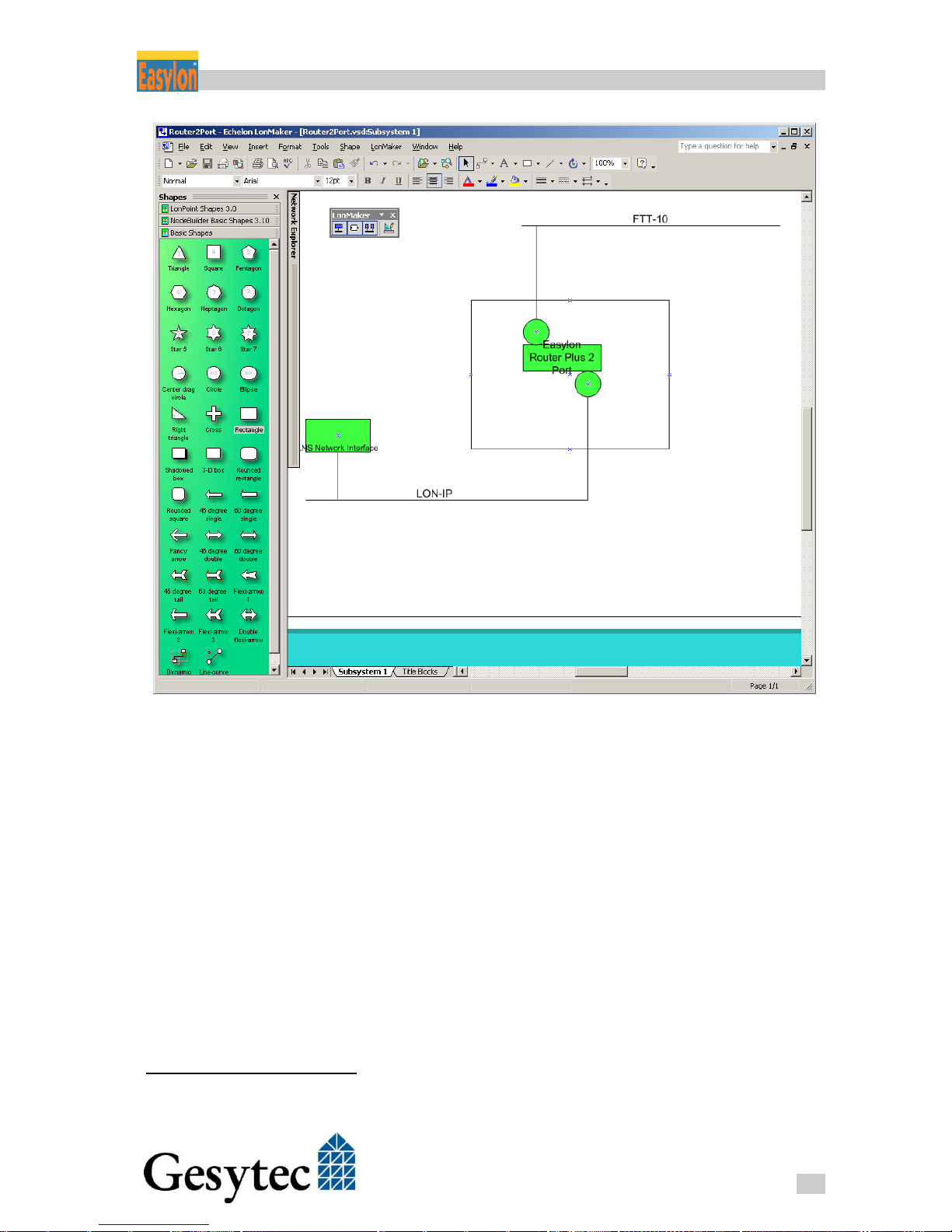
Now the shape created in LonMaker still has to be commissioned. This is realized by sending the service pin message.
On one hand you must be connected to the LONWORKS network in order to per-
form the commissioning in the LonMaker. On the other hand, to access the router’s Web Interface, an Ethernet connection to the Easylon Router+ is required.
First right-click on the router shape created in LonMaker. Select the command
Commission in the dialog, performing this process in the Service Pin mode. Sim-
ultaneously open the Web Interface of the Easylon Router+ in a web browser.
Select CATEGORIES > Service from the INFORMATION tab, where a button to
release the service pin message is available without the need to log in.
Figure 4-10: Triggering the Service Pin Message
Alternatively to activate the service pin via the Web Interface, you can also use
the “service“ button on the top side of the Easylon Router+ for commissioning if
the router is located nearby.
Page 35
Router+ Using the Router Functionality
31
LVR2/UserDoc/Router/2-PortRouter+_2P_Manual-EN-v1.1.docx
Figure 4-11: LonMaker Representation of Commissioned Router
You can check via the Web Interface of the Easylon Router+ if the installation is
OK. Go to the STATISTICS tab and select the CEA-709 in the CATEGORIES to
the left. If transmitted packets appear in the right column under Internal (refresh
browser window repeatedly14), the installations has been successful.
14
Auto Refresh in the QUICKINFO of the Easylon Router+ can be used here.
Page 36
Router+ Using the Router Functionality
32
LVR2/UserDoc/Router/2-PortRouter+_2P_Manual-EN-v1.1.docx
4.3 Configuring the LON/FT Interface
Using a network management tool as the LonMaker will set the router operation
mode. This setting can be modified here.
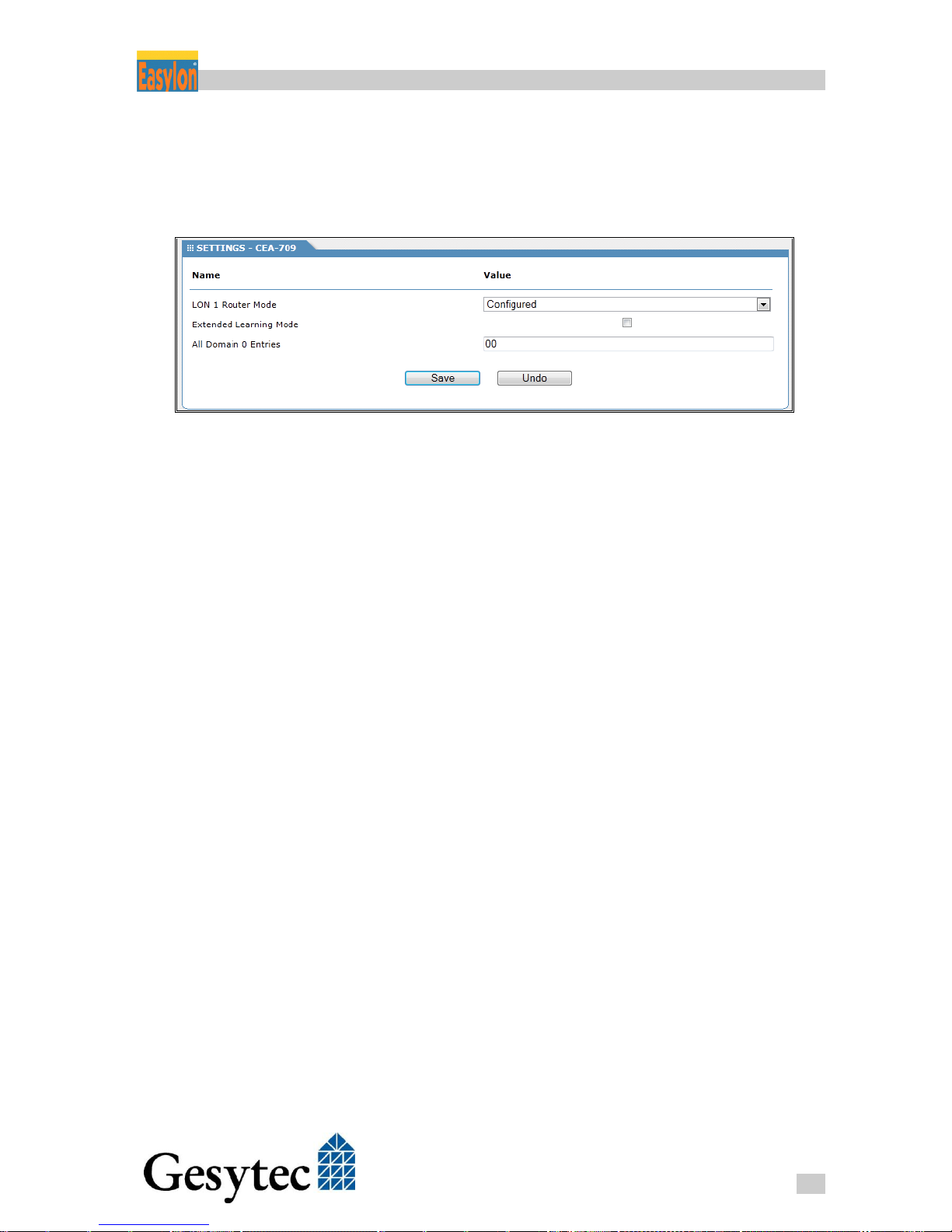
Figure 4-12: CEA-709 Settings
The Extended Learning Mode can be applied if the Router Mode is set to Learning. In addition to the subnet information the node information will then be used
for a more efficient routing. (default = OFF)
Page 37
Router+ Using the RNI Functionality
33
LVR2/UserDoc/Router/2-PortRouter+_2P_Manual-EN-v1.1.docx
Using the RNI Functionality 5
As already described in chapter 1.1 the Easylon Router+ provides a Remote Network Interface (RNI) for each of the channels (LON, LON/IP), used with MIP
and VNI meaning in total four simultaneously usable RNI. Thus different
LONWORKS tools (such as nodeutil via MIP or Easylon Analyzer via VNI) can
directly communicate via TCP/IP with one of the channels. The virtual interfaces
can directly be accessed via their IP ports.
Router
LON
LON IP
VNI
MIP
50001
50011
VNI
MIP
50000
50010
Figure 5-1: Assignment of Channels to the IP Port
Software Installation
1. First unpack the RNI drivers by double-clicking on the EXE file in the direc-
tory RNISetup on the enclosed data carrier;
2. Copy the unpacked drivers to c:\Easylon\Install\RniLonCl;
3. Launch the application FastInst.exe and follow the software directions to per-
form the installation. After successful installation an Easylon logo appears in
the task bar of the system tray.
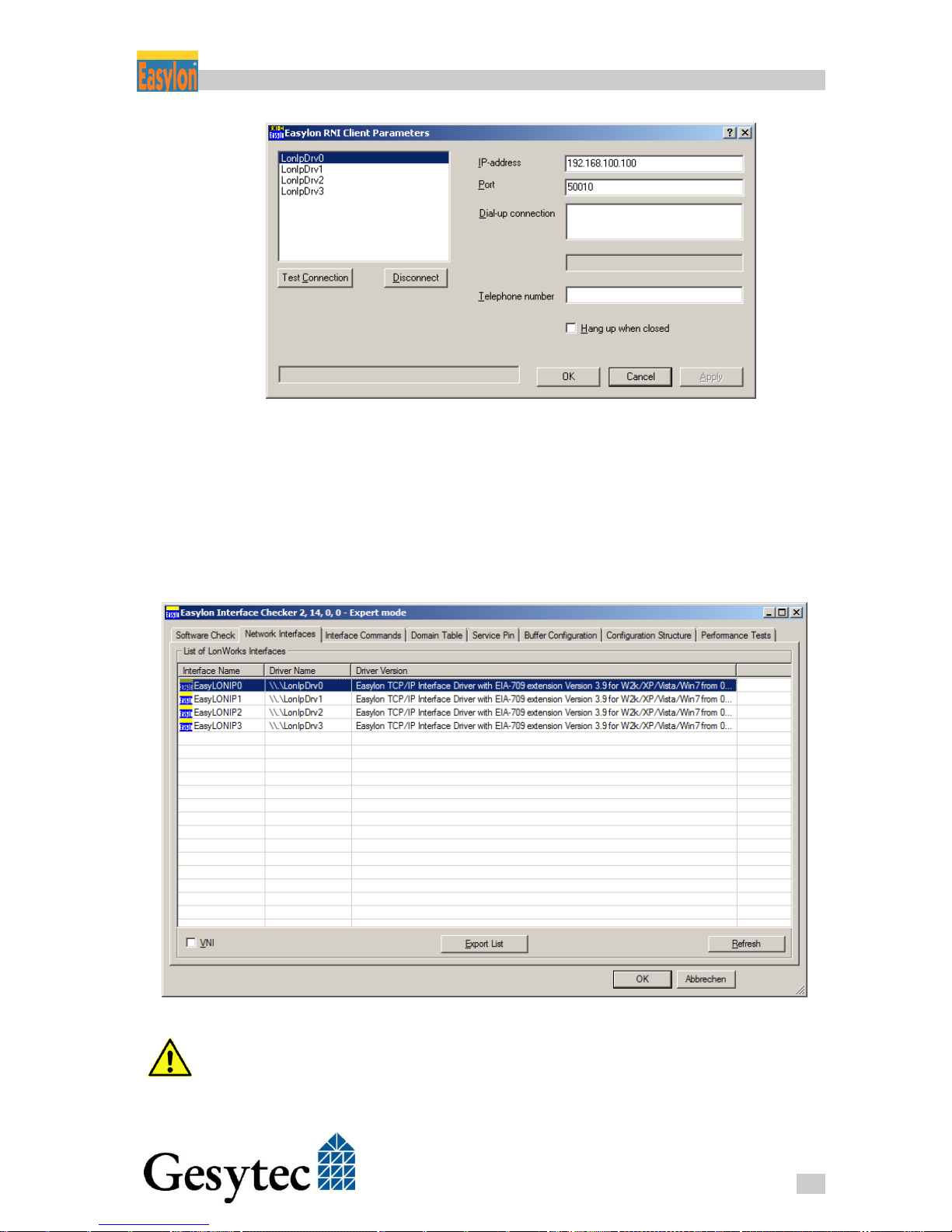
4. Right-click on the Easylon logo in the system tray. Select the entry Settings
from the context menu and enter the IP address of the Easylon Router+ and
the IP port of the router’s desired RNI (see Figure 5-1);
5. Click the button Test Connection to verify the connection.
Page 38
Router+ Using the RNI Functionality
34
LVR2/UserDoc/Router/2-PortRouter+_2P_Manual-EN-v1.1.docx
Figure 5-2: RNI Client Parameter
You can also use the Easylon Interface Checker (EasyCheck) to verify the correct functionality of the software installed. Launch the software via the entry
Easylon > LPX in the menu Windows Start. A survey of all interfaces found is
displayed. As the RNI drivers are provided in the system the same way as physically installed interface devices, the appropriate entries can easily be selected in
EasyCheck in order to perform further status queries and tests.
Figure 5-3: RNI Driver under EasyCheck
Assign valid values for domain, subnet and node ID to each RNI. All channels
connected to the router must be in the same Domain. The subnet ID must match
Page 39

Router+ Using the RNI Functionality
35
LVR2/UserDoc/Router/2-PortRouter+_2P_Manual-EN-v1.1.docx
with the connected channel of the interface. The combination of all three values
has to be unique over the entire network.
Further Information about RNI Functionality
Further details related to backgrounds and operation of a Remote Network Interface can be found in the appropriate manual included on the data carrier.
Page 40
Router+ Performing Service Procedures
36
LVR2/UserDoc/Router/2-PortRouter+_2P_Manual-EN-v1.1.docx
Performing Service Procedures 6
This section describes some routine operations that may be required while operating a router.
6.1 Restart Router
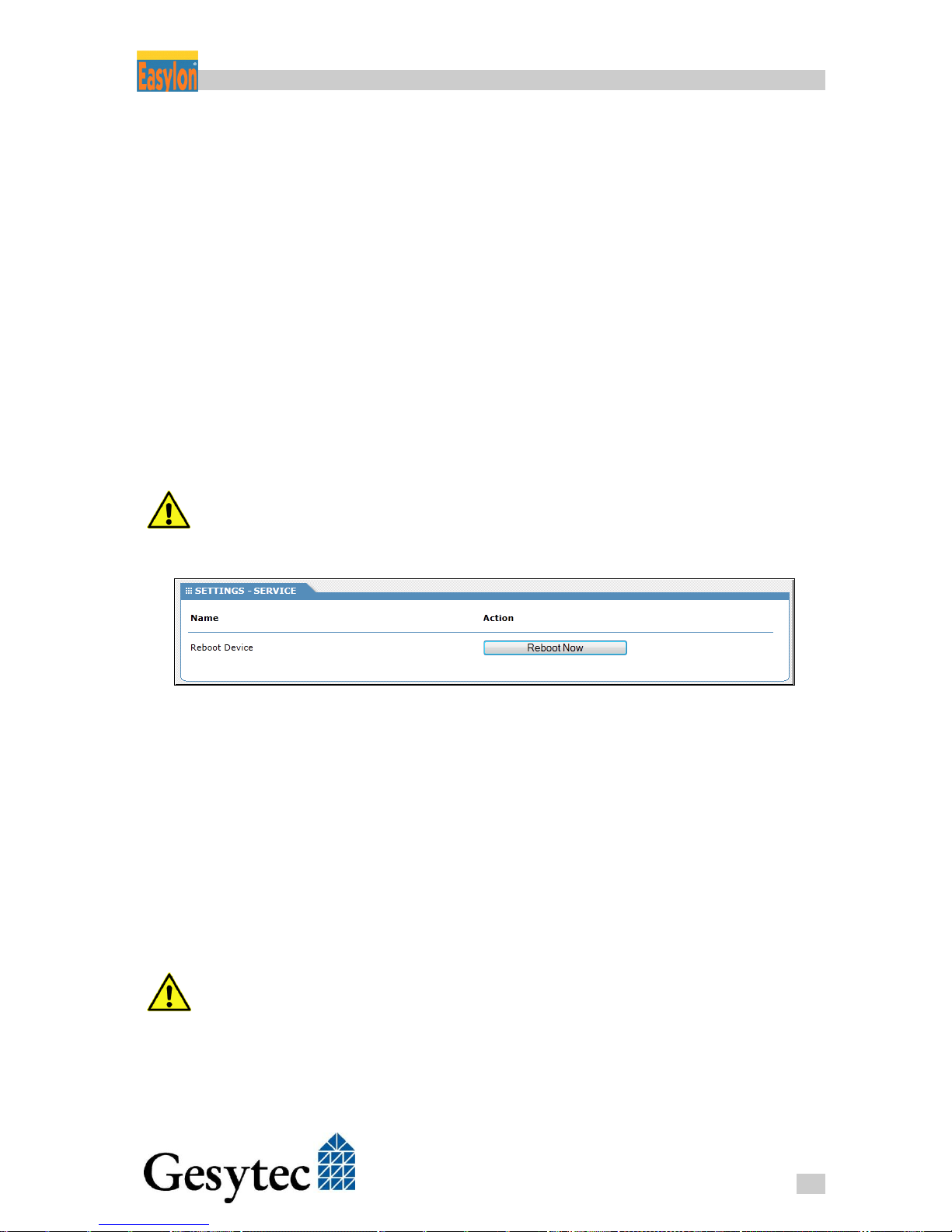
In order to restart the Easylon Router+, open its Web Interface by entering its IP
address in the web browser of a PC connected to the router. Go to the SETTINGS
tab, enter name and password of an authorized user, then select Service from the
CATEGORIES on the left side. After clicking on the button Reboot Device and
acknowledgement of a security query the router will restart. During the booting
process, the Status LED changes its color from green to red.
After modification of certain parameters and after deployment of a new firmware
the router has to be restarted to apply the modifications.
Figure 6-1: Restart Router
6.2 Save and Load Configuration
The most current settings of the router can be locally saved as .rcf file in order to
be uploaded into the device later again. This file contains the router specific configuration data in an XML format.
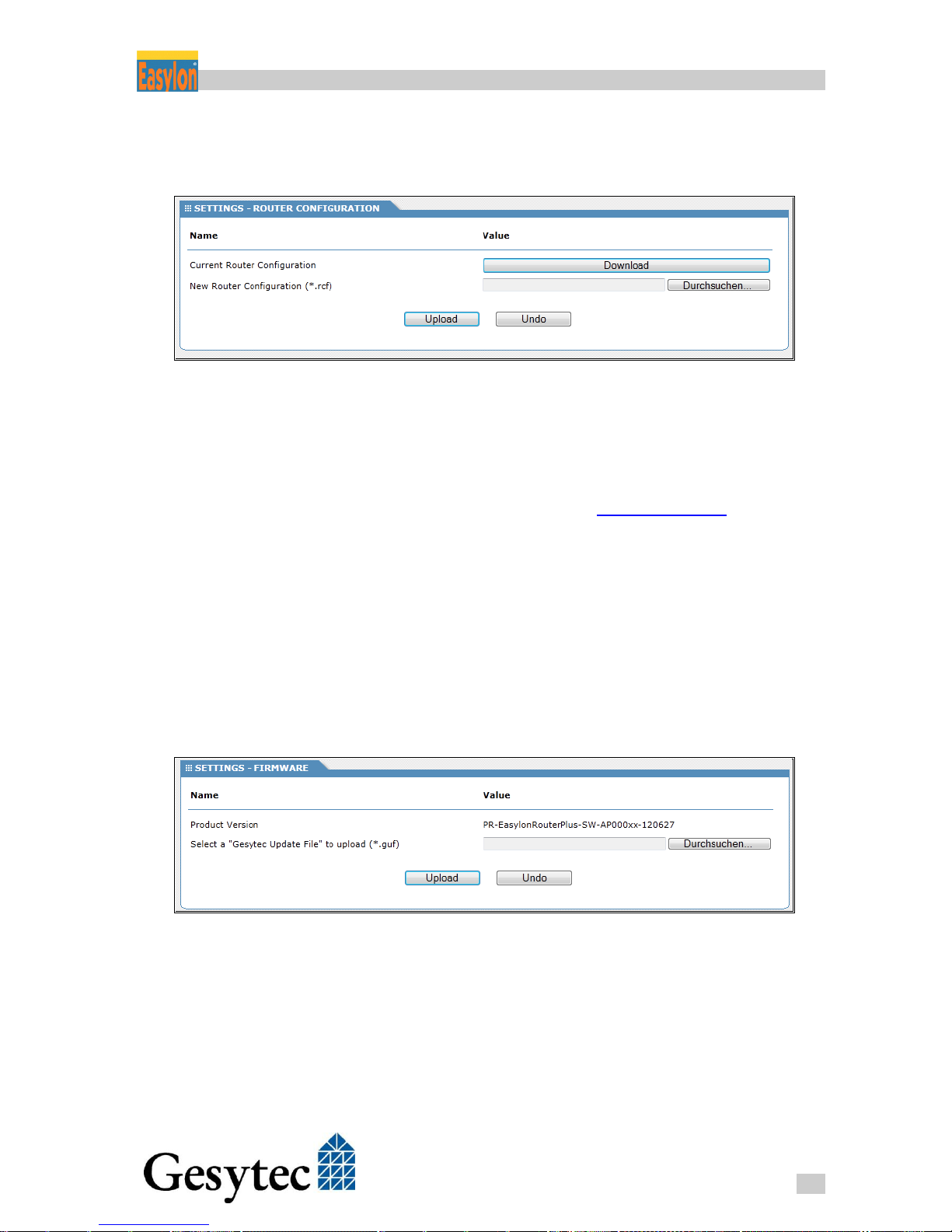
For this purpose go to the SETTINGS tab in the Web Interface and then in the
CATEGORIES to Router Configuration. Clicking the Download button next to
Current router configuration will save a .RCF file on the PC. Its file name is
composed from the Node ID f the Router and a time stamp.
NOTE:
Loading a manually edited configuration file may result in a malfunctioning
Router device.
In order to upload an existing router settings file to the router, click on the button
Browse… next to New Router Configuration (*.rcf) and then select the file from
Page 41
Router+ Performing Service Procedures
37
LVR2/UserDoc/Router/2-PortRouter+_2P_Manual-EN-v1.1.docx
your local storage medium. Launch the transmission procedure by clicking Up-
load.
Figure 6-2: Saving/Uploading Configuration
6.3 Firmware Update
Gesytec provides updates of the router’s firmware in form of specific GUF files
you can retrieve, for example, from the Web site www.gesytec.com.
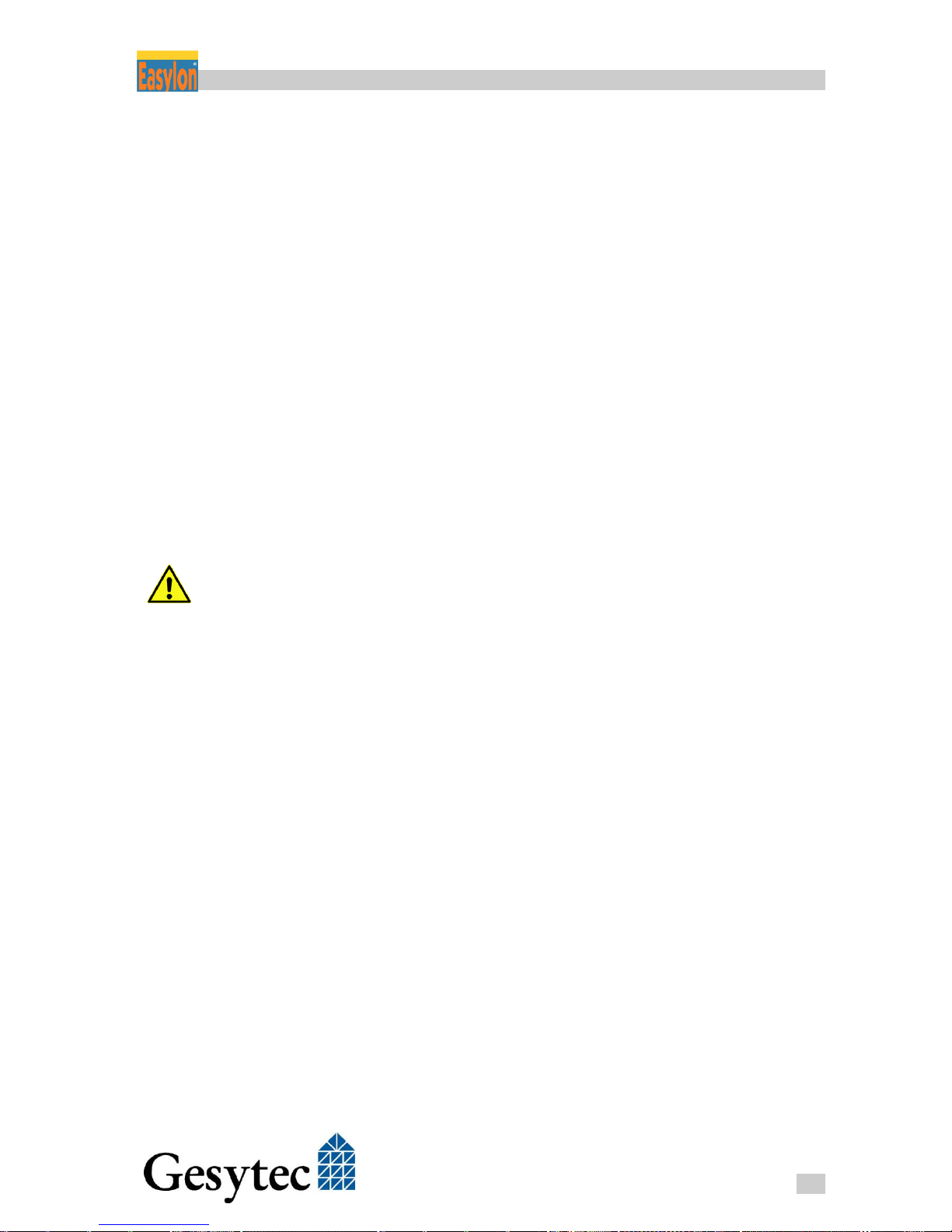
In order to deploy new firmware to the device, go to the SETTINGS tab in the
Web Interface and choose Firmware from the CATEGORIES to the left. The current firmware version is shown.
Next to Select a “Gesytec Update File” to upload (*.guf) click on Browse… and
select the desired file from your local storage medium. Upload and subsequent
firmware update are launched clicking the Upload button. During installation of
the new firmware the Status LED changes to red. After completion of the procedure the router must be restarted to apply the update.
Figure 6-3: Firmware Update
Page 42
Router+ Performing Service Procedures
38
LVR2/UserDoc/Router/2-PortRouter+_2P_Manual-EN-v1.1.docx
6.4 Reset Router to Factory Defaults
Proceed according to the following steps in order to reset the Easylon Router+ to
its factory settings:
1. Remove the power supply plug, wait half a minute.
2. Reconnect the power supply and immediately push the Factory Reset
button (see Figure 1-4, ) on the top side of the housing until the
Start/Reset LED starts to flash (will take approximately 10 seconds).
3. Release Factory Reset button and press it again for a second. It will then
flicker fast and even faster later. Finally it will be constantly on. The reset
process has started.
4. After about a minute the Start/Reset LED will turn off for a first time fol-
lowed by a short flash. Then it will turn on again for a minute. After it
has turned off a second time, the device is restarted and the factory reset
has finished.
The settings of the route rare now reset to the factory defaults.
Returning to factory defaults sets the IP-address back to 192.168.100.100.
Refer to chapter 2.3 “Connecting to the Web Interface” to re-establish communication with the device. Furthermore all defined users will be deleted and the
default user “Gesytec” will be reestablished.
Page 43

Router+ Solving Problems
39
LVR2/UserDoc/Router/2-PortRouter+_2P_Manual-EN-v1.1.docx
Solving Problems 7
This section deals with typical problem situations and provides suggestions for
remedy.
7.1 Web Interface of the Router does not Open
Symptoms
Browser signals a timeout while opening the site.
Possible Causes
Device is not switched-on.
No Ethernet connection established.
Problems with IP addresses.
Solution Suggestions
1. Verify if the router is connected to the power supply and if that is func-
tioning.
2. Does the Status LED glow green?
If the Status LED is not showing green latest 3 minutes after switchingon, please contact Gesytec service via [email protected].
3. Is the Status LED blinking red or red/green?
In that case there is a IP address problem. Perhaps there is an address
conflict with another device in the network using the same address. Perhaps, if DHCP is active, the router has not been assigned an IP address.
Ask the system administrator for a valid address.
4. Check the LEDs at the Ethernet connector of the Easylon Router+. The
green LED must be illuminated. The yellow LED indicates whether 10
MBit/s or 100 MBit/s have been recognized as speed.
Also verify on the PC if an Ethernet connection is established.
5. Using the DeviceFinder, verify if the Easylon Router+ is detected and has
its correct IP address.
While using DHCP in the router or on the PC it may occur that the devices are not located in the same subnet and therefore no connection can be
Page 44

Router+ Solving Problems
40
LVR2/UserDoc/Router/2-PortRouter+_2P_Manual-EN-v1.1.docx
established. Configure the IP settings the way to enable a communication
with the Easylon Router+.
6. You are just configuring multiple devices one after the another and reset-
ting the default IP address 192.168.100.100 of the Easylon Router+ to the
address desired in the installation?
In this case it may occur that PC still remembers the MAC address of the
previous device with the IP address 192.168.100.100. Thus a new device
cannot be addressed under 192.168.100.100, as the PC is expecting it under the old MAC address. Enter the command “arp -d” in the command
line and the PC will delete the obsolete assignment.
7.2 DeviceFinder Does not Work with Certain DSL Routers
Symptoms
DeviceFinder can’t find the Easylon Router+.
Cause
The procedure to search for devices is using UDP Broadcast messages. These are
not transmitted by the by certain DSL routers. A known device currently is the
AVM Fritz!Box.
Solution Suggestions
Unfortunately this problem cannot be solved. Please use another DSL router.
7.3 LON LEDs Don’t Flicker
Symptoms
The LON LEDs remain dark.
Possible Causes
Faulty connection at LON/FT channel
Faulty bus termination
Faulty configuration of the LON/IP interface
Solution Suggestions
1. First verify the wiring of the LON/FT interface, especially if the cable
shield has been grounded. Could it be that earth has been connected on a
wrong pin?
Page 45
Router+ Solving Problems
41
LVR2/UserDoc/Router/2-PortRouter+_2P_Manual-EN-v1.1.docx
2. Make sure that the terminator settings are correct.
Is there maybe already a terminator in the network? If so, switch-off the
termination at the Easylon Router+.
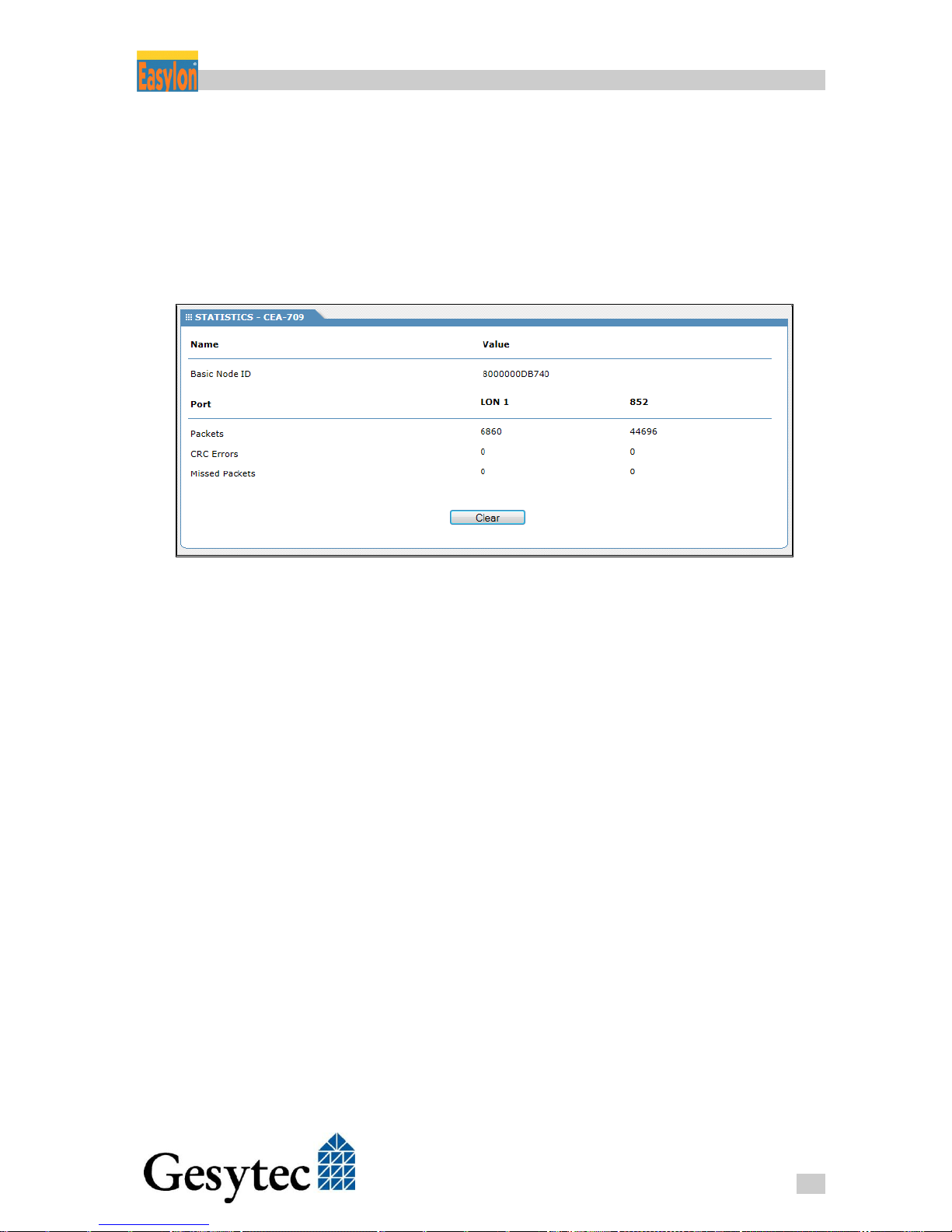
3. Check the data traffic of both LON interfaces by means of the statistics
function of the Web Interface. For this purpose select the STATISTICS
tab and CEA-709 from CATEGORIES .
Figure 7-1: Statistics of the LON Interface
You should see increasing values for Packets for LON. For this purpose you
have to refresh the page repeatedly. The value for CRC Errors has to be low,
otherwise there may be a wiring problem.
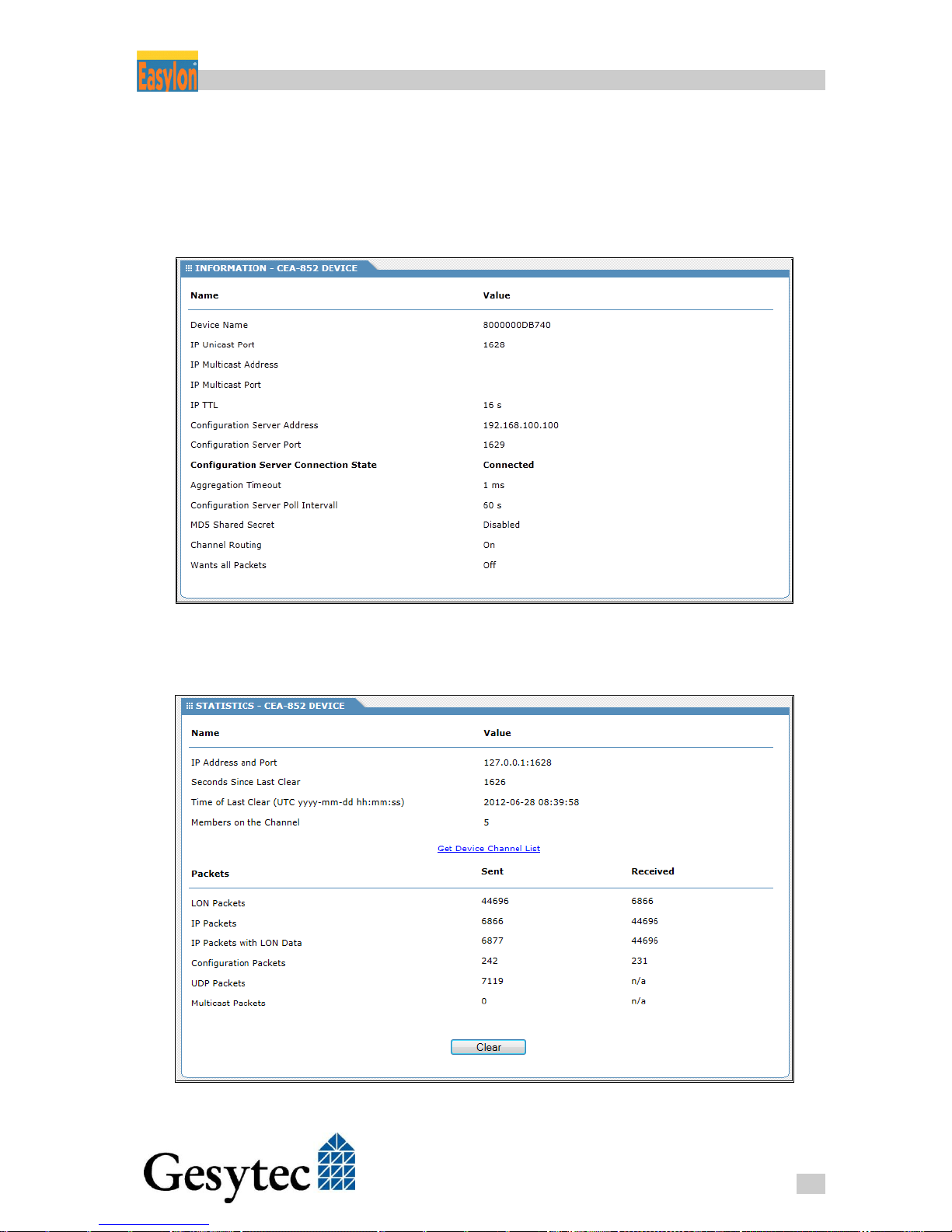
Should the Packets counter of the CEA-852 interface show 0, the LON/IP configuration is faulty. First verify if the Easylon Router+ is correctly registered at
the Configuration Server. Verify as well the counters for the individual packet
types in CATEGORIES > CEA-852.
Page 46
Router+ Solving Problems
42
LVR2/UserDoc/Router/2-PortRouter+_2P_Manual-EN-v1.1.docx
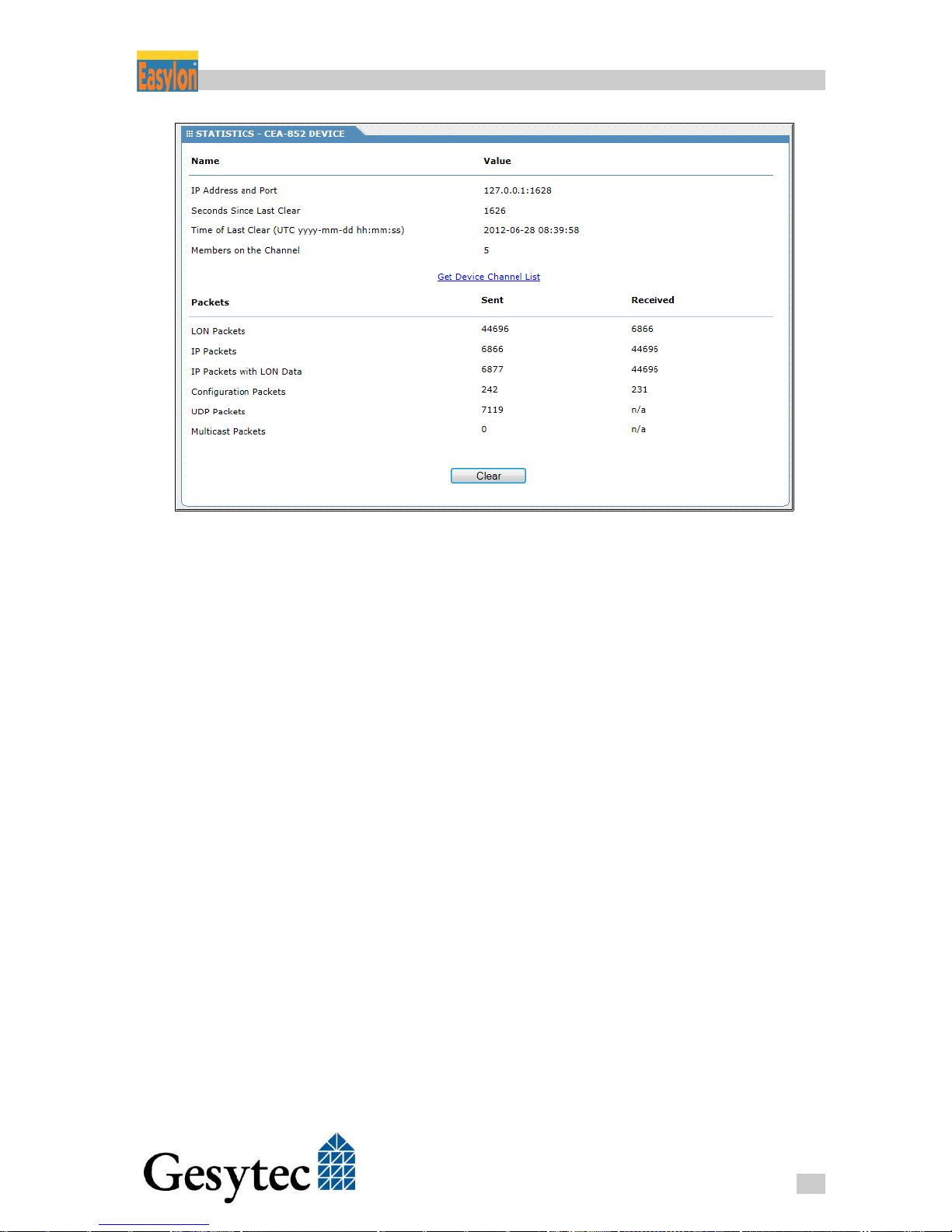
Figure 7-2: Statistics of the LON/IP Interface
It is important for the communication with the Configuration server that you see
values in the column Received. The values for UDP Packets and Multicast Pack-
ets indicate the values for the CEA-852 data traffic. Verify if the multicast address is configured identically on all devices.
7.4 Communication Problems at the LON/IP Channel
Symptoms
Data are not exchanged with all devices.
Possible Causes
No communication with the Configuration Server.
Not all devices are connected to the network.
Clocks are not synchronized.
Solution Options
Check the Channel List in the Configuration Server if it is complete and for devices showing status Red. Give these devices a more thorough inspection.
Check if the Status/Reset LED of the router is showing green. If the LED is off,
the router has not been registered by the Configuration Server. In that case check
Page 47
Router+ Solving Problems
43
LVR2/UserDoc/Router/2-PortRouter+_2P_Manual-EN-v1.1.docx
the IP address settings for the Configuration Server in the router and the settings
in the Configuration Server for consistency.
You can as well check the Configuration Server communication in the Web Interface. Have a look at INFORMATION > CEA-852 Device.
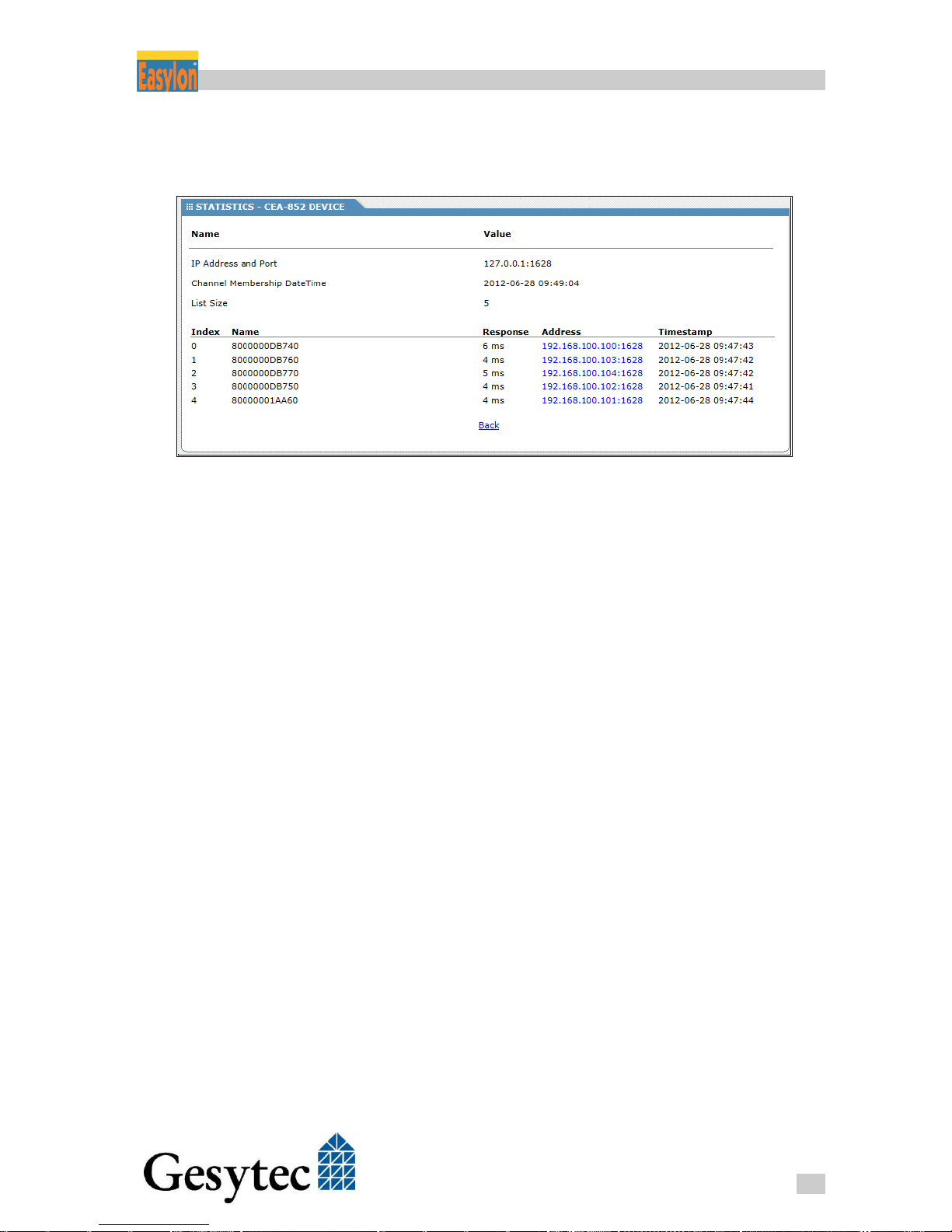
You can perform a communication test with the other devices at the LON/IP channel via the
STATISTICS tab of the Web Interface. For this purpose open CEA-852 Device from
CATEGORIES. Activate the link Get Channel List you can see on the right side (cf.
Page 48
Router+ Solving Problems
44
LVR2/UserDoc/Router/2-PortRouter+_2P_Manual-EN-v1.1.docx
Figure 7-2). The router now tries to exchange data with the known devices on the
LON/IP channel will display the response times.
Figure 7-3: Checking the LON/IP Channel
Make sure that all devices are included in the list and that data can be exchanged
with those devices.
Verify if the time settings are correct on the devices of the LON/IP channel. If
necessary, use an Easylon Router+ as NTP server.
7.5 Status and LON LEDs Momentarily Glow
Symptom
Short glowing of LON LED together with Status LED for approximately 1 s.
Possible Causes
Overload
Solution Suggestions
The LEDs display per channel that the router is overloaded. Lower the data rate
within the respective channel.
Page 49

Router+ Solving Problems
45
LVR2/UserDoc/Router/2-PortRouter+_2P_Manual-EN-v1.1.docx
7.6 No Routing
Symptom
Not data exchange in direction of a channel is performed.
Possible Causes
The router is not configured.
The router is “self-learning“ and has discovered a topology error.
Solution Suggestions
Use the LonMaker in order to verify the router. If necessary, re-commission the
router. In case of a topology error in the router state you can reset the router using the LonMaker.
7.7 The LonMaker Does not Receive the Service Pin Messages
Symptom
Service pin messages are not displayed in the LonMaker.
Possible Causes
Faulty LON/IP configuration
Solution Suggestions
First check the LON/IP parameterization as described above.
During commissioning of the router you have to make sure that you first commission the virtual router of three included in the Easylon Router+ that addresses
the LonMaker. Typically this is the router located at the LON/IP interface before
you may commission the other two.
Page 50
Router+ Annex
46
LVR2/UserDoc/Router/2-PortRouter+_2P_Manual-EN-v1.1.docx
Annex 8
8.1 Survey of Node IDs
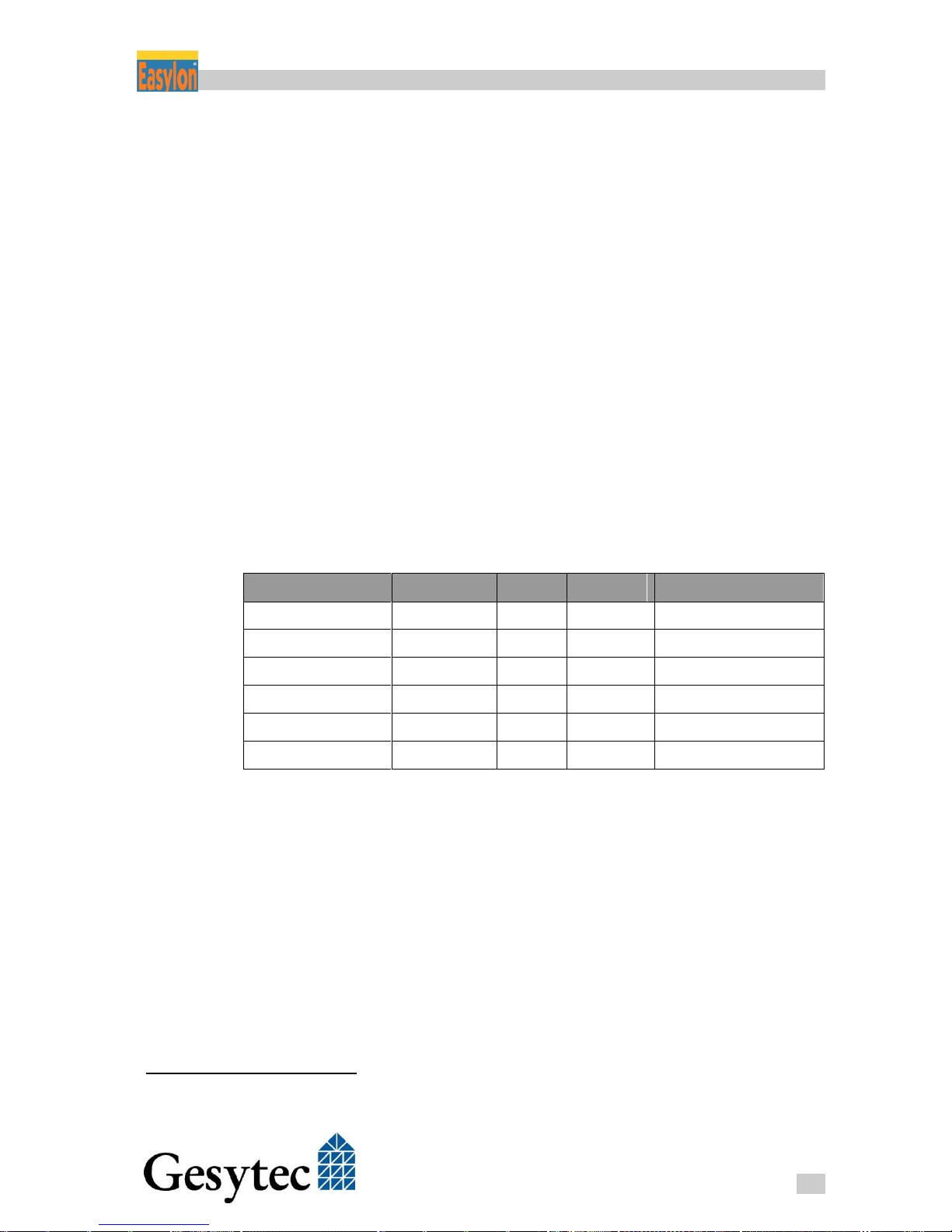
In total, the Easylon Router+ with two ports covers a range of 16 Node IDs15; 6
of them are assigned to the router and the Remote Network Interfaces. Each connection of the two interfaces can be identified by a discrete Node ID, realized by
adding a hexadecimal number to the basis Node ID of the router. The following
table gives the appropriate offset related to the individual connection options and
the modes of the Easylon Router+.
Example:
For a Basic Node ID of 80 00 00 01 AA 80 the extended Node ID 80 00
00 01 AA 8B describes the external connection of the LON interface in MIP
mode.
Router
Interface
Mode
IP Port
Offset Node ID
LON/IP (external)
+0
LON 1 (external)
+5
LON/IP
VNI
50000
+8
LON/IP
MIP
50010
+9
LON/FT
VNI
50001
+A
LON/FT
MIP
50011
+B
Table 8-1:Node IDs of the Router Connections
8.2 Technical Specifications
Power Supply
Voltage 24 V DC +/-20%
Power Consumption < 2.5 W
Connection Plug-in screw terminals
0.5 – 2.5mm², Phönix 5.1 mm
15
This number is due to compatibility reasons with other Easylon Router+ devices offering more ports.
Page 51

Router+ Annex
47
LVR2/UserDoc/Router/2-PortRouter+_2P_Manual-EN-v1.1.docx
Ambient Conditions
Temperature
Operation 0 – +55 °C, at free convection
Storage -20 – +70 °C
Humidity Class F (DIN 40 040), 5 – 93 % not condensing
EMC
Emission EN 55022 A/B
Sensitivity EN 61 000-6-2
Housing
Dimensions 157x58x86 [mm], 9 units acc. to DIN 43880
Mounting Top hat rail (EN 60715-35*7.5/35*15)
Material Lexan/Noryl
Color Gray/Black
Protection Class IP 20
Inflammability UL94-V0, self-extinguishing
Functions and Features
Real-time clock Gold Cap buffered, > 36 h
Watchdog
Voltage Monitoring
Temperature Sensor Display in Web Interface
Displays and Operation
LEDs - Status
- LON
- LON/IP
- Start / Reset
3 DIL switches bus termination & topology
Further Buttons - LON Service
- Factory Reset
Interfaces
LONWORKS 1 x FTT-10 transceiver
Connection 3-pin plug-in screw terminal 0.5 – 2.5 mm²,
Phönix 5.1 mm
Ethernet 10/100 MBit/s, acc. to CEA-852
Connection RJ45
Link signal LED on connector
Speed indicator LED 10/100 MBit/s on connector
Page 52
Router+ Annex
48
LVR2/UserDoc/Router/2-PortRouter+_2P_Manual-EN-v1.1.docx
8.3 Echelon Configuration Server
If there is already an i.LON Configuration Server (ILCS) from Echelon running
the following steps show you how to configure the Easylon Router+ to interact
successfully with an ILCS:
1. Make sure that the Configuration Server can be accessed by the Easylon
Router+ in the network.
2. Enter IP address and port (by default 1629) of the Configuration Server
in the router’s settings. The Easylon Router
+
should now sign-in with the
Configuration Server, where it initially will be administrated in the group
Orphans.
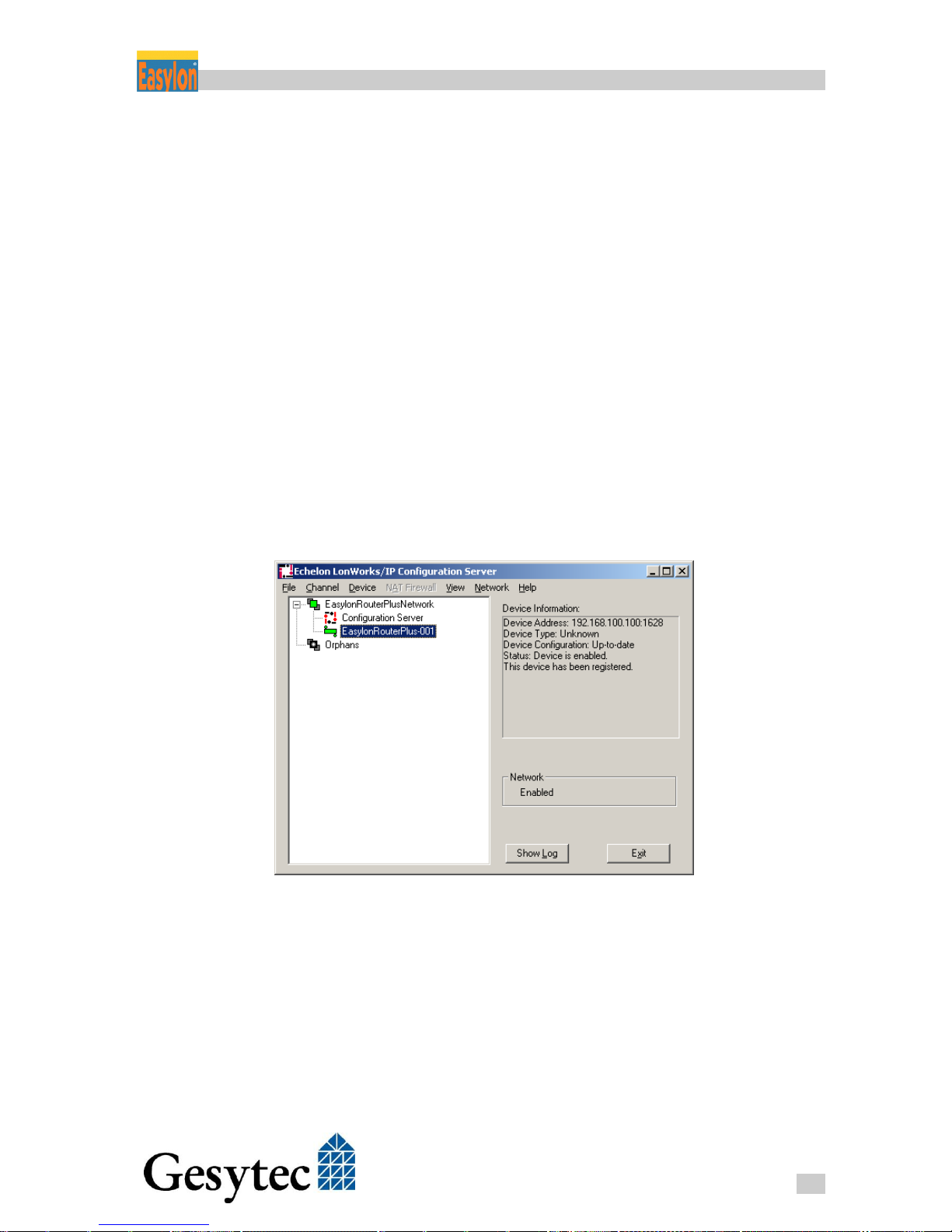
3. Open the configuration dialog of the Configuration Server, where the
known devices will be shown above the Orphans group. Drag the entry
for the Easylon Router+ to the desired channel in order to launch the au-
tomatic configuration of the LON/IP channel via the server. After successful assignment, the router icon should be appear in green.
Figure 8-1: Easylon Router+ in the Configuration Server
Page 53

Router+ Figures and Tables
49
LVR2/UserDoc/Router/2-PortRouter+_2P_Manual-EN-v1.1.docx
Figures and Tables 9
9.1 Figures
Figure 1-1: Easylon Router+ with 2 Ports ............................................................. 1
Figure 1-2: Router Logic ....................................................................................... 2
Figure 1-3: Assignment of the IP-Ports to the Router Channels ........................... 3
Figure 1-4: Control Elements and Connections ..................................................... 4
Figure 2-1: The Easylon Router+ Web Interface ................................................. 11
Figure 2-2: IP Settings ......................................................................................... 12
Figure 2-3: Time Settings .................................................................................... 13
Figure 2-4: Changing the Password ..................................................................... 14
Figure 3-1: Configuration Server Settings ........................................................... 15
Figure 3-2: CEA-882 Channel List ...................................................................... 17
Figure 4-1: CEA-852 Settings ............................................................................. 21
Figure 4-2: Statistical Data related to the LON/IP Interface ............................... 23
Figure 4-3: Creating a New LonMaker Project ................................................... 25
Figure 4-4: Creating a Channel for the LON/IP Interface ................................... 26
Figure 4-5: Channel for the LON/FT Interface.................................................... 26
Figure 4-6: The two Channels in LonMaker........................................................ 27
Figure 4-7: Creating the Router Shape ................................................................ 28
Figure 4-8: Completed Presentation of the Easylon Router+ in LonMaker ........ 29
Figure 4-9: Schematic and Real Router ............................................................... 29
Figure 4-10: Triggering the Service Pin Message ............................................... 30
Figure 4-11: LonMaker Representation of Commissioned Router ...................... 31
Figure 4-12: CEA-709 Settings ........................................................................... 32
Figure 5-1: Assignment of Channels to the IP Port ............................................. 33
Figure 5-2: RNI Client Parameter ........................................................................ 34
Figure 5-3: RNI Driver under EasyCheck ........................................................... 34
Figure 6-1: Restart Router ................................................................................... 36
Figure 6-2: Saving/Uploading Configuration ...................................................... 37
Page 54

Router+ Figures and Tables
50
LVR2/UserDoc/Router/2-PortRouter+_2P_Manual-EN-v1.1.docx
Figure 6-3: Firmware Update............................................................................... 37
Figure 7-1: Statistics of the LON Interface .......................................................... 41
Figure 7-2: Statistics of the LON/IP Interface ..................................................... 42
Figure 7-3: Checking the LON/IP Channel ......................................................... 44
Figure 8-1: Easylon Router+ in the Configuration Server ................................... 48
9.2 Tables
Table 8-1:Node IDs of the Router Connections .................................................. 46
Page 55

Router+ Index
51
LVR2/UserDoc/Router/2-PortRouter+_2P_Manual-EN-v1.1.docx
Index 10
.rcf 36
2 port router
set.up 25
Aggregation Timeout 23
Automatic Registration
15, 19
blacklist 19, 20
blacklisted device 18
bus load 19
bus termination 5
button
factory reset 5
service 5
CEA-709 4
CEA-709.1 7
CEA-709.3 1
CEA-852 1, 4, 7, 21
settings 17, 21
CEA-852 server
settings 15
Channel List 17
Channel Routing 24
Channel Timeout 16, 19
commissioning 30
configuration
router 21
Configuration Server 5, 22
settings 15
tips 19
device name 21
DeviceFinder 8, 9, 40
DHCP 9, 11, 12
DIL switches 5
disable 19, 20
disabled device 18
DNS 11
domain 34
dynamic device 18
EasyCheck 34
Extended Learning Mode
32
factory reset 5, 38
firewall 8
firmware 37
gateway 11
Global Cycle Time 16
GUF file 37
installation
software 8
interface
LON 7
LON/IP 21
IP address 6, 11
dynamic 12
IP TTL 22
LED 4, 37, 40
LON/FT 4, 7
LON/IP 4, 7
LonMaker 25
MD5 shared secret 16
MD5 Shared Secret 24
MIP 2, 33, 46
Multicast 16, 19, 22
Neuron IDs 46
node ID 34
NTP 12
client 12
server 12
Server 16
orphan device 18
password 11, 14
power supply 4, 6, 7, 46
protective earth 7
real-time clock 13
Remote Network Interface
2, 33
RNI 2, 8, 33
installation 33
router
configuration 21
configuration file 36
restart 36
router shapes 28, 30
service pin 30, 45
shield 7
start / reset 5, 38
static device 18
statistics 41
status 4
subnet mask 11
Subnet/Node Routing 32
technical specifications 46
temperature 47
time settings 12
topology
free/bus 5
transceiver 47
TTL 11
Unicast 16, 22
update
firmware 37
user 11, 14
VNI 1, 2, 33
Wants All Packets 24
Web Interface 8, 11
 Loading...