

Page 1
Electricity & Gas
You can see more about your energy consumption (both
electrici ty and gas) by selecting an o ption from the
Menu.
Day
Your hourly energ y use for today. You can see this in terms
of energy (k Wh) or cost (£) - select the w button to chan ge
between
kWh or £.
The row shown in LIGHT GREEN is the hou r during which most
energy was cons umed. The total is to the right.
Week, Month and Year
A visual represent ation of energy use over the pa st nine days,
six weeks or 14 months , with the period of highes t energy
consumption highlighted.
If a budget has been set (s ee
Settings > Budget), then
performance a gainst a budget is shown. The areas sh aded in
RED show where over-budget ene rgy has been used.
Technical specications
This product i s designed to be used indoors in a dome stic
environment. It i s not suitable for outdoor use. It i s intended
to be installed and con gured by a qualied installer only.
Supply voltage 240Va c, 50Hz
Operating voltage 5Vdc
Operating power < 0.6W
Operating temperature 0 to 40ºC
Operating humidity 0 to 85% non-condensing
Further information
More detailed information on the Trio II is available online at
http://ww w.geotogether.com/trio2
Safety notice
Please be aware of thes e simple safety precautio ns
when using this produc t. Safe operation of your Trio II
may be hindered if use d in a way that is not specied by
the manufac turer.
Keep the Trio II away from water and other liquids.
Disconnect from mains power supply before cleaning
(with a soft, dry cloth only). Please contact your
supplier if any compo nents appear damaged or fault y.
Your Trio II is designed to be used in an indoor,
domestic environment only.
To protect the environmen t, this product and its
batteries mus t be disposed of safely.
This product is C E approved.
This product com plies with RoHS regulations.
Manufacturer
Designed and manu factured by:
Green Energy Op tions Ltd.
3 St. Mary ’s Court, Main Street, Hard wick, Cambridge
CB23 7QS, UK
Hereby, Green Energy O ptions Ltd. (UK) declares tha t the
radio equipment enc losed (identied by the produ ct type
numbers on the produ ct label) are in compliance with
Directive 2014/53/EU.
The full text of t he EU declaration of conformit y is available
online at www.geotogether.com/cedoc
TR2L-A-QRG-001_3
Troubleshooting
My monitor isn’t showing any information
If your monitor shows Waiting for data, this could be
because your mon itor is out of range and is not able to
communicate wit h the smart meter. Try moving your monitor
closer to the smar t meter.
If problems persist, please contact your supplier.
My display is making a noise
The display has a buil t in speaker which is used to notif y you
of alerts , messages and can also provid e feedback when you
interact wit h the display. You can adjust the volume, and tu rn
o/on the dierent sounds via th e Settings page.
System Status shows a cloud error
The cloud ser vice is only available if you r Trio II has the
optional Wi-F i module tted.
When the
System St atus screen shows the cloud symbol
(p) in red or amber, then this means one of t he following:
• Your cloud account has not bee n congured.
• The monitor is unable to access the cloud service - check
your home broadband connection.
• The cloud se rvice is temporarily oine.
My monitor is blank or has switched itself o
The monitor back light may have turned itself o to save pow er,
press one of the touch bu ttons to switch it back on . This setting
can be changed under Set tings.
If you are using bat teries to power the monitor, the batteri es
may have gone at. The bat tery icon (o) will be shown when
operating on bat tery power. The running time is four ho urs.
Reconnect to the m ains adaptor or replace the batteri es.
We recommend that the monitor is powered continuously
using the power suppl y provided.
Trio II Touch Button
Quick Start Guide
TR2L-A-QRG-001_3.indd 1 30/05/2017 11:54
Page 2
Now
Electricity Gas
2.63 kW 1.36 m
3
Toda y
Home
Prepay
14:37
Use arrow button s
to move between
Now, Toda y
and Prepay (if
applicable) tabs.
Introduction
The Trio II shows energy use for e lectricity and ga s smart
meters and will have been con gured to work with the meters
you have installed, which may be electricity, gas or both.
Please read the important safety notice overleaf before
using your monitor.
Setting up
Connecting the power supply
Connect the pow er supply to your Trio II. Your monitor
will turn on automat ically when you plug it into the m ains.
You should always leave your monitor connected to the
power supply.
You can congure the screen on the moni tor to dim or switch
o at certain times of th e day. (See
Settings > Display)
The power suppl y has been made exclusively for t he Trio II
monitor and must n ot be used with other devices .
Using batteries
Your monitor can optional ly be used with 3 x AA A (LR03)
non-rechargeable batteries.
Remove the back cove r and insert the batteri es, as marked
on the inside case. Reattach the back cover and the monitor
will show the bat tery symbol (o) at the top of the screen.
It’s adv isable to power the monitor wit h the supplied power
supply and to not use b atteries for a prolonged perio d.
Smart meter connection
Each time the moni tor is turned on it will show Connec ting
to smart meter... while establishing a connection. This can
take up to ve minutes.
It may take up to one hour af ter the initial setup for the g as
consumption to show on the screen.
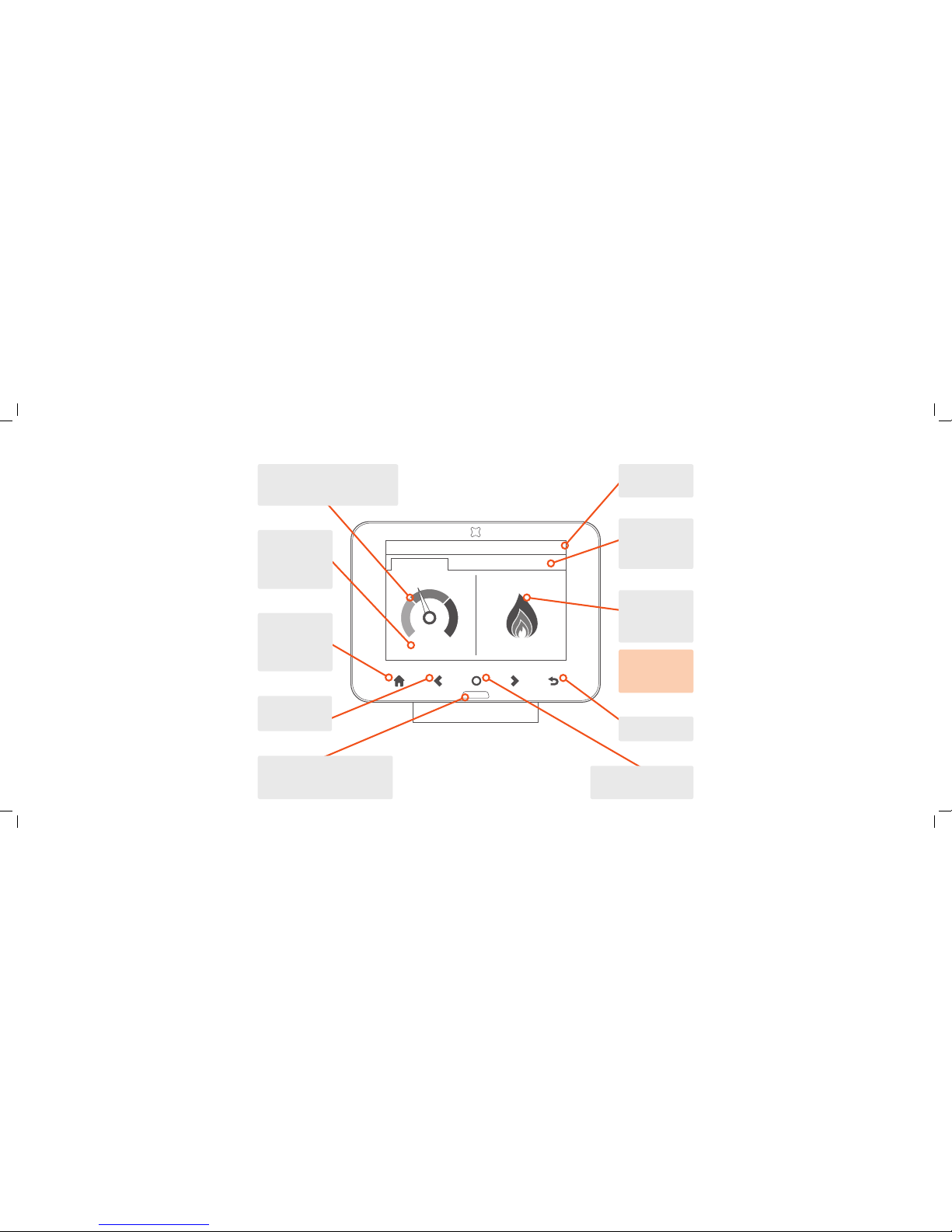
Overview of the monitor and the Home screen
The LED at the bot tom of the monitor
shows your elec tricity usage (GREEN
for low, AMBER for medium o r RED for
high) or BLUE for gas-onl y setups.
The title of the
screen shown and
the current time.
The ame shows
the recent rate of
gas consumption
(typically over the
last 30 minutes).
Press to switch be tween
cost or energy consumption
whilst on Home screen.
The left of th e screen shows the current
rate of electricity consumption. As
appliances and light s are switched on
and o, the dial needle will move.
If you only have a
gas smart meter,
then the electricity
dial is not shown.
The rate of
consumption is
shown in cost per
hour or, if kW is
selected, th e rate of
energy being used.
Press to enter
Menu whilst on
Home screen.
Press to return
to
Home.
Press to return to
previous screen.
Use the
b c
buttons to nav igate
around the screen.
Menu
The main menu is onl y available from the Home screen. To
select it , touch the t button at the botto m of the screen.
Electricity/Gas usage
Detailed information on the electricity consumption for the
day, week, month and year.
System status
Quick indicator of w hether the system is wor king OK (GREEN)
or if there is someth ing that needs attention (A MBER or RED).
Meter balance
Information on th e cost of used energy (credit meter) o r
balance available (pre-payment meter).
Prepay (prepay customers only)
Top up your current balance, ac tivate emergency credit a nd
view your top- up history.
Tar iffs
Displays the cur rent and next electric ity and gas prices.
Debt (prepay customers only)
Outsta nding debt with your utilit y provider will be outlined
with a breakdown of t he charges and recovery rate.
Inbox
View message s received from your utilit y provider(s). New
messages will be s hown on the
Inbox screen automatically.
Meters
Information on your electricity or gas meter and the current
meter readings.
Support
Contact det ails for your utility provi der(s), (may include a
telephone number and email address).
Settings
Personalise your Trio II within th e Settings screen.
TR2L-A-QRG-001_3.indd 2 30/05/2017 11:54
 Loading...