

Page 1

Code: 263080
Operating
Instructions
Ref:.. \operat98\instructions 18\263080.qxp 05-01-18
©York Survey Supply Centre 2018
Prospect House
George Cayley Drive
Clifton Moor
York
England
YO30 4XE
Tel: +44 (0) 1904 692723
Fax: +44 (0) 1904 690385
E-Mail: [email protected]
...for secure online ordering of all our products!
Nothing else measures up!
Multi-Digit Pro +
Page 2
©York Survey Supply Centre 2018Ref:.. \operat98\instructions 18\263080.qxp 05-01-18
O
perator’s Manual: Multi-Digit Pro +
Supplied with: Multi-Digit Pro, 3 x AA batteries, padded bag
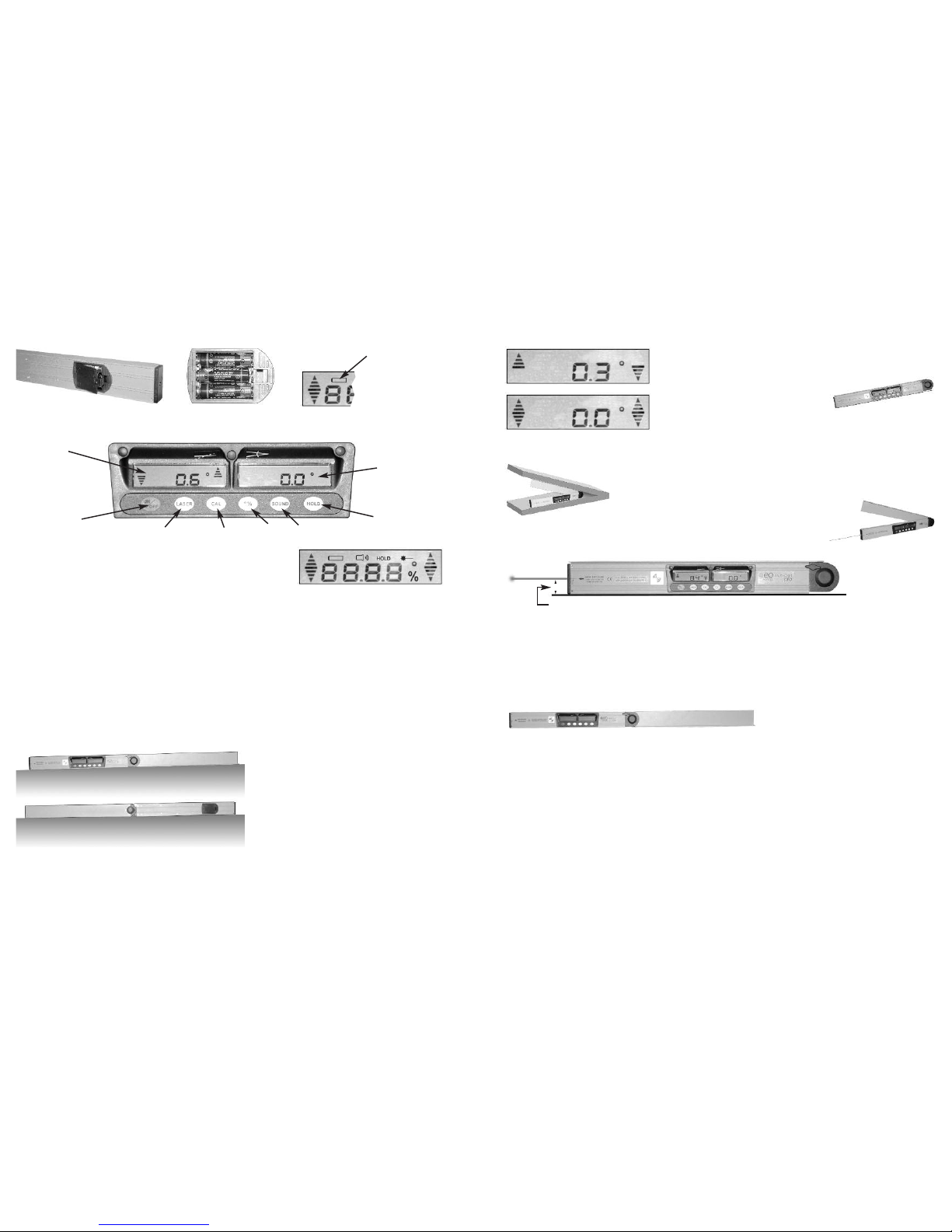
Batteries: Open the battery compartment cover and put in the batteries (take care of correct polarity).
D
isplay and keypad:
ON/OFF Switch on/off Multi-Digit Pro
LASER Switch on/off laser beam
CAL Calibrate the unit (see instructions below)
º/% Set reading of inclination to degrees (º) or percent (%)
SOUND Switch on/off signal tone - (0º position of inclination confirmed by a signal tone)
HOLD Current readings of inclination and angle will be frozen by pressing HOLD (figures are flashing).
By pressing HOLD again - figures will be released.
IMPORTANT - CALIBRATION OF INCLINOMETER!
• Calibrate before first use
• Before important measurements
• After a hit or a drop
• After a big fluctuation in temperature
Checking of calibration:
Unfold arm to 180º and lock it in this position.
Lay down unit to a flat surface (position A) and switch on.
Wait 10 sec. and note measured value of inclination (left display).
Turn unit by 180º to position B. Wait 10.sec and note measured value.
If deviation between the two values is more than 0.2º Multi-Digit Pro has to be calibrated.
How to calibrate:
Unfold arm to 180º and lock it in position.
Lay down unit to a flat surface (position A) and switch on.
a) Wait 10 sec. - press CAL (Display shows “0”) and wait further 10 sec.
b) Press CAL (Display shows “1”) - turn unit by 180º to position B (lay on same position as in A).
c) Wait 10 sec. - press again CAL.
=> Calibration process completed.
M
easurement of inclination:
S
witch on Multi-Digit Pro.
Measured inclination value is shown in left display. Standard unit of measurement is degrees (º) - can be changed to
percent (%) by pressing button “º/%”.
Lay unit on surface with blank bottom side only.
The two arrows shown in the display indicate which direction Multi-Digit Pro has
to be moved in order to reach 0º or 90º position.
0
º - 45.0º = Leading to 0º position.
45.1º - 90º = Leading to 90º position.
The exact 0º position is shown by double arrows.
D
isplay has automatic digit inversion for overhead measurements.
Reading of measured values is possible in every position.
Angle measurement:
Measured angle value is shown in the right display
(measuring range 0-180º).
Laser beam:
By switching on the laser beam Multi-Digit Pro can be used
as a laser spirit level too.
The working range extends to 20m.
The height of the laser from the base is 30.5mm.
Take special care: Do not stare into laser beam - do not aim laser beam at people.
Connection to camera tripod:
With ¼” thread (at bottom side) Multi-Digit Pro can be connected to a camera tripod.
Locking of arm:
The foldable arm can be locked in any desired position.
For example at an angle of 90º to transfer right angles.
Or at an angle of 180º to extend the unit to 1m (see diagram):
Technical Data
Working range angle: 0º ~ 180º
Resolution: 0.1º
Accuracy angle: ±0.1º
Working range inclination: 0º - 90º or 0% - 100%
Resolution: 0.1º or 0.1%
Accuracy inclination: 0.2º
Working range of laser: up to 20m*
Accuracy laser: ±0.5mm/m
Laser wavelength: 650nm
Laser class:2
Power supply/Operating time: 3 x 1.2v AA/48h
Length: 530mm (1000mm)
Weight: 1.3kg
*Depending on room illumination.
Important Battery symbol
flashes when
batteries need
to be replaced
Reading of
inclination
ON/OFF
ON/OFF
laser beam
Calibrate
Set degree
or percent
ON/OFF
tone
HOLD
function
Reading of
angle
Position A
Position B
a
a = 30.5mm
 Loading...