

Page 1
Technical Support: (219) 929-4127
Venture-6 User’s Guide 3
How to Use V enture-6
Power Source
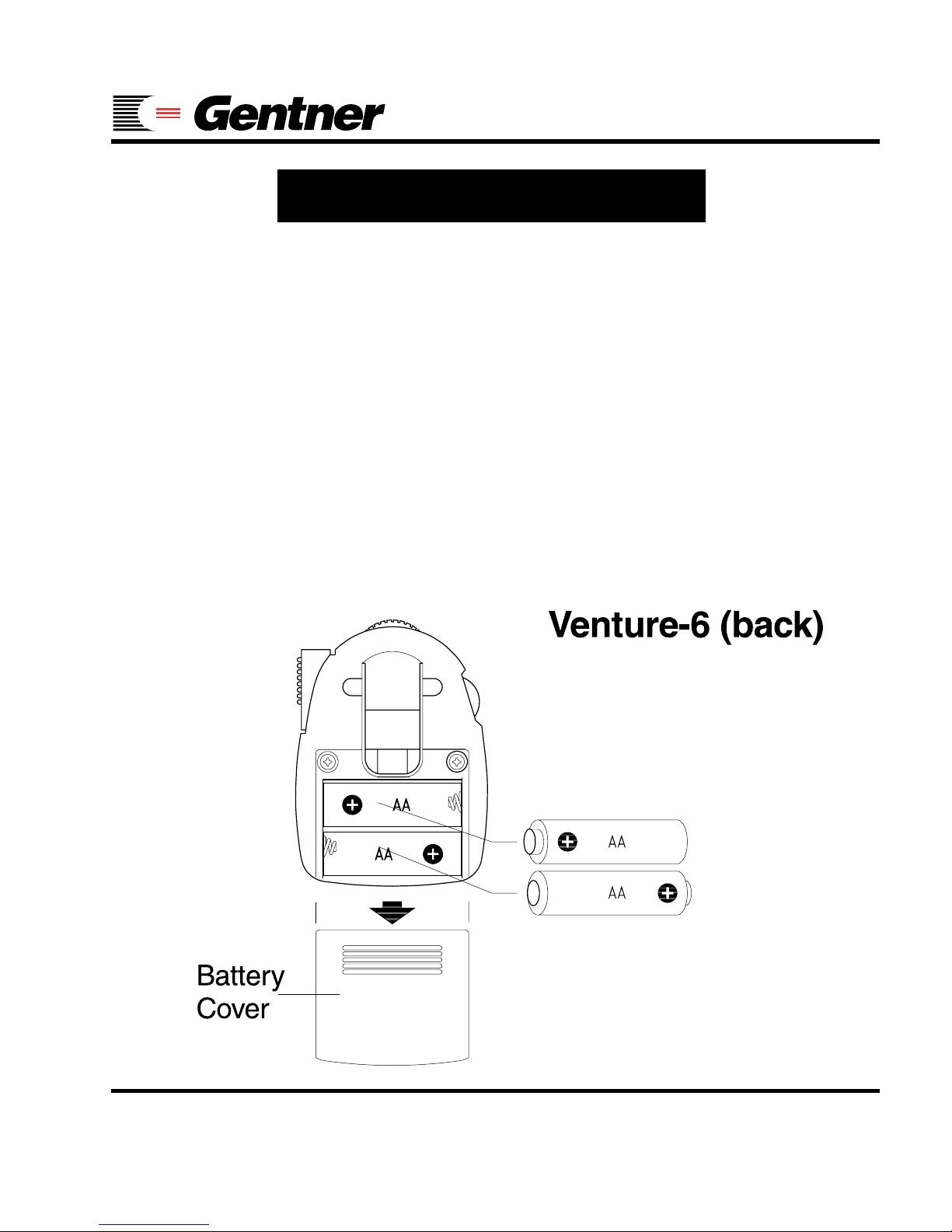
The V enture-6 receiver operates on two AA-size
batteries (alkaline or rechargeable Ni-Cad). To
install the batteries, place your thumbs on either side of the pocket clip and slide the battery
cover off. Note the polarity markings and insert
the batteries as shown.
Page 2
Technical Support: (219) 929-4127
4 Venture-6 User’s Guide
How to Use Venture-6
Operating Instructions:
o Step 1
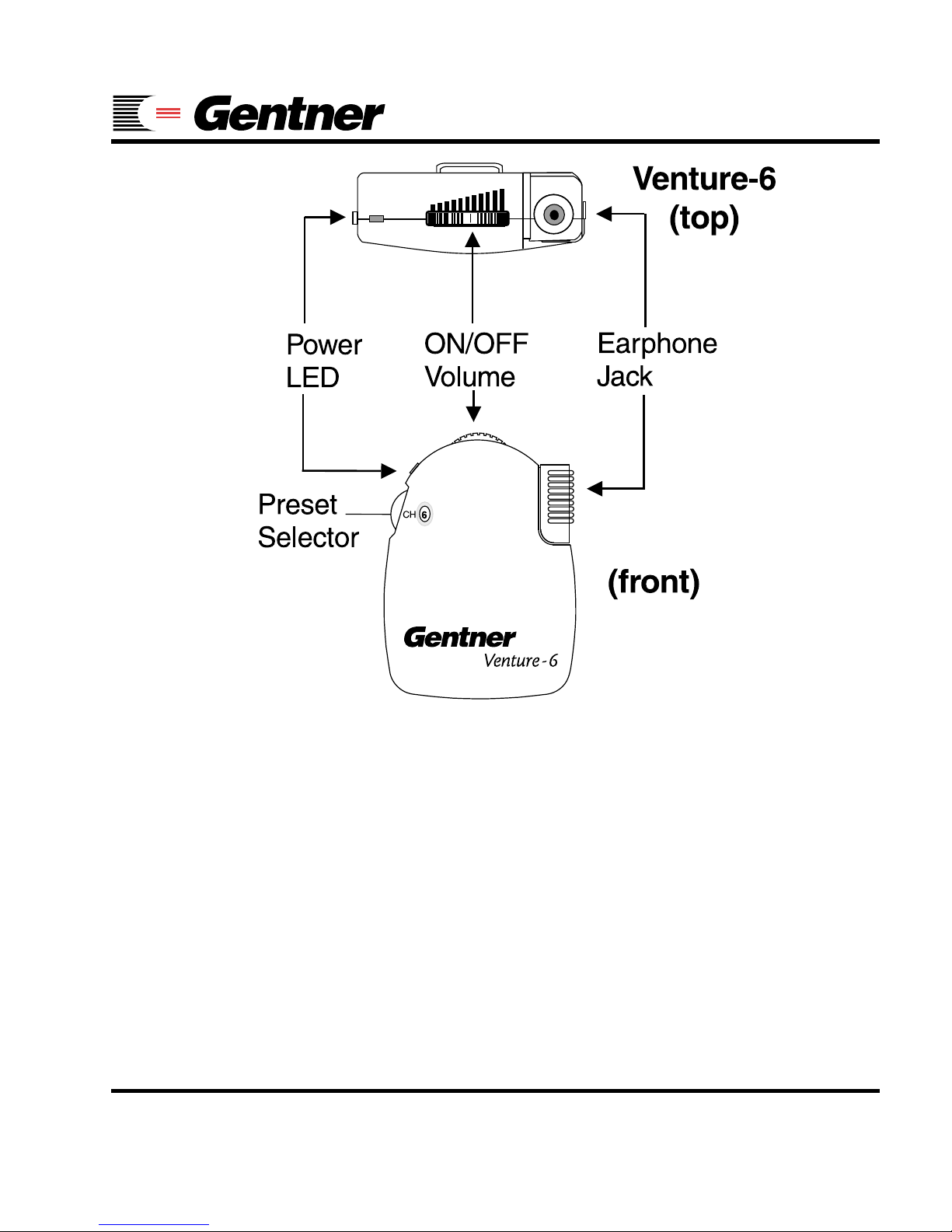
Plug the earphone into the earphone jack.
The earphone cable also acts as the receiver
antenna. Extend the cable fully for the best
reception and least interference.
q Step 2
Turn on the receiver by rotating the volume wheel.
The red power LED will light up. This indicates
that the receiver is ON and the batteries are
properly charged.
q Step 3
Adjust the volume to the desired listening level.
WARNING!
To avoid harm to ears, keep all receivers
OFF until the transmitter is operating at
full power . Keep volume setting at low to
mid-range at all times.
Page 3
Technical Support: (219) 929-4127
Venture-6 User’s Guide 5
P Note:
Be sure to turn off the receiver when it is not in
use. This will help preserve the battery charge.
A white line will appear centered at the top of
the thumb wheel when in the OFF position.
q Step 4
To change presets, turn the preset selector
wheel. The current preset will appear in the round
window on the front of the receiver.
Page 4

Technical Support: (219) 929-4127
6 Venture-6 User’s Guide
Tuning
Changing Preset Selection:
The Venture-6’s six presets come factory set to
frequencies across the Assistive Listening Band
selected for best overall performance:
Preset Factory Setting Frequency
1 Channel 01 216.025
2 Channel 04 216.175
3 Channel 07 216.325
4 Channel 10 216.525
5 Channel 13 216.675
6 Channel 17 216.875
You may change the presets by following the
step-by-step instructions on the next three pages.
See page 10 for frequencies corresponding to
other channels. The Venture-6 receiver is digitally tuned. Once a channel is selected, no further adjustments are necessary.
Page 5
Technical Support: (219) 929-4127
Venture-6 User’s Guide 7
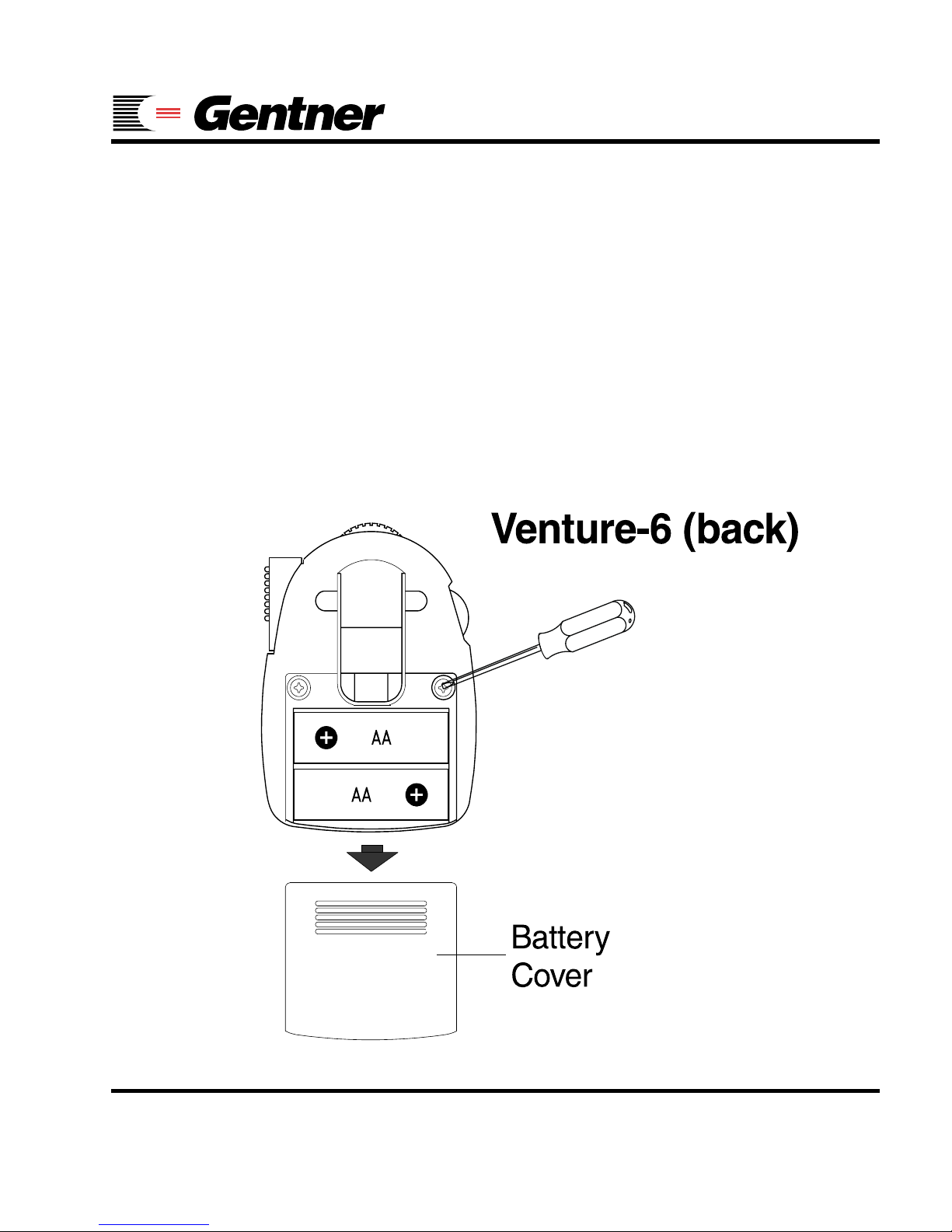
q Step 1
Remove the battery cover from the back of the
receiver.
q Step 2
Remove the two Phillips case screws and remove the back panel.
Page 6
Technical Support: (219) 929-4127
8 Venture-6 User’s Guide
Tuning
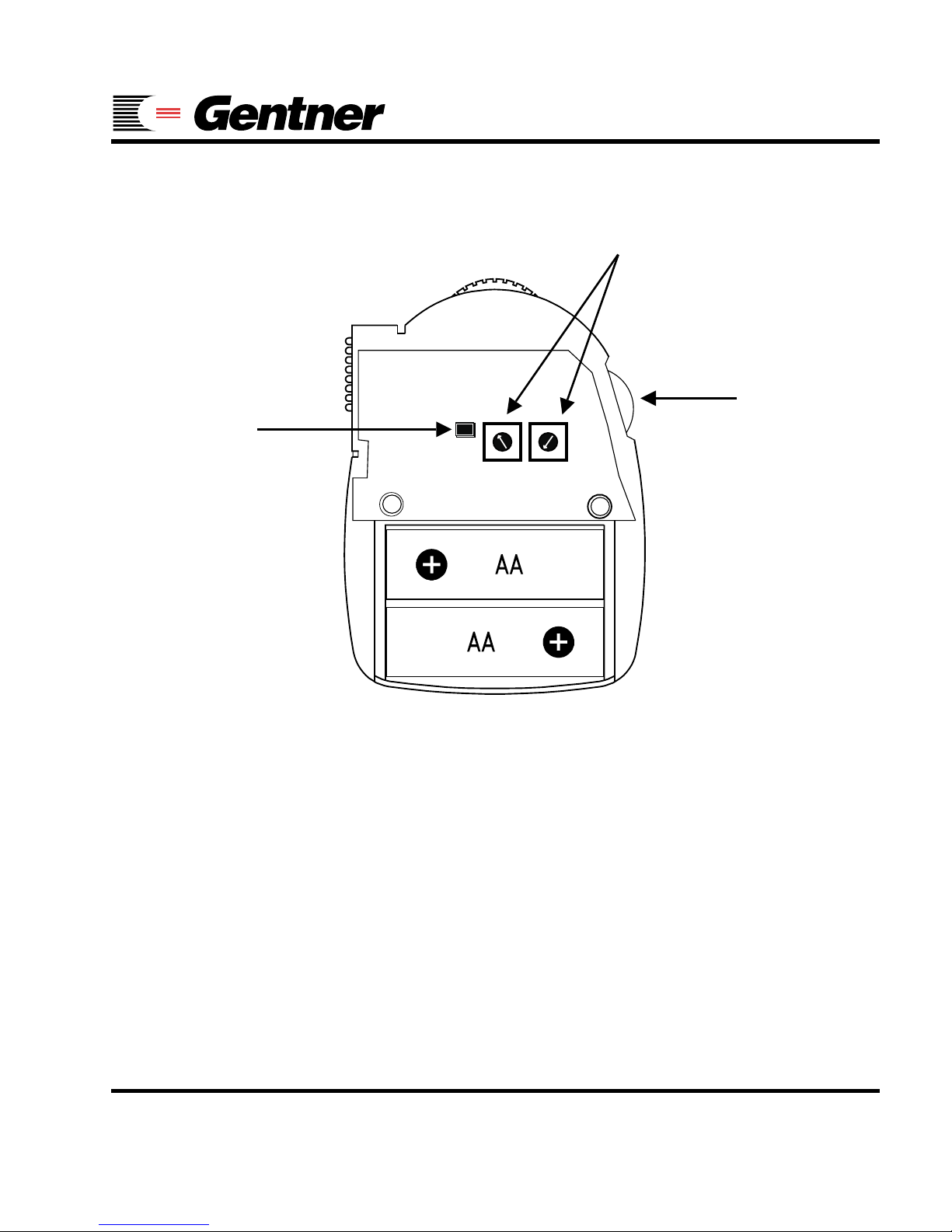
q Step 3
Turn the preset selector wheel to the desired
preset (1-6).
q Step 4
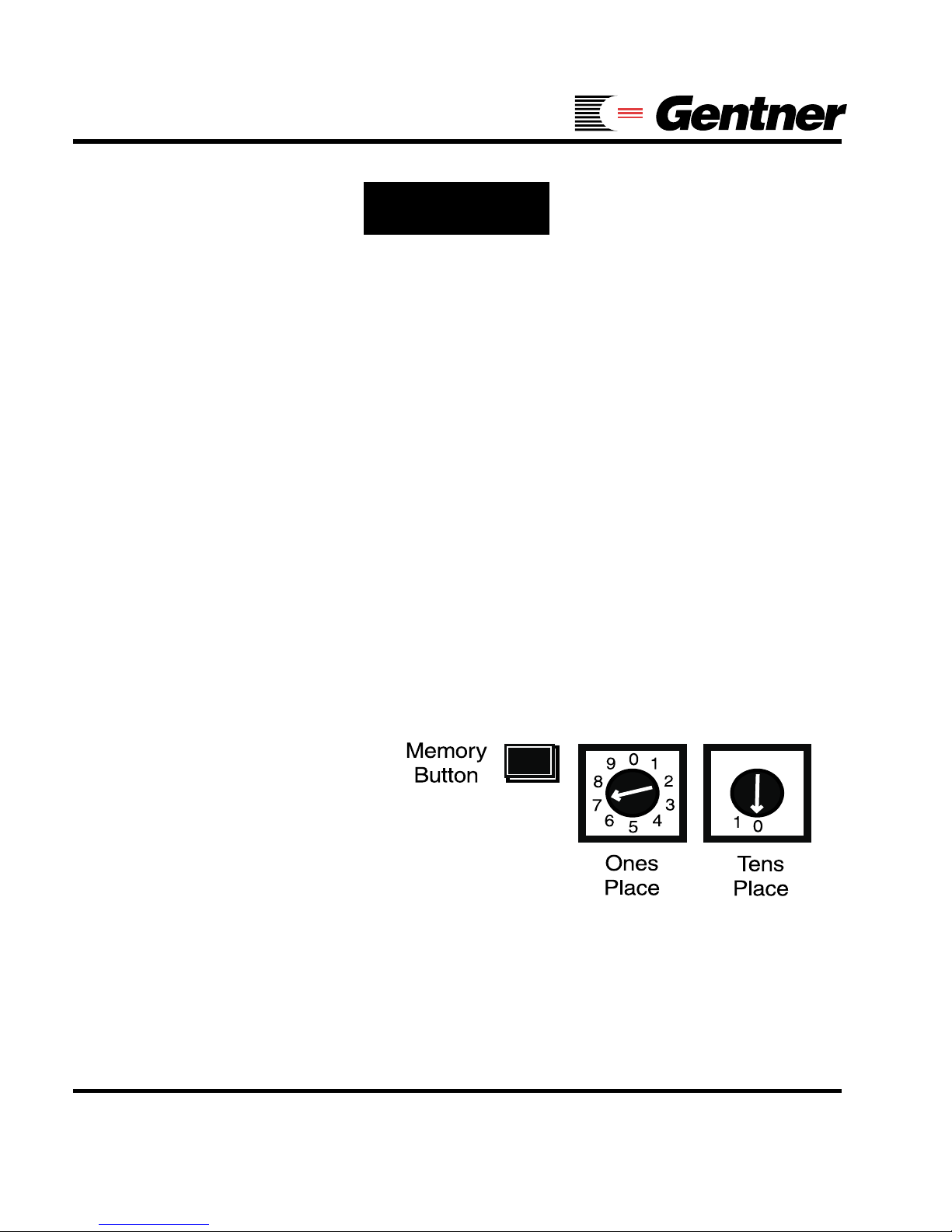
Using a small, plastic, flathead screwdriver, turn
the channel setting rotary switches to the desired channel number.The left-hand switch
indicates the “ones” place. The right-hand switch
indicates the “tens” place. The example shows
the setting for channel 07.
q Step 5
Push the memory button to save the channel
setting to the current preset. Repeat steps three
through five for each preset.
Page 7
Technical Support: (219) 929-4127
Venture-6 User’s Guide 9
PB Board
1
2
4
3
5
6
7
8
9
0
0
1
2
3
19
0
Channel Setting
Rotary Sw itc h e s
Memory
Button
Preset
Selector
P Note
Before changing batteries, wait one minute after
turning off the receiver. This allows the CPU to
switch from active mode to standby mode.
Otherwise memory will be lost and the presets
will return to the factory settings. Also, units
without power (due to no/dead batteries) for more
than one hour will revert to the factory presets.
Page 8
Technical Support: (219) 929-4127
10 Venture-6 User’s Guide
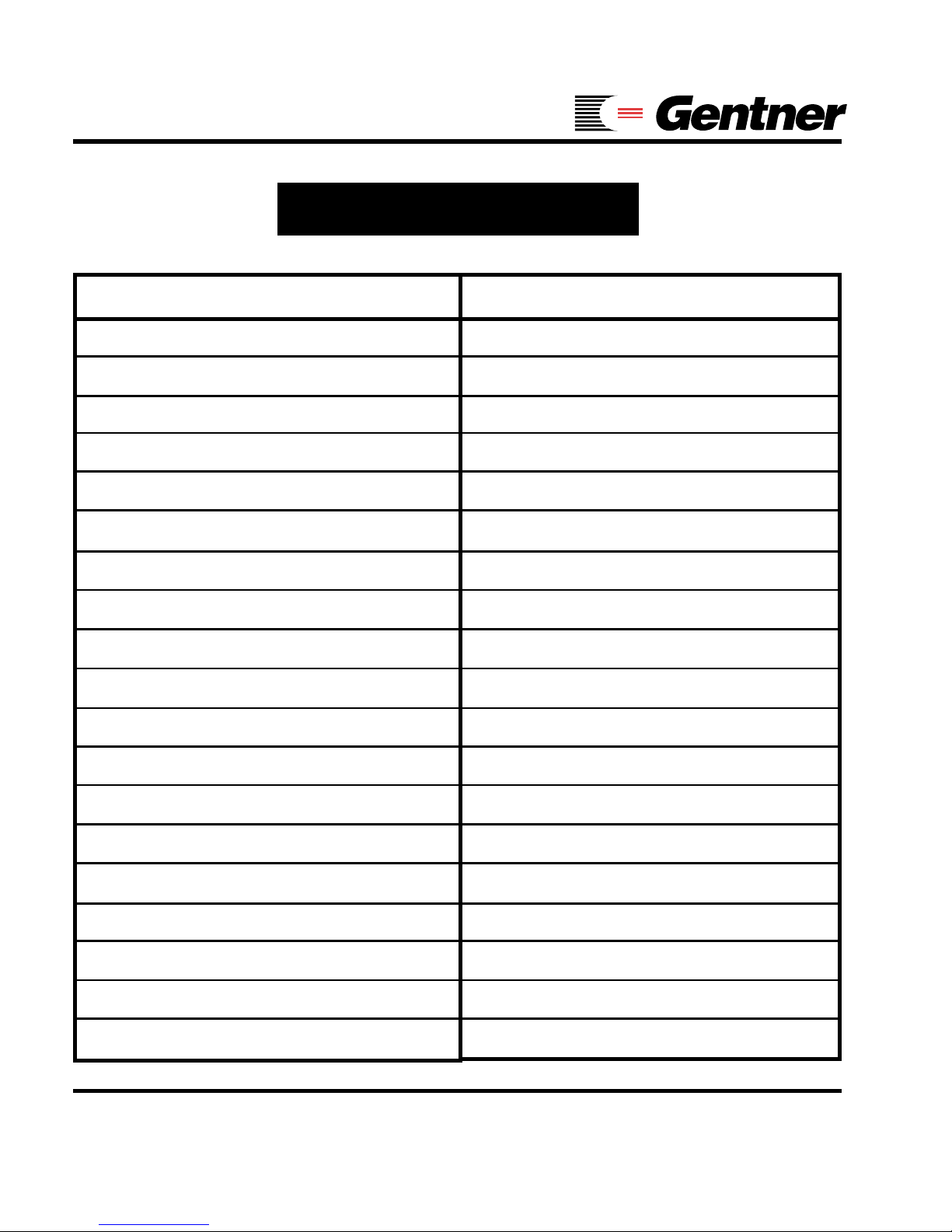
Frequency Chart
Channel *Frequency
01 216.025
02 216.075
03 216.125
04 216.175
05 216.225
06 216.275
07 216.325
08 216.375
09 216.425
10 216.525
11 216.575
12 216.625
13 216.675
14 216.725
15 216.775
16 216.825
17 216.875
18 216.925
19 216.975
*Frequencies are in MHz
Page 9

Technical Support: (219) 929-4127
Venture-6 User’s Guide 11
Correcting Interference
With any type of radio-frequency (RF) device,
other RF sources can interfere with reception.
Even the Assistive Listening Band is occasionally subject to use by other types of devices.
To check for on-channel interference, take the
Venture-6 receiver to the place where the interference is the worst and turn off the transmitter.
The interfering signal should now become stronger. Set the Venture-Base transmitter and the
receivers to a different channel and return to
the same place. If interference continues, try
changing channels again until you get a clear
signal.
If more than one Venture-Base is operating in
the same area, try to keep the channels used as
far apart as possible (3 channel spacing recommended).
Page 10
Technical Support: (219) 929-4127
12 Venture-6 User’s Guide
Recharging
The Venture-6 is designed for use with regular
or rechargeable Ni-Cad batteries. Each receiver
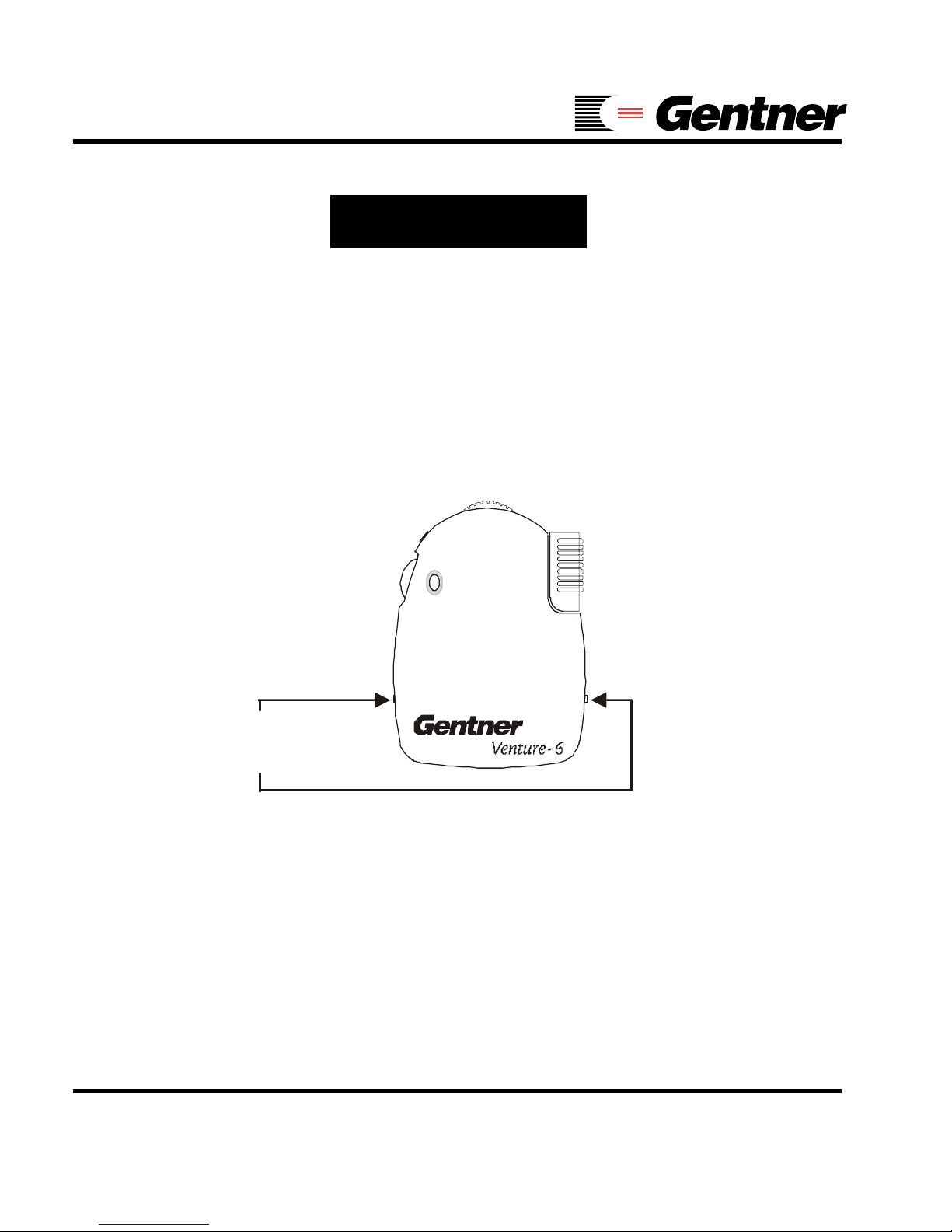
has two recharger contacts, one on each side
(see the diagram below).
These contacts may be used in conjunction with
Gentner’s BC-10A for quick and easy recharging. Simply place the Venture-6 receiver in the
BC-10A charger when not in use and it will automatically recharge for the next usage.
V
enture-6
(fr o n t)
CH
6
Recharger
C ontacts
Page 11

Technical Support: (219) 929-4127
Venture-6 User’s Guide 13
WARNING!
Use ONLY Ni-Cad rechargeable batteries in the V enture-6 when using the BC10A battery charger. Alkaline batteries
will damage the BC-10A. Also, do not
exceed 60 hours of continuous recharging or you may damage the batteries
and/or the receiver.
Important Recharging Information:
Fully depleted Ni-Cad batteries require approximately 18 hours to recharge. Once charged,
Ni-Cad batteries will power the Venture-6 for
approximately 30 hours. Alkaline batteries will
power the V enture-6 for approximately 40 hours.
Page 12

Technical Support: (219) 929-4127
14 Venture-6 User’s Guide
Specifications
Venture-6
Dimensions: 2.63"/6.68 cm W x 3.5"/
8.89 cm H x .75"/1.91 cm D
Weight: 2.2 oz.(4.5 oz with earbud & batteries)
62.8 g (128.6 g)
Frequency Range: 100–6 kHz
Output Level: 140 mW into 32 Ohms at 10
percent thd
Signal-to-Noise Ratio: >55 dB at 1 mV
Distortion: < 2 percent
Transmission Type: FM, medium bandwidth
(20 kHz)
RF Frequency Range: 19 Channels, 216 MHz
Sensitivity: 0.6 uV typical, 1 mV max
for 12 dB SINAD
Controls: On-Off / V olume, Preset Selector,
Channel Selector (hidden)
Earphone Jack: Standard 3.5 mm Mono
Power Requirements: 2xAA batteries
Battery Life: 40 hours with Alkaline types
Page 13

Technical Support: (219) 929-4127
Venture-6 User’s Guide 15
Notice
Gentner Communications Corporation assumes no
liability for improper use or operation of this
equipment. The user is cautioned to operate the
volume controls at the lowest acceptable level, and
in a manner that will not cause damage to hearing.
Ear pieces and accessories should be worn using
good judgment and for their intended purpose. To
avoid entanglement, the ear pieces and neck loops
should be removed and stored promptly after use
and before sleeping.
Users are cautioned that changes or modifications
not expressly approved by Gentner
Communications Corporation could void the user’s
authority to operate the equipment.
If you experience problems with this equipment,
contact Gentner Communications Corporation.
Page 14

Technical Support: (219) 929-4127
16 Venture-6 User’s Guide
Compliance
T ested to Comply with FCC Standards
The V enture-6 complies with Part 15 of the FCC Rules. Operation
is subject to the following two conditions:
1) This device may not cause harmful interference.
2) This device must accept any interference received,
including interference that may cause any undesired
operation.
This device complies with RSS-210 of Industry Canada.
Operation is subject to the following two conditions: (1) this
device may not cause interference, and (2) this device must
accept any interference, including interference that may cause
undesirable operation of the device.
This devise may not interfere with TV reception or federal
government radar, and must accept any interference received,
including interference that may cause undesired operation.
Page 15

Technical Support: (219) 929-4127
Venture-6 User’s Guide 17
Warranty
Gentner Communications Corporation (Manufacturer) warrants
that this Assistive Listening System (ALS) product is free of
defects in both materials and workmanship. Should any part of
this equipment be defective, Manufacturer agrees, at its option,
to:
A. Repair or replace any defective ALS product, free of charge
(except transportation charges), for a period of one year from
the date of the original purchase, provided the owner returns
the equipment to the Manufacturer at the address set forth below.
No charge will be made for parts or labor during this period;
B. Furnish replacement for any defective ALS product parts in
the equipment for a period of one year from the date of original
purchase. Replacement parts shall be furnished without charge,
except labor and transportation;
C. Repair or replace any defective ALS accessory , free of charge
(except transportation charges), for a period of 60 days from
the date of the original purchase, provided the owner returns
the equipment to the Manufacturer at the address provided.
No charge will be made for parts or labor during this period. This
Warranty excludes assembled products not manufactured by
Manufacturer whether or not they are incorporated in a
Manufacturer product or sold under a Manufacturer part or model
number .
Page 16

Technical Support: (219) 929-4127
18 Venture-6 User’s Guide
THIS W ARRANTY IS VOID IF:
A. The equipment has been damaged by negligence, accident,
act of God or mishandling, or has not been operated in
accordance with the procedures described in the operating and
technical instructions; or ,
B. The equipment has been altered or repaired by other than
Manufacturer or an authorized service representative of
Manufacturer; or ,
C. Adaptations or accessories other than those manufactured
or provided by Manufacturer have been made or attached to
the equipment which, in the determination of Manufacturer , shall
have affected the performance, safety or reliability of the
equipment; or ,
D. The equipment’ s original serial number has been modified
or removed.
NO OTHER WARRANTY, EXPRESS OR IMPLIED,
INCLUDING WARRANTY OF MERCHANTABILITY OR
FITNESS FOR ANY P ARTICULAR USE, APPLIES TO THE
EQUIPMENT, nor is any person or company authorized to
assume any warranty for Manufacturer or any other liability in
connection with the sale of Manufacturer’s products.
Page 17

Technical Support: (219) 929-4127
Venture-6 User’s Guide 19
Manufacturer does not assume any responsibility for
1) consequential damages, 2) expenses or loss of revenue or
property , 3) inconvenience or interruption in operation
experienced by the customer due to a malfunction in the
purchased equipment. No warranty service performed on
any product shall extend the applicable warranty period.
In case of unsatisfactory operation, the purchaser shall
promptly notify Manufacturer at the address set forth below in
writing, giving full particulars as to the defects or
unsatisfactory operation. Upon receipt of such notice,
Manufacturer will give instructions respecting the shipment of
the equipment, or such other matters as it elects to honor this
warranty as above provided. This warranty does not cover
damage to the equipment during shipment and Manufacturer
assumes no responsibility for such damage. All shipping
costs shall be paid by customer.
This warranty extends only to the original purchaser and is
not assignable or transferable.
Starin Distributing, Inc • 1531 South Calumet
Road • Chesterton, IN 46304 USA •
(219) 929-4127 • Fax: (219) 929-4377 •
www.gentnerals.com
Page 18

Technical Support: (219) 929-4127
20 Venture-6 User’s Guide
Cont act Numbers
Sales and Technical Support:
Phone..............................1 (219) 929-4127
Fax....................................1 (219) 929-4377
Other Contact Information:
World Wide Web....www.gentnerals.com
Starin Distributing, Inc.
1531 South Calumet Road, Chesterton, IN
46304
 Loading...