

Page 1

ExecutiveExecutive
TeleconferencerTeleconferencer
User’s ManualUser’s Manual
ET
100
Page 2

Gentner Part No. 800-130-001
Rev. 11/95
This equipment complies with the requirements of the EU guidelines:
89/336/EEC “Electromagnetic Compatibility”
73/23/EEC “Electrical operating material for use within specific
voltage limits”
Conformity of the equipment with the above guidelines is attested by the CE mark.
© Copyright 1995 by Gentner Communications Corporation. All rights reserved. No part of
this manual may be reproduced in any form or by any means without written permission from
Gentner Communications Corporation. Printed in the United States of America. Original version, 1/95. Gentner Communications Corporation reserves specification privileges. Information
in this manual is subject to change without notice.
Copyright
Information
Please register your ET100 by completing the self-addressed, postage prepaid warranty registration card and return it to Gentner by mail. You may also FAX it to the above number or call
Gentner via telephone. When your product is properly registered, Gentner will be able to better
serve you should you require technical assistance or desire to receive product upgrades, new
product information, etc.
Warranty
Registration
Page 3
For Setup Assistance Dial: 800-945-7730 or 801-975-7200
ET100 User's Manual Page 1
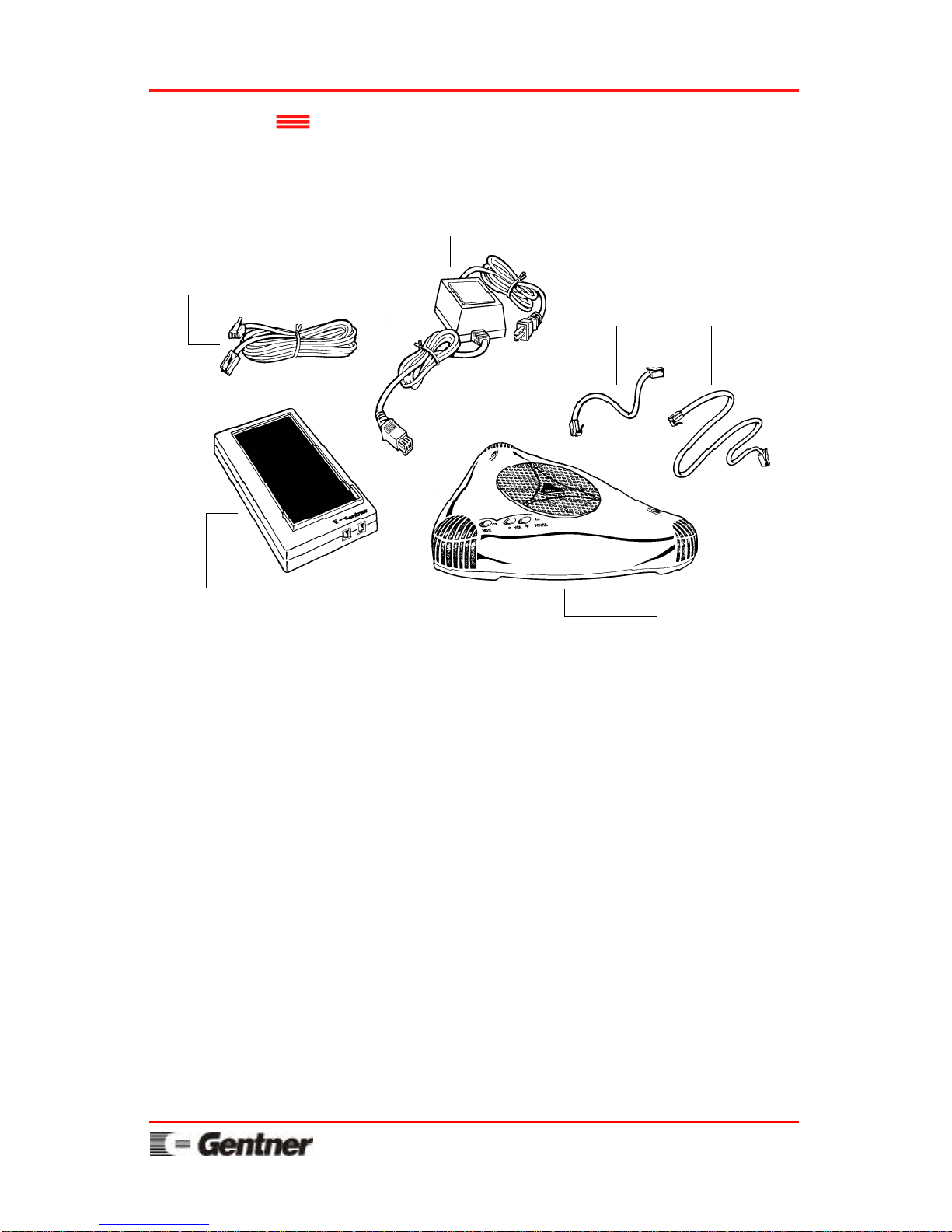
Audio module
The ET100 user’s manual, quick reference
instructions, and warranty registration card should
also be included with your shipment.
SHIPPING NOTE:
Gentner is not responsible for product damage
incurred during shipment. You must make claims
directly with the carrier. Inspect your shipment
carefully for obvious signs of damage. If the
shipment appears to be damaged, retain the original
boxes and packing material for inspection by the
carrier. Contact your carrier immediately.
25 foot connection cable
Switch-hook module
16 inch and 32 inch
flat handset cables
In-line power module with
12 foot fixed cable
Unpacking Check to see that the following equipment was
received with your shipment:
Page 4
Page 2 ET100 User's Manual
For Setup Assistance Dial: 800-945-7730 or 801-975-7200
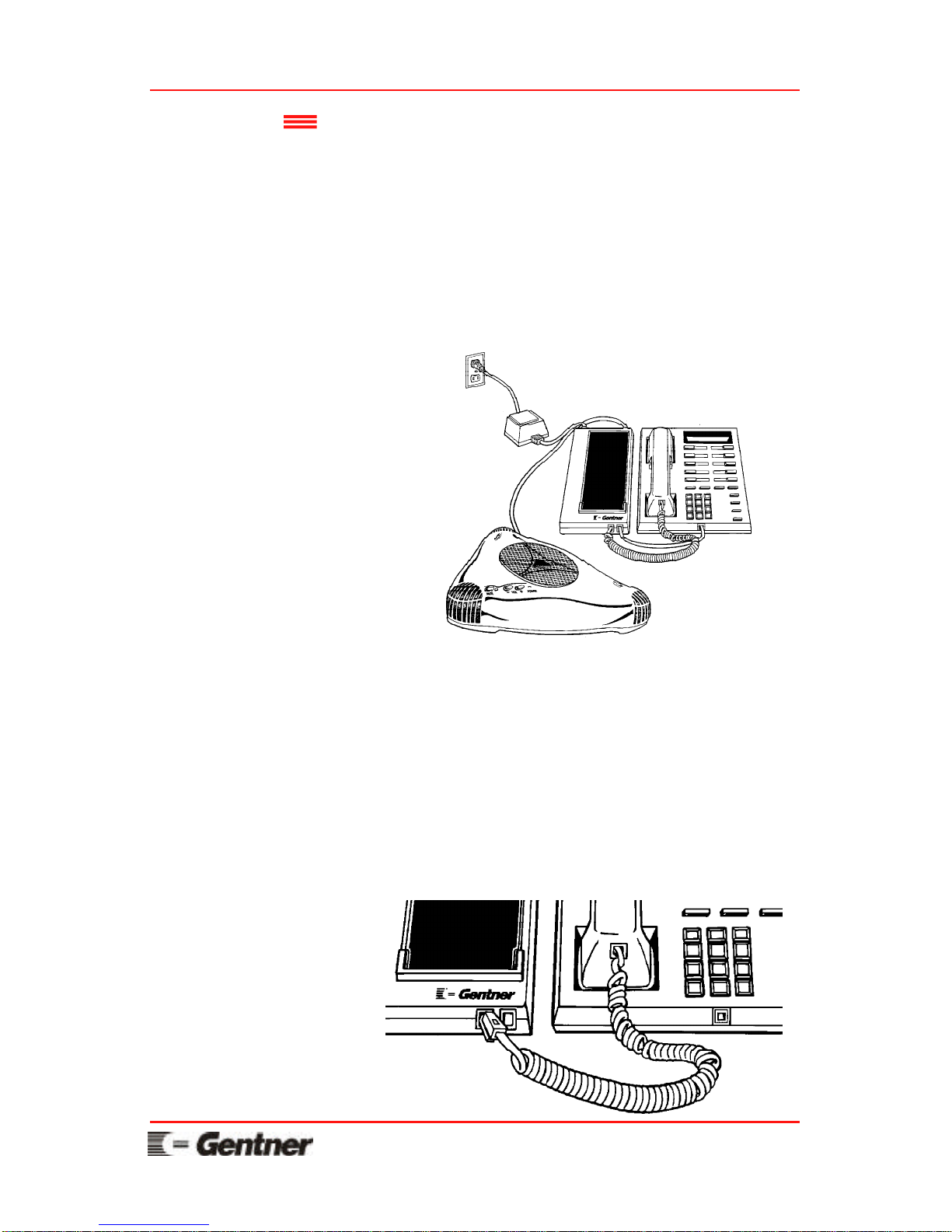
Installation The ET100 connects directly to your existing
telephone set so that you can maintain all of the
functions of your telephone. Follow these step-bystep instructions to install your ET100:
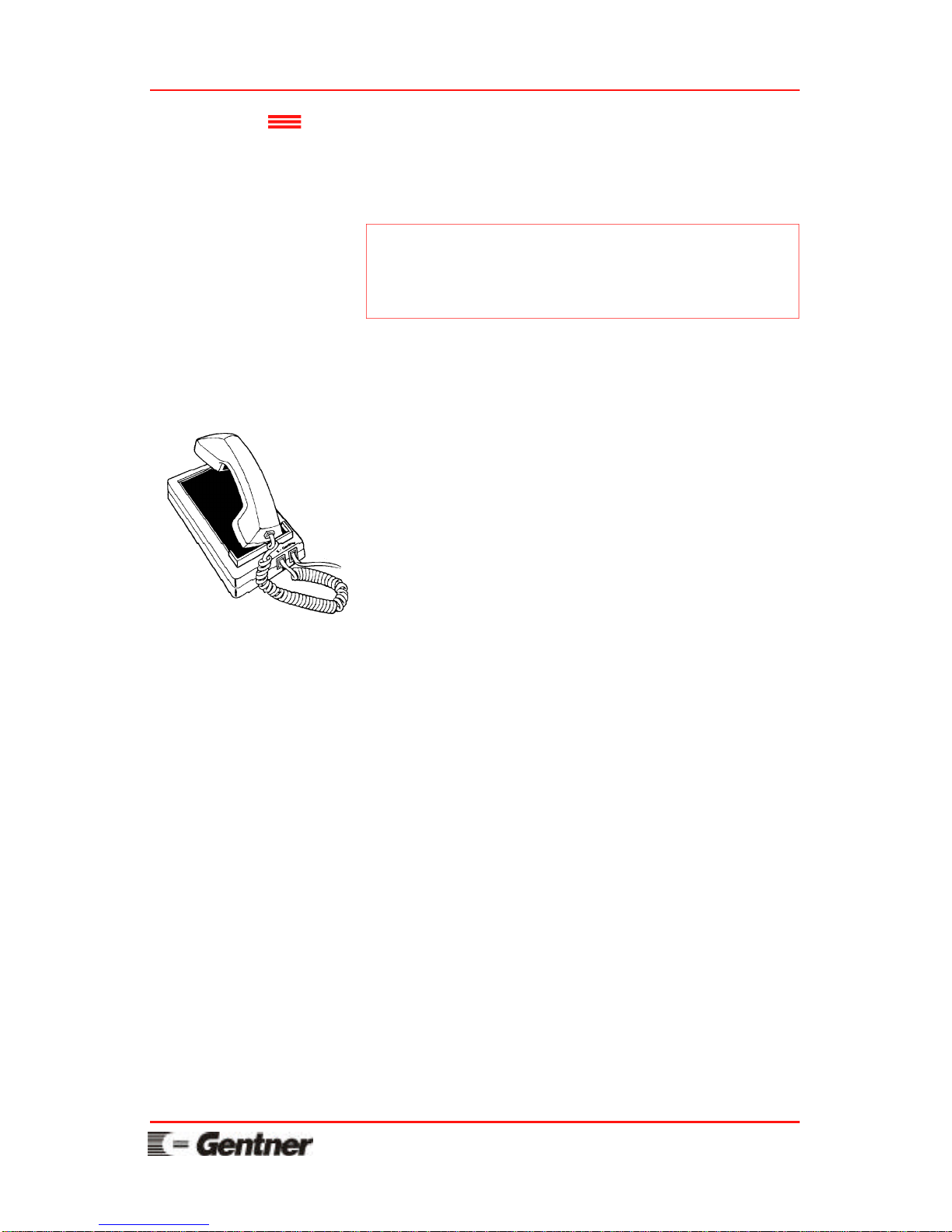
Completed Installation
The following drawing shows the ET100 system
when installation is completed.
Step 1
A
Unplug the handset cord from the base of your
telephone set.
B
Plug the handset cord into the switch-hook
module jack on the left (labeled with a curly
cord).
Page 5
For Setup Assistance Dial: 800-945-7730 or 801-975-7200
ET100 User's Manual Page 3
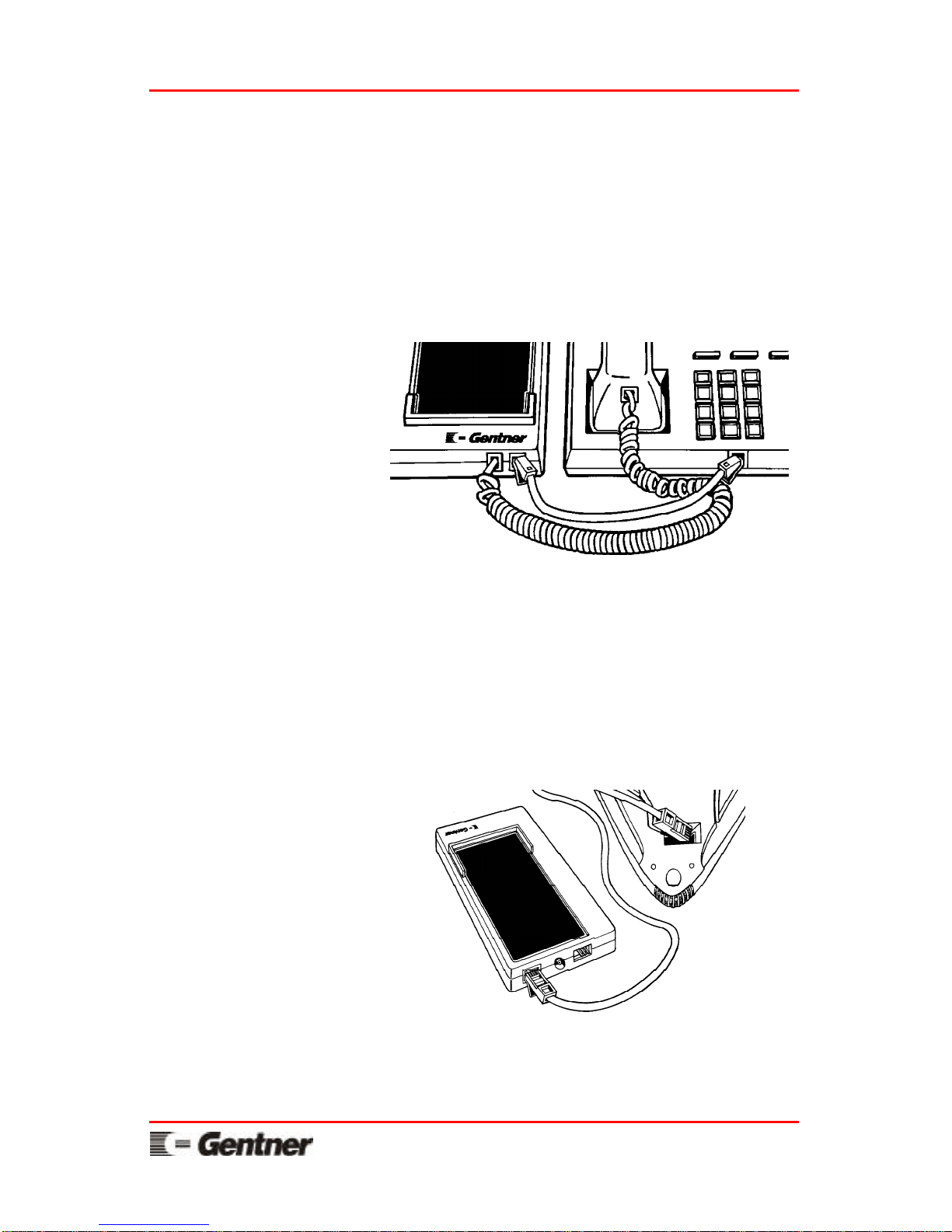
Step 2
A
Plug one end of the supplied 16 inch or optional
32 inch flat handset cable into the telephone
handset jack.
B
Plug the other end of the flat handset cable into
the switch-hook module jack on the right.
Step 3
A
Plug one end of the supplied 25 foot connection
cable into the switch-hook module jack labeled
AUDIO MOD.
B
Plug the other end of the 25 foot connection
cable into the bottom of the audio module.
Step 4
Place the audio module at the desired conference
location.
Page 6
Page 4 ET100 User's Manual
For Setup Assistance Dial: 800-945-7730 or 801-975-7200
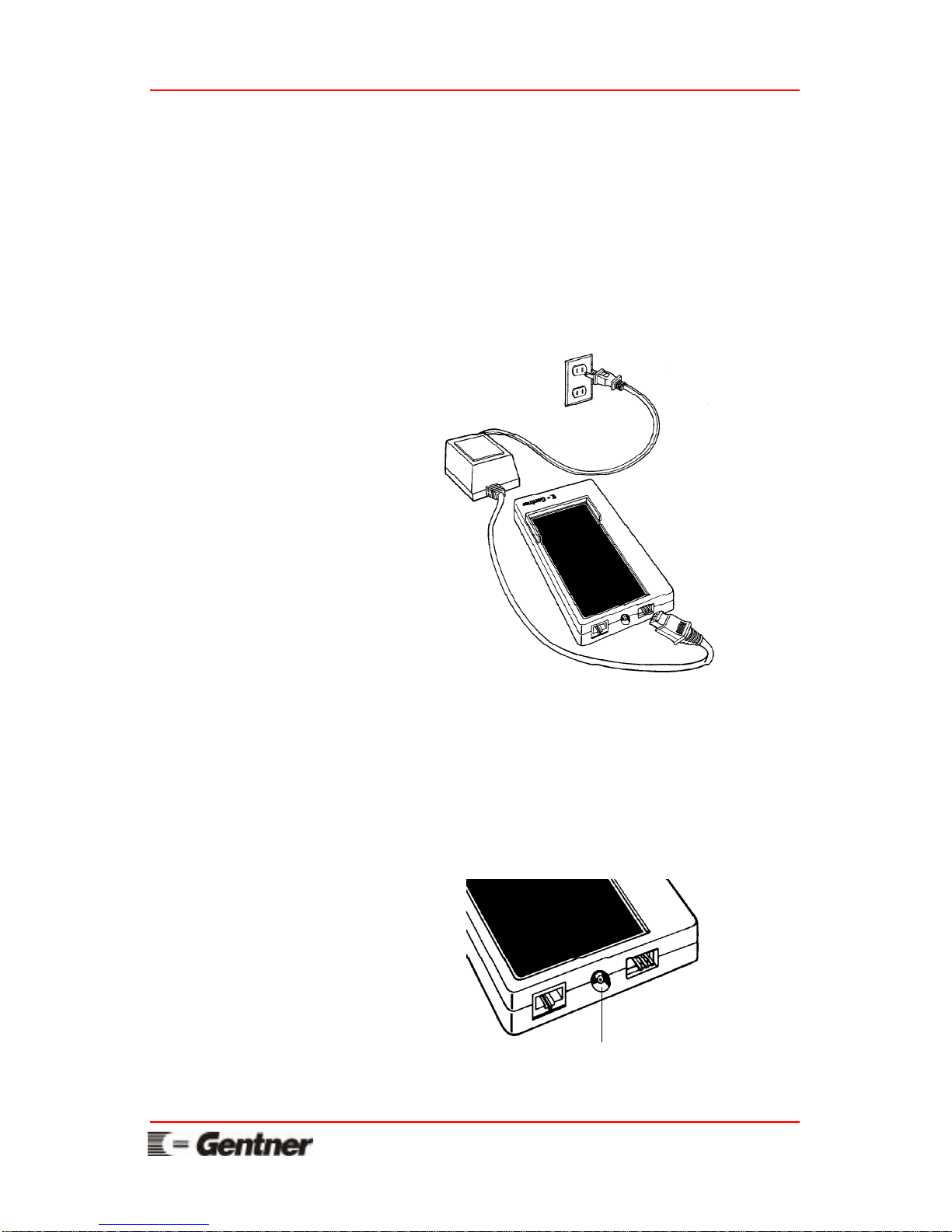
Step 5
A
Plug the white end of the power module with the
“NOTCH SIDE” up into the switch-hook
module jack labeled DC POWER.
B
Plug the other end of the power module into an
electrical power outlet. The audio module
power light will glow when power is applied.
Tape recorder connection
Step 6 (Record Option)
To record your audioconference, connect a tape
recorder to the switch-hook module jack labeled
TAPE. A standard phono cable is typically
supplied with most tape recorders.
Page 7
For Setup Assistance Dial: 800-945-7730 or 801-975-7200
ET100 User's Manual Page 5
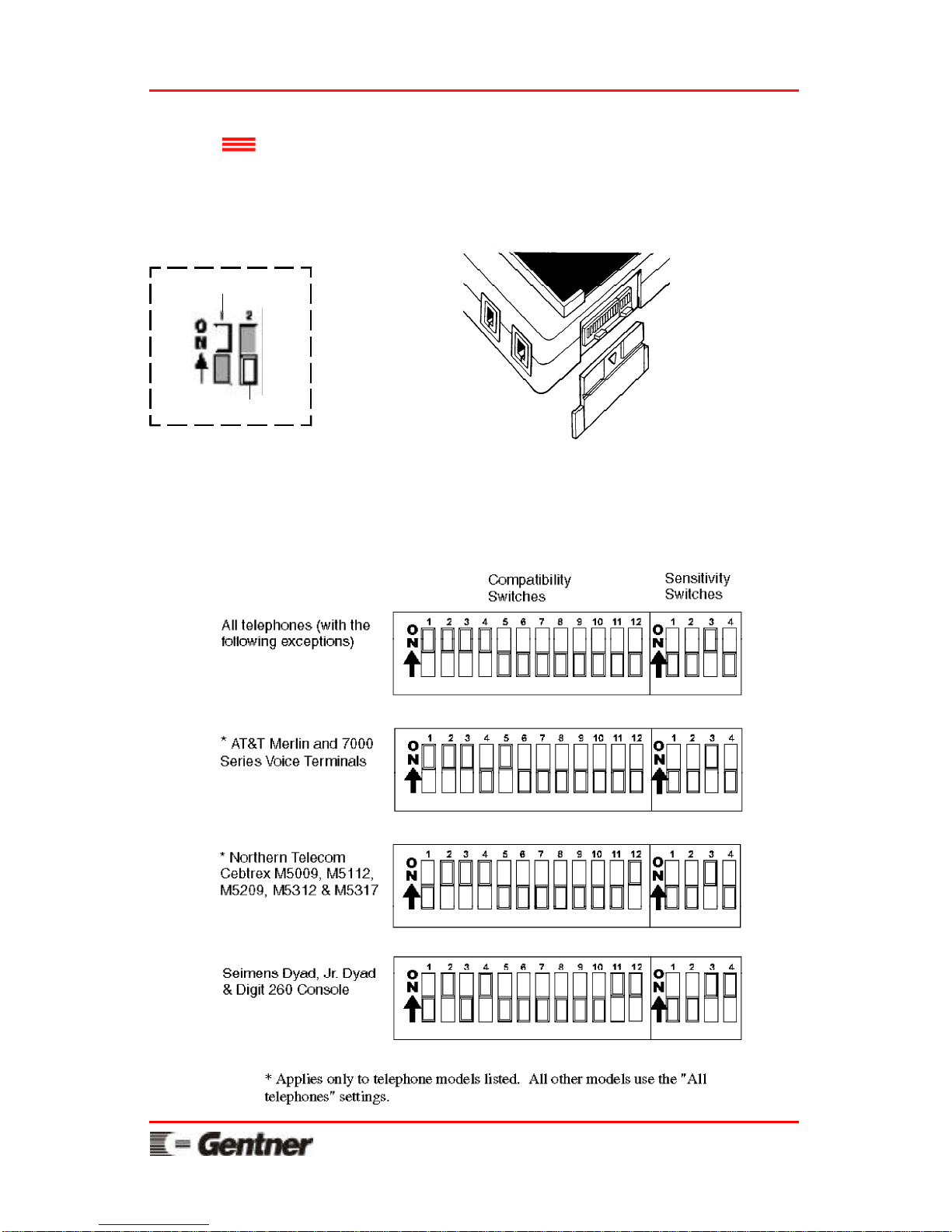
Dip Switch
Setup
Determine the appropriate settings for your
particular telephone using the following diagrams.
Set the compatibility and sensitivity switches
according to your telephone type. These switches
are found on the side of the switch-hook module.
Switch Setting Key
Switch ON (Up)
Switch OFF (Down)
TELEPHONE VOLUME NOTE:
For telephones that have handset volume control, set
the telephone handset volume at a normal listening
level prior to adjusting the ET100.
Page 8
Page 6 ET100 User's Manual
For Setup Assistance Dial: 800-945-7730 or 801-975-7200
Assisted
Setup
Step 1
Pick up your telephone handset and call
1-800-283-5330 (a quiet line used for ET100
setup). When you hear silence on the other end,
set the handset down next to your phone (NOT
on the switch-hook module).
Step 2
Press and hold any MUTE button on the audio
module for a few seconds, until you hear the
prompt “setup enabled.” The POWER light will
be flashing red.
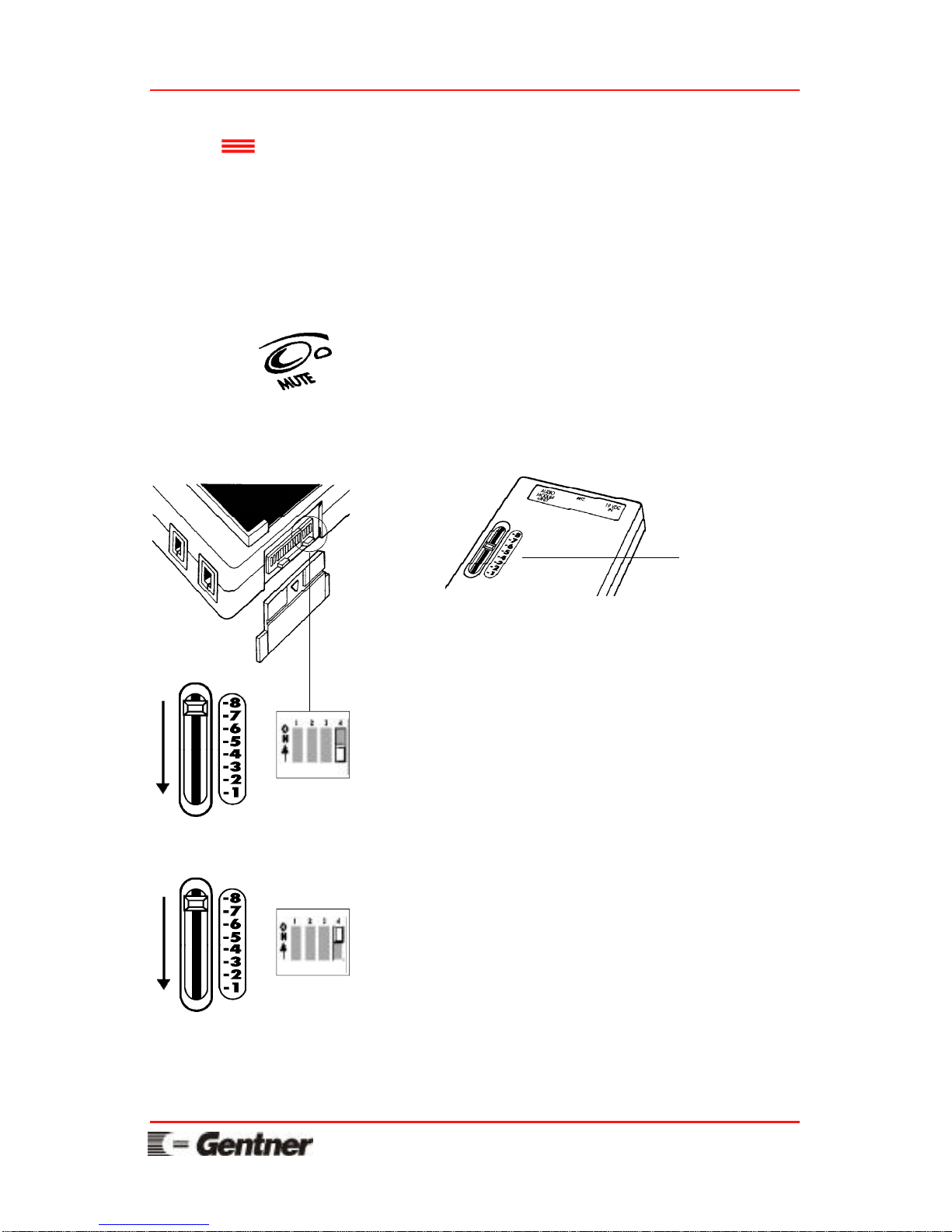
Step 3
Set the slide control on the bottom of the switchhook module to 8. Make sure the sensitivity
switch #4 (found on the side of the switch-hook
module) is down (off). If the MUTE lights on
the audio module are green, no adjustment is
needed. Go to step 4.
Move the slide control slowly down to 1. Stop
immediately when the MUTE lights turn from
red to green.
If the MUTE lights never turn green, reposition
the slide control at 8. Move the sensitivity
switch #4 (the switch farthest to the right) up
(on).
Slowly move the slide control down again. Stop
immediately when the MUTE lights change
from red to green.
If the MUTE lights NEVER turn green, call for
assistance at the number below.
Slide control on
the bottom of
the switch-hook
module
Page 9

For Setup Assistance Dial: 800-945-7730 or 801-975-7200
ET100 User's Manual Page 7
Step 4
Press any MUTE button to turn the assisted
setup off. You will hear the prompt “system
ready.” You can now hang up your phone.
Helpful Hint:
When placing a call, and the distant location
hears static, a hum, or scratchy noises, position
sensitivity switch 2 up (ON) and 3 down (OFF).
Repeat steps 1 through 4.
THIS IS A ONE-TIME SETUP.
Do not settle for bad audio. Please call the number
below if you are unable to get clean, good-sounding
audio.
Page 10
Page 8 ET100 User's Manual
For Setup Assistance Dial: 800-945-7730 or 801-975-7200
Operating the ET100 is practically identical to
operating your telephone because it uses your
existing telephone functions.
Operation
Making calls and beginning a conference
Pick up your handset from the telephone cradle
and dial out as normal. Place the handset on the
switch-hook module pad to begin the
conference. Or, place the handset on the switchhook module pad first and dial out as normal.
The conference will automatically begin.
Answering calls and beginning a conference
Pick up your handset from the telephone cradle
and answer the call as normal. After the
telephone call has been established, place the
telephone handset on the switch-hook module
pad. Or, place the handset directly on the
switch-hook module pad after answering the
call. The conference will automatically begin.
Hanging up a call
Place the handset on the telephone handset
cradle.
Adjusting the speaker volume
Press the VOL + or VOL - button on the audio
module. Press the VOL + and VOL - buttons
simultaneously to return the speaker volume to
normal (default) level.
NOTE: The ET100 works best in an
environment where there is little or no
background noise.
Page 11

For Setup Assistance Dial: 800-945-7730 or 801-975-7200
ET100 User's Manual Page 9
Muting and unmuting the microphones
Press any audio module MUTE button once to
mute all three microphones. All MUTE lights
will flash red when microphones are muted.
Press any MUTE button once again to unmute
all three microphones. All MUTE lights will
glow green when microphones are unmuted.
Using existing telephone features
Leave the handset placed on the switch-hook
module pad, or pick up the handset from the
switch-hook module pad while using your
telephone as normal to put a call on hold,
transfer a call, access additional lines,
conference additional lines, hold a private
conversation, etc.
Note: The ET100 will provide full-duplex audio as
long as the phones on both ends of the conference
call provide full duplex features. (Speakerphones are
NOT full duplex.)
Page 12

Page 10 ET100 User's Manual
For Setup Assistance Dial: 800-945-7730 or 801-975-7200
Troubleshooting
Symptom
Probable RemedyProbable Cause
The power indicator
does not light.
The mute indicators
light green when the
handset is placed on the
switch-hook module, but
there is no audio
present.
You can hear the people
at the distant location,
but they cannot hear
you.
The audio level received
at the distant location is
too low or too high.
The speaker volume is
too low or too high at
the maximum setting.
The unit is not receiving
power.
The telephone handset cables
are not properly connected.
The telephone is not connected to a call.
The mute function is turned
on. The mute indicators will
flash red when the microphones are muted.
The “Dip Switch Setup” configuration is improperly set.
The send audio volume is set
too low or too high.
If the telephone has a handset volume control, it has
been set too low or too high.
Ensure all cables are properly
connected. Ensure the power
outlet is active.
Ensure all telephone handset
cables are properly connected. See the “Installation”
section in this manual.
Ensure the “LINE” or “ACCESS” button on the telephone has been pushed.
Press the mute button once.
The mute indicators will
glow green when the microphones are active.
See the “Dip Switch Setup”
section in this manual.
See the “Dip Switch Setup”
section in this manual.
Adjust the telephone handset
volume to nominal listening
level, and repeat the assisted
setup.
Page 13

For Setup Assistance Dial: 800-945-7730 or 801-975-7200
ET100 User's Manual Page 11
Redial the number or have
the distant location call again
to get a better connection.
Have the people at the distant
location eliminate the noise
source or move to another
room if possible.
See the “Dip Switch Setup”
section in this manual.
Adjust the telephone handset
volume to the nominal listening level and repeat the “Assisted Setup” section of this
manual.
There is a bad telephone line
connection.
The distant location has
noisy equipment or is in a
noisy environment.
The “Dip Switch Setup” configuration is improperly set.
If the telephone has a handset volume control, it has
been set too high.
The system sounds
“scratchy” or is producing excessive noise.
The system squeals or
produces feedback.
Symptom
Probable RemedyProbable Cause
If you cannot resolve your difficulty by following the suggested remedies in this
troubleshooting section, please call Gentner for assistance at 800-945-7730 or
801-975-7200.
Page 14

Page 12 ET100 User's Manual
For Setup Assistance Dial: 800-945-7730 or 801-975-7200
Specifications
System Weight
7 lbs. (3.18 kg) dry
9 lbs. (4.08 kg) shipping
System Power Requirements
120 VAC, 60 Hz, 23 W (or optional power supply)
Echo Cancellation
Digital echo cancellation used to eliminate acoustic
(room) and telephone line echo
Audio Performance
Frequency Response
300 Hz - 3300 Hz, ± 1.5 dB
Signal to Noise Ratio
50 dB
Total Harmonic Distortion
0.3%
Record Output
-10 dBu, 600 ohms, unbalanced
Controls
Volume up/down
Microphone mute
Utilizes all telephone system functions
Operating Temperature
32o to 100o F
Storage Temperature
0o to 150o F
Switch-hook Module
Dimensions
9.80"L x 4.70"W x 1.25"H
(24.89L x 11.94W x 3.18H cm)
Weight
14 oz. (.41 kg) dry
Connectors
PHONE: 4 conductor, handset style
HANDSET: 4 conductor, handset style
AUDIO MOD. ONLY: 8 conductor, RJ-45
REC: Phono
19 VDC IN: 3 Pin, Molex® style
Page 15

For Setup Assistance Dial: 800-945-7730 or 801-975-7200
ET100 User's Manual Page 13
Audio Module
Dimensions
11.0"L x 11.75"W x 3.20"H
(27.94L x 29.85W x 8.13H cm)
Weight
2 lbs. 14 oz. (1.30 kg) dry
Connector
SWITCH-HOOK MOD: 8 conductor, RJ-45
Microphones
3 unidirectional elements configured in 360o polar
pattern, non-gating
Speaker
4" round, adjustable to 85 dB SPL peak volume
In-line Power Module
Dimensions
3.50"L x 2.50"W x 2.75"H
(8.90L x 6.35W x 7.0H cm)
Cable Length
12 foot fixed cable
Weight
2 lbs. 1 oz. (.94 kg) dry
Electrical
19 VDC unregulated, 23 W
Supplied Cables
Handset Cables
12 inch flat and 32 inch flat (optional use)
Connection Cable
25 foot
Page 16

Page 14 ET100 User's Manual
For Setup Assistance Dial: 800-945-7730 or 801-975-7200
GENTNER COMMUNICATIONS CORPORATION (Manufacturer) warrants that this product
is free of defects in both materials and workmanship. Should any part of this equipment be
defective, Manufacturer agrees, at its option, to:
A. Repair or replace any defective part free of charge (except transportation charges) for a period of one year from the date of the original purchase, provided the owner returns the equipment to the Manufacturer at the address set forth below. No charge will be made for parts or
labor during this period;
B. Furnish replacement for any defective parts in the equipment for a period of one year from
the date of original purchase. Replacement parts shall be furnished without charge, except labor and transportation.
This Warranty excludes assembled products not manufactured by Manufacturer whether or not
they are incorporated in a Manufacturer product or sold under a Manufacturer part or model
number.
THIS WARRANTY IS VOID IF:
A. The equipment has been damaged by negligence, accident, act-of-God or mishandling, or
has not been operated in accordance with the procedures described in the operating and technical instructions; or,
B. The equipment has been altered or repaired by other than Manufacturer or an authorized
service representative of Manufacturer; or,
C. Adaptations or accessories other than those manufactured or provided by Manufacturer have
been made or attached to the equipment which, in the determination of Manufacturer, shall have
affected the performance, safety or reliability of the equipment; or,
D. The equipment's original serial number has been modified or removed.
NO OTHER WARRANTY, EXPRESS OR IMPLIED, INCLUDING WARRANTY OF MER-
CHANTABILITY OR FITNESS FOR ANY PARTICULAR USE, APPLIES TO THE EQUIPMENT, nor is any person or company authorized to assume any warranty for Manufacturer or
any other liability in connection with the sale of Manufacturer's products.
Manufacturer does not assume any responsibility for consequential damages, expenses or loss
of revenue or property, inconvenience or interruption in operation experienced by the customer
due to a malfunction in the purchased equipment. No warranty service performed on any product shall extend the applicable warranty period.
In case of unsatisfactory operation, the purchaser shall promptly notify Manufacturer at the
address set forth below in writing, giving full particulars as to the defects or unsatisfactory operation. Upon receipt of such notice, Manufacturer will give instructions respecting the shipment of the equipment, or such other matters as it elects to honor this warranty as above
provided. This warranty does not cover damage to the equipment during shipment and Manufacturer assumes no responsibility for such damage. All shipping costs shall be paid by customer.
This warranty extends only to the original purchaser and is not assignable or transferable.
Gentner Communications Corporation, 1825 Research Way, Salt Lake City, Utah 84119
Page 17

For Setup Assistance Dial: 800-945-7730 or 801-975-7200
ET100 User's Manual Page 15
pursuant to Part 15 of the FCC Rules. These limits are designed to provide reasonable protection against harmful interference when the equipment is operated in a commercial environment.
used in accordance with the user's manual, may cause harmful interference to radio communications. Operation of this equipment in a residential area is likely to cause harmful interference, in
Changes or modifications not expressly approved by Gentner could void the user's authority to
operate the equipment.
FCC Part 15
Compliance
This equipment complies with Part 68 of the FCC rules. On the bottom of the switch-hook
quested, this information must be provided to the telephone company.
If this equipment causes harm to the telephone network, the telephone company will notify you
practical, the telephone company will notify the customer as soon as possible. Also, you will be
advised of your right to file a complaint with the FCC if you believe it is necessary.
dures that could affect the operation of this equipment. If this happens, the telephone company
will provide advance notice in order for you to make the necessary modifications in order to
If trouble is experienced with this equipment, please contact Gentner at 800-945-7730 or 801975-7200 for repair and (or) warranty information. If the trouble is causing harm to the tele-
network until the problem is resolved.
This equipment cannot be used on telephone company provided coin service. Connection to
When the ET100 is used with a leased telephone system, permission to connect to the telephone
system should be obtained from the owner of the system. Customer instructions for KX-type
that they can only be connected to host equipment and never to the network. This device must
be connected through the telephone handset.
FCC Registration Number: FBIUSA-21446-KX-N
Page 18

Page 16 ET100 User's Manual
For Setup Assistance Dial: 800-945-7730 or 801-975-7200
NOTICE: The Industry of Canada label identifies certified equipment. This certification
means that this equipment meets certain telecommunications network protective operational and
safety requirements. The Industry of Canada does not guarantee this equipment will operate to
the user's satisfaction.
Before installing this equipment, users should ensure that it is permissible to be connected to the
facilities of the local telecommunications company. The equipment must also be installed using
an acceptable method of connection. In some cases, the company's inside wiring associated
with a single line individual service may be extended by means of a certified connector assembly
(telephone extension cord). The customer should be aware that compliance with the above conditions may not prevent degradation of service in some situations.
Repairs to certified equipment should be made by an authorized Canadian maintenance facility
designated by Gentner. Any repairs or alterations made by the user to this equipment, or equipment malfunctions, may give the telecommunications company cause to request the user to disconnect the equipment.
Users should ensure for their own protection that the electrical ground connections of the power
utility, telephone lines and internal metallic water pipe system, if present, are connected together. This precaution may be particularly important in rural areas.
CAUTION: Users should not attempt to make such connections themselves, but should contact the appropriate electric inspection authority, or electrician, as appropriate.
IC Certification Number: 1970 6282 A
IC Compliance
Safety
Information
CAUTION: For use only with certified telecommunication equipment.
ATTENTION: Pour utilisation seulement avec du materiel de telecommunications certifie de
marque.
Page 19

“Our vision is to provide our customers with
the total audio solution for conferencing.”
Page 20

GENTNER COMMUNICATIONS CORPORATION
Sales and Technical Assistance
1825 Research Way
Salt Lake City, Utah 84119
Toll Free 800-945-7730
Telephone 801-975-7200
FAX 801-977-0087
FAX-On-Demand 800-695-8110
Wordlwide Web Page @ http:\\www.gentner.com
 Loading...