

Page 1
Programming and Information Guide
The HomeLink® Wireless Control System provides a convenient way to replace up to three handheld radio-frequency (RF) transmitters used to activate devices such as gate operators, garage
door openers, entry door locks, security systems, and even home lighting. For compatible
products and video programming instructions, please visit www.HomeLink.com or
www.youtube.com/HomeLinkGentex.
Before Programming HomeLink
Do not use HomeLink with any garage door opener that lacks safety stop and reverse
features as required by U.S. federal safety standards (this includes any garage door opener
model manufactured before April 1, 1982). A garage door that cannot detect an object signaling the door to stop and reverse - does not meet current U.S. federal safety standards.
Before programming HomeLink to a garage door opener or gate operator, make sure that
people and objects are out of the way of the device to prevent potential harm or damage.
When programming a garage door opener, it is advised to park outside of the garage.
Notes
Garage door opener motors manufactured after 1995 may be equipped with rolling code
protection. If this is the case, you may need a stepladder or other sturdy, safe device to
reach the “Learn” or “Smart” button on the garage door motor.
It is recommended that a new battery be placed in the remote control transmitter for
quicker training and accurate transmission of the radio-frequency signal.
Retain the original transmitter of the RF device you are programming for use in other
vehicles as well as for future HomeLink programming.
It is suggested that upon the sale or lease termination of the vehicle, the programmed
HomeLink buttons be erased for security purposes. Refer to “Erasing HomeLink Buttons”
later in these instructions.
You can program a maximum of three devices. To change or replace any of the three
devices after it has been initially programmed, you must first erase the current settings.
See ‘Erasing HomeLink Buttons’ or ‘Reprogramming a Single HomeLink Button’ later in
these instructions.
Please note that the instructions below apply to the majority of HomeLink use cases. However,
there are some HomeLink applications or HomeLink compatible systems that require slightly
different instructions.
HomeLink® and the HomeLink® house icon are registered trademarks of Gentex Corporation.
HomeLink Connect™ is a trademark of Gentex Corporation.
Bluetooth Low Energy® is a registered trademark of Bluetooth SIG, Inc.
Page 2
Programming HomeLink
Note: Some vehicles may require the ignition switch to be turned on or to the second
(“accessories”) position for programming and/or operation of HomeLink. It is also recommended
that a new battery be placed in the hand-held transmitter of the device being programmed to
HomeLink for quicker training and accurate transmission of the radio-frequency signal.
1. Position the end of your hand-held transmitter 1–3 inches (5–14 cm) away from the
HomeLink button you wish to program while keeping the indicator light in view.
2. Simultaneously press and hold both the chosen HomeLink and hand-held transmitter
buttons until the HomeLink indicator light changes from a slow to either a rapid blink (rolling
code) or solid ON state (fixed code). If the indicator light has the multi-color feature, the LED will
also change from yellow to green. Now you may release both the HomeLink and hand-held
transmitter buttons.
Note: Some devices may require you to replace this Programming Step 2 with procedures
noted in the “Gate Operator / Canadian Programming” section. If the HomeLink
indicator light does not change to a rapidly blinking light after performing these steps, contact
HomeLink at
www.homelink.com.
3. Firmly press, hold for five seconds and release the programmed HomeLink button up
to two separate times to activate the door. If the door does not activate, press and hold the justtrained HomeLink button and observe the indicator light.
If the indicator light stays on constantly, programming is complete and your
device should activate when the HomeLink button is pressed and released.
If the indicator light blinks continuously, continue with “Programming” steps 4-
6 to complete the programming of a rolling code equipped device (most commonly a
garage door opener).
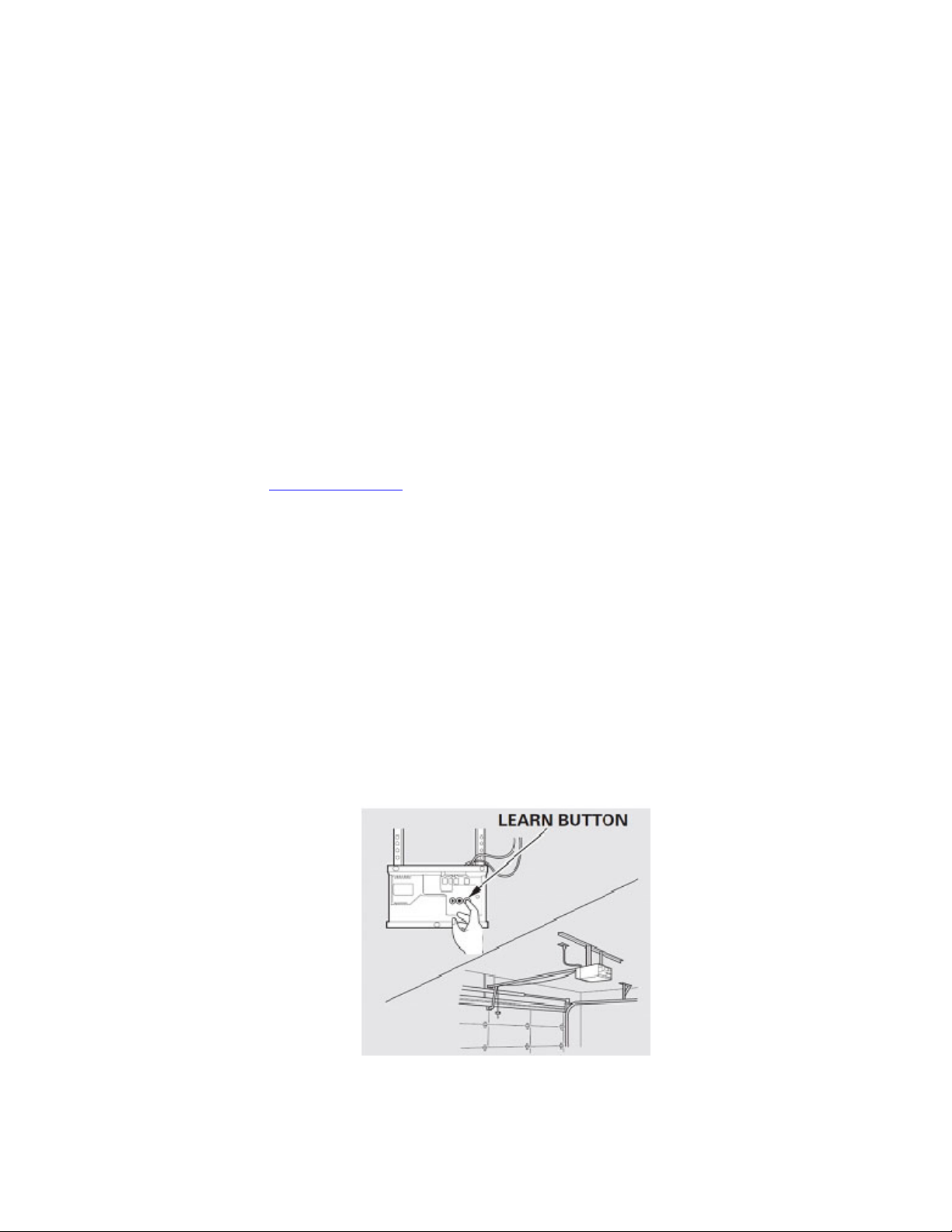
4. At the garage door opener receiver (motor-head unit) in the garage, locate the “learn” or
“smart” button. This can usually be found where the hanging antenna wire is attached to the
motor-head unit.
5. Firmly press and release the “learn” or “smart” button. (The name and color of the button
may vary by manufacturer.) There are typically 30 seconds to initiate step 6.
HomeLink® and the HomeLink® house icon are registered trademarks of Gentex Corporation.
HomeLink Connect™ is a trademark of Gentex Corporation.
Bluetooth Low Energy® is a registered trademark of Bluetooth SIG, Inc.
Page 3

6. Return to the vehicle and firmly press, hold for two seconds and release the
programmed HomeLink button. Repeat the “press/hold/release” sequence a second time, and,
depending on the brand of the garage door opener (or other rolling code equipped device),
repeat this sequence a third time to complete the programming process.
HomeLink should now activate your rolling code equipped device.
Gate Operator /
Canadian Programming
Canadian radio-frequency laws require transmitter signals to “time-out” (or quit) after several
seconds of transmission – which may not be long enough for HomeLink to pick up the signal
during programming. Similar to this Canadian law, some U.S. gate operators are designed to
“time-out” in the same manner.
If you live in Canada or you are having difficulties programming a gate operator or garage door
opener by using the “Programming” procedures, replace “Programming HomeLink” step
2 with the following:
Note: If programming a garage door opener or gate operator, it is advised to unplug the device during the
“cycling” process to prevent possible overheating.
2.Continue to press and hold the HomeLink button while you press and release - every two
seconds (“cycle”) your hand-held transmitter until the HomeLink indicator light changes
from a slow to either a rapid blink (rolling code) or solid ON state (fixed code). Now you
may release both the HomeLink and hand-held transmitter buttons.
Proceed with “Programming” step 3 to complete.
Using HomeLink
To operate, simply press and release the programmed HomeLink button. Activation will now occur
for the trained device (i.e. garage door opener, gate operator, security system, entry door lock,
home/office lighting, etc.). For convenience, the hand-held transmitter
of the device may also be used at any time.
In the event that there are still programming difficulties or questions, please review the training
video listed at the YouTube.com location listed below.
Erasing HomeLink Buttons
To erase programming from the three buttons (individual buttons cannot be erased but can be
“reprogrammed” as outlined below), follow the step noted:
Press and hold the two outer HomeLink buttons until the indicator light
begins to flash-after 10 seconds. Release both buttons. Do not hold for
longer that 20 seconds. HomeLink is now in the train (or learning) mode
and can be programmed at any time beginning with “Programming” - step 1.
Reprogramming a Single HomeLink Button
HomeLink® and the HomeLink® house icon are registered trademarks of Gentex Corporation.
HomeLink Connect™ is a trademark of Gentex Corporation.
Bluetooth Low Energy® is a registered trademark of Bluetooth SIG, Inc.
Page 4

To program a device to HomeLink using a HomeLink button previously trained, follow these
steps:
1. Press and hold the desired HomeLink button. DO NOT release the button.
2. The indicator light will begin to flash after 20 seconds. Without releasing the
HomeLink button, proceed with “Programming” - step 1
For questions or comments, contact HomeLink at: www.homelink.com or 1–800–355–3515.
For video training directions, please refer to the following YouTube location.
#1) Search for YouTube.com
#2) Then search for HomeLinkInstruction’s channel
#3) Select the video HomeLink Programming Instructions – Garage Door Opener
HomeLink® and the HomeLink® house icon are registered trademarks of Gentex Corporation.
HomeLink Connect™ is a trademark of Gentex Corporation.
Bluetooth Low Energy® is a registered trademark of Bluetooth SIG, Inc.
Page 5

HomeLink Connect™
Wireless control is made possible through HomeLink Connect, a home automation aggregator app
that can be configured and paired with HomeLink, allowing users to activate home automation
devices or entire scenes without needing to fumble with their phone. Additional HomeLink
Connect information can be found on the internet at www.connect.homelink.com
Getting Started with HomeLink Connect
1. Download the App
Download the HomeLink Connect app from the Apple App Store or Google Play.
2. Create a HomeLink Account
Follow the app prompts to create your own unique HomeLink account. You’ll be asked to accept the
Terms & Conditions of Gentex Corporation, which owns HomeLink, and Yonomi, our home automation
aggregator partner. If you already have an account, simply sign in.
HomeLink and Yonomi are working with the leaders in home automation to bring you simple,
convenient and comprehensive control of all your various home automation devices. With an evergrowing list of compatible partners, HomeLink is one of the only in-vehicle features that will grow
increasingly useful the longer you own it.
Compatible Devices
For the most recent list of compatible home automation devices/partners, visit:
www.connect.homelink.com/compatible-products
3. Link your Existing Accounts
Once you’ve created your HomeLink account, the app will populate automatically with a list of
connected home brands available through HomeLink. Find the products you own and connect their
accounts to HomeLink by entering their login information. Repeat for all your accounts. Successfully
connected accounts are confirmed by the yellow “Account Linked” label.
4. Configuring Physical In-Mirror Buttons
HomeLink Connect uses the HomeLink physical vehicle-integrated buttons to execute home
automation commands. To program one of the physical buttons through the app, select + for the
button you want to configure, name and choose a button icon, and select the device’s functionality.
You can modify or delete a button from the app at any time.
5. Connect or Pair your Phone to the Vehicle
HomeLink Connect can be activated by physical mirror-integrated buttons via a Bluetooth Low
Energy® (BLE) connection with the phone. This links programmed button in the app to the physical
button on the mirror.
HomeLink® and the HomeLink® house icon are registered trademarks of Gentex Corporation.
HomeLink Connect™ is a trademark of Gentex Corporation.
Bluetooth Low Energy® is a registered trademark of Bluetooth SIG, Inc.
Page 6
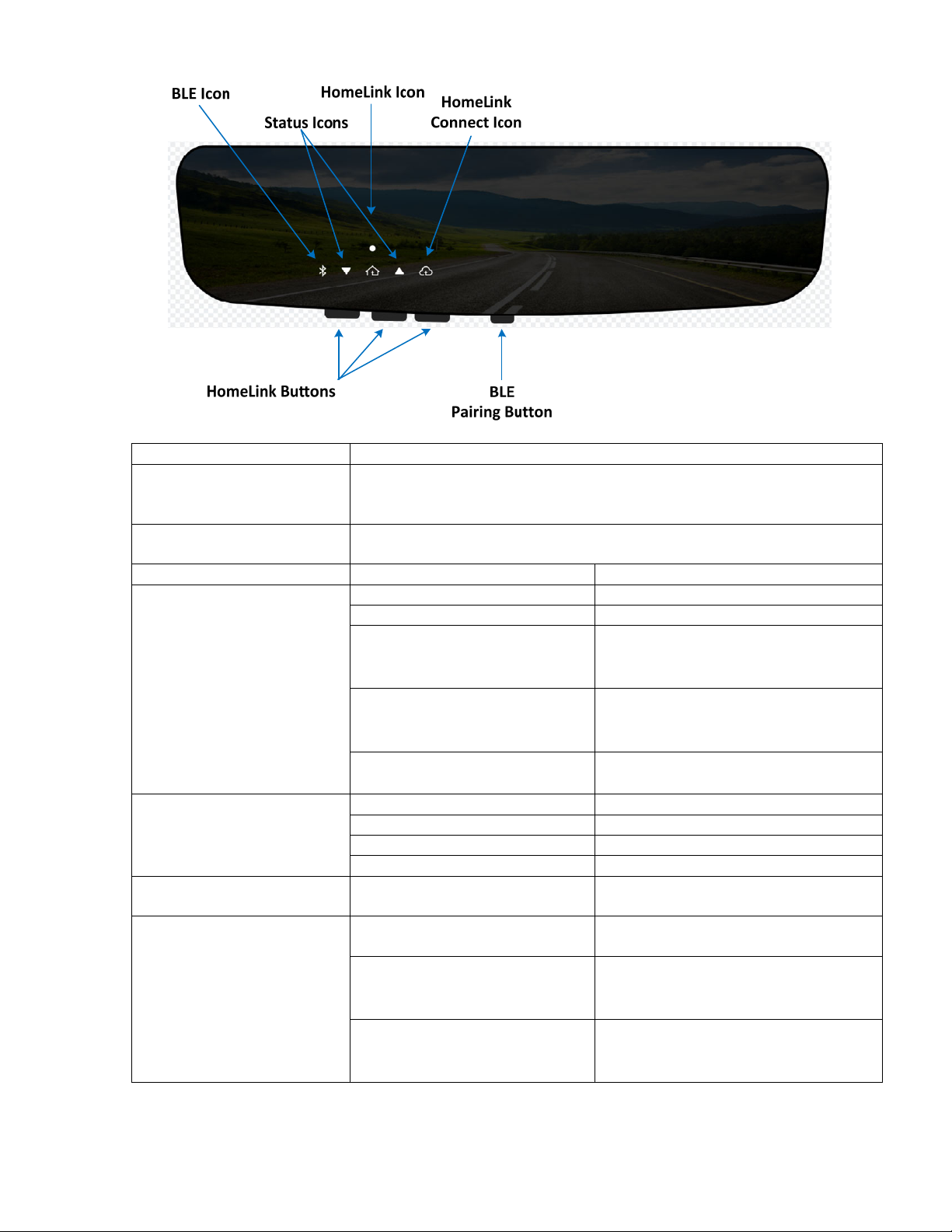
Buttons Description
HomeLink Buttons Operates a device with the press of the button when trained to a
Garage Door Opener, or associated with an IoT device through the
HomeLink Connect app.
BLE Pairing Button Enables BLE pairing with iOS or Android phones through the
HomeLink Connect app by pressing the button for 3 seconds.
LED Color and Action Description
BLE Icon White, slow pulsating Pairing is in process
White, fast pulsating Successful pairing
Red, flashing 5 times
Red, solid for 10s
Unsuccessful pairing, or
confirmation timeout
Fade out
White, flashing 5 times
Confirmed pairing
White, solid for 5s
Fade out
White, solid for 10s
Green, flashing up to 10s
IoT Channel Association has been
deleted from the mirror.
Status Icon Orange, flashing Up Arrow Door Opening
Green, flashing Up Arrow Door Opened
Orange, solid Down Arrow Door Closing
Green, solid Down Arrow Door Closed
HomeLink Icon Green or Orange
See Owner’s Manual Text.
Solid or Flashing
HomeLink Connect Icon White, pulsating Sending messages through app to
internet.
White, flashing 3 times
Successful connection to internet.
White, solid for 5s
Fade out
Red, flashing 3 times
Red, solid for 5s
Unsuccessful connection to the
internet.
Fade out
HomeLink® and the HomeLink® house icon are registered trademarks of Gentex Corporation.
Bluetooth Low Energy® is a registered trademark of Bluetooth SIG, Inc.
HomeLink Connect™ is a trademark of Gentex Corporation.
Page 7

FCC and Canada
This device complies with FCC rules part 15 and Innovation, Science, and Economic
Development Canada RSS-210. Operation is subject to the following two conditions: (1) This
device may not cause harmful interference, and (2) This device must accept any interference
that may be received including interference that may cause undesired operation. WARNING: The
transmitter has been tested and complies with FCC and ISED rules. Changes or modifications
not expressly approved by the party responsible for compliance could void the user’s authority to
operate the device.
This equipment complies with FCC and ISED radiation exposure limits set forth for an
uncontrolled environment. End Users must follow the specific operating instructions for satisfying
RF exposure compliance. This transmitter must be at least 20 cm from the user and must not be
co-located or operating in conjunction with any other antenna or transmitter.
FCC (États-Unis) et ISED (Canada)
Cet appareil est conforme aux règlements de la FCC, section 15, et au CNR-210 d’Innovation,
Sciences et Développement économique Canada. Le fonctionnement est assujetti aux deux
conditions suivantes : (1) cet appareil ne doit pas causer d’interférences nuisibles et (2) cet
appareil doit accepter toute interférence reçue, y compris celle qui pourrait entraîner un
dysfonctionnement. MISE EN GARDE : L’émetteur a subi des tests et est conforme aux
règlements de la FCC et d’ISDE. Les changements ou modifications non approuvés
explicitement
par la partie responsable de la conformité pourraient rendre caduque l’autorisation de l’utilisateur
de se servir du dispositif.
Cet appareil est conforme aux limites d’exposition aux radiations de la FCC et d’ISDE établies
pour
un environnement non contrôlé. Les utilisateurs finaux doivent respecter les instructions
d’utilisation spécifiques pour satisfaire aux exigences de conformité aux expositions de RF.
L’émetteur doit se trouver à 20 cm au minimum de l’utilisateur et ne doit pas être situé au même
endroit que tout autre émetteur ou antenne ni fonctionner avec un autre émetteur ou antenne.
HomeLink® and the HomeLink® house icon are registered trademarks of Gentex Corporation.
HomeLink Connect™ is a trademark of Gentex Corporation.
Bluetooth Low Energy® is a registered trademark of Bluetooth SIG, Inc.
 Loading...