

Page 1
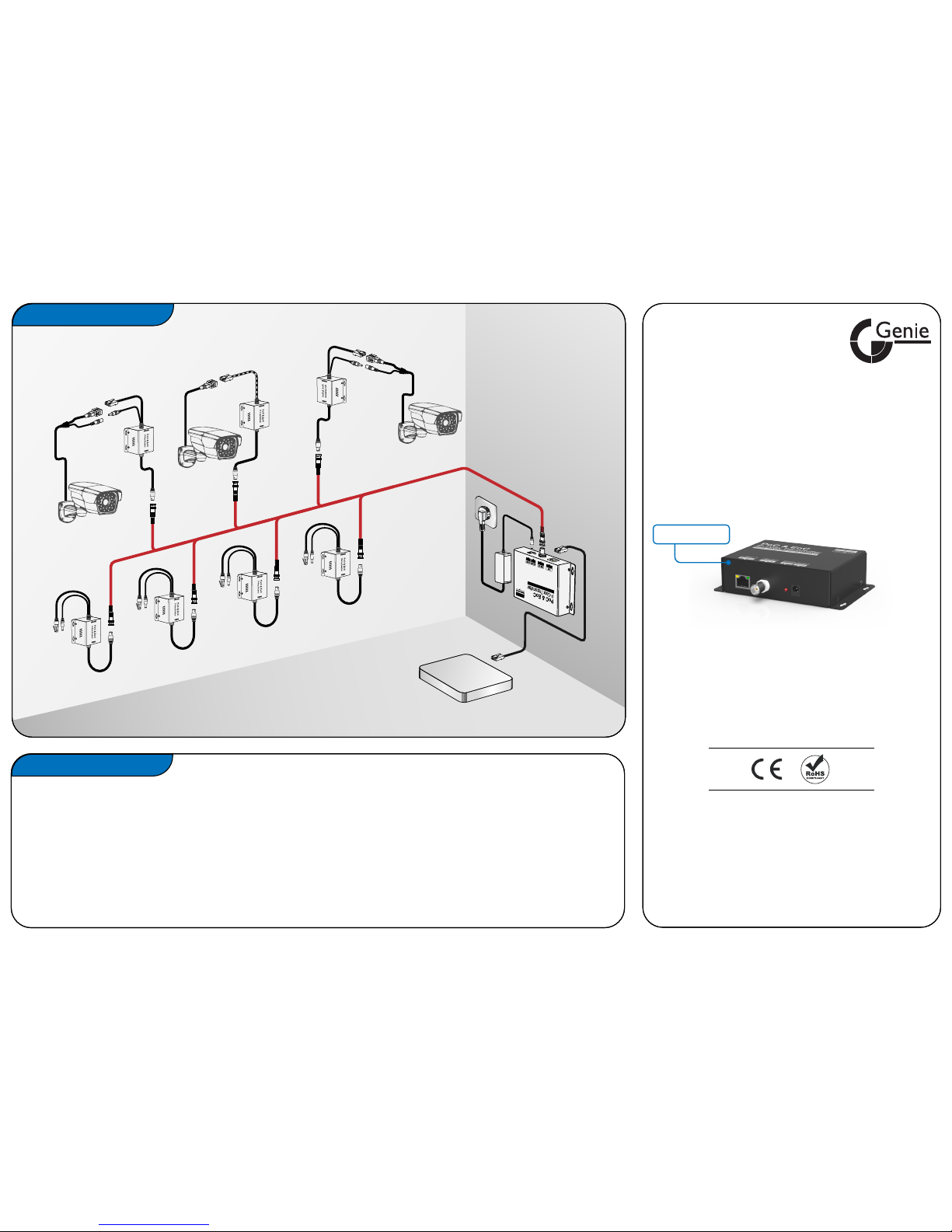
This IPOC8T (transmitter) is designed to simplify the wiring process for network cameras.
It enables multiple megapixels network cameras sharing one cable, transmitting both power and high-speed
network for longer distance. Cable types cover 75ohm coaxial cable, double stranded electric wire and twisted
pair UTP cable etc. Plug & Play designed, and with unrelenting commitment to performance, this cutting-edge
cabling technology will save a great many installation time and cabling costs.
PRODUCT INTRO
Ver. 2017.6.1
Quick Installation Guide
Please read and understand thoroughly this quick installation
guide before using and keep it for future reference.
PoE Output
Network Output
+12V DC Output
STANDARD
IP CAMERA
PoE IP
CAMERA
UP TO 300m (1000ft)
OVER RG-59 COAX
NETWORK
CABLE
DC48V
POWER
NVR/ROUTER
INSTALLATION MAP
Network Output
+12V DC Output
STANDARD
IP CAMERA
IPOC8T
Transmitter
Enable 8 network cameras transmitting both DC
power & network signal over one single cable.
IPOC8T
Page 2
2
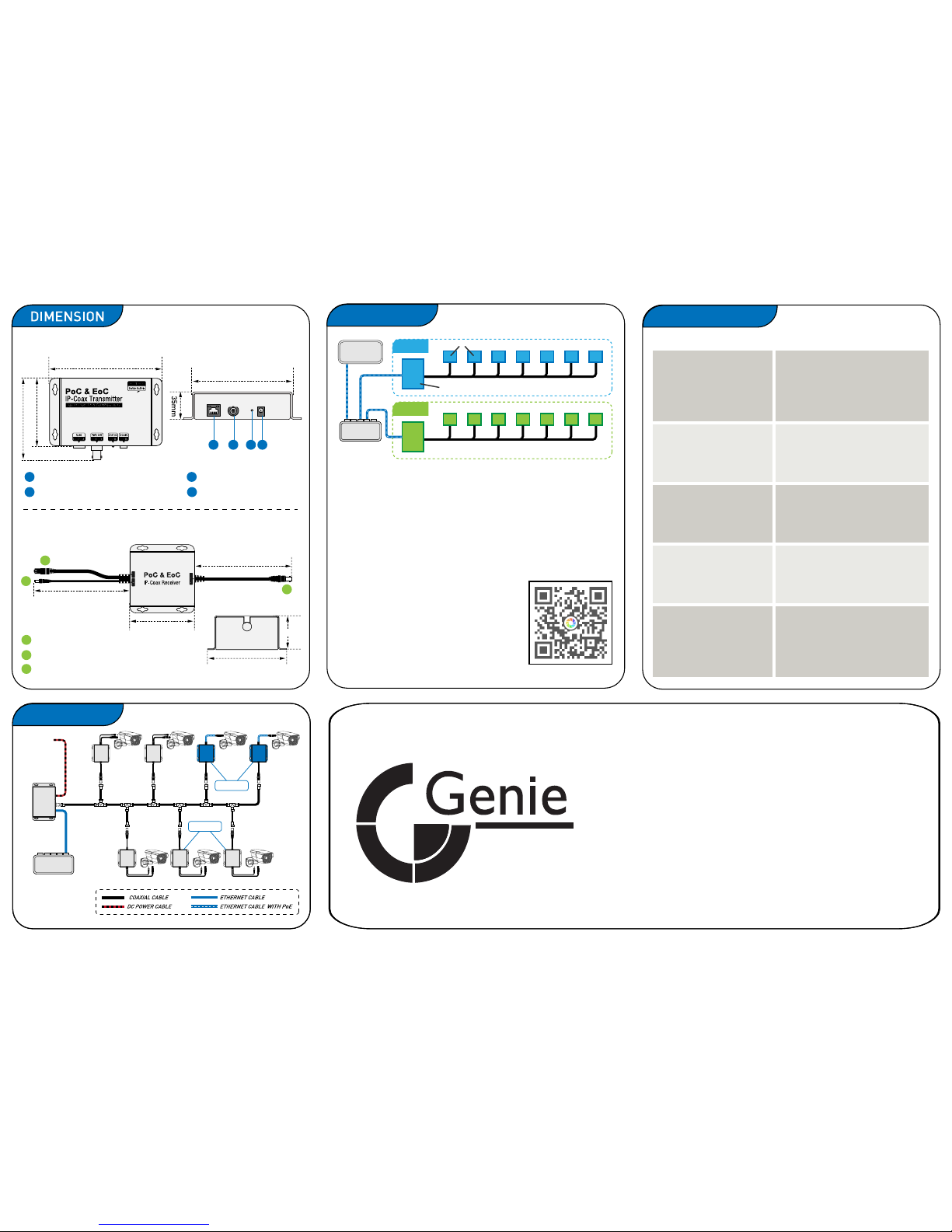
RJ45 Network Interface
3
Power Indicating LED
4
DC 48V Power Input
75ohm BNC Connector
1
CAT 5 Modular Plug (PoE Optional)
A
DC12V Power Output Plug
B
75ohm BNC Connector
C
A
B
C
165mm
165mm
68mm
60mm
45mm
Transmitter: IPOC8T
Reciever: IPOC1R
SPECIFICATION
HARDWARE INTERFACE
Connector type:
Cable type:
Range:
Bandwidth:
BNC 75ohm
RG59/ RG11/ 2-core Power Cable
300m over RG59/Power Cable
500Mbps ~1Gbps (total up + down)
PHYSICAL
Dimensions:
Weight:
Working temperature:
Relative humidity:
L137mm x W85mm x H35mm
350g
-10°C to +50°C
85% non-condensing
ETHRNET INTERFACE
Connector type:
Cable type:
Range:
RJ45
Straight through or cross-over
upto 100m (350ft)
POWER LED INDICATOR
ON:
OFF:
Normal power supply
Without power supply or there is
abnormalty in the circuit.
AC100V ~ AC240V
DC48V
3000mA
POWER
Input voltage:
Output voltage:
Supply current:
IPOC8-T
© Genie CCTV Ltd 2017 All rights reserved.
MANUFACTURER:
Genie CCTV, Ltd
www.geniecctv.com
86mm
104mm
142mm
2 3
4
1
117mm
DIAGRAM 1
Connection by 75ohm coaxial cable
Multiple Group Connection
Plug & Play
ROUTER/ NVR/
UPPER HUB
Note:
Max 8 cameras were supported transmitting Ethernet signal in a LAN
group. The default network password for each group is HomePlugAV.
If many groups were added to the same network, users need to set
an unique password for each group by our PC based utility software,
so as to avoid signal intererence during transmission.
Scan the QR-code on the right to download the
guiding steps on how to set up the network
password. Or, the document is also available
from below link by website browser.
Web link:
http://okgo.top/14931080810048695.pdf
DIAGRAM 2
GROUP 1
GROUP 2
ETHERNET
SWITCH
ETHERNET
SWITCH
POWER
(DC48V)
PoC & EoC
RECEIVER
CONVENTIONAL
IP CAMERA
PoE IP
CAMERA
TRANSMITTER
Transmitter
Receivers
IPOC1RP
IPOC1R
 Loading...