

Page 1

Supera Color LCD TV BOX User’s Manual
= 1 =
Supera Color LCD TV Box
User’s Manual
Contents
FCC Information................................................................................................................ 2
1 Product Name:.............................................................................................................. 2
2 Introduction:.................................................................................................................3
3 Hardware Installation...................................................................................................... 5
4 IR Remote and key description....................................................................................... 6
5 Menu options................................................................................................................... 7
6. Trouble shooting.............................................................................................................8
7. Frequency Asked Questions ........................................................................................... 8
Limited Warranty
IN NO EVENT SHALL THE DIRECT VENDOR’S LIABILITY EXCEED THE PRICE PAID FOR
THE PRODUCT FROM THE DIRECT, INDIRECT, SPECIAL, INCIDENTAL OR
CONSEQUENTIAL DAMAGES RESULTING FROM THE USE OF THE PRODUCT, DISK OR ITS
Page 2

Supera Color LCD TV BOX User’s Manual
= 2 =
DOCUMENTATION.
The direct vendor makes no warranty or representation, expressed, implied, or statutory with
respect to the contents or use of this documentation, and specially disclaims its quality,
performance, merchantability, or fitness for any particular purpose.
The direct vendor also reserves the right to revise or update the device or documentation
without obligation to notify any individual or entity of such revisions, or update. For further inquires
please contact your direct vendor.
FCC Information
This equipment has been tested and found to comply with the limits for a Class B digital device
pursuant to Subpart J of Part 15 of the FCC Rules. These limits are designed to provide reasonable
protection against harmful interference in a residential installation. This equipment generates uses
and can radiate radio frequency energy and, if not installed and used in accordance with the
instructions, may cause harmful interference to radio communications. However, there is no
guarantee that interference will not occur in a particular installation. If this equipment does cause
harmful interference to radio or television reception, which can be determined by turning the
equipment off and on, the user is encouraged to try to correct the interference by one or more of the
following measures:
Reorient or relocate the receiving antenna.
Increase the separation between the equipment and receiver.
Connect the equipment into an outlet on a circuit different from that which the
receiver is connected.
Consult the dealer or an experienced radio/television technician for help.
FCC Warning
To assure continued FCC compliance the user must use grounded power supply core and the
provided shielded video interface cable with bonded ferrite cores. If a BNC cable is going to be
used, use only a shielded BNC(5) cable. Also, any unauthorized changes or modifications no
expressly approved by the party responsible for compliance could void the user’s authority to
operate this device.
1 Product Name:
This manual is for Geniatech Supera color LCD TV Box
Page 3

Supera Color LCD TV BOX User’s Manual
= 3 =
2 Introduction:
The Supera Color LCD TV BOX is a state-of-the-art TV to PC VGA/XVGA/SXGA converter box.
The compact unit easily turns your LCD/CRT monitor, plasma display or projector all that has a
VGA input connector devices into a multimedia center with small desktop space. With a built-in TV
tuner and multiple video ports, you can connect DVD players, digital video cameras, VCRs or even
game consoles to your PC, and view high quality video in full-screen, high-resolution images.
The full screen display resolution is up to 1280x1024 with refresh rate from 60Hz and it is most
suitable to use 19" or bigger PC monitor to watch TV program, like football game, movie and any
show you want! The User-friendly OSD (On Screen Display) can let you easily use brightness,
contrast and hue adjustment for better video quality! The full function remote controller can help
you to make the channel selection, input source switching, volume adjustment, and etc.
With Enhanced 3D motion adaptive de-interlacing, LCD TV BOX provides high quality picture
and gives sharp & stable image output to LCD and/or CRT monitor
2.1 Features
o LCD TV BOX can provide high quality picture with sharp, stable image output to
VGA/SVGA/XGA/SXGA
o LCD TV BOX I output mode can be changed from 640*480,800*600, 1024*768 to 1280 *
1024 (60Hz)
o Compatible for Multi Signal inputs: TV, Video, S-Video, and PC.
o Automatic source mode detection (NTSC/PAL/SECAM for video S-Video)
o TV Channels auto scanning and memorize
o Brightness/Contrast/Saturation/Color/Sharpness/Gamma Adjustment
o Provide user-friendly OSD (on screen display) for function control
o No software or driver required. No PC compatibility problem
o Compact standing body (Supera Color) and easy installation, no need to uncover PC case
o With Muliti-Language OSD Selection
o Full function remote controller
o PAL B/G、D/K/I、NTSC and SECAM Standard (ONE standard in same time)
2.2 Specifications
o Video input
- TV Input: Coaxial (RF)
- Composite Video Input
- S-Video Input
- VGA Input: 8 pin (Mini DIN)-15 pin (DB15)
o Video Output
- VGA Output: 15 pin DB
o Audio input
- Composite Audio Input
- From PC Sound card Line-In
Page 4

Supera Color LCD TV BOX User’s Manual
= 4 =
o Audio output
- Audio Output to Sound Enclosure or Sound card Line in
2.3 System Requirements
o No specific PC system required
o VESA compatible VGA monitor, such as LCD, CRT monitor, plasma
display or projector all that has a VGA input connector devices.
o Video input device (e.g. Cable, Antenna, VCR, V8, LD player, TV game machine
and etc.)
2.4 Accessories
LCD TV BOX (Supera Color)
LCD TV BOX holder
User’s Manual (This manual)
Audio Cable
IR Remote
CVBS Cable
Power adapter (Switching, 110-240V AC, 7.5V1A DC)
8 pin – DB 15 cable
Page 5
Supera Color LCD TV BOX User’s Manual
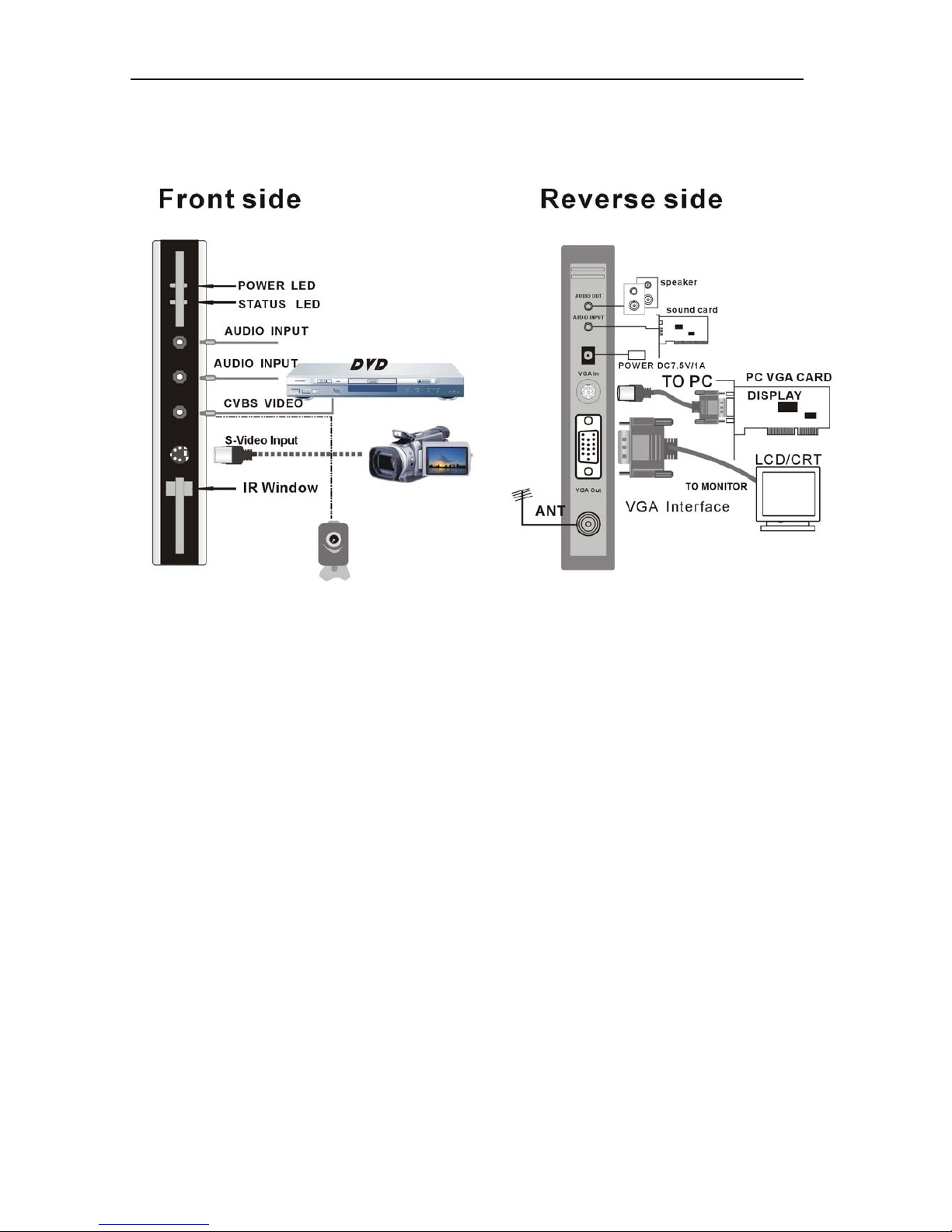
3 Hardware Installation
Connection
Shut off the power of LCD TV BOX and PC Monitor
1. Connect the to monitor, PC and LCD TV BOX (Please match the right color).
2. Connect the sound enclosure or other device which has sound input jack device (for a example,
your sound card’s Line In port), to LCD TV Box’s Line Out port.
3. Connect the Cable TV Antenna to LCD TV BOX’ s antenna input.
4. Connect the AC/DC power converter’s output to LCD TV BOX, LCD TV BOX will auto power
on.
5. Connect video and/or S-video in port to the Video device’s (DVD/VCD/VCR/PS2/Gamestation)
video out port.
Caution:When you first use this new LCD TV BOX, please first select SEARCH item in
MENU and press “MENU” to start one time full auto-scan all the channels. This procedure
will takes 5-10 minutes, and the status LED will blinking when on processing.
= 5 =
Page 6
Supera Color LCD TV BOX User’s Manual
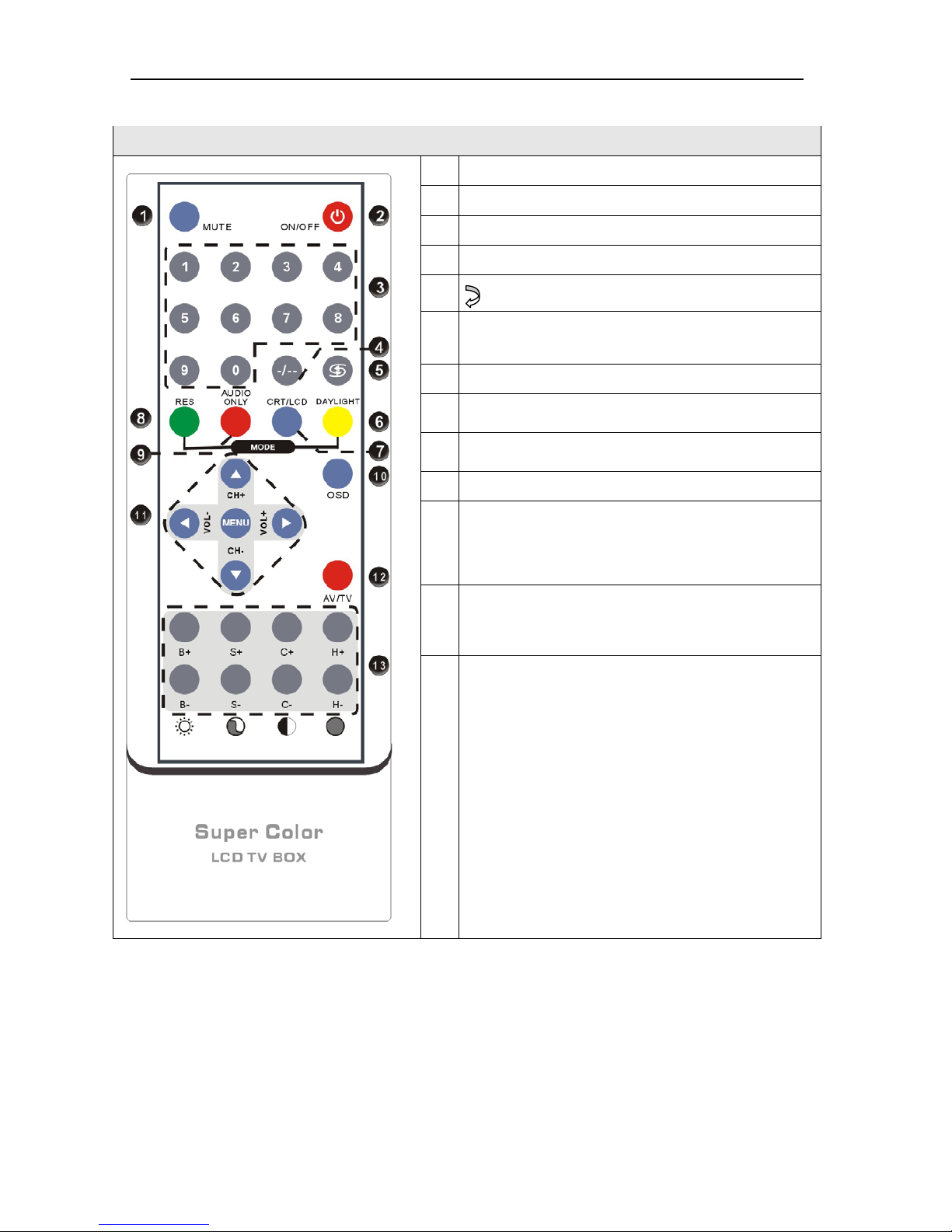
4 IR Remote and key description
IR Remote and key description
1
Mute:Mute on/off
2
Power: Power on/off
3
0 - 9: 0-9 keys
4
-/--:digit
5 return to previous channel
6
DAYLIGHT:
设置不同的画面效果,预设有标
准、柔和、艳丽、明亮四种画面效果模式
7
CRT/LCD:提供相对应显示器的显示模式.
8
RES: change resolution
9
AUDIO ONLY:画外音
10
OSD:OSD on/off
11
CH+/CH-:channel up and down
VOL+/VOL-:Volume up and down
MENU:Invoke menu
12
AV/TV:Video source select
TV—PC(VGA)—CVBS—S-Video
13
B+ B-:亮度增加减少
S+ S-:饱和度增加减少
C+ C-:对比度增加减少
H+ H-:灰度增加减少
= 6 =
Page 7
Supera Color LCD TV BOX User’s Manual
= 7 =
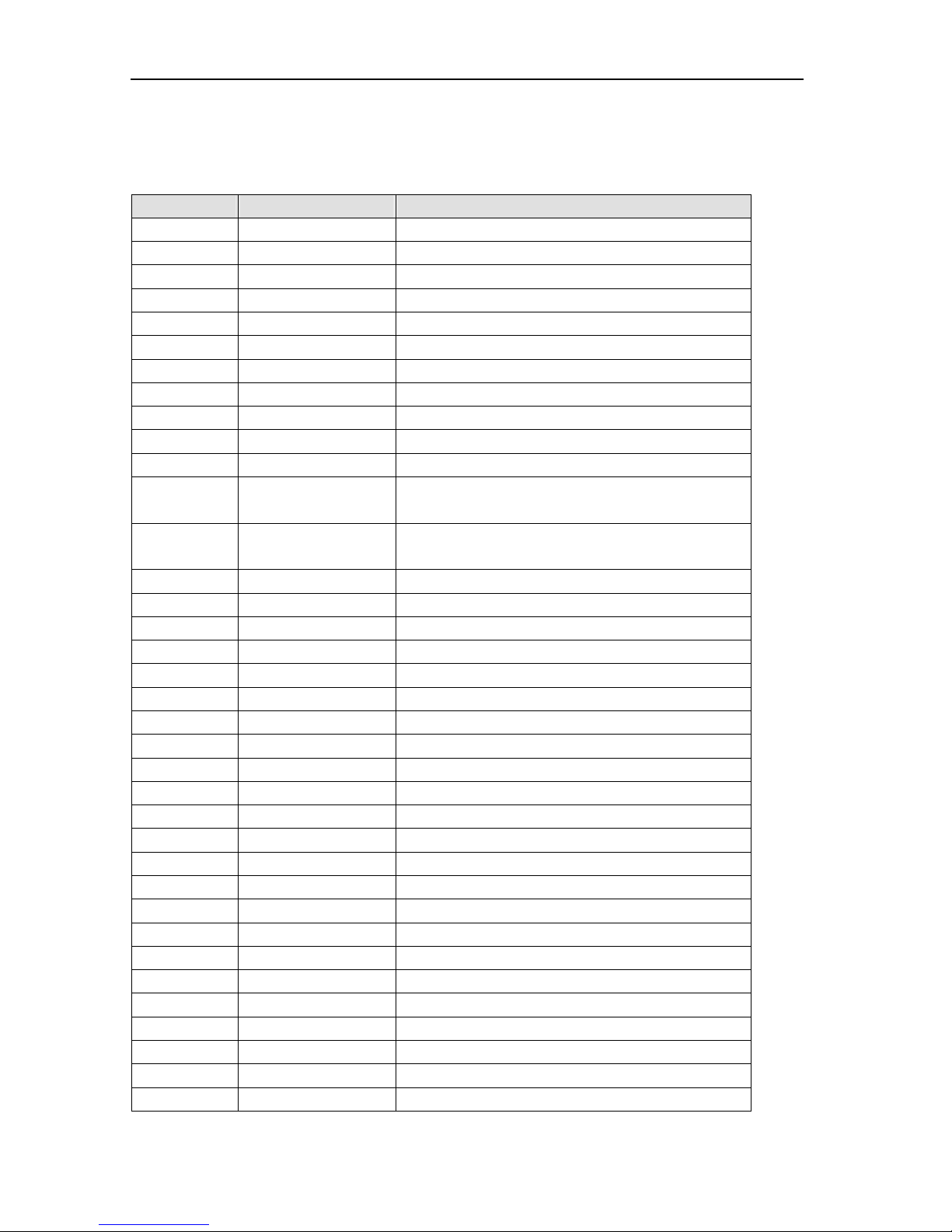
5 Menu options
Press “MENU” button to enter the menu option, press “Channel up and down” select the
option you want to change or look up, then press “MENU” to enter, press “ VOLUME + and -”
changing the value. Select “EXIT ” and press “MENU” when finish
Main Menu Sub Items Description
Color → ↓
Enter Color sub setting.
Brightness
Adjust brightness of image.
Contrast
Adjust contrast of image.
Saturation
Adjust saturation of image.
Hue
Adjust hue of image
Default
Set all color setting to default value.
Return
Return to up menu.
Video → ↓
Enter Video sub setting
Standard
PAL/NTSC/SECAM
Return
Return to up menu
Channel → ↓
Enter Video sub setting.
TV System Standard
NTSC/PAL-M/PAL-N/PAL-B-G/PAL-D-K/(Depends
on Tuner)
Auto Scan
Take auto scan channel action (high speed,
recommended).
Full Scan
Take full frequency scan (low speed).
Fine Tune
Finely adjust the frequency of the current channel
Skip
Skip the current channel
Return
Return to up menu
Display → ↓
Enter Display sub setting.
VGA
640 X 480
SVGA
800 X 600
XGA
1024 X 768
SXGA
1280 X 1024
W1440S
W1440S
W1280S
W1280S
W1440P
W1440P
Return
Return to up menu
OSD → ↓
Toggle OSD
Pos.X
OSD Movie X
Pos.Y
OSD Movie Y
Return
Return to up menu
Language → ↓
Select language
English
English language
簡中
Chinese language
繁中
Chinese language
Portuguese
Portuguese language
Exit →
Exit menu mode.
Page 8
Supera Color LCD TV BOX User’s Manual
= 8 =
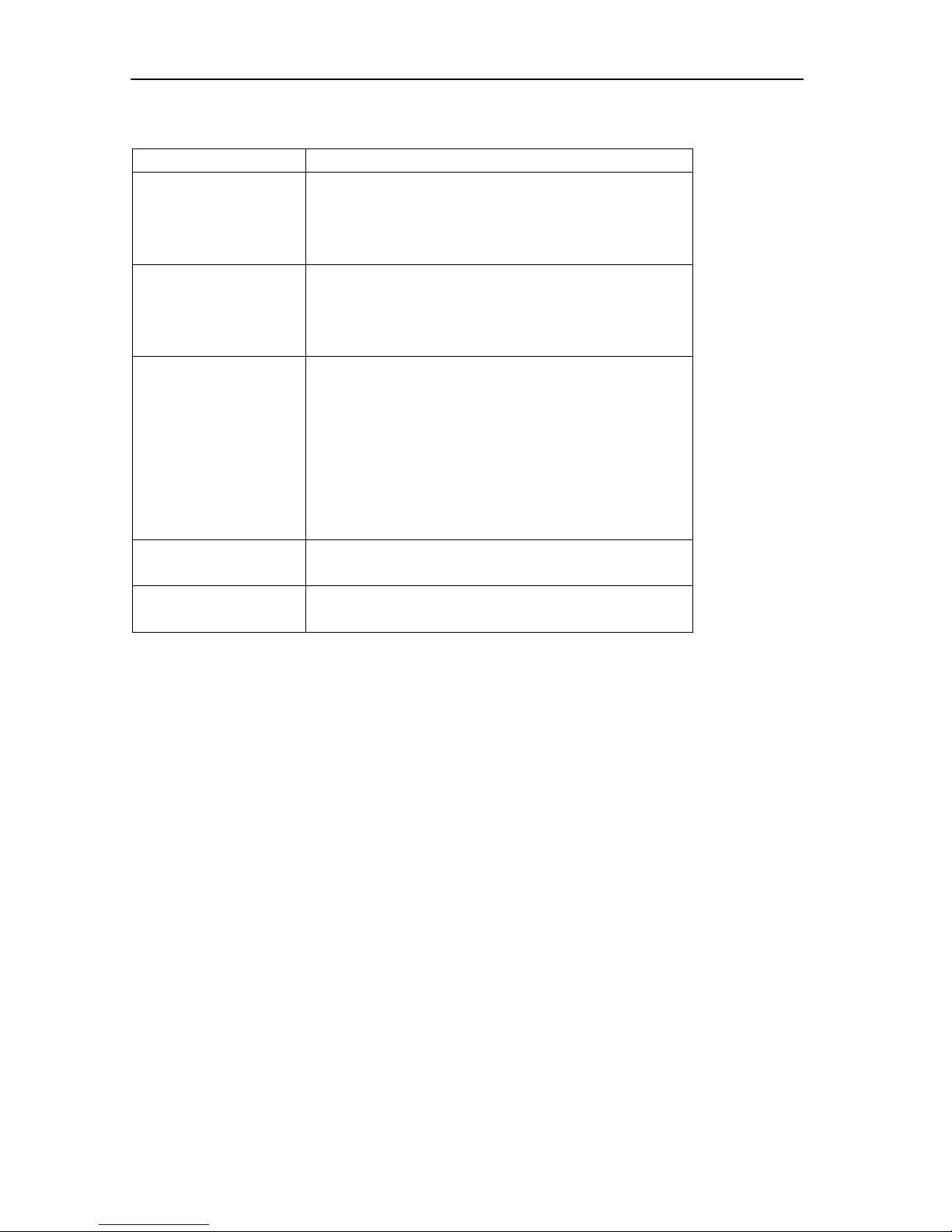
6. Trouble shooting
Description Hints
No picture and no
sound (Even noise)
1. Power LED off: Please check the AC/DC adaptor,
the power connector;
2. Power LED on: check the monitor and sound
device connection
Picture is ok but no
sound (Even nose)
1. Check the sound device connection
2. Check if mute key is pressed
3. Check if volume is lower to the end of minimum
4. Check sound device’s volume setting
No picture but sound is
Ok
1. Check the connection between monitor and LCD
TV BOX
2. Check if the monitor is power off
3. Check the monitor is not in power saving status
4. Check if your monitor cannot support high
resolution, please change to other resolution by
press the RES key, wait a moment to see if it is ok,
or press RES key once more to another resolution.
No color 1. TV cable signal is too weak
2. Check the Saturation setting
REMOTE problem 1. Check the IR sender’s batteries
2. Check if too much dust on the sender
7. Frequency Asked Questions
Q:Why I need 1280X1024 resolution?
A:For CRT monitor, you can find more than one resolution at which you can get better display
quality, but for LCD monitor, one panel only have one resolution at you can get the best display
quality, other s are not so good, even you can say its no good, normally, 15” LCD monitor’s best
resolution and highest resolution is 1024X768, for 17” and 19”, its best and highest resolution is
1280X1024.
Q: What is the difference between LCD TV BOX and other such 640*480 level TV box (for an
example, TV box V for CRT)?
A: The key difference is our LCD TVBOX has a 9 bit input ADC and have a digital de-interlacer
inside our main chip, which improves the picture quality.
 Loading...