

Page 1
SpectroLED
STUDIO 800/1200
LED LIGHT
USER MANUAL
Page 2

SpectroLED
INTRODUCTION
SpectroLED Studio LED Light - USER MANUAL
2
THANK YOU FOR CHOOSING GENARAY
The Genaray SpectroLED Studio Lights provide bright,
continuous light with flicker-free dimming for photography
and video shoots. They’re ideal for studio work, but they’re
constructed to be sturdy and durable enough for location
work as well.
SpectroLED fixtures are available with 800- and 1200LED arrays that can operate on AC or battery power. Each
fixture offers a brightness range of 100% to 10%, along
with a high CRI for precise color accuracy and rendering.
A diffuser is included for a softer wraparound light quality.
Daylight models generate a 5600 K daylight-balanced
light and include a tungsten filter to match other tungsten
fixtures in your studio. The bi-color models offer a color
temperature range from 3200 to 5600 K.
Each fixture includes a remote that will control any
SpectroLED light from up to 65 feet away. It will also
control the brightness and color temperatures of all
SpectroLED lights in a multilight display. For additional
light-shaping capability and light-spill control, an easyto-install barndoor attachment is sold separately. The
barndoors include removable silver intensifiers, and clips
for attaching gels.
Page 3

PRECAUTIONS
· Please read and follow these
instructions, and keep this
manual in a safe place.
· Keep this unit away from water and
any flammable gases or liquids.
· Make sure the unit is powered off
when plugging it into a power source.
· Use only the correct,
recommended voltage.
· Do not attempt to disassemble or
repair the equipment—doing so will
void the warranty, and Genaray will
not be responsible for any damage.
· Handle the unit with care.
· Do not stare directly at the lights
when they are powered on.
· Clean the unit with only
a soft, dry cloth.
· Keep this unit away from children.
· Use only parts provided
by the manufacturer.
· Make sure the item is intact and
that there are no missing parts.
· All images are for illustrative
purposes only.
SpectroLED Studio LED Light - USER MANUAL
Precautions
3
Page 4
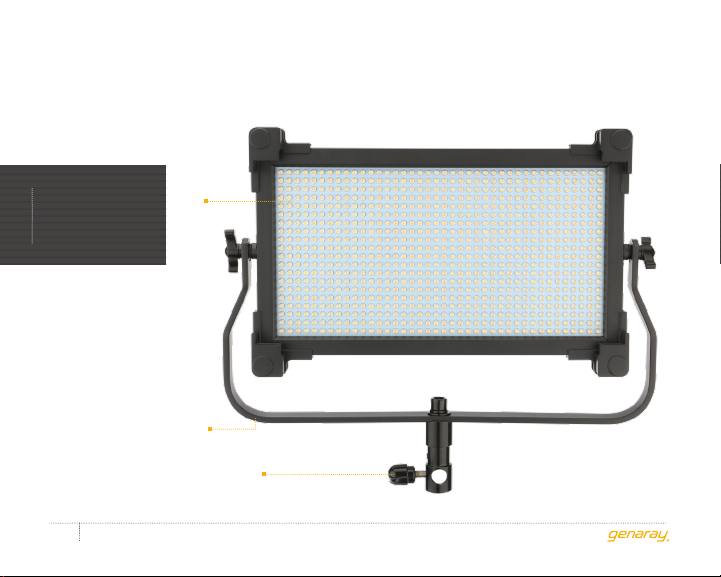
SP-S-800B/D1
OVERVIEW
LED
array
Yok e
Locking knob
SpectroLED Studio LED Light - USER MANUAL
4
Page 5
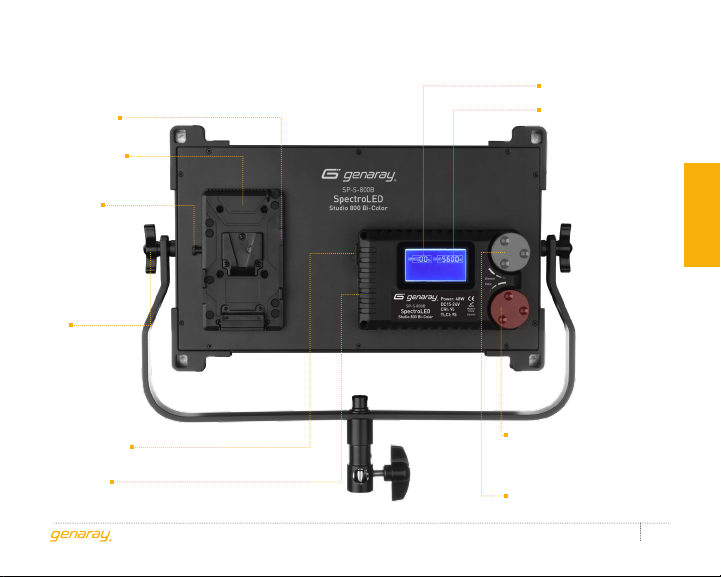
D-tap input
power socket
Battery plate
V-mount
release
button
Tilt
adjustment
knobs
Brightness
Color
temperature
Product overview
Power switch
4-pin XLR
power socket
Color temperature
knob
(Bi-color only)
Dimmer knob
SpectroLED Studio LED Light - USER MANUAL
5
Page 6
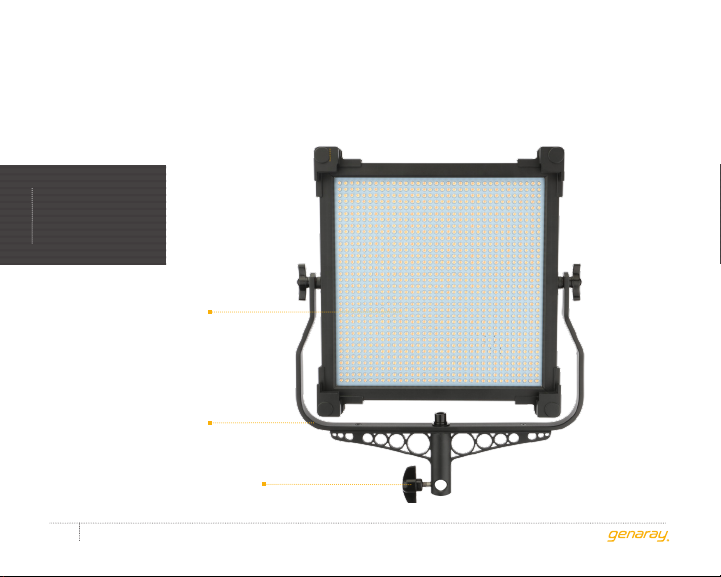
SP-S-1200B/D1
OVERVIEW
LED
array
Yok e
Locking knob
SpectroLED Studio LED Light - USER MANUAL
6
Page 7
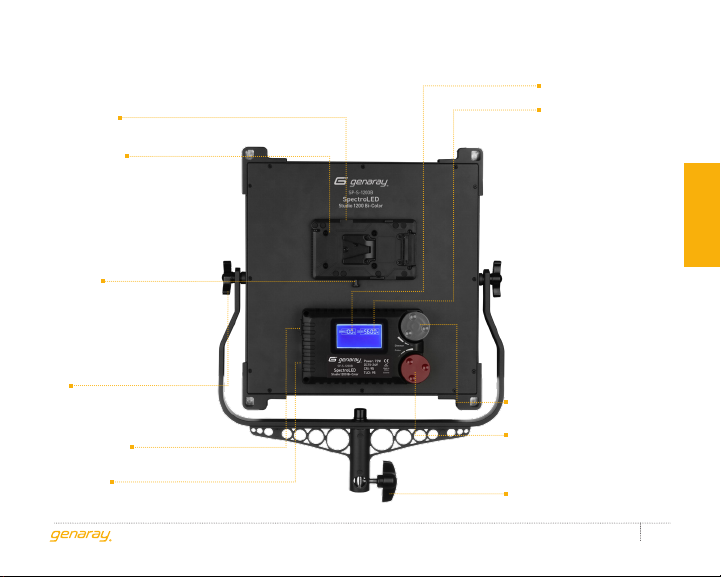
D-tap input
power socket
Battery plate
V-mount
release
button
Tilt
adjustment
knobs
Power switch
4-pin XLR
power socket
Brightness
Color
temperature
Product overview
Dimmer knob
Color temperature
knob
(Bi-color only)
Locking knob
SpectroLED Studio LED Light - USER MANUAL
7
Page 8

MOUNTING THE
SPECTROLEDCONTENTS INCLUDE
· AC adapter
· AC power cord
contents
· Remote controller
· Diffuser
· Tungsten filter (Daylight models only)
· Carry case
· Shoulder strap
SpectroLED Studio LED Light - USER MANUAL
8
BABY-PIN STUD
Mount the fixture on any heavy-duty light
stand with a 5/8-inch baby-pin stud, and
turn the locking knob until secure.
JUNIOR-PIN RECEIVER
Remove the tilt adjustment knobs to mount
the light into a 11⁄8-inch junior-pin receiver.
Page 9

POWERING THE
SPECTROLED
The SP-S-1200 and SP-S-800 can be
powered directly from an AC outlet or with
one V-mount battery (not included).
USING THE SPECTROLED
WITH AC POWER
Important
The SP-S-1200 and SP-S-800 are
multivoltage fixtures capable of running on
100 to 240 V, 50/60 Hz. The included cable
has a 120 V, 50 Hz (North American) plug.
To use this fixture with other voltages, you
must use a plug adapter (sold separately).
Use the AC adapter and AC power
cord to connect the fixture's 4-pin
XLR socket to an AC outlet.
USING THE SPECTROLED
WITH BATTERY POWER
The SP-S-1200 and SP-S-800 can be
powered by a V-mount battery.
When attaching the battery, make sure the
power switch is in the Off position, and the
fixture is not plugged into a wall outlet.
A Gold Mount battery can be used
by connecting it to the SP-S-1200
and SP-S-800 with a D-tap
power cable (not included).
Use the battery’s charge indicator to
see remaining charge or runtime.
SpectroLED Studio LED Light - USER MANUAL
instructions
9
Page 10

OPERATING THE
SPECTROLED
Power the fixture on. The LCD screen will
show the last setting that was used.
instructions
After powering on the light, set the
brightness and color temperature by turning
the knobs on the back of the fixture.
· Color temperature can be adjusted
from 3200 to 5600 K in 100 K
increments (bi-color models only).
· Brightness can be adjusted from
100% to 10% in 1% increments.
USING THE REMOTE
See also the Remote Function
table on the right.
The included remote can control your
SpectroLED from up to 65 feet away.
One remote can control several lights.
SpectroLED Studio LED Light - USER MANUAL
10
To sync your SpectroLED fixtures with
the remote, follow these steps:
1. Power on all SpectroLED fixtures.
2. Press and hold the A and D buttons
until you hear a confirmation
beep from the fixture(s).
Remote function Daylight Bi-Color
Synchronize A + D
Dimmer up A A
Dimmer down B B
Color temperature up– C
Color temperature
down
Power on/off D C + D
Audio confirmation
beep on/off
Dimmer 25%
down*
(hold)
– D
A + B A + B
C –
A + D
(hold)
Page 11

CHANGING THE BRIGHTNESS
(ALL MODELS)
The A and B buttons control the brightness.
Press the buttons to change the setting in
1% increments. Press and hold to rapidly
scroll through the brightness range.
Multilight Setups
If the lights are set at different brightness
levels, pressing the A or B button
will raise or lower the brightness
incrementally while maintaining the
difference in their brightness levels.
CHANGING COLOR TEMPERATURE
(BI-COLOR MODELS ONLY:
SP-S-1200B1 / SP-S-800B1)
Press the C and D buttons to change the
color temperature in increments of 100 K.
Press and hold the buttons to rapidly scroll
through the color temperature range.
Multilight Setups
If the lights are set at different color
temperatures, the remote will change the
settings incrementally while maintaining
the difference in their color temperatures.
AUDIO CONFIRMATION TONE
The audio confirmation tone is useful when
the fixture’s LCD screen is not visible, or
when operating several lights at once.
To enable or disable the audio confirmation
tone, press and hold the A and B buttons.
· All models of SpectroLED lights give
an audio tone when they reach the
top and bottom brightness levels.
· Bi-color models give a confirmation tone
when they reach the top and bottom
of the color temperature range.
instructions
SpectroLED Studio LED Light - USER MANUAL
11
Page 12

SLEEP MODE
Sleep mode turns off the LED array without
instructions
powering off the fixture. It’s a convenient
function to use to preserve bulb life and
electricity when setting up new shots
or taking a break. For multilight setups,
the remote will put all synced fixtures to
sleep at once, saving time and effort.
To put the lights to sleep or wake
them, press and hold the D button
(daylight models) or the C and D
buttons (bi-color models).
SpectroLED Studio LED Light - USER MANUAL
12
DIMMER DOWN 25%
(DAYLIGHT MODELS ONLY:
SP-S-1200D1 / SP-S-800D1)
This function allows for quick
power adjustments.
· With the first press of the C button,
the dimmer will jump to 100%.
· Each subsequent press will dim the light
by 25%. It will cycle from 100%, then to
75%, 50%, 25%, and back up to 100%.
REPLACING THE BATTERY
The remote operates on a 23 A, 12 V battery.
To replace the battery, access it by
removing the screw on the back of the
remote with a small Phillips screwdriver.
Page 13

USING THE DIFFUSER
AND FILTER BARNDOORS
The SpectroLED includes a diffuser.
A tungsten filter is included for
daylight models. To attach the diffuser
or filter, follow these steps:
1. Slide the bottom edge of the diffuser/
filter under the lower tabs.
2. Slightly bend the diffuser/filter and fit
the top edge under the upper tabs.
For attachment instructions, refer to
the user manual included with the
barndoors (available separately).
SpectroLED Studio LED Light - USER MANUAL
instructions
13
Page 14

PRODUCT
SPECIFICATIONS
SP-S-800B1 (Bi-Color)
sPecifications
LED count: 800 LEDs
Color temperature:
Bi-Color: 3200 (±150) to 5600 K (±300 K)
Daylight: 5600 K
Luminance:
Bi-Color: 3200 K: 2000 lx
4300 K: 4500 lx
5600 K: 2665 lx
Daylight: 5600 K: 5300 lx
Beam angle: 45°
CRI: 95
TLCI: 95
14
SP-S-800D1 (Daylight)
SpectroLED Studio LED Light - USER MANUAL
Maximum output power: 48 W
Working voltage: AC: 100–240 V, 50–60 Hz, 2.0 A
DC: 12 V, 5 A
Mount: 5/8 in. baby pin convertible to
11⁄8 in. junior pin
Battery mount: Sony V-mount
Dimensions: Light only: 9.75 × 10.1 × 2.5 in.
(24.8 × 27.6 × 8 cm)
With yoke: 14.75 × 13.9 × 3.1 in.
(35.4 × 43.8 × 8 cm)
Weight (with yoke,
without batteries): 5.9 lb. (2.68 kg)
Page 15

SP-S-1200B1 (Bi-Color)
SP-S-1200D1 (Daylight)
LED count: 1200 LEDs
Color temperature:
Bi-Color: 3200 (±150) to 5600 K (±300 K)
Daylight: 5600 K
Luminance:
Bi-Color: 3200 K: 2800 lx
4300 K: 6200 lx
5600 K: 3720 lx
Daylight: 5600 K: 7780 lx
Beam angle: 45°
CRI: 95
TLCI: 95
Maximum output power: 72 W
Working voltage: AC: 100–240 V, 50–60 Hz, 2.0 A
DC: 15 V, 6 A
Mount: 5/8 in. baby pin convertible to
11⁄8 in. junior pin
Battery mount: Sony V-mount
Dimensions: Light only: 13.9 × 12.7 × 3 in.
(35.3 × 32.2 × 7.7 cm)
With yoke: 18.5 × 15.25 × 3 in.
(47 × 38.7 × 7.7 cm)
Weight (with yoke,
without batteries): 6.5 lb. (2.95 kg)
sPecifications
SpectroLED Studio LED Light - USER MANUAL
15
Page 16

ONE-YEAR LIMITED WARRANTY
This Genaray product is warranted to the original purchaser to be free from defects in materials and
workmanship under normal consumer use for a period of one (1) year from the original purchase date
or thirty (30) days after replacement, whichever occurs later. Genaray’s responsibility with respect
to this limited warranty shall be limited solely to repair or replacement, at Genaray’s discretion, of
any product that fails during normal use of this product in its intended manner and in its intended
environment. Inoperability of the product or part(s) shall be determined by Genaray. If the product
has been discontinued, Genaray reserves the right to replace it with a model of equivalent quality and
function.
This warranty does not cover damage or defect caused by misuse, neglect, accident, alteration, abuse,
improper installation or maintenance. EXCEPT AS PROVIDED HEREIN, GENARAY MAKES NEITHER
ANY EXPRESS WARRANTIES NOR ANY IMPLIED WARRANTIES, INCLUDING BUT NOT LIMITED TO
ANY IMPLIED WARRANTY OF MERCHANTABILITY OR FITNESS FOR A PARTICULAR PURPOSE. This
warranty provides you with specific legal rights, and you may also have additional rights that vary from
state to state.
To obtain warranty coverage, contact the Genaray Customer Service Department to obtain a return
merchandise authorization (“RMA”) number, and return the defective product to Genaray along with
the RMA number and proof of purchase. Shipment of the defective product is at the purchaser’s own
risk and expense.
For more information, or to arrange service, visit www.genaray.com or contact us at [email protected].
© 2018 Genaray. All Rights Reserved.
GG1
 Loading...