

Page 1
Square Sun
BI-COLOR SOFT LED FLOOD
USER MANUAL
Page 2

Square Sun™
INTRODUCTION
Square Sun Bi-Color Soft LED Flood - USER MANUAL
2
THANK YOU FOR CHOOSING GENARAY
The Genaray Square Sun LED light fixture provides
photographers and videographers with ultra-bright yet soft
continuous light. This 1024-LED fixture can operate on AC
or battery power, and it features flicker-free dimming from
100% to 10% with broad 120-degree coverage. The built-in
diffuser and the recessed placement of the LEDs within
the fixture contribute to a bright and punchy light that
also has a soft wraparound quality. This design eliminates
the multiple shadows that are often associated with LED
lighting.
The Square Sun supports DMX-512 so the light’s settings
can be remotely controlled from a DMX console. It has 512
selectable channels and a 3-pin XLR output jack to daisy
chain other DMX-compatible lights.
Square Sun fixtures come in a heavy-duty metal chassis
that can withstand the most demanding professional
environments. For compatibility in the studio, the
integrated yoke can be mounted to a light stand with a
baby-pin stud or a junior-pin receiver.
Page 3

PRECAUTIONS
· Please read and follow these
instructions, and keep this
manual in a safe place.
· Keep this unit away from water and
any flammable gases or liquids.
· Make sure the unit is powered off
when plugging it into a power source.
· Use only the correct,
recommended voltage.
· Handle the unit with care.
· Do not attempt to disassemble or
repair the equipment—doing so will
void the warranty, and Genaray will
not be responsible for any damage.
· Do not stare directly at the lights
when they are powered on.
· Clean the unit with only
a soft, dry cloth.
· Images are for illustrative
purposes only.
Square Sun Bi-Color Soft LED Flood - USER MANUAL
Precautions
3
Page 4
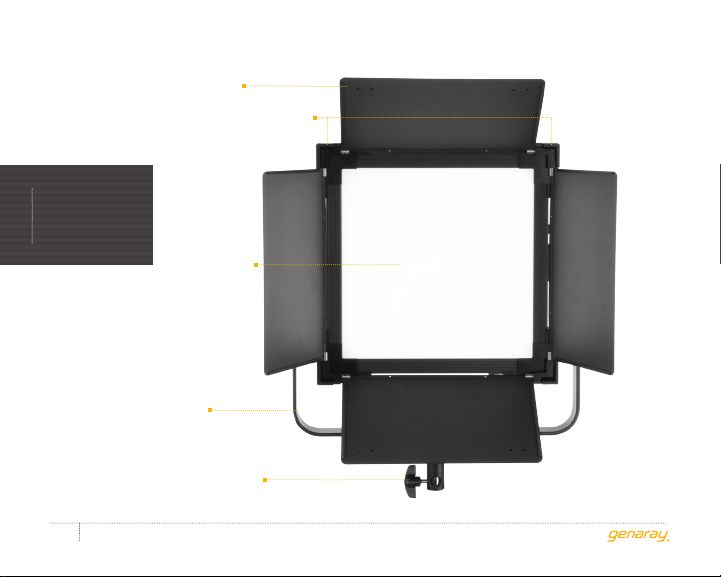
Barndoors
Barndoor locking tabs
PRODUCT
OVERVIEW
LED array /
Soft panel
Yok e
Locking knob
Square Sun Bi-Color Soft LED Flood - USER MANUAL
4
Page 5
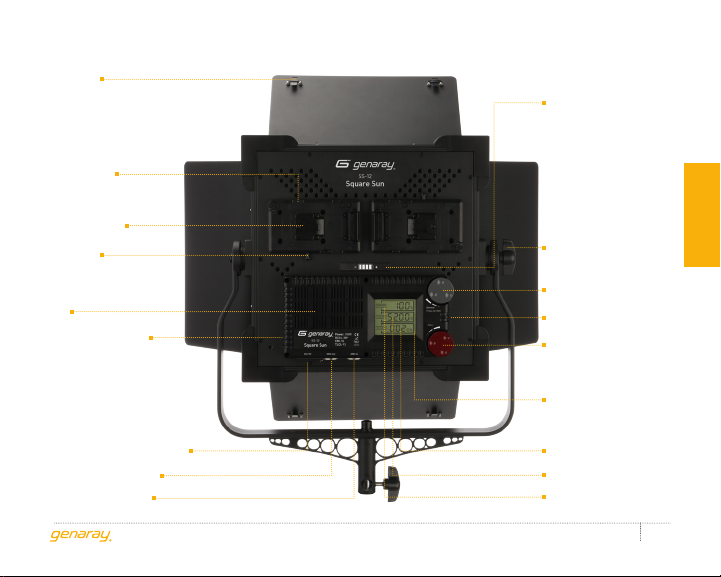
Gel clips
D-tap input
power socket
Battery plate
V-mount
release button
Fan
Fan on/off switch
Battery status
indicator
Tilt adjustment
knob
Dimmer/DMX knob
Power switch
Color temperature knob
LCD screen
Product overview
4-pin XLR power socket
DMX output socket
DMX input socket
DMX address
Color temperature
Brightness
Square Sun Bi-Color Soft LED Flood - USER MANUAL
5
Page 6

MOUNTING THE SS-12CONTENTS INCLUDE
contents
· LED with yoke
· AC adapter
· DMX cable
· Power cord
· Barndoors
Square Sun Bi-Color Soft LED Flood - USER MANUAL
6
Mount the SS-12 on any heavy-duty light
stand with a 5/8-inch baby-pin stud, and
turn the locking knob until secure.
Remove the locking knob to mount the
SS-12 into a 11⁄8-inch junior pin receiver.
Page 7
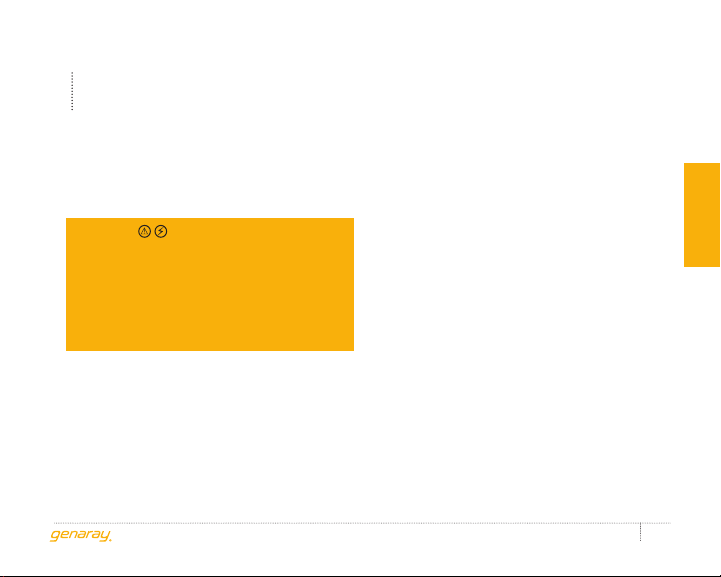
POWERING THE SS-12
The SS-12 can be powered directly
from an AC outlet or by two V-mount
batteries (not included).
USING THE SS-12 WITH AC POWER
Important
The SS-12 is a multivoltage fixture
capable of running on 100–240 V,
50/60 Hz. The included cable has a 120 V,
50 Hz (North American) plug. To use this
fixture with other voltages, you must
use a plug adapter (sold separately).
Connect the AC power adapter to the
SS-12 with the 4-pin XLR cable, and
plug the power cable into an outlet.
The AC adapter comes in a mounting frame
that fits into one of the V-mounts. Align
the adapter with one of the V-mounts,
and slide it into the mount until it clicks.
To remove the AC adapter, press the
V-mount release button, and slide
the adapter off of the V-mount.
USING THE SS-12 WITH
BATTERY POWER
The SS-12 is powered by two V-mount
batteries. To operate the SS-12
on battery power, both V-mount
batteries must be attached.
When attaching the batteries, make sure
the power switch is in the Off position, and
the fixture is not plugged into a wall outlet.
Three-stud batteries can be used by
connecting them to the SS-12 with
D-tap power cables (not included).
Square Sun Bi-Color Soft LED Flood - USER MANUAL
instructions
7
Page 8
OPERATING THE
SS-12
The battery status indicator on the rear
panel displays the remaining battery power.
instructions
4 lights (green) 80 to 100%
3 lights (green) 50 to 80%
2 lights (green) 30 to 50%
1 light (green) 10 to 30%
1 light (orange) Less than 10% (the
Square Sun Bi-Color Soft LED Flood - USER MANUAL
8
light will not operate)
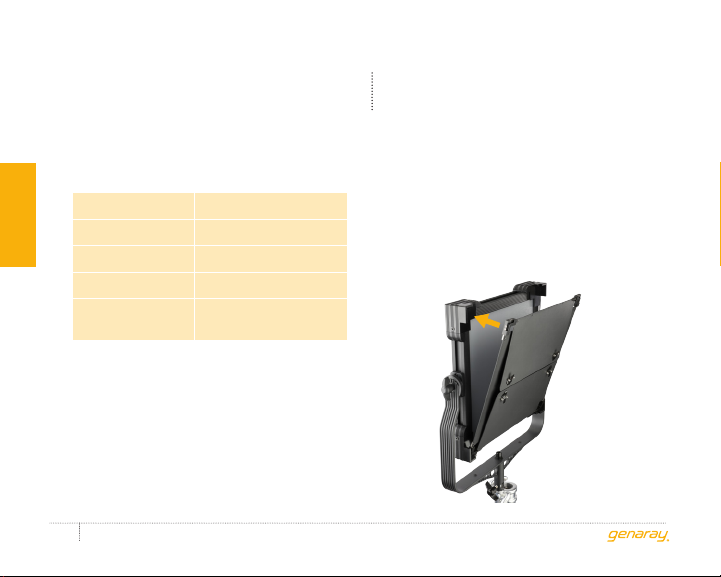
USING THE BARNDOORS
To attach the barndoors, place the barndoor
frame on the two lower locking tabs. Press
the top of the barndoor frame into the top
locking tabs until they click into place.
To remove the barndoors, pull the top
barndoor locking tabs to release the frame.
Page 9
USING DMX
ADJUSTING BRIGHTNESS AND
COLOR TEMPERATURE
Open the barndoors, and power the
SS-12 on. The LCD screen will show
the last setting that was used.
After powering on the SS-12, set the
brightness and color temperature by
rotating the knobs on the back of the fixture.
· Color temperature can be adjusted from
3200 to 5600 K in 100 K increments.
· Brightness can be adjusted from
100% to 10% in 1% increments.
For quieter operation, turn the fan
off via the fan on/off switch.
Note
When the fan is turned off, the maximum
brightness will be capped at 80%.
The SS-12 supports DMX-512 so the
light’s settings can be remotely controlled
from a DMX lighting control console.
To setup DMX operation on the
SS-12, follow these steps:
1. Use a 3-pin XLR cable to connect a DMX
controller to the SS-12 DMX input jack.
2. Use the SS-12 DMX output jack
to connect multiple lights.
3. To set the DMX address on the
SS-12, press the dimmer knob
to activate DMX mode.
4. Turn the knob to select a DMX address.
Important
Make sure the DMX address on the
SS-12 matches the DMX console.
Press the dimmer knob again to
return to brightness control mode.
Square Sun Bi-Color Soft LED Flood - USER MANUAL
instructions
9
Page 10
PRODUCT
SPECIFICATIONS
LED count: 1024
sPecifications
Color temperature: 3200 (±150) to 5600 K (±300 K)
Luminance: 2565 lx @ 1 m
Coverage: 120°
CRI: 96
TLCI: 96
Output power: 100 W
Square Sun Bi-Color Soft LED Flood - USER MANUAL
10
Working voltage: AC: 100–240 V
DC: 24–30 V
Mount: 5/8 in. baby pin convertible
to 11⁄8 in. junior pin
Dimensions: Light only: 14.8 × 14.8 × 3.3 in.
(37.7 × 37.7 × 8.5 cm)
With yoke: 17 × 21.9 × 3.3 in.
(43.3 × 55.7 × 8.5 cm)
Weight (with barndoors and yoke,
without batteries): 12.45 lb. (5.6 kg)
Page 11

ONE-YEAR LIMITED WARRANTY
This Genaray product is warranted to the original purchaser to be free from defects in materials and
workmanship under normal consumer use for a period of one (1) year from the original purchase date
or thirty (30) days after replacement, whichever occurs later. Genaray’s responsibility with respect
to this limited warranty shall be limited solely to repair or replacement, at Genaray’s discretion, of
any product that fails during normal use of this product in its intended manner and in its intended
environment. Inoperability of the product or part(s) shall be determined by Genaray. If the product
has been discontinued, Genaray reserves the right to replace it with a model of equivalent quality and
function.
This warranty does not cover damage or defect caused by misuse, neglect, accident, alteration, abuse,
improper installation or maintenance. EXCEPT AS PROVIDED HEREIN, GENARAY MAKES NEITHER
ANY EXPRESS WARRANTIES NOR ANY IMPLIED WARRANTIES, INCLUDING BUT NOT LIMITED TO
ANY IMPLIED WARRANTY OF MERCHANTABILITY OR FITNESS FOR A PARTICULAR PURPOSE. This
warranty provides you with specific legal rights, and you may also have additional rights that vary from
state to state.
To obtain warranty coverage, contact the Genaray Customer Service Department to obtain a return
merchandise authorization (“RMA”) number, and return the defective product to Genaray along with
the RMA number and proof of purchase. Shipment of the defective product is at the purchaser’s own
risk and expense.
For more information, or to arrange service, visit www.genaray.com or contact us at [email protected].
© 2017 Genaray. All Rights Reserved
Page 12

GG2
 Loading...