

Page 1

Powerbank Series
USER MANUAL
Page 2

Powerbank LED
INTRODUCTION
Powerbank Series LED Light - USER MANUAL
2
THANK YOU FOR CHOOSING GENARAY
Genaray’s Powerbank LED lights are pocket-sized and
lightweight LED fixtures that are surprisingly bright
and color-accurate for their size. They’re true bi-color
lights that have a color temperature range of 3200 to
5600 K. The dimming range of 10% to 100% can be
adjusted in 1% increments for precise brightness control.
Booster mode adds an additional 30% brightness for
moments when you need to push a little extra output.
Page 3

PRECAUTIONS
· Please read and follow these
instructions, and keep this
manual in a safe place.
· Keep this unit away from water and
any flammable gases or liquids.
· Handle the unit with care.
· Do not attempt to disassemble or
repair the equipment. Doing so will
void the warranty, and Genaray will
not be responsible for any damage.
· Do not stare directly at the lights
when they are powered on.
· Clean the unit with only
a soft, dry cloth.
· Images are for illustrative
purposes only.
Powerbank Series LED Light - USER MANUAL
Precautions
3
Page 4
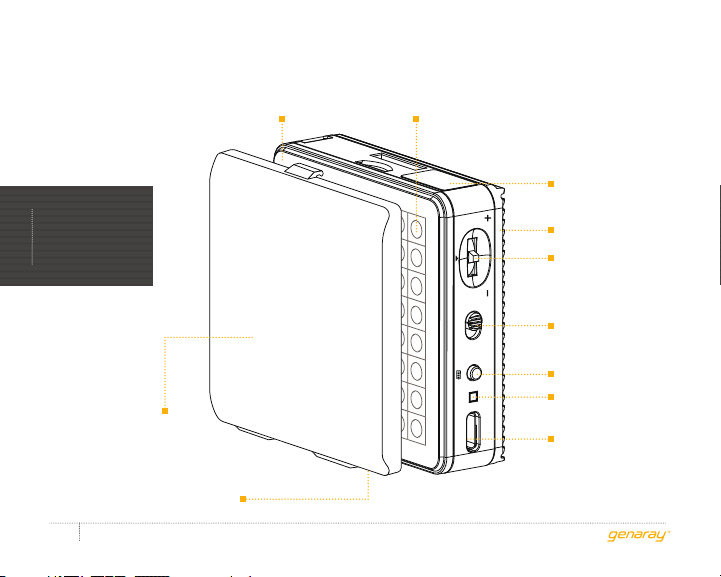
PB-64
Diffuser LED panel
LCD screen
PRODUCT
OVERVIEW
Removable
diffuser hood
1/4-20 mounting sockets
Powerbank Series LED Light - USER MANUAL
4
Heat sink
Adjustment
dial
Power switch
Capacity: 1500 mAh
Booster button
Charging
indicator
5V/2A INPUT BOOSTER ON / OFF
USB Type-C
power input
Page 5
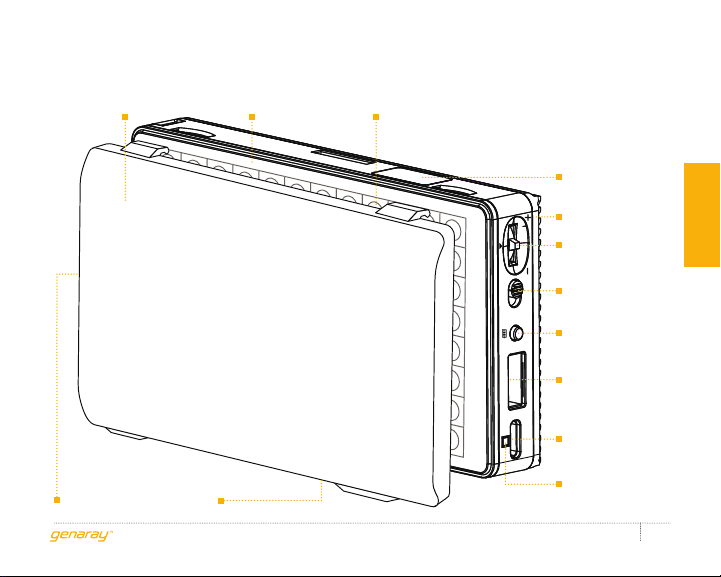
Removable diffuser
hood
1/4-20 mounting sockets
PB-96
Diffuser LED panel
LCD screen
Heat sink
Adjustment
dial
Product overview
Power switch
Capacity: 3300 mAh
Booster button
USB Standard-A
power output
5V/2A OUTPUT BOOSTER ON / OFF 5V/2A INPUT
USB Type-C
power input
Charging
indicator
Powerbank Series LED Light - USER MANUAL
5
Page 6
Also Included
contents
· Mounting clamp
· Mini tripod
· Ball head
· USB cable
· Carry pouch
Powerbank Series LED Light - USER MANUAL
6
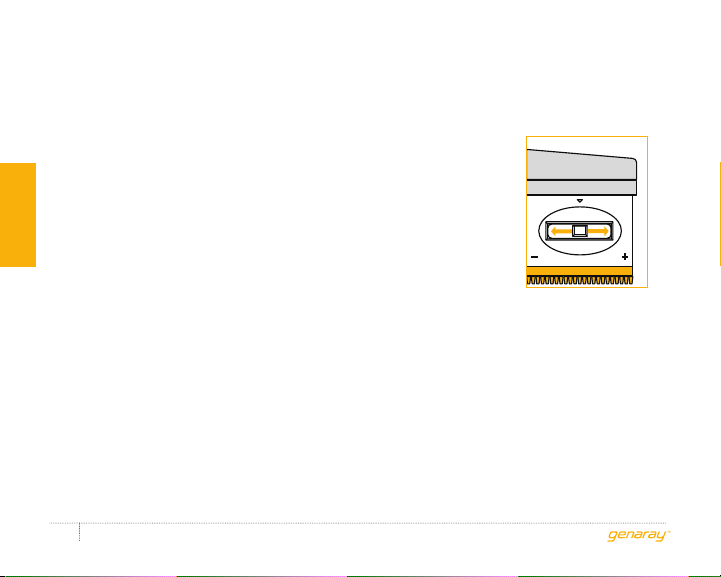
BRIGHTNESS
The brightness
level appears on
the LCD screen.
Sliding the
adjustment dial to
either side adjusts
_
the brightness in 1%
increments. Slide
and hold to rapidly
adjust the value.
BOOSTER
Press the booster button to increase
the brightness to 130% for one minute.
If the button is not pressed again
after one minute, the Powerbank
returns to the original brightness.
+
Page 7
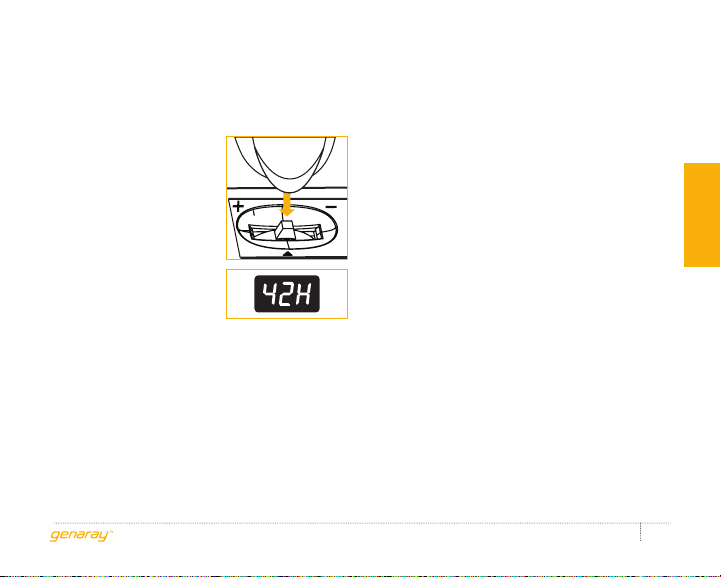
COLOR
TEMPERATURE
Press down on
the adjustment
dial. The color
temperature,
along with the
letter K, will
appear on the
LCD screen.
Sliding the adjustment dial to either
side adjusts the color temperature
in 100 K increments. Slide and
hold to rapidly adjust the value.
CHARGING
Use the included USB cable to connect
the Powerbank to a powered USB
port. Or connect a USB power adapter,
and plug it into an available outlet.
The charging indicator will glow red
while the Powerbank is charging.
The Powerbank is fully charged
when the indicator turns green.
CHECKING THE BATTERY LEVEL
Press and hold the Booster button.
The percentage of remaining battery
power will appear on the LCD screen.
When the button is released, the
screen will return to displaying the
brightness in five seconds.
instructions
Powerbank Series LED Light - USER MANUAL
7
Page 8
CHARGING A MOBILE
DEVICE (PB-96 ONLY)
Connect a mobile device’s USB
instructions
charging cable to the Powerbank’s
USB power output port.
The PB-96 must be turned off to
charge an external device.
Powerbank Series LED Light - USER MANUAL
8
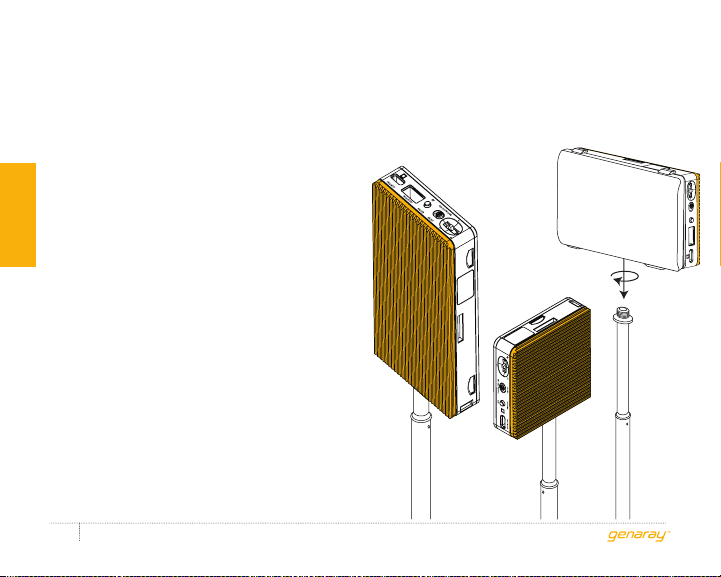
MOUNTING THE POWERBANK
Page 9

PRODUCT
SPECIFICATIONS
Light Fixture
LED Chip Type: SMD
LED Count: PB-64: 64
PB-96: 96
Beam Angle: 120°
Color Temperature: 3200 to 5600 K in
100 K increments
CRI: >96
TLCI: >96
Dimming: 10% to 100% in 1% increments
Display: LCD
Housing Material: Metal
Light Intensity @ 3 ft.: PB-6 4: 200 lx
PB-96: 250 lx
sPecifications
Connectors
Power Input Connector: USB Type-C
Powerbank Series LED Light - USER MANUAL
9
Page 10

sPecifications
Mount Type: 1/4-20 receiver
Dimensions (H × W × D): PB-64: 2.6 × 2.6 × 0.75 in.
(6.6 × 6.6 × 1.9 cm)
PB-96: 4.6 × 2.6 × 0.75 in.
(11.7 × 6.6 × 1.9 cm)
Weight: PB-64: 5.4 oz. (153 g)
PB-96: 8.3 oz. (235 g)
Powerbank Series LED Light - USER MANUAL
10
Integrated BatteryPhysical
Capacity (mAh): PB-64: 1400mAh
PB-96: 3000mAh
Battery Chemistry: Lithium-ion
Operating Voltage: 5V
Page 11

ONE-YEAR LIMITED WARRANTY
This Genaray product is warranted to the original purchaser to be free from defects in materials and
workmanship under normal consumer use for a period of one (1) year from the original purchase date or
thirty (30) days after replacement, whichever occurs later. Genaray’s responsibility with respect to this limited
warranty shall be limited solely to repair or replacement, at Genaray’s discretion, of any product that fails
during normal use of this product in its intended manner and in its intended environment. Inoperability of the
product or part(s) shall be determined by Genaray. If the product has been discontinued, Genaray reserves the
right to replace it with a model of equivalent quality and function.
This warranty does not cover damage or defect caused by misuse, neglect, accident, alteration, abuse,
improper installation or maintenance. EXCEPT AS PROVIDED HEREIN, GENARAY MAKES NEITHER ANY
EXPRESS WARRANTIES NOR ANY IMPLIED WARRANTIES, INCLUDING BUT NOT LIMITED TO ANY IMPLIED
WARRANTY OF MERCHANTABILITY OR FITNESS FOR A PARTICULAR PURPOSE. This warranty provides you
with specific legal rights, and you may also have additional rights that vary from state to state.
To obtain warranty coverage, contact the Genaray Customer Service Department to obtain a return
merchandise authorization (“RMA”) number, and return the defective product to Genaray along with the RMA
number and proof of purchase. Shipment of the defective product is at the purchaser’s own risk and expense.
For more information, or to arrange service, visit www.genaray.com or contact us at [email protected].
© 2019 Genaray. All Rights Reserved.
Page 12

GG1
 Loading...