

Page 1
www.gemalto.com
DOC118369C Page 1/4
Prox-SU
Contactless Interface
USB Smart Card Reader
With optional SIM/SAM slot
Quick Installation Guide
Page 2
Prox–SU
Quick Installation Guide
www.gemalto.com
DOC118369C Page 2/4
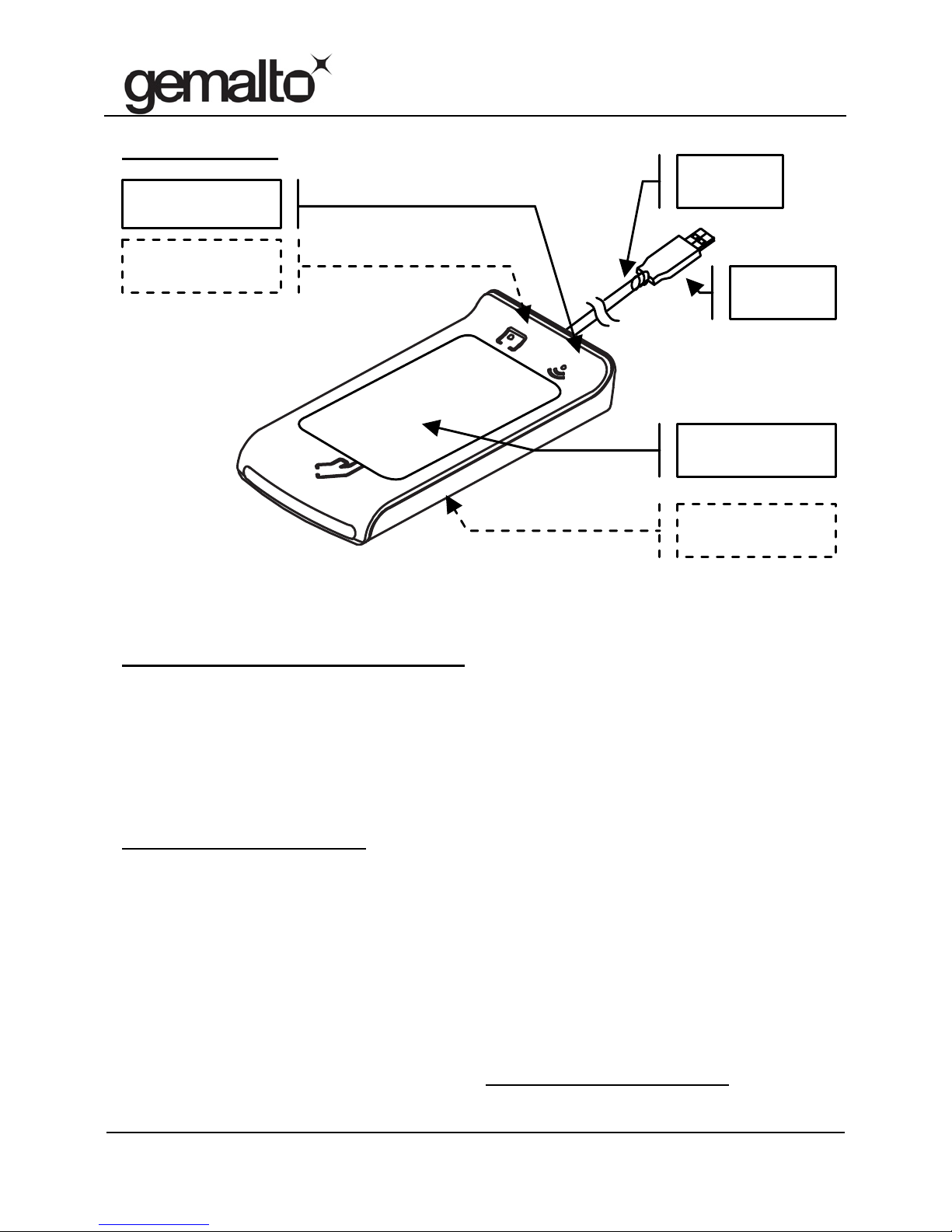
Prox–SU view
Note: For an optimal use with contactless smart cards, please put the smart
card over the landing zone as shown in the above figure.
Prox–SU computer installation
Plug the USB cable into the USB port of your computer and follow the onscreen instructions when the installation wizard appears. For Windows
operating systems, the standard USB CCID Microsoft driver is required. Use
the Windows Update procedure if needed to download the driver.
Use the PC/SC driver package or web link available in the Gemalto web site
http://support.gemalto.com
.
PC/SC driver OS support:
Windows: 2000, XP 32/64 bits, Vista 32/64 bits, Seven 32/64 bits
Windows: CE 5.0 / 6.0 / 6.0 R2
Linux: Red Hat / Debian / Ubuntu / OpenSuse distributions
Mac OS: Tiger 10.4 / Leopard 10.5 / Snow Leopard 10.6
For installation recommendation please refer to the Prox–SU installation
guide available in the Gemalto web site http://support.gemalto.com
.
SIM/SAM card
yellow indicator
Contactless card
blue indicator
Contactless card
landing zone
SIM/SAM card
internal slot
1m80 USB
cable
USB A
plug
Page 3
Prox–SU
Quick Installation Guide
www.gemalto.com
DOC118369C Page 3/4
Prox–SU operation table
Card Indicator Description
Off The card interface is deactivated
Slow Blink (0,2 s / 2 s) The card interface is ready
Blink (0,5 s / 1 s) The card is present and inactive (powered off)
On The card is present and active (powered on)
Flashing The card communication is in progress
Note: When no SIM/SAM card is inserted, the yellow indicator will always be
off.
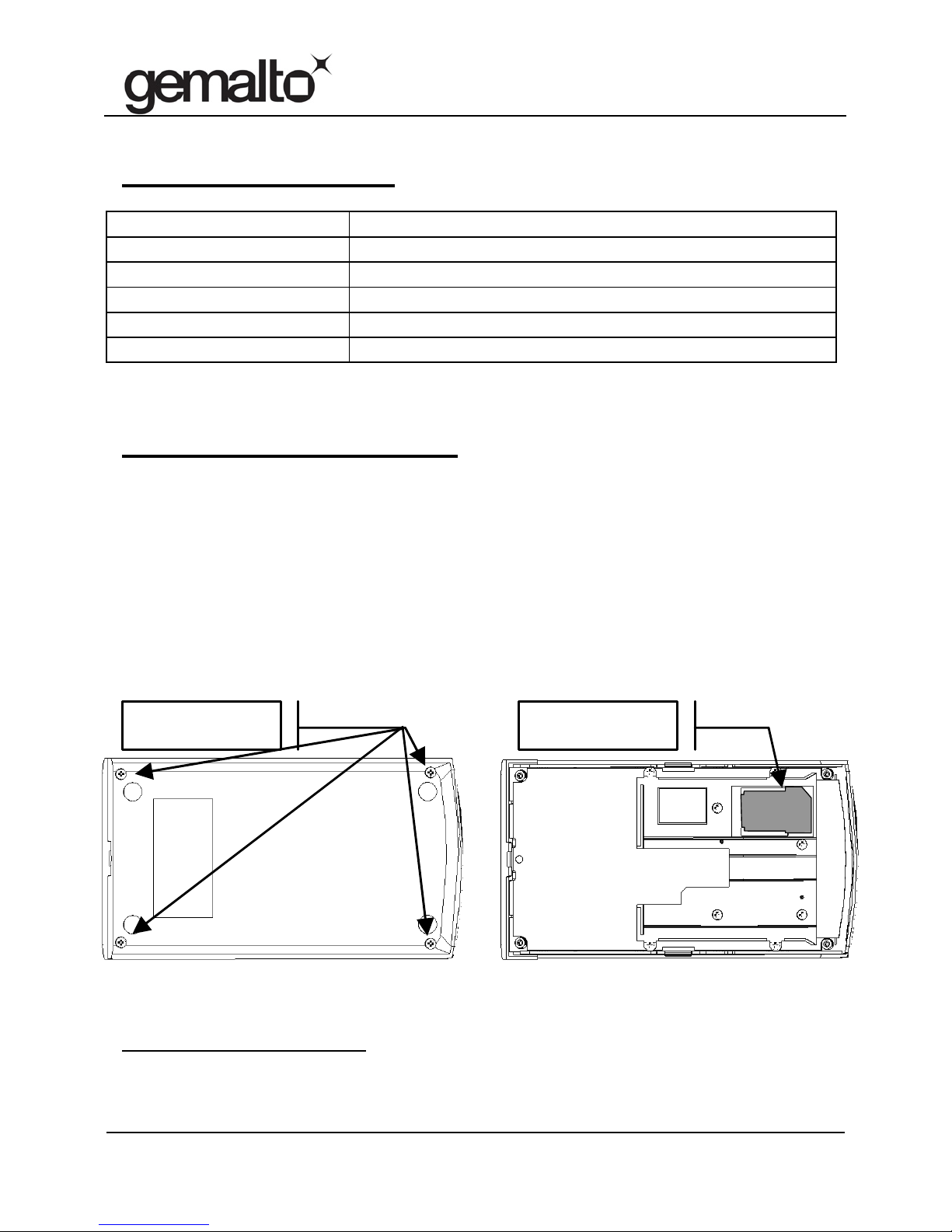
Prox–SU SIM/SAM installation
The contact card is optional and can be inserted into the internal SIM/SAM
card connector located into the device:
Remove the four screws located on the bottom cabinet
Remove the bottom cabinet from the top cabinet
Insert the SIM/SAM card into the connector
Assemble the bottom cabinet with the top cabinet using the four
screws
For installation recommendation of the SIM/SAM card please refer to the
Prox–SU installation guide available in the Gemalto web site
http://support.gemalto.com
.
SAM/SIM internal
slot
4 screws location
SIM or SAM
card
SIM or SAM
card
Page 4
Prox–SU
Quick Installation Guide
www.gemalto.com
DOC118369C Page 4/4
Rating: 5V 200mA - Accessories for use with UL Listed Computers having limited power or class 2
output. Intended to be used with a Limited Power Source.
Regulatory information
Notice for the USA: FCC Statement
The Federal Communications Commission (FCC) Radio Frequency Interference Statement (USA Only)
This equipment has been tested and found to comply with the limits for a Class B digital device, pursuant to
part 15 of the FCC Rules. These limits are designed to provide reasonable protection against harmful
interference in a residential installation. This equipment generates uses and can radiate radio frequency
energy and, if not installed and used in accordance with the instructions, may cause harmful interference to
radio communications. However, there is no guarantee that interference will not occur in a particular
installation. If this equipment does cause harmful interference to radio or television reception, which can be
determined by turning the equipment off and on, the user is encouraged to try to correct the interference by
one or more of the following measures:
— Relocate the radio or television antenna.
— Plug the equipment away from the radio or television.
— Plug the equipment into a different electrical outlet, so that the equipment and the radio or television is on
separate electrical circuits.
— Make sure that all your peripheral devices are also FCC class B certified.
— Make sure you use only shielded cables to connect peripheral devices to your equipment.
— Consult your equipment dealer or an experienced radio/television technician for help.
Warning: The system verification tests were conducted with Gemalto supported peripheral devices. Cables
used with this equipment must be properly shielded to comply with the requirements of the FCC. Changes or
modifications not expressly approved by Gemalto could void the user’s authority to operate the equipment.
Déclaration de conformité à la directive R&TTE
Nous Société GEMALTO
Sise à: Avenue du Pic de Bertagne, 13881 GEMENOS Cedex,
Déclarons que les produits :
Lecteurs de cartes
Prox–SU
satisfont à la Directive 1999/5/CE du Parlement Européen et du conseil
et sont conformes aux normes :
(Norme radio) : ETSI EN 302 291-1 (V1.1.1-2005/07) ETSI EN 302 291-2 (V1.1.1-2005/07)
(Norme C.E.M) : ETSI EN 301 489-1 (V1.8.1 (2008)) ETSI EN 301 489-3 (V1.48.1 (2002))
(Norme DBT) : EN 60950-1/ A11
Fait à Gémenos, le 10/12/2010
Pierre-André COLLET
Responsable Homologations Produits
Instructions for disposal of waste equipment by users in private household
This symbol on the product or on its packaging indicates that this product must not be
disposed of with your other household waste. Instead, it is your responsibility to dispose
of your waste equipment by handing it over to a designated collection point for the
recycling of waste electrical and electronic equipment. The separate collection and
recycling of your waste equipment at the time of disposal will help to conserve natural
resources and ensure that it is recycled in a manner that protects human health and the
environment. For more information about where you can drop off your waste equipment
for recycling, please contact your local city office, your household waste disposal service
or the shop where you purchased the product.
 Loading...