

Page 1
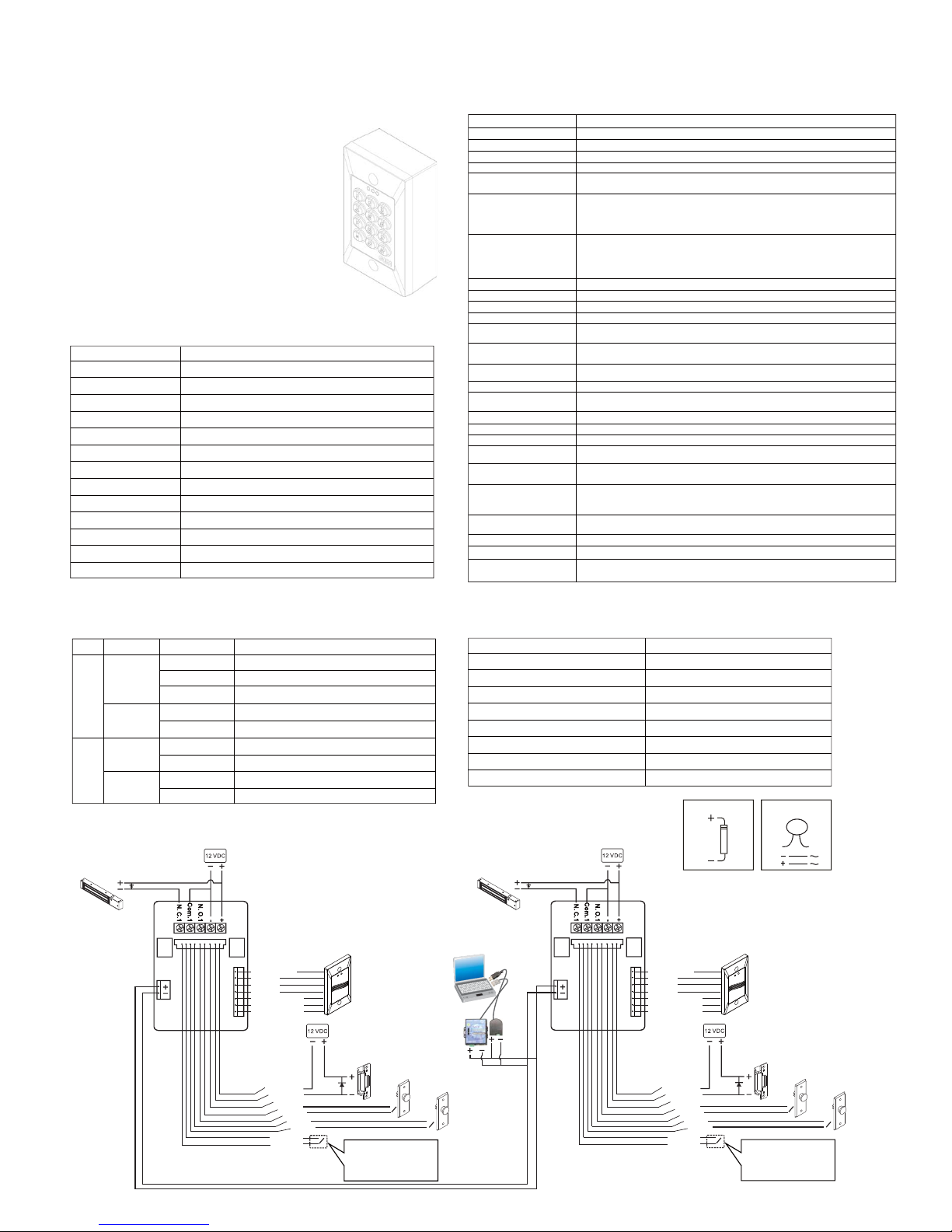
Wiring Diagram:
Factory default setting:
Access mode
Card memory
Transaction memory (MAX 1000 cards)
Master codes (Master password)
(All) Functions of alarm
Door relay time
Key timeout
Awaiting code timeout
Programming mode timeout
Card only (0000)
All Bits
0 pcs
*123456#
Clear the function (00)
3 seconds
5 seconds
5 seconds
25 seconds
Indicators Status and Default Value:
Beep & LED indication:
Mode Signal
Yellow(Flash slowly)
Green On
Red On
Yellow (Flash quickly)
Red(Flash quickly)
1 Beep
2 Beep
1 Beep
2 Beep
Status
Power-on, stand-by
Valid entry, door relay active
Warning, invalid card or code, tamper,alarm relay active
Enter programming mode
Card read, or clear the memory
valid card, keypress, entry program mode
Invalid cards, mistake codes
Valid entry, exit the program mode
Incorrect input or other failed operation
Normal
Programming
Programming
Normal
LED
Beep
Specifications:
Part No
Connection
Users
Record volumes
Reader application
Keys
Interface
Proximity distance
Indicators
ST-630E
On line
1000
1000
WG26,WG34
12 keys (0-9,*,#)
RS485
10~15cm
125Khz (EM)
Dimension(mm)
Operating voltage
Temperature
Humidity
3 LEDs
114(L)x69.5(W)x10(D)mm
12VDC
-5C~60ºC
5%~95%(Non-condensing)
Proximity frequency
RS 485
White
Green
Locking Device 1
(Fail-Safe)
Blue:N.O.2
Green:Com.2
Yellow:N.C.2
Gray:P2
White:P1
White:B1
Gray:B2
Brown:Reed
Brown:Reed
Blue:LED(Yellow)
Pink:LED(Red)
Green:LED(Green)
Black:V0
Orange:D1
Yellow:D0
Red;+10~14Vdc
RS 485
Auxiliary Reader
Door one
Door two
Operation Instruction:
*XXXXXX#
* #
01*XXXXXXxxxxxx#
02*XXX#
03*XXX#
10*xxxxx*XXXXXXXXXX#
12*xxxxx*XXXXX#
13*xxxxx*XXXXX*N#
Exit program mode
Change default password, press twice new 6-digit codes
Controller station setting (001-254)
Time Delay Setting from 000-250 seconds. 000= toggle mode.
Adding or revise the card No.
Adding the card No. in sequence. xxxxx=the beginning slot position XXXXX=the
quantity of cards. After setting the quantity of cards, read the first card and press “#”
to complete the setting. The access mode is for Card Only after adding the cards.
(p.s.X
≦
01000)
14*xxxxx*XXXX#
Access mode and clear card setting
xxxxx=The beginning slot position XXXXX=the end slot position
Slot position=00001~01000
N indicates the access mode. 0=Access not allowed, 1=Card Only, 2=Card or Code,
3=Card & Code, 4=Clear card information
Code setting: xxxxx=slot position XXXX= 4-digit code (Position=00001~01000)
15*99#
Clear all cards (Not including master card)
17*XXXXXXXXXX#
Enter card no. to clear the information when forget the slot position. X=10 digit card no.
21*XXX#
Alarm output time setting XXX=000~255 seconds
22*XXX#
The second relay activate time. XXX=000~250 seconds (Second relay for security
system) (000 manual mode) (Default value is 15 seconds)
25*X#
Master cards setting X=(1 or 2) 2 Master card available
Under normal status, proximity the master cards to program mode
26*XXXXX*XXXXX#
Security card arrange setting: XXXXX=00001~01000 (The range of the No. should be
32*X# Anti-pass-back function X=0 / OFF X=1/ ON
33*X#
Two doors synchronize X=0/OFF X=1/ON Access controller and reader can control
different doors.
34*99#
Clear the function of Anti-pass-back
35*X#
X=1=access record to duty X=0=access record Not to Duty X=default is 0
Enter program mode, enter 6-digit codes (Default 123456)
Slot position=00001~01000 and enter the 10-digit card No.
51*99#
Reset to default, and clean the controller memory to the factory default.
55*99#
Read card once and hear 1 Beep to add new card. Read card twice and hear 2 beeps
to clear the card (The default access mode for this instruction is Card Only).
72*XXX#
Door left open alarm time delay setting. XXX=000~255 seconds. The door status reed switch
is required for this function. The second relay active alarm output after the limited time.
(Refer to 21*XXX#)
73*X#
X=1 Enter the emergent code or press 99* with security cards, the relay of the
74*X#
Door left open alarm and force open mode are setting. X=1/ON, X=0/OFF
76*X#
Emergent alarm setting X=1/ON, X=0/OFF
99*
Active the second relay by press the code 99* first, and read the valid card. (without
entering the program mode).
Set the emergent code by entering 6-digit code twice. Enter the code to activate the second
relay. Accompany with the instruction of 22*XXX# to set the second relay active time.
71*XXXXXXxxxxxx#
succeeding without a break in numbering.
controller will be avtivated. X=0/OFF
Blue:N.O.2
Green:Com.2
Yellow:N.C.2
Gray:P2
White:P1
White:B1
Gray:B2
Brown:Reed
Brown:Reed
White
Green
Blue:LED(Yellow)
Pink:LED(Red)
Green:LED(Green)
Black:V0
Orange:D1
Yellow:D0
Red
;+10~14Vdc
Relay Relay
Relay Relay
Locking Device 1
(Fail-Safe)
Auxiliary Reader
Locking Device 2
(Fail-Secure)
Push Button 2
Push Button 1
Locking Device 2
(Fail-Secure)
Push Button 2
Push Button 1
Door status reed switch contact is (N.
O.) The contact switch is in N.O.(Normal Open) status when the door closes.
The contact switches to N.C. (Normal
Close) when the door opens.
Door status reed switch contact is (N.
O.) The contact switch is in N.O.(Normal Open) status when the door closes.
The contact switches to N.C. (Normal
Close) when the door opens.
Computer
485-TO-USB485-TO-TCPIP
USB
RJ45
Features:
Master card and codes
Auto reset function
Security system setting / Release
Synchronize with security system
Entering / Exiting programming mode: Only
proximity, Codes + proximity, Codes or proximity
Door status monitor function
Anti pass back function
Emergent access alarm, time delay alarm and forced door alarm output
Dual relays programmable On / Off or pulsed or latched mode
LED indicator to distinguish the status
Use for all kinds of the electric lock
Use software to connect up to 254 controllers
Copyright © All Rights Reserved.
P-MU-ST-630E Ver. C Publish:2011.06.27
Operation Manual (S1 Mode/On line)
ST-630E Access Control Unit
For DC use only For AC/DC
The door strike must have a vartistor or a
diode across the door strike terminals to
suppress the back EMF of the strike-failure
to do so will damage the relay contacts and
electronic components.
(Suggested Card: CCTR00-CNPSLD-CN)
 Loading...