

Page 1
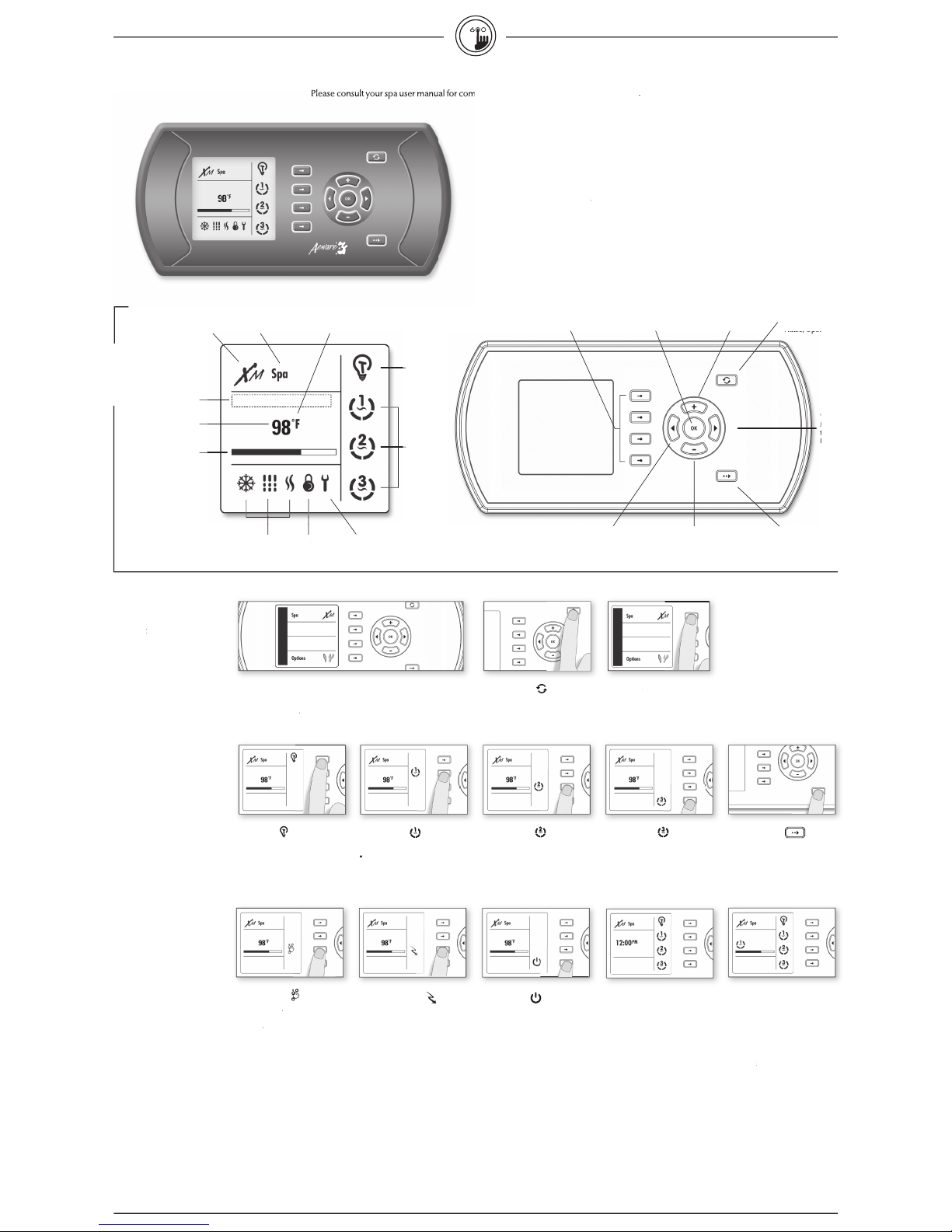
• Select
Spa
to view Spa menu.
Starting Pump 1
Select
Pump 1
to turn Pump
1 on.
Select
Pump 1
repeatdely
to control
pump 1 speeds.
(20 minute built-in timer)
Starting Light
• Select
Light
key to turn light on.
• Select
Light
key again to turn
light off.
(120 minute built-in timer)
Next menu page
• Press
Next
key to display the next
page in the spa menu.
Goes to
b
lower option
Turning Economy on
L
owers the temperature set point of
the spa by 20˚F (11˚C).
• Select
Economy
to activate the
Economy mode.
• Select
Economy
again to override
economy programming (see spa
setup section)
Standby Mode
S
tops all pumps at the same time by a
simple click of a button!
• Select
Standby
to activate
this mode.
• Select
Standby
to again to resume
normal operations.
S
ystem automatically returns to
Normal mode after a certain period
of time, unless the Standby mode has
been reactivated.
Spa light will fl ash for a few seconds
before the exit of Standby mode and
restart the pumps. The "Standby"
message is also displayed during
Standby mode.
* Pump will stay turned on if there is a
request for more heat.
Displaying time
• Press
Ok
key
to display the time.
• Press
Ok
key a second time
to go
back to water temperature display.
Viewing active progress bars
A progress bar is a visual indicator of
the time remaining before a device
is turn off or before the end of the
Standby mode. Only one bar is
displayed at the time.
• Use
Left
or
Right
keys to visualize
the progress bar of each activa-
ted device.
This menu allows control of all pumps, blower and spa light, as well as the
activation of the Economy and Standby modes. Every time a device is on,
its animated icon is displayed. All pump activity can be stopped at once by
activating the
Standby
mode.
Main
Pump 1
to turn Pump 2 on.
to turn Blower on.
off.
key to display the
the features of your sp
tem
3
to turn Pump 3 on.
3
Aeware's new se
keypads
features
ven
interface
creating a true and unique user experience.
AM/PM (˚F/ ˚C)
Time, temperature
icons
Audio, Options
2, 3, 4
icon
Page 2
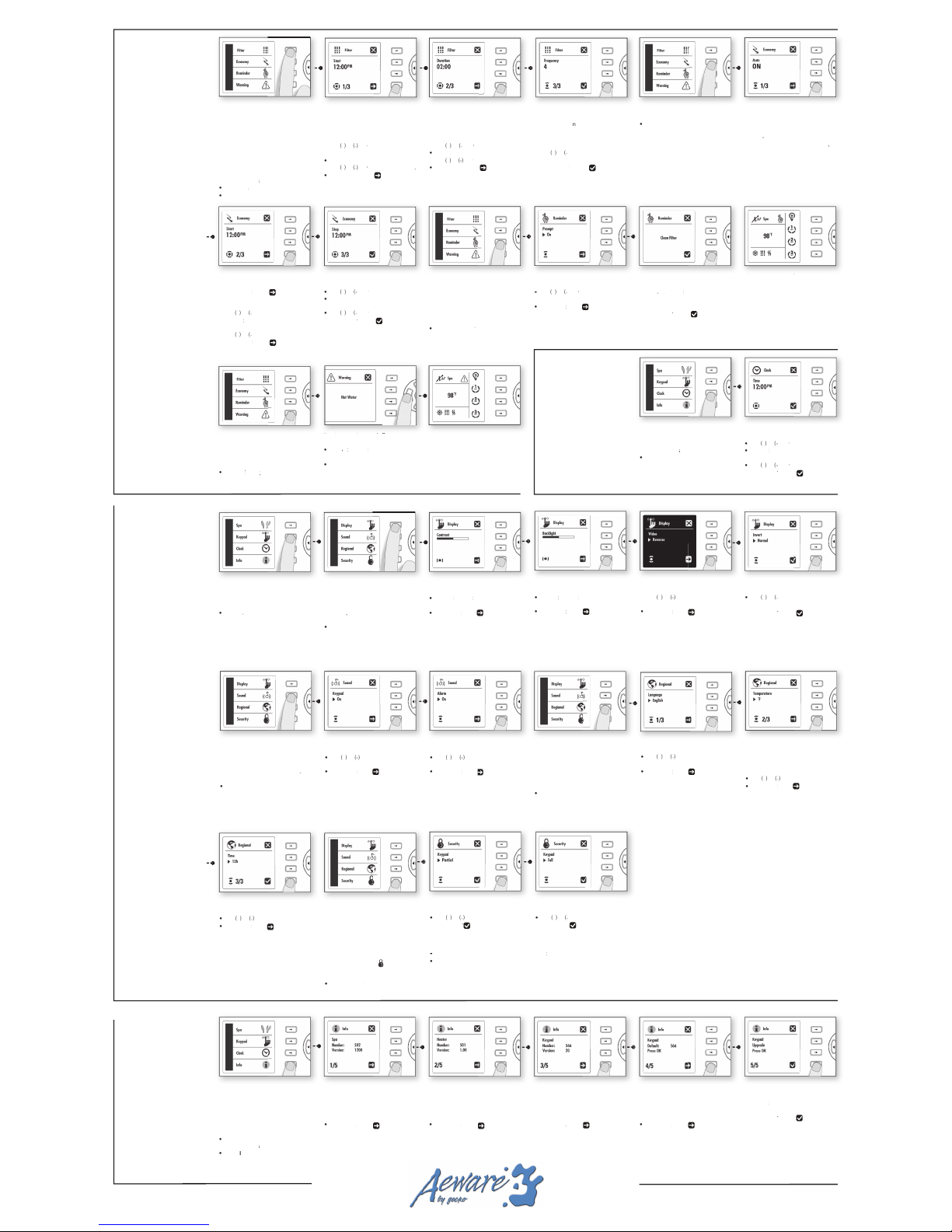
Time setting
ystem info
Time of day
ter
www.geckoalliance.c
The display will show the starting hour
to select hour
to change minutes
fi lter cycle duration.
t a
value for
the fi lter cycle
in hours and minut
to set hour setting.
to change minutes.
the next parameter: fi lter cycle
frequency.
option on screen
arrow
to set hour setting.
key to access minutes
to set minutes.
arrow
to set hour setting.
to set minutes.
option on screen
to spa options menu.
This menu allows you to activate/
option
Turning reminders on/off
to activate or
to save changes and go to next menu
Viewing spa reminders
The reminder icon will show up
to prompt you to review active
keys
to review
option on screen
task or go back to main menu.
This menu allows for you
to view all
W
option
Viewing spa warnings
The warning icon icon shows up to
Turning warnings on/off
keys to review all
warning messages.
key again to go back to
This sub-menu is used to set keypad
,
Adjusting contrast
keys to adjust
arrow on display to
Adjusting backlight
keys to adjust
arrow on display to
to activate or
arrow on display to
screen menu.
to activate or
option on screen
main menu.
This sub-menu is used to set keypad
options
key to activate or
Turning alarm sound on
key
to activate or
arrow on display to
This sub-menu is used to set keypad
to select from: English,
arrow on display to
Temperature units
Water temperature can be displayed
to change setting.
arrow on display to
screen menu.
to change setting.
arrow on display to
to change the temperature Set Point,
options
key to select "Partial".
option on screen
To unlock the keypad:
key
key for
5 seconds
to select
To unlock the keypad, press
key for 5 seconds.
values
to reset back to default
factory values.
Viewing information about
Viewing information on
version are displayed.
Viewing information on
s
version are displayed.
key to start the upgrade of
the software of the keypad.
option on screen
the software of the
Viewing information about
the system
To v
version, to reset programmed settings
key
menu
sub-menu
To program the fi lter cycle, you must
fi lter cycle, pumps run for one minute
to purge the plumbing, then Pump
1 runs for the programmed number
key
menu
sub-menu
To program keypad setti
key
menu
sub-menu
key
menu
to set hour setting.
to set minutes.
option on screen
to keypad main menu.
 Loading...