

Page 1

Ge BE E + F Gm bH • ww w .oe m- pri nte r .co m • Ge BE Do k.N r .: SM AN -E- 413 -V4 .0 Eas y-L oad ing The rm al Pri nte r GPT -43 52( -60 )
O p e ra ti n g M a n u a l
GeBE Documen t No.:
SMAN-E-41 3-V4.0
Printed: 09.07.20 07
Status: 18.01.20 05
German: SMAN-D-4 12
GeBE Elektr onik und Feinwerktechnik GmbH
Beethovenstr . 15 • Germering • Germany • www .oem-printer .com
Phone:++49 (0) 89/894141-0 • Fax:++49 (0) 89/8402168 • email: [email protected]
The GeB E log o is a reg iste red trad em ark of GeB E Ele ktro nik und Fein wer kte chn ik Gm bH. All oth er bra nds nam ed in this bro chu re ar e pro per ties of the res pec tive
com pan ies. Erro rs and cha nge s res erv ed. The tec hnic al dat a give n are non -co mm itta l info rma tion and do not rep res ent any ass ura nc e of cer tain fea ture s.
Our term s of pay me nt and del iver y app ly.
Cop yrig ht © 200 7 GeB E Ele ktro nik und Fein wer kte chn ik Gm bH. All righ ts res erv ed.
A ct iv iti es at G eB E
Printer: GeBE Elektr onik und Feinwerktechnik GmbH • E-Mail: [email protected] • www .oem-printer .com
Key boar ds: GeBE Computer & Peripherie GmbH • E-Mail: sales@tastatur en.com • www .tastatur en.com
Inter net applications: www .GeBE.net
GPT -4352(-60)
Easy-Loading Thermal Printer
Page 2

Ge BE E + F Gm bH • ww w .oe m- pri nte r .co m • Ge BE Do k.N r .: SM AN -E- 413 -V4 .0 Eas y-L oad ing The rm al Pri nte r GPT -43 52( -60 )
C on te nt
2
1 C on te nt
1 Con ten t 2
2 Saf ety Inst ruc tion s 3
3 Pac king List 4
4 Inst alla tion 5
4.1 Inst alla tion in a fr ont pan el 5
4.2 Par tial inst alla tion in plas tic cas ing 5
4.3 Exa mp le for inst alla tion and app lica tion 5
5 Con nec ting the Prin ter 6
5.1 Con nec ting the pow er sup ply (1) 6
5.2 Pow er Dow n (2) 6
5.3 Con nec ting the Cha r ger (3) 6
6 Prin ter Con figu rati on 7
6.1 Con figu rati on ove r Initi alis atio n-T extP r ese rve 7
6.2 Ent ries into the "TIN IT" 7
6.3 Sold er Brid ges 7
7 Inte rfac es 8
7.1 Ser ial Inte rfac e 8
7.1. 1 Ser ial inte rfac e RS2 32 (V .24) at con nec tor J2 8
7.1. 2 Tim ing der seri elle n RS2 32 /TT L Sch nitt stel le 8
7.2 Par alle l Inte rfac e 9
7.2. 1 Cen tr onic s Ada pter 9
7.2. 2 PIN -sei zur e at the SUB -D 25 of the ada pte r 9
7.2. 3 Tim ing of the Par alle l Inte rfac e 9
7.3 Infr ar ed Inte rfac es 10
7.4 US B 11
7.5 Blu eto oth ® Wir eles s T ech nolo gy 12
8 Ope rati on 13
8.1 Wh ich the rma l pap er is suit able ? 13
9 Key Fun ctio ns 14
10 OPD-Menue® 15
11 Sta tus Mes sag es 17
12 Bat ch File s 18
13 Opt ion Mag neti c Car d Rea der 19
14 Cha rac ter Set s 20
14.1 GeB E Sta nda r d Cha ract er Set 20
14.2 Opt iona l Cha rac ter Set s 20
15
16 Opt ions Acc ess orie s 22
16.1 Op tion s 22
16.2 Acc ess orie s 22
16.2 .1 Mo unt ing fram es 22
16. 2.2 Pap er 22
16.2 .3 Pow er sup plie s and cha r ging dev ices 22
16.2 .4 Bat teri es 22
16.2 .5 Cab les 22
17 Ser vic e 22
18 CE Cer tific atio n 23
19 T ech nica l Dat a 24
20 Mec han ical Dim ens ions 24
Page 3

Sa fe ty In st ru ct io ns
3
2 Sa fe ty In st ru ct io ns
• The device may only be opened or r epair ed by autho-
rized personal. Never open the device or carry out r epairs yourself. Always contact an authorized technical
servicer .
Y ou can find all necessary service information in the
chapter "Service and Maintenance".
• Befor e the device is tur ned on, make sur e that the
system voltage of your installation matches the supply
voltage of the device. The device characteristics ar e
printed on the name plate and in the technical data.
- The name plate is located on the underside of the
device.
- For the technical data of the device, r efer to the
chapter "T echnical Data".
• The peripheral devices that ar e connected to the inter -
faces and the DC cir cuits of this device have to meet
the r equir ements for safety extra-low voltage (SEL V) in
accor dance with EN/IEC 60950.
• Switching of f the device does not completely discon-
nect it fr om the power supply . Y our device is only disconnected completely , when the power plug is unplugged.
• Please make sur e that the power supply cable is run
in a way that nobody trips over it, and it cannot be damaged by other devices.
• During operation, surfaces in the surr ounding ar ea of
the print head may heat up. Ther efor e, dir ect contact
with the print head must be avoided to pr event bur ning
accidents.
Do not put heat sensitive objects close to this heat
sour ce.
• A void constant high humidity and condensation. Pr o-
tect the device fr om being splashed and fr om getting in
contact with chemicals.
• Only use spar e parts and accessories supplied or
authorized by GeBE. The use of unauthorized parts or
accessories may af fect the function and safety of the
device. All parts included ar e listed in the chapter "Packing List", while the original accessories ar e listed in
the chapter "Parts and Accessories ".
• It is no longer possible to safely operate the device, if:
- the housing has been damaged.
- moistur e r eached the inside of the device
- smoke is coming fr om the inside of the device
- the power supply cor d is damaged
-the device stopped working pr operly .
T ur n of f the device immediately , when a failur e occurs, as
mentioned above, and contact GeBE customer service.
See chapter "Service and Maintenance".
• W e explicitly state that all pr oduct liability and guaratee
claims ar e null and void, if the device has not been used
in accor dance with the instructions in this operating manual or on the device itself!
• Risk of explosion in case of incorr ect battery exchange.
• Please r ead how to safely exchange batteries in the
chapter "Exchanging Batteries".
• The printer versions with an infrar ed interface contain a
light emitting diode of laser category I. This infrar ed
transmitter does not pose a thr eat for the human eye or
skin, even with long periods of exposur e.
• The device complies with laser category I in accor dan-
ce with EN60825-1/A2:2001
• It is pr ohibited to operate the device, if the housing is
damaged. Please contact GeBE Service. Y ou can find
the information under "Service and Maintenance". For
the description of the infrar ed interface, please r efer to
page 10.
Rea d ope rati ng ma nua l bef or e ope rati on!
Dur ing inst alla tion : Alw ays disc onn ect the pow er .
Saf e ope ratio n of this dev ice is only war rant eed , if the inst ruct ions in this ope ratin g man ual hav e bee n
com plie d with . Usa ge in acc or dan ce with the ope ratin g man ual is r equ ir ed for pr odu ct war rant y .
If the use r atte mpt s to r epa ir the pr odu ct, all fact ory war rant ies will be null and void .
Onl y use man ufac tur er's par ts and acc ess orie s ! Mak e sur e that the prin ter is sav ed aga inst ove rvol tage
afte r EN/ IEC 609 50.
L a s e r K l a s s e I
Ge BE E + F Gm bH • ww w .oe m- pri nte r .co m • Ge BE Do k.N r .: SM AN -E- 413 -V4 .0 Eas y-L oad ing The rm al Pri nte r GPT -43 52( -60 )
Page 4
Ge BE E + F Gm bH • ww w .oe m- pri nte r .co m • Ge BE Do k.N r .: SM AN -E- 413 -V4 .0 Eas y-L oad ing The rm al Pri nte r GPT -43 52( -60 )
P ac ki ng Li st
4
3 P ac ki ng Li st
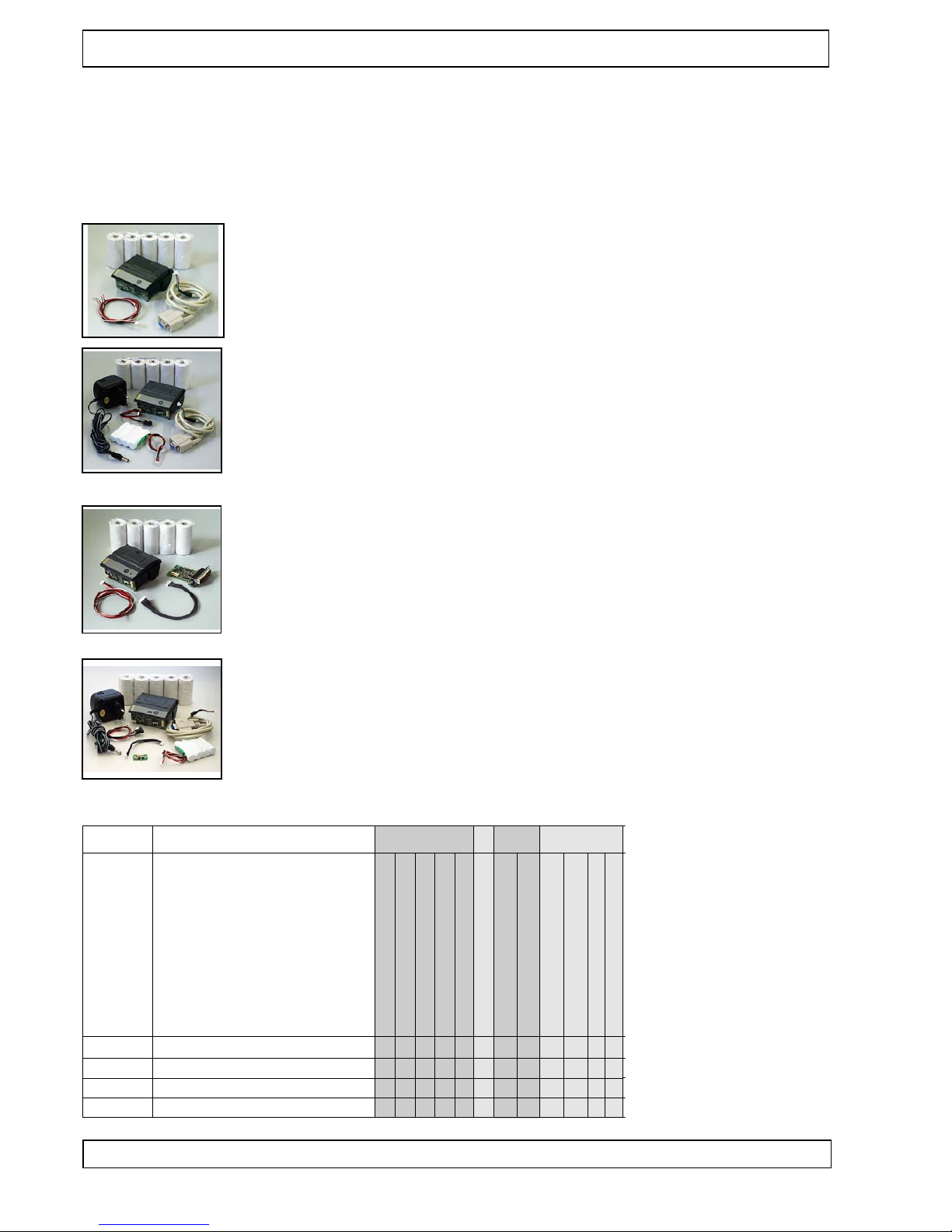
All printer sets GPT -4352(-60) contain:
- tanspar ent LEVER (exchangeable)
- 5 paper r olls: GPR-T01-058-031-007-0 60A r esp. GPR-T01-058-060-007-0 60A for GPT -4352-60
- operating manual: SMAN-E-413
In addition the dif fer ent sets contain:
SET1 GPT-4352- LV-82-24 -LC-at
• GKA-406: RS232 interface cabel, 500 mm
• GKA-410: Power cable,
one side open, 250 mm
SET2 GPT-4352-LV-82-24-V.2 4-EVAL-at
• GKA-406: RS-232 interface cable 500 mm
• GKA-416: Connectin g cable for charger,
190 mm
• GNA-4,8V-1 ,6Ah-NiMH : Battery,
4x Mignon (AA)
• GNG-6V-0 ,8A-U : Charge r
SET3 GPT -43 52- LV- 82- 24- SPI (4,5 V)-E VAL -at
• GKA-407: Connectin g cable 12pol.
to Centroni cs Adapter
• GPT -4382-1 0: Centroni cs Adapter
25 pol Sub-D Stift
• GKA-410: Power cable,
one side open, 250 mm
A r t i c l e N o .
121 65
121 86
1 133 6
121 78
Nom enc latu re
Inte rfac e
GPT -435 2-L V -82- 24-V .24- at
RS2 32, V.2 4
X
G P T - 4 3 5 2 - L V - 8 2 - 2 4 - V . 2 4 - E V A L - a t
GPT -435 2-L V -82- 24-I R2- EV AL-a t
X
X
GPT -435 2-L V -82- 24-T TL(4 ,5V) -EV AL- at
TT L
I n f r a r e d o n b o a r d a n d c o n n e c t o r
SPI (for Cen tron ics ada pter )
SPI (for exte rnal mod ules )
X
X
X
X
X
X
B a t t e r i e s
8 KBy te EEP ROM *
LiIo n
Fea ture s
NiM H
cha rgin g circ uit
Sle ep Mod e
X
X
X
X
X X X
X
X
X
Rew inde r con trol
Z / Z e i l e : 2 4 , ( 3 2 , 4 2 , 5 4 )
X
Far be Ant hraz it RAL 701 6
X
X X X
X
X
X
X
X
X
GPT -4352
GPT -4352-60
SET1 GPT-4352- 60-LV-82 -24-LC- at
• GKA-406: RS232 interface cabel, 500 mm
• GKA-410: Power cable,
one side open, 250 mm
SET2 GPT-4352-60-LV-82-24- V.24-EVAL-at
• GKA-406: RS-232 interface cable 500 mm
• GKA-416: Connectin g cable for charger,
190 mm
• GNA-4,8V-1 ,6Ah-NiMH : Battery,
4x Mignon (AA)
• GNG-6V-0 ,8A-U : Charge r
SET3 GPT -43 52- 60- LV- 82- 24- SPI (4,5 V)-E VAL -at
• GKA-407: Connectin g cable 12pol.
to Centroni cs Adapter
• GPT -4382-1 0: Centroni cs Adapter
25 pol Sub-D Stift
• GKA-410: Power cable,
one side open, 250 mm
SET4 GPT-4352-LV-82-24-IR2 -EVAL-at
• GCT -4382-2 0: e xternal IR- adapter
• GKA-408: connectin g cable to external IR
• GKA-416: connecting cable for charger,
190 mm
• GNA-4,8V-1 ,6Ah-NiMH : battery, 4x Mignon
(AA)
• GNG-6V-0,8 A-U: Charge r
SET4 GPT-4352-60-LV-82-24- IR2-EVAL-at
• GCT -4382-2 0: e xternal IR- adapter
• GKA-408: connectin g cable to external IR
• GKA-416: connecting cable for charger,
190 mm
• GNA-4,8V-1 ,6Ah-NiMH : battery, 4x Mignon
(AA)
• GNG-6V-0,8 A-U: Charge r
While unpacking, check if all
parts on the packing list ar e
pr esent and undamaged.
Make sur e that all parts deliver ed ar e r emoved fr om the
packaging. Claims for compensation that ar e based on
damage that occur ed during
shipment can only be asser ted, if the delivery service is
notified immediately .
Please write a damage r eport and send it back to the
supplier together with the
defective part(s).
Page 5
In st al la tio n
5
4 In st al la tio n
4.1 Installation in a fr ont panel
The plastic housing of the GPT -4352 printer can
be installed with two scr ews in an easily done
cut-out of a fr ont panel with up to 4 mm thickness. The contact surface is flat. The edge of the
housing juts out by 1 mm, covering the space
between the panel and the housing.
The housing is pushed into the cut-out fr om the
outside, and then easily scr ewed on.
The two holes of 2.8 mm diameter allow the use
of M 2.5 scr ews.
4.2 Partial installation in plastic casing
As shown in the pictur e, the printer housing can also be installed at the edge of a casing. This installation variant has
the part of the printer housing that contains the paper r oll
extending beyond the unit casing. This saves r oom in the
device casing for the installation of other components.
T o facilitate installation in dif fer ent casing shapes, the outer
wall of the paper storage was left smooth below the bearing
collar . The housing can pr oject about 19 mm fr om the casing
edge, since about half of the paper storage can be used,
right up to the slanting slot for inserting the mounting plate.
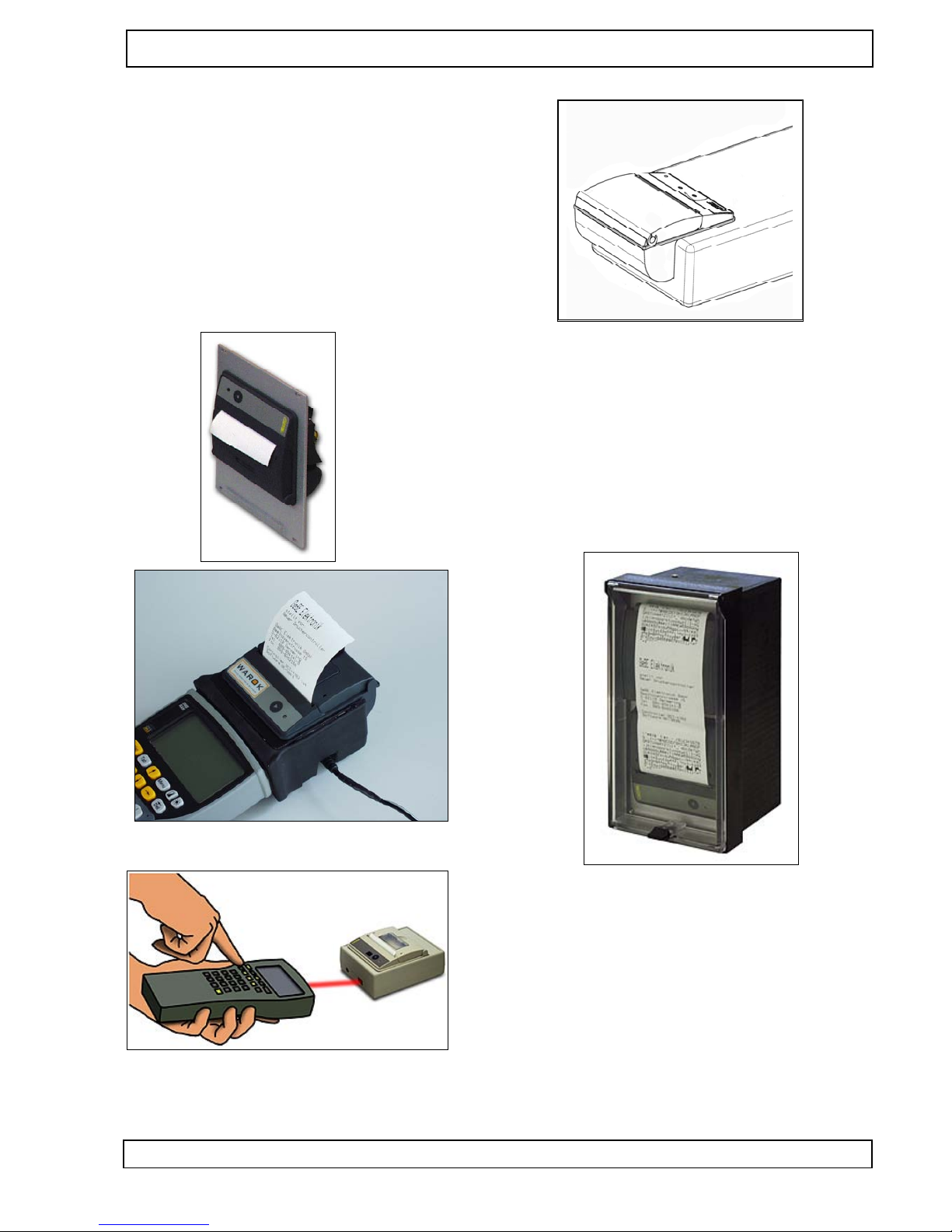
4.3 Example for installation and application
As the pictur es show , the installation types ar e almost unlimited. The advantage of the complete thermal printer Mini
Mulde in its plastic housing consists above all of the fact that
it becomes possible to use the practical Easyloading technology of the printer mechanisms also in applications withsmaller numbers of items.
For this small GeBE-printer a paper r ewinder is available, so
that also a printer with pr esentation stage, like shown above,
can be used e.g. in a contr ol panel housing. The Mini
MULDE is used also in the Desktop Printer Series POCKET
and is suitable for Handheld computers with printing station.
Application in a pocket printer with infrar ed
interface.
Ge BE E + F Gm bH • ww w .oe m- pri nte r .co m • Ge BE Do k.N r .: SM AN -E- 413 -V4 .0 Eas y-L oad ing The rm al Pri nte r GPT -43 52( -60 )
Page 6
Ge BE E + F Gm bH • ww w .oe m- pri nte r .co m • Ge BE Do k.N r .: SM AN -E- 413 -V4 .0 Eas y-L oad ing The rm al Pri nte r GPT -43 52( -60 )
C on ne ct in g th e Pr in te r
6
5 C on ne ct in g th e Pr in te r
During installation:
Always disconnect the power !!
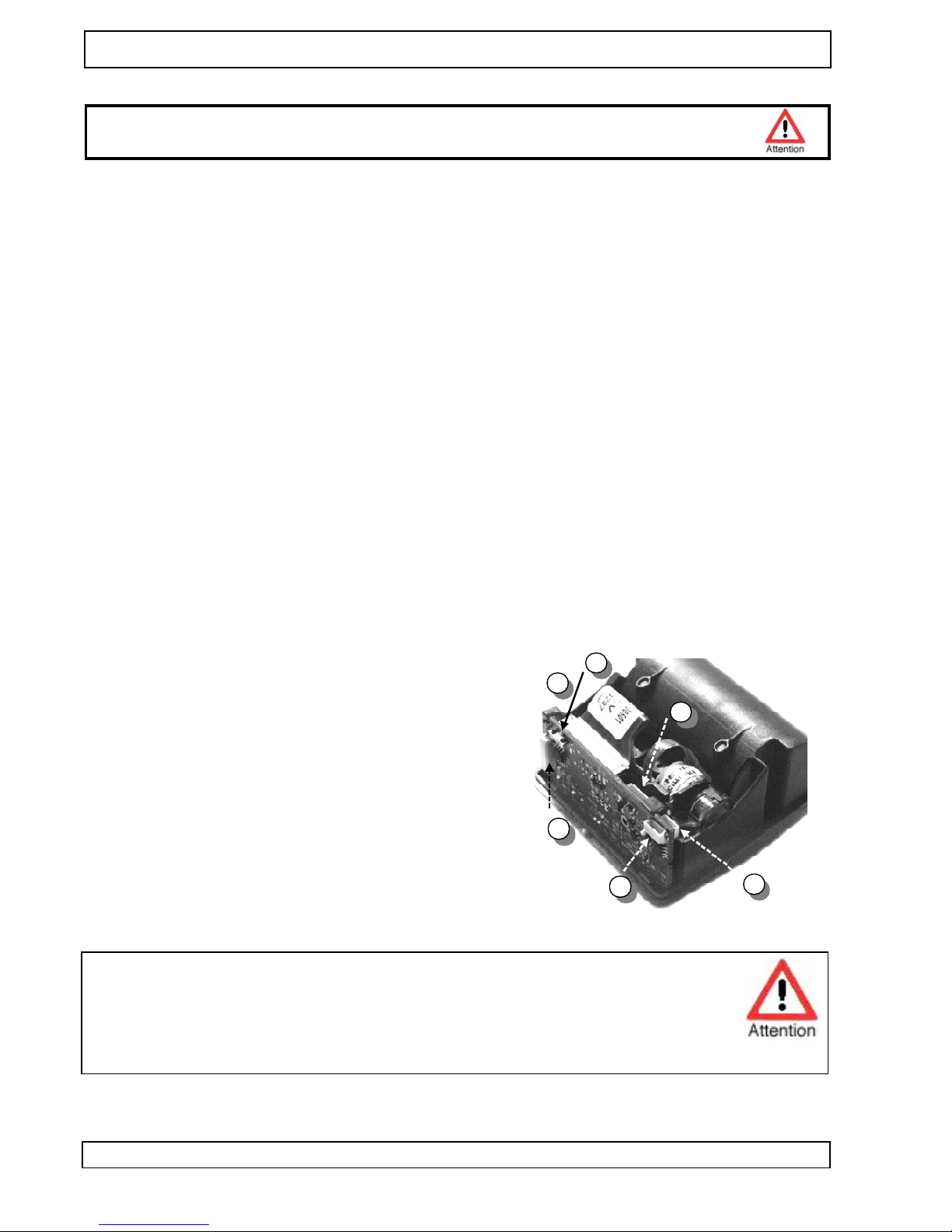
5.1 Connecting the power supply (1)
The printer can be supplied with fixed voltage fr om a power supply or a battery . Battery or power supply ar e plugged into the same connector . Thr ough the voltage supply connection, the printer can be supplied with voltages
between 3.5 V (for printers with Centr onics adapters with 4.5V) and 7.2 V . The supply for the logic chip is pr oduced
on the boar d. The power cable GKA-410, included in sets 1 and 3, is connected to the connector J4 (3 r ed wir es
for + 3.5 -7.2 VDC , 3 black gr ounding wir es, and one white cable for an NTC 6.8 KOhm of a Ni-MH battery). For
simple power connections, the white wir e r emains unconnected. W e r ecommend keeping the length of the line as
short as possible. The longer the line, the higher the line r esistance, causing bad print quality or even printer failur e.
Attention: A void confusing the connection poles, because it can cause immediate damage to the printer . Car efully check the power supply connection befor e you tur n on the printer .
5.2 Power Down (2)
Starting with har dwar e version V1.4c the standar d version does not support the power -of f mode.
The contr oller comes with dif fer ent levels of power saving modes (power down modes):
• idle mode (8 mA typical)
• sleep mode (20 µA typical)
• power -of f mode (0.1 µA typical), optional configuration r equir ed
During the r eceiving of data and during printing the contr oller is in an active status.
With the parallel interface, the ballast r esistor R35 is not part of the standar d configuration.
Connect jumper J3 for idle mode.
Remove jumper J3 for sleep mode.
Power -of f logic ist not in the standar d configuration (r eplaced by R37).
5.3 Connecting the Char ger (3)
EV AL printers have a standar d char ging cir cuit for 4 Ni-MH cells.
An operation with 3 or 5 cells is also possible. The char ging is per formed by the uncontr olled plug-in power supply GNG-6V -0,5A-U
that has a special inter nal r esistance. It is connected thr ough the
cable GKA-416 to the connector J1. The char ging time for a 1500
mA/h battery will be about 5 hours. During the char ging pr ocess,
the LED on the contr ol panel will display dif fer ent pulses that show ,
whether the fast or trickle char ging mode is active.
1
3
2
4
5
6
A TTENTION !
Never use a fixed-voltage power supply for char ging the batteries. The char ging cir cuit is a "simple switch contr ol", meaning that the curr ent limitation is not done in the char ge contr ol of the printer ,
but in the plug-in power supply .
Please use the suitable GeBE power supply GNG-6.0V -0,5A-U.
Page 7

Ge BE E + F Gm bH • ww w .oe m- pri nte r .co m • Ge BE Do k.N r .: SM AN -E- 413 -V4 .0 Eas y-L oad ing The rm al Pri nte r GPT -43 52( -60 )
Pr in te r C on fig ur at io n
7
6 Pr in te r C on fig ur at io n
6.1 Configuration over Initialisation-T extPr eserve "TINIT " (Softwar e Switch)
All commands for initializing the contr oller ar e filed in the text file "TINIT ". TINIT is available in the flash memory
of the printer and in the EEPROM (Note: Low-priced contr ollers with minimal functionality may not have an EEPROM). An entry in the EEPROM cancels entries in the Flash. For example, if a printer is to print double height
and inverse in data mode, the r elevant commands ar e enter ed in the text file "TINIT". After a RESET , the contr oller
will first carry out its basic initialization, r ead the solder bridge settings, and then pr ocess the commands in the
"TINIT". Ther efor e, the commands in the "TINIT" have final authority r egar ding the valid settings. Custom settings
can also be achieved thr ough entries in the text file "TINIT". If an EEPROM is available, "TINIT" can also be alter ed thr ough an interface.
The basic initialization of the contr oller corr esponds with the following instructions that ar e initially not enter ed in
the "TINIT : <ESC> "A"; <ESC> "D" "0"; <ESC> "H" "0"; <ESC> "I" "0";
<ESC> "L" "0"; <ESC> "M" "0"; <ESC> "N" 0 0; <ESC> "P" 1; <ESC> "S"0; <ESC> "W" "0".
6.2 Entries into the "TINIT", which ar e primarily used
Com m. (AS CII)
Com m. (he x)
Fun ctio n
<ES C>" Y"n
<ES C> "[" $40 $18
1B 59 1E
1B 5B 4 0 18
Set blac ken ing of the pap er to a med ium valu e of 25
Pow er con sum ptio n to 64 pixe ls, med ium prin t dyn ami cs and prin t qua lity
<ES C> "e" $05
<ES C> "r" "1" .... cha rgin g circ uit con figu rate d for NIM H cell s
<ES C> "]" $0 $0
1B 45 05
Pow er-d own afte r 5 sec ond s rega rdle ss of the buff er stat us, if ena bled
1B 5D 00 00
Act ivat e the tran smi tter of the seri al inte rfac e
6.3 Solder Bridges Sleep Mode, Baud Rate, Text/Data Mode, Adapter SELECT
Ther e ar e four 0-Ohm bridges and two jumpers on the contr oller boar d (optional) .
These bridges will each be inquir ed once during RESET .
Na me
Me ani ng
Com men t
Br9
BR 204
ena ble Pow er Dow n
text /dat a mod e
With out Br9 , the con troll er afte r a Pow er Up in slee p
mo dus
Dat a mod e: prin ting rota ted by 180 °, first line at the bot tom pag e mar gin
Def ault : con nec ted (dis able )
Def ault : ope n (tex t mod e)
BR 203
BR2 01/
BR 202
RN 1
R9
Br2 06
Br20 5
RS2 32/C entr
Bau d rate
Cho ice, if the RS2 32 or the Cen tron ics thro ugh SPI (GC T438 2-1 0) is acti ve.
Sig nal- and
Han dha ke line s
V ADA PTE R Sele ct
Equ ippe d with TTL leve ls for the seri al inte rfac e
Pin 4 of the seri al inte rfac e can eith er be con nec ted with
RTS ( Han dsh ake inpu t of the con troll er) orw ith Vcc or Vp
(pow er sup ply for exte rnal inte rfac e ada pter )
only con nec ted on vers ion SPI /Ce ntro nics
Def ault : ope n (OF F)
Oth er bau d rate s on req ues t.
Alw ays inqu ired dur ing RES ET.
only con nec ted on vers ion TTL /ser ial and SPI /
Cen tron ics
Stan dard : nur R9 bes tück t - Han dsh ake eingan g wird zum Aufw ecke n ben utzt .
Opt ion: only Br2 06 con nec ted - Vp an J2 / Pin 4
Opt ion: only Br2 05 con nec ted- Vcc an J2 / Pin
4
Br2 21
/DT R_B lue
Ove r this line the con troll er sen ds the sign al for Slee p
mod us oft the Blut ooth Mod ul GSW -Blu e1.
Defa ult: ope n -
Opt ion: only r Br2 21 con nec ted - /DT R_B lue at
J2 / Pin 4
Ba ud
BR 201
BR 202
Br201, Br202, Br203 closed and Br204 open
Br202, Br203 closed and Br201,Br204 open:
activate the OPD-Menue®
960 0 192 00
OF F
OF F
ON
OF F
115 200 576 00
ON
ON
OF F
ON
Jumper J3 zur Auswahl des Power Down Modus
Na me
Me an ing
Co mm en t
J3
Po we r Do wn
Mo de
De ter min es tog eth er wit h Br9 , if idl e mo de, sle ep
mo de, or pow er- off mo de is goi ng to be use d.
Sta nda rd: plu gg ed in = Idl e Mo de in
com bin atio n wit h bes tück ter Br9 .
op en = Sle ep Mo de
Page 8
Ge BE E + F Gm bH • ww w .oe m- pri nte r .co m • Ge BE Do k.N r .: SM AN -E- 413 -V4 .0 Eas y-L oad ing The rm al Pri nte r GPT -43 52( -60 )
In te rf ac es • Se ri al In te rf ac e
8
7 In te rf ac es
7.1 Serial Interface
7.1.1 Serial interface RS232 (V.24) at connector J2
Connector at printer: JST -SH (5pin). >>> Cable: GKA-406: The other end has a 9 pin SUB-D socket. The assignment is 1:1, matching the serial interface of the PC.
Please note that the DSR and the DCD ar e terminated on some interfaces.
PIN-seizur e
Pin
Sig nal
Inp ut/
Ou t-
put
Com men t
Ass ign me nt
Ca ble
GKA -40 6
D-S UB 9Pi n
1
2
GND sign al
TX D
GN D
I
Prin t data
5
3
3
4
Sel ec-
tion l
thro gh
BR 5
RX D
RT S
O
I
+3.0 V digi tal
+3.0 V -7.2 V powe r
O
O
Erro r repo rts and Xon /Xof f mes sag es
Han dsh ake inpu t of the con troll er (Sta nda rd: Rea ctiva tion Fun ction )
2
7
Sup ply for exte rnal ada pter
Sup ply for exte rnal ada pter
5
CT S O If the leve l is logi c-tru e, the con troll er can rece ive data .
8
1,4,6,9 = NC
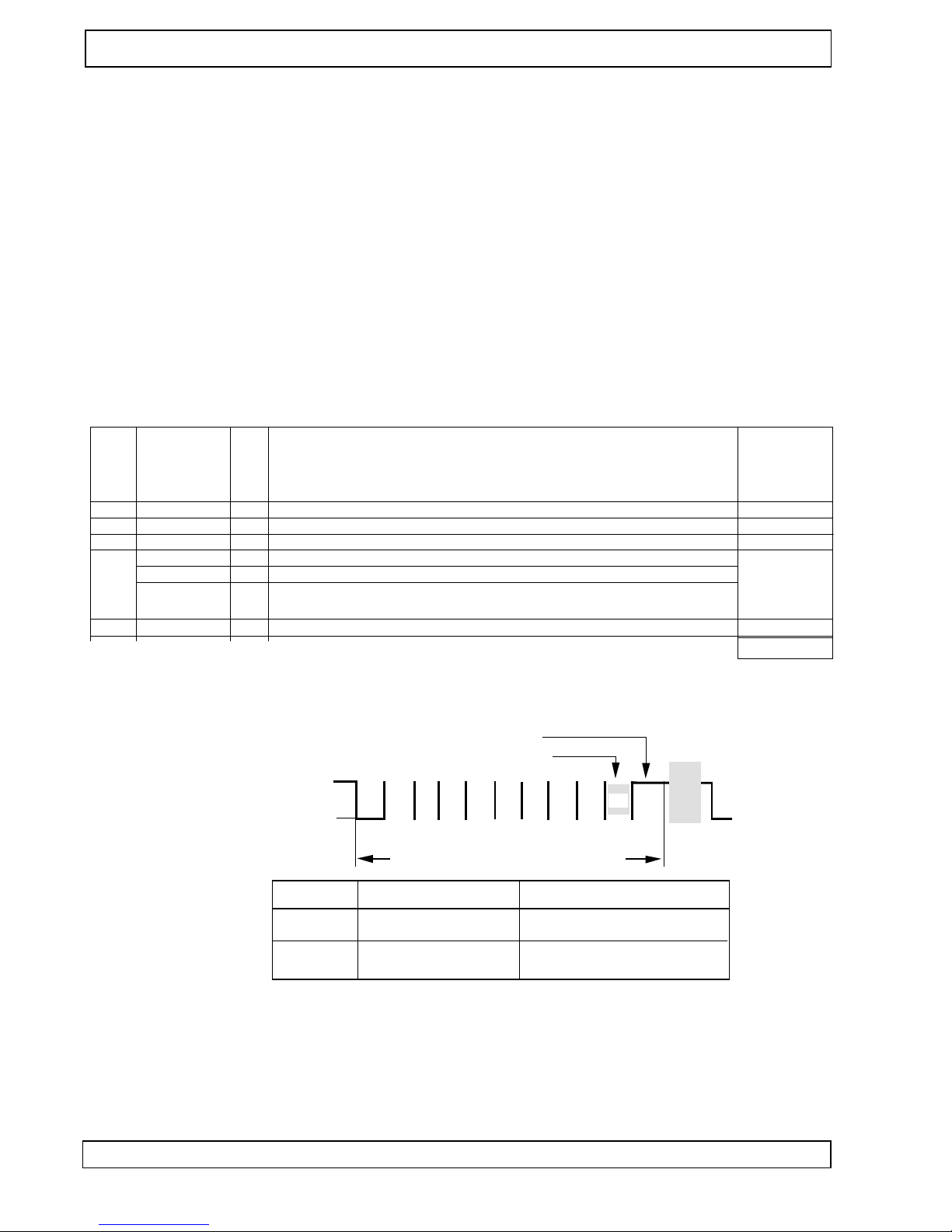
Serial Data Format
Standard:
• 9600 Baud
• 8 Datenbit
• No Paritybit
• 1 Stopbit
LSB
MS B
Star t
Sto p Par
Star t
0 1 2 3 4 5 6 7
Bit
1 Char acter : (1Sta rt, 8 Data , 1 Parit y, 1 Stop )
"1" (Mar k)
"0" (Spa ce)
A t t e n t i o n : t h e s t a n d a r d c o n f i g u r a t i o n h a s n o p a r i t y b i t
A t t e n t i o n : t h e s t a n d a r d c o n f i g u r a t i o n h a s 1 s t o p b i t
S i g n a l L e v e l o n T T L i n t e r f a c e L e v e l o n R S - 2 3 2 i n t e r f a c e
" 1 " ( M a r k )
+ 5 V ( T T L - l e v e l ) - 3 V . . . - 1 2 V
0 V ( T T L - l e v e l )
+ 3 V . . . + 1 2 V
" 0 " ( S p a c e )
Selectable Data Formats
• 1,200, 2,400, 4,800, 9,600, 19,200,
38,400, 57,600 and 115,200 baud
• 7/8 data bits
• odd, even, non parity bit
• 1, 2 stop bit
• TX line turned ON/OFF
RS232
The interface cable that comes with the set connects
plug-in connector with the RS232 connection (COM interface of a PC) on the other end. An open-ended cable
with 5 single wir es is available as an option.
TTL
For OEM, a special version with 3.3V TTL levels is
available.
GeBE COM
In this setting, the printer uses the GeBE - Ir pr otocol
for communicating. The pr otocol can be used thr ough
the RS232 as well as the TTL.
Thr ough the CRC pr otected transmission blocks, a secur e data connection can be r ealized.
Also see: Infrar ed Interfaces
GeBE-Doc.No. MAN-E-395
7.1.2 Timing der seriellen RS232 /TTL Schnittstelle
The standar d Timingis shown in the pictur e below .
The Data format can be set via Menue (only printers with EEPROM).
Page 9

Ge BE E + F Gm bH • ww w .oe m- pri nte r .co m • Ge BE Do k.N r .: SM AN -E- 413 -V4 .0 Eas y-L oad ing The rm al Pri nte r GPT -43 52( -60 )
In te rf ac es • Pa ra lle l In te rf ac e
9
7.2 Parallel Interface
Na me
Me ani ng
Com me nt
BR1 or
J3
BR2 or
J3
Fee dba ck of the AUT O_L F outp ut of the hos t on SEL ECT :
Allo ws a Win dow s syst em to rep ort prin ter - SEL ECT
bac k to itse lf.
SEL ECT inte rrup t
BR1 : def ault : ope n
J3 : defa ult: 2-3 ope n, auto LF not fed bac k
to Sele ct.
BR2 : def ault : ope n
J3 : defa ult: 1-2 clos ed, sele ct acti ve
7.2.1 Centr onics Adapter with SUB-D 25 pin Connector
The cable GKA-407 connects the adapter with the printer (at J5).
The cable GKA-302 pr oduces a 1:1 connection of the adapter and the parallel port of a PC.
7.2.2 PIN-seizur e at the SUB-D 25 of the adapter
Pin
Sig nal
Inp ut/O utp ut
Com me nts
1
2
Stro be/
DB 0
I
I
Acc epti ng data DB0 ..7 with risin g edg e
3
4
5
6
DB 1
DB 2
I
I
DB 3
DB 4
I
I
7
8
9
10
DB 5
DB 6
I
I
DB 7
/Ac kno wle dge
I
O
11
12
13
14
BU SY
Pap er End
O
O
Sel ect
Aut o Line Fee d
O
I
Bec ome s high with the falli ng edg e of /Str obe
See erro r mes sag es
See erro r mes sag es
Can be con nec ted with sele ct (Win dow s ope ratio n)
15
16
17
18- 25
/Fa ult
/Inp ut-P rime
O
I
Sel ect in
GND digi tal
I
See erro r mes sag es
use d for initia ting Res et
use d for initi atin g the wak e up seq uen ce
7.2.3 Timing of the Parallel Interface
T i m e
N a m e
m i n ( µ s )
t y p ( µ s )
m a x ( µ s )
C o m m e n t s
Tac k
T
ba
Ack n.pu lse wid th
Dela y bus y ack n.
17
5,5
T
bs T dsu
T
hold
T
sb
Bus y Set up
Dat a Set up
0,5
0,5
Dat a hold
dela y Stro be-B usy
0,5
0,5
Tim e befo re the nex t stro be
With ope n-co llect or trigg erin g, the min imu m time is 3.5 µs. This valu e can
be cha nge d by inte grat ingd iffer ent RC filte rs.
T
strb
Stro be puls e wid th
0,5
B u s y
D a t e n
S t r o b e /
A c k n /
T s t r b
T h o l d
T s b
T a c k
P a r a l l e l e S c h n i t t s t e l l e
T b a
T d s u
T b s
Adapter GCT -4382-1 0 with
Centronics Interfac e
Page 10

Ge BE E + F Gm bH • ww w .oe m- pri nte r .co m • Ge BE Do k.N r .: SM AN -E- 413 -V4 .0 Eas y-L oad ing The rm al Pri nte r GPT -43 52( -60 )
In te rf ac es • In fr ar ed In te rf ac es
1 0
7.3 Infrar ed Interfaces
The following pr otocols can be used:
• IrDA: IR LPT (printer service)
IR COMM 9 wir e (optional)
Also see: www .ir da.or g
• G e B E - I R : Simple, err or -pr oof, bidir ectional,
dot to dot IR-pr otocol.
GeBE-Doc.No. MAN-D-394
• HP-IR: Unidir ectional IR transmission
GeBE-Doc.No. MAN-D-416
All standard versions of the printer have the hardware
for an IR transmitter/receiver installed, so the protocols
GeBE-IR and IrDA are available for all standard printers
of the series GPT-4352.
The inter nal IR tranceiver is installed dir ectly below the
r ed foil window (10). The GPT -4352 has an LED next to
the transceiver that signals any IR communication. It is
important to consider that infrared transmissions only
work "at sight". The radiation angle is about +/-15 degrees. The transfer distance, which also strongly depends on the efficiency of the opposite side, is about
1.0 meter. It can be expanded to < 3 meters by installing a booster-IR LED.
Use of the Sleep Mode
In the setting "IrDA "or "GeBE IR", the IR r eceiver will
even be active in the sleep mode, so the device will not
have to be switched on explicitly for printing. The power consumption of the printer is only about 25µA in
this mode. However , the printer should still be tur ned
of f during long periods of inactivity .
GeBE -IR Pr otocol
The GeBE-Ir pr otocol is a simple, err or pr otected infrar ed pr otocol. The data transmission is pr ocessed in
CRC pr otected blocks.
With each transmission confirmation, the printer status
is sent back to the host.
The implementation is easy to r ealize. The pr otocol is
disclosed.
IrDA Pr otocol
The printer works with the pr otocol service IrLPT . Her e
the printer doesn't send back.
A bidir ectional Service "IrCOMM 9 wir e" ist available on
r equest.
In the menu setting, the selected baud rate r epr esents
the maximum baud rate. If 57,600 baud is selected, for
example, the printer will start to communicate with 9,600
baud and then switch up to 57,600 or 38,400 baud, depending on the transmitter .
The maximum baud rate of 115,200 should only be r educed, if transmission pr oblems occur .
When an infrar ed transmission is interrupted, the printer
will look for the transmitting master device for about 20
seconds in or der to complete the transmission. After
that, the stack is r eset, and new inquiries ar e answer ed.
Driver for IrDA
Windows 98 / ME / NT / 2000 / XP
Driver for Windows ar e available on our W ebsites.
WIN CE , P ALM OS , SYMBIAN Serie 60
Driver for these systems ar e available at:
www .Bachmannsoftwar e.com or
www .fieldsoftwar e.com
For pocket PCs Bachmann of fers an application (Printboy) for printing p.e. out of Pocket W or d.
IrComm Service s
Uncook ed Service s
Cooked Service s
IrLPT
3-wire Raw
Centron ics
IEEE 1284
3 - wire
9 - wire
IrDA Dat a Spe cific atio n
Rad iatio n out put
Min . inpu t rad iatio n inte nsit y
Max . inpu t rad iatio n inte nsit y
Pea k wav e leng th
Pea k wav e leng th boo ster LED
Com plie s: IrDA V1. 0 Sta nda r d Pow er SIR
mi n
40
ma x
100
4
50 0
870
880
mW /sr On- axi s
W/c m2
mW /cm 2
v<(± 15° )
v<(± 15° )
nm
nm opt iona l
Saf ety
IrD A
Inte rfac e par ame ters
GeB E-I R
Inte rfac e par ame ters
Com plie s with IEC 825 -1 clas s 1 (EN 608 25) eye safe ty spe cific atio ns
IrDA : auto mat ic sett ing in acc or dan ce with IrDA ; 9,60 0, 38,4 00, 57,6 00, or
115 ,20 0 Bau d
GeB E IR-P r otoc ol: 9,60 0; 38,4 00; 57,6 00; or 115 ,200 bau d,
8 data bits , non pari ty , 1 stop bit
Page 11

Never activate an action in the printer driver at the end of a job. This can cause a
loss of data.
Ge BE E + F Gm bH • ww w .oe m- pri nte r .co m • Ge BE Do k.N r .: SM AN -E- 413 -V4 .0 Eas y-L oad ing The rm al Pri nte r GPT -43 52( -60 )
In te rf ac es • U S B
1 1
7.4 USB
The GPT -4352 with USB meets the USB specification
V1.1 for full-speed devices. The printer is compatible to
USB V2.0 bus systems. The USB device class is equivalent to a "V endor Specific Device". Ther efor e, transmission can be done with virtual COM port drivers.
The printer will operate like a serial printer . The virtual
COM port drivers ar e available for the operating systems Windows 98/98SE/ME/2000, and XP , and possibly WinCE fr om the thir d quarter of 2004. For Linux
V2.40 and up, ther e is a dir ect Ker nel support. Ther efor e, a driver is not r equir ed. Standar d GeBE printer drivers can be used.
Operation
If a sleep mode has been selected for the printer , it will
switch to sleep mode after the pr eset time period has
passed. The USB interface, however , r emains active,
being dir ectly fed fr om the USB bus. A new print job
with the standar d driver r eactivates the printer without
any loss of data. The USB suspend mode also has the
printer inter nal USB interface tur ned of f. In this mode,
the printer will "go to sleep" after the pr eset sleep time.
USB Driver
Windows 98 / ME / NT / 2000 / XP
Windows and USB drivers can be found on the GeBE
website. Please r ead the included installation instructions. Befor e the initial operation, the matching virtual
COM port driver (VCP driver) and the printter driver
have to be installed.
Setting the VCP Driver
The example shows the setting with Windows 2000.
The pr ocedur e is very similar with XP or Windows 98.
Starting with the Windows "ST AR T" menu, select "Contr ol Panel" -> and click on the "System" folder .
Select the "Har dwar e" tab), and click on "Device Manager".
Ther e, activate the "+" symbol under "Connections
(COMand LPT)", and look for the entry
"USB Serial Port (COMx)".
Open it and click on "Port Settings", in or der to have
the settings of the virtual COM port displayed.
It is r ecommended to use the settings of the virtual
COM port accor ding to the settings of the printer::
115,200, n, 8, 1, XON/XOFF .
If the printer is not operated in step mode, "Har dwar e
Flow Contr ol" is r ecommended.
Click on "Advanced" to see the extended settings.
Please make sur e that the settings shown below have
been carried out.
For Windows 2000 and XP
For Windows 98 and ME
USB Spe cific atio n
Dev ice type
Spe ed
Pow er con sum ptio n prin ter
V1.1 ( V2.0 com pati ble)
Ven dor spe cific dev ice
Ful l spe ed
no prin ting
USB acti ve /prin ter acti ve
USB acti ve /prin ter slee p
USB sus pen d / prin ter slee p
min . Typ .
30 mA
25 mA
300 µA
ma x.
Page 12

1 2
Ge BE E + F Gm bH • ww w .oe m- pri nte r .co m • Ge BE Do k.N r .: SM AN -E- 413 -V4 .0 Eas y-L oad ing The rm al Pri nte r GPT -43 52( -60 )
In te rf ac es • B lu et oo th ® W ir el es s T ec hn ol og y
7.5 Bluetooth® Wir eless T echnology
The GPT -4352 with BT meets the BT specification V1.1
class 2, attaining a transmission range of about 10 -15
m. If you r equir e a longer transimission range, please
contact us. The printer can be operated with a customary BT dongle that comes with a virtual COM port driver .
A RS232 r emote r eceiver is available on r equest.
Operation
The printer r esponds to an inquiry scan with its name
"GPT -4352" and its BT addr ess. However , it can also be
addr essed dir ectly , without a scan, with its BT addr ess.
A "BT connect" activates the printer . The printer will
maintain a connection until it goes into sleep mode. The
online power consumption of the printer with an active
BT link is about 35mA. The sleep mode disconnects an
active connection and activates the BT snif f mode. In
this mode, the printer scans its envir onment for possible calls every 1.25 seconds. During these inquiry scans,
it r emains visible and r esponsive. It will then take about
2-3 seconds to establish a connection.
The power consumption in this mode is about 1.5mA.
When the printer is r eactivated thr ough the feed button,
the BT tranceiver will r emain in snif f mode. After the set
time period, the printer will go back into sleep mode.
If you ar e not planning to operate the printer for several
days, switch it of f with the OFF/NEXT key . After the power is tur ned on, it will take a minimum of 10 seconds
for the printer to become r eady to r ecieve data.
The printer does not ask the master for any authentication.
Should your transmitter r equir e a PIN number , type in
"0000".
Please always set your printer to 115,200, n, 8,1.
W e r ecommend to set the sleep time to "1 minute".
Drivers
Windows 98 / ME / NT / 2000 / XP
Windows drivers can be found on our website.
WIN CE, P ALM OS, SYMBIAN Serie 60
For WIN CE, P ALM OS, and Symbian series 60 devices,
you can find a driver support at:
www .fieldsoftwar e.com
www .Bachmannsoftwar e.com
This printer contains a 2.4 GHz radio transmitter . For health r easons, a distance of at least 1.0 cm
must be kept between the printer surface and the body of the user , except hands, fists, feet, and
joints. As a pr ecaution, any body contact during operation should be kept to a minimum.
Blue toot h Spe zifik atio n
Fun k Sen de-L eve l
Rei chw eite
Pro file
Dru cke r Stro mau fnah me
V1 .1
4 dBm (cla ss 2)
app . 10 -15 m
SPP seri al port prof ile
no prin ting min .
Acti ve link/ data traff ic at 115 kbp s
Act ive link
50 mA
25m A
Typ . ma x.
62 mA
35 mA
95 mA
55 mA
Idl e
Prin ter acti v/ BT snif f mod e
18m A
5 mA
Snif f mod e (1.2 5 sec . sca n)
Pow er off
1 mA
0,3 µA
25 mA
7 mA
40 mA
15 mA
1,3 mA
0,7 µA
2,5 mA
2,0 µA
CE statement:
The BlueRS+I complies with the Eur opean safety r egulations IEC 60950,
and EMV r egulations ETS 300 328-2 and ETS 301 489 -1 und -17.
FCC statement:
The printer contains a BlueRS+I OEM serial adapter with the FCCID: RFR-BRSI / IC: 4957A-BRSI .
The BlueRS+I complies with part 15 of the FCC rules and with RSS-210 of Industry Canada.
The BlueRS+I has been qualified as a pr oduct in accor dance with the Bluetooth ® Qualification Pr ogram (BQP).
A class 1 version (up to 100 m range) is under way.
Page 13

1 3
Ge BE E + F Gm bH • ww w .oe m- pri nte r .co m • Ge BE Do k.N r .: SM AN -E- 413 -V4 .0 Eas y-L oad ing The rm al Pri nte r GPT -43 52( -60 )
O pe ra tio n
8 O pe ra tio n
8.1 Which thermal paper is suitable ?
The printer is specified for a paper width of 57.5 ± 0.5 mm, with a weight
of 60 g/sqm. GeBE is of fering suitable paper r olls (GPR-T01-058-031-007060A r esp. GPR-T01-058-060-007-0 60A for GPT -4352-60) as part of the
standar d pr ogram. Other papers may not be suitable for use.
Thermal papers that ar e r esistant against water , gr ease, or alcohol ar e
available for special applications. W e will gladly assist you in your selection of the suitable thermal paper .
How do I insert the paper?
Use paper r olls that ar e coated on the outside with a width of 57.5 mm ±
0,5mm and a winding diameter of 31 mm and 60 mm for GPT -4352-60.
Standar d GPT -4352: GPR-T01-058-031-007-0 60A
Standar d GPT -4352-60: GPR-T01-058-060-007-0 60A
1. Unwind about10 cm (4 ") of paper fr om the r oll. Keep the layers wound
tightly .
2. Open the printer cover by slightly pr essing the LEVER in the cover upwar ds. The print r oll is lifted fr om the mechanism together with the cover .
The cover is now easy to open.
3. Insert the paper r oll in the paper storage, so the outside shows towar d
the printer mechanism. Only this outside can be printed on.
4. Close the cover by applying str ong pr essur e. Y ou can hear it snap shut.
Now you can rip of f paper at the tear bar without the cover opening up or
the paper sliding thr ough the print head.
1.
2.
3.
4.
8.2 Maintenance, Cleaning
After lar ger print ef forts, depending on the paper quality and adverse envir onmental conditions, it may be necessary to clean the print head, sen-
sor , and the platen r oll, especially , if some ar eas ar e no longer printed
pr operly .
• Open paper supply lid and r emove paper r oll.
• Loosen dirt particles at the paper sensor and the tear -of f bar with a
small brush.
• Blow for cefully into the paper supply compartment in or der to r emove
the coarse dust.
• Soak Q-tip in isopr opanol (IP A) and clean the print head, or use print
head cleaning pin/cleaning car d.
• Other stubbor n debris can also be r emoved with a Q-tip (IP A).
Never use sharp objects for cleaning. This might cause damage to the print head.
Which side of the thermal paper can be printed on?
On the paper r oll, the side to print on is, in almost all cases, the
outside. If you should have any doubts, just do the finger nail
test: Quickly drive the edge of a finger nail with slight pr essur e
over the paper . The thermosensitive side will tur n black as a r esult of the frictional heat.
Page 14

Ge BE E + F Gm bH • ww w .oe m- pri nte r .co m • Ge BE Do k.N r .: SM AN -E- 413 -V4 .0 Eas y-L oad ing The rm al Pri nte r GPT -43 52( -60 )
1 4
K ey Fu nc ti on s
9 K ey Fu nc tio ns
Description of the Key Functions
The keys can have dif fer ent functions depending on the
status – normal operation or print settings menu. The
time for which the button is held down is also an issue.
FEED / ENTER (1)
Thr ough this key , the printer can be r eactivated fr om
sleep mode, and the paper can be transported forwar d.
When the feed key is pr essed, the printer will first feed
one line of the set font. If the key is held down for mor e
than 2 seconds, it will feed continously .
Self T est
With this, the printer functions can be tested thr ough a
printout. T o start the self test the FEED Button {FEED}
(1) has to be held down for mor e than 3 seconds when
waking up the printer out of the Power OFF mode . The
interfaces won't be tested in this case. Softwar e version
and character set will be printed out. For OEM special
printouts can be activated during this operation self
test.
OFF / NEXT T aste (3)
By holding down the OFF/NEXT key for mor e than 3 seconds during operation, the pr ocessing of batch file T2
is initiated. In µ-P flash, the command for power -of f (af-
ter 1 second) is filed in batch file T2. This way , this key
is pr ogrammed as an OFF button for the printer (contr oller with power -of f mode).
IR Fenster (2); Status LED (4) s. Kap. Satusmeldungen
SET Key
r ently without function.
Key FEED/ENTER
Key OFF/NEXT
Action
pr essed
held down > 2s
not pr essed
not pr essed
paper feed by one line
continous paper feed
pr essed during power -on < 1s
held down during power -on
paper inserted > 2s
held down during power -on
no paper > 2s
pr essed in hexdunp mode
no paper
not pr essed
not pr essed
r eactivation, no paper feed
call T0 (self test)
not pr essed
not pr essed
call hexdump mode
hexdump mode end
not pr essed
not pr essed
pr essed
key r eleased after < 1s in nor mal paper mode
key held down > 3s
call T1
(default = form feed 1 line)
call T2
(default = power -of f after one second)
pr essed
call print settings menu
1.
2.
4.
3.
Page 15
1 5
Ge BE E + F Gm bH • ww w .oe m- pri nte r .co m • Ge BE Do k.N r .: SM AN -E- 413 -V4 .0 Eas y-L oad ing The rm al Pri nte r GPT -43 52( -60 )
O P D -M en u e®
10 O P D -M en ue ®
The most important settings of the printer can be changed with a few key str okes using the OPD-Menue ® (OnPaperDisplay).
They can be called at any time, and can be quickly understood with the menu printout.
The inconvenient accessing of DIP switches and the pr ogramming thr ough a terminal pr ogram ar e a thing of the
past.
The OPD-Menue ® is operated with only two keys (OFF/NEXT and FEED/ENTER)
The OPD-Menue ® is an editor of an initialization batch file "TMENUE" that is called befor e the "TINIT".
See chapter on batch files.
Key FEED/ENTER
pr essed
not pr essed
pr essed
Key OFF/NEXT
Action
not pr essed
pr essed
incr easing the parameter
moving to the next menu item
pr essed
leaving menu and saving settings
M en u G ui de - Ex am pl e:
Bold : printout of the menu
Normal: possible settings
Italic: comment
W elcome to the OPD menu 1.0 5
Setup timeout after 10 minutes
Actual printer settings:
Ubat: 52V
Tbat: 24°C
(displaye d only with battery )
Firmware: GE-xxxx
Density 25
Speed: med (64)/low
Interface : RS232/USB /Blue
COM: 9600,n,8,Tx +
Sleep time: 5 sec
Font #: 1
Char . format: D0,W0,H0, S0,48
? Change actual settings
Press ENTER to change
Press NEXT to skip
Press NEXT+ENTER to save and exit
PRINTER SETUP:
Press ENTER to modify
Press NEXT to store and continue
Press NEXT+ENTER to save and exit
Density: 25 20, 25, 30, 35, 40, 45, 50, 90(2ply)
Speed/Quality : med 64/ low (Depending on the Printer typ) low (32)/med , med
(64)/med , med (64)/low , high (96)/low
Interface : RS232/USB /Blue RS232/USB/ Blue, IrDA, GeBE-IR, GeBE-COM
Baudrate: 9600 1200, 2400, 4800, 9600, 19200, 38400, 57600, 1 15200.
COM paramet er: n,8,Tx+ n, 7, Tx+ / o, 7, Tx+ / e, 7, Tx+ / n, 8, Tx+ / o, 8, Tx+ / e, 8, Tx+ /
n, 7, Tx- / o, 7, Tx- / e, 7, Tx- / n, 8, Tx- / o, 8, Tx- / e, 8, Tx-
Sleep T ime: 5 se c
OFF , 5 sec, 30 sec, 1 min, 10 min, 1 h, 12 h, 32 h
Page 16

Ge BE E + F Gm bH • ww w .oe m- pri nte r .co m • Ge BE Do k.N r .: SM AN -E- 413 -V4 .0 Eas y-L oad ing The rm al Pri nte r GPT -43 52( -60 )
St at us M es sa ge s
1 6
Font #: 1 1, 2, 3, 4
T ext orientat: T extmode (D0) T extmode (D0), Datamod e (D1)
Char . size : W0/H0
W0/H0, W0/H1, W0/H2, W0/H3, W1/H0, W1/H1, W1/H2, W1/H3
Char . spacing : 0 0,1,2,3,4,5 ,6,7
Print width : 48 mm (Dependiong on type of printer)
48 mm, .... 32 mm
? Return to default settings
Press ENTER to change
Press NEXT to skip
Press NEXT+ENTER to save and exit
ONL Y with clock option / clock connected
17.03.03 17:33
? Change date / time
Press ENTER to change
Press NEXT to skip
Press NEXT + ENTER to save and exit
RTC SETUP:
Press ENTER to modify
Press NEXT to store and continue
Pr ess NEXT+ENTER to save and exit
00 .. 49 Y ear: 03
01 .. 12 Month: 11
01 .. 31 Date : 14
01 .. 07 Day : 7
00 .. 23 Hour : 13
00 .. 59 Minute : 33
1 00 : 00 ON
? Change alarm
Pr ess ENTER to change
Pr ess NEXT to skip
Pr ess NEXT + ENTER to save and exit
ALARM SETUP:
Pr ess ENTER to modify
Pr ess NEXT to stor e and continue
Pr ess NEXT+ENTER to save and exit
01 .. 07, * Day : 7 * : means periodic enterprise, e.g. if "day" is adjusted to *, each
day to the adjusted time an alarm is called
00 .. 23, * Hour : 13
00 .. 59, * Minute : 33
ON, OFF Mode: OFF
Page 17

St at us M es sa ge s
1 7
Ge BE E + F Gm bH • ww w .oe m- pri nte r .co m • Ge BE Do k.N r .: SM AN -E- 413 -V4 .0 Eas y-L oad ing The rm al Pri nte r GPT -43 52( -60 )
11 St at us M es sa ge s
LED "ST A TUS" (gr een/r ed) (4)
The ST A TUS LED will flash gr een slowly , when everything is in or der . It will flash r ed in r egular intervals in case of a
failur e. During fast char ging, the ST A TUS LED will flash gr een in r egular intervals, while it permanently glows gr een
during trickle char ge.
Status Messages of the Printer thr ough the Interfaces
Besides the optical status messages displayed by the thr ee LEDs on the contr ol panel of the printer , messages ar e
also transmitted thr ough the serial interface. Most of the time, they ar e sent as single ASCII characters that can be
analyzed by the host.
The following table shows all status messages.
Sta tus
Me ssa ges
Ser ial
Int erf ace
Co mm ent s
Fee db ack
thr oug h the se-
rial inte rfa ce
on: of f /fla sh fr equ enc y
fas t: "S" app . 0.6 6Hz
me diu m: "M" app . 0.3 3Hz
slow : "L" app . 0.1 6Hz
Sta tus LE D
Fau ltle ss
ope rat ion :
Aft er r ese t
Aft er wat ch- dog
r ese t
Err or end
"R"
"R"
"X "
1:3 1 / M
gr een
Lev el on the stat us line s only sho rt-te rm dur ing pha se of initi aliz atio n. Me ssa ge: <XO N>
"R" "X" (or err or)>
Cra shi ng pro gra m
also afte r har dw ar e, sof twa r e, and wat chd og r ese ts
Buf fer em pty
Buf fer full
Syn chr ono us
fee dba ck
Bat ter y cha r -
gin g:
X ON
X OF F
all
cha rac ter s
For ma ttin g
Fas t cha r ge
T rick le cha r ge
Err ors :
"l"
"L "
"L "
"f"
sta rt
"F "
err or
en d
Buf fer em ptie d by 32 cha rac ters <D C1 > = $11
Spa ce for 22 mo re cha rac ters in buf fer <D C3 > = $13
Pro ces sing of syn chr oniz ing com ma nds ;
eac h tran smi tted cha rac ter
of f
LED per -
me nen tly on
LED flas hes
(1:3 )
L := cha r ge sta rt l := end of cha r ge
L := cha r ge sta rt l := end of cha r ge
F := cha r ge sta rt f := end of cha r ge
Pap er end
T em p. low
T em p. hig h
Vp too hig h
"P "
"K "
"p "
"k "
"T "
"M "
"t"
"m "
Par ity err or
EE -O K
EE -in val id
EE- Pas swo r d
"? "
"E0 "
"E1 "
"E2 "
1:1 / S
r ed
Afte r pap er has bee n inse rted , the prin ter wai ts for abo ut 2s bef ore prin ting in ord er to al-
low for eno ugh time for the mec han ism to be clos ed.
prin t hea d tem per atu r e too low
prin t hea d tem per atu r e too hig h
1:3 1 / M
gr een
Par ity or fram ing err or / no inte rrup tion of prin ting
EEP RO M com ma nd com ple ted with out err ors
Inva lid tex t file no.
W r ong pas swo r d for EEP RR OM acc ess
EE -Ov erf low
EE- Tim e-o ut
EE -K O
"E3 "
"E4 "
"E5 "
IR Rec ept ion
Suc ces sfu l r ead
Uns ucc ess ful
r ea d
IR com mu nic atio n
T ext file me mo ry ove rflo w
Pro gra mm ing time for EEP RO M byte exc eed ed.
EE PR OM not fou nd
LE D on
Rea din g ma gne tic car ds
r ed
LED on 2se c.
3 x s h o r t L E D o n
yel low
Cha gin g V olta ge
Cha r gin g volt age (line )
LE D on
yel low
LED is on if volt age is hig her tha n 9 - 10 V in or der to sign al a vali d cha r gin g volt age .
Page 18
1 8
Ge BE E + F Gm bH • ww w .oe m- pri nte r .co m • Ge BE Do k.N r .: SM AN -E- 413 -V4 .0 Eas y-L oad ing The rm al Pri nte r GPT -43 52( -60 )
B at ch Fi le s
12 B at ch Fi le s
Almost all commands that the printer can r eceive
thr ough the interfaces and then perform can be put into
the batch files. When a batch file is pr ocessed, the commands it contains ar e added to the data str eam of the
print pr ogram sequentially , as if they wer e coming
thr ough the interface fr om outside. This way , all settings
that can be done by command can be pr ocessed via
batch file. Besides settings commands, batch files can
also contain text and graphics.
The file structur e consists of one TINIT , which is pr ocessed with each system boot-up, as well as 10 files that
can be used fr eely , which ar e r etrieved by command.
Some of these files can be addr essed thr ough additional
events. If the contr oller has an EEPROM, it contains a
file structur e that is identical to that of the pr ogram memory (Flash).
When a filed is r etrieved, the printer will check, if it contains data in the EEPROM. If it does not, the file will be
pr ocessed in the Flash. This allows Flash files to be
over -written.
The following batch files ar e accessable:
Allocated in the Flash Memory , Factory Settings:
• "TINIT" ... settings after har dwar e RESET
• "T0 " ..... self test thr ough FEED key after r eset
• "T1 " ..... form feed thr ough NEXT key <1 sec.
• "T2 " ..... power -of f thr ough OFF key >3 sec.
• "T3 - T9" : unused
T ext or Graphics, Batch Files in the EEPROM
For the printing of text and graphics, the GPT -4352 has
an 8 KB EEPROM (app. 6 KB can be used for logos),
and the GPT -4352 has a 32 KB EEPROM (app. 30 KB
can be used for logos).
It is r ecommended to stor e logos PCL compr essed.
By using the Windows driver , compr ession rates of app.
3 - 4:1 can be achieved.
For comparison: Uncompr essed full graphics of 5 cm
length take up 20 KB, while they only r equir e app. 5,7KB
when compr essed.
Configuration of the Printer with TMenu and TINIT
After a har dwar e RESET (connecting the power supply),
the printer will check for a pr escribed TMenu and/or
TINIT in the EEPROM. If it finds one or both, it will pr ocess the batch file commands and will then be r eady for
operation. If not, it will pr ocess the TMenu and/or the
TINIT containing the factory settings in the Flash.
TMenu :
The OPD-Menue ® is a printer function that allows the
user to edit the TMenu in the EEPROM. The TMenu can
only be changed thr ough the OPD Menu.
Structur e of the TMenu:
<ESC>Y<18h> {density}
<ESC>[<DEZ64><DEZ48> {power consumption}
<ESC>]<DEZ115><DEZ4 0 {baud rate, settings}
<ESC>e<DEZ5><DEZ2> {power -down time}
<ESC>P1 {font}
<ESC>D0 {text orientation}
<ESC>W0<ESC>H0 {text size}
<ESC>S0 {text spacing}
<ESC>h48 {print width}
TINIT :
The TINIT is always processed subseque nt to the TMenu. In the TINIT , other presets that were not incorpor ated
in the menu can be executed. It also allows settings to be
blocked in the menu by repeatin g them here.
The followin g TINIT file is an example of a file that can be
modified by the user .
It is availabl e for downloa ding from the Internet at the
URL: www .oem-pri nter .com/flash .
The file will erase the TINIT , while printing out all actions
in italic at the same time.
Any command s can be entered in the TINIT .
Erase Tinit ...
<ESC>uUERAS
Special number S-xxx / Status 24nov03
Program tinit with GE-xxxx...
{Comments}
<ESC>s@PROG<00h><11 h>
<ESC>r1<28h><3Ch><01 h><12h> {char ging parameters}
<A9h><01h><3Ch><01h> <40h>
<19h><01h><85h><0Ah> <8Ch>
All programmed!
If a command of the TMenu is r epeated in the
TINIT , this value can no longer be changed
thr ough the menu.
By using these files in the EEPROM you ar e
changing the standar d factory settings .
Creating and Saving Logos:
A special printer driver is available for cr eating logos.
Page 19
1 9
Ge BE E + F Gm bH • ww w .oe m- pri nte r .co m • Ge BE Do k.N r .: SM AN -E- 413 -V4 .0 Eas y-L oad ing The rm al Pri nte r GPT -43 52( -60 )
O pt io n M ag ne tic C ar d R ea de r
13 O pt io n M ag ne tic C ar d R ea de r
EC Car d
Tra ck
2
2
2
2
3
Pla ce
1-3
Con ten t
iden tific atio n 672
9-18
21-2 2
acc oun t num ber
yea r of exp irat ion
23-2 4
1-4
mon th of exp irat ion
iden tific atio n (015 9, EC card )
3
3
3
3
5-12
14-2 3
ban k iden tific atio n cod e
acc oun t num ber
37-4 0
41
rem aini ng amo unt that can be with dra wn
fina l digi t of the yea r of the last with draw al
3
3
S-C ard
Tra ck
61-6 2
63-6 4
yea r of exp irat ion
mon th of exp irat ion
Pla ce Con ten t
2
3
3
Cre dit Car d
x
1-4
like EC card
iden tific atio n (005 9, S-c ard)
9-24 like EC card
Tra ck
1
1
1
Pla ce
2-17
Con ten t
cred it card num ber
19-4 4
46-4 7
last nam e of the card hold er
yea r of exp irat ion
1
2
2
2
48-4 9
1-16
mon th of exp irat ion
cred it card num ber
18-1 9
20-2 1
yea r of exp irat ion
mon th of exp irat ion
Num eric Cha rac ter T rac k 2 and 3
P 321 0
1 000 0
eq ua ls
0
Me ani ng
0 000 1
0 001 0
1 001 1
0 010 0
1
2
3
4
1 010 1
1 011 0
0 011 1
0 100 0
5
6
7
8
1 100 1
1 101 0
0 101 1
1 110 0
9
:
con tr ol
; < star t sen tine l
con tr ol
0 110 1
0 111 0
1 111 1
=
field sep erat or
con tr ol
?
end sen tine l
ALP HA Cha rac ter T rac k 1
P 543 210
1 000 000
0 000 001
he x
00
01
spa ce
!
0 000 010
1 000 011
0 000 100
1 000 101
02
03
,,
#
04
05 $ %(s tart )
1 000 110
0 000 111
0 001 000
1 001 001
06
07 & '
08
09 ( )
he x
0 100 000
1 100 001
20
21 @ A
1 100 010
0 100 011
22
23
1 100 100
0 100 101
24
25
B
C
D
E
0 100 110
1 100 111
26
27
0 101 010
1 101 011
28
29
F
G
H
I
1 001 010
0 001 011
1 001 100
0 001 101
0A
0B * +
0C
0D , -
0 001 110
1 001 111
0 010 000
1 010 001
0E
0F . /
10
11 0 1
1 101 000
0 101 001
2A
2B
0 101 100
1 101 101
2C
2D
J
K
L
M
1 101 110
0 101 111
2E
2F
1 110 000
0 110 001
30
31
N
O
P
Q
1 010 010
0 010 011
1 010 100
0 010 101
12
13 2 3
14
15 4 5
0 010 110
1 010 111
1 011 000
0 011 001
16
17 6 7
18
19 8 9
0 110 010
1 110 011
32
33
0 110 100
1 110 101
34
35
R
S
T
U
1 110 110
0 110 111
36
37
1 111 010
0 111 011
38
39
V
W
X
Y
0 011 010
1 011 011
0 011 100
1 011 101
1A
1B : ;
1C
1D < =
0 011 110
0 011 111
1E
1F > ? (end )
0 111 000
1 111 001
3A
3B
1 111 100
0 111 101
3C
3D
Z
[
\
]
0 111 110
1 111 111
3E
3F
^( field )
_
The magnetic car d r eader of the GPT -4352 can be used
for magnetic car ds of the type ISO 3554. It r eads up to
3 tracks simultaneously . The permissible swiping
speed is 10 - 100 cm/s.
The r ecor ding density and the number of bits per character dif fer fr om one track to the next accor ding to ISO
3554. They determine the maximum number of characters including start and stop characters that can be r ecor ded on each track:
In accor dance with the norm, track 1 and 2 ar e just r ead
during operation.
T rack 3 is the only one that is also used for r ecor ding.
Operation
After the swiping of the car d, the LED lights up for
about 2 seconds, if the car d was r ead corr ectly . If an er r or occur ed, the LED will flash rapidly 6 times.
While the LED is on, another r eading pr ocess is not
possible. After the LED has gone out, the inter nal buffers ar e getting r eady for the next r eading pr ocess, waiting for a new car d to be swiped.
The printer puts out the car d data for each track with a
header . The data set is concluded with a check sum.
The car d data per track contain:
- the number of data on this track
- status byte (type of err or , if occur ed)
- data
A detailed description can be found in the softwar e
manual.
Applications
Track 1 and 2 for credit cards.
Track 2 and 3 for Eurocheque
Track 2 for access control
Track 3 for time recording
The Magnetic Carsd Reader can be combinated
with:
USB, Bluetooth, RS232/TTl, und IrDA-9 wir e
Not with HP-Ir , GeBE-Ir and IrDA IrLPT
T rack
1
2
bpi bit
210
75
7
5
3 210 5
Characters
79
40
107
Page 20
2 0
Ge BE E + F Gm bH • ww w .oe m- pri nte r .co m • Ge BE Do k.N r .: SM AN -E- 413 -V4 .0 Eas y-L oad ing The rm al Pri nte r GPT -43 52( -60 )
C ha ra ct er S et s
14 C ha ra ct er Se ts
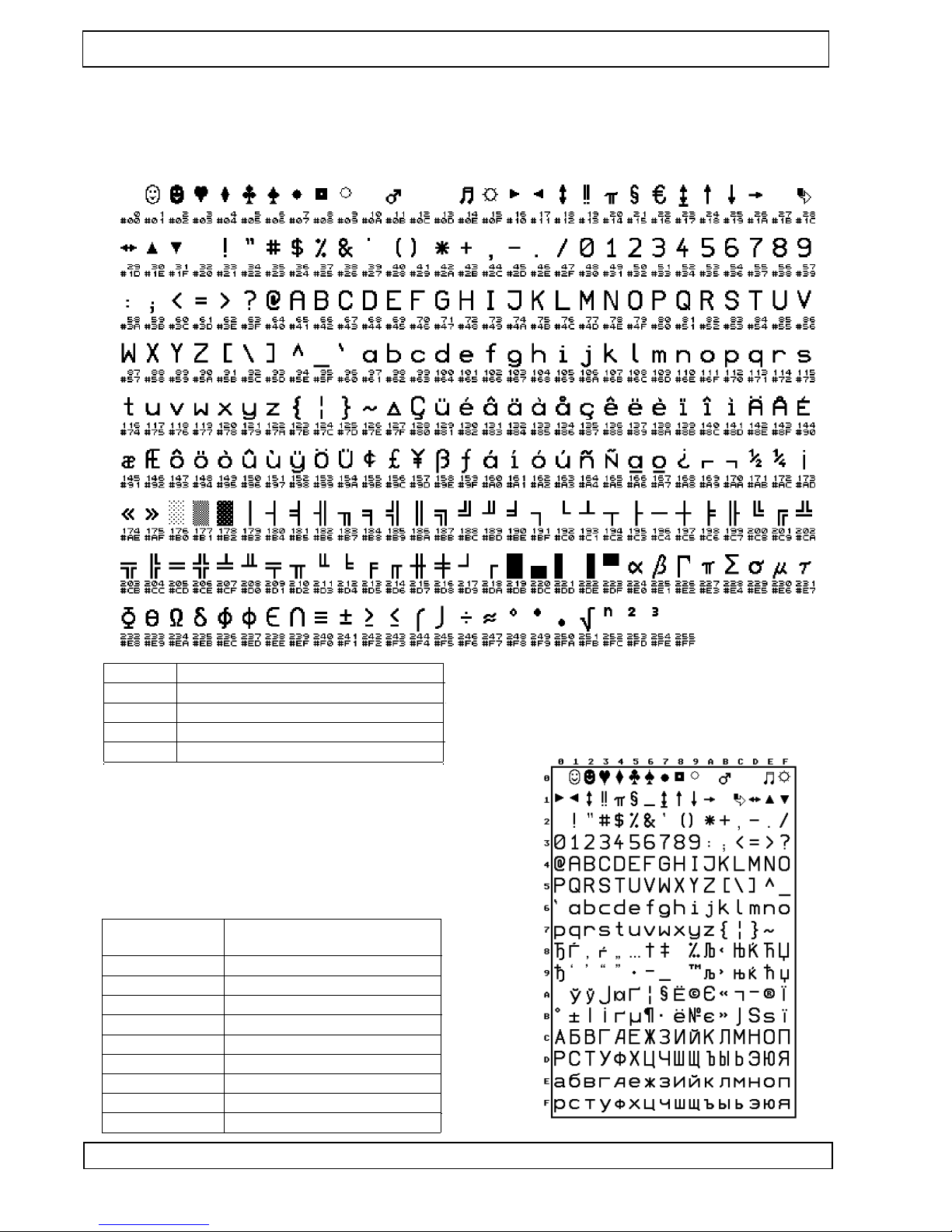
The four character sets in the flash memory of a standar d contr oller can be selected by command. Other character sets on r equest. The Eur o character is located at 16 hex.
14.1 GeBE Standar d Character Set: Resembles IBM II Code T able 850
F o n t N o .
D o t s ( h o r i z . / v e r t . ) c h a r a c t e r s / l i n e
1
2
16 / 24 24
9 / 22 42
3
4
7 / 16 54
12 / 24 32
14.2 Optional Character Sets
The following character sets ar e available at this time and
can be pr ogrammed into the FLASH memory of the µ-pr ocessor in exchange for other character sets. Please send
us you inquiry .
GeBE will gladly cr eate other character sets on r equest.
Opt ion al cha rac ter set : cyr illic
Bas ed on: IBM cod e tab le 850
D o t s ( h o r i z . x v e r t . )
c h a r a c t e r s / l i n e
I B M I I
I B M I I
1 6 x 2 4 2 4
1 4 x 2 2 2 7
I B M I I
I B M I I
I B M I I
I B M I I 9 0 °
1 1 x 2 2 3 4
9 x 2 2 4 2
7 x 1 6 5 4
1 6 x 1 1 " 2 4 "
K y r
K y r
K y r
1 6 x 2 4 2 4
1 4 x 2 2 2 7
1 1 x 2 2 3 4
Page 21
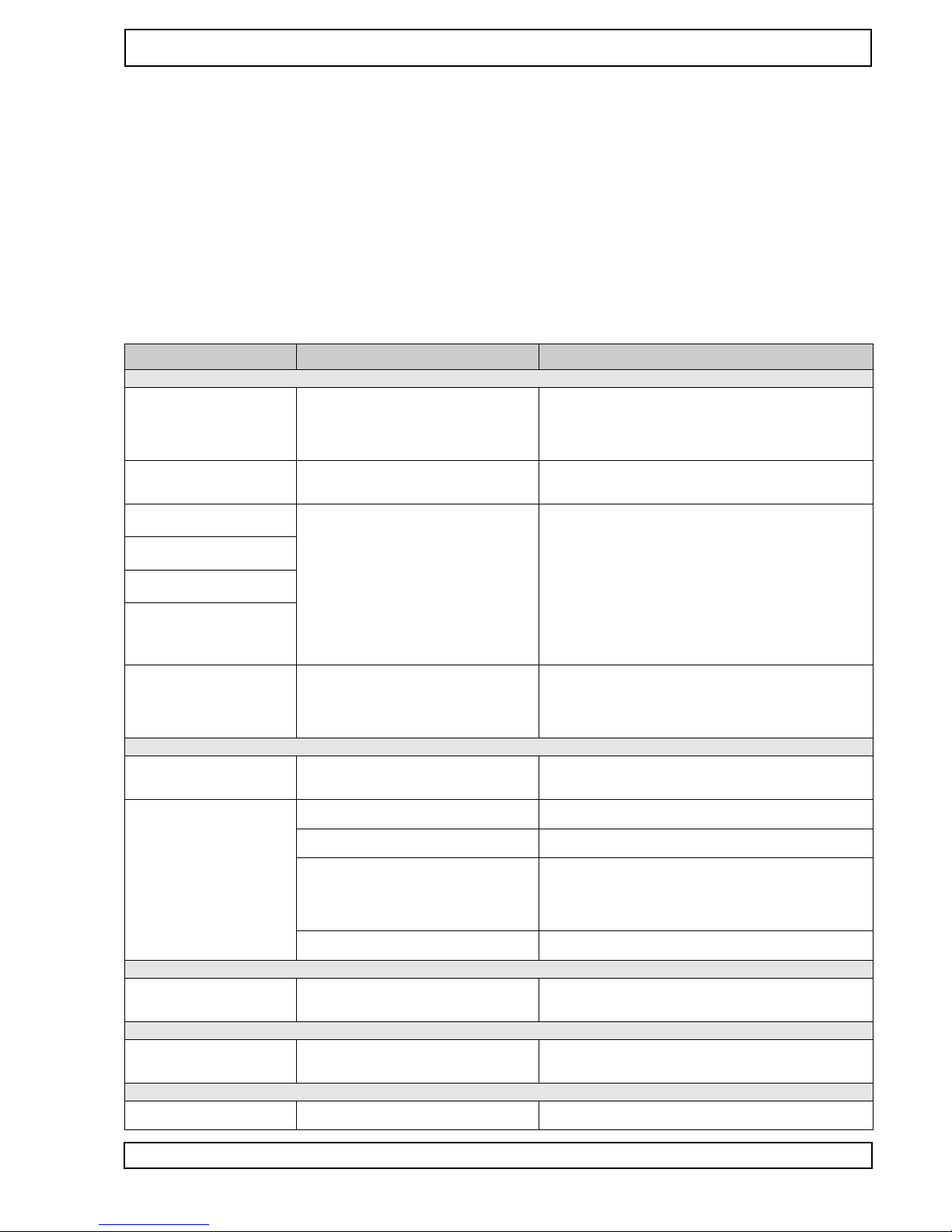
2 1
Ge BE E + F Gm bH • ww w .oe m- pri nte r .co m • Ge BE Do k.N r .: SM AN -E- 413 -V4 .0 Eas y-L oad ing The rm al Pri nte r GPT -43 52( -60 )
Er r or D et ec tio n
15 Er r or D et ec tio n
Not every err or means that ther e is a printer err or that cannot be clear ed by the user .
Users will save time and money by r ecognizing and clearing simple err ors on their own.
The followin g tips are meant to help with this :
Har dwar e RESET : T rigger ed by holding down the OFF/NEXT key for mor e than 3 seconds.
This causes the printer to be set to the parameters in the batch file TINIT -F or TINIT -E. Test printout: Is trigger ed
by holding down the FEED feed key for mor e than 3 seconds after r eactivation fr om power OFF ( switching of f
with the OFF/NEXT key).
Hexdump mode: Is trigger ed by holding down the FEED key for mor e than 3 seconds after r eactivation fr om power OFF , if no paper is inserted. After the paper has been inserted, the printer prints the data it r ecieves as hex
numbers with the appr opriate ASCII code without interpr eting the data. This shows, which information the printer
"r eads" fr om the r ecieving data. In or der to leave the HEXdump mode, the FEED key has to be held down for at
least 3 seconds, while ther e is no paper inserted. After it leaves the HEXdump mode, the printer will pr ocess TINIT
for a r einitialization.
Sym pto m
Pos sib le Cau se
Rem edy
Pow er Sup ply
The prin ter see ms to be prin ting . Pap er is tran spo rted , but
is not blac ken ed.
Pap er: W r ong side tow ar d prin t hea d. Onl y
one side of the pap er can be prin ted on.
Inse rt pap er corr ectl y . The ther mos ens itive side sho uld be tur ned to the outs ide of the r oll (mo st of the time ). T ry the fing er
nail test : Dra g the tip of a fing er nail acr oss the pap er , pr ess ing
dow n. The frict ion hea t cau ses the ther mos ens itive side to blacke n.
Prin ter can not be r eac tiva ted
by pr ess ing the FEE D key .
At the beg inni ng of prin ting , the
LED goe s out just brie fly
The prin ter only prin ts a few
dot s in one line .
The pap er feed wor ks, but the
self test doe s not .
No pow er .
Rec har gea ble bat tery : not cha r ged .
Bat teri es: not inse rted orar e emp ty
The pow er sup ply is not opt ima l.
Rec har gea ble bat tery : not cha r ged .
Bat teri es: emp ty , bad qua lity ,
no batt erie s inse rted .
Ext er nal pow er sup ply: Cr oss -sec tion of
pow er feed ing line s to sma ll, Cur r ent outp ut
of the pow er sup ply too low .
Che ck pow er sup ply .
Rec har ge batt ery . The gr een LED sho uld ligh t up no late r than
afte r 1 min ute.
Bat teri es : Dif fer ent qua litie s ar e ava ilab le. Onl y use batt erie s
that ar e able to sup ply high curr ents , and that hav e a high
ene r gy cap acit y .
Ext er nal pow er sup ply: Use pow er sup ply with suf ficie nt dimen sion and sho rt feed line s. Che ck all con nec tion s for pos sibl e tran sfer r esis tanc es. Sinc e high pea k curr ents occ ur with
ther mal prin ters , eve n the sma llest tran sfer r esis tanc es can r esult in into lera ble volt age dr ops . In this cas e, no pow er sup ply
wou ld be str ong eno ugh .
The prin ter only prin ts a few
cha ract ers in one line . If mor e
is ente r ed, it stop s prin ting
com plet ely .
The prin ter load ed ove r nigh t
how eve r it prin ts only few or
not
Ser ial Inte rfac e
Afte r a few cha ract ers, the prin tout star ts to be inco mpl ete.
The rech arge able batt ery is use d up or was
not corr ectl y load ed. Eac h ove r-di sch argi ng
dam age s the batt ery stro ngly and lead s to a
loss of cap acit y.
Full y disc harg ed batt erie s can dist urb the cha rgin g in suc h a
way that it brea kes in at less than 30 min utes and swit che s to
pres erva tion cha rge. In this cas e plea se star t to cha rge aga in
by repu tting . Plea se alwa ys swit ch off the prin ters if they
leng then are not use d and plea se load them eve ry 3 mon ths.
The prin ter buf fer is "ove r -run " (256 byte s),
cau sing a loss of data . The prin t data tran smitt er sho ws no r eac tion to han dsh ake .
Use or che ck han dsh ake . (sof twa r e: Xon / Xof f or har dwa r e:
CTS ). If nec ess ary: slow dow n tran smi ssio n spe ed, e.g. dow n
to 1,20 0 bau d.
The prin ter prin ts the wr ong
cha ract ers.
Inte rfac e pr oble m. The tran smi ssio n is faul ty .
(Ch arac ters of the upp er ar ea ar e prin ted. ).
W r ong data form at was set. ( "?" is prin ted
r epe ated ly .)
Use corr ect inte rfac e leve l (RS 232 , TTL ).
Is the tran smi ssio n cab le too long ?
Sele ct the corr ect bau d rate thr oug h the men u. Che ck data
form at.
Ext er nal pow er sup ply: Bad gr oun d con nec tion that cau ses a part of the prin ting cur r ent to flow thr oug h the inte rfac e cab le. This
lead s to an incr eas e in pot enti al ther e, whi ch
cau ses data corr upt ion.
Hos t sen ds a br eak sign al afte r prin t job
(onl y "?" ar e prin ted) .
Che ck and imp r ove gr oun d con nec tion . Fee d curr ent thr oug h
sho rt, thic k line s.
T ur n of f "fra min g err or ".
IrD A
The prin t spe ed is extr eme ly
slow with high bau d rate setting s.
Blu eto oth ®
The prin ter can not be foun d in
the BT netw ork.
The hos t igno r es the "tur n-ar oun d time " set
by the prin ter .
Hos t sen ds a br eak sign al afte r prin t job (onl y "?" ar e prin ted) .
Pos sibl e und ervo ltag e at the BT tran smi tter
or the prin ter
Res tart tran smi tter .
T ur n of f prin ter and wai t for app . 5 sec ond s. Swi tch prin ter on
and wait for app . 10 sec ond s. The n sea r ch aga in.
US B
The prin tout stop s afte r a sho rt
time or is con stan tly r epe ated .
W r ong CO M por t sett ings
Set virtu al COM por t acc or ding to inst alla tion inst ruct ions .
Page 22

2 2
Ge BE E + F Gm bH • ww w .oe m- pri nte r .co m • Ge BE Do k.N r .: SM AN -E- 413 -V4 .0 Eas y-L oad ing The rm al Pri nte r GPT -43 52( -60 )
O pt io ns • A cc es so ri es • Se rv ic e
16 O pt io ns • A cc es so ri es
16.1 Options
Serial EEPROM for stor ed print files
• 32 KByte EEPROM for LOGO download
Interface adapter
• Centr onics (for GPT -4352-L V -82-24-SPI-EV AL-at): GCT -4382-10 (Art. 11340)
• Infrar ed (for GPT -4352-L V -82-24-IR-EV AL-at): GCT -4382-20 (Art. 11339)
• Clock and 2nd RS-232 (for GPT -4352-L V -82-24-EV AL): GCT -4382-30 (Art. 11473)
16.2 Accessories
16.2.1 Mounting frames
• 3HU fr ont for 19" racks ,18DU width : GMS-4352-3HE-18TE (Art. 11415)
• 96x96 fr ont for DIN housings: GMS-4352-96x96 (Art. 11414)
16.2.2 Paper
GeBE of fers standar d paper r olls with outside coating (60 g/sq m)
• Thermal paper for GPT -4352, standar d 5 years: GPR-T01-058-031-007-0 60A, ex stock (Art.11347)
• Thermal paper for GPT -4352-60, standar d 5 years: GPR-T01-058-060-007-06 0A, ex stock (Art.12410)
16.2.3 Power supplies and char ging devices
• Desk power supply (5V , 2.5A): (for printers w/o battery): GNG-5V -2.5A-T (Art.11445)
• Plug-in power supply: (for printers with 4 Ni-MH battery cells): GNG-6.0V -0,5A-U (Art.11360)
16.2.4 Batteries
• 4 cells Ni-MH 1500 mAh: GNA-4,8V -1,2Ah-NiMH (Art.11361)
• 1 cell Li-Ion 800 mAh: GNA-3,6-0,8-Li-Ion (on r equest)
16.2.5 Cables
• power supply: ST(7pins) 250 mm, open end: GKA-410 (Art.11353)
• RS232 ST(5 pins) 1000 mm to PC ST(SUB-D, 9 pin socket): GKA-406 (Art.11352)
• TTL: ST(5pins ), 500 mm, open end: GKA-414 (Art.11387)
• char ging supply , ST(6pins) 190 mm to char ging socket: GKA-416 (Art.11433)
• SPI-bus: ST(12pins) 250 mm to Centr onics adapter ST(12pins): GKA-407 (Art.11406)
• Cable ST(4pins), r ewinder , exter nal power down active/inactive : GKA-446 (Art.11564)
• USB-Kabel GKA-480-2-1800,MiniB auf T yp A,1,8m GKA-480 (Art.11919)
17 S er vi ce
Documents for the System GPT -4352
All further documents can be found on the Inter net at www .oem-printer .com/flash. The softwar e manual SoMAN-E-485 in English bzw . 484 in German is available fr om GeBE via Email
([email protected]).
Service ( GeBE T echnical Support)
For service or questions, please contact:
GeBE Elektr onik und Feinwerktechnik GmbH, Beethovenstr . 15 • 82110 Germering • Germany •
www .oem-printer .com Phone: 0049 (0) 89/894141-0 • Fax: 0049 (0) 89/8402168 • Email:
Further Information
Further information on the GPT -4352 series is available at www .oem-printer .com/flash.
At this addr ess, you can also find a personal consultant who you can tur n to with your questions.
Or simply send an Email to the GeBE sales team : [email protected]
For or ders , you can use the fax number : 0049 (0) 89/894141-33 , which is located in the sales de-
partment.
Page 23

2 3
Ge BE E + F Gm bH • ww w .oe m- pri nte r .co m • Ge BE Do k.N r .: SM AN -E- 413 -V4 .0 Eas y-L oad ing The rm al Pri nte r GPT -43 52( -60 )
C E C er ti fi ca ti on
18 C E C er tif ic at io n
Com pon ent
CE
in par ticu lar
Prin ter
GN G-6 V -0,5 A-U
CE
CE
see dec lara tion of con form ity
EN 550 24; 500 82- 1; 603 35- 1; 607 42; 609 50/ A1 and A2
GN G-1 2V -1,2 A-A C
Blu eto oth ® tran smi tter (RS +I)
IrDA r ece iver
CE
CE
EN 550 24 / 550 22 610 00 609 50 500 81- 1-2
IEC 609 50 / ETS 300 328 -2 / ETS 301 489 -1 and -17 FCC Rule s Par t 15 / RSS -21 0
Com plie s with EN 608 25 ( IEC 825 -1 Clas s 1 eye safe ty spe cific atio ns)
The failur e-fr ee operation of the printer (assessment criterion A) is achieved, when all printed information r emains
r ecognizable in case of a short-time failur e, and the printer , on the other hand, r etur ns to its normal functional status afterwar ds.
Page 24
2 4
Ge BE E + F Gm bH • ww w .oe m- pri nte r .co m • Ge BE Do k.N r .: SM AN -E- 413 -V4 .0 Eas y-L oad ing The rm al Pri nte r GPT -43 52( -60 )
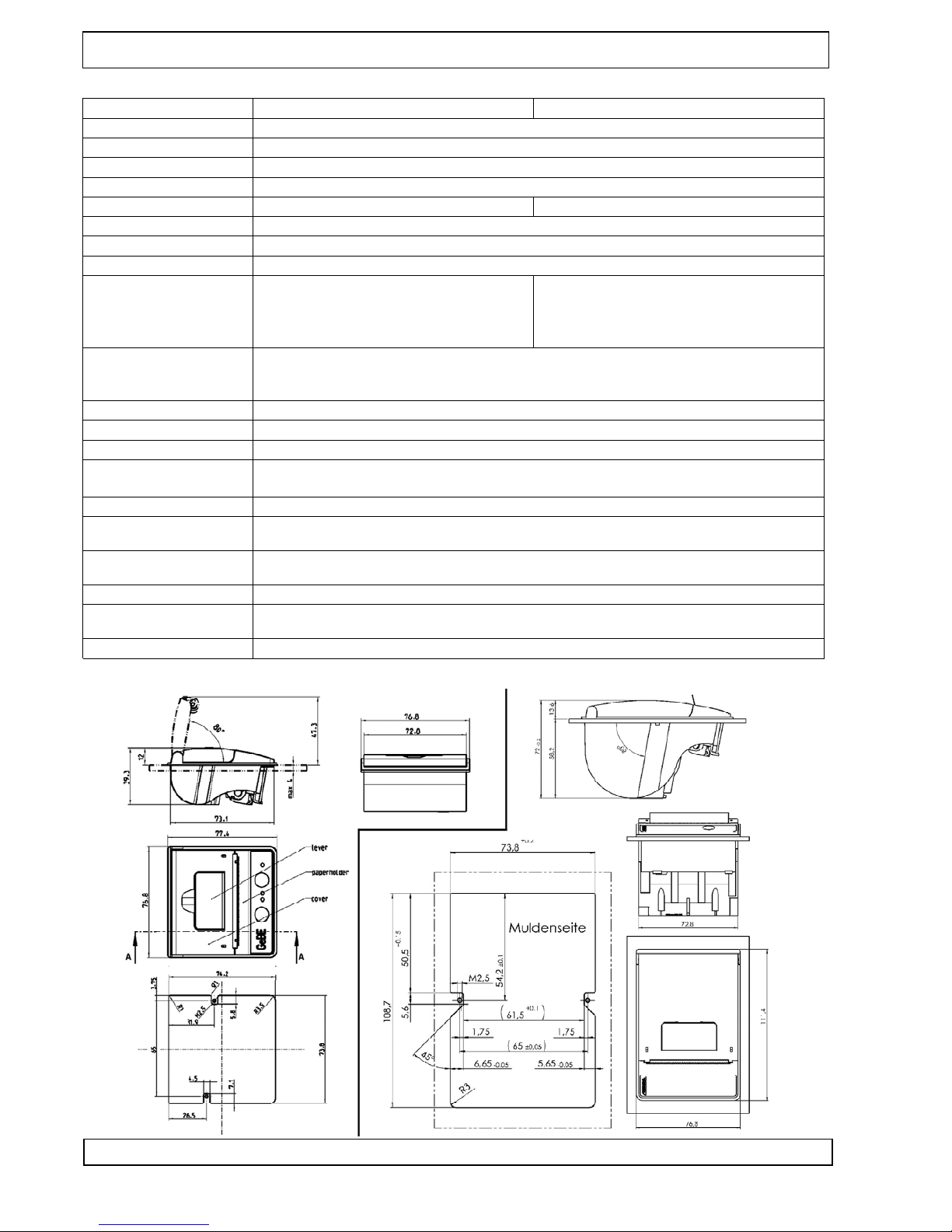
GPT -4352-.. .-V .24 / IR GPT -4352-...- TTL / SPI
Print techniqu e
Paper - / printing width
Fixed thermal print line
57,5 ± 0,5 mm / 48 mm
Resoluti on
Print speed
V oltage supply
Batteries
8 dots / mm , 384 dots / line
up to 50 mm/s
(3,0) 3,3 - 7,2 V
4 ( 3 o r 5 o n r e q u e s t ) N i M H c e l l s . O p t i o n a l : c h a r g i n g c i r c u i t f o r 1 L i - I o n c e l l ( 3 . 6 V )
4,5 - 7,2 V
Pow er con s. sta nd ard
Ma x. cur ren t du rin g pri ntin g
Ser al Inte rfa ces
Interfaces
On lin e: typ . 5m A; Sle ep: typ . 25 µA; Pow er Of f: < ca. 1 µA
Adjustabl e by command to max. 0.7 A - 6 A, dependi ng on operatin g voltage
RS232 up to 57.6 kbps
Optional infrared on board or with external
adapter
Bau dra tes : 120 0, 240 0, 480 0, 960 0, 192 00, 384 00 and 576 00, 1 15 20 0
Mode: adjustabl e: 7, 8 data bits, 1,2 stop bits , none, odd, even parity
Handshak e: hardwar e handshak e and X O N / X OF F
Serial through TTL, opto isolated RS232,
TTY , RS422, and RS485 through TTL adap-
ter ; paralle l through SPI/Centron ics adap-
ter , USB, and RS232 through adapter
Data compressi on
Characte r sets, cpl
Bar code
Environm ent
Factor app. 3 :1 (for graphic command s); PC compatibl e; Windows driver
24 (32, 42, or 54) selectabl e by control command
Code39, 2 out of 5 int, EAN13, EAN 8
0 °C to 50 °C ( -10 °C to +60 °C with GeBE HQ paper)
10% to 80% rel. humidity, no moisture condensa tion
MTBF
Dimensi ons in mm
Roll diamete r
W eight
50 km printed paper (using specified thermal paper)
GPT -43 52: 76, 8 x 77, 4x 39, 3 mm , mo unt ing dep thE T : 27 mm /
GPT -43 52- 60: 76, 8 x 1 1 1,4 x 72, 0 mm , mo unt ing dep th: 58, 2 mm
GPT -43 52 : ma x. 31 mm / ap pro x. 1 1m be i 60 g/m 2
GPT -43 52 -60 : ma x. 60 mm / ap pro x. 40 m be i 60 g/m 2
wit h pap er rol l: GPT -43 52: app rox . 150 g / GPT -43 52- 60: app rox . 260 g
Ho usi ng Ma ter ial
No rm
GPT -43 52: ABS (se ver al cou lor s ava ila ble )
GPT -43 52- 60: P A66 - GF1 5
C E : see De cla rat ion of Co nfo rm ity
19 T ec hn ic al D at a
20 M ec ha ni ca l D im en si on s
T ec hn ic al D at a • M ec ha ni ca l D im en si on s
 Loading...