

Page 1

.
WiMAX SmartMeter by GE
WiMAX SmartMeter by GE
WX-I210+c
Basic Manual
Page 2

WiMAX SmartMeter by GE
Contents
1. Product Description .............................................................................................................................. 1
2. Installation Instructions ........................................................................................................................ 2
3. Labels and Display Information ........................................................................................................... 3
3.1 Nameplat e Information and Labels .................................................................................................. 3
3.2 Liquid Crystal Display I nform ation.................................................................................................... 4
3.2.1 Display Examples ........................................................................................................................ 5
4. Service and Rep air ................................................................................................................................ 7
4.1 Service ............................................................................................................................................ 7
4.2 Repair.............................................................................................................................................. 7
4.3 Returning a Met er ............................................................................................................................ 7
Page 3
1. Product Description
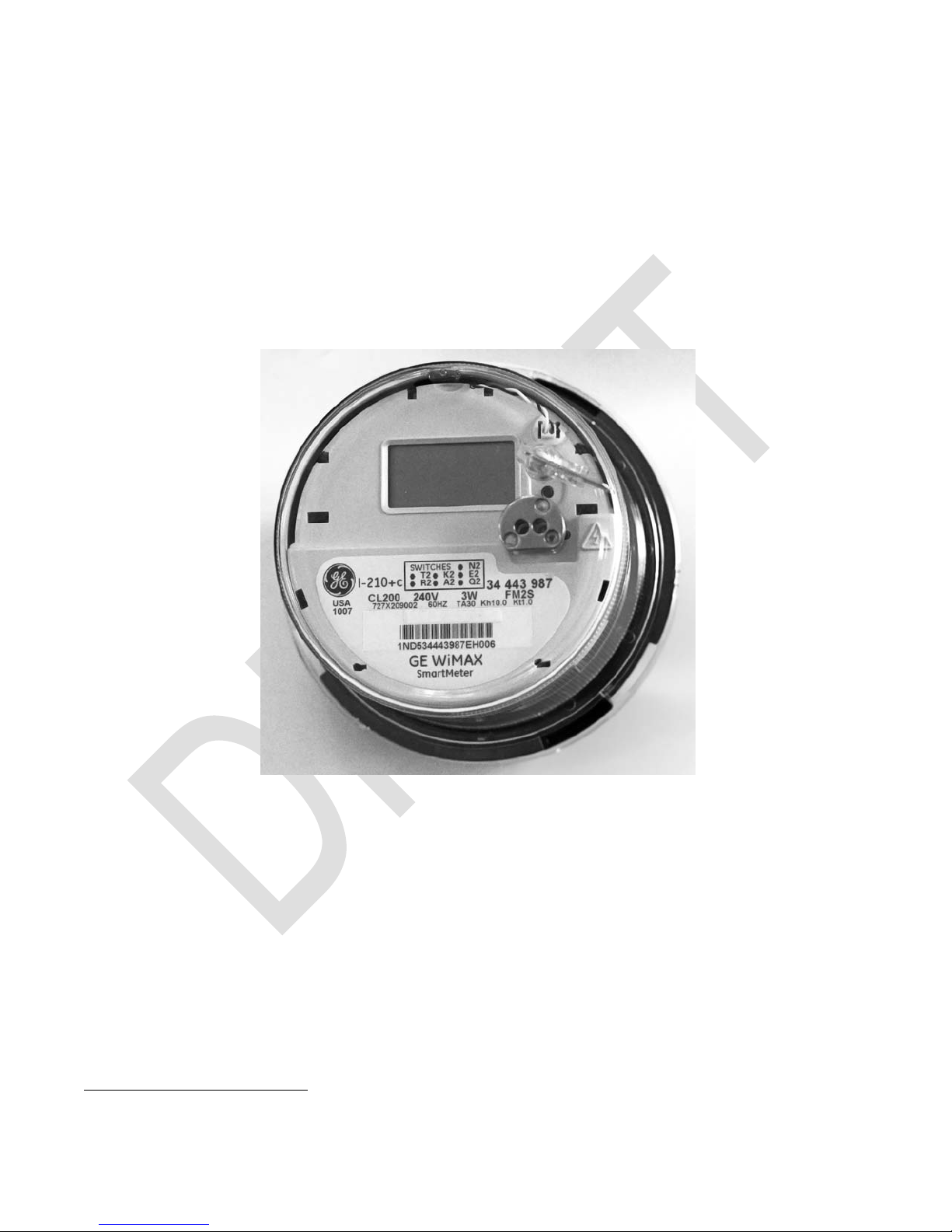
The WiMAX SmartMeter by GE (WX-I210+c) is an electronic, single-phase electricity meter
intended for residential metering and demand response applications. The meter can be
operated in demand / load profile (DMD / LP), or time-of-use / load profile (TOU / LP) mode,
thereby providing support for a broad range of advanced metering and demand response
requirements.
The WX-I210+c is a new class of meter that contains an integrated WiMAX
router, which provides open standards-based communications network interfaces for both
remote meter communications and meter-to-home area network (HAN) communications over
premise electric wiring.
1
/ HomePlug2
Figure 1-1: WX-I210+c: WiMAX SmartMeter by GE
The WX-I210+c incorporates a wide range of additional advanced metering features including: an
extended range of software-configurable metrology capabilities (soft-switches); accurate timekeeping
via a harmonic clock with an oscillating crystal and battery backup power source, to accurately
maintain time during power outage conditions; enhanced energy, demand, and time-of-use billing
measures; load profile recording; self-read capability; demand reset support; test mode; real-time
pricing functionality; demand response and load limiting functionality with the presence of optional
relay switch; authorized local connect / disconnect switch control; and rolling status and rolling billing
period functions.
1
IEEE 802.16.e Air Interface for Fixed and Mobile Broadband W i r eless Access Systems (WiMAX)
2
HomePlug Powerline Alliance, HomePlug version 1. 0
W iMAX SmartMeter Manual • 1
Page 4

WiMAX SmartMeter by GE
2. Installation Instructions
To install the meter, make sure that the following installation steps are performed:
1. Take the last meter read on the existing meter.
2. Remove existing meter’s tamper indication seal.
3. Remove existing meter from socket.
4. Replace new meter into socket.
5. Install new tamper indication seal.
6. Re-energize the circuits to the meter.
Page 5
3. Labels and Display Information
3.1 Nameplate Information and Labels
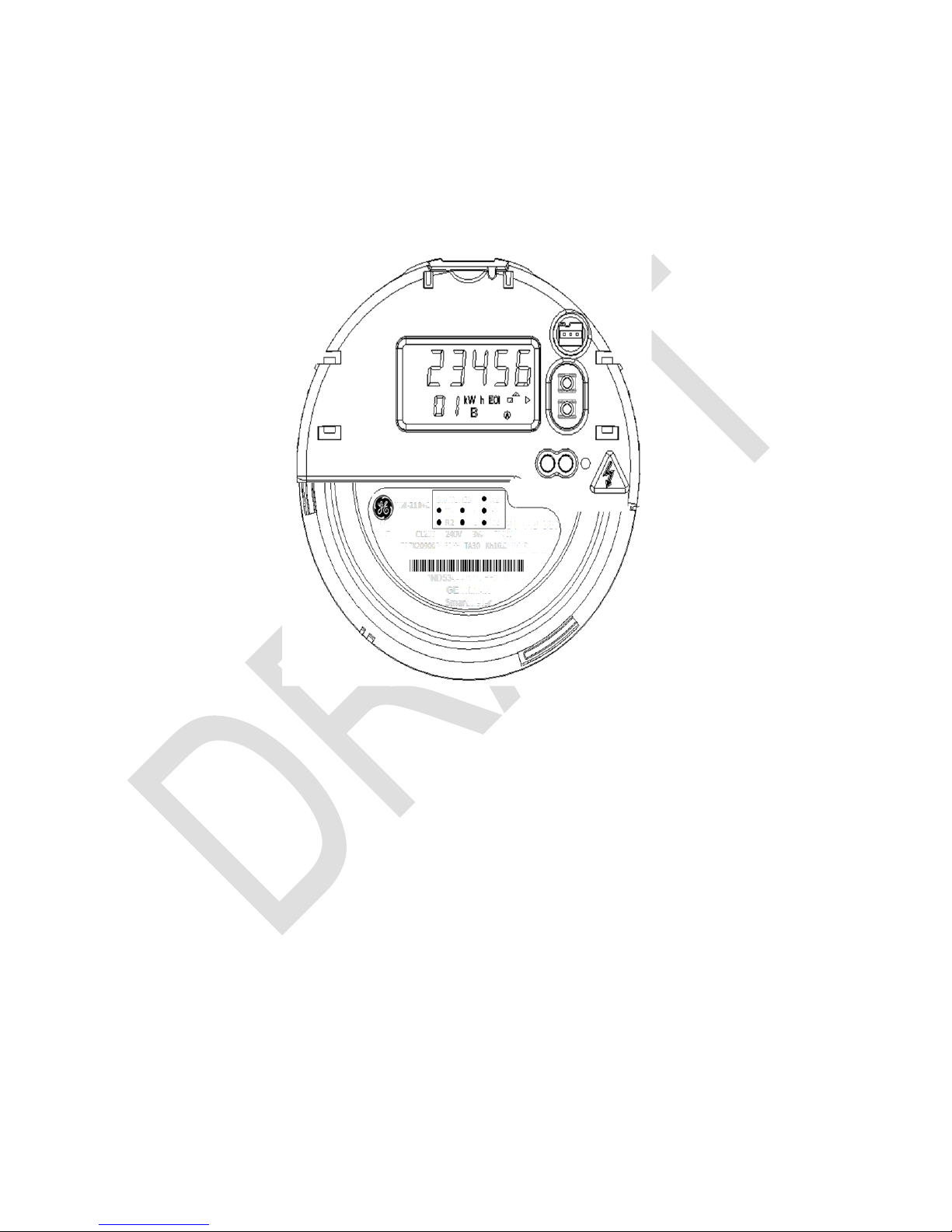
See Figure 3-1 for a graphic representation of the meter nameplate. The meter nameplate is
found on the front of the meter.
WiMAX SmartMeter by GE
Figure 3-1 Meter Nameplate
The nameplate provides the following information
• Meter type
• Utility information and bar code area
• Meter serial number
• Operating frequency
• Test ampere value
• Watt-hour and test constants
• Current and voltage rating
• Wiring configuration, ANSI form factor
• Available softswitches
_____________________________________________________________________________
W iMAX SmartMeter Manual • 3
Page 6
WiMAX SmartMeter by GE
3.2 Liquid Crystal Display Information
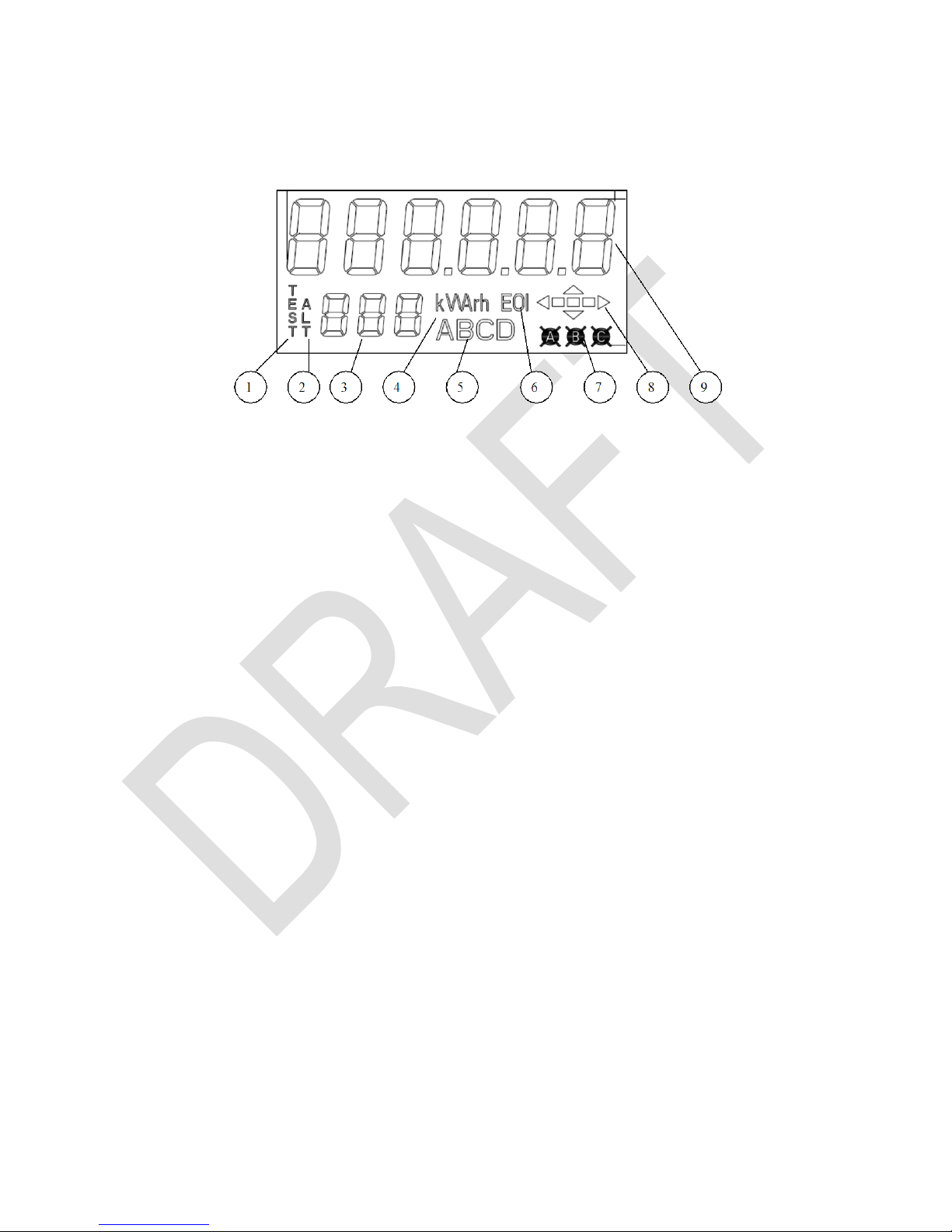
The liquid crystal display (LCD) is shown. The numbered list coincides with the numbers in
Figure 3-2.
Figure 3-2: Liquid Crystal Display Information
1. The “TEST” annunciator indicates the meter is in Test mode.
2. The “ALT” annunciator indicates the meter is in Alternate Display mode.
3. The three small digits are used to display the current display label or code. “CA” or
“Er” appearing in this location indicates a Caution or Error message in the display.
4. These letters are used to display the units of measure for the quantity currently
being displayed. For example, energy displays will have a “kWh” annunciator and
Apparent Power will have a “kVA” annunciator.
5. The letters A through D indicate the time-of-use (TOU) rate that is in effect. Only
one letter at a time is displayed when the meter is operating in TOU Mode. If no
letters are lit, the meter is in a non-TOU rate.
6. This display indicates an end-of-interval (EOI) condition.
7. When displayed, the “A” annunciator indicates the A voltage is present at the
meter. If this annunciator is blinking, phase-A volt age is low.
The “B” annunciator will only be displayed during an all-segments display.
When displayed, the “C” annunciator indicates the C voltage is present at the
meter. If this annunciator is blinking, C voltage is low. (Network meters only)
8. The left-right arrows indicate watt hour direction of energy flow. The right arrow will
be lit if the energy is delivered; the left arrow will be lit if the energy is received.
The up-down arrows indicate VArh direction of quadergy flow. The up arrow will be
lit if the quadergy is lagging; the down arrow will be lit if the quadergy is leading.
The meter’s magnitude indicator consists of three segments, used to simulate the
rotation of the disk on an electromechanical meter. Each state change represents
Page 7
WiMAX SmartMeter by GE
Kt. One complete “revolution” represents ten state changes, which represent Kh
watt-hours or var-hours. The meter illuminates the segments as follows:
State
0
1
2
3
4
5
6
7
8
9
0
…
If the Wh direction is delivered (or the VArh direction is lagging), the states change
in increasing order with respect to the above illustration. If the Wh direction is
received (or the VArh direction is leading), the states change in decreasing order.
Note: If the calculated phasor VAh is below the programmed creep threshold, the
meter will turn off the Wh and VArh direction arrows.
9. These characters display the programmed metering quantities. There are three
possible decimal point positions located between the four rightmost digits.
3.2.1 Display Examples
The following figures show examples of W iMAX SmartMeter displays.
3.2.1.1 kWh Display
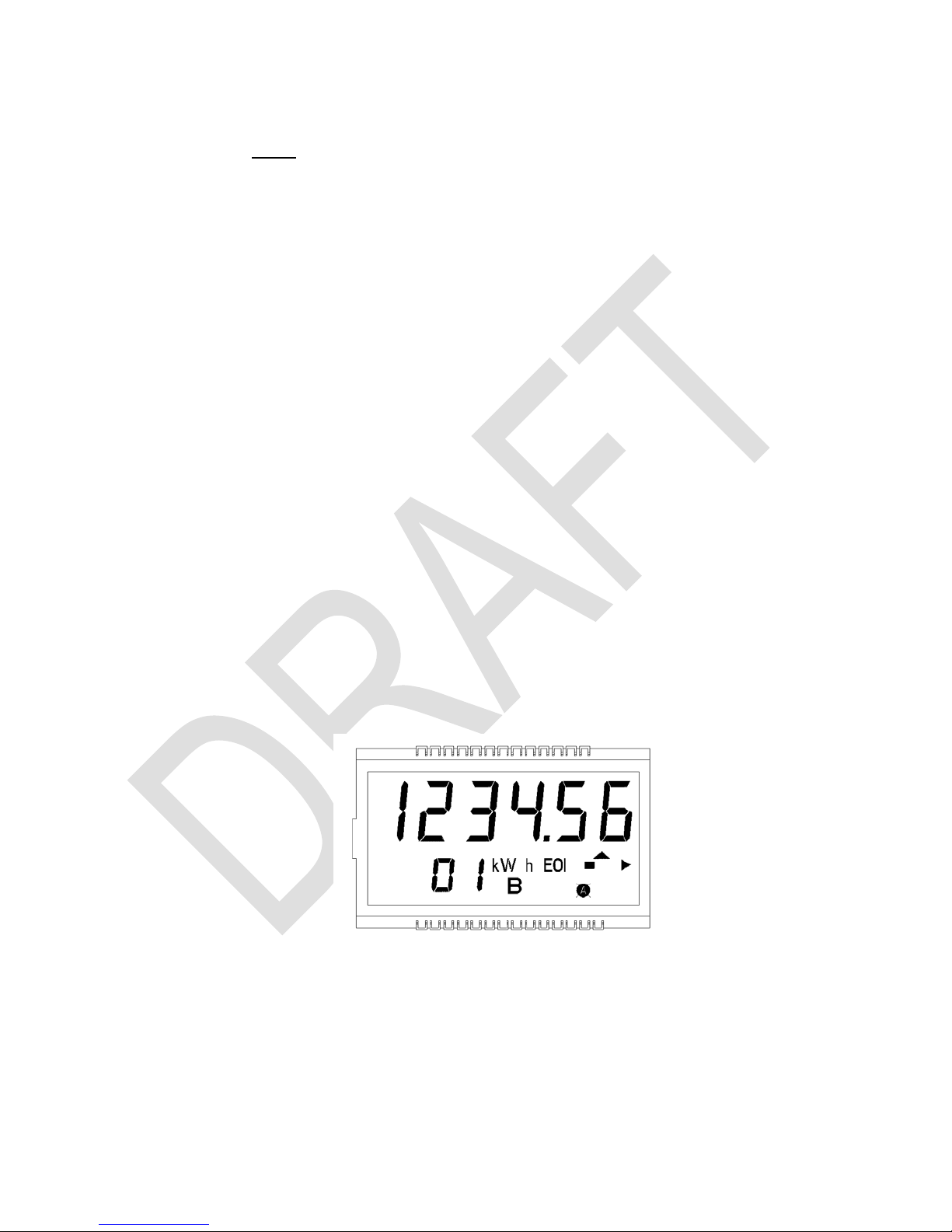
Figure 3-3 shows the following conditions:
1. The Display Label is “01”.
2. Six-digit display of energy (kWh).
3. Phase A present and voltage exceeds the low voltage threshold.
4. End-of-demand-interval indication. This indicator is lit at the end of each demand
subinterval.
Figure 3-3: kWh Disp lay
_____________________________________________________________________________
W iMAX SmartMeter Manual • 5
Page 8
WiMAX SmartMeter by GE
5. Displayed quantity is measured in kilowatt-hours.
6. Energy is being delivered to the load.
7. The one block indicates State 0 of the magnitude indicator.
8. Quadergy (kVArh) is lagging.
9. TOU rate B is in effect.
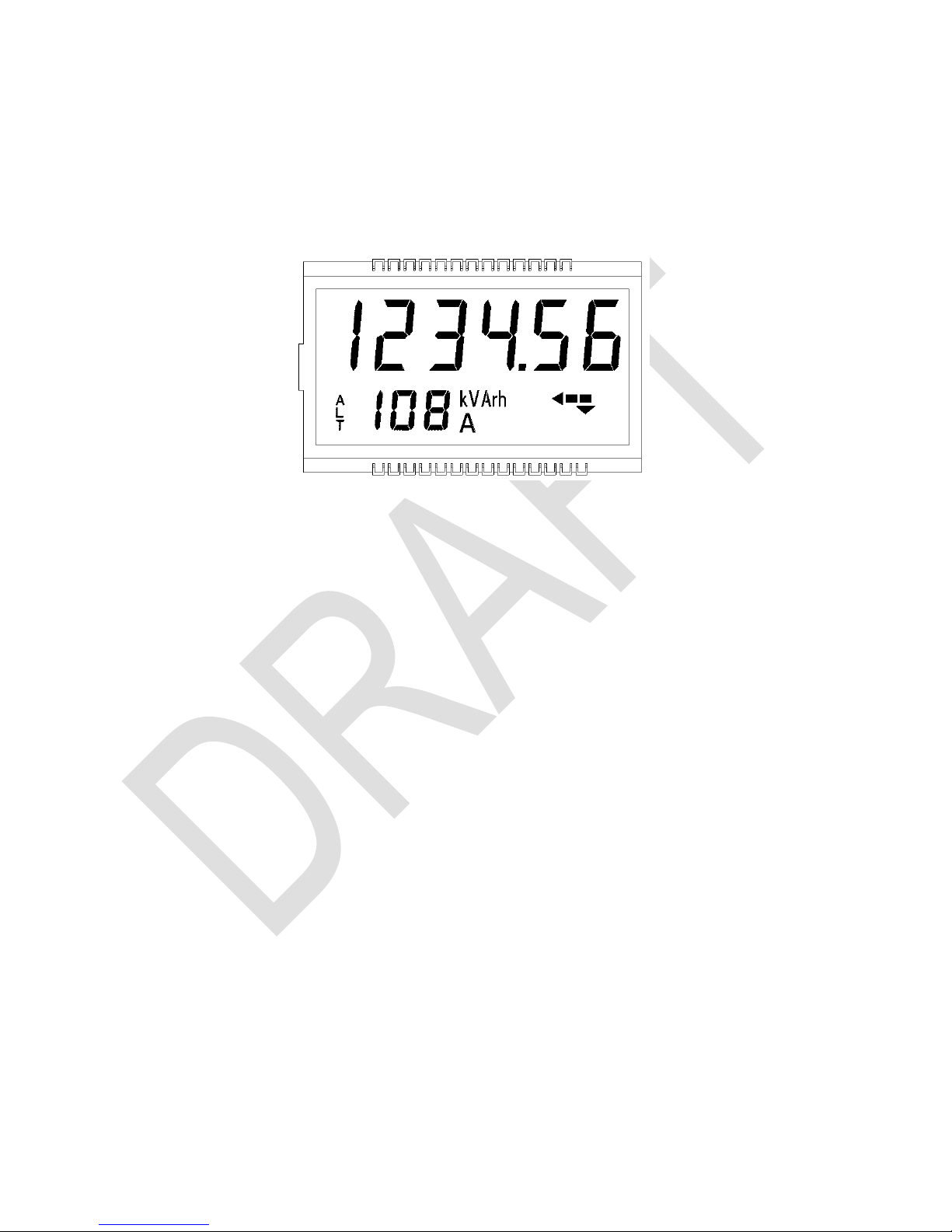
3.2.1.2 Alternate Display Mode
Figure 3-4: Alternate Display
Figure 3-4 shows the following conditions:
1. Meter is in Alternate Display mode.
2. Display label “108” is displayed.
3. Phase A and C voltages are present.
4. Six-digit display of quadergy kVArh.
5. Displayed quantity is measured in kVArh.
6. Meter is displaying previous season data.
7. The two blocks indicate State 1 of the magnitude indicator.
8. Quadergy (kVArh) is leading.
9. Energy is being received from the load.
10. TOU rate A is in effect.
Page 9

4. Service and Repair
4.1 Service
The WX-I210+c meter is factory-calibrated and requires no routine or scheduled service by the
user.
4.2 Repair
Factory repair or replacement service is offered when you cannot fix a problem. Because of the
high density and integrated design, the repair of on-board components is not recommended.
Instead, return the whole meter to General Electric as described in the following paragraph.
4.3 Returning a Meter
If you wish to return a meter, call your General Electric sales representative for a Returned
Material Authorization (RMA). The entire meter should be returned with the GE-supplied
Returned Material Authorization information form completed. Key information includes quantity,
catalog number, serial number(s) and a complete description of the problem. Your General
Electric sales representative will provide return instructions.
WiMAX SmartMeter by GE
_____________________________________________________________________________
W iMAX SmartMeter Manual • 7
 Loading...