

Page 1
The World Leader
In Data Elimination
Before operating, please read the Operating Instructions!
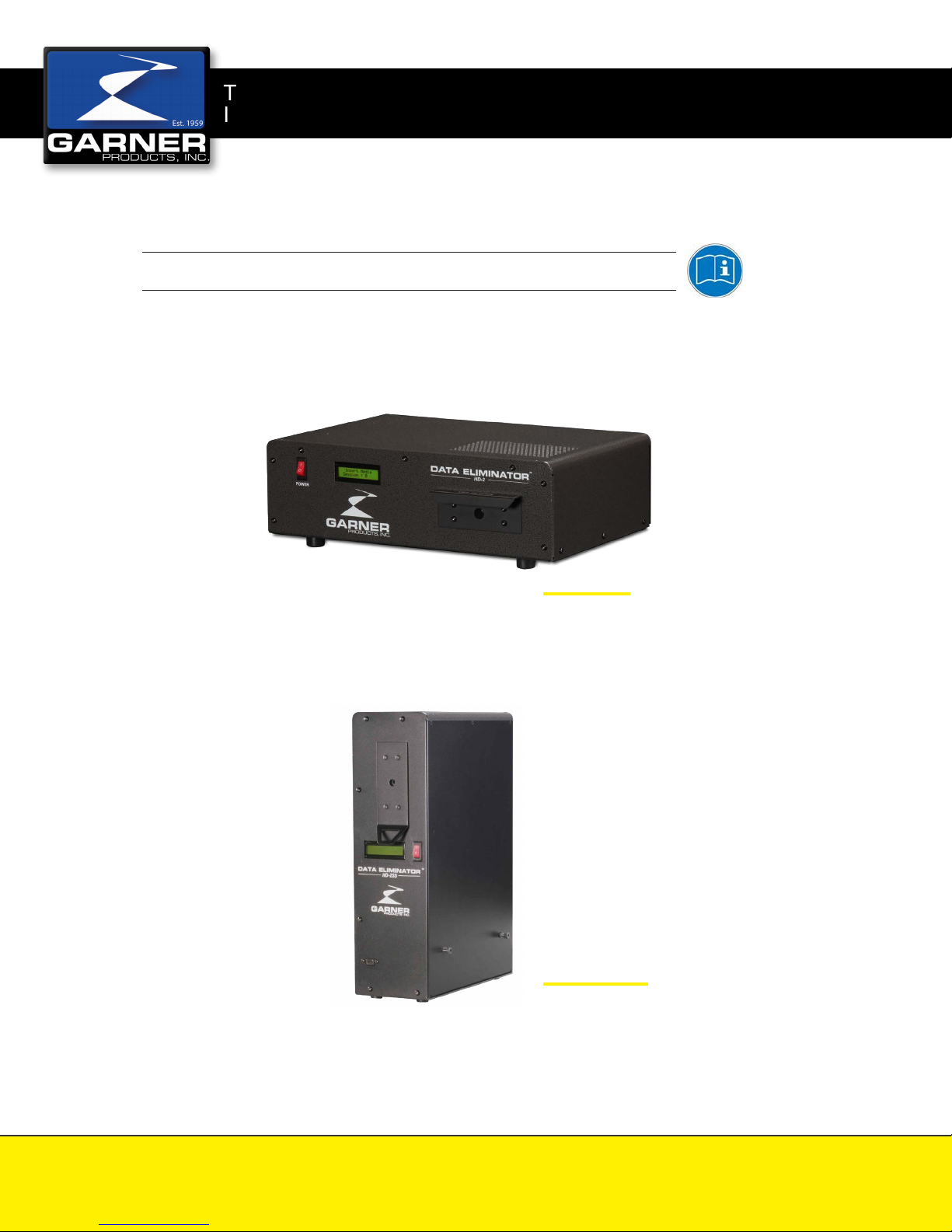
HD-2™ SERIES
Operation Manual
HD-2X
with Data Port
HD-2SS
SpaceSaver HD-2
GarnerProducts.com
Tel: 916-784-0200 Fax: 916-784-1425
10620 Industrial Avenue, Suite 100, Roseville, CA 95678
1-800-624-1903
4075-289 REV 10 HD-2 OPERATION MANUAL
2017-09-21
Page 2
HD-2 SERIES Operation Manual
IMPORTANT SAFETY NOTES
No operator-serviceable parts inside
unit. Maintenance to be done only by
trained personnel.
High Voltage exists inside unit even
when equipment is not under power.
All trouble shooting and wiring checks
must be performed by a qualified
electrician or authorized plant
personnel.
A non-shielded power cord may
be used to connect AC power to
the system. Use only power cords
approved by Garner Products
For continued protection against risk
of fire, replace fuses with fuses of
same types and ratings only.
Do not cover chassis ventilation slots
or block enclosure openings.
Check input voltage selection; if
not compatible with wall voltage,
have technician qualified by Garner
Products modify wiring inside this
system before connecting system
plug to wall voltage.
Unplug power cord from the wall to
disconnect power to the system.
Disconnect main power and unplug
unit from the wall before installing
or removing device or servicing
equipment.
PACE MAKER USERS
Due to stray magnetic fields, consult your physician before operating.
CONTROLS AND INDICATORS
POWER Button (RED): The power button switches the power on and off.
Media Drawer: The media drawer holds the media to be degaussed and activates and
LCD display: The LCD display gives status, automatic count, total count, software version, field
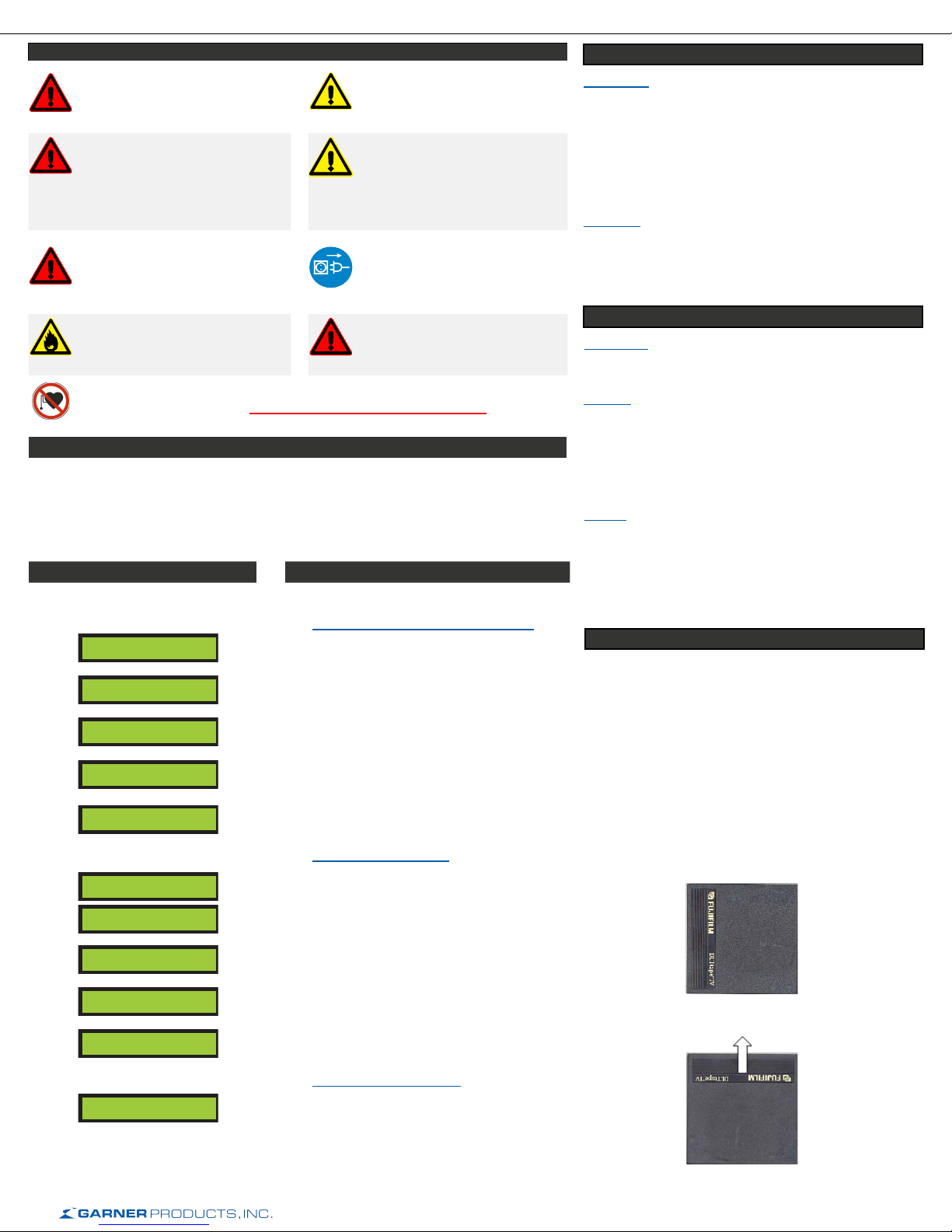
LCD DISPLAY DEGAUSSING INSTRUCTIONS
The following information appears on
the LCD Display from power-up through
one automatic degaussing cycle:
deactivates the degaussing cycle when in the closed and open positions.
strength, user instructions and fault messages.
Automatic Degaussing
Step 1: Press POWER button ON
GARNER
PRODUCTS, INC.
HD-2
DATA ELIMINATOR
FIRMWARE VER
##
TOTAL
# −− ##
Insert Media
Session = 0
Displays Manufacturer.
Displays Degausser Model.
Displays current firmware version.
Displays total erasing cycles. Number on left
indicates number of times the counter reached
50,000.
Ready for media to be placed in the Media
Drawer. Counter for erase cycles from power up.
INITIATION
Introduction
The degausser model Garner HD-2X and HD-2SS
are continuous duty capacitive discharge degaussers.
The unit is designed to erase hard drives and tape
cartridges that fit inside the drawer. The convenient
media loading design accommodates many different
types and sizes of media, without the need for
adapters.
Inspection
Inspect the degausser for shipping damage as soon as
it is unpacked. If the degausser or any accessories are
damaged or fail to operate correctly, notify carrier and
contact your dealer immediately
INSTALLATION
Power Plug
Plug the IEC connector attached to the supplied power
cord into the receptacle on the back of the unit.
Location
The degausser must be placed on a flat, hard
surface. Keep at least a 15 cm (6 inch) distance from
any object that may interfere with the coo ling fan
exhaust located on the backside of the degausser.
As a general rule, media not inten ding to be erased
should be kept about 60 cm (2 ft) away.
Cooling
Forced air-cooling is used to maintain safe ope rating
temperatures within the degausser. The air intake is
located on the back panel and the exhaust is through the
holes in the top panel. To ensure proper cooling, do not
block the air-intake and maintain at least a 15 cm (6 in.)
distance from the back of the degausser to any obstacle.
DEGAUSSING INSTRUCTIONS FOR DLT MEDIA
Remove the plastic protective cases.
Although the data is completely degaussed in one operation,
a second pass rotated at 90 degrees is required to smooth
out any magnetic fluctuation.
Note: For DLT media that is to be re-used, a second pass
is needed. If the second pass is not completed, the tape
drive may eject the tape and indicate the tape needs
cleaning. A second pass at 90 degrees will correct this
condition. If you have any questions, please contact your
dealer.
Step 2: Insert media
Drawer Open
Erase Cycle
Initiated
Charging
>>>>>>>>>>>>>>>>
--------------===|==
Data Eliminated
Lift drawer up and slide drawer out until it stops.
Display indicates media drawer is open.
Closing the drawer automatically starts the
degauss cycle.
Displays capacitor charging status.
Visual indicator of erasing field strength.
Indicates power and erasing field strength was
verified good and data has been eliminated.
Step 3: Remove Media
Remove Media
Session = 0
Erase cycle has completed. Open drawer and
remove media.
First Pass
Second Pass
2 of 6
Page 3
LCD DISPLAY ERROR CODES
Charge Error:
The LCD screen displays “Charge Error”. This error indicates that the
degausser failed to charge to the determined power level necessary to
successfully erase the media in the degaussing chamber.
Action:
Turn off the degausser for one minute and restart. (Turning off the power
to the degausser will clear the error.) If the error repeats, have the power
mains checked and also check the degausser to make sure the power
setting is set to match the power mains. If error persists, call customer
support.
Gauss Error:
The LCD displays “Gauss Error”. This error indicates the erasing field may
not have been adequate to effectively erase the media in the degaussing
chamber.
Action:
Turn off the degausser for approximately one minute. Turning off the power
to the HD-2X and HD-2SS will clear the error. Turn the degausser back on.
To initiate the degauss cycle with media already in the media drawer, open
the media drawer and close it. The media in the degaussing chamber will be
erased if the field is sufficient otherwise the “Gauss Error” will persist on the
LCD screen. If error persists, call customer support.
HD-2 SERIES Operation Manual
Drawer Open Error:
The LCD displays “Drawer Open”. This error indicates that the Media
Drawer is not completely closed. The degausser continuously checks to
see if the Media Drawer is closed. If the drawer is not closed, the “Drawer
Open” will persist on the LCD. Once the drawer is closed, the degausser will
automatically continue the erase function.
Action:
Check to see that drawer is seated in detent.
Overheat Error:
LCD displays “Overheat”. This error indicates the internal temperature has
risen to a level that may be harmful to the degausser.
Action:
When the degausser indicates an overheat error, it will inhibit any further
operation until the degausser returns to an acceptable temperature. Leave
the degausser powered on as the chassis fan will help reduce the heat
inside the degausser. When the temperature is low enough, the degausser
will return to normal operation. If this error persists, call customer support.
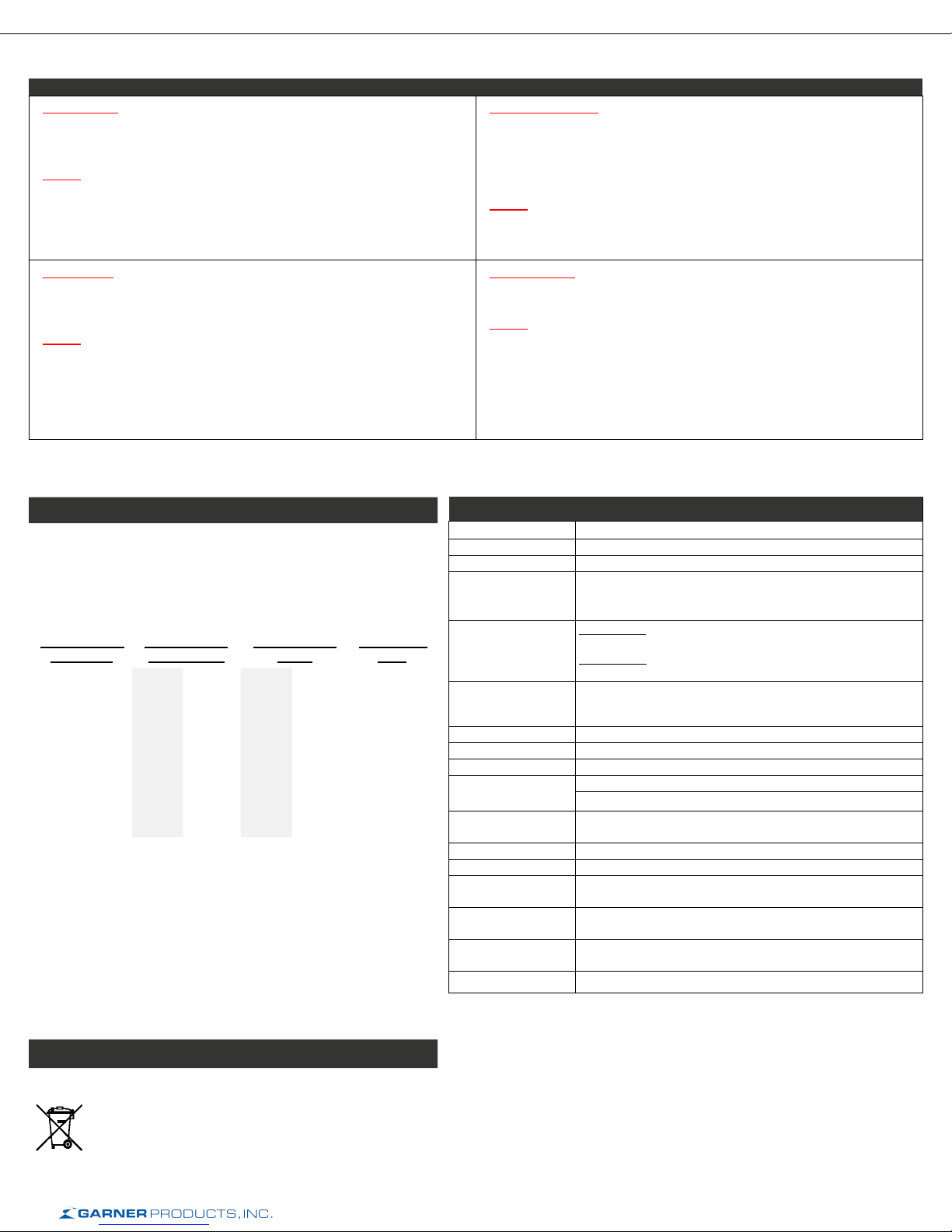
MAGNETIC FIELDS
Magnetic Fields Measured Around Perimeter
The HD-2X and HD-2SS produces a single focused magnetic pulse
lasting less than 1/20 of a second. The focused intensity allows the
unit to erase today’s highest coercivity media while also limiting the
magnetic field exposure to 1 second for every 20 pieces of media
degaussed.
Distance from
degausser
0 mm (0 in.)
100 mm (4 in.)
200 mm (8 in.)
300 mm (12 in.)
Magnetic field
(Front Panel)
HD-2X HD-2SS HD-2X HD-2SS
710
gauss
167
gauss
68
gauss
40
gauss
620
gauss
249
gauss
85
gauss
19
gauss
Magnetic field
(Side)
458
gauss
99
gauss
52
gauss
44
gauss
328
gauss
81
gauss
26
gauss
8 gauss < 0.05 Second
Duration of
Field
< 0.05 Second
< 0.05 Second
< 0.05 Second
Note: The testing room measured 0.4 gauss before degausser was
plugged in.
Average Operational Distance (AOD) from user to the degausser is
12-18 inches (300-450 mm). According to the American Conference
of Governmental Industrial Hygienists (ACGIH) Threshold Limit
Values (2005) - Static Magnetic Fields, whole body exposure limits
recommended for an 8 hour shift are 600 gauss. Because of the short
duration of each pulse from a degausser (1/20
th
* of a second) and the
extremely small magnetic field outside of the unit (<19 gauss, AOD) the
total 8 hour whole body exposure is 1/120th of the recommended limit.
*Pulse duration was rounded to ½ second per discharge for calculations to
cover any build up of magnetic fields generated before or after discharge.
DISPOSAL
SPECIFICATIONS
Part Numbers HD-2X, HD-2SS
Certifications/Listings CE • ANSI • FCC
Power Supply 100~240VAC ±5%, 50/60 Hz- Factory configurable
Power Consumption During standby: 24W
Media
Erasing time Erases up to 480 (1.8 in.) hard drives per hour
Cycle time 60 seconds per cycle.
Degausser System Capacitive Discharge
Operating Duty Cycle Continuous
Magnetic Field HD-2X: >10,000 Gauss / >1 Tesla
Drawer Capacity HD-2X: 1.3 x 4.3 x 5.9 (in.) 33 x 109 x 149.9 (mm)
Temperature 5°C - 40°C (41°F - 104°F)
Humidity 10%H - 40%H (without condensation)
Weight HD-2X: 37 lbs. (16.8 kg)
Dimensions
(HxWxD)
Warranty 1 Year Factory Warranty Standard, Optional 3 Year Factory
Made In U.S.A.
During charge: 156W (avg)
At the time of erase: 60W
Hard drives: Laptop, standard, network up to 1.5 in. (1.25 in.
for HD-2X) in height
Tape media: All LTO, all DLT, AIT, 2590 Series, 8mm, and
others
Erases up to 360 (2.5 in.) hard drives per hour
Erases up to 60 (3.5 in.) hard drives per hour
HD-2SS: 8,800 Gauss / 0.88 Tesla
HD-2SS: 1.5 x 4.3 x 5.9 (in.) 38.1 x 109 x 149.9 (mm)
HD-2SS: 36 lbs. (16.34 kg)
HD-2X: 6 x 17.8 x 13.3 in. (151 x 451 x 338 mm)
HD-2SS: 17.9 x 5.2 x 13.3 in. (454 x 132 x 339 mm)
Warranty available.
Disposing of the machine:
Dispose of the machine in an environmentally sound fashion at
the end of its useful service life. Do not dispose of any of the
parts included in the machine or its packaging with household
trash.
3 of 6
Page 4
HD-2 SERIES Operation Manual
4 of 6
Page 5

HD-2 SERIES Operation Manual
GARNER PRODUCTS, INC. LIMITED WARRANTY
AND
WARRANTY RETURN POLICY
Garner Products, Inc. (“Garner”) warrants this Garner-branded product (“Product”) against defects in materials and workmanship for
a period of ONE (1) YEAR from the date of purchase by the original end-user (“end-user”) as evidenced by end-user’s packing slip or
invoice (“Warranty Period”). No Product may be returned except upon prior written permission by Garner and shipment to factory with
transportation charges prepaid.
If a valid claim is received within the Warranty Period, at its option, Garner will either: (1) repair the Product, (2) exchange the Product,
or (3) request that end-user replace parts with new or refurbished user-installable parts that Garner provides in fulfillment of its warranty
obligations. A replacement Product or Part, including a user-installable part that has been installed in accordance with instructions
provided by Garner, assumes the remaining warranty of the original Product.
Garner is not responsible for damage arising from failure to follow instruction relating to the Product’s use. This warranty does not apply
to: (a) cosmetic damage, including but not limited to scratches, dents and broken plastic; (b) freight damage; (c) consumable parts; (d)
normal wear and tear or otherwise due to the normal aging of the Product; (e) damage caused by accident, abuse, inadequate wiring,
power surge, rust, corrosion, neglect, misuse, liquid contact, fire, earthquake or other external causes; (f) damage caused by operating
the Product outside the permitted or intended uses described by Garner; (g) damage caused by service performed by anyone who is
not a representative of Garner or a Garner authorized service provider; (h) a Product or part that has been modified to alter functionality
or capability without the written permission of Garner; or (i) if any Garner serial number has been removed or defaced.
No Garner dealer or reseller is authorized to make any modification, extension, or addition to this warranty.
DISCLAIMER
TO THE EXTENT PERMITTED BY LAW, THIS WARRANTY AND THE REMEDIES SET FORTH ARE EXCLUSIVE AND IN LIEU OF
ALL OTHER WARRANTIES, REMEDIES AND CONDITIONS, WHETHER ORAL, WRITTEN, STATUTORY, EXPRESS OR IMPLIED.
GARNER DISCLAIMS ALL STATUTORY AND IMPLIED WARRANTIES, INCLUDING WITHOUT LIMITATION, WARRANTIES OF
MERCHANTABILITY AND FITNESS FOR A PARTICULAR PURPOSE AND WARRANTIES AGAINST HIDDEN OR LATENT DEFECTS,
TO THE EXTENT PERMITTED BY LAW. IN SO FAR AS SUCH WARRANTIES CANNOT BE DISCLAIMED, GARNER LIMITS THE
DURATION AND REMEDIES OF SUCH WARRANTIES TO THE DURATION OF THE EXPRESS WARRANTY AND RETURN POLICY
DESCRIBED HEREIN.
LIMITATION OF LIABILITY
EXCEPT AS PROVIDED IN THIS WARRANTY AND TO THE MAXIMUM EXTENT PERMITTED BY LAW, IN NO EVENT SHALL
GARNER BE LIABLE TO ANY PARTY FOR ANY DIRECT, SPECIAL, INCIDENTAL OR CONSEQUENTIAL DAMAGES RESULTING
FROM ANY BREACH OF WARRANTY OR CONDITION, OR UNDER ANY OTHER LEGAL THEORY, INCLUDING BUT NOT LIMITED
TO LOSS OF USE; LOSS OF REVENUE; LOSS OF ACTUAL OR ANTICIPATED PROFITS; LOSS OF BUSINESS; LOSS OF
GOODWILL; LOSS OF, DAMAGE TO, COMPROMISE OR CORRUPTION OF DATA; OR ANY INDIRECT OR CONSEQUENTIAL
LOSS OR DAMAGE HOWSOEVER CAUSED. END-USER’S SOLE AND EXCLUSIVE REMEDY FOR ANY CAUSE OF ACTION, IS
A CLAIM FOR DAMAGES WHICH IN NO EVENT WILL EXCEED THE PRICE OF THE SPECIFIC PRODUCT AS TO WHICH THE
CLAIM IS MADE.
If a problem occurs with this Product, contact Garner directly by Email at [email protected] or by phone at (916) 784-0200 to
obtain technical support and/or to get a Return Authorization Number (RA#).
All returns must be specifically authorized by Garner prior to shipment and returned to Garner FREIGHT PREPAID with the RA#
marked prominently near the shipping label.
Garner recommends using the original shipping container to securely package the Product. It is end-user’s responsibility to ensure the
Product is packaged properly to prevent damage during transit to Garner. Garner will provide product packaging to end-user at enduser’s request and expense.
Enclose proper documentation, including RA#, the return address, a name and phone number of the contact person, the serial number
of the merchandise being returned and a description of the reason for the return. Omission of any of this information may delay service.
Garner recommends end-user insure the shipment; otherwise end-user accepts the risk if Product is lost or damaged in shipment.
Garner will pay to ship the repaired or replacement Product to end-user’s shipping dock if end-user’s delivery address is in the United
States (excluding Puerto Rico and U.S. possessions and territories); otherwise Garner will ship the Product to end-user freight collect.
Garner will select method for return shipment. Alternate shipment methods may be made at end-user’s expense.
WARRANTY RETURN POLICY
5 of 6
Page 6

Company:
Garner Products Inc.
10620 Industrial Avenue, Suite 100
Roseville, CA 95678 USA
Tel: (800) 624-1903 or (916) 784-0200
Fax: (916) 784-1425Hours: Monday through Friday,
8:00 a.m. to 5:00 p.m. Pacic Time (GMT - 8 hours)
Email: [email protected]
Distributors:
Datumstruct (s) Pte Ltd, Singapore
33 Changi South Ave 2, #03-00
Singapore 486445
Tel: (65) 6749 0206
Fax: (65) 6742 2827
Hours: Monday through Friday, 9:00 a.m. to 6:00 p.m.
Singapore Standard Time (GMT + 8 hours)Email:
Email: [email protected]
Datalifecycle.com Pvt Ltd, India
No 55, 17th Cross Road, between 6th and 8th Main,
Malleshwaram, Bangalore – 560 055, India.
Tel: (91) 80 2344 4490
Hours: Monday through Friday, 9:00 a.m. to 6:00 p.m.
India Standard Time (GMT + 5:30 hours)Email:
[email protected]
HD-2 SERIES Operation Manual
Synnex Canada Limited, Canada
200 Ronson Drive
Toronto, Ontario
Canada M9W 5Z9
Contact: Lucy Sousa
Tel: +1 (416) 240-2531
Hours: Monday through Friday, 9 a.m. to 6 p.m. Canada
Standard Time (GMT – 4 hours)
Email: [email protected]
Varese Secure Ltd, United Kingdom
Lancaster Court
8 Barnes Wallis Road
Fareham
PO15 5TU
Tel: +44(0) 1489 660196
Mobile: +44(0) 7740 725647
Hours: Monday through Friday, 9:00 a.m. to 5:00 p.m.
Greenwich Mean Time (GMT)
Email: [email protected]
Stocking U.S. Dealer:
Data Devices International, Inc., USA
2600 Mission Street, Suite 100
San Marino, CA 91108
Tel: (626) 799-6545
Email: [email protected]
Better Shredders
35 Trevor Road
York, PA 17404
Tel: (717) 829-1894
Toll Free: (888) 350-2079
Email: [email protected]
6 of 6
 Loading...