

Page 1
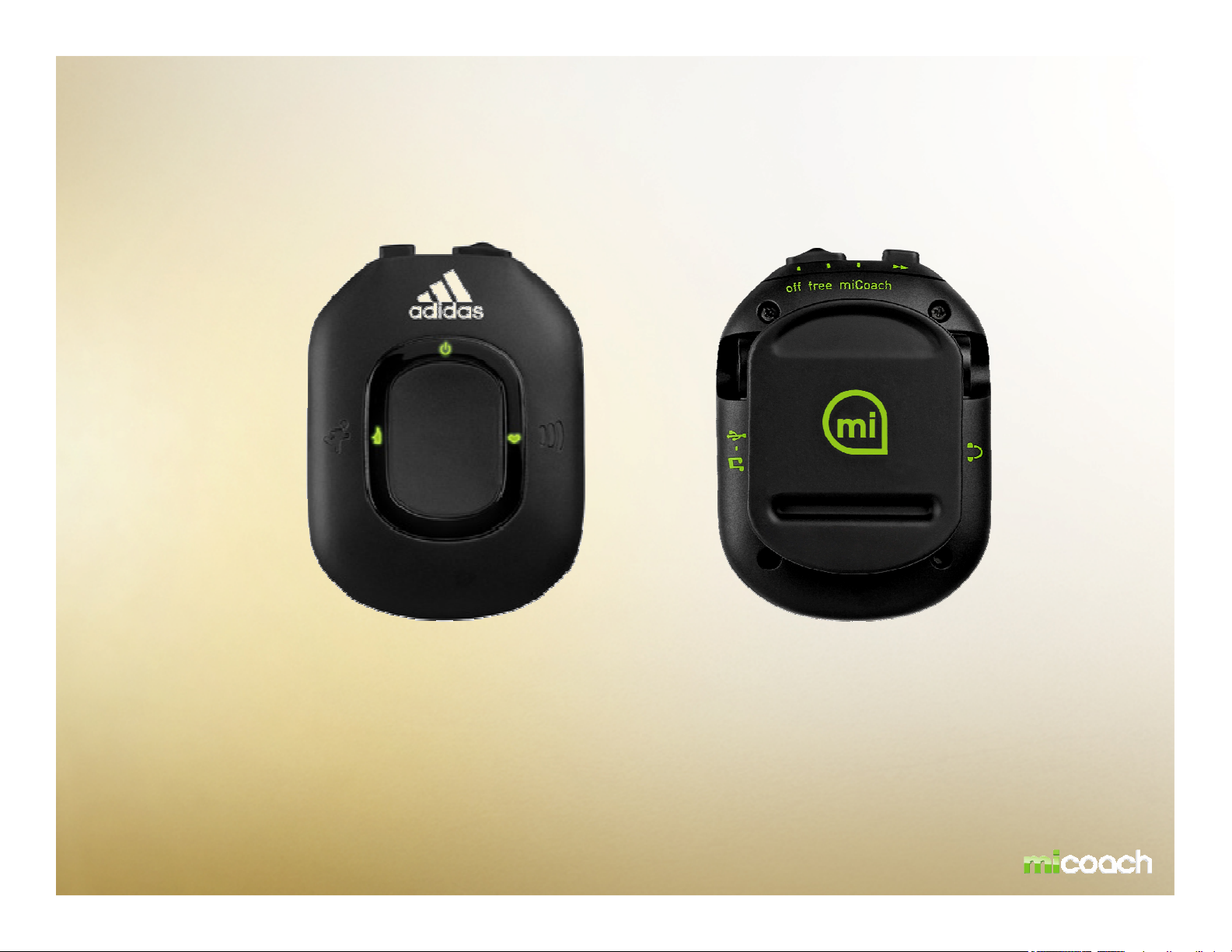
miCoach Pacer USER MANUAL
Please note: this is a DRAFT of the miCoach Pacer user manual.
All designs and images are work in progress and subject to change!
Page 2
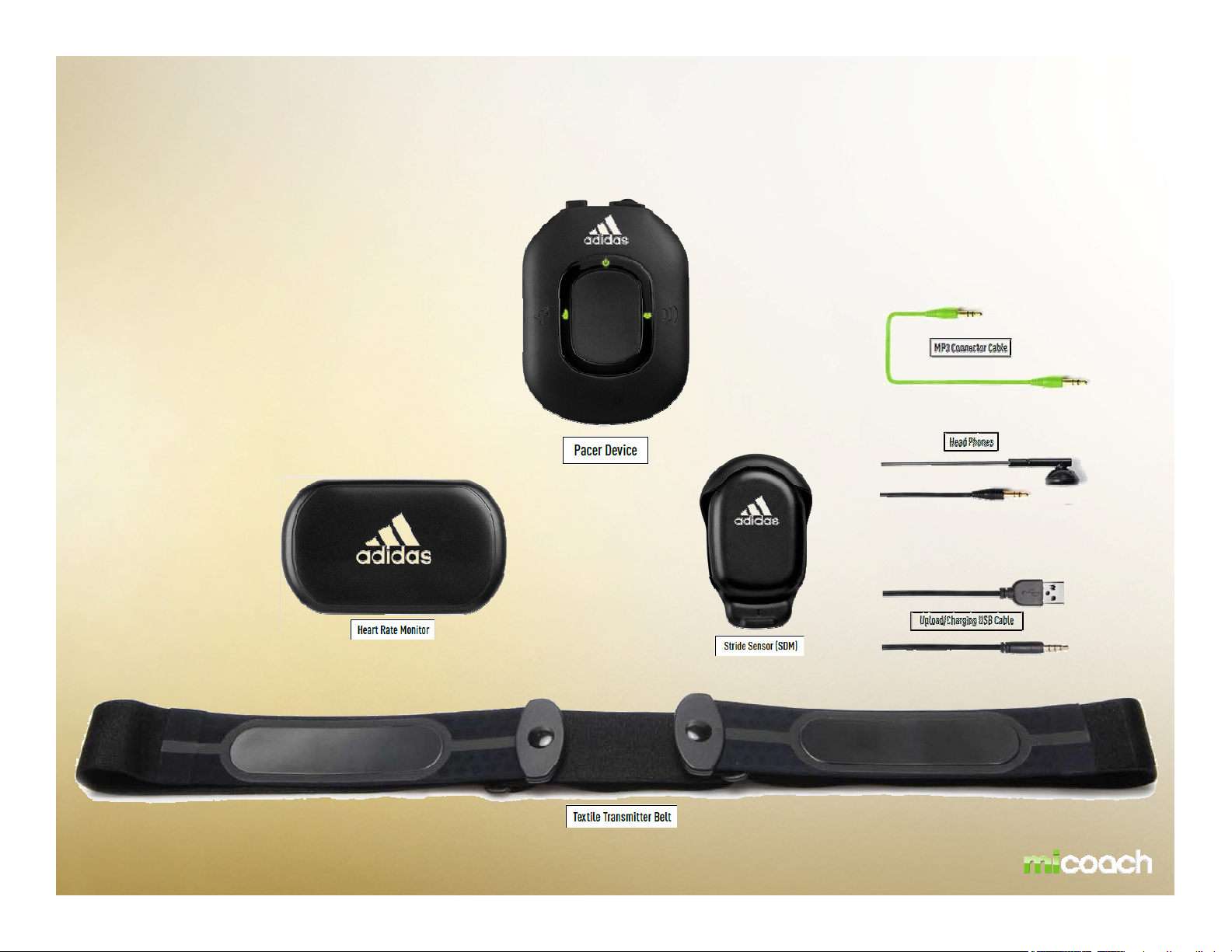
miCoach Pacer Bundle
Page 3
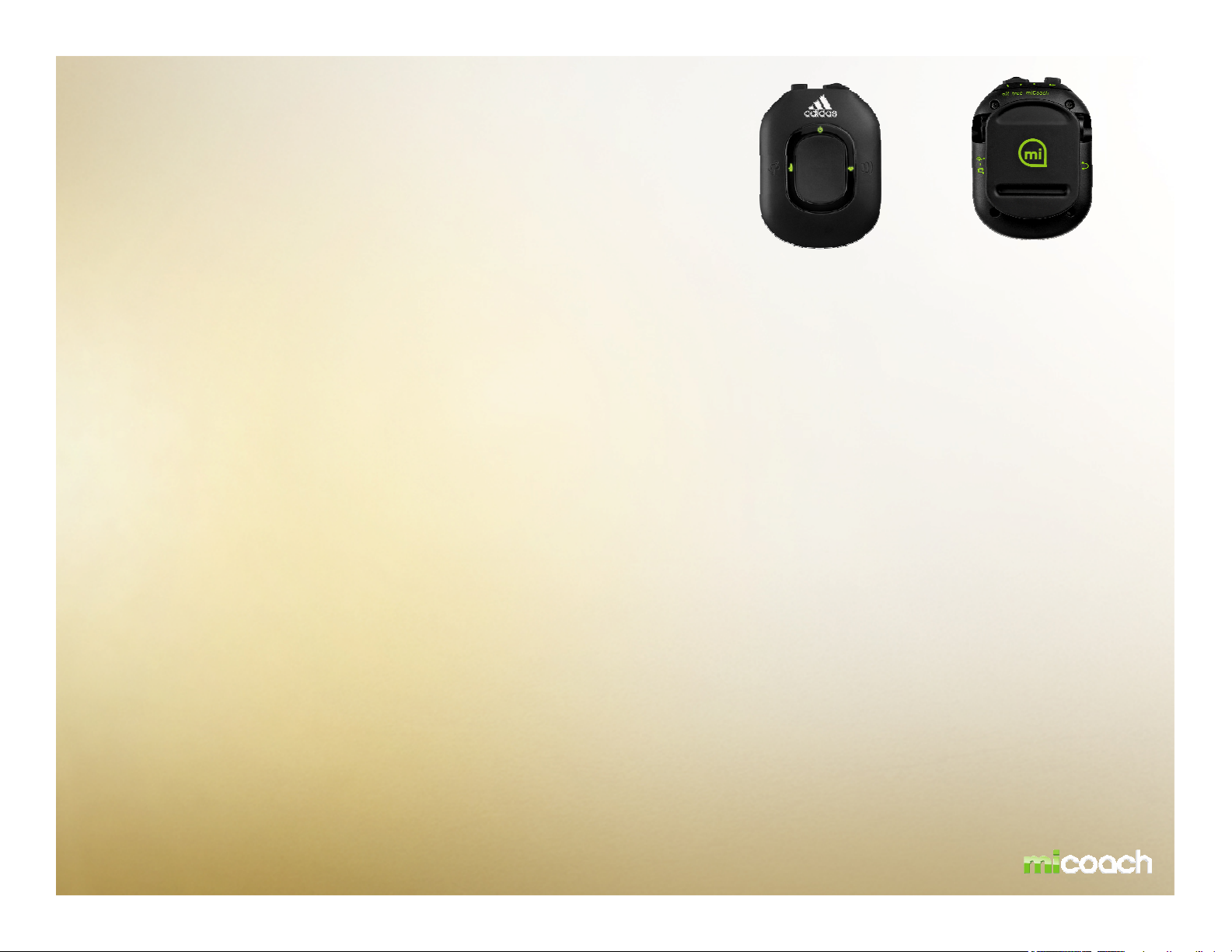
PRODUCT DESCRIPTION
- Real time audible coaching based on physiological data received
from the miCoach Heart Rate Monitor and miCoach Stride Sensor
- Stores planned personalised workouts and recorded data for each
- Web Synchronizer function allows personalised workouts to be downloaded from miCoach.com
- All recorded data can be uploaded to miCoach.com for detailed analysis
- MP3 Player compatibility
- The miCoach Pacer is a wireless receiving device that provides real time coaching for runners of all ability
levels
- Connects to any PC or MAC with access to the internet to upload workout data and download additional
workouts
- Attaches to clothing via a clip on the back of the unit.
- Small, lightweight, and rechargeable
- Keeps track of users performance parameters, such as heart rate, pace, and total distance
- Interfaces with the miCoach website, providing an easy and intuitive interface for workout uploads,
performance evaluations based on data downloads, and preference settings
Page 4

Pacer Functionality
Slide Switch Located on top of the unit, this switch selects between the 3 modes of operation:
Off, Free and miCoach. During the workout, the Free switch also is a mute option.
Select Button Located on top of the unit, this button selects one of the workouts stored on the
device.
Running Man Located on the front left of the unit; this button starts and pauses the selected
workout.
Info Button Located in the middle on the unit. This button gives the user an immediate update
of up to 8 selectable performance measurements.
Volume Button Located on the front right of the unit. This button controls the coaching volume the
device will output to the headphones.
This functionality does not control external device volume.
•Are there recommended locations where the Pacer should be worn for comfort, accessibility, and RF performance?
Page 5
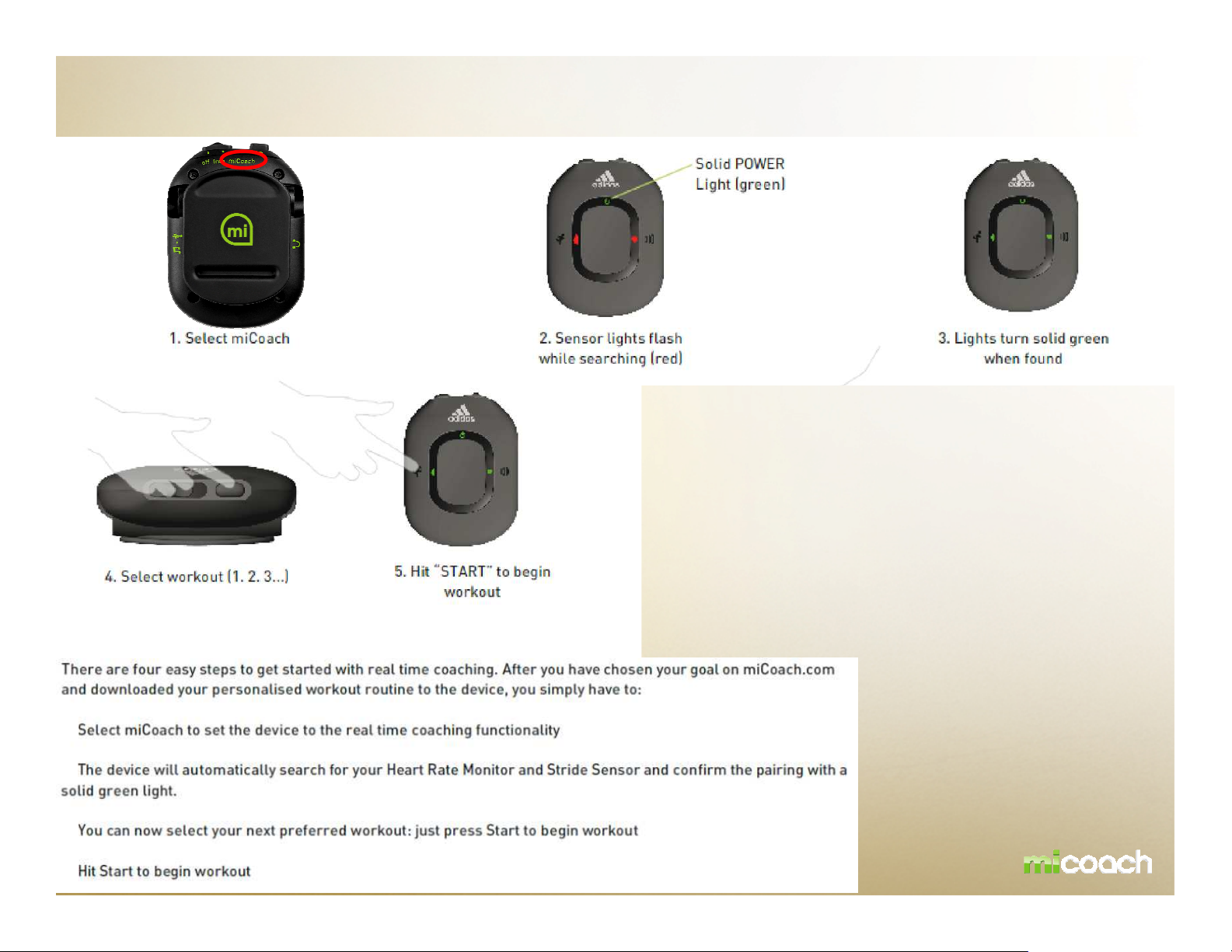
Workout with Pacer – miCoach mode
•Picture How to pause or end a work-out?
User presses the start button
-
-
-
-
Page 6
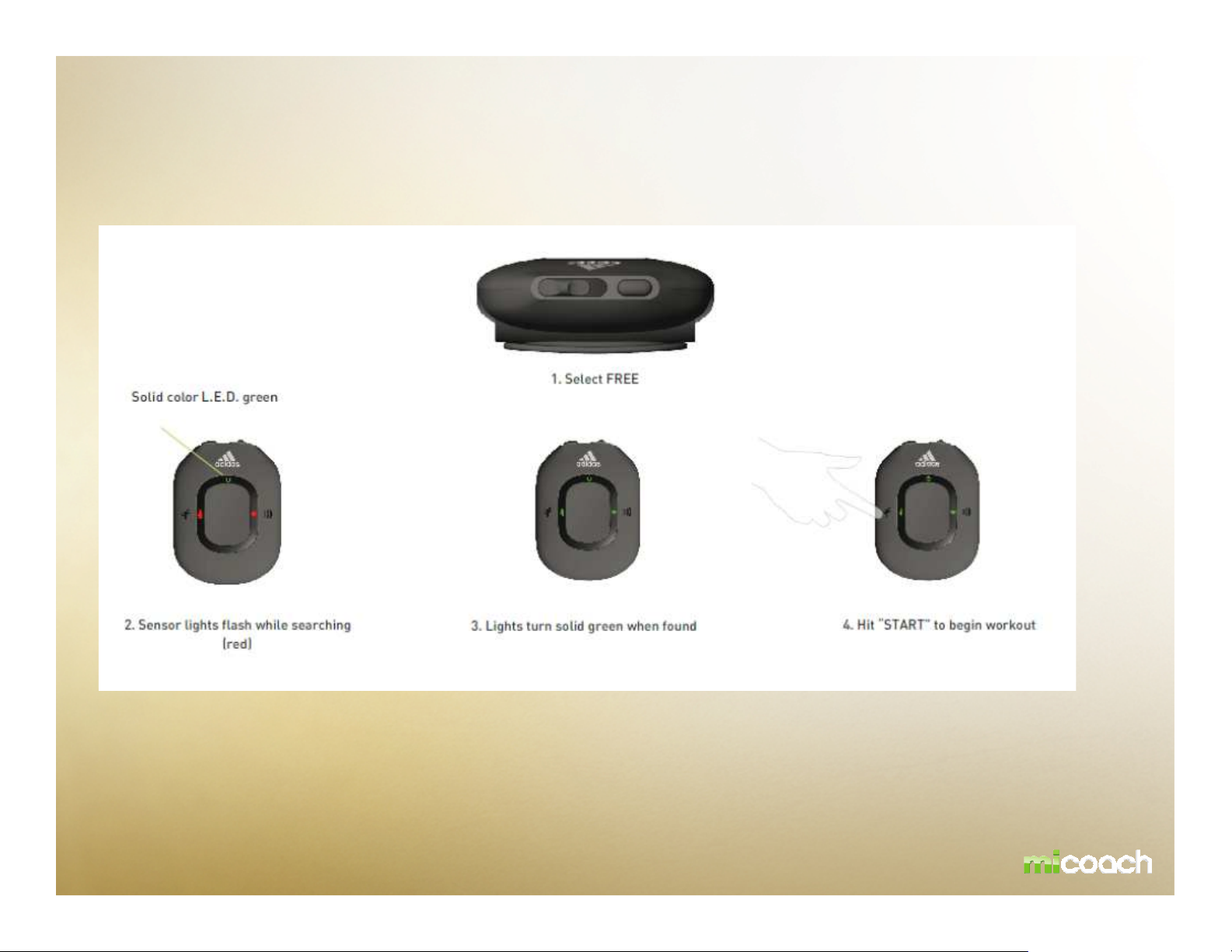
Workout with Pacer – FREE mode
•Picture How to pause or end a work-out?
User presses the start button
There is also the possibility to use the miCoach Pacer as a data logging device. Simply set the Pacer to
„free“ and together with the Heart Rate Monitor and Stride Sensor, tracks your Heart Rate, Speed and Distance
Data and gives you updates regarding Pacer/Calories burned on demand.
Page 7
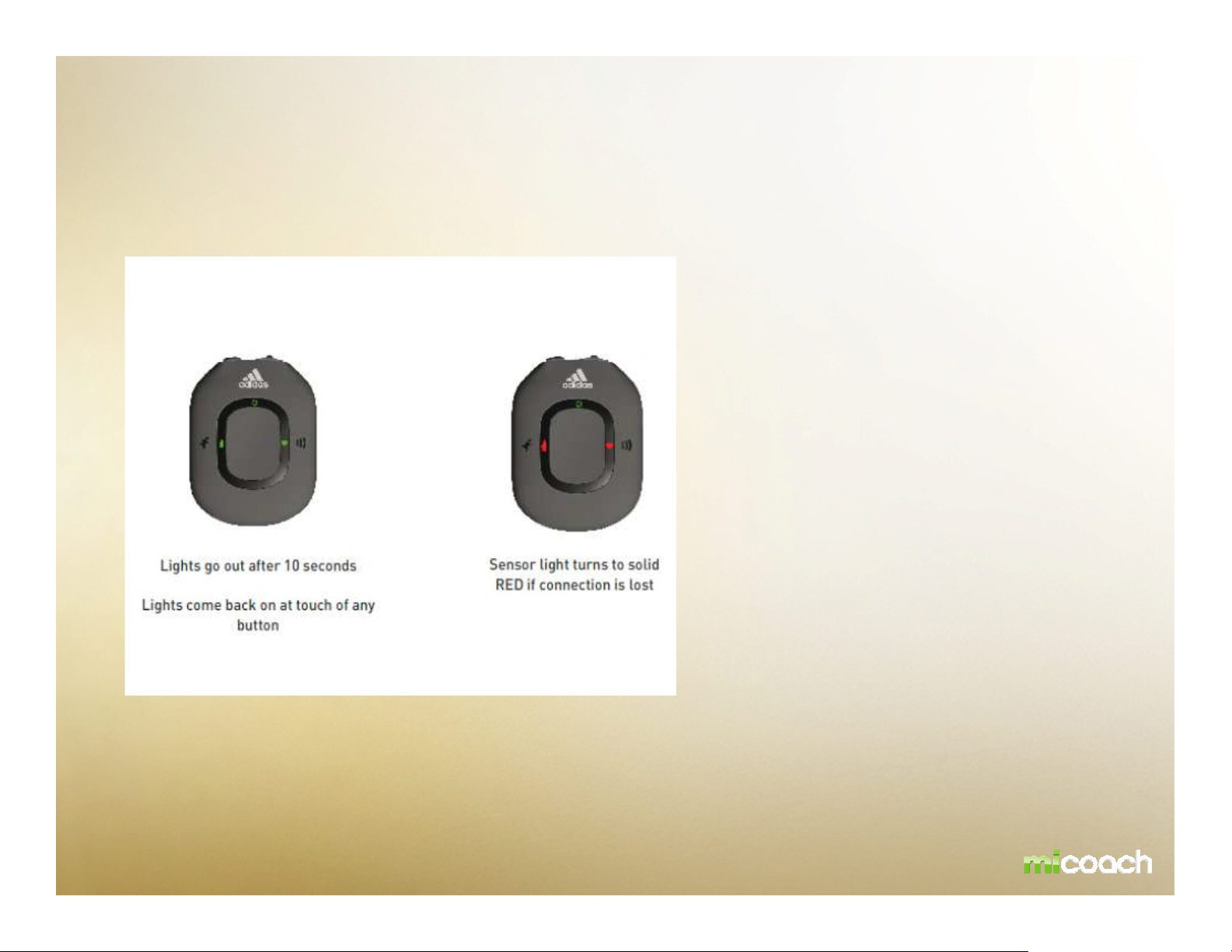
Workout with Pacer – FEEDBACK INDICATORS
-Solid Green means connected to HRM and SDM
-Solid Red means lost connection to HRM and SDM
-Flashing Red means searching for HRM and SDM
-Flashing Green means paused
-Blue means connected to computer
-Power Button flashing Red means low battery
-Flashing Blue/Red/Blue/Red means charging
-Flashing Blue/Green/Blue/Green means fully charged
Page 8
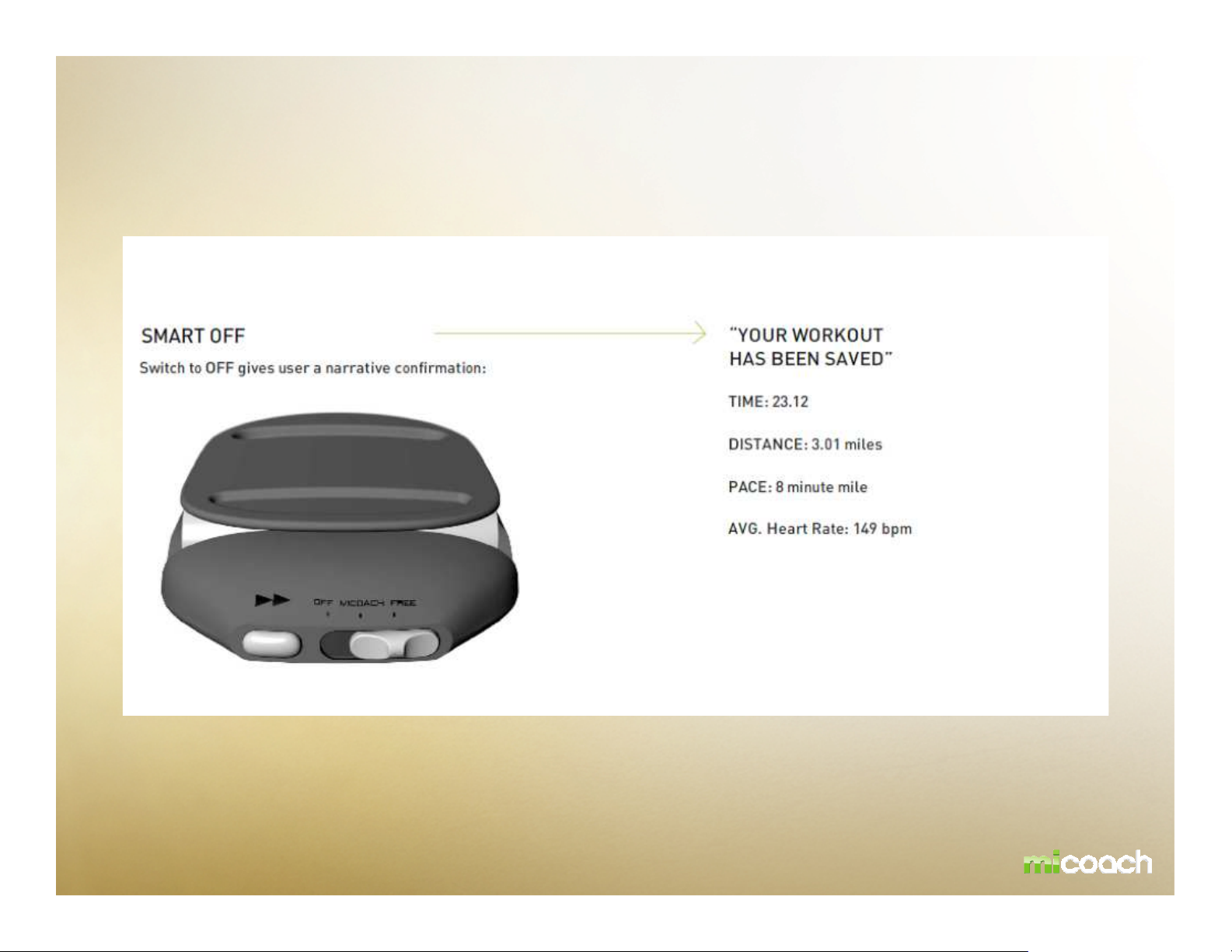
Workout with Pacer – SMART OFF
Example:
All collected data will be saved
automatically when switching off the device
Page 9
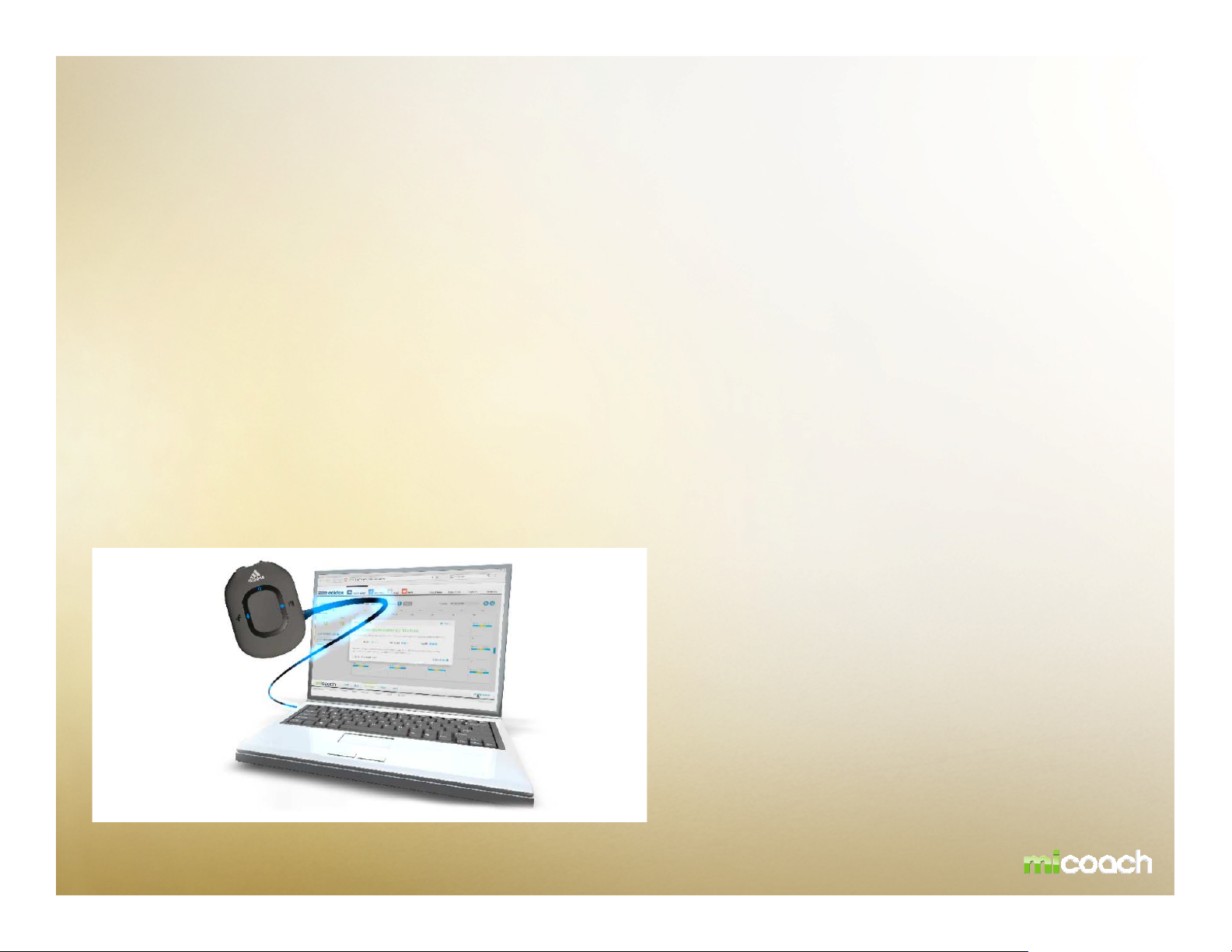
Workout with Pacer – INTERACTION
PC Connection
The Pacer unit connects to a PC or MAC via the included USB cable. Users connect to the miCoach website
to upload workout statistics, download new workouts, and receive software updates. Data is loaded on and
off the unit via the USB Mass Storage Class Protocols. The USB connection recharges the lithium battery.
Interaction / Communication: miCoach.com – Product
The user is required to install a single desktop application which will be able to then identify and
communicate with miCoach supported hardware devices. The sychroniser location site is found at :
www.micoach.com/start/softwaredownloads
Full bi-directional synchronization of sport data (including training plans, workout results, user profile and
settings) via USB cable
The USB connection cable provided can be used to synchronize (Up-/Download) workout information with
miCoach.com and at the same time charges the battery of the Pacer device.
Page 10
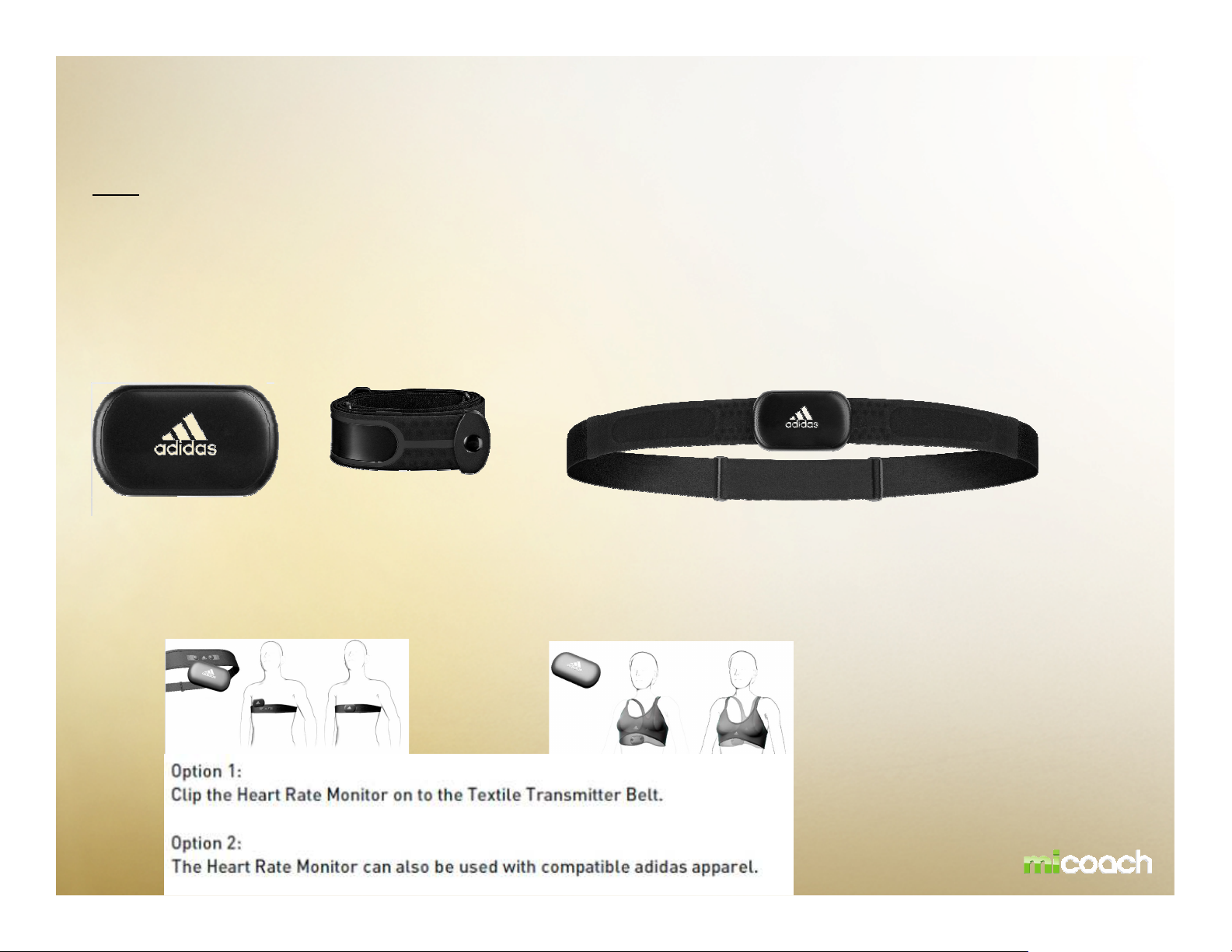
HEART RATE MONITOR
HRM
Power On: RF transmission automatically activates when heart rate monitor is clipped on to a
compatible strap and is fastened around chest.
Power Off: HRM automatically stops transmitting and returns to ultra-low power mode two
minutes after removal of the body.
+
=
Page 11
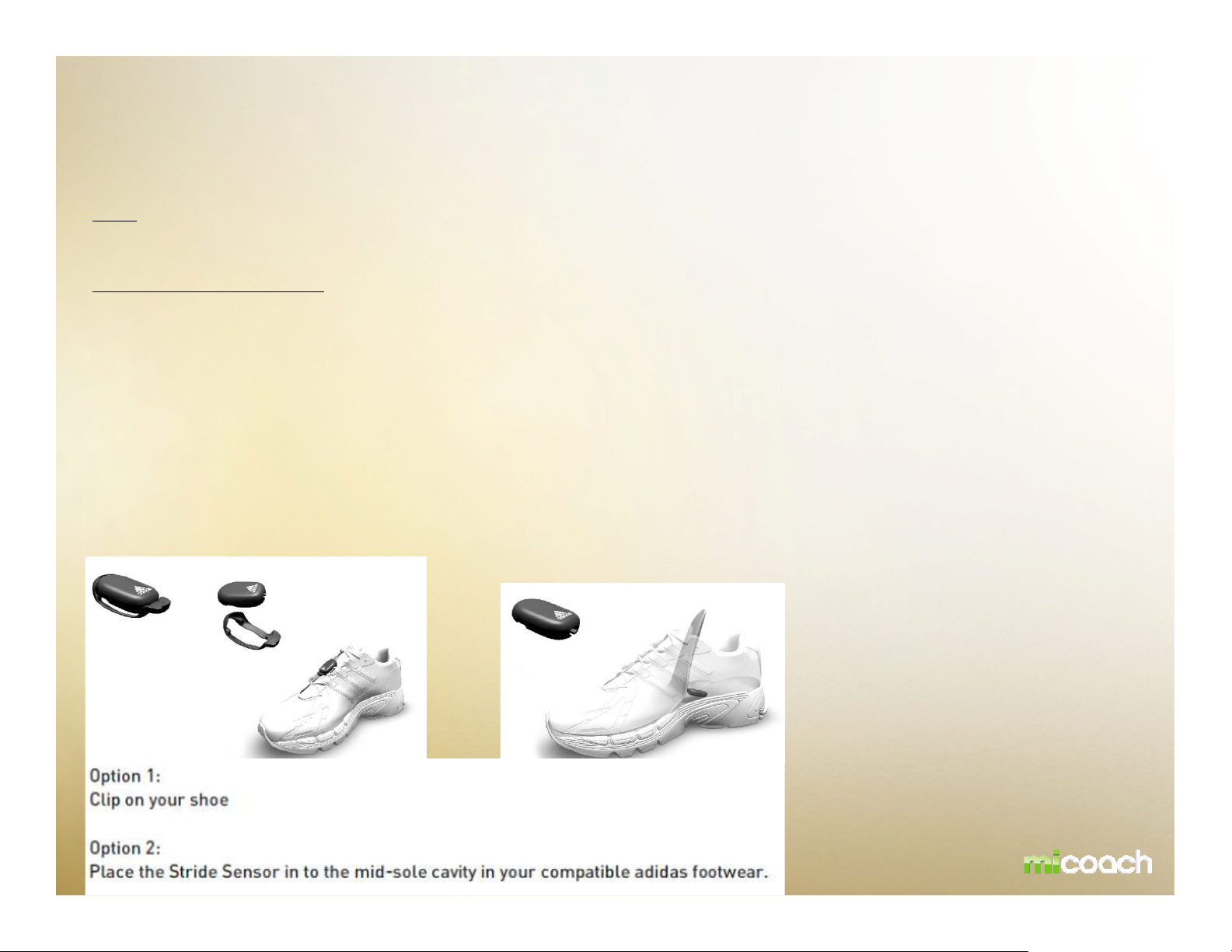
STRIDE SENSOR
SDM
Power On/Off: The SDM is always on and transmits your workout data when you exercise.
Operational Characteristics
Shoe Attachment: The SDM is attached securely to the laces of any running shoe using the supplied clip, or inserted into the
mid-sole cavity of 80 % of adidas running shoe range in 2010.
•On the Stride Sensor page, it would be good to clearly indicate
which direction of the SDM is facing forward (users will always ask
that question), and that the SDM goes in with the miCoach logo
facing up when installed in-shoe. It’s also worth stressing that
the SDM should be secured well when used on the laces to get
best accuracy and so it does not slip out while running.
Page 12

CALIBRATION OF STRIDE SENSOR
Stride sensor calibration
The accuracy of the stride sensor will be >95% accuracy “out of the box” for a majority of users. Some users
with certain stride characteristics may experience lower accuracy but this will improve once a simple
calibration procedure is performed. The SDM provides >98% accuracy after calibration.
Additional calibration can be done on miCoach.com.
Page 13

BATTERY INFO - PACER
Pacer
Non detachable rechargeable 125mAh lithium polymer battery
Battery and power
Charging via USB
Battery charged in 2 hours
Page 14
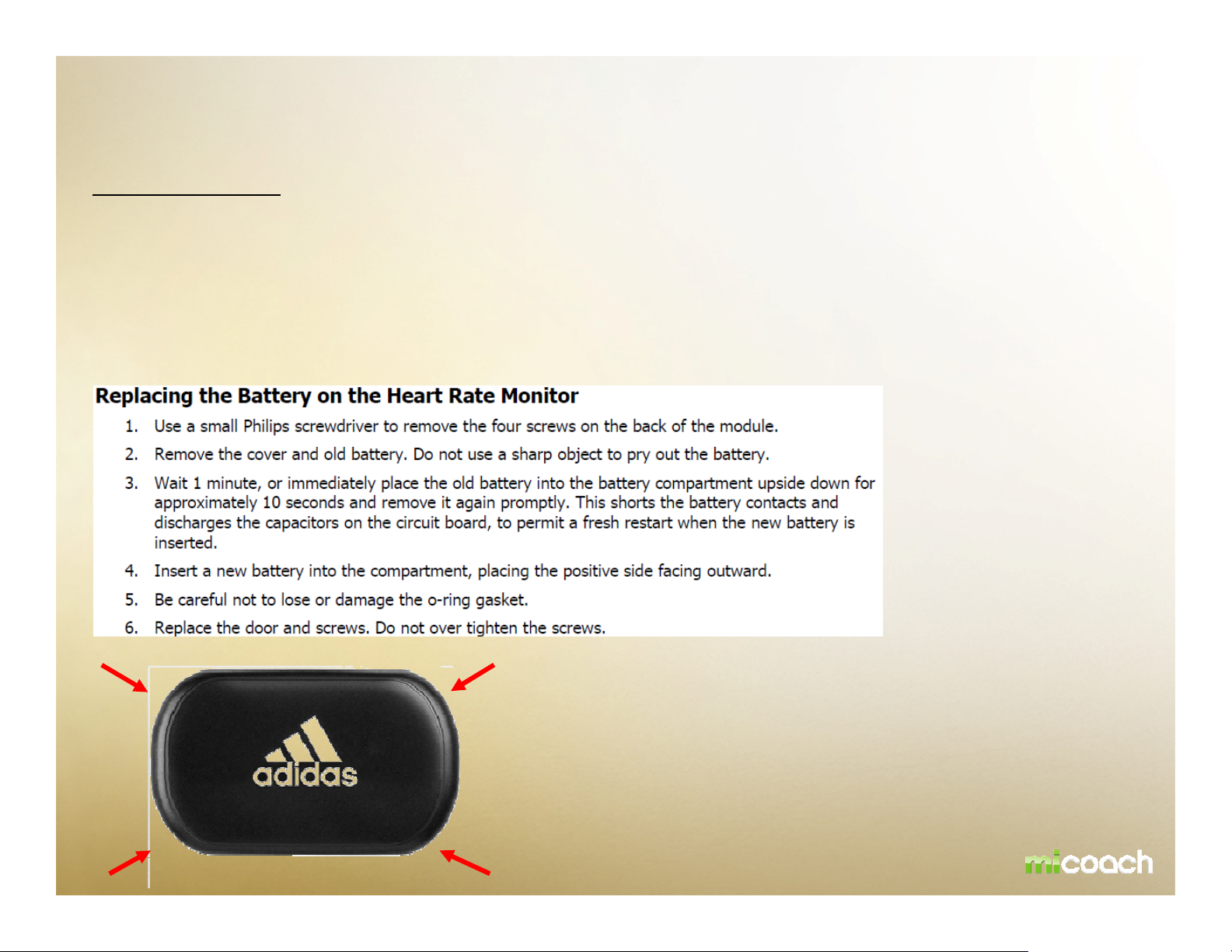
BATTERY INFO – HEART RATE MONITOR
Heart Rate Monitor
Replaceable CR2032 lithium coin cell battery
Open 4 screws of the back plate
The Heart Rate Monitor does not need to be re-paired after battery replacement.
Page 15
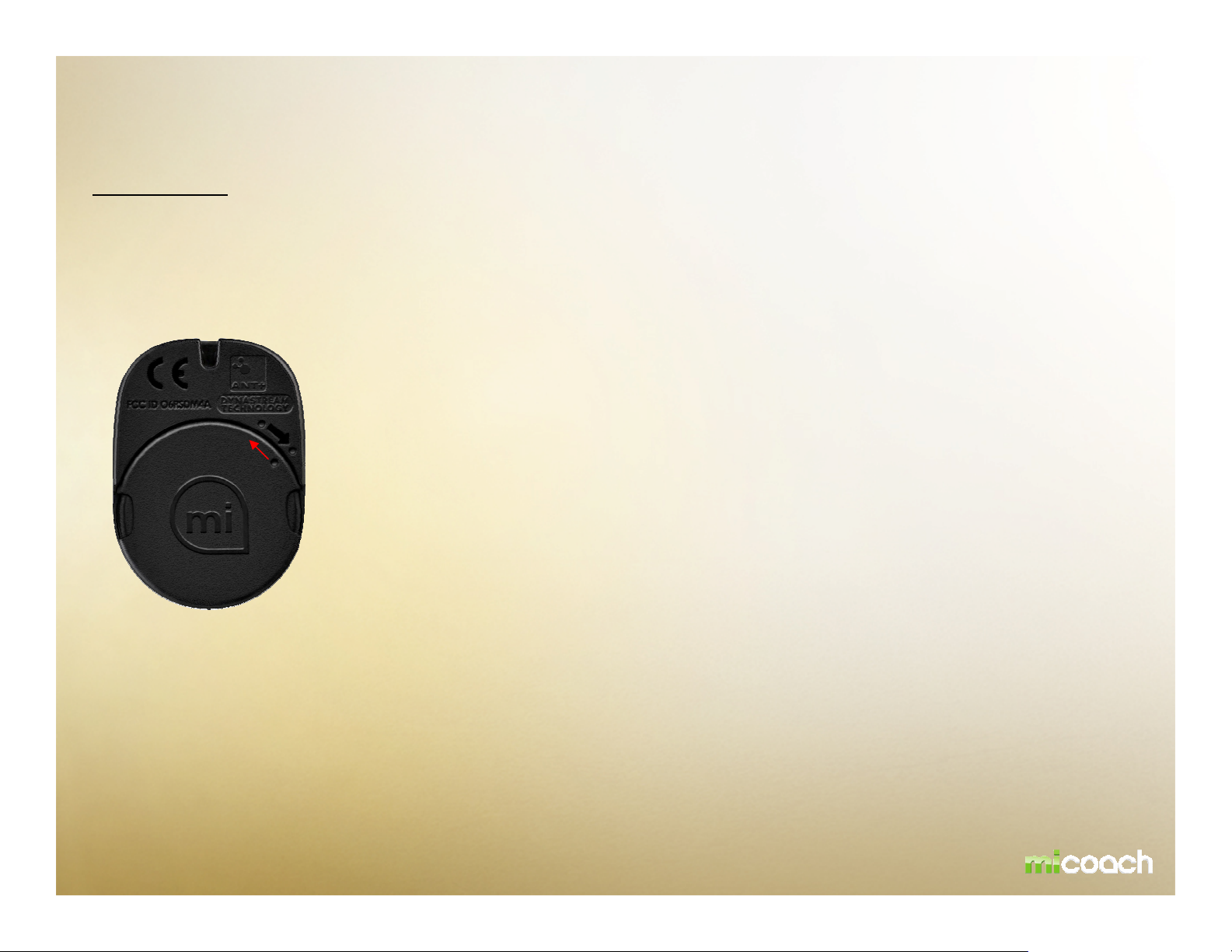
BATTERY INFO – STRIDE SENSOR
Stride Sensor
Replaceable CR2032 lithium
Twist and turn the back plate
Simply push down and twist the back plate to open the SDM (see red arrow)
coin cell
battery
The stride sensor does not need to be re-paired after battery replacement.
Page 16

PAIRING HEART RATE MONITOR and PACER
Every device in the pacer bundle is already paired. The Heart Rate Monitor in the Pacer Bundle is prepaired with the pacer device.
The HRM must be “paired” with an ANT+™ enabled receiver device
Repairing Process
Pressing & holding the center and workout button at the same time while Pacer is off (TBD)
•Notes on pairing: The HRM must be active in order to pair it to the Pacer
– instruct users to put it on the chest to activate it. The SDM is always active.
Mark can confirm, but I presume both sensors must be paired at the same
time (if only one sensor is present and active, only it will be paired?).
such as miCoach Pacer.
Page 17

PAIRING STRIDE SENSOR and PACER
Every device in the pacer bundle is already paired. The Heart Rate Monitor in the Pacer Bundle is pre-paired with the pacer
device.
The SDM must be “paired” with an ANT+™ enabled receiver device such as miCoach Pacer.
Repairing Process
Pressing & holding the center and workout button at the same time while Pacer is off (TBD)
•Notes on pairing: The HRM must be active in order to pair it to the Pacer
– instruct users to put it on the chest to activate it. The SDM is always active.
Mark can confirm, but I presume both sensors must be paired at the same
time (if only one sensor is present and active, only it will be paired?).
Page 18
2
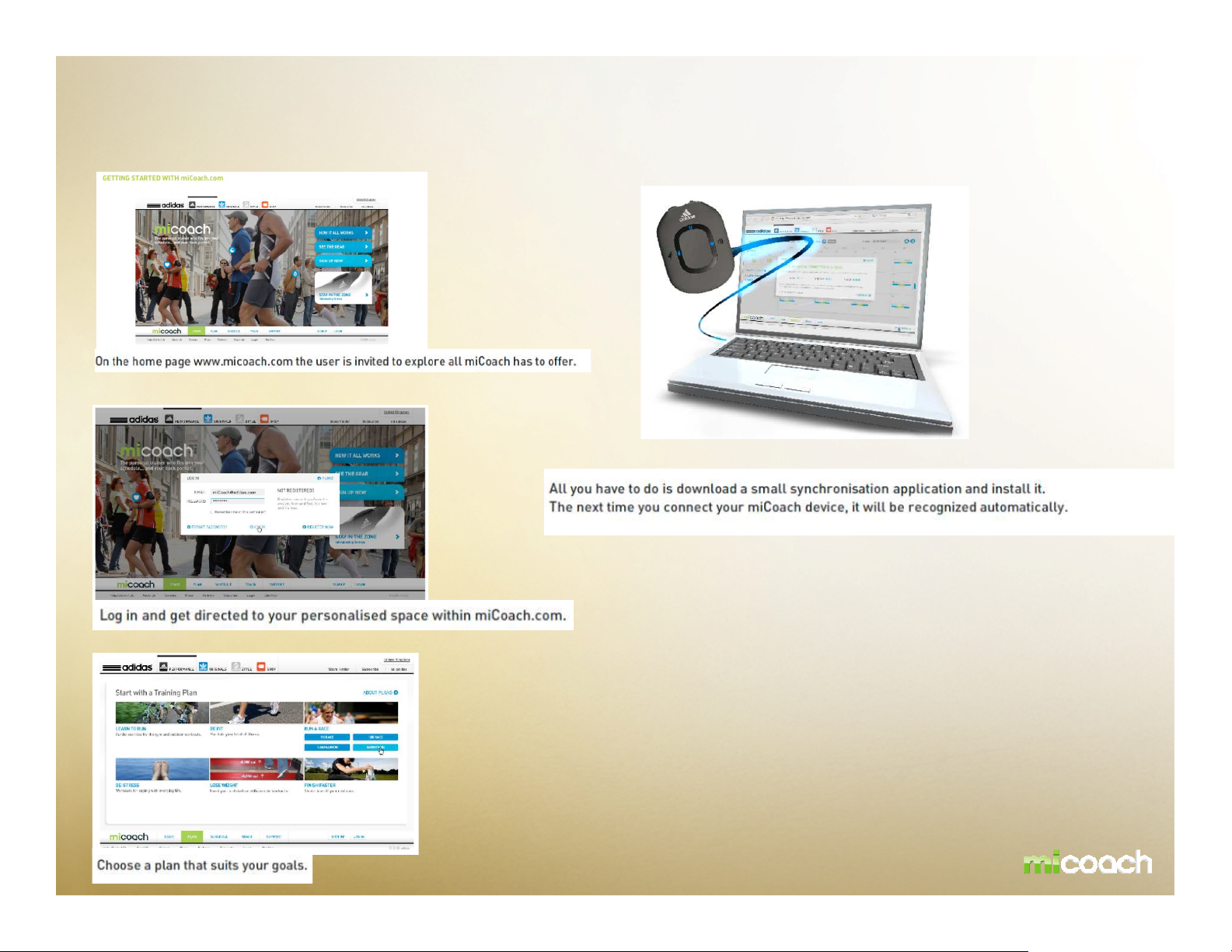
Pacer – CONSUMER JOURNEY – Prior to workout
1
4
Connect your miCoach Pacer to your MAC or PC and download your
Personalized workouts.
3
Page 19
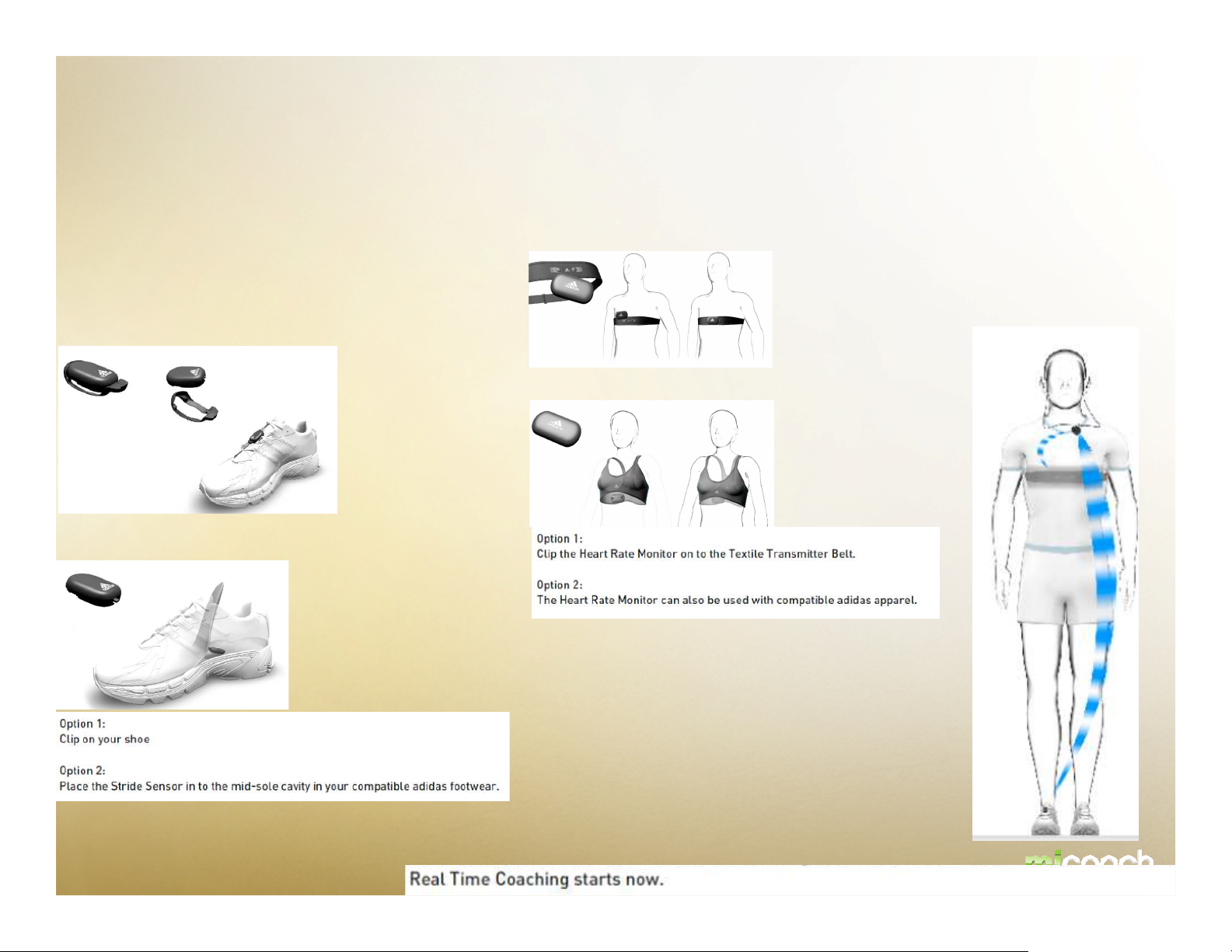
Pacer – CONSUMER JOURNEY – get ready for
workout
Option 1
HRM
SDM
Option 1
Option 2
Option 2
SDM and HRM are sending accuarte data to miCoach Pacer via 2.4 GHZ
Page 20
1
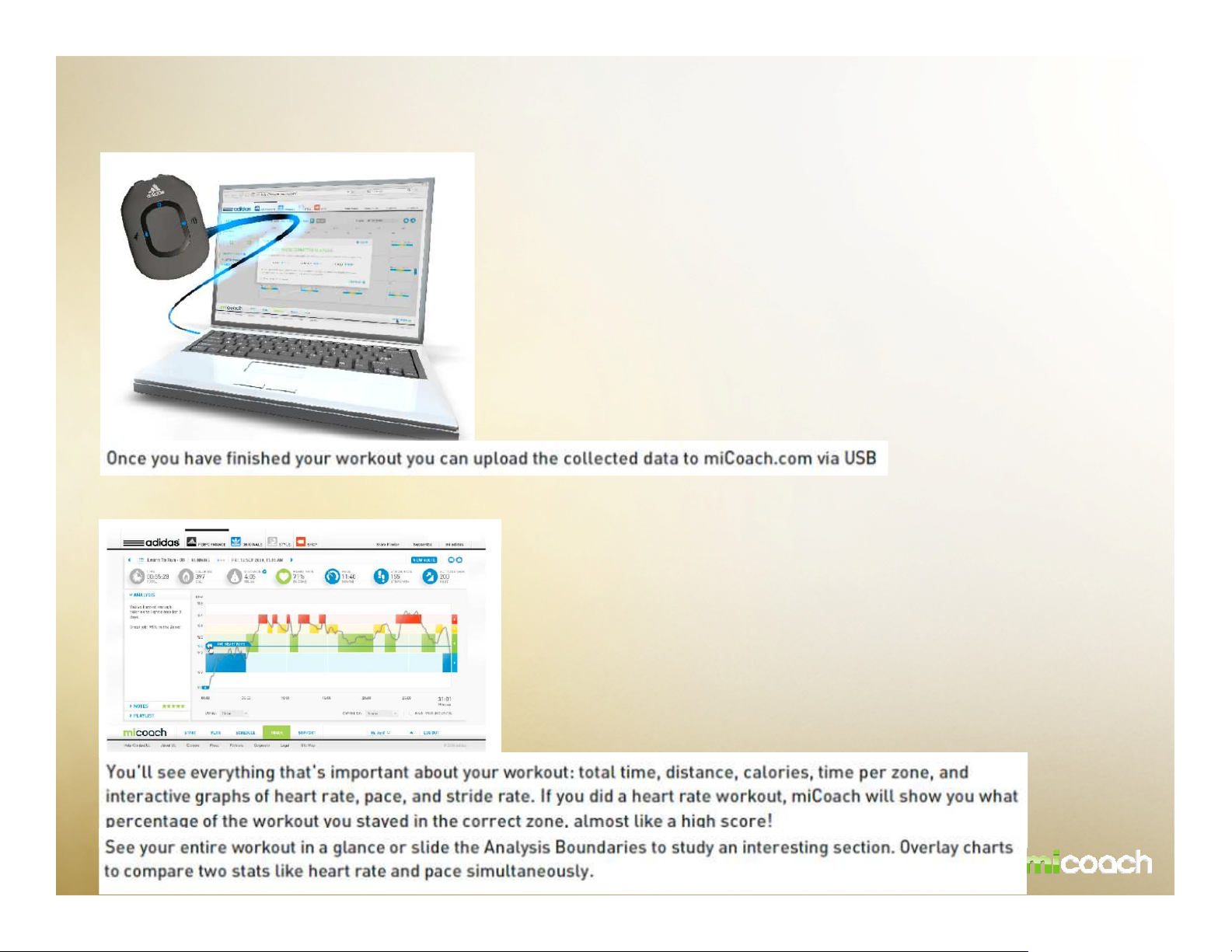
Pacer – CONSUMER JOURNEY – After the workout
2
Page 21

TECHNICAL SPECIFICATION MICOACH PACER
General Specifications
Size: 56 mm x 41 mm x 16.75 mm
Weight: 22.9g
Attachment Method: Clips to workout apparel or MP3 holder via clip on back of unit
User Interface: 4 buttons (3 front, one top), 1 Slide switch (top)
Audio Interface: 1/8” stereo headphone jacks (TRS connector)
Power: Rechargeable 125mAh lithium polymer battery
Battery Life: 10 hours on before recharging
Sensor Communication link: ANT+TM protocol to HRM and SDM
RF Frequency: 2.4GHZ
Sensor Com. Range: >2.5 m
Data Received: Averaged BPM, and stride rate data from ANT+TM transmitter
PC Connection: 1/8” TRS to USB series “A” connection (cord included)
Operating temperature: -15 to 40 C
Non operating temperature: <-18 or >45C
Relative humidity: 10 – 85 % non condensing
Maximum operating altitude: TBD
Battery and power
Charging via USB
Battery charged in 2 hours
Note - Consumer Facing info:
be a bit more selective on what needs to go into technical specs in the user doc.
Page 22

TECHNICAL SPECIFICATION MICOACH HRM
HRM Module General Specifications
Ref Size: 63 mm (L) x 38 mm (W) x 10.5 mm (H)
Weight: 19.5 g (no strap)
User-interface: Auto on/off
Power: user-replaceable CR2032 lithium battery
Battery life: >1.000 hours active life (2.8 years @ 1 hr/day usage at 20oC)
Communication link: ANT+™ protocol
RF frequency: 2.4 GHz
Communication Range: > 2.5 m
Water Resistance : 1m
*The adidas HRM is not designed to treat or diagnose any medical condition
Note - Consumer Facing info:
be a bit more selective on what needs to go into technical specs in the user doc.
Page 23

TECHNICAL SPECIFICATION MICOACH SDM
General Specifications
Ref In-Shoe Size: 34 mm (L) x 23 mm (W) x 8 mm (H)
Total In-Shoe Weight: <8 g (including battery)
Ref Size with Shoe Clip: 45 mm (L) x 29 mm (W) x 13 mm (H)
Total Weight with Clip: <9 g (including battery)
Foot Pod Attachment Method: Attached to shoe using patented one-piece clip.
User-interface: Always-on (no buttons or LED)
Power: user-replaceable CR2032 lithium battery
Battery life: >6 months (at 20oC) extreme cold can effect battery life
Battery low power indication 1 month prior
Communication link: ANT+™ protocol
RF frequency: 2.4 GHz (unable to transmit in water environment)
Communication Range: > 2.5 m (dependent on receiver)
Message Rate: 2 Hz
Regulatory compliance FCC, IC, CE, ROHS
Sensor Technology: Dynastream patented SpeedMax technology
Calibrated speed/dist accuracy: Walk 97%, Jog 98%, Run 97%: median accuracy
Uncalibrated speed/dist accuracy: Walk 95%, Jog 95%, Run 95%: median accuracy
Tested Speed Range: 3.6 km/hr to 19.8 km/hr (2.2 mph to 12.3 mph)
Tested Pace Range: 16:40 min/km to 3:00 min/km (26:50 min/mi to 4:50 min/mi)
Instantaneous cadence accuracy: +/- 1 stride/min
Sensor Accuracy Range: 0oC to +40oC
Water resistance: 1m
Note - Consumer Facing info:
be a bit more selective on what needs to go into technical specs in the user doc.
Page 24

TECHNICAL SPEC MICOACH TEXTILE TRANSMITTER STRAP
Product Summary
Textile Transmitter Strap is a soft, flexible strap that is worn around the chest and must be used in
conjunction with the HRM device to collect accurate heart rate data.
General Specifications
Construction: Seamless press and bond design
Fabric Material: EUROJERSEY Sensitive fabric. PA and EA composition. Black
Electrode: Proprietary conductive material
Snap Life Expectancy: At least 800 snap on/off cycles
Snap Material: Stainless Steel
Washing: Hand rinse at 30 degrees Celsius. Sustains at least 30 rinses.
Weight: approximately 50g
Sizing: One size, adjustable: 580-840mm +/10mm (Medium – XL) Torso size 29 – 39 inches
Note - Consumer Facing info:
be a bit more selective on what needs to go into technical specs in the user doc.
Page 25
STATEMENTS
FCC
"Note: This equipment has been tested and found to comply with the limits for a Class B digital device
pursuant to part 15 of the FCC Rules. These limits are designed to provide reasonable protection against
harmful interference in a residential installation. This equipment generates, uses, and can radiate radio
frequency energy and if not installed and used in accordance with the instructions, may cause harmful
interference to radio communications. However, there is no guarantee that interference will not occur in a
particular installation. If this equipment does cause harmful interference to radio or television reception,
which can be determined by turning the equipment off and on, the user is encouraged to try to correct the
interference by one of the following measures:
* Reorient or relocate the receiving antenna
* Increase the separation between the equipment and receiver
* Connect the equipment into an outlet on a circuit different from that to which the receiver is connected
* Consult the dealer or an experienced radio/TV technician for help"
miCoach
"This device complies with part 15 of the FCC Rules. Operation is subject to the following two
conditions: (1) This device may not cause harmful interference, and (2) this device must accept any
interference received, including interference that may cause undesired operation.“
“Changes or modifications not expressly approved by the manufacturer could void the user’s authority to operate the equipment”.
“This product does not contain any user-serviceable parts. Repairs should only be made by an authorized adidas miCoach
center. Unauthorized repairs or modififififications could result in permanent damage to the equipment, and void your warranty
and your authority to operate this device under Part 15 regulations.”
Canadian Conformity
This Category II radio-communication device complies with Industry Canada Standard RSS-310.
Ce dispositif de radio-communication de catégorie II respecte la norme CNR-310 d'Industrie
Canada.
Page 26

WARRANTY INFORMATION
TBD.
Page 27

TIPS & TROUBLESHOOTING
TBD.
Page 28

SERVICE & SUPPORT
TBD.
Page 29

SAVETY & CLEANING
TBD.
Page 30

2009
 Loading...