

Page 1

quick start manual
Garmin Mobile
™
Page 2
Completing Software
➊
Installation
1. After downloading Garmin Mobile™, open the Garmin
Mobile application on your BlackBerry
2. To activate the software, enter the activation code.
Pairing your Phone with an
➋
®
device.
External GPS Receiver
If you receive a message prompting you to test your Bluetooth
GPS receiver, you need to pair your phone with an external
receiver using Bluetooth wireless technology to acquire
satellites.
With Garmin Mobile you can pair your BlackBerry with a
Garmin Bluetooth receiver or other brand (not all third party
Bluetooth receivers are supported).
1. Enable the Bluetooth component on your phone. This might
be in a menu called Settings, Bluetooth, Connections, or
Hands-free.
2. From your phone menu button, select
3. Select your receiver from the list.
4. Enter the passkey for your receiver. The passkey for Garmin
receivers is 1234.
NOTE: To obtain the passkey for third-party receivers,
refer to the product owner’s manual.
2 Garmin Mobile™ for BlackBerry® quick start manual
Add Device.
®
Acquiring Satellite Signals
➌
Open the Garmin Mobile application. Move to an open area,
out of parking garages, and away from tall buildings. Acquiring
satellite signals may take a few minutes.
Using Garmin Mobile
➍
Garmin Mobile allows you to nd a destination and then create
a route to it. You can also view trafc, weather conditions, and
fuel prices.
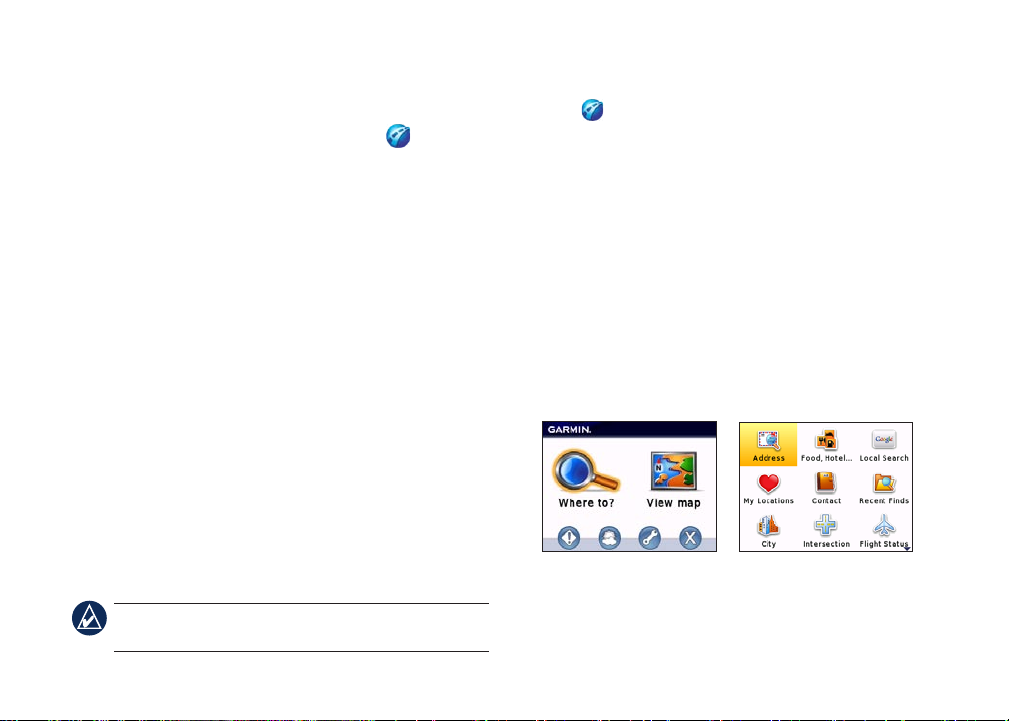
Where to?
The Where to? menu allows you to nd a destination using
one of the categories, such as address, food, lodging, fuel, and
attractions.
Main Menu Where to? Menu
Page 3
Finding an Address
1. Select Where to? > Address.
2. Select the state/region.
3. Enter the street number and street name, and then select
OK.
4. Select the appropriate address to open the information page.
5. Select
The map appears, and turn-by-turn directions are provided as
you drive.
Information Page Options
After selecting a location in the search results list, you have
several options:
•
•
•
•
•
•
•
Start Navigating to create a route to this location.
Start Navigating
Find Nearby
—create a route to this location.
—nd other places near this location.
Save—save this location to My Locations > Favorites.
View Map—view this location on a map.
View Trafc—view current trafc incidents near this
location.
View Weather—view current weather conditions at this
location.
Call—dial the location’s phone number.
Following the Route
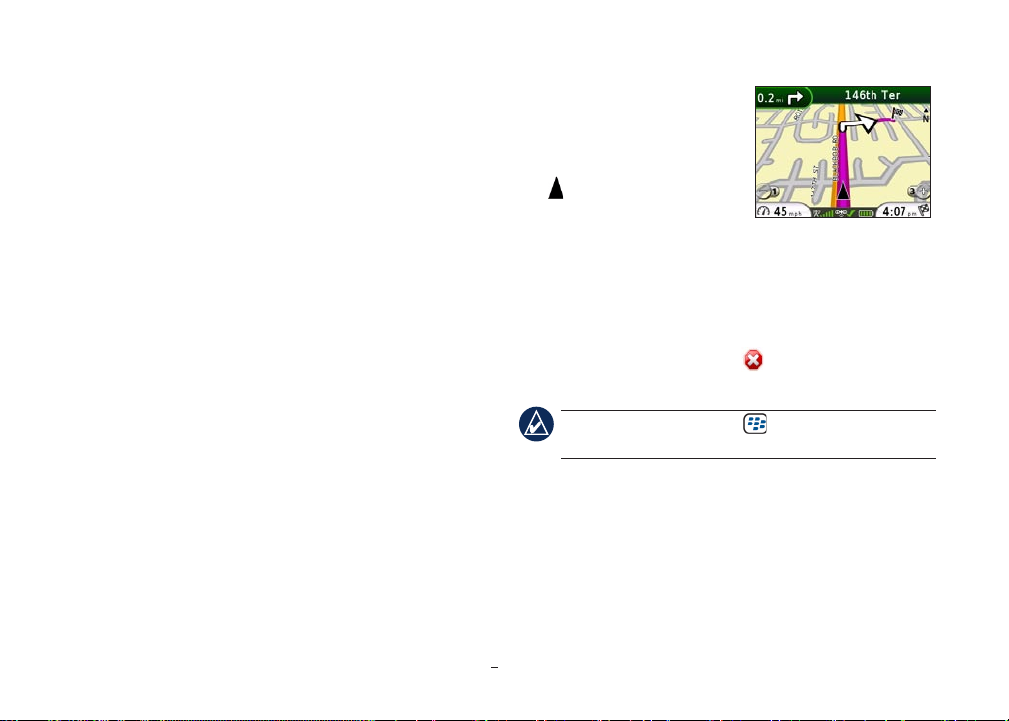
After you nd a location, select
Start Navigating to create a route
to it. The map appears with your
route indicated by a magenta line.
The position icon shows your
position on the map.
Directions appear at the top of the
screen. Your current speed and estimated arrival time appear at
the bottom of the screen. If you are not navigating, you current
speed and direction of travel appear at the bottom of the screen.
If you leave the map and want to return, select View map on the
main Garmin Mobile page. Select Stop to stop the active
route.
Finding a Destination
Garmin Mobile allows you to search a variety of categories,
such as restaurants and hotels.
1. Select Where to? > Food, Hotel….
2. Select a category (such as
Map While NavigatingMap While Navigating
TIP: Select the BlackBerry Menu key for a pop-up
menu with additional navigating options.
Fast Food), if desired.
as
Food) and a subcategory (such
Garmin Mobile™ for BlackBerry® quick start manual 3
Page 4

3. Select OK to display a list of all locations.
4. Select your destination.
Finding a Location by Spelling Its Name
If you know the name of the location you are searching for, you
can type it on the key pad.
1. Select Where to? > Food, Hotel… > Spell Name.
2. Type the name or letters contained in the name.
3. Select
4. Select your destination.
OK to display a list of all locations containing the
letters you have entered.
Finding a Location Near Another
Location
Use Find Nearby to nd places near a selected location. The
Finding a Location with Local Search
1. Select Where to? > Local Search.
2. Spell the name or category of your destination or select the
3. Select the location to open the detail information page.
Saving and Finding My Locations
You can use My Locations to save and quickly access favorite
locations. To save a location you have found, select Save on the
location information page.
To save your current location, select Where to? > My
Locations > Current Location.
To view your saved locations, select Where to? > My
Locations > Favorites.
following example explains how to nd a hotel, and then nd a
restaurant near that hotel.
1. Select Where to?, and nd your hotel.
2. From the information page, select
3. Select
Food, Hotel… > Food and nd a restaurant.
Find Nearby.
Using Garmin Mobile Manager
Use Mobile Manager to nd and save locations. Before you use
Mobile Manager, you must create an account.
1. From your phone, select Where to? > My Locations >
2. Enter a user name, and select
category of the destination.
Mobile Manager > Create Account.
OK. A password is generated
for you; write down the password.
4 Garmin Mobile™ for BlackBerry® quick start manual
Page 5
3. From your computer, go to http://mobile.garmin.com to
complete the registration and change your password.
4. From your phone, select
Mobile Manager to access your saved locations in Garmin
Mobile.
Where to? > My Locations >
Finding a Location Using Photo
Navigation
Panoramio™ provides pictures that include location information.
To view photos, select Where to? > Panoramio.
Finding an Address Using Contacts
Contact integration allows you to navigate to a location that is
stored in the BlackBerry phone book.
1. Select Where to? > Contact.
2. Select an entry from the phone book.
NOTE: If there is not an address already associated with
the entry, then you will be prompted to create one.
Viewing Your Recent Finds
You can quickly select a recently-found location by selecting
Where to? > Recent Finds.
Finding a City
1. Select Where to? > Cities.
2. Type at least the rst few letters of the city, and select
list of cities beginning with those letters is displayed in order
of population.
3. Select the city.
Garmin Mobile™ for BlackBerry® quick start manual 5
OK. A
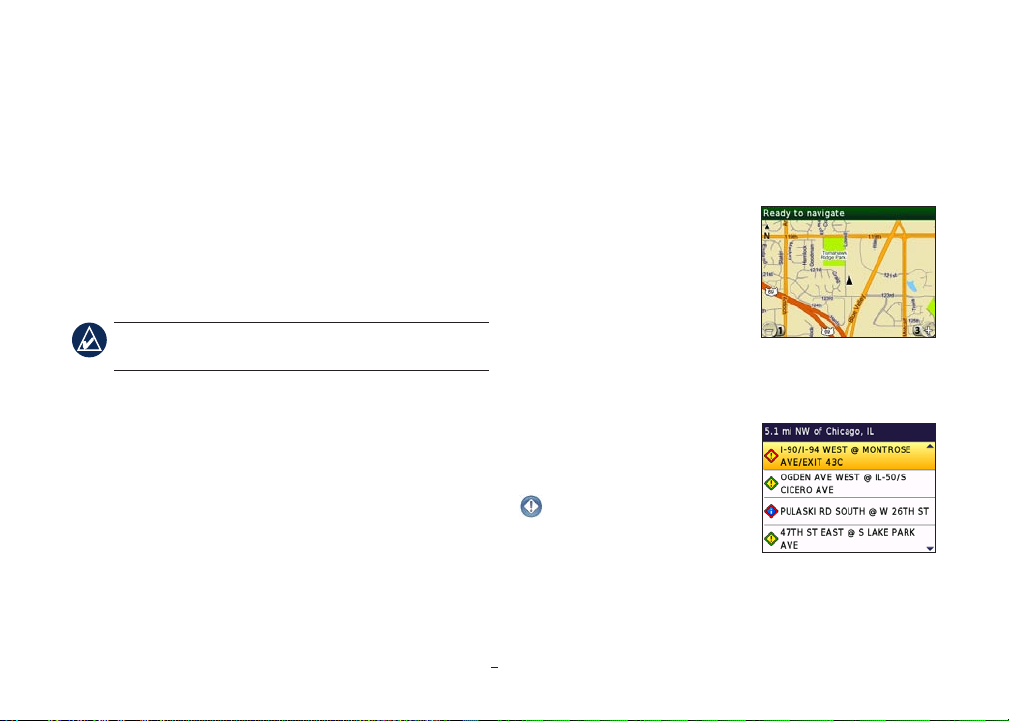
Viewing the Map
Select View map from the main
menu to view the map. Press 1
and 3 to zoom out and zoom in,
respectively.
Use the trackball to pan in any
direction. Alternatively, press 2,
4, 6, and 8 to pan up, left, right, and
down, respectively.
Viewing Trafc
To view trafc incidents near your
current location, select
Trafc from the Main Menu.
Select an incident to view details.
View Map View Map
TrafcTrafc
Page 6
Viewing Weather
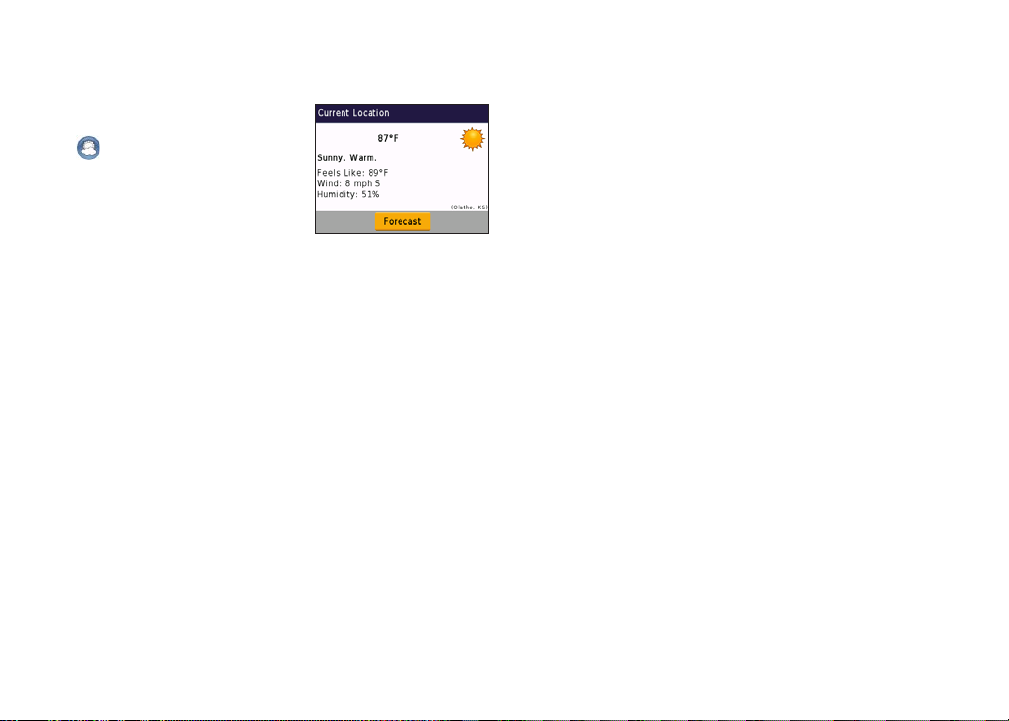
To view the weather conditions at
your current location, select
Weather from the Main
Menu. Select Forecast to view
the high and low temperatures for
your location for the next ve days.
Select a specic day to view a
description of the expected weather
for that day.
WeatherWeather
Incoming Calls and E-mails
If you choose to answer an incoming phone call while
navigating with Garmin Mobile, press the Answer key on your
phone. You will automatically return to the map page after
disconnecting your call.
If you want to ignore the call, press the Ignore key. The map
page automatically returns.
Your phone alerts you if there is an incoming e-mail. From the
map page, Garmin Mobile will continue navigating unless you
choose to check the message.
6 Garmin Mobile™ for BlackBerry® quick start manual
Tips and Contact Information
If you are having trouble connecting to the Internet, check the
Network Connections setting. From the Main Menu, select
Settings > Network Connections.
If you are having trouble connecting to the Internet in other
applications, check the Network settings for your BlackBerry
device.
Contact Garmin Product Support if you have any questions
while using Garmin Mobile. In the USA, go to www.garmin
.com/support, or contact Garmin USA by phone at (913) 397-
8200 or (800) 800-1020.
In the UK, contact Garmin (Europe) Ltd. by phone at 0808
2380000.
In Europe, go to www.garmin.com/support and click Contact
Support for in-country support information, or contact Garmin
(Europe) Ltd. by phone at +44 (0) 870.8501241.
Page 7
Warnings and Important Information
Failure to avoid the following potentially hazardous situations could result
in an accident or collision resulting in death or serious injury.
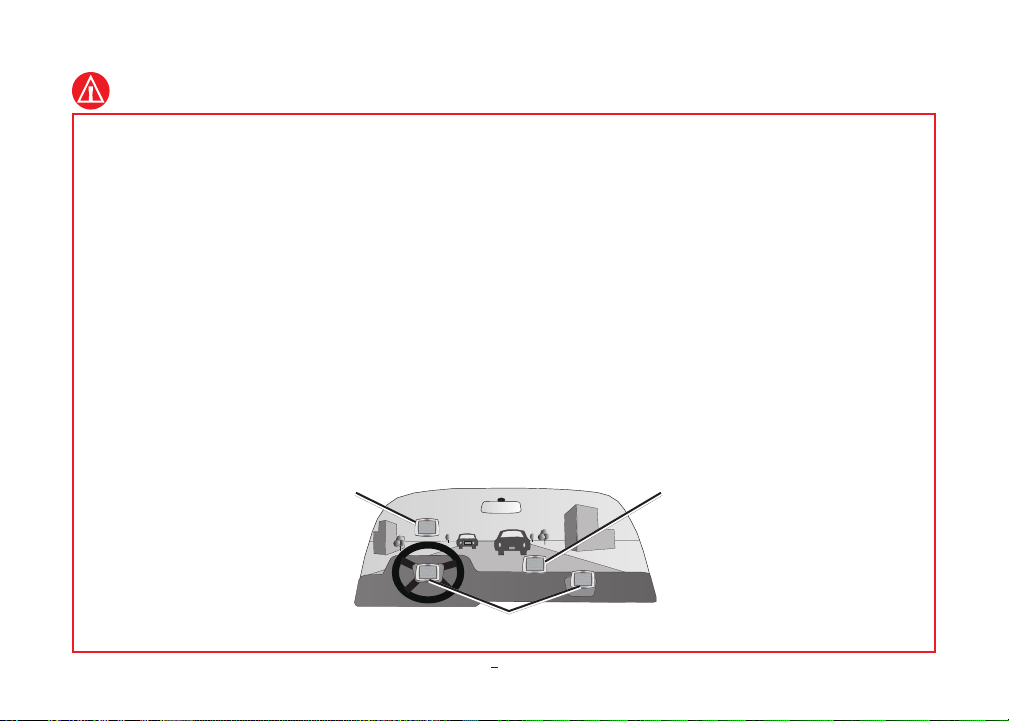
When installing your mobile phone in a vehicle, place the unit
•
securely so it does not obstruct the driver’s view of the road or
interfere with vehicle operating controls, such as the steering
wheel, foot pedals, or transmission levers. Do not place in front
of or above any airbag. (See diagram.)
When navigating, carefully compare information displayed on
•
your mobile device to all available navigation sources, including
information from street signs, visual sightings, and maps. For
safety, always resolve any discrepancies or questions before
continuing navigation and defer to posted road signs.
•
•
Always operate the vehicle in a safe manner. Do not become
distracted by your mobile phone while driving, and always
be fully aware of all driving conditions. Minimize the amount
of time spent viewing your mobile phone’s screen while driving
and use voice prompts when possible. Do not input destinations,
change settings, or access any functions requiring prolonged use
of your mobile phone’s controls while driving. Pull over in a
safe and legal manner before attempting such operations.
The navigation software is designed to provide route
suggestions. It is not designed to replace the need for driver
attentiveness regarding road closures or road conditions, trafc
congestion, weather conditions, or other factors that may affect
safety while driving.
Do not mount where
driver’s eld of
vision is blocked.
Do not mount in front of an airbag eld of deployment.
Garmin Mobile™ for BlackBerry® quick start manual 7
Do not place
unsecured on
the vehicle
dashboard.
Page 8

MAP DATA INFORMATION: One of the goals of Garmin is to provide
customers with the most complete and accurate cartography that is available
to us at a reasonable cost. We use a combination of governmental and private
data sources, which we identify in product literature and copyright messages
displayed to the consumer. Virtually all data sources contain some inaccurate or
incomplete data. In some countries, complete and accurate map information is
either not available or is prohibitively expensive.
End-User License Agreement
IMPORTANT – READ THESE TERMS AND CONDITIONS OF THIS ONETIME PURCHASE END USER LICENSE AGREEMENT (“AGREEMENT”)
CAREFULLY BEFORE PURCHASING, USING OR OTHERWISE
SUBSCRIBING TO GARMIN MOBILE™ SOFTWARE, TECHNOLOGY,
AND/OR DATA PLANS (“GARMIN MOBILE APPLICATION”) FOR
YOUR BLACKBERRY DEVICE (“DEVICE”). BY PURCHASING,
SUBSCRIBING TO, DOWNLOADING, INSTALLING, USING, OR
OTHERWISE ACCESSING THE GARMIN MOBILE APPLICATION, YOU
ACKNOWLEDGE THAT YOU HAVE READ THIS AGREEMENT, THAT
YOU UNDERSTAND IT, THAT YOU AGREE TO BE BOUND BY ITS
TERMS AND CONDITIONS, AND THAT YOU ARE AT LEAST 18 YEARS
OF AGE. IF YOU DO NOT AGREE TO THE TERMS AND CONDITIONS OF
THIS AGREEMENT, DO NOT LOAD THE GARMIN MOBILE SOFTWARE
ONTO YOUR DEVICE. DURING THE GARMIN MOBILE APPLICATION
SUBSCRIPTION PROCESS, YOU MAY ALSO BE REQUIRED TO READ
AND ACCEPT A SEPARATE END-USER LICENSE AGREEMENT WITH
TRAFFIC.COM, A THIRD-PARTY DATA PROVIDER TO THE GARMIN
MOBILE APPLICATION.
Grant of License: Subject to the terms and conditions set forth herein, Garmin
International, Inc. and/or its afliated companies (collectively “Garmin”) grants
you a non-transferable, non-exclusive, and non-sub-licensable limited right and
license to view, use, and access the Garmin Mobile Application to (i) retrieve
maps, directions, and turn-by-turn navigation data for North America, text,
images, graphics, audio, and other images, and (ii) receive other third-party
content data, text, images, graphics, photographs, audio, video, and other images
from non-Garmin data providers, including such data as fuel price data, weather
data, hotel data, and/or trafc data (hereinafter “third-party content data”) for
display on your Device, solely for your informational purposes and for your
immediate, private, individual, and non-commercial use provided you retain all
copyright and proprietary notices contained in the navigation data and/or thirdparty content data applicable to either Garmin or any third-party provider.
This One-Time Purchase subscription applies to only one (1) Device. During the
rst twelve (12) months of your subscription, if your original Device becomes
non-operational you may be permitted, at Garmin’s sole discretion, to make
a one-time transfer of the Garmin Mobile Application to another supported
Blackberry Device. To make a request for such transfer, please contact the
Garmin Customer Service department via http://www.garmin.com/garmin/cms/
site/us/support/supportcontact. No transfers are permitted, for any reason, after
twelve (12) months from the purchase of your subscription. Although software
xes, updates and patches are included in the One-Time Purchase, a free upgrade
to the next version(s) of Garmin Mobile is not.
All rights not expressly stated herein are reserved by Garmin, and Garmin
disclaims any and all implied licenses. Without limiting the foregoing, you agree
not to: (i) reverse engineer, decompile, reverse compile, create compilations or
derivative works, translate, adapt, or disassemble the Garmin Mobile Application
or any part thereof, including the third-party content data; (ii) copy or reproduce
the Garmin Mobile Application or any part thereof, including the third-party
content data, in any form; (iii) publish, display, disclose, sell, rent, lease, store,
loan, distribute, publicly display or perform, co-brand, frame, or permit third
parties to link to the Garmin Mobile Application or any part thereof, including
the third-party content data; (iv) assign, sublicense, convey, transfer, pledge
as security, or otherwise encumber the rights and licenses granted hereunder;
(v) use the Garmin Mobile Application in any fashion that may infringe any
8 Garmin Mobile™ for BlackBerry® quick start manual
Page 9

patent, copyright, trademark, trade secret, or any other intellectual property or
proprietary right of Garmin, its third-party data providers, or any other thirdparty; (vi) directly or indirectly use, broadcast, or distribute the Garmin Mobile
Application in connection with a television, radio, web, telephone, or telematics
application without the specic written approval of Garmin; (vii) provide any
portion of the Garmin Mobile Application to a government agency; or (viii) enter
into any agreement with any third-party that in any way restricts, prevents, or
hinders the ability of Garmin to provide to such third-party the Garmin Mobile
Application or any other product or service made available by Garmin from time
to time.
Data Plan Fees: You are responsible for any applicable charges and fees
associated with any data plan fees or other subscription charges or fees of any
kind whatsoever that may be required by your carrier to access the Garmin
Mobile Application.
Ownership of Application: You acknowledge and agree that Garmin owns
all right, title, and interest in or, if applicable, licenses to the Garmin Mobile
Application, including, but not limited to, all trademarks, data, and content,
except to the extent any such third-party content data is owned by the respective
third-party data provider. Any reference to products, services, processes,
hypertext links to third parties, or other data by trade name, trademark,
manufacturer, supplier, or otherwise does not necessarily constitute or imply
its endorsement, sponsorship or recommendation by Garmin or its licensors.
Product and service information are the sole responsibility of each individual
vendor.
Term: The One-time Purchase term shall mean the useful life of the Garmin
Mobile Application or until otherwise terminated in accordance with the
terms and conditions of this Agreement (“Term”). Garmin may terminate this
Agreement for any reason, including, but not limited to, if Garmin nds that you
have violated any of the terms of this Agreement. In addition, this Agreement
shall terminate immediately upon the termination of the agreement between
Garmin and any third-party from whom Garmin licenses third-party content data
for use as part of or in the Garmin Mobile Application. All provisions relating
to condentiality, indemnity, proprietary rights, and non-disclosure shall survive
the termination of this Agreement. All other rights and obligations of the parties
shall cease upon termination including, but not limited to, all licenses granted
hereunder.
Condentiality: At all times during the Term and thereafter, you shall keep
condential and not disclose, directly or indirectly, and shall not use for your
benet or any other individual or entity any Condential Information of Garmin
or any of its third-party data providers. “Condential Information” means any
trade secrets or condential or proprietary information whether written, digital,
oral, or other form which is unique, condential, or proprietary to Garmin or
its third-party data providers, including, but not limited to, the Garmin Mobile
Application, and any other materials or information related to the business or
activities of Garmin which are not generally known to others engaged in similar
businesses or activities. You shall return to Garmin any of its Condential
Information upon request and/or upon termination of this Agreement.
Restricted rights: You agree not to export or re-export the Garmin Mobile
Application or its Host Product to any country in violation of the export control
laws of the United States of America.
Indemnity: You agree to indemnify, defend and hold Garmin and its licensors
and suppliers (including, but not limited to, their respective assignees,
subsidiaries, afliated companies and their respective ofcers, directors,
employees and shareholders, agents and representatives) harmless from and
against any and all liability, loss, injury, demand, action, cost, expense, or claim
of any kind or character, including, but not limited to, attorneys’ fees, arising
out of or in connection with your use of or subscription to the Garmin Mobile
Application.
Limited Warranty: This Garmin Mobile Application (excluding the map
data and other third-party content data) is warranted to perform substantially
as described in the product documentation for one (1) year from the date of
purchase. Within this period, Garmin will, at its sole option, repair or replace
Garmin Mobile™ for BlackBerry® quick start manual 9
Page 10

the Application. Such repairs or replacement will be made at no charge to you
provided that you shall be responsible for any transportation cost. This warranty
does not cover failures due to abuse, misuse, accident or unauthorized alteration
or repairs.
The Garmin Mobile Application is intended to be used only as a travel aid and
must not be used for any purpose requiring precise measurement of direction,
distance, location or topography. GARMIN MAKES NO WARRANTY AS
TO THE ACCURACY OR COMPLETENESS OF MAP DATA OR OTHER
THIRD-PARTY CONTENT IN THE APPLICATION.
THE WARRANTIES AND REMEDIES CONTAINED HEREIN ARE
EXCLUSIVE AND IN LIEU OF ALL OTHER WARRANTIES, WHETHER
EXPRESS, IMPLIED, STATUTORY, OR ARISING FROM TRADE USAGE
OR COURSE OF CONDUCT, INCLUDING, BUT NOT LIMITED TO,
ANY IMPLIED WARRANTIES OF MERCHANTABILITY, FITNESS FOR
A PARTICULAR PURPOSE, OR NON-INFRINGEMENT AND OTHER
EXPRESS OR IMPLIED WARRANTIES OF ACCURACY, COMPLETENESS,
“REAL-TIME” INFORMATION, TITLE OR ANY OTHER TYPE OF
WARRANTIES RELATING TO THE GARMIN MOBILE APPLICATION OR
ITS PERFORMANCE HEREUNDER.
Limitation of Liability: YOU ASSUME ALL RESPONSIBILITY AND
RISK FOR THE USE OF THE GARMIN MOBILE APPLICATION, AND
GARMIN DISCLAIMS ALL LIABILITY FOR ANY LOSS, INJURY,
OR DAMAGE RESULTING FROM USE OF THE GARMIN MOBILE
APPLICATION AND ANY THIRD-PARTY DATA OR CONTENT. IT IS
YOUR RESPONSIBILITY TO USE THE GARMIN MOBILE APPLICATION
PRUDENTLY AND TO VISUALLY VERIFY STREETS, ROADS, ROAD
SIGNS, DIRECTIONS, WEATHER CONDITIONS, AND TRAFFIC
CONDITIONS. IN NO EVENT SHALL GARMIN OR ITS SUPPLIERS,
INCLUDING THIRD-PARTY DATA PROVIDERS, BE LIABLE TO YOU
OR ANY OTHER PARTY FOR ANY COMPENSATORY, INDIRECT,
INCIDENTAL, SPECIAL, OR CONSEQUENTIAL DAMAGES (INCLUDING,
WITHOUT LIMITATION, INDIRECT, DIRECT, SPECIAL, PUNITIVE, OR
EXEMPLARY DAMAGES FOR LOSS OF BUSINESS, LOSS OF PROFITS,
BUSINESS INTERRUPTION, OR LOSS OF BUSINESS INFORMATION)
ARISING OUT OF THE USE OF OR INABILITY TO USE THE GARMIN
MOBILE APPLICATION AND ANY THIRD-PARTY DATA OR CONTENT,
EVEN IF GARMIN HAS BEEN ADVISED OF THE POSSIBILITY OF
SUCH DAMAGES. SUBJECT TO THE FOREGOING, GARMIN’S AND
ITS SUPPLIERS’ TOTAL AGGREGATE LIABILITY WITH RESPECT
TO ITS OBLIGATIONS UNDER THIS AGREEMENT OR OTHERWISE
WITH RESPECT TO THE GARMIN MOBILE APPLICATION SHALL NOT
EXCEED $1.00. SOME STATES AND COUNTRIES DO NOT ALLOW THE
EXCLUSION OF INCIDENTAL OR CONSEQUENTIAL DAMAGES, SO THE
ABOVE LIMITATIONS MAY NOT APPLY TO YOU.
Miscellaneous: This Agreement constitutes the entire understanding and
agreement of the parties (except for any separate end-user license agreements
required by Garmin’s third-party data providers, which shall be read in
conjunction with this Agreement), and supersedes all prior and contemporaneous
understandings and agreements, whether written or oral, with respect to its
subject matter. No delay or failure by Garmin to exercise or enforce at any
time any right or provision hereof will be considered a waiver thereof. No
single waiver will constitute a continuing or subsequent waiver. No waiver,
modication or amendment of any provision hereof will be effective against
Garmin unless it is in a signed writing by Garmin. You may not assign your
rights or obligations hereunder (including as a change of control) without the
prior written consent of Garmin. Subject to the foregoing, this Agreement will
bind and inure to the benet of the successors and permitted assigns of the
parties. This Agreement shall be governed and construed in all respects by the
laws of the State of Kansas, without regard to principles of conict of laws and
without application of the Uniform Computer Information Transaction Act. The
parties agree that the exclusive jurisdiction and venue of any dispute amongst the
parties shall be entered in the state or federal courts within the State of Kansas,
and each of the parties hereby waives any right to a trial by jury. If any provision
10 Garmin Mobile™ for BlackBerry® quick start manual
Page 11

of this Agreement or the application thereof to any party or circumstance is
held to be invalid, illegal, or unenforceable in any respect, that provision to the
extent permitted by law (not otherwise) shall be severed from this Agreement
and shall not affect the remainder hereof, and the parties agree to substitute for
such provision a valid provision which most closely approximates the intent
and economic effect of such severed provision. The parties to this Agreement
are independent contractors. Garmin shall not be liable to you for a failure to
perform any of its obligations under this Agreement during any period in which
such performance is delayed due to circumstances beyond its reasonable control.
All notices hereunder must be in writing and mailed by certied mail, return
receipt requested, or by prepaid courier service, or by facsimile with receipt
conrmed by telephone, to each party’s address.
Garmin Mobile™ for BlackBerry® quick start manual 11
Page 12
Garmin® and the Garmin Logo are trademarks of Garmin Ltd. or its subsidiaries, registered in the USA and other countries. Garmin Mobile™ is a
trademark of Garmin Ltd. or its subsidiaries. These trademarks may not be used without the express permission of Garmin. Google™ and Panoramio
™
are trademarks of Google Inc. The Bluetooth® word mark and logos are owned by the Bluetooth SIG, Inc. and any use of such marks by Garmin
is under license. Other trademarks and trade names are those of their respective owners. The RIM and BlackBerry device families of related marks,
images, and symbols are the exclusive properties of and trademarks or registered trademarks of Research In Motion Limited—used by permission.
© 2008 Garmin Ltd. or its subsidiaries
Garmin International, Inc.
1200 East 151st Street, Olathe, Kansas 66062, USA
Garmin (Europe) Ltd.
Liberty House, Hounsdown Business Park, Southampton, Hampshire, SO40 9RB UK
Garmin Corporation
No. 68, Jangshu 2nd Road, Shijr, Taipei County, Taiwan
www.garmin.com
August 2008 Part Number 190-00981-01 Rev. A Printed in Taiwan
 Loading...