

Page 1
SERVICE MANUAL SUPPLEMENT
CAUTION
WARNING TO SERVICE
TECHNICIANS
PRECAUTIONS TO BE OBSERVED BEFORE AND DURING
SERVICING TO AVOID POSSIBLE EXPOSURE TO
EXCESSIVE MICROWAVE ENERGY
(a) Do not operate or allow the oven to be operated with the door open.
(b) Make the following safety checks on all ovens to be serviced before activating the magnetron or other
microwave source, and make repairs as necessary:
(1)Interlock operation, (2) proper door closing, (3) seal and sealing surfaces (arcing, wear, and other
damage), (4) damage to or loosening of hinges and latches, (5) evidence of dropping or abuse.
(c) Before turning on microwave power for any service test or inspection within the microwave generating
compartments, check the magnetron, wave guide or transmission line, and cavity for proper alignment,
integrity, and connections.
(d) Any defective or misadjusted components in the interlock, monitor, door seal, and microwave generation
and transmission systems shall be repaired, replaced, or adjusted by procedures described in this manual
before the oven is released to the owner.
(e)(i) A microwave leakage check to verify compliance with the Federal performance standard should be
performed on each oven prior to release to the owner. (For U.S.A)
(e)(ii) A microwave leakage check to verify compliance with the Canadian Regulation, HEALTH AND WELFARE,
SOR/79-920 should be performed on each oven prior to release to the owner. (For CANADA)
See the Service Manual of EM-C180US(SM-640179)
except the items described in this Service Manual.
PRODUCT CODE NO. 437-453-00
for Model EM-C180
Microwave Oven
FORM # EM-C180 (02/05)
Page 2
CAUTION
For microwave energy emission
On every service call. A check for micro-
wave energy emission must be made
according to the following manner.
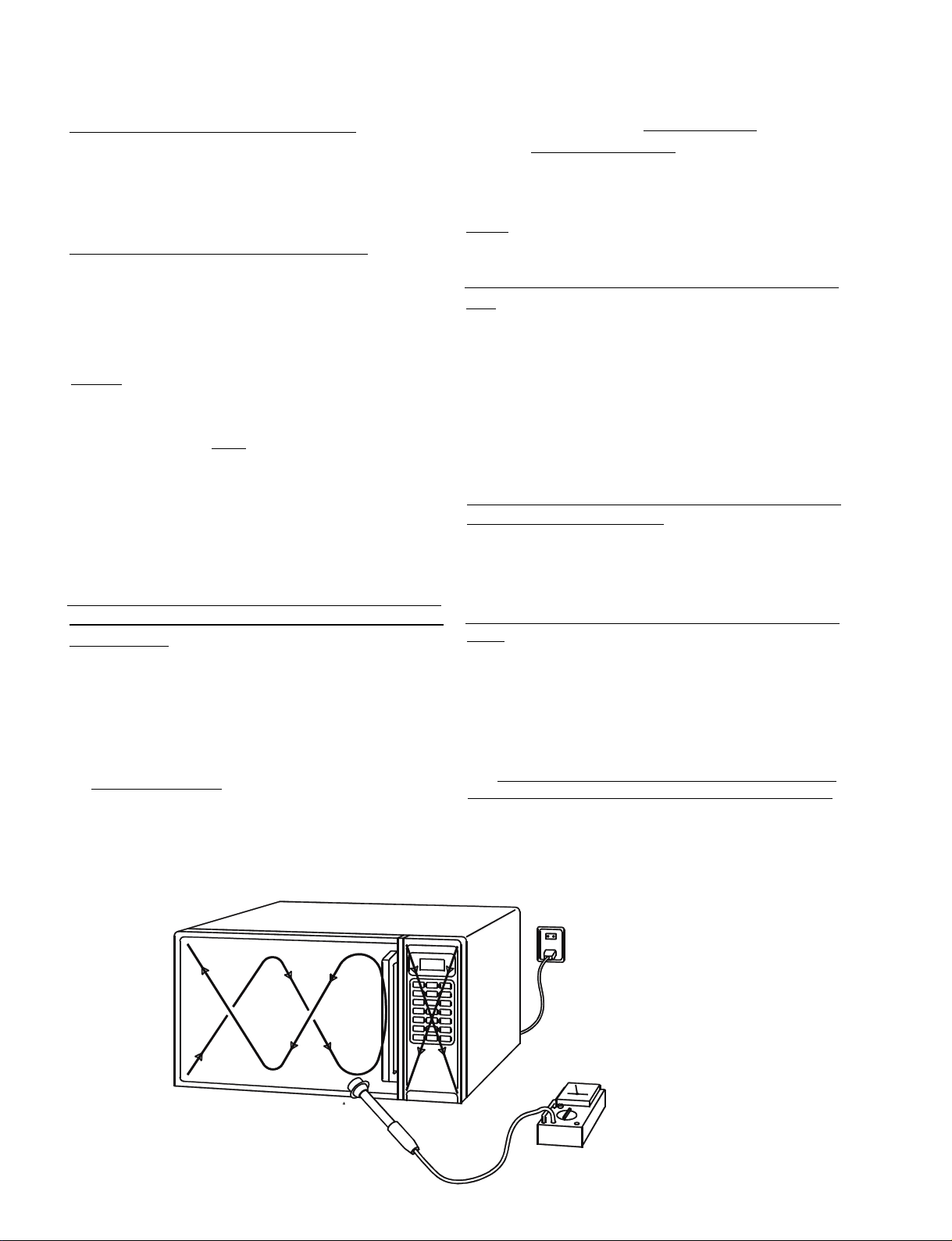
Measurement of energy emission
In the area emitting the highest reading, switch the
meter to SLOW RESPONSE and take a reading for
minimum of three (3) seconds. We recommended the
pattern outline shown below when the door surface is
surveyed.
NOTE: Periodically check to be sure that the probe tip
is not worn or dirty.
Measurement must be made with the microwave oven
operating at its maximum output and containing a load
of 275±15 milliliters of tap water initially at 20°±5°
celsius (68±9°F) placed within the cavity at the center.
NOTE:The water container m ust be a 600 milliliter bea-
ker and made of an electrically none conductive material such as glass or plastic.
The cook tray must be in place when measuring
emission.
A properly operating door and seal assembly will normally register emission no greater than 4 mW/cm2 to
allow for measurement uncertainty with the cooking
shelf or tray in place.
All repairs must be performed in such a
manner that microwave energy emission
is minimal.
Follow the instructions supplied with the detector being used and perform an R.F. emission test around the
door front, and all edges and vent of the outer case.
The cabinet (wrapper) must be in place and the oven
fully assembled.
When performing an emission survey, with the meter
on FAST RESPONSE, the movement of the detector
probe shall not exceed one (1) inch per second.
The following U.S. standard applies to microwave ovens:
21 CFR 1030.10, Perf ormance Standard f or Microw a v e
Ovens.
It requires that the power density of the microwave
radiation emitted by a microwave oven shall not exceed five (5) milliwatts per square centimeter at any
point 5 centimeters (about 2 inches) or more from the
external surface of the oven.
All microwave ovens exceeding the emission level of 4
mW/cm2 must be reported to Dept. of Service for microwave ovens and the manufacturer immediately.
The owner should be told not to use the microwave
oven until it has been repaired completely.
If a microwave oven is found to operate with the door
open, report to Dept. of Service, the manufacturer and
CDRH* immediately. Also tell the owner not to use the
oven.
*CDRH: Center for Device and Radiological Health.
The interlock monitor switch acts as the final safety
switch protecting the customer from microwave radiation. If the interlock monitor switch operates properly
and the door interlock switch fails, the fuse will blow.
If this happens, all interlock switches must be replaced.
The contacts of the interlock switches may be welded
together.
Page 3
- TABLE OF CONTENTS -
Adjustment Procedures.............................................1
Specifications............................................................ 2
Power output Measurement ......................................2
Precautions and Repair Service Tips .......................2
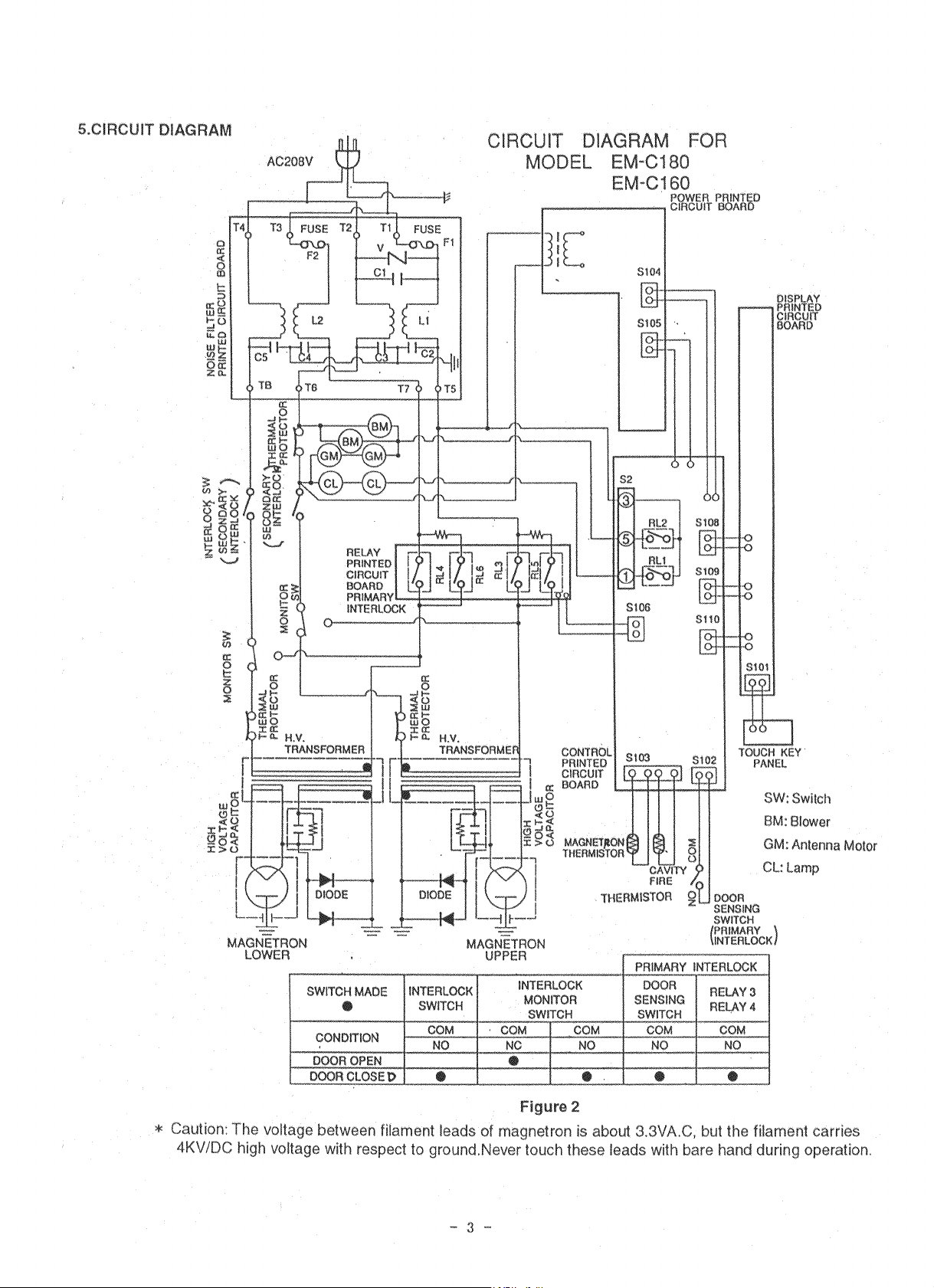
Circuit Diagram .........................................................3
1. ADJUSTMENT PROCEDURES
TO AVOID POSSIBLE EXPOSURE TO MICROWAVE
ENERGY LEAKAGE, THE FOLLOWING ADJUSTMENTS OF THE INTERLOCK SWITCHES SHOULD
BE MADE ONLY BY AUTHORIZED SERVICE PERSONNEL.
The service center should have the designated
detector to measure the microwave energy
leakage after the repair or adjustment.
NOTE: Detector to be used at the service center is
NARDA 8100, 8200 or the equivalent.
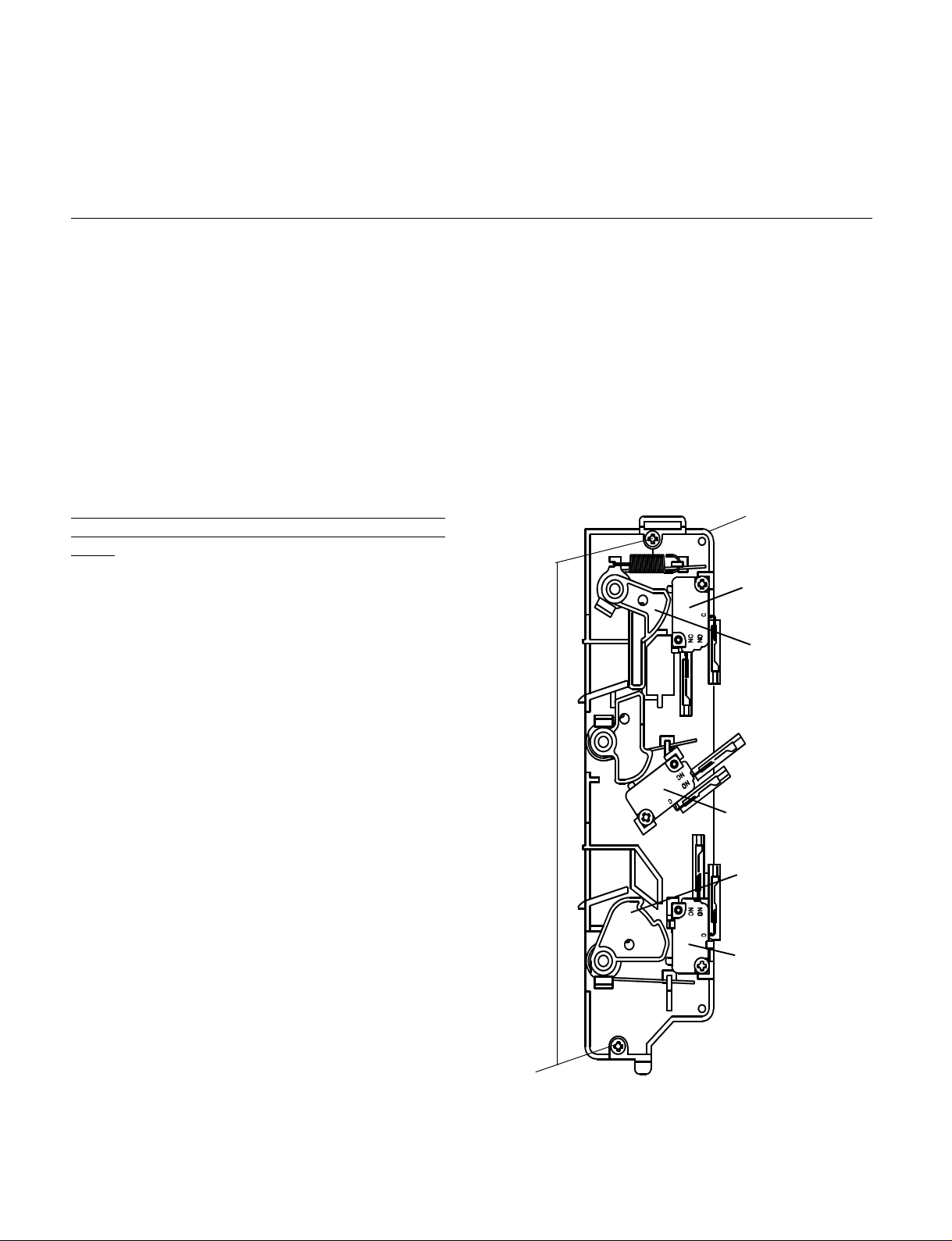
INTERLOCK SWITCH, INTERLOCK MONITOR
SWITCH AND DOOR SENSING SWITCH ADJUSTMENT
(Figure 1)
(1) Loosen 2 screws securing the lever stopper.
(2) Adjust the lever stopper position so that it is pushed
up and pulled backwards until there is zero gap
between the latch lever and the switch body on the
interlock switch. At the same time there is zero gap
between the latch lever and the switch body on the
door sensing switch when the door latch is securely
locked.
(3) Tighten the lever stopper screws securely.
(4) Make sure the interlock monitor switch closes
after the interlock switch opens when the door is
opened very slowly, according to “CHECKOUT
PROCEDURE FOR SWITCHES” on page 6.
(5) Make sure the interlock monitor switch opens
before the interlock switch closes when the door is
closed very slowly, according to CHECKOUT PRO-
CEDURE FOR SWITCHES” on page 6.
(6)(i) Make sure the microwave energy leakage should
be no greater than 4 mW/cm2 to allow to measure-
ment uncertainty when measured with a detector.
(All service adjustments must be made for mini-
mum microwa ve energy leakage readings .) (For US)
(6)(ii) Make sure the microwave energy leakage is
below the limit of 1 mW/cm2 (at 275cc water load),
5 mW/cm2 (at no load) and 5 mW/cm2 (at 275 cc
water load without cabinet) when measured with a
detector.
Test Procedures and Troubleshooting...............4•`10
Disassembly Instructions .............................. 11•`14
Exploded View and Pa rts List ........................ 15•`22
Overall Circuit Diagram.................................23•`25
(All service adjustments must be made for minimum
microwav e energy leakage readings .) (F or Canada)
NOTE: If the interlock monitor circuit operates and at
the same time the fuse blows with the door
open, be sure to replace the relay circuit board
, Interlock switch and monitor switch.
Lever stopper
Interlock monitor
switch
Latch Lever
Interlock
switch (Secondary
interlock switch)
Latch Lever
Door sensing
switch
(Primary interlock
switch)
Screws
Figure 1
- 3 -
Page 4

2.SPECIFICATIONS
Microwave output ................1,800W to 180W
Frequency ...........................2,450MHz
Power supply.......................208V, 60Hz
Rated current ......................13 Amp.
Safety Device......................
Thermal protector(Magnetron) 150°C(270°F)Open
(Thermostat) 80°C(144°F)Close
Thermistor (Magnetron) 200°C(360°F) Open
108°C(194°F)Close
Thermistor(Duct)................120°C(216°F) Open
Fuse (Cartr idge Type) .................250V 10A
Micro switch, Relay
Interlock Switch
Interlock monitor Switch
Door sensing Switch and
Relay RL-3 and 4
Max. input time....................Electronic Digital, up to
Manual
Overall Dimensions........422(W)x540(D)x335(H) mm
Oven cavity size ............330(W)x330(D)x230(H) mm
Effective Capacity of Oven Cavity.........19.1liters
Net weight ...........................32Kg
3. POWER OUTPUT MEASUREMENT
NOTE: The power output specification, 1800W on this
model is measured with IEC measurement. The power
output is measured with two(2) liters water is equivalent to 1800W in measurement with IEC, when measured with the following power output.
(1)1. Fill two beakers, one liter of tap water respec tively
2. Use an accurate thermometer and measure each
water temperature respectively.
(2) Place beakers side by side in center of the
ceramic tray.
(3) Close the door,set the “TIME” for two minutes.
Touch the “START” key and heat the water for
exactly two minutes.
(4)Take the beakers out, immediately stir the water
and measure the water temperatures respectively.
(5) Calculate the temperature rise of water in each
beaker . Then calculate the average value of the two
temperature rises.( Ģt)
(6) The teperature rise shall be in the following range;
Average Temp. Rise
Minimum 23.1°C
Maximum 28.3°C
Po w er output is affected by the line voltage under load.
(7) For correct Power output measurement, the line
voltage under load must be 208±2Volts.
4.PRECATIONS AND REPAIR SERVICE TIPS
PRELIMINARY
10min./Memory 30min.
A. SINCE NEARLY 4,000 V OLTS EXISTS IN SOME
CIRCUITS OF THIS MICROWAVE OVEN, REPAIRS SHOULD BE CARRIED OUT WITH
GREAT CARE.
B. TO AVOID POSSIBLE EXPOSURE TO MICRO-
WAVE ENERGY LEAKAGE, THE FOLLOWING
PRECA TIONS MUST BE TAKEN BEFORE SERVICING.
(1) Before the power is applied.
(a) Open and close door several times to make
sure the interlock switch, door sensing switch
and interlock monitor switch operate properly.
(Listen for the clicking sound from switches.)
Make sure the interlock monitor switch is
closed after the interlock switch and door sens-
ing are open when the door is opened.
(See pages 1 and 6)
(b) Make sure the perf orated screen and the choke
dielectric of the door are correctly mounted.
(2) After the power is applied.
(a) Open and close the door to see if the interlock
mechanism operates properly.
(b) Check microwave energy leakage with a leak-
age detector and confirm the energy leakage
is below 5mW/cm
2
(3) Do not operate the unit until it is completely
repaired of any of the following conditions.
(a) Door is not closed firmly against the cavity
front.
(b) The hinge is broken.
(c) The choke dielectric or the door seal is dam-
aged.
(d) The door is bent or warped, or there is any
other visible damage to the oven that may
cause microwave energy leakage.
Note: Always keep the seal clean.
(e) Make sure that there are no defective parts in
the interlock mechanism.
(f) Make sure that there are no defective par ts in
the microwave generating and transmission
assembly. (especially wave guide).
(4) The following items should be checked after
the unit is repaired.
(a) The interlock monitor switch is connected cor-
rectly and firmly.
(b) The magnetron gasket on the magnetron is
properly positioned.
(c) Waveguide and oven cavity are intact. (No
leakage of microwave energy).
(d) The door can be properly closed and the safety
switches work properly.
(e) The oven must be stopped when the door is
opened or the time is up.
The ov en must not be operated with any of the abo v e
components removed or bypassed.
- 2 -
Page 5
Page 6
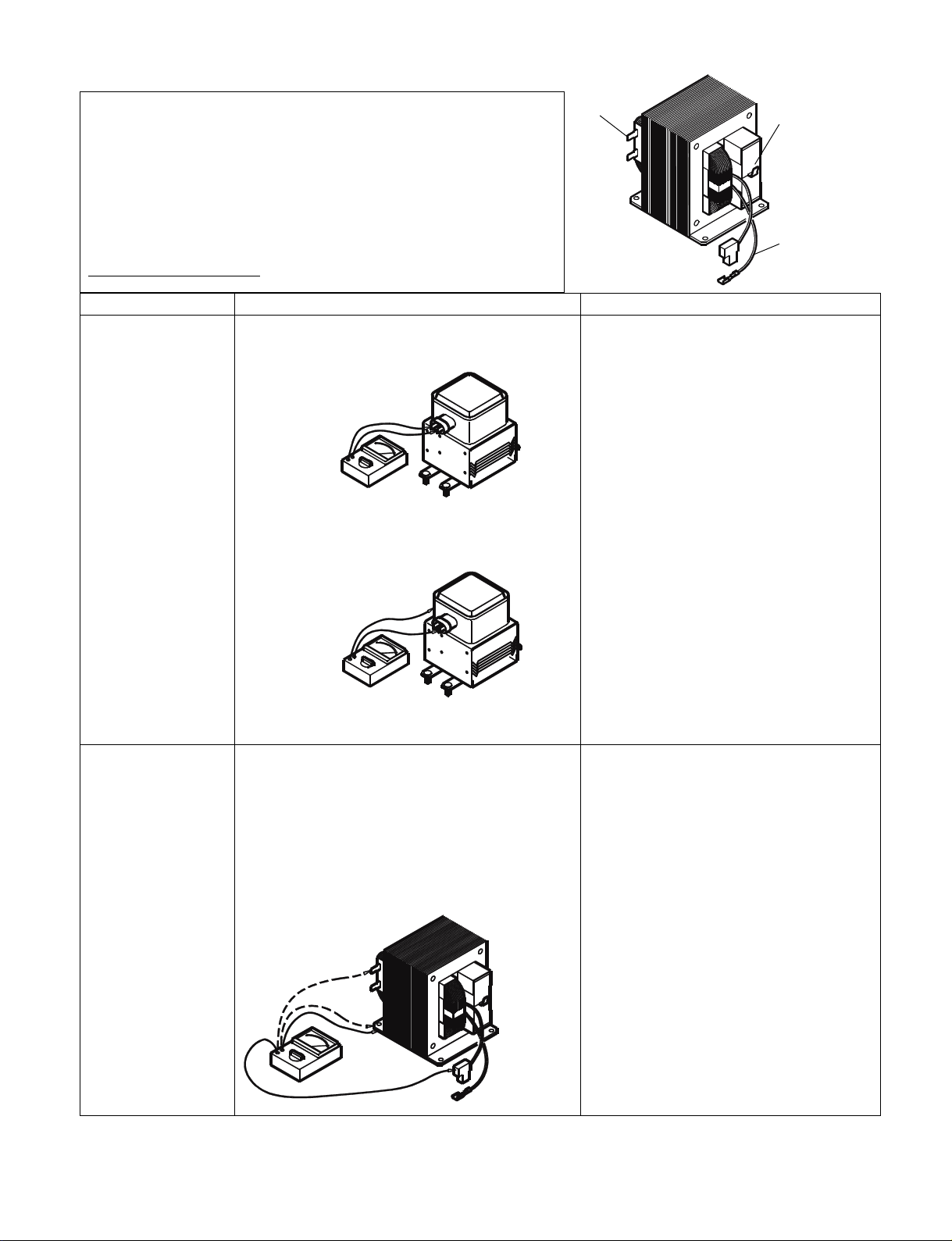
6. TEST PROCEDURES AND TROUBLESHOO TING
CAUTION
-DISCONNECT THE POWER SUPPLY CORD FROM THE WALL
OUTLET WHENEVER REMO VING THE CABINET FROM THE UNIT.
PROCEED WITH TESTS ONLY AFTER DISCHARGING THE HIGH
VOLTAGE CAPACITORS AND REMOVING THE LEAD WIRES ON
THE PRIMARY WINDING OF THE HIGH VOLTAGE TRANSFORMERS FOR LOWER AND UPPER MA GNETRONS.
(SEE FIGURE 3)
A. TEST PROCEDURES
COMPONENT
MAGNETRON
CHECKOUT PROCEDURE RESULT
1) Check for resistance: Across the filament terminal of the magnetron with an ohm - meter
on Rx1 scale.
Figure 4
2) Check for resistance: Between each filament
terminal of the magnetron and the chassis
ground with an ohm-meter on highest scale.
PRIMARY
WINDINGS
Secondary
Windings
Filament
Windings
Figure 3
Normal reading:
Less than 1 ohm.
Normal reading:
Infinite ohms.
HIGH-VOLTAGE
TRANSFORMER
1) Measure the resistance:
With an ohm-meter on R x1 scale.
a. Primary winding;
b. Filament winding;
c. Secondary winding;
2) Measure the resistance:
with an ohm-meter on highest scale.
a. Primary winding to ground;
b. Filament winding to ground;
Figure 5
Figure 6
Normal reading:
Approximately 1.0 ohms
Less than 1 ohm.
Approximately 60 ohms
Normal reading:
Infinite ohms.
Infinite ohms.
Note: Remove varnish of measured point.
- 6 -
Page 7
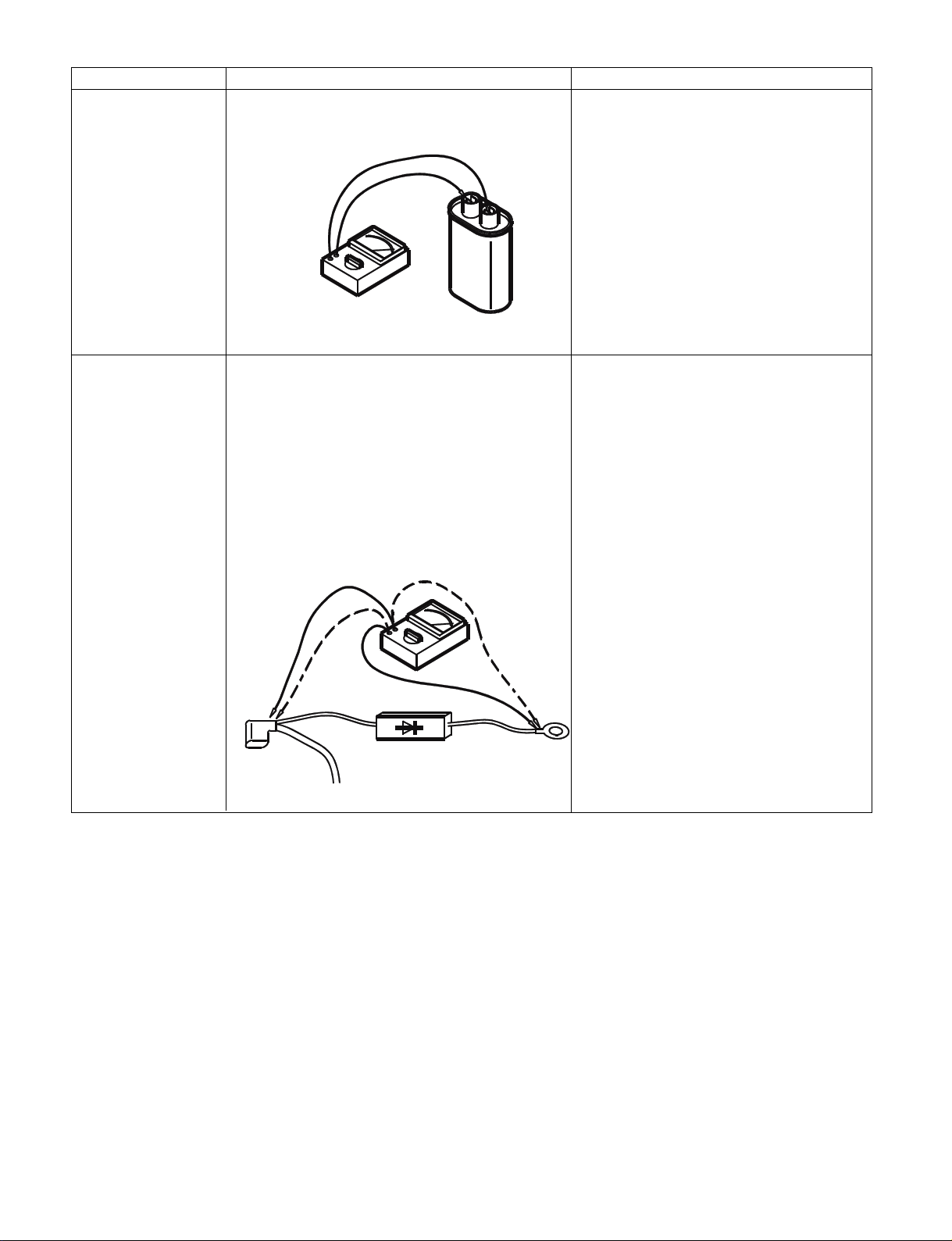
COMPONENT
HIGH-VOLTAGE
CAP A CITOR
Including internal
bleeder
resistor
CHECKOUT PROCEDURE RESULT
Measure the resistance: Across two terminals with
an ohm-meter on highest scale.
Figure 7
Normal reading:
Momentarily indicates several ohms, and
gradually to 10 meg-ohms.
Abnormal reading:
Indicates continuity or 10 meg-ohms
from the beginning.
HIGH-VOLTAGE
DIODE
Measure the resistance: Across two terminals with
an ohm-meter on highest scale.
Figure 8
Normal reading:
Indicate about middle position in one
direction (forward) and infinite ohms in
the reverse direction, using ohm meter
with a 9V battery.
NOTE
- Some digital meter may show more
than 0 ohms or infinite ohms even in a
forward direction because the low measuring voltage of the meter does not
allow the meter to pass through the high
voltage diode. Use an ohm meter with
a 9V battery.
Abnormal reading:
Indicates continuity or infinite ohms in
both directions.
- 7 -
Page 8
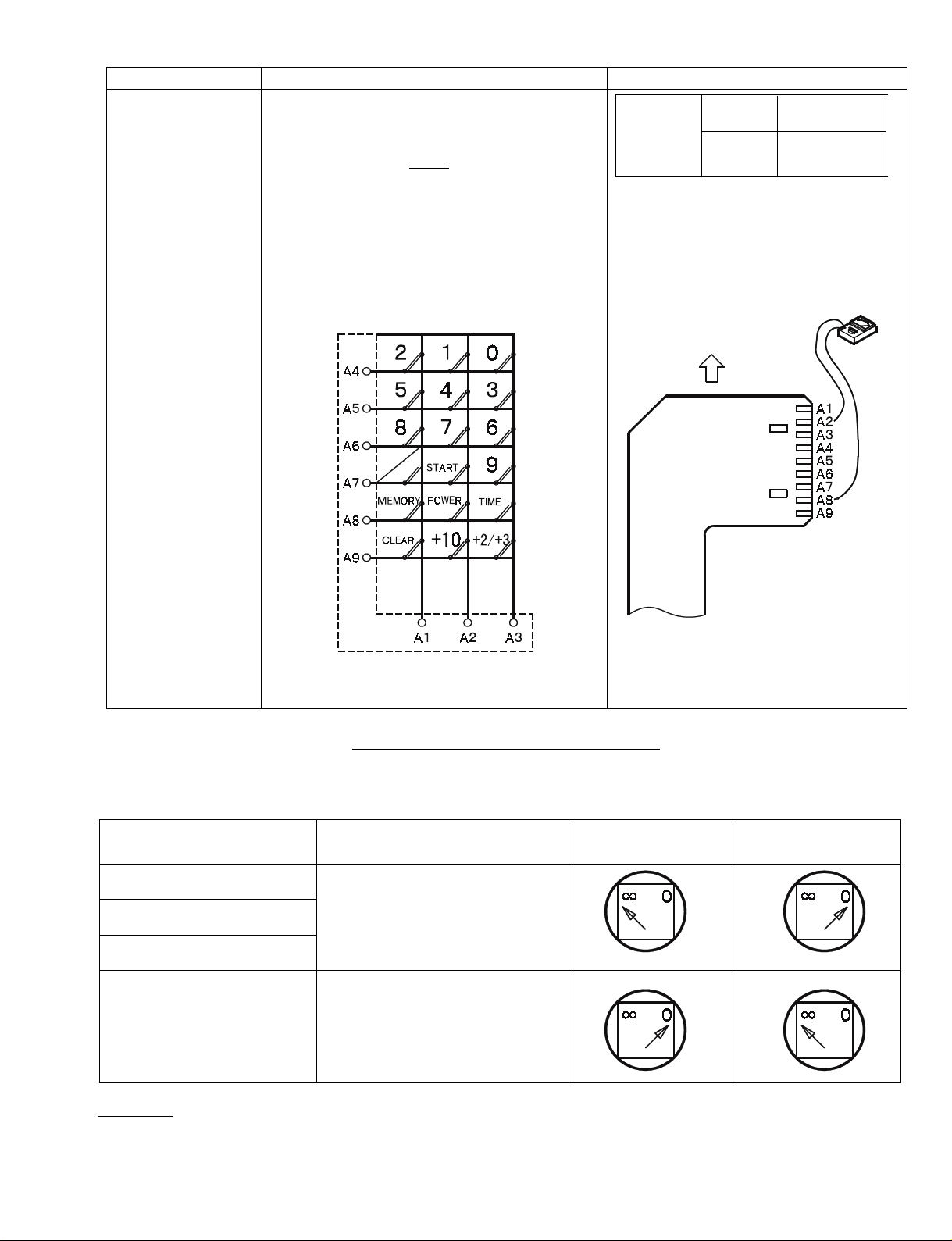
COMPONENT
TOUCH KEY
BOARD
CHECKOUT PROCEDURE RESUL T
Measure the resistance between terminals of
FPC connector after removing it from
S101.(Figure 10)
NOTE
- When reconnecting the FPC connector, make
sure the holes on the connector are properly
inserted in hook of the plastic fastener in S101.
MATRIX CIRCUIT FOR
TOUCH KEY BOARD
FPC CONNECTOR
When When not
Resistance touched touched
Value Less than More than
1 K ohms 1 meg ohms
When checking the POWER key ,
connect the ohm-meter as illustrated
below.
TERMINAL OF FPC CONNECTOR
FIGURE 10
CHECKOUT PROCEDURE FOR SWITCHES
Disconnect the lead wires from the switches and check for the continuity of the switches, connecting an ohm-meter
to its terminals.
SWITCHES
(SEE Figure 1 on page 1)
INTERLOCK SWITCH
DOOR SENSING SWITCH
INTERLOCK MONITOR
SWITCH
CHECKOUT PROCEDURES DOOR OPEN DOOR CLOSED
Terminals "COM" and "NO"
Ter minals "COM" and "NC"
CAUTION: After checking the switches, make sure that the interlock monitor switch is properly connected according
to the CIRCUIT DIAGRAM on page 3.
- 8 -
Page 9
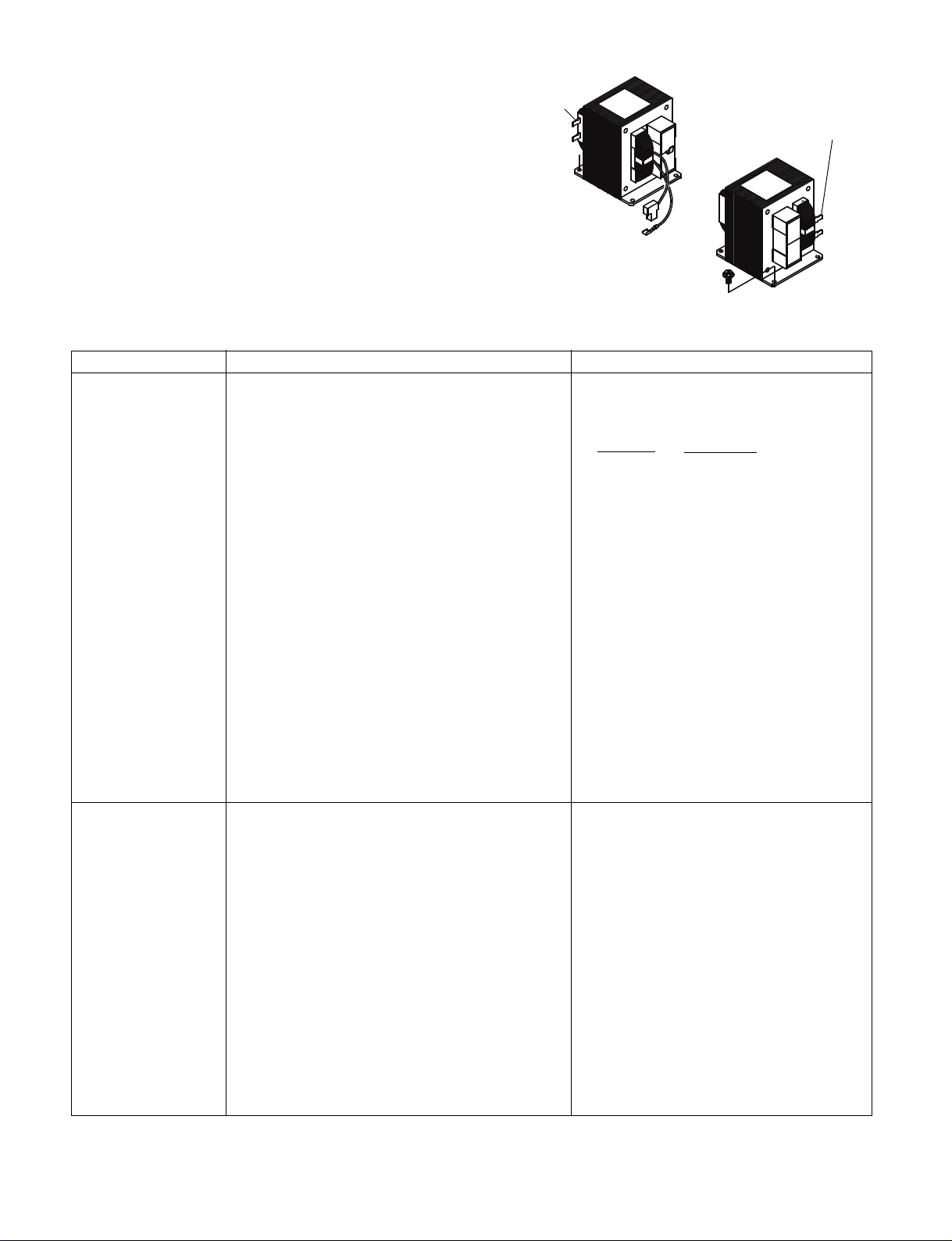
WARNING:
When removing the cabinet, you m ust disconnect
the power supply cord from the wall oulet f or your
safety. Only the chec kout procedure below needs
the power supply on. TAKE GREAT CARE to avoid
possible electrical shock.
For your safety, proceed with the test only
after removing the wire leads from the primary winding of the high voltage transformer
Primary
Winding
Primary
Winding
Lower
Upper
COMPONENT
POWER
P.C.B
CHECKOUT PROCEDURE RESULT
Check voltage at S104 and S105 after removing each connector (female) from power circuit
board.
Pin No.3 (Ground) and 4,5, 1,2 at S105.
Pin No.1 and 2 at S104.
CAUTION:
For your safety, proceed with the test only
after removing the wire leads from the pri-
mary winding of high voltage transformer.
Test procedures:
a) Make sure that the power supply cord is not
plugged in.
b) Remove the connector S104 and S105 from
the power circuit board.
c) Plug the power supply cord : back in.
d) And then, measure each voltage.
Normal reading:
Connection
Pin No., Voltage(V)
S105
#3 to #4 DC 12
#3 to #5 DC 16
#3 to #1 DC 30
#3 to #2 DC 35
S104
#1 to #2 AC 2.4
CONTROL
P.C.B
Measure the voltage: Between test points TP-1,
TP-2 ,TP-3 and ground (See figure 16 on page
23)
Note
- Proceed with the check of the control P.C.B to
see if any one of the measured values is different from the specified values.
- 9 -
Test point
TP, Voltage(V)
TP-1 DC - 5
TP-2 DC - 12
TP-3 DC - 16
TP-4 DC - 35
Page 10

B. TROUBLESHOOTING
CONDITION TROUBLE CHECK RESULT REMEDY
Power with normal
voltage is applied. Place
a cup of water inside
microwave oven
Step down
Transformer
Shorted
Replace
* “TIME”,”1”,”0” ,”0”
and “START” keys
are touched
Fuse(10A) blows
off immediately
No display
cooking time
H.V Capacitor
Connection of FPC
from Touch key
board
Power circuit board
(See page 7)
Touch key board
(See page 6)
Control circuit
board
(See page 7)
Shorted
Incorrect
Voltage
incorrect
Resistance
incorrect
Voltage
incorrect
Replace
Reconnect
Replace
Replace
Replace
Door sensing
switch
(See page 7)
Cooking operation will not
start
Oven does not
heat up
* Note:Oven will not accept settings of 60 through to 99 seconds.
TIME must be entered as 1 minute and 39 seconds for 99 seconds.
Interlock switch
(See page 7)
Control circuit
board
(See pages 7 & 23)
See “HINT” on page
10
- 10 -
No continuty
No continuty
Voltage
incorrect
Replace
Replace
Replace
Page 11

CONDITION TROUBLE CHECK RESULT REMEDY
Low microwave
output
Uneven heating
C. ERROR INDICATION
The Display will show an error indication for self-diagonosis as follows.
“E” means that a service technician is required .
“U” means that user can correct the operation.
Display
E-21
E-31
E-32
Thermistor (on duct) sensies
a temperature of 120°C or
higher.
Thermistor (on Magnetron) or
thermistor (on Duct) is
shorted.
Thermistor (on Magnetron) or
thermistor (on Duct) is opened.
Trouble Other Symptom
Oven stops heating.
Buzzer continuously beeps.
Blower motor will stop
immediately.
Oven stops heating.
Buzzer does not beep.
Blower motor will stop
immediately.
Oven stops heating.
Buzzer does not beep.
Blower motor is operated.
Magnetron
Rotation of top or
bottom antenna
Poor
oscillation
Gear motor
Rotation has
stopped.
°
Solution
Check and remove the cause of the cav-
ity fire or abnormal overheating.
This error function will be cancelled when
the power cord is unplugged.
Check for short-circuit of thermistor
itself or wire insulation of thermistor.
This error function be cancelled when the
power cord is unpluged.
Check for open-circuit of thermistor
itself or improper connection of wire
socket of thermistor.
This error function be cancelled when the
CLEAR key is touched.
See “HINT”
on page 10
Repair or
replace
U-10
U-50
Thermistor (on Magnetron)
senses a temperature of 200°C
or higher.
The key for “Start” is not
touched within 1 minute after
the door is opened or closed .
Oven stops heating.
Buzzer continuously
beeps.
Blower motor will stop
immediately.
(Remark:
The purpose of this function is to avoid accidental
operation while the user is
not attempting to operate
the oven.)
- 9 -
Check and remove cause of abnormal
overheating (such as operation with
no food).
This error function will be cancelled when
the CLEAR key is touched.
This error function will be cancelled
when the door is opened and closed.
Page 12

THERMISTOR CHART
Duct
Magnetron
Thermistor connector
8000
7000
6000
5000
4000
3000
Resistance K¶
2000
1000
0
0 102030405060
Temperature
“HINT”
PROCEDURE FOR DETERMING WHETHER THE UPPER MAGNETRON CIRCUIT OR LOWER MAGNETRON
CIRCUIT IS DEFECTIVE.
SYMPTOM:One magnetron does not work giving less than normal heat.
Caution:
Make sure that cabinet (outer wrap) and rear plate are not removed from the oven for your safety.
1.Operate oven as follows.
1)Place a cup of water in the oven
2)Close the door.
3)Touch “CLEAR”, “TIME”, “5”, “0” and “START” keys to operate the oven for 50 seconds with full power level.
2. Determine if the Exhaust air is warm in the following positions..
1)Put your hand near the exhaust duct outside of the rear plate to feel the exhaust (Never remove
the cabinet and rear plate from the oven for your safety when you put your hand near exhausting duct.)
2)If air from the upper position of the duct is not warm,the upper magnetron circuit is defective.
If air from the lower position of the duct is not warm,the lower magnetron circuit is defective.
Cabinet(outer wrap)
Rear Plate
Rear Plate
Exhaust Duct
Upper position
Lower position
Figure 11
The H.V Transformer for
operating the upper Magnetron
is located on the inside of the
rear plate
The H.V Transformer for
operating the lower Magnetron
is located on the inside of the
rear plate
- 12 -
Page 13

7. DISASSEMBLY INSTRUCTIONS
- THE OVEN MUST BE DISCONNECTED FROM THE
ELECTRICAL OUTLET WHEN MAKING REPLACEMENTS, REPAIRS, ADJUSTMENT OR CONTINUITY
CHECKS. BEFORE PROCEEDING WITH ANY REPAIR, WORK , WAIT AT LEAST 1 MINUTE, UNTIL
THE CAP A CIT OR IN THE HIGH V OLTAGE AREA HAS
FULLY DISCHARGED.
- If the interlock switch, the relay RL-3 and RL-4 or the
interlock monitor switch operate properly, deter mine
which of the following is defectiv e : control circuit board,
high voltage transformer, high voltage capacitor, high
voltage diode or magnetron.
A. REMOVING INTERLOCK SWITCH
(See Figure 1 on page 1)
(1) Disconnect all lead wires from the interlock
switches.
(2) Remove 2 screws securing the lever stopper.
(3) Remove 1 screw securing the switches.
Then pull out the switches.
(4) Make the necessary adjustment, and perform a
microwave energy leakage check according to
“1. ADJUSTMENT PROCEDURE FOR
SWITCHES” on page 1. Check proper operation
according to “CHECKOUT PROCEDURE FOR
SWITCHES” on page 6.
B.REMOVING INTERLOCK MONITOR AND DOOR
SENSING SWITCH
(See Figure on page 1)
(1) Disconnect all lead wires from the interlock moni-
tor switch and door sensing switch.
(2) Remove 1 screw securing the these switches.
Then pull out the switches.
(3) Make the necessary adjustments or replace-
ment of the switch by reversing step (2) and
check microwave energy leakage according to
“1. ADJUSTMENT PROCEDURE FOR
SWITCHES” on page 1. Check proper operation
according to “CHECKOUT PROCEDURE FOR
SWITCHES” on page 6.
WHEN REPLACING ANY DOOR MICROSWITCH,
REPLACE ONLY WITH THE SAME SWITCH SPECIFIED ON THE PARTS LIST.
C. REMOVING FUSE
Remove the 10A fuse with screwdriver.
NOTES
- When replacing the 10A fuse, be sure to use the
exact repair part.
- If the 10A fuse blows immediately, check the primary
and secondary interlock switch, the relays RL-3 and
RL-4 (on the control circuit board) and the interlock
monitor switch according to “CHECKOUT PROCEDURE FOR SWITCHES” on page 6. Make sure to check
the microwave energy leakage according to “1. ADJUSTMENT PROCEDURE FOR SWITCHES” on page
1, when the primary and secondary interlock switches,
the relay RL-3 and RL-4 or the interlock monitor switch
is adjusted or replaced.
D. REMOVING DISPLAY CIRCUIT BOARD
(1) Disconnect all lead wires on the Control panel
from the Control PCB and Power PCB.
(2) Remove 4 screws securing the Control panel
Ass’y to the oven cavity.
(3) Push up and pull out the Control panel Ass’y.
(4) Remove 4 screws securing the Display PCB.
(5) Take out the Display PCB and push up the lever
end of the plastic fastener and remove the FPC
connector from the connector socket S101.
CAUTION:
When replacing new Display PCB please ensure
that all 10 LED heads are positioned exacty into
the square holes of the control frame at once.
Never force any LED head into the PCB.
E. REMOVING MAGNETRONS
(1) Remove 1 screw securing the thermal
protector .
(2) Disconnect 2 lead wires from the magnetron
terminals .
(3) Remove thermistor (lower magnetron) by
pulling horizontally.
(4) Remove 4 hex nuts (upper magnetron) or 2 hex
nuts (lower magnetron)securing to the
waveguide.
(5) Remove magnetrons.
(6) Take out the magnetron VERY CAREFULLY.
NOTES
- When removing the magnetron, make sure that its
dome does not hit any adjacent parts, or it may be
damaged.
- When replacing the magnetron, be sure to install the
magnetron gasket in the correct position and be sure
that the gasket is in good condition.
- After replacing the magnetron, check the microwave
energy leakage to ensure it is below the limit of
5mW/cm2. (For US)
- After replacing the magnetron, be sure to check the
microwave energy with a leakage detector and
confirm it is below the limit of 1 mW/cm2 (at 275cc
water load),5 mW/cm2 (at no load) and 5 mW/cm
2
(at 275 cc water load without cabinet) when measured
with a detector. (For CANADA)
- 13 -
Page 14

HINT FOR LAMP-CHANGE
Before removing the bulb access panel, pull out
the main-plug. Change the faulty bulb and secure
the bulb access panel. Plug the cord back in and
check operation.
F. CHANGING POWER SUPPLY CORD
(See exploded view on page 15)
(1) Unfasten 1 screw for ground and pull out the
2 wires of the power cord from the terminal plate.
(2) Remove 1 screw for the bottom bracket of the
cord bushing.
(3) Install the new power supply cord with the
reverse procedure of above (1) to (2).
WARNING:
For changing the power supply cord, never use
other than the following.
Key No. Order No. Parts Name
5 617 140 1318 Power cord Ass’y
6 617 140 1332 Cord bush
7 617 140 1349 Bottom bracket
G. REMOVING CERAMIC TRAY ASS’Y
(See Fig.12 )
(1) Take off the cabinet.
(2) Put (insert) a screwdriver in the 9 mm diameter
hole located at the lower hinge of left side of the
oven cavity. Push the tray up with the screwdriver.
(3) Open the door and take out the tray very care-
fully.
Door
NOTES
- After replacing the door, be sure to check that the
interlock switch, the door sensing switch
and the interlock monitor swich operate normally.
(See pages 1 and 6)
- After replacing the door, check for microwave ene rgy leakage with a leakage detector. Microwave
energy leakage must be below the limit of
5mW/c‡u. (For US)
- After instaling the door, check for microwave
energy with a leakage detector and confirm that the
leakage is the below the limit of 1 mW/cm2 (at 275cc
waterload),5 mW/cm2 (at no load) and 5 mW/cm
(at 275cc water load without cabinet) . (F or CANAD A)
2
I.HOW TO RESET THE MEMORY OF ACCUMU LATIVE COOKING TIME
1. Push the keys step by step as follows,
“ CLEAR “, “ TIME “, “ 8 “, “ 8 “, “ 8 “, “ 1 “
“ START “, “ START “.
The display will show accumulative cooking time
in display window.
2. Then push the keys as follows.
“ 0 “, “ MEMORY “.
The Memory of Accumulative cooking time will be
cleared.
J.RELEASING TYPE CONNECTOR
This oven is provided with locked type connectors.
When you remo ve a connector , pull the connector while
releasing the lock by pressing “A” point shown below.
Do not pull the wire of the connector.
Connector:
S1, S2, S102, S104, S105 (Figure 13)
A
A
Hole
Screw driver
Figure 12
H.REMOVING DOOR
Remove 2 hex nuts securing the upper hinge,
remove 3 hex nuts securing the lower hinge and
remove 1 special screw securing the door arm
(located at the bottom of the door sash).
Figure 13 Figure 14
Pull connector case (Never pull the wire)
Figure 15
- 14 -
Page 15

K. ADDITIONAL FUNCTIONS
The following functions can be completed by the key operation described below.
The Accumulative cooking time and the number of door opening /closings can be observed.
The Type and level of the buzzer sound can be selected. The “display of remaining cooking time when
cooking is temporarily stopped due to door opening” can be selected. The “Accumulative cooking time
period” will inform the service technician of the life expectation of the magnetron or other parts.
Key Operation Step
KEY
1
2
3
CLEAR
STOP
TIME
8
• Press CLEAR / STOP key.
• Press TIME key.
• Press 8 three times.
OPERATION
Key operations at Step 1 thru Step 3 are common to all functions. Proceed with the key
operation at Step 4 for your desired functions.
• Select the function to press the number key
1 ... Accumulative cooking time.
2 ... The number of door operations. (See “HINT” at Step 6)
3 ... Indication of remaining cooking time (when cooking
is interrupted by door opening).
4 ... To cancel remaining cooking time.
5 ... Tone of the buzzer on cooking completion. (Pip,
4
1
Pip, Pip)
6 ... Tone of the buzzer on cooking completion. (Peep)
7 ... The buzzer off.
8 ... The buzzer on.
e.g. Number 1 key is pressed for “Accumlative cooking time
period”
DISPLAY WINDOW
LOW MED. HIGH
LOW MED. HIGH
LOW MED. HIGH
LOW MED. HIGH
5
START
• Press START key.
• All 4 digits will be flashing.
LOW MED. HIGH
• Press START key again.
• The number “215”shows total cooking time in hours.
• When number key other than 1 or 2 is pressed at step 4,
6
START
“0” appears in display window and the setting has been
LOW MED. HIGH
completed.
Note:When number “2” is depressd at Step 4 above the
displayed figure shows the number of door operation ••100
e.g. “20” displayed=2000 door operations.
LOW MED. HIGH
• Press CLEAR / STOP key to clear the display for the
7
CLEAR
STOP
option 1 and 2. • The function is cleared and “0” will
appear in the display window.
LOW MED. HIGH
- 15 -
Page 16

Maintenance:
The microwave ovens are designed, manufactured, and tested for years of dependable operation. However, the
oven may require service from time to time if the consumable components listed below are not replaced at the
appropriate time. For protection from unexpected service calls and undue inconvenience, we recommend that
the user has the listed parts replaced at the inter vals below, (at customer cost).
This will avoid the trouble of repeated service calls after the expiration of the warranty period.
Consumable components:
When more than 1,250 hours of accumulative cooking time or more than 200,000 cycles of door opening/closing
is observed by key operations (See page 13 for more information), the following consumable components should
be replaced.
(Maintenance light in window display indicates when accumulative cooking time reaches 1,250 hours.)
Light
1. Magnetron Tube, Part No. 415 002 6408
2. Printed Circuit Board-Relay, Part No. 617 137 3844
3. Switch base Assembly, Part No. 617 205 1208
4. Door Latch, part No. 617 068 1087
When more than 2,000 hours of accumulative cooking time is observed, the following consumable compo-
nents should be replaced.
5. Blower motor, Part No. 617 140 1370
When slow rotating of blower motor is observed after removing dust from blower motor, blower motor must
be replaced.
6. Door hinge, Part No. 617 120 3028
When a worn door hinge is observed and proper door adjustments can not be made, the door hinge must
be replaced.
7. Door Assembly, Part No. 617 178 0734
When a worn door pin is observed and proper door adjustments can not be made, the door assembly must
be replaced.
- 16 -
Page 17

8. EXPLODED VIEW AND P ARTS LIST
Main body Parts-1
NOTE: All component have special characteristics for safety and must be replaced using parts listed in this
manual. All service on M/W ovens should be performed by a qualified technician using approved testing
equipment. Customers should not attempt replace component marked with a symbol.
- 17 -
Page 18

NOTE: All component have special characteristics for safety and must be replaced using parts listed in this
manual. All service on M/W ovens should be performed by a qualified technician using approved testing
equipment. Customers should not attempt replace component marked with a symbol.
- 18 -
Page 19

Page 20

Main body Parts-2
NOTE: All component have special characteristics for safety and must be replaced usnig parts listed
in this manual.
All service on M/W ovens should be performed by a qualified technician using approved testing
equipment. Customers should not attempt replace component marked with a symbol.
- 20 -
Page 21

NOTE: All component have special characteristics for safety and must be replaced using parts listed
in this manual.
All service on M/W ovens should be performed by a qualified technician using approved testing
equipment. Customers should not attempt replace component marked with a symbol.
- 21 -
Page 22

Page 23

Page 24

Page 25

Page 26

Page 27

Page 28

- 28 -
Printed in JAPAN
Wiring of High voltage Circuit
Brown(C Inside)
Wiring of Switches
Monitor switch
Interlock switch
Door sensing switch
Orange(C)
Brown
White
Yellow
Purple
Purple
Blue(NC Inside)
L i g h t
Blue
Orange
White
Pink(NO Inside)
(NO)
(NC)
White
FRONTFRONT
FRONTFRONT
FRONT
BACKBACK
BACKBACK
BACK
March/99
 Loading...