

Page 1

Art. 4230
D Gebrauchsanweisung
lightline Timer electronic
GB Operating Instructions
lightline Electronic Timer
F Mode d’emploi
Programmateur electronic lightline
NL Gebruiksaanwijzing
lightline Timer electronic
S Bruksanvisning
lightline Timer electronic
I Istruzioni per l’uso
lightline Timer elettronico
E Manual de instrucciones
lightline Temporizador electrónico
DK Brugsanvisning
lightline elektronisk timer
Page 2

G
17
GARDENA lightline Electronic Timer
Welcome to GARDENA lightline …
Please read these operating instructions carefully and observe
the notes given.
Use the instructions to familiarise yourself with their correct use,
and the notes on safety.
The Applications Range for your Timer
The GARDENA lightline Electronic Timer has been designed
for private use in your house and garden. It has been designed for
outdoor and indoor use.
Intended purpose
Keep these operating instructions in a safe place.
For safety reasons, children under 16 as well as persons not
familiar with these operating instructions should not use this
GARDENA lightline Electronic Timer.
n
Page 3

Setting up
1. Connect the GARDENA lightline Electronic Timer to the lightline
Transformer or to the 12 V Transformer of your GARDENA Water
jet pump.
2. Connect the plug of the Transformer to an AC 230 V socket.
3. Program the GARDENA lightline Electronic Timer as described in
the paragraph "How to programme".
Connect the Timer
G
19
G
18
Use
You can use your GARDENA lightline Electronic Timer to automatically illuminate your garden at any time or to operate the timing
of water jets and pumps, e.g. in garden ponds.
You can easily select the time when you want it to start and stop a
given programme.
n Safety Instructions
The GARDENA lightline Electronic Timer may only be used in
conjunction with GARDENA lightline for automatic operation
within the low voltage range.
Use the GARDENA lightline Electronic Timer and any other
GARDENA lightline products exclusively with 12 V low voltage
installations. If connected to 230 V your life is at risk!
Caution!
12 V Low voltage
For use with GARDENA
lightline only
Only one Timer may be used per transformer or per cable.
Use only authentic GARDENA lightline Accessories to operate
your GARDENA lightline Installation.
Make sure that your GARDENA lightline Electronic Timer
and your GARDENA lightline Transformer are placed in a location that is protected from the sun and that they cannot be
submerged.
Before you do any work on the GARDENA lightline Installation,
disconnect the transformer from the mains electricity supply.
Disconnect the plug!
Position
Use only authentic
GARDENA lightline
Accessories
Use only one Timer
per outlet
Page 4
G
21
G
20
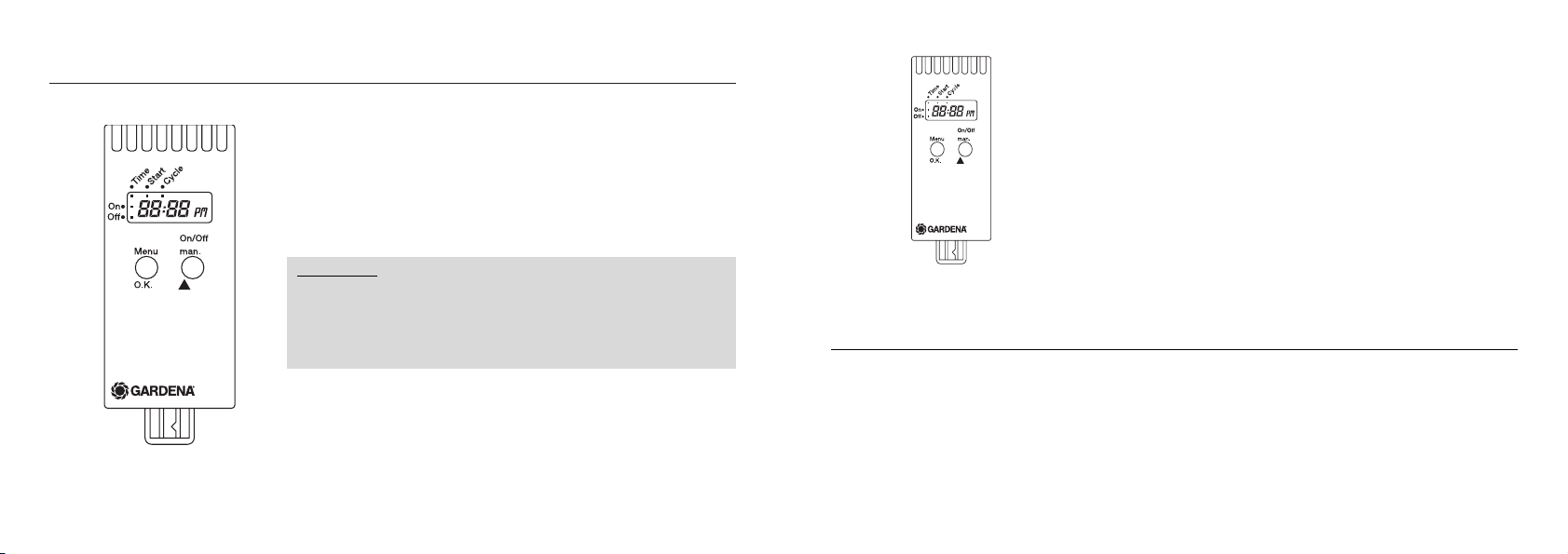
Function Keys and Display
q Menu-O.K.
➞ Go to the next step in the programme while storing and confirming the data input set with the MAN-key.
w On/Off-man.
➞ To change single input data (e.g. to register hours, minutes, …).
➞ To manually switch on and off all connected appliances.
LCD-Display
ON
Status display – Connected appliances have been activated.
OFF
Status display – Connected appliances have not been activated.
Information:
x When in input mode the relevant display blinks.
x At high temperatures (above 60° on display) the LCD-Display
may switch off. This does not affect the running of the
programme. Once it has cooled down, the LCD-Display
becomes visible again.
Function keys
TIME (current time)
➞ in programme mode:
Day Indicator – current time in hours
Minute Indicator – current time in minutes
START
➞ Start time when connected appliances become active.
Hour Indicator – Hours of Activation
Minute Indicator – Minutes of Activation.
CYCLE
Display of the chosen programme
(➞ Table of single programmes: see "Programme Overview").
How to Programme
1. Press the O.K.-Switch
➞ the Hour Indicator (TIME) is blinking.
2. You can set the time with the MAN-key, e.g. 17:00.
3. Use the O.K.-key to confirm the set time and to change to the
minutes setting mode.
4. Now use the MAN-key to select the minutes of the set time,
e.g. 23.
5. Use the OK-key to confirm and switch to set the start time.
Input current data
Page 5

G
23
G
22
1. Use the MAN-key to set the hours of the start time, e.g. 21.
Then confirm by pressing the OK-key and to switch to set the
minutes.
2. Press the MAN-key to set the minutes of the start time, e.g. 30.
Confirm your input by pressing the OK-key.
Now you may select your programme.
1. Select a programme from the paragraph "programme overview"
and press the MAN-key until the programme number appears on
the display.
Information:
If set at 00 (Stand-by) no programme is active.
2. Confirm your selection by pressing the O.K.-key.
➞ The programming session is finished and the current time is
shown on the display.
At any time during programming you can select the next programme level (current time, starting time, programme number) by pressing the OK-key. At the same time the input data is recorded.
If during the programming session there has been no input
for more than 120 seconds, then the programming mode is automatically switched off and the LCD shows the real time
(normal display). If you have made other selections previously, they
will be recorded.
Information
Active-Programme
How to set the start time
You have now finished the programming session, and connected
appliances will now automatically be activated or inactivated at the
times set.
Example:
x The real time is 18:45.
x ON is illuminated, i.e. connected appliances have been
activated.
x Colon in the time display is blinking i.e. the countdown is
running.
The appliances which are programme-controlled may be switched
on or off at any time prematurely by simply pressing the MAN-key.
The operating time is 30 minutes.
If you want to check the data you can repeatedly press the OK-key
and run through the programme levels, select one programme
step at a time and check it. (This will not interrupt the current
programme cycle).
To change data proceed as described above.
How to read/change
the programme
Display during the
active period
Page 6

G
25
G
24
The connected lamp or the water jet will be activated once a day
(at the start time you set) for 2 hours and 30 minutes.
The connected GARDENA lightline lamps will come on twice a day
for two hours. For example they will switch on at 7:00 and 19:00
according to the start time you have set.
The connected pond aeration system is activated four times a day
for two hours. This means your pond will have sufficient oxygen.
If you have set the start time at 15:00, then the pump will run from
15:00 to 17:00, from 21:00 to 23:00, from 3:00 to 5:00 and from
21:00 to 23:00 and it will start again at 15:00.
You have selected
Programme 23
You have selected
programme 18
Examples:
You have selected
programme 05
Programme Overview
Programme
Number length of cycle
00 no programme has been activated
01 24 hours (once a day) 30 minutes
02 24 hours (once a day) 1 hour
03 24 hours (once a day) 1.5 hours
04 24 hours (once a day) 2 hours
05 24 hours (once a day) 2.5 hours
06 24 hours (once a day) 3 hours
07 24 hours (once a day) 4 hours
08 24 hours (once a day) 5 hours
09 24 hours (once a day) 6 hours
10 24 hours (once a day) 7 hours
11 24 hours (once a day) 8 hours
Programme
Number length of cycle
12 24 hours (once a day) 9 hours
13 24 hours (once a day) 10 hours
14 24 hours (once a day) 11 hours
15 24 hours (once a day) 12 hours
16 24 hours (once a day) 14 hours
17 12 hours (twice a day) 1 hour
18 12 hours (twice a day) 2 hours
19 12 hours (twice a day) 3 hours
20 12 hours (twice a day) 4 hours
21 6 hours (4 times a day) 30 minutes
22 6 hours (4 times a day) 1 hour
23 6 hours (4 times a day) 2 hours
24 6 hours (4 times a day) 4 hours
Page 7
G
27
Technical Data
GARDENA lightline Electronic Timer
Art. No. 4230
Voltage 12 V Low Voltage
Maximum switching current 10 A AC
Operating temperature –20 °C – +50 °C
We expressly point out that, in accordance with the product
liability law, we are not liable for any damage caused by our
units if it is due to improper repair or if parts exchanged are not
original GARDENA parts or parts approved by us, and, if the
repairs were not carried out by a GARDENA Service Centre or
an authorised specialist. The same applies to spare parts and
accessories.
Product liability
G
26
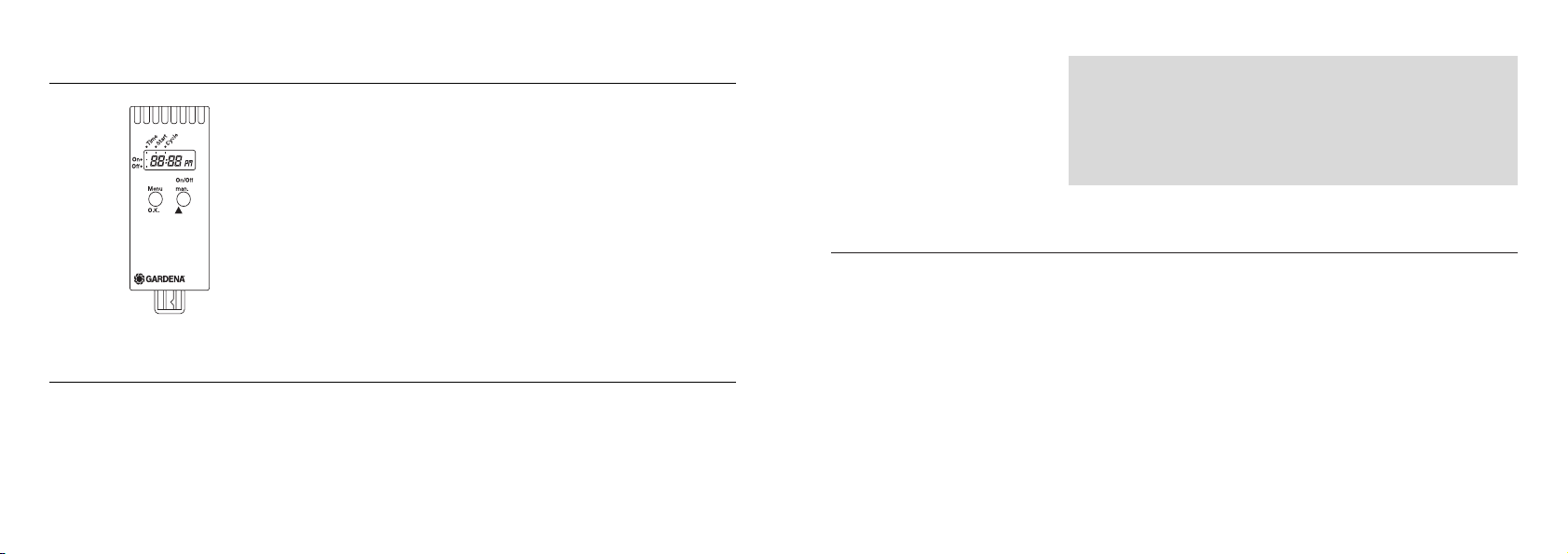
Manual On/Off-Operation (MAN) without Programme Selection
You may operate the GARDENA lightline Electronic Timer manually
regardless of the programmed data before and after data input by
pressing the MAN-key.
By pressing the key once, connected appliances will be activated
for a maximum of 30 minutes (LCD: ON). If you press the MAN-key
again, the power supply is interrupted and the connected appliances will become inactive.
Trouble-Shooting or Defects
If you have any problems with your GARDENA lightline
Electronic Timer please contact our Service or return the
defective unit together with a short description of the
problem – in case of guarantee, with the warranty card duly
completed and signed – postage paid to one of the GARDENA
Service Centres listed on the back of this leaflet.
Page 8

G
29
G
28
EU Certificate of Conformity
EMVG
The undersigned
GARDENA Kress + Kastner GmbH · Hans-Lorenser-Str. 40 · D-89079 Ulm
hereby certifies that, when leaving our factory, the units indicated below are in accordance with the
harmonised EU guidelines, EU standards of safety and product specific standards.
This certificate becomes void if the units are modified without our approval.
Thomas Heinl
Technical Dept. Manager
Year of CE marking:
1999
Ulm, 01.06.1999
EU directives:
Electromagnetic Compatibility
89/336/EC
Directive 93/68/EC
Description of the units:
GARDENA lightline Electronic
Timer
Art. No.:
4230
Guarantee
In the event of a fault, please
send the defective unit together
with the receipt and a description of the fault, postage paid,
to one of the GARDENA
Service Centres on the back
of this page.
We will return your GARDENA
lightline Electronic Timer free
of charge once it has been
repaired.
x ments of the operating
instructions. Neither the purchaser nor a non-authorised
third party have attempted to
repair the unit.
Parts subject to wear are
excluded from this guarantee.
The manufacturer‘s guarantee
does not affect the user’s existing warranty claims against the
dealer/seller.
GARDENA guarantees this
product for 3 years (from date
of purchase). This guarantee
covers all serious defects of the
unit that can be proved to be
material or manufacturing
faults. Under warranty we will
either replace the unit or repair
it free of charge if the following
conditions apply:
x The unit must have been
handled properly and in
keeping with the require-
Page 9

109
Garantiekarte GARDENA lightline Timer electronic
Warranty Card GARDENA lightline Electronic Timer
Carte de garantie Programmateur electronic lightline GARDENA
Garantiekaart GARDENA lightline Timer electronic
Garantikort GARDENA lightline Timer electronic
Certificato di garanzia GARDENA lightline Timer elettronico
Tarjeta de garantía GARDENA lightline temporizador electrónico
Garantibevis GARDENA lightline elektronisk timer
Wurde gekauft am: Händlerstempel
Was purchased on: Dealer’s stamp/ Receipt
Achetée le (date et lieu d’achat) : Cachet du revendeur
Werd gekocht op: Stempel van de handelaar
Försäljningsdatum: Återförsäljarens stämpel
Data di acquisto: Timbro del rivenditore
Se vendió el: Sello del comerciante
Købt den: Forhandlerens stempel
✃
Page 10

110
Beanstandung:
Reasons for complaint:
Défaut constaté :
Klacht:
Reklamation:
Difetto riscontrato:
Reclamación:
Reklamation:
✃
Page 11

115114
France
GARDENA France
BP 50080
Z.A.C. Paris Nord II
95948 ROISSY C.D.G. Cedex
Great Britain
GARDENA UK Ltd.
27 – 28 Brenkley Way
Blezard Business Park
Seaton Burn
Newcastle upon Tyne
NE13 6DS
Greece
Agrokip
G. Psomadopoulos & Co.
20, Lykourgou str.
Kallithea
Athens
Hungary
GARDENA Magyarország Kft.
Késmárk utca 22
1158 Budapest
Iceland
Heimilistaeki hf
Saetun 8
P.O. Box 5340
125 Reykjavik
Italy
GARDENA Italia S.r.l.
Via Donizetti 22
20020 Lainate (Mi)
Japan
KAKUDAI Mfg. Co. Ltd.
1-4-4, Itachibori Nishi-ku
Osaka 550
Luxembourg
Magasins Jules Neuberg
Grand Rue 30
Case Postale No. 12
Luxembourg 2010
Netherlands
GARDENA Nederland B.V.
Postbus 50176
1305 AD Almere
Neth. Antilles
Jonka Enterprises N.V.
Sta. Rosa Weg 196
P.O. Box 8200
Curaçao
New Zealand
NYLEX New Zealand
Private Bag 94001
South Auckland Mail Centre
10 Offenhauser Drive
East Tamaki, Manukau
Norway
GARDENA Norge A/S
Postboks 214
2013 Skjetten
Polen
GARDENA Polska Sp. Z.o.o.
Szymanóv 9 d
05-532 Baniocha
Deutschland
GARDENA
Kress + Kastner GmbH
GARDENA Service
Hans-Lorenser-Straße 40
D-89079 Ulm
Produktfragen: (0731) 490-123
Reparaturen: (0731) 490-290
Argentina
Argensem S.A.
Venezuela 1075
(1618) El Talar – Buenos Aires
Australia
NYLEX Corporation Ltd.
25–29 Nepean Highway
P.O. Box 68
Mentone, Victoria 3194
Austria
GARDENA Österreich
Gesellschaft m.b.H.
Stettnerweg 11 – 15
2100 Korneuburg
Belgium
MARKT (Belgium) NV/SA
Sterrebeekstraat 163
1930 Zaventem
Brazil
M. Cassab
Av. das Nações Unidas, 20.882
Santo Amaro, CEP 04795-000
São Paulo – S.P.
Bulgaria/Блг
ДКС ООД
Соф 1797
Бул. ”Г..До” 16 . 4
Canada
GARDENA Canada Ltd.
100, Summerlea Road
Brampton, Ontario
Canada L6T 4X3
Chile
Antonio Martinic Y CIA. LTDA.
Gilberto Fuenzalida 185 Loc.
Las Condes – Santiago
Costa Rica
Compania Exim
Euroiberoamericana S.A.
350 Sur del Automercado
Los Yoses
San Pedro
Cyprus
FARMOKIPIKI LTD.
P.O. Box 7098
74, Digeni Akrita Ave.
1641 Nicosia
Czech Republic
GARDENA spol. sr. o.
Řípská 20a, č.p. 1153
62700 Brno
Denmark
GARDENA Danmark A/S
Naverland 8, Box 1462
2600 Glostrup
Finland
Habitec Oy
Martinkyläntie 52
01720 Vantaa
Page 12

Portugal
MARKT (Portugal), Lda.
Recta da Granja do Marquês
Rua de São Pedro
Algueirão
2725-596 Mem Martins
Republic of Irland
Michael McLoughlin & Sons
Hardware Limited
Long Mile Road
Dublin 12
Russland/осс
О Д
ул. осфлоск 66
117330 оск
Singapore
Variware
Holland Road Shopping Centre
227-A 1st Fl., Unit 29
Holland Avenue
Singapore 1027
Slowenia/Croatia
Silk d.o.o. Trgovina
Brodišče 15
1236 Trzin
South Africa
GARDENA
South Africa (Pty.) Ltd.
P.O. Box 11534
Vorna Valley 1686
Spain
ANMI Andreu y Miriam S.A.
Calle Pere IV, 111
08018 Barcelona
Sweden
GARDENA Svenska AB
Box 9003
20039 Malmö
Switzerland
GARDENA
Kress + Kastner AG
Bitziberg 1
8184 Bachenbülach
Turkey
Dost Ds Ticaret
Mümessillik A.Ş.
Yeşilbağlar Mah. Başkent
Cad.No. 26
Pendik – Istanbul / Turkey
Ukraine/Ук
О ЛС
г. К 01033
ул. Гд 50
USA
GARDENA
3085 Shawnee Drive
Winchester, VA 22604
4230-20.960.02/0991
GARDENA Kress + Kastner GmbH
Postfach 2747, D-89070 Ulm
http://www.gardena.com
 Loading...