

Page 1

Page 2
!
IMPORTANT SAFETY INSTRUCTIONS !
READ these instructions.
KEEP these instructions.
HEED all warnings.
FOLLOW all instructions.
DO NOT use this apparatus near water.
CLEAN ONLY with dry cloth.
DO NOT block any ventilation openings. Install in accordance with the manufacturer's instructions.
DO NOT install near any heat sources such as radiators, heat registers, stoves,
or other apparatus (including amplifiers) that produce heat.
DO NOT defeat the safety purpose of the polarized or grounding-type plug. A
polarized plug has two blades with one wider than the other. A grounding type
plug has two blades and a third grounding prong. The wider blade or the third
prong are provided for your safety. If the provided plug does not fit into your
outlet, consult an electrician for replacement of the obsolete outlet.
PROTECT the power cord from being walked on or pinched, particularly at plugs,
convenience receptacles, and the point where they exit from the apparatus.
ONLY USE attachments/accessories specified by the manufacturer.
1.
2.
3.
4.
5.
6.
7.
8.
9.
10.
11.
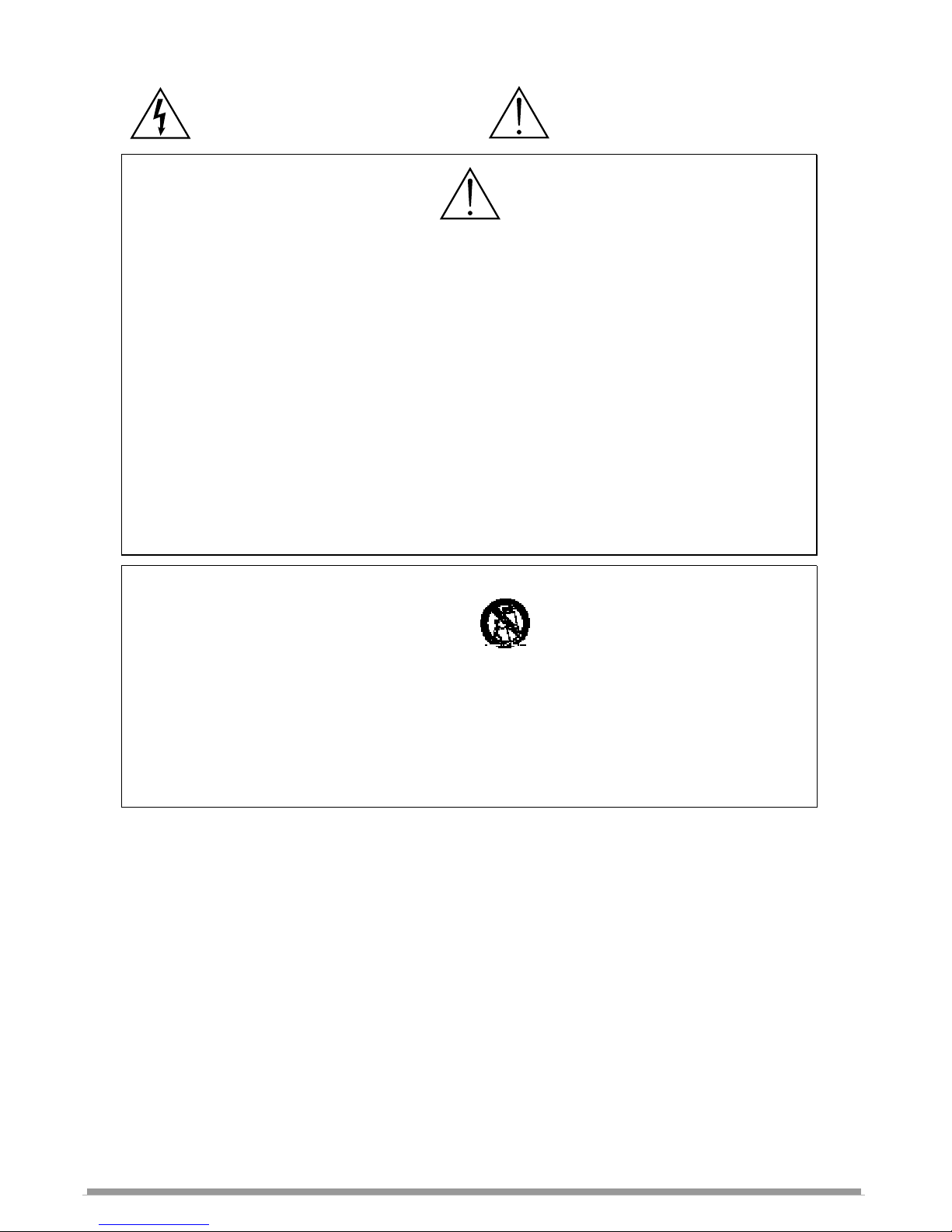
This symbol indicates that dangerous voltage
constituting a risk of electric shock is present within
this unit.
This symbol indicates that there are important
operating and maintenance instructions in the
literature accompanying this unit.
W
ARNING!
USING THIS SYSTEM AT EXCESSIVE VOLUMES CAN CAUSE PERMANENT HEARING DAMAGE.
USE AS LOW A VOLUME AS POSSIBLE.
In order to use this system safely, avoid prolonged listening at excessive sound pressure levels. Please use the following guidelines established by
the Occupational Safety Health Administration (OSHA) on maximum time exposure to sound pressure levels before hearing damage occurs.
90 dB SPL at 8 hours
95 dB SPL at 4 hours
100 dB SPL at 2 hours
105 dB SPL at 1 hour
110 dB SPL at ½ hour
115 dB SPL at 15 minutes
120 dB SPL — avoid or damage may occur
It is difficult to measure the exact Sound Pressure Levels (SPL) present at the eardrum in live applications. In addition to the volume setting on the
AS1000, the SPL in the ear is affected by ambient sound from floor wedges or other devices. The isolation provided by the fit of quality earpieces is
also an important factor in determining the SPL.
Here are some general tips to follow in the use of this product to protect your ears from damage.
• Turn up the volume control only far enough to hear properly.
• Ringing in the ears may indicate that the gain levels are too high. Try lowering the gain levels.
• Have your ears checked by an audiologist on a regular basis. If you experience wax buildup in your ears, stop using the system until an
audiologist has examined your ears.
• Wipe the ear molds with an antiseptic before and after use to avoid infections. Stop using the earphones if they are causing great discomfort
or infection.
UNPLUG this apparatus during lightning storms or when unused for long periods of
time.
REFER all servicing to qualified service personnel. Servicing is required when the
apparatus has been damaged in any way, such as power-supply cord or plug is damaged, liquid has been spilled or objects have fallen into the apparatus, the apparatus
has been exposed to rain or moisture, does not operate normally, or has been
dropped.
DO NOT expose the apparatus to dripping and splashing. DO NOT put objects filled
with liquids, such as vases, on the apparatus.
USE only with a cart, stand, tripod, bracket, or table
specified by the manufacturer, or sold with the
apparatus. When a cart is used, use caution when
moving the cart/apparatus combination to avoid
injury from tip-over.
Remove the batteries from the receiver if the system will not be used for a long
period of time. This will avoid any damage resulting from a defective, leaking
battery.
DO NOT throw used batteries into a fire. Be sure to dispose of or recycle used
batteries in accordance with local waste disposal laws.
12.
13.
14.
15.
16.
17.
LICENSING INFORMATION
THIS RADIO EQUIPMENT IS INTENDED FOR USE IN PROFESSIONAL
ENTERTAINMENT AND SIMILAR APPLICATIONS.
Changes or modifications not expressly approved by Galaxy Audio Incorporated could void your
authority to operate the equipment.
Licensing of Galaxy Audio wireless microphone equipment is the user's responsibility, and
licensability depends on the user's classification and application, and on the selected frequency.
Galaxy Audio strongly urges the user to contact the appropriate telecommunications authority
concerning proper licensing, and before choosing and ordering frequencies.
NOTE: THIS EQUIPMENT MAY BE CAPABLE OF OPERATING ON SOME FREQUENCIES
NOT AUTHORIZED IN YOUR REGION. PLEASE CONTACT YOUR NATIONAL AUTHORITY TO
OBTAIN INFORMATION ON AUTHORIZED FREQUENCIES FOR WIRELESS MICROPHONE
PRODUCTS IN YOUR REGION
Licensing: Note that a ministerial license to operate this equipment may be required
in certain areas. Consult your national authority for possible requirements.
Page 3

2. Safety.....................................
3. Description of Transmitters..............................2
4. Description AS1000R.........................................4
5. Setup Procedure................................................7
Specification Transmitters................................8
6. Specification AS1000R......................................9
7. Accessories.............................................10
8. Troubleshooting.................................................11
9. Frequency Chart.................................................12
10. Certification.........................................................13
11. Warranty..............................................................15
12. Registration........................................................16
1. Introduction....................................................... 1
Inside front cover
Table of Contents Page
ANY SPOT WIRELESS CAMERA SYSTEMS
The following items are included in the Any Spot Wireless Camera
system:
1. -Transmitter AS-HH5 Handheld Microphone or
AS-MBP5 Body Pack with Lav/Headset Microphone
2. -AS-1000R Receiver
3. -Set of Ear Buds
4. -1/8” Stereo Record Out Cable
5. -Owner's Manual
CONTENTS:
Page 4

1
AS-CK
GALAXY AUDIO ANY SPOT AS-CK
WIRELESS CAMERA SYSTEMS
Introduction
INTRODUCTION
Thank you for purchasing the Galaxy Audio Any Spot! This
system operates in the UHF Frequency band and utilizes a
Phase Locked Loop (PLL) synthesizer control for improved
reception and channel selection. The system provides 64
selectable frequencies, via the rotary switches, making it easy
to avoid frequency interference.
Camera Kits are great for field reporting or anytime live audio/video
is recorded or transmitted. Kits include: one Receiver AS-1000R, a
Handheld Mic (AS-HH5) or Body Pack (AS-MBP5) transmitter with
one of the following mics; headset/lav combo (AS-HLC) or, headset
(AS-HS), or lavalier (AS-LV). The Receiver can be attached to the
camera and features a Stereo Line Output for delivering the audio
signal to the camera. The Receiver also features a separate Stereo
Headphone Output, with volume control, which allows the camera
operator to monitor the audio signal.
Please take a few minutes to read this instruction manual
carefully before operating the system.
Page 5

PRODUCT DESCRIPTION
2
AS-HH5
AS-HH5 Handheld Microphone
The AS-HH5 is equipped with a uni-directional dynamic cartridge.
Power is supplied by two 1.5V AA size batteries.
1. Grille: Protects the microphone cartridge
and helps reduce breath sounds and wind
noise.
2. Low Battery LED: LED indicates battery status. Switching the power to "ON” causes
the LED to flash once and then go out indicating that the batteries have sufficient
power. If the LED stays on, it indicates that the batteries have insufficient power and
should be changed soon. If the status LED fails to flash, the batteries are either dead
or not positioned correctly, and you should correct the positioning or charge or replace
the batteries
3. On/off Switch: Turns transmitter power on and off.
4. Battery Compartment: Insert two AA batteries into the compartment and make sure
that the polarity of the batteries is correct.
5. Group Selector: Changes transmitter group setting. (for 8 selectable frequency
groups)
6. Channel Selector: Changes transmitter channel setting. (for 8 selectable frequency
channels within each frequency group)
7. Battery Cover: Slide the battery cover down to expose the battery compartment
and the Group/Channel selectors.
8. Charging Input: If rechargeable batteries are used, they can be charged by using
the optional DC charger AS-DCC. Charging can take up to 10 hours.
1
2
3
4
5
6
7
8
Page 6
3
AS-MBP5
PRODUCT DESCRIPTION
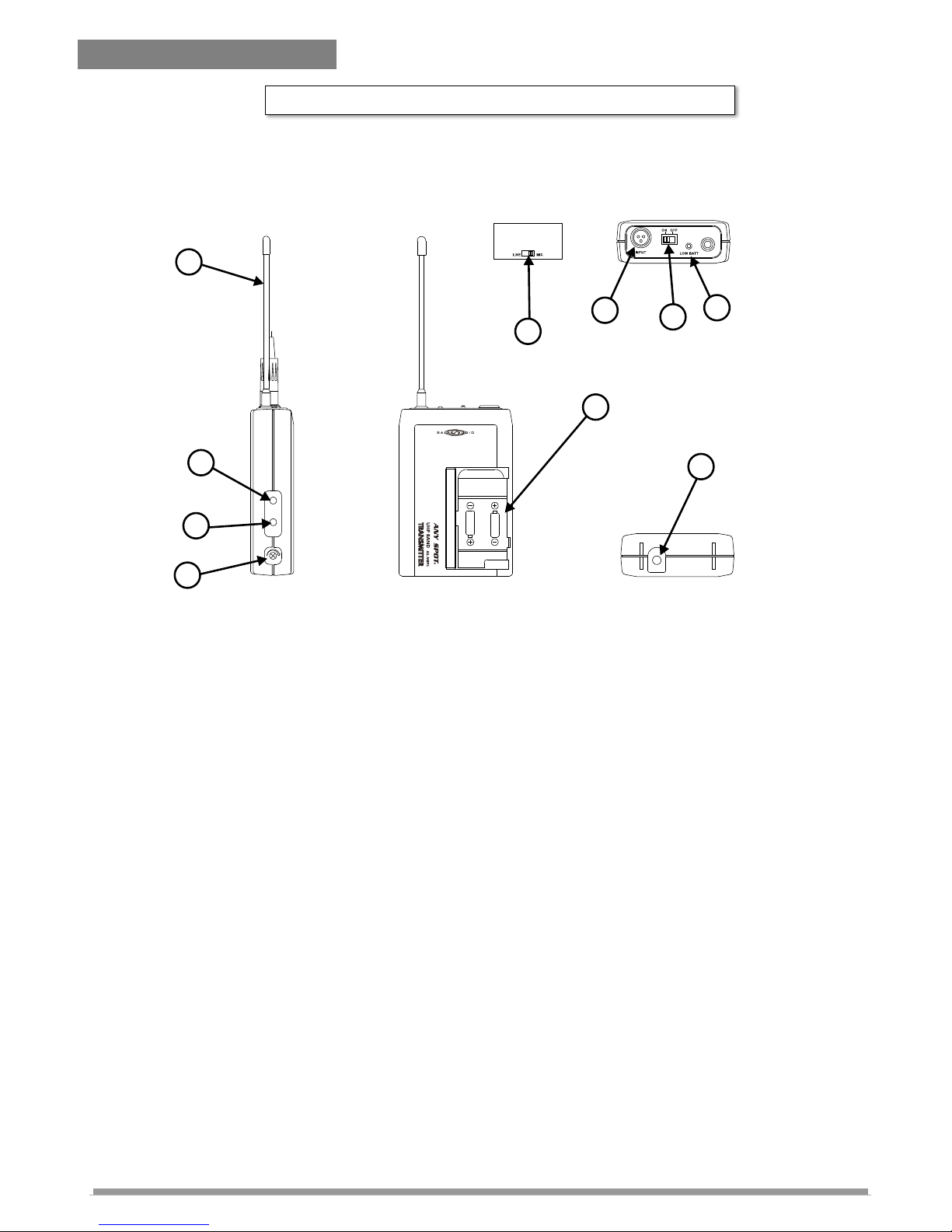
AS-MBP5 Bodypack Transmitter
The bodypack transmitter operates on UHF band frequencies with PLL
synthesized control. 64 preprogrammed selectable UHF frequencies are
provided to avoid interference. Power is supplied by two 1.5V AA size batteries.
1. Mini XLR connector: Input connection for a microphone or instrument cable.
2. On/Off Switch: Turns transmitter power on and off.
3. Low Battery LED: LED indicates battery status. Switching the power to "ON”
causes the LED to flash once and then go out indicating that the batteries have
sufficient power. If the LED stays on, it indicates that the batteries have insufficient
power and should be changed soon. If the status LED fails to flash, the batteries are
either dead or not positioned correctly, and you should correct the positioning or
replace or charge the batteries.
4. Mic/Line Selector: The switch sets the audio input either to microphone level or line
level.
5. Antenna: Permanently connected, helical antenna.
6. Group Selector: Changes transmitter group setting. (for 8 selectable frequency
groups)
7. Channel Selector: Changes transmitter channel setting. (for 8 selectable frequency
channels within each frequency group)
8. Gain: The rotary control adjusts the sensitivity of the transmitter to the level of the
connected lapel/headset microphone or instrument.
9.
10.
Battery Compartment: Insert two 1.5v AA dry or rechargeable batteries into the
compartment and make sure that the batteries are positioned for correct polarity.
Charging Input: If rechargeable batteries are used they can be charged by using
the optional DC charger AS-DCC. Charging can take up to 10 hours.
GROUP
CHANNEL
GAIN
1
2
3
4
5
6
7
8
1
2
3
4
5
6
7
8
AA BATTERY
AA BATTERY
CHARGING
INPUT
1
2
3
4
5
6
7
8
9
10
Page 7

4
AS-1000R
AS-1000R Receiver
Features
Two 1/4-wave antennas for true diversity reception.
Two stereo 1/8" outputs for ear buds and interfacing with
recording equipment.
Multi-Color LED indicator allows the user to obtain more
status information from the receiver.
Charging input allows for re-charging of batteries without
having to remove them. (For use only with optional charger
unit and rechargeable batteries).
Up to 64 selectable frequencies are available to set up a
multi-frequency broadcasting system while avoiding
interference. The frequency group and channel selection
switches are contained inside the battery compartment,
which helps prevent the accidental changing of channels
during use.
In the rare event of a signal dropout, our “Auto-Mute”
circuitry prevents intermittent static from going into the
users ears.
Page 8

5
AS-1000R
PRODUCT DESCRIPTION
1. POWER: On/Off slide switch.
2. MULTI-COLOR LED INDICATOR:
A. When the power is first switched on, the LED flashes RED,
and then fades out if no signal from the transmitter is present.
B. A constant GREEN LED indicates a signal from the
transmitter is present plus fully charged batteries.
C. A constant AMBER LED indicates the batteries are low and
signal is present. (Time to replace the batteries).
D. A constant RED LED indicates low batteries and no signal
from the transmitter is present.
E. A flashing RED LED indicates the batteries are being
charged (only applies to rechargeable batteries and the
charger unit).
11
5
10
4
3
1
2
7
6
GR CH
1
2
3
4
5
6
7
8
GR.
1
2
3
4
5
6
7
8
CH.
Page 9

6
AS 1000R-
9
8
3. VOLUME CONTROL: Adjusts the volume of the signal
present at the ear bud jack (#6).
4. 1/4" WAVE ANTENNA
5. 1/8" STEREO RECORDING OUTPUT: Provides a stereo
line level signal to recording or other equipment. (Not
affected by the volume control #3).
6. 1/8" STEREO EAR BUD OUTPUT: Provides a stereo signal
to the ear buds.
7. BATTERY COMPARTMENT DOOR RELEASE.
8. BATTERY CHARGER INPUT: For use with the optional
battery charger (AS-DCC). (Use only with rechargeable type batteries.)
9. BELT CLIP: Allows the receiver to be easily worn on a belt,
waistband, or guitar strap.
10. GROUP and CHANNEL SELECTORS: Rotary switch (GR)
used to select group, and (CH) to select channel.
11. BATTERY COMPARTMENT: Holds two AA standard or
rechargeable batteries. (Observe correct polarity
indications.)
Page 10

7
AS CK SET UP-
AS-CK SETUP PROCEDURE
Note: The word “Transmitter” in this procedure applies to both
the AS-HH5 Hand Held Microphone and the AS-MBP5 Body
Pack with its connected Microphone.
1. Make sure that both the Transmitter and AS1000R
Receiver power switches are in the off position before
beginning this procedure.
2. Install 2 fresh AA batteries into the AS1000R. Attach
headphones to the Green headphone jack. Move the
power switch to the ON position. The LED indicator
should illuminate Red for a few seconds and then go out.
If the LED lights up Green, first double check that the
Transmitter power switch is in the off position. If the LED
remains Green even when the Transmitter is switched
OFF, adjust the group and channel switches until the LED
goes out. This will greatly increase the likelihood that the
Any Spot system will be functioning on a frequency free
from interference.
3. Install 2 fresh AA batteries into the Transmitter. Adjust the
group and channel switches to match the group and
channel settings selected on the AS1000R. Move the
Transmitter power switch to the ON position. The Red low
battery indicator on the Transmitter should flash on and
then go out. The LED on the AS1000R should now
illuminate Green, indicating that it is receiving signal from
the Transmitter. If the LED on the AS1000R does not turn
Green, verify that the Transmitter and AS1000R have both
been adjusted to the same group and channel settings. If
the AS-1000R LED still does not turn Green, please try
selecting a new group and channel on both the
Transmitter and AS1000R to avoid any possible
interference from outside RF sources. Repeat this until
the AS1000R LED turns Green.
4. If using the AS-MBP5 Transmitter, verify that the switch on
the back of the body pack is set to "Mic". Increase the
headphone volume control on the AS1000R slowly while
speaking into the Microphone and listening to the
Page 11

8
AS-CK
Handheld Mic (AS-HH5)/Bodypack Transmitter (AS-MBP5)
Headphones. If you are not hearing any audio or just a
low level signal, try increasing the Gain control (turn
clockwise) on the AS-MBP5 until a proper level is
reached. If the audio sounds distorted, try decreasing the
Gain control (turn counter-clockwise) on the AS-MBP5.
5. Once a frequency has been selected, additional
Receivers may be set to the same frequency and audio
quality verified.
6. A general rule for any wireless system: Any number of
Receivers may be set to the same frequency and used in
the same area. However, only one transmitter may be
used on a selected frequency in any given area.
Model no.
AS-HH5/MBP5
Carrier Frequency
Range
UHF 682~698MHz.
Oscillator
PLL synthesized, 64-selectable channels
Frequency Stability
±0.005%
Maximum Deviation
±48KHz
Spurious Emission
>60dB below carrier frequency
T.H.D.
<1%(at 1KHz)
Microphone
Cartridge
Handheld: uni-directional dynamic
Lavalier: uni-directional electret condenser
Headset: omni-directional electret condenser
Power Supply
DC 3V (2 x 1.5V AA batteries or rechargeable
batteries)
Current Consumption
65mA ± 5mA
Dimension W x H x D
3" x 4.2" x 1.2" (76 x 106 x 29mm)
Page 12

9
AS-1000R
SPECIFICATION : AS-1000R Receiver
Design and specifications are subjects to be changed without notice.
Model no.
AS1000R
Frequency Range
UHF 682~698MHz. 64 CH
Case
Body-pack In Ear Monitor
Oscillator
PLL synthesized
Receiving Mode
Single channel. Diversity
Frequency Stability
±0.005%
Receiving Sensitivity
At 5 dBuV over 80dB S/N ratio
Image & Spurious
Rej.
80dB minimum
Selectivity
> 50dB
Modulation Mode
FM
IF Frequency
1st: 56MHz 2nd: 10.7MHz
Dynamic Range
>96dB
S/N Ratio
>94dB, at 15KHz deviation and 60dBuV antenna
input
AF Response
Headphone: 100Hz to 10KHz (±3dB)
Line: 100Hz to 10KHz (±3dB)
T.H.D.
<1%(at 1KHz)
Power Supply
DC 3V ( 2 x 1.5V AA batteries or rechargeable
batteries)
Audio Output
Headphone stereo output: 20mW, Line stereo
output level: -10dB
Current Consumption
130mA ± 10mA
Dimension W x H x D
3" x 4.2" x 1.2" (76 x 106 x 29mm)
Page 13

10
Design and specifications are subjects to be changed without notice.
AS-CK
ACCESSORIES
ANY SPOT
GUITAR CABLE 1/4" TO
MINI XLR
guitar/instrument cable, mini XLR plug, works
with both AS-MBP5 & AS-MBP7
UNI HEADSET MIC W/ MINI
XLR
omni directional heaset (dual ear) can also be used
as a lapel microphone, mini XLR plug, works with
both AS-MBP5 & AS-MBP7
UNI LAV/LAPEL MIC W/ MINI
XLR
uni directional lav/lapel microphone, mini XLR plug,
works with both AS-MBP5 & AS-MBP7
HEADSET/LAV COMBO OMNI
MIC
Omni directional, Will work as a headset or lav, Mini
XLR connector.
AS-HLC
AS-HS
AS-LV
AS-GTR
CAMERA CABLE
1/8" Stereo to L and R XLR male connectors
AS-CC
DC CHARGER
DC charger will charge up
to 5 AS-1000R or other DC chargeable units from
Galaxy including AS-MBP5, AS-MBP7, AS-HH5, &
AS-HH7 5 charging cables included.
AS-DCC
(X) 5
ANY SPOT CAMERA KIT
CASE
Holds body pack receivers, body pack transmitters
or handheld microphone, and accessories.
AS-CASEREC
Page 14

11
TROUBLESHOOTING
Problem Solution
No Sound
l Make sure both the transmitter and receiver are switched
on and receiving power.
l Make sure the transmitter and receiver are tuned to the
same frequency program number.
l Make sure an audio signal is being supplied to the
transmitter.
l Make sure the receiver is within range of the transmitter.
l Check whether the transmitter is located too near a metal
object, or there are obstructions between the transmitter
and receiver.
Sound
interference
l When using 2 or more systems simultaneously, make
sure the chosen frequencies are not interfering with each
other.
l Check whether the interference comes from other
wireless systems, TV, radio, etc. Try choosing new
matching frequency program numbers for both the
transmitter and receiver.
Distortion
l Make sure the receiver volume is not set too high.
l Make sure the source signal supplied to the transmitter is
not distorted.
AS-1000R
Page 15

12
Frequency Chart
Page 16

13
Certification
AS-1000R: Approved under the Declaration of Conformity (DoC) provision of FCC
Part 15. Meets essential requirements of European Union R&TTE Directive
1999/5/EC, eligible to bear CE marking. Type approved to EN 300 422 -2. Meets
requirements of EMC Standard EN 301 489 Parts 1 and 9. This Radio Equipment is
intended for use IN MUSICAL PROFESSIONAL ENTERTAINMENT AND SIMILAR
APPLICATIONS.
NOTE: This Radio apparatus may be capable of operating on some frequencies not
authorized in your region. Please contact your national authority to obtain information
on authorized frequencies for wireless microphone products in your region
Licensing: A ministerial license to operate this equipment may be required in certain
areas. Consult your national authority for possible requirements.
FCC Statement. The AS-1000R Receiver complies with Part 15 of the FCC rules.
Operation is subject to the following two conditions: (1) this device does not cause
harmful interference, and (2) this device must accept any interference received,
including interference that may cause undesired operation.
Licensing Statement. A user license may be required for operation. Contact the
communications authority in your country for more information.
Modifications to Approved Equipment. Changes or modifications not expressly
approved by Galaxy Audio Incorporated could affect compliance with
telecommunications standards, thereby voiding the user's authority to operate this
product.
NOTE: This equipment has been tested and found to comply with
the limits for a Class B Digital Device, pursuant to Part 15 of the
FCC Rules. These limits are designed to provide reasonable
protection against harmful interference in a residential installation.
This equipment generates, uses and can radiate radio frequency
energy and, if not installed and used in accordance with the
instruction may cause harmful interference to radio communication.
However, there is no guarantee that interference will not occur in a
particular installation. If this equipment does cause harmful
interference to radio or television reception, which can be
determined by turning the equipment off and on, the user is
encouraged to try to correct the interference by one or more of the
following measures:
Reorient or relocate the receiving antenna.
Increase the separation between the equipment and receiver.
Connect the equipment into an outlet on a circuit different from
that to which the receiver is connected.
Consult the dealer or an experienced radio / TV technician for
help.
AS-CK
Page 17

14
NOTES
NOTES
Page 18

15
ONE YEAR LIMITED WARRANTY
This warranty gives you specific legal rights, and you may also have other rights which may
vary from state to state. This warranty is extended to the purchaser and to any purchaser from
him/her for value.
GALAXY AUDIO warrants the materials and workmanship of its products for a period of one
full year from the date of the original purchase.
The following are not covered by the warranty:
1. Damage to or deterioration of the exterior cabinet which occurs after delivery.
2. Damage after initial delivery resulting from accident, misuse or neglect.
3. Damage resulting from failure to follow instructions contained in the owner’s manual.
4. Damage resulting from the performance of repairs by someone other than GALAXY
AUDIO or an authorized GALAXY AUDIO service center.
5. Damage occurring during the shipment or delivery of any GALAXY AUDIO product to
GALAXY AUDIO or an authorized service center after initial delivery of the product to
you.
6. Damage to any GALAXY AUDIO product which has been altered, or on which the serial
number has been effaced or removed.
If your unit requires service, it must be returned, shipping charges prepaid to GALAXY
AUDIO service center in the United States. (This warranty is not enforceable outside the U.S.)
Please call or write GALAXY AUDIO, 601 E. Pawnee, Wichita, Kansas 67211,
(800) 369-7768. Under no circumstances should you return your unit to the factory without
first calling GALAXY AUDIO and acquiring a Return Authorization Number (RMA) or
written instruction to do so. If service is required, you must present the original or a copy of
the bill of sale as a proof of date of purchase of your unit. Upon receipt of your unit for
service, GALAXY AUDIO will repair or replace your unit as soon as possible, but in no event
later than 30 days after the receipt of the unit. We will return the unit to you, shipping charges
prepaid, provided the necessary repairs are covered by this warranty.
IMPLIED WARRANTIES OF MERCHANTABILITY AND FITNESS FOR PARTICULAR
PURPOSE ARE LIMITED IN DURATION TO THE LENGTH OF THIS WARRANTY,
UNLESS OTHERWISE PROVIDED FOR BY STATE LAW. GALAXY AUDIO’S
LIABILITY IS LIMITED TO THE REPAIR OR REPLACEMENT, AT OUR OPTION, OF
ANY DEFECTIVE PRODUCT, AND SHALL IN NO EVENT INCLUDE INCIDENTAL OR
CONSEQUENTIAL DAMAGES OF ANY KIND. SOME STATES DO NOT ALLOW
LIMITATIONS ON HOW LONG AN IMPLIED WARRANTY LASTS AND/OR DO NOT
ALLOW THE EXCLUSION OR LIMITATION OF INCIDENTAL OR CONSEQUENTIAL
DAMAGES, SO THE ABOVE LIMITATIONS AND EXCLUSIONS MAY NOT APPLY TO
YOU.
GALAXY AUDIO does not authorize any third party, including any dealer or Authorized
Service Center, to assume any liability on behalf of GALAXY AUDIO or to make any
warranty for GALAXY AUDIO.
1-800-369-7768 www.galaxyaudio.com
P.O. BOX 16285 Wichita, Ks 67216-0285
Specifications in this manual are subject to change without notice.
V8292007
Page 19

REGISTRATION
This Galaxy Audio product will be used for:
Live Sound o
Church o
Recording
Home/Project Studio o
Commercial Studio o
Post-Production/Mastering o
Broadcast
On-Air o
Production o
What magazines do you read?_________
_________________________________
_________________________________
__________________________________
_________________________________
_________________________________
How can Galaxy Audio better serve you?
_________________________________
_________________________________
_________________________________
_________________________________
__________________________________
_________________________________
Name________________________Phone_____________
Address________________________________________
City, State, Zip____________________________________
email_______________________
Dealer_______________________PurchaseDate________
Serial number Model
Registration
Registration information is used ONLY by GALAXY
AUDIO and will be kept strictly confidential.
REGISTRATION CARD
Page 20

PLACE
STAMP
HERE
GALAXY AUDIO
P.O. BOX 16285
WICHITA, KS 67216-0285
1-800-369-7768 www.galaxyaudio.com
P.O. BOX 16285 Wichita, Ks 67216-0285
 Loading...