

Gaggia RI8177/50, 10002030, 10001708, 10002484, Platinum Vision Operation And Maintenance Manual
Page 1

Operation and maintenance manual
Before using the machine, please read the attached operating instructions.
Carefully read the safety rules
Manual de uso e manutenção
Antes de utilizar a máquina consulte estas instruções.
Leia atentamente as normas de segurança.
Page 2

CONTENTS
IMPORTANT PRECAUTIONARY MEASURES ...........................................................2
APPLIANCE ...............................................................................................................4
ACCESSORIES .......................................................................................................................4
INSTALLATION ..........................................................................................................5
STARTING THE MACHINE...........................................................................................................5
SETTING THE LANGUAGE .......................................................................................................... 6
«
AQUA PRIMA» WATER FILTER ..................................................................................................7
DISPLAY ....................................................................................................................8
(OPTI-DOSE) INDICATES THE INDICATES THE COFFEE DOSE PER CUP .................................................. 8
ADJUSTMENTS .........................................................................................................9
COFFEE INTENSITY .................................................................................................................9
ADJUSTING THE HEIGHT OF THE DRIP TRAY ..................................................................................9
COFFEE GRINDER ADJUSTMENT .................................................................................................9
BEVERAGE DISPENSING .......................................................................................10
ESPRESSO / COFFEE / LONG COFFEE ........................................................................................10
DISPENSING BEVERAGES WITH PRE-GROUND COFFEE ................................................................... 11
HOT WATER DISPENSING ........................................................................................................ 12
STEAM DISPENSING ..............................................................................................................13
CAPPUCCINO .......................................................................................................................14
MILK ISLAND (OPTIONAL) .......................................................................................................15
BEVERAGE PROGRAMMING ..................................................................................16
BEVERAGE PROGRAMMING MENU .............................................................................................16
ESPRESSO / COFFEE / LONG COFFEE PROGRAMMING ....................................................................17
PROGRAMMING THE MACHINE .............................................................................18
<LANGUAGE & DISPLAY> «LANGUAGE» MENU ............................................................................19
<
LANGUAGE & DISPLAY> «CONTRAST» MENU ............................................................................19
<
ALERTS AND ACOUSTIC SETTINGS> «READY MACHINE» MENU ......................................................20
<
ALERTS AND ACOUSTIC SETTINGS> «KEY TONE» MENU ..............................................................20
«
CUP-WARMING SURFACE» MENU ............................................................................................ 20
<
WATER SETTINGS> «RINSE» .................................................................................................21
<
WATER SETTINGS> «WATER FILTER» MENU .............................................................................. 21
<
WATER SETTINGS> «WATER HARDNESS» MENU .........................................................................22
BEVERAGE SETTINGS ...........................................................................................23
«PREBREWING» ADJUSTMENT ................................................................................................. 23
COFFEE TEMPERATURE ADJUSTMENT ........................................................................................ 24
Page 3

«OPTI-DOSE» ADJUSTMENT FOR COFFEE BREWING ...................................................................... 24
WATER QUANTITY ADJUSTMENT FOR COFFEE BREWING ..................................................................24
TIME/DATE SETTINGS ............................................................................................25
SET CLOCK ......................................................................................................................... 25
DATE SETTINGS ...................................................................................................................26
STAND-BY SETTINGS ............................................................................................................. 27
MACHINE ON/OFF ................................................................................................................. 28
MAINTENANCE SETTINGS .....................................................................................30
«PRODUCT COUNT.» MENU .................................................................................................... 30
«
CLEANING CYCLE» MENU .....................................................................................................31
«
BOILER DESCALING CYCLE» MENU .........................................................................................32
«
LOCK DISPLAY» MENU ......................................................................................................... 34
SPECIAL FUNCTIONS .............................................................................................35
FACTORY SETTINGS ..............................................................................................................35
CLEANING AND MAINTENANCE ............................................................................36
MAINTENANCE DURING OPERATION ...........................................................................................36
GENERAL MACHINE CLEANING .................................................................................................36
CLEANING THE BREW GROUP. .................................................................................................37
ERROR CODES .......................................................................................................38
TECHNICAL DATA ...................................................................................................39
SAFETY RULES .......................................................................................................40
Page 4

2
IMPORTANT PRECAUTIONARY MEASURES
During use, every precaution must be taken to limit the risk of fi re, electric shock and/or accidents.
• Read carefully all the instructions and information listed in this manual and in any other booklet contained in the
packaging before turning on or using the espresso machine.
• Do not touch hot surfaces.
• To avoid fi res, electric shocks or accidents, do not immerse the cord, plug or body of the machine in water or other
liquid.
• Be especially careful when using the espresso machine in the presence of children.
• Unplug the cord when the machine is not in use or during cleaning. Let it cool down before inserting or removing
parts and before cleaning.
• Do not use the machine with a damaged cord or plug or in the case of failure or breakdown. Have the machine
checked or repaired at the nearest customer service center.
• The use of accessories not recommended by the manufacturer can cause damage to property or injury to persons.
• Do not use the espresso machine outdoors.
• Make sure the cord does not dangle or touch hot surfaces.
• Keep the espresso machine away from heat sources.
• Make sure the espresso machine's main switch is in the "Off" position before plugging it in. To turn it off, turn the
switch to "Off" and unplug the cord from the socket.
• Be extremely careful while using the steamer.
Any repair and/or assistance, with the exception of normal cleaning and maintenance operations, must be
performed by an authorized customer service center. Do not immerse the machine in water.
• Check that the voltage indicated on the tag corresponds to that of the electrical system of your home.
• Never use warm or hot water to fi ll the water tank. Use only cold water.
• Do not touch the machine's hot parts or the power cord with your bare hands during operation.
• Never wash the machine with corrosive detergents or abrasive utensils. Use only a soft cloth dampened with water.
• To slow down the formation of limescale, we recommend using fi ltered water.
WARNING
Page 5

3
GENERAL INFORMATION
This coffee machine is suitable for preparing espresso coffee using coffee beans and it is equipped with a
device to dispense steam and hot water.
Warning: no liability is assumed for any damage caused by:
• incorrect use not in accordance with the intended uses;
• repairs not carried out by authorized customer service centers;
• tampering with the power cable;
• tampering with any part of the machine;
• the use of non-original spare parts and accessories;
• failure to descale the machine or use at temperatures below 0°C (32°F).
IN THESE CASES, THE WARRANTY IS NOT VALID.
THE WARNING TRIANGLE INDICATES ALL IMPORTANT INSTRUCTIONS
FOR THE USER’S SAFETY. PLEASE FOLLOW THESE INSTRUCTIONS
CAREFULLY TO PREVENT SERIOUS INJURIES!
HOW TO USE THESE OPERATING INSTRUCTIONS.
Keep these operating instructions in a safe place and make them available to anyone else who would use the coffee
machine. For further information or in case of problems, please refer to any authorized service center.
KEEP THESE INSTRUCTIONS FOR FUTURE REFERENCE.
• A short electrical cord has been provided to keep it from twisting or causing tripping.
• Extension cords can be used, but must be used with great care.
When an extension cord is used, check that:
a. the voltage listed on the extension cord corresponds to the electrical voltage of the appliance;
b. the cord has a grounded, three-prong plug (if the appliance's cord is of this type);
c. the cord does not dangle from the table to avoid tripping.
• Do not use multi-sockets
INSTRUCTIONS FOR THE ELECTRICAL CORD
Page 6

4
TOUCH-SCREEN Display
APPLIANCE
Compartment for
pre-ground coffee
ACCESSORIES
“Aqua Prima” water fi lter Ground coffee measuring scoop Water hardness tester
Grinder adjustment key Power cable
Brew Group
Coffee grounds drawer
Socket for power cable
Coffee bean hopper
Power button
Service door
Coffee bean hopper cover
Drip tray
Dispensing head
Drip tray + grill
Hot water / steam spout
Water tank
Hot water / steam knob
Cup warming surface
Button for raising/lowering
the drip tray + grill
“Milk Island” connection
E-Plus System
Lubricant for the brew group
Page 7

5
1 2 3
4
7
6
5
When the right temperature is reached, the machine performs a priming and
a rinse cycle of the internal circuits. A small quantity of water is dispensed.
Wait for this cycle to be completed automatically.
See page 21 to enable/disable the rinse function.
The screen for beverage dispensing appears on the display; see page 8.
INSTALLATION
Attach the female end of the power
cord to the machine. Insert the
male end into the power outlet
(see data tag).
Place a container beneath the hot
water spout.
Remove the coffee bean hopper
cover.
Fill the hopper with coffee beans.
Close the cover pushing it down
completely.
Remove the water tank. We
recommend installing the “Aqua
Prima” water fi lter (see page 7).
Press the main power button to the
“ON” position.
Make sure that the main power button is not pressed in the “ON” position.
Fill the tank with fresh drinking
water. Do not exceed the “max”
level indicated on the water tank.
Once fi lled place the tank back into
the machine.
STARTING THE MACHINE
TO ASSESS WATER HARDNESS, SEE “WATER
HARDNESS MENU” ON PAGE 22.
Page 8

6
1 2 3
These settings allow you to regulate the machine’s parameters to dispense coffee according to the
typical parameters of the country where it is used. For this reason, the languages are also differentiated
by location.
Set the clock and the calendar of the machine as shown on page 25.
SETTING THE LANGUAGE
INSTALLATION
4
7
5 6
1.2.1.1.1 language
English
italiano (it)
Italiano (ch) Deutsch
show
text
8:30 am
15/06/06
go to
menu
English
italiano (it)
Italiano (ch)
Deutsch
English
italiano (it)
Italiano (ch)
Deutsch
warming up
Press .
If necessary, press the key to
display the desired language.
Select the language.
Wait until the machine completes
the heating stage.
rinse
When the right temperature is
reached, the machine performs a
rinse cycle of the internal circuits.
rinse
A small quantity of water is
dispensed. Wait for this cycle to be
completed automatically. See page
21 to enable/disable the function.
The screen for product
dispensing appears on the
display.
1.2.1.1.1 language 1.2.1.1.1 language
Page 9

7
4
9
32
5
7
6
8
1
«AQUA PRIMA» WATER FILTER
To improve the quality of the water you use, and extend the life of your machine at the same time, it is
recommended that you install the “Aqua Prima” water fi lter. After installation, go to the water fi lter
initialization program (see programming). By using this program, the machine advises the user when the
water fi lter must be replaced.
Place a container beneath the hot
water spout.
Turn the knob until the
position is reached. Water
dispensing begins.
Remove the Aqua Prima water
fi lter from its packaging. Enter the
date of the current month.
Insert the water fi lter in its place
within the empty tank (see
fi gure);
Press down until it clicks into
place.
Fill the tank with fresh drinking
water. Let the water fi lter soak in
the full tank for 30 minutes for
correct initialization.
on
reload water
fi lter
off
1.2.4 water settings
rinse
on
water
hardness
3/4
water fi lter
off
Have you replaced the old water
fi lter with a new one?
Access programming (see page
18 and 19). Press “water settings”.
Press “reload water fi lter”.
Press “water fi lter”.
Press the
key to confi rm the
activation of the new water fi lter.
1.2.4.2. water fi lter
Once fi nished, the “close steam knob” message appears on the display. Turn the knob back to the rest position ( ).
Fill the water tank if necessary.
The machine is now ready for use and the “Aqua Prima” water fi lter control is active (see page 21).
1.2 machine settings
language & display
cup-warming
surface
water
settings
alerts and acoustic
settings
Page 10
8
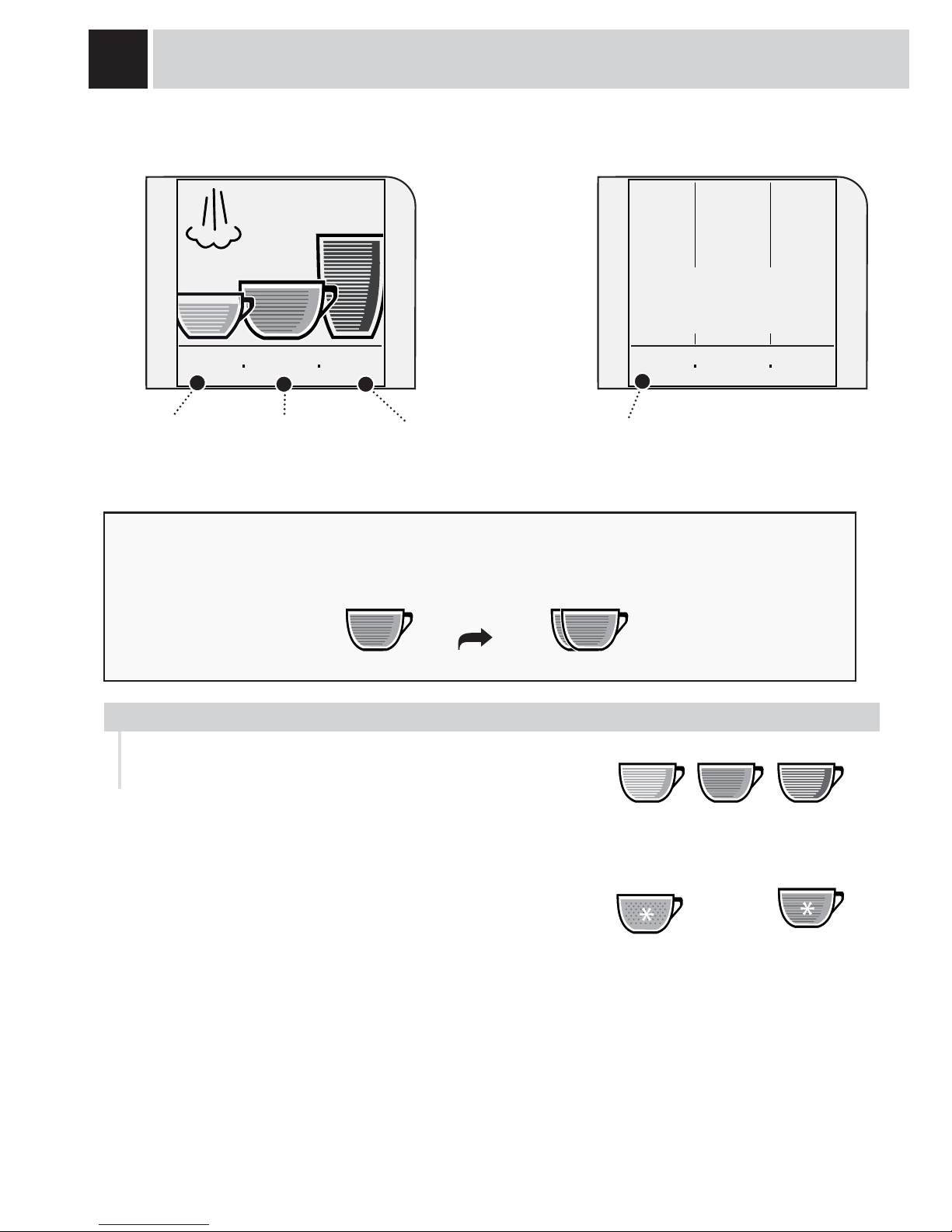
• To get the desired coffee, press the corresponding symbol on the display.
The machine automatically performs all the necessary operations.
• Press the icon twice to make 2 cups.
press twice
light medium strong
The color intensity of the icon indicates the quantity of coffee to be
ground for preparing each beverage.
The greater the quantity of coffee ground, the stronger the coffee
will be.
DISPLAY
Go to the “text
format” menu
Enter the
programming menu
It is possible to change the type of display and choose between “icon format” and “text format”
ICON FORMAT
Go to the “icon
format” menu
TEXT FORMAT
(OPTI-DOSE) INDICATES THE COFFEE DOSE PER CUP
When the machine is programmed to use pre-ground coffee or
when a beverage is customized, the icon is displayed in a different
way and/or accompanied by an asterisk (see the paragraphs about
programming beverages).
pre-ground customization
show
text
8:30 am
15/06/06
go to
menu
show
text
8:30 am
15/06/06
steam
espresso
mild
coffee
medium
long
coffee
strong
go to
menu
Enter the clock
menu
The Gaggia coffee machine allows using all types of coffee beans available on the market (except
caramelized ones).
However, coffee is a natural product and its features may change according to its origin and blend.
With some coffee blends it could happen that, after choosing the coffee, it is not brewed and the machine
returns to the initial status.
In such cases, reduce the quantity of coffee to be ground (e.g.: from “strong” to “medium”), using this
function.
Page 11

9
MEDIUM
COFFEE
STRONG
COFFEE
MILD
COFFEE
COFFEE INTENSITY
ADJUSTING THE HEIGHT OF THE DRIP TRAY
The machine lets you make slight adjustments to the coffee grinder to adapt it to the kind of coffee used.
The adjustment must be performed by pressing the pin
located inside the coffee hopper. This must be pressed and
turned by means of the supplied key only. Press and turn
the pin one notch at a time and brew 2-3 cups of coffee; the
grinder adjustment can only be noticed in this way.
The references located inside the container indicate the
grind setting.
COFFEE GRINDER ADJUSTMENT
FINE GRINDMEDIUM GRINDCOARSE GRIND
ADJUSTMENTS
Adjust the drip tray before dispensing any products so as to use any kind of cup.
To raise the drip tray, slightly press on the upper key. To
lower the drip tray, slightly press on the lower key.
When the desired height is reached, release the key.
Note: empty and clean the drip tray daily.
To adjust the intensity of the brewed coffee.
The coffee may even be adjusted while
brewing. This adjustment has an immediate
effect on the selected type of brewing.
E-PLUS SYSTEM - ESPRESSO PLUS SYSTEM
The E-Plus System has been carefully designed to give your coffee the intense taste you desire. Simply
turn the knob and you will notice that the coffee goes from mild intensity to strong intensity.
Page 12

10
1 2
3
4 5
Choose a beverage and press the
corresponding icon on the display:
once for 1 cup or twice for 2 cups.
The machine begins grinding the
set quantity of coffee.
The machine begins dispensing
the selected beverage.
BEVERAGE DISPENSING
COFFEE BREWING CAN BE STOPPED AT ANY TIME BY PRESSING “STOP
COFFEE”.
THE STEAM SPOUT MAY REACH HIGH TEMPERATURES: DANGER OF SCALDING.
DO NOT TOUCH IT WITH BARE HANDS.
To brew 2 cups, the machine dispenses half of the entered quantity and briefl y interrupts dispensing in order
to grind the second coffee dose. Coffee dispensing is then restarted and completed.
This procedure shows how to dispense an espresso. To dispense another type of coffee, press the appropriate
icon. Use appropriate espresso or coffee cups so that the coffee does not overfl ow.
The machine ends dispensing automatically on the basis of the quantity determined by the manufacturer. It is
possible to customize this quantity. See page 16.
Position 1-2 cup(s) to dispense an
espresso
Position 1-2 cup(s) to dispense a
coffee or a long coffee
show
text
8:30 am
15/06/06
go to
menu
show
text
8:30 am
15/06/06
go to
menu
stop
coffee
espresso
ESPRESSO / COFFEE / LONG COFFEE
Page 13
11
4
21 3
65
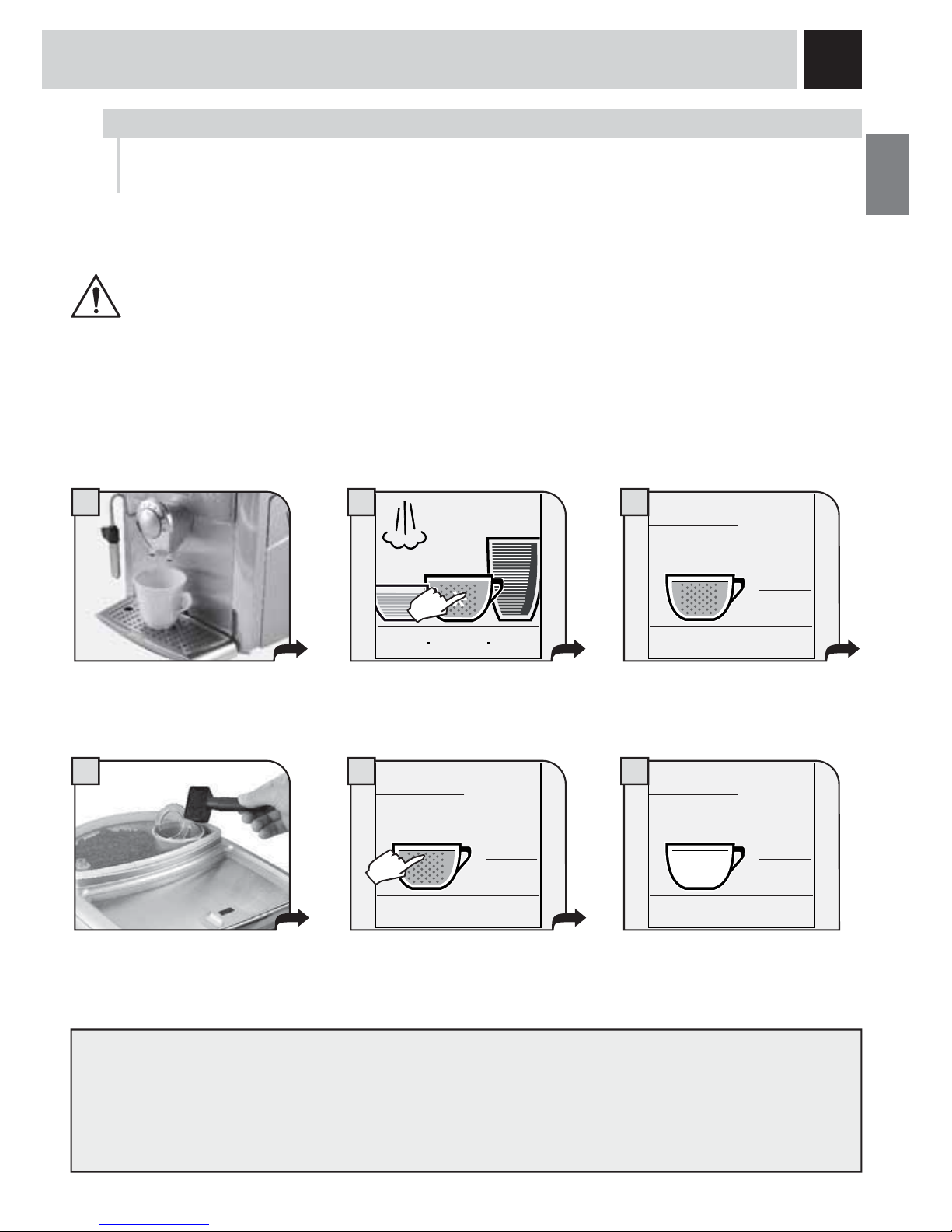
The machine allows you to use pre-ground and decaffeinated coffee.Pre-ground coffee must be poured into
the appropriate compartment positioned next to the coffee bean hopper. Only use coffee ground for espresso
machines and never coffee beans or instant coffee. (see the “Beverage programming” section on page 16)
WARNING: PUT PRE-GROUND COFFEE INTO THE COMPARTMENT ONLY WHEN
YOU WISH TO DISPENSE THIS TYPE OF BEVERAGE.
INSERT ONLY ONE SCOOP OF GROUND COFFEE AT A TIME. TWO CUPS OF
COFFEE CANNOT BE DISPENSED AT THE SAME TIME.
Press the appropriate key. The
display will show:
Pour pre-ground coffee in the
appropriate compartment using the
measuring scoop provided.
Note:
• If brewing does not start within 30 seconds from the appearance of the message (3), the machine will return
to the main menu and discharge any inserted coffee into the coffee grounds drawer;
• If no pre-ground coffee is poured into the compartment, only water will be dispensed;
• If the dose is excessive or if 2 or more scoops of coffee are added, the machine will not dispense the
beverage and the coffee in the compartment will be discharged into the coffee grounds drawer.
The preparation of a coffee with pre-ground coffee is shown in the example given below. The pre-ground
coffee option is shown with an asterisk on the selected beverage.
show
text
8:30 am
15/06/06
go to
menu
Place 1 cup to brew one coffee.
A message reminds the user to
pour pre-ground coffee into the
appropriate compartment.
coffee
stop
coffee
The machine begins dispensing
the selected beverage.
add pre-ground
coffee!
start!
Press “start!” to begin brewing.
coffee
stop
coffee
coffee
stop
coffee
add pre-ground
coffee!
start!
DISPENSING BEVERAGES WITH PRE-GROUND COFFEE
Page 14

12
1
4
5
6
7
2 3
8 9
BEVERAGE DISPENSING
Place a container beneath the
steam/hot water spout.
Turn the knob until the
position is reached.
Wait until the machine has
dispensed the desired quantity of
water.
When the machine has dispensed
the desired quantity, turn the knob
until it is in the rest position (
).
To dispense another cup
of hot water, repeat these
operations.
Press the icon.
show
text
8:30 am
15/06/06
go to
menu
steam
hot
water
Select hot water dispensing.
hot water
steam
hot
water
hot water
show
text
8:30 am
15/06/06
go to
menu
Press to return to the main
menu.
Note: if the display shows the hot water icon , hot water may be dispensed by simply turning the knob as shown
at step 4.
HOT WATER DISPENSING
DISPENSING MAY BE PRECEDED BY SHORT SPURTS OF HOT WATER AND SCALDING IS
POSSIBLE. THE HOT WATER/STEAM SPOUT MAY REACH HIGH TEMPERATURES: DO NOT
TOUCH IT WITH BARE HANDS. USE THE APPROPRIATE HANDLE ONLY.
Page 15

13
1
5
6
7
2 3
4
8 9
Place a container with the
beverage to be warmed up
beneath the steam spout.
Heat the beverage; move the
container while heating.
When you have fi nished, turn the
knob until it is in the rest
position (
).
After dispensing, clean the steam spout as described on page 36.
Note: if the display shows the steam icon
, steam may be dispensed by simply turning the knob as shown at
step 4.
Repeat the operations to
heat another beverage.
show
text
8:30 am
15/06/06
go to
menu
steam
hot
water
steam
Press the icon. Select steam dispensing.
Turn the knob until the
position is reached.
steam
hot
water
Press to return to the main
menu.
show
text
8:30 am
15/06/06
go to
menu
steam
STEAM DISPENSING
DISPENSING MAY BE PRECEDED BY SHORT SPURTS OF HOT WATER AND SCALDING IS
POSSIBLE. THE HOT WATER/STEAM SPOUT MAY REACH HIGH TEMPERATURES: DO NOT
TOUCH IT WITH BARE HANDS. USE THE APPROPRIATE HANDLE ONLY.
Page 16

14
3
4 5 6
1
8
2
7 9
BEVERAGE DISPENSING
steam
hot
water
steam
Select steam dispensing (see steps 2
and 3 on page 13).
Immerse the steam spout in the
milk.
Turn the knob until the
position is reached.
Froth the milk: move the cup
during heating.
When you have fi nished, turn the
knob until it is in the rest
position (
).
Fill 1/3 of the cup with cold milk.
Place the cup beneath the
dispensing head.
steam
hot
water
steam
Press to return to the main
menu.
show
text
8:30 am
15/06/06
go to
menu
Press the key once to brew coffee.
CAPPUCCINO
DISPENSING MAY BE PRECEDED BY SHORT SPURTS OF HOT WATER AND SCALDING IS
POSSIBLE. THE HOT WATER/STEAM SPOUT MAY REACH HIGH TEMPERATURES: DO NOT
TOUCH IT WITH BARE HANDS. USE THE APPROPRIATE HANDLE ONLY.
After dispensing, clean the steam spout as described on page 36.
To dispense 2 cappuccinos:
• froth two cups of milk by following steps 1 to 6;
• dispense two coffees by following steps 7 to 9 (then press the icon of the desired coffee twice).
Page 17

15
1 2
6
7 8
3
4 5
MILK ISLAND (OPTIONAL)
This device, which may be purchased separately, enables you to easily and comfortably prepare delicious
cappuccinos.
Warning: before using the Milk Island, read the manual and all precautions carefully for
correct use.
Important note: the quantity of milk in the carafe must never be below the “MIN” minimum
level nor exceed the “MAX” maximum level. Thoroughly clean all the Milk Island components
after use.
To guarantee best results when preparing cappuccino, we recommend using cold
(0-8°C / 32-45°F), partially skimmed milk.
Fill the milk carafe with the quantity of
milk desired (between the MIN and
MAX levels indicated).
Place the milk carafe onto the base
of the Milk Island. Check that the
light on the base is green.
Remove the carafe using the
handle.
Gently swirl the carafe and pour
the milk into the cup.
Position the cup with frothed
milk under the dispensing head.
Dispense coffee into the cup.
Turn the knob to the
position.
Wait for the milk to be frothed.
When the desired milk froth has
been reached, turn the knob until
it is in the rest position ( ).
The machine will stop
automatically after dispensing
steam continuously for 2
minutes.
To dispense more steam turn the
knob to the (
) position and then
back to the
position.
Page 18

16
BEVERAGE PROGRAMMING
BEVERAGE PROGRAMMING MENU
Hold down the beverage key for two
seconds
Every beverage can be programmed according to your individual tastes. This is shown by an asterisk on the
customized beverage.
To program the desired beverage:
Once a beverage has been customized, the machine will use these settings when
brewing that particular beverage. To modify the quantity of coffee, you must reset
the customization.
show
text
8:30 am
15/06/06
go to
menu
show
text
8:30 am
15/06/06
go to
menu
Page 19

17
1 2
3 4
5
6 7
To brew a different amount of coffee
than the one preset by the
manufacturer, press “custom coffee
dose” before the end of the brewing
cycle in progress. When the desired
quantity is reached, press “stop
coffee”.
By pressing start! the machine
prepares to brew coffee.
The machine will automatically start
and fi nish a brewing cycle according to
the standard settings.
The brewing cycle may be
interrupted only by pressing
“stop coffee”.
If the key is not pressed the
coffee may overflow.
Once brewing is completed, you
must press
within fi ve
seconds.
If is not pressed the
machine returns to the main
menu and the customized
settings will not be saved.
The display shows the confi rmation
of the saved settings, and the
machine automatically returns to the
main menu.
After pressing “start!”, the
machine will perform a
brewing cycle.
ESPRESSO / COFFEE / LONG COFFEE PROGRAMMING
Enter the menu of the coffee to be
customized (press the corresponding
icon for two seconds).
In this phase you can:
select the use of
pre-ground coffee
save settings return to the previous
window
select the quantity of
coffee to be ground
(opti-dose)
show
text
8:30 am
15/06/06
go to
menu
coffee
start!
coffee
coffee
stop
coffee
custom
coffee dose
standard
coffee
dose
coffee
stop
coffee
custom
coffee dose
coffee
saved!
coffee
Page 20
18
PROGRAMMING THE MACHINE
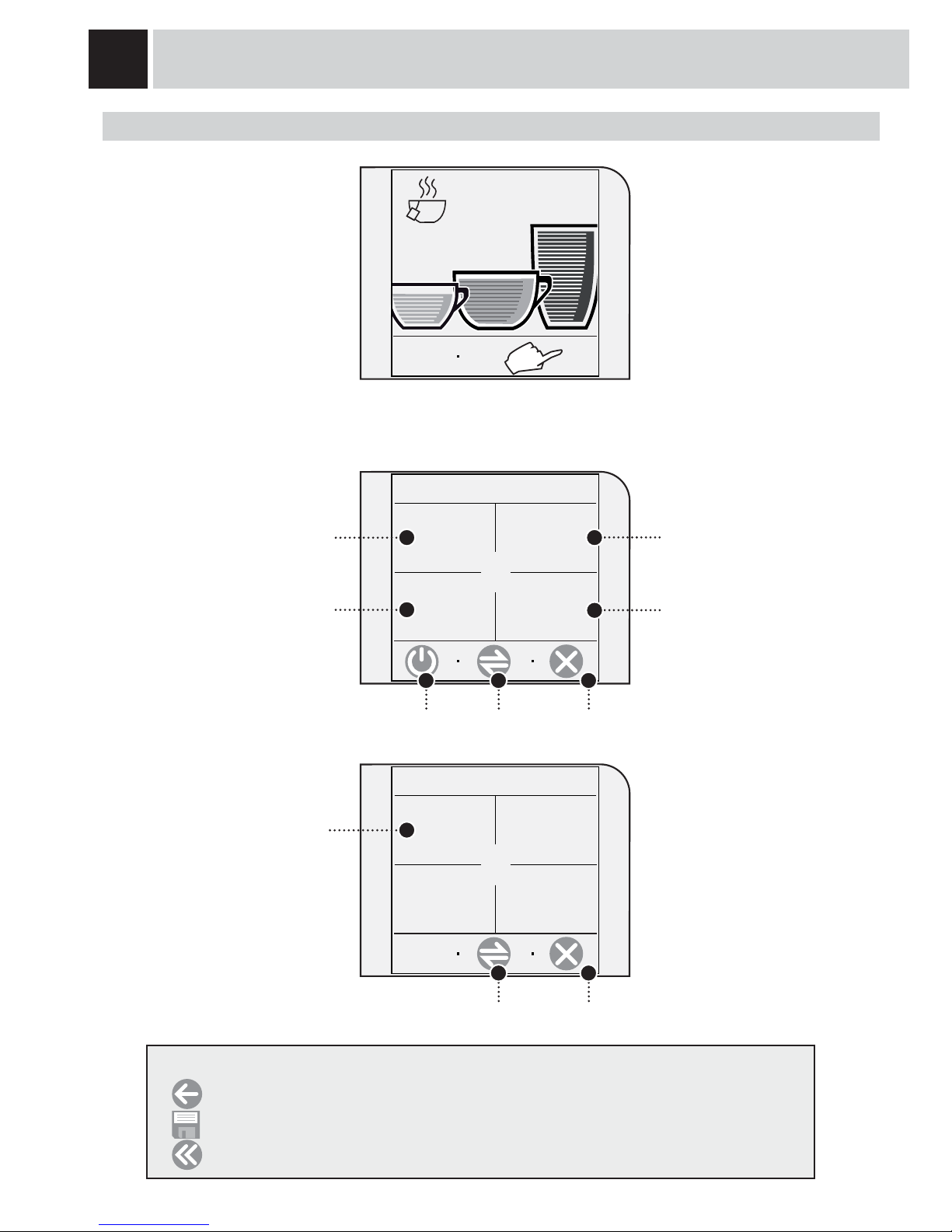
Some of the machine’s functions
may be programmed according
to your custom settings.
Press “go to menu”.
The main programming menu will appear.
programming the machine
operations (see page 19.)
beverage programming
(see page 23)
setting (see page 25):
- current date and time;
- stand-by mode;
- turn on/off times over the span
of a day (energy saving).
Exit
show
text
8:30 am
15/06/06
go to
menu
1. main menu
beverage
settings
machine
settings
time/date
settings
MACHINE SETTINGS
maintenance
settings
Next page
cleaning cycles
(see page 30)
activate stand-by mode
special functions
(see page 35)
Exit
2. main menu
special
settings
Previous page
After having set each of the following menus, press
-
to return to the previous screen WITHOUT saving the new settings;
-
to save;
-
to return to the main menu WITHOUT saving the new settings.
Page 21
19
10
<LANGUAGE & DISPLAY> «LANGUAGE» MENU
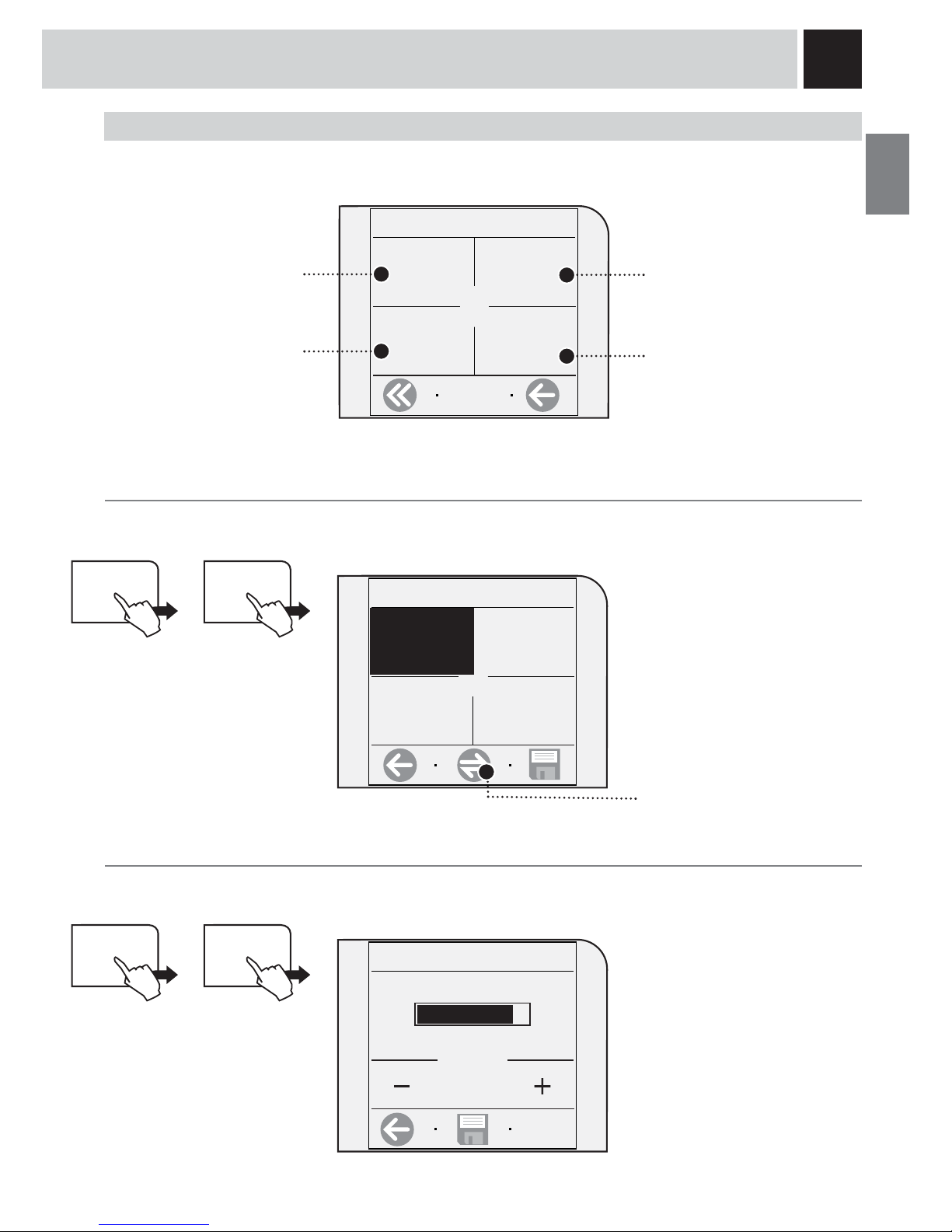
To change the display language of the messages. Press “language & display” and “language”.
This function was described at the
beginning of the manual. This
setting is of fundamental
importance for correctly adjusting
the parameters of the machine
according to the country where the
machine is used.
MACHINE SETTINGS
When the machine settings are selected the following screen appears. Here you may:
set:
the menu language
the display contrast
set the functions for the water
treatment
1.2 machine settings
language &
display
cup-warming
surface
language &
display
1.2.1.1.1 language
English
language
English
italiano (it)
italiano (ch)
1.2.1.2. contrast
contrast
10 / 15
<LANGUAGE & DISPLAY> «CONTRAST» MENU
To set the correct contrast of the display. Press “language & display” and “contrast”.
Adjust the contrast by
pressing + or –
water
settings
activate/deactivate the
acoustic alarms
alerts and
acoustic
settings
the operation of the
cup-warming surface
Deutsch
In this menu you can:
To display the other available
languages.
language &
display
Page 22

20
PROGRAMMING THE MACHINE
<ALERTS AND ACOUSTIC SETTINGS> «MACHINE READY» MENU
This function activates/deactivates a tone every time the machine is ready. Press “alerts and acoustic settings”
and “machine ready”.
alerts and
acoustic
settings
1.2.2.1. machine ready
off
machine
ready
on
on
<ALERTS AND ACOUSTIC SETTINGS> «KEY TONE» MENU
This function activates/deactivates a tone every time a key is pressed. Press “alerts and acoustic settings” and
“key tone”.
activate the tone deactivate the tone
alerts and
acoustic
settings
1.2.2.2. key tone
off
key tone
on
on
activate the key tone deactivate the key
tone
«CUP-WARMING SURFACE» MENU
To set the operation of the cup-warming surface located on the upper part of the machine.
Press “cup-warming surface”
keep the cup-warming
surface always on.
In this menu you can:
keep the cup-warming
surface off when the machine
is in stand-by mode
keep the cup-warming
surface always off.
cup-warming
surface
1.2.3. cup-warming surface
always on
always off
off while in
stand-by
In this menu you can:
In this menu you can:
Page 23

21
<WATER SETTINGS> «RINSE»
To clean the internal circuits in order to guarantee that the beverages are only made with fresh water. The
function is enabled as default by the manufacturer. Note: this rinse cycle is performed every time the machine
is turned on after the warming phase.
Press “water settings” and “rinse”.
water
settings
1.2.4.1. rinse
off
rinse
on
on
activate the rinse
cycle
deactivate the rinse cycle
In this menu you can:
<WATER SETTINGS> «WATER FILTER» MENU
To activate/deactivate the warning to replace the “Aqua Prima” water filter. The machine informs the user
when the “Aqua Prima” water filter needs to be replaced.
Press “water settings” and “water filter”.
water
settings
1.2.4.2. water fi lter
off
water fi lter
off
on
activate the control deactivate the control
In this menu you can:
reload water fi lter
Important note.
This setting automatically adjusts the parameters which allow the user to perform correct machine maintenance.
Select:
on: only when the “Aqua Prima” water fi lter is installed in the water tank as shown on page 7.
This function is automatically activated after selecting “reload water fi lter”.
off: when there is no “Aqua Prima” water fi lter in the water tank.
reload water fi lter: when a new “Aqua Prima” water fi lter is installed in the water tank.
proceed with the initialization
(cleaning) of the water fi lter.
Page 24

22
1
2
1234
3
PROGRAMMING THE MACHINE
<WATER SETTINGS> «WATER HARDNESS» MENU
With the “Water hardness” function you can adapt your machine to the hardness degree of the water you use.
This way, the machine will require descaling at the appropriate time.
Hardness is expressed on a scale from 1 to 4. The appliance is preset at value 3.
Press “water settings” and “water hardness”.
water
settings
1.2.4.3. water hardness
water
hardness
3/4
In this menu you can:
Immerse the water hardness tester provided
with the machine in water for 1 second.
Check the value.
The tester may be used only for
one measurement.
Set the water hardness obtained
from the test on the machine by
pressing + or –.
Page 25

23
BEVERAGE SETTINGS
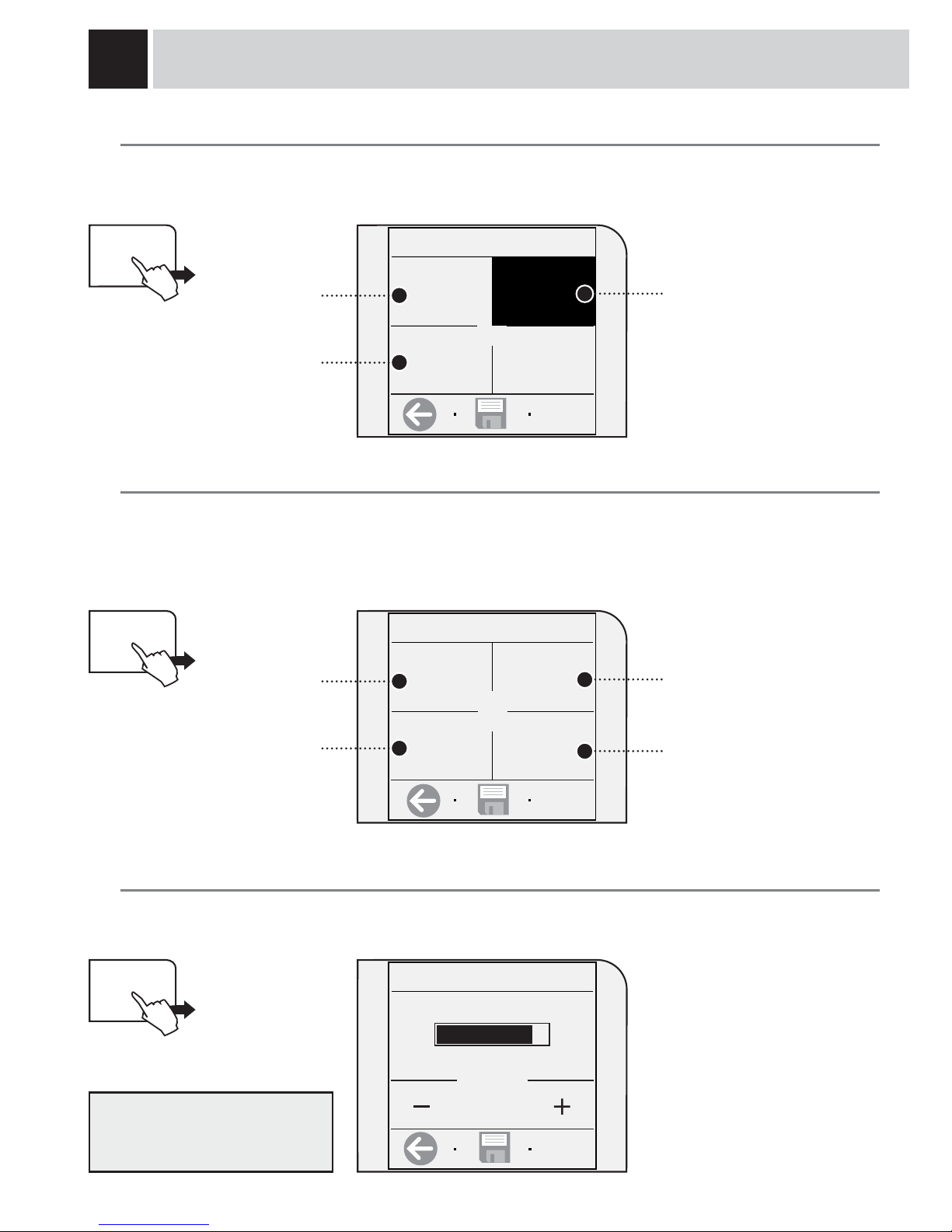
To adjust the general brew parameters of the various types of coffee. Press “beverage settings” on the
main menu.
By selecting each beverage, you can adjust:
the coffee’s brew
temperature
the quantity of coffee to be ground
(opti-dose) or the use of
pre-ground coffee
coffee prebrewing
The current status is indicated below each setting.
«PREBREWING» ADJUSTMENT
To set the prebrewing function: the coffee is slightly dampened before brewing to bring out the full aroma of
the coffee which acquires an excellent taste. Press “prebrewing”.
normal
prebrewing
strong (longer)
prebrewing
deactivate
prebrewing
1.1. beverage settings
espresso
coffee
long coffee
1.1.2. coffee settings
prebrewing
strong
temperature
medium
aroma
medium
coffee
volume
the length of the coffee
1.1.2.1. coffee prebrewing
medium
strong
off
prebrewing
strong
In this menu you can select:
Page 26
24
200
COFFEE TEMPERATURE ADJUSTMENT
To set the temperature for preparing coffee. Press “temperature” and select the desired temperature.
Low
temperature
Medium
temperature
High
temperature
«OPTI-DOSE» ADJUSTMENT FOR COFFEE BREWING
To set the coffee quantity to be ground and to set the use of pre-ground coffee.
You can adjust your beverage according to the quantity of coffee used, or you may choose to prepare it with
decaffeinated coffee using the “pre-ground” function. Press “coffee aroma”.
strong aroma
1.1.2.2. cof fee temperature
low
medium
high
temperature
medium
1.1.2.3. coffee aroma
mild
medium
strong
aroma
medium
pre-ground
mild aroma
medium aroma
the use of pre-ground coffee
WATER QUANTITY ADJUSTMENT FOR COFFEE BREWING
To set the water quantity to be used for preparing coffee. Press “coffee volume”.
coffee
volume
1.1.2.4. coffee water dose
Adjust the quantity by
pressing + or –
PROGRAMMING THE MACHINE
In this menu you can select:
In this menu you can select:
In this menu you can select:
Adjust the quantity according to
the cups you wish to use.
Page 27
25
SET CLOCK
It is important to correctly set the clock for turning the machine on and off (energy saving mode).
Press “set clock”.
TIME/DATE SETTINGS
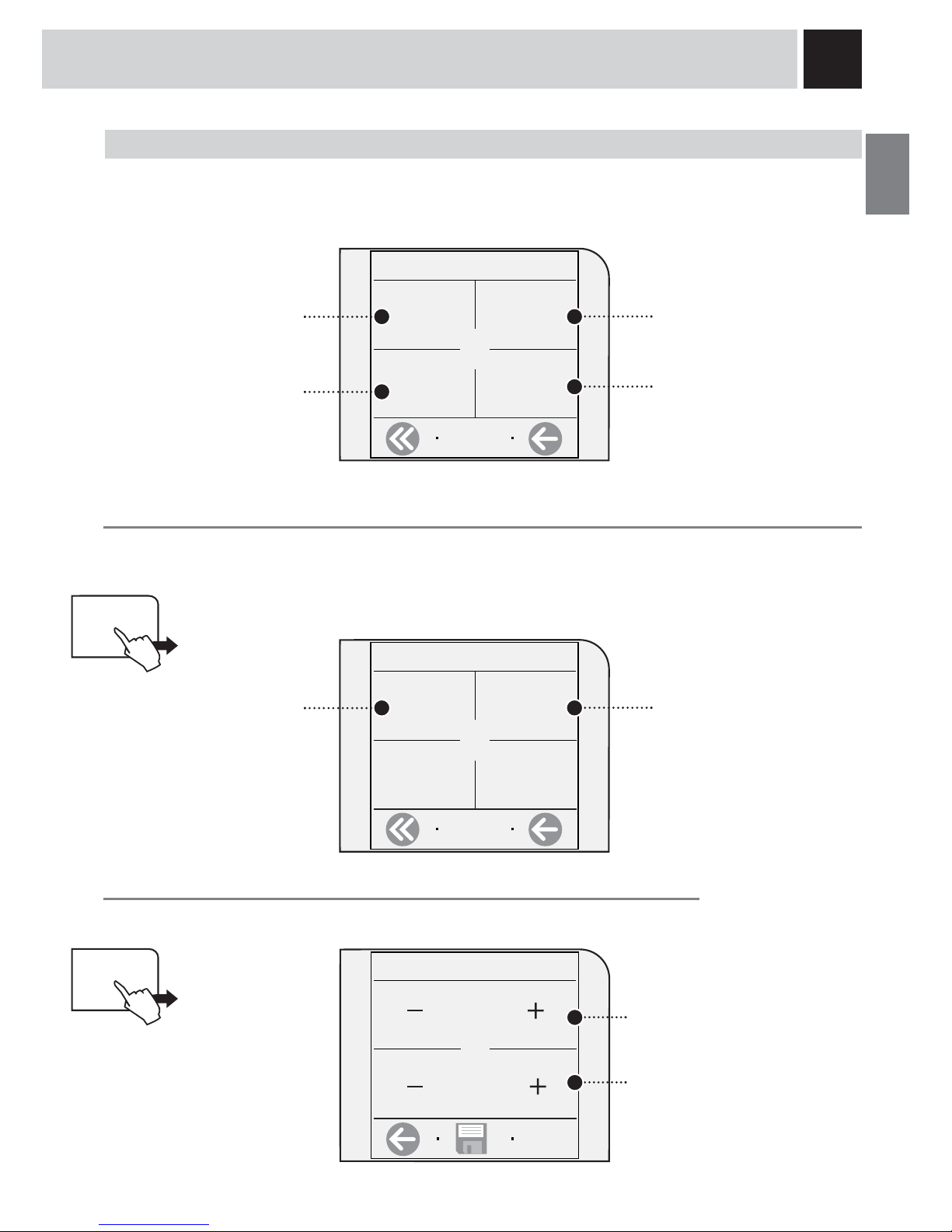
To set the current time, the stand-by timer and the energy saving function. Press “time/date settings” from the
main menu.
In this menu you can:
set the current time
1.3 time/date settings
set clock
date settings
set the date
1.3.1. set clock
current time
08:00
time format
24 hr
In this menu you can:
set the time view mode
(in 24 hour or am/pm format).
set the current time
Current time
To set the current time on the machine. Press “current time”.
1.3.1.1. current time
08 h
set clock
current time
08:00
00 min
Adjust the hour by
pressing + or –
Adjust the minutes
by pressing + or –
stand-by
settings
after 3 hours
machine
on/off
set the parameters for
stand-by after the last
dispensing
set the intervals (three
intervals that can be activated
separately) for turning the
machine on and off (energy
saving).
Page 28

26
PROGRAMMING THE MACHINE
Time format
To set the clock format. The modification of this setting adjusts all the parameters that require viewing/setting the
time. Press “time format”.
1.3.1.2. time format
am/pm
time format
24 hr
American
format
24 hr
International
format
DATE SETTINGS
It is important to correctly set the date for turning the machine on and off (energy saving mode).
Press “date settings”.
1.3.2. date settings
current date
15/06/06
date format
dd/mm/yy
In this menu you can:
set the date format
set the current date
Current date
To set the current date on the machine. Press “current date”.
1.3.2.1. current date
6
date settings
current date
15/06/06
Adjust the year by
pressing + or –
Adjust the month
by pressing + or –
year
6
Jun
15
Thursday
Adjust the date by
pressing + or –
The day of the week is
automatically set according to
the set date.
Page 29

27
STAND-BY SETTINGS
You can set the amount of time the machine waits after the last dispensing to go into stand-by mode.
The default setting is «after 3 hours».
Press “stand-by settings”.
1.3.3. stand-by settings
after 3 hours
after 15 min after 30 min
after 1 hour
When the set time has elapsed, the machine goes
in stand-by.
To exit stand-by mode, press “start”. After warming
up and performing a self-test, the machine is once
again ready for use.
Date format
To set the date view mode. The modification of this setting adjusts all the parameters that require viewing/setting
the date. Press “date format”.
1.3.2.2. date format
mm/dd/yy
date format
dd/mm/yy
American
format
dd/mm/yy
International
format
yy/mm/dd
stand-by
settings
after 3 hours
Page 30

28
MACHINE ON/OFF
With this function the machine turns on (activate) and turns off (energy saving) at the desired times.The machine
performs this function only if it is turned on at the main power button.
Press “machine on/off”
1.3.4. machine on/off
interval 1
on 00:00
off 00:00
week day
settings
In this menu you can:
set the second interval for
turning on and off
set the fi rst interval
for turning on and off
Setting an interval for turning on the machine
In order to set an interval for turning on the machine, press the key for the interval that you wish to set. Press, for
example, “interval 1”.
1.3.4.1. interval 1
machine
on/off
interval 1
on 00:00
off 00:00
Adjust the hour for turning
on by pressing + or –
turning on
interval 2
on 00:00
off 00:00
interval 3
on 00:00
off 00:00
set the third interval
for turning on and off
choose the days that the
intervals are active
To correctly set the parameters, you must:
- set the individual intervals for turning on and turning off the machine;
- choose which days these intervals will be active.
it is recommended not to overlap intervals for turning on the machine.
07 h
30 min
Adjust the minutes by
pressing + or –
After having set the turn on time, adjust
the turn off time by pressing the key.
PROGRAMMING THE MACHINE
Page 31

29
1.3.4.1. interval 1
Adjust the hour for
turning off by pressing + or –
turning off
09 h
00 min
Adjust the minutes by
pressing + or –
Press the key to return to the turn on
times.
For each day, choose the intervals for turning on
Scroll the days of the week and, for each day, select the interval/s you wish to activate.
1.3.4.4. week day settings
week day
settings
Interval NOT active for the
selected day
To select the day of the week
interval 1
on 07:30
off 09:00
Monday
interval 2
on 11:00
off 13:00
interval 3
on 17:00
off 19:00
You can select various intervals for each day.
The selected day of the week is
displayed.
Interval active for
the selected day
Page 32

30
MAINTENANCE SETTINGS
To clean/maintain all the machine’s internal circuits. Press “maintenance settings” on the main menu.
In this menu you can:
display the beverages
dispensed by the machine
1.4 maintenance settings
product
counters
10
cleaning
cycle
perform the cleaning cycle
of the Brew Group
boiler
descaling
cycle
58
lock
display
perform the descaling cycle
(the machine indicates how
many litres can be dispensed
before descaling).
temporarily lock the touch
screen (e.g. to clean the
display)
MAINTENANCE
<PRODUCT COUNT.> MENU
This function shows how many products have been prepared for every single type of coffee since last reset.
Press “product counter”.
1.4.1. partial count.
espresso
3
coffee
5
In this menu you can:
display how many medium
coffees have been brewed
display how many espresso
coffees have been brewed
product
counters
10
long coffee
2
display how many long coffees
have been brewed
reset all the partial counters
reset
Page 33

31
1
2
Press “cleaning cycle”
«CLEANING CYCLE» MENU
To clean the machine’s internal circuits used for brewing coffee.
To wash the Brew Unit, simply clean with water as shown on page 37. This wash completes the
maintenance process of the Brew Unit. We recommend carrying out this cycle on a monthly base or every
500 coffees using the tablets, which can be purchased separately at your local dealer.
Note: before performing this function make sure that:
1. a large enough container is positioned under the spout;
2. the appropriate tablet for washing the Brew Group has been inserted into the
compartment for pre-ground coffee.;
3. Fill the water tank.
THE CLEANING CYCLE CANNOT BE INTERRUPTED.
A PERSON MUST BE PRESENT DURING THE OPERATION.
cleaning
cycle
1.4.2. cleaning cycle
no
Have you inserted the cleaning tablet
and fi lled the water tank?
yes
Make sure that the tablet has
been inserted as shown.
Press “yes”.
cleaning cycle
Wait for the cleaning cycle to fi nish
(approximately 4 minutes). The machine
will return to the main menu.
Page 34

32
5
2
4
3
1
6
Press “boiler descaling cycle”
«BOILER DESCALING CYCLE» MENU
To perform the automatic descaling cycle.
Descaling is necessary every 3-4 months or when the machine indicates it. The machine must be turned on and will
automatically manage the distribution of the descaler.
A PERSON MUST BE PRESENT DURING THE OPERATION.
WARNING! NEVER USE VINEGAR AS A DESCALER.
For the descaling process use a non-toxic and/or non-harmful descaling solution for coffee machines, commonly
available on the market. The used solution is to be disposed of according to the manufacturer’s instructions and/or
regulations in force in the country of use.
Note: before beginning the descaling cycle make sure that:
1. a large enough container is positioned under the water spout;
2. THE “AQUA PRIMA” WATER FILTER HAS BEEN REMOVED.
boiler
descaling
cycle
no
MAINTENANCE
no
yes
Do you wish to perform the
descaling cycle?
Turn the knob to the
reference.
Place a large enough container
beneath the hot water spout.
Pour the descaling solution into the
tank and fi ll the tank with water.
Insert the tank into the machine.
Press “yes” to start.
Descaling is carried out at a controlled temperature. If the machine is cold, you must wait until it has reached the
right temperature; otherwise you must cool the boiler as follows:
When the following message
appears, the heater is at the right
temperature
fi ll the water tank with the
descaling solution
fi ll the water tank with the
descaling solution
Press the button to start.
1.4.3. boiler descaling cycle
Page 35

33
7
13
8 9
10 11 12
14
When the solution is fi nished the
following message appears on
the display:
Remove the water tank, rinse
with fresh drinking water to
eliminate traces of the descaling
solution, then refi ll with fresh
drinking water.
Insert the tank with fresh
drinking water.
Rinse the machine’s circuits by
pressing the key.
The machine performs the rinse
cycle. During the rinse cycle, the
machine may require the water tank
to be fi lled.
The machine begins to dispense
the descaling solution through the
hot water spout. The dispensing
occurs at predetermined intervals,
in order to allow the solution to be
more effective.
The intervals are displayed as
shown above in order to check the
status of the descaling process.
Once the rinse cycle is fi nished the
following screen appears.Remove
the tank, install the “Aqua Prima”
water fi lter again (if desired) and fi ll
it with fresh drinking water.
Turn the knob until it is in the
rest position (
).
When descaling is complete,
return to the main menu to
dispense beverages.
boiler descaling cycle boiler descaling cycle
fi ll water tank
fi ll the water tank with fresh
water
boiler cleaning cycle
fi ll water tank
show
text
8:30 am
15/06/06
go to
menu
Page 36

34
1
2
MAINTENANCE
Press “lock display”
«LOCK DISPLAY» MENU
To clean the display. The touch screen display may be cleaned with a dampened cloth or with appropriate cleaners
specifi cally for displays.
Solvents, alcohol, harsh detergents and/or sharp objects that may damage the display must not be used.
lock
display
1.4.4. lock display
unlock
display locked
1.4.4. lock display
unlock
display locked
To reactivate the display, press “unlock” on the lower right-hand corner
and then (within two seconds) “unlock” in the upper left-hand corner (this
message appears only after having pressed the previous key).
Page 37

35
1
2 3
FACTORY SETTINGS
The function for restoring all the factory settings is contained in this menu. Press “factory settings”.
If “yes” is selected, a subsequent
confi rmation by inverted keys is requested.
By selecting “yes” the settings are
restored.
ALL THE CUSTOM SETTINGS WILL BE LOST AND CANNOT BE RECOVERED. AFTER RESTORING
FACTORY SETTINGS, YOU MUST, IF DESIRED, REPROGRAM ALL THE MACHINE FUNCTIONS.
All the parameters are restored.
SPECIAL FUNCTIONS
This menu allows you to access special functions present on the machine. Press “special settings” on the main
menu.
2.1. special settings
factory
settings
go to
menu
special
settings
factory
settings
2.1.1. factory settings
yes
no
yes
no
Are you sure?
yes
no
please wait...
2.1.1. factory settings 2.1.1. factory settings
PROGRAMMING THE MACHINE
Do you want to restore factory settings?
All your personal settings will be
canceled.
Page 38

36
1
2 3
1 2
64 5
CLEANING AND MAINTENANCE
Switch off the machine and unplug
it.
Clean the tank and the cover.
Remove the grounds drawer.
Clean the pre-ground coffee
compartment with a dry cloth.
Clean the display.
Empty and clean it.
Remove the drip tray.
Remove the end part of the steam
spout; remove and wash the steam
spout support. Then reinsert it.
Remove the upper part of the drip
tray and wash it all with running
water.
MAINTENANCE DURING OPERATION
During normal operation, the “empty coffee grounds drawer” message may appear. This operation must be
performed when the machine is on.
If you remove grounds with the
machine off or when not signaled
on the display, the count of the
grounds emptied into the drawer is
not reset. For this reason the
machine might display the “empty
coffee grounds drawer” message
even after preparing just a few
coffees.
GENERAL MACHINE CLEANING
The cleaning described below must be performed once a week.
Note: if water remains in the tank for several days, do not use it.
WARNING! Never immerse the machine in water.
Page 39

37
1
8
9
2
5
6
7
3
4
The Brew Group must be cleaned at least once a week. Before removing the group, remove the coffee
grounds drawer as shown in fi g.1 on page 36.
Wash the Brew Group with lukewarm water.
Lubricate the Brew Group after approximately 500 brewing cycles. The grease for the Brew Group’s
lubrication may be purchased in authorized service centres.
WARNING! Do not wash the Brew Group with detergents that can compromise its correct operation.
Do not wash in the dishwasher.
CLEANING THE BREW GROUP.
Wash the Brew Group and the fi lter
and dry.
Press the PUSH button to remove
the Brew Group.
Insert the washed and dried Brew
Group. DO NOT PRESS THE
“PUSH” BUTTON.
Make sure the Brew Group is in
rest position; the two references
must match.
Insert the coffee grounds drawer.
Close the service door.
Make sure the components are
in the correct position. The hook
shown must be in the correct
position; to check its position,
fi rmly press the “PUSH” button.
The lever on the rear part of the
group must be in contact with
the group base.
Apply the lubricant evenly on both
side guides.
Lubricate the Brew Group guides
using the supplied lubricant.
Page 40

38
ERROR CODES
GUIDE MESSAGE THAT APPEARS HOW TO REMOVE THE MESSAGE
close coffee bean lid Close the coffee bean hopper lid to be able to make a
beverage.
add coffee beans Fill the coffee bean hopper with coffee beans.
insert brew group Insert the Brew Group in its place (page 37).
insert coffee grounds drawer Insert the coffee grounds drawer.
empty coffee grounds drawer Remove the coffee grounds drawer and empty the
grounds.
Note: the coffee grounds drawer must be emptied
only when the machine requires it and when the
machine is turned on. If you empty the drawer with
the machine turned off it will not record the emptying
operation.
door open Close the service door to be able to operate the machine.
fi ll water tank Remove the water tank and refi ll it with fresh drinking
water.
empty drip tray Open the side door and empty the drip tray located under
the Brew Group.
Warning: if this operation is performed when the machine is on, it will record the coffee grounds drawer
emptying and will reset the relative counter; therefore,
it is necessary to empty the coffee grounds as well.
change water fi lter The Aqua Prima water fi lter must be replaced in the
following cases:
1. 60 litres of water have been dispensed;
2. 90 days have passed since its installation;
3. 20 days have passed and the machine has not been
used.
Note: this message appears only when «inserted» has
been selected in the water fi lter function (see page 21).
carafe removed
milk island removed
The steam knob has been turned to the
position and
either the Milk Island has not been installed or the carafe
is not positioned correctly. Install the Milk Island or
position the carafe correctly.
Otherwise, turn the knob until it is in the rest position (
).
descale A descaling cycle must be performed on the machine’s
internal circuits.
energy saving
Stand-by
Press “start” to exit energy saving or stand-by mode.
Page 41

39
TECHNICAL DATA
TECHNICAL DATA
Nominal voltage
See label on the appliance
Power rating
See label on the appliance
Power supply
See label on the appliance
Shell material
ABS - Thermoplastic
Size (w x h x d)
320 x 370 x 415 mm - 12.60” x 14.57” x 16.34”
Weight
9 Kg - 19.8 lbs
Cable length
1200 mm - 47.24”
Control panel
Front (TOUCH-SCREEN)
Water tank
1.7 liters - 57.5 oz / Removable
Coffee bean hopper capacity
250 grams - 8.9 oz / coffee beans
Pump pressure
15 bar
Boiler
Stainless steel
Coffee grinder
With ceramic burrs
Quantity of ground coffee
7 - 10.5 grams / 0.25 - 0.37 oz.
Coffee grounds drawer
14
Safety devices
Boiler pressure safety valve – Double safety thermostat.
Subject to engineering and manufacturing changes due to technological developments.
The machine conforms to the European Directive 89/336/EEC (Italian Legislative Decree 476 dated 04/12/92)
concerning electromagnetic compatibility.
Page 42

40
SAFETY RULES
IN CASE OF EMERGENCY
IMMEDIATELY UNPLUG THE CORD FROM THE OUTLET.
ONLY USE THE APPLIANCE
• Indoors.
• For preparing coffee, hot water and for frothing milk.
• This appliance is not intended for use by persons (including children) with reduced physical, sensory or
mental capabilities, or lack of experience and knowledge, unless they have been given supervision or
instruction concerning use of the appliance by a person responsible for their safety.
• Children should be supervised to ensure that they do not play with the appliance.
PRECAUTIONS FOR THE USE OF THE MACHINE
• Do not use the machine for purposes other than those indicated above, in order to avoid danger.
• Do not introduce any substances other than those indicated in the instruction manual.
• During the normal fi lling of any reservoirs, all nearby reservoirs must be closed.
• Fill the water tank only with fresh drinking water: Hot water and/or any other liquid may damage the
machine.
• Do not use carbonated water.
• Do not put fi ngers or any material other than coffee beans in the coffee grinder.
• Before manipulating the coffee grinder, turn of the machine’s main switch and unplug the cord.
• Do not put instant coffee or whole bean coffee in the ground coffee container.
• Only use your fi nger when operating the LCD screen.
CONNECTION TO ELECTRICAL POWER
The connection to the electrical network must be carried out in accordance with the safety regulations in
force in the user’s country.
The machine must be connected to a socket which is:
• compatible with the type of plug installed on the machine;
• suitably sized to comply with the ratings shown on the machine identifi cation plate.
• effectively grounded.
The power cord must not:
• come into contact with any type of liquid: danger of electric shocks and/or fi re;
• be crushed and/or come in contact with sharp surfaces;
• be used to move the machine;
• be used if damaged;
• be handled with damp or wet hands;
• be wound in a coil when the machine is being operated.
• Be tampered with.
INSTALLATION
• Choose a solid, stationary fl at surface (no more than 2° of inclination).
• Do not install the machine in areas where water could be sprayed.
• Optimal operational temperature: 10°C - 40°C / 50-104 degrees Fahrenheit
• maximum humidity: 90%.
• The machine should be installed in an adequately lit, ventilated, hygienic location and the electric socket
should be within easy reach.
• Do not place on heated surfaces!
• Install it at least 10 cm / 4” from the walls and cooking surfaces.
• Do not use in places where the temperature may drop to a level equal to and/or lower than 0°C / 32
degrees Fahrenheit. If the machine has been exposed to such conditions notify the customer service
center, who will have to carry out a safety check.
• Do not use the machine near infl ammable and/or explosive substances.
• The machine must not be used in an explosive or volatile atmosphere or where there is a high
SOS
Page 43

41
concentration of dust or oily substances suspended in the air.
• Do not install the machine on top of other appliances.
DANGERS
• The appliance must not be used by children and persons who have not been informed of its operation.
• The appliance is dangerous to children. When left unattended, unplug from the electrical outlet.
• Keep the coffee machine packaging out of the reach of children.
• Never direct the jet of hot water and/or steam towards yourself or others. Danger of scalding.
• Do not insert objects through the appliance’s openings. (Danger! Electrical Current!).
• Do not pull out the plug by yanking on the power cord or touching it with wet hands.
• Warning. Danger of burning when in contact with hot water, steam and the hot water spout.
FAILURES
• Do not use the appliance if a failure has been verifi ed or suspected, for example after being dropped.
• Any repairs must be performed by an authorized customer service center.
• Do not use the appliance with a defective power cord. The manufacturer or its customer service center will
have to replace the power cable if damaged. (Caution! Electrical Current!)
• Turn off the appliance before opening the service door. Danger of burns!
CLEANING / DESCALING
• For cleaning the milk and coffee circuits use only recommended detergents provided with the machine.
These detergents must not be used for other purposes.
• Before cleaning the machine, the main switch must be turned to OFF (0), unplugged from the socket and
cooled down.
• Keep the appliance from coming into contact with splashes of water or immersing in water.
• Do not dry the machine’s parts in conventional or microwave ovens.
• The machine and its components must be cleaned and washed after the machine has not been used for a
certain period.
REPLACEMENT PARTS
For safety reasons, use only original replacement parts and original accessories.
WASTE DISPOSAL
- The packing materials can be recycled.
- Appliance: unplug the appliance and cut the power cord.
- Deliver the appliance and power cord to a service center or public waste disposal facility
This product complies with eu directive 2002/96/ec.
The symbol on the product or on its packaging indicates that this product may not be treated as household
waste. Instead it shall be handed over to the applicable collection point for the recycling of electrical and
electronic equipment.
By ensuring this product is disposed of correctly, you will help prevent potential negative consequences for
the environment and human health, which could otherwise be caused by inappropriate waste handling of this
product. For more detailed information about recycling of this product, please contact your local city offi ce,
your household waste disposal service or the shop where you purchased the product.
FIRE SAFETY
In case of fi re, use Carbon Dioxide extinguishers (CO2).
Do not use water or dry-powder extinguishers.
Page 44

42
SAFETY RULES
ADDITIONAL INFORMATION FOR CORRECTLY USING THE “AQUA PRIMA”
FILTER.
Please follow these simple instructions to correctly use the “Aqua prima” fi lter:
1. Keep the “Aqua prima” fi lter cool and away from sunlight; the room temperature should be between +5°C
and +40°C;
2. Do not use the fi lter in temperatures over 60°C.
3. If the coffee machine is not used for 3 days, we recommend washing the “Aqua prima” fi lter;
4 If the coffee machine is not used for more than 20 days, it is advisable to replace the fi lter.
5. To store an already opened fi lter, seal it in a nylon bag and keep in the fridge; do not store it in the freezer to
avoid damaging the fi lter properties.
6. Before using the fi lter, leave it to soak in the water tank for 30 minutes.
7. Once it is taken out of its pack, do not keep the fi lter in the open air.
8. The fi lter must be replaced 90 days after opening the packing or after treating 60 litres of drinking water.
Page 45

43
Page 46

ÍNDICE
PRECAUÇÕES IMPORTANTES .................................................................................2
APARELHO ................................................................................................................4
ACESSÓRIOS ......................................................................................................................... 4
INSTALAÇÃO ............................................................................................................. 5
LIGAR A MÁQUINA ..................................................................................................................5
SELECCIONE O IDIOMA ............................................................................................................6
FILTRO “AQUA PRIMA” .............................................................................................................7
VISOR ........................................................................................................................8
(OPTI-DOSE) INDICAÇÃO DA QUANTIDADE DE CAFÉ MOÍDO ...............................................................8
AJUSTES ...................................................................................................................9
CONSISTÊNCIA DO CAFÉ ..........................................................................................................9
AJUSTE DA ALTURA DA BANDEJA DE LIMPEZA ................................................................................ 9
AJUSTE DO MOINHO DE CAFÉ .................................................................................................... 9
DISTRIBUIÇÃO DO PRODUTO ...............................................................................10
EXPRESSO / CAFÉ / CAFÉ LONGO .............................................................................................10
DISTRIBUIÇÃO DE BEBIDA COM CAFÉ MOIDO ...............................................................................11
DISTRIBUIÇÃO DE ÁGUA QUENTE .............................................................................................. 12
DISTRIBUIÇÃO DE VAPOR ........................................................................................................13
CAPPUCCINO .......................................................................................................................14
MILK ISLAND (OPCIONAL) .......................................................................................................15
PROGRAMAÇÃO DE BEBIDA .................................................................................16
MENU DE PROGRAMAÇÃO BEBIDA ............................................................................................. 16
PROGRAMAÇÃO DE EXPRESSO / CAFÉ / CAFÉ LONGO ....................................................................17
PROGRAMAÇÕES DA MÁQUINA ............................................................................19
<IDIOMA & VISOR> MENU «IDIOMA» ........................................................................................19
<
IDIOMA & VISOR> MENU «CONTRASTE» .................................................................................. 19
<
TONS E ALARMES ACÚSTICOS> MENU «MÁQUINA PRONTA» ..........................................................20
<
TONS E ALARMES ACUSTICOS> MENU «TOM TECLAS» ................................................................20
MENU «PLACA AQUECEDORA DE CHÁVENAS»..............................................................................20
<
PROGRAMAÇÕES ÁGUA> MENU «ENXAGUAR» ........................................................................... 21
<
PROGRAMAÇÕES ÁGUA> MENU «FILTRO ÁGUA» ........................................................................ 21
<
PROGRAMAÇÕES ÁGUA> MENU «DUREZA ÁGUA» .......................................................................22
Page 47

PROGRAMAÇÕES BEBIDAS ..................................................................................23
SELECÇÃO «PRÉ-INFUSÃO» ...................................................................................................23
SELECÇÃO TEMPERATURA DO CAFÉ .......................................................................................... 24
SELECÇÃO «OPTI-DOSE» PARA A DISTRIBUIÇÃO DE CAFÉ ..............................................................24
SELECÇÃO DA QUANTIDADE DE ÁGUA PARA A DISTRIBUIÇAO DE CAFÉ ............................................... 24
PROGRAMAÇÕES RELÓGIO ..................................................................................25
ACERTAR HORA ...................................................................................................................25
PROGRAMAÇÕES DATA ...........................................................................................................26
PROGRAMAÇÕES STAND-BY ....................................................................................................27
MÁQUINA ON/OFF ................................................................................................................. 28
PROGRAMAÇÕES DE MANUTENÇÃO ...................................................................30
MENU «CONTADORES PRODUTOS» ........................................................................................... 30
MENU «CICLO DE LAVAGEM» ..................................................................................................31
MENU «CICLO DESCALCIFICAÇÃO CALDEIRA» .............................................................................. 32
MENU «BLOQUEIO VISOR» .....................................................................................................34
ESPECIAIS ..............................................................................................................35
PROGRAMAÇÕES DE FÁBRICA ..................................................................................................35
LIMPEZA E MANUTENÇÃO .....................................................................................36
MANUTENÇÃO DURANTE O FUNCIONAMENTO ...............................................................................36
LIMPEZA GERAL DA MÁQUINA ..................................................................................................36
LIMPEZA DO GRUPO DE DISTRIBUIÇÃO ....................................................................................... 37
CÓDIGOS DE AVARIAS ...........................................................................................38
DADOS TÉCNICOS .................................................................................................39
NORMAS DE SEGURANÇA .....................................................................................40
Page 48

2
Durante a utilização de electrodomésticos, aconselha-se a tomar algumas precauções a fi m de limitar o risco
de incêndios, choques eléctricos e/ou acidentes.
• Leia atentamente todas as instruções e informações indicadas neste manual e em qualquer outro folheto contido na
embalagem antes de ligar ou utilizar a máquina de café expresso.
• Não toque nas superfícies quentes.
• Não mergulhe o cabo, a fi cha ou o corpo da máquina na água ou outro líquido a fi m de evitar incêndios, choques
eléctricos ou acidentes.
• Preste particular atenção em utilizar a máquina de café expresso na presença de crianças.
• Tire a fi cha da tomada se a máquina não for utilizada ou durante a limpeza. Deixe arrefecê-la antes de introduzir ou
remover peças e antes de realizar a sua limpeza.
• Não utilize a máquina com o cabo ou a fi cha danifi cados ou em caso de avarias ou rupturas. Faça controlar ou
consertar o aparelho no centro de assistência mais próximo.
• A utilização de acessórios não aconselhados pelo fabricante pode causar danos a objectos e pessoas.
• Não utilize a máquina de café expresso ao ar livre.
• Evite que o cabo penda da mesa ou que toque em superfícies quentes.
• Ponha a máquna de café expresso longe de fontes de calor.
• Certifi que-se de que a máquina de café expresso tenha o interruptor geral sobre a posição “Desligado” antes de
introduzir a fi cha na tomada. Para desligá-la, posicione-a sobre “Desligado” e depois tire a fi cha da tomada.
• Preste extrema atenção durante a utilização do vapor.
Qualquer intervenção de conserto e/ou assistência, excepto as operações de normal limpeza e manutenção,
deverão ser realizadas unicamente por um centro de assistência autorizado. Não mergulhe a máquina na
água.
• Controle que a voltagem indicada na plaqueta corresponda àquela da instalação eléctrica da sua residência.
• Nunca utilize água morna ou quente para encher o recipiente de água. Utilize apenas água fria.
• Não toque com as mãos nas partes quentes da máquina e no cabo de alimentação durante o funcionamento.
• Nunca utilize detergentes corrosivos para a limpeza ou ferramentas que arranham. É sufi ciente um pano macio
humedecido com água.
• Não utilize café caramelizado.
PRECAUÇÕES IMPORTANTES
ADVERTÊNCIA
Page 49

3
• É fornecido um cabo eléctrico bastante curto para evitar enrolamentos ou tropeçar nele.
• É possível utilizar, com muito cuidado, extensões.
Quando for utilizada uma extensão, certifi que-se de que:
a. a voltagem indicada na extensão corresponda à voltagem eléctrica do electrodoméstico;
b. esteja equipada com uma fi cha de três pinos e com ligação à terra (se o cabo do electrodoméstico for
deste tipo);
c. o cavo não penda da mesa para evitar tropeçar nele.
• Não utilize tomadas múltiplas
A máquina de café é indicada para a preparação de café expresso utilizando café em grãos e está equipada
com um dispositivo para a distribuição de vapor e água quente.
Atenção: não se assume qualquer responsabilidade por eventuais danos ocorridos por:
• uso errado ou não conforme com as fi nalidades previstas;
• consertos não realizados nos centros de assistência autorizados;
• alteração do cabo de alimentação;
• alteração de qualquer componente da máquina;
• uso de peças sobresselentes e acessórios não originais;
• não descalcifi cação da máquina ou utilização com temperaturas abaixo de 0°C.
NESTES CASOS A GARANTIA PERDERÁ A SUA VALIDADE.
Guarde estas instruções de uso em lugar seguro e coloque-as junto da máquina de café se por acaso for utilizada por
terceiros. Para mais informações ou no caso de problemas contacte os Centros de Assistência Autorizados.
GUARDE SEMPRE ESTAS INSTRUÇÕES.
O TRIÂNGULO DE ADVERTÊNCIA INDICA TODAS AS INSTRUÇÕES
IMPORTANTES PARA A SEGURANÇA DO UTILIZADOR. SIGA
ESCRUPULOSAMENTE ESTAS INDICAÇÕES PARA EVITAR FERIMENTOS
GRAVES!
USO DESTAS INSTRUÇÕES
GENERALIDADES
INSTRUÇÕES SOBRE O CABO ELÉCTRICO
Page 50

4
Visor TOUCH-SCREEN
ACESSÓRIOS
Filtro “Aqua Prima” Medidor de café
pré-moído
Papel para teste de
dureza água
APARELHO
Chave de ajuste da moagem Cabo de alimentação
Grupo de distribuição
Gaveta de recolha das
borras
Tomada de encaixe para cabo de alimentação
Recipiente de café em grãos
Placa aquecedora de chávenas
Interruptor geral
Portinhola de serviço
Tampa recipiente de café
em grãos
Reservatório de
recuperação de líquidos
Distribuidor
Bandeja de limpeza + grelha
Tubo de distribuição de
água quente/vapor
Reservatório de água
Botão da torneira
água quente/vapor
Engate “Milk Island”
Compartimento para café
pré-moído
Tecla para levantar/baixar a
bandeja de limpeza
E-Plus System
Graxa para grupo de
distribuição
Page 51

5
1 2 3
4
7
6
5
Depois de terminado o aquecimento, a máquina realizará o carregamento e
um ciclo de enxágue dos circuitos internos. Será distribuída uma pequena
quantidade de água. Aguarde este ciclo terminar de maneira automática.
Para habilitar/desabilitar a função de enxágue veja pág.21.
Sucessivamente será visualizada a página de vídeo para a distribuição dos
produtos; veja pág.8.
INSTALAÇÃO
Introduza a fi cha na tomada
posicionada na parte traseira da
máquina, e a outra extremidade
numa tomada de corrente
apropriada (veja plaqueta dados).
Posicione um recipiente por baixo
do tubo de distribuição de água
quente.
Tire a tampa do recipiente de café.
Encha o recipiente com café em
grãos.
Feche a tampa pressionando-a até
o fundo.
Retire o reservatório de água.
Aconselha-se a instalar o fi ltro
“Aqua Prima” (veja pág. 7).
Pressione o interruptor geral sobre
a posição “Ligado”.
Assegure-se de que o interruptor geral não esteja pressionado.
Encha o reservatório com água
fresca potável; nunca ultrapasse o
nível máximo indicado no próprio
reservatório. Por fi m recoloque o
reservatório.
LIGAR A MÁQUINA
AJUSTE O GRAU DE DUREZA DA ÁGUA, VEJA
“MENU DUREZA ÁGUA” PÁG. 22.
Page 52

6
1 2 3
Acerte o relógio e o calendário da máquina como mostrado na pág.25
INSTALAÇÃO
SELECCIONE O IDIOMA
Esta selecção permite programar os parâmetros da máquina para adaptar o café segundo os
parâmetros clássicos do país de uso; por este motivo, alguns idiomas estão diferenciados também por
localidade.
5
8
6 7
1.2.1.1.1 language
English
italiano (it)
Italiano (ch)
Deutsch
Pressione a tecla .
Se necessário, pressione a tecla
para visualizar o idioma
desejado.
1.2.1.1.1 language
français (fr)
français (ch
cnd)
español
português
1.2.1.1.1 language
Seleccione o idioma.
aquecimento
enxaguar
enxaguar
français (fr)
français (ch
cnd)
español
português
Aguarde a máquina terminar a
fase de aquecimento.
Depois de terminado o
aquecimento, a máquina realizará
um ciclo de enxágue dos circuitos
internos.
Sucessivamente será visualizado
o ecrã para a distribuição dos
produtos.
Será distribuída uma pequena
quantidade de água. Aguarde este
ciclo terminar de maneira
automática. Para habilitar/
desabilitar a função veja pág. 21.
mostrar
texto
8:30 am
15/06/06
ir ao
menu
Page 53

7
4
9
32
5
7
6
8
1
Depois da máquina terminar, aparecerá a frase “fechar botão vapor”; recoloque o botão para a posição de repouso
(
). Se necessário encha o reservatório de água. Desta maneira a máquina estará pronta para ser utilizada e o
controlo do fi ltro Aqua prima será activado (veja pág.21).
Entre na programação (veja
pág.18 e 19). Pressione
“programaç. água”.
Pressione “recarregar fi ltro água”.
1.2.4.2. fi ltro água
ligado
recarregar fi ltro
água
desligado
Pressione “fi ltro água”.
1.2.4 programaç. água
enxaguar
ligado
dureza água
3/4
fi ltro água
desligado
Pressione a tecla para
confi rmar a introdução do fi ltro
novo.
foi substituído o fi ltro água velho
com um novo?
Tire o fi ltro “Aqua Prima” da
embalagem; seleccione a data do
mês corrente.
FILTRO “AQUA PRIMA”
Para melhorar a qualidade de água utilizada, garantindo no entanto uma vida maior do aparelho, aconselhase a instalar o fi ltro “Aqua Prima”. Depois de instalado, prossiga com o programa de activação do fi ltro (veja
programação); desta forma a máquina avisará o utilizador quando o fi ltro deverá ser substituído.
Introduza o fi ltro no encaixe no
interior do reservatório vazio (veja
fi gura); Pressione até o ponto de
paragem.
Encha o reservatório com água
fresca potável. Deixe o fi ltro no
reservatório cheio durante 30
minutos para uma correcta
activação.
Posicione um recipiente por baixo
do tubo de distribuição de água
quente/vapor.
Vire o botão até a marca
. A
distribuição de água terá início.
1.2 programaç. máquina
idioma & visor
aqueced.
cháv.
programaç.
água
tons e alarmes
acústicos
Page 54

8
• Para obter o café desejado, pressione o símbolo correspondente no visor.
A máquina realizará automaticamente todas as operações necessárias.
• Para distribuir 2 chávenas, pressione 2 vezes consecutivamente o ícone.
pressione 2 vezes
suave médio forte
A intensidade de cor do ícone indicará a quantidade de café a
moer para a preparação do produto. Maior será a quantidade de
café a ser moído e mais forte será o café distribuído.
VISOR
Ir ao menu
“formato texto”
Entrar no menu
de programação
É possível modificar a visualização do visor e escolher entre o “formato ícone” e o “formato texto”
FORMATO ÍCONE
Ir ao menu
“formato ícone”
FORMATO TEXTO
(OPTI-DOSE) INDICAÇÃO DA QUANTIDADE DE CAFÉ MOÍDO
Quando a máquina for programada para utilizar o café pré-moído ou
quando um produto for personalizado, o ícone será visualizado de
forma diferente e/ou será marcado por um asterisco (consulte os
parágrafos para a programação das bebidas).
pré-moído personalização
mostrar
ícones
8:30 am
15/06/06
ir ao
menu
mostrar
texto
8:30 am
15/06/06
vapor
expresso
suave
café
normal
café
longo
forte
ir ao
menu
Entrar no menu
de acerto do relógio
Com a máquina de café Gaggia é possível utilizar todos os tipos de café em grãos à venda (não
caramelizados).
Contudo, o café é um produto natural e as suas características podem variar conforme a origem e a
mistura.
Portanto, com algumas misturas pode acontecer que o café, depois de seleccionado, não seja distribuído e
a máquina volte ao estado inicial.
Nestes casos é oportuno reduzir a quantidade de café a moer (por ex.: de “forte” a “médio”), utilizando esta
função.
Page 55

9
CAFÉ
MÉDIO
CAFÉ
FORTE
CAFÉ
SUAVE
CONSISTÊNCIA DO CAFÉ
AJUSTE DA ALTURA DA BANDEJA DE LIMPEZA
A máquina permite realizar um pequeno ajuste do grau de moagem do café para adaptá-lo ao tipo de
café utilizado.
O ajuste deverá ser realizado pressionando o pino presente
dentro do recipiente de café; este deverá ser pressionado e
virado só através da chave fornecida. Pressione e vire o pino
de uma posição por vez e distribua 2-3 cafés; só desta
maneira será possível notar a variação do grau de moagem.
As marcas no interior do recipiente indicam o grau de
moagem seleccionado.
AJUSTE DO MOINHO DE CAFÉ
MOAGEM FINAMOAGEM MÉDIAMOAGEM GROSSA
AJUSTES
Ajuste a bandeja de limpeza antes de distribuir os produtos para poder utilizar qualquer tipo de chávenas.
Para levantar pressione levemente a tecla superior,
para baixar pressione levemente a tecla inferior; depois
de alcançada a altura desejada, solte a tecla.
Obs.: esvazie e lave a bandeja de limpeza diariamente.
Para programar a consistência do café
distribuído. O ajuste pode ser realizado
também durante a distribuição do café.
Este ajuste tem um efeito imediato na
distribuição seleccionada.
E-PLUS SYSTEM - ESPRESSO PLUS SYSTEM
O E-Plus System foi realizado de propósito para dar ao café a consistência e a intensidade de gosto
desejada. Com uma simples rotação do botão será possível adaptar o carácter do café a seu gosto.
Page 56

10
1 2
3
4 5
Escolha o produto e pressione o
ícone correspondente no visor;
uma vez para 1 chávena e duas
vezes para 2 chávenas.
A máquina iniciará a
moagem da quantidade
de café programada.
A distribuição da bebida
seleccionada terá início.
DISTRIBUIÇÃO DO PRODUTO
É POSSÍVEL INTERROMPER A DISTRIBUIÇÃO DE CAFÉ A QUALQUER MOMENTO
PRESSIONANDO DE NOVO A TECLA «STOP CAFÉ».
O VAPOR PODE ALCANÇAR TEMPERATURAS ELEVADAS: PERIGO DE
QUEIMADURAS. EVITE TOCÁ-LO DIRECTAMENTE COM AS MÃOS.
Para distribuir 2 chávenas, a máquina distribuirá metade da quantidade seleccionada e interromperá
brevemente a distribuição para moer a segunda dose de café. A distribuição de café será portanto reiniciada
e terminada.
Este processo mostra como distribuir um expresso. Para distribuir um outro tipo de café, seleccione-o
pressionando o respectivo ícone. Utilize chávenas apropriadas para o café não sair.
A máquina terminará a distribuição de café automaticamente de acordo com as quantidades programadas na
fábrica. É possível personalizar as quantidades, veja pág.16.
Posicione 1/2 chávena(s) para
distribuir um expresso
Posicione 1/2 chávena(s) para
distribuir um café ou um café
longo.
mostrar
texto
8:30 am
15/06/06
ir ao
menu
mostrar
texto
8:30 am
15/06/06
ir ao
menu
stop
café
expresso
EXPRESSO / CAFÉ / CAFÉ LONGO
Page 57

11
4
21 3
65
A máquina permite utilizar café pré-moído e descafeinado.
O café pré-moído deve ser deitado no compartimento apropriado posicionado ao lado do recipiente de café
em grãos. Deite apenas café para máquinas de café expresso moído e nunca café em grãos ou solúvel. (veja
capítulo “Programação de bebida” pág. 16)
ATENÇÃO: QUANDO DESEJAR DISTRIBUIR APENAS UM PRODUTO COM CAFÉ
PRÉ-MOÍDO DEITE NO COMPARTIMENTO ESTE TIPO DE CAFÉ.
INTRODUZA SÓ UM MEDIDOR DE CAFÉ MOÍDO POR CADA VEZ. NÃO É POSSÍVEL
DISTRIBUIR DOIS CAFÉS AO MESMO TEMPO.
Pressione a respectiva tecla e
aparecerá no visor:
Deite café moído no compartimento
apropriado utilizando o medidor
fornecido.
Nota:
• Após 30 segundos desde o aparecimento da mensagem (3), se não iniciar a distribuição, a máquina
regressará ao menu principal e descarregará o eventual café introduzido na gaveta de recolha das borras;
• Se o café pré-moído não for deitado no compartimento, acontecerá apenas a distribuição de água;
• Se a dose for excessiva ou se adicionar 2 ou mais medidores de café, a máquina não distribuirá o produto e
o café deitado será descarregado na gaveta de recolha das borras.
No exemplo abaixo indicado é mostrada a preparação de um café utilizando café pré-moído. A escolha
personalizada de utilizar o café pré-moído será visualizada no visor através do asterisco posicionado na
bebida pré-escolhida.
mostrar
texto
8:30 am
15/06/06
ir ao
menu
Posicione 1 chávena para distribuir
um café.
O visor lembrará ao utilizador de
deitar o café moído no
compartimento apropriado.
café
stop
café
A distribuição da bebida
seleccionada terá início.
adicionar café
pré-moído!
iniciar!
Pressione a tecla “iniciar” para
iniciar a distribuição.
café
stop
café
café
stop
café
adicionar café
pré-moído!
iniciar!
DISTRIBUIÇÃO DE BEBIDA COM CAFÉ MOIDO
Page 58

12
1
4
5
6
7
2 3
8 9
DISTRIBUIÇÃO DO PRODUTO
Posicione um recipiente por baixo
do tubo de água quente.
Vire o botão até a marca
.
Aguarde ser distribuída a
quantidade de água desejada.
Depois da máquina distribuir a
quantidade desejada, vire o botão
até a posição de repouso (
).
Para distribuir mais uma
chávena de água quente,
repita as operações.
Pressione o ícone.
mostrar
texto
8:30 am
15/06/06
ir ao
menu
vapor
água
quente
Seleccione a distribuição de água
quente.
água quente
vapor
água
quente
água quente
mostrar
texto
8:30 am
15/06/06
ir ao
menu
Pressione a tecla para voltar
ao menu principal.
Nota: se no visor já for visualizado o ícone da água quente , será possível distribuir água quente simplesmente
virando o botão como mostrado na etapa 4.
DISTRIBUIÇÃO DE ÁGUA QUENTE
NO INÍCIO DA DISTRIBUIÇÃO PODEM-SE VERIFICAR BREVES JACTOS DE ÁGUA QUENTE
COM PERIGO DE QUEIMADURAS. O TUBO DE DISTRIBUIÇÃO DE ÁGUA QUENTE/VAPOR
PODE ALCANÇAR TEMPERATURAS ELEVADAS: EVITE TOCÁ-LO DIRECTAMENTE COM AS
MÃOS, UTILIZE EXCLUSIVAMENTE A PEGA APROPRIADA.
Page 59

13
1
5
6
7
2 3
4
8 9
Coloque um recipiente com a
bebida a aquecer por baixo do
tubo vapor.
Aqueça a bebida; mova o
recipiente durante o aquecimento.
Depois de terminado, vire o botão
até a posição de repouso (
).
Depois de distribuído, limpe o tubo vapor como descrito na pág.36.
Nota: se no visor já for visualizado o ícone do vapor
, será possível distribuir vapor simplesmente virando o
botão como mostrado na etapa 4.
Para aquecer mais uma
bebida repita as etapas.
mostrar
texto
8:30 am
15/06/06
ir ao
menu
vapor
água
quente
vapor
Pressione o ícone. Seleccione a distribuição de
vapor.
Vire o botão até a marca
.
vapor
água
quente
vapor
Pressione a tecla para voltar
ao menu principal.
mostrar
texto
8:30 am
15/06/06
ir ao
menu
DISTRIBUIÇÃO DE VAPOR
NO INÍCIO DA DISTRIBUIÇÃO PODEM-SE VERIFICAR BREVES JACTOS DE ÁGUA QUENTE
COM PERIGO DE QUEIMADURAS. O TUBO DE DISTRIBUIÇÃO DE ÁGUA QUENTE/VAPOR
PODE ALCANÇAR TEMPERATURAS ELEVADAS: EVITE TOCÁ-LO DIRECTAMENTE COM AS
MÃOS, UTILIZE EXCLUSIVAMENTE A PEGA APROPRIADA.
Page 60

14
3
4 5 6
1
8
2
7 9
DISTRIBUIÇÃO DO PRODUTO
vapor
água
quente
vapor
Seleccione a distribuição de vapor
(Veja etapas 2 e 3 pag.13).
Posicione uma chávena por baixo
do tubo vapor.
Vire o botão até a marca
.
Bata o leite; mova a chávena
durante o aquecimento.
Depois de terminado, vire o botão
até a posição de repouso (
).
Encha a chávena com 1/3 de
leitefrio.
Posicione a chávena por baixo do
grupo de distribuição.
vapor
água
quente
vapor
Pressione a tecla para voltar
ao menu principal.
mostrar
texto
8:30 am
15/06/06
ir ao
menu
Pressione uma vez a tecla para
distribuir o café.
CAPPUCCINO
NO INÍCIO DA DISTRIBUIÇÃO PODEM-SE VERIFICAR BREVES JACTOS DE ÁGUA QUENTE
COM PERIGO DE QUEIMADURAS. O TUBO DE DISTRIBUIÇÃO DE ÁGUA QUENTE/VAPOR
PODE ALCANÇAR TEMPERATURAS ELEVADAS: EVITE TOCÁ-LO DIRECTAMENTE COM AS
MÃOS, UTILIZE EXCLUSIVAMENTE A PEGA APROPRIADA.
Depois de distribuído, limpe o tubo vapor como descrito na pág.36.
Para distribuir 2 cappuccinos:
• bata duas chávenas de leite seguindo as etapas de 1 a 6;
• distribua dois cafés seguindo as etapas de 7 a 9 (nesse ponto pressione duas vezes o ícone do café
desejado).
Page 61

15
1 2
6
7 8
3
4 5
MILK ISLAND (OPCIONAL)
Este dispositivo, que pode ser comprado separadamente, permite-lhe preparar com muita facilidade e
comodidade óptimos cappuccinos.
Atenção: antes de utilizar o Milk Island consulte o respectivo manual onde são indicadas
todas as precauções para uma correcta utilização.
Nota importante: a quantidade de leite na jarra não deve ser inferior ao nível mínimo “MIN”
e nunca deve ultrapassar o nível máximo “MAX”. Depois de utilizado o Milk Island, limpe
cuidadosamente todos os seus componentes.
Para garantir um resultado melhor durante a preparação do cappuccino, aconselha-se a
utilizar um leite parcialmente desnatado e frio (0-8°C)
Encha a jarra com a quantidade
de leite desejado.
Posicione a jarra na base do Milk
Island. Certifi que-se de que o
indicador luminoso posicionado na
base se torne de cor verde.
Retire a jarra utilizando a pega. Depois de executados uns leves
movimentos circulares, deite o
leite na chávena.
Posicione a chávena com o leite
batido por baixo do distribuidor.
Distribua o café na chávena.
Vire o botão até a posição
.
Aguarde até o leite ser batido.
Uma vez obtida a espessura
desejada, girar o botão até à
posição de repouso (
).
Depois de distribuído
continuamente o vapor durante 2
minutos, a máquina parará
automaticamente.
Para distribuir mais vapor ponha
o botão para a posição (
) e de
novo para a posição
.
Page 62

16
PROGRAMAÇÃO DE BEBIDA
MENU DE PROGRAMAÇÃO BEBIDA
Mantenha pressionada durante dois
segundos a tecla da bebida
Qualquer bebida pode ser programada a seu gosto. A personalização é evidenciada no visor através do
aparecimento de um asterisco.
Para programar a bebida desejada:
Quando for personalizado um produto, será possível distribuir só aquele tipo de
café; para alterar as quantidades de café, será preciso realizar uma nova
personalização ou um reset da personalização.
mostrar
texto
8:30 am
15/06/06
ir ao
menu
mostrar
texto
8:30 am
15/06/06
ir ao
menu
Page 63

17
1 2
3 4
5
6 7
Para distribuir uma quantidade de
café diferente daquela pré-ajustada
pelo fabricante, pressione “dose café
pessoal” antes da distribuição em
curso terminar. Depois de obtida a
quantidade, pressione “stop café”.
Ao pressionar iniciar!,
a máquina preparar-se-á para
distribuir o café.
A máquina iniciará e terminará
automaticamente a distribuição de
café, de acordo com as programações
padrões.
A distribuição pode ser
interrompida só
pressionando “stop café”.
Se não for pressionada a
tecla poderá acontecer a
saída de café da chávena.
Depois de concluída a distribuição,
salve as programações dentro de
cinco segundos.
Se não for pressionada a
tecla
a máquina voltará
ao menu principal e as
programações pessoais não
serão memorizadas.
Aparecerá no visor a confi rmação da
memorização, a máquina voltará
automaticamente ao menu principal.
Ao pressionar a tecla iniciar!
o ciclo de distribuição deverá
obrigatoriamente terminar,
PROGRAMAÇÃO DE EXPRESSO / CAFÉ / CAFÉ LONGO
Entre no menu do café a personalizar
(mantenha pressionado durante dois
segundos o ícone correspondente).
Nesta fase será possível:
seleccionar a utilização
de café pré-moído
salvar as
programações
voltar à visualização
anterior
seleccionar a quantidade
de café a moer.
(opti-dose)
mostrar
texto
8:30 am
15/06/06
ir ao
menu
café
iniciar!
café
café
stop
café
dose café
pessoal
dose
café
padrão
café
stop
café
dose café
pessoal
café
memorizado!
café
iniciar!
Page 64

18
PROGRAMAÇÃO DA MÁQUINA
Depois de programados todos os menus seguintes, pressione
-
para voltar à visualização anterior SEM salvar as novas programações;
-
para salvar;
-
para voltar ao menu principal SEM salvar as novas programações.
Algumas funções da máquina
podem ser programadas
para personalizar o seu
funcionamento de acordo com
as próprias exigências.
Pressione a tecla “ir ao menu”.
Entra-se no menu de programação:
programação das funções
da máquina (veja pág. 19)
programação dos produtos
(veja pág. 23)
programação (veja pág. 25) :
- hora e data corrente
- temporizador de stand-by;
- Horários para ligar e desligar
durante o dia
(poupança energia).
Sair
mostrar
texto
8:30 am
15/06/06
ir ao
menu
1. menu principal
programaç.
bebida
programaç.
máquina
programaç.
relógio
CONFIGURAÇÃO DA MÁQUINA
programaç.de
manutenção
Página
seguinte
realização dos
ciclos de manutenção
(veja pág. 30)
activação do stand-by
funções especiais
(veja pág. 35)
Sair
2. menu principal
programaç.
especiais
Página anterior
Page 65

19
10
<IDIOMA & VISOR> MENU «IDIOMA»
Para mudar o idioma de visualização das mensagens no visor. Pressione a tecla “idioma & visor” e a tecla
“idioma”.
Esta função foi descrita no começo
do manual. A selecção é
fundamental para a correcta
programação dos parâmetros da
máquina de acordo com o País de
uso.
PROGRAMAÇÕES DA MÁQUINA
Quando for seleccionado o menu das programações da máquina aparecerá a visualização seguinte. Aqui será
possível:
seleccionar:
o idioma dos menus
o contraste do visor
seleccionar as funções para o
tratamento da água
1.2 programaç. máquina
idioma &
visor
aqueced.
cháv.
idioma &
visor
1.2.1.1.1 idioma
English
idioma
português
italiano (it)
italiano (ch)
idioma &
visor
1.2.1.2. contraste
contraste
10 / 15
<IDIOMA & VISOR> MENU «CONTRASTE»
Para seleccionar o correcto contraste do visor. Pressione a tecla “idioma & visor” e a tecla “contraste”.
Ajustar o contraste
pressionando + ou –
programaç.
água
activar/desactivar os
avisos acústicos
tons e
alarmes
acústicos
seleccionar o funcionamento
da placa aquecedora de
chávenas
Deutsch
Neste menu será possível:
Para visualizar os demais
idiomas disponíveis.
Page 66

20
PROGRAMAÇÃO DA MÁQUINA
<TONS E ALARMES ACÚSTICOS> MENU «MÁQUINA PRONTA»
Esta função permite activar/desactivar a emissão de um aviso sonoro sempre que a máquina estiver pronta.
Pressione a tecla “tons e alarmes acústicos” e a tecla “máquina pronta”.
tons e
alarmes
acústicos
1.2.2.1. máquina pronta
desligado
máquina
pronta
ligado
ligado
<TONS E ALARMES ACUSTICOS> MENU «TOM TECLAS»
Esta função permite activar/desactivar a emissão de um aviso sonoro sempre que for pressionada uma tecla.
Pressione a tecla “tons e alarmes acústicos” e a tecla “tom teclas”.
activar o aviso sonoro desactivar o aviso
sonoro
tons e
alarmes
acústicos
1.2.2.2. tom teclas
desligado
tom teclas
ligado
ligado
activar o tom das
teclas
desactivar o tom das
teclas
MENU «PLACA AQUECEDORA DE CHÁVENAS»
Para seleccionar o funcionamento da placa aquecedora de chávenas posicionada na parte superior da máquina.
Pressione a tecla “aqueced.cháv.”
deixar a placa
aquecedora de chávenas
sempre ligada.
Neste menu será possível:
deixar a placa aquecedora de
chávenas desligada quando
a máquina está em stand-by
deixar a placa aquecedora de
chávenas sempre desligada.
aqueced.cháv.
1.2.3. aqueced.cháv.
sempre ligado
sempre deslig.
desl.durante o
standby
Neste menu será possível:
Neste menu será possível:
Page 67

21
<PROGRAMAÇÕES ÁGUA> MENU «ENXAGUAR»
Para a limpeza dos circuitos internos, a fim de garantir que a distribuição de bebidas seja realizada apenas
com água fresca. Esta função é activada por defeito pelo fabricante. Nota: este enxágüe será realizado a cada
ligação da máquina após a fase de aquecimento.
Pressione a tecla “programaç. água” e a tecla “enxaguar”.
programaç.
água
1.2.4.1. enxaguar
desligado
enxaguar
ligado
ligado
activar o enxágue desactivar o enxágue
Neste menu será possível:
<PROGRAMAÇÕES ÁGUA> MENU «FILTRO ÁGUA»
Para activar/desactivar o aviso de substituição do filtro “Aqua Prima”. Ao activar esta função a máquina
avisará o utilizador quando o filtro “Aqua Prima” deverá ser substituído.
Pressione a tecla “programaç. água” e a tecla “filtro água”.
programaç.
água
1.2.4.2. fi ltro água
desligado
fi ltro água
desligado
ligado
activar o controlo desactivar o controlo
Neste menu será possível:
recarregar fi ltro
água
Nota importante.
Esta programação selecciona automaticamente os parâmetros que permitem ao utilizador uma correcta
manutenção da máquina.
Seleccione:
ligado : só quando no reservatório de água já foi instalado o fi ltro “Aqua Prima” como mostrado na pág.7.
Esta opção será activada de forma automática depois de executado o comando “recarregar fi ltro água”.
desligado : quando não está presente o fi ltro “Aqua Prima” no reservatório.
recarregar fi ltro água : quando é instalado um fi ltro “Aqua Prima” novo no reservatório de água.
prosseguir com a activação
(lavagem) do fi ltro.
Page 68

22
1
2
1234
3
PROGRAMAÇÃO DA MÁQUINA
<PROGRAMAÇÕES ÁGUA> MENU «DUREZA ÁGUA»
Graças à função “Dureza água” será possível adaptar a sua máquina ao grau de dureza da água utilizada, para
a máquina lhe pedir para descalcificar no momento oportuno.
A dureza é exprimida numa escala de 1 a 4. O aparelho é pré-programado para o valor 3.
Pressione a tecla “programaç. água” e a tecla “dureza água”.
programaç.
água
1.2.4.3. dureza água
dureza
água
3/4
Neste menu será possível:
Mergulhe na água, durante 1 segundo, o papel
para o teste de dureza da água fornecido com
a máquina.
Verifi que o valor.
O teste pode ser utilizado apenas
para uma medição.
Seleccionar a dureza da água, de
acordo com o valor lido no teste,
na máquina pressionando + ou –
Page 69

23
PROGRAMAÇÕES BEBIDAS
Para programar os parâmetros gerais de distribuição dos diferentes tipos de café. Pressione a tecla
“programaç. bebida” no menu principal.
Ao seleccionar cada produto será possível programar:
a temperatura de
distribuição de café
a quantidade de café a moer
(opti-dose) ou a utilização de café
pré-moído
a pré-infusão
do café
O estado corrente de programação está indicado em correspondência de cada parâmetro
SELECÇÃO «PRÉ-INFUSÃO»
Para seleccionar a pré-infusão: o café é levemente humedecido antes da infusão e isto faz ressaltar o aroma
cheio do café que vai ganhar um gosto excelente. Pressione a tecla “pré-infusão”.
pré-infusão
normal
pré-infusão forte
(mais comprida)
pré-infusão
desactivada
1.1. programaç. bebida
expresso
café
café longo
1.1.2. programaç. café
pré-infusão
forte
temperatura
media
aroma
normal
altura café
a altura do café
1.1.2.1. pré-infusão café
normal
forte
desligado
pré-infusão
forte
Neste menu será possível seleccionar:
Page 70

24
200
SELECÇÃO TEMPERATURA DO CAFÉ
Para seleccionar a temperatura para a preparação de café. Pressione a tecla “temperatura” e seleccione
a temperatura desejada.
Temperatura
baixa
Temperatura
média
Temperatura
alta
SELECÇÃO «OPTI-DOSE» PARA A DISTRIBUIÇÃO DE CAFÉ
Para programar a quantidade de café a moer e seleccionar o uso de café pré-moído.
Poderá saborear a sua bebida com a quantidade de café desejada ou poderá prepará-la com o café
descafeinado utilizando a função “pré-moído”. Pressione a tecla “aroma”.
aroma forte
1.1.2.2. temperatura café
baixa
media
alta
temperatura
media
1.1.2.3. aroma café
suave
normal
forte
aroma
normal
moído
aroma suave
aroma médio
a utilização de
café pré-moído
SELECÇÃO DA QUANTIDADE DE ÁGUA PARA A DISTRIBUIÇAO DE CAFÉ
Para seleccionar a quantidade de água a utilizar para a preparação de café. Pressione a tecla “altura café”
altura café
1.1.2.4. dose água café
Ajuste a quantidade
pressionando + ou –
PROGRAMAÇÃO DA MÁQUINA
Neste menu será possível seleccionar:
Neste menu será possível seleccionar:
Neste menu será possível seleccionar:
Seleccione a quantidade de
acordo com as chávenas a ser
utilizadas.
Page 71

25
ACERTAR HORA
Para programar todos os parâmetros respeitantes o relógio. Importante para programar correctamente os
horários para ligar e desligar a máquina! Pressione a tecla “acertar hora”
PROGRAMAÇÕES RELÓGIO
Para acertar a hora corrente, programar o temporizador para o stand-by e a poupança energia. Pressione a tecla
“programaç. relógio” no menu principal.
Neste menu será possível:
acertar a hora corrente
1.3 programaç. relógio
acertar
hora
programaç.
data
acertar a data
1.3.1. acertar hora
hora corrente
08:00
formato hora
24 hr
Neste menu será possível:
seleccionar a modalidade de
visualização da hora (no
formato 24h ou no formato
am/pm).
acertar a hora corrente
Hora corrente
Para acertar a hora corrente na máquina. Pressione a tecla “hora corrente”.
1.3.1.1. hora corrente
08 h
acertar
hora
hora corrente
08:00
00 min
Acerte a hora
pressionando + ou –
Acerte os minutos
pressionando + ou –
programaç.
stand-by
após 3 horas
máquina
on/off
programar os parâmetros
para o stand-by após a
última distribuição
programar os intervalos (três
activáveis separadamente)
para ligar e desligar a
máquina (poupança energia).
Page 72

26
PROGRAMAÇÃO DA MÁQUINA
Formato hora
Para seleccionar a modalidade de visualização da hora. A alteração desta selecção programará todos os
parâmetros que precisam de uma visualização/acerto da hora. Pressione a tecla “formato hora”.
1.3.1.2. formato hora
am/pm
formato hora
24 hr
visualização da
hora no formato
anglo-saxão
24 hr
visualização da
hora no formato
internacional
PROGRAMAÇÕES DATA
Para programar todos os parâmetros respeitantes o calendário. Importante para programar correctamente os
horários para ligar e desligar a máquina! Pressione a tecla “programaç. data”.
1.3.2. programaç. data
data corrente
15/06/06
formato data
dd/mm/aa
Neste menu será possível:
seleccionar a modalidade de
visualização da data.
programar a data corrente
Data corrente
Para programar a data corrente na máquina. Pressione a tecla “data corrente”.
1.3.2.1. data corrente
6
programaç.
data
data corrente
15/06/06
Acerte o ano
pressionando + ou –
Acerte o mês
pressionando + ou –
ano
6
jun
15
quinta
Acerte o dia
pressionando + ou –
O dia da semana será
programado automaticamente
de acordo com a data
introduzida.
Page 73

27
PROGRAMAÇÕES STAND-BY
Para programar após quanto tempo, desde a última distribuição, a máquina entrará em stand-by.
O tempo programado por defeito é «após 3 horas».
Pressione a tecla “programações stand-by”.
1.3.3. programaç. stand-by
após 3 horas
após 15 min após 30 min
após 1 hora
Depois de passado o tempo programado a
máquina entrará em stand-by. Pressione a tecla
“iniciar”. Depois de realizado o diagnóstico das
funções e a fase de aquecimento, a máquina
estará de novo pronta para funcionar.
Formato data
Para seleccionar a modalidade de visualização da data. A alteração desta selecção programará todos os
parâmetros que precisam de uma visualização/acerto da data. Pressione a tecla “formato data”.
1.3.2.2. formato data
mm/dd/aa
formato data
dd/mm/aa
visualização da
data no formato
anglo-saxão
dd/mm/aa
visualização da
data no formato
internacional
aa/mm/dd
programaç.
stand-by
após 3 horas
Page 74

28
MÁQUINA ON/OFF
Através desta função será possível programar a máquina para se ligar (activa) e se desligar (poupança energia)
nas horas desejadas.
A máquina controla esta função só se for ligada através do interruptor geral.
Pressione a tecla “máquina on/off”.
1.3.4. máquina on/off
intervalo 1
ligado 00:00
desligado 00:00
programaç.
dias
Neste menu será possível:
programar o segundo intervalo
de ligação
programar o primeiro intervalo
de ligação
Programar um intervalo para ligar
Para programar um intervalo para ligar pressione a tecla do intervalo a ser programado. Pressione, por exemplo,
a tecla “intervalo 1”.
1.3.4.1. intervalo 1
máquina
on/off
intervalo 1
ligado 00:00
desligado 00:00
Acerte a hora para ligar
pressionando + ou –
ligar
intervalo 2
ligado 00:00
desligado 00:00
intervalo 3
ligado 00:00
desligado 00:00
programar o terceiro intervalo
de ligação
escolher em quais dias activar os
intervalos
Para realizar uma correcta programação será preciso:
- programar intervalos únicos para ligar e desligar a máquina.
- escolher os dias em que estes intervalos estarão activos.
Aconselha-se a não sobrepor os intervalos de ligação.
07 h
30 min
Acerte os minutos
pressionando + ou –
Depois de programado o horário para
ligar, programe o horário para desligar
pressionando a tecla.
PROGRAMAÇÃO DA MÁQUINA
Page 75

29
1.3.4.1. intervalo 1
Acerte a hora para desligar
pressionando + ou –
desligar
09 h
00 min
Acerte os minutos
pressionando + ou –
Pressione a tecla para voltar ao horário
para ligar.
Escolher, por cada dia, os intervalos para ligar
Percorra os dias da semana e, por cada dia, seleccione o(s) intervalo(s) desejados(s) a activar.
1.3.4.4. programações dias
programaç.
dias
Intervalo inactivo para o dia
seleccionado
Para seleccionar o dia da semana
intervalo 1
ligado 07:30
desligado 09:00
segunda
intervalo 2
ligado 11:00
desligado 13:00
intervalo 3
ligado 17:00
desligado 19:00
É possível seleccionar por cada dia
intervalos diferentes.
Será visualizado o dia da
semana seleccionado.
Intervalo activo
para o dia
seleccionado
Page 76

30
PROGRAMAÇÕES DE MANUTENÇÃO
Para limpar/realizar a manutenção de todos os circuitos internos da máquina. Pressione a tecla “programaç. de
manutenção” no menu principal.
Neste menu será possível:
visualizar os produtos
distribuídos pela máquina
1.4 programaç.de manutenção
contadores
produto
10
ciclo de
lavagem
realizar o ciclo de lavagem
do grupo de distribuição
ciclo descal.
caldeira
58
bloqueio
visor
realizar o ciclo de
descalcifi cação(a máquina avisa
quantos litros faltam para a
descalcifi cação)
bloquear momentaneamente
o touch screen (por ex. para
realizar a limpeza do visor)
MANUTENÇÃO
MENU <CONTADORES PRODUTOS>
Esta função permite visualizar o número de produtos distribuídos por cada tipo de café, desde o último reset.
Pressione a tecla “contadores produtos”.
1.4.1.2. cont. parciais
expresso
3
café
5
Neste menu será possível:
visualizar o número de cafés
longos distribuídos
visualizar o número de cafés
expressos distribuídos
contadores
produto
10
café longo
2
visualizar o número de cafés
distribuídos
apagar todos os contadores
parciais
reset
Page 77

31
1
2
Pressione a tecla “ciclo de lavagem”
MENU «CICLO DE LAVAGEM»
Para realizar a limpeza dos circuitos internos da máquina destinados à distribuição de café.
Para a lavagem do grupo de distribuição é suficiente realizar a limpeza com água como mostrado na
pág.37. Esta lavagem completa a manutenção do grupo de distribuição. Aconselha-se a realizar este ciclo
mensalmente ou a cada 500 cafés utilizando as pastilhas à venda separadamente no seu revendedor de
confiança.
Nota: antes de realizar esta função certifi que-se de que:
1. um recipiente de dimensões apropriadas tenha sido posicionado por baixo do
grupo de distribuição;
2. no grupo de distribuição tenha sido introduzida a pastilha apropriada de limpeza;
3. encha o reservatório de água
O CICLO DE LAVAGEM NÃO PODE SER INTERROMPIDO.
UMA PESSOA DEVE ESTAR PRESENTE DURANTE A OPERAÇÃO.
ciclo de
lavagem
1.4.2. ciclo de lavagem
não
foi introduzida a pastilha de
lavagem e enchido o
reservatório de água?
sim
Certifi que-se de ter introduzido
a pastilha como mostrado.
Pressione a tecla “sim”
ciclo de lavagem
Aguarde o ciclo de lavagem terminar
(cerca de 4 minutos); a máquina voltará
ao menu principal.
Page 78

32
5
2
4
3
1
6
Pressione a tecla “ciclo descal. caldeira”
MENU «CICLO DESCALCIFICAÇÃO CALDEIRA»
Para realizar o ciclo automático de descalcifi cação.
A descalcifi cação é necessária a cada 3-4 meses ou quando for assinalada pela máquina. A máquina deve estar
ligada e realizará automaticamente a distribuição do descalcifi cante.
UMA PESSOA DEVE ESTAR PRESENTE DURANTE A OPERAÇÃO.
ATENÇÃO! DE MANEIRA NENHUMA UTILIZE O VINAGRE COMO DESCALCIFICANTE.
Aconselha-se a utilizar um produto descalcifi cante para máquinas de café de tipo não tóxico e/ou não nocivo, fácil de
se encontrar à venda. A solução a ser utilizada deverá ser eliminada de acordo com quanto previsto pelo fabricante e/
ou pelas normas vigentes no país de utilização.
Nota: antes de iniciar o ciclo de descalcifi cação certifi que-se de que:
1. um recipiente de dimensões apropriadas tenha sido posicionado por baixo do tubo de água;
2. TENHA SIDO REMOVIDO O FILTRO “AQUA PRIMA”.
ciclo descal.
caldeira
MANUTENÇÃO
Posicione um recipiente de
dimensões apropriadas por baixo
do tubo de distribuição de água
quente.
não
sim
Quer realizar o ciclo de
descalcifi cação?
Pressione “sim” para iniciar
A descalcifi cação é realizada a uma temperatura controlada. Se a máquina estiver fria, aguarde o alcance da
temperatura certa; caso contrário, será preciso realizar o arrefecimento da caldeira da maneira seguinte:
encher o reservatório de água
com solução descalcifi cante
encher o reservatório de água
com solução descalcifi cante
Vire o botão até a marca .
Quando aparecer a mensagem
seguinte a caldeira estará à
temperatura certa.
Introduza a solução descalcifi cante
no reservatório. Coloque este
último na máquina.
Pressione a tecla
para iniciar:
1.4.3. ciclo descal. caldeira
Page 79

33
7
13
8 9
10 11 12
14
Quando a solução terminar,
aparecerá no visor:
Retire o reservatório de água,
lave-o com água fresca potável
para eliminar resíduos de
solução descalcifi cante, depois
encha-o com água fresca
potável.
Introduza o reservatório cheio
de água fresca potável.
Realize o enxágue dos circuitos
da máquina pressionando a
tecla.
A máquina realizará o enxágue.
Durante o enxágue, a máquina
poderá pedir para encher o
reservatório de água.
A máquina iniciará a distribuir a
solução descalcifi cante através do
tubo de distribuição de água
quente. A distribuição acontecerá
por intervalos preestabelecidos,
para permitir agir à solução de
forma efi caz.
Depois de terminado o enxágue,
aparecerá a visualização seguinte.
Remova o reservatório, instale
novamente, se quiser, o fi ltro
“Aqua prima” e encha-o com água
fresca potável.
Vire o botão até a posição de
repouso (
).
Os intervalos são visualizados de
maneira a poder verifi car o estado
de avanço do processo.
ciclo descal. caldeira ciclo descal. caldeira
encher reservatório água
encher o reservatório com
água fresca
ciclo lavagem caldeira
encher reservatório água
mostrar
texto
8:30 am
15/06/06
ir ao
menu
Depois de terminada a
descalcifi cação, volte ao menu
principal para a distribuição de
produtos.
Page 80

34
1
2
MANUTENÇÃO
Pressione a tecla “bloqueio visor”
MENU «BLOQUEIO VISOR»
Para limpar o visor. É possível limpar o visor touch-screen com um pano humedecido ou com detergentes apropriados
para visores à venda.
É proibido utilizar solventes, álcool, detergentes agressivos e/ou objectos pontiagudos que podem danifi car a
superfície do visor.
bloqueio
visor
1.4.4. bloqueio visor
desbloq.
visor bloqueado
1.4.4.bloqueio visor
desbloq.
visor bloqueado
Para reactivar o visor pressione “desbloq.” em baixo à direita e
sucessivamente (dentro de dois segundos) “desbloq.” acima à
esquerda (essa tecla aparecerá só depois de pressionada a
anterior).
Page 81

35
1
2 3
PROGRAMAÇÕES DE FÁBRICA
Este menu contém a função para restabelecer todos os valores de fábrica. Pressione a tecla “programaç. de
fábrica”.
Se for seleccionado “sim” será pedida uma
confi rmação seguinte com teclas invertidas.
Ao seleccionar “sim” será
realizado o restabelecimento.
TODAS AS PROGRAMAÇÕES PESSOAIS SERÃO APAGADAS E NÃO PODERÃO SER MAIS
RECUPERADAS; DEPOIS DE RESTABELECIDAS AS PROGRAMAÇÕES, SERÁ PRECISO, SE QUISER,
REPROGRAMAR TODAS AS FUNÇÕES DA MÁQUINA.
Sucessivamente todos os parâmetros
serão restabelecidos
ESPECIAIS
Este menu permite entrar nas funções especiais presentes na máquina. Pressione a tecla “programaç. especiais”
no menu principal.
2.1. programaç. especiais
programações
de fábrica
ir ao
menu
programaç.
especiais
programaç.
de fábrica
2.1.1. programaç. de fábrica
sim
não
sim
não
Seguro?
sim
não
aguarde por favor...
2.1.1. programações de fábrica 2.1.1. programações de fábrica
PROGRAMAÇÃO DA MÁQUINA
Quer restabelecer os valores
padrão? Todas as
programações pessoais serão
apagadas.
Page 82

36
1
2 3
1 2
64 5
LIMPEZA E MANUTENÇÃO
Desligue a máquina e tire a fi cha
da tomada.
Lave o reservatório e a tampa.
Retire a gaveta de recolha das
borras.
Esvazie-a e lave-a.
MANUTENÇÃO DURANTE O FUNCIONAMENTO
Durante o funcionamento normal pode aparecer a mensagem “esvaziar gaveta borras”. Esta operação deve
ser realizada quando a máquina está a funcionar.
Ao esvaziar as borras com a
máquina desligada ou quando não
for sinalizado no visor, não será
zerada a contagem das borras
depositadas na gaveta. Por isso a
máquina poderá visualizar a
mensagem “esvaziar gaveta
borras” mesmo depois de
distribuídos apenas uns cafés.
LIMPEZA GERAL DA MÁQUINA
A limpeza abaixo indicada deve ser realizada pelo menos uma vez por semana.
Nota: se a água fi car durante uns dias no reservatório, não a utilize.
ATENÇÃO! não mergulhe a máquina na água.
Limpe com um pano seco o
compartimento de café pré-moído.
Limpe o visor.
Retire a bandeja de limpeza.
Retire a parte terminal do tubo de
vapor; retire e lave o suporte do
tubo de vapor. Após volte a
introduzi-lo.
Remova a parte superior da
bandeja de limpeza e lave tudo
com água corrente.
Page 83

37
1
8
9
2
5
6
7
3
4
O grupo de distribuição deverá ser limpo pelo menos uma vez por semana. Antes de extrair o grupo será
preciso retirar a gaveta de recolha das borras como mostrado na fi g. 1 da pág.36.
Lave o grupo de distribuição com água morna.
Lubrifi que o grupo de distribuição depois de cerca de 500 distribuições. É possível comprar a graxa para a
lubrifi cação do grupo de distribuição nos centros de assistência autorizados.
ATENÇÃO! Não lave o grupo de distribuição com detergentes que podem comprometer o correcto
funcionamento dele. Não o lave na máquina de lavar louça.
LIMPEZA DO GRUPO DE DISTRIBUIÇÃO
Lave o grupo e o fi ltro; seque-o.Pressione o botão PUSH para
extrair o grupo de distribuição.
Volte a colocá-lo sem pressionar a
tecla PUSH!
Certifi que-se de que o grupo
esteja na posição de repouso; as
duas marcas deverão coincidir.
Introduza a gaveta de recolha das
borras. Feche a porta de serviço.
Certifi que-se de que os
componentes estejam na posição
correcta. O gancho mostrado
deve fi car na posição correcta;
para verifi car pressione
fi rmemente a tecla “PUSH”.
A alavanca posicionada na parte
traseira do grupo deve fi car em
contacto com a base.
Distribua a graxa uniformemente
nas duas guias laterais.
Lubrifi que as guias do grupo só
com a graxa fornecida.
Page 84

38
CÓDIGOS DE AVARIAS
MENSAGEM GUIA VISUALIZADA COMO RESTABELECER A MENSAGEM
fechar tampa café Feche a tampa do recipiente de café em grãos para
poder distribuir qualquer produto.
adicionar café em grãos Encha o recipiente de café com café em grãos.
introduzir grupo Introduza o grupo de distribuição no próprio encaixe.
introduzir gaveta borras Introduza a gaveta de recolha das borras.
esvaziar gaveta borras Retire a gaveta de recolha das borras e deite as borras
num recipiente apropriado.
Nota: a gaveta de recolha das borras deverá ser
esvaziada só quando a máquina o pedir e com a
máquina ligada. O esvaziamento da gaveta com
máquina desligada não permitirá memorizar na
máquina o esvaziamento realizado.
porta aberta Para poder tornar operativa a máquina será preciso
fechar a portinhola de serviço.
encher reservatório água Retire o reservatório e encha-o com água fresca potável
esvaziar bandeja limpeza Abra a porta lateral e esvazie a bandeja de limpeza que
fi ca por baixo do grupo de distribuição.
Atenção: ao realizar esta operação com a máquina
ligada, a própria máquina regista o esvaziamento da
gaveta de recolha das borras anulando o respectivo
contador; por este motivo será preciso deitar fora
também as borras de café.
substituir fi ltro água O fi ltro Aqua Prima deverá ser substituído nos casos
seguintes:
1. depois de distribuídos 60 litros de água;
2. depois de passados 90 dias desde a sua instalação:
3. depois de passados 20 dias sem utilizar a máquina.
Nota: esta mensagem aparecerá só se for seleccionado
«introduzido» na função do fi ltro de água (veja pág.21).
jarra retirada
milk island retirado
O botão vapor foi virado para a posição
e o Milk
Island não está instalado ou a jarra não está posicionada
correctamente. Instale o Milk Island ou posicione
correctamente a jarra.
Caso contrário vire o botão para a posição de
repouso (
).
descalcifi car Realize um ciclo de descalcifi cação dos circuitos
internos da máquina.
Page 85

39
DADOS TÉCNICOS
Tensão nominal
Veja plaqueta posicionada no aparelho
Potência nominal
Veja plaqueta posicionada no aparelho
Alimentazione
Veja plaqueta posicionada no aparelho
Material do corpo
Plástico
Dimensões (l x a x p)
320 x 370 x 415 mm
Peso
9 Kg
Comprimento do cabo
1200 mm
Painel de comando
Frontal (TOUCH-SCREEN)
Depósito de água
1,7 litros – Extraível
Capacidade depósito de café
250 gramas de café em grãos
Pressão da bomba
15 bar
Caldeira
Aço inox
Moinho de café
Com mós de cerâmica
Quantidade de café moído
7 - 10,5 g
Dispositivos de segurança
Válvula de segurança de pressão caldeira – duplo
termóstato de segurança.
DADOS TÉCNICOS
Sob reserva de modifi cações de construção e realização devidas ao progresso tecnológico.
Máquina conforme com a Directiva Europeia 89/336/CEE (Decreto legislativo 476 de 04/12/92), relativa à eliminação
das rádio-interferências.
MENSAGEM GUIA VISUALIZADA COMO RESTABELECER A MENSAGEM
poupança energia
Stand-by
Pressione a tecla “iniciar”
Page 86

40
NORMAS DE SEGURANÇA
EM CASO DE EMERGÊNCIA
Retire imediatamente a fi cha da tomada de rede.
UTILIZE EXCLUSIVAMENTE O APARELHO
• Em lugar fechado
• Para preparar café, água quente e para aquecer o leite.
• O aparelho não é destinado a ser utilizado por pessoas (inclusive as crianças) com capacidades físicas,
mentais ou sensoriais reduzidas ou com experiência e/ou competências insufi cientes, a não ser que não
estejam sob a supervisão de uma pessoa responsável pela segurança deles ou não sejam ensinadas por
ela sobre o uso do aparelho.
• Mantenha as crianças sob a supervisão, para evitar que brinquem com o aparelho.
PRECAUÇÕES PARA O USO DA MÁQUINA
• Não utilize a máquina para fi ns diferentes daqueles acima indicados, a fi m de evitar perigos.
• Não introduza nos depósitos substâncias diferentes daquelas indicadas no manual de instruções.
• Durante o normal enchimento de qualquer depósito, é obrigatório fechar todos os depósitos próximos.
• Encha o depósito de água apenas com água fresca potável: água quente e/ou outros líquidos poderiam
danifi car a máquina.
• Não utilize água adicionada com dióxido de carbono.
• No moinho de café é proibido introduzir os dedos e qualquer material que não seja café em grãos.
• Antes de trabalhar no interior do moinho de café desligue a máquina através do interruptor geral e tire a
fi cha da tomada de corrente.
• Não introduza café solúvel ou em grãos dentro do depósito de café moído.
• Para fazer funcionar a máquina, utilize só os dedos da mão.
LIGAÇÃO À REDE
A ligação à rede eléctrica deve ser realizada de acordo com as normas de segurança vigentes no país de
utilização.
A tomada, em que ligar a máquina deverá ser:
• conforme com o tipo de fi cha instalada na própria máquina;
• dimensionada a fi m de respeitar os dados da plaqueta de dados no fundo do aparelho.
• ligada a uma efi ciente instalação de ligação à terra.
O cabo de alimentação, não deve:
• entrar em contacto com qualquer tipo de líquido: perigo de choque eléctrico e/ou incêndio;
• ser esmagado e/ou entrar em contacto com superfícies cortantes;
• ser utilizado para deslocar a máquina;
• ser utilizado se estiver danifi cado;
• ser manuseado com as mãos húmidas ou molhadas;
• ser enrolado quando a máquina estiver funcionando.
• ser alterado.
INSTALAÇÃO
• Escolha uma superfície de apoio bem nivelada (não deverá ultrapassar 2° de inclinação), sólida e fi rme.
• Não instale a máquina em lugar onde pode ser utilizado um jacto de água.
• Temperatura ideal de funcionamento: 10°C÷40°C
• Humidade máxima: 90%.
• O lugar deve estar sufi cientemente iluminado, ventilado, higiénico e a tomada de corrente deve ser
facilmente alcançável.
• Não a coloque acima de superfícies incandescentes!
• Ponha a máquina pelo menos a 10 cm de distância das paredes e das chapas de cozinhar.
• Não utilize em ambientes cuja temperatura possa alcançar valores iguais e/ou inferiores a 0°C; se a
máquina atingir essas condições contacte o centro de assistência para efectuar um controlo de
segurança.
SOS
Page 87

41
• Não utilize a máquina perto de substâncias infl amáveis e/ou explosivas.
• É proibido utilizar a máquina em atmosfera explosiva, agressiva ou de alta concentração de pós ou
substâncias oleosas em suspensão no ar;
• Não instale a máquina acima de outras aparelhagens.
PERIGOS
• O aparelho não deve ser utilizado por crianças e pessoas não informadas sobre o seu funcionamento.
• O aparelho está perigoso para as crianças. Se fi car sem guarda, desligue-o da tomada de alimentação.
• Não deixe os materiais utilizados para a embalagem da máquina ao alcance das crianças.
• Não dirija para si e/ou para outros o jacto de vapor sobreaquecido e/ou de água quente: perigo de
queimaduras.
• Não introduza objectos nas aberturas do aparelho (Perigo! Corrente eléctrica!).
• Não toque na fi cha com as mãos e pés molhados, não retire-a da tomada puxando o cabo.
• Atenção: perigo de queimaduras pelo contacto com a água quente, o vapor e o bico de água quente.
AVARIAS
• Não utilize o aparelho no caso de avaria verifi cada ou suspeita, por exemplo após uma queda.
• Eventuais consertos deverão ser realizados pelo serviço de assistência autorizado.
• Não utilize um aparelho com cabo de alimentação defeituoso. Se o cabo de alimentação estiver
danifi cado, deverá ser substituído pelo fabricante ou pelo seu serviço de assistência aos clientes. (Perigo!
Corrente eléctrica!).
• Desligue o aparelho antes de abrir a portinhola de serviço. Perigo de queimaduras!
LIMPEZA / DESCALCIFICAÇÃO
• Para a limpeza dos circuitos do leite e do café utilize apenas detergentes aconselhados e fornecidos junto
da máquina. Não utilize estes detergentes para outros fi ns.
• Antes de limpar a máquina, é indispensável posicionar o interruptor geral sobre DESLIGADO (0); desligue
a fi cha da tomada de corrente e aguarde a máquina se arrefecer.
• Não permita que o aparelho entre em contacto com jactos de água ou seja mergulhado em água.
• Não seque as peças da máquina em fornos convencionais e/ou de microondas.
• O aparelho e os seus componentes devem ser limpos e lavados após um período de não utilização do
aparelho.
PEÇAS SOBRESSELENTES
Por razões de segurança, utilize apenas peças sobresselentes e acessórios originais.
DESMANTELAMENTO
Este produto está conforme a directiva EU 2002/96/EC.
O simbolo impresso no produto ou na sua embalagem indica que este produto não se pode tratar como lixo
doméstico normal.
Este produto deve ser entregue num ponto de recolha de equipamentos eléctricos e electrónicos para
reciclagem. Ao assegurar-se que este produto é eliminado correctamente, estará a ajudar a evitar possiveis
consequências negativas para o ambiente e saúde pública que resultariam se este produto não fosse
manipulado de forma adquada. Para obter informações mais detalhadas sobre a reciclagem deste produto,
por favor contacte o gabinete da câmara municipal da sua cidade ou a loja onde comprou o produto.
ANTI-INCÊNDIO
Em caso de incêndio utilize extintores de dióxido de carbono (CO2).
Não utilize água ou extintores de pó.
Page 88

42
NORMAS DE SEGURANÇA
INFORMAÇÕES ADICIONAIS PARA O USO CORRETO DO FILTRO “AQUA
PRIMA”
Para utilizar corretamente o fi ltro “Aqua prima” indicamos alguns cuidados que devem ser levados em
consideração:
1. Conservar o fi ltro “Aqua prima” num ambiente fresco protegido contra o sol; a temperatura do ambiente
deve estar compreendida entre +5°C e +40°C;
2. Utilizar o fi ltro em ambientes com temperaturas que não ultrapassem os 60°C.
3. Recomendamos lavar o fi ltro “Aqua prima” após 3 dias de inutilização da máquina de café;
4 Recomenda-se substituir o fi ltro após 20 dias de inutilização da máquina de café;
5. Caso se deseje conservar um fi ltro já aberto, fechá-lo hermeticamente num saco de nylon e colocá-lo na
geladeira; é proibido conservá-lo no freezer, pois as propriedades do fi ltro podem se alterar.
6. Antes de utilizar o fi ltro, deixá-lo imerso no reservatório de água por 30 minutos.
7. Não conservar o fi ltro ao aberto depois que ele tiver sido extraído da embalagem.
8. O fi ltro deve ser substituído 90 dias após a abertura da embalagem ou depois de ter tratado 60 litros de
água potável.
Page 89

43
Page 90

GAGGIA S.p.A.
20087 Robecco sul Naviglio - MI - Italia
Tel. +39 02949931
Fax +39 029470888
Internet: www.gaggia.it
E-mail: gaggia@gaggia.it
The manufacturer reserves the right to change the features of the product without prior notice.
O fabricante reserva-se o direito de efectuar qualquer alteração sem aviso prévio.
Type SUP-034AR Cod.15001278 Rev.00 del 15-03-08
 Loading...