

Page 1
Thank you for purchasing new FZONE FMT-331 Metro-Tun er, p le as e re ad
this manual carefully to make sure that you are using it correctly. Pl ea se
keep it for future reference.
Fzon e Tech no logy Co ., L td.
www. fzonetechnology.com
Overall
a.Never use alcohol,petrol or other strong chemical cleaning to wipe the
exterior or the LCD.
b.Do not crush or strike the exterior , otherwise the unit won't be in good
condition or has some other malfunctions.
Operati on Gu ide
Notice fo r Use
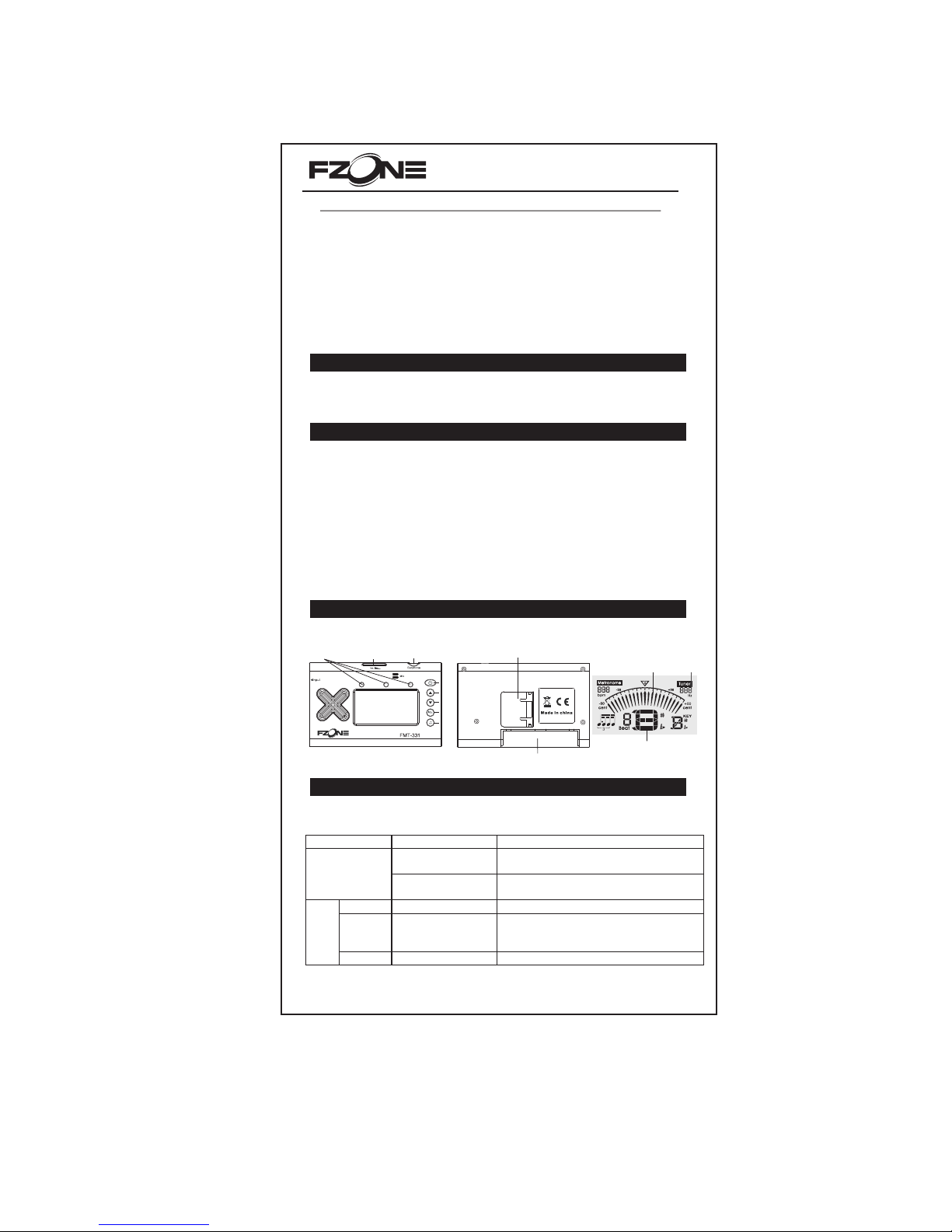
Obverse O per ati on Display
Metro-Tuner
FMT-33 1 User's Ma nual
a. Confirm the correct polarity when putting in a new battery.
b.Take out the battery when the unit is not in use for a long time.
c. Take o ff t he b at te ry a nd r e- pu t it i n af te r 10 s ec on ds w he n it c an 't w or k
well.
d.Replace with the new battery if the LCD lights show weak or unclear.
e.Dispose of the old battery properly.
Battery use
尺寸 :10 5* 23 3 MM
材质 :80 g速写 纸
正反 面印
Note
disp lay
A4
Note
accu racy
indi catio n
Vol.
Earp hone
Not e accur acy
ind icati on need le
Stand
Batte ry
1.Operation guide in the tuning mode:
Function Operati on Remark
Keep pressing b utton 4
for 2 se conds
It will trans fer between tu ner and m etronome . Transferring m ode
Press butto n 5 s hortly It will transfer into TONE genera tor under tune r's
mode.
Mode Press butto n 1 Chromatic(C ),Guitar(G),B ass(B),Violin(V)Ukul ele(U)
A4
calibration
Slide button 2 for be ing
up or button 3 for being
down
Scope:410 -490 Hz
Tuner
Flat display Press button 4 shortly Flat display b or #
Butto n1
Butto n2
Butto n3
Butto n4
Butto n5
Page 2
Specifi cat ion s
1、Tun in g mo de :C hr om at ic /g ui ta r/ ba ss /v io li n/ uk ul el e
2、Tun in g ra ng e:B0 -- B7
3、Rhythm:
4、Beat:0.1.2.3.4.5.6.7.8.9.
5、A4 calibration :410-490Hz
6、Tun in g wa y: t un in g au to ma ti ca ll y
7、Tolerance:+/-1cents
8、Power:3V(2 pieces of AAA batteries)
9、Accessories:Battery ,Pick up,User Manual
Metrono me
1.First enter into the tone generator by pressing button 5 under tuner mode.
2.Press button 5 ,it will play the note with LCD displaying as C,C#,D,D#,
E,F,F#,G,G#,A,A#,B,from low to high pitch. You can adjust the
volume as you like ,and change the displaying note by sliding the button 5 ,
and it can adjust the sound with diff er en t A4 an d fl at a s yo u li ke .
2.tuning steps:
a.Tu rn i t on a nd k ee p it s ta nd in g be si de ; fo r mo re p re ci se t un in g ,y ou c an u se
the pick-up to clip the instrument.
b.Press button 1 to choose the tuning mode accordingly .
c.Lightly pluck the string you wish to tune. It will automatically detect the
current pitch,and display which string you are tuning by the clear LCD.
d.Make sure the LCD correctly display which string you are tuning.For
instance,under Guitar mode, if you are tuning the second string ,and the LCD
display "1A",then the string is too tight and please loose it;if the LCD display
"3G",you string is too loose and please tighten it.While under Chromatic
model,the LCD will show the note as C, C# , D , D# , E, F , F# , G,G # , A, A # ,B ,
from the low to the high pitch.
e.When the LCD correctly display the string which you are tunning,adjust the
string slightly according to the Note accuracy indication needles.Loosening
or tightening the string a bit as needed. The s tr in g wi ll b e in t un e wh en t he t he
needle point to the middle"0",and the middle LED turn on.
f.After getting all the strings in tune,go back and double check each one. You
may find some of the strings are still slightly flat.As you tune-up ,pressure
from the strings naturally bends the guitar neck by a very small amount .Then,
in turn,make some of strings which you have just tuned slightly loose again.
Tuning all the strings in order two or three times is a good way to solve this
problem.
g.For standard instrument tuning,the flat tuning is set to "#"(standard position).
In some situations,you can tune your instrument down one half-step or
semitone as you like. To do thi s ,s im pl y to p re ss b ut to n 4.
Tone Genera tor O per ation
Fzone Technology Co., Ltd.
Metrono me Op era tion
1.K eep pre ssing b utton 4 t o enter i nto met ronom e mode.
2.S tart or s top pla ying th e metro nome : Pr ess but ton 1.
3.C hangi ng the be at: pre ss butt on 4 shor tly to ch ange th e beat in s equen ce:
0, 1, 2 , 3, 4, 5, 6, 7 , 8, 9.
4.C hoosi ng Value :p res s butto n 5 to choo se the va lue fro m 7 diffe re nt ty pes.
5.P ress bu tton 2( UP) or bu tton 3( DOWN) t o chang e the tem po betw een 30- 280 in 1
ste ps, kee p press ing wil l quick t he chan ging.
Aut o-off f un cti on: If no o perat ion or no s ignal i s detec ted for 3 m inute s, the un it will b e
tur ned off a ut oma tical ly.
 Loading...