

Page 1

CS100 Quick Reference Guide
Caring for your coffee beans
Coffee starts to go stale after a few hours exposure to
air.
Never open coffee bags before you need them.
Re-seal opened bags and store in an airtight container in
a cool, dry and dark place.
Do not overfill bean hoppers towards the end of the day.
Do’s and Don’ts
Do not operate the coffee machine without training.
Turn off milk chiller at night if used and remove milk to
refrigerator.
Always conduct the daily cleaning procedure without fail.
Only use recommended cleaning products.
Do not adjust machine settings after set up.
Milk
Use milk stored at below 8oC for a consistent quality cappuccino.
At the start of the day
The CS100 is switched on by pressing the power button; pull down the flap above the steam wand and press
the top left button.
The CS100 will ask you to RINSE UNIT. Simply press the rinse button which is directly below the power
button. After a brief rinse cycle the machine will be ready for use and display SELECT PRODUCT.
Fill bean hoppers and water reservoir to appropriate levels.
Insert milk hose into milk.
The machine is ready for use.
Place the appropriate size of cup under the delivery head and press the product button required.
At the end of the day – everyday
1. Empty drip tray, replace without drip tray cover.
2. Press the green coloured cleaning button behind the programme flap once.
3. Press the + button once. CAPPUCCINO CLEANING will show on the display.
4. Press the green cleaning button once and the message CLEANER FOR CAPPUCCINO will appear
on the display.
5. Insert the milk tube into a vessel containing ¾ pint of water and 30ml (one shot) of cappuccino
6. Press the green cleaning button once and cleaning will commence.
cleaner.
7. Wait until the machine bleeps and shows WATER FOR CAPPUCCINO message. Remove milk tube
from cleaner and insert into ½ pint container of cold water. Press green cleaning button.
8. When display shows SELECT PRODUCT switch off power.
The above procedure takes less than five minutes.
9. Remove drip tray and clean.
10. Remove grounds drawer and clean
11. Clean the machine and milk cooler (if supplied) with a damp – not wet, cloth
Do not put any parts in a dish or glass washer
If you are in any doubt, telephone 01283 22 22 00
Page 2
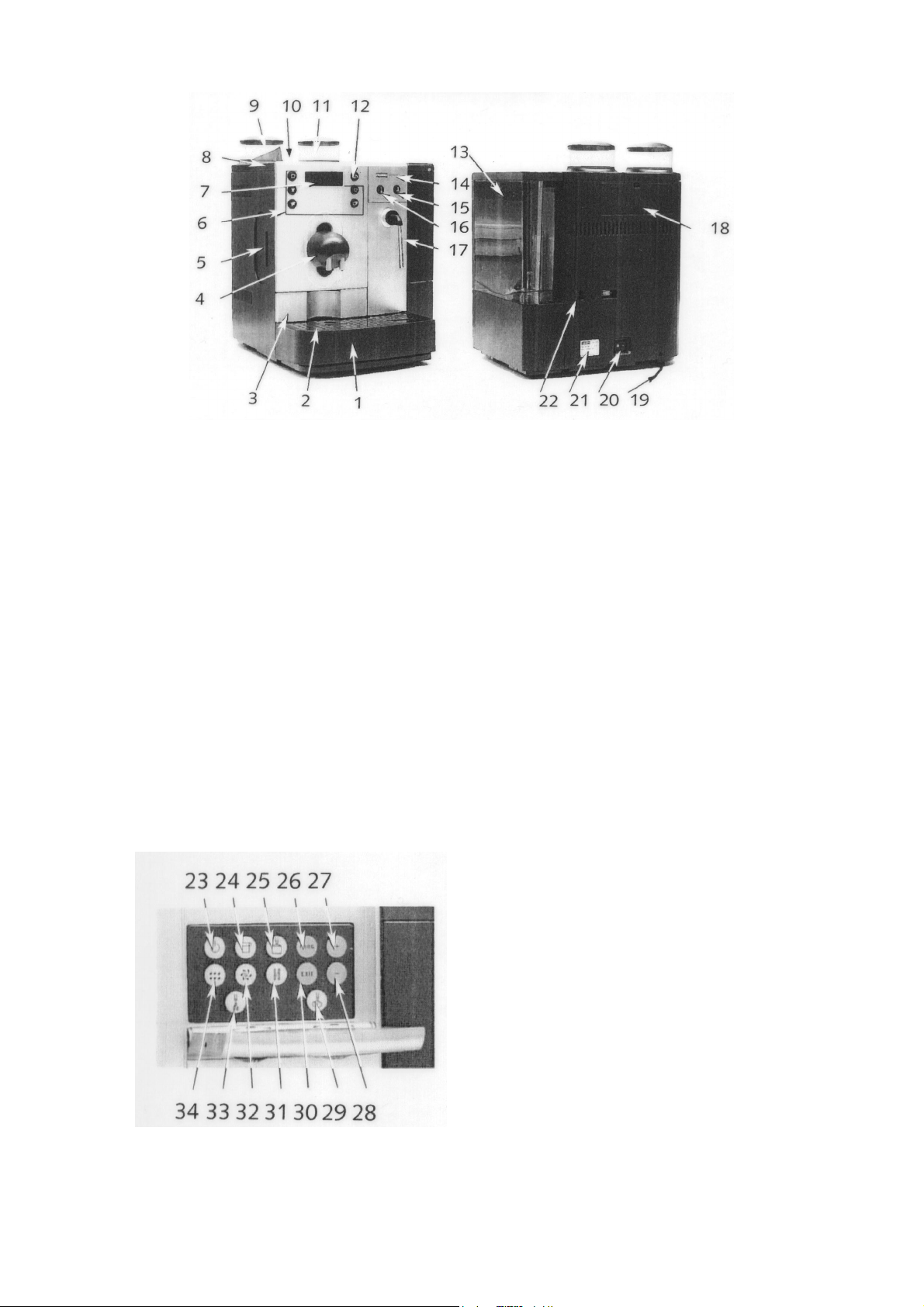
KNOW YOUR CS100
Legend:
1. Drip Tray 12. Grinder Selection
2. Drip Tray Cover 13. Water Tank
3. Drawer 14. Programming Keyboard Cover
4. Coffee Outlet / Milk Frother 15. Product Button – Hot Water
5. Milk Supply 16. Product Button – Hot Steam
6. Product Buttons 17. Hot Water / Steam Wand
7. Display 18. Grinder Access Cover
8. Cup Surface 19. Power Supply Cord
9. Hopper / Grinder – Left 20. Mains Switch
10. Cleaning Tablets Slot 21. Data Plate
11. Hopper / Grinder – Right 22. Water Supply Connection
Legend:
23. ON / OFF Button
24. Product Button – Pot
25. Product Button – Milkfroth
26. Programming Button – PROG
27. Programming Button – ‘+’
28. Programming Button – ‘-‘
29. Product Button – Hot Steam
30. Programming Button ‘EXIT’
31. Descaling Programme Button
32. Cleaning Programme Button
33. Product Button – Hot Water
34. Rinsing Programme Button
If you are in any doubt, telephone 01283 22 22 00
Page 3

‘Decalcifying necessary’ message
The DECALCIFYING NECESSARY message will appear when your CS100 needs de-scaling. You can
continue to use the machine as normal, but you must undertake the following procedure within 24 hours.
This should not occur frequently, but will take around half an hour to complete when it is required.
1. Check machine is switched off. If your CS100 is plumbers directly into the mains water supply lift off
water regulator from rear of water reservoir and unplug lead from rear of machine.
2. Open the programming door and press and hold (approx: 4 secs) the blue DECALCIFYING button
(to the left of the ‘exit button’).
3. The LED display will instruct you to EMPTY DRIP TRAY.
4. You will then be instructed to INSERT AGENT IN TANK. Remove water reservoir and place 3
Descaler tablets into 1 pint/0.6 litre of warm water in the CS100’s reservoir. Mix with care. Ensure
that the descaler tablets are fully dissolved in the water. Do not overfill with water – water level
should be just above the top of the tank magnet, 7cm from the base of the tank.
5. Press the DECALCIFYING button and the LED will display UNIT DECALCIFYING.
6. During this process the CS100 will ask you to EMPTY DRIP TRAY and then FILL WATER TANK.
Thoroughly rinse the water tank and fill with cold water.
7. The LED will then show PRESS DECALCIFYING.
8. Press the DECALCIFYING button
9. Finally the CS100 will request EMPTY DRIP TRAY CLEAN CONTACTS.
10. Make sure that the contacts at the back of the drip tray are dry before replacing.
11. Replace and connect water regulator on mains plumbed machines.
After 220 cycles
The LED will say CLEANING NECESSARY
You will still be able to continue to use the CS100 in the normal way with this message showing, but you
must undertake the following procedure at the end of the day.
1. Open the programming door above the Steam Wand press and hold green CLEANING button until it
bleeps
2. Press ‘+’ twice and the LED display will show ENTIRE CLEANING
3. Press the green CLEANING button again.
4. LED display will now instruct you to EMPTY DRAWER or EMPTY DUMPBOX.
5. Insert the cleaning tablet into chute situated between the two hoppers.
6. Place milk tube into container with approximately ¾ pint of water, add 2 shots (60ml) Cappuccino
7. The display will show ENTIRE CLEANING PLEASE WAIT.
8. After approximately fifteen minutes the LED display will ask for WATER FOR CAPPUCCINO – place
9. You will be asked to EMPTY DRIP TRAY and EMPTY DRAWER or empty dump box.
10. The final display will read SELECT PRODUCT. The CS100 is now ready to use.
Empty the drip tray and grounds container.
Even if already empty, the drip tray must be removed for at least seven seconds.
Cleaner.
milk tube in about ½ pint of clean water and press green CLEANING button.
If you are in any doubt, telephone 01283 22 22 00
Page 4

Trouble shooting tips
Message displayed Cause or symptom Action
FILL WATER TANK
The tank is empty
The water level indicator in the tank has
FILL COFFEE BEANS
jammed
The tank is encrusted with limescale
The beans container is empty
Although beans have been refilled, the
indicator ‘FILL BEANS’ does not go out
EMPTY DUMP BOX OR
EMPTY DRAWER
after delivery.
A stone has become lodged.
The waste container is full.
The display does not go out after the waste
container has been emptied.
Remove and fill water reservoir.
Empty tank, wash out, fill and replace.
Remove tank, run descaling programme
Refill beans
Deliver another cup of coffee
Remove stone as described - see
instruction manual – section ‘stone removal’
Remove tray, empty waste container and
replace tray.
The tray was removed for less than 8 secs
for emptying. Remove tray for about 10
secs and replace. Leave the unit switched
on while emptying the waste container.
The counter is reset only with the machine
is on.
DRIP TRAY MISSING
EMPTY DRIP TRAY
CLEAN UNIT
DECALCIFYING
NECESSARY
MALFUNCTION
The tray is not snapped in correctly Insert tray correctly
The residual water tray is full
The display does not go out after tray has
been emptied
220 deliveries or 180 washes have been
performed.
The display does not go off after cleaning
has been performed.
The unit must be descaled.
The display does not go out after descaling
has been carried out.
Various causes Call customer Services
Carefully remove tray, empty, wash out and
replace.
Remove tray, clean metal contacts and dry
thoroughly
Clean according to instructions. See
previously.
Carry out cleaning again, but this time do
not add cleaning tablet.
Descale as described previously
Carry out descaling again, but this time only
with water and without descaler.
Problems Cause or symptom Action
During coffee delivery the coffee
Powder too fine Set grinder to coarser level, make two or three
only flows drop by drop
coffees. If the result is not better, clean the
appliance.
Coffee flow is stopped after
Insufficient powder in system Deliver a cup of coffee
prebrew
Very loud noise from the grinder Stone in grinder Refer to manual
Insufficient foam when foaming
Cappuccino blocked Carry out daily cleaning procedure. Try changing
milk.
If you are in any doubt, telephone 01283 22 22 00
air intake nozzle.
 Loading...