

Page 1
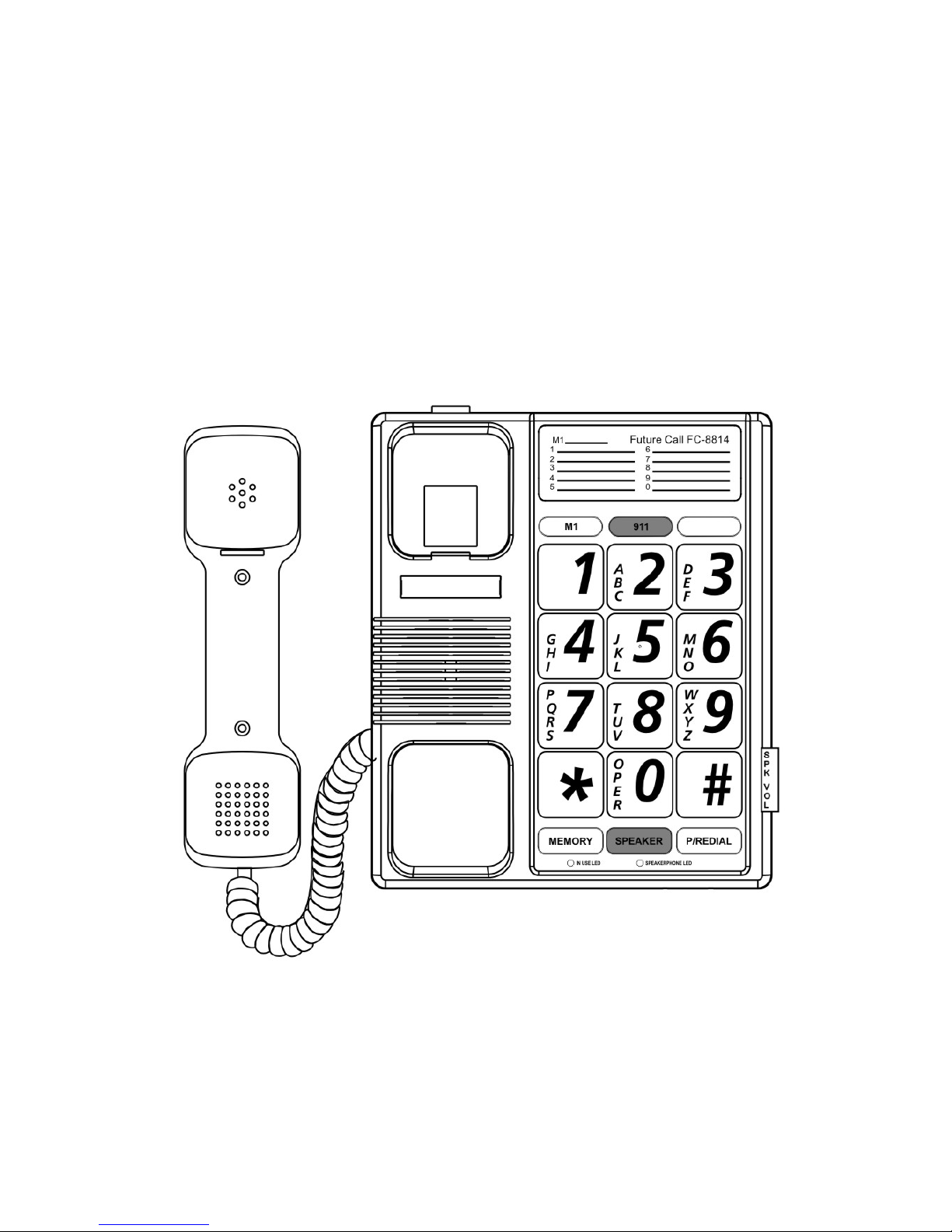
FUTURE CALL
Big button Speakerphone
MODEL: FC-8814
USER MANUAL
Please follow instructions for repairing if any otherwise
do not alter or repair any parts of device except specified.
Page 2

IMPORTANT SAFETY
INSTRUCTIONS
Before using your telephone equipment, basic safety
precautions should always be followed to reduce the risk
of fire, electric shock and injury to persons including the
following:
1. Read and understand all instructions.
2. Follow all warnings and instructions marked on the
product.
3. Unplug this product from the wall outlet before
cleaning. Do not use liquid or aerosol cleaners. Use a
damp cloth for cleaning.
4. Do not use this product near water, for example, near
a bath tub, wash bowl, kitchen sink, or laundry tub, in
a wet basement or near a swimming pool.
5. Do not place this product on an unstable cart, stand,
or table. The product may fall causing serious
damage to the product.
6. Slots and open in gs in the enclosur e a nd t h e back and
bottom are provided for ventilation, to protect it from
overheating. These openings must not be blocked or
covered. The openings should never be blocked by
placing the product on a bed, sofa, rug, or other
similar surface. This product should never be placed
near or over a radiator or heat register. This product
should not be placed in a built-in installation unless
proper ventilation is provided.
7. This product should be operated only from the type of
power source indicated on the marking label. If you
are not sure of the type of power supply to your home,
consult your dealer or local power company.
Page 3

8. Do not allow anything to rest on the power cord. Do
not locate this product where the cord will be abused
by persons walking on it.
9. Do not overload wall outlets and extension cords as
this can result in the risk of fire o r electric shock .
10. Never push objects of any kind into this product
through cabinet slots as they may touch dangerous
voltage points or short out parts that could result in a
risk of fire or electric shock. Never spill liquid of any
kind on the product.
11. Do not disassemble this product, but take it to a
qualified service technician or service center when
repair work is required. Opening or removing covers
may expose you to voltage or other risks. Incorr ect
reassembly can cause electric shock when the
appliance is subsequently used.
12. Unplug this product from the wall outlet and refer to
qualified service personnel under the following
conditions:
A. When the power supply cord or plug is damaged or
frayed.
B. If liquid has been spilled into the product.
C. If the product has been exposed to rain or water.
D. If the product does not operate normally by followi ng
the operating instructions. Adjust only those controls
that are covered by the operating instructions.
Improper adjustment of other controls may result in
damage and may require extensive work by a
qualified technician to restore the product to normal
operation.
E. If the product has been dropped or the enclosure has
been damaged.
Page 4

F. If the product exhibits a distinct change in
performance.
13. Avoid using a telephone during an electrical storm.
There may be a remote risk of electric shock from
lightning.
14. Do not use the telephone to report a gas leak in the
vicinity of a leak.
15. Never install telephone wiring during a lightning
storm.
16. Never install telephone jacks in wet locations unless
the jack is specifically designed for wet locations.
17. Never touch uninsulated telephone wires or terminals
unless the telephone line has been disconnected at
the network in terface.
SAVE THESE INSTRUCTIONS
Page 5
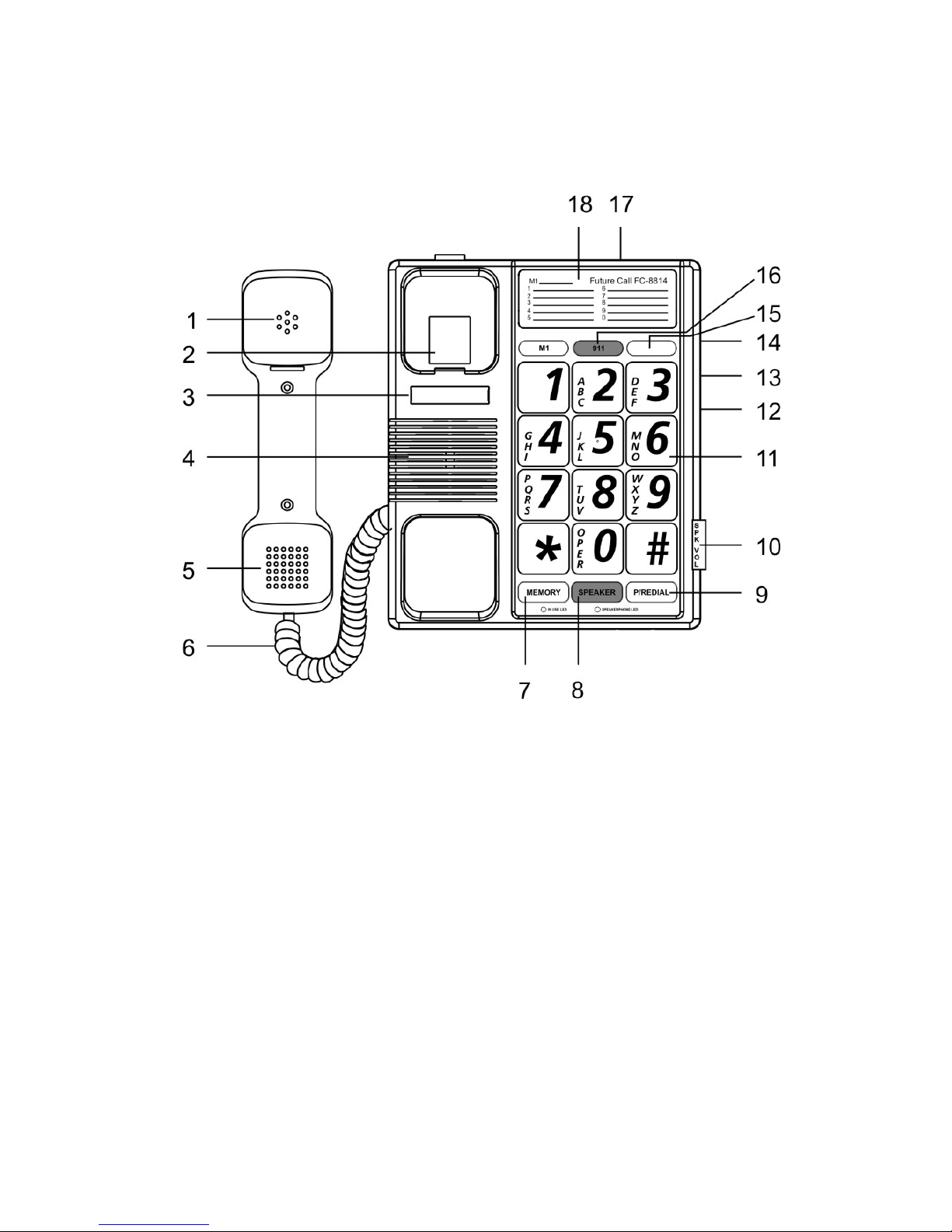
GET TO KNOW YOUR PHONE
1. Receiver 11. KEY Buttons(1~9;*;0;#)
2. Hook Switch 12. Store Button
3. Phone No. Card 13. Ringer (OFF/LO/HI) Switch
4. Speaker 14. Handset Volume Switch
5. Transmitter 15. Ringer Indicator
6. Handset Cord 16. 911 Button
7. MEMORY Button 17. Phone Line Jack
8. SPEAKER Button 18. Memory Index Card
9. P/REDIAL Button
10. Speaker Volume
Control
Page 6
INSTALLATION
Coil Cord Conne ctio n
Insert coil cord into modular ja ck locat e d on s ide ho using.
Connect the othe r end in to the modu la r jack loca ted on hand set.
Line Cord Connection
Insert the modular plug of the straight cord into the rear side of
base unit, the inser t the other end of RJ11C plug into the wall
jack.
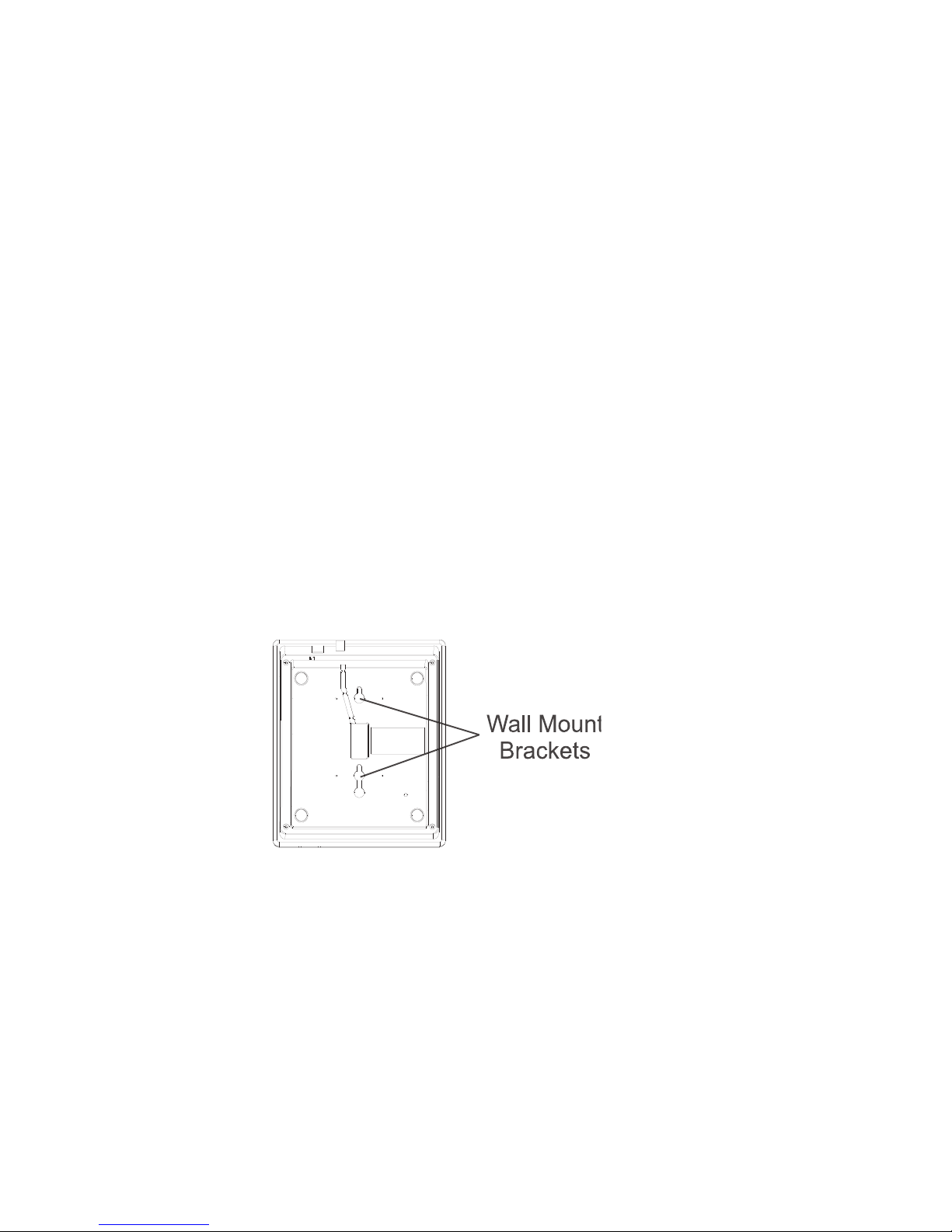
Wall Mounting
Your PHONE is also designed to mount on a wall.
Position the wall mount slots on the bottom of the
base over the two studs of the wall plate. Pull down
to lock in place.
Page 7

OPERATION
Handset / Speakerphone
You can use either the HANDSET or SPEAKERPHONE mode
during a conversation. During a call , one of the other can be
used and they can be interchan ge d at a ny ti me oth er th an
during dialing. The HAN DSET is activated when the HANDSET
is lifted off its cradle .
The SPEAKERPHONE is activated when you press the
Speakerphone but to n and the Green LED below the s p eaker
key is on. At the end of the call, press the Speakerphone button
again, green LED will turn off.
To switch from the Speakerphone mode to the Handset mode ,
lift the handset.
To switch fro m the Handset mode to Speakerphone mode
(without losing the Call), press the Speakerphone button first
before you place the Handset in the Cradle, and the Green LED
will turn on.
Speakerphone Volume Control
When using the Speakerphone, adjust the loudness by sliding
up or down the Speaker-Phone Volume control.
KEY FEATURE
Last Number Redial / Paus e
Your PHONE remembers the last number dialed. If the number
you dial is busy or not being answ ered, hang up. To redia l the
last number automatically, press the REDIAL button. NOTE:
You can redial the same telephone number as many times as
required. However, once you dial an other number, the previou s
number is erased. This key is also used as a pause key when
programming this phone on a PBX system.
Ringer OFF / LO / HI
Your phone provides a ringer adjustment of High, Low or Off,
when you don‘t want to be disturbed, slide the switch to the off
Page 8

position. Now you can still make outgoing calls without being
disturbed by incoming cal ls.
Receiver Volume Control Low, Mid, High
On the right hand side of your telephone base, you will find a
Receiver Volume Switch This control may be used to adjust the
volume of received speech following the marking Low , Mid,
High
MEMORY FEATURE
To Program
Your PHONE is equipped with a 911 memory key , 1 one touch
key M1 and ten 2 touch memory keys for programming your
most frequently dialed telephone numbers. You can store up to
16 digits in the M1 key button or in each of the numeric key
button (0 through 9), by following the steps outlined below:
1. Lift the handset or press the speakerphone button.
2. Press and release the Store button on right hand side of
the phone base.
3. Press the numeric keys for the telephone number you want
to store.
4. Press and release the Store button once again
5. Press the priority key (M1) or keypad number the 0-9 keys
you want that telephone number store in
6. Your number is now stored.
7. To change a stored number, repeat the same process. The
new number will be stored over the old stored number.
Note: If you need to disconnect the 911 key you may program
any other number you wish or just the digit “1” into this key by
following the above points 1-4 push the red 911 key for point 5
A memory index card is provided for writing down the person’
name.
Page 9

To Retrieve Memory Numbers
To retrieve numbers stored in the M1 button, pick up the phone
and wait for a dial tone, then press the M1 key which stores the
telephone number you want to dial. Your call will be
automatically d ia l ed.
To retrieve numbers stored in the key button (0-9 ),
Pick up the handset or speakerp ho n e butto n, and press the
Memory button.
Then press the key button number (0-9) which stores the
telephone number you want to dial. Your call will be
automatically d ia l ed.
CONSUMER INFORMATION
This equipment comp li es wi th Part 68 of th e FC C r ul es an d the
requirements adopt ed by the ACTA On the b ott om of th is
equipment is a label th at contains, among oth er in formation, a
product identifier of US: GXA M TE2 2BH T-9 1 6
If requested, this number must be provided to the telephone
company.
The applicable jacks (i.e. RJ11C) for this equipment are
provided in the packaging with each piece of approved
equipment. The jacks are certified by Universal Service Order
Codes (USOC).
A plug and jack used to connect this equipment to the premises
wiring and telephone network must comply with the applicable
FCC Part 68 rules and req uirements adopted by the ACTA. A
compliant telephone cord and modular plug are provided with
this product. They are designed to be connected to a
compatible modular jack that is also compliant. See installation
instructions for details.
The REN is used to determine the number of devices that may
be connected to a telephone line. Excessive RENs on a
telephone line may result in the devices not ringing in response
Page 10

to an incoming call. In most but not all areas, the sum of RENs
should not exceed five (5.0). To be cer ta i n of the n umb er of
devices that may be connected to a line, as determine d by t he
total RENs, con tact the local tele phone company. [For pr oducts
approved after July 23, 2 00 1, t he REN for this product is part of
the product identifier that has the format US:AAAEQ##TXXXX.
The digits represented by ## are the REN without a decimal
point (e.g., 03 is a REN of 0.3). For earlier products, the REN is
separately shown on the label.]
If this equipment FC-8814 causes harm to the telephone
network, the telephone com p a ny wi l l not ify you in advance that
temporary discontinuance of service may be req ui red. But if
advance notice isn’t practical, the telephone company will notify
the customer as soon as possible. A lso , you wi l l be advis e d of
your right to file a complaint with the FCC if you believe it is
necessary.
The telephone company may make changes in its facilities,
equipment, operations or procedures that could affect the
operation of the equipment. If this happens the telephone
company will provide advance notice in order for you to make
necessary modifications to maintain uninterrupted service.
If you experience trouble with this equipment, disconnect it from
the network until the problem has been corrected or until you
are sure that the equipment is not malfunctioning.
Please follow instructions for repairing if any (e.g. battery
replacement section); otherwise do not alter or rep air any parts
of device except specified.
Connection to party line service is subject to state tariffs.
Contact the state public utility commission, public service
commission or corporation commission for information.
This equipment is hearing aid compatible.
NOTICE : If your hom e has specially wire d al arm eq u ipment
connected to the
Page 11

telephone line, ensure the installation of this equipment FC8814 is not disable your alarm equipment. If you have
questions about what will disable alarm equipment, consult
your telephone company or a qualified installer.
WARNING : Changes or modifications to this unit not expressly
approved by the party responsible for compliance could void
the user’s authority to operate the equipment.
SERVICE
According to FCC regulation. This equipment which has been certified
and registered by the FCC, may only be repaired by authorized person,
the FCC certification may be voided. Should you encounter any
problems, please call the FUTURE CALL LLC.
Toll-free Customer Hotline for assistance:
1-888-934-CALL, Monday - Friday between the hours of 9:00 am - 6:00
pm PST
For general inquires, you can E-Mail to [email protected] or visit our
website at www.future-call.com
FOR WARRANTY AND OUT-OF WARRANTY SERVICE:
You may call our toll-free hot line on 1-888-934-CALL (1-888-934-2255)
9AM-6PM PST or E-mail to [email protected]
QUESTIONS?
STOP...doesn’t take unit back to the store.
LOOK...for the toll-free “help” telephone number.
LISTEN... as our experts talk you through the problem.
For immediate answers to your questions regarding operation, missing
parts or installation call:
FUTURE CALL LLC
HOTLINE & E-MAIL AT:
1-888-934-CALL & [email protected]
LIMITED WARRANTY AND SERVICE
Page 12

FUTURE CALL LLC. warrants this product to be free from
defective materials or factory workmanship and will repl ace or
repair this unit or any part thereof, except batteries, if it proves
to be defective in normal use or service within 90 days from
date of original purchase. Our obligation under this warranty is
the repair or replacement of the defective instrument or any
part thereof, except batteries. This warranty wi l l be consi d ered
void if unit is tampered with, improperly serviced, or subjected
to misuse, negligenc e or accidental damag e. There are no
other
express warranties other than those stated herein.
This warranty gives you specific legal rights, and you may also
have other rights which varies from state to state. TO OBTAIN
SERVICE PLEASE E-MAIL US ON
[email protected] OR CALL US TOLL FREE 1-8 88-934-CALL
9AM-6PM PST
(1-888-934-2255). IF THE UNIT IS UNDER WARRANTY
PROOF OF PURCHASE MUST BE PROVEN.
Made in China
 Loading...