

Page 1
Page 2

1
INTRODUCTION
Thank you for purchasing our newest Caller ID phone. This manual is designed to familiarize you
with this phone. To get the maximum use from your new phone, we suggest that you read this
instruction manual carefully before using.
SAFETY INSTRUCTION
When using your telephone equipment, the following basic safety precautions should always be
followed to reduce the risk of fire, electric shock and injury to persons:
1. Read, understand and follow all warnings and instructions
2. Unplug the product from the wall outlet before cleaning. Do not use liquid cleaners or aerosol
cleaners. Use a soft damp cloth for cleaning.
3. Do not place this product on unstable surfaces. The product may drop, causing serious
damage to the product.
4. Do not overload wall outlets and extension cords as this can result in fire or electric shock.
5. Never push foreign objects of any kind into this product through cabinet slots as they may
affect dangerous voltage points or short circuit parts that could result in fire or electric shock.
Never spill liquid of any kind on the product.
6. Avoid moving or disconnecting this unit during a heavy storm, as there may be a remote risk
of electric shock from lightning and thunder.
7. Unauthorized persons cannot open or service even if there is a defect with the unit. This will
void the warranty, please send to service center for any defects.
FEATURES
¾ FSK/DTMF compatible with auto-detection
¾ 16-digit LCD display
¾ Emergency number key(911) and the number can be changed
¾ 66 incoming number memories and 20 outgoing number memories
¾ 16 kinds of ringing tone for selection
¾ 10 two-touch memories
¾ Hold with 6 kinds of music selectable
¾ Talking incoming caller’s number and Talking Keypad function
¾ Do Not Disturb function
¾ Transfer function between parallel phones (using 2 similar models)
¾ Pre-dial and edit function
¾ Redial function
¾ 5 sets of alarm clock
¾ 8 levels of LCD contrast adjustable
¾ Set PABX code
¾ Pulse/Tone dialing selection
Page 3

2
¾ 4 levels of hands-free volume for selection
¾ 3 levels of handset volume for selection
¾ Ringing volume 3 levels(HI/LO/OFF) for selection
¾ Baby call function
¾ Off Line Hook Detection
¾ LCD backlight function
¾ Thunder-proof and anti-dialing from parallel phones function
¾ Hands-free dialing and speaking function
¾ In use LED indicator
¾ New incoming call and Ringer Indicator
Page 4
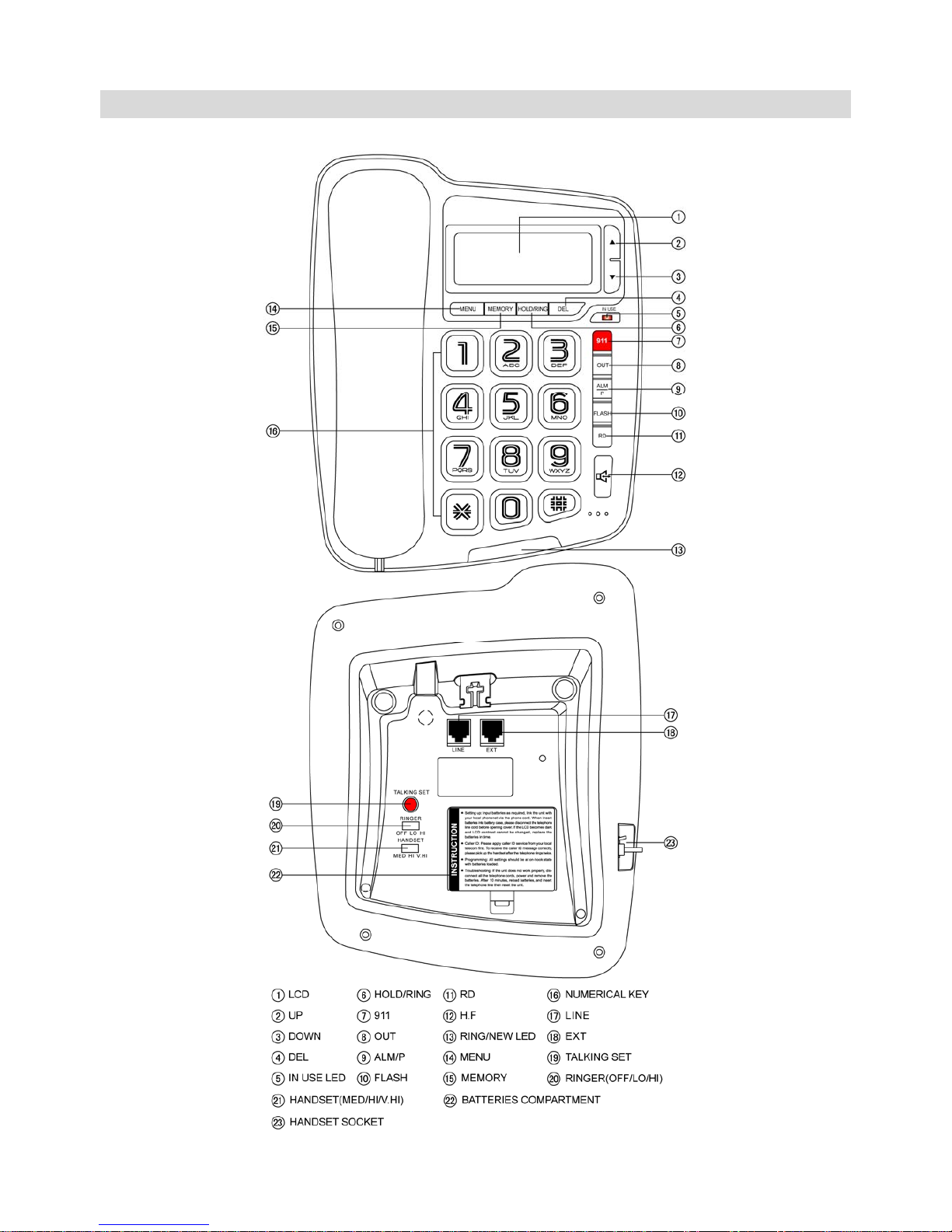
LOCATION DESCRIPTION
3
Page 5

GETTING STARTED
1. The unit requires 3×1.5V AA alkaline batteries. The batteries are only for the talking
functions, alarm and the LCD backlight, THIS PHONE WILL WORK FULLY WITHOUT
BATTERIES. Open the battery compartment cover and insert the batteries in the right
polarity, then close the cover please use alkaline batteries. The time should be displayed on
the liquid crystal screen after the batteries are inserted.
2. Insert one end of the line cord to the line jack of the base and the other end to the wall outlet
of exchange.
3. Connect one end of the curly cord to the handset and the other end to the base of the
telephone.
4. Set the dialing mode to correct mode according to the directions from your local telecom.
5. Apply for the caller ID from your local telecom office.
RECEIVING A CALL
1. When a call comes, the telephone rings, the RING/NEW LED is blinking, and the LCD
displays the seq. number of the call, the date, time, incoming number and the NEW icon.
2. For repeat incoming call, the LCD displays REP icon.
When the incoming memory is full, the latest incoming number replaces the oldest number in
the memory.
NOTE: For the phone to display incoming numbers and other information, you must have
an active Caller ID subscription with your service provider.
¾ From the handset
1. Pick up the handset and talk to the other party.
2. When finished, return the handset to the base.
¾ Switching to speakerphone
1. When using the handset, press key and return the handset to the base.
2. When finished, press key again.
¾ From the speakerphone
1. When the telephone rings, press key and talk to the caller. For the other party to hear
your voice clearly, speak into the speaker from a distance of 32cm or less.
2. When finished, press key again.
NOTE:
Generally telecom transmits the incoming message between the first ring and the second ring.
So please answer the phone after the second ring.
MAKING A CALL
¾ From the handset
1. Pick up the handset.
4
Page 6

2. When you hear the dial tone, dial the desired number.
3. The telephone will start to time the conversation after 6 seconds.
4. When finished, return the handset to the base.
¾ From the speakerphone
1. Press
key
2. When you hear the dial tone, dial the desired number.
3. The telephone will start to time the conversation after 6 seconds.
4. When finished, press
key again.
¾ Pre-dialing function
1. When the handset is on the base, dial the desired number.
2. If a mistake is made, use the DEL key to delete.
3. Press key or pick up the handset, the number will be dialed automatically.
¾ Redial
1. Pick up the handset or press key,
2. Press RD key, the last dialed number will be dialed again
REVIEWING, CALLING BACK AND DELETING INCOMING NUMBERS
¾ Reviewing
In on-hook state, press ▲ or ▼ key to scroll through and review the numbers.
¾ Calling back
In on-hook state, scroll to the desired number, press or RD key or pick up the handset, the
number is dialed out. Or press RD key twice, the telephone will add the long distance code
ahead the number automatically and then dial back.
NOTE: If the PABX code is set, the telephone will detect and add the PABX code before the
number automatically and then dial back. The PABX code will be dialed first, followed by a 2
seconds pause and then the telephone number.
¾ Deleting
In on-hook state, when the desired number is shown, press DEL key, the number is deleted. Or
press and hold DEL key for 3 seconds, all the incoming numbers will be deleted.
REVIEWING, CALLING BACK AND DELETING OUTGOING NUMBERS
¾ Reviewing
In on-hook state, press OUT key, then repeatedly press OUT key to review the outgoing
numbers one by one.
¾ Calling back
In on-hook state, press OUT key to review the desired number, then press or RD key or pick
up the handset, and the number is dialed out.
5
Page 7

6
¾ Deleting
1. In on-hook state, press OUT key to scroll to the desired number.
2. Press DEL key and the number is deleted
3. Or press and hold DEL key for 3 seconds, all numbers will be deleted.
NEW INCOMING CALL AND RINGER INDICATOR
New incoming call and ringer indicator is the same LED, when a new call comes in, the
RING/NEW LED is blinking. When a new number has not been reviewed, the LED is blinking in
4s interval.
SETTING MENU
¾ Setting date & time
1. In on-hook state, press MENU key, LCD displays SET 1 DATE. Press MENU key again, the
year flashes on the LCD.
2. Press ▲ or ▼ key to edit the year.
3. Press MENU key to confirm and enter into the month setting.
4. Repeat the above procedure for month setting.
5. Repeat the above procedure for date and time setting.
¾ Setting Local Area Code
1. In on-hook state, press MENU key and press ▲ key, LCD displays SET 2 CODE, press
MENU key again, LCD displays CODE ------ and first “-” flashes.
2. Press ▲ or ▼ key to edit the flashing code.
3. Press MENU key to confirm and enter the next flashing code setting.
4. Repeat the above procedure for the rest code setting.
NOTE: E.g. Area code number is set to “206---”, when the incoming call comes for “2061169600”,
the telephone auto filter area code and LCD displays”1169600”
¾ Setting Long Distance Code
1. In on-hook state, press MENU key and press ▲ key twice, LCD displays SET 3 LCODE,
press MENU key again, LCD displays ---------------0 or the preset codes, press DEL key to
delete it.
2. Input the long distance codes using the numerical keypad. A maximum of 16 digits can be
input.
3. Press MENU key to confirm.
¾ Adjusting LCD Contrast
1. In on-hook state, press MENU key and press ▲ key three times, LCD displays SET 4 LCD,
Press MENU key again, LCD displays LCD 5
2. Press ▲ or ▼ key to adjust the LCD contrast, a total of 8 levels can be selected.
3. Press MENU key to confirm and exit.
Page 8

7
¾ Setting Flash Time
1. In on-hook state, press MENU key and press ▲ key four times, LCD displays SET 5 FLASH,
press MENU key again, LCD displays FLASH 600
2. Press ▲ or ▼ key to edit the flash time to 100, 300, 600 and 1000ms.
3. Press MENU key to confirm.
¾ Setting PABX Code
1. In on-hook state, press and hold DEL key 3 seconds to set PABX code, LCD displays
PCODE - and the “-” flashes.
2. Press ▲ or ▼ key to set PABX code from 0 to 9 or -.
3. If choose “-”, it means no PABX code has been set.
4. Press MENU key to confirm and quit.
¾ Setting Alarm Clock
1. In on-hook state, press ALM/P key once, LCD displays 12-00 AL1,
2. Press ▲ or ▼ key to select ON or OFF. LCD displays “ALM” icon when the alarm is set to
ON.
3. Press MENU key, value “12” starts to flash.
4. Press ▲ or ▼ key to set the alarm hour and press MENU key to confirm and enter into alarm
minute setting.
5. Press ▲ or ▼ key to edit alarm minute and press MENU key to confirm and enter into the
next group alarm clock setting.
6. Repeat the above procedure to set additional alarms.
7. End user can press any keys to turn off the alarm when it is sounding.
NOTE: The first 3 groups of alarm clock will be repeated periodically every day while the last 2
groups of alarm clock is effected one time.
VOICE TALKING SETTING
Please insert the batteries to power the telephone first, and then use the two features
below.
For the first to use this telephone, the voice talking function is at ON state.
¾ Voice talking of caller’s number
1. In on-hook state, press and hold TALKING SET button for 3 seconds at the bottom of the
telephone base, LCD displays TALK 1 ON(OFF) and “1” flashes.
2. Press ▲or ▼ key to select the talking times among 1~3.
3. Press TALKING SET button again, “ON”(or “OFF”) flashes.
4. Press ▲ or ▼ key to turn on the voice talking of caller’s number
5. Press MENU key to confirm and exit.
After this function has been turned on, the phone will talk the caller’s number for 1~3 times when
a call comes.
Page 9
NOTE: To use Voice Talking of caller's number function, you must have an active Caller ID
subscription with your service provider.
To turn off voice talking, press and hold TALKING SET button for 3 seconds, then press
TALKING SET button again, turn it off using ▲ or ▼ key and press MENU key to confirm and
exit.
¾ Voice talking of pre-dialed number
1. In on-hook state, press and hold TALKING SET button for 3 seconds, LCD displays TALK 1
ON(OFF).
2. Press TALKING SET button twice, LCD displays PDIAL ON(OFF) and “ON”(or “OFF”)
flashes.
3. Press ▲ or ▼ key to turn on the voice talking of pre-dialed number
4. Press MENU key to confirm and exit.
After this function has been turned on, the phone will sound the dialed number when you pre-dial
in on-hook state.
NOTE: To turn off voice talking press and hold TALKING SET button for 3 seconds, then press
TALKING SET button twice again, turn it off using ▲ or ▼ key and press MENU key to confirm
and exit.
TRANSFER BETWEEN PARALLEL PHONES
¾ Setting the paging number
1. In on-hook state, press and hold MENU key, LCD displays EL--
2. Key in “*” and the paging number (example “*1”and “*2”), use DEL key to edit
3. Press MENU key to confirm and exit.
¾ Transferring a call to paralleled phones:
When a call comes, use one of paralleled phones to answer. Press “*” and the paging number
that was set in the other telephone to where you want to transfer the call (the operation should be
done within 30 seconds after you answer the call using the parallel phone. If the time is more 30
seconds, the transfer operation is not available), the other telephone rings, pick up its handset or
press key to answer the incoming call.
NOTE: Please use same series telephones for the above feature to work. Any special
services starting with “*” offered by your service provider may not function properly.
To get the best effect of this function, you should insert the batteries before using.
ANTI-DIALING FROM PARALLEL PHONES FUNCTION
1. In on-hook state, press and hold # key for 3 seconds, LCD displays SPI OFF
2. Press # key again, LCD displays SPI ON
3. Press MENU key to confirm.
When the anti-dialing is set to ON, users who want to dial using an extension(parallel phone) via
the same line will hear a “DI-DI, DI-DI” beep continuously and will not be allowed to make a call.
8
Page 10

9
SETTING RINGING TONE AND ADJUST RINGING VOLUME
There are 16 kinds of ringing tone for selection:
1. In on-hook state, press HOLD/RING key, LCD displays ring 02 db3
2. Press HOLD/RING to select the desired ringing tone.
3. Press ▲ or ▼ key to adjust ringing volume.
4. Press MENU to confirm and exit.
NOTE: The volume ranges from dB0-dB3, with dB3 being the loudest volume, and dB0 is “Do
Not Disturb” mode. If the phone is set at DND mode, the telephone will not ring when there is an
incoming call.
Also you can slide the RINGER(OFF/LO/HI) switch at the bottom to choose the volume.
DO NOT DISTURB AT REAL TIME
When there is calling in and the telephone is ringing, press DEL key, it will stop ringing.
ADJUST HANDS-FREE VOLUME
In hands-free mode, press ▲ or ▼ adjust the hands-free volume. LCD displays the volume level,
total 4 levels for adjustment.
ADJUST HANDSET
V
OLUME
Slide the HANDSET(MED/HI/V.HI) switch at the bottom to choose the appropriate handset
volume.
SELECTING PULSE OR TONE DIALING MODE
1. In on-hook state, press and hold * key for 3 seconds, LCD displays T, then dialing mode is
set as Tone.
2. Repeatedly press * key to adjust dialing mode as P(Pulse) or T(Tone).
3. Then press MENU key to confirm.
HOLD ON MUSIC
¾ Hold music selection
There are 6 kinds of hold music for selection
1. In off-hook or hands free state, press HOLD/RING key
2. Press OUT key to select the desired music on hold. The music is played at the same time.
3. Press ▲ or ▼ key to adjust the volume of hold music, a total of 4 levels.
4. Press HOLD/RING key to quit.
¾ When talking over handset, press HOLD/RING key to enter the hold mode and the hold
music is sent out. In hold mode
1. Press HOLD/RING key to release hold mode and continue to talk over handset, or
Page 11

2. Hang up handset, it enters hands-free hold mode.
¾ When speaking in hands-free mode, press HOLD/RING key to enter the hold mode and
the hold music is sent out. In hold mode
1. Pick up handset to talk over handset, or
2. Press key to quit hold mode and talk at hands-free mode.
EMERGENCY NUMBER (911)
In on-hook or off-hook state, press 911 key at the keypad, the emergency number 911 will be
dialed out automatically.
Note if you wish just to disconnect this key just program the digit ”1” as your desired number, the
procedure is as following:
¾ To change the number stored in the 911 key
1. Pre-dial the desired number that you wish to store.
2. Press MEMORY key
3. Press 911 key, the number will be stored in the 911 key.
¾ To make a call from the 911 key
In off-hook or on-hook state, press 911 key to dial the stored number out directly.
Or in on-hook state, press MEMORY key firstly, then press 911 key, LCD displays the stored
number, press or RD key or pick up the handset to dial it out directly, or press RD key twice
to dial out number ahead with long distance code.
NOTE: the function of the 911 key is invalid when the telephone is at BABY LOCK ON state.
TWO TOUCH MEMORY OPERATION
¾ Store the number in two-touch memory
1. Pre-dial the desired number that you wish to store.
2. Press MEMORY key
3. Press one of numeric keys (0-9) on the keypad. The telephone number is now stored under
the selected number on the keypad.
¾ Make a call from two-touch memory
In on-hook state, press MEMORY key + numeric key (0-9), LCD displays the stored number,
press or RD key or pick up the handset to dial it out directly, or press RD key twice to dial out
number ahead with long distance code.
In off-hook state, press MEMORY key + numeric key (0-9), the stored number will be dialed out
directly.
BABY CALL/BABY LOCK/OFF LINE FUNCTION
¾ BABY CALL function
At on-hook state, press and hold RD key for 3 seconds to come into baby call function setting.
10
Page 12
LCD displays BABYCALL OFF(ON), press ▲ or ▼ key to set it ON or OFF, press MENU key to
confirm. If you select ON, LCD displays NO CODE (or the preset baby call number, press DEL
key to cancel), input baby call number using numerical key and press MENU key to confirm.
After set baby call function to ON state, pressing any key except RD key or picking up handset
will dial out the baby call number automatically.
When baby call function is ON state, you can still answer the incoming call.
NOTE: 1. If you don’t use the function, enter baby call function setting as per above operation
and select BABYCALL OFF, press MENU key to confirm.
2. Also you can press and hold TALKING SET button for 3 seconds at on-hook state, then press
TALKING SET button three times again to enter to BABY CALL function.
¾ BABY LOCK function
At on-hook state, press and hold RD key for 3 seconds, LCD displays BABYCALL OFF(ON) ,
then press RD key once to enter into BABY LOCK setting, and the LCD displays BABYLOCK
OFF(ON), press ▲ or ▼ key to set it ON or OFF, then press MENU key to confirm.
After set baby lock function to ON state, pressing any number will invalid except emergency
numbers 110, 112, 119, 120, 800 and 999.
NOTE: Also you can press and hold TALKING SET button for 3 seconds at on-hook state, then
press TALKING SET button four times again to enter to BABY LOCK function.
¾ OFF LINE function
At on-hook state, press and hold RD key for 3 seconds, LCD displays BABYCALL OFF(ON) ,
then press RD key twice to enter into OFF LINE setting, and the LCD displays OFFLINE
OFF(ON), press ▲ or ▼ key to set it ON or OFF, then press MENU key to confirm.
After you set OFF LINE function to ON state:
If you do not put the handset on the cradle properly when in handset mode, or you do not close /
turn off the speakerphone after your conversation has ended, the telephone will detect the busy
tone automatically, and return to standby mode this will allow the telephone to ring at the next
incoming call, if then you pick up the handset, the phone will continue to ring then you will need
to replace the handset back on the cradle and pick it up again to answer the call or if the
speakerphone was not closed you just press speakerphone key once or pick up the handset
to answer the call.
NOTE: Also you can press and hold TALKING SET button for 3 seconds at on-hook state, then
press TALKING SET button five times again to enter to OFF LINE function.
LOW BATTERY DETECTION
When the voltage is lower than 3.9V, LCD displays a battery icon to remind the user to replace
the batteries.
11
Page 13

12
LCD BACKLIGHT FUNCTION
The backlight is turned on when receiving an incoming call, dialing, pressing any key or in
MUSIC HOLD mode. It will fade off if the telephone is left idle for several seconds.
NOTE: If batteries are not inserted, there will be no LCD backlight function.
FLASH FUNCTION
When dialing and the line is engaged, press FLASH key and then press RD key to dial it out
again.
PAUSE FUNCTION
If dial a number from PABX extension, press PABX number (normally “0” or “9”) + ALM/P +
desired number. When redial, need not dial PABX number and ALM/P key, just press RD key.
NOTES
Please unplug telephone line when installing / replacing batteries.
TROUBLESHOOTING
? No voice
+ Check if the handset is on the phone or if the line has terminated.
? Receive only
+ Check if P/T mode is properly set.
? Rusty batteries or leakage
+ Remove the rust or wipe away the leakage.
? Noise
+ Check if the circuit is spoilt. (Change the circuit)
Check if the connector is wet or rusty (Change the connector)
?
Ring once then disconnect when receiving a call. Dialing function is still available
+ Check if connector is in a moist environment.
Check if too many extensions are used together or the quality of extension is not good
enough (Change the bad extension)
? LCD become dim
+ Check if LCD contrast is properly set or if the batteries are weak. (Adjust LCD contrast, if the
LCD is still dim, replace the batteries.)
? No ring
+ Check if the ringing volume is set at dB0, reset it.
? Most of the functions failed
+ Check if the batteries are strong enough. (Change the batteries)
If batteries are OK (Remove the battery, unplug the lines and reinstall after 10 minutes)
Page 14

13
NOTE: Due to continuous product development all features and specifications are subject to
change without prior notice.
On the bottom of this equipment is a label that contains, among other information, a product
identifier of US:
FCC # 4V4VKTE16BFC-2004 Ren # 1.1B
If requested, this number must be provided to the telephone company.
LIMITED WARRANTY AND SERVICE
FUTURE CALL LLC. warrants this product to be free from defective materials or factory
workmanship and will replace or repair this unit or any part thereof, except batteries, if it proves
to be defective in normal use or service within 90 days from date of original purchase. Our
obligation under this warranty is the repair or replacement of the defective instrument or any part
thereof, except batteries. This warranty will be considered void if unit is tampered with,
improperly serviced, or subjected to misuse, negligence or accidental damage. There are no
other express warranties other than those stated herein.
This warranty gives you specific legal rights, and you may also have other rights which vary from
state to state.
TO OBTAIN SERVICE PLEASE E-MAIL US ON [email protected] OR CALL US TOLL
FREE 1-888-934-CALL 9AM-6PM PST (1-888-934-2255). IF THE UNIT IS UNDER WARRANTY
PROOF OF PURCHASE MUST BE PROVEN.
 Loading...