

Page 1

Wireless
Show
PC to TV Add RF Converter
User’s Manual
Page 2

Federal Communication Commission (FCC) Notice
This equipment has been tested and found to comply with the
limits of a Class B digital device, pursuant to Part 15 of the FCC
Rules. These limits are designed to provide reasonable protection
against harmful interference in a residential installation. This
equipment generates, uses and can radiate radio frequency energy
and, if not installed and used in accordance with the instructions,
may cause harmful interference to radio communications.
However, there is no guarantee that interference will not occur in
particular installations. If this equipment does cause harmful
interference to radio or television reception, which can be
determined by turning the equipment off and on, the user is
encouraged to try to correct the interference by one or more of
following measures:
1. Reorient or relocate the receiving antenna.
2. Increase the separation between the equipment and receiver.
3. Connect the equipment into an outlet on a circuit different
from what the receiver is connected
4. Consult the dealer or an experienced radio TV technician for
help.
CAUTIONS:
1. The change or modifications not expressly approved by the
partyresponsible for compliance could void the user's authority
to operate the equipment.
2. Shielded interface cables and AC power adapter, if any, must
used in order to comply with the emission limits.
Page 3

1. Overview
Wireless-Show is a PC to TV converter with RF-Transmitter. Except
IBM & compatible PCs it works with MAC and NEC PCs too. There is
no software driver needed. Wireless-Show provides a plug and play
solution and supports up to 1280*1024 true color resolutions. It
is the best tool for playing PC Game, watching DVD, and TV through
PC to TV big screen. It also provides a solution for cost efficient
presentation and education tool.
1.1. Features
ÚPlug and play pure hardware design
ÚSupport resolution up to 1280*1024
ÚSupport NTSC and PAL system
ÚIBM , MAC (PTA-8015A) and NEC PC compatible
ÚSimultaneous display on both TV and PC Monitor
ÚSupport Composite Video, S-VHS
ÚManufacture default reset
ÚRF-2.4Ghz transmitter both video and stereo audio within 300 feet.
ÚBrightness (8-Level) , Sharpness (Flicker Filter) = 8-Level
ÚOver/Under Scan(Size),Separate to Horizontal &Vertical
(8-Size in each direction)
ÚEE-ROM auto save TV-Position and Size (adjust status)
Ú2Dimention moving (up, down, left, right)
ÚZoom/Pan , and freeze/unfreeze
ÚAuto-Detect VGA in and power off
Page 4

1.2. System Requirement
ÚIBM or compatible PC/IMAC PC /NEC PC with “VGA” output
TV set with Composite Video, S-VHS input
Ú
1.3. Package Contents
ÚWireless-Show unit
ÚThis manual
ÚPower Adapter
Ú(MAC-PC) or (NEC-PC) converter (optional)
ÚY-Cable, CV-Cable, SVHS-Cable, Stereo-Cable, Extension-Cable
Page 5
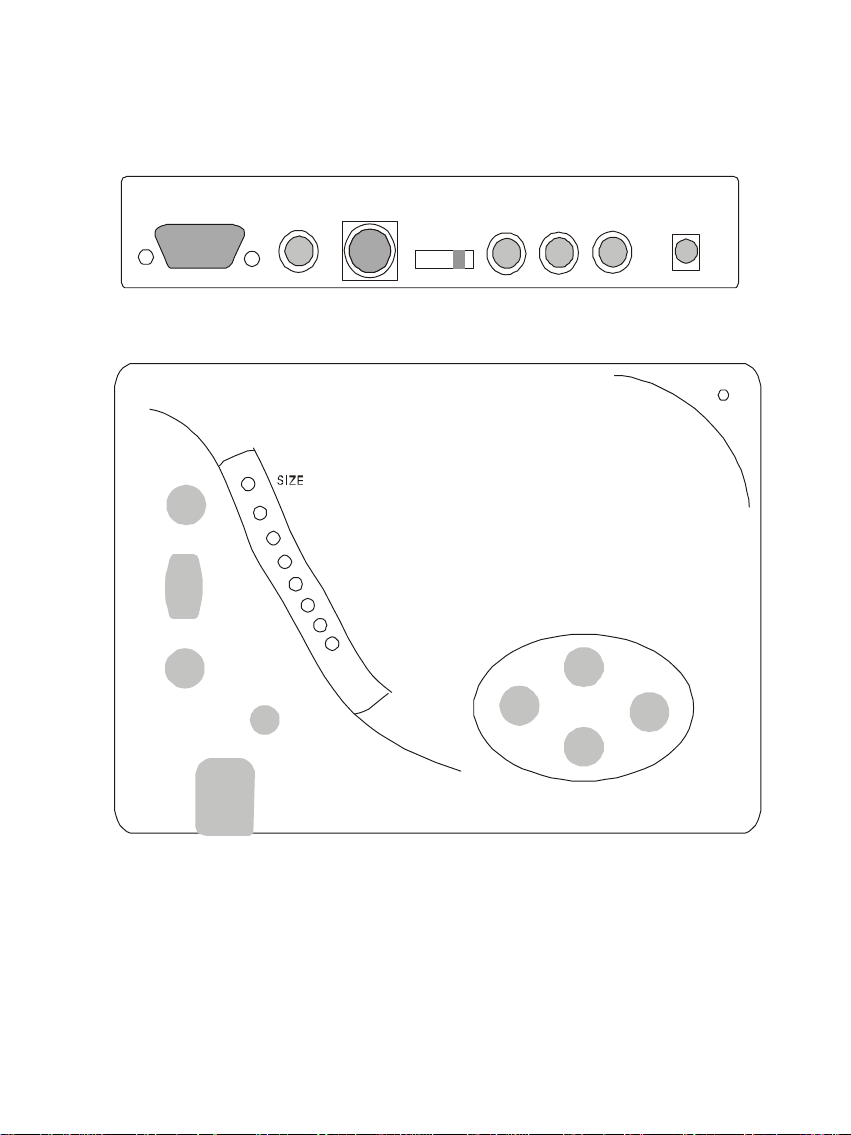
2. WIRELESS SHOW OUTLINE DESCRIPTION
SVHS
CV/OUT
Power
VGA I/O
V-Size
+
Flicker
Zoom
F
H-Size
Bright
-
Stereo
Sw
Jack
Ch1
Ch2
Ch3
Ch4
PICTURE
Chanel select
CV/IN
Antena
Jack
Page 6

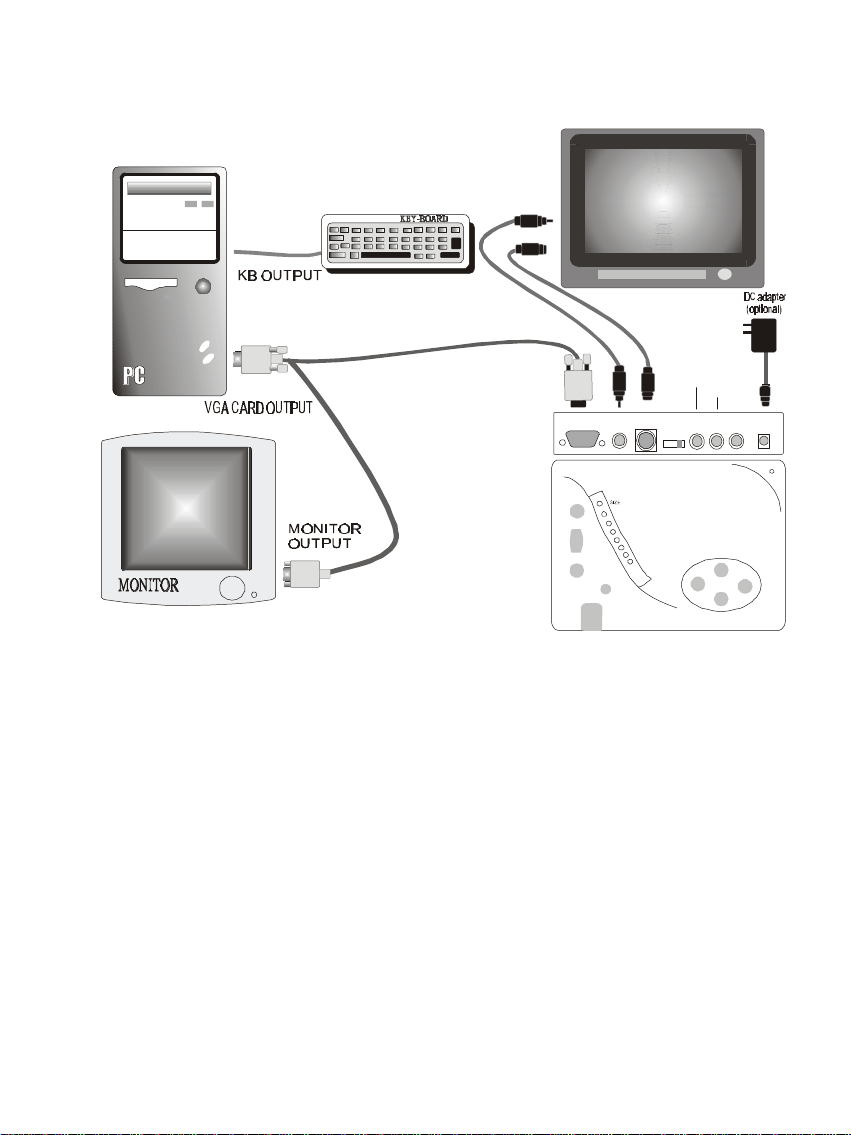
3 Hardware Installation
l Power off your computer
l Connect VGA output to Quick-Show by using the VGA Y-cable in the
Wireless-Show box. Plug two Y ends to VGA card and monitor.( You
can find the description on the Y-cable connectors )
l Connect AV or S-VHS cable from Wireless-Show to TV or RF-Input
Of Wireless-Show
l Plug the power adaptor from Wireless-Show DC/IN port into outlet
l The same picture of PC monitor will be shown on TV screen.
Note :
1. For Macintosh & NEC PCs you might need a pair of adaptor to connect to
Macintosh/NEC PC and monitor.
2. You don’t need these additional adaptors for IMAC model.
Page 7
TV SHOW
A
V
AV
S
-
F
+
Ch1
Ch2
Ch3
Ch4
PICTURE
Chanel select
SVHS
CV/OUT
VGA
Sw
Stereo
Antena
Power
E
N
C
O
D
E
R
AV
Audio IN
Video IN
D
R
A
C
A
G
V
I/O
V-Size
Flicker
Zoom
R
O
T
N
O
M
H-Size
Bright
CV/IN
Jack
Jack
Page 8

4 How to adjust your TV-Screen
1. Use Up/Down/Left/Right keys to move TV active area to left-
upper corner of TV screen
2. Put “PIC/SIZE” switch to SIZE position, use “HSIZE” and
“VSIZE” key to change active size
3. Put “PIC/SIZE” switch to PIC position, use “BRIGHT” and
“FLICKER” key to adjust active area for your preference.
4. Each wet-up will be saved into EEROM. Which means when you
turn on your PC and Quick-Show will display the last picture your
have saved.
5. For good RF-Video/Audio quality, you need put Wireless-Show
higher than most person, and rotate box direction to find best
Position.
5. Special Function KEY
1. “LEFT” KEY add “RIGHT” KEY
Wireless-Show will automatically change to Default Reset mode.
2. “UP” KEY add “Down” KEY
The function of Freeze/Un Freeze will become alternately.
Page 9

6. Trouble Shooting
1. Problem
ÚTV display in black and white color only
Solution
ÚCheck whether your TV system (PAL or NTSC) is selected correctly.
2. Problem
ÚTV picture is distorted
Solution
ÚMake sure that all cables are well connected.
3. Problem
ÚNo display on TV
Solution
ÚMake sure that all cables are connected properly.
ÚVerify that the correct TV channel is selected.
ÚFor Notebook users please switch your Notebook to external monitor
display mode.
Page 10

WARNING
Changes or modifications to this unit not expressly approved by the party
responsible for compliance could void the user’s authority to operate the
equipment.
The device complies with part 15 of the FC Rules. Operation is subject to the
following two conditions: (1) This device may not cause harmful interference,
and (2) this device must accept any interference received, including
interference that may cause undesired operation.
Note:
This equipment has been tested and found to comply with the limits for
a Class B digital device, pursuant to Part 15 of the FCC Rules. These
limits are designed to provide reasonable protection against harmful
interference in a residential installation. This equipment generates, uses
and can radiate radio frequency energy and, if not installed and used in
accordance with the instructions, may cause harmful interference to
radio communications.
However, there is no guarantee that interference will not occur in a
particular installation. If this equipment does cause harmful
interference to radio or television reception, which can be determined by
turning the equipment off and on, the user is encouraged to try to
correct the interference by one or more of the following measures:
¡¼ Reorient or relocate the receiving antenna.
¡¼ Increase the separation between the equipment and receiver.
¡¼ Connect the equipment into an outlet on a circuit different
from that to which the receiver is needed.
¡¼ Consult the dealer or and experienced radio/TV Technician for
help.
Page 11

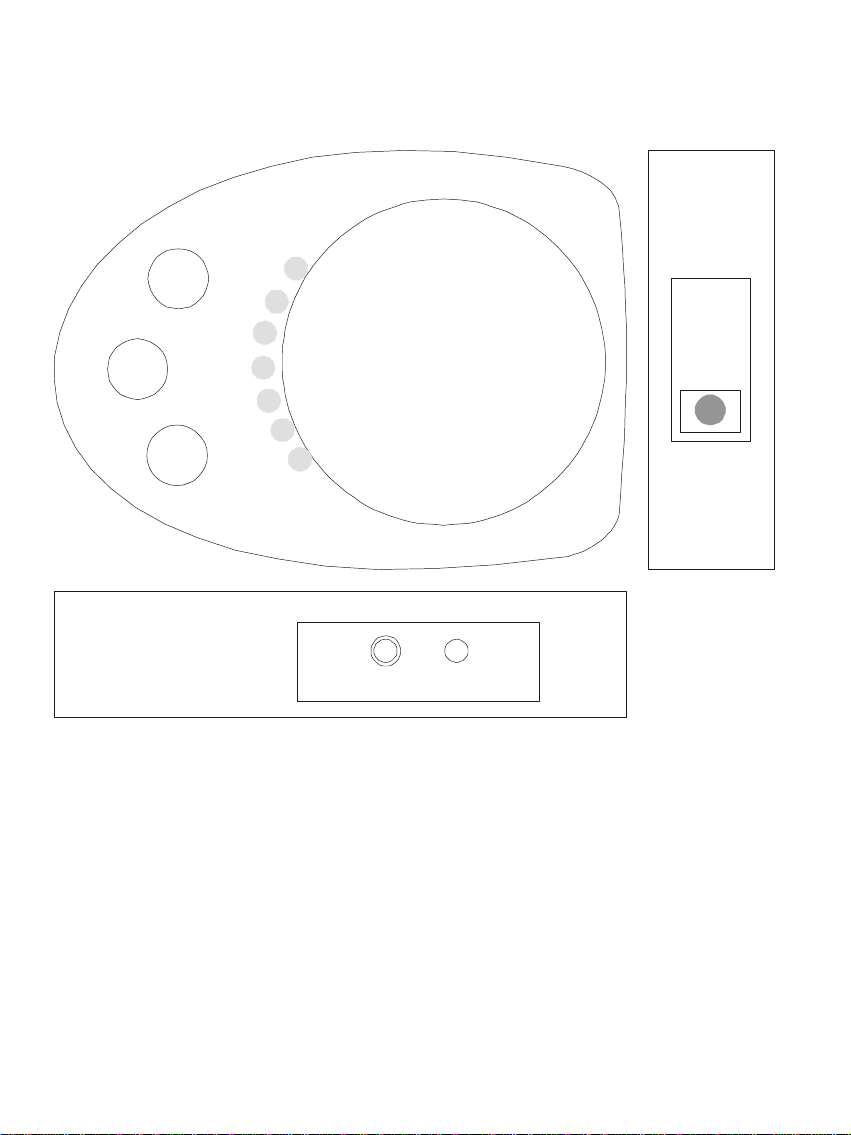
RF-TRANSMITTER & RECIIVER
Features
ÚPlug and play pure hardware design
ÚDistance up to 300 feet
ÚSupport NTSC and PAL system
ÚHigh quality 2.4GHZ composite video and stereo audio
transfer
ÚEasy installation & DIY
ÚFour Independent channe
Installationl
ÚConnect Video and Audio source to transmitter, plug
DC/Adapter
to AC
ÚConnect receiver Video and Audio output to TV, plug
DC/Adapter
to AC
ÚAdjust transmitter and receiver to same channel
Ú For good quality, you need put transmitter and receiver higher
than person,
and try to rotate box direction to find best position
Page 12
D
C
K
B
4
3
CH
Select
2
1
Video
Audio
/
 Loading...