

Page 1
FullSpeed TX600
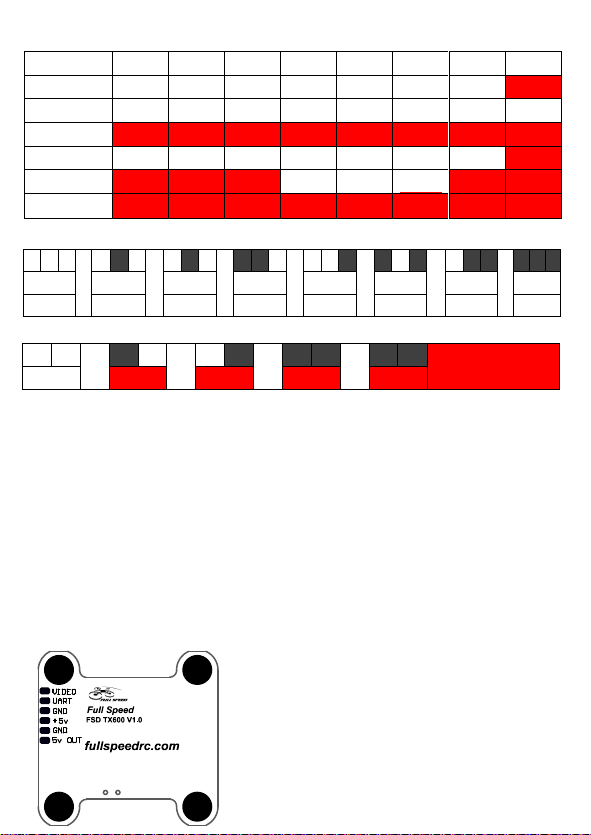
Channel 1 2 3 4 5 6 7 8
Band A 5865 5845 5825 5805 5785 5765 5745 5725
Band B 5733 5752 5771 5790 5809 5828 58 47 5866
Band E 5705 5685 5665 5645 5885 5905 5925 5945
FS 5740 5760 5780 5800 5820 5840 58 60 5880
Race Band 5658 5695 5732 5769 5806 5843 5880 5917
Low Race 5362 5399 5436 5473 5510 5547 5584 5621
Channel&Band LED Flash Code (Red for Channel & Green for Band)
1 2 3 4 5 6 7 8
Band A Band B Band E
Power LED Flash Code (Blue)
25MW 100MW 200MW 400MW 600MW
Black means the light is on.
Settings Quickstart
Red LED:Channel
Green LED:Band
Blue LED:Power
1. Press & hold the button for 5s to adjust Channel. Red LED will flash 3x & show the
Channel. Short press for 1x to switch Channel.
2. Press & hold the button for 5s after step1 to adjust Band. Green LED will flash 3x &
show the Band. Short press for 1x to switch Band.
3. Press & hold the button for 5s after step2 to adjust Power. Blue LED will flash 3x &
show the Power. Short press for 1x to switch Power.
transmitter so the power select mode can be accessible.)
4. Press & hold the button for 5s after setp3 to save setting. All LED will flash for 3x to
show the Channel, Band & Power.
Warning
R Band L Band
FS
Red area on frequency table is locked area! Please
follow your local laws and regulations .
Long press for 20s to unlock or reset all set
up .Please re-power after unlocking.
We suggest the VTX and Camera work on the same
5V.
2LEDs flash at the same
time on 600mw
(Only to unlock the
Page 2
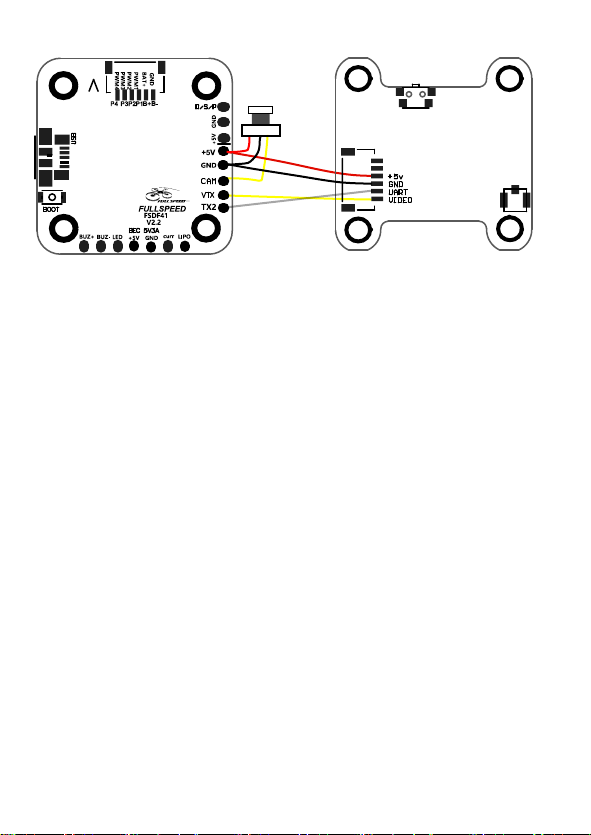
Pin assignment
camera
TX600
Precautions for use:
-Input voltage must be kept + -right
-Please choose antenna with good VSWR and DB if you replace,
to get far transmission distance
Features:
- 25/100/200/400/600mw switchable
- Lightweight designed
- Build-in PIT mode
- Smart port
- Frequency lock on
- Clean fliltering , interference rejection ablity
- Won't interfere with other VTX while it's powering
up in different frequency
 Loading...