

Page 1
Connectivity P eripherals
g
Product Reference
P oint 510, Point 1600
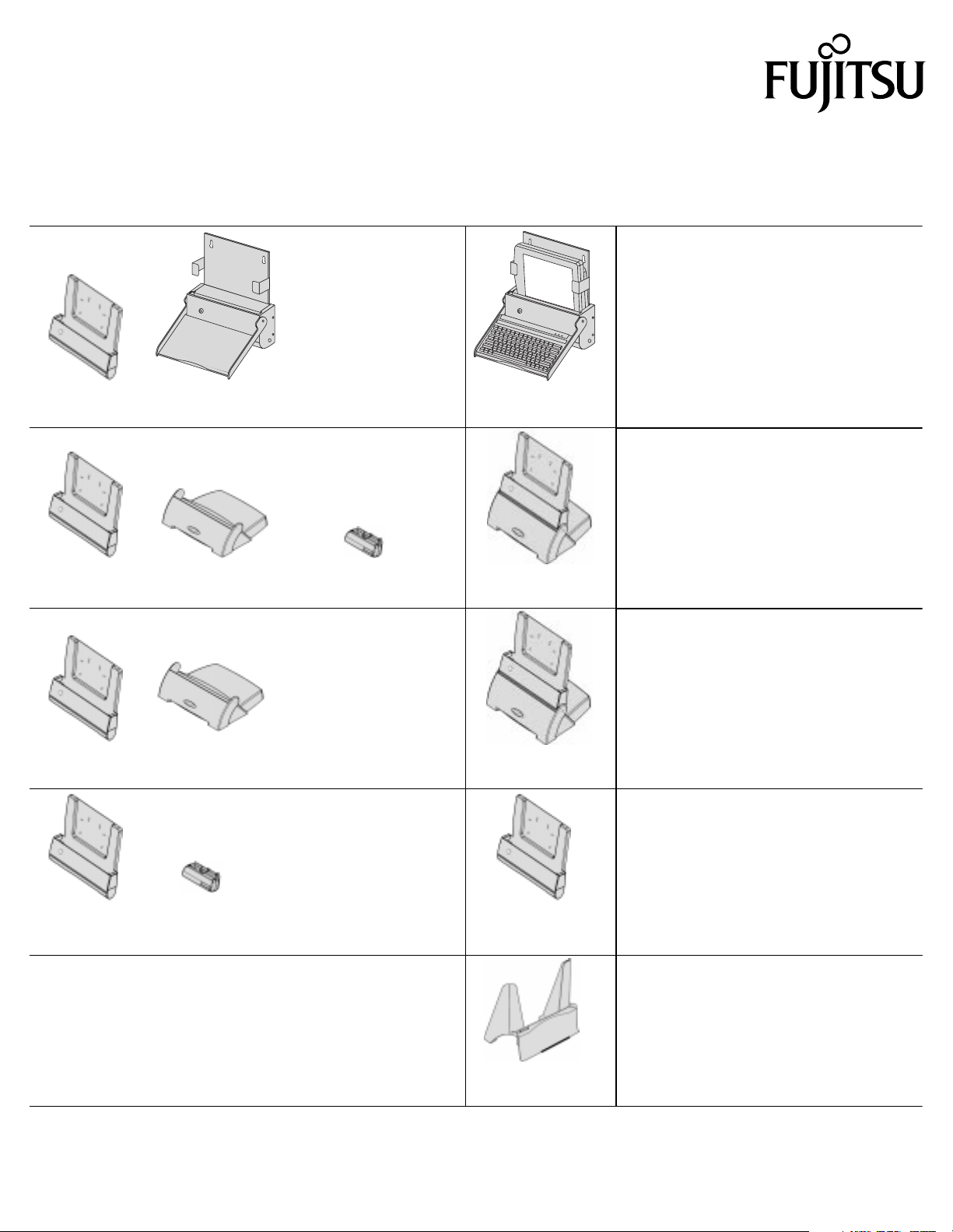
Components that comprise connectivity peripherals are shipped unassembled. This document describes the components used
to assemble each connectivity peripheral. Use this document to verify that the components you ordered are included. Note that
some of these peripherals are available in nonlocking versions, see “Order Numbers” later in this product reference for a listin
of locking and nonlocking versions.
Components Description
Assembled
Connectivity Peripheral
Wall-Mount Cradle
The wall-mount cr adle is assembl ed using a
cradle module and wa ll-mount bas e; it provid es a
connection to a k eyboard and external DC
power.
Cradle
Module
Cradle
Module
Cradle
Module
Cradle
Module
+
+
+
+
Wall-Mount
Base
Cradle
Base
Cradle
Base
Portable Port
Expander
+
Portable Port
Expander
=
Wall-Mount
Cradle
=
High-Connectivity
Cradle
The wall-mount cr adle is shown her e wit h a
keybo ard and Point 510 pen tablet which are
separately or derable .
High-Connectivity Cradle
The high-connecti vi ty cradle is assem bled using
a cradle module, cradle base, and portabl e port
expander; it allows you to connect a PS/2- style
keybo ard, PS/2-s tyle mous e, e x ternal DC po wer,
external floppy disk drive, external monitor,
parallel device, RS- 232C serial device, and Rx/
Tx (3 wire) serial de vice. Note that the latch on
the portable port expander must be remove d
prior to assembly.
High-Usage Cradle
The high-usage cradle is assembled using a
cradle module and cradle base; it allows you to
connect a PS/2-style keyboard, PS/2-style
mouse, and e xternal DC power.
=
High-Usage
Cradle
Port Replicator
The port replicator is assemb led using a cradle
module and portabl e port ex pande r; it all ows y ou
to connect a PS/2-style keyboard, PS/2-style
=
Port
Replicator
mouse, external DC power, external floppy disk
drive, external monitor, parallel device, RS-232C
serial device, and Rx/Tx (3 wire) serial device.
Note that the portable port expander latch must
be remove d prior to assembly.
Charge-Only Cradle
The charge-only cr adle requires no assembly.
This cradle pr ovi des a connec tion t o e xternal DC
power and is used f or storing and charging the
pen tablet bet ween uses. The cradle
accommodates the pen tablet with or without the
Charge-Only
Cradle
© 1999 Fujitsu Personal Systems, Inc.
Point 510 and Point 1600 are trademarks of Fujitsu Personal Systems, Inc.
1/99 Page 1 of 2 58-0634-00A
hand strap attached.
Page 2

Other Accessories and P eripherals 0
0
The following accessories and peripherals are not
included when you order connectivity peripherals and, if
required in your installation, must be ordered separately:
• AC adapter (FMWAC4)
• Folding desk stand (FMWDS3)
• External floppy disk drive (FMWFD2)
•Keyboard
The folding desk stand is commonly used with the port
replicator.
Folding Desk Stand
Related Documentation 0
Order Numbers
Order numbers for connectivity peripheral components
and assemblies are given in the following list. Note that
assemblies which include the cradle module are available
in locking and non-locking versions. The nonlocking
version of the cradle module is not equipped with the
tubular lock and cradle latches that are present on the
locking version.
• FMW26CR1 High-Usage Cradle - Locking
• FMW26CR21 High-Usage Cradle - Nonlocking
• FMW26CR2 High-Connectivity Cradle - Locking
• FMW26CR22 High-Connectivity Cradle Nonlocking
• FMW26CR3 Port Replicator - Locking
• FMW26CR23 Port Replicator - Nonlocking
• FMW26CR4 Wall-Mount Cradle - Locking
• FMW26CR24 Wall-Mount Cradle - Nonlocking
• FMW26CR5 Portable Port Expander
• FMW26CR8 Cradle Module - Locking
• FMW26CR28 Cradle Module - Nonlocking
• FMW26CR9 Cradle Base
• FMW26CR10 Charge-Only Cradle
• FMW26CR11 Wall-Mount Base
Refer to the following documents for details on using and
installing connectivity peripherals.
Connectivity Peripherals User’s Guide (FMW26TRG5)
This guide provides details on using connectivity
peripherals for the end user.
Connectivity Peripherals Installation Guide
(FMW26TRG6)
This manual provides details on assembling and
installing connectivity peripherals and connecting
peripheral interfaces.
Page 2 of 2
 Loading...