

Page 1
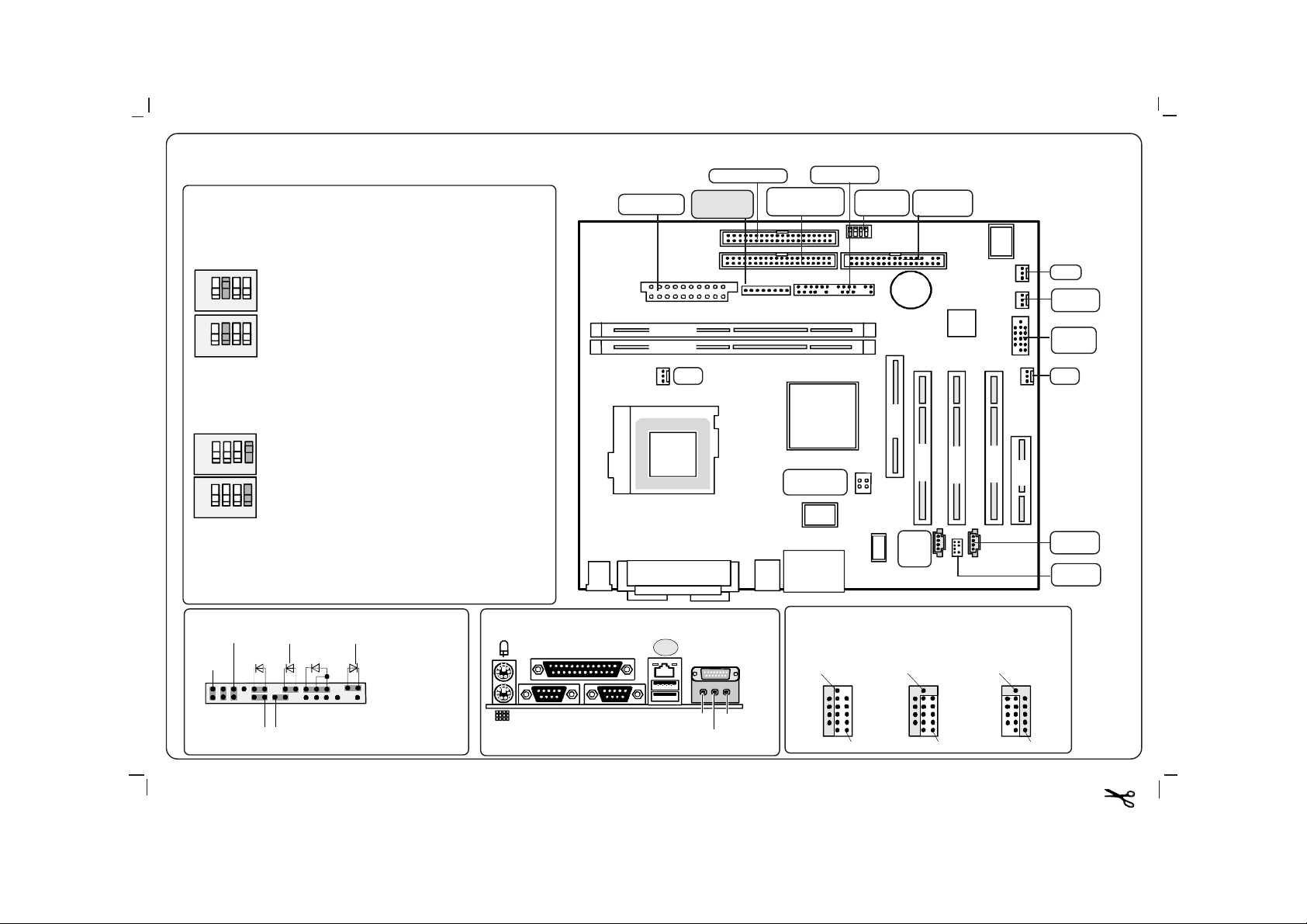
Systembaugruppe D1330 / 31 / 32 / System board D1330 / 31 / 32
Floppy disk drive
Schalter /
DIP switches
1 Schalter muss auf OFF stehen /
Switch must be set to OFF
2 System-BIOS wiederherstellen / BIOS recovery
ON
1234
ON
1234
ON Das System startet von Diskette und ermöglicht die
Wiederholung eines fehlgeschlagenen BIOS-Update.
The system starts from floppy and allows a BIOS recovery.
OFF Das System startet mit dem BIOS von der System-
baugruppe (Standard).
The system starts with the BIOS from the system board
(default settings).
3 Wird nicht benutzt / Not used
Power supply
DIMM 2
DIMM 1
Power supply
monitoring
Fan 1
Secondary IDE
drives 3 and 4
Control panel
Configuration
switch
Primary IDE
drive 1 and 2
A26361-D1332-Z140-1-7419
Ausgabe/Edition 01/02
Fan 2
Cover
monitoring
C/D
USB port
WOL
4 Hilfsspannung festlegen / Defining auxiliary voltage
ON
1234
ON
1234
Bedienfeldstecker / Front panel connector
Powe r O n/Of f
1)
Reset
Sleep
ON Wake-up on USB wird abgeschaltet.
Wake-up on UBS is switched on.
OFF Normaler Betrieb (Standard). Alle Funktionen werden
mit Hilfsspannung versorgt.
Normal operation (default settings). All functions are
supplied with auxiliary voltage.
1)
HD-LED
1)
SCSI LED In pu t
Message LED
1)
Power On
1)2)
LED
)1)
Sleep LED
1
1) Cable is not
2
included in the
delivery scope.
2) 2pin or 3pin
externe Anschlüsse / external ports
COM1
LPT
COM2
LAN
USB
Game/Midi
Line-Out
Line-In
AUDIO
Micro-In
AGP
Power supply
+12 V
USB port C / D1 / USB port C / D1
Connecting internal
12-pin cables
for USB SmartCard
Reader
12
CCR
ON
PCI 1
AUX
audio
input
Connecting internal
10-pin cables
for USB Devices
non-Intel Standard
12
CCR
ON
1 1
Polyscript Carbo weiß (Nr .13-54)
PCI 3
PCI 2
Connecting internal
10-pin cables
for USB Devices
Intel Standard
12
CCR
ON
CNR
1
CD audio
input
Audio front
panel
 Loading...