

Page 1

15.6” LEDTV
IMPORTANT
Pleasereadthismanualcarefullybeforeinstalling
andoperatingtheTV.
Keepthismanualhandyforfurtherreference
USERMANUAL
MODELNO.:FL16102
Page 2

TableOfContents
SafetyInformation.................................................................................................................2
PreparationsGuide
ImportantSafetyPrecautions.................................................................................................3
InstalledAndConnectedTV
TVButtonsAndTerminalInterface........................................................................................4
Externaldeviceconnectiondiagram...................................................................5
InstallAndConnectTV...........................................................................................................6
SelectInputSource................................................................................................................9
FunctionDescription
TVChannel..........................................................................................................................11
PictureMenu..........................................................................................................................9
SoundMenu........................................................................................................................10
FeatureMenu......................................................................................................................13
SetupMenu..........................................................................................................................14
Multimedia
Photo...................................................................................................................................16
1
OtherInformation
Help......................................................................................................................................18
Specifications.......................................................................................................................19
TVStandinstallationInstructions.......................................................................6
Thisusermanualforreferenceonly
Music...................................................................................................................................16
Movie...................................................................................................................................16
eBook..................................................................................................................................16
RemoteController..................................................................................................................7
OtherFeatures
PVR.....................................................................................................................................17
Page 3
SafetyInformation
2
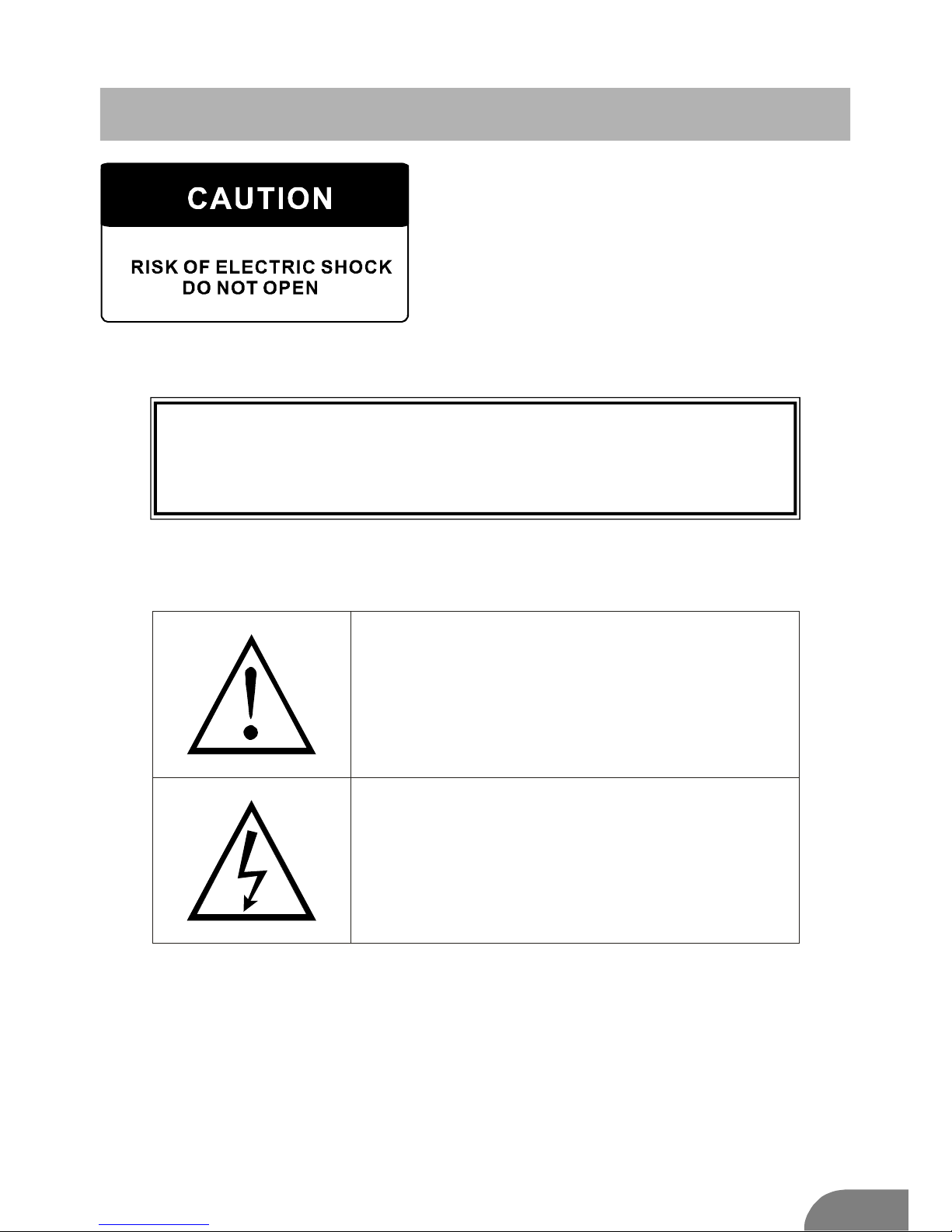
Highvoltagesareusedintheoperationof
thisproduct.toreducetheriskofelectric
shock,donotremovecoverofthecabinet,
referservicingtoqualifiedservicepersonal
IftheTVanychangesorcoarseadjustment,electricshocks
tobehurt,donotattempttoopenamachine-maintenance,
customercontactcentresneededoverhaul.
Theexclamationpointwithinanequilateral
triangleisintendedtoalerttheusertothe
presenceofimportantopertinginthe
literatureaccompanyingtheappliance.
Warning
Thelightningflashwitharrowheadsymbol
withinanequilateraltriangle,isintendedto
alerttheusertothepresenceofuninsulated
dangerousvoltagewithintheproducts
enclosurethatmaybeofsufficientmagnitude
toconstituteariskofelectricshocktopersons.
Page 4

3
ImportantSafetyPrecautions
1.Readtheseinstructions.
2.Keeptheseinstructions.
3.Heedallwarnings.
4.Followallinstructions.
5.Donotusethisapparatusnearwater.
6.Cleanonlywithdrycloth.
7.Donotblockanyventilationopenings.Installinaccordancewiththe
manufacturer抯
instructions.
8.Donotinstallnearanyheatsourcessuchasradiators,heatregisters,stoves,or
otherapparatus(includingamplifiers)thatproduceheat.
9.Donotdefeatthesafetypurposeofthepolarizedorgrounding-typeplug.A
polarizedplughastwobladeswithonewiderthantheother.Agroundingtypeplug
hastwobladesandthirdgroundingprong.Thewidebladeorthirdprongare
providedforyoursafety.Whentheprovidedplugdoesnotfitintoyouroutlet,
consultanelectricianforreplacementoftheobsoleteoutlet.
10.Protectthepowercordfrombeingwalkedonorpinched,particularlyatplugs,
conveniencereceptacles,andthepointwheretheyexitfromtheapparatus.
11.Onlyuseattachments/accessoriesspecifiedbythemanufacturer.
12.Useonlywiththecart,stand,tripod,bracket,ortablespecifiedbythe
manufacturer,orsoldwiththeapparatus.Whenacartisusedcautionwhen
movingthecart/apparatuscombinationtoavoidinjurytip-over.
13.Unplugthisapparatusduringlightningstormsorwhenunusedforlongperiods
oftime.
14.Referallservicingtoqualifiedservicepersonnel.Servicingisrequiredwhenthe
apparatushasbeendamagedinanyway,suchaspower-supplycordorplugis
damaged,liquidhasbeenspilledorobjectshavefallenintotheapparatus,the
apparatushasbeenexposedtorainormoisture,doesnotoperatenormally,orhas
beendropped.Warningtoreducetheriskoffireorelectricshock,donotexpose
thisapparatustorainormoisture.
15.Theapparatusshallbedisconnectedfromthemainsbyplacingthepower/standby
switchinthestandbypositionandunpluggingthepowercordoftheapparatusfrom
theACmainsreceptacle.
16.Thesocket-outshallbeinstalledneartheequipmentandshallbeeasilyaccessible.
17.Thisproductshouldneverbeplacedinabuilt-ininstallationsuchasabookcase
orrackunlessproperventilationisprovidedorthemanufacturer'sinstructionshave
beenadheredto.
18.Apparatusshallnotbeexposedtodrippingorsplashing.
19.Donotplaceanysourcesofdangerontheapparatus(e.g.liquidfilledobjects,
lightedcandles).
20.WallorCeilingMounting-Theapplianceshouldbemountedtoawallorceiling
onlyasrecommendedbythemanufacturer.
21.NeverplacetheTV,remotecontrolorbatteriesnearnakedflamesorother
heatsources,includingdirectsunlight.Topreventthespreadoffire,keep
candlesorotherflamesawayfromtheTV,remotecontrolandbatteriesat
alltimes.
22.TheUSBterminalshouldbeloadedwith0.5Aundernormaloperation.
Page 5
TVButtonsAndTerminalInterface
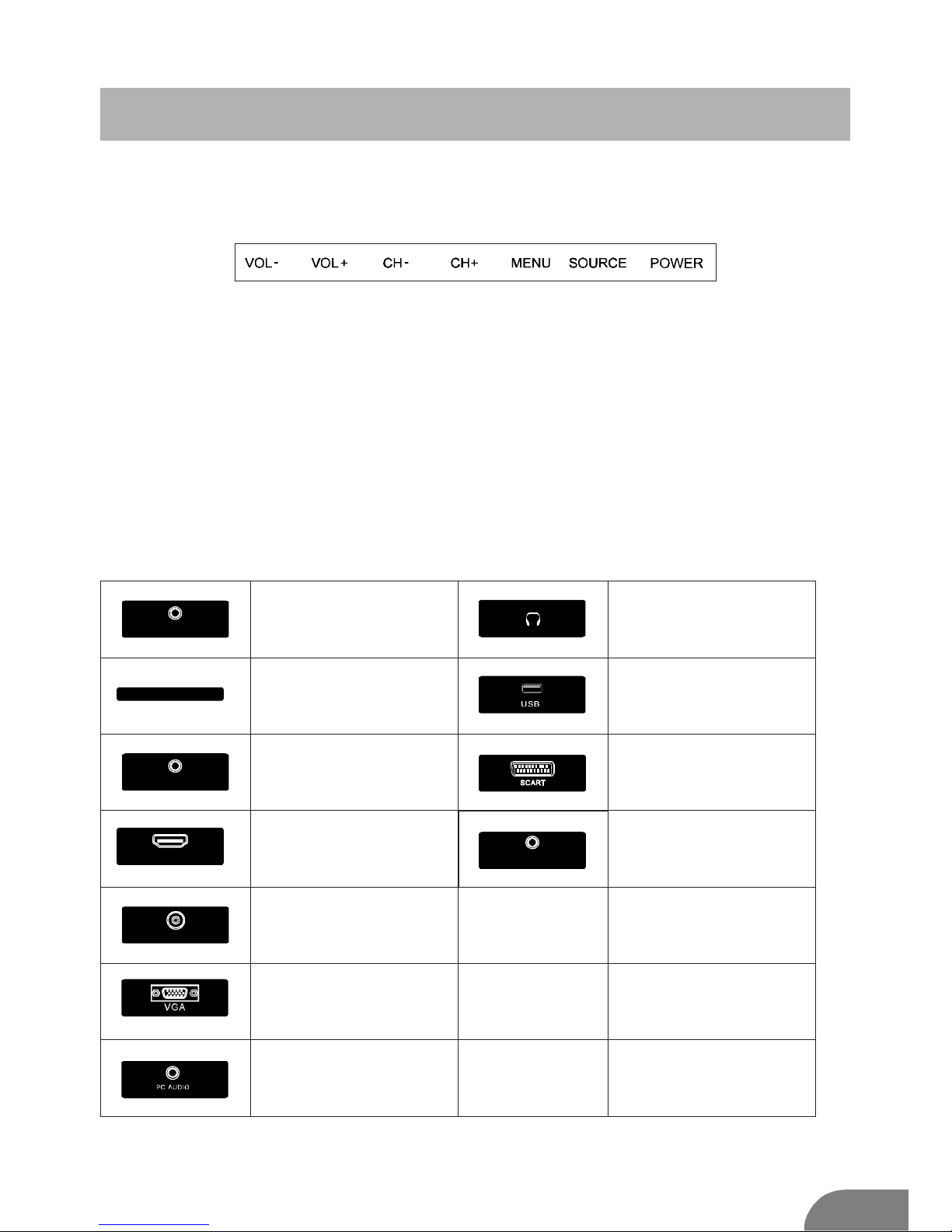
TVButtons
POWER:TurnON/OFFPower.
:ExternalSignalInputSelection.
:DisplayMainMENUAndConfirmMENUItemSelection.
:SelectingChannel.
:AdjustingVolume.
SOURCE
MENU
CH+/VOL+/-
Note:Thefollowingisonlyfunctionalschematic,Andtheactualpositionand
arrangementofdifferentmodelsmaybedifferent.
TerminalInterface
Note:Thefollowingarethevariousterminalinterface,theactualpositionand
arrangement,thenumberofdifferentmodelsmaybedifferent.
HDMI
AVinput
ExternalAVSignalInputAnd
RelevantRith/LeftSoundChannel
CISLOT
ThecardreaderinputCI(common
interface)thisrequiresCAM
(conditionalaccessmodule)
usedforpayTV.
YPbPrinput
Connecttothecompositeterminalof
yourDVD/VCR
(Somemodelswithoutthisinterface)
HDMIinput
DigitalsignalinputfromHDMIvideo
connector.
ANT75
Connecttheantennal/cadletvinput
(75/VHF/UHF)
VGAinput
PCanalogsignalinput
PCAUDIOINPUT
VGAinputandaudioinputwhenVGA
input
EARPHONEoutput
Whenearphonesarepluggedin,
speakersaredisabled
USBinput
ConnectaUSBdeviceheretoplay
itsmediafilesortorecordprograms
viathePVRfunction.
SCARTinput
standard,itsupportscompositeand
RGBsignalinput.ltisaconnection
foreuropean
(Somemodelswithoutthisinterface)
4
CI
COAX
OUT
COAXIAL
ConnecttheSPDIFreceiver.
AV
YPbPr
RF
Page 6
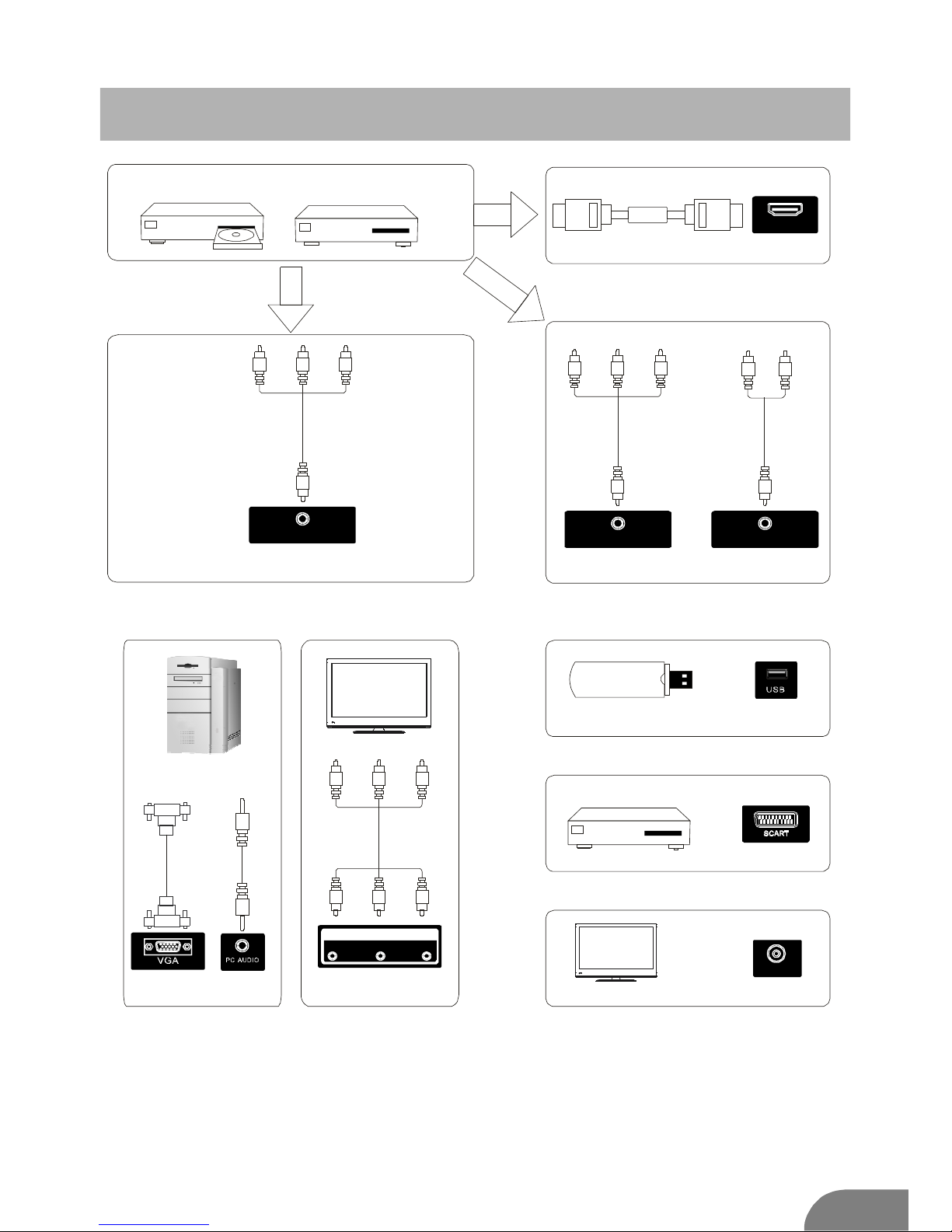
Externaldeviceconnectiondiagram
DVD
Set-topboxes
HDMI
HDMI
HDMIinputconnection
AVoutputconnection
USBconnection
TVconnection
Set-topboxes
SCARTconnection
5
AVinputconnection
AVinputconnection
YPbPr
AV
AV
AVinputconnection
OUTPUT
VIDEO R L
RF
Page 7

1
3
2
4
InstallAndConnectTV
6
SetyourTV
ToputyourTVinafirmplacewhichcan
beartheweightoftheTV.
Toavoiddanger,pleasedon
抰 exposethe
TVnearwaterorheatingplace(suchas
light,candle,heatingmachine),donotblock
theventilationatthebackofTV.
Connectantennaandpower
1.Connecttheantennacabletotheantenna
socketonthebackoftheTV.
2.ToplugthepoweradaptorofTV(DC12V)
TurnonTV
3.PressthepowerbuttonoftheTVthe
indicationlight.ifitis
onstandbymode(thelightisred),press
thepowerbuttonontheremotecontrol
toturnontheTV.
willturntoblue
Note:
Pictureforreferencepurposesonly.
TVStandInstallationInstructions
1.OpenthecartonandremovetheTV
andscatteredaccessoriesandbase
(somemodelswithoutbase).
2.toavoidtheinjuryoftheTV,covered
withasoftmattress,putitonthetable,face
downonasoftmattress,thebaseofthe
neckisfixedontheTVwithscrews.
3.screwthebaseandconnectedtotheTV.
4.theinstallationiscomplete.
TVANT
FMANT
TVsignaloutput
1
3
2
Page 8

7
FAV/LISTFREEZE
SUBTITLE
REVEAL SIZE HOLD TEXT
RECLIST
TIMESHIFT
GUIDEASPECT
REC INDEX CANCELSUB.PG
MTS
SLEEP EXIT
TV/RADIO
DISPLAY
DTV/ATV
SOURCE P.MODE S.MODE
RED GREEN
YELLOW
CYAN
ENTER
MENU
1 2
3
4
5
6
7
8
9
10
11
12
13
14
Page 9

8
FAV/LISTFREEZE
SUBTITLE
REVEAL SIZE HOLD TEXT
RECLIST
TIMESHIFT
GUIDEASPECT
REC INDEX CANCELSUB.PG
MTS
SLEEP EXIT
TV/RADIO
DISPLAY
DTV/ATV
SOURCE P.MODE S.MODE
RED GREEN
YELLOW
CYAN
ENTER
MENU
15
16
17
18
19
20
21
22
23
24
25
26
27
28
30
31
29
32
33
Page 10

9
SOURCE
SOURCE
Input
DTV
ATV
AV
Selectinputsource
SCART
YPbPr
HDMI
FunctionDescription
Media
PC
Page 11
10
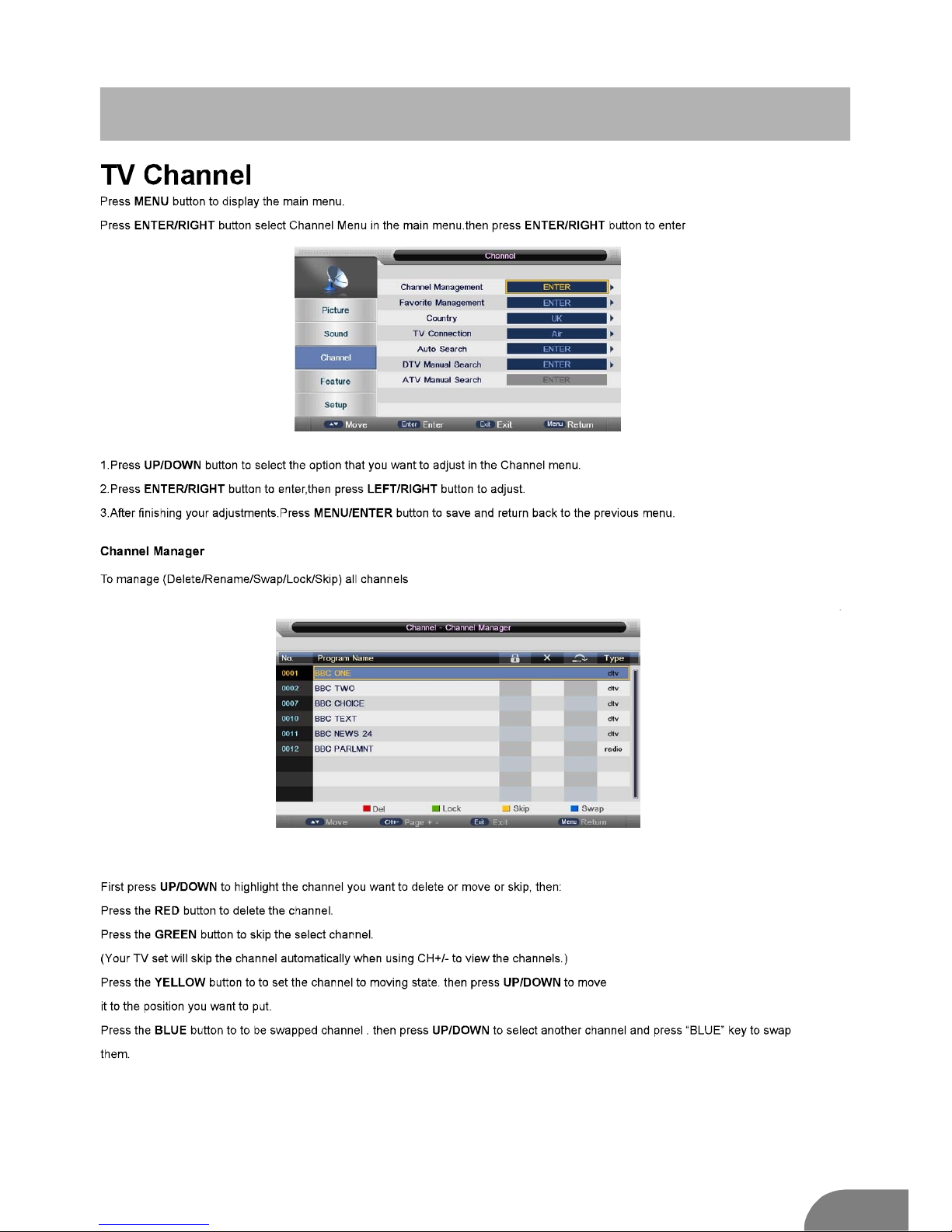
FunctionDescription
Page 12
11
FunctionDescription
Page 13
12
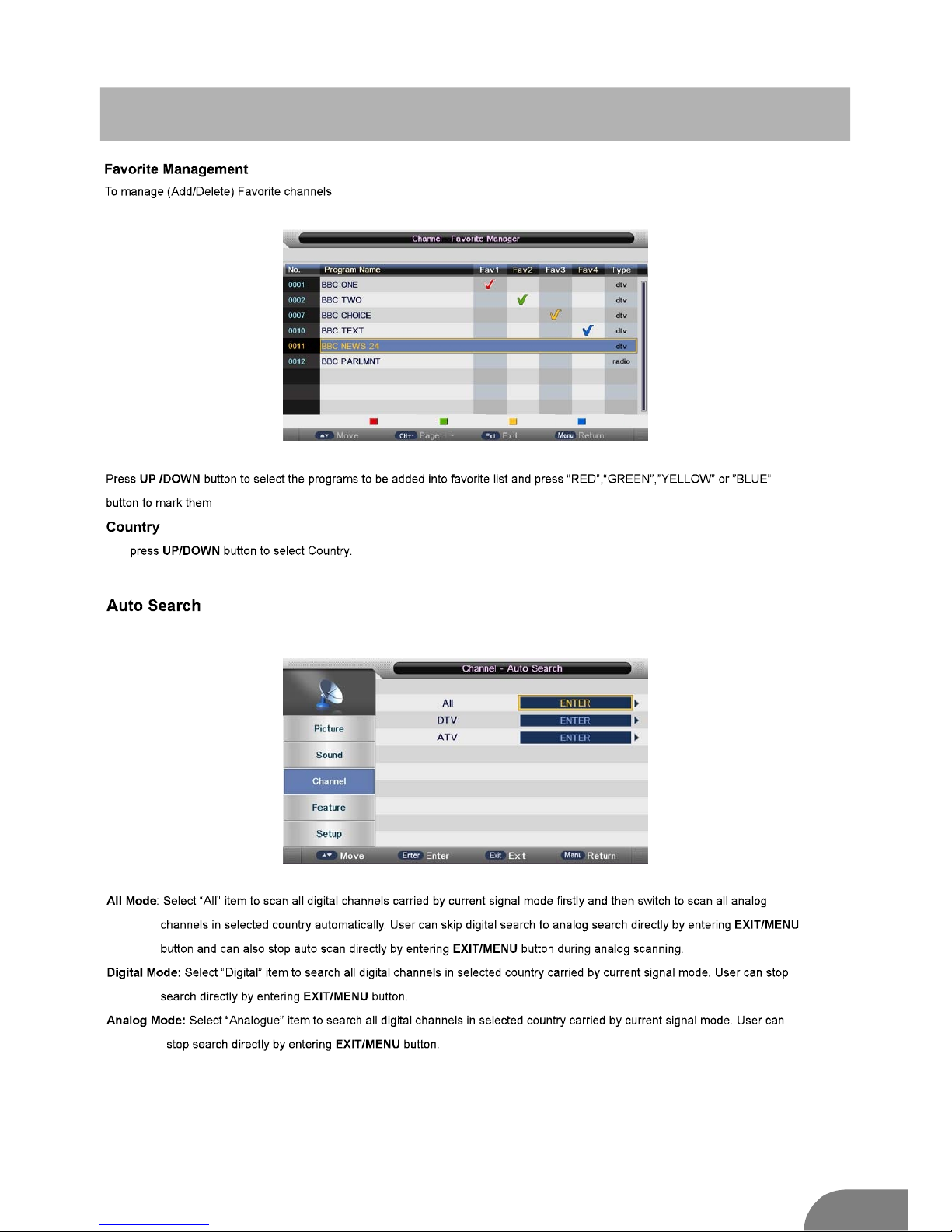
FunctionDescription
Favorite1 Favorite2 Favorite3 Favorite4
Page 14
13
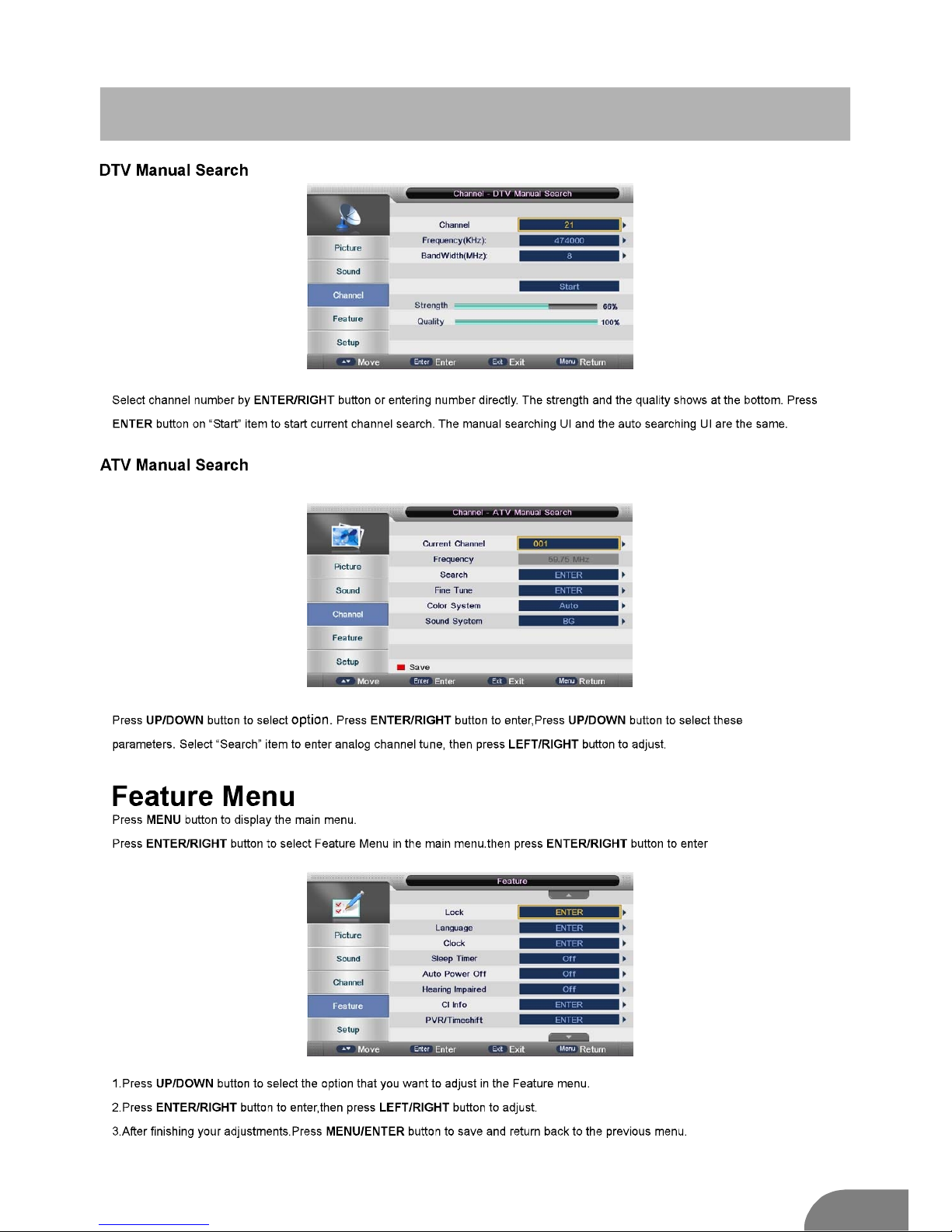
FunctionDescription
Page 15
14
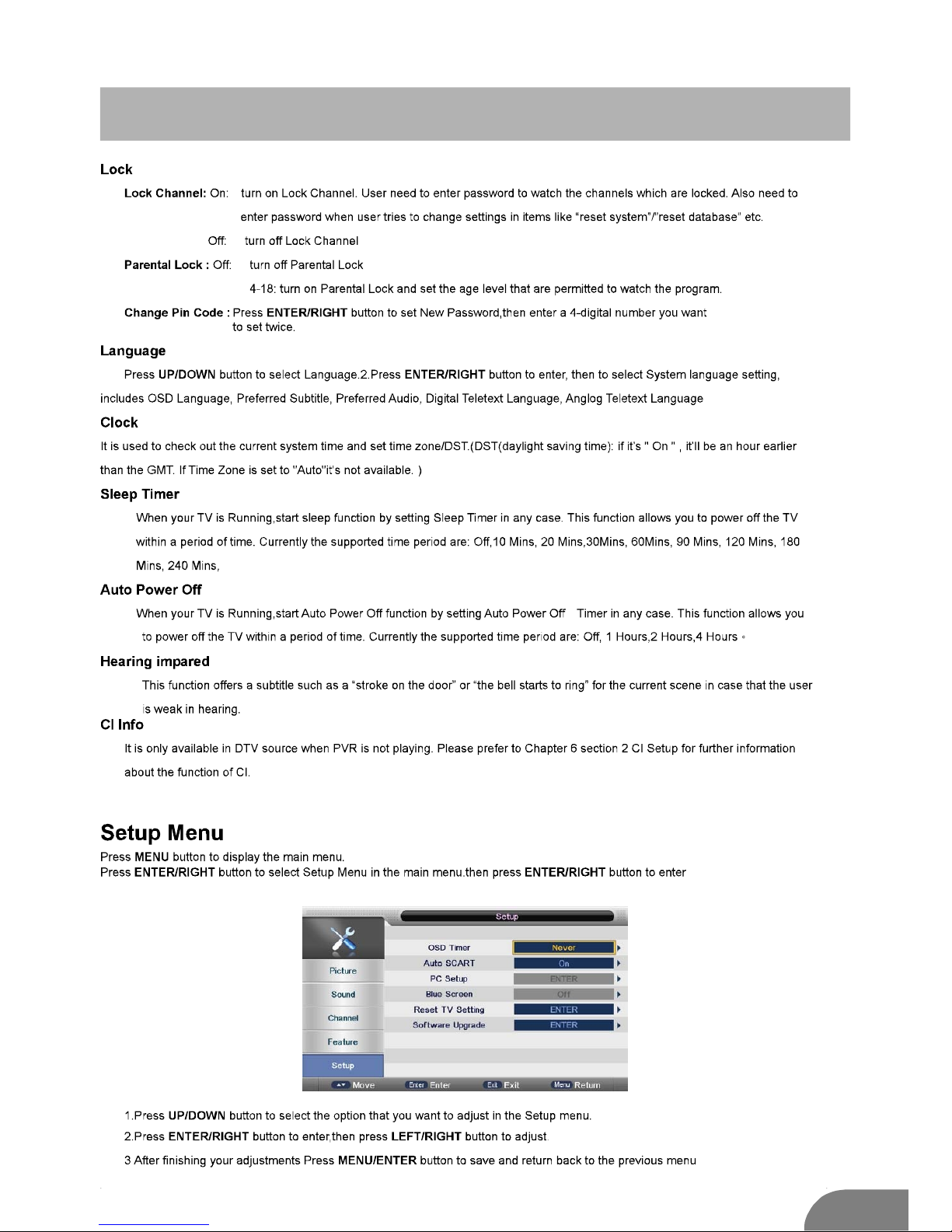
FunctionDescription
Page 16

15
FunctionDescription
Page 17
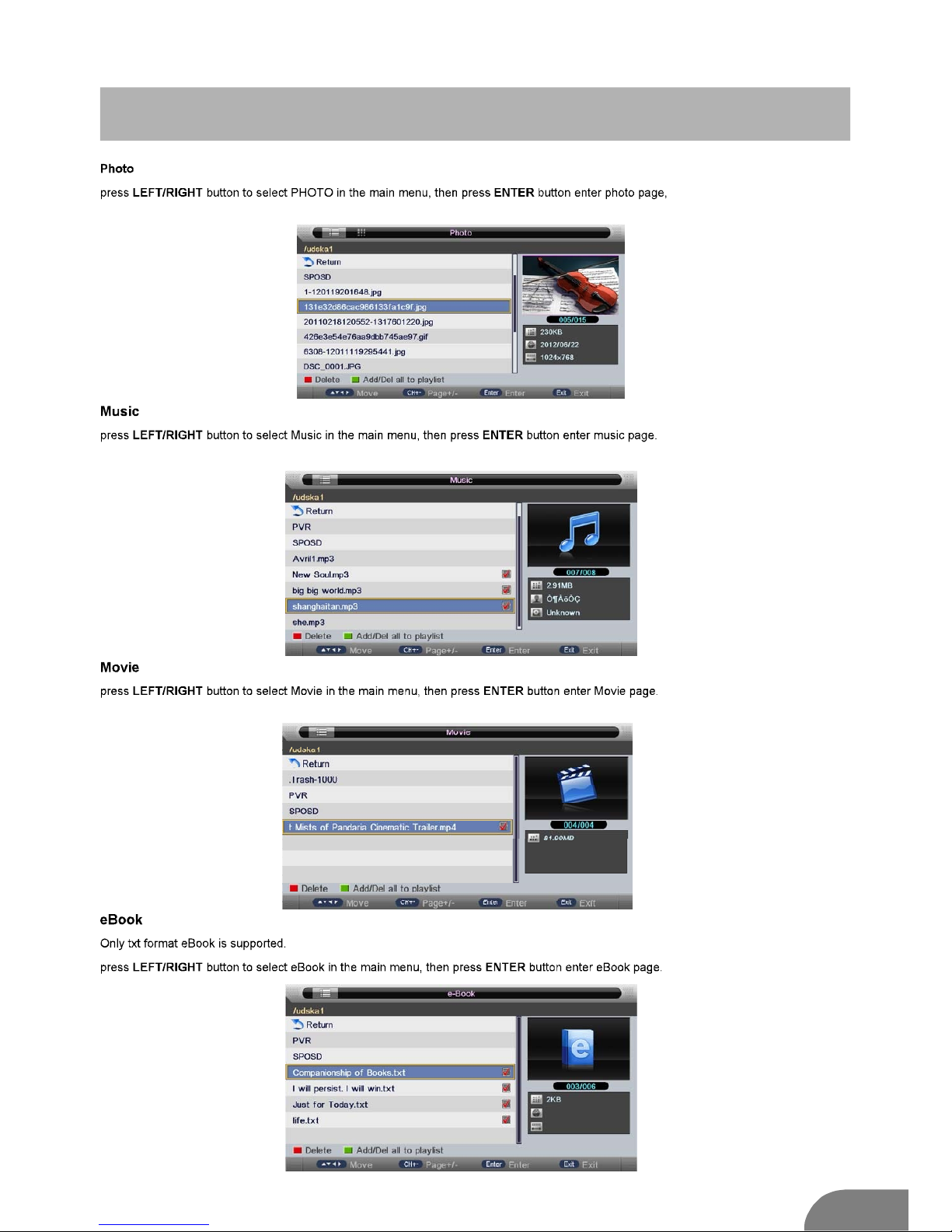
16
Multimedia
Page 18

17
PVR
OtherFeatures
Reminder
Display
Page 19
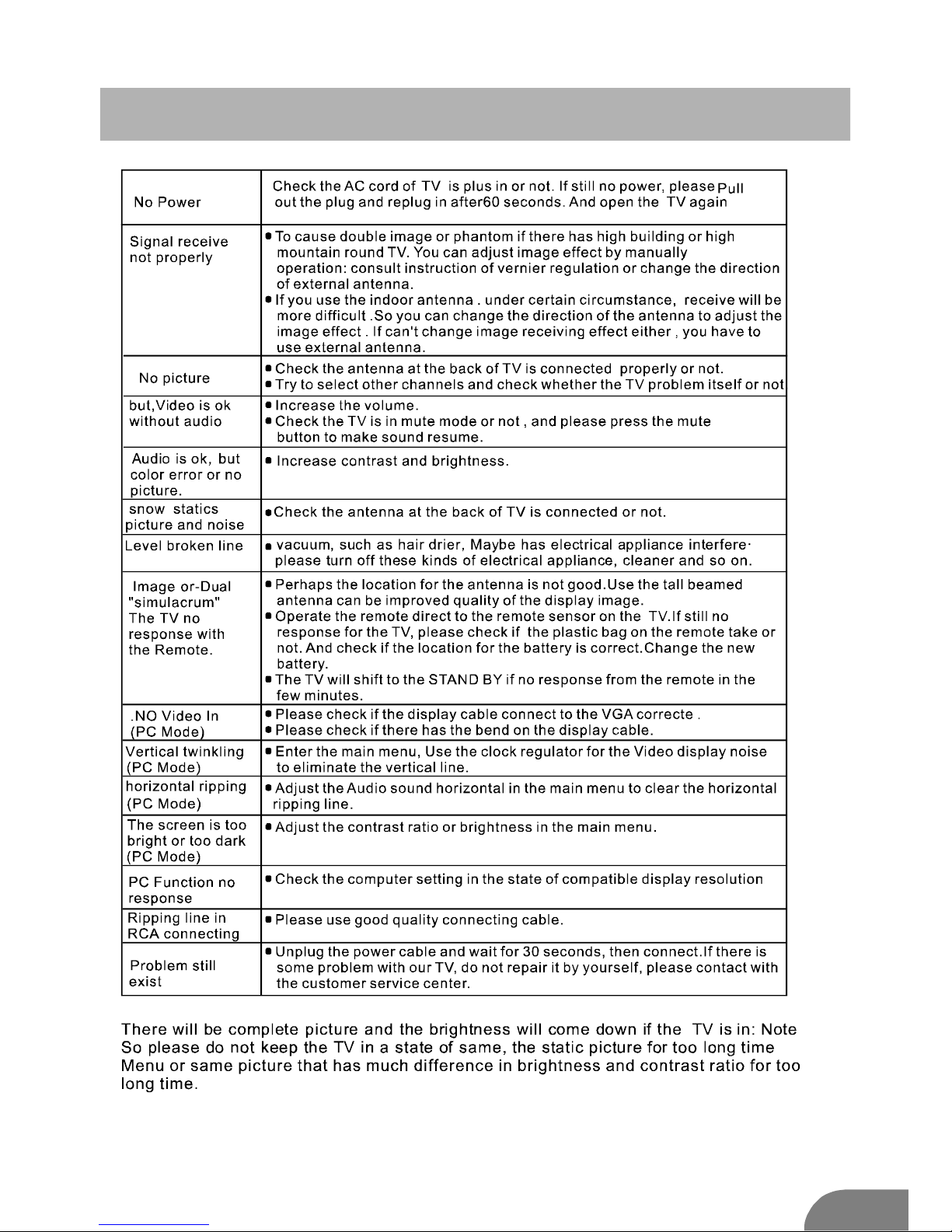
Help
18
Page 20
 Loading...