

Page 1

USER MANUAL
tremolo & reverb
®
Page 2
Flint - tremolo & reverb User Manual
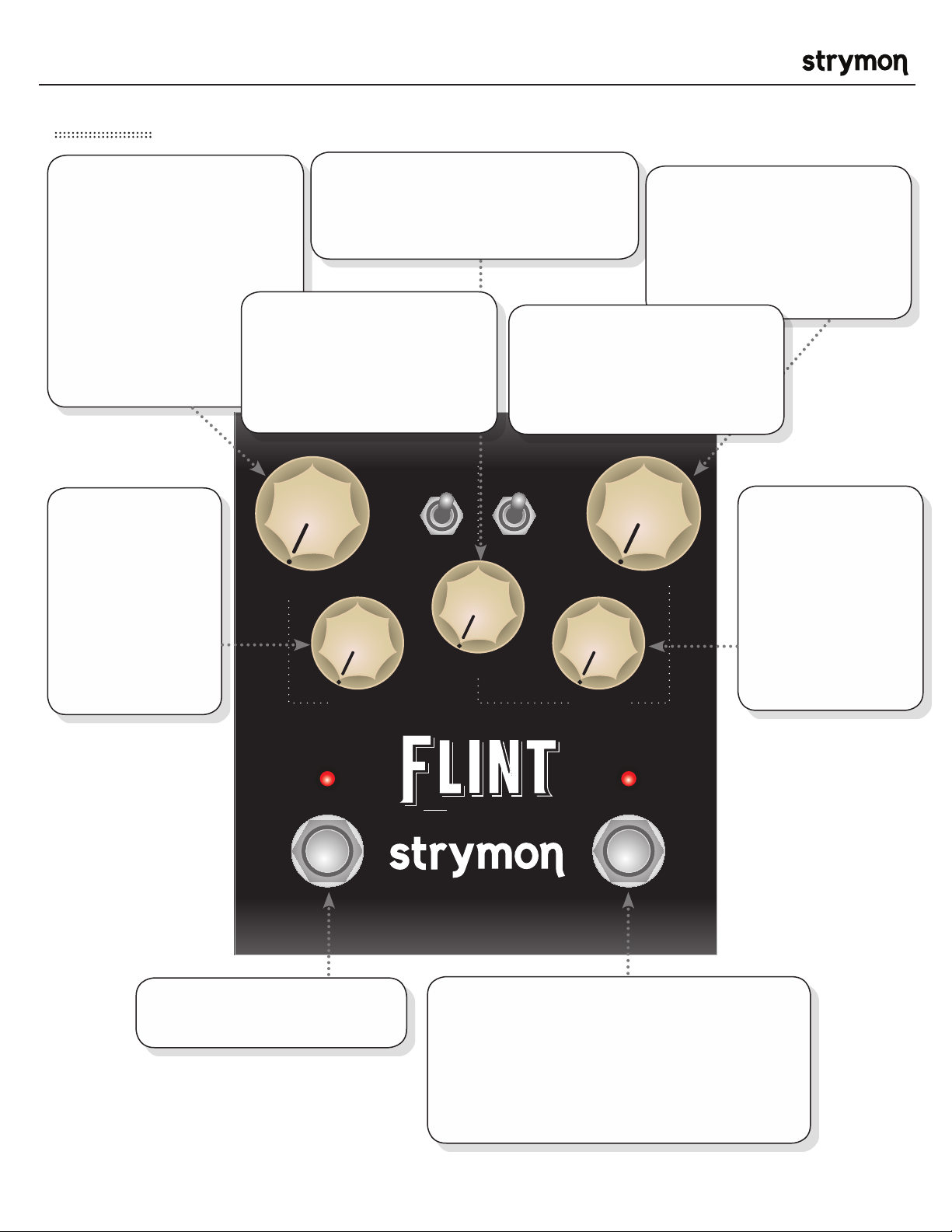
Front Panel
®
INTENSITY: Controls
the intensity or Depth of
the tremolo effect. This is
accomplished by varying
the amplitude of the LFO
that controls the tremolo. At
minimum position,
the LFO is off and no
tremolo effect is heard,
but the signal still
travels through the
tremolo ‘circuit’.
SPEED: Varies
the tremolo LFO
frequency from slow
to fast. The slow
range is extended
to give lower trem
speeds than were
generally available
in the vintage
offerings.
DECAY: Varies the reverb time from
short to long. The ‘70s and ‘80s verbs will
approach ‘infinite’ decay at maximum.
TREMOLO SWITCH:
Switches between 3 tremolo types
‘61 Harm - Harmonic band filtering
‘63 Tube - Power Tube Bias
‘65 Photo - Photocell
TREMOLO REVERB
‘61 harm
‘63
tube
‘65 photo
DECAY
MIX: Controls the reverb wet
mix from full dry at minimum
to full wet with no dry signal at
maximum. A 50/50 mix occurs
around 3 o’clock on the mix
knob.
REVERB SWITCH:
Switches between 3 reverb types
‘60s - Spring Tank
‘70s - Electronic Plate (solid state)
‘80s - Studio Rack Hall
‘60s
‘70s
‘80s
MIXINTENSITY
COLORSPEED
COLOR: Varies the
reverb tone from
darker at low settings,
to brighter at higher
settings. This is critical
for dialing in the sweet
spot in front of a variety
of amps.
TREMOLO
BYPASS
TREMOLO BYPASS FOOTSWITCH:
Engages and disengages tremolo.
REVERB
BYPASS
tremolo & reverb
®
REVERB BYPASS FOOTSWITCH:
Engages and disengages reverb. Bypass mode is true
bypass by default. LED on indicates that the effect is
engaged. TIP: Hold the Reverb Bypass footswitch during
power up to change the bypass mode to analog bypass
with trails (reverb persist).
pg 2
Page 3
Flint - tremolo & reverb User Manual
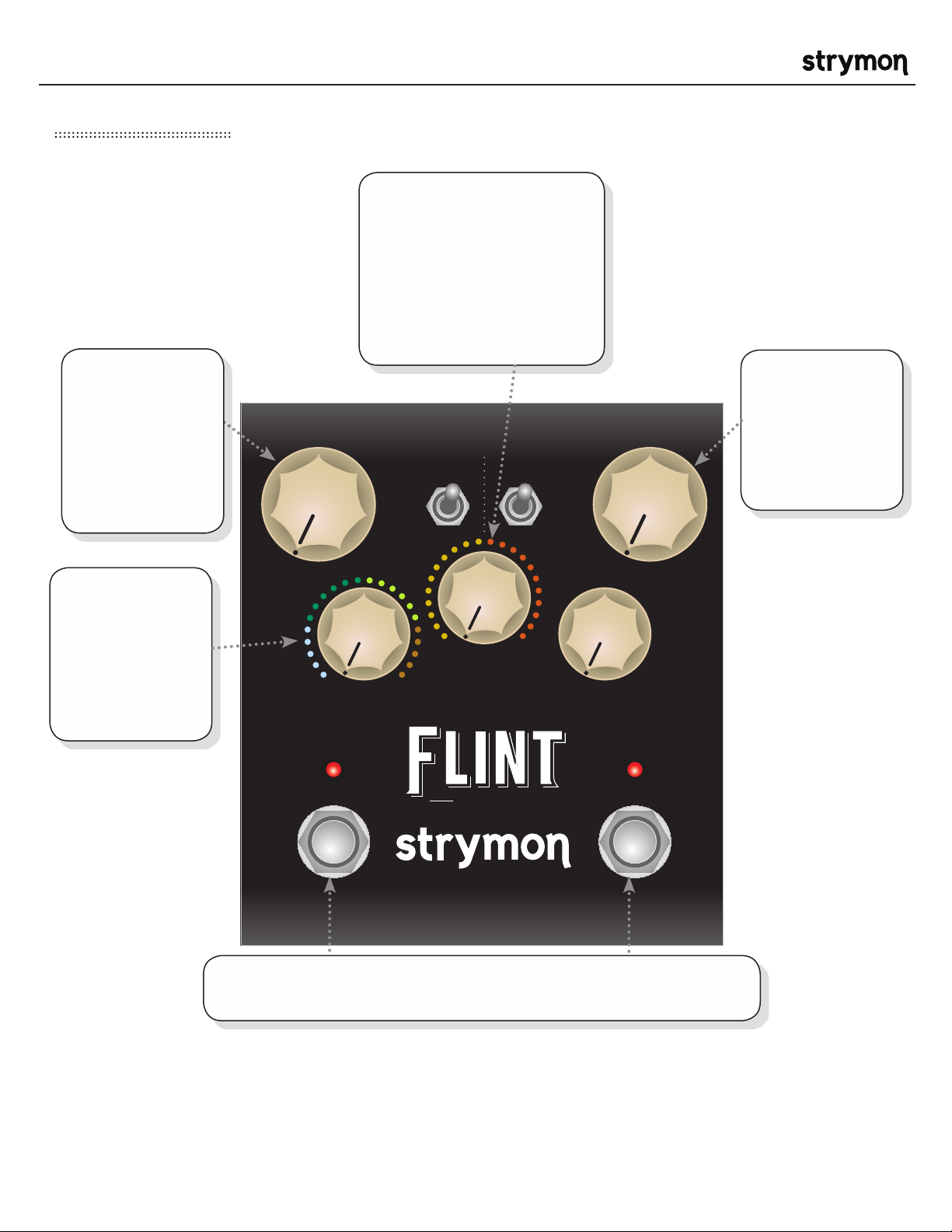
Secondary Functions
®
EFFECT ORDER: Sets
whether the signal travels
through Reverb then Tremolo
or Tremolo then Reverb. The
default is Reverb through
Tremolo as this is how many
vintage amplifier circuits
worked.
TREMOLO BOOST
/ CUT: Controls
the +/- 3dB
boost or cut
when Tremolo
is engaged. Set
to 12 o’clock for
unity gain.
TAP DIVISION:
Sets the desired
tap division for
the Tremolo LFO
when an external
TAP footswitch is
used.
( TREMOLO
BOOST/CUT )
TRIPLET
1/16
( TAP DIVISION )
TREMOLO
BYPASS
TREMOLO REVERB
‘61 harm
‘63
tube
‘65 photo
1/8
TREM
> VERB
tremolo & reverb
1/4
VERB
> TREM
( EFFECT
ORDER )
‘60s
‘70s
‘80s
REVERB BOOST /
CUT: Controls the
+/- 3dB boost or
cut when Reverb
is engaged. Set
to 12 o’clock for
unity gain.
( REVERB
BOOST/
CUT )
REVERB
BYPASS
®
Hold down TREMOLO BYPASS and REVERB BYPASS to access all secondary
functions on the knobs.
pg 3
Page 4
Flint - tremolo & reverb User Manual
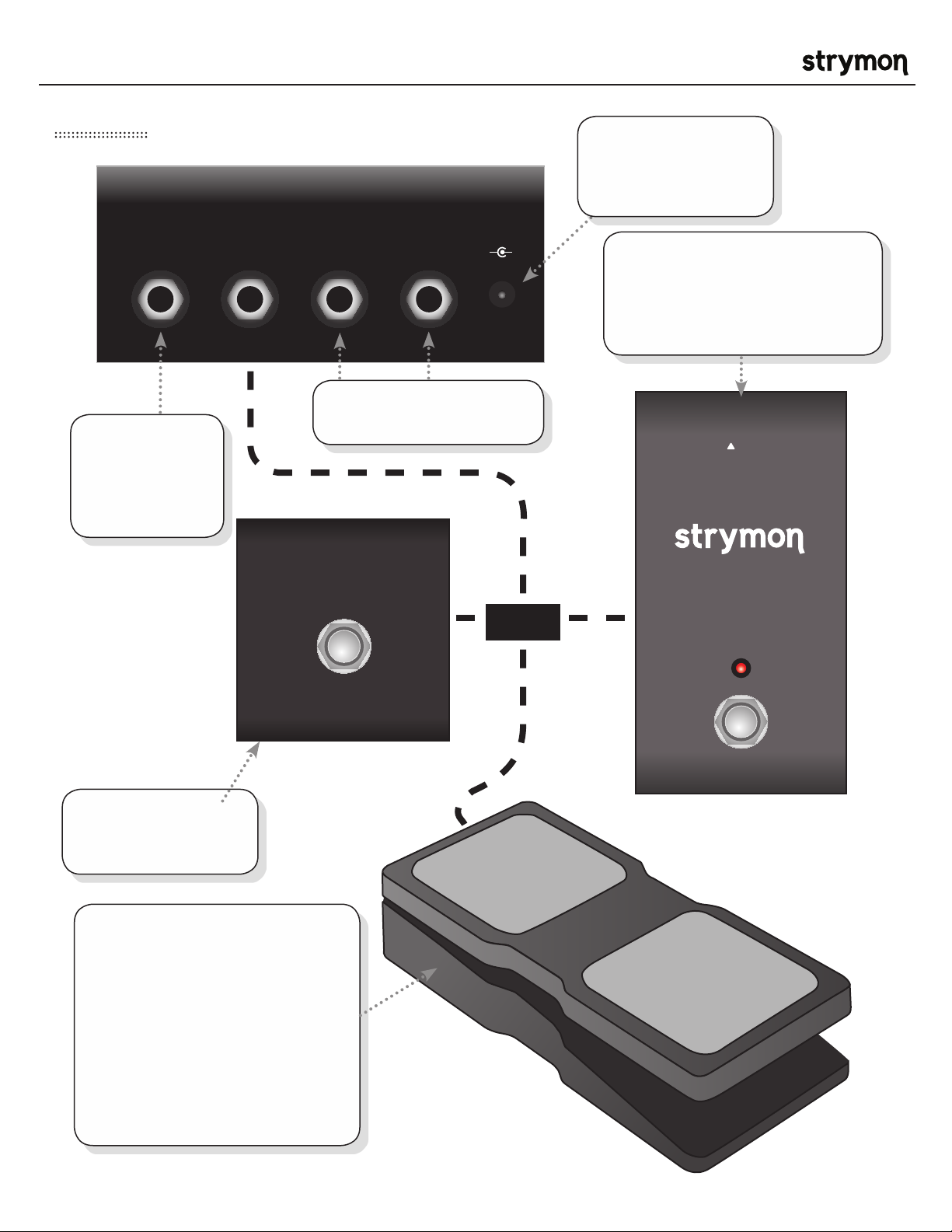
Rear Panel
®
Standard 9V DC center
negative power input.
250 mA available
current required.
INPUT
High impedance
mono or TRS
stereo input
(internally jumper
configurable.)
EXP
RIGHT OUTLEFT OUT
9VDC
+
Stereo outputs. Use LEFT
OUT for mono signal output.
TAP
-
OR
Connect an external FAVORITE
SWITCH to store and recall your
favorite preset. TIP: Press and hold
the Reverb BYPASS switch to store
your favorite setting.
TRS
®
FAVORITE
Connect an external
TAP Switch to tap the
tempo of your tremolo.
Connect a standard TRS expression
pedal for continuous control over
any selectable knob parameter. To
select the knob controlled by the
expression pedal, hold the TREMOLO
BYPASS footswitch during power
up. The first knob turned is then
assigned to the expression pedal.
The maximum position the knob is
turned up to becomes the expression
pedal “toe down” maximum value.
pg 4
Page 5
Flint - tremolo & reverb User Manual
‘63
tube
TREMOLO REVERB
‘60s
‘70s
‘80s
‘63
tube
TREMOLO REVERB
‘60s
‘70s
‘80s
‘63
tube
TREMOLO REVERB
‘60s
‘70s
‘80s
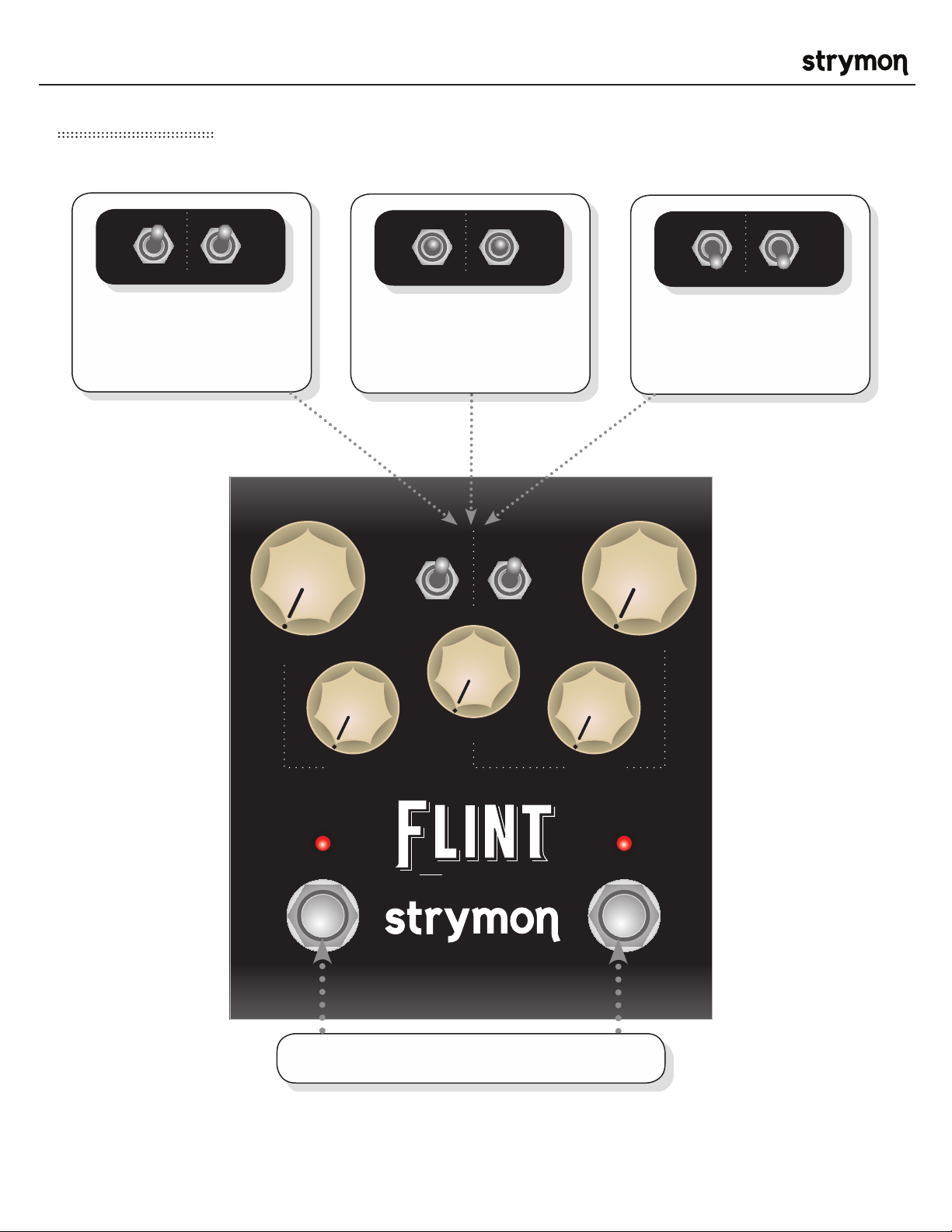
Power up settings
®
Power up with both toggle switches
in the UP position while holding
footswitches to configure the Flint
EXP jack for use with an expression
pedal.
Power up with both toggle switches
in the MIDDLE position while
holding footswitches to configure
the Flint EXP jack for use with a
FAVORITE Switch.
TREMOLO REVERB
‘61 harm
‘63
tube
‘65 photo
‘60s
‘70s
‘80s
DECAY
Power up with both toggle switches
in the DOWN position while holding
footswitches to configure the Flint
EXP jack for use with an external
TAP pedal.
MIXINTENSITY
TREMOLO
BYPASS
COLORSPEED
REVERB
BYPASS
tremolo & reverb
®
HOLD BOTH AT POWER UP
pg 5
Page 6
Flint - tremolo & reverb User Manual
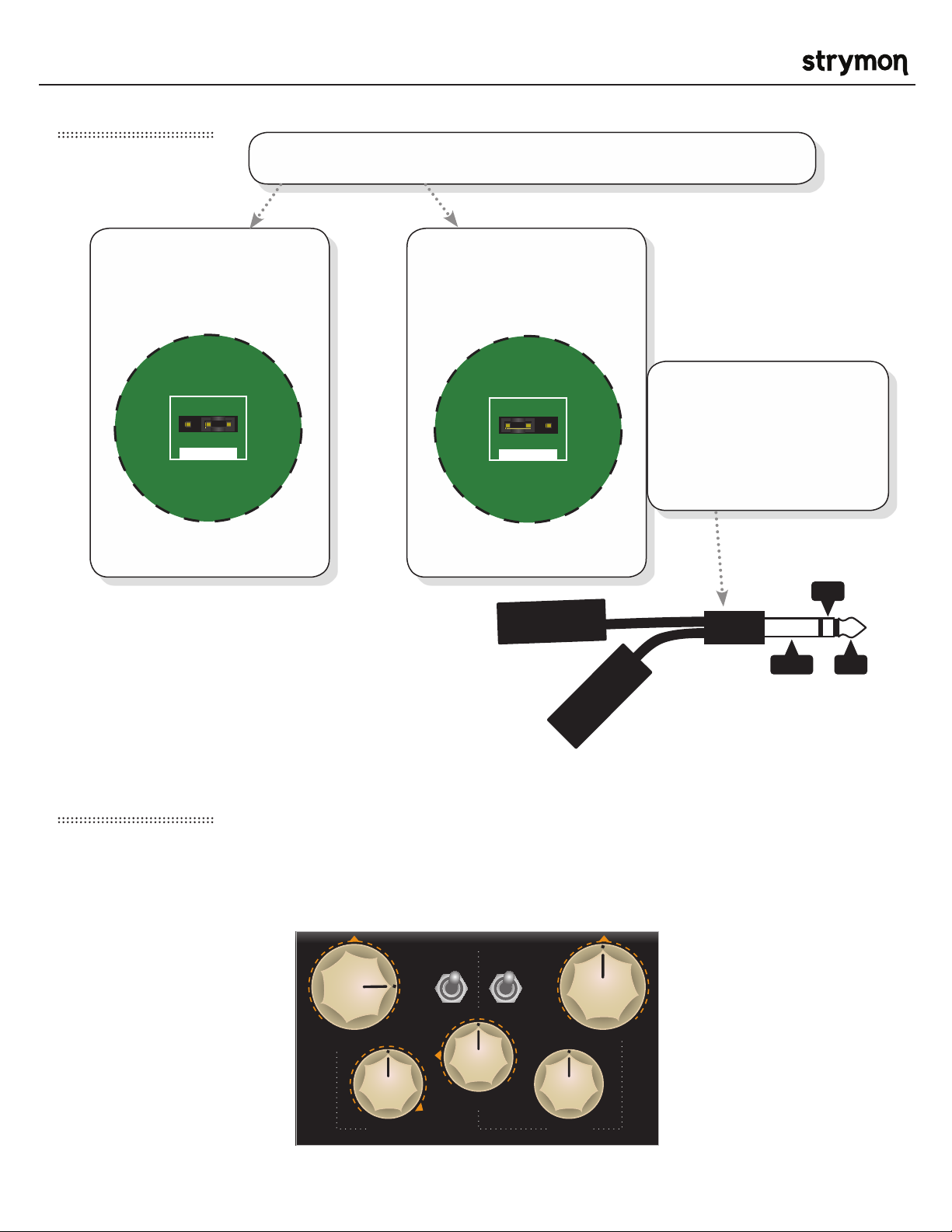
TRS Input Jumper
Remove the back cover to select either mono input or TRS stereo input.
®
MONO INPUT
Place the jumper on the
right 2 pins. (this is how Flint
ships from the factory)
*close up view of Flint circuit board
STEREO INPUT
Place the jumper on the left
2 pins.
*close up view of Flint circuit board
RIGHT 1/4” INPUT
TRS (tip/ring/sleeve)
STEREO INPUT ADAPTER
If configured for stereo input,
a TRS stereo input adapter
can be used to access the
stereo inputs.
RING
RING
TIP
SLEEVE TIP
LEFT 1/4” INPUT
Factory settings
Secondary functions: Shown below with orange arrows
EXP input jack: Assigned to use an expression pedal and vary Tremolo SPEED
EXP INPUT ASSIGN: Assigned to use an expression pedal
TREMOLO REVERB
‘61 harm
‘63
tube
‘65 p hoto
DECAY
‘60s
‘70s
‘80s
MIXINTENSITY
COLORSPEED
pg 6
Page 7
Flint - tremolo & reverb User Manual
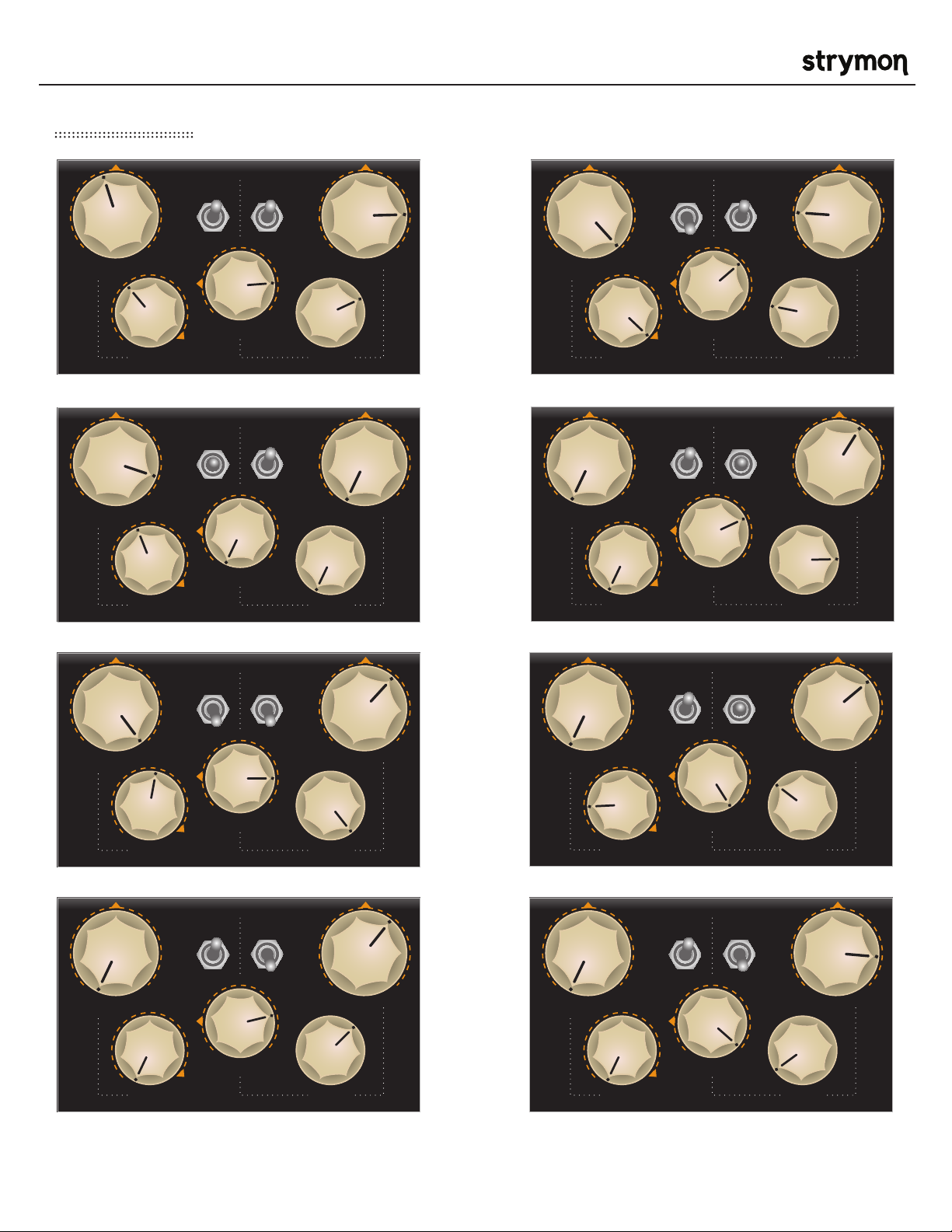
Sample Settings
®
TREMOLO REVERB
‘61 harm
‘63
tube
‘65 p hoto
‘60s
‘70s
‘80s
TREMOLO REVERB
‘61 harm
‘63
tube
‘65 p hoto
MIXINTENSITY
DECAY
COLORSPEED
Tweed Surf Rumble
TREMOLO REVERB
‘61 harm
‘63
tube
‘65 p hoto
DECAY
‘60s
‘70s
‘80s
MIXINTENSITY
COLORSPEED
TREMOLO REVERB
‘61 harm
‘63
tube
‘65 p hoto
‘60s
‘70s
‘80s
MIXINTENSITY
DECAY
COLORSPEED
‘60s
‘70s
‘80s
MIXINTENSITY
DECAY
COLORSPEED
Tube Biased Electro SolidPlate
TREMOLO REVERB
‘61 harm
‘63
tube
‘65 p hoto
DECAY
‘60s
‘70s
‘80s
MIXINTENSITY
COLORSPEED
TREMOLO REVERB
‘61 harm
‘63
tube
‘65 p hoto
DECAY
How Soon Harmonic Plate
TREMOLO REVERB
‘61 harm
‘63
tube
‘65 p hoto
DECAY
‘60s
‘70s
‘80s
MIXINTENSITY
TREMOLO REVERB
‘61 harm
‘63
tube
‘65 p hoto
DECAY
‘60s
‘70s
‘80s
MIXINTENSITY
COLORSPEED
‘60s
‘70s
‘80s
MIXINTENSITY
COLORSPEED
‘80s Hall ‘80s Dark Cathedral
COLORSPEED
pg 7
Page 8

Flint - tremolo & reverb User Manual
Features
• Hand crafted tremolo & reverb algorithms inspired by classic systems
• Ultra Low Noise, high performance A/D and D/A Converters
• Premium analog front end and output section
• High Performance DSP
• ‘61 Harmonic, ‘63 Tube Bias, and ‘65 Photoresistor Tremolo types
• ‘60s Spring, ‘70s Electronic Plate, and ‘80s Rack Reverb types
• Stereo Input (via TRS jack) and Stereo output
• Expression pedal input with selectable control over any knob parameter
• Compatible with Favorite switch to save your favorite sound
• Remote TAP with external tap footswitch
• +/- 3dB boost/cut for Reverb and Tremolo
• Rugged & Lightweight Anodized Aluminum Chassis
• No-Nonsense User Interface
• True Bypass (electromechanical relay switching)
®
Specifications
Input Impedance 1Meg Ohm
Output Impedance 100 Ohm
Signal to Noise 115 dB typical
A/D & D/A 24-bit 96kHz
Frequency Response 20Hz to 20kHz
Max Input Level +8dBu
DSP performance 1596 MegaFLOPS
Bypass Switching True Bypass (electromechanical relay switching)
Dimensions 4.5” deep x 4” wide x 1.75” tall
Power Supply
Input Voltage 9VDC Center Negative
Required Current 250mA
pg 8
Page 9

Flint - tremolo & reverb User Manual
Strymon Non-Transferrable Limited Warranty
Warranty
Strymon warrants the product to be free from defects in material and workmanship for a period of one (1) year
from the original date of purchase. If the product fails within the warranty period, Strymon will repair or, at our
discretion, replace the product at no cost to the original purchaser.
Exclusions
This warranty covers defects in manufacturing discovered while using this product as recommended by
Strymon. This warranty does not cover loss or theft, nor does the coverage extend to damage caused by
misuse, abuse, unauthorized modification, improper storage, lightning, or natural disasters.
Limits of Liability
In the case of malfunction, the purchaser’s sole recourse shall be repair or replacement, as described in the
preceding paragraphs. Strymon will not be held liable to any party for damages that result from the failure of
this product. Damages excluded include, but are not limited to, the following: lost profits, lost savings, damage
to other equipment, and incidental or consequential damages arising from the use, or inability to use this
product. In no event will Strymon be liable for more than the amount of the purchase price, not to exceed the
current retail price of the product. Strymon disclaims any other warranties, express or implied. By using the
product, the user accepts all terms herein.
®
How to Obtain Service Under this Warranty
For North American customers: Contact Strymon through our website at http://www.strymon.net/support for
Return Authorization and information. Proof of original ownership may be required in the form of a purchase
receipt.
For International Customers: Contact the Strymon dealer from which the product was purchased from in order
to arrange warranty repair service.
Strymon® is a division of Damage Control®, LLC.
REV A
pg 9
 Loading...