

Page 1

User’s manual · MAX IPS100
Technical changes and mistakes reserve - 1 - MAX IPS100 Version en_1.0 FTE Maximal
Table of contents
0. Control elements and connection s.......................................................................................................................3
0.1. Receiver front panel......................................................................................................................................3
0.2. Receiver back panel ......................................................................................................................................3
0.3. Remote control ..............................................................................................................................................4
1. First installation......................................................................................................................................................5
1.1. Complete Content..........................................................................................................................................5
1.2. Accessories and installation ex amples .......................................................................................................6
1.3. Safety rules ....................................................................................................................................................7
1.4. Fast installation guide...................................................................................................................................8
1.5. Menu overview.............................................................................................................................................13
2. Standard functions...............................................................................................................................................14
2.1. Switch on the receiver.................................................................................................................................14
2.2. StandBy........................................................................................................................................................14
2.3. Teletext............................................................................................................................................... ..........14
2.4. MUTE ............................................................................................................................................................14
2.5. Numeric block on remote control ...............................................................................................................14
2.6. Switch channels...........................................................................................................................................14
2.7. Change between TV- and Radio channels........................................... ......................................................14
2.8. Vol+/Vol- Volume ........................................................................................................................................14
2.9. Stop the functions .......................................................................................................................................14
2.10. Open Main menu......................................................................................................................................15
2.11. Watch the last viewed channel...............................................................................................................15
2.12. Channel list..............................................................................................................................................15
2.13. EPG Electronic Program Guide........................................................................................................... ...15
2.14. Favourite channel list..............................................................................................................................16
2.15. Menu Audio..............................................................................................................................................16
2.16. Signal and Channel information.................. ...........................................................................................16
2.17. Changing favourite channels .................................................................................................................16
2.18. Zoom Function.........................................................................................................................................16
2.19. Subtitles...................................................................................................................................................16
2.20. Direct buttons in the streaming function................................. ..............................................................16
2.21. Short-circuit protection...........................................................................................................................17
3. Channel management................................................................................................................................ ..........18
3.1. TV-Channel list.............................................................................................................................................18
3.1.1. Skip channels......................................................................................................................................18
3.1.2. Lock channels.....................................................................................................................................18
3.1.3. Delete channels...................................................................................................................................19
3.1.4. Delete channel groups or all channels........................................ ......................................................19
3.1.5. Edit channels.......................................................................................................................................19
3.1.6. List of favourite channels...................................................................................................................19
4. Timers.......................................................................................................................................... .........................20
4.1. Sorting..........................................................................................................................................................20
4.2. Delete Timer.................................................................................................................................................20
4.3. Edit / Add timer...........................................................................................................................................20
5. Tools .....................................................................................................................................................................22
5.1. Calculator.....................................................................................................................................................22
5.2. Calendar.......................................................................................................................................................22
6. CAS Management.................................................................................................................................................23
Page 2

User’s manual · MAX IPS100
Technical changes and mistakes reserve - 2 - MAX IPS100 Version en_1.0 FTE Maximal
7. System Settings...................................................................................................................................................24
7.1. Menu Language ...........................................................................................................................................24
7.2. Audio Language...........................................................................................................................................24
7.3. Time Zone.....................................................................................................................................................24
7.4. TV Settings...................................................................................................................................................25
7.5. OSD Settings................................................................................................................................................25
7.6. Geographical location.................................................................................................................................26
7.7. Version .........................................................................................................................................................26
7.8. Factory Default.............................................................................................................................................26
7.9. Software Upgrade........................................................................................................................................26
8. Parental Control...................................................................................................................................................27
8.1. Set Lock........................................................................................................................................................27
8.2. Channel lock ................................................................................................................................................27
8.3. Installation Lock ..........................................................................................................................................27
8.4. Change Password........................................................................................................................................27
9. Installation............................................................................................................................................................28
9.1. Antenna configuration: ...............................................................................................................................28
9.2. Channel Search: Satellite............................................................................................................................29
9.3. Satellite Management..................................................................................................................................30
9.4. Transponders Management........................................................................................................................30
9.5. Channel Search: IP......................................................................................................................................31
9.6. Network Configuration................................................................................................................................32
9.7. Streaming Configuration.............................................................................................................................32
9.8. Network Management..................................................................................................................................33
9.9. SatcoDX Update...........................................................................................................................................33
9.10. Backup.....................................................................................................................................................33
10. The equipment of the receiver........................................................................................................................34
10.1. Technical data..........................................................................................................................................34
Page 3
User’s manual · MAX IPS100
Technical changes and mistakes reserve - 3 - MAX IPS100 Version en_1.0 FTE Maximal
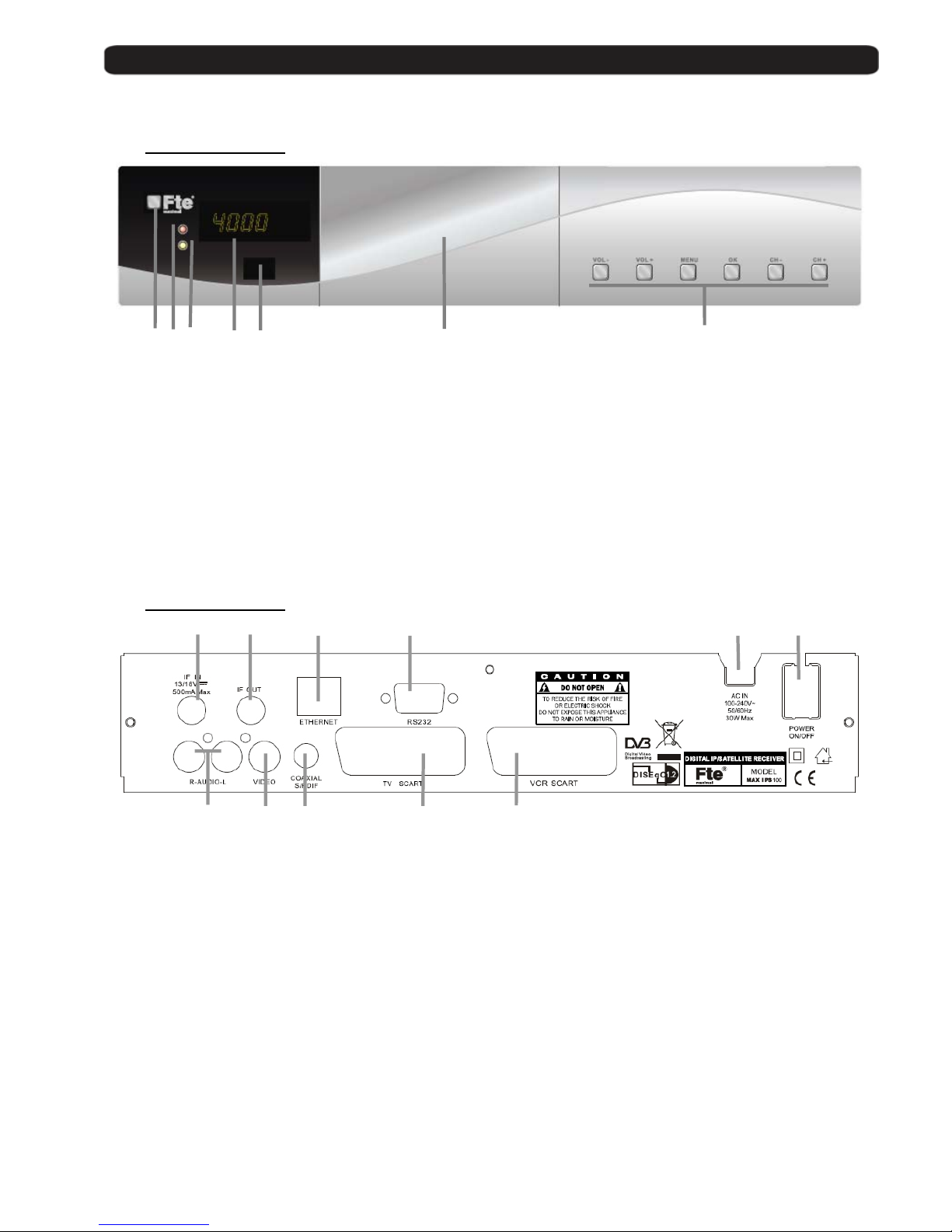
0. Control elements and connections
0.1. Receiver front panel
1 2 3 4 5 6 7
1 POWER: Switches the receiver ON or i n Sta nd by mode. For total switching of f, use the main
switch at the back side of the receiver.
2 POWER LED: Indicates that the mains voltage (90-230 VAC) is available.
3 LOCK LED: Indicates a sufficient signal level at the input
4 DISPLAY: 4 Digits to display the program numbers.
5 IR-SENSOR: Reception sensor for the IR remote control signals
6 FRONT COVER: Opening front door, you can access to conditional access system.
7 BUTTONS: These buttons allow controlling the main functions of the receiver, and provide the
same functionality as the remote control ones.
0.2. Receiver back panel
1 2 3 4 5 6
7 8 9 10 11
1 IF IN: Satellite inpu t.
2 IF OUT: Satellite output for cascading to other devices.
Note: The operation of another receiver at the same time is only possible with limited
channel selection.
3 ETHERNET: Network connection of the receiver.
4 RS-232: Serial port to update the firmware of the receiver
5 AC IN: Power cord 230VAC/50Hz.
6 POWER ON/OFF: Main switch to swi tc h off t otally the recei ver
7 AUDIO: Audio ou tp ut for home audio systems
8 VIDEO: Video output for ex ternal monitor, TFT or video beamer
9 COAXIAL S/PDIF: Coaxial output for digital audio (AC3)
10 TV SCART: SCART output for connec ti n g on e TV set
11 VCR SCART: SCART connector for video recorder, DVD recorder or DVD player
Page 4
User’s manual · MAX IPS100
Technical changes and mistakes reserve - 4 - MAX IPS100 Version en_1.0 FTE Maximal
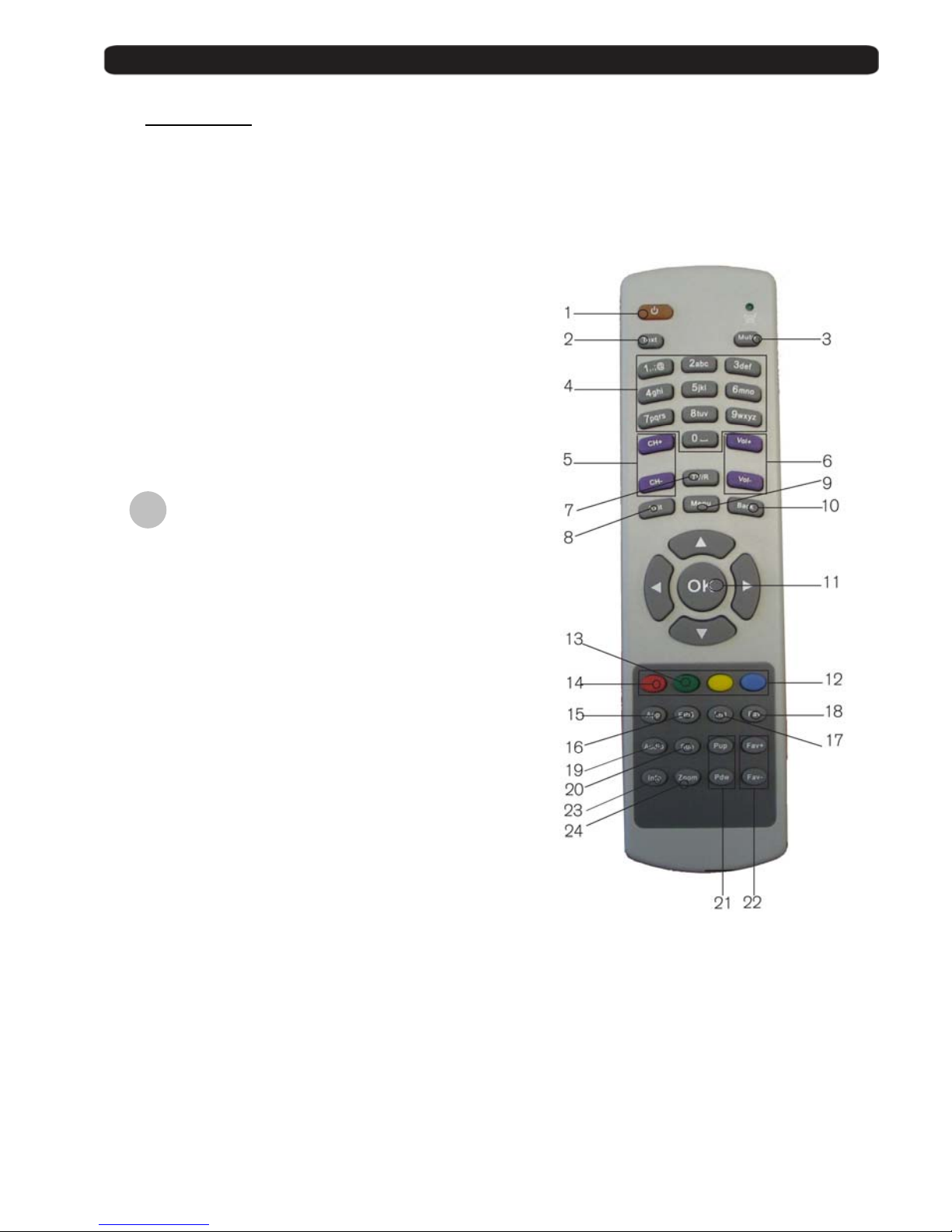
0.3. Remote control
1. POWER: Switches receiver ON or in stand-by-mode
2. TEXT: Open and close teletext
3. MUTE: Switches audio on and off
4. NUMERIC BLOCK: For direct typing values and na me s
5. CH+ CH-: Changes channel up and down
6. VOL+ VOL-: Adjusts audio volume up and down
7. TV/R: Switches between TV and Radio
Channels
8. EXIT: Exit menus or stop op erations
9. MENU: Opens the main menu
10. BACK: Watch the last viewed channel
11. : Confirms selections or opens channel
list
12. Color Keys: Controls menu options.
13. Green Button: Start sending video st rea min g.
14. Red Button: Stop sending video streaming.
15. SAT: Not available in this model
16. EPG: Shows the EPG information
17. List: Opens channel list
18. Fav: Opens favourite channel list
19. Audio: Opens audio menu
20. Sub: Switches subtitle on and off
21. Pup Pdw: Moves cursor in block steps
22. Fav+ Fav-: Moves favourite channel up and down
23. INFO: Shows channel information with signal
bar
24. Zoom: Zoom function
OK
Page 5
User’s manual · MAX IPS100
Technical changes and mistakes reserve - 5 - MAX IPS100 Version en_1.0 FTE Maximal
1. First installation
1.1. Complete Content
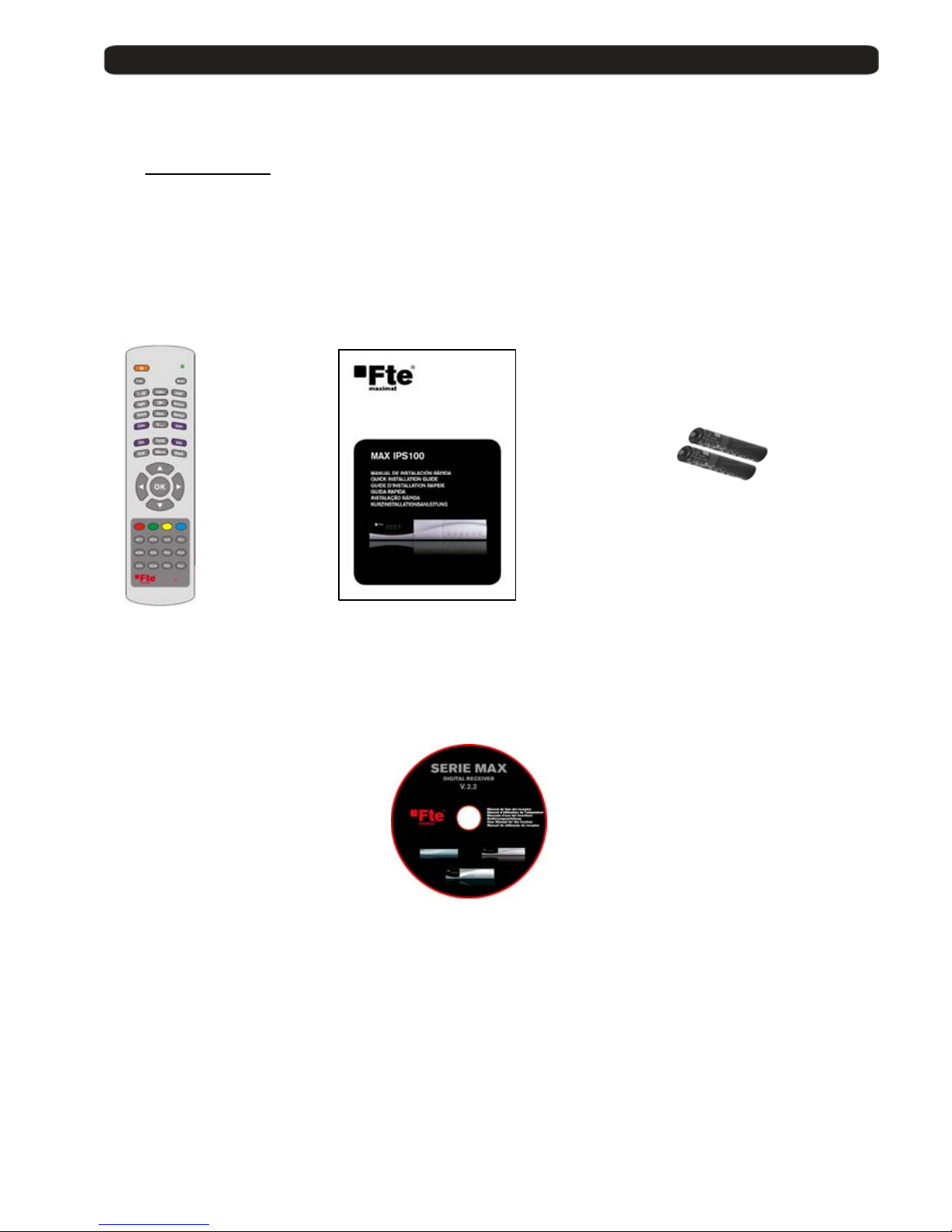
The following goods must be included in this package when you open it for the first time.
Remote control Installation guide Two batteries
type AAA, Micro, 1,5V
CDROM
Page 6
User’s manual · MAX IPS100
Technical changes and mistakes reserve - 6 - MAX IPS100 Version en_1.0 FTE Maximal
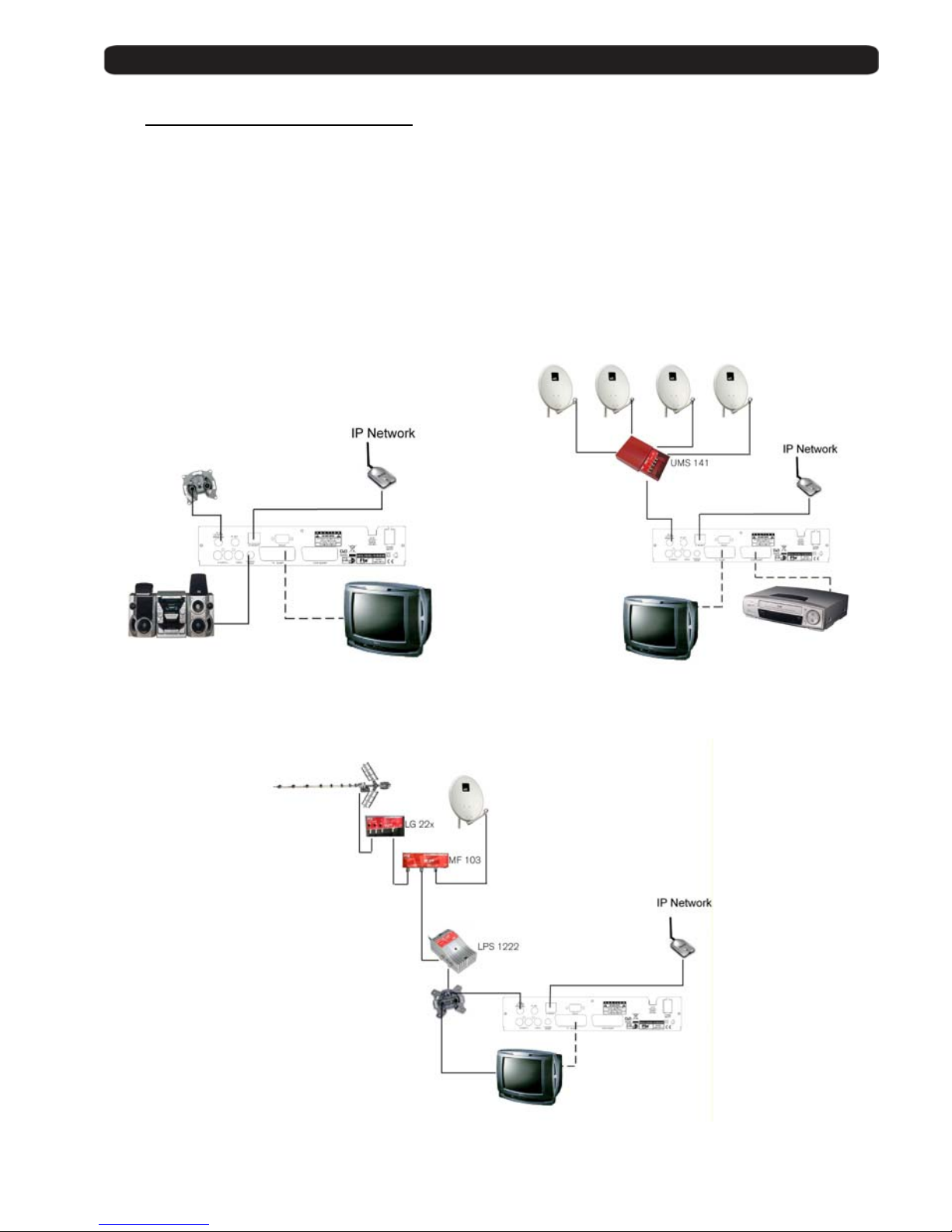
1.2. Accessories and installation examples
PR 80 AB Offset Dish 80cmØ Code: 0798021
LNC 54 U LNC universal single Code: 0400065
LNC 54 US LNC universal twin Code: 0400064
UMS 141 Four DiSEqC Switch Code: 0702224
LOG 3235 F DVB-T Compatible Antenna Code: 0203235
LG 229 DVB-T Mast Amplifier Code: 9000329
MF 103 Mixer Terr-SAT Code: 9000104
LPS 1222 Power Supply Code: 9901222
AO 90S 3 connectors outlet Code: 0500094
AO 100 4 connectors outlet Code: 0500100
Page 7

User’s manual · MAX IPS100
Technical changes and mistakes reserve - 7 - MAX IPS100 Version en_1.0 FTE Maximal
1.3. Safety rules
Please read the manual carefully before using the receiver.
You will receive a lot of information to use this product correctly and you will prevent incidents.
Please keep the manual on a safe place.
This sign warns you about
high voltages, with risk
of electric shock
Caution: Do not open the housing of
this receiver. Repairs can onl y be
made by professionals au th or i z ed by
Fte maximal. If not, warranty will not be
valid anymore.
This sign informs about
special information which is
important to know.
Caution: Keep this receiver far away from liquids. Do not place it on placements close to water like flowers
vases, wash basin, aquariums or pools. It exists a high risk of electric shock when water or high humidity
filters inside the receiv er s. Never place other devices on it; th ey can overheat the receiver as wel l as daring
fire risk. The receiver m ust be used only with original pow er cord to 230V main plug.
Please read carefully this manual and do not hesitate to contact to professional help if you have any doubt.
Opening the receiver housing as well as the Hard Disk case will mean a total lost of warranty.
Installation:
1. Never work during a thunderstorm or st ay i n g near of the antenna systems.
2. Before adjusting the receiver, make sure that your antenna is well aligned and works properly.
3. Unplug the main connection (230V) every time you work with receiver connections. Do it also when you stay
away for a long time out of home like in holiday periods.
4. The best placement for the receiver is close to the TV and your other equipment like DVD, VCR, CD, and game
stations. Select a stable place where you can make the necessary connections in a safety way.
The 230V main plug should be in a place easy to reach, that you can unplug it when it is necessary.
Cleaning: Before cleaning the receiver with a slightly damped cloth, please disconnect th e m ain 230 V connection from
the receiver. Please use only mild cleaners.
Accessories: Please , do no t use accessories which are not agreed by the manufacturer of the r eceiver.
Unsuitable accessories could increase the risk of getting on fire, an electrical impact or other damages.
Placement: Select a placement where the Receiver has air circulation enough, otherwise it may have overheating
accumulation. Do not co ver the openings of the housing . Un suitable placements are als o places close to heaters or soft
locations like e.g. sofas and beds.
Power connection: Select a main plug with easy access, in case of unplugging necessity; it will be easier and faster.
Please, make sure that th e cord as well as the plug is in perfect con dit ions. Do not pull the cable, use always the plug.
Housing: Please, make sure that no liquid will filter into the housing of the receiver. If so, disconnect immediately the
receiver from the main 230 V plug and bring the receiver to a professional.
Air humidity: When you take the Receiver from a cold to a warm pl ace, please wait until the r ece i ver gets the same
temperature as the new environment, in order to avoid problems of humidity condensation.
Maintenance / Repairing: Within the warranty time all the repairing processes should be done by Fte Maximal technical
staff. Otherwise, the wa rranty will be lost.
RISK OF ELEKTRIC SHOCK
DO NOT OPEN
CAUTIONR
Page 8
User’s manual · MAX IPS100
Technical changes and mistakes reserve - 8 - MAX IPS100 Version en_1.0 FTE Maximal
1.4. Fast installation guide
Please, follow the instructions for a faster and simple r ins tal l a ti o n of the r ec ei ver.
Step 1: Connections
Connect the ETHERNET input of the receiver to the network.
Connect the cable from the LNB and Dish:
Connect the cable with the Sat elli te signal to the IF IN input of the receiver.
Connecting TV set, LCD or video beamer:
You can connect in different ways your TV set or other display system:
Scart This is the connector which wi ll be normally used to connect the TV.
For this purpose, you will ne ed a S c art – Scart connector.
Recorder / DVD At the VCR - Scart connecto r, you can connect a Video or DVD-Recorder.
Also the signal coming from a DVD player is possible to be wa tch e d i f yo ur TV se t has
Scart connections.
You will find further information at chapter TV Settings.
You can obtain further information in chapter Receiver back panel.
This receiver has a main switch at the back panel of the receiver.
If a message “short-circuit” in shown, you have a short-circuit in your antenna system.
Please check it and restart the receiver.
When you set up the system for the first time, the current date will be stored in Menu > System Settings > Version
as beginning date for the warranty period.
Step 2: Main settings on receiver
When you start the first time the re ceiver or when you execute a “facto ry default” process, you will see this
installation guide in English language.
The selection of the menu opti on s wil l be done with the arrow buttons
, and the button
OK of the remote control.
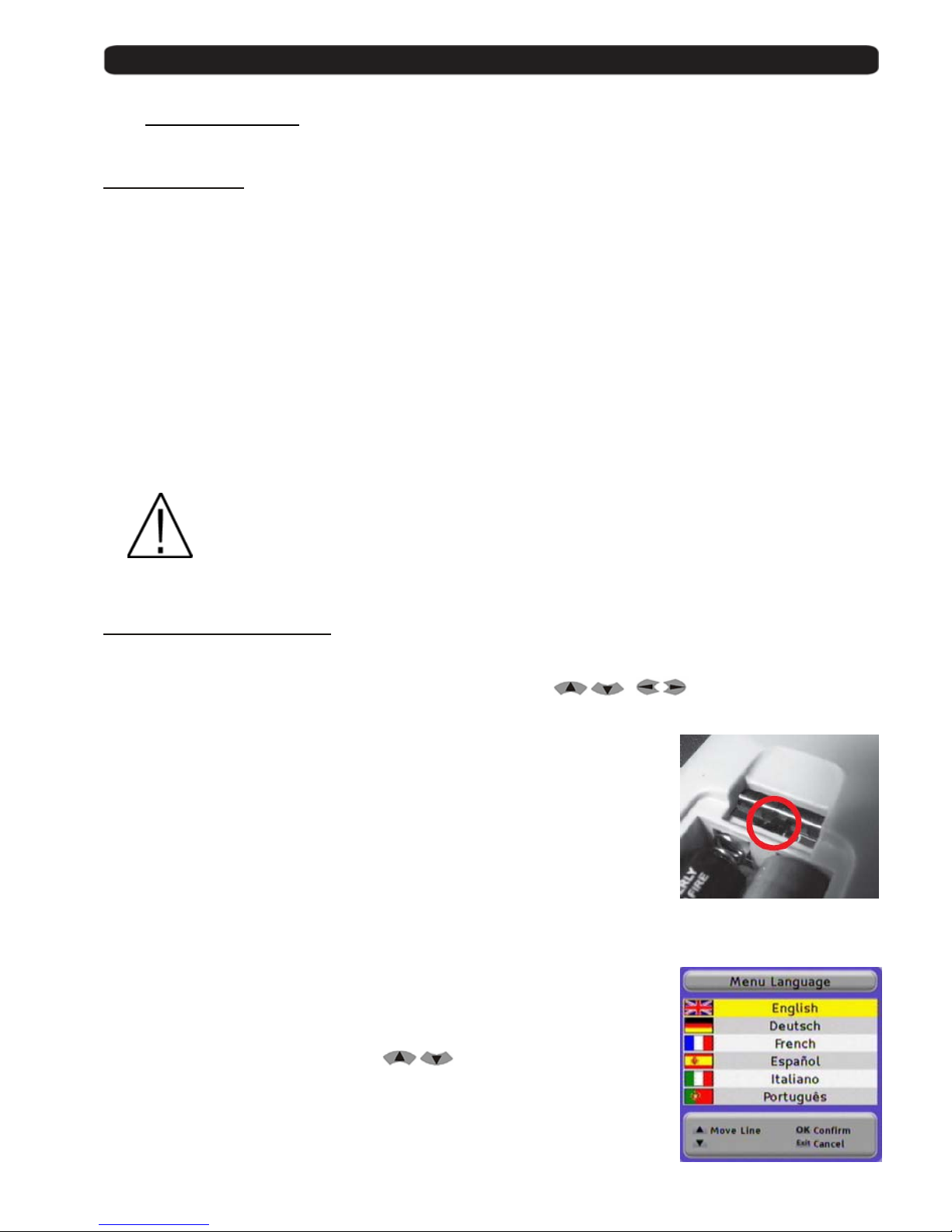
Please, choose the code for your remote control in the first window.
Fte Maximal gives you the possibility of using a IP, a DVB-T and a DVB-S receivers at
the same time.
For this purpose, your new receiver is selected by factory with code 1.
You have the possibility to change the code of it, to do that you have to change the
position of a switch in the remote control.
You have to select the same position in the receiver than in the remote control.
If you have problems with remote control devices, you can change the transmission
code if you go to Menu > System Settings > OSD Settings
after finishing the quick installation guide.
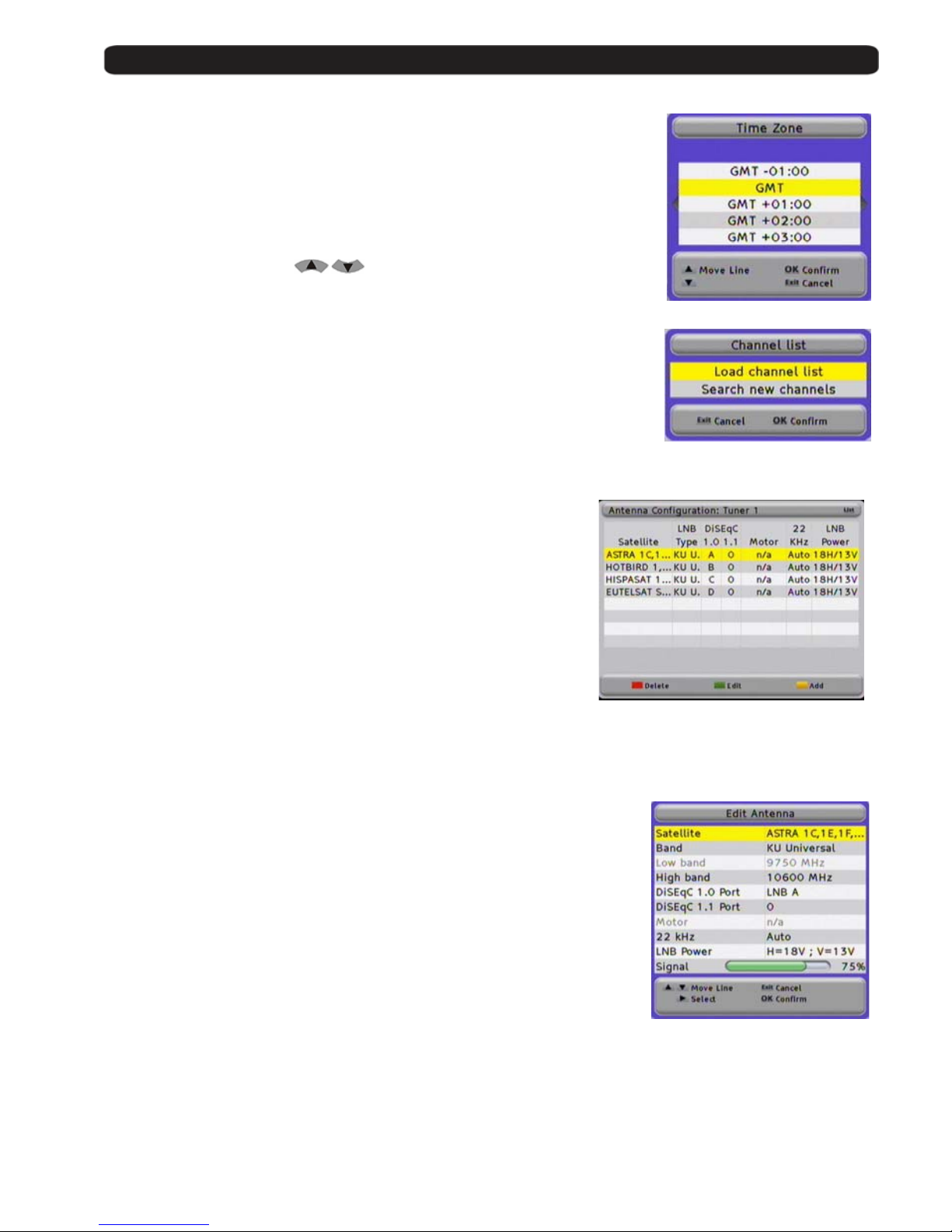
Menu Language :
Here you have to select the language for the Receiver menu and information.
Select the language with the arrow buttons
and press the OK button.
Page 9
User’s manual · MAX IPS100
Technical changes and mistakes reserve - 9 - MAX IPS100 Version en_1.0 FTE Maximal
Time Zone:
In order to the receiver is able to display the correct time and adjust the timer
recordings correctly, it is needed to fix the time zone to the place you live.
Select here the time delay according to your position comparing to
Greenwich Time.
In UK: Summer time: +1 hours
Winter time: GMT hour
Select with the arrow buttons
and press the OK button.
Selection of the satellite list of channels pre-loaded
This option allows loading the channel list stored in your receiver, and you will not
need to tune channels. The list includes Astra / Hot Bird / Hispasat / Turksat
channels, and it is suppo sed that the same input signal is available in both inputs.
If you select Load Channel List, the installation assistant finishes at this point and
it begins the viewing of the channels.
In case of having a different configuration, please select Tune new channels and
continue with the installation assistant, configuring the antennas.
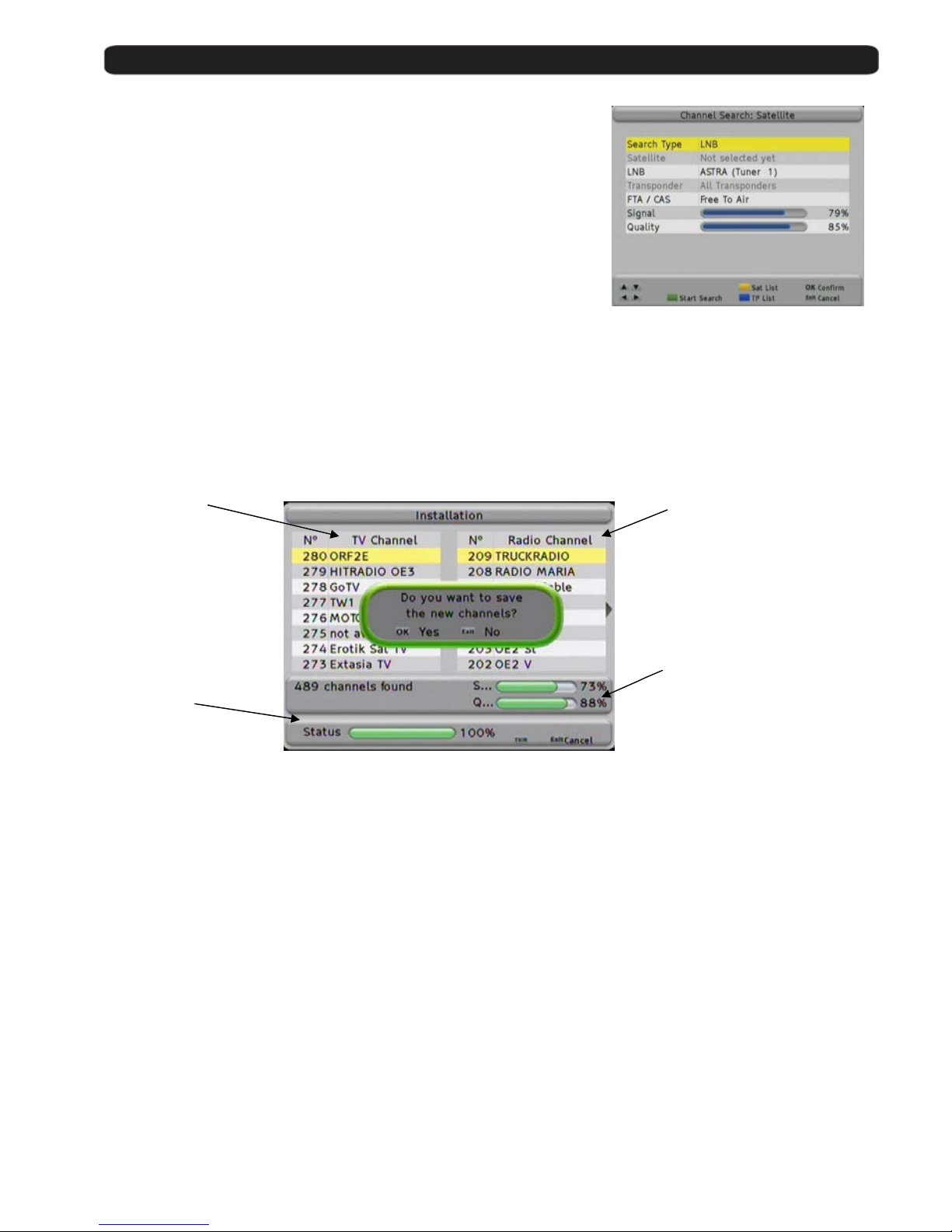
Antenna configuration:
In this menu, you should configure the connected signals in the IF IN of
your receiver.
By default, the equipment comes with the configuration that you can see
in the Picture, with four satellites.
The available options in this screen allow:
Red Button: Deletes the selected satellite. It asks for confirmation.
Green Button: Edits the selected satellite. The options appear at the
image below.
Yellow Button: Adds a satellite. The options appear at the below image.
Antenna Options:
1. Name: Your receiver disposes of several pre-configured
satellites. You can find the one you want in the list or add a
new one. They are sorted by its orbital position.
2. Band: There are two available bands: C and Ku. The
differences basically are th e frequencies in the transmiss io n.
The Ku band has two possibiliti e s; the most common is the
Universal Ku.
3. Low Band / High Band: It is used when the band selection is
the Ku, and it programmes the lo cal oscillators of the LNC.
4. DiSEqC 1.0 / 1.1 Port: To configure the use of switches.
5. Motor: Activates the motor option to direct the antenna.
6. 22 KHz: tone of switching the ban d of t he LNC.
7. LNB Power: LNB Feeding. By default the selection is for an
Universal LNB.
8. Signal: It shows if there is available signal in this selected configuration.
Alter whatever change, it sh ould be confirmed with the OK key when you exit the menu.
Page 10
User’s manual · MAX IPS100
Technical changes and mistakes reserve - 10 - MAX IPS100 Version en_1.0 FTE Maximal
Channel Search: Satellite
Once the antenna configuration is completed, you should proceed to tune
the satellite channels that you have selected. There are different ways to
tune the channels: through LNB, through Satellites and through
Transponders.
When you select the channel searching through LNB, you only can select
one LNB, which corresponds to the programmed tuner.
When you are searching by satellites, you are allowed to select a Wide
range of satellites, so you coul d pr o gr amme the searching of all the
satellites that you have configured.
The searching through Transponder is the most selective. It allows
selecting all the fre qu encies that you’re going to tune and searching channel s.
In whatever selection, you always will have available to search Free To Air channels (uncoded chan nels),
channels with Conditional Access or All the channels.
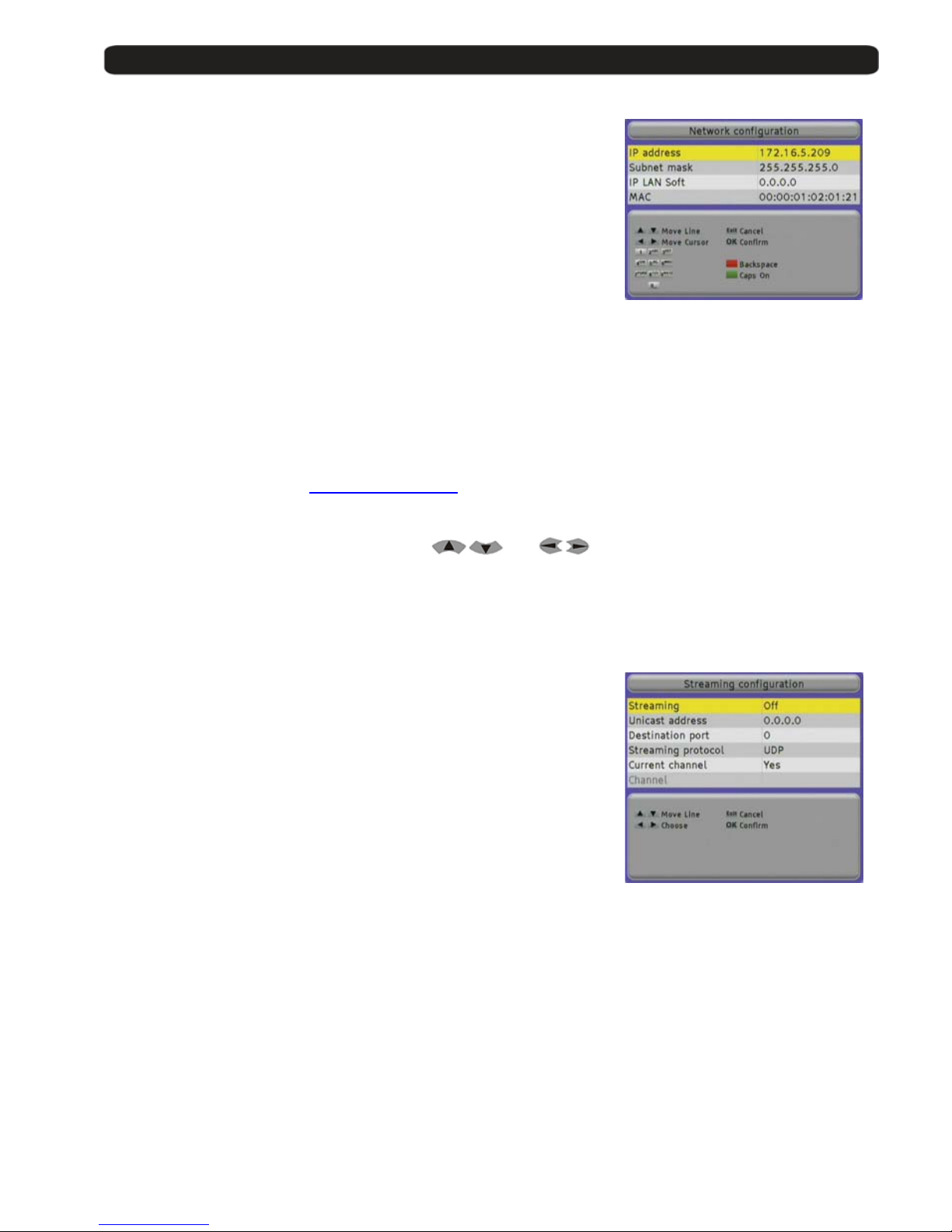
Please, choose the searching pressing the Green button. Once you have finished (the time will depend on
the number of transponders it will have to find) you will get a window like the following one:
Detected TV Detected
Channels Radio Channels
Level and Q u al i ty
Searching process
Meter
You can select the ch annel searching whenev er pressing the Exit button.
Once the searching is fin ished, you must confirm the storing of a new Channel List.
Press the OK button.
The receiver will come back to the Channel Search menu.
You can search again if you wa nt, or exit by pressing the Exit button.
Page 11
User’s manual · MAX IPS100
Technical changes and mistakes reserve - 11 - MAX IPS100 Version en_1.0 FTE Maximal
Network Configuration
The receiver will require the introduction of the needed parameters to be able
to get connected to a network, as well as to be visible to other equipments so
that receive streaming of vi deo and audio.
You should introduce the following parameters:
IP Address Number of 32 bits expresse d i n 4 numbers between
0 and 255 which identifies the receiver inside its
network.
Every device in the network should have a different
IP Address and it is highly recommended that all of
them are in the same subnetwork and with IP
addresses into the following range:
10.x.x.x
172.16.0.0 – 172.31.255.255
192.168.x.x
Subnet Mask Number in IP format that, combined with the IP address, identifies where the equipment is.
IP LAN Soft: IP address of the PC where the application for exchang i n g vi d eo streamings between the
PC and the receiver is installed.
If you want, you can do wnload the application IP LAN Soft from the Website:
www.ftemaximal.com
MAC Device address at hardware level. It is unique in each device and it comes from the factory.
You can move through the menus with the buttons
and .
With the Red button you delete the last character.
Press OK to save the changes.
Streaming Configuration
This receiver can send streaming to other equipment connected to the
network.
You can send video streamings in Unicast and Multicast modes.
- Unicast is when the information is sent from a un ique sender to a
unique receiver.
- Multicast in when the information is sent through a network to
multiple destinations simulta ne o usl y. The equipment that work in
multicast mode send the information into an IP range between
224.0.0.0 and 239.255.255.255.
In this window you can configure th e network parameters of the device at destination:
Streaming You should select On so that the receiver sends the streaming.
Address IP Address of the destination device.
You can simultaneously send the streaming to different devices in case that in this
field a multicast IP address is introduced.
Destination port Communications port where the information is sent.
The port must be an even numbe r in t he ra nge between 1024 – 65534.
Streaming protocol You can select the communications protocol. Options: UDP or RTP.
Page 12
User’s manual · MAX IPS100
Technical changes and mistakes reserve - 12 - MAX IPS100 Version en_1.0 FTE Maximal
Current Channel It allow you to fix the number of transponder that is going to be sent t othe destination receiver.
No: Always will be sent to the receiver at destination the indicated cannel in the field Channel,
and the origin receiver only will be able to see any cannel belonging to the same transponder
which is indicated in the Channel field, or IP channels.
When you see an IP channel, the stre aming sending process will stop.
Yes: the receiver will send the channel which is tuned locally. Every time you
change the channel in the receiver, you must tune the same in the destination
receiver.
Channel: Service to be sent. Only available when you select No in the field Current Channel.
You can move through the menu with th e buttons
and .
With the Red button you delete the last character.
Press OK to save the changes.
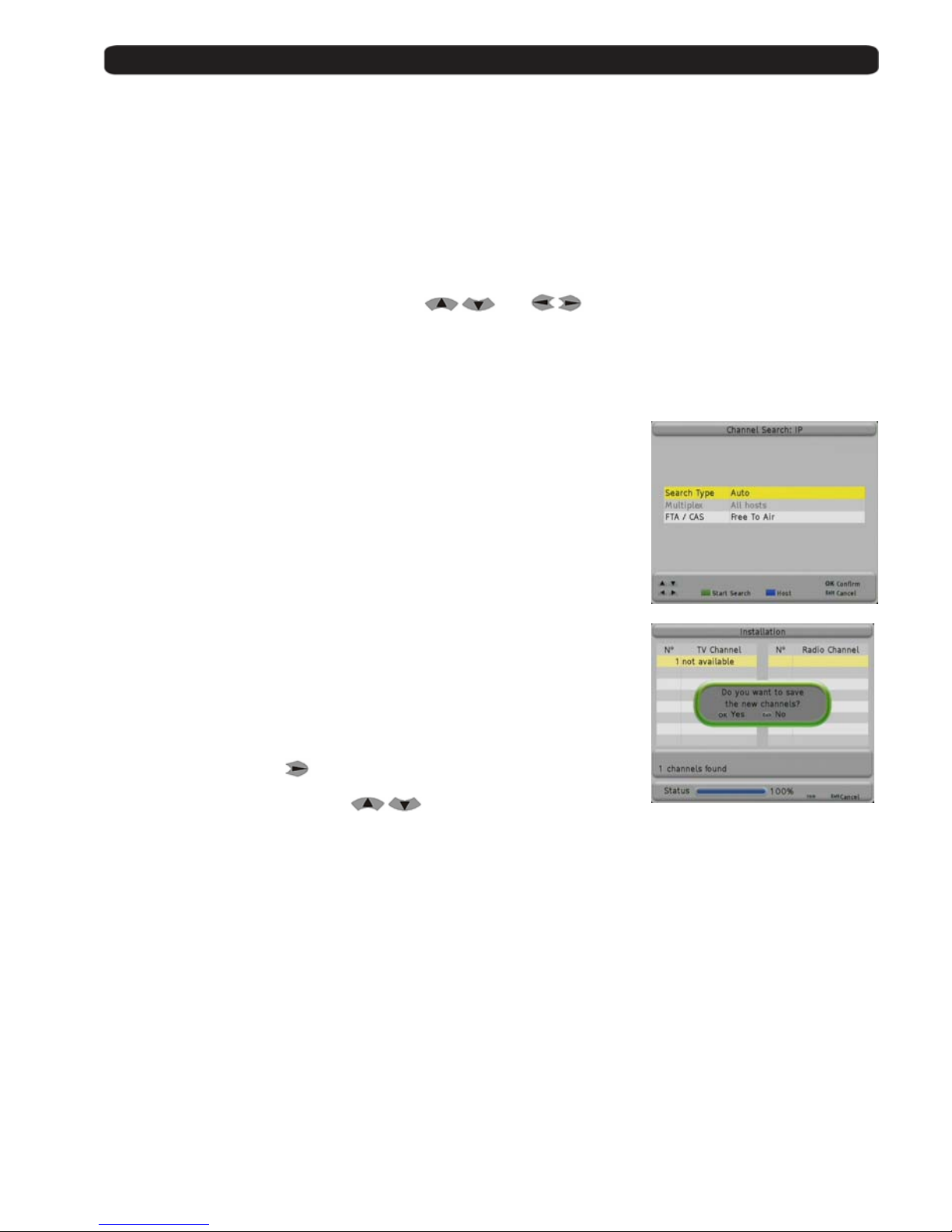
Search IP Channels
The receiver will carry out a search for channels broadcasted by other equipment
connected to the network.
You can receive transm issions of other equipment in mode Unicast and
Multicast.
- Unicast is when the information is sent from a un ique sender to a
unique receiver.
- Multicast in when the information is sent through a network to multiple
destinations simultaneo u s l y . The equipment that work in mul ticast mode
send the information into an IP range between 224.0.0.0 and
239.255.255.255.
In Search Type select Auto to search for all the channels which are broadcasted
by other equipment in your network in multicast mode. If you select the Host
option, it will look for transmissio ns of the equipment present in the list Network
Management that you select.
In the field Multiplex you should select the hosts from the list Network
Management in which yo u wit h to search for channels.
Pressing the Blue button or
a new window will appear, where you can select
the hosts.
You can move the cursor wi th
.
With the Green button you select the hosts.
Press Exit to go back to the search menu.
If you press the Green button, it will carry out a search of the video IP channels.
Press Exit to exit.
The Fast install guide is now finished.
Page 13
User’s manual · MAX IPS100
Technical changes and mistakes reserve - 13 - MAX IPS100 Version en_1.0 FTE Maximal
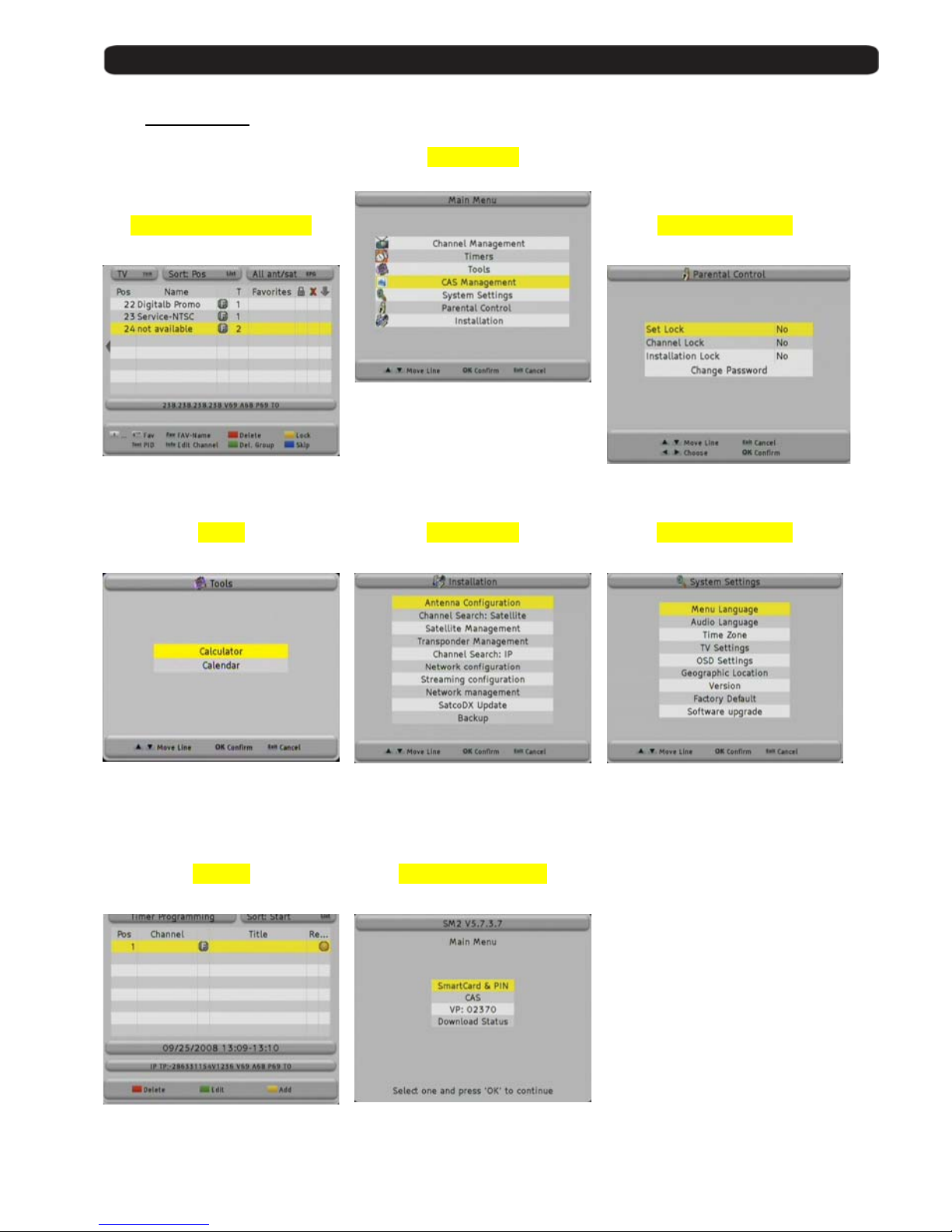
1.5. Menu overview
Main menu
Channel Management
Parental Control
Move, rename or delete ch ann els,
Program and, create favo urite list.
Activate parental control
Tools
Installation System Settings
Calculator,
Calendar with date management
Receiver and antenna settings
Search channels
Network adjustments
Backup
Main settings for receiver
for OSD and adapt TV set
Factory defaul t
Software upgrade
Timers
CAS Management
Manual activation for timer events.
Conditional access system
information.
Page 14
User’s manual · MAX IPS100
Technical changes and mistakes reserve - 14 - MAX IPS100 Version en_1.0 FTE Maximal
2. Standard functions
2.1. Switch on the receiver
The receiver has a main switch at the back panel. To switch on, take the switch in position 1.
Now the receiver begins to run an d show information on its displ ay.
2.2. StandBy
To switch the receiver from Standby (sleep mode) to the working mode, press Orange Po wer button on the left corner
at the top of the remote control.
If the receiver had been working before and you did not switch on by main switch, the receiver show the last displayed
channel.
When you press it again, the receiver goes back to the stand by mode.
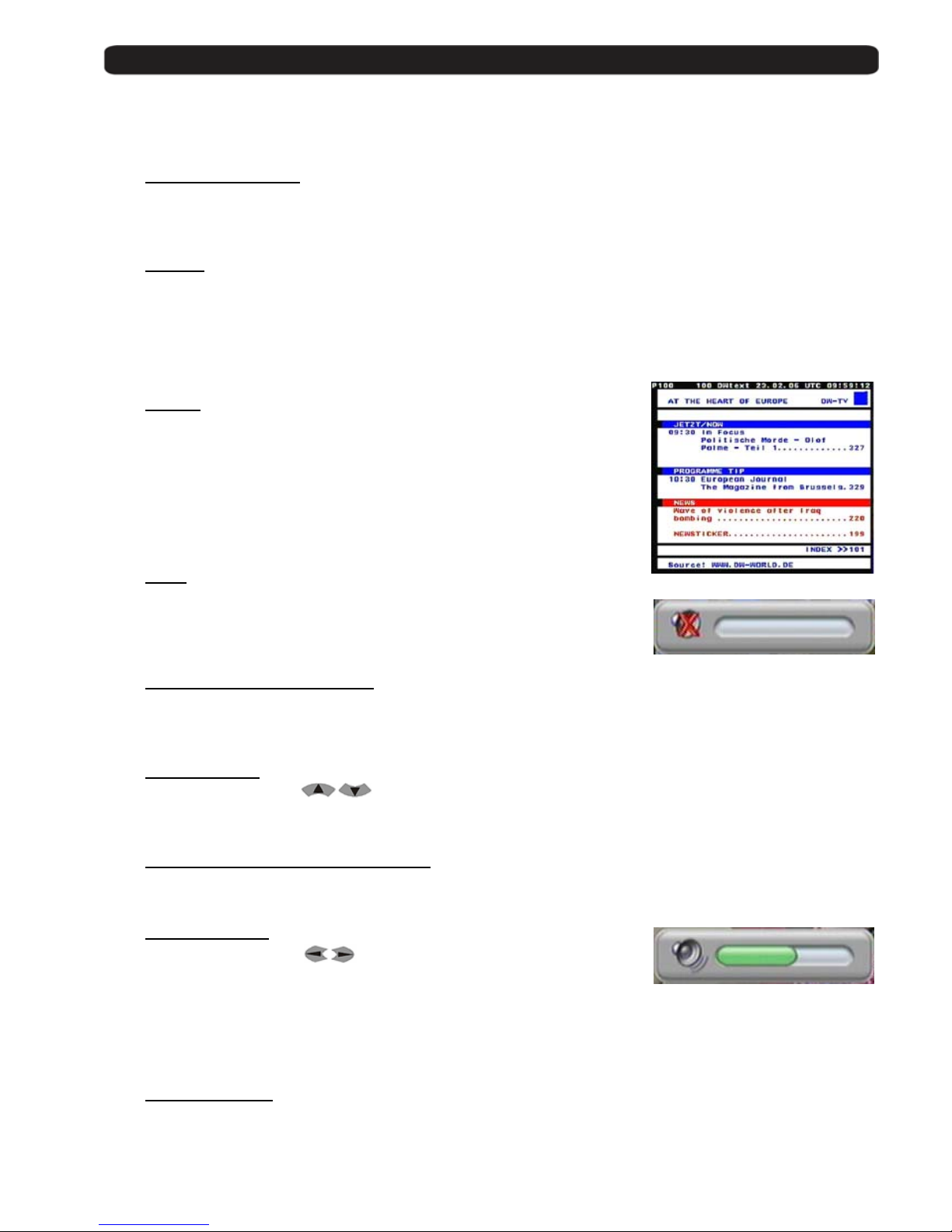
2.3. Teletext
The button Text opens the teletext generator.
Automatically the rece iv er loads page 100 as standard.
Like in your TV set you can open the pages by pressing the buttons 0-9.
If you want to open, for exampl e , the page 140, you have to pres s th e
buttons 1 – 4 – 0.
When you want close the pag e, press Exit.
2.4. MUTE
With this function, you will be able to shut down the audio completely.
To do it, press the button Mute and the warning symbol will be displayed.
By pressing again the button Mute the function will be disabled.
2.5. Numeric block on remote control
Over the numeric block in the remote control, you can select directly channels the when you know the stored program
place. If you want for exampl e pl a c e 2 3, y ou ha ve to press the buttons 2 and 3 and after the button OK .
2.6. Switch channels
With the buttons CH+ / CH- or
you can change the channels also.
Press one button for gett ing one channel up or down.
2.7. Change between TV- and Radio channels
When you want change between TV and Radio channels, you have to press the button TV/R on the remote control.
2.8. Vol+/Vol- Volume
With the buttons Vol+ / Vol- or
you can regulate the audio volume.
To do it, you will see a graphic like the one at the left side.
For using this function properly, you need to make an alignment with you TV set.
Turn off the volume of the receive r . For this, press the button MUTE on remote control. Now turn up the volume on TV
until the moment you hear a noise. Now turn down the volume until the noise desapears. Normally this is around
50-75% of the total volume of the TV se t.
2.9. Stop the functions
With the button Exit you can stop functions like channels search or close menus.
Page 15
User’s manual · MAX IPS100
Technical changes and mistakes reserve - 15 - MAX IPS100 Version en_1.0 FTE Maximal
2.10. Open Main menu
To open the main menu, you have to pre ss th e but ton MENU.
The menu system is made in a tree structure.
2.11. Watch the last viewed channel
With the Back button, you can access to the channel viewed previously.
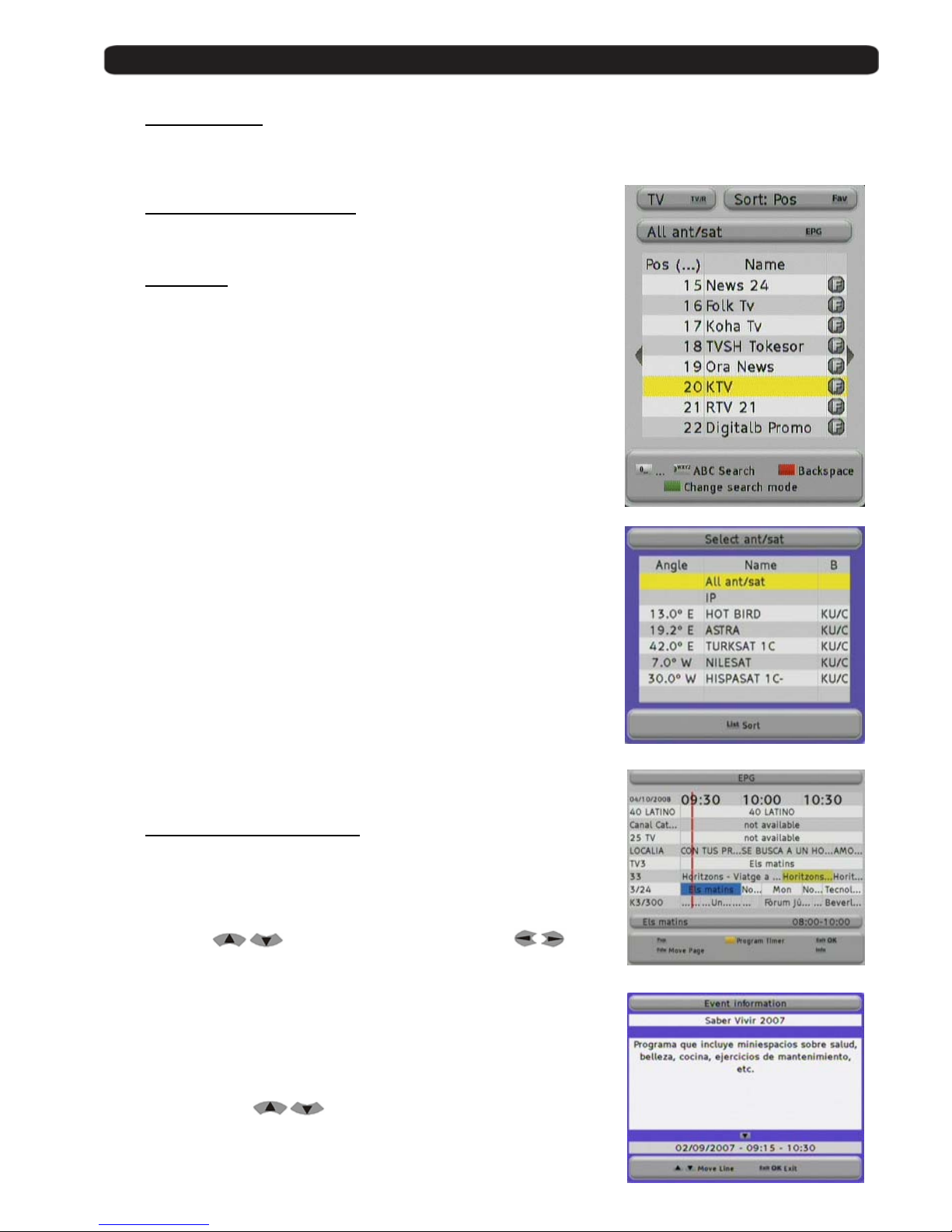
2.12. Channel list
When all the menus are closed, you can open a channel list by pressin g the
button OK.
With the button TV/R you can switch be tween TV and Radio channels.
With the button FAV you can sort this list as follows:
POS, Position in channel list
Name, by alphabetic sort
FTA / CAS sort by free or coded chan n els
If the position or the name of the channel fits, you can carry out a searching.
Press the Green button to select the searching mode until the symbol (…)
appears in the row Pos or Name, and introduce the characters with the
alphanumeric keyboard.
The handling of the keyboard is like in a mobile phone.
When you press one button se veral times you will have different results.
Example: If you press button 2: a, b, c and 2
You will get a channel list with the information requeste d.
With the EPG button, you can filter the channels shown in the list.
A window will appear where all the inputs of your receiver are shown.
You can select only the channels of one conc ret e satellite, the IP channels,
or all the channels.
In this window, if you press List you will change the sort of the list (by name,
or by angle).
2.13. EPG Electronic Program Guide
By pressing the button EPG you will start the electronic program guide.
The receiver gets the information of the tuned channel. The in formation
only will be available in case that the streaming contains it or the broadcaster
transmits it.
With the buttons
you can select a channel an d with one
event. The Blue colour field highlights the current selected event and the Red
line shows the current time.
With the Yellow button you can mark one event. The receiver will switch to this
channel once the event has begun. If you select an event which has already
started, the receiver switches to this channel immediately.
Pressing the button INFO you will get more detailed information about the
event.
With the arrow buttons
you can move along the text.
Page 16
User’s manual · MAX IPS100
Technical changes and mistakes reserve - 16 - MAX IPS100 Version en_1.0 FTE Maximal
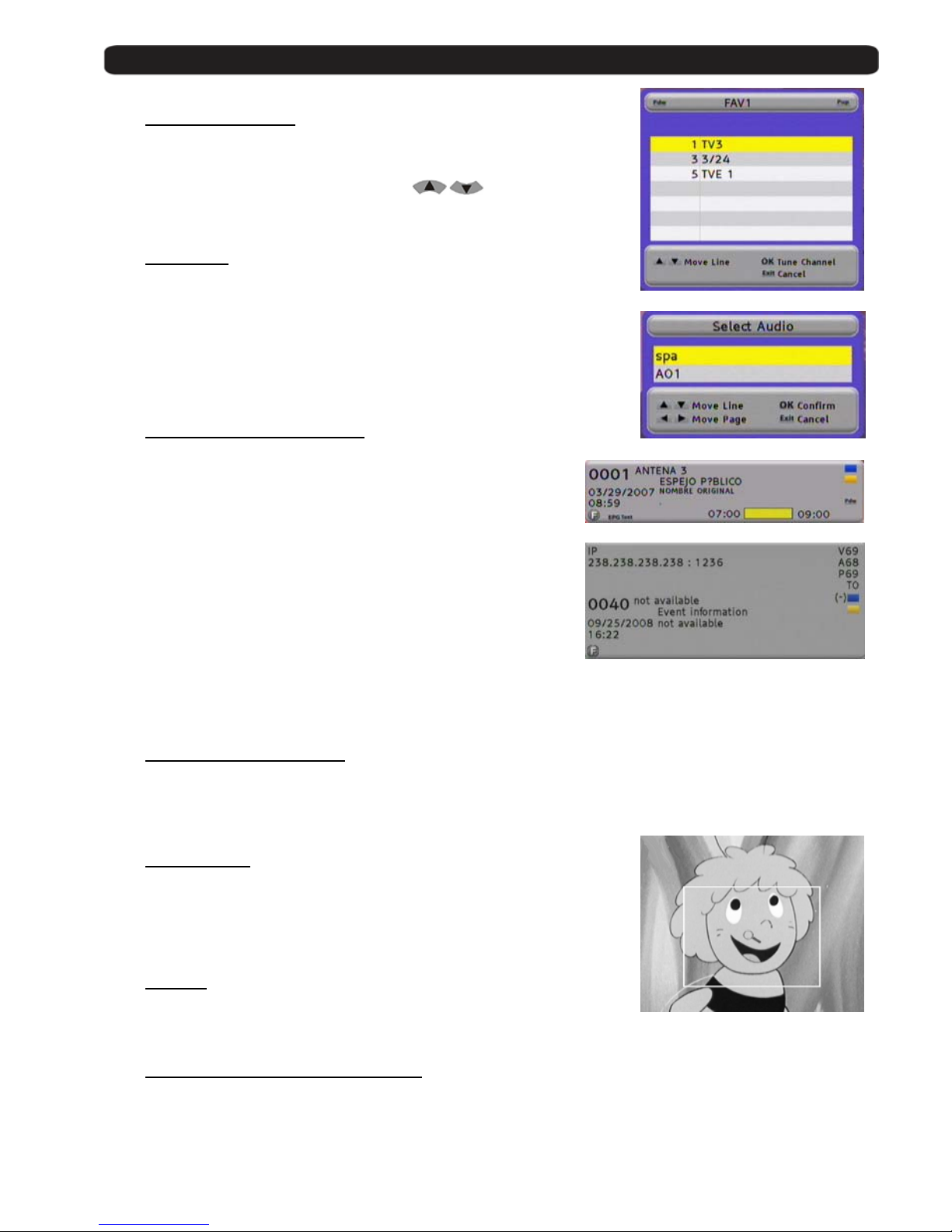
2.14. Favourite channel list
If no menu is opened, you can get your favourite channels list by pressing
the button FAV.
With the buttons Pup / Pdw you can switch between 8 different lists, if you
have marked channels before. With the buttons
you can
select a channel from this list.
2.15. Menu Audio
If all menus are closed you can open the menu Audio by pressing the button
Audio.
You can change here the audio o utput in Stereo, Left and Right audio format.
Testing the channels, yo u will be able to make the most suitable selection.
Standard selection is Stereo.
2.16. Signal and Channel information
Pressing the INFO button, with no menu activated ,
You will see the channel information and the Signal Level Bar. This
information is the same that appears when you change the channels.
In the signal bar we can see the following information:
Channel Number, Channel Name, current Time and Date,
Name of the current event and br ief description given by EPG .
Start and Stop time of the e v e nt and the indication of the current time
from the beginning in yellow colou r.
This menu disposes of 2 keys of advanced functions. Blue and Yellow
keys. Through Blue key, you can get the technical information of the
shown channel at the top p art of the window, as you can see in the
image:
Yellow key allows seeing which will be the next event indicated by EPG, with its start and stop times.
2.17. Changing favourite channels
With the buttons FAV+ and FAV- you can switch the favourite channels directly.
The Sequence for the channels is the established one before in main channel list.
2.18. Zoom Function
With the Zoom button you can see more details of the image.
By pressing the button OK you can select the enlargement.
If you want to stop, please press Exit.
2.19. Subtitles
When no menu is opened, you can start with Sub button the subtitle function.
Subtitles only can be displayed when the operator transmit them.
2.20. Direct buttons in the streaming function
Pressing the Green button out of the menus, it automatically start sending the video str e ami ng that you have configur ed
in the menu Streaming Configuration.
With the Red button, it stops sending.
Page 17

User’s manual · MAX IPS100
Technical changes and mistakes reserve - 17 - MAX IPS100 Version en_1.0 FTE Maximal
2.21. Short-circuit protection
If you see one message like this, you have a short circuit or to high power in the
antenna system.
In this case switch off the receiver and check the system.
The displayed informati o n sto ps automatically when the problem is solved.
Page 18
User’s manual · MAX IPS100
Technical changes and mistakes reserve - 18 - MAX IPS100 Version en_1.0 FTE Maximal
3. Channel management
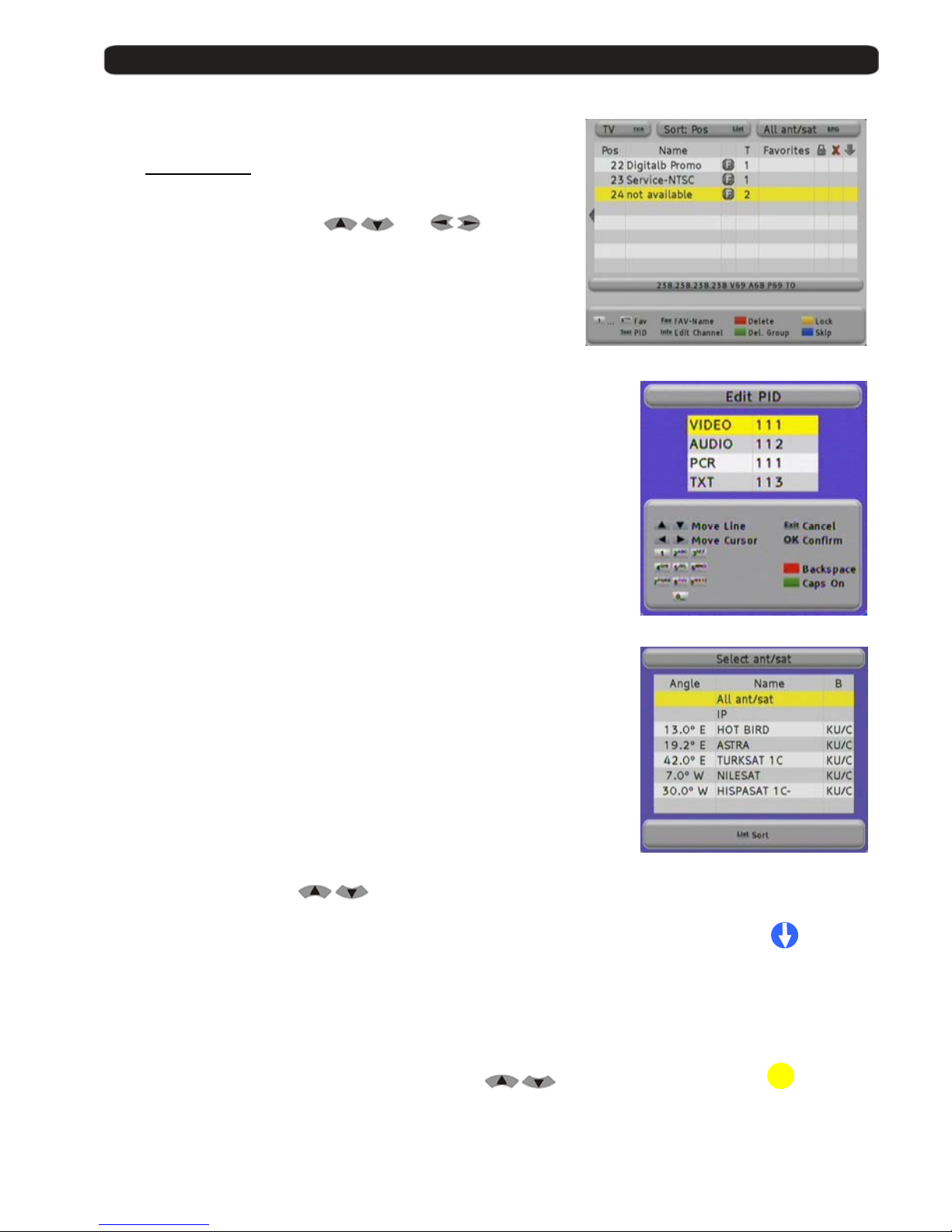
3.1. TV-Channel list
Here you will find an overview about all channels.
Channels can be administrated, moved, deleted or blocked.
The navigation is wit h the b uttons
and .
With the button TV/R you will switch between TV and Radio channels.
With the button LIST you can sort this list as follows:
POS, Position in channel list
Name, alphabetically
FTA / CAS sort by free or coded chan n els
To see the PID information, you have to press the button TEXT.
This information will be read by the receiver automatically and it gives
the information where the program is in the data stream.
It is not necessary to change it, but it can be done by the numeric keys
of the remote control.
With the EPG button, you can filter the channels shown in the list.
A window will appear where all the inputs of your receiver are shown.
You can select only the channels of one conc ret e satellite, the IP channels, or all
the channels.
In this window, if you press List you will change the sort of the list (by name, or
by angle).
3.1.1. Skip channels
With this function it is possible to sk ip selected
with the buttons CH+ / CH- or
.
If you want mark channels for skipping, you have to select the ch a nn el and then press
the Blue Button Skip. Doing this, you will see that the channel has a symbol
like the one at the right side. Marked channels only will be opened by channel list.
3.1.2. Lock channels
If you want to lock channels wit h a pa ssword needed for opening th em,
you can do it with this function.
If you want to mark channels, please select the channel by
buttons and than press the Yellow button Lock.
Doing this, you will see that the channel now has a symbol like the one at the right side.
In order the function works properly, you have to activate the password
function in menu Parental Control.
±
Page 19
User’s manual · MAX IPS100
Technical changes and mistakes reserve - 19 - MAX IPS100 Version en_1.0 FTE Maximal
3.1.3. Delete channels
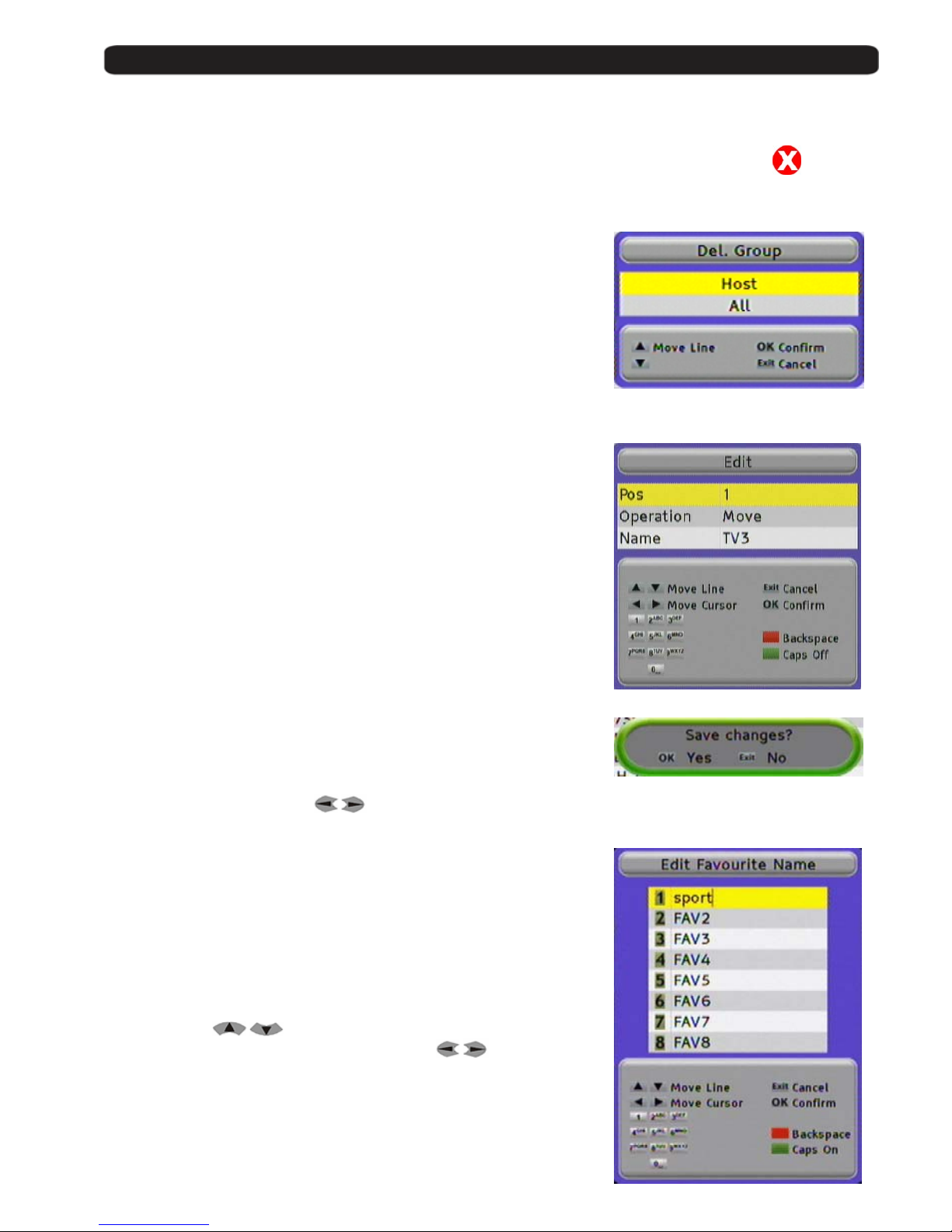
If you want to delete one channel, you have to select it and then press the
Red button Delete.
Doing this, you see now one symbol like one the right side.
You can mark more than one channel, the channels will be deleted when you close the
Channel Management.
3.1.4. Delete channel groups or all channels
If you want to delete a chann el group or all channels,
you have to select them and th an pr ess the Green button Del. Group.
In the following submenu you should choose Transponder, Sat ellit e, all
channels from one Host or All channe l s, de pe nding on the selected channel
in channel list.
With the OK button the selection will be done.
3.1.5. Edit channels
If you want to move channels in their position in channel list
or you want to change their name, you can do it in the submenu
Edit Channel.
To do it, press the button INFO.
In the line POS you can change the placemen t in channel list
In Operation, you can select the mode of changing the position of
the channel. You can choose between Move (it will shift the rest of cha n ne l s)
and Exchange (it will exchange the position between 2 channels)
In the line Name you can mo di fy the actual name of this channel .
The keyboard handling is like in a mobile phone.
When you press one button se veral times you will have different results.
Example: If you press button 2: a, b, c and 2
With the arrow buttons you can move the cursor in its position.
In this menu, the Green button change between normal and capital letters
and the RED button delete the letters.
With the OK button the selection will be done.
The receiver stores the changes when you leave the menu.
Please confirm by selecting with
OK the message.
3.1.6. List of favourite channels
With the buttons 1 to 8 from the numeric block you can select channels of the
favourite channel list 1 to 8.
At the column Favourite of the Channel List, you will see which Favourite list
each channel is from.
If you want to give to a favourite channel list an own name,you can do it by
pressing the button FAV.
With the buttons
you have to select one list.
In the line you can move the cursor with the buttons
.
The RED button delete letters and t he Green button change between normal
and capital letters.
The keyboard handling is like in a mobile phone.
When you press one button se veral times you will have different results.
Example: If you press button 2: a, b, c and 2
With the OK button the selection will be done.
Page 20
User’s manual · MAX IPS100
Technical changes and mistakes reserve - 20 - MAX IPS100 Version en_1.0 FTE Maximal
4. Timers
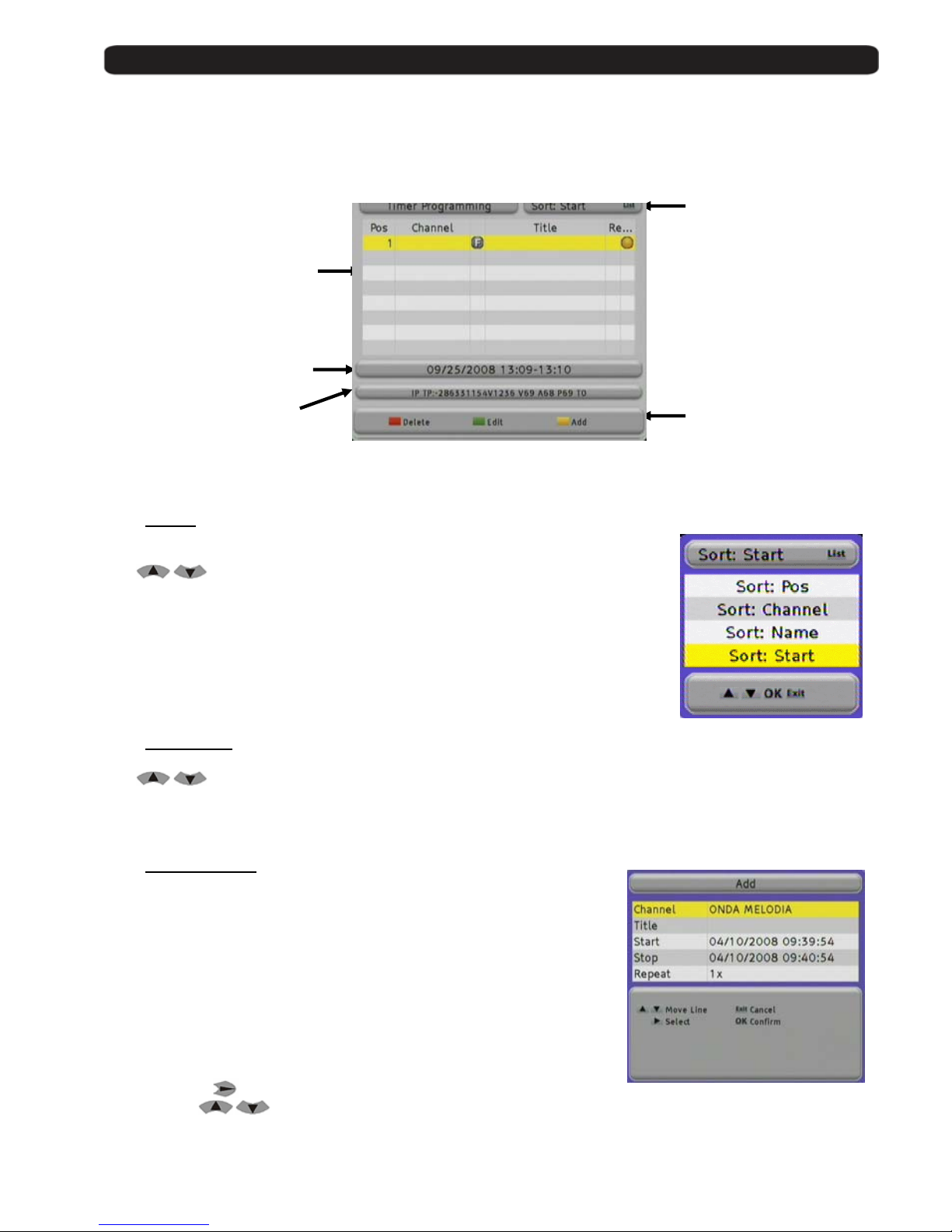
In menu Timers you get one overview about all events which you have programmed.
These events can be store over EPG or direct in this menu.
4.1. Sorting
For having a better view, you can sort the events.
Please press for this the button LIST.
With
buttons you can select the follow options:
Sort Channel: Sort the list related to the first letter of the program name in
A,B,C….
Sort Name: Sort the events related to the name of event in A,B,C….
Sort Start: Sort the files related to th e start time.
Sort Pos: Sort the files by date of creation.
4.2. Delete Timer
With the Red button Delete you ca n delete even ts.
With
buttons you can select one ev ent and then press the
Red button Delete, then confirm the following message.
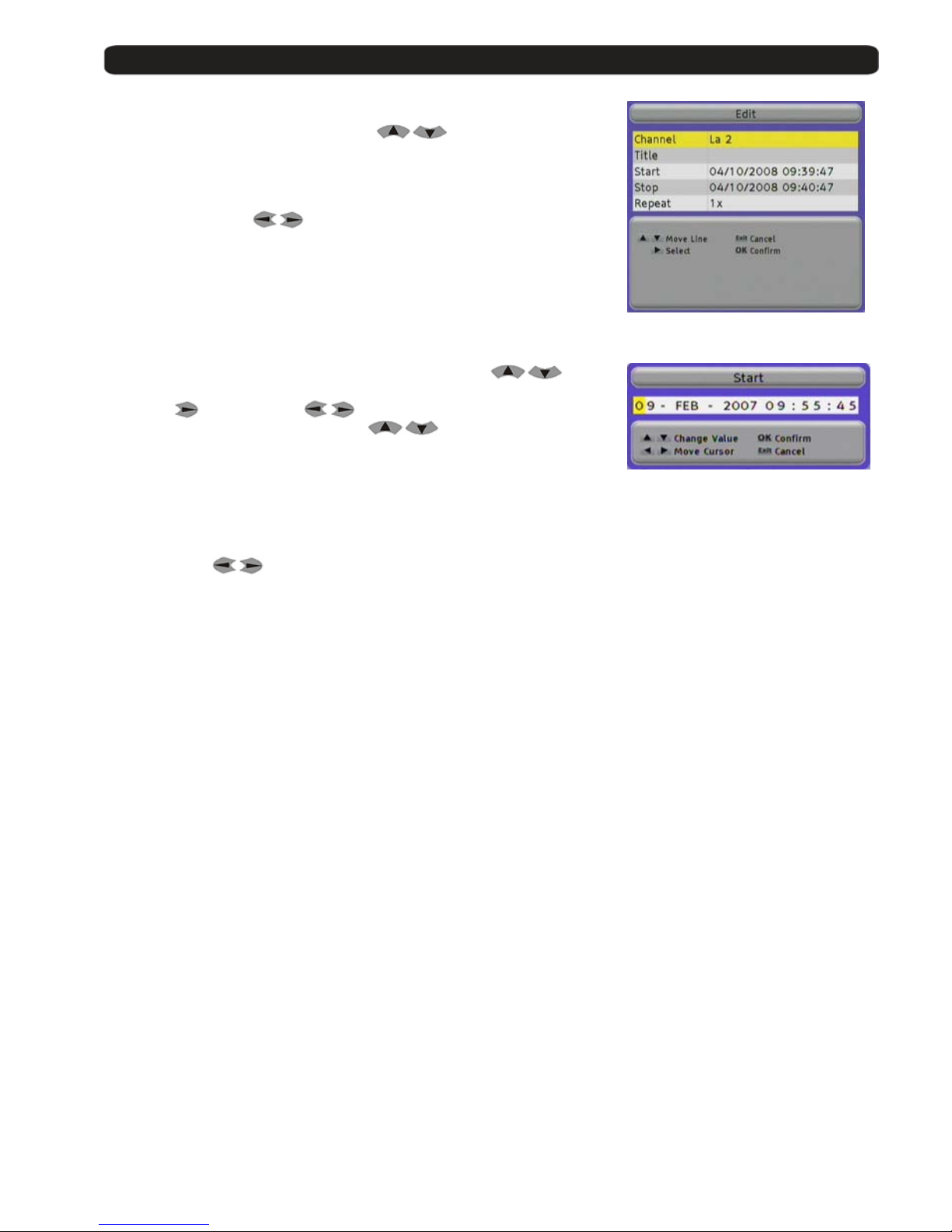
4.3. Edit / Add timer
With the Green button Edit you can modify one event,
This can be useful, when you wa nt to program one event and
you do not know exactly its starting or ending time.
With the Yellow button Add you can add manual one event.
The using of Add and Edit is the same.
Channel
Here you can change the channel which will be programmed.
Press the button
and select in the new menu the channel you want
by the buttons
and press OK.
Start date and time
selected of event
Frequency and PID
information for the
selected event
List with all events including
channel name and nam e for
the event
Menu options
Menu options
Page 21
User’s manual · MAX IPS100
Technical changes and mistakes reserve - 21 - MAX IPS100 Version en_1.0 FTE Maximal
Title
You can modify an existing title or create a new one.
If you want to change it, select this line by
buttons.
The keyboard handling is like in a mobile phone.
When you press one button se veral times you will have different results.
Example: If you press button 2: a, b, c and 2
With the arrow buttons
you can move the cursor in its position.
In this menu, the Green button changes between normal and
capital letters and the RED button deletes letters.
Start / Stop
If you want to modify start and stop times, select this line by
buttons.
Press now
and select with the entry yo u want to change.
The entry will be modified by the buttons
.
When you have finished, press OK.
Repeat
The standard value is 1x, for one time recording.
With the buttons
you can choose the following options also .
2x - 6x This repeats the timer next day, at same time, s ame channel.
T This repeat the timer every day at sam e t ime , s am e ch an ne l .
W This repeat the timer every week at same time, same chann el.
Monday – Friday It will repeat the timer since Monday to Friday in the same channel and at the same time.
Page 22
User’s manual · MAX IPS100
Technical changes and mistakes reserve - 22 - MAX IPS100 Version en_1.0 FTE Maximal
5. Tools
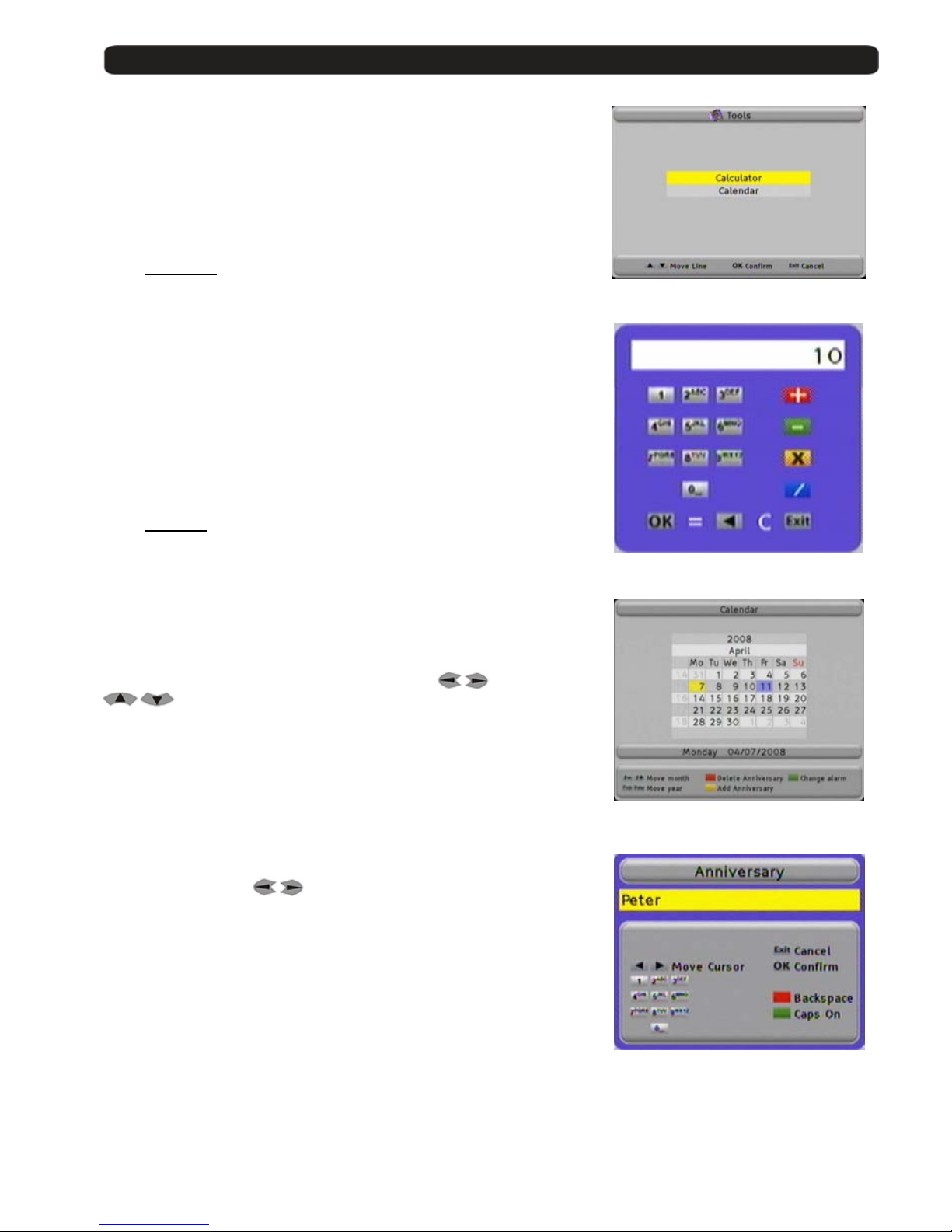
In this menu you can find two little helper tools.
The calculator is useful for fast calculations and with the calendar
you can mark dates for special events like birthdays.
5.1. Calculator
The using of the calculator is very easy.
With numeric block remot e co ntrol, input the numbers.
For the calculations you use the colour buttons .
Red Button Addition
Green Button Subtraction
Yellow Button Multiplication
Blue Button Division
The button OK is used for = function.
With the buttons ◄ you restore the calculator.
5.2. Calendar
If you open the calendar , t he yellow marked field show s the current date.
This will be shown in the li ne un der the calendar.
With the buttons Fav- and Fav+ you can switch between the m o nths.
With the buttons Pup and Pdown you can change the year.
In the first column it is marked the number of week in the year and one blue
marked field shows a stored even t.
You can select the individual dates with the buttons
and
.
Add one event (Anniversary)
If you want to add an event, select the date and press the
Yellow button Add Anniversary.
You can type the name for the event like in a mobile phone.
When you press one button se veral times you will have different results.
Example: If you press button 2: a, b, c and 2
With the arrow buttons
you can move the cursor in its position.
In this menu, the Green button changes between normal and
capital letters and the RED button deletes letters.
If you select later a blue marked field you will see the name info the field.
Delete one event
If you want to delete an even t, you have to select it and then press
the Red button delete Anniversary.
Change Alarm
Pushing the Green button, you can add an alarm to the event, you will see that this symbol (*) appears close to the
date. A visual alarm will appear in the screen the day of the event.
Page 23

User’s manual · MAX IPS100
Technical changes and mistakes reserve - 23 - MAX IPS100 Version en_1.0 FTE Maximal
6. CAS Management
In this option, you can ac cess to the information about the conditional
access system
Follow the steps showed on menu i n or der to access to the card data.
If there is no card or is incorrectly inserted, an error alert will be shown on TV.
With a card, information about the card will be sho wed .
Page 24
User’s manual · MAX IPS100
Technical changes and mistakes reserve - 24 - MAX IPS100 Version en_1.0 FTE Maximal
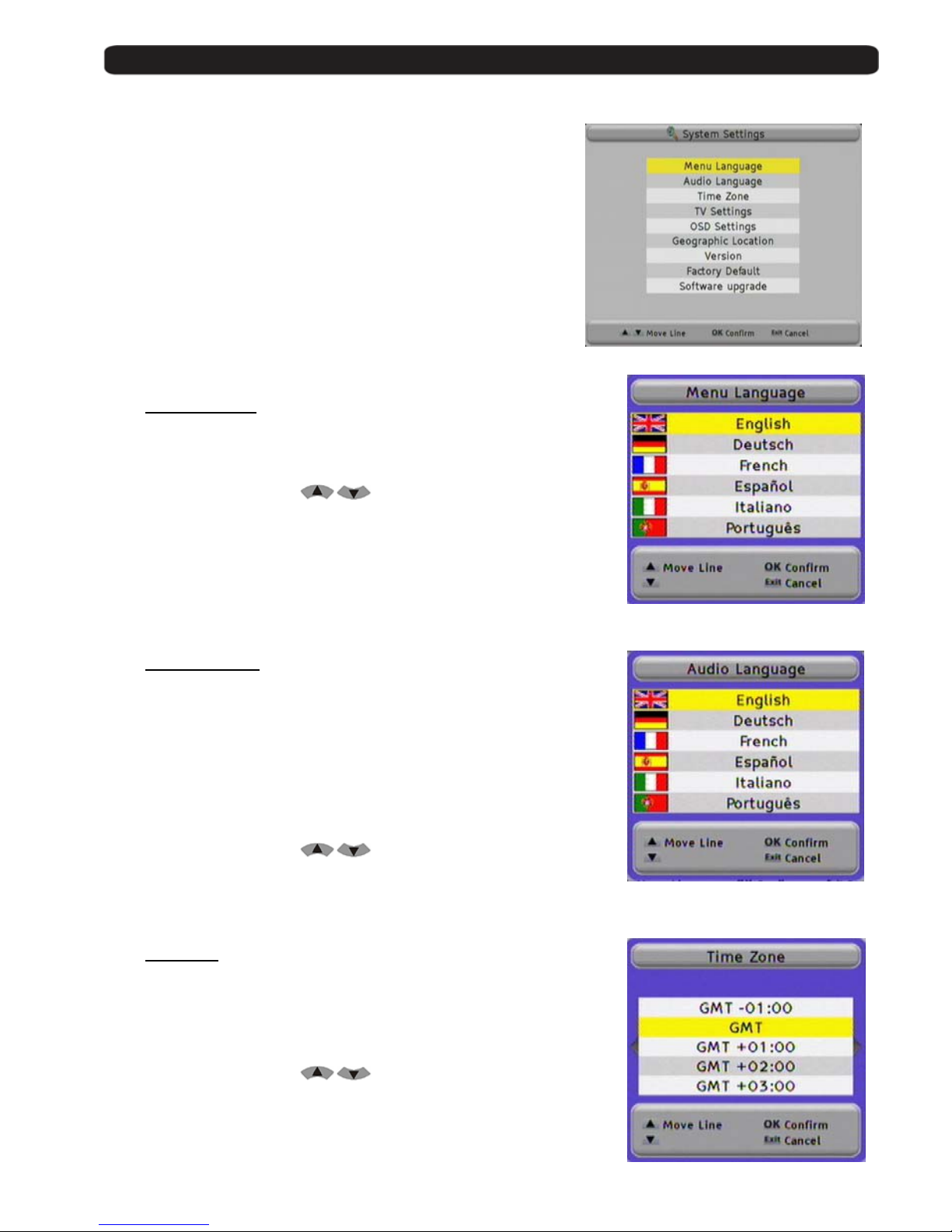
7. System Settings
In the menu System Settings you will find all basic adjustments
of the Receiver.
7.1. Menu Language
Here you can choose the language which will be shown in the receiver.
You can select:
English, German, French, Spanish, Italian, Portuguese
Please select with the bu ttons
and then press OK.
7.2. Audio Language
Here you can choose the audio language for the TV and Radio channels.
Example:
If you select English and the channel you want to see have one
audio carrier in English, you will get the audio in English.
If there is no audio carrier in English, you will get the first one which is
supported in this channel, for example German.
You can select:
English, German, French, Spanish, Italian, Portuguese
Please select with the bu ttons
and then press OK.
7.3. Time Zone
In order to the receiver shows the correct time as well as adjusting the records
properly, it is needed th e adjustment of the Time Zone where you live.
For UK: Summer time: +1 hour
Winter time: GMT hour
Please select with the bu ttons
and then press OK.
Page 25
User’s manual · MAX IPS100
Technical changes and mistakes reserve - 25 - MAX IPS100 Version en_1.0 FTE Maximal
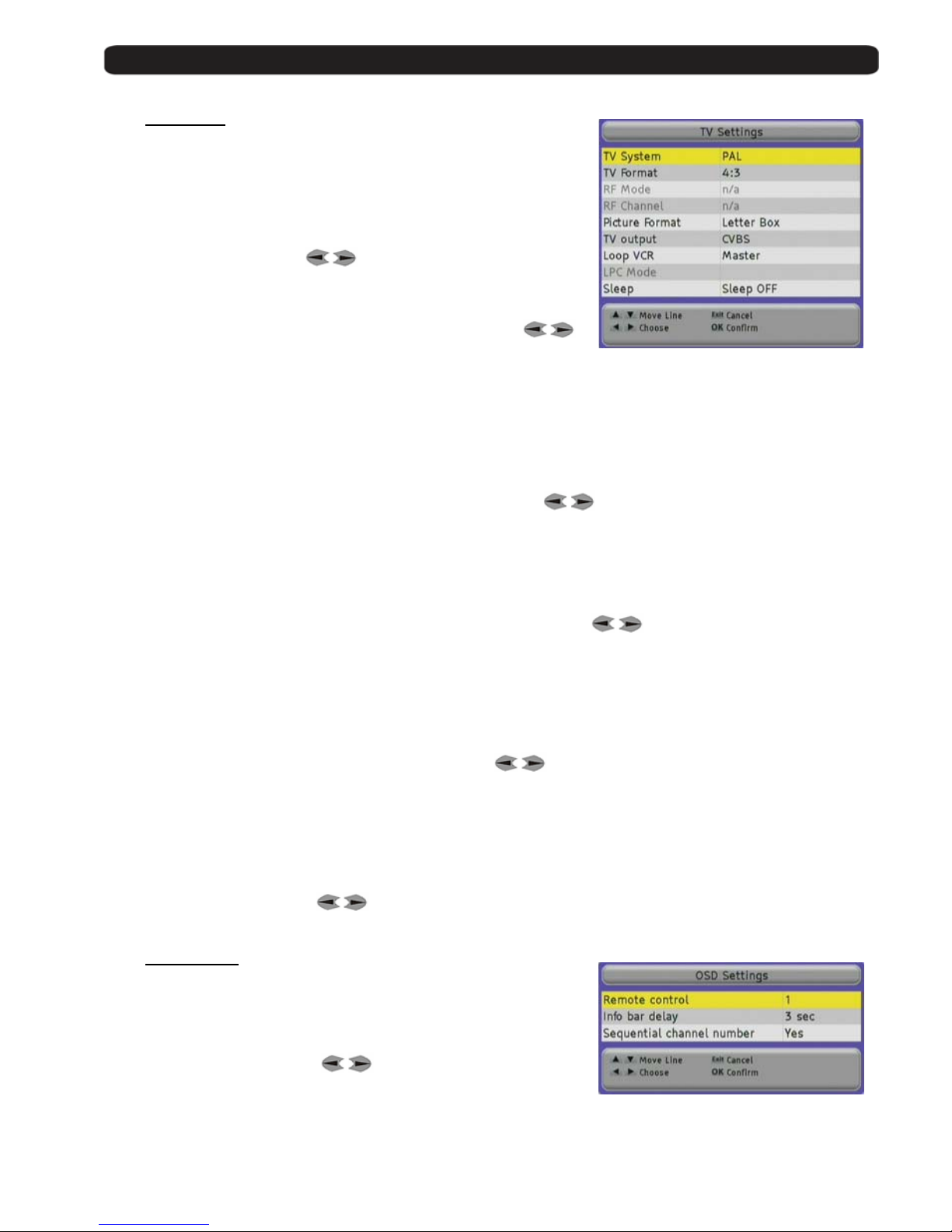
7.4. TV Settings
Here you can adapt your receiver to your TV set and you can select
the screen format.
TV-System
Select here which TV system your TV set support.
Selection: NTSC, PAL, Secam and AUTO
Please change with the buttons
.
TV-Format
Select here which TV format your TV set has availa bl e.
Selection: 4:3, 16:9 and AUTO, please change it with the buttons
.
RF Mode
Not available in this model.
RF Channel
Not available in this model.
Picture Format
This option is only available when you have not selected TV format in mode AUTO.
Options: Pan&Scan or Letter Box , please change with the buttons
.
In this option you can choose how the pictures in films with a big format will be adapted to your TV set.
If you select Pan&Scan you will see one part of the film and at the left and right sides it will be cut
In Letter Box, the picture will become smaller and you will see on top and bottom two black bars.
TV output
This option allows choosi n g ho w th e r eceiver will send the colour s to the TV set.
Selection: CVBS , RGB, SVIDEO or YUV , please change with the buttons
.
Loop VCR
Here you select the priority of an external video signal.
If you have selected Slave, the receiver shows every time the signal coming from the VCR Scart connector, when there
is signal available. It also can be a signal from DVD player or r ec order.
If you have select Master , the signal from receiver has priority and you will see only the signal from connector VCR
scart when the receiver is in Standby mode.
Selection: Master or Slave , please change with the buttons
.
LPC Mode
Not available in this model.
Sleep
If you want shut down the receiver au tomatically, you can choose here the time for the sleep timer.
Selection: 15, 30, 45, 60, 75, 90, 105, 120 or Sleep Off
Please change it with the buttons
.
7.5. OSD Settings
Remote control
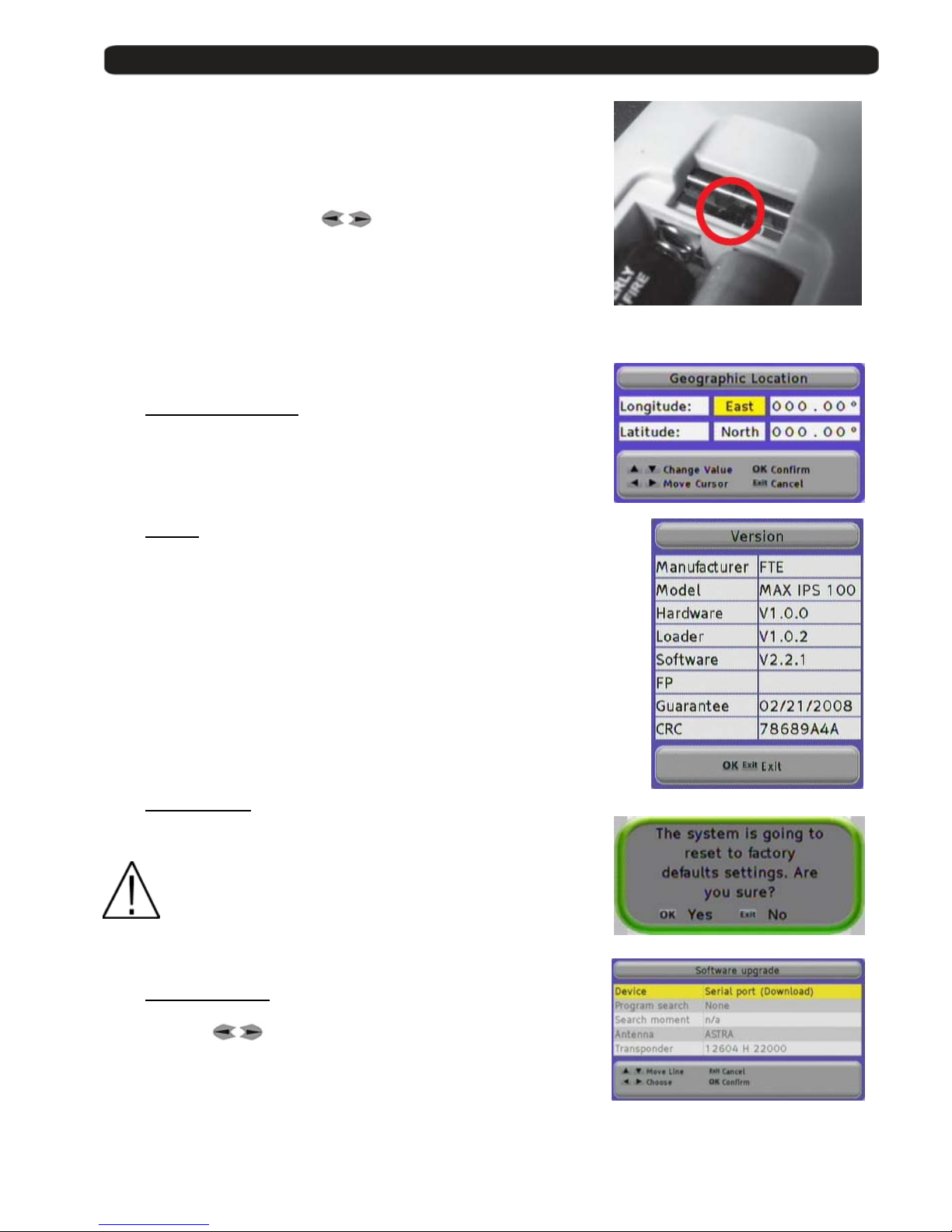
Here you can change the trans m ission code for the remote control if you
have problems with other devices.
Please change it with the buttons
.
For saving the changes, please press OK .
Do not forget to change also the code on the remote contro l.
For this, you have to change the position of a switch in the remote control.
Page 26
User’s manual · MAX IPS100
Technical changes and mistakes reserve - 26 - MAX IPS100 Version en_1.0 FTE Maximal
You have to select the same position in the receiver than in the remote
control.
Info bar dela y
Here you can select how long the information of the OSD will be displayed on
the screen.
Selection: 1 to 10 sec.
Please change it with the buttons
.
Number of Sequential Channel
Selecting Yes in this option, the positions of the channels will be occupied
continuously and sequentially. Although you move the position of one
channel, you will shift the positions to avoid leaving empty channels.
Selecting No, you can leave empty channels if we shift th e position of one channel.
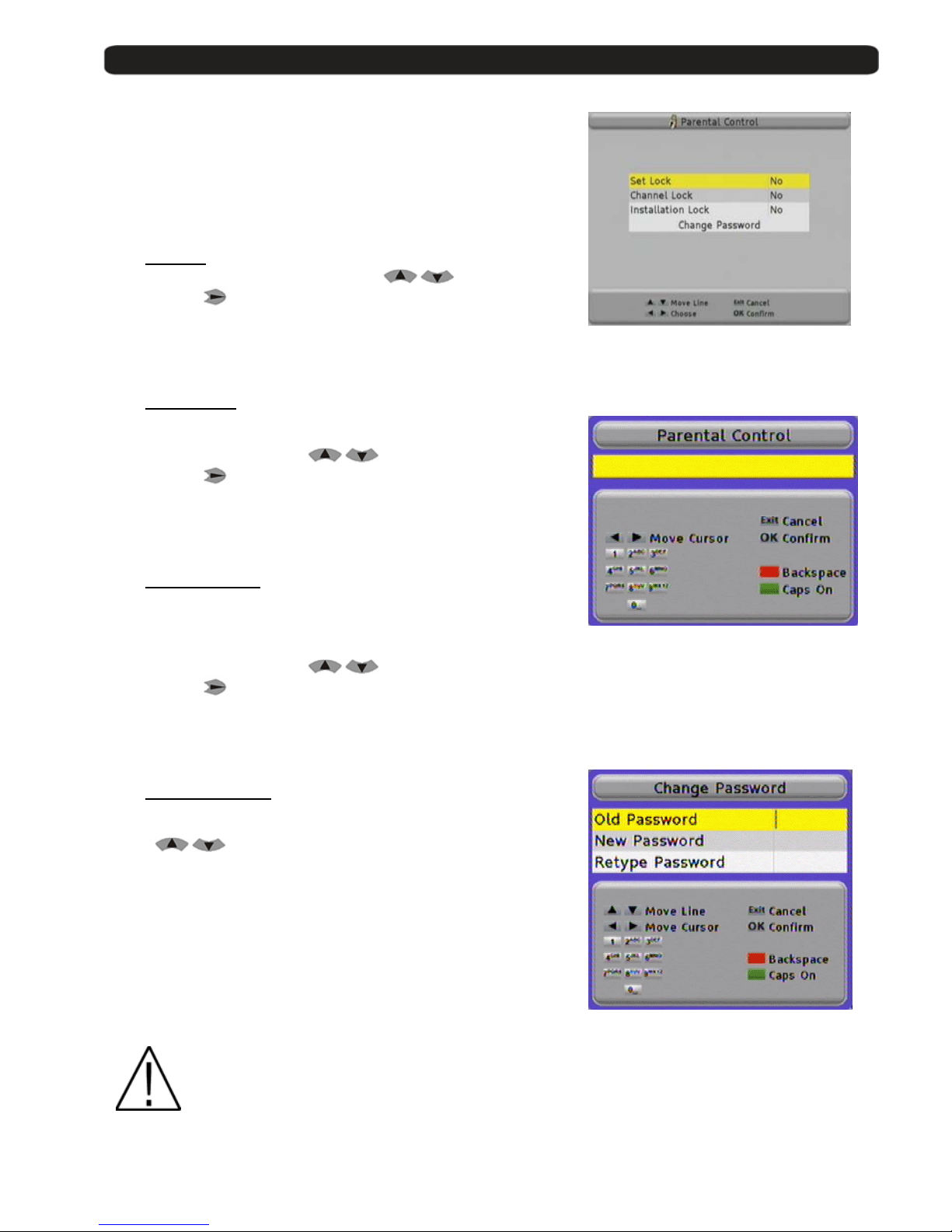
7.6. Geographical location
For the adjustment of positioners with the USALS system, it is necessary to
have the information about L atitude and Length of your locati on.
7.7. Version
Here you get information about the hard and software from your receiver.
Manufacturer Manufacturer of the receiver.
Model Exact article name.
Hardware Revisions number from main PCB
Loader Version for boot loader
Software Version for installed software
FP Not available in this model
Guarantee Beginning of the warranty time
CRC Checksum of the EEprom
7.8. Factory Default
With this option you can restore the receiver totally to the status when
the receiver was used the first time.
Caution: Make this only if you are 100% sure, this step can is
irreversible.
7.9. Software Upgrade
With this menu you can transfer data and install ne w software.
With the buttons
you can choose between the following
possibilities.
Serial port (Download) Start data download via RS-232 connection.
Air (now) Starts data download via OTA immediately
Air (programmed) Starts data download via OTA at a pro gr ammed time
Page 27
User’s manual · MAX IPS100
Technical changes and mistakes reserve - 27 - MAX IPS100 Version en_1.0 FTE Maximal
8. Parental Control
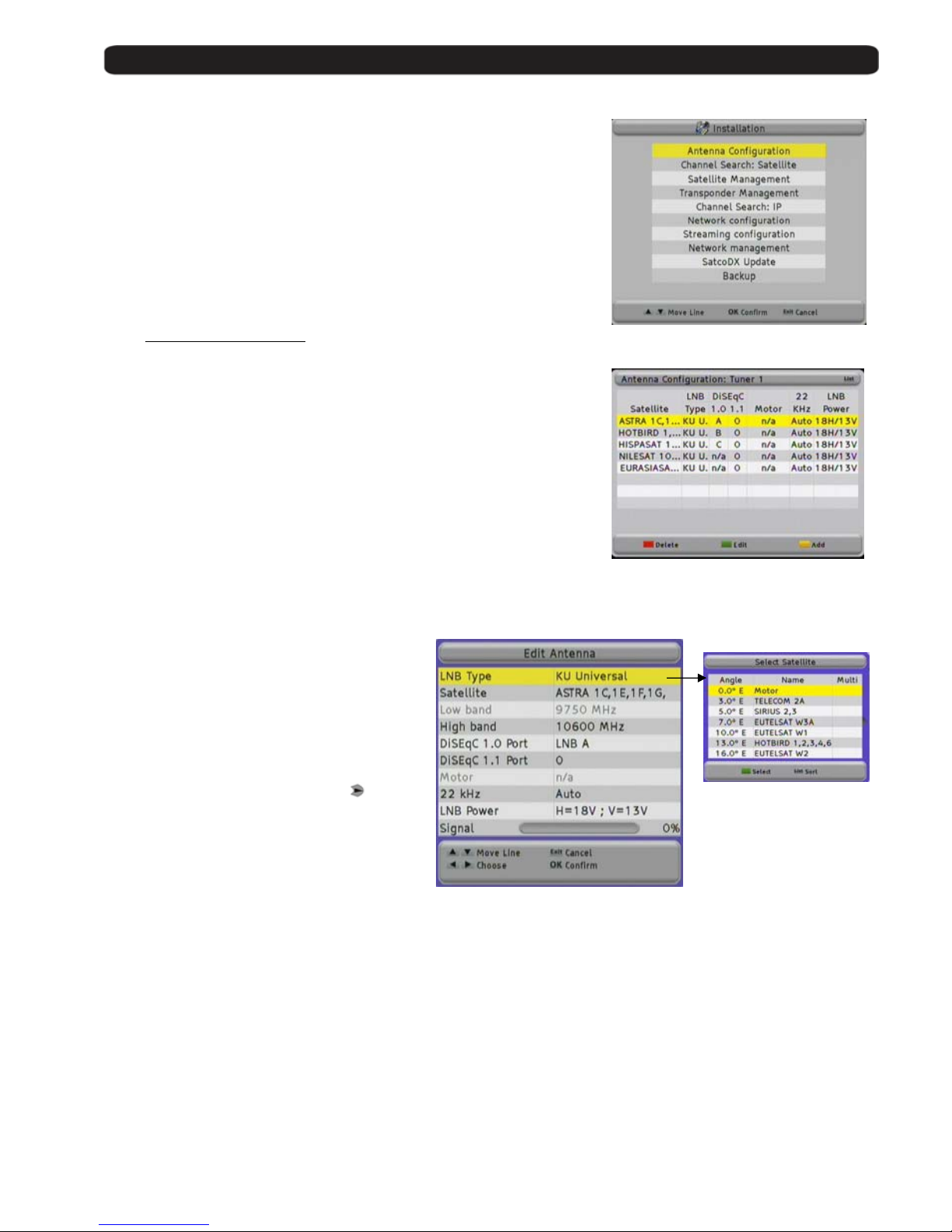
With this menu, you can activate the parental control where is nec essary
to give one password before opening channels or making settings.
8.1. Set Lock
To activate the parental contro l, select with
button Set Lock
and then press
.
You have to give the standard code 0000 or your individual on e with the
numeric block from the remote control. Then press OK button.
8.2. Channel lock
Here you can activate the parental control for channels if you have
marked it in Channel Management for Lock.
For this, select with the buttons
the line Channel Lock
and than press
.
You have to give the standard code 0000 or your individual on e with the
numeric block from remote control. Then press OK button.
8.3. Installation Lock
Here you cane activate the parental control for the menu Parental
control,
System Settings and Installation.
For this, select with the buttons
the line Installation Lock
and then press
.
You have to give the standard code 0000 or your individual on e with the
numeric block from remote control. Than press OK button.
8.4. Change Password
When you want to chan ge the standard password, select for this with the
buttons
Change Password and press OK button.
Old Password Input here the actual password
New Password Input here the new password you want.
Password must have 4 digit.
Retype Password Retype here the new password
and press OK button.
If you loose in any time the standard or your individual password you can unlock it with master
password 5100.
Page 28
User’s manual · MAX IPS100
Technical changes and mistakes reserve - 28 - MAX IPS100 Version en_1.0 FTE Maximal
9. Installation
Over this menu you can search for new channels Channel Search,
modify the frequency list MUX Management, or make backups.
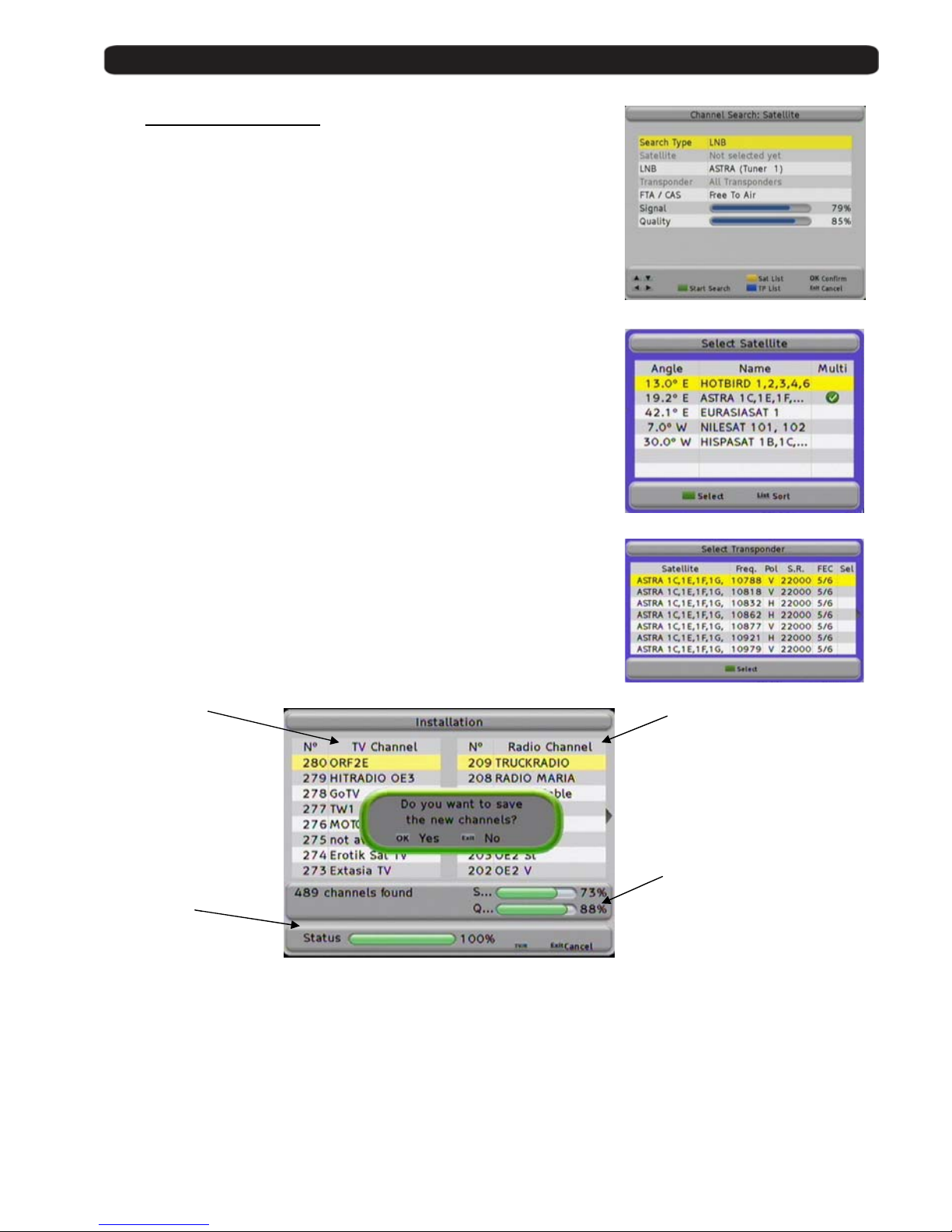
9.1. Antenna configuration:
In this menu you should configure the signals that are connected at the
inputs IF IN of your PVR.
By default, the equipment comes with the configuration that you can see in
the Picture with four satellites.
The available options in this screen allow:
Red button: Deletes the selected satellite. It requests for confirmation.
Green button: Edits the se lected satellite. The optio n a pp ears in the
following image.
Yellow button: Adds a satellite. The opti o ns ap pear in the below image.
Antenna Options:
1. LNB Type: There are two available
bands: C and Ku. The differ ence is
basically the transmission frequency.
The Ku band has two possibilities, the
most common is the universal Ku.
2. Satellite: Your PVR is provided with
several satellites pre-stored. You can
find the one you want in the list or to
add a new one. They are sorted by its
orbital position. With the key
you
can access to the availa ble satellite
list.
3. Low Band / High Band: It is used
when the band selection is Ku one,
and it programmes the Local
Oscillators of the LNC.
4. DiSEqC 1.0 / 1.1 Ports: To configure the use of antenna switch. These switches allow t he
reception of different satellites in a single input.
5. Motor: Enables the function of usin g a mot or to di r e ct th e antenna.
6. 22 KHz: Tone to switch the band of the LNC.
7. LNB Power: Feeding to the LNB. By default the selection is the one for an universal LNB.
8. Signal: It shows if there is an available signal in the selected configuration.
Alter whatever change, it sh ould be confirmed with the OK key when you exit the menu.
Page 29
User’s manual · MAX IPS100
Technical changes and mistakes reserve - 29 - MAX IPS100 Version en_1.0 FTE Maximal
9.2. Channel Search: Satellite
Once the antenna configuration is completed, you should proceed to tune
the satellite channels that you have selected. There are different ways to
tune the channels: through LNB, through Satellites and through
Transponders.
When you select the channel searching through LNB, you only can select
one LNB, which corresponds to the programmed tuner.
When you are searching by satellites, you are allowed to select a Wide range
of satellites, so you could programme the searching of all the satellites that
you have configured.
The searching through Transponder is the most selective. It allows se lecting
all the frequencies that you ’ re going to tune and searching channels.
In whatever selection, you always will have available to search Free To Air
channels (uncoded channels ), channels with Conditional Access or All the
channels.
Please, choose the searching pressing the Green button. Once you have
finished (the time will depend on the number of transponders it will have to
find) you will get a window like the following one:
Detected TV Detected
Channels Radio Channels
Level and Q u al i ty
Searching process
Meter
You can select the ch annel searching whenev er pressing the Exit button.
Once the searching is finished, you must confirm th e storing of a new Channel List.
Press the OK button.
The receiver will come back to the Channel Search menu.
You can search again if you wa nt, or exit by pressing the Exit button.
Page 30
User’s manual · MAX IPS100
Technical changes and mistakes reserve - 30 - MAX IPS100 Version en_1.0 FTE Maximal
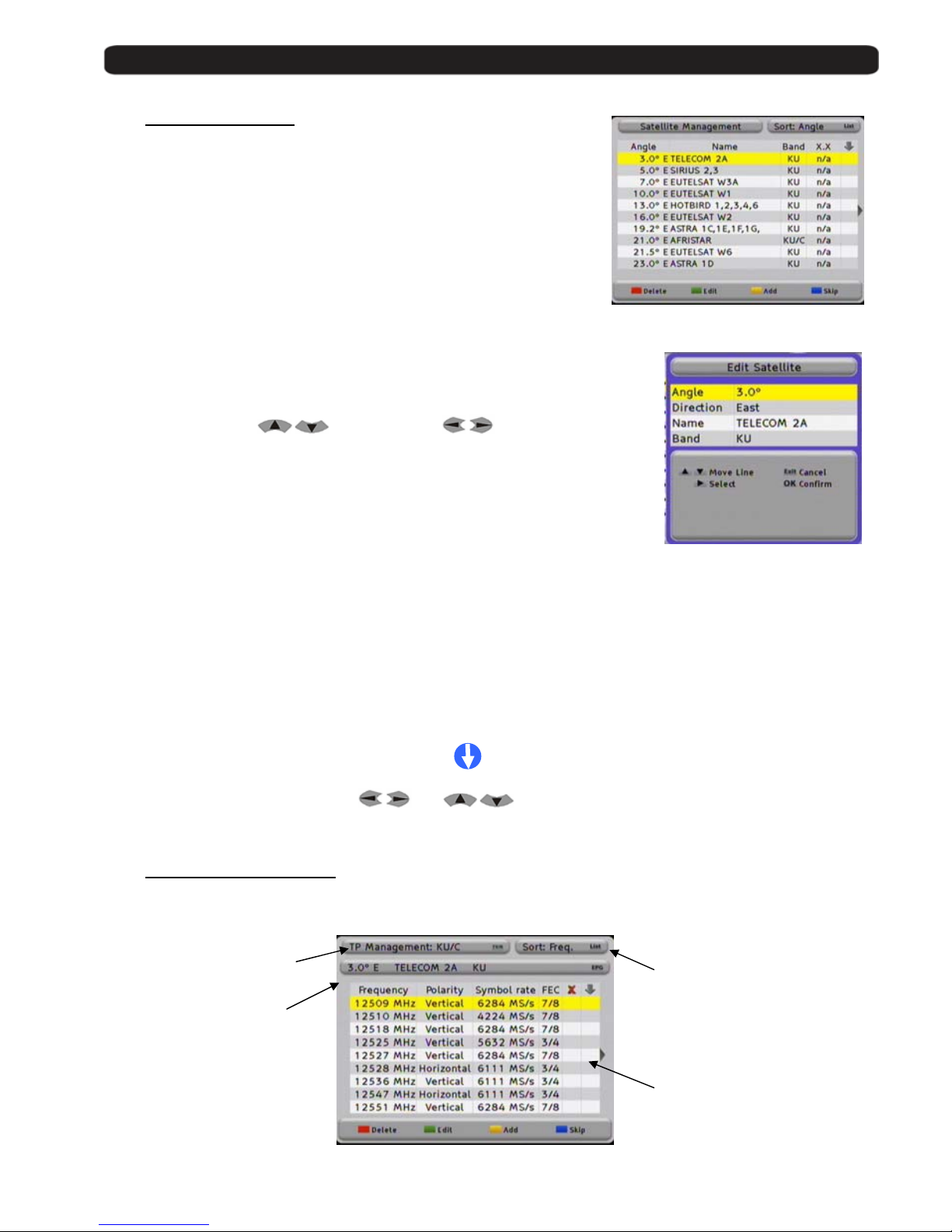
9.3. Satellite Management
Your receiver are provided with a very important pre-stored satellite list, if
in addition you want to add some one more or to change the parameters of
some channels, these functions are made through this menu. The
available options ar e:
Delete Satellites
If you want to delete one satellite, you can do it with the Red (Delete) key.
Doing this, the receiver is requesting you the deleting confirmation, with
the OK button you will erase the satellite, with the Exit button you will
cancel.
Edit satellites
With the Green (Edit) button, you can modify the parameters of one satellite. The
editable parameters with its orbital position in degrees and direction, the name as
well as the transmission band (C, Ku or both).
Select with the buttons
the row and with the values,
and press OK to confirm.
To edit the name of the satellite, the handling of the keyboard is the same than the
one of a cellular telephone: pressing one button some times, you will choose the
wished letter. Example : if you push the key 2: a, b, c and 2 will be shown. With the
arrow buttons you can place the cursor in the wanted button. In this menu, the
Green key changes between cap ital and normal letters, with the Red key, it erases
the last character.
Add satellites
With the Yellow (Add) button, you can add a satellite. The process is exactly the same than the before one, with the
difference that the menu does not have data.
Skip Satellite
With this function it is possible to skip one satellite in the fast searching channels process.
The marked channels will be not selected where you search channels. Please, ensure that you mark the satellites
correctly. It will appear in the right column the icon:
To select the satellites, us e the bu ttons
and . Press the Blue (Skip) button to mark them.
You can place marks in more than one satellite.
9.4. Transponders Management
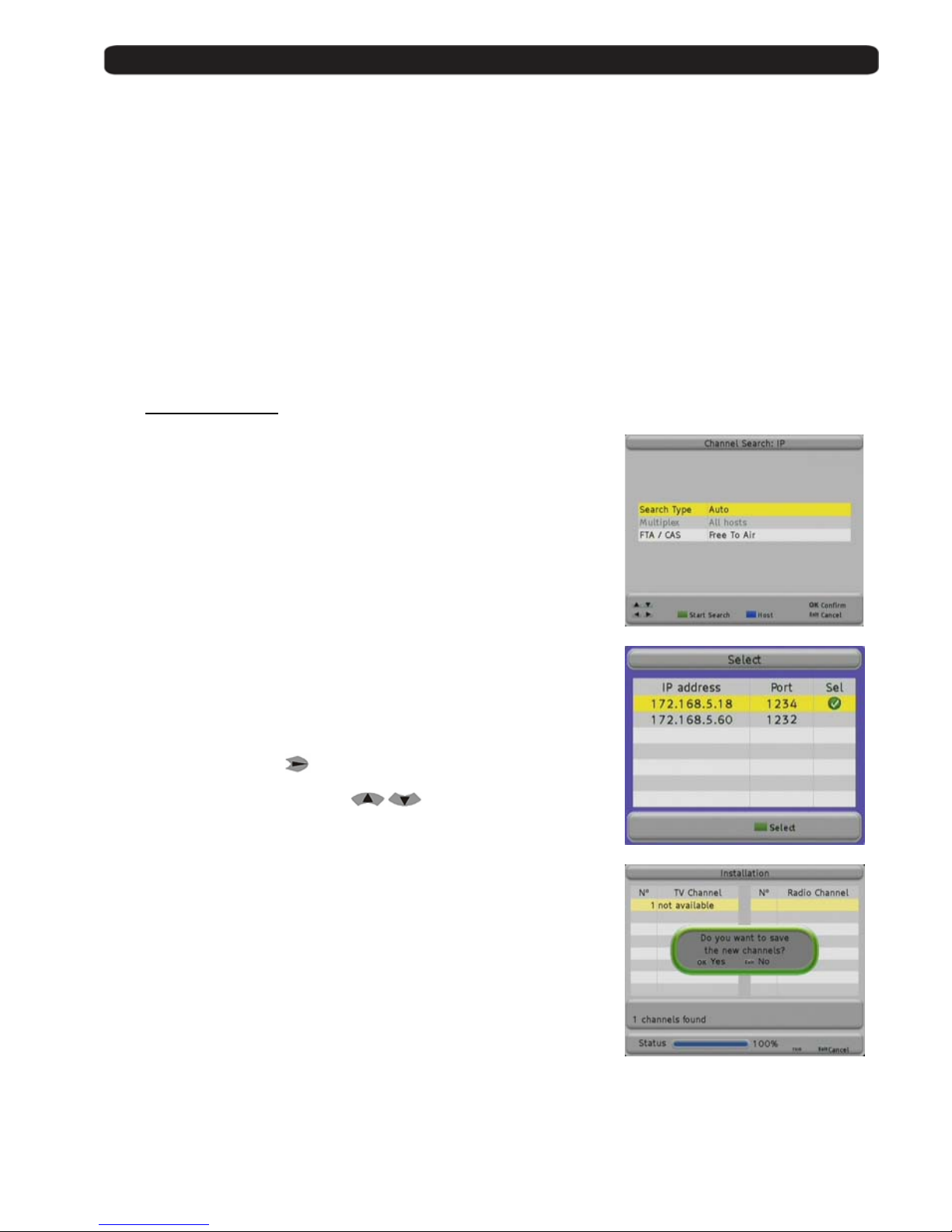
In the transponders management, we will have a screen like the following one:
With t he TV/R they are
shown the TP of the C, Ku
or both bands.
UIT the LIST key you can
change the sort which with
the TP are shown. You can
change the sort of the TP
List, you can sort them by
frequency or by polarity.
With t he EPG they are
shown the different prestored satellites and when
you select whatever of
them, it is shown the TP of
this satellite.
Data block of TP where it is
shown the satellite frequency
of transmission, polarity,
symbol rate and FEC. Last
two columns are for the
selection of erasing and skip.
Page 31
User’s manual · MAX IPS100
Technical changes and mistakes reserve - 31 - MAX IPS100 Version en_1.0 FTE Maximal
The options you have right wit h th e list are the following ones:
Delete Transponder: The RED key allows you to make a multiple selection of transponders to be deleted. When you
select a TP, it will appear the icon in its column, when you exit of the menu, you will be requested to confirm the
changes.
Edit Transponder: This function with the GREEN key will allow you to va ry the parame ters of the tran sponder. You ca n
change the frequency, polarity, symbol rate and FEC. This last parameter can be changed to AUTO mode in case of
unknowing it.
Add Transponder: Like in the previous step, the YELLOW key , allow adding new TP to the list.
Skip Transponder: In this function, with the BLUE key, allows that one transponder will be keeped in the list but it will be
not tuned.
Whatever change made over the list of transponders will need to be confirmed with OK button when you exit the menu.
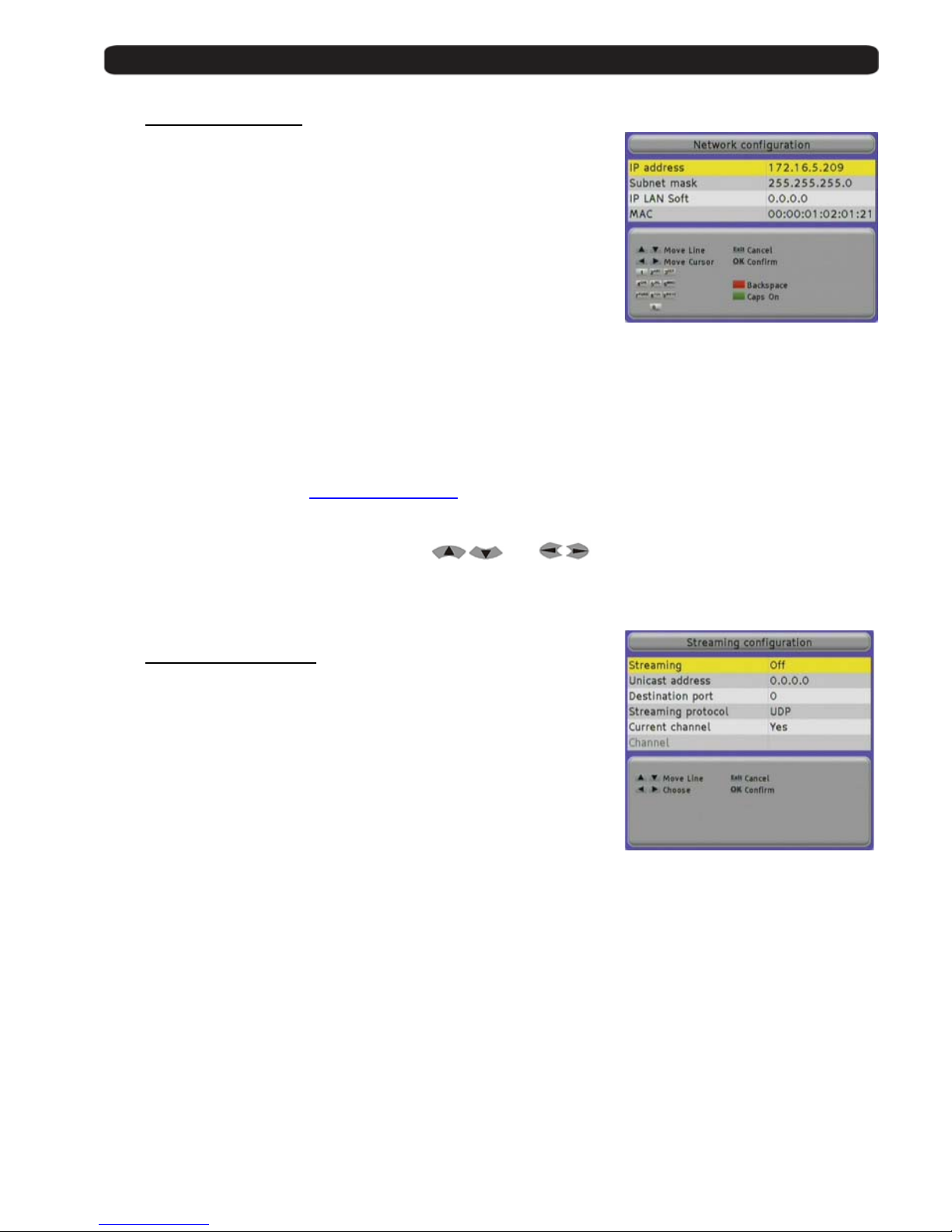
9.5. Channel Search: IP
The receiver will carry out a search for channels broadcasted by other
equipment connected to the network.
You can receive transm issions of other equipment in mode Unicast and
Multicast.
- Unicast is when the information is sent from a un ique sender to a
unique receiver.
- Multicast in when the information is sent through a network to
multiple destinations simulta ne o usl y. The equipment that work in
multicast mode send the information into an IP range between
224.0.0.0 and 239.255.255.255.
In Search Type select Auto to search for all the channels which are
broadcasted by other equipment in your network in multicast mode. If you
select the Host option, it will look for transmissions of the equipment present
in the list Network Management that you selec t.
In the field Multiplex you should select the hosts from the list Network
Management in which yo u wi th to search for channels.
Pressing the Blue button or
a new window will appear, where you can
select the hosts.
You can move the cursor wi th
.
With the Green button you select the hosts.
Press Exit to go back to the search menu.
If you press the Green button, it will carry out a search of the video IP
channels.
Press Exit to exit.
Page 32
User’s manual · MAX IPS100
Technical changes and mistakes reserve - 32 - MAX IPS100 Version en_1.0 FTE Maximal
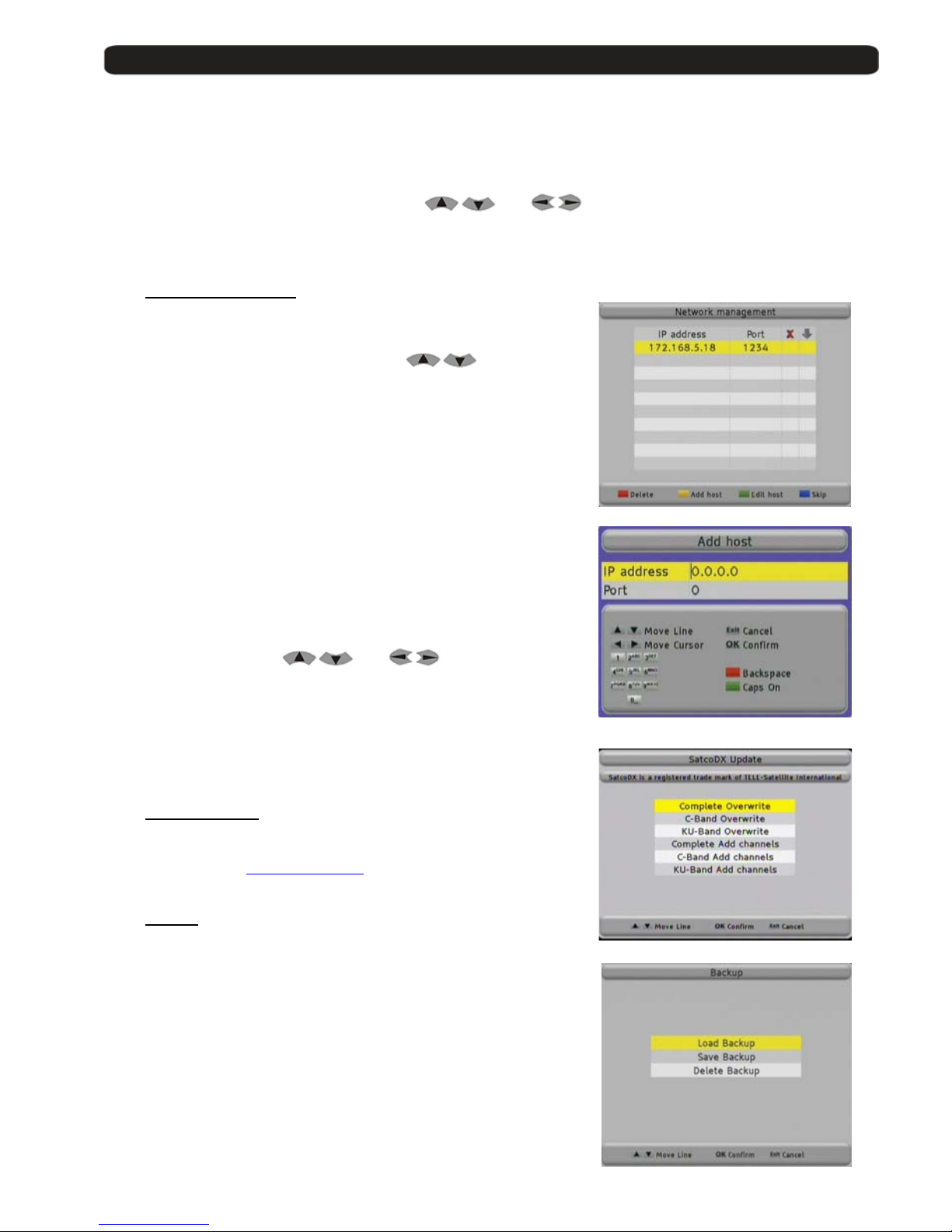
9.6. Network Configuration
The receiver will require the introduction of the needed parameters to be able
to get connected to a network, as well as to be visible to other equipments so
that receive streaming of vi deo and audio.
You should introduc e th e following parameters:
IP Address Number of 32 bits expresse d i n 4 numbers between
0 and 255 which identifies the receiver inside its
network.
Every device in the network should have a different
IP Address and it is highly recommended that all of
them are in the same subnetwork and with IP
addresses into the following range:
10.x.x.x
172.16.0.0 – 172.31.255.255
192.168.x.x
Subnet Mask Number in IP format that, combined with the IP address, identifies where the equipment is.
IP LAN Soft: IP address of the PC where the appl ication for exchangin g vid eo streamings between the
PC and the receiver is installed.
If you want, you can do wnload the application IP LAN Soft from the Website:
www.ftemaximal.com
MAC Device address at hardware level. It is unique in each device and it comes from the factory.
You can move through the menus with the buttons
and .
With the Red button you delete the last character.
Press OK to save the changes.
9.7. Streaming Configuration
This receiver can send streaming to other equipment connected to the
network.
You can send video streamings in Unicast and Multicast modes.
- Unicast is when the information is sent from a un ique sender to a
unique receiver.
- Multicast in when the information is sent through a network to
multiple destinations simulta ne o usl y. The equipment that work in
multicast mode send the information into an IP range between
224.0.0.0 and 239.255.255.255.
In this window you can configure th e network parameters of the device at destination:
Streaming You should select On so that the receiver sends the streaming.
Address IP Address of the destination device.
You can simultaneously send the streaming to different devices in case that in this
field a multicast IP address is introduced.
Destination port Communications port where the information is sent.
The port must be an even numbe r in t he ra nge between 1024 – 65534.
Streaming protocol You can select the communications protocol. Options: UDP or RTP.
Current Channel It allow you to fix the number of transponder that is going to be sent t othe destination receiver.
No: Always will be sent to the receiver at destination the indicated cannel in the field Channel,
and the origin receiver only will be able to see any cannel belonging to the same transponder
which is indicated in the Channel field, or IP channels.
When you see an IP channel, the stre aming sending process will stop.
Page 33
User’s manual · MAX IPS100
Technical changes and mistakes reserve - 33 - MAX IPS100 Version en_1.0 FTE Maximal
Yes: the receiver will send the channel which is tuned locally. Every time you
change the channel in the receiver, you must tune the same in the destination
receiver.
Channel: Service to be sent. Only available when you select No in the field Current Channel.
You can move through the menu with the buttons
and .
With the Red button you delete the last character.
Press OK to save the changes.
9.8. Network Management
In this menu you can manage the equipment you decide to receive
streaming from, in mode Unicast.
You can move through the list with the buttons
.
Pressing the Red button you can delete a host from the list.
With the Yellow key a new window will appear where you will be able to
add a new host.
At IP Address introduce the IP address of the sender device.
Every device in the network should have a different IP Address and it is
highly recommended that all of them are in the same subnetwork and
with IP addresses into the following range:
10.x.x.x
172.16.0.0 – 172.31.255.255
192.168.x.x
At Port introduce the nu mber of the port where the information will be
received. The port must be an even number in the range between 1024 –
65534.
You can move with buttons
and .
With the Red button you will delete the last character.
Press OK to add the new host.
With the Green button you can edit the information of the selected host.
With the Blue button the receiver will not take into account the selected
receiver when you carry out a search of IP channels.
9.9. SatcoDX Update
SatcoDX is a standard created by TELE-SATELLITE to update and keep
updated the list of channels and TP of your receiver. You can find more
details in the website: www.satcodx.com
9.10. Backup
Here you can save and load personal backups.
Load Backup
This function load one backup from internal receiver memory.
Save Backup
This function saves one ba cku p to the in t er n al rece i ve r m emory.
This process overwrites whatever backup made before.
Delete Backup
This function deletes one backup in the internal receiver memory.
Page 34
User’s manual · MAX IPS100
Technical changes and mistakes reserve - 34 - MAX IPS100 Version en_1.0 FTE Maximal
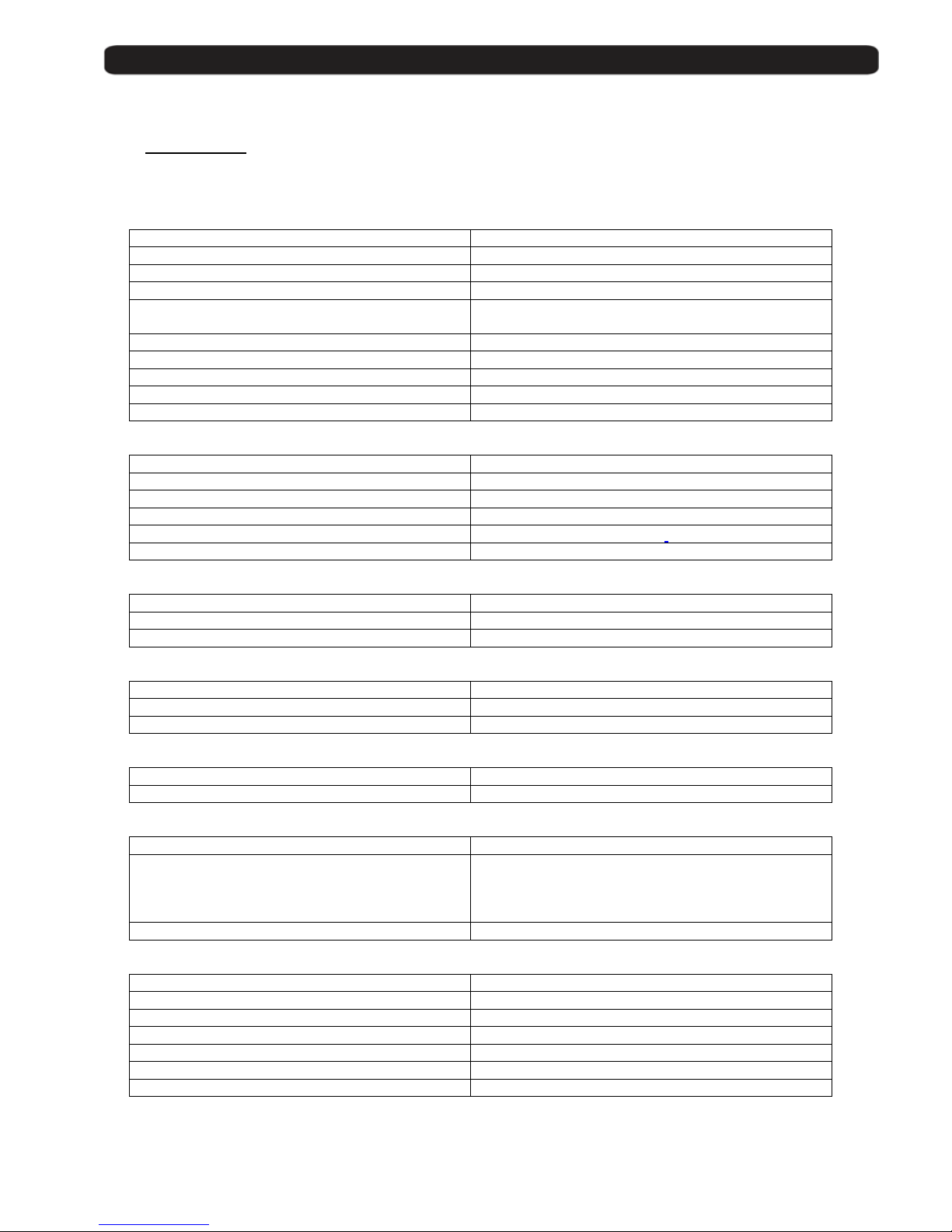
10. The equipment of the receiver
10.1. Technical data
The features of a digital receiver depend only on a part of its hardware / electroni c components.
A big part of the functions are made by the software.
General
Reference MAX IPS100
Code 0720038
Reception range DVB-S + IPTV
Memory places 5000
OSD Language
English, German, French, Spanish, Italian,
Portuguese
Codes for remote control 3
Electronic Program Guide (EPG) Yes
Integrated tele text decoder Yes
Memory for tele text 800 pages
Data connections RS-232
VIDEO
Decoding MPEG-2 & MEPG-1 compatible
Bit Rate Max 15Mbps
Output NTSC/ SECAM / PAL
Screen format 4:3 / 16:9 / Auto
Resolution 720X480 @ 30fps; 720X576 @ 25fps
Connections Scart or RCA
AUDIO
Decoding MPEG-2/MEPG-1 layer 1&2
Sampling rate 32 / 44,1 / 48
Connections Scart, RCA, AC3 coaxial
DEMODULATION
Demodulation QPSK
FEC All supported by DVB-S
Input data ra te 2-45 MS/s
INPUT SIGNAL
Frequency range 950 – 2150 MHz
Input level -60dBm -30dBm
NETWORK
Network Interface 10/100 (RJ45) half/full duplex, auto negotiate
Network Protocols (over IP v4)
UDP/RTP
SAP/SDP
TCP
IGMP v1, v2
Input Max Bitrate 9.4 Mbps
DIVERS
Current supply for active antenna 13/18 VDC – 0/22 KHz 400 mA max
Smart Card 1 CA
Power supply 90~260VAC 50Hz~60Hz
Power consumption Typ. 10 watts / Máx. 20 watts
Operation temperature +5° to +40°
Size (B×T×H) 280×195×60mm
Weight 1.5Kg
 Loading...