

Page 1
1
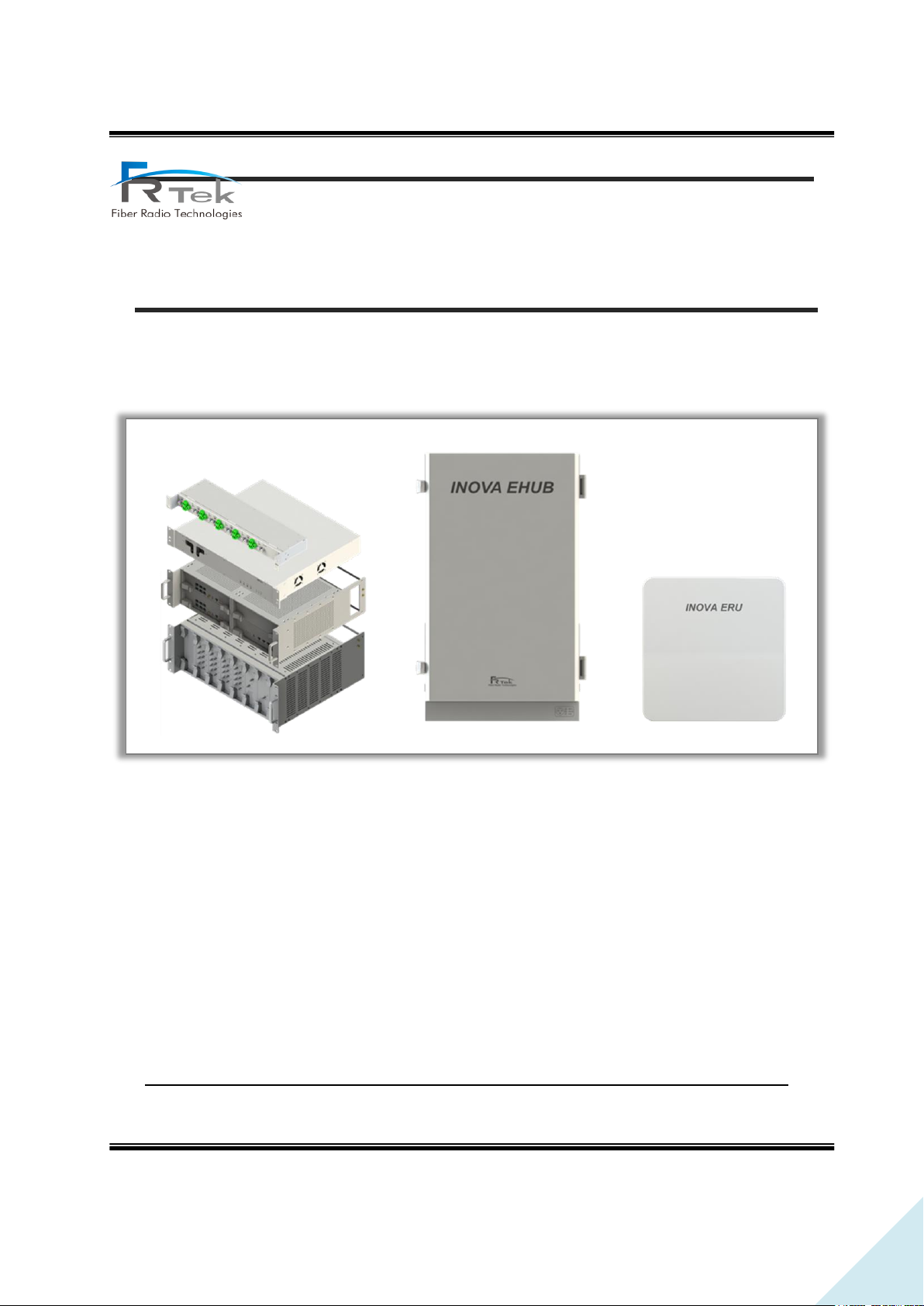
INOVA DAS Bluetooth Manual
Document Reference
Company: Fiber Radio Technologies
Version: Ver 1.0
Document Status: Release 1
Issue Date: 2019. 01.
Department: R&D Group 2
Author Manager: Jun Hyun, Lee
INOVA DAS
Bluetooth Manual
PRIVATE AND CONFIDENTIAL © 2019 FRTEK CO., LTD.
Page 2

2
INOVA DAS Bluetooth Manual
▪ Copyright
The copyright of this manual is from FRTek Co., Ltd.
This manual may not be reproduced, distributed, modified on any form without the consent of FRTek
Co., Ltd
Unauthorized disclosure, distribution, copying or use of the information contained in this document
in whole or in part without authority is strictly prohibited.
▪ Trademark
The trademarks mentioned in this manual are registered trademarks of the respective company.
Please read this service manual before installation and operation. Use the system only in accordance with contents of this manual.
The specification and information regarding the products in this manual are subject to change due to updates to system functionality or
system revision changes without notice. For the latest revision of this manual or for technical inquiries, please contact below :
Company Address : 181 Metro Drive, Suite 580, San Jose, CA 95110
Homepage : http://www.frtek.com
Contact for technical inquires or troubleshooting.
Telephone : 330-622-2911 or 510-390-1939
PRIVATE AND CONFIDENTIAL © 2019 FRTEK CO., LTD.
Page 3
3
INOVA DAS Bluetooth Manual
Version
Issue Date
Details of Revision
Author
Authorizing
Manager
V 1.0
19. 01. 02.
Original
Jun Hyun, Lee
Revision History
This manual is produced by R&D Group 2 Printed in FRTek.
PRIVATE AND CONFIDENTIAL © 2019 FRTEK CO., LTD.
Page 4

4
INOVA DAS Bluetooth Manual
Contents
Chapter 1. Safety & Certification Notice ..................................................................................................... 6
1.1 FCC Warning Statements ...................................................................................................................... 7
1.1.1 FCC Part 15.105 statement ............................................................................................................ 7
1.1.2 FCC Part 15.21 statement .............................................................................................................. 7
1.1.3 FCC 15.203 Antenna requirement 20 ......................
1.1.3 FCC 15.203 Antenna requirement 20 .......................................................................................... 7
Chapter 2. System Overview ......................................................................................................................... 11
2.1 System Overview .................................................................................................................................. 12
2.2 System Network Configuration ......................................................................................................... 12
Chapter 3. System Configuration ................................................................................................................. 14
3.1 EHUB Figure and Configuration ........................................................................................................ 15
3.2 ERU Figure and Configuration ........................................................................................................... 16
Chapter 4. Bluetooth Connection ................................................................................................................ 17
Chapter 5. System Installation ..................................................................................................................... 19
5.1 Tools ........................................................................................................................................................ 20
5.2 EHUB Installation .................................................................................................................................. 22
5.2.1 Product Installation ....................................................................................................................... 22
5.2.2 Ground Cable Connection............................................................................................................ 23
5.2.3 Power Cable Connection .............................................................................................................. 24
5.3 ERU Installation..................................................................................................................................... 24
5.3.1 Product Ceiling Installation ......................................................................................................... 24
5.3.2 Product Wall Installation .............................................................................................................. 25
PRIVATE AND CONFIDENTIAL © 2019 FRTEK CO., LTD.
Page 5

5
INOVA DAS Bluetooth Manual
Figures
Figure 1. Basic Network Configuration. ..................................................................................................... 12
Figure 2. EHUB Configuration. ..................................................................................................................... 15
Figure 3. ERU Configuration. ........................................................................................................................ 16
Figure 4. Device of control panel and printer window. ........
Figure 5. Add device window - 1...............................................
Figure 6. Add device window - 2...............................................
Figure 7. Add device window - 3...............................................
Figure 8. Add device window - 4...............................................
Figure 9. Device manager window. ...........................................
Figure 10. Local GUI connection through Bluetooth. ............
Figure 11. EHUB Required Door Space. ...................................................................................................... 22
Figure 12. EHUB Anchor Bolt Assemble. .................................................................................................... 22
Figure 13. EHUB Wall Installation Assemble. ............................................................................................ 23
Figure 14. EHUB Ground Cable Connection. ............................................................................................. 23
Figure 15. EHUB Power Cable. ..................................................................................................................... 24
Figure 16. ERU Ceiling Installation. ............................................................................................................. 24
Figure 17. ERU Ceiling Installation Assemble............................................................................................ 25
Figure 18. ERU Anchor Bolt Wall Assemble. ............................................................................................. 25
Figure 19. ERU Wall Installation Assemble. ............................................................................................... 26
PRIVATE AND CONFIDENTIAL © 2019 FRTEK CO., LTD.
Page 6

6
INOVA DAS Bluetooth Manual
Chapter 1
Safety & Certification Notice
1.1 FCC & IC Warning Statements
1.2 Certification Notice
PRIVATE AND CONFIDENTIAL © 2019 FRTEK CO., LTD.
Page 7

7
INOVA DAS Bluetooth Manual
Safety & Certification Notice
1.1 FCC Warning Statements
1.1.1 FCC Part 15.105 statement
- This equipment has been tested and found to comply with the limits for a Class A digital device.
- These limits are designed to provide reasonable protection against harmful interference when the
equipment is operated in a commercial environment.
- This equipment generates, uses, and can radiate radio frequency energy and, if not installed and
used in accordance with the instruction manual, may cause harmful interference to radio
communications.
- Operation of this equipment in a residential area is likely to cause harmful interference in which
case the user will be required to correct the interference at his own expense.
1.1.2 FCC Part 15.21 statement
- Any changes or modifications not expressly approved by the party responsible for compliance could
void the user's authority to operate this equipment
1.1.3 Healthy and SAFETY warning
- This system can be operated by approved operator only and operator should observe the warning
sentence of operating manual.
- The operator who can install, operate or handle related system service should acquaint themselves
this manual.
- Control and configuration of this system should be set up according to purpose of use (Refer to
the manufacturer’s product information), it has to be satisfied prescribed request items.
- Operator should turn off the main power switch before installing system, maintenance and related
works.
- If this product is disassembled intentionally, it can bring electric shock, breakdown, malfunction
PRIVATE AND CONFIDENTIAL © 2019 FRTEK CO., LTD.
Page 8
8
INOVA DAS Bluetooth Manual
and static with losing life and property. Do not disassemble, repair and modify product.
- This system cover should be (door) securely fastened in open position, e.g. by tying it up, at
outdoor work in order to prevent door from slamming due to wind causing bodily harm or damage.
- Due to power dissipation, the remote unit may reach a very high temperature. Do not operate this
equipment on or close to flammable materials. Use caution when servicing the unit.
- Use this equipment only for the purpose specified by the manufacturer. Do not carry out any
modifications or fit any spare parts, which are not sold or recommended by the manufacturer. This
could cause fires, electric shock or other injuries.
- Read and obey all the warning labels attached to the unit. Make sure that all warning labels are
kept in a legible condition.
- It is the responsibility of the network provider to implement prevention measures to avoid health
hazards associated with radiation from the antenna(s) connected to the unit.
- Do not use any solvents, chemicals, or cleaning solutions containing alcohol, ammonia, or abrasives.
- Although the remote unit is internally protected against overvoltage, it is strongly recommended
to ground (earth) the antenna cables close to the repeater’s antenna connectors for protection
against atmospheric discharge.
Warning
Obey all general and regional installation and safety regulations relating to work on high voltage
installations, as well as regulations covering correct use of tools and personal protective equipment.
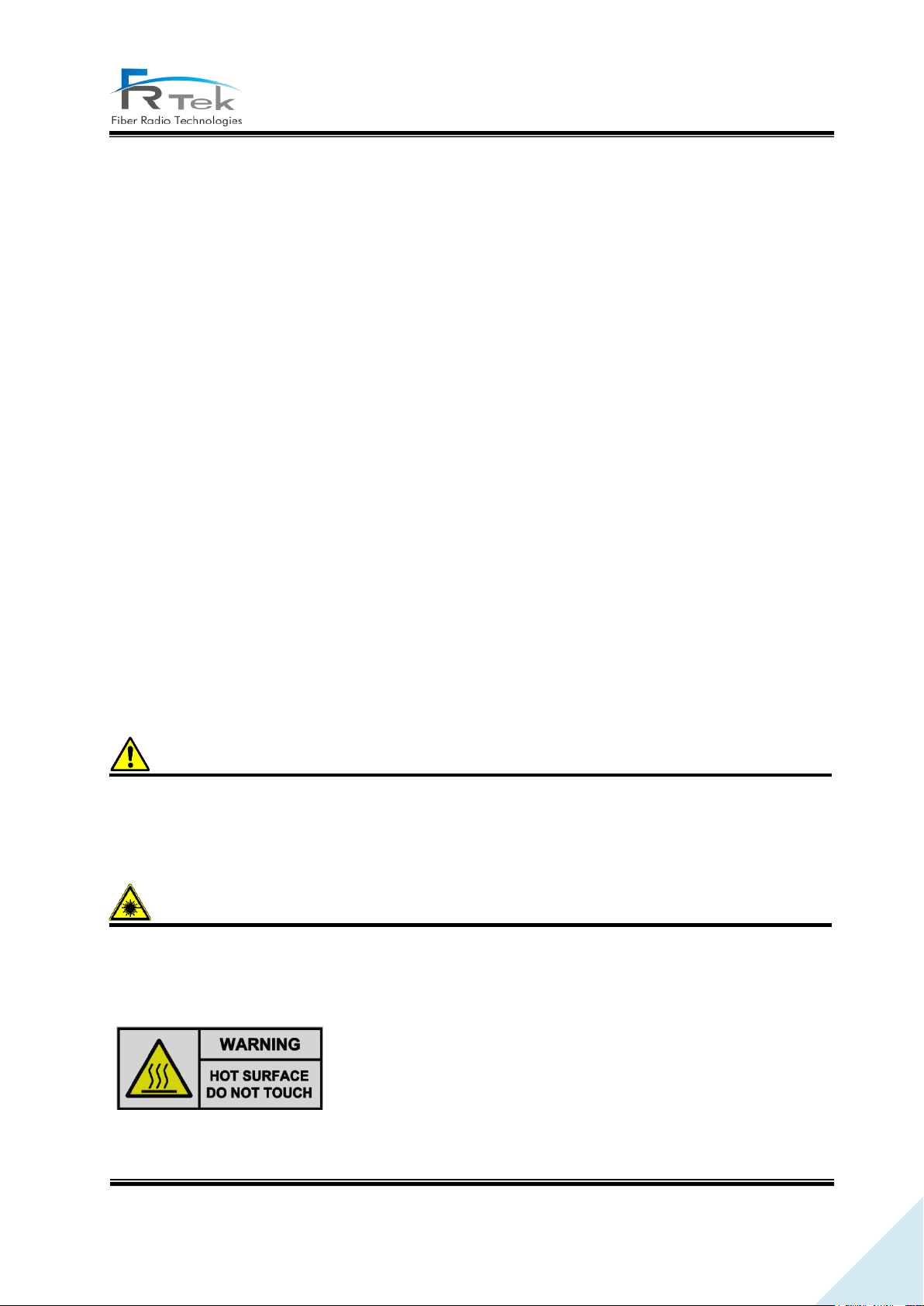
Warning
Laser radiation! Do not stare into the beam; do not view it directly or with optical instruments.
Please be informed that the temperature of the surface is too high. Please
be careful. The label is attached to the front of the equipment and the
PSU (Power Supply Unit).
PRIVATE AND CONFIDENTIAL © 2019 FRTEK CO., LTD.
Page 9

9
INOVA DAS Bluetooth Manual
To ensure compliance with FCC and ISED RF exposure requirements this device must be installed
to provide a minimum of 20cm between the antenna and people.
Pour garantir la conformité aux exigences d'exposition RF de la FCC et d' ISED Canada, cet appareil
doit être installé de manière à laisser un minimum de 20 cm entre l'antenne et les personnes.
This device complies with Industry Canada licence-exempt RSS standard(s).
Operation is subject to the following two conditions: (1) this device may not cause interference,
and (2) this device must accept any interference, including interference that may cause undesired
operation of the device.
Le présent appareil est conforme aux CNR d'Industrie Canada applicables aux appareils radio
exempts de licence.
L'exploitation est autorisée aux deux conditions suivantes : (1) l'appareil ne doit pas produire de
brouillage, et (2) l'utilisateur de l'appareil doit accepter tout brouillage radioélectrique subi, même
si le brouillage est susceptible d'en compromettre le fonctionnement.”
• [FCC] RF/IC Exposure Statements
• [IC] RSS-GEN, Sec. 8.4
PRIVATE AND CONFIDENTIAL © 2019 FRTEK CO., LTD.
Page 10

10
INOVA DAS Bluetooth Manual
Note
RESTRICTED ACCESS LOCATION: location for equipment where both of the following apply:
- access can only be gained by SERVICE PERSIONS or by USERS who have been instructed about
the reason for the restrictions applied to the location and about any precautions that shall be
taken; and
- access is through the use of a TOOL or lock and key, or other means of security, and is controlled
by authority responsible for the location
PRIVATE AND CONFIDENTIAL © 2019 FRTEK CO., LTD.
Page 11

11
INOVA DAS Bluetooth Manual
Chapter 2
System Overview
2.1 System Overview
2.2 System Network
PRIVATE AND CONFIDENTIAL © 2019 FRTEK CO., LTD.
Page 12
12
INOVA DAS Bluetooth Manual
System Overview
2.1 System Overview
INOVA DAS is a system that can provide high quality telecommunication quality and data
telecommunication service both in-building Also, this system is a DAS (Distributed Antenna System)
system, a digital system capable of accommodating a plurality of frequency bands, available for public
and private facilities.
INOVA DAS helps improve poor telecommunication in-building wireless environments. This system
provides telecommunication service to every corner of the building, and allows the user to use
telecommunication service regardless of the location. Also, INOVA DAS supports worldwide
telecommunication standards and public interface protocols.
2.2 System Network Configuration
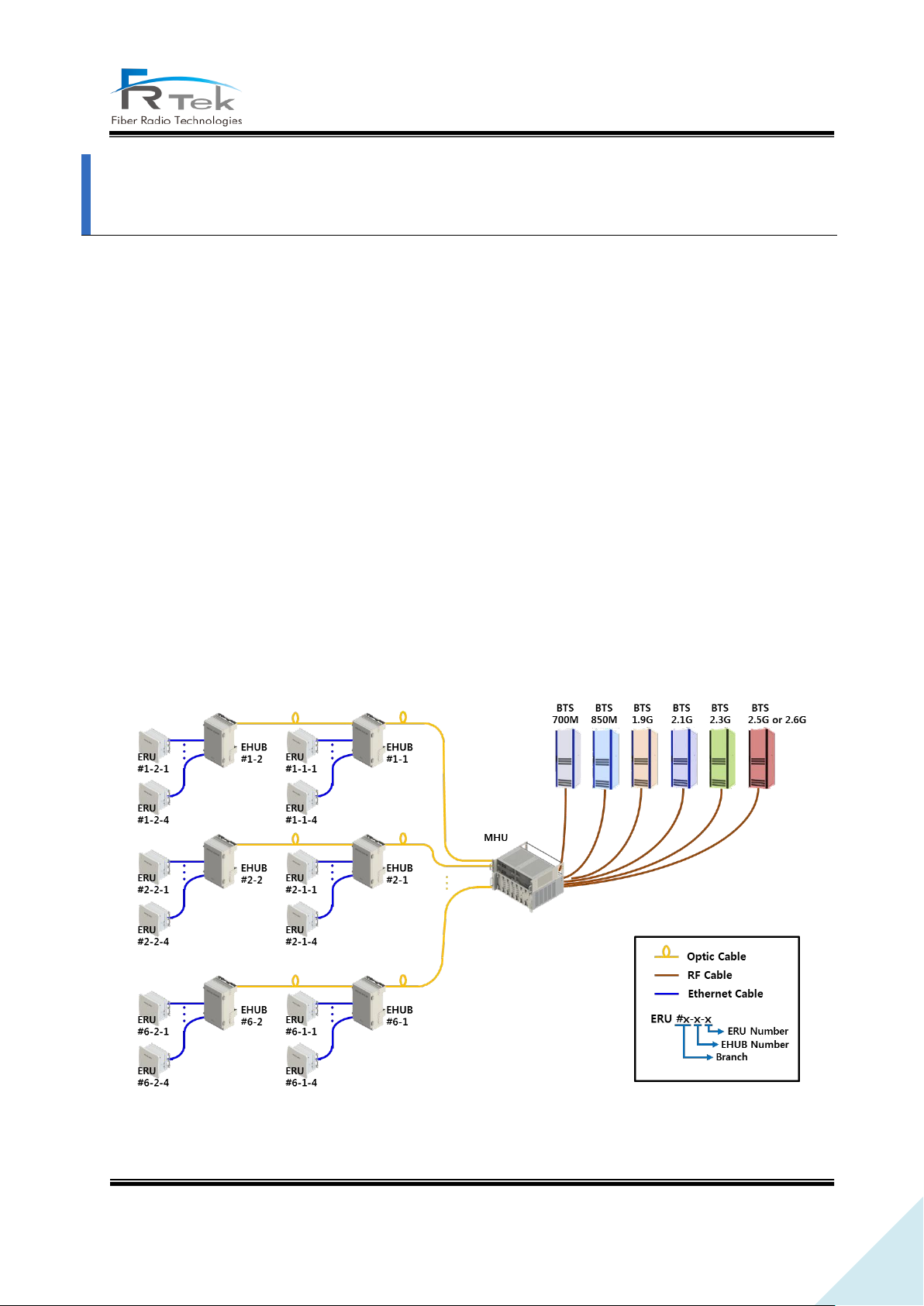
INOVA DAS basic network configuration for EHUB and ERU is as below picture.
Figure 1. Basic Network Configuration.
PRIVATE AND CONFIDENTIAL © 2019 FRTEK CO., LTD.
Page 13
13
INOVA DAS Bluetooth Manual
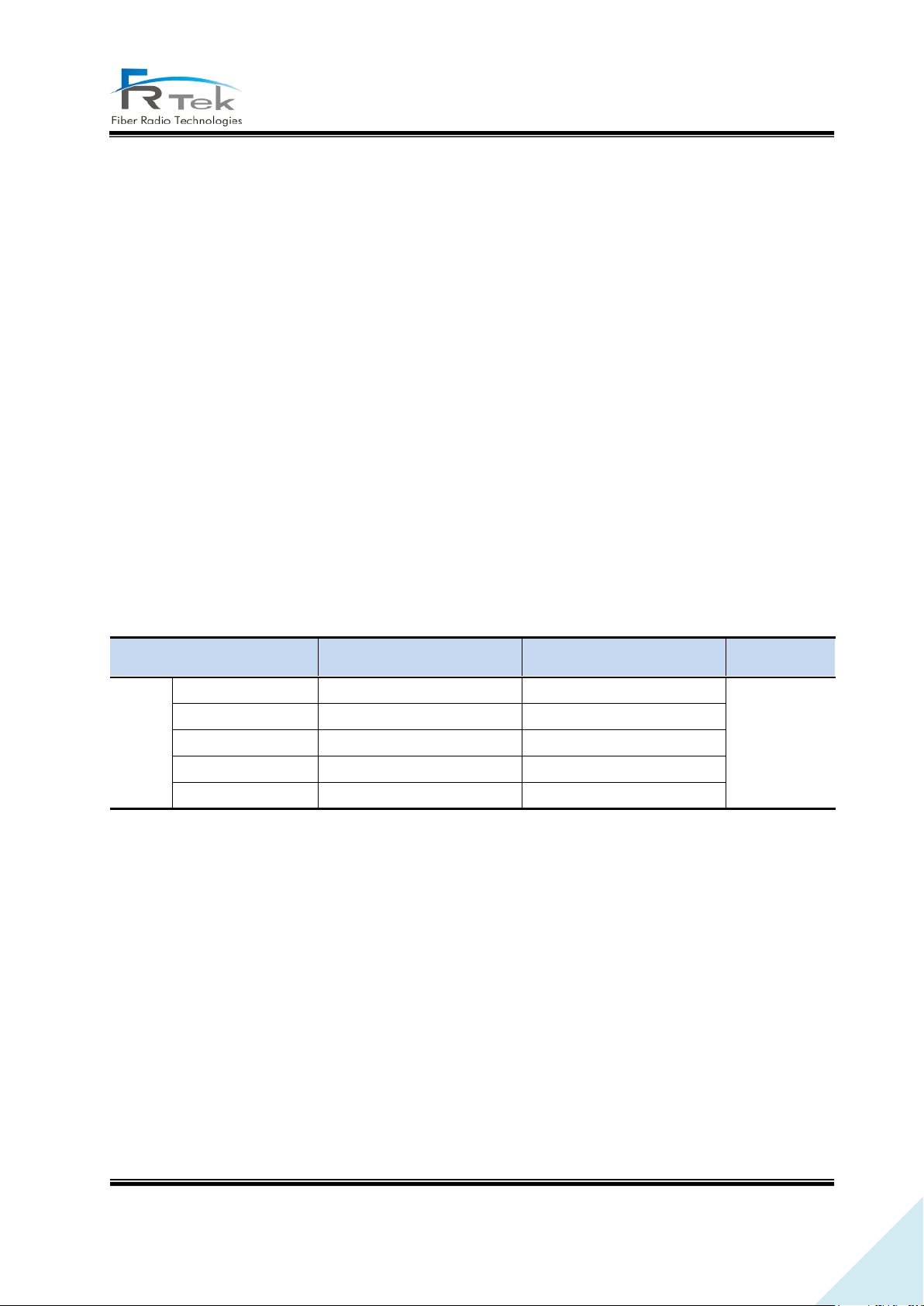
Service Band
FCC ID
IC ID
Remark
ERFU(s)
700 & 850 MHz
2AFEG-700-850-21
20471-70085021IC
1.9 GHz
2AFEG-1900-24
20471-190024IC
2.1 GHz
2AFEG-2100-24
20471-210024IC
2.3 & 2.5 GHz
2AFEG-23-25-21-24
N/A
2.3 & 2.6 GHz
N/A
20471-23262124IC
MHU is connected to the base station with wired RF cable, and connected to the lower EHUB
equipment with optic cable. EHUB is connected to ERU with wired Cat.7 cable, optic signal is converted
into Ethernet signal and transmitted to ERU or the Ethernet signal is converted into optic signal and
transmitted to MHU. Each branch of the MHU can each be connected cascade with 2 EHUBs for
operation, EHUB can be connected up to total of 4 ERUs.
Used Abbreviations
MHU: Master Hub Unit
DAS: Distributed Antenna System
EHUB: Ethernet HUB unit
ERU: Ethernet Remote Unit
ERFU: ERU RF Unit
The EHUB has no other transmitters except for Bluetooth transmitter. The ERU has Bluetooth
transmitter and can also be installed the following repeater modules (ERFUs) approved by FCC/IC below
to extend wireless service for in-building and outdoor areas.
Bluetooth transmitter into EHUB and ERU device is just operated for status monitoring and control
parameters from server, software for DAS download and signal quality measurement.
There is no simultaneous transmission between Bluetooth transmitter and the repeater modules
within ERU device because ‘the cellular repeater signal on downlink side is NOT transmitted through
Bluetooth transmitter’.
The Bluetooth specification is as follows.
- Bluetooth V 2.0 / Class 1
- Output power: 5 dBm
- Size: 27.1 X 14.8 X 2.6mm (Shield case)
- Operating Temperature: -40°c ~ +85°c
PRIVATE AND CONFIDENTIAL © 2019 FRTEK CO., LTD.
Page 14

14
INOVA DAS Bluetooth Manual
Chapter 3
System Configuration
3.1 EHUB Figure and Configuration
3.2 ERU Figure and Configuration
PRIVATE AND CONFIDENTIAL © 2019 FRTEK CO., LTD.
Page 15
15
INOVA DAS Bluetooth Manual
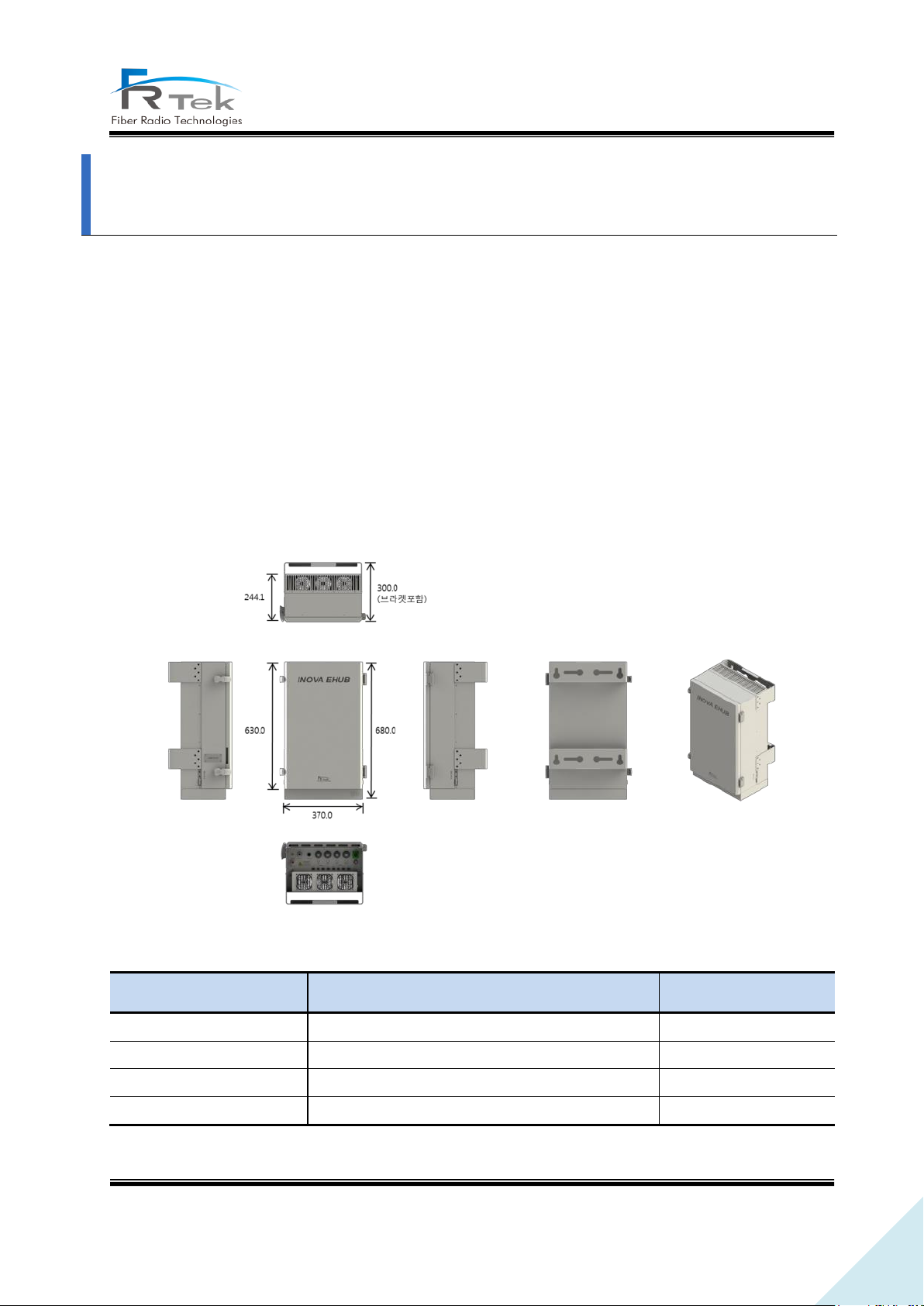
Item
Content
Remark
Size
370 * 680 * 300 (W * H * D)
Including bracket
Weight
Approx. 35kg
Input power
AC 120V (60Hz)
Environment
In-building type
System Configuration
3.1 EHUB Figure and Configuration
EHUB is a structure that can be used in-building, enclosure is minimized considering installation
space and operator's convenience. EHUB converts optic signal to Ethernet signal or converts Ethernet
signal to optic signal
EHUB functions can be simply described as the following.
- Function to convert optic signal into RF signal, amplify and service through antenna. (Downlink)
- Function to convert RF signal into digital signal, and transmit to upper equipment. (Uplink)
- 700MHz, 850MHz, 1.9GHz, 2.1GHz, 2.3GHz, 2.5GHz or 2.6GHz service support.
Below picture shows the EHUB figure.
Figure 2. EHUB Configuration.
PRIVATE AND CONFIDENTIAL © 2019 FRTEK CO., LTD.
Page 16
16
INOVA DAS Bluetooth Manual
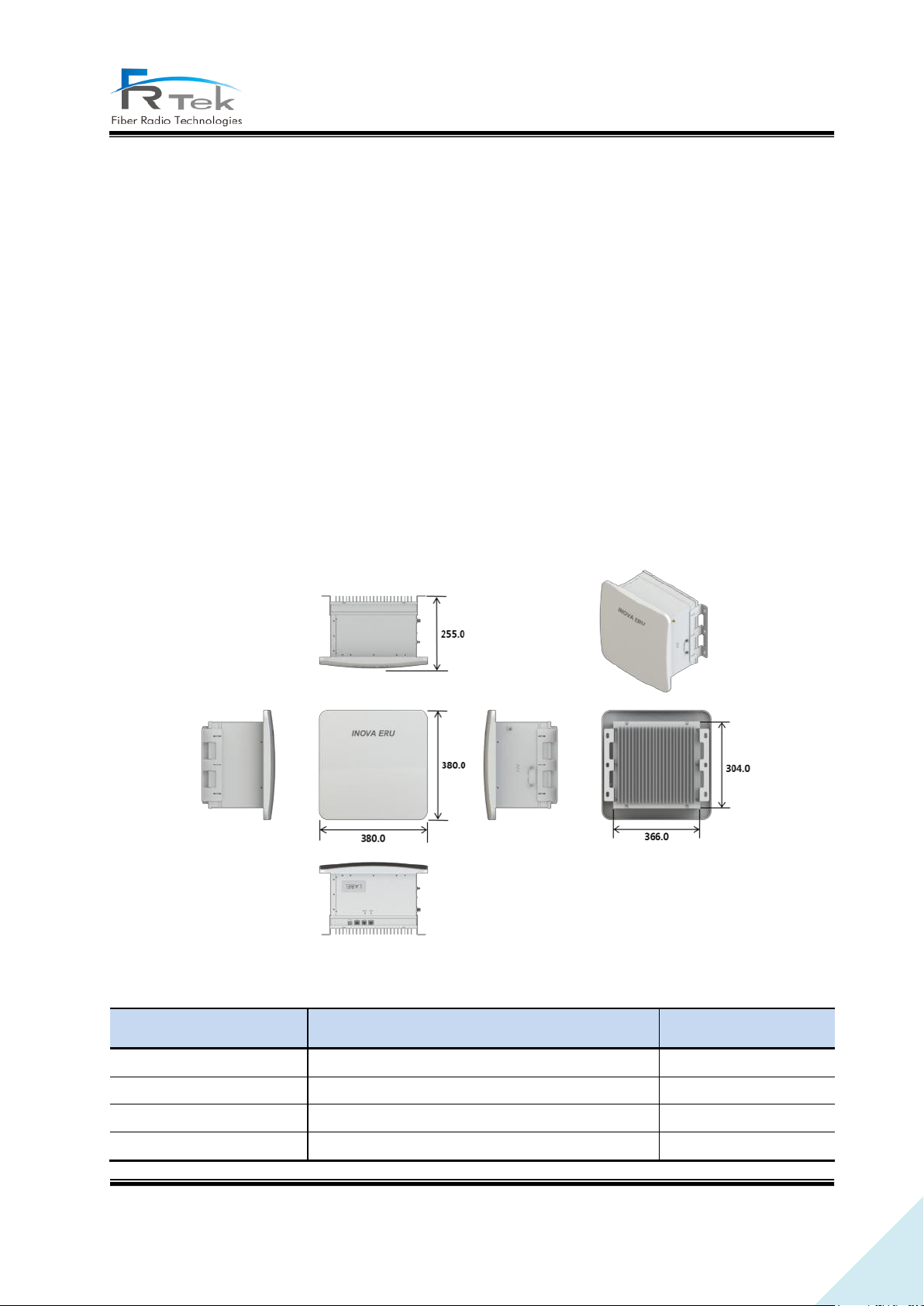
Item
Content
Remark
Size
380 * 380 * 255 (W * H * D)
Including bracket
Weight
Approx. 19kg
Input power
PoE++
No separate PSU
Environment
In-building type
3.2 ERU Figure and Configuration
ERU is a structure that can be used in-building, enclosure is configured as ceiling fixed type.
ERU is configured with ERPSU, ERDTU, ERCPU, 4 ERFUs (ERU RF unit) and can support up to 6
frequency bands.
ERU functions can be explained as the following.
- Converts Ethernet signal to RF signal, amplifies and services through antenna. (Downlink)
- Converts RF signal to Ethernet signal, transmits to upper equipment. (Uplink)
- 700MHz, 850MHz, 1.9GHz, 2.1GHz, 2.3GHz, 2.5GHz or 2.6GHz service support.
- Receives power supply from EHUB through Cat.7 cable. (No separate PSU)
- Delay control function through Time Advance function.
- 1Gbps Ethernet port implementation for various use.
Below picture shows the ERU figure.
Figure 3. ERU Configuration.
PRIVATE AND CONFIDENTIAL © 2019 FRTEK CO., LTD.
Page 17

17
INOVA DAS Bluetooth Manual
Chapter 4
Bluetooth Connection
PRIVATE AND CONFIDENTIAL © 2019 FRTEK CO., LTD.
Page 18

18
INOVA DAS Bluetooth Manual
Bluetooth Connection (GUI)
INOVA DAS is implemented with Bluetooth function for user's convenience.
The antenna is permanently connected at the factory and is shipped with the INOVA DAS.
GUI access is available remotely through Bluetooth.
Turn on the ROU power. Then go to the control panel - hardware and sound - device and printer
window, click right button of the mouse and click the add device button.
In the list of devices to be added, the Bluetooth module available for connection will be searched.
As the picture above, select the I-STORM module from the list. The Bluetooth name can be changed
by setting, if the device cannot be searched, recheck the connection between the Bluetooth and the
Main Board.
Click on 'enter the device connection code' item. Then input the device connection code.
(Default : 1234)
When the device connection code has been correctly input, window will show as the above picture.
When the window appears, click the 'close' button.
Open the Device manager window, and check if 2 new Comports are added in the PC. Normally it
would take 10~15 seconds to confirm. Also, the Comport number will be set randomly.
Access the Local GUI, and check the Comport assigned to the Bluetooth. Select the faster number of
the Comport number and access to GUI. (If there are COM23 and COM24, then select COM23.)
PRIVATE AND CONFIDENTIAL © 2019 FRTEK CO., LTD.
Page 19

19
INOVA DAS Bluetooth Manual
Chapter 5
System Installation
5.1 Tools
5.2 EHUB Installation
5.3 ERU Installation
PRIVATE AND CONFIDENTIAL © 2019 FRTEK CO., LTD.
Page 20
20
INOVA DAS Bluetooth Manual
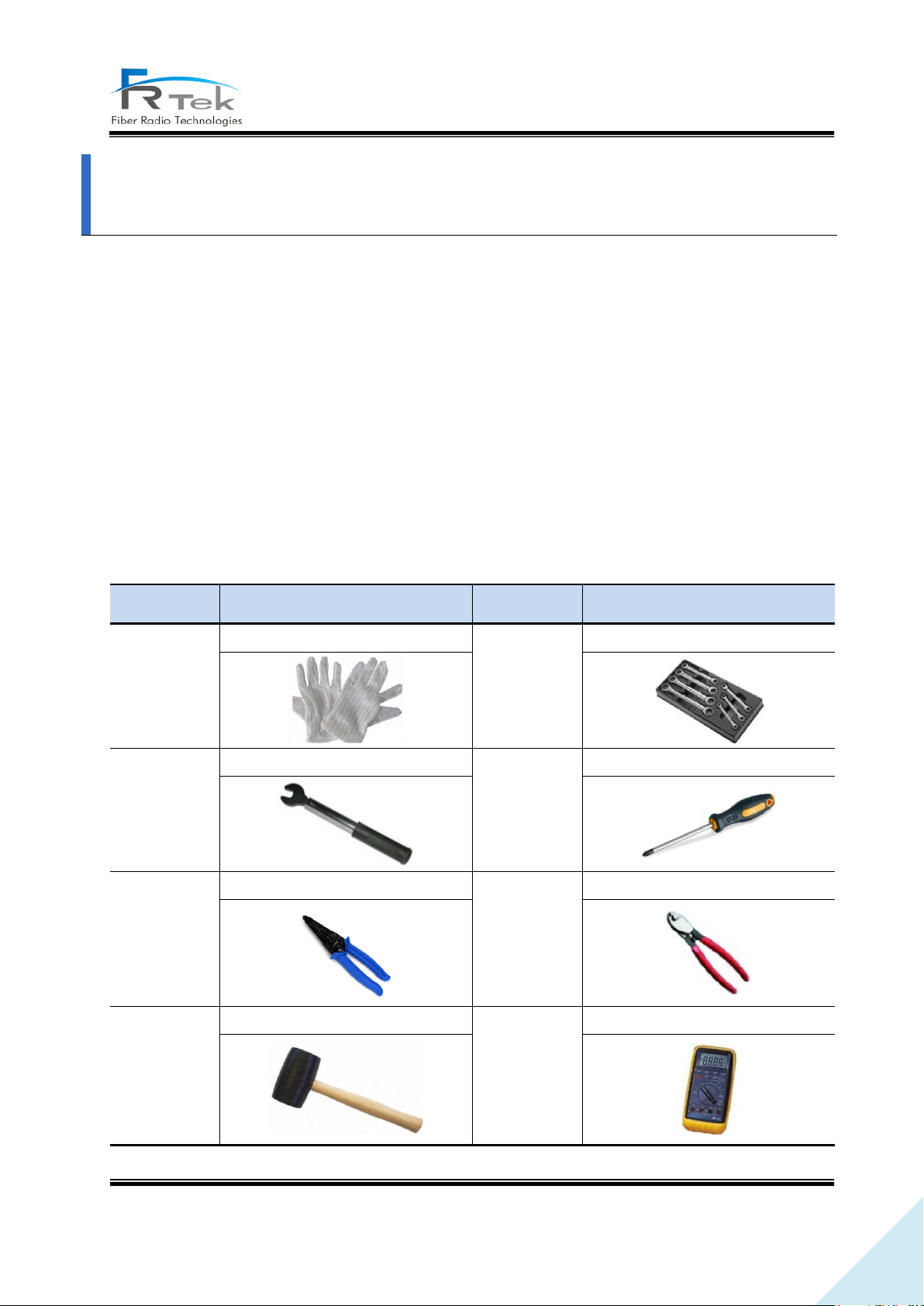
No.
Tools
No.
Tools
1
ESD Gloves
2
Torque Wrench Set
3
33mm Torque Wrench
4
+, 3Φ Screw Driver
5
Wire Stripper
6
Wire Cutter
7
Rubber Mallet
8
Digital Multi-meter
System Installation
“This manual is to provide product installation method and product information to the user operating
the INOVA DAS system, the repeater manager who uses the operation manual needs to require
professional knowledge and experience on construction operation of repeater systems. “
This chapter explains how to connect power cables and how to install each equipment and optic
cable. It specifically describes MHU(MWDM, MPSU, MDRU, MBIU), EHUB, ERU installation method and
cable connecting method.
5.1 Tools
Tools needed for installation are as below.
PRIVATE AND CONFIDENTIAL © 2019 FRTEK CO., LTD.
Page 21
21
INOVA DAS Bluetooth Manual
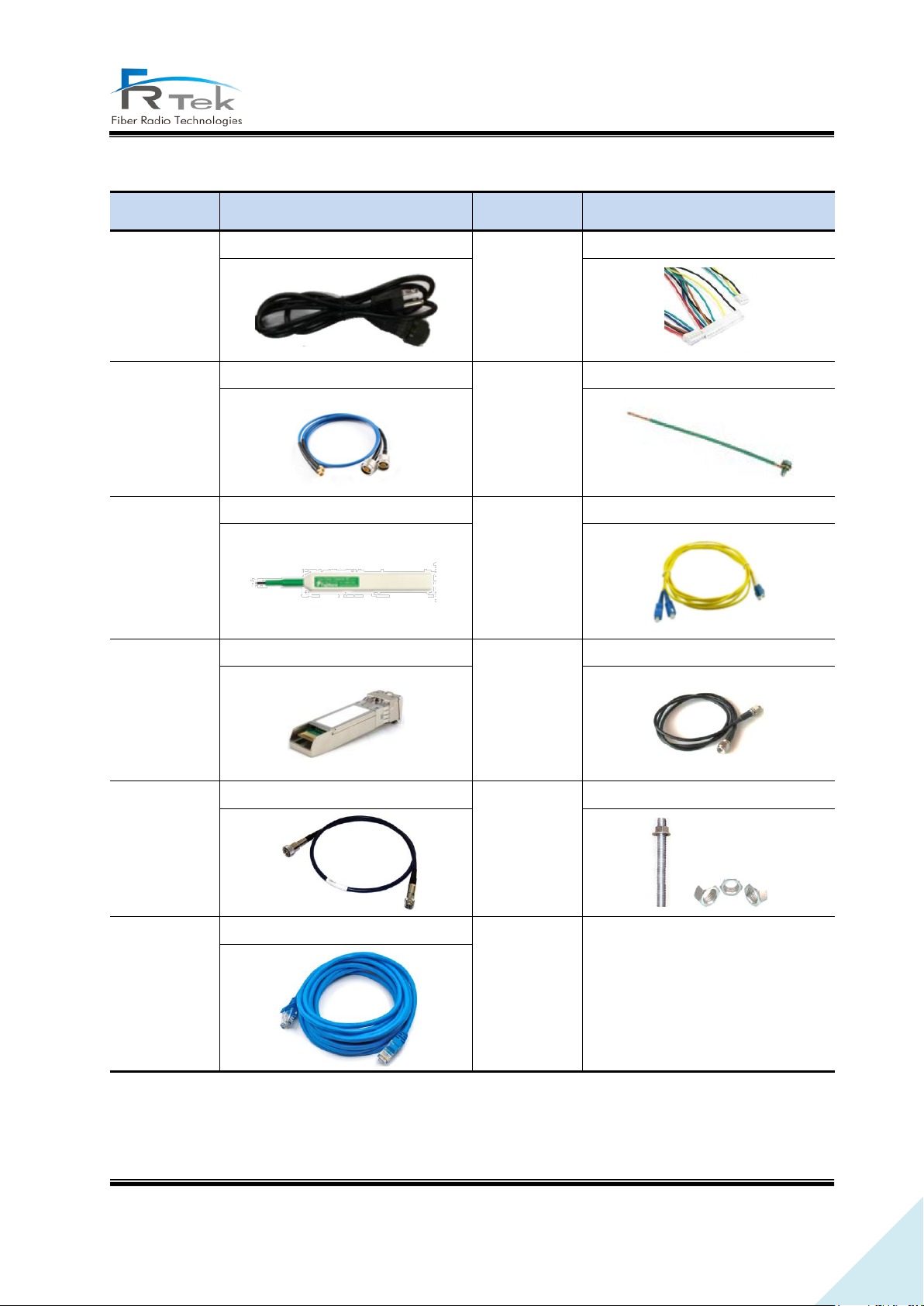
No.
Tools
No.
Tools
1
AC Cable
2
INOVA Harness Cable
3
INOVA RF Cable
4
Ground Wire Line
5
Optic Connector Cleaner
6
LC-type Optic Fiber
7
Optic Module
8
SMA Cable
9
ANT RF Cable
10
Bracket Bolt/Nut
11
UTP Cable
Other cables and components needed for installation are as below.
PRIVATE AND CONFIDENTIAL © 2019 FRTEK CO., LTD.
Page 22
22
INOVA DAS Bluetooth Manual
5.2 EHUB Installation
5.2.1 Product Installation
EHUB is configured to one enclosure, can be installed to wall through mounting bracket
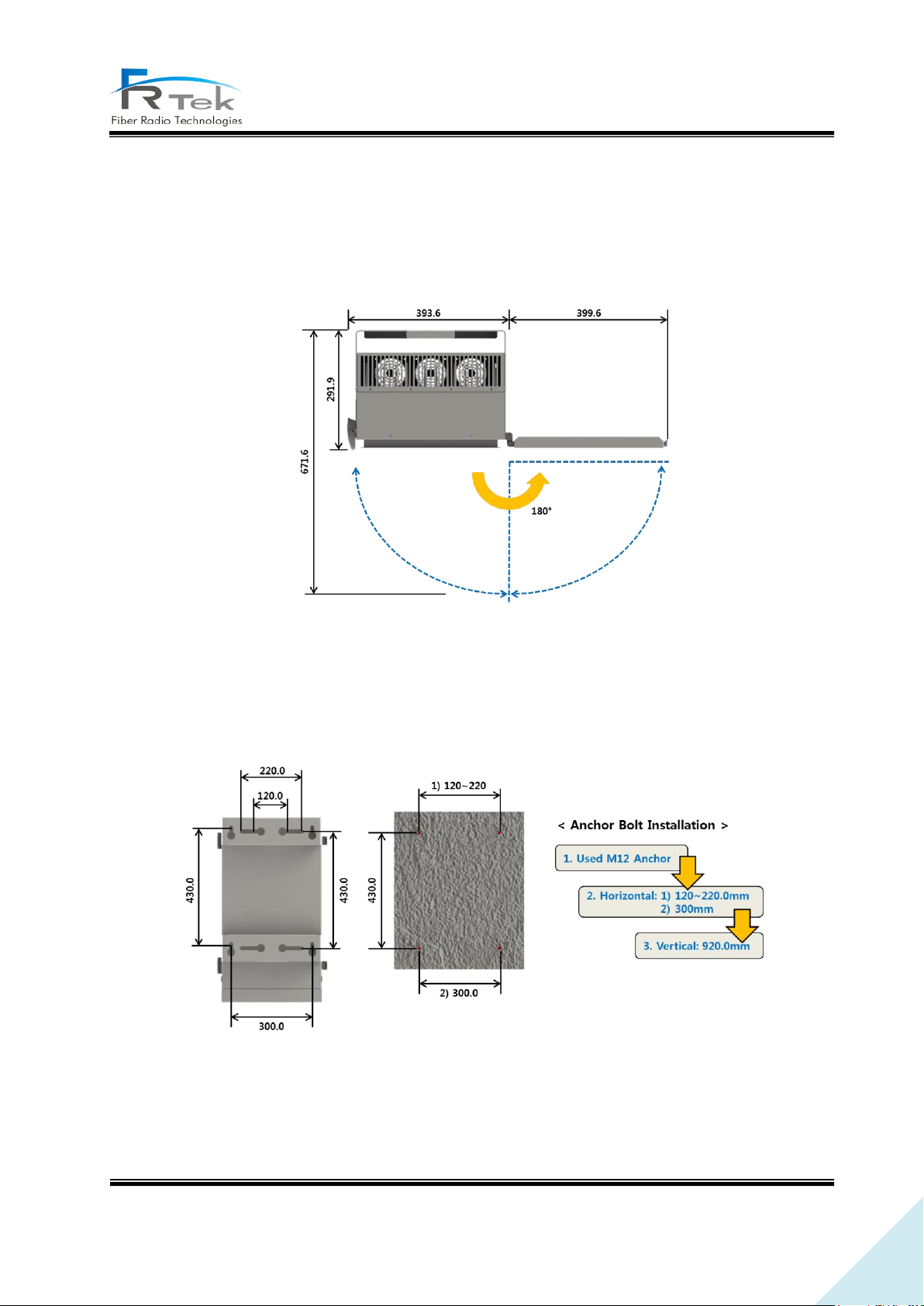
Figure 4. EHUB Required Door Space.
Since EHUB is configured with door, for ease of process, 400mm space on the equipment right side
must be secured, and more than 672mm installation space is needed from installation wall.
Figure 5. EHUB Anchor Bolt Assemble.
Above figure is a simple drawing for the wall face. For wall installation of EHUB, use anchor bolt to
fix.
PRIVATE AND CONFIDENTIAL © 2019 FRTEK CO., LTD.
Page 23
23
INOVA DAS Bluetooth Manual
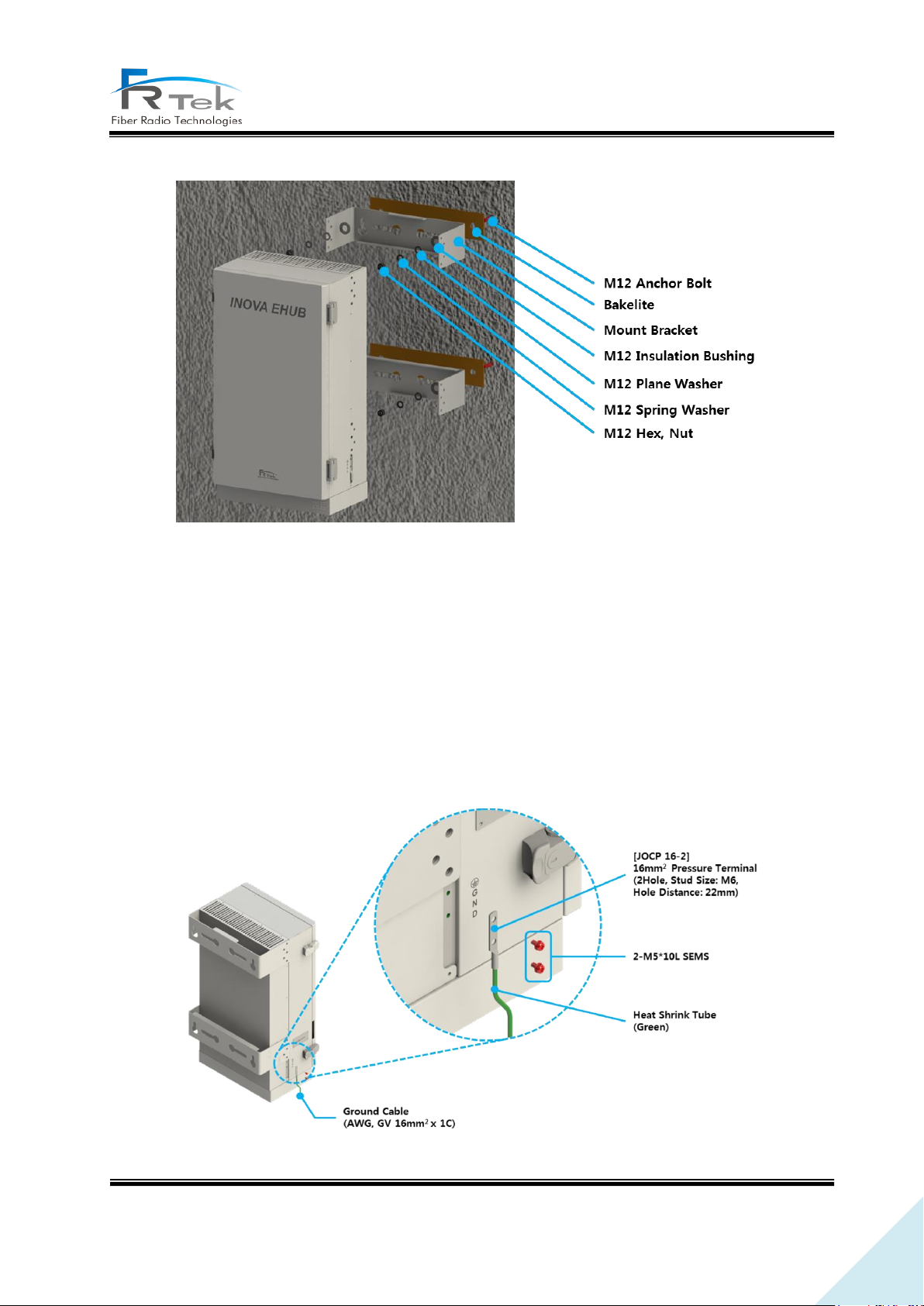
Figure 6. EHUB Wall Installation Assemble.
Above figure is the assemble drawing of EHUB wall installation. The assemble orders are as below.
1. Insert bakelite to M16 Anchor Bolt, and locate EHUB according to M16 Anchor Bolt location.
2. Insert M16 Insulation Bushing, M16 Plane Washer, and M16 Spring Washer.
3. Tighten M16 Hex, Nut using spanner.
5.2.2 Ground Cable Connection
Figure 7. EHUB Ground Cable Connection.
PRIVATE AND CONFIDENTIAL © 2019 FRTEK CO., LTD.
Page 24
24
INOVA DAS Bluetooth Manual
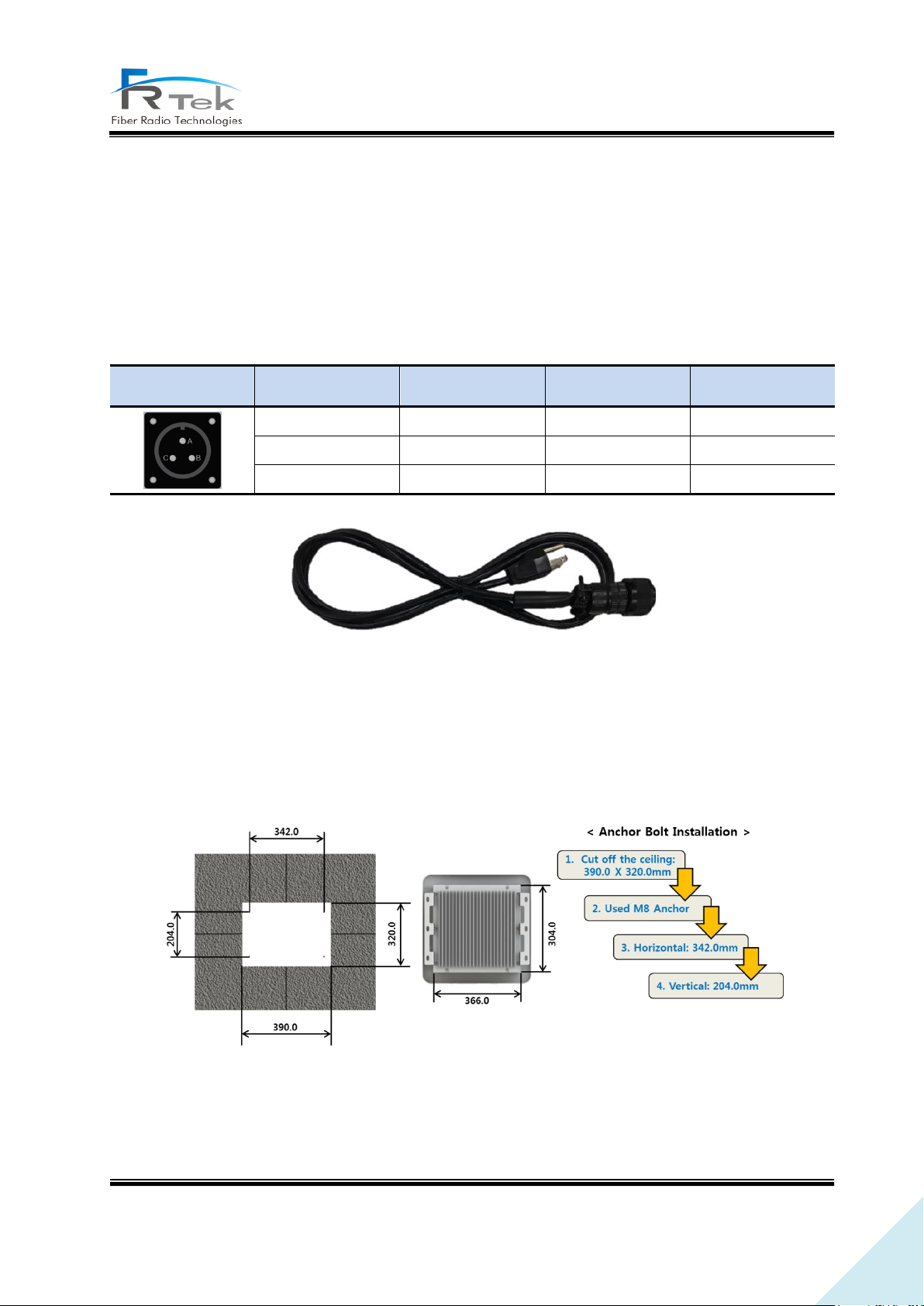
MS Connector
Pin Name
Name
Description
Length(mm)
A
AC_H
AC Hot
1800
B
AC-N
AC Neutral
1800
C
F.G
Frame Ground
1800
Enclosure grounding and building grounding is connected in order to stable and protect EHUB
equipment from electrical danger.
5.2.3 Power Cable Connection
EHUB uses AC120V(60Hz) as main power, and power cable includes plug. Below is the pin specification
of AC power cable, when connecting power, polarity of each pin must be checked.
5.3 ERU Installation
5.3.1 Product Ceiling Installation
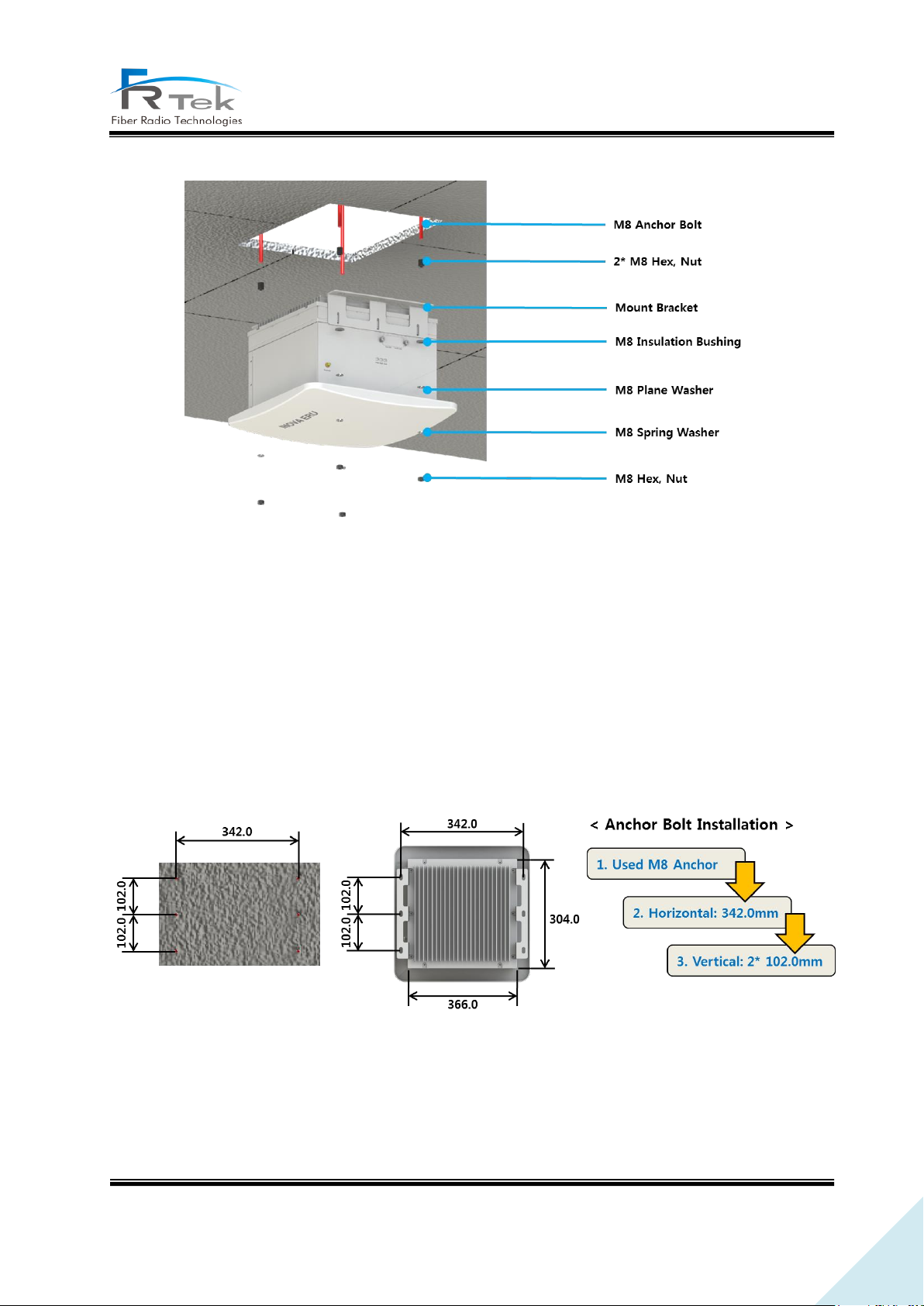
Figure 9. ERU Ceiling Installation.
Figure 8. EHUB Power Cable.
ERU can be installed on the ceiling through mount bracket. Above figure is a simplified drawing of
the ceiling. Us anchor bolt to fix ERU for ceiling installation.
PRIVATE AND CONFIDENTIAL © 2019 FRTEK CO., LTD.
Page 25
25
INOVA DAS Bluetooth Manual
Figure 10. ERU Ceiling Installation Assemble.
Above figure is the assemble drawing of EHUB ceiling installation. The assemble orders are as below.
1. Insert bakelite to M8 Anchor Bolt, and locate ERU according to M8 Anchor Bolt location.
2. Insert M8 Insulation Bushing, M8 Plane Washer, and M8 Spring Washer.
3. Tighten M8 Hex, Nut using spanner.
5.3.2 Product Wall Installation
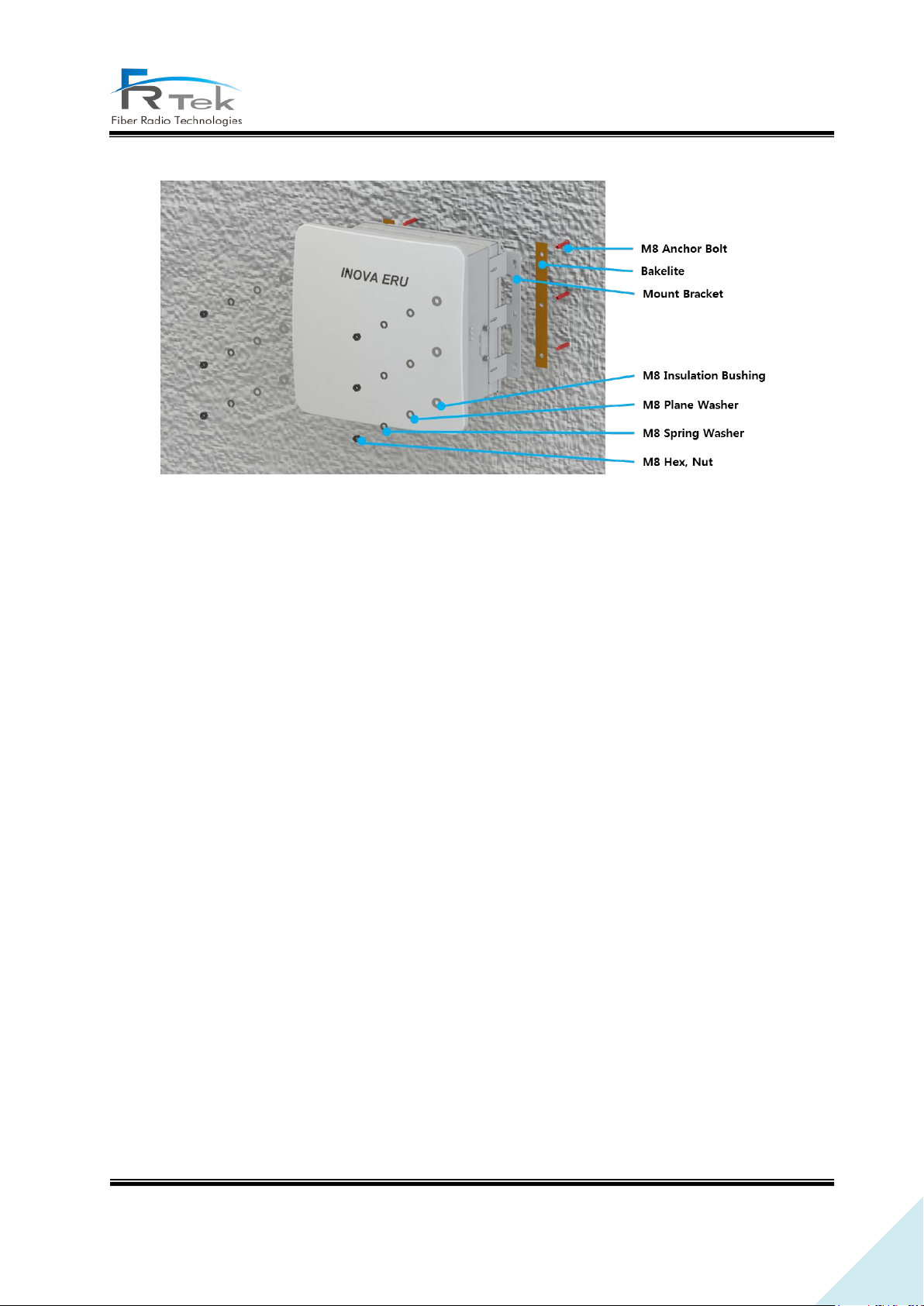
Figure 11. ERU Anchor Bolt Wall Assemble.
ERU can be installed on the wall through mount bracket. Above figure is a simplified drawing of the
wall. Us anchor bolt to fix ERU for wall installation.
PRIVATE AND CONFIDENTIAL © 2019 FRTEK CO., LTD.
Page 26
26
INOVA DAS Bluetooth Manual
Figure 12. ERU Wall Installation Assemble.
Above figure is the assemble drawing of ERU wall installation. The assemble orders are as below.
1. Insert bakelite to M8 Anchor Bolt, and locate ERU according to M8 Anchor Bolt location.
2. Insert M8 Insulation Bushing, M8 Plane Washer, and M8 Spring Washer.
3. Tighten M8 Hex, Nut using spanner.
PRIVATE AND CONFIDENTIAL © 2019 FRTEK CO., LTD.
Page 27
27
INOVA DAS Bluetooth Manual
INOVA DAS
Bluetooth Manual
Without any authorization of FRTek Co., Ltd., the disclosure, distribution,
reproduction and reuse of all or part of the information in this manual to the
.
Fiber Radio Technologies CO., LTD.
All rights reserved.
- Copyright ⓒ FRTek Co., Ltd. All rights reserved.
-
3rd party are strictly prohibited
PRIVATE AND CONFIDENTIAL © 2019 FRTEK CO., LTD.
 Loading...