

Page 1
user guide
940H Student Microphone
940C Microphone Charger
pro
Page 2

Page 3

Page 4

Contents
Introduction . . . . . . . . . . . . . . . . . . . . . . . . . . . . . . . . . . . . . . . . . . . . . . . . . . . . . . . . . . . . . .1
Chapter 1 940H Microphone and 940C Charger
. . . . . . . . . . . . . . . . . . . . . . . . . . . . . .2
Chapter 2
Charger Setup. . . . . . . . . . . . . . . . . . . . . . . . . . . . . . . . . . . . . . . . . . . . . . . . . .3
Chapter 3 Install Batteries
. . . . . . . . . . . . . . . . . . . . . . . . . . . . . . . . . . . . . . . . . . . . . . . . .4
Chapter 4 Charge Microphone
. . . . . . . . . . . . . . . . . . . . . . . . . . . . . . . . . . . . . . . . . . . . . 5
Chapter 5 Using Microphone
. . . . . . . . . . . . . . . . . . . . . . . . . . . . . . . . . . . . . . . . . . . . . .6
Chapter 6
Troubleshooting and Product Specifications. . . . . . . . . . . . . . . . . . . . . . . . . . 7
Chapter 7 Regulatory
. . . . . . . . . . . . . . . . . . . . . . . . . . . . . . . . . . . . . . . . . . . . . . . . . . . . . .8 - 9
Page 5

Introduction
Congratulations on the purchase of your 940H Student Microphone. Using a student
microphone is a great way to encourage student participation. Your 940H Student
Microphone should only be used with your FrontRow Pro or FrontRow Pro Digital
classroom sound system.
Read this manual carefully to become familiar with your 940H Student Microphone
to get the most out of your system.
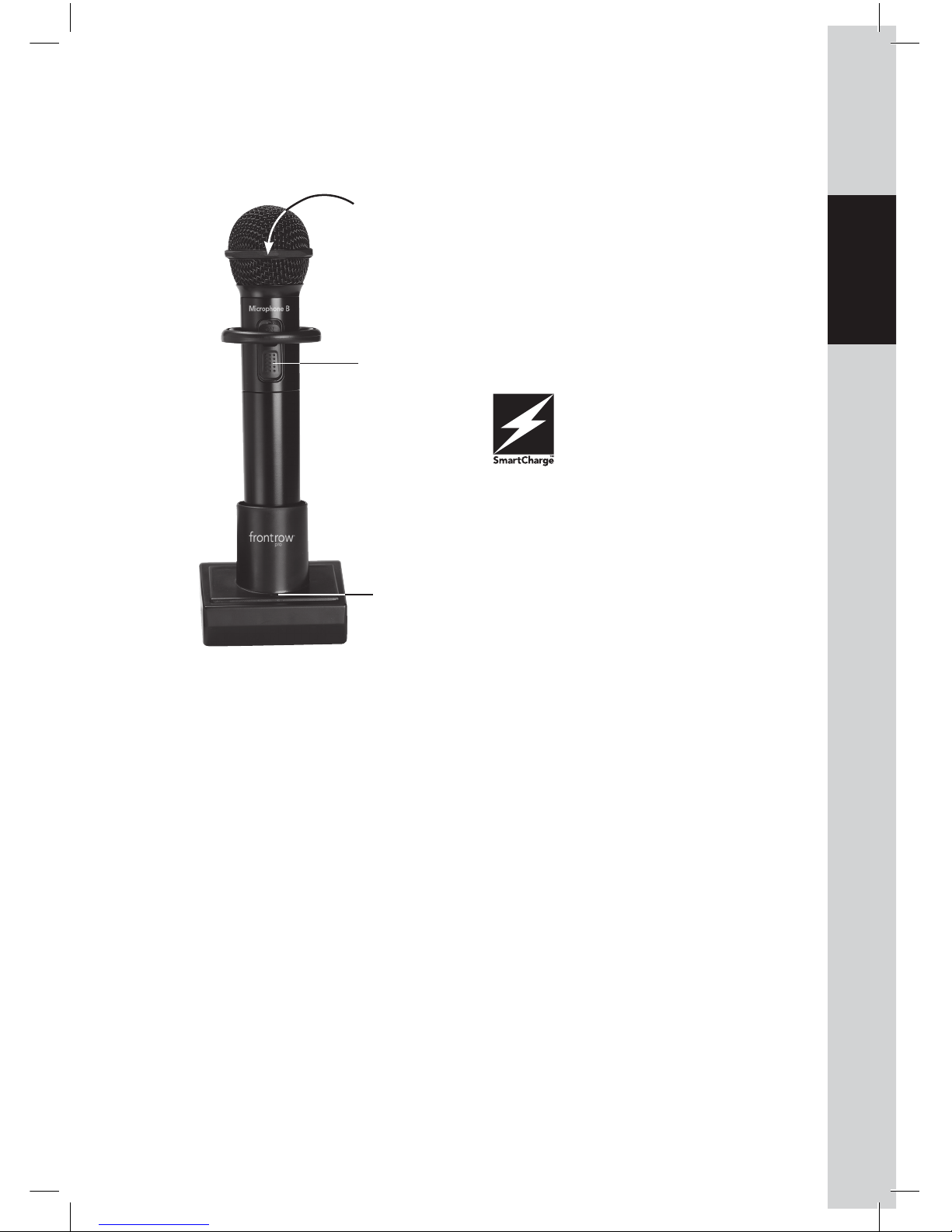
Your 940H Student Microphone and 940C Charger use SmartCharge technology.
The microphone will only charge the "silver-sleeve", auto-sensing battery that
comes with your microphone. If an incompatible battery is detected, the
microphone will not let you charge the battery.
You may use standard alkaline batteries in your 940H Student Microphone if you forget
to charge the unit, but do not attempt to charge alkaline batteries. To ensure proper
charging, always be sure that only "silver sleeve" auto-sensing batteries are installed.
1
Page 6
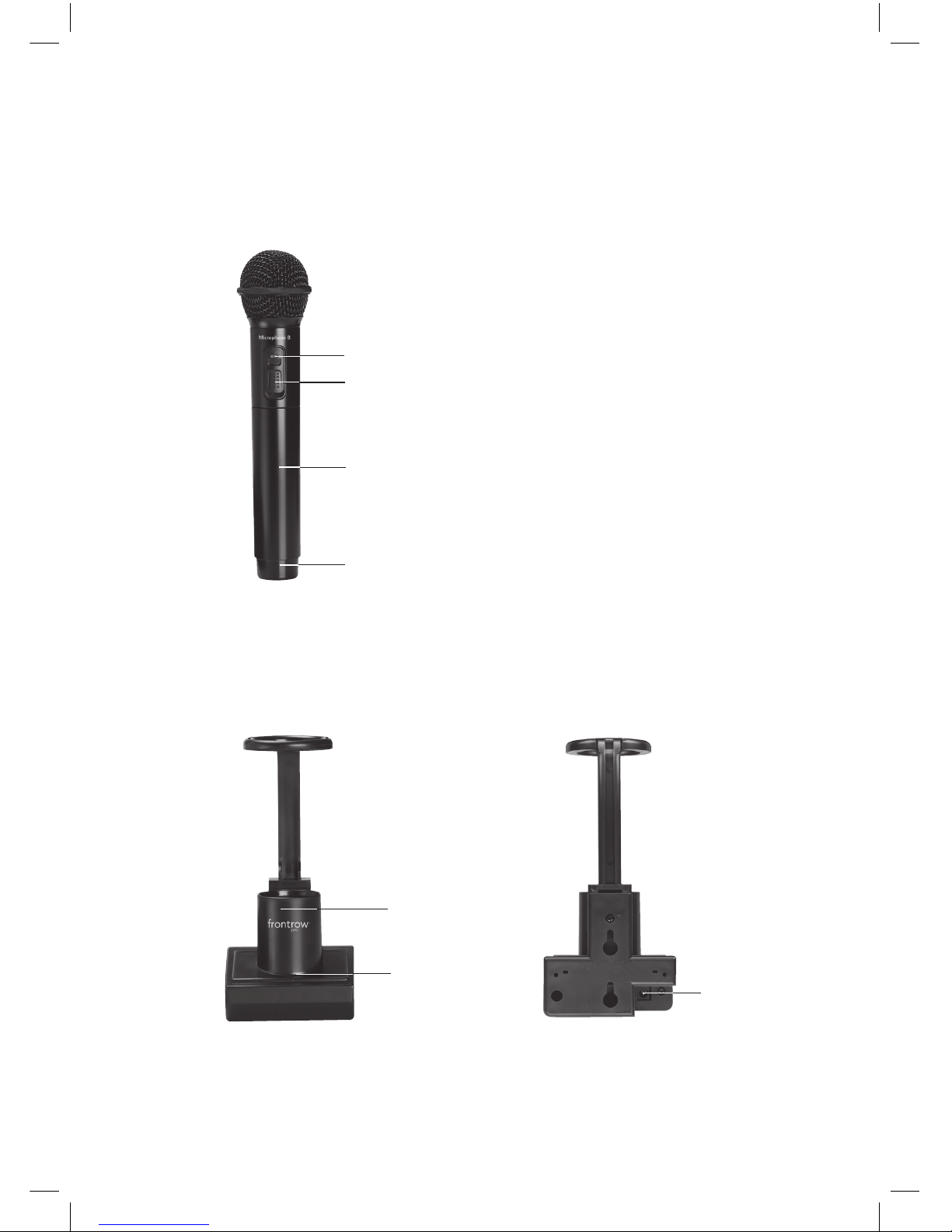
2
1. 2 way indicator light
Green = On and transmitting
Red = Low battery
2. On/off switch
3. Battery compartment
(In handle)
4. Emitter diodes
(Do not block)
5. Charging base
6. 2 way indicator light
Red = Charging
Green = Fully charged
7. Power Supply Input
1 940H Microphone and 940C Charger
Features
2
1
3
4
Front
Back
5
6
7
Page 7
3
1
2
3
4
5
6
7
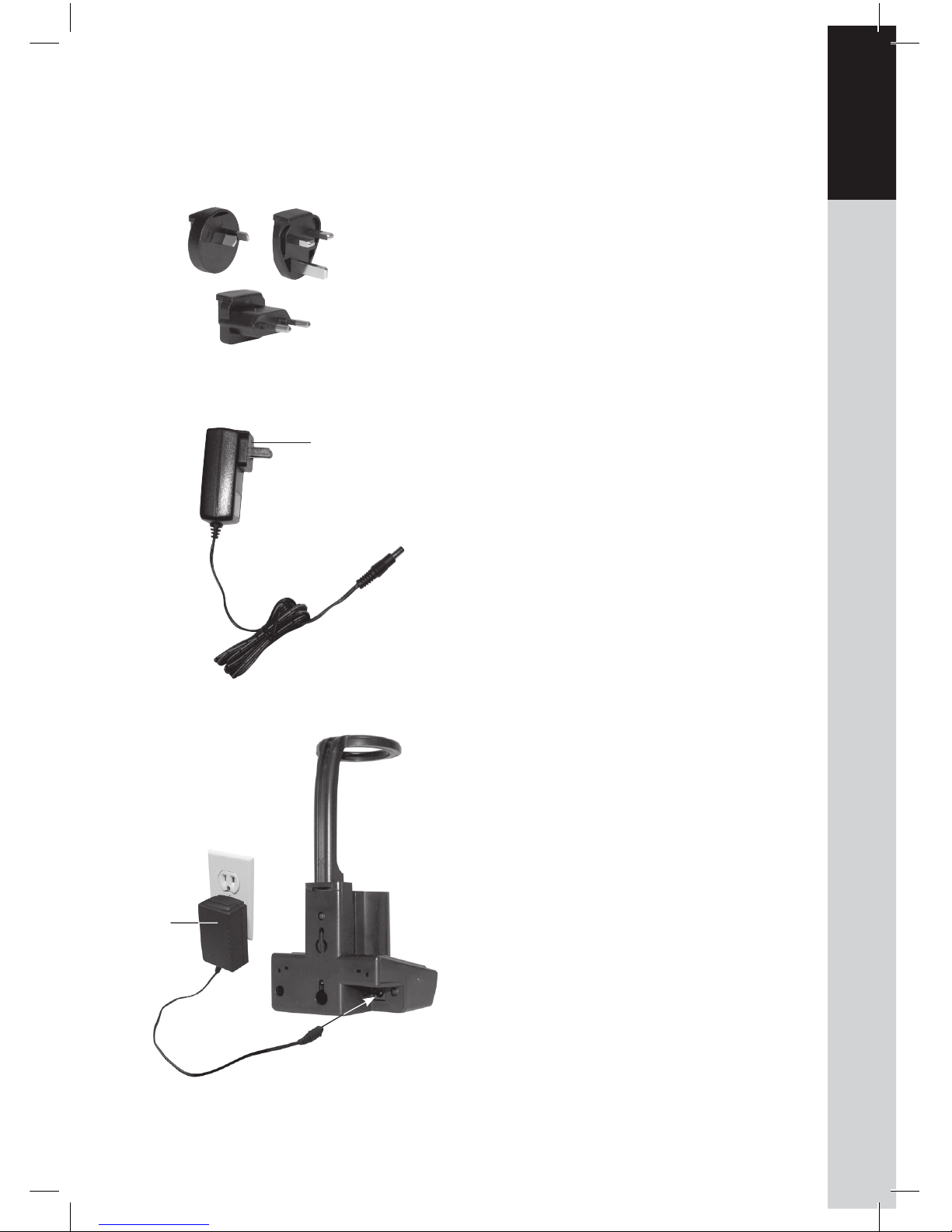
1. Find the power plug that is appropriate for the power outlet style
in your country
2.
Slide power plug onto the power
supply
3. Plug power supply into power
outlet and into the back of the
charging base
2 Charger Setup
3
3
1
2
Page 8
4
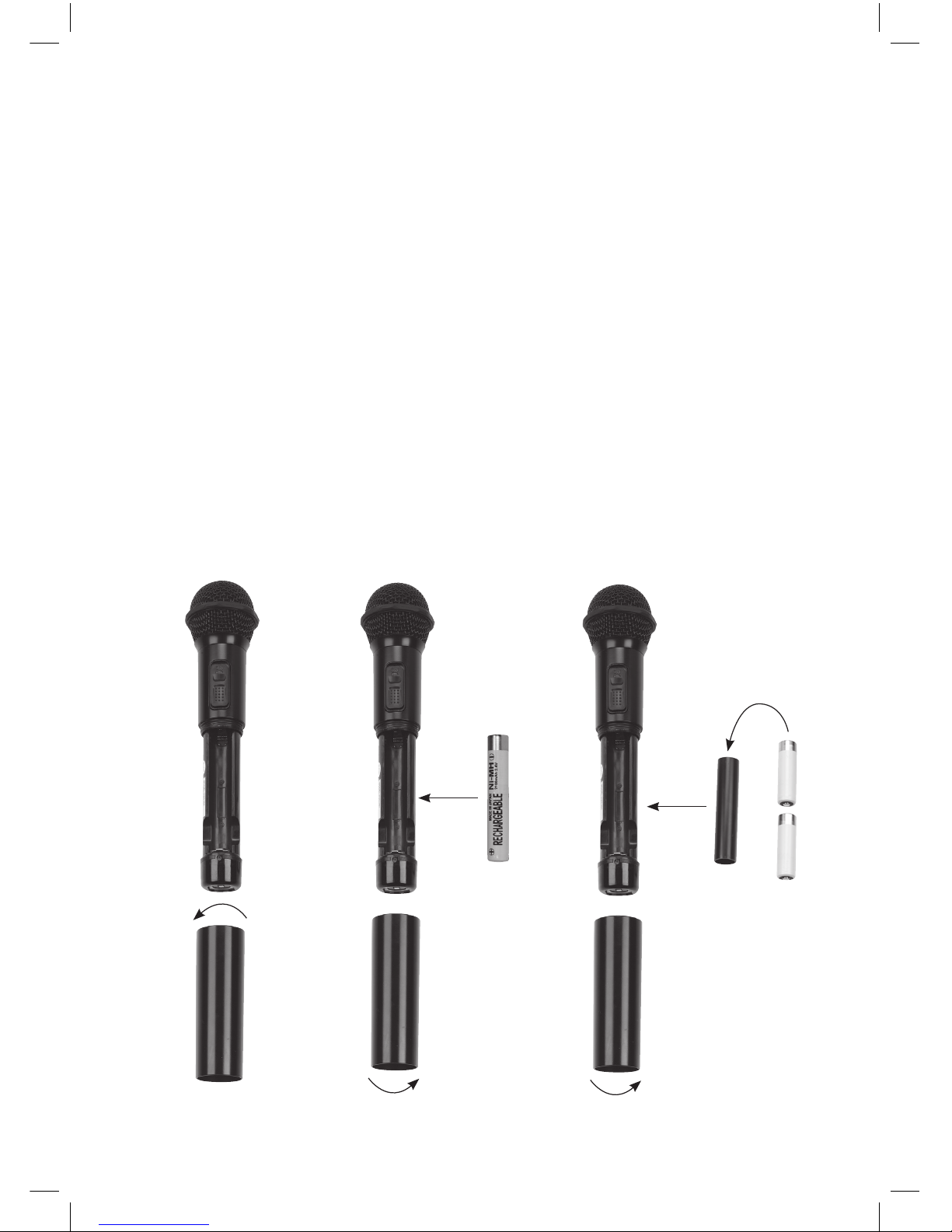
1. Twist microphone handle counterclockwise to remove housing
2.
Insert battery into battery compartment.
Note polarity indicators
3. Replace housing
If using 2 AA (LR6) alkaline batteries or
"silver sleeve", auto sensing batteries
1. Twist microphone handle counterclockwise to remove housing
2.
Insert batteries into the battery holder
3. Insert battery holder into the battery
compartment. Note polarity indicators.
4.
Replace housing
3 Install Batteries
2
1
3
2
4
3
OR
Page 9
1
2
3
4
5
6
7
5
Important: In order to prevent damage to your microphone, the SmartCharge
feature is intended to prevent charging of any battery other
than the "silver sleeve" auto-sensing
battery supplied by FrontRow. Do not
attempt to charge alkaline batteries.
To ensure proper charging, always be
sure that only "silver sleeve" autosensing batteries are installed.
1
3
2
1. Turn microphone off
2.
Place microphone in charger and
charge overnight before initial use
and nightly
3. Note indicator light
Red = Charging
Green = Fully charged
4 Charge Microphone
Page 10
6
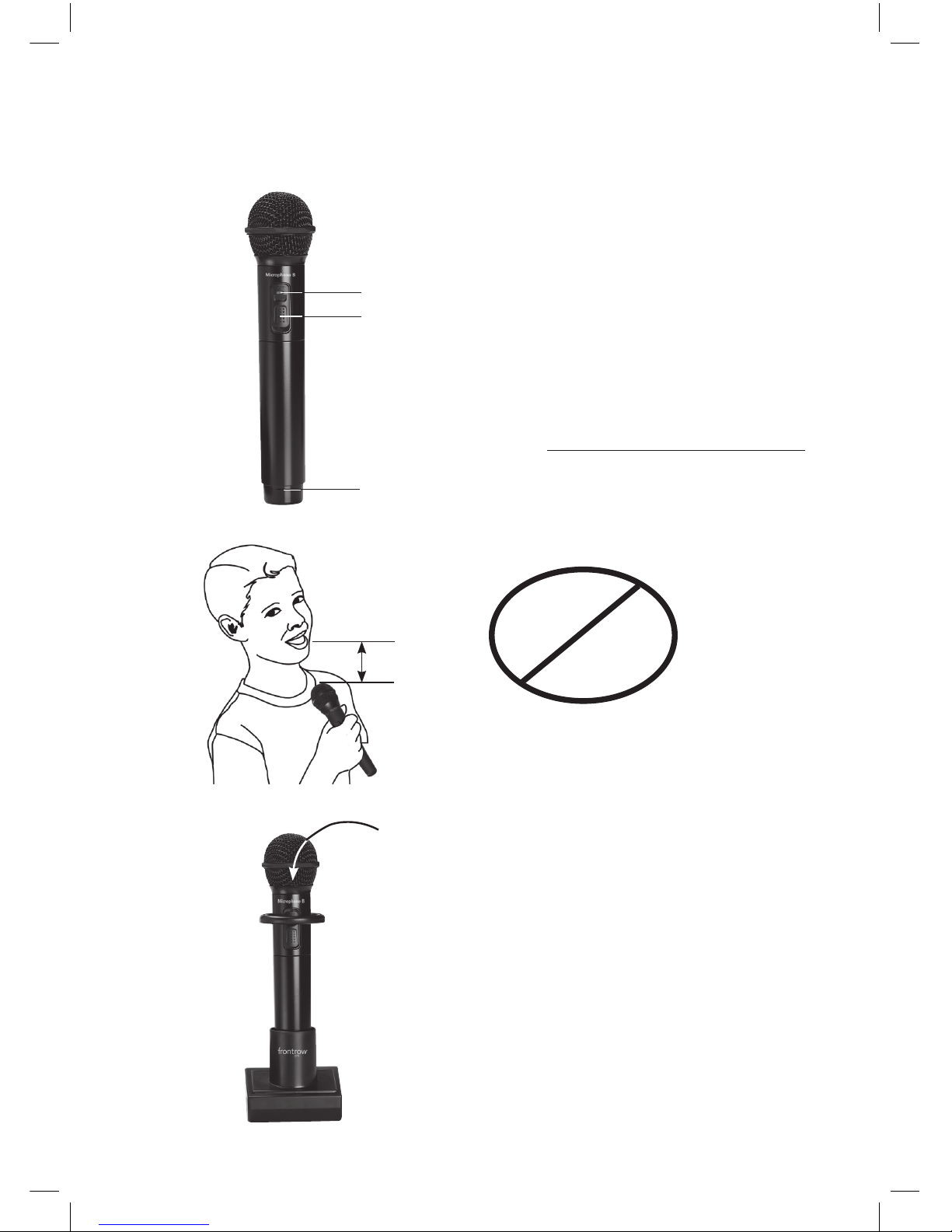
1. Turn microphone on
2. Note indicator light
Green = On and transmitting
Red = Low battery
3. Hold top of microphone approximately 3in. (7cm) from mouth
4. Do not block emitter diodes
5. Place microphone in charger at the
end of the day
NOTE:
The 940H is always on Channel B.
If you are using two transmitters, the
other transmitter must be on Channel A.
5 Using Microphone
1
2
3
4
5
3in. (7cm)
A + B
A + A
B + B
Page 11

7
1
2
3
4
5
6
7
Microphone will not turn on
• Check batteries are installed correctly
• Batteries may be dead. Test with alternate
batteries and recharge or replace if necessary
• Verify charger is working
Static/crackling noises
• Verify you are not blocking microphone
emitters
• Verify no other transmitter is transmitting
on Channel B
Batteries will not hold a charge
• Replace batteries with fresh "silver sleeve",
auto-sensing batteries
Product Specifications
940H Student Microphone
Transmitting frequency: 2.8MHz
Transmission type: Infrared
Frequency response: 50Hz to 16kHz
Operating range: 40ft (12m)
User controls: On/Off
Batteries: 1 NiMH rechargeable battery
Size: 9.5 x 2.25 x 2.25 in. (24 x 5.5 x 5.5 cm)
Weight: 11oz (312g)
940C Microphone Charger
Power supply: AC power supply (9.0V/1.0A max.)
Indicator lights: Red = charging
Green = fully charged
Dimensions: 7.5 x 3.5 x 3.25 in (19 x 9 x 8.5 cm)
Weight: 6 oz (170g)
6 Troubleshooting
AC Power Supply
Type: Switching power supply
Input: 100-240V ~ 50-60Hz, 400mA
Output: 9.0V/1.0A max.
Weight: 4.0oz (114g)
Page 12
8
7 Regulatory
This equipment has been tested and found
to comply with the limits for a Class B digital
device, pursuant to Part 15 of the FCC Rules.
These limits are designed to provide reasonable protection against harmful interference
in a residential installation. This equipment
generates, uses and can radiate radio frequency energy and, if not installed and used
in accordance with the instructions, may
cause harmful interference to radio communications. However, there is no guarantee
that interference will not occur in a particular
installation.
FrontRow Pro Microphone 940H
Tested to comply with
FCC Standards
FOR HOME OR OFFICE USE
part 15, subpart B
This product conforms with the essential requirements of European Union
Directive 89/336/EEC EMC Directive
and 2002/95 ROHS Directive
This product has been cleared by the U.S. Food
and Drug Administration for use by persons
with normal hearing and hearing impairment.
FCC notes
The FrontRow Pro Digital active learning
system is approved by the FCC (Federal
Communications Commission). The use of
the system may be governed by specific FCC
rules and FCC licensing or notifications may
be required. Consult your local FCC office
for detailed information.
Phonic Ear receivers and transmitters, when
required, are approved by the Federal
Communications Commission (FCC) in the
U.S. and Industry Canada. Other government
approvals are available upon request. (Other
international regulations may also apply.)
Any changes or modifications made to any
government-approved element of this instrument, without the express approval of
Phonic Ear, Inc. in writing, could void the
user's authority to operate those elements
of the system.
IC notes
This Class B digital apparatus complies with
Canadian ICES-003.
Cet appareil numérique de la classe B est
conforme à la norme NMB-003 du Canada.
The term "IC:" before the radio certification
number only signifies that Industry of Canada
technical specifications were met.
Electrical and electronic
equipment (EEE) contains
materials, components and
substances, that could be
dangerous or detrimental to human health
and the environment if waste electrical and
electronic equipment (WEEE) is not disposed
of correctly. Products marked with the
crossed-out dustbin shown here are electrical
and electronic equipment. The crossed-out
dustbin indicates that waste electrical and
electronic equipment may not be disposed
of with unsorted household waste and that it
must be collected separately.
In developing and manufacturing your Phonic
Ear product, we used high-quality materials
and components that can be reused. Thus,
when disposing of your waste electrical
and electronic equipment, you must use a
collection system designated for this purpose,
regardless of whether you dispose of your
waste at your local waste site or it is collected
from your home. Please contact your local
authority for further information.
Page 13

9
1
2
3
4
5
6
7
1. Avoid Abuse to the Charger
To reduce risk of electric shock, unplug
the power supply from outlet before
attempting any maintenance or cleaning.
Turn off controls will not reduce this risk.
DO NOT disassemble the power sup-
ply or charger. Return the apparatus
to Phonic Ear Front Row for qualified
service and repair if service or repair
is required. Incorrect reassembly may
result in a risk of electric shock or fire.
DO NOT expose the power supply or
charger to rain, snow, water, gas, oil, etc.
DO NOT operate the power supply or
charger if it has received a sharp blow,
been dropped, or otherwise damaged
in any way; return the apparatus to
Phonic Ear Front Row for qualified service and repair.
DO NOT block or cover the apparatus
and impede ventilation.
2. Proper Use of the Power Supply or
Charger and Wiring
An extension cord should not be used
unless absolutely necessary. Use of
improper extension cord could result
in a risk of fire and electric shock. The
cord MUST be plugged into a grounded
outlet. Make sure it is properly wired, in
good electrical condition, and wire size
is large enough for AC ampere rating of
the power supply or charger as specified
below. AWG = American Wire Gauge.
To reduce risk of damage to plug and
cord when disconnecting the power
supply or charger, ALWAYS pull on plug
- NEVER on cord.
Locate cord so that it will not be
stepped on, tripped over, or otherwise
subject to damage or stress. DO NOT
lay extension cord on charger.
DO NOT operate the power supply
or charger with damaged cord or
plug - replace them immediately.
ELECTRICAL WARNINGS
!
ELECTRICAL SAFETY
INFORMATION:
PRECAUTIONS & SAFETY
RECOMMENDATIONS
Follow Manufacturers' Recommendations
Before using the microphone and charger,
read all instructions for, and caution markings on the microphone and charger and in
this user guide.
Page 14

Page 15
© 2007 Phonic Ear Inc. and FrontRow and the names of Phonic Ear and FrontRow products are trademarks or registered trademarks of Phonic Ear, Inc. in the U.S. and other countries. Produc t specifications and accessories subject to change without notice.
USA
FrontRow
Corporate Headquarters
2080 Lakeville Highway
Petaluma, CA 94954-6713
toll-free: 800.227.0735
tel: 707.769.1110
fax: 707.769.9624
web: www.gofrontrow.com
Australia
Phonic Ear
512 Wickham Street
Fortitude Valley Qld 4051
toll-free: 1 800 PHONIC
tel: + 617 3250 0385
fax: + 617 3250 0386
web: www.gofrontrow.com
Canada
Phonic Ear
10-7475 Kimbel Street
Mississauga, ON L5S 1E7
toll-free: 800.340.9894
tel: 905.461.5300
fax: 905.677.7760
web: www.gofrontrow.com
Europe/ASIA
Phonic Ear A/S
Kongebakken 9
2765 Smørum
Denmark
tel: +45 3917 7101
fax: +45 3927 7900
web: www.gofrontrow.com
www.phonicear.com
New Zealand
Oticon New Zealand Ltd.
142 Lambton Quay
P.O. Box 9128
Te Aro. Wellington
toll-free: 800 OTICON
toll-free fax: 00800 FAX
OTICON
web: www.oticon.co.nz
United Kingdom
PC Werth Limited
Audiology House
45 Nightingale Lane
London SW12 8SP
tel: 020 8772 2700
web: www.soundfield.info
821-7348 -106/Rev. A/5199 0307
 Loading...