

Page 1
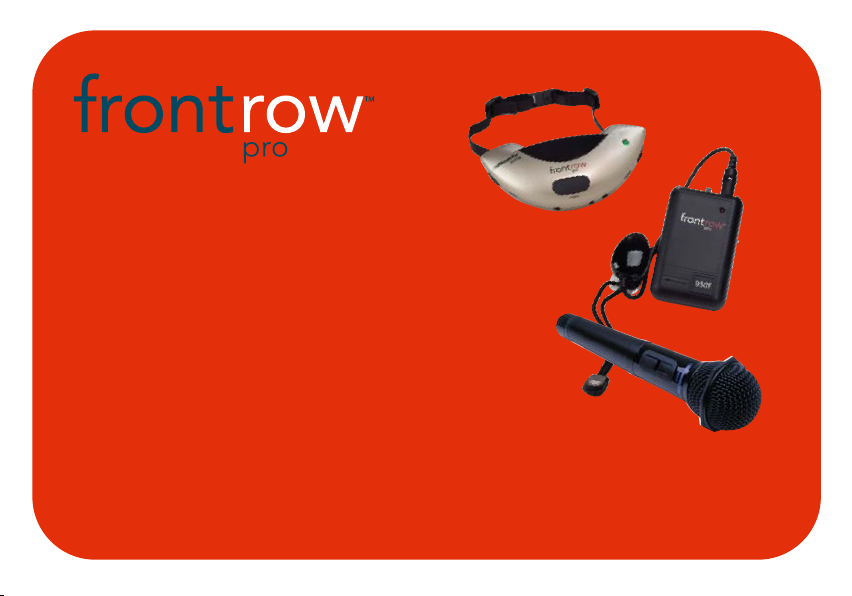
USER GUIDE
930T body-worn transmitter
930TM pendant transmitter
930HT handheld transmitter
Page 2

contents
introduction . . . . . . . . . . . . . . . . . . . . . . . .1
understanding active learning
and its benefits . . . . . . . . . . . . . . . . . . . . . .2
installation tips . . . . . . . . . . . . . . . . . . . . .3
basic system guidelines . . . . . . . . . . . . .4-5
typical system components . . . . . . . . . . .6
930TM transmitter features . . . . . . . . . .7-8
930T transmitter features . . . . . . . . . .9-10
930HT handheld transmitter features . . . .11
installing body-worn and pendant
transmitter batteries . . . . . . . . . . . . . . . . .12
installing handheld transmitter batteries . . .13
930T/930TM transmitter charging . . . . . .14
930HT handheld transmitter charging . . . .15
using 930TM pendant transmitter . . . .16-17
using 930T body-worn transmitter . .18-19
using 930HT handheld transmitter . .20-21
team-teaching and student pass
mic combinations . . . . . . . . . . . . . . .22-23
accessory options . . . . . . . . . . . . . . . . . . .24
troubleshooting . . . . . . . . . . . . . . . . . .25-26
product specifications . . . . . . . . . . . . .27-28
caring for your system . . . . . . . . . . . . . . .29
regulatory compliance . . . . . . . . . . . . .30-31
Page 3

introduction
Congratulations on the purchase of your new FrontRow Pro active learning system! With
proper care and use it will remain one of your most valuable teaching tools for many years.
You may have heard the term sound field used to describe technology to improve classroom acoustics. Your FrontRow system fits under that category, but we call it an active
learning system because it's about so much more than just sound. Active learning systems
can help engage students, improve attentiveness to the teacher, build learning success,
reduce the achievement gap, foster control and orderliness, improve test scores, and reduce
vocal strain and fatigue for teachers.
Read this manual carefully to become familiar with your system and to get the most out of
its many features and options.
1
Page 4
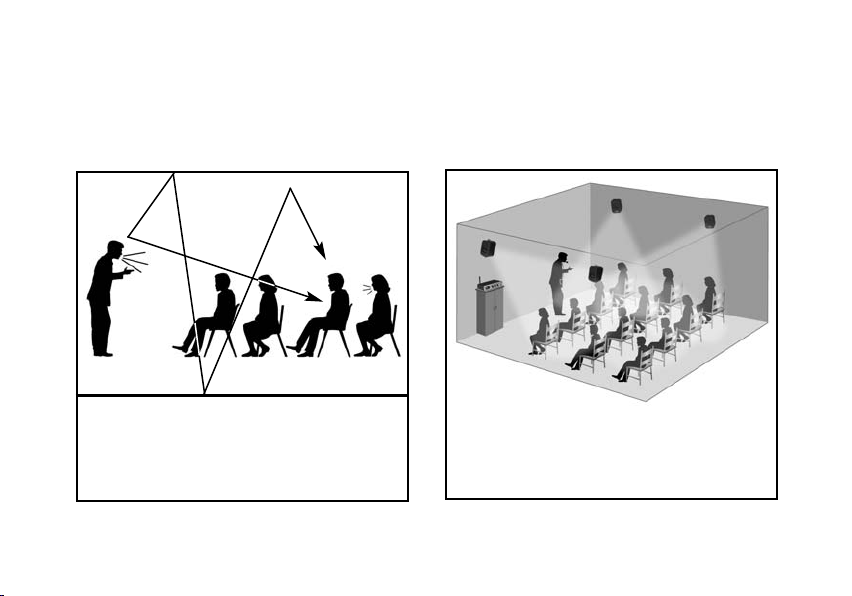
understanding active learning and its benefits
without active learning
• reduced comprehension
• reduced attention
• teacher fatigue
with active learning
?
?
cough!
• improved comprehension
• improved attention
• greater teacher energy
2
Page 5

installation tips
Your FrontRow Pro active learning system is a precision wireless audio instrument designed
to improve students’ ability to perceive the teacher’s voice. In fact, the US Food and Drug
Administration (FDA) considers it to be a medical device.
As such, we strongly recommend having your system set up by a professional installer who
is familiar with Phonic Ear active learning systems (contact your representative for referrals to
installers in your area).
If you choose to install your FrontRow Pro system yourself, take great care to follow the
instructions in the separate FrontRow Pro Installer Guide before using. Achieving the best
performance from your system is only possible by properly selecting and positioning all
speakers and sensors. Improper installation can result in poor performance.
3
Page 6

basic system guidelines
To help ensure that you get the most from this system, follow these basic guidelines:
Fresh batteries
intentionally not installed them in your equipment.
Install your batteries in your equipment now, then charge overnight before initial use
(see pages 12-15 for charging procedure).
Avoid battery corrosion. Before charging any electronic equipment make sure only NiCad
or NiMH rechargeable batteries are installed. As an added precaution, remove batteries if the
equipment will not be used for several weeks. Note that your 930TM and 930HT transmitter
mics can detect and charge appropriate battery types. Older models that may be in your classroom may not have this feature, however.
Charge your transmitter batteries every night. Our rechargeable Nickel Metal
Hydride (NiMH) batteries last a minimum of 8 hours between charges, but should be
recharged every night so they are ready to go in the morning. Plan on buying new NiMH
batteries after 12 months of use.
Alkaline batteries. If you forget to charge your NiMH batteries, you can use alkaline
batteries. They will last approximately 12 hours. NEVER recharge alkaline batteries!
. To ensure that your batteries are as fresh as possible upon arrival, we have
4
Page 7

basic system guidelines (cont’d)
Speak at a normal level when using your microphone; the system is projecting your
voice for you.
Don’t block your FrontRow Pro sensors. Your FrontRow Pro transmitter uses light to
communicate with the receiver. Your installer placed the receiver and possibly external
sensors to ensure that you can move about the classroom freely without interruption of the
signal. Don’t block the receiver or sensors with drawings, furniture, or other objects because
your voice may not be heard.
Don’t use two transmitters on the same channel. Your FrontRow Pro receiver is
designed to accept audio from two microphones simultaneously, but they must be on
separate channels. Consult pages 22-23 for details.
5
Page 8
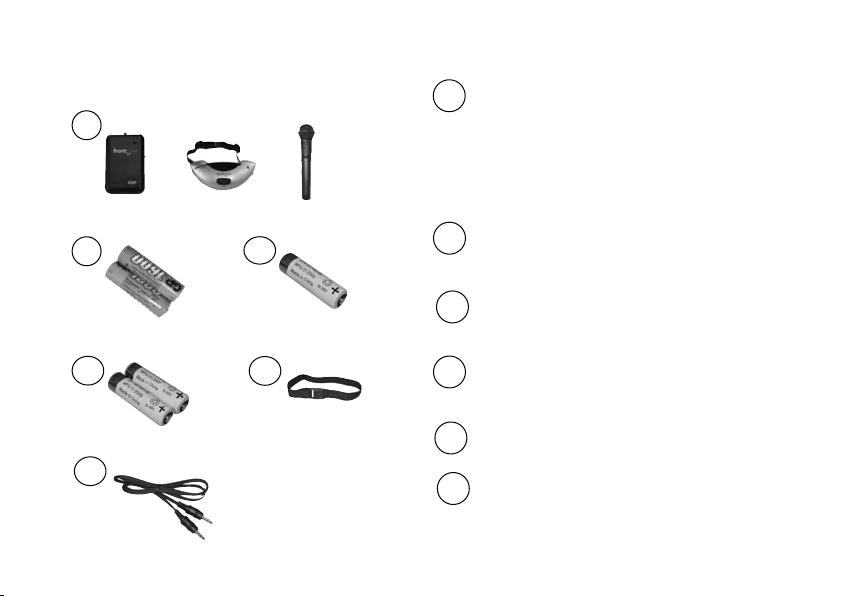
typical transmitter components
1
or
or
1 930T body-worn transmitter
or
930TM pendant transmitter
or
930HT handheld transmitter
2
3
2 930T AA NiMH rechargeable batteries (2),
standard (AT0807)
3 930TM AA NiMH rechargeable battery (1),
auto-sensing (374-30-400-00)
4
5
4 930HT AA NiMH rechargeable batteries
(2), auto-sensing (374-30-400-00)
5 elastic belt for 930T (AT0712)
6
6 aux-in adaptor cord, 3.5mm to 3.5mm
(384-01-210-08)
6
Page 9
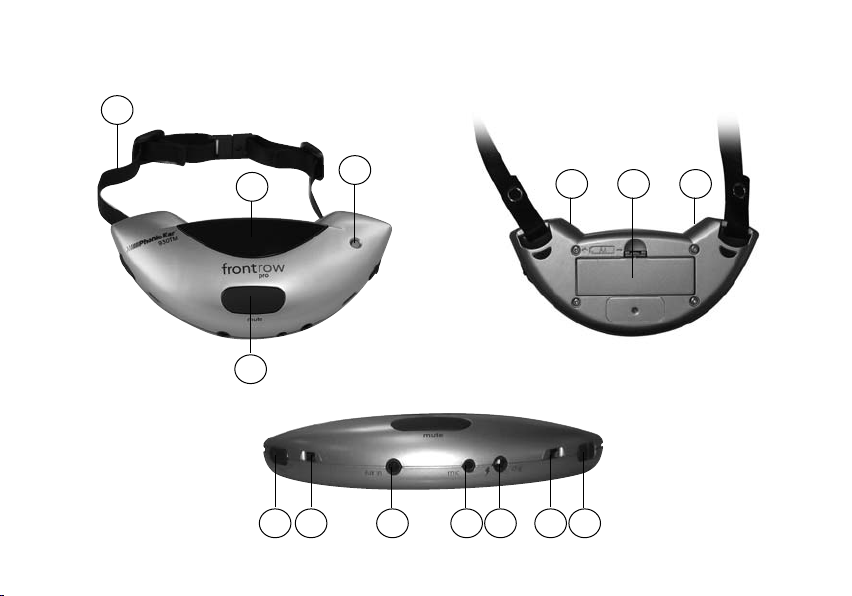
930TM transmitter features
1
front
back
2
3
4
11 66
bottom
5 7
6 68 9 10
7
Page 10

1 lanyard neck strap
6 dual microphone ports
2 emitter diodes
Do not block
3 4-way indicator light
on = Green light
mute = Blinking green light
low batt = Blinking red light. When
light starts blinking there is approximately 1 hour of battery life left.
batt charging = Solid red light
4 mute button
Push to mute
5 channel selector
Select channel A or channel B. (Do not
match another transmitter channel in
same room)
7 auxiliary input
(Optional) connect a secondary sound source
(computer, VCR, etc.)
8 external mic jack
(Optional) connect a boom microphone
9 charge jack
Connect to 930R charge output jack
to charge NiMH battery
10 on/off switch
11 battery compartment
Use 1 AA rechargeable NiMH (auto sensing)
or disposable alkaline battery
8
Page 11
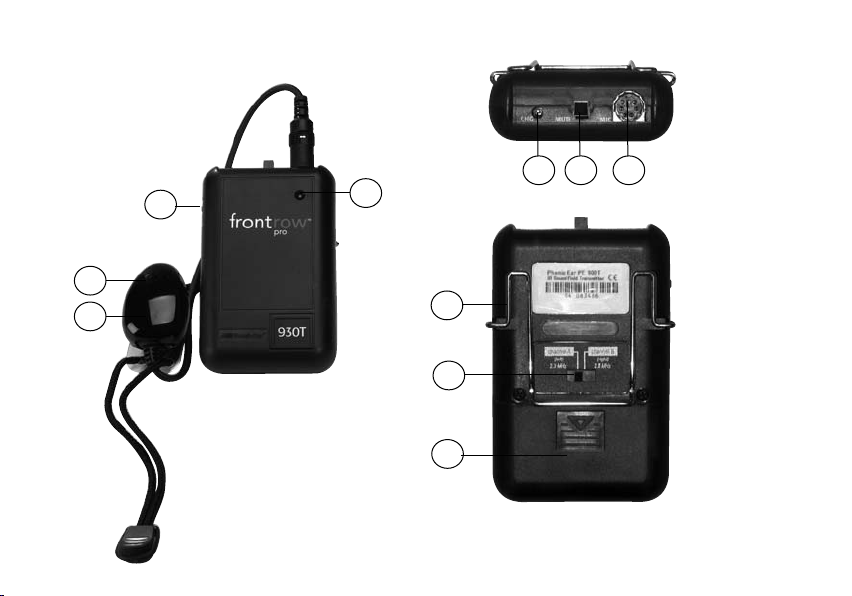
930T transmitter features
1
3
4
top
5 6 7
2
8
front
9
10
back
9
Page 12

1 on/off switch
6 mute button
Push down to mute
2 3-way indicator light
on = Dim red light
low batt = Blinking red light. When
light starts blinking there is approximately 1 hour of battery life left.
batt charging = Bright red light
3 emitter mic element
4 emitter mic diodes
Do not block
5 charge jack
Connect to 930R charge output jack
to charge NiMH batteries
7 DIN connector jack
Connects to emitter/microphone
8 belt clip
9 channel selector
Select channel A or channel B. (Do not
match another transmitter channel in
same room)
10 battery compartment
Use AA rechargeable NiMH or disposable
alkaline batteries. Do not charge alkaline
batteries!
10
Page 13
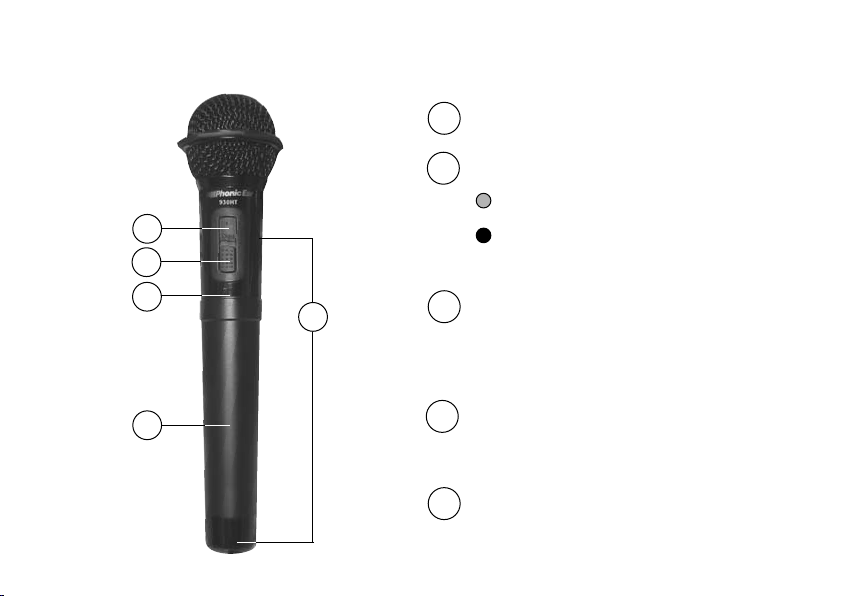
930HT handheld transmitter features
2
1
3
5
1 on/off switch
2 2-way indicator light
on = Green light
low batt = Red light. When red light
is on there is approximately 1 hour of
battery life left.
3 internal channel selector
Select channel A or channel B. (Remove battery compartment tube for access; do not
match transmitter channels in same room)
11
4
4 battery compartment tube
Use 2 AA rechargeable NiMH (autosensing
style) or disposable alkaline batteries
5 emitter diodes
Do not block
Page 14
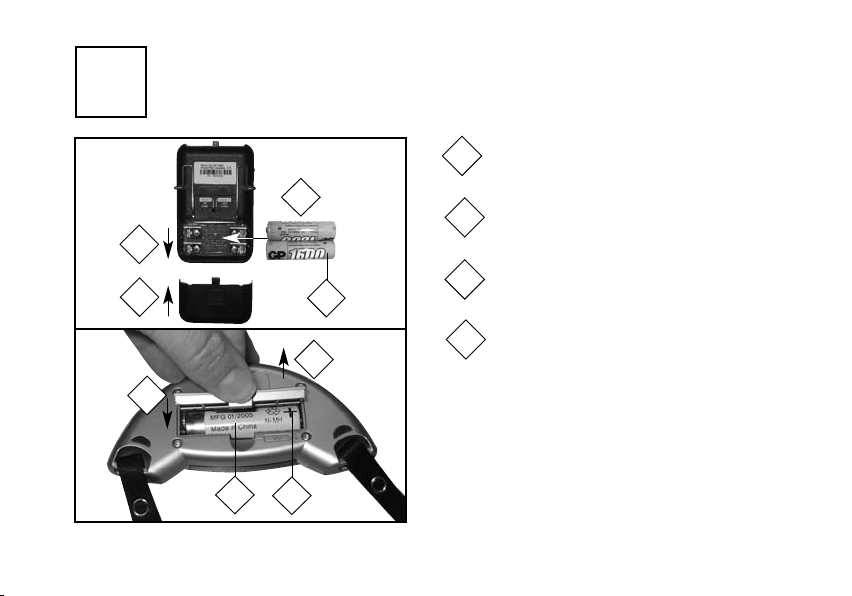
1a
installing body-worn and pendant transmitter batteries
930T
930TM
Push off battery compartment door
1
2
Insert battery(ies) into compartment
2
1
Follow polarity indicators
4
3
3
Replace battery door
4
1
4
CAUTION!: DO NOT recharge AA alkaline batteries.
The 930TM and 930HT transmitters use auto-sensing
batteries to prevent accidental recharging of alkaline
2
3
cells. NEVER recharge alkaline batteries in 930T or
900T body-worn transmitters.
12
Page 15
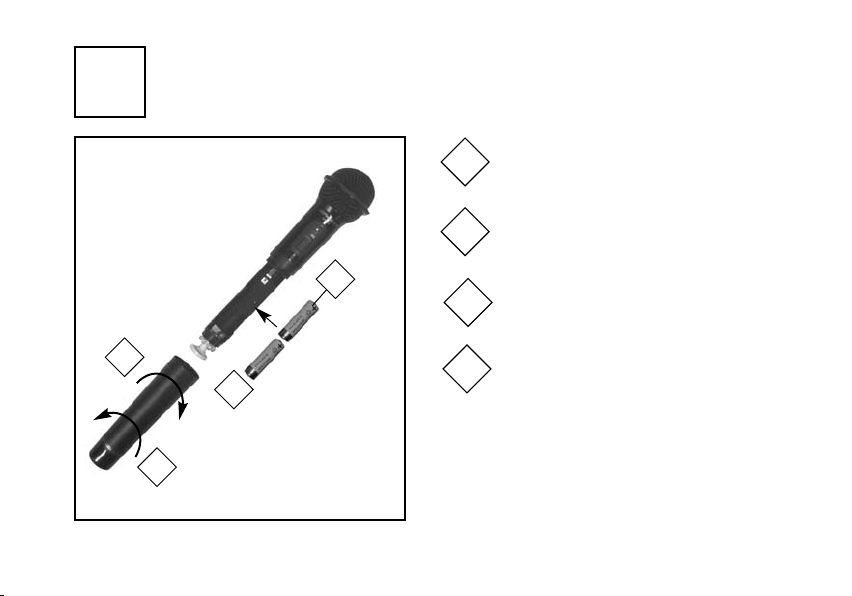
1b
installing handheld transmitter batteries
Twist handle counter-clockwise
1
to remove
Insert 374-30-400-00 rechargeable
2
batteries into compartment
3
Follow polarity indicators
3
13
4
1
374-30-400-00
2
AA alkaline batteries
rechargeable
batteries or
Twist handle clockwise to replace
4
CAUTION!: DO NOT recharge AA alkaline batteries.
The 930HT handheld transmitter uses auto-sensing
batteries to prevent accidental recharging of alkaline
cells. NEVER recharge alkaline batteries in 930T or
900T body-worn transmitters.
Page 16
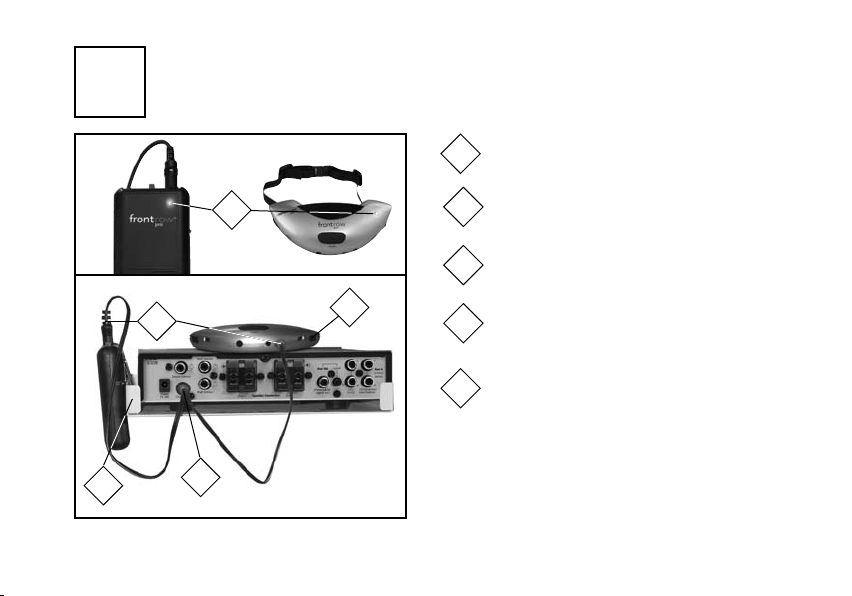
2a
930T/930TM transmitter charging
(
charge before first use and nightly)
Indicator light on body-worn or pendant trans-
1
mitter flashes red when batteries run low
Plug 300-6497-105 charge cord into
1
2
charge socket on back of 930R
Make sure that transmitter(s) is turned off
3
930TM (bottom)
4
5
2
300-6497-105
3
Plug 300-6497-105 cord into 900T,
4
930T, or 930TM transmitter(s)
Hang 930T or 900T transmitter on edge of
5
wall mount. Lay 930TM on top of receiver.
CAUTION!: DO NOT recharge AA alkaline batteries.
The 930TM pendant transmitter uses auto-sensing
batteries to prevent accidental recharging of alkaline
cells. NEVER recharge alkaline batteries in 930T or
900T body-worn transmitters.
14
Page 17
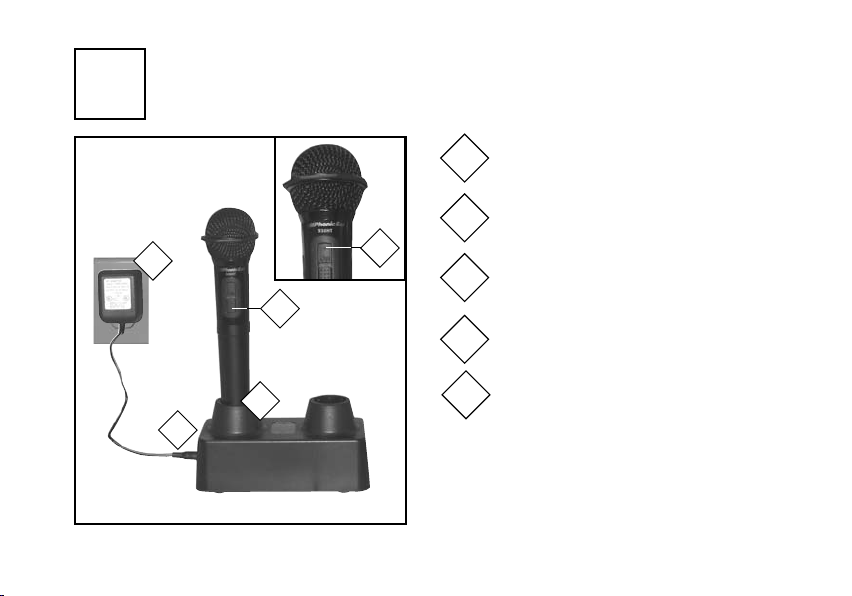
2b
15
930HT handheld transmitter charging
(
charge before first use and nightly)
3
4
5
2
AT0 792
930HTC
1
CAUTION!: DO NOT recharge AA alkaline batteries.
The 930HT handheld transmitter uses auto-sensing
batteries to prevent accidental recharging of alkaline
cells. NEVER recharge alkaline batteries in 930T or
900T body-worn transmitters.
Indicator light on handheld transmitter turns
1
red when batteries run low
Plug AT0792 cord into 930HTC charger unit
2
Plug AT0792 power supply into wall socket
3
Turn mic off
4
Place handheld transmitter into 930HTC charger
5
Page 18
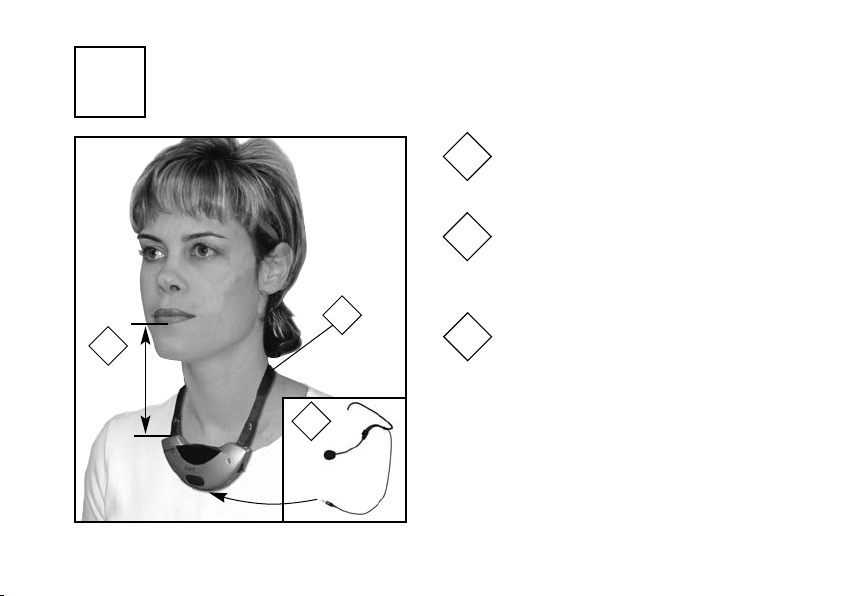
3a
using 930TM pendant transmitter
1
2
Place transmitter around neck and
connect clasp
Adjust strap to position transmitter as
close to mouth as possible, approximately 13cm/5in. (Maximizes feedback
resistance and sound quality).
2
13cm/5in
1
OPTIONAL: If desired, plug in
3
external boom microphone to further
improve feedback resistance
3
16
Page 19
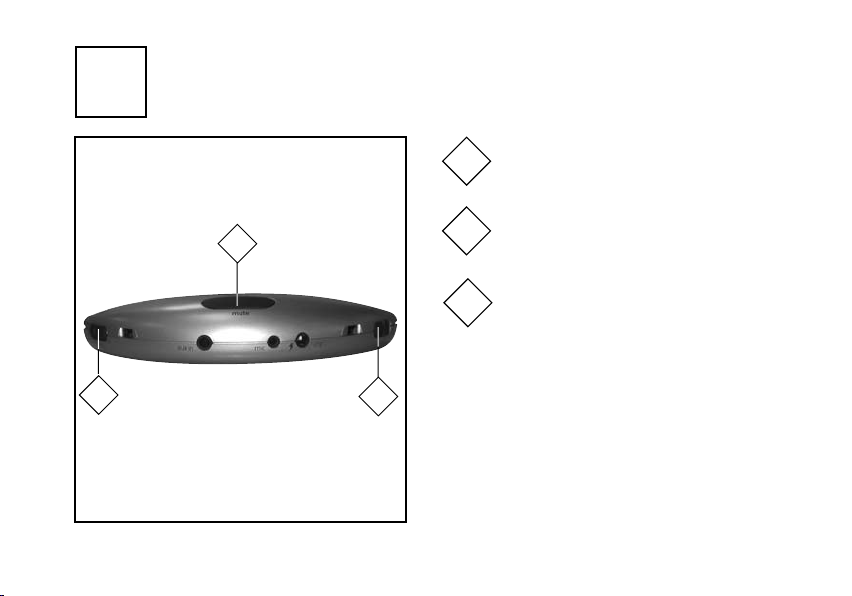
3b
using 930TM pendant transmitter (cont’d)
Turn transmitter power on
4
Set channel A or B
6
5
Use mute switch as needed for private
6
conversations
17
5
930TM (bottom)
4
NOTE: DO NOT match any other transmitter
channel used in the same room.
Page 20
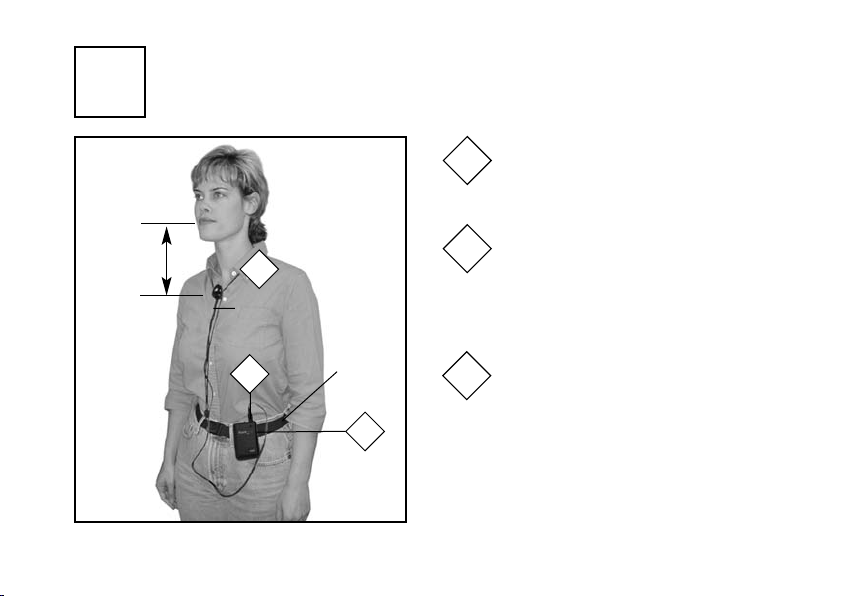
4a
using 930T body-worn transmitter
1
Clip transmitter to belt using AT0489
wire clip (optional AT0712 waist belt
available)
15cm/
6in max.
2
AT0795 -L
emitter/mic
3
AT0712
waist belt
(optional)
1
Put microphone around neck and
2
adjust distance to mouth (position
mic as close to mouth as possible to
maximize feedback resistance and
sound quality)
Plug in microphone
3
18
Page 21
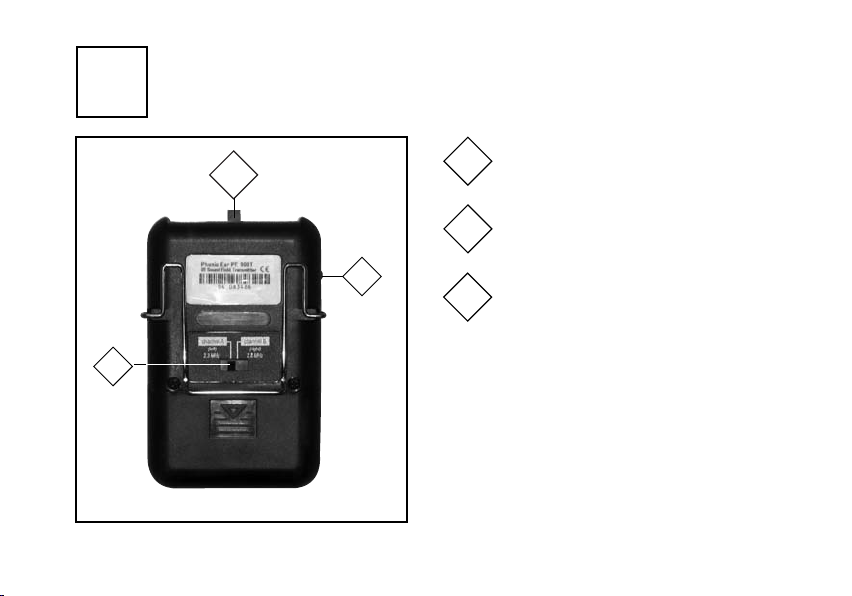
4b
using 930T body-worn transmitter (cont’d)
Turn transmitter power on
6
4
Set channel A or B
5
19
4
5
930T (back)
NOTE: DO NOT match any other transmitter
channel used in the same room.
Use mute switch as needed for private
6
conversations
Page 22
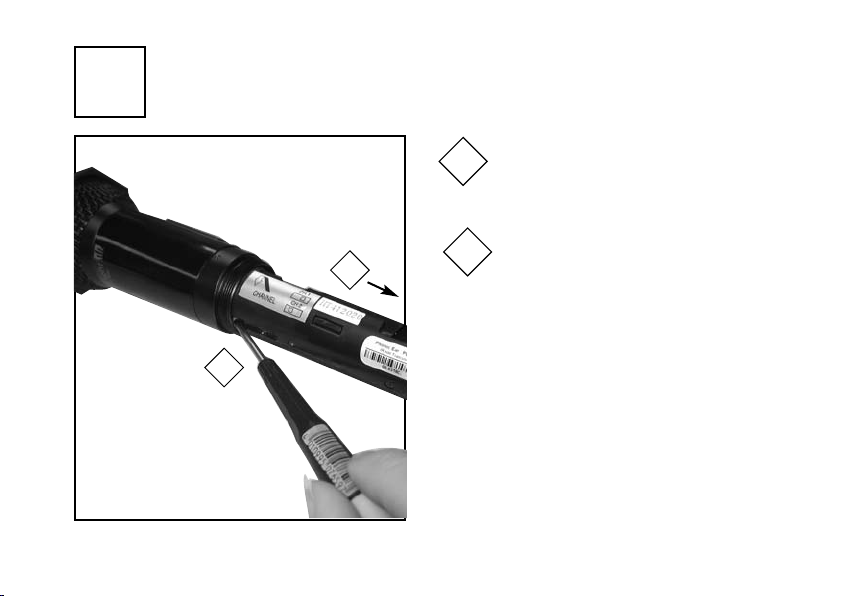
5a
using 930HT handheld transmitter
1
2
1
2
To set or change channel, remove battery
compartment cover to access channel
control switch
Insert small screwdriver into access hole
as shown to change channel switch
NOTE:
channel used in the same room.
DO NOT match any other transmitter
20
Page 23
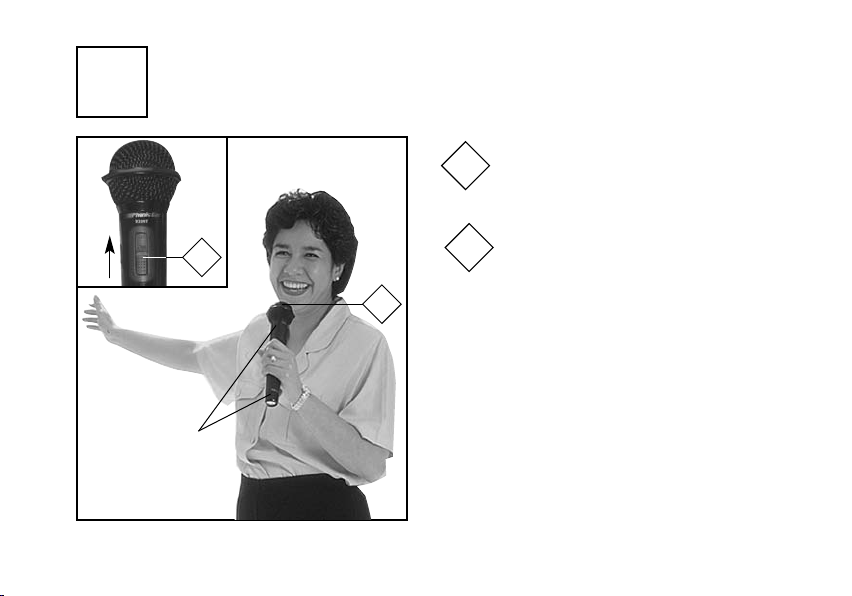
5b
NOTE:
Do not block
emitter diodes
with hand
21
using 930HT handheld transmitter (cont’d)
Turn transmitter power on
3
Hold microphone approximately 2-3
4
3
4
inches from mouth and talk into the top
of microphone grille
Page 24
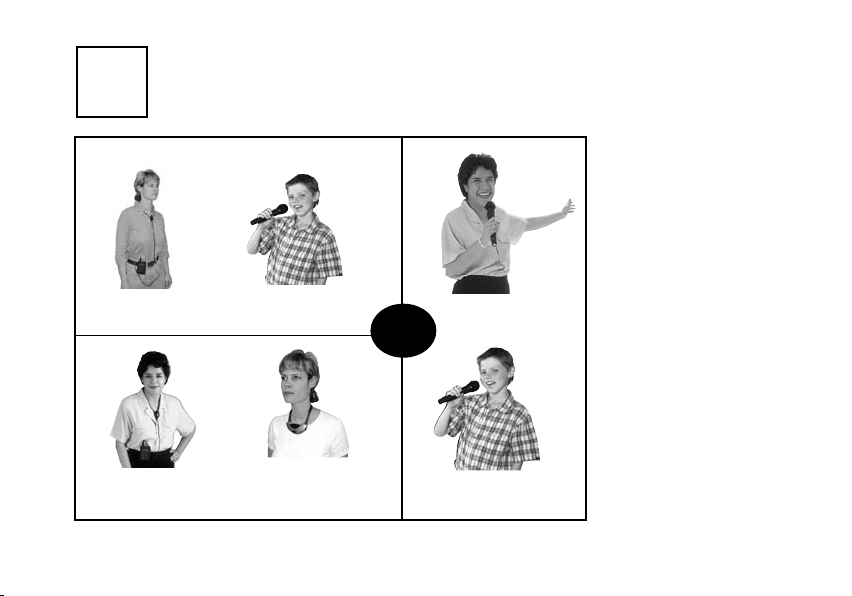
6a
team-teaching and student pass mic combinations
use any transmitter style combination...
teacher
(channel A)
teacher A
(channel A)
student
(channel B)
teacher B
(channel B)
or
Your FrontRow Pro system
encourages student participation with a convenient
pass mic. If you offer teamteaching in your classroom,
FrontRow Pro is also ready
to accommodate you with a
second teacher mic.
teacher
(channel A)
student
(channel B)
22
Page 25
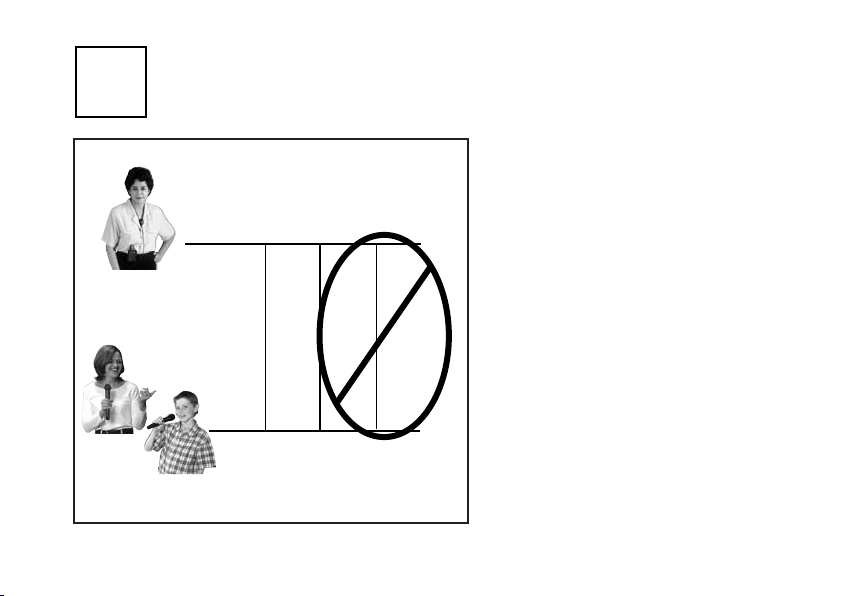
6b
team-teaching and student pass mic combinations (cont’d)
NOTE: Channel settings for transmitters
must be different (i.e. Teacher A and
Teacher B cannot both be using channel A)
channel
teacher A
student or teacher B
23
ABAB
++++
BAAB
Page 26
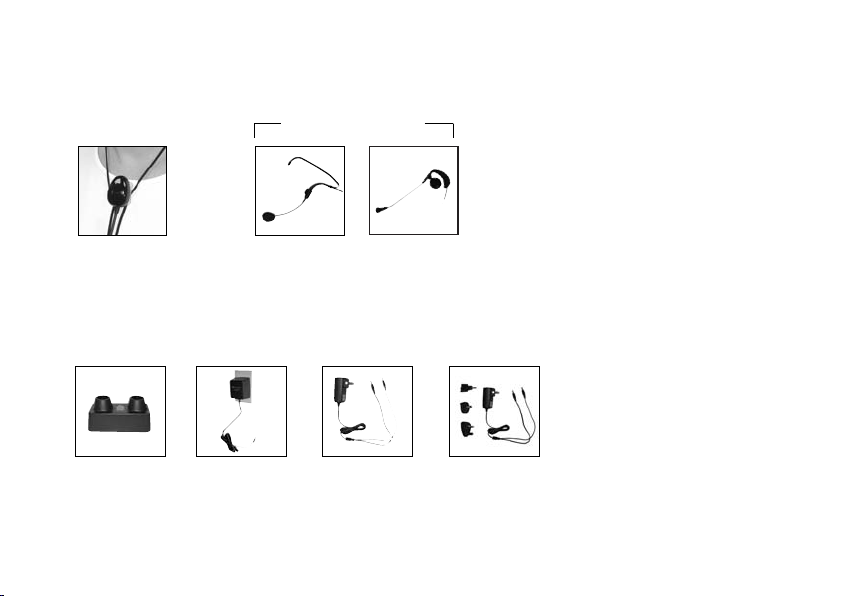
accessory options
used with 930T
AT0795-L
emitter/microphone
lapel
transmitter accessories
930HTC
handheld transmitter
charging stand
AT0 792
930HTC power supply
used with 930TM
AT0655
boom microphone
040-7150-105
wall charger
(US/CAN)
930TM, 930T, 900T
AT0814
earhook microphone
890-88-051-00
wall charger
(UK, AU, NZ, EU)
930TM, 930T, 900T
24
Page 27

troubleshooting
no signal reception (volume control
light on receiver is red)
• Check that the transmitter is on
• Verify that you are not blocking either the emitters on the transmitter or the sensors on
receiver or mounted around room
• If reception is interrupted when facing a certain
direction, install an additional sensor in that
area of the room (see Installer Guide)
• If team-teaching, verify that transmitters are not
on the same channel
• Recharge or replace the transmitter’s batteries
• Verify that the emitter/mic is working (Test with
another working emitter/mic)
25
feedback (squealing)
• Make sure that speakers are mounted as close
as possible to the ceiling and to the listening area.
Avoid mounting speakers in the teacher’s primary
lecture area
• Position the microphone closer to mouth
•
Lower the MIC
• Select the Low or Medium O
(930R)
• Adjust the H
(930R)
VOLUME control(s) on the receiver
VOICE setting
PTI
BAND EQ control on the receiver
IGH
weak or no output from speaker(s)
•
Increase t
trol(s) on the receiver
• Position the microphone closer to mouth
• Verify that the speakers have been properly
installed
IC VOLUME or AUX VOLUME con-
he M
Page 28

troubleshooting (cont’d)
receiver won’t turn on (power light
doesn’t turn on)
• Verify that the power supply is plugged into
both the receiver and a working wall outlet
• Test with another power supply
’dead spots’ or
microphone crack-
ling/noise
• Verify that you are not blocking either the
emitters on the transmitter or the sensors on
receiver or mounted around room
• If reception is interrupted when facing a certain direction, install an additional sensor in
that area of the room (see Installer Guide)
• If three or more external sensors are used in
your room, confirm that they are all wall sensors (see Installer Guide)
• If team-teaching, verify that transmitters are
not on the same channel
• Recharge or replace the transmitter’s batteries
• Verify that the emitter/mic is working (Test with
another working emitter/mic)
26
Page 29

product specifications
transmitter: 930TM
Transmitting frequency: 2.3MHz & 2.8MHz (switchable)
Modulation: FM wide-band
Operating range: 18.5m/60ft line-of-sight (typical)
Transmission angles: 160˚ horizontally; 40˚ vertically (1/2
power)
Microphones: dual uni-directional cardioid (directivity index
6.0@500Hz)
User controls: On/off/mute/channel
Inputs/outputs: 2.5mm mic input; 3.5mm aux input;
1.3mm DC charge jack
Battery life: minimum 8 hour (single AA,
2500mAHrechargeable NiMH)
Size (wxhxd): 11 x 6 x 2.5 cm/4.5 x 2.5 x 0.9 in
Weight: 85g/3.0oz (with battery)
Case: ABS plastic
27
transmitter: 930T
Transmitting frequency: 2.3MHz & 2.8MHz (switchable)
Modulation: FM wide-band
Operating range: 18.5m/60ft line-of-sight (typical)
Transmission angles: 140˚ horizontally; 40˚ vertically(1/2
power)
User controls: On/off/mute/channel
Inputs/outputs: 6 pin DIN mic input; 1.3mm DC charge
jack
Battery life: minimum 8 hour (dual AA, 1600mAH
rechargeable NiMH)
Size (wxhxd): 11 x 6 x 2.5 cm/4.5 x 2.5 x 0.9 in
Weight: 85g/3.0oz (with battery)
Case: ABS plastic
Page 30

product specifications (cont’d)
transmitter: 930HT
Transmitting frequency: 2.3MHz & 2.8MHz (switchable)
Modulation: FM wide-band
Operating range: 12m/40ft line-of-sight
Transmission angle: 360˚ radial
Audio distortion: <1.0% (±15kHz deviation @1kHz)
Microphone type: uni-directional dynamic
User controls: on/off/channel
Battery life: 8 hours fully charged (dual AA,
2500mAHrechargeable NiMH)
Size: 255 x 58 mm/10.04 x 2.28 in
Weight: 258g/9.1oz with battery
28
Page 31

caring for your system
cleaning
Clean as needed, using a soft, damp cloth.
storage
Clean with a soft damp cloth and remove the batteries from the transmitter(s). Place the system in
its original packaging.
other important notes
• Protect your active learning system from excessive moisture, heat, and mechanical shocks.
• The case bottom of the 930R receiver, as well as
the AT0783 power supply, can get warm under
normal operation.
• To protect the transmitter’s case front, position it
face down on a soft surface when removing or
inserting the batteries.
29
• Always dispose of old batteries in approved battery recycling bins. It may be illegal to dispose in
the trash. If you are not sure of proper disposal
method, please consult your local authority.
Page 32

regulatory compliance
receiver: part 15, subpart B
FrontRow Pro Transmiitter 930T, 930TM, 930HT
Tested to comply with
FCC Standards
FOR HOME OR OFFICE USE
This equipment has been tested and found to
comply with the limits for a Class B digital
device, pursuant to Part 15 of the FCC Rules.
These limits are designed to provide reasonable
protection against harmful interference in a residential installation. This equipment generates,
uses and can radiate radio frequency energy
and, if not installed and used in accordance with
the instructions, may cause harmful interference
to radio communications. However, there is no
guarantee that interference will not occur in a
particular installation. If this equipment does
cause harmful interference to radio or television
reception, which can be determined by turning
the equipment off and on, the user is encouraged to try to correct the interference by one or
more of the following measures:
• Reorient or relocate the receiving antenna.
• Increase the separation between the equipment and receiver.
• Connect the equipment into an outlet on a
circuit different from that to which the receiver
is connected.
• Consult the dealer or an experienced radio/TV
technician for help.
30
Page 33

regulatory compliance (cont’d)
FCC notes
The FrontRow Pro active learning system is
approved by the FCC (Federal Communications
Commission). The use of the system may be
governed by specific FCC rules and FCC licensing
or notifications may be required. Consult your
local FCC office for detailed information.
Phonic Ear FM receivers and FM transmitters,
when required, are approved by the Federal
Communications Commission (FCC) in the U.S.
and Industry Canada. Other government
approvals are available upon request. (Other
international regulations may also apply.)
Any changes or modifications made to any government-approved element of this instrument,
without the express approval of Phonic Ear Inc in
writing, could void the user's authority to operate
those elements of the system.
31
This product conforms with the essential
requirements of European Union Directive
1999/5/CE R&TTE Directive
This product has been cleared by the
U.S. Food and Drug Administration for
use by persons with normal hearing and hearing
impairment.
Waste from electronic equiment must be
handled according to local regulations.
Page 34

FRONTROW
is a division of
u.s.a. 800.227.0735, then press 5•canada 800.263.8700 • international +45 3917 7101
© 2005 Phonic Ear Inc. Phonic Ear and the names of Phonic Ear products are trademarks or
registered trademarks of Phonic Ear Inc. in the U.S. and other countries. 821-7348-101/Rev. A/4644 0505
 Loading...