

Page 1
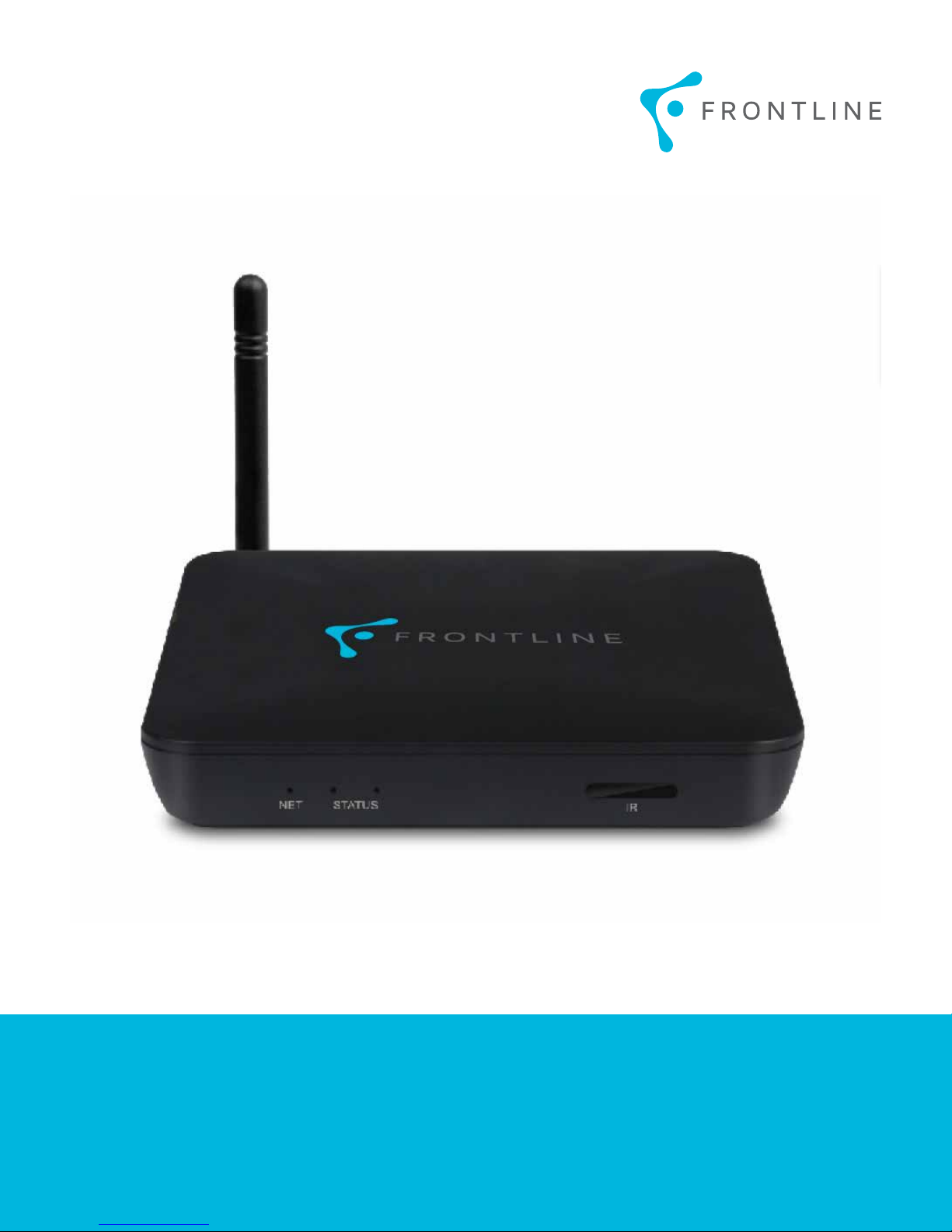
Frontline ATV585 Box
USER MANUAL
Page 2

TABLE OF CONTENTS
1. SAFETy INFOrmATION ................................................................................................................1
1.1 WArNINg ......................................................................................................................................................1
1.2 PrECAuTIONS ..............................................................................................................................................1
1.3 HANdLINg CAuTIONS ................................................................................................................................1
2. INTrOduCTION .............................................................................................................................2
2.1 PACkAgE CONTENTS ..................................................................................................................................2
2.2 PrOduCT FEATurES ...................................................................................................................................2
2.3 PANEL INTrOduCTION ...............................................................................................................................2
2.4 SETuP CONNECTION ...................................................................................................................................2
2.5 dISPLAy WHEN POWEr uP .......................................................................................................................2
3. SETTINgS ........................................................................................................................................ 3
3.1 WI-FI ..............................................................................................................................................................3
3.2 BLuETOOTH ...................................................................................................................................................3
3.3 ETHErNET ......................................................................................................................................................3
3.4 dATE uSAgE ..................................................................................................................................................3
3.5 WIrELESS & NETWOrkS ..........................................................................................................................4
3.6 HOmE ..............................................................................................................................................................4
3.7 SOuNd ............................................................................................................................................................4
3.8 dISPLAy .........................................................................................................................................................4
3.9 STOrAgE ........................................................................................................................................................4
3.10 PErmISSIONS.............................................................................................................................................4
3.11 LOCATION ....................................................................................................................................................5
3.12 SECurITy .....................................................................................................................................................5
3.13 LANguAgE & INPuT..................................................................................................................................5
3.14 rESET ............................................................................................................................................................5
3.15 Add AN ACCOuNT .....................................................................................................................................5
Page 3

3.16 dATE & TImE ...............................................................................................................................................5
3.17 dEvELOPEr OPTIONS................................................................................................................................6
3.18 ABOuT dEvICE ...........................................................................................................................................6
5. Tv NAvIgATION .............................................................................................................................6
5.1 CHANNEL NumBEr ENTry .......................................................................................................................6
5.2 INvALId CHANNEL NumBEr ENTry ......................................................................................................6
5.3 NAvIgATINg CHANNELS vIA Tv guIdE ..................................................................................................7
5.4 Tv mAIN mENu ............................................................................................................................................7
5.5 Pvr ..................................................................................................................................................................7
5.6 TO ENABLE Pvr ...........................................................................................................................................8
5.7 vIEWINg ALL APPS ...................................................................................................................................8
5.8 AddINg APPS .............................................................................................................................................8
5.9 WATCHINg NETFLIx ...................................................................................................................................8
5.10 WATCHINg yOuTuBE ..............................................................................................................................9
5.11 CHANNELS WATCHEd rECENTLy ..........................................................................................................9
5.12 SySTEm INFOrmATION...........................................................................................................................9
6. TrOuBLE SHOOTINg/FAQ ............................................................................................................9
6.1 NO PICTurE ...................................................................................................................................................9
6.2 uSB CONTENT CANNOT BE rEAd ............................................................................................................9
7. rEPAIrS ..........................................................................................................................................9
8. SPECIFICATION ............................................................................................................................ 10
AudIO dECOdEr ..............................................................................................................................................10
vIdEO/PICTurE dECOdEr ..............................................................................................................................10
STOrAgE SySTEm ...........................................................................................................................................10
SIzE .....................................................................................................................................................................10
NET WEIgHT ......................................................................................................................................................10
9. TrAdEmArk NOTICE .................................................................................................................10
3
Page 4

1. SAFETy INFOrmATION
• Follow all instructions.
Please read and understand all instructions before using
this product. If damage is caused by failure to follow the
instructions, the warranty does not apply.
1.1 WArNINg
To reduce the risk of electric shock, DO NOT remove the
cover (or back).
DO NOT attempt to repair the product, this could lead to
risk of injury and/or damage to the product .
To reduce the risk of fire or electric shock, keep this product
away from direct sunlight, open flames or heat, large
amounts of moisture, dust and sand.
FCC Note (for U.S.A)
This equipment has been tested and found to comply with
the limits for a Class B digital device, pursuant to Part
15 of the FCC rules. These limits are designed to provide
reasonable protection against harmful interference in a
residential installation. This equipment generates, uses
and can radiate radio frequency energy and, if not installed
and used in accordance with the instructions, may cause
harmful interference to radio or television reception, which
can be determined by turning the equipment off and on.
The user is encouraged to try to correct the interference
by one or more of the following measures:
- Reorient or relocate the receiving antenna.
- Increase the separation between the equipment and
re ceiver.
- Consult the dealer or an experienced radio/TV technician
for help.
This class B digital product meets all requirements of the
Canadian Interference - Causing Equipment Regulations.
1.2 PrECAuTIONS
Important Safety Instructions
• DO NOT use this apparatus near water.
• DO NOT clean with any chemical detergent. Clean
only with a dry cloth.
• DO NOT block any ventilation openings. Install in
accordance with the manufacturer’s instructions.
•
DO NOT install near any heat sources such as radiators,
heat registers, stoves or other apparatus that produce
heat.
•
Protect the power cord from being walked on or pinched
particularly at plugs, convenience receptacles, and
the point where it exits the apparatus.
• Only use attachments/accessories specified by the
manufacturer.
• Use only with the cart, stand, tripod, bracket or table
specified by the manufacturer, or sold with the apparatus.
When a cart is used, use caution when moving the
cart/apparatus to avoid injury from tipping over.
•
Unplug this apparatus during lightning storms or when
unused for a long period of time.
• Refer all servicing to a qualified service personnel.
Servicing is required when the apparatus has been
damaged in any way, such as when the power-supply
cord or plug is damaged, liquid has been spilled or
objects have fallen into the apparatus, the apparatus
has been exposed to rain or moisture, does not operate
normally, or has been dropped.
1.3 HANdLINg CAuTIONS
•
DO NOT expose this apparatus to dripping or splashing.
Do not put objects filled with liquids, such as vases
on the apparatus.
• To turn this apparatus off completely, you must pull
the power plug out of the wall socket. Consequently,
the power plug must be easily and readily accessible
at all times.
Read these operating instructions carefully before using
the unit. Follow all the safety instructions listed below.
Keep these operating instructions handy for future reference.
• Read these instructions.
• Keep these instructions.
• Heed all warnings.
1
•
DO NOT plug multiple electric devices into the same wall
socket. Overloading a socket can cause it to overheat,
resulting in a fire.
• Before connecting other components to this player,
be sure to turn them off.
Page 5
• If the product makes an abnormal noise or produces
!
a burning smell or smoke, turn off the power switch
immediately and disconnect the power plug from
the wall outlet. Then, contact the nearest customer
service center for technical assistance. Do not use
the product. Using the product as it is may cause a
fire or an electric shock.
2. INTrOduCTION
2.1 PACkAgE CONTENTS
1. Frontline ATV585 Box
2. User’s Guide
3. HDMI Cable
4.
Power Adapter, Input: AC100 ~ 240V, 50/60Hz, Output:
5V/2A
2.2 PrOduCT FEATurES
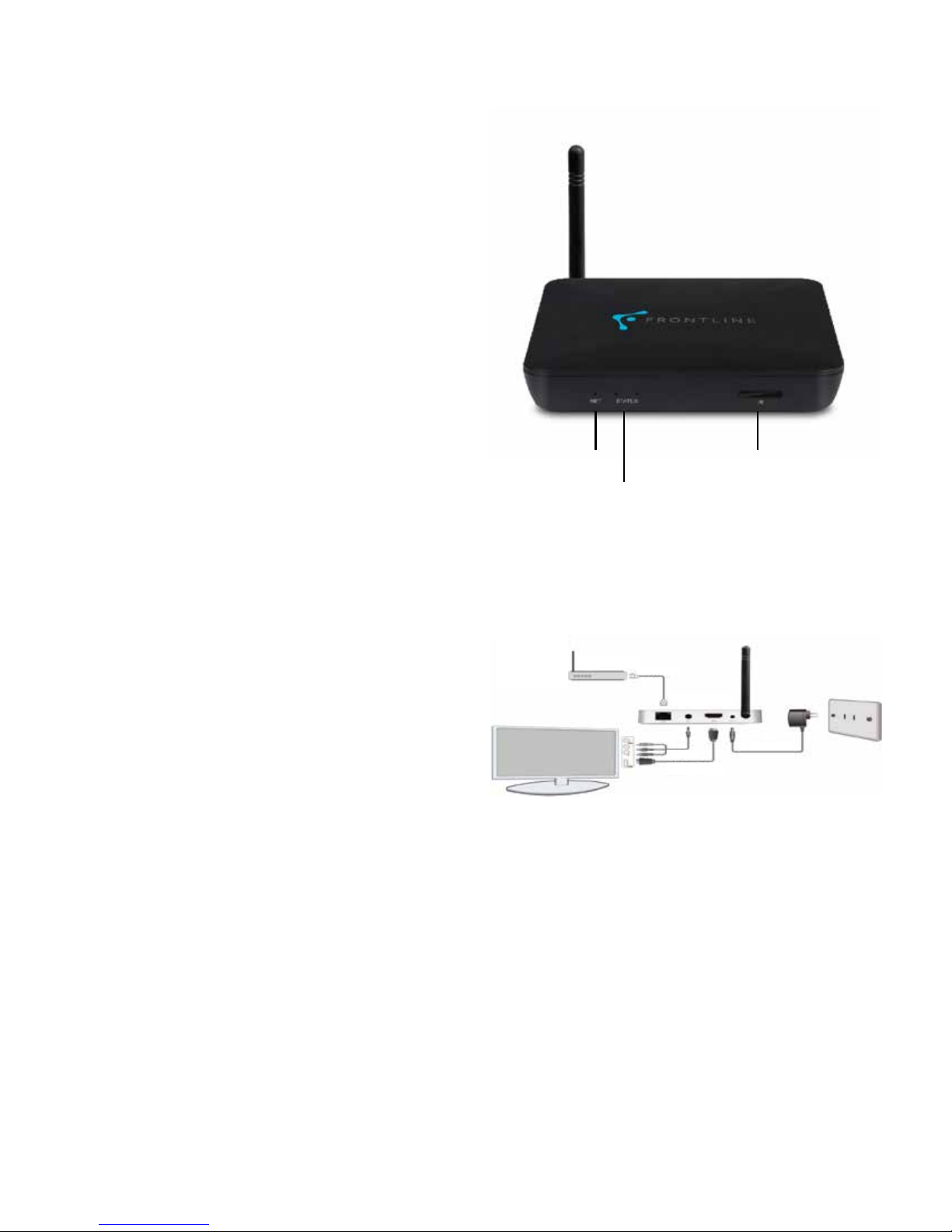
2.3 PANEL INTrOduCTION
Network Indicator
Status Indicator
IR Receiver
•
Quad Core A5, 1.5GHz, RAM 1G , ROM built in 8G EMMC
• Powered by Android 4.4 OS
• Built in 802.11b/g/n Wi-Fi module, wireless Internet
access
•
2 USB interface, support mobile HDD, wired/wireless
mouse and keyboard operation
• Support 1080P video playback
• HDMI video output, connect to HDTV for HD video
playback
•
Support weather, calendar, and desktop clock gadgets
• Support 2.4G wireless motion Remote Controller
•
Support music player, picture player and more family
entertainment
2.4 SETuP CONNECTION
Place ATV585 on a flat platform near the TV and make
sure nothing is blocking the remote control signal.
INTERNET
MODEM
RJ45 CABLE
FRONTLINE BOX
AV CABLE
HDMI CABLE
POWER CABLE
2.5 dISPLAy WHEN POWEr uP
After powering up, the TV will show a green Frontline
Logo during loading. When loading is finished, the Home
screen will appear.
2
Page 6
3. SETTINgS
!
!
!
!
Using Navigation (4 directions), OK, EXIT and Menu keys
of Remote Controller to select options, the option selected
will be highlighted and confirmed by pressing the OK key.
The same operation applies for inputting text.
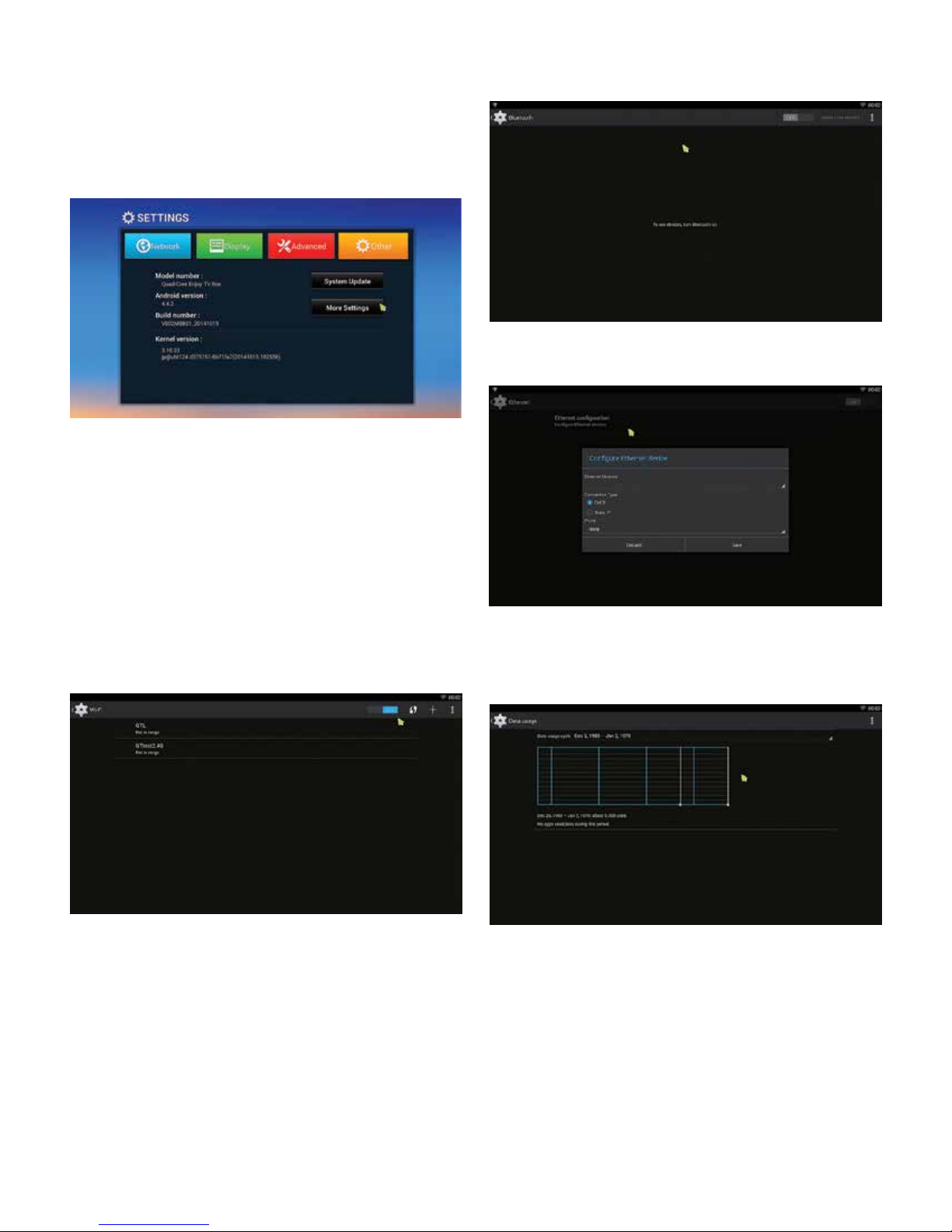
3.1 WI-FI
The device will automatically scan for Wi-Fi networks
when you select “ON”.
3.2 BLuETOOTH
3.3 ETHErNET
Connect an available Wi-Fi network. If connecting to a
secured Wi-Fi network, a corresponding password will
need to be input first. If the device fails to connect, you will
need to reset the password to this Wi-Fi connection. Once
you have connected to a Wi-Fi network successfully, the
ATV585 will automatically connect to this Wi-Fi network
when restarted.
Note: If the device is factory reset, the Wi-Fi network
password will also have to be reset.
3.4 dATE uSAgE
Show data usage information.
3
Page 7
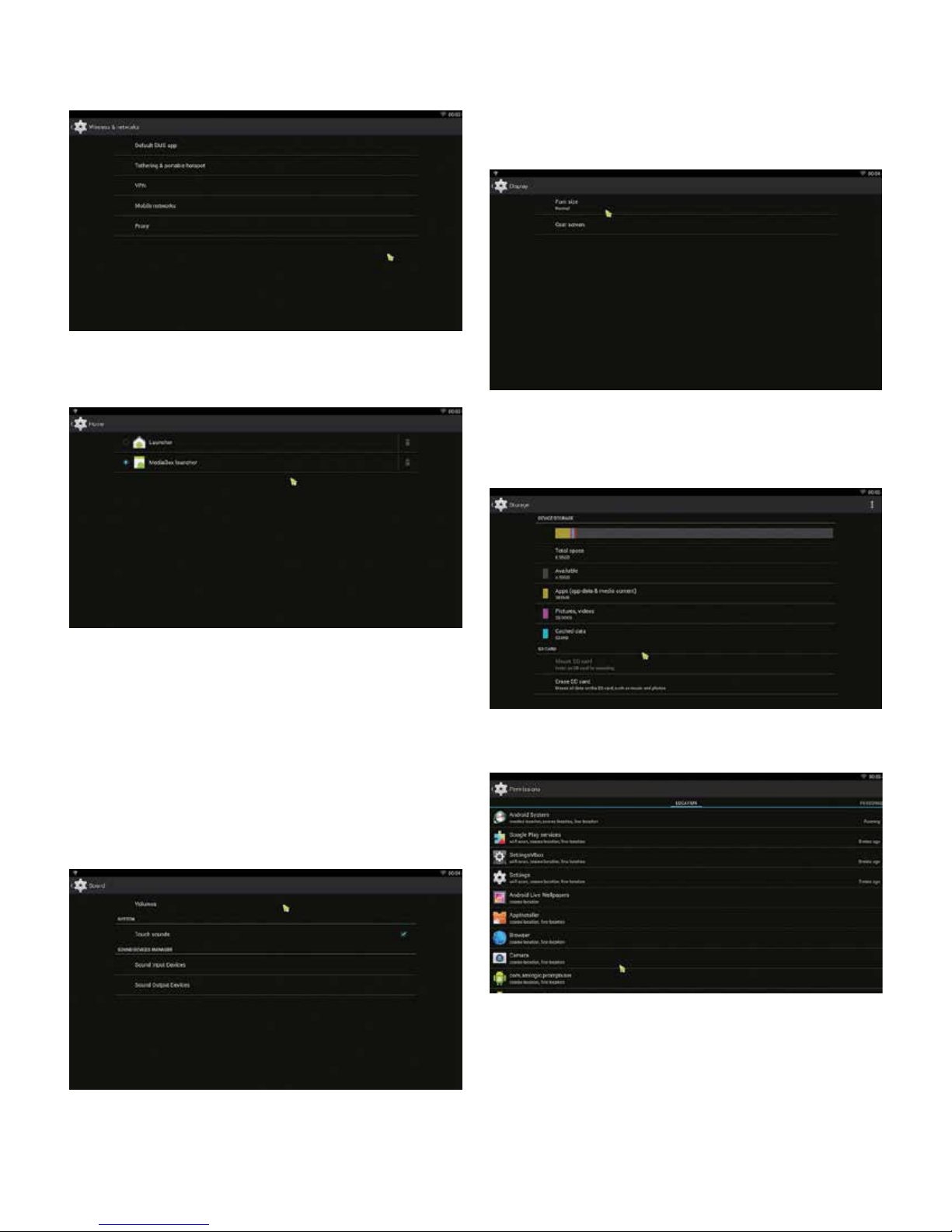
3.5 WIrELESS & NETWOrkS
3.6 HOmE
3.8 dISPLAy
• Font size - Change the font size of OSD
• Cast screen
3.9 STOrAgE
Shows the storage used of the OS and SD card.
3.7 SOuNd
• Volumes - Increase or decrease sound volumes
• Touch Sounds - If you enable Touch sound, sound
will be heard while you move the remote controller
across the screen.
• Sound Input Devices
• Sound Output Devices
3.10 PErmISSIONS
4
Page 8
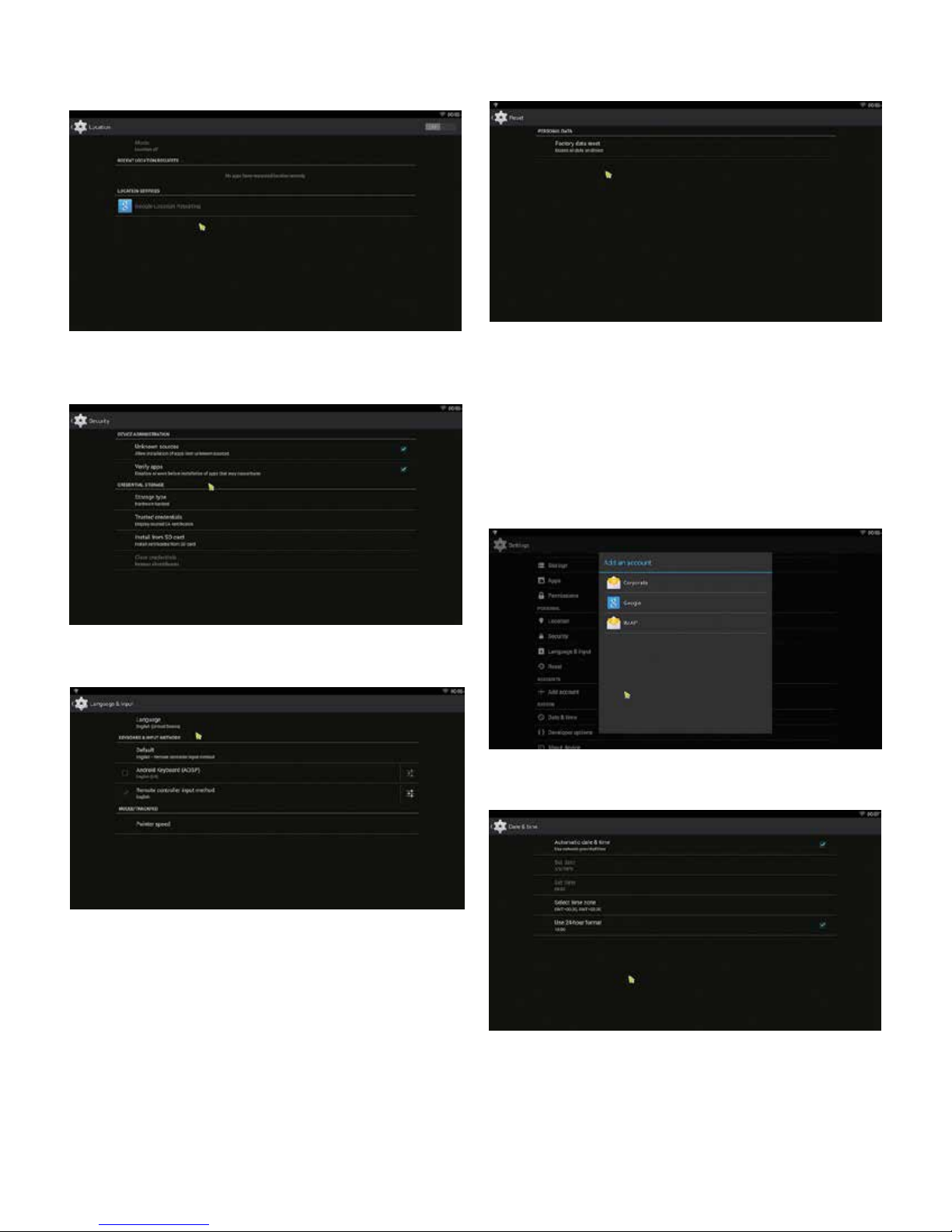
3.11 LOCATION
3.12 SECurITy
3.14 rESET
Factory data rest:
You can reset all the settings and apps to factory default.
Note: You might want to backup important data before
resetting the box. Once you choose to rest to factory
default, all data/apps will be deleted.
3.15 Add AN ACCOuNT
3.13 LANguAgE & INPuT
Change OSD language and input method.
The default input method is android standard keyboard.
3.16 dATE & TImE
5
Page 9
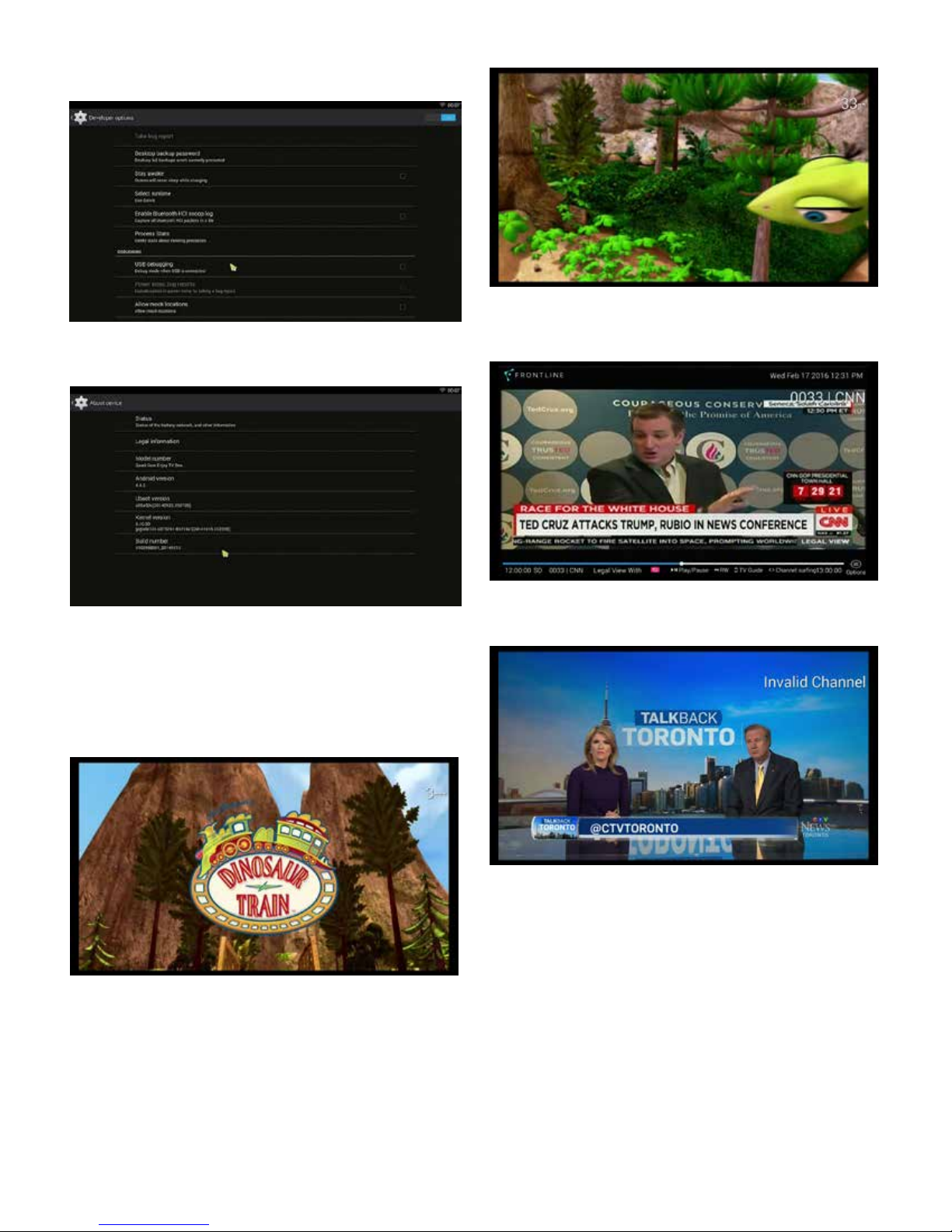
3.17 dEvELOPEr OPTIONS
!
3.18 ABOuT dEvICE
Either press “OK” or wait for the system to upload the
channel.
5. Tv NAvIgATION
5.1 CHANNEL NumBEr ENTry
Enter channel number
5.2 INvALId CHANNEL NumBEr ENTry
6
Page 10
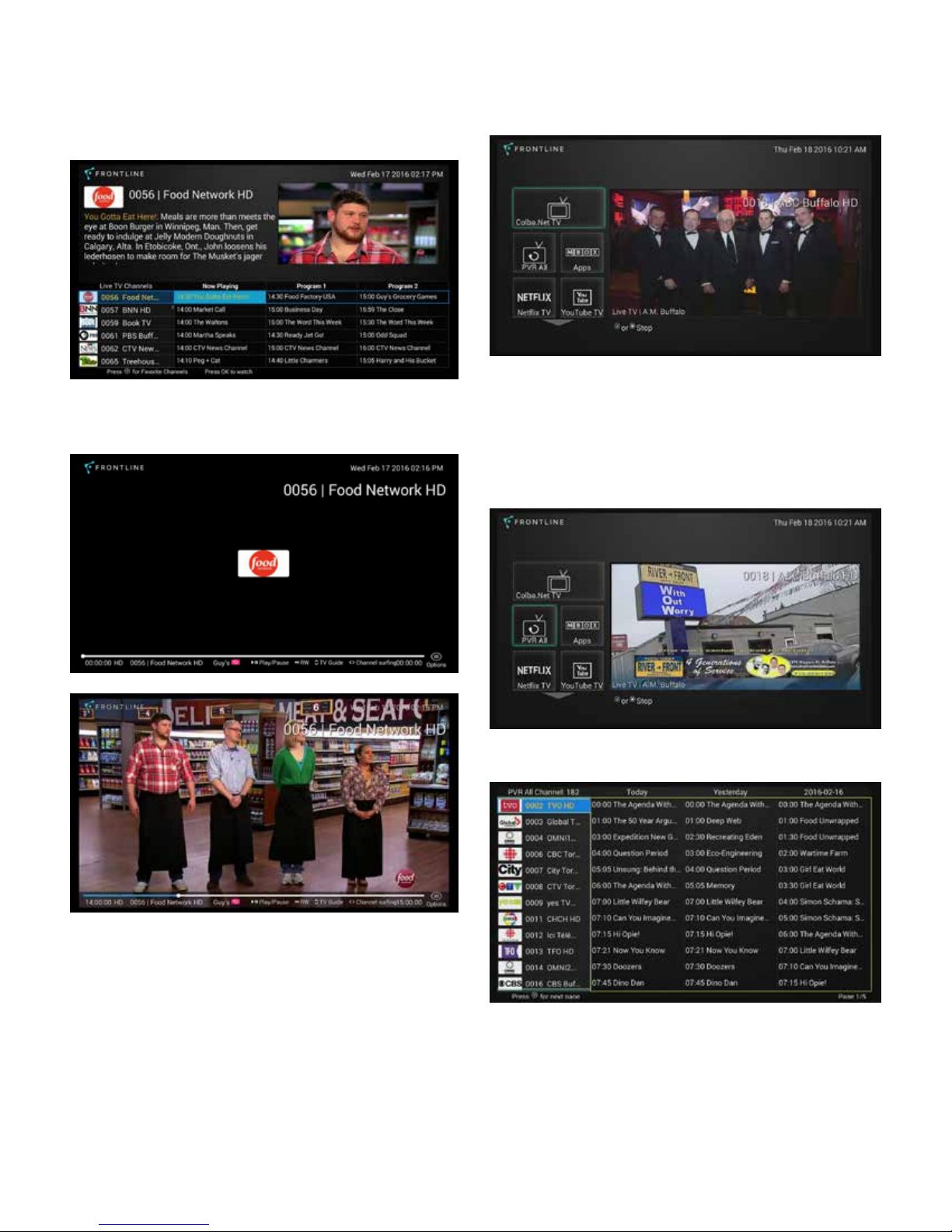
5.3 NAvIgATINg CHANNELS vIA Tv guIdE
5.4 Tv mAIN mENu
Click on “TV Guide- Scroll Up” button on the remote to
display TV Guide.
Use the “Scroll” buttons on the remote to navigate shows.
Press “OK” to watch highlighted show.
Click on “Go Back” button to load Main Menu
5.5 Pvr
Frontline automatically records and stores all shows for
2 weeks.
To view all PVR shows, select PVR All on the Main Menu
Navigate using TV Guide- Scroll up/Down/Left/Right
7
Page 11
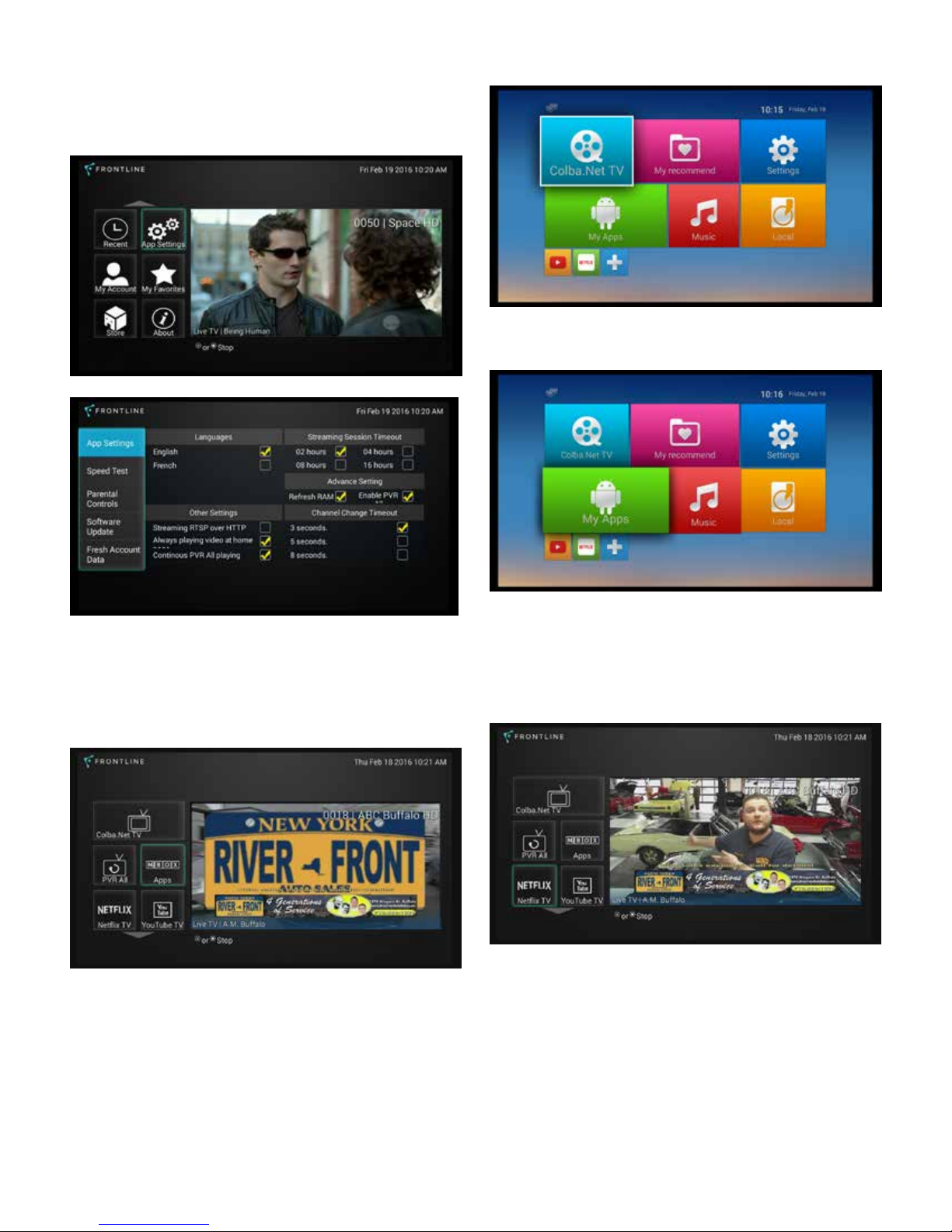
5.6 TO ENABLE Pvr
To view all PVR content you must first enable the setting.
To do this click on APP Settings on the Main Menu.
5.8 AddINg APPS
Navigate over Enable PVR and press “OK” on the remote.
5.7 vIEWINg ALL APPS
Select MBOX Apps
You can add Apps by selecting “My Apps” or “PLUS” sign.
5.9 WATCHINg NETFLIx
Select “Netflix” on Main Menu
8
Page 12
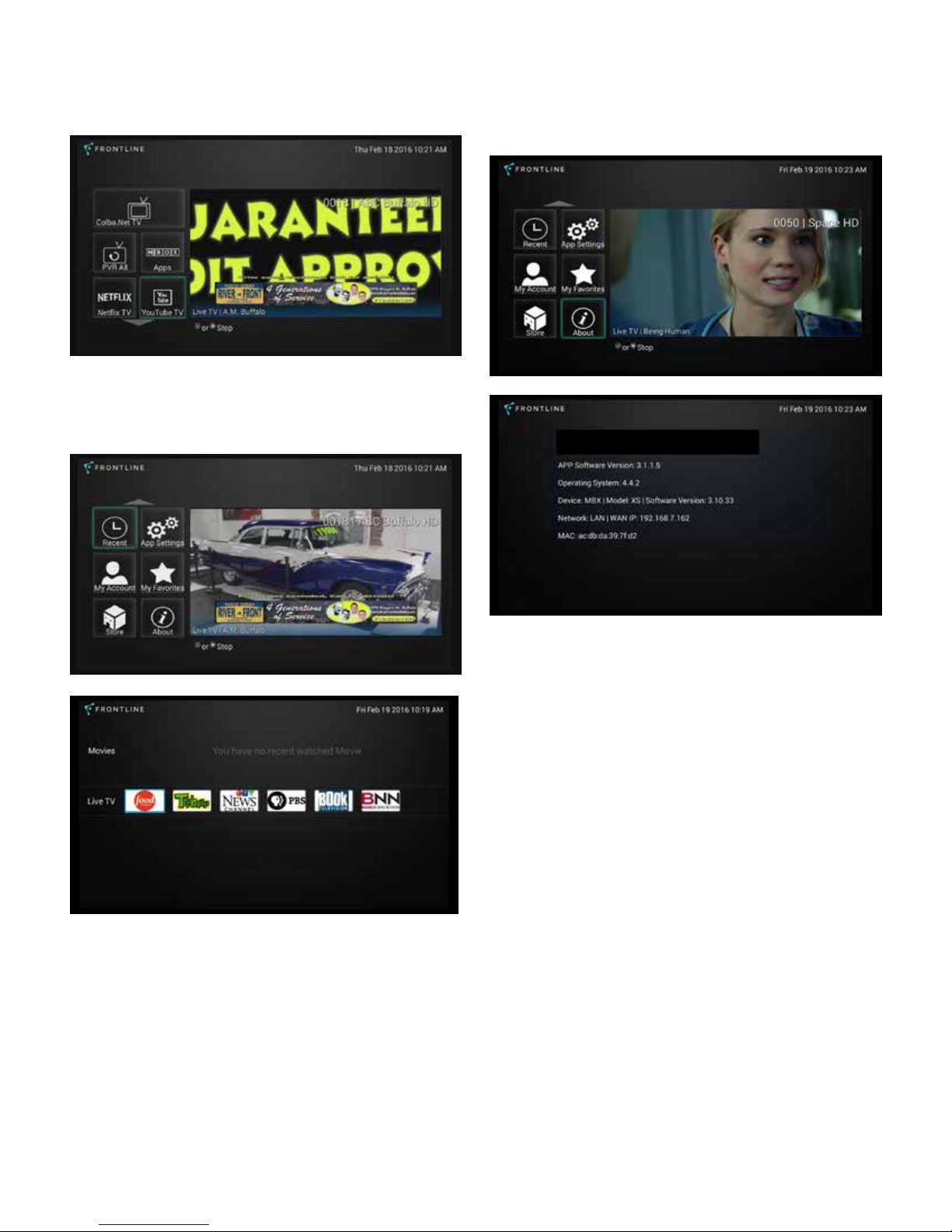
5.10 WATCHINg yOuTuBE
5.12 SySTEm INFOrmATION
Select “YouTube” on Main Menu
5.11 CHANNELS WATCHEd rECENTLy
Select “Recent” on Main Menu
Network, Frontline TV box and IP address information
can all be found under “About”
6. TrOuBLE SHOOTINg/FAQ
6.1 NO PICTurE
Refer to the TV user manual for how to select the correct
video input channel.
6.2 uSB CONTENT CANNOT BE rEAd
• The format of USB storage device is not supported
• The supported memory size is 32G maximum.
• Make sure that this player supports these files.
7. rEPAIrS
If you contact us to repair your player, an administration
fee may be charged if either:
An engineer is called out to your home at your request
and there is no defect in the product.
You bring the unit to a repair center and there is no defect
in the product.
9
Page 13

We will provide you with the amount of the administration
fee before we make a home visit or begin any work on
your player.
MPEG-4 ASP@L5 up to 1080P@60fps
WMV/VC-1 SP/MP/AP up to 1080P@60fps
We recommend you read this manual throughly, search
for a solution on line at www.geniatech.com or contact
Geniatech Customer Care before seeking to repair your
player.
8. SPECIFICATION
CPU ................... Quad Core ARM Cortex-A5 CPU @ 1.5GHz
GPUMali ........... 450 GPU @ 600MHz
RAM .................. 1G DDR3
ROM .................. 8G, EMMC
OS ..................... Android 4.4 OS
Optional ............ DOLBY
USB ................... USB2.0 ×2
HDMI ................. V1.4a
DC Input ............ 5V-2A
SD Slot .............. Max: 32G
RealVideo 8/ 9/10 up to 1080P@60fps
Multiple language and multiple format sub-title video
support
MJPEG and JPEG unlimited pixel resolution decoding
Supports JPEG thumbnail,scaling,rotation and transition
effects
Supports .mkv/.wmv/.mpg/.mpeg/.dat/.avi/.mov/.iso/.
mp4/.rm/.jpg files formats
STOrAgE SySTEm
Built-in 4K bits One-Time-Programming ROM for key storage
SIzE
100 X 100 X 15mm
NET WEIgHT
160g
Video Output.... HDMI/CVBS
Audio Output ...HDMI
IR receiver
Wi-Fi ................. IEEE 802.11 b/g/n, 2.4G(5.8G optional)
BT ...................... Optional
LAN ................... RJ45 10/100M Ethernet interface
AudIO dECOdEr
Supports MP3,AAC,WMA,RM,FLAC,Ogg and programmable
with 5.1 down-mixing
vIdEO/PICTurE dECOdEr
H.265 HEVC [email protected] up to 1080P@60fps
H.264 AVC HP @L4.2 up to 1080P@60fps
H.264 MVC up to 1080P@60fps
9. TrAdEmArk NOTICE
The terms HDMI and HDMI High-Definition Multimedia
Interface and the HDMI Logo are trademarks or registered
trademarks of HDMI Licensing LLC in United States and
other countries.
MPEG-1 MP/HL up to 1080P@60fps
MPEG-2 MP/HL up to 1080P@60fps
10
Page 14

WWW.FrONTLINE.CA
© Frontline Broadband Inc. – 2016 – All rights reserved
 Loading...