

Page 1
Temperature Sensor Module
Operating Voltage
3.0V to 5.5V
Temperature
-55°C to 125°C [-57°F to 257°F]
Measurement Accuracy
±0.5°C
Dimensions
18.5mm x 15mm [0.728in x 0.591in]
The temperature sensor module allows ambient temperature
measurement using digital serial bus.
Temperature Sensor Module consists of a DS18B20 single-bus digital
temperature sensor, a LED and a resistor. It’s compatible with popular
electronics platforms like Arduino, Raspberry Pi and Esp8266.
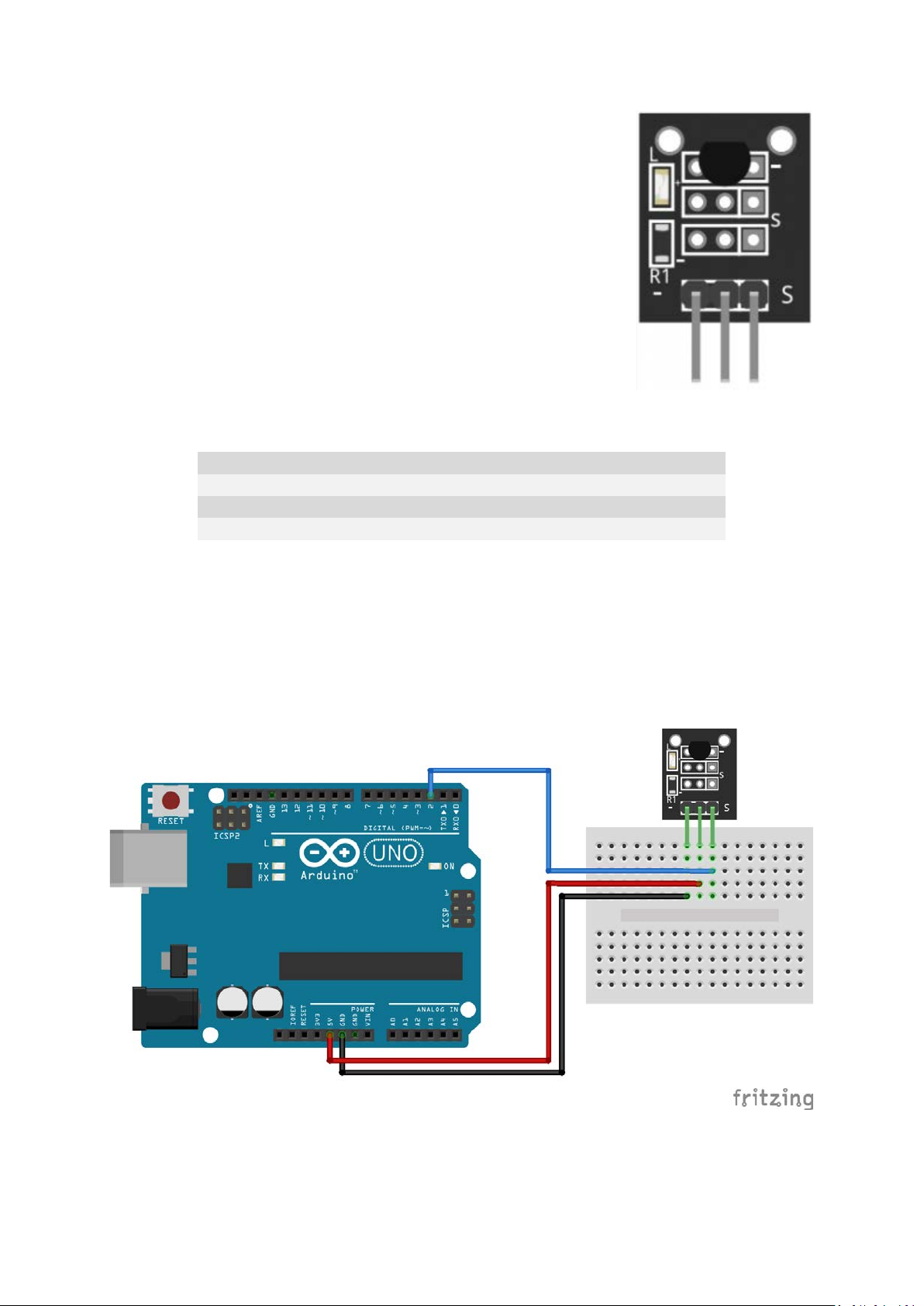
Pinout and Connection to Arduino
Connect the Power line (middle) and ground (-) to +5 and GND respectively. Connect signal (S) to pin
2 on the Arduino.
Page 2

Arduino Example Sketch
The following Arduino sketch will use the OneWire library to serially communicate with the sensor
and output the temperature via the serial monitor.
#include <OneWire.h>
#include <DallasTemperature.h>
// Data wire is plugged into pin 2 on the Arduino
#define ONE_WIRE_BUS 2
// Setup a oneWire instance to communicate with any OneWire devices
// (not just Maxim/Dallas temperature ICs)
OneWire oneWire(ONE_WIRE_BUS);
// Pass our oneWire reference to Dallas Temperature.
DallasTemperature sensors(&oneWire);
void setup(void)
{
// start serial port
Serial.begin(9600);
Serial.println("Dallas Temperature IC Control Library Demo");
// Start up the library
sensors.begin(); // IC Default 9 bit.
// If you have troubles consider upping it 12.
// Ups the delay giving the IC more time to process
// the temperature measurement
}
void loop(void)
{
// call sensors.requestTemperatures() to issue a global temperature
// request to all devices on the bus
Serial.print("Requesting temperatures...");
sensors.requestTemperatures(); // Send the command to get temperatures
Serial.println("DONE");
Serial.print("Temperature for Device 1 is: ");
Serial.print(sensors.getTempCByIndex(0));
// Why "byIndex"?
// You can have more than one IC on the same bus.
// 0 refers to the first IC on the wire
}
 Loading...