

Page 1
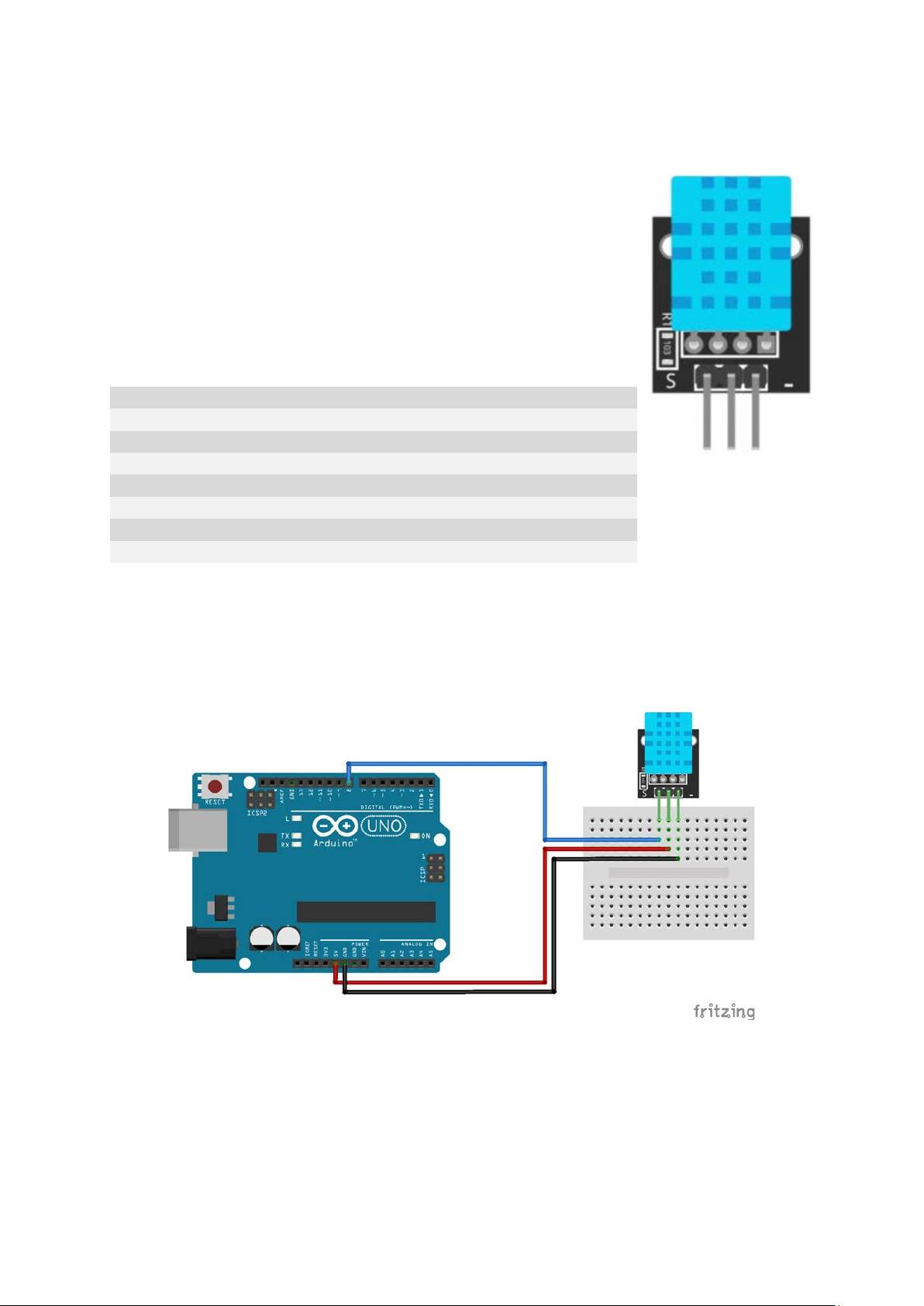
Temperature and Humidity Sensor Module
Operating Voltage
3.3V to 5.5V
Humidity range
20% to 90% RH
Humidity accuracy
±5% RH
Humidity resolution
1% RH
Temperature range
0ºC to 50ºC [32ºF to 122ºF]
Temperature accuracy
±2ºC
Temperature resolution
1ºC
Signal transmission range
20m
This temperature and humidity sensor module provides a digital serial
interface to measure humidity and temperature.
The module consists of a DHT11 digital humidity and temperature sensor
and a 1 kΩ resistor. The DHT11 uses an internal thermistor and a capacitive
humidity sensor to determine environment conditions, an internal chip is
responsible for converting readings to a serial digital signal.
Pinout and Connection to Arduino
Connect the Power line (middle) and ground (-) to +5 and GND respectively. Connect signal (S) to pin
8 on the Arduino.
Arduino Example Sketch
The following sketch uses pin 8 on the Arduino to serially send and receive data from the sensor.
Serial communication is archived by sending specific high/low signals to the sensor and waiting for a
response. Temperature and humidity data is read bit by bit and returned as an array of bytes.
Page 2

int DHpin = 8; // input/output pin
byte dat[5];
byte read_data()
{
byte data;
for(int i = 0; i < 8; i++)
{
if(digitalRead(DHpin) == LOW)
{
while(digitalRead(DHpin) == LOW); // wait 50us;
delayMicroseconds(30); // Duration of high level determine whether data is 0 or 1
if(digitalRead(DHpin) == HIGH)
data |= (1<<(7 - i)); //High in the former, low in the post;
while(digitalRead(DHpin) == HIGH); //Data '1', waiting for next bit
}
}
return data;
}
void start_test()
{
digitalWrite(DHpin, LOW); //Pull down the bus to send the start signal;
delay(30); //The delay is greater than 18 ms so that DHT 11 can detect the start signal;
digitalWrite(DHpin, HIGH);
delayMicroseconds(40); //Wait for DHT11 to respond;
pinMode(DHpin, INPUT);
while(digitalRead(DHpin) == HIGH);
delayMicroseconds(80); //The DHT11 responds by pulling the bus low for 80us;
if(digitalRead(DHpin) == LOW);
delayMicroseconds(80); //DHT11 pulled up after the bus 80us to start sending data;
for(int i = 0; i < 4; i++) //Receiving data, check bits are not considered;
dat[i] = read_data();
pinMode(DHpin, OUTPUT);
digitalWrite(DHpin, HIGH); //After release of bus, wait for host to start next signal
}
void setup()
{
Serial.begin(9600);
pinMode(DHpin, OUTPUT);
}
void loop()
{
start_test();
Serial.print("Current humdity = ");
Serial.print(dat[0], DEC); //Displays the integer bits of humidity;
Serial.print('.');
Serial.print(dat[1], DEC); //Displays the decimal places of the humidity;
Serial.println('%');
Serial.print("Current temperature = ");
Serial.print(dat[2], DEC); //Displays the integer bits of temperature;
Serial.print('.');
Serial.print(dat[3], DEC); //Displays the decimal places of the temperature;
Serial.println('C');
delay(700);
}
 Loading...