

Page 1
FRITZ!Box 7340
Kurzanleitung
Quick Guide
Guide rapide
Guía rápida
Guida rapida
DE
EN
FR
ES
IT
Page 2
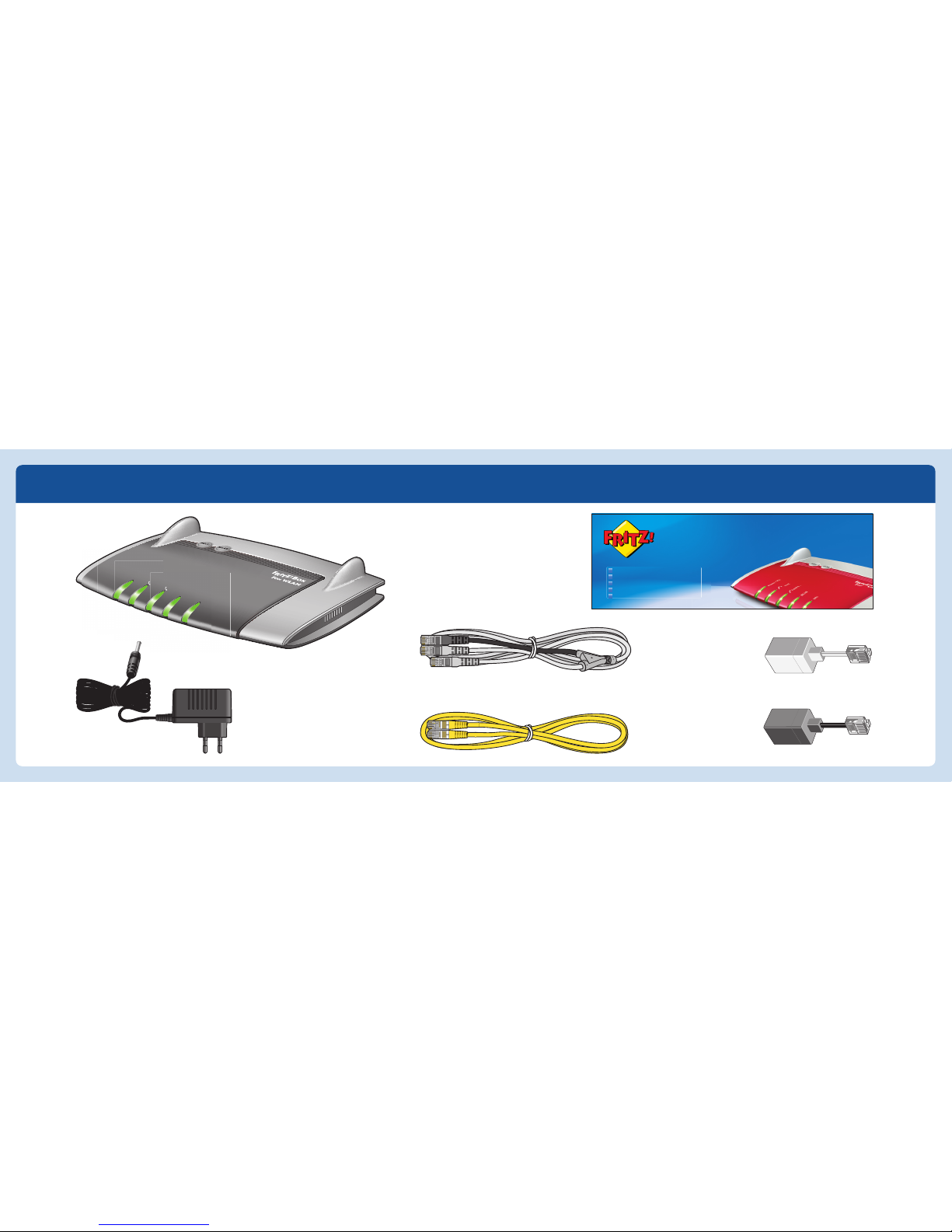
Lieferumfang / Contents / Contenu / Contenido / Confezione
FRITZ!Box 7340
Kurzanleitung
Quick Guide
Guide rapide
Guía rápida
Guida rapida
DE
EN
FR
ES
IT
Power/DSL
Internet
Fixed Line
WLAN
Info
Page 3
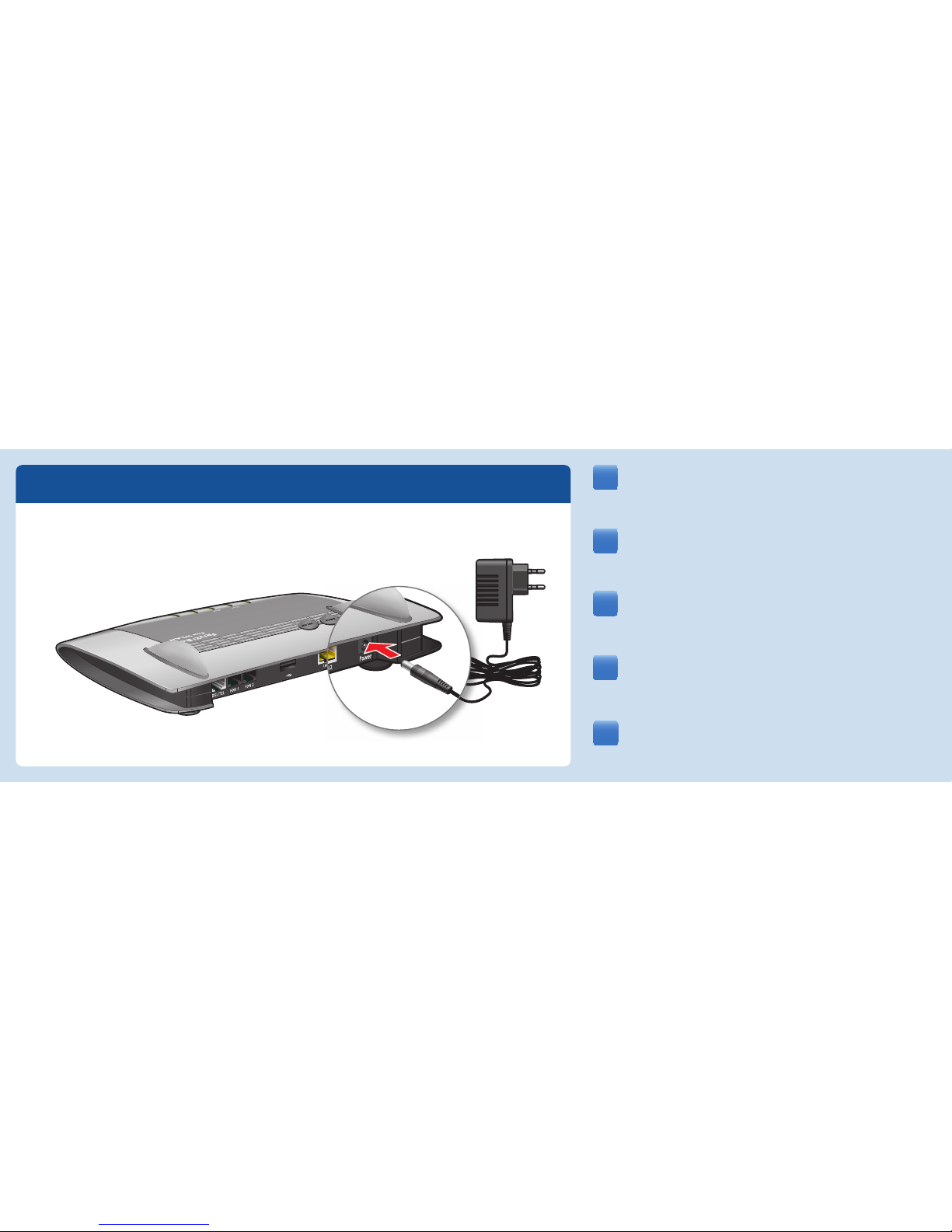
Raccordez le bloc d’alimentation à la prise femelle «Power» de
votre FRITZ!Box. La diode électroluminescente «Power/DSL»
commence à clignoter.
Schließen Sie die FRITZ!Box an den Strom an. Die Leuchtdiode
„Power/DSL“ beginnt zu blinken.
Connect the FRITZ!Box to electrical power. The “Power/DSL” LED
starts fl ashing.
Conecte su FRITZ!Box a la alimentación eléctrica. El díodo
“Power/DSL” comenzará a parpadear.
Collegate il FRITZ!Box alla rete elettrica. Il LED “Power/DSL” inizia
a lampeggiare.
1
DE
EN
FR
ES
IT
INFO
INFO
WLAN
WLAN
Fixed Line
F
ix
ed
Line
Internet
Inte
r
ne
t
Power
P
ower
/
/
DSL
DS
L
Page 4
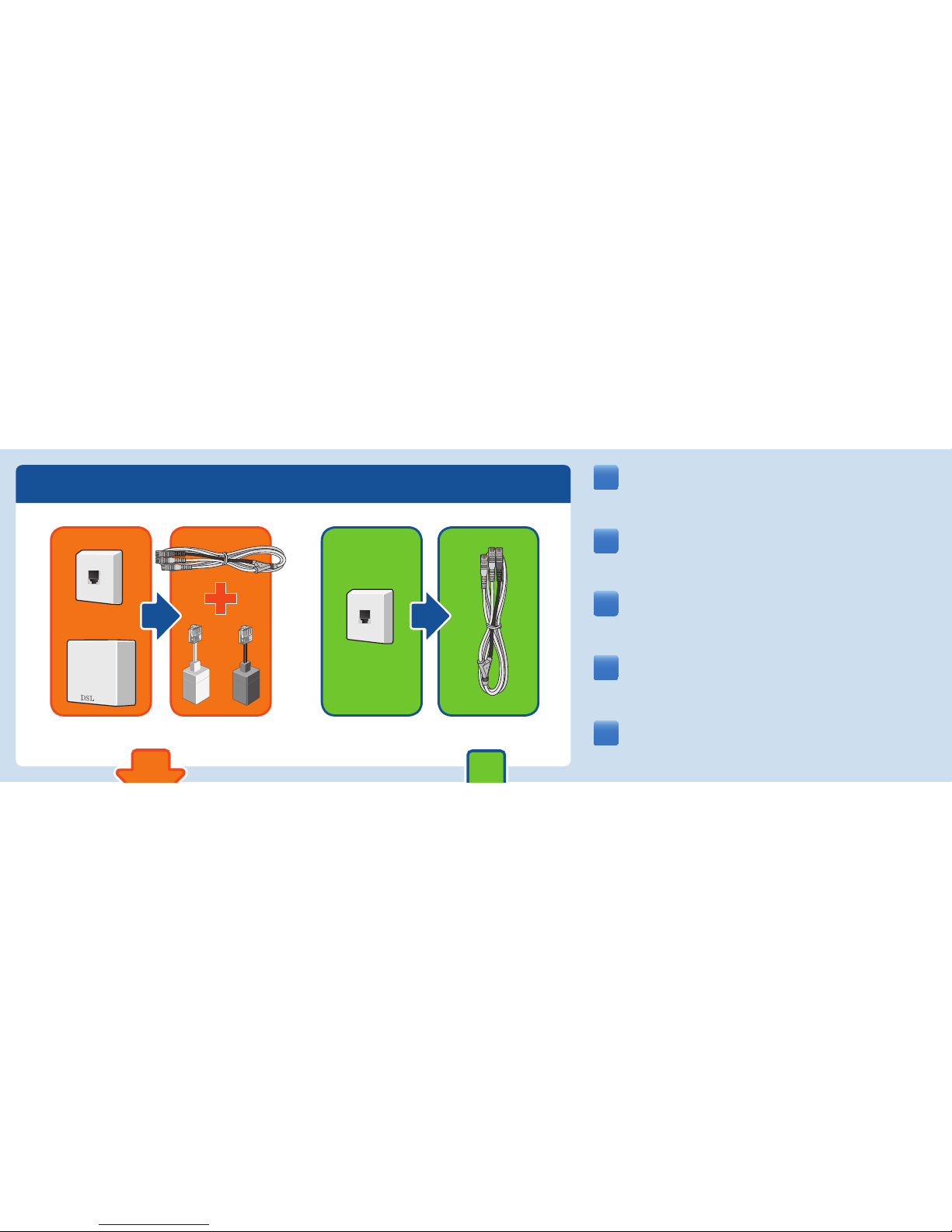
Déterminez votre ligne : en cas de ligne DSL et ligne fi xe, suivez
les instructions en orange; en cas de ligne DSL (seulement DSL),
suivez les instructions en vert.
Bestimmen Sie Ihren Anschlusstyp und folgen Sie den orangen
Pfeilen bei einem DSL- und Festnetzanschluss und den grünen
Pfeilen bei einem DSL-Anschluss.
Set your connection type and follow the orange arrows if you have
a fi xed line and a DSL line, or the green arrows if you have a DSL
line only.
Verifi que que tipo de conexión tiene a su disposición y siga la ruta
naranja, si tiene una conexión a la línea ADSL y a la red telefónica
y la verde, si tiene una conexión a ADSL sin línea de telefonía fi ja.
A seconda di qual è la vostra connessione, seguite l’arancione per
una connessione DSL e di rete fi ssa e il verde per una connessione
solamente DSL.
2
DE
EN
FR
ES
IT
Page 5
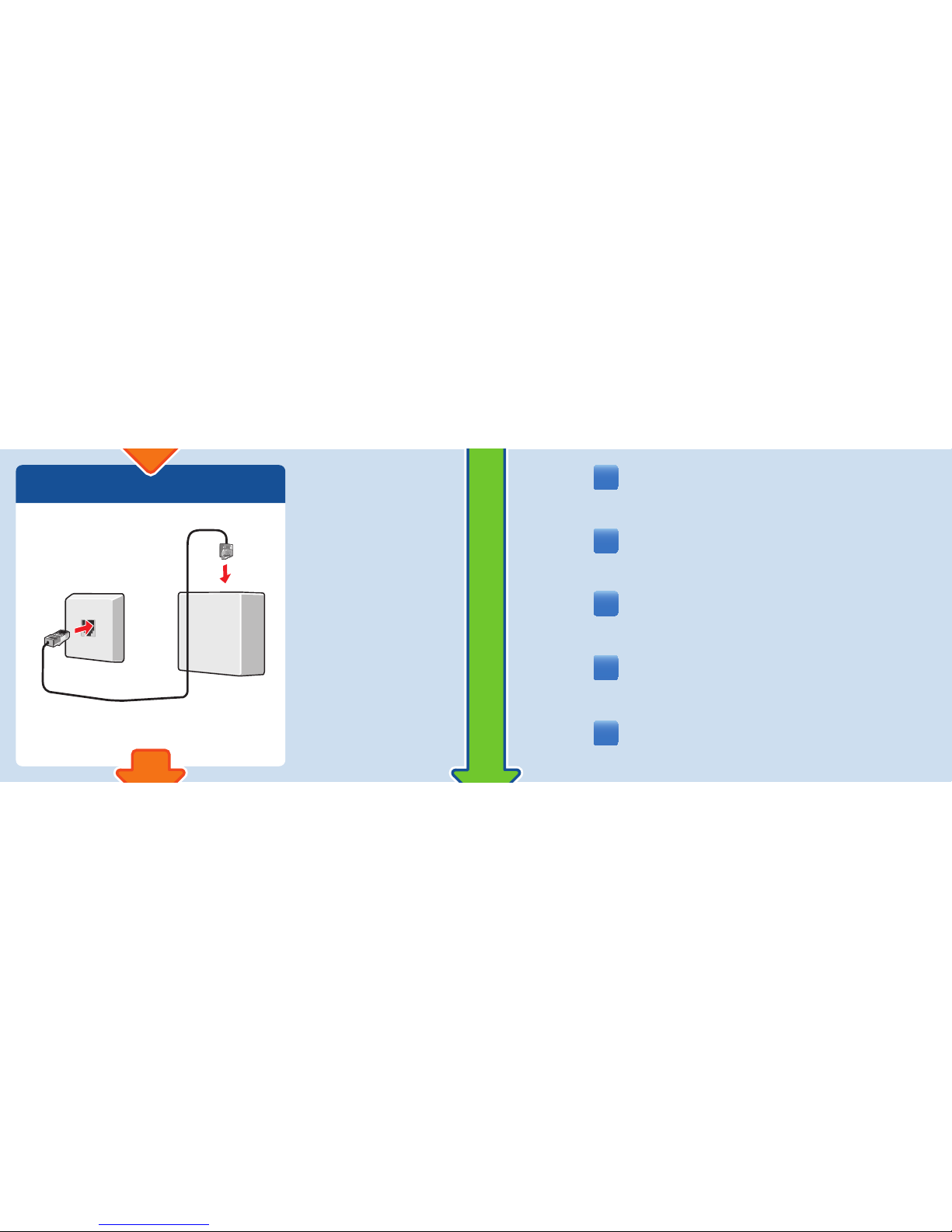
Raccordez votre prise téléphonique à votre répartiteur DSL.
Verbinden Sie Ihre Telefondose mit Ihrem DSL-Splitter.
Connect your telephone socket to your DSL splitter.
Conecte la conexión telefónica al splitter o microfi ltro ADSL.
Collegate la presa telefonica allo splitter DSL.
3.1
DE
EN
FR
ES
IT
Page 6
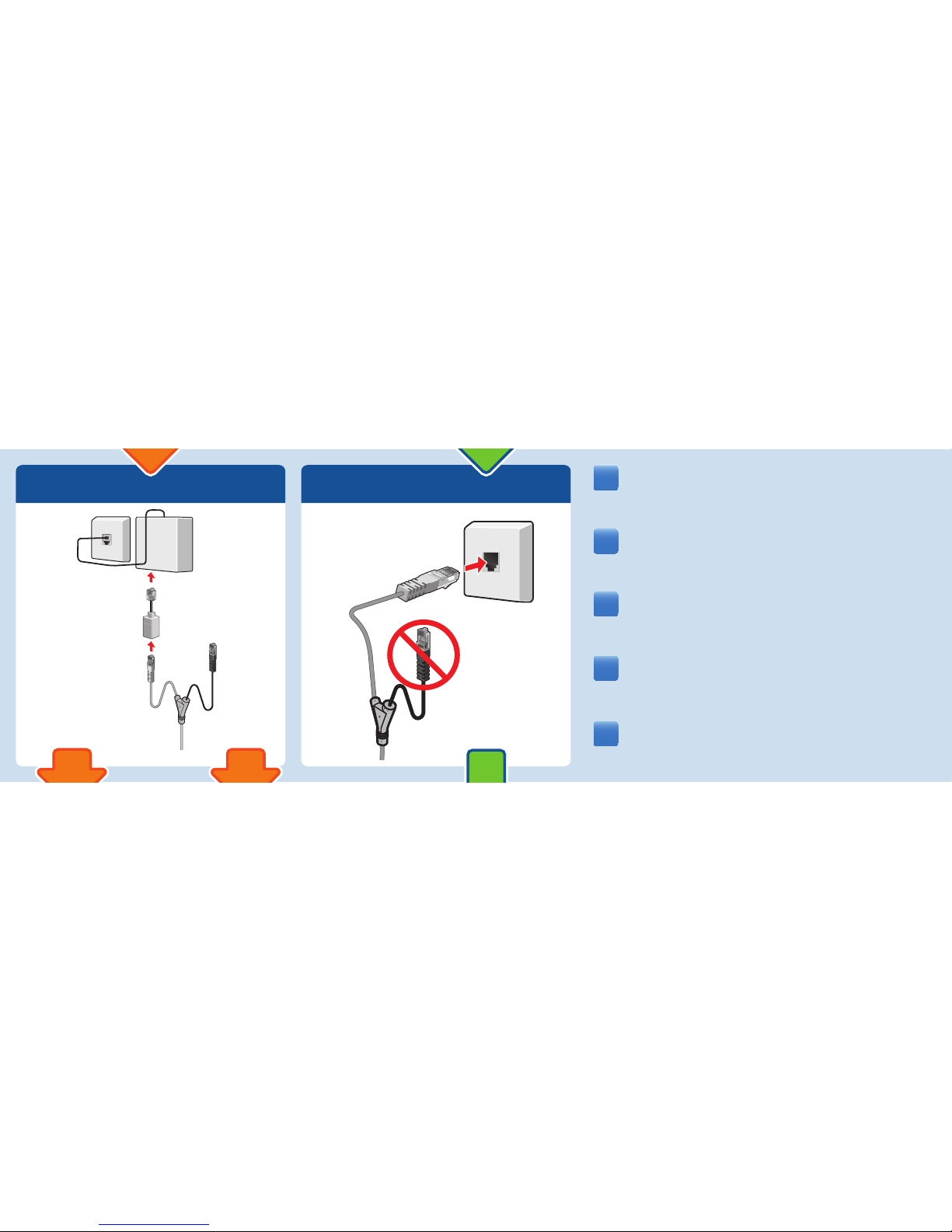
Raccordez l’extrémité courte et grise du câble à votre ligne DSL. Si
cette fi che n’entre pas, branchez cette extrémité de cordon dans
l’adaptateur de couleur gris qui vous a été fourni à la livraison.
Verbinden Sie das kurze, graue Kabelende mit Ihrem DSLAnschluss. Wenn der Stecker nicht in die Buchse passt, verbinden
Sie ihn mit dem grauen Anschlussadapter aus dem Lieferumfang.
Connect the shorter end of the gray cable to the DSL line. If the
plug does not fi t into the socket, connect it with the grey adapter
included in the package.
Conecte el extremo gris corto del cable a su conexión a la línea
ADSL. Si el conector no entra en la boca de conexión de la toma de
la línea ADSL conéctelo primero al adaptador gris, que encontrará
en el embalaje.
Collegate l’estremità grigia breve del cavo alla presa DSL. Se il
connettore non entra nella presa collegatelo all’adattatore grigio
in dotazione al FRITZ!Box.
3.2 3.2
DE
EN
FR
ES
IT
Page 7
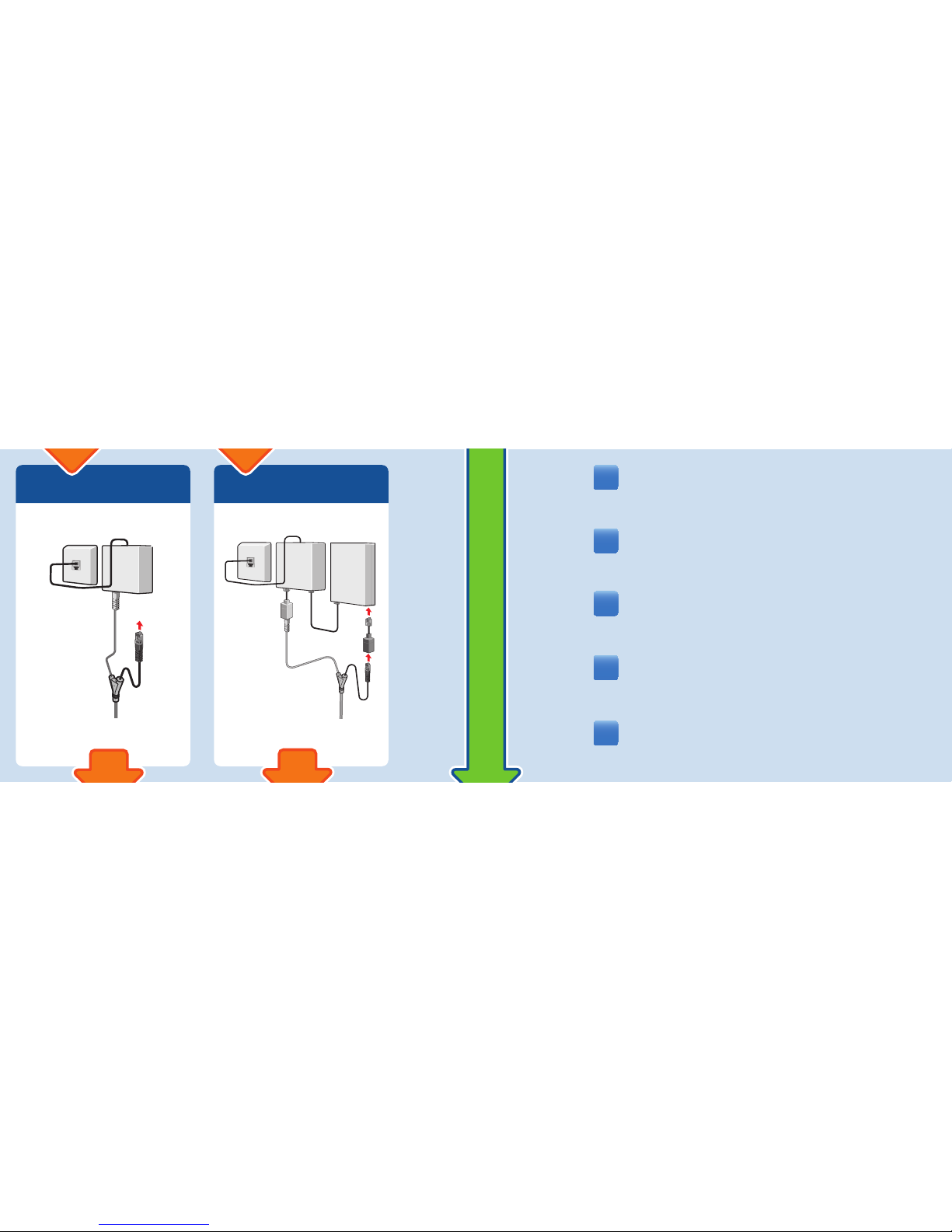
Raccordez l’extrémité noire du câble à votre ligne téléphonique. Si
cette fi che n’entre pas, branchez cette extrémité de cordon dans
l’adaptateur de couleur noire qui vous a été fourni à la livraison.
Verbinden Sie das schwarze Kabelende mit Ihrem
Telefonanschluss. Wenn der Stecker nicht in die Buchse passt,
verbinden Sie ihn mit dem schwarzen Anschlussadapter aus dem
Lieferumfang.
Connect the black end of the Y-shaped cable with the fi xed-line
socket of your line. If the plug does not fi t into the fi xed-line
socket, connect it with the black adapter included in the package.
Conecte el extremo negro del cable a la conexión telefónica. Si el
conector no entra en la boca de conexión de la toma de la línea
fi ja conectelo primero al adaptador negro, que encontrará en el
embalaje.
Collegate l’estremità nera del cavo alla presa telefonica. Se
il connettore non entra nella presa di rete fi ssa collegatelo
all’adattatore nero in dotazione al FRITZ!Box.
3.3
Analog
Analog
Analogique
Analógica
Analogica
ISDN
ISDN
RNSI
RDSI
ISDN
3.3
DE
EN
FR
ES
IT
Page 8
© AVM Computersysteme Vertriebs GmbH • Documentation release 04/2013 • 521288007
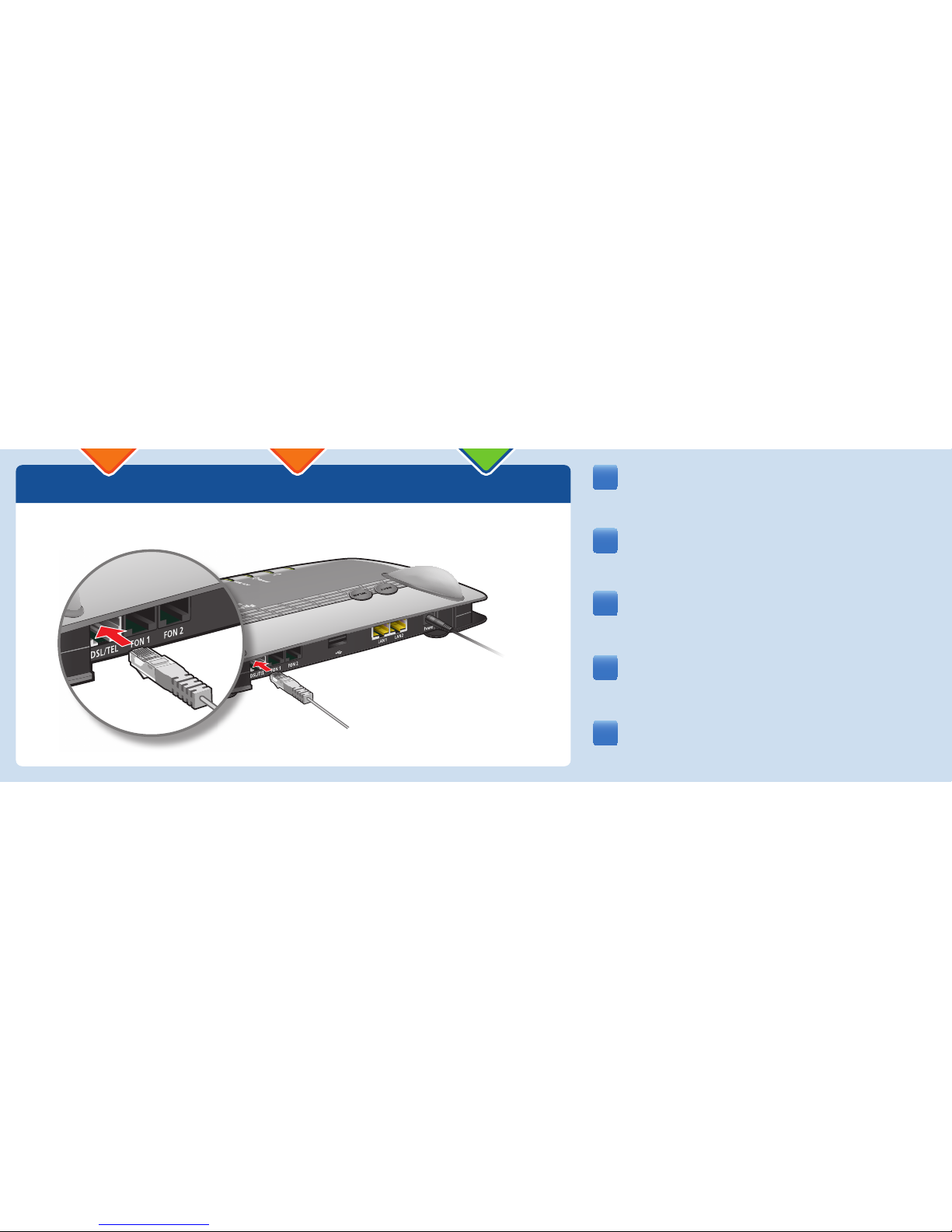
Schließen Sie das lange, graue Kabelende an die Buchse
„DSL/TEL“ der FRITZ!Box an.
Raccordez l’extrémité longue et grise du câble à la prise femelle
«DSL/TEL» de votre FRITZ!Box.
Connect the gray, long end of the cable to the socket on the
FRITZ!Box labeled “DSL/TEL”.
Conecte el extremo gris largo del cable al puerto de conexión de
su FRITZ!Box marcado con las siglas “DSL/TEL”.
Collegate l’estremità grigia del cavo alla presa “DSL/TEL” del
FRITZ!Box.
4
EN
FR
ES
IT
DE
INFO
WLAN
Fixed Line
L
in
e
Internet
Inte
r
n
e
t
Power
P
ow
e
r
/
DS
L
DS
L
O
O
WLAN
Fixed
L
ine
Inter
n
e
t
P
owe
r
/
DSL
Page 9
5
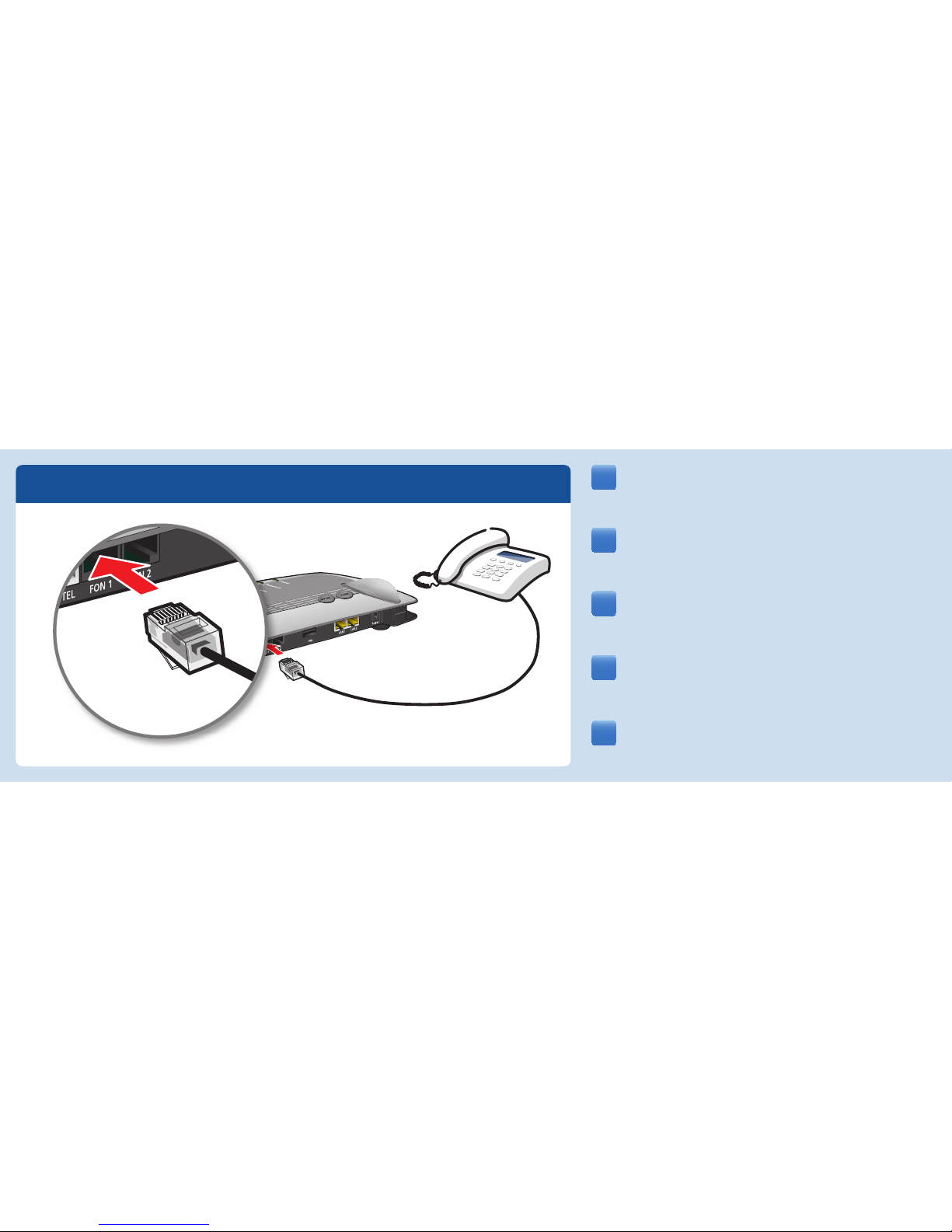
Raccordez vos appareils analogiques à FON1 et FON2.
Schließen Sie Ihre analogen Geräte an FON1 und FON2 an.
Connect your analog devices to the sockets FON 1 and FON2.
Ahora podrá conectar sus dispositivos telefónicos analógicos a los
puertos FON1 y FON2.
Collegate i apparecchi analogici a FON1 e FON2.
DE
EN
FR
ES
IT
INFO
WLAN
Fixed Line
Internet
Powe
r
/
/
DSL
DS
L
INFO
WLAN
Fixe
Li
L
Inter
net
L
ine
Intern
e
t
P
ower
/
DSL
Page 10
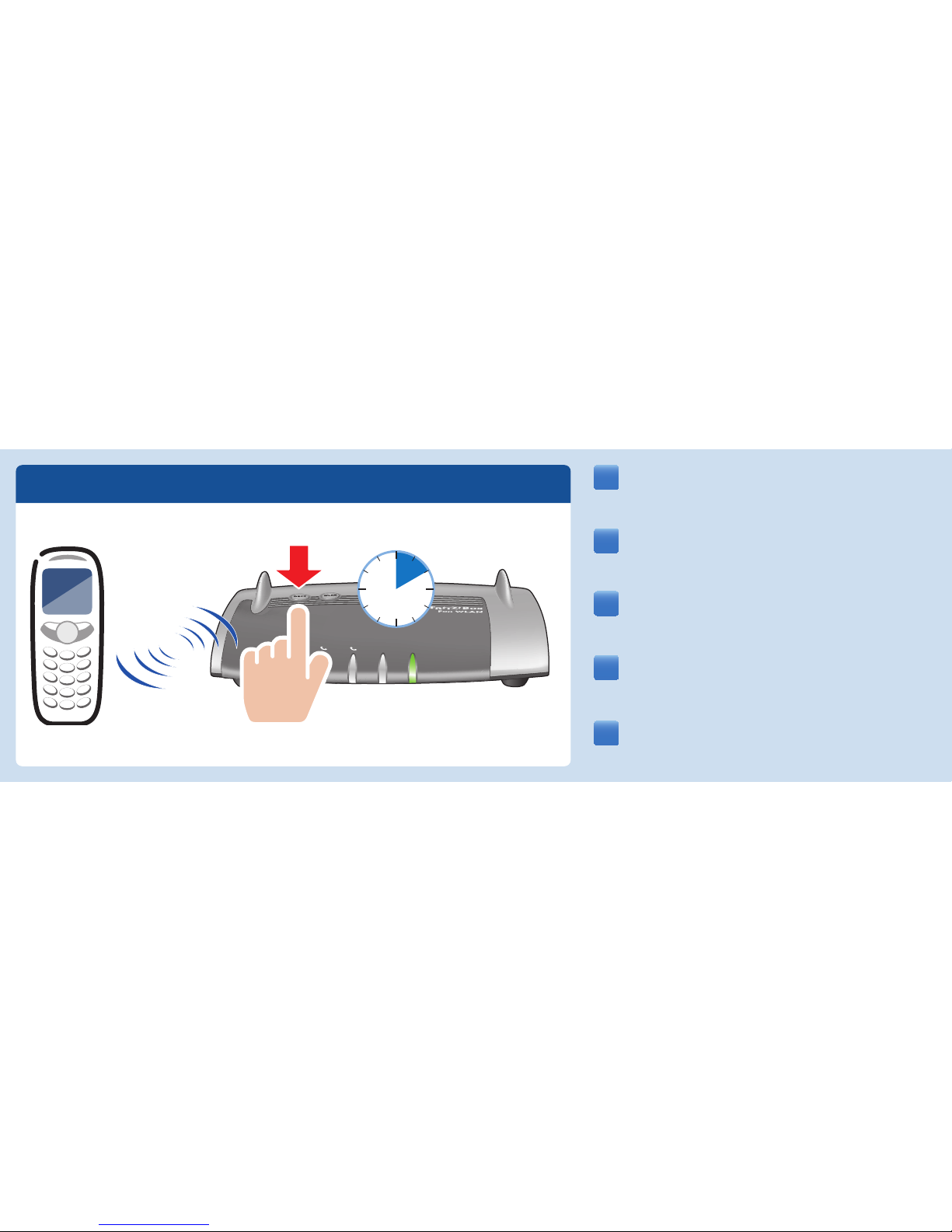
• Inicie en su teléfono DECT el proceso de conexión.
• Indique en el teléfono el PIN “0000”.
• Presione el botón DECT en su FRITZ!Box.
• Attivate la modalità di registrazione del vostro telefono DECT.
• Digitate il PIN “0000” sul telefono.
• Premete il tasto DECT sul FRITZ!Box.
• Bringen Sie Ihr DECT-Telefon in den Anmeldemodus.
• Geben Sie am Telefon die PIN „0000“ ein.
• Drücken Sie die DECT-Taste auf der FRITZ!Box.
• Put your DECT telephone in registration mode.
• Enter the PIN “0000” on the telephone.
• Press and hold down the “DECT” button on the FRITZ!Box.
5
• Faites passer votre téléphone DECT sur le mode d’enregistrement.
• Saisissez le code confi dentiel «0000» sur le téléphone.
• Enfoncez la touche DECT de FRITZ!Box.
Fixed Line
Internet
WLAN
Power/DSL
10 s
Registration
DE
EN
FR
ES
IT
Page 11
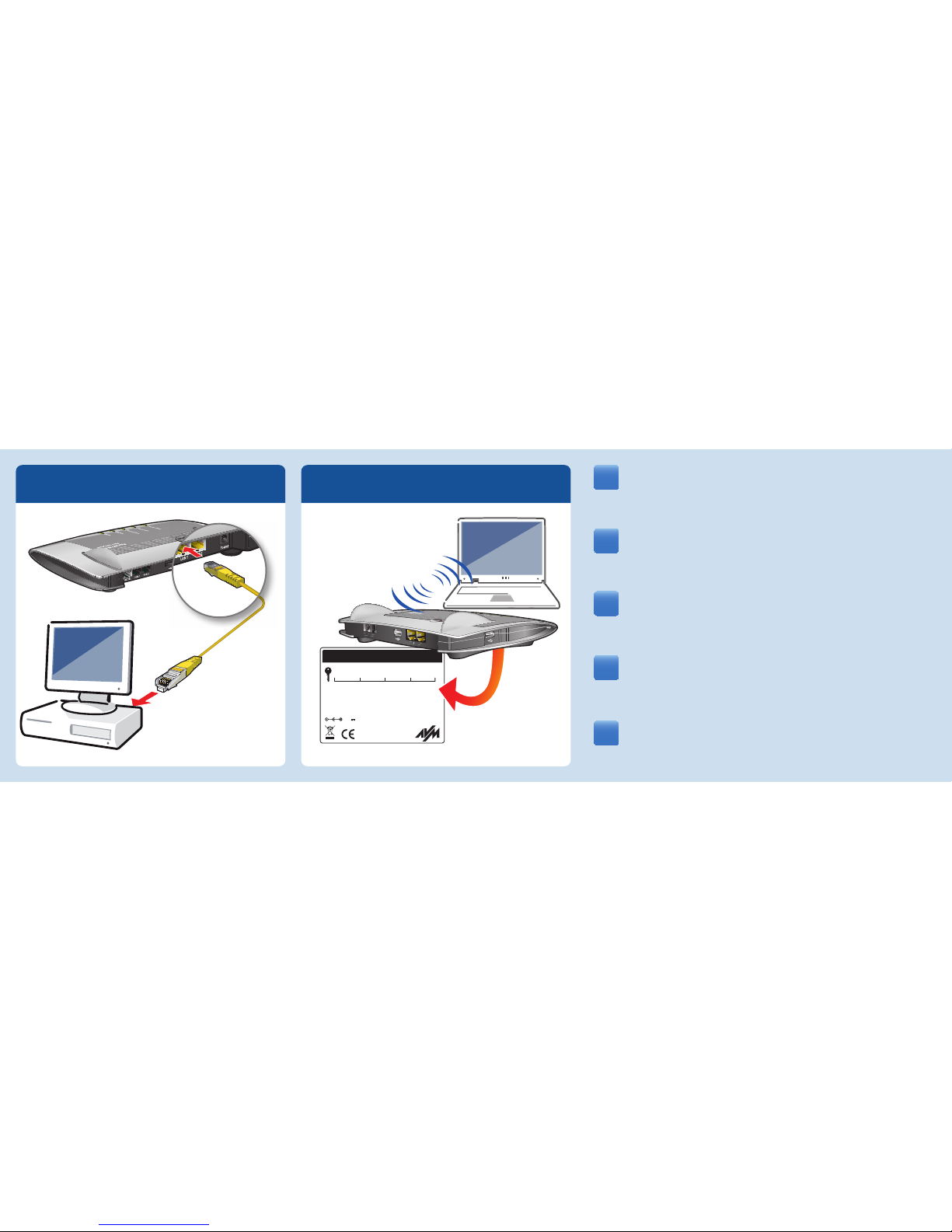
Connectez votre ordinateur à FRITZ!Box, soit avec un câble LAN,
soit via la connexion sans fi l (WLAN).
Verbinden Sie Ihren Computer entweder mit einem LAN-Kabel oder
per WLAN-Verbindung mit der FRITZ!Box.
Connect your computer using a LAN cable or establishing a WLAN
connection with the FRITZ!Box.
Conecte sus ordenadores a FRITZ!Box con ayuda de un cable LAN o
sin cables, estableciendo una conexión inalámbrica (WLAN).
Collegate il computer al FRITZ!Box o con un cavo LAN oppure via
WLAN.
66
INFO
WLAN
Fixed Line
Internet
Power
/
DSL
FRITZ!Box 7340
© AVM GmbH
www.avm.de
Made in Germany
12V 2A 24VA
Use only with the power unit
:
311P0W062
WLAN Network Key (WPA/WPA2):
Installation
: http://fritz.box
Part-No.:
2000 2448
Serial No.:
WLAN
LAN
LAN
LAN
LAN
FON
FON
DS
L
/
T
EL
DSL/TEL
3xxx xx81 1xxx 9xx1
DE
EN
FR
ES
IT
Page 12
fritz.box Internet
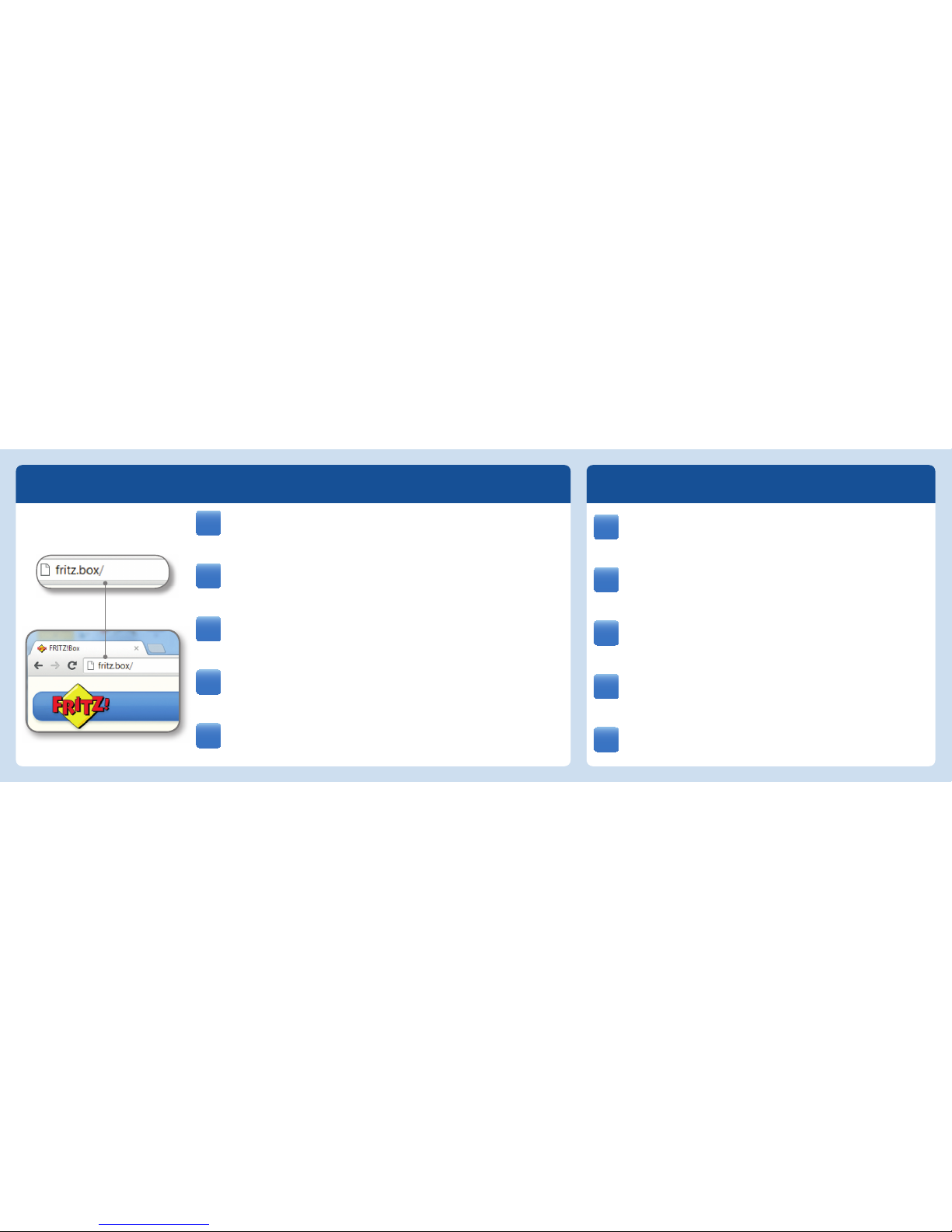
Die FRITZ!Box hat eine Benutzeroberfl äche, in der Sie alle
erforderlichen Einstellungen vornehmen. Sie können sie in jedem
Internetbrowser öff nen, indem Sie fritz.box eingeben.
FRITZ!Box a une interface utilisateur qui vous permet d’exécuter
toutes les confi gurations nécessaires. Vous pouvez ouvrir cette
interface avec fritz.box dans n’importe quel navigateur Internet.
The FRITZ!Box has a user interface. This is where you confi gure all of
the settings for operating. Just open a web browser and enter
fritz.box in the address bar.
Su FRITZ!Box tiene una interfaz de usuario, en la que podrá ajustar
la confi guración de acuerdo a sus necesidades. Digitando fritz.box
podrá abrirla con cualquier explorador de Internet.
Il FRITZ!Box è dotato di un’interfaccia utente in cui realizzare tutte
le impostazioni necessarie. Potete aprirla in ogni browser digitando
fritz.box.
• Starten Sie einen Internetbrowser.
• Geben Sie die gewünschte Adresse ein.
• Démarrez un navigateur Internet.
• Saisissez l’adresse souhaitée.
• Start a web browser.
• Enter the desired URL.
• Inicie un explorador de Internet.
• Digite la dirección deseada.
• Avviate un browser.
• Immettete l’indirizzo richiesto.
DE
EN
FR
ES
IT
DE
EN
FR
ES
IT
Page 13
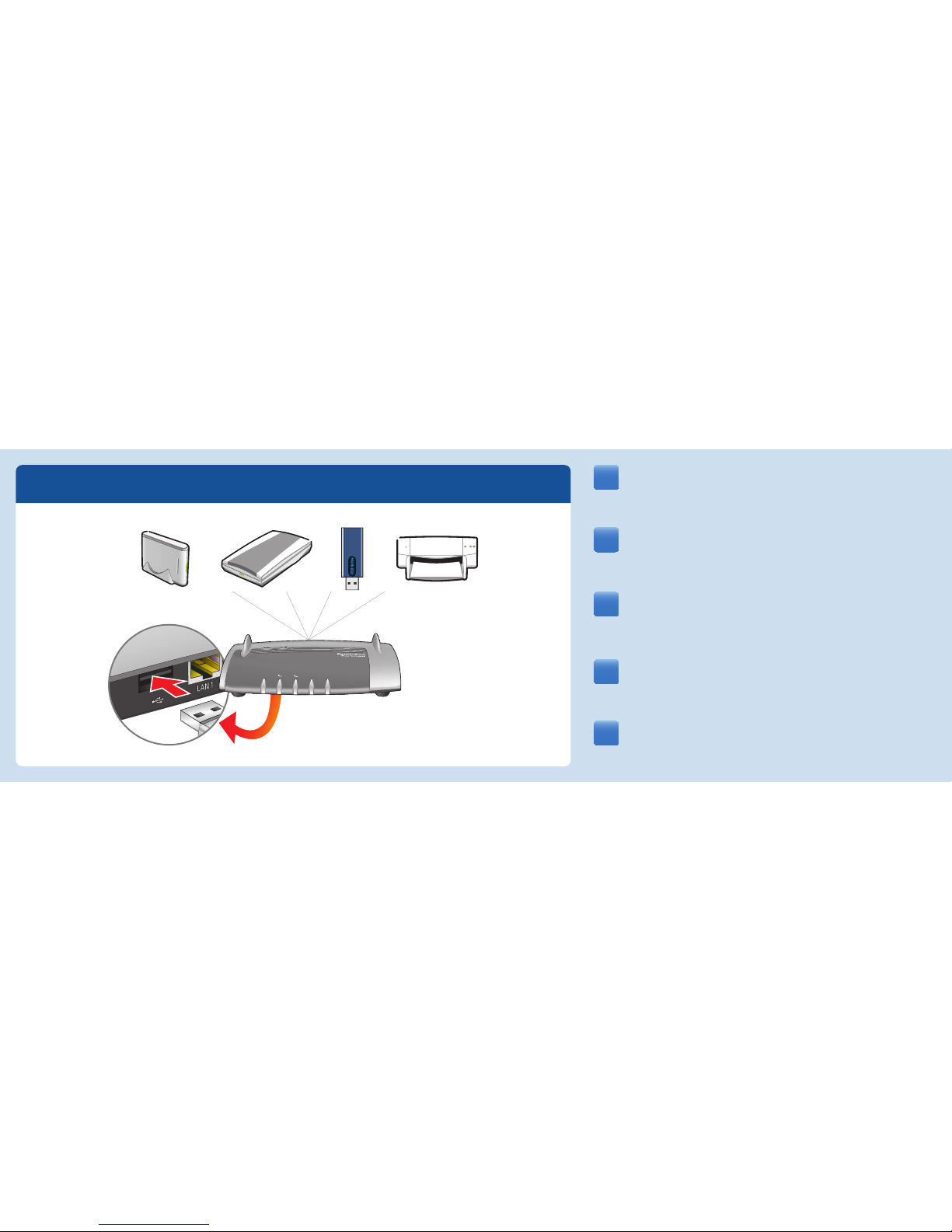
FRITZ!Box a deux ports USB. Les périphériques USB que
vous connectez à ces ports peuvent être utilisés par tous les
ordinateurs du réseau.
Die FRITZ!Box hat zwei USB-Anschlüsse. Alle Computer im
Netzwerk können die USB-Geräte verwenden, die Sie an diese
Anschlüsse anschließen.
Su FRITZ!Box tiene dos puertos de conexión USB. Los dispositivos
USB que conecte a dichos puertos podrán ser utilizados por todos
ordenadores que se encuentren en su red.
The FRITZ!Box has two USB ports to which you can connect various
USB devices. All computers in the network can use the USB
devices that you connect to these ports.
Il FRITZ!Box è dotato di due porte
USB. Gli apparecchi USB che
collegate a queste porte possono essere usati da tutti i computer
della rete.
USB
DE
EN
FR
ES
IT
Info
Info
Fixed Line
Internet
WLAN
Power/DSL
Page 14
LED
DE
EN
FR
ES
IT
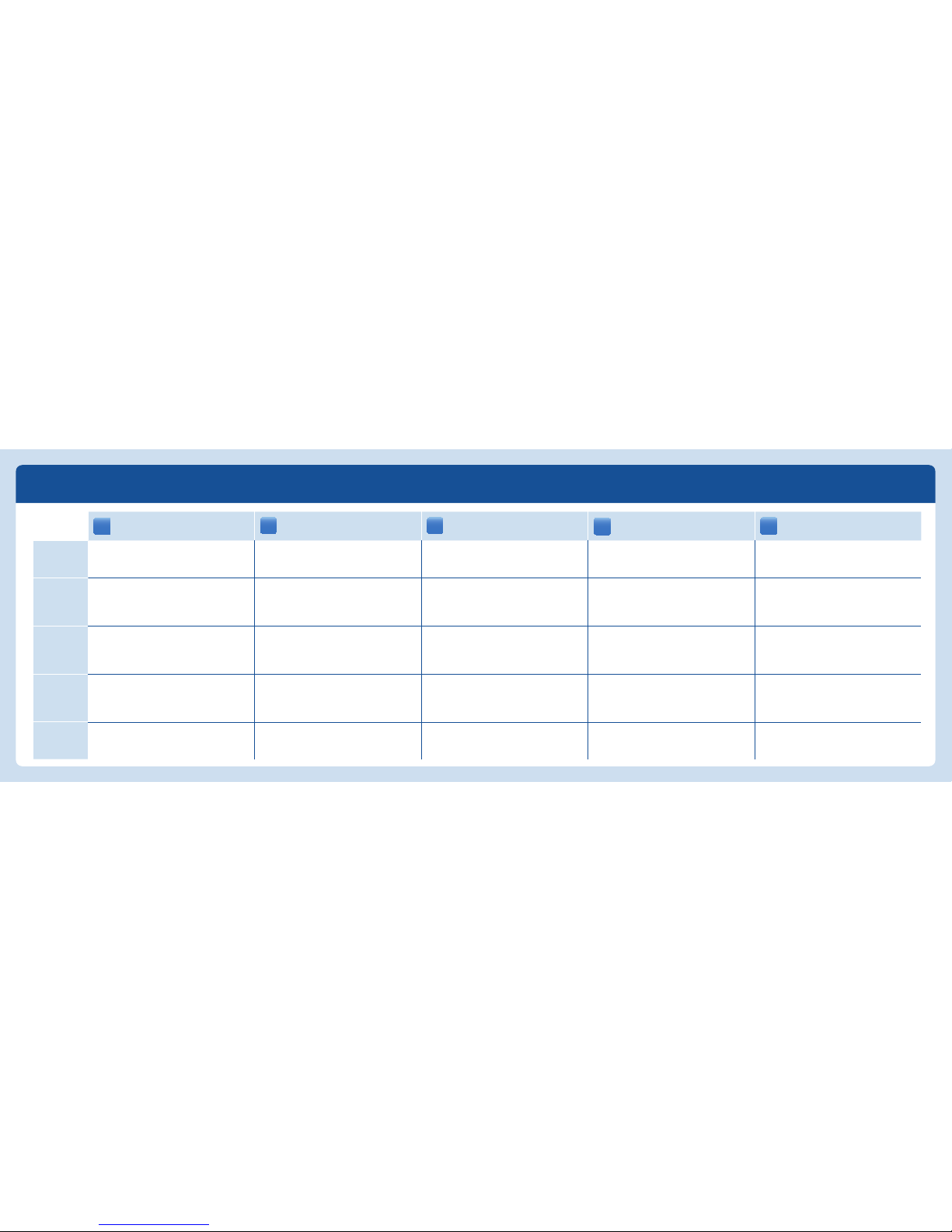
Power/DSL
blinkt: Verbindung wird hergestellt
leuchtet: FRITZ!Box ist betriebstbereit
flashing: the connection is being established
on: FRITZ!Box is ready for operation
clignote : la connexion est en cours
d’établissement
allumée : FRITZ!Box est en état de fonctionner
parpadea: se está estableciendo la conexión
brilla: FRITZ!Box está listo
lampeggia: collegamento in corso
acceso: FRITZ!Box pronto per l’uso
Internet
blinkt: neue Nachrichten in Ihrer Mailbox
leuchtet: Telefonverbindung über Internet aktiv
flashing: you have new messages in your inbox
on: a telephone connection to the Internet is
active
clignote : un message est arrivé sur votre
boîte de réception
allumée : une conversation téléphonique via
Internet est en cours
parpadea: tiene nuevos mensajes en su buzón
de correo
brilla: existe una conexión telefónica vía
Internet
lampeggia: nuovi messaggi nella mailbox
acceso: una connessione telefonica via Internet
è attiva
Fixed Line
blinkt: neue Nachrichten in Ihrer Mailbox
leuchtet: Telefonverbindung über Festnetz
aktiv
flashing: you have new messages in your inbox
on: a telephone connection over the fixed-line
network is active
clignote : un message est arrivé sur votre
boîte de réception
allumée : une conversation téléphonique
via la ligne fi xe est en cours
parpadea: tiene nuevos mensajes en su buzón
de correo
brilla: existe una conexión telefónica a través
de la red fija de telefonía
lampeggia: nuovi messaggi nella mailbox
acceso: una connessione telefonica via rete
fissa è attiva
WLAN
blinkt: die WLAN-Einstellungen werden
übernommen
leuchtet: die WLAN-Einstellungen sind aktiv
flashing: adopting the WLAN settings
on: WLAN settings are active
clignote : les paramètres du réseau local sans
fil vont être acceptés
allumée : les paramètres du réseau local sans
fil sont actifs
parpadea: se está ajustando la configuración
de la red inalámbrica (WiFi)
brilla: configuración de la red inalámbrica
(WiFi) activa
lampeggia: vengono applicate le impostazioni
WLAN
acceso: impostazioni WLAN attive
Info
blinkt/leuchtet: frei einstellbar
rot: Fehler
flashing/on: configurable
red: error
clignote/allumée : configurable
rouge : erreur
parpadea/brilla: programable
rojo: error
lampeggia/acceso: impostabile a piacere
rosso: errore
Page 15
Service
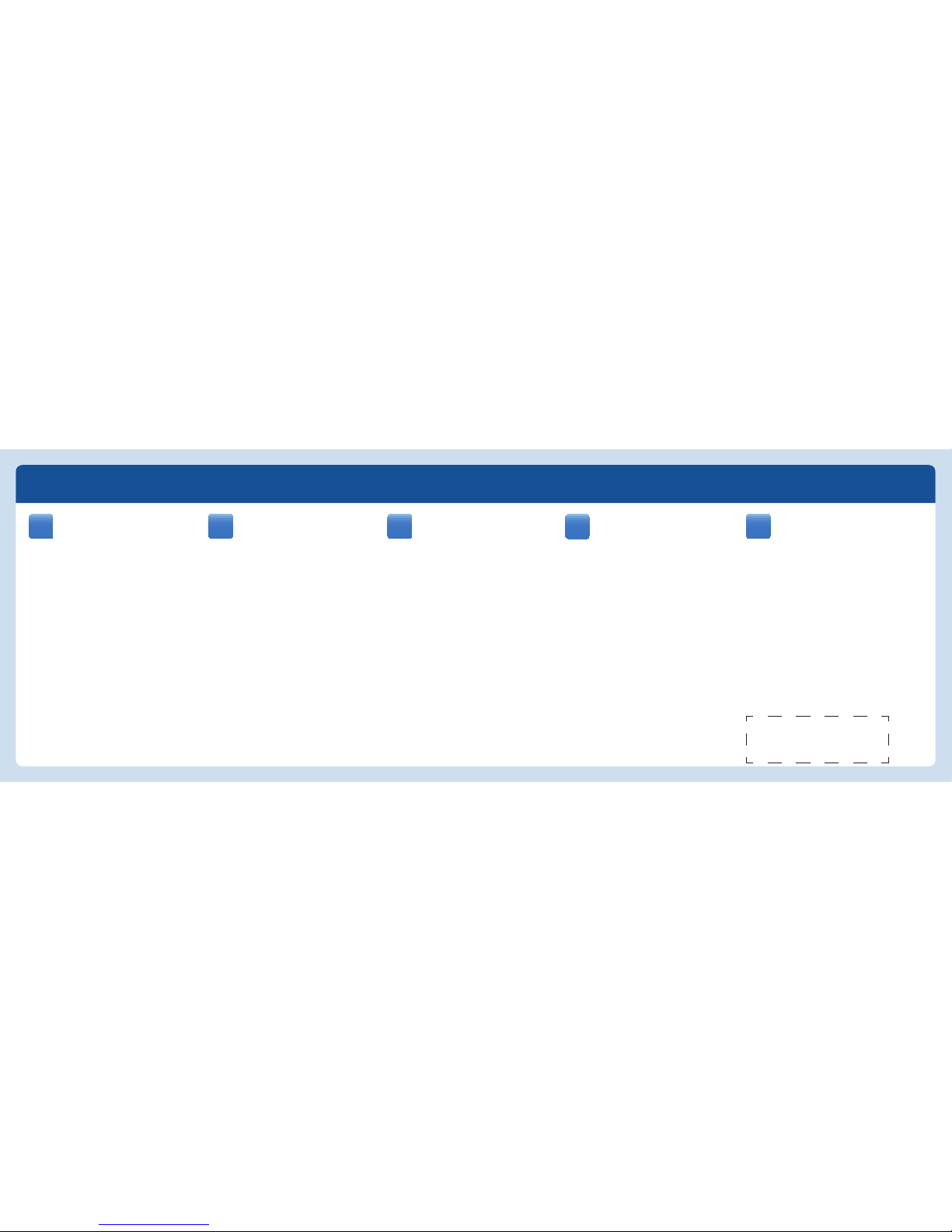
Herstellergarantie
AVM bietet eine Herstellergarantie für
Ihre FRITZ!Box. Die Garantiebedingungen
fi nden Sie im Handbuch.
Lizenzbestimmungen
Die Lizenzbestimmungen Ihrer FRITZ!Box fi nden
Sie in der Benutzeroberfl äche unter „Rechtliche
Hinweise“.
Entsorgung
FRITZ!Box, Steckernetzteil und Kabel dürfen
nicht über den Hausmüll entsorgt werden. Bitte
bringen Sie sie nach der Verwendung zu den
zuständigen Sammelstellen für Altgeräte.
Handbuch
Die FRITZ!Box wird in einem ausführlichen
Benutzerhandbuch beschrieben, das Sie auf
unserer Internetseite fi nden:
www.avm.de/de/service/Handbuecher
Manufacturer’s Warranty
AVM off ers a manufacturer’s warranty
for your FRITZ!Box. The conditions of the
warranty are elaborated in the manual.
Licensing Terms
The licensing conditions are presented in the
FRITZ!Box user interface under the “Legal Notice”
heading.
Disposal
The FRITZ!Box, power supply unit and cables may
not be disposed of with household waste. Please
bring them to the relevant collection facilities for
electrical and electronic equipment.
Manual
The FRITZ!Box is described in a comprehensive
user’s manual available on our web site:
www.avm.de/en/service/manuals
Garantie du fabricant
AVM off re une garantie de fabricant
sur votre produit. Vous trouverez les
conditions de cette garantie dans le manuel.
Dispositions de la licence
Vous trouverez les dispositions de la licence sur
l’interface utilisateur de sous le mot
« Mentions légales ».
Élimination
Conformément aux prescriptions européennes,
FRITZ!Box, le bloc d’alimentation et les câbles ne
peuvent être jetés dans les ordures ménagères.
Après les avoir utilisés, veuillez les remettre aux
services municipaux de gestion des déchets.
Manuel
Pour de plus amples informations, veuillez
consulter le manuel détaillé que vous trouverez
sur notre site Internet:
www.avm.de/en/service/manuals
Garantía de fabricación
La fi rma AVM ofrece una garantía de
fabricación del producto. En el manual de
usuario encontrará las condiciones de garantía.
Condiciones de la licencia
Encontrará las condiciones de licencia en la
interfaz de usuario de su bajo “Nota legal”.
Reciclaje
FRITZ!Box, la unidad de alimentación de corriente
y los cables se deben reciclar de acuerdo con
las normas europeas de reciclaje y no con los
residuos urbanos normales. Lleve por favor estas
piezas a los centros de reciclaje de su comuna.
Manual
Su FRITZ!Box se describirá detalladamente en
el manual de usuario que podrá descargar de
nuestra página web:
www.avm.de/en/service/manuals
Garanzia del produttore
La AVM off re per questo prodotto una
garanzia del produttore. Le condizioni di
garanzia sono riportate nel manuale.
Condizioni di licenza
Le condizioni di licenza si trovano nell’interfaccia
utente del - alla voce “Note legali”.
Smaltimento
Ai sensi delle attuali direttive europee il FRITZ!Box,
l’alimentatore e i cavi non vanno smaltiti con i rifi uti
domestici bensì consegnati, al termine del loro ciclo
di vita, presso un centro di raccolta autorizzato.
Manuale
Ulteriori informazioni sono riportate nel manuale
completo, consultabile sul nostro sito web:
www.avm.de/en/service/manuals
PEFC
DE
EN
FR
ES
IT
Page 16
CE
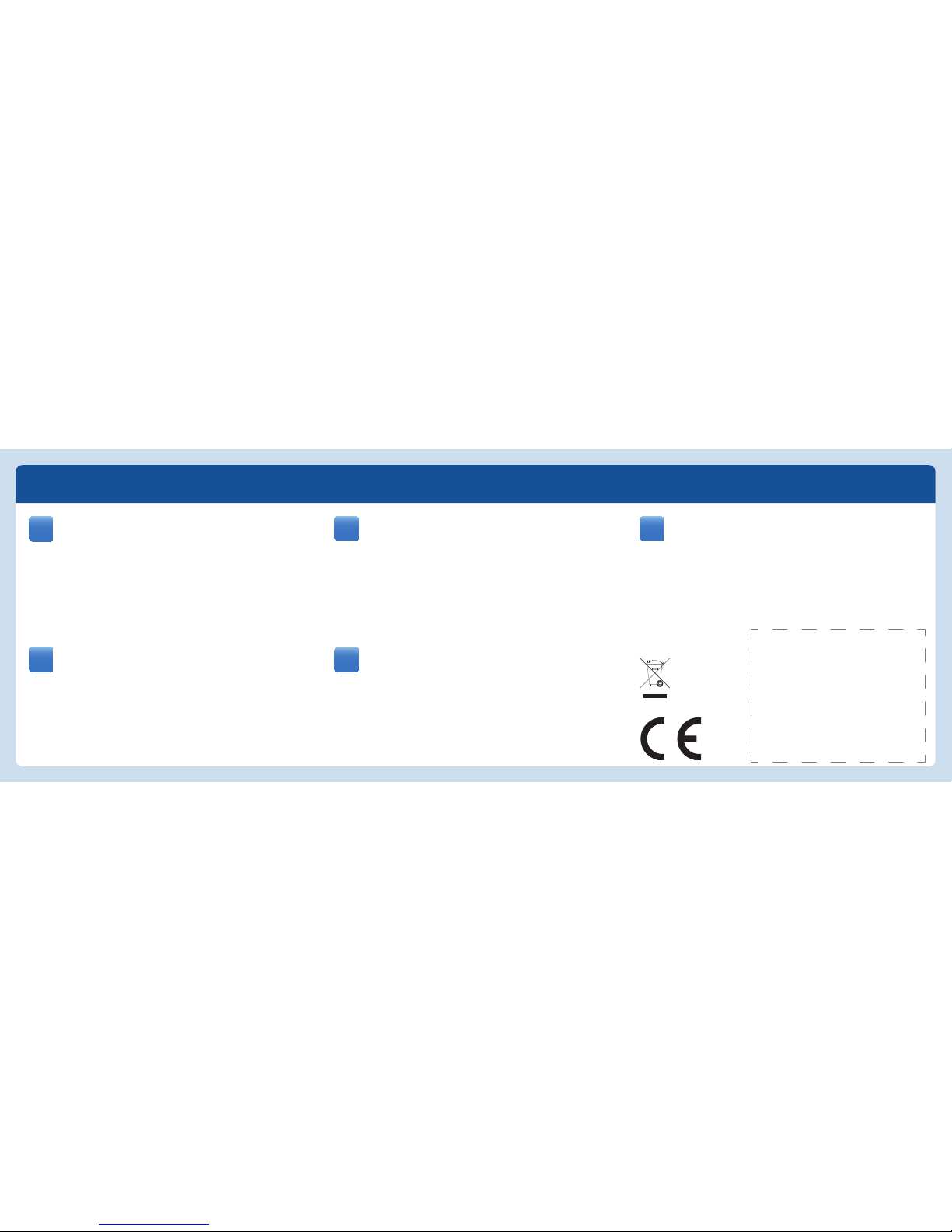
Die FRITZ!Box erfüllt die Anforderungen der EU-Richtlinie 1999/5/EG
(Richtlinie über Funkanlagen und Telekommunikationsendeinrichtungen,
R&TTE) sowie der EU-Richtlinie 2009/125/EG (Richtlinie über umweltgerechte
Gestaltung energiebetriebener Produkte). Die Konformität der FRITZ!Box mit den
genannten Richtlinien wird durch das CE-Zeichen bestätigt. Die ausführliche CEKonformitätserklärung fi nden Sie im Handbuch (PDF).
Die Funktechnik dieses Gerätes ist für die Verwendung in allen Ländern der
Europäischen Union sowie in der Schweiz, in Norwegen und Island vorgesehen. In
Frankreich ist nur der Betrieb in geschlossenen Räumen zulässig.
The FRITZ!Box satisfi es the requirements of the EU directive 1999/5/
EC (R&TTE Directive: Radio Equipment and Telecommunications Terminal
Equipment) as well as the EU directive 2009/125/EC (Directive on ecodesign
requirements for energy-related products). The CE symbol confi rms that the FRITZ!Box
conforms with the above mentioned regulations. The detailed declaration of CE
conformity is included in the PDF manual.
The radio technology of this device is designed for use in all countries of the European
Union and in Switzerland, Norway and Iceland. In France only indoor operation is
permitted.
FRITZ!Box satisfait aux prescriptions de la directive communautaire 1999/5/
CE (directive concernant les équipements hertziens et les équipements
terminaux de télécommunications, dite directive R&TTE) et de la directive
communautaire 2009/125/CE (directive pour l’écoconception des produits liés
à l’énergie). La conformité de FRITZ!Box à ladites directives est attestée par le
symboleCE. Pour une déclaration de conformité détaillée, veuillez vous reporter au
manuel (PDF).
La technologie sans fi l de cet appareil est destinée à une utilisation dans tous les
pays de l’Union européenne ainsi qu’en Suisse, en Norvège et en Islande. En France,
seule l’utilisation dans des lieux fermés est autorisée.
FRITZ!Box cumple con los requerimientos de las directivas de la Unión
Europea 1999/5/CE (R&TTE Directiva de Equipamiento de Radio y
Equipamiento Terminal de Telecomunicaciones) y de la directiva 2009/125/
CE (Establecimiento de requisitos de diseño ecológico aplicables a los productos
relacionados con la energía). El símbolo CE confi rma que FRITZ!Box cumple con
las directivas y normas mencionadas anteriormente. La declaración detallada de
cumplimiento con dichas normas se encuentra disponible en el manual (PDF).
Este dispositivo podrá ser utilizado en todos los países de la Comunidad Económica
Europea, incluyendo Suiza, Noruega e Islandia. En Francia sólo se permite su
utilización en espacios cerrados.
Il FRITZ!Box soddisfa i requisiti della direttiva EU 1999/5/CE (direttiva sugli
impianti radio e i dispositivi terminali di telecomunicazione, R&TTE) e della
direttiva EU 2009/125/CE (direttiva sulla progettazione ecocompatibile dei
prodotti che consumano energia). La conformità del FRITZ!Box alle direttive sopra
indicate è confermata dalla presenza del marchio CE. La dichiarazione di conformità
CE dettagliata è riportata nel manuale (in formato PDF).
La tecnica radio di questo apparecchio è adatta all’impiego in tutti i paesi dell’Unione
Europea e in Svizzera, Norvegia e Islanda. In Francia ne è consentito l’impiego solo
negli ambienti chiusi.
DE
FR
ES
IT
GUA 55 x 42mm
EN
 Loading...