

Page 1
FREUND
FREUND ELEKTRONIKA d.o.o
International Burch University | Francuske revolucije bb | 71210 Ilidza | Bosnia and Hercegovina
www.ip-integra.ba | [email protected] | Tel. +387 33 922 890
FE-W826-T2 Setup guide
Connect all the antennas correctly, then insert your SIM card into the SIM card slot of the
router. Check with your ISP (Internet Service Provider) company to get an APN (Access Point
Name) according to your SIM card. Different ISPs have different APN.
Power up the router. With your pc connected to the router network, open a web browser. In
the web browsers address bar enter router´s IP address 192.168.1.1. Login-page as shown in
Picture 1 will open, enter username and password provided by your ISP company. For every
next login, a page will open as shown in Picture 2. Username and password can be found on
the backside of the router.
Picture 1
Page 2
FREUND
FREUND ELEKTRONIKA d.o.o
International Burch University | Francuske revolucije bb | 71210 Ilidza | Bosnia and Hercegovina
www.ip-integra.ba | [email protected] | Tel. +387 33 922 890
Picture 2
After login status page will open (Picture 3). To set up 4G click on Network, then choose
interfaces.
Page 3
FREUND
FREUND ELEKTRONIKA d.o.o
International Burch University | Francuske revolucije bb | 71210 Ilidza | Bosnia and Hercegovina
www.ip-integra.ba | [email protected] | Tel. +387 33 922 890
Picture 3
Page 4
FREUND
FREUND ELEKTRONIKA d.o.o
International Burch University | Francuske revolucije bb | 71210 Ilidza | Bosnia and Hercegovina
www.ip-integra.ba | [email protected] | Tel. +387 33 922 890
Picture 4
Interfaces page will open (Picture 4), then for 4G network click edit, and edit page will open
(Picture 5).
Page 5
FREUND
FREUND ELEKTRONIKA d.o.o
International Burch University | Francuske revolucije bb | 71210 Ilidza | Bosnia and Hercegovina
www.ip-integra.ba | [email protected] | Tel. +387 33 922 890
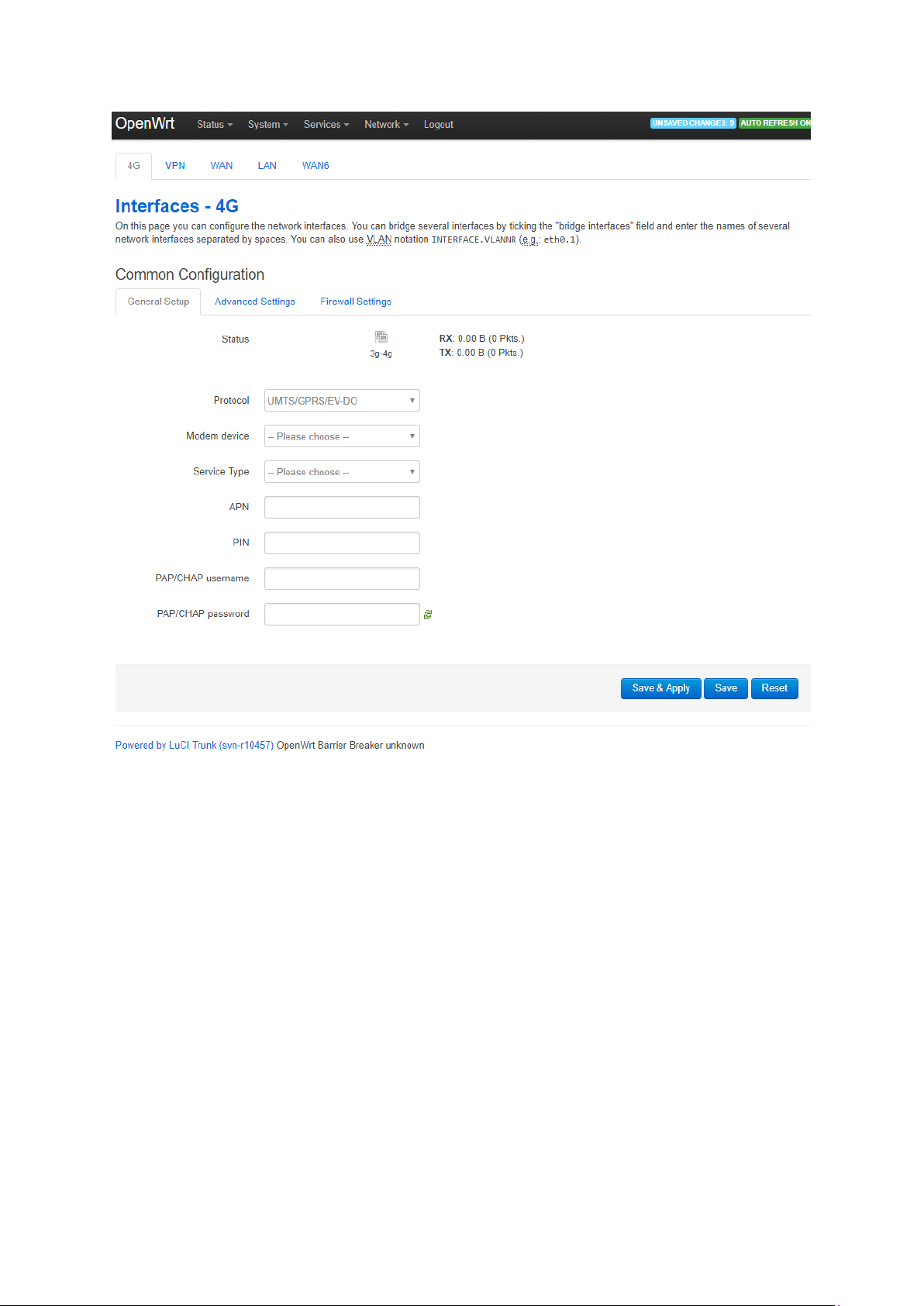
Picture 5
Fields for 4G should be filled in following way:
1. For protocol choose UMTS/GPRS/EV-DO
2. For modem device choose according to 3G/4G module. If EC25 module is used, then
choose /dev/tty/ USB2
3. For service type choose UMTS/GPRS
4. APN is provided from your ISP
5. In PIN field enter PIN code of SIM card
6. For PAP/CHAP username and PAP/CHAP password enter desired username and
password.
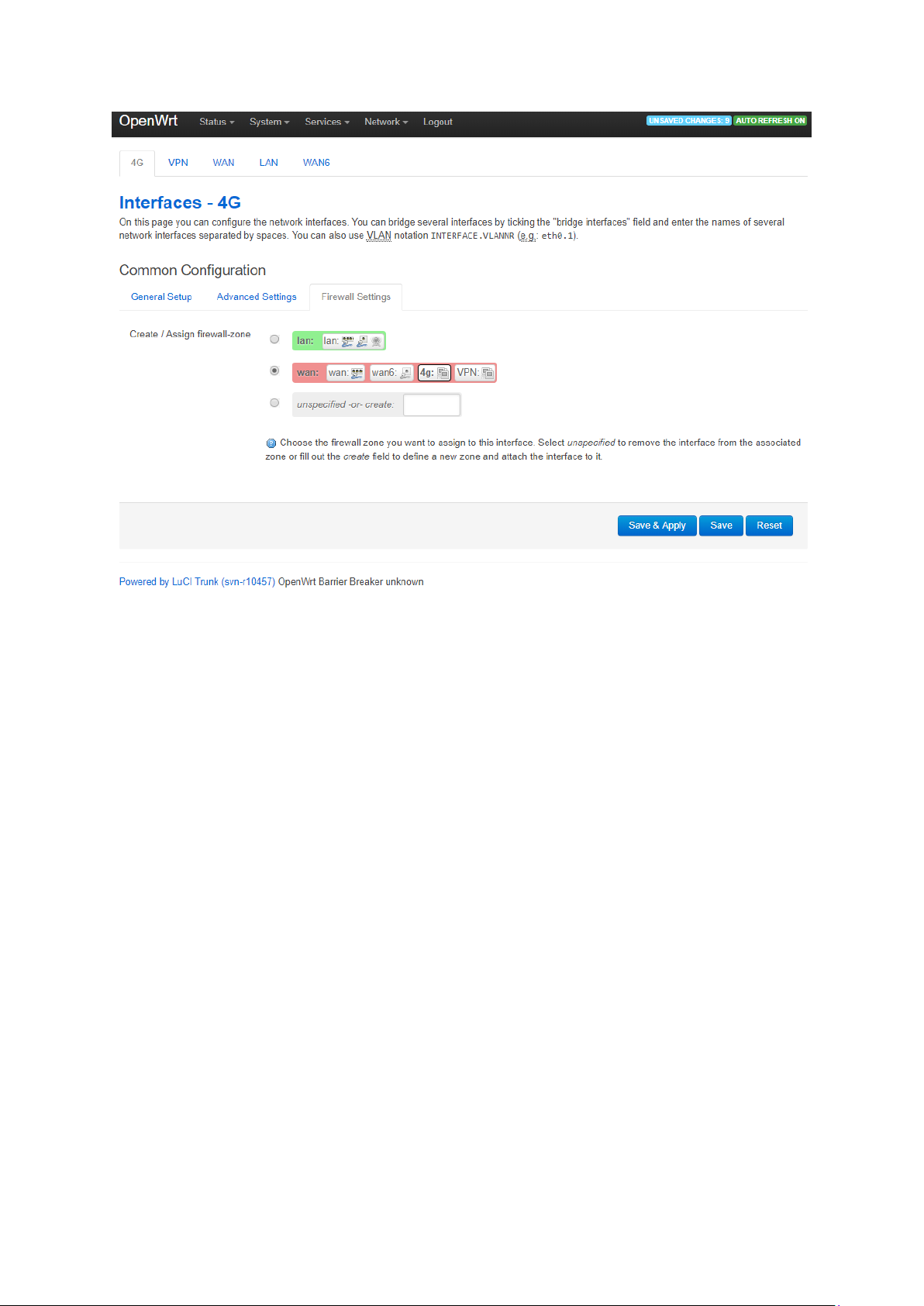
After fields are filled out click on Save & Apply. For firewall setting choose WAN (Picture 6).
Page 6
FREUND
FREUND ELEKTRONIKA d.o.o
International Burch University | Francuske revolucije bb | 71210 Ilidza | Bosnia and Hercegovina
www.ip-integra.ba | [email protected] | Tel. +387 33 922 890
Picture 6
 Loading...