

Page 1

FCC ID:2ALQU-VT20
IC:22607-VT20
Model:VT21
VILTA-S
User Manual
Stabilizer for Smartphone
Page 2

Contents
Overview
Packing List
Product Overview
Quick Start
App Installation
Smartphone Installation and Balance
App Connection
Start Up
Control Panel Introduction
App Menu Introduction
App Operation
Specifications
Specifications Parameter
Technical Parameter
Other Specification
02
03
04
05
07
08
12
14
17
17
18
Warning
Warranty Information
19
24
0101
Page 3
OVERVIEW
|
|
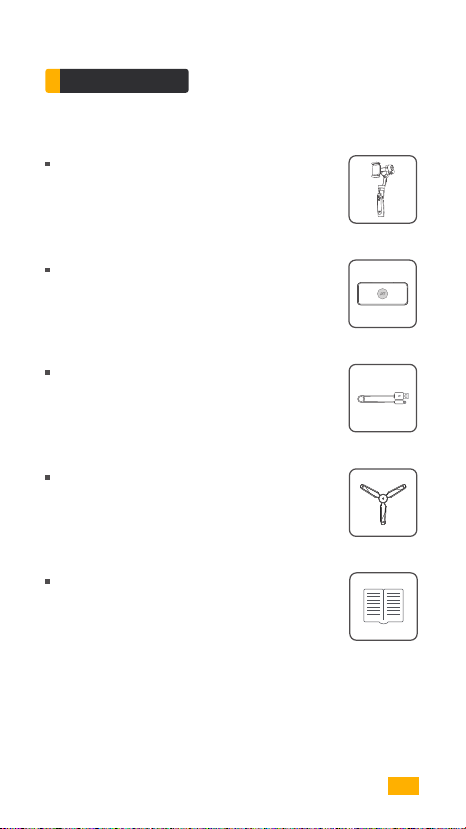
Packing List
VILTA-S
Portable Bag
Charging Cable
Tripod
User Manual
0102
Page 4
| OVERVIEW |
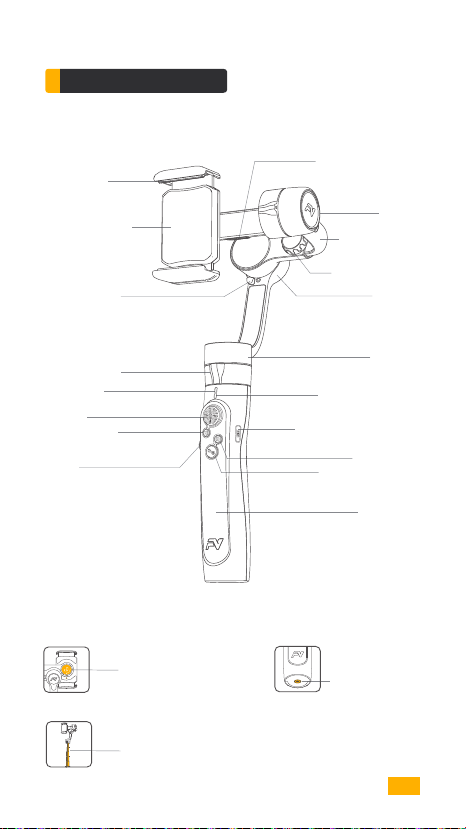
Product Overview
Smartphone
Mounting Clamp
Wireless Charging
(Optional)
Roll Axis Buckle
Pan Axis Buckle
Connection
Indicator Light
Joystick
Shutter Button
Wheel
Portrait and
Landscape Switch
USB-A Charging Port
Tilt Axis
Adjustment Arm
Adjustment Knob
Roll Axis
Pan Axis
Mode Indicator Light
Micro USB Charging Port
Setup Button
Power/Mode Button
Handle Grip
1/4 Inch Screw Port
Extension Rod
03
Page 5
| QUICK START |
App Installation
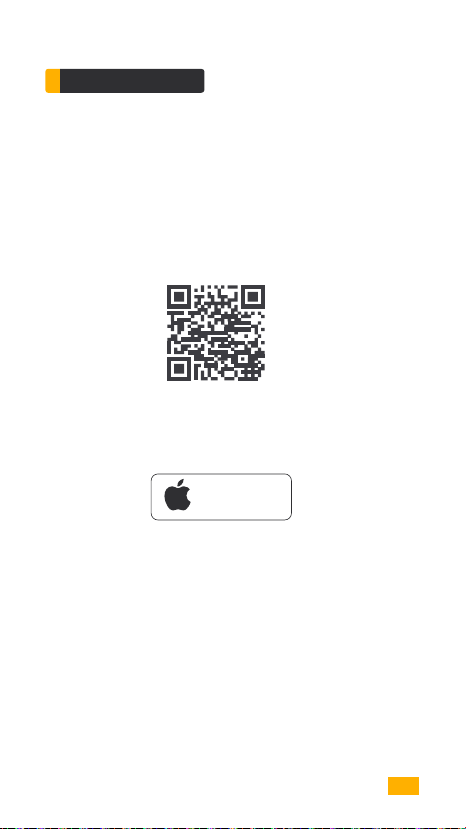
Download FV Share App
For Android users, please search FV Share App in Google Play,
or scan the QR code to install. (Android 5.0 or above)
For iOS users, please search FV Share App in App Store.
( iOS 9.0 or above)
Available on the
App Store
04
Page 6
| QUICK START |
Smartphone Installation and Balance
1
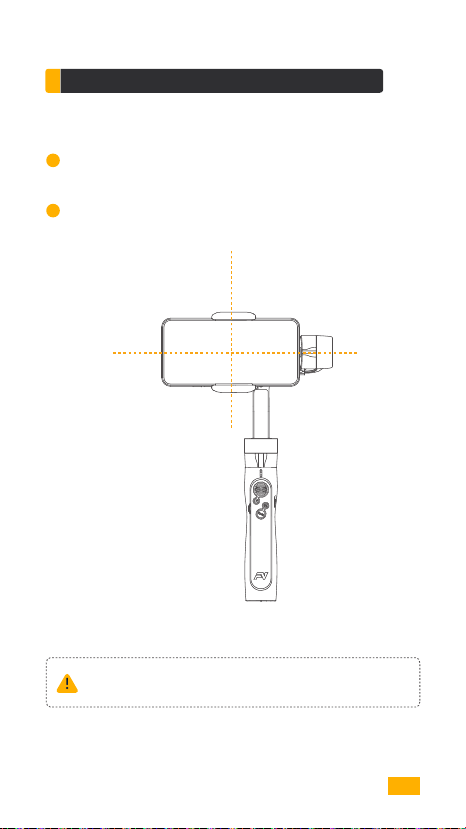
Equidistantly pull open the smartphone mounting clamp. Put your
phone in and keep it close to the tilt axis motor.
2
Slightly move the adjustment arm. When your phone can stay level
and balanced as shown below, screw up the adjustment knob.
Always keep your phone mounted and well balanced in level prior
to power on.
05
Page 7
| QUICK START |
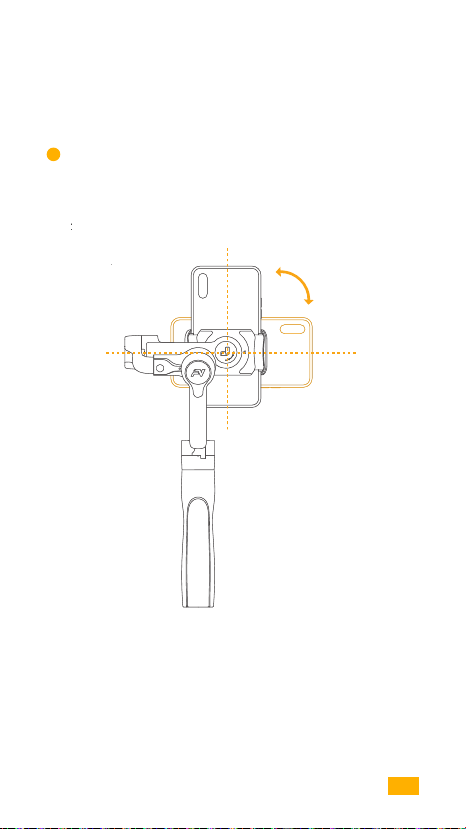
3
Portrait and landscape orientation can be switched by manually
rotating smartphone mounting clamp.
06
Page 8
| QUICK START |
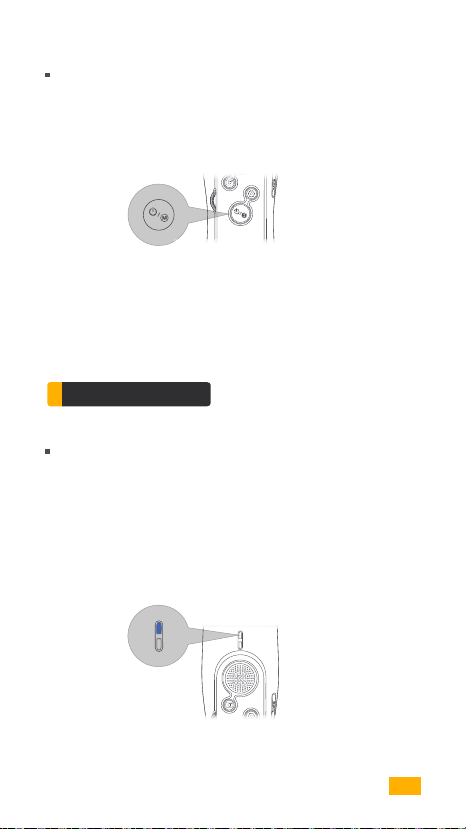
Power On/Off
Long press power / mode button for 3 seconds to power on/off.
Power/Mode Button
App Connection
FV Share Connection
Power on VILTA-S.
Turn on bluetooth.
Open FV Share. Choose VILTA-S. Tap Connect to Gimbal. Choose
your gimbal and get connected. After successfully connecting, the
blue connection indicator light stops flashing.
Connection
Indicator Light
07
Page 9

| START UP |
Control Panel Introduction
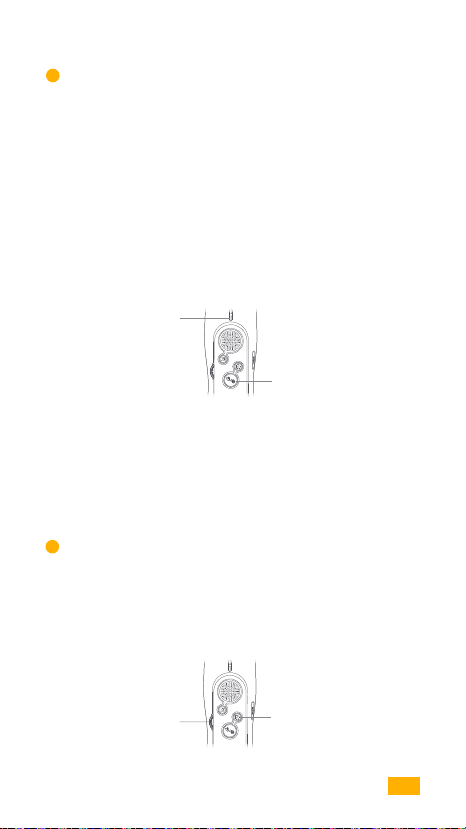
Shutter Button
1
Light press shutter button to focus. Deep press shutter button to take
a photo. Double press shutter button to take selfie. Long press shutter
button to record.
Shutter Button
2
Joystick
Use joystick to control gimbal left or right, upwardly or downwardly.
( Not available at POV mode )
Joystick
08
Page 10
| START UP |
3
Mode Indicator Light and Mode Switch
Green Light--Lock Mode
Yellow Light--Semi Follow Mode
Red Light--Full Follow Mode
Flashing--Charging
Yellow Light Flashing--POV Mode
Green Light Flashing--Gimbal in Busy Status
Red Light Flashing--Gimbal Fault
Mode Indicator
Light
Power / Mode Button
Single Tap power/mode button to switch gimbal follow mode in cycle.
Double tap power/mode button to switch gimbal scene mode in cycle.
Triple tap power/mode button to recenter the smartphone.
4
Adjust Parameter
At camera auto mode, use wheel to zoom in/out , or to adjust exposure.
At camera manual mode, use wheel to adjust camera parameters.
Wheel
Setup Button
09
Page 11
| START UP |
Single tap setup button to open camera manual mode or switch camera
parameters.
Double tap setup button to switch function of wheel, i.e. adjust focus or
adjust exposure.
Long press setup button to exit camera manual mode.
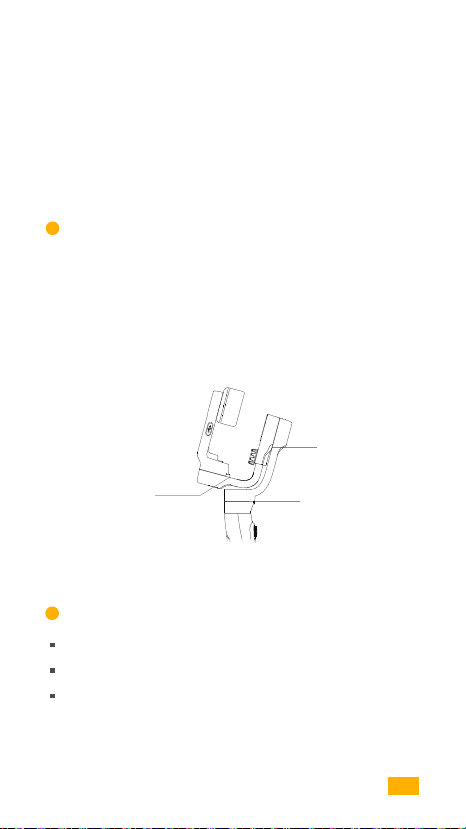
5
VILTA-S Standby
If any buckle is locked, VILTA-S will automatically sleep.
If unlock all buckles, VILTA-S will resume work.
VILTA-S will automatically power off if VILTA-S sleeps for more than
15 minutes.
Buckle
Buckle
6
Charge Gimbal
When charging, mode indicator light alternately glints.
When fully charged, mode indicator light is green.
Please apply charging cable with standard configuration to charge VILTA-S.
Buckle
10
Page 12
| START UP |
When the charging current is 2A, it takes 2.0 hours to be fully
charged, which allows 17 working hours. Datum come from
laboratory.
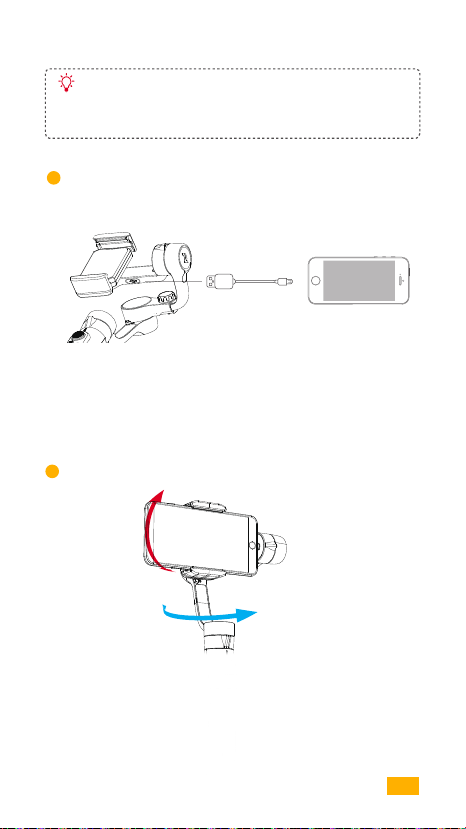
7
Charge Phone
Phone Charging
Cable
Gimbal can charge phone via phone charging cable.
Gimbal Manual Mode
8
Tilt
Pan
Directly adjust phone shooting direction by hand.Manual mode can be
turned off in VILTA-S App.
11
Page 13
| START UP |
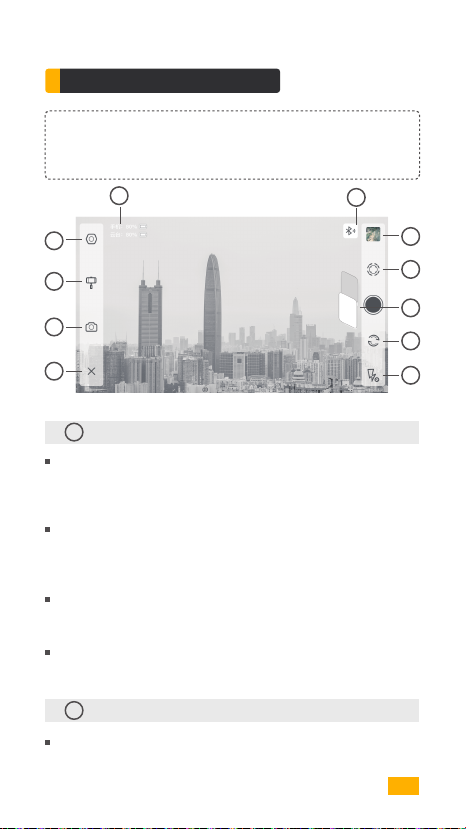
App Menu Introduction
Due to the variety of Android systems, Android users may not be able to
use the fully optimized functions of VILTA-S. We thank you for your un-
derstanding and support.
05
05
01
02
03
04
01
Advanced Settings
Video
Phone
Camera
Camera Resolution, Video Resolution, Panorama Quality,
Panorama Saved, Photo and Video Save Address,Phone Anti-shake
Gimbal
Roll Axis Attitude Adjustment,Scene Mode Settings, Dead Zone
Settings, Gimbal Calibration, Reset All
Joystick
Speed, Dead Zone, Direction, Smooth Degree
Information
Gimbal Battery Information, Gimbal Information, About App, Live
02
Gimbal
Scene Modes:
Walk Mode, Sport Mode, Custom Mode
06
07
08
09
10
12
Page 14
| START UP |
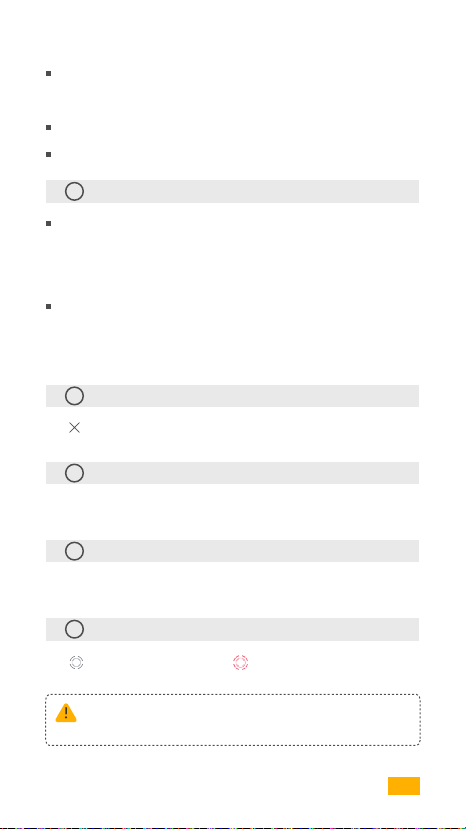
Follow Modes:
Follow Mode, Semi-follow Mode, Lock Mode, POV Mode
ImaginAction Mode
Gimbal Manual Mode
03
Camera Settings
Camera Mode:
Time-lapse, Panorama, Long Exposure, Beautify, HDR, Filter, White
Balance, Grid, Camera Manual Mode
Video Mode:
Slow Motion, Beautify, Filters, Time Lapse, Motion Time Lapse,
Motion Lapse, White Balance, Grid,Camera Manual Mode
04
Return
Tap to return to App home page
05
Information
Gimbal Battery, Phone Battery, Bluetooth Connection Status
06
Documents
Preview and storage location of photos and videos.
07
IntelliTrace
Tap to turn on IntelliTrace. Tap to turn off IntelliTrace.
Frame the subject and VILTA-S will track in real time.
Answering a phone when recording or in IntelliTrace, the
recording will be automatically stopped.
13
Page 15
| START UP |
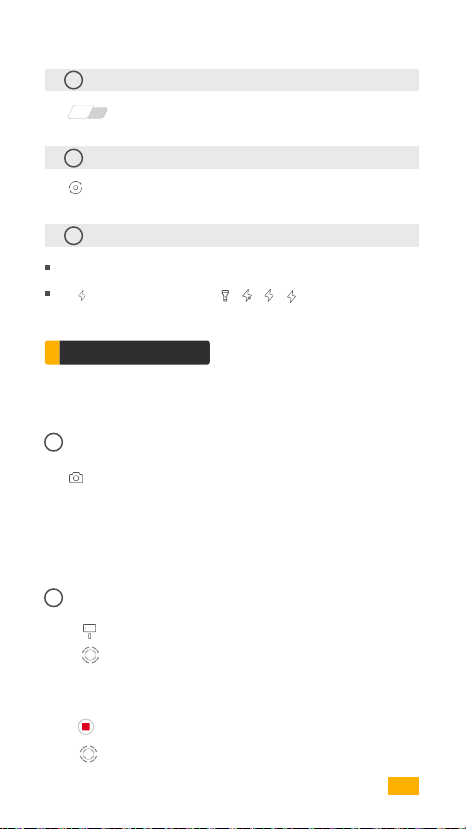
08
Photo/Video Switch
Phone
Video
Tap to switch
09
Front/Back Camera Switch
Tap to switch
10
Flashlight Status
Display current flashlight status
Tap to switch flashlight state
A
App Operation
Photo Mode
01
Panorama
Tap to enter panorama. Choose 180°, 330°, 3*3, 3*5, VILTA S will
automatically shoot and compound a panorama. It will be automat-
ically saved to documents.
Video Mode
02
IntelliTrace
1. Tap and choose sport mode in scene mode.
2. Tap to start IntelliTrace.
3. Tap or draw a frame of the subject on your phone screen. VILTA-S
will intelligently identify and automatically track subject.
4.Tap to start shooting.
5.Tap to exit IntelliTrace.
14
Page 16
| START UP |
03
Time Lapse
1. Tap and choose time lapse.
2. Set shutter interval and time of duration. Tap Start.
3. Tap to exit shooting. Video will be automatically saved to
documents.
04
Motion Time Lapse
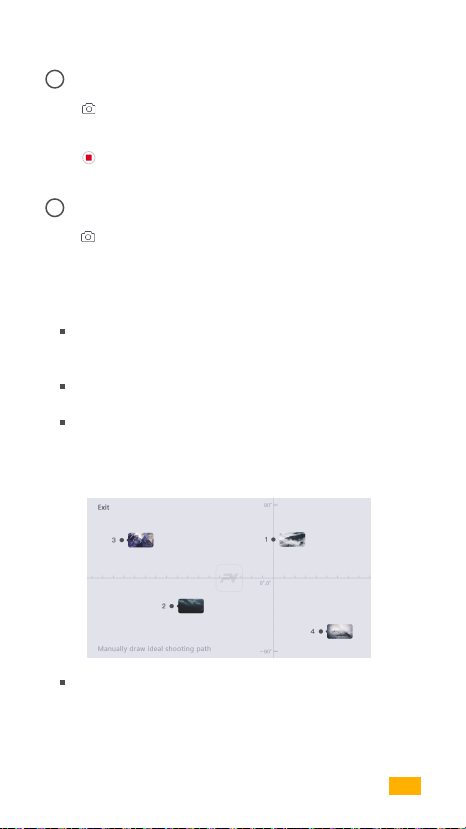
1. Tap and choose motion time lapse.
2. Set shooting points
Auto Mode
Manually adjust phone to one position. Take photo at that
position. It is shooting point A. Likewise, other shooting
points can be done in the same approach.
Shooting path will be generated according to the shooting
points.
Adjust smoothness of the shooting path.
Manual Mode
Draw shooting path at will on your phone screen.
3. Set shutter interval and time of duration. Tap Start.
15
Page 17
| START UP |
05
Slow Motion Video
1. Tap and choose slow motion.
2. Tap to start shooting. Tap to exit shooting.
Videos will be automatically saved to documents.
06
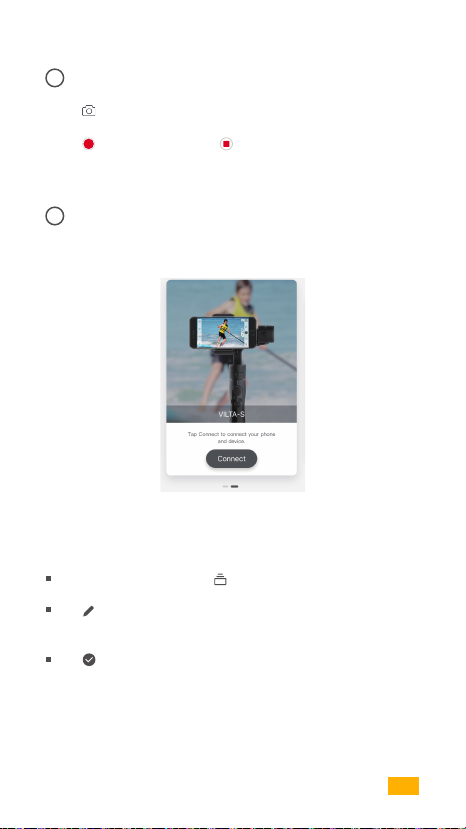
Photo/Video Editing
1. Photo Editing
Enter App home page and tap at the bottom.
Tap to choose the photo and editing ( Filter, Beautify,
Adjust, Mosaric, Crop, Paint )
Tap to confirm editing.
16
Page 18
| START UP |
2. Video Editing
Enter App home page and tap at the bottom. Choose video.
Tap to editing (Add Video, Video Editing, Add
Music, Filter, Adjust)
Tap to confirm editing.
07
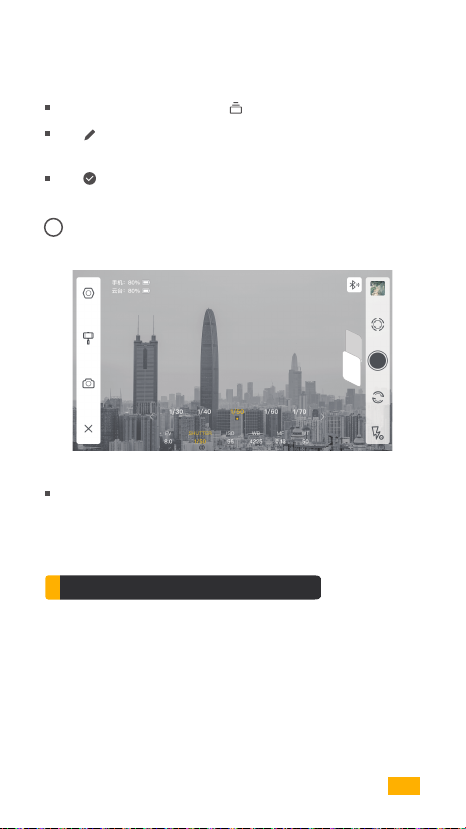
Camera Manual Mode
Video
Phone
Adjust exposure,shutter,ISO, white balance, manual focus
and zoom of your phone camera.
Specifications Parameter
Name
Item No.
Dimensions
Weight
Supported Phones
VILTA S
VT20
334*133*50mm (Folded)
525g
Phones Width: 58~85mm
17
Page 19

| SPECIFICATIONS |
Technical Parameter
01
Mechanical Rotation Range
Tilt
Roll
Pan
02
Maximum Control Speed
Adaptive Rotation Speed(±500°/s)
03
Battery
Battery Type
Voltage
Working Current
Above datum come from laboratory. Gimbal has been well
balanced. Wireless charging function is turned off. Datum
vary according to phone models and gimbal balance status.
±160°
±155°
320°
Intelligent Lithium Battery
7.4V
Static: 93mA Dynamic:3.6A
2000mAHBattery Capacity
14.8WHEnergy
Static: 0.7W ynamic:26.5WConsumption
Other Specification
Operating Temperature
Wifi Type
-5℃~40℃
Bluetooth 4.2
18
Page 20

| WARNING |
Warning
VILTA-S will be available after being activated.
Wireless charging function is available for phone models that can
support.
Buckles would be slightly worn because of frinction.
Do not expose to fire or high heat.
Drop and collision will break VILTA-S. Please caution.
Not water-proof. No water or liquid cleaning agent.
Do not disassemble, repair or modify VILTA-S.
Please apply charging cable complying with public safety regulation.
Do not interfere VILTA-S operation when working.
Not suitable for children.
Not include smartphones.
Web: www.freevisiontech.com www.fvshare.com
Email: [email protected]
Tel: +86 4009970100
19
Page 21

| WARNING |
IC Warning
This device complies with Industry Canada’s licence-exempt RSSs.
Operation is subject to the following two conditions:
(1) This device may not cause interference; and
(2) This device must accept any interference, including interference that
may cause undesired operation of the device.
The device has been evaluated to meet general RF exposure requirement.
The device can be used in portable exposure condition without restriction.
Cet appareil est conforme aux CNR exemptes de licence d'Industrie Canada
. Son fonctionnement est soumis aux deux conditions suivantes :
( 1 ) Ce dispositif ne peut causer d'interférences ; et
( 2 ) Ce dispositif doit accepter toute interférence , y compris les
interférences qui peuvent causer un mauvais fonctionnement de l'appareil.
Le dispositif a été conçu pour répondre à la demande générale de
radioexposition.
20
Page 22

| WARNING |
CE Maintenance
1.Risk of explosion if battery is replaced by an incorrect type. Dispose of
used batteries according to the instructions.
2.The product shall only be connected to a USB interface of version USB2.0.
3.EUT Operating temperature range: -10° C to 40° C .
4.The device complies with RF specifications when the device used at 5mm
from your your body.
Declaration of Conformity
Hangzhou Freevision Intelligent Technology Co.,Ltd
hereby declares that this [Name:VILTA,Model:VT20/VT21] is in compliance
with the essential requirements and other relevant provisions of Directive
2014/53/EU.In accordance with Article 10(2) and Article 10(10),This product
is allowed to be used in all EU member states.
FCC Warning
This device complies with part 15 of the FCC Rules. Operation is subject to
the following two conditions: (1) This device may not cause harmful
interference, and (2) this device must accept any interference received,
including interference that may cause undesired operation.
Any Changes or modifications not expressly approved by the party
responsible for compliance could void the user's authority to operate the
equipment.
21
Page 23

| WARNING |
Note: This equipment has been tested and found to comply with the limits
for a Class B digital device, pursuant to part 15 of the FCC Rules. These
limits are designed to provide reasonable protection against harmful
interference in a residential installation. This equipment generates uses and
can radiate radio frequency energy and, if not installed and used in
accordance with the instructions, may cause harmful interference to radio
communications. However, there is no guarantee that interference will not
occur in a particular installation. If this equipment does cause harmful
interference to radio or television reception, which can be determined by
turning the equipment off and on, the user is encouraged to try to correct
the interference by one or more of the following measures:
Reorient or relocate the receiving antenna.
Increase the separation between the equipment and receiver.
Connect the equipment into an outlet on a circuit different from that to
which the receiver is connected.
Consult the dealer or an experienced radio/TV technician for help.
The device has been evaluated to meet general RF exposure requirement.
The device can be used in portable exposure condition without restriction.
22
Page 24

| WARNING |
Warranty Card
From the purchase date, you enjoy the free repair within 12 months with this
card if it occurs any qualityproblems.
Warranty Rules
If your VILTA meets the following requirements, you can enjoy the warranty
policy:
1) If within 7 days of purchase and it occurs manufacturing defect, the
customer can choose to have a full refund (based on the invoice price)
or exchange the product for a new one.
2) With 1 years of purchase, you can enjoy free repair if it is non man-made
problem.
3) The product has not been refitted, dissembled or modified.
4) Valid purchase proof is provided.
Non warranty rule
If your VILTA falls under one of the following situations, we will charge appr-
opriate maintenance cost:
1) A man made problem affecting the quality of product;
2) Damage caused by refitting, disassemble, or opening of the shell;
3) An uncontrollable incident( earthquake, fire, flood, war) resulting damage;
4) Damage caused by not using as stated in the user manual
Warranty Information
1) The customer is at first required to pay the product return delivery fee.
After Freevision after-sale service center receives the product, it will
undergo a test.
2) If the product does not conform to the conditions for free repair,
Freevision will assess the problem and cost of repair, the customer has
the right to repair or deliver it back.
3) When you receive the repair service, please provide valid purhase proof
and this warranty card. Please note: The warranty card only becomes
valid after sale. The card can not be altered, or it will be deemed invalid.
4) Freevision reserves the right of final interpretation.
23
Page 25

| WARRANTY INFORMATION |
From the purchase date, you enjoy free repair within 12 months with this
card if it occurs any quality problems.
Warranty Rules
If your VILTA Mobile meets the following requirements, you can enjoy the
warranty policy:
If within 7 days of purchase and it occurs manufacturing defect, the cus
tomer can choose to have a full refund(based on the invoice price) or ex
change the product for a new one;
Within 1 year of purchase, you can enjoy free repair if it is non man-ma
de problem;
The Product has not been refitted, dissembled or modified;
Valid purchase proof is provided.
Non Warranty Rules
If your VILTA Mobile falls under one of the following situations, we will ch
arge appropriate maintenance cost:
A man-made problem affecting the quality or product;
Damage caused by refitting, disassemble, or opening of the shell;
An uncontrollable incident (earthquake, fire, flood, war) resulting damage;
Damage caused by not using as stated in the user manual.
Warranty Information
The customer is at first required to pay the product return delivery free.
After Freevision after-sale service center receives the product, it will un
dergo a test.
If the product does not conform to the conditions for free repair, Freev
ision will assess the problem and cost of repair, the customer has the
right to repair or deliver it back.
When you receive the repair service, please provide valid purchase pro
of and this warranty card.Please note: the warranty card only becomes
valid after sale. The card can not be altered, or it will be deemed invalid.
Freevision reserves the right of final interpretation.
24
Page 26

| WARRANTY INFORMATION |
Customer Information
Name:
Tel:
Zip Code:
Email:
Address:
Dealer Information
Name:
Tel:
Zip Code:
Email:
Address:
Product Information
Item No.
Product Code:
Purchase Date:
25
Page 27

| WARRANTY INFORMATION |
Warranty Card
Inspection Date
Repair Date Result Technician Cause
26
Page 28

www.freevisiontech.com
 Loading...