

Page 1
ZipCharge™
Ultra fast-charging portable power stick
User Guide
Revision 1.04
Page 2

© 2009 Freeplay Energy
For more information visit www.freeplayenergy.com
. All rights reserved. ZipCharge™ is a trademark of Freeplay Energy UK Ltd.
12
Congratulations on your purchase
of the brand new, state of the art,
ZipCharge™ Power Stick and welcome
to a new experience of freedom!
TROUBLESHOOTING & SUPPORT
For a version of this User Guide, please go to
www.freeplayenergy.com/support/zipcharge.htm
This website will also contain other information to help
support
© 2009 Freeplay Energy
For more information visit www.freeplayenergy.com
. All rights reserved. ZipCharge™ is a trademark of Freeplay Energy UK Ltd.
Page 3

2 11
CONTENTS
Safety & General Information
Warranty............................................................................ 4
Out of the Box................................................................... 5
ZipCharge™ Functions & Features................................... 6
. Compatibility...................................................................... 7
Charging the ZipCharge™ Power Stick............................ 8
Charging a Device with the ZipCharge™ Power Stick...... 9
Performance..................................................................... 10
Technical Specification.................................................... 11
Troubleshooting & Support.............................................. 12
........................................... 3
Colour and Finish Stainless steel and black plastic
Power Storage High conversion efficiency rechargeable 3.5
Watt hour lithium ion phosphate cell
Input
3.6V DC, 4.1A
Output
USB (A) 5V, 900mA
A USB patch cable is supplied with tips for
various devices.
Charging Dock Mains supplied ZipCharge™ dock
Input
12V DC, 2000mA
Output
3.6V DC, 4.1A
Power Supply External Switch Mode Power Supply.
Manufacturer: Seanen
Model Numbers:
KSAS0241200200HK (UK)
KSAS0241200200HE (EU)
Input
100 – 240V AC, 50-60Hz, 600mA
Output
12V DC, 2000mA
Adapter Charge Rate 15 min: 100% capacity
TECHNICAL SPECIFICATION
© 2009 Freeplay Energy
For more information visit www.freeplayenergy.com
. All rights reserved. ZipCharge™ is a trademark of Freeplay Energy UK Ltd.
© 2009 Freeplay Energy
For more information visit www.freeplayenergy.com
. All rights reserved. ZipCharge™ is a trademark of Freeplay Energy UK Ltd.
Page
Page 4

3 10
Typical Performance
Guideline only, performance will vary according to the
device, charge times/rates are those of the ZipCharge™.
Portable devices will charge from the ZipCharge™ at the
standard USB charge rate of that device.
Mobile Phones
10 minutes ZipCharge™ Full mobile phone battery
60 second ZipCharge™ 8hrs stand by, 15 min talk time
iPOD
10 minutes ZipCharge™ Full iPOD battery
60 second ZipCharge™ 2hrs play time
PERFORMANCE
SAFETY & GENERAL INFORMATION
WARNING
Please observe the following for the ZipCharge™ product
•
Do not expose the unit to rain or moisture.
•
Do not expose to direct heat and do not clean with
abrasives or chemicals.
•
Do not take the unit apart. This will invalidate any
warranty.
DISPOSAL
NOTE
It is normal for the ZipCharge™ and its dock to warm up
during charging.
The ZipCharge™ contains a rechargeable battery and
should not be discarded as household waste. It is
recommended that it be handed over to a collection point
that is appropriate for recycling of electronic equipment.
© 2009 Freeplay Energy
For more information visit www.freeplayenergy.com
. All rights reserved. ZipCharge™ is a trademark of Freeplay Energy UK Ltd.
© 2009 Freeplay Energy
For more information visit www.freeplayenergy.com
. All rights reserved. ZipCharge™ is a trademark of Freeplay Energy UK Ltd.
Page 5

4 9
WARRANTY
This warranty does not affect your statutory rights.
Your ZipCharge™ hardware product
materials and workmanship for a period of Two (2) YEARS from the
date of original retail purchase. If a hardware defect arises and a
claim is made within the warranty period, Freeplay Energy UK Ltd,
at its option and to the extent permitted by the law will (1) repair the
product at no charge using new or refurbished parts, (2) exchange
the product with a functionally equivalent product that is new or
refurbished, or (3) refund the original purchase price. This warranty
excludes damage resulting from abuse, accident, modifications or
other causes that are not defects in materials and workmanship.
Rechargeable batteries have a limited number of charge cycles and
may eventually need to be replaced. The ZipCharge™ has a
guaranteed optimal charge performance for up to 1000 charge /
discharge cycles, corresponding to a reasonable use of 1 charge
cycle per day for 3 to 5 years. After 1000 charge/discharge cycles,
the 1100mAh capacity of the ZipC harge™ batt ery ma y
reduce. This reduction in capacity is a normal result of use and is not
covered by warranty.
To register your new ZipCharge™ product, please complete the
online registration form at:
is warranted against defects in
www.Freeplayenergy.com
ZIPCHARGE™ POWER STICK
CH A RG I NG A DE V IC E WI TH T H E
1. Select the appropriate charging tip for the device to be
charged and connect the tip to the USB cable (See page 7
for device compatibility) and then insert the charging tip into
the device.
2. Connect the other end of the USB cable to the ZipCharge™
Stick.
3. Press the ON/OFF button once. A flash of 3 outward blue
dots will appear on the ZipCharge™ stick to indicate the
ZipCharge™ is charging your device. These 3-dots will flash
intermittently during charging.
4. Leave to charge, please note: charging times will vary
according to the device being charged.
5. On completion of charge, press the ON/OFF button once. 3
inward blue moving dots will indicate the ZipCharge™ is
switching off. The ZipCharge™ will retain its battery energy
for longer if it is switched off after use.
© 2009 Freeplay Energy
For more information visit www.freeplayenergy.com
. All rights reserved. ZipCharge™ is a trademark of Freeplay Energy UK Ltd.
© 2009 Freeplay Energy
For more information visit www.freeplayenergy.com
. All rights reserved. ZipCharge™ is a trademark of Freeplay Energy UK Ltd.
Page 6

8 5
CHARGING THE ZIPCHARGE™ POWER
STICK IN THE DOCKING STATION
1.
dock.
2. Connect the power supply to the back of the dock and to a
mains or wall outlet and switch the outlet on.
3. Leave to charge, full charge of the ZipCharge™ is achieved
after 15 minutes. The ZipCharge™ is fully charged when the
blue dock LED changes from a solid blue light to a flashing
blue light, Just 10 minute’s mains/wall charging will provide
more than 60% full ZipCharge™ battery capacity and is
enough to charge most mobile phones.
5. Disconnect the power supply and release the ZipCharge™
stick from the docking station which is now ready for use, to
view the ZipCharge™ internal battery charge level press
and hold the ON/OFF button. The charge is indicated by one
to three blue LEDs, three LEDs indicate that the
ZipCharge™ stick is fully charged.
Place the ZipCharge™ power stick in the ZipCharge™
OUT OF THE BOX
1 x ZipCharge™
1 x ZipCharge™ Dock
1 x Quick Start User Guide
1 x Mains power supply
1 x USB patch Cable
Tips for
Mini USB
iPhone and iPOD
Blackberry
Nokia
Samsung
Sony Ericsson
HTC
Motorola
© 2009 Freeplay Energy
For more information visit www.freeplayenergy.com
. All rights reserved. ZipCharge™ is a trademark of Freeplay Energy UK Ltd.
© 2009 Freeplay Energy
For more information visit www.freeplayenergy.com
. All rights reserved. ZipCharge™ is a trademark of Freeplay Energy UK Ltd.
Page 7
6 7
COMPATIBILITY
The ZipCharge™ has been extensively tested and is compatible with most major
manufacturers mobile phones.
Dimensions
ZipCharge™ Power Stick: 25mm x 25mm x 114mm
ZipCharge™ & Dock: 25mm x 42mm x 138mm
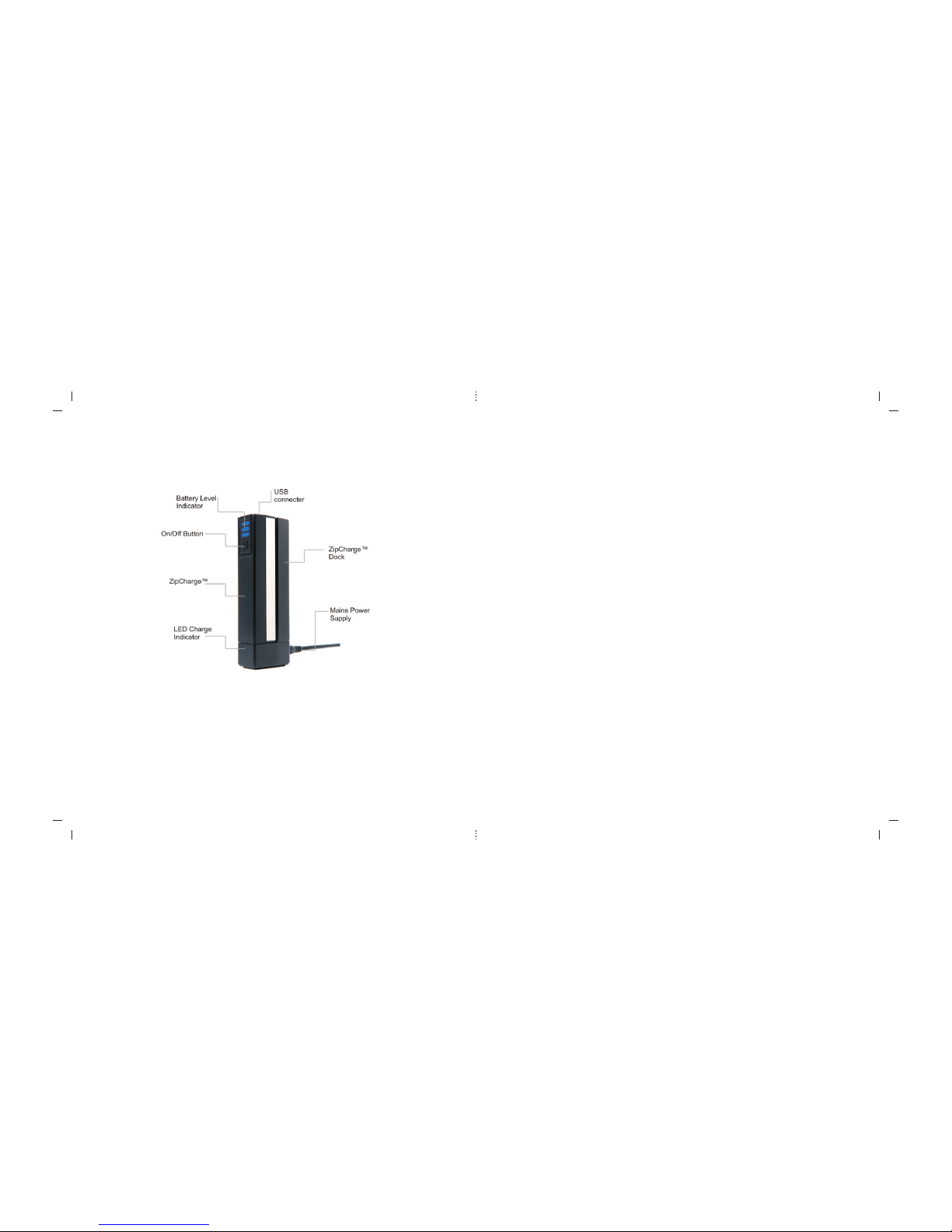
ZipCharge™ Functions & Features
© 2009 Freeplay Energy
For more information visit www.freeplayenergy.com
. All rights reserved. ZipCharge™ is a trademark of Freeplay Energy UK Ltd.
© 2009 Freeplay Energy
For more information visit www.freeplayenergy.com
. All rights reserved. ZipCharge™ is a trademark of Freeplay Energy UK Ltd.
Other Devices : ZipCharge will charge most USB driven devices not requiring the
installation of software to charge.
Zip Charger Mobile Phone Compatibility Note:
The electrical output of Zip Charger is USB standard. This is compatible with the
charging requirements of the majority of mobile phones.
Some phones, including a few in the Nokia range, require a higher input voltage than
USB in order to complete the upper end of their charge process.
In these instances the phones receive charge from Zip when their batteries are in the
near empty state, but do not reach a fully charged condition. The phone prematurely
terminates the charge process, and some charge remains behind in Zip for to happen
when the phone battery is in its lower charge-level regime. Zip remains another
download into the phone, once the phone's battery level drops due to use.
In these cases two discharges by Zip are required to deliver all its energy into the
phone. These need a useful device in these instances as it provides a recharge when it
is most needed.
 Loading...