

Page 1
www.foxroxelectronics.com
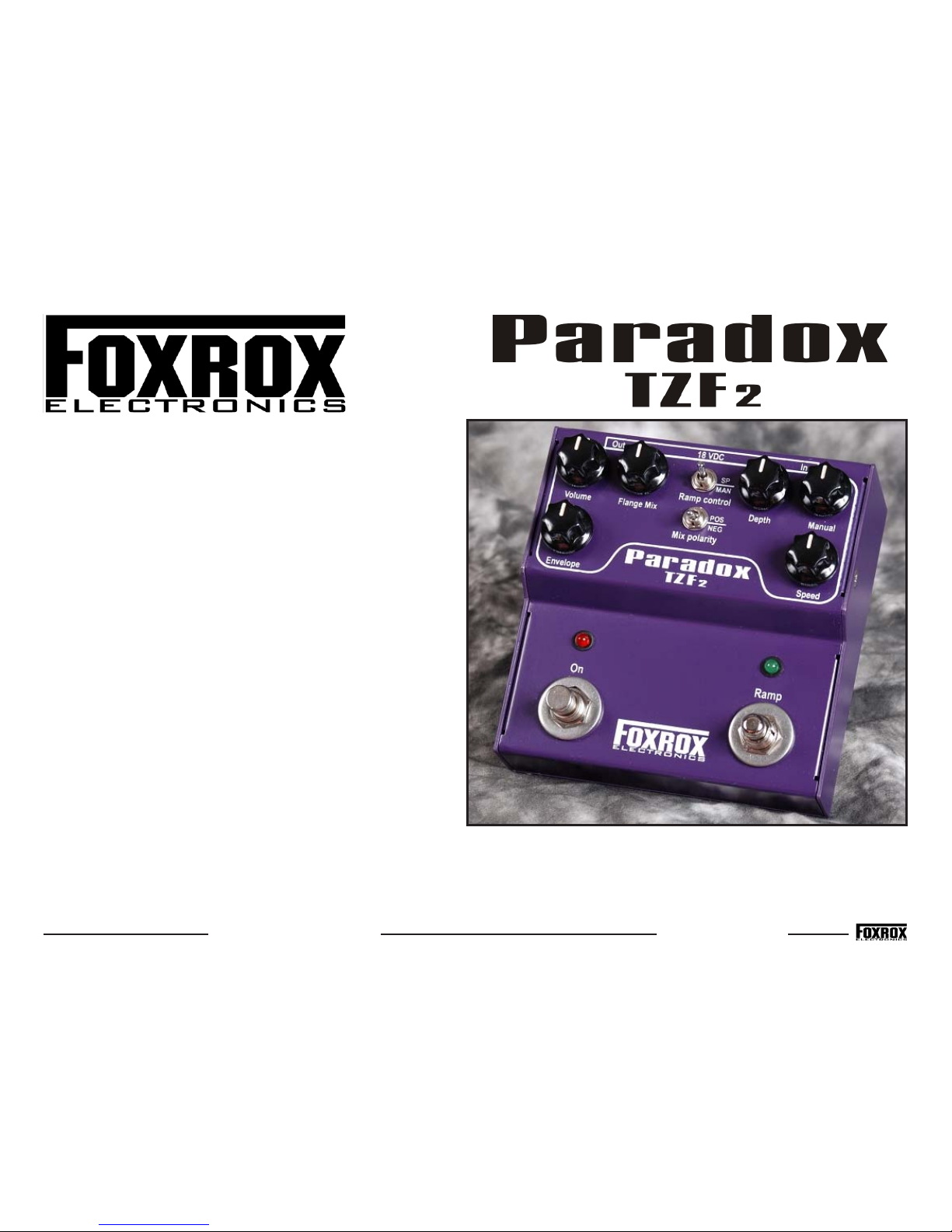
Paradox TZF2 is an analog through-zero-flanger geared towards
live performance. Organic time-based modulation with interactive
sweep control and warm analog processing produce flanging
sounds that you’ve heard in recordings and in nature but have
never been able to recreate.
Paradox TZF2 is an updated version of the original Foxrox Paradox
TZF, which was in production between 2002 and 2006. The original
Paradox TZF was the very first flanger pedal capable of achieving a
through-zero sweep. Since its inception, it has been considered by
many to be the finest flanger ever created. Paradox TZF2 is a
smaller, slimmed down version of the original Paradox TZF design.
Some features were taken away and replaced with features geared
towards live performance. These include Envelope control and
Ramping for speed and flange point, along with a wide range LFO.
Both Positive and Negative mixing is available for creating the
through-zero sweep in all its glory.
Like the original version, Paradox TZF2 requires a bit of a learning
curve. Take your time learning how to use it, be patient, and enjoy
every moment. The effort is worth it!
Technical Information:
Dimensions: Width = 5" Depth = 4.8" Height = 2.85"
Weight: 1 lbs 11 oz
Voltage: 18 Volts DC
Current draw: 100 mA
Power connection: 2.1mm, Center = NEG (FX standard)
Signal switching: True bypass with red LED.
Important application tip:
For best results, run overdrive/distortion/fuzz effects BEFORE Paradox
TZF2. That is, between your guitar and the flanger. After that, run Paradox
TZF2 into a CLEAN amp.
A dirty signal at the input will give TZF2 a richer frequency range to deal
with, creating the most pronounced effect. And a clean amp will reproduce
the effect most accurately. Doing it the other way around, clean guitar
into TZF2 an then into dirt pedals or a distorted amp, will mask the effect
to the point where it is almost inaudible.
If the normal tone of your amp is always distorted, then try hooking TZF2
up in the effects loop. If there is no effects loop, then you will have to try
a different amp if you want the most intense TZF sounds.
Manual written by Dave Fox
Page 2

p. 2
Paradox TZF2 Features
Volume: Typical setting: Around 11:00 - 1:00
A common complaint with flangers is that there is a volume drop. This is because the
flanging effect causes sounds to be perceived at different levels. The Volume knob has
enough boost and cut so that you can always get the level you need.
Flange Mix: Typical setting: MAX
For the most intense flanging sounds, keep this knob all the way up. For more subtle
sounds, back it off. When using NEG polarity, the zero flange point causes full cancelation. Your signal basically drops out, like a tremolo effect. Sometimes this is undesirable.
By dialing back the Flange Mix you can put the sweep more in the background, while
still enjoying the NEG through zero sound and it won't cancel out completely.
When you turn the Flange Mix knob all the way down, there will be no flanging effect.
The tone will be unaffected, but it will not perfectly match the bypassed tone. This is
because your signal is passing through an analog delay chip and all its associated circuitry. Enjoy the analog warmth.
Depth: Typical setting: All over the place
Depth and Manual are interactive. As you turn Manual Down, the depth of the sweep
becomes more exaggerated.
Manual: Typical setting: All over the place
The manual knob has several functions:
-Manual sweep: Turn Depth and Envelope all the way down. The manual knob can be
used to sweep through the entire range. The ZERO flange point occurs at or around the
1:00 setting. Use the manual knob to sweep above and below the ZERO flange point.
-LFO: Turn up the Depth knob and select a speed. Use the Manual knob to set the
amount of delay. You can sweep above, over and below the zero point.
-Envelope: Use the Manual knob to set the low point of the sweep. The place that the
sweep returns to when your guitar signal fades.
-Manual Ramp - Use the Manual knob to set the point that the sweep returns to after
the Manual Ramp ramps down.
Speed: Typical setting: All over the place
At its slowest setting, it takes a few minutes for a single cycle. At its fastest setting it's
really fast. By manipulating the Manual and Depth knobs and sweeping on each side of
the zero point you can set up a sweep that is perceived as twice as fast.
Speed Ramping - Use the speed knob to set the speed that the sweep returns to when
the Ramp button is released.
Envelope: Typical setting: Around 10:00 - 2:00
Use the dynamics of the input signal to control the flange point. Envelope can be used
on its own, or in combination with the LFO and the ramping features.
Tips for using Envelope control:
1) Turn the Depth knob all the way down.
2) Turn the Manual knob all the way down.
3) Strum your strings and slowly increase the ENVELOPE control.
Listen the sweep to kick in. Experiment from here.
When using the Evelope feature, the Manual knob can be used to set the low point of
the sweep.
You can combine Envelope, Ramping and LFO to create interactive flanging sounds never
before realized.
Ramp Control switch
This switch selects between Speed ramping and Manual ramping.
Speed Ramping: Step on the momentary Ramp switch and the LFO quickly speeds up
to the maximum speed. Release the Ramp switch and it slowly ramps back down to
the speed selected by the Speed control.
Manual Ramping: Step on the Ramp switch and the flange point quickly rises to its
maximum setting. Release and it slowly returns to the setting selected by the Manual
control.
Mix Polarity
Positive: A subtle type of flanging. A very pretty sound.
Negative: A more intense sound, capable of full cancellation when passing over the
Zero flange point.
Speed LED
Located above the Ramp switch, this LED blinks in time with the LFO. It is active all
the time, regardless of bypass status and other settings.
 Loading...