

Page 1
CERTIFIER
MANUAL
USB
FM-6602FM-6602
USER
Mp3 Digital Player
Page 2
1
Subject
Note......................................1
Overview
Player overview......................2
LCD overview.........................3
Earphone overview.................3
Features....... ........................4
Technical Spec.......................5
Operational Notes.................. 6
OPERATION NOTES
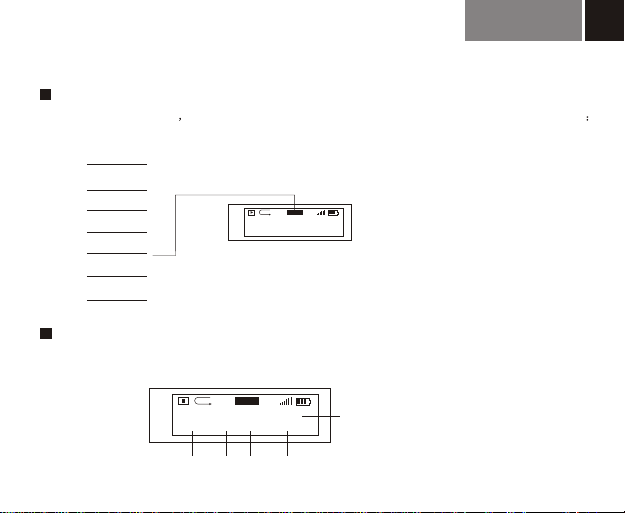
Battery/ Turn on or off...............8
Three MODE...........................9
Operation Notes.......
Advanced function
Music.....................................15
Voice..................................... 15-16
FM tuner.................................17-18
Settings................................. 19-21
Erase Files............................. 22
About /Exit............................. 23
Communication with Computer
Connection..............................25
Installation............................. 26
Download............................... 27
Disconnection......................... 28
Formatting...............................28
.............. 10-12
Check quickly.........................29
Menu overview........................30
Thanks for buying FOXDA s MP3
player, please look through this
user manual before use our MP3
player ,so as you can understand
our high quality product for your
reference, we wish our product
could satisfy you, and your any
suggestion on our MP3 will be
highly appreciated.
Page 3
OVERVIEW
MP3 player with removable storage hard disk, fashionable appearance, easy operation,
provide recording, music playing and repeating for you.
2
2
1/14
3
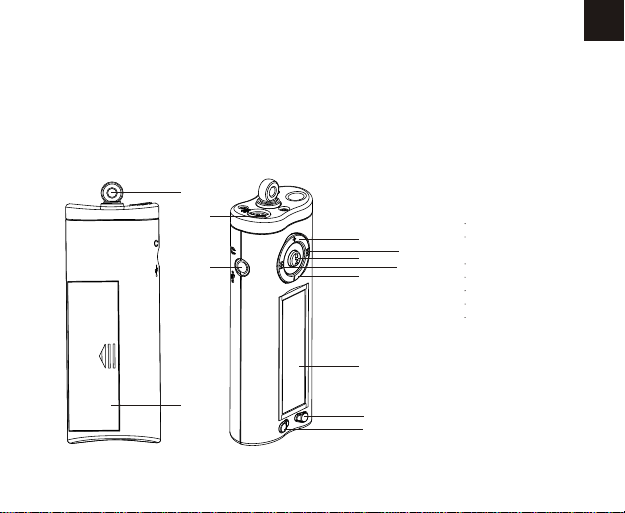
Player overview
4
5
12
9/11
13
8
7
10
Note : Pressing 6 &11 Button
6
at the same time is hold
HOLE
1 EAR
2 HANG HOLE
BATTERY COVER
3.
4 INTERNAL MIC
5 VOL+
6 REC/A-B/EQ
7 LCD
8 VOL-
9. PLAY
10.MENU
11. STOP
12. FF
13. FW
14. USB port
Page 4
3
2
1
3
A-B
JAZZ
5
4
12
23
TRYING MUSIC.MP3
Song 001-01:05/04:47
9
7
8
10
6
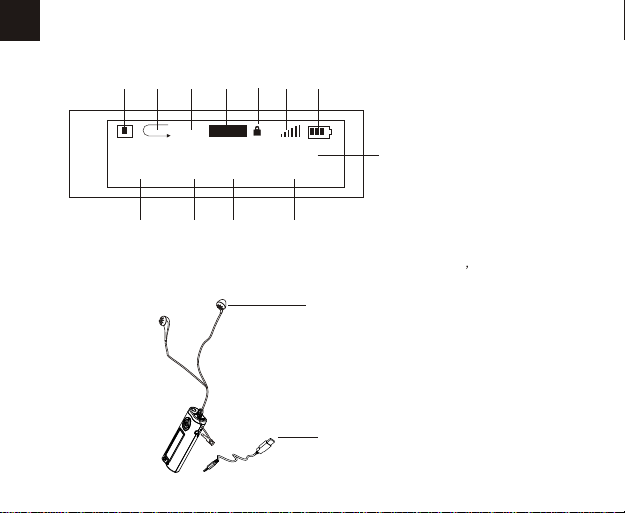
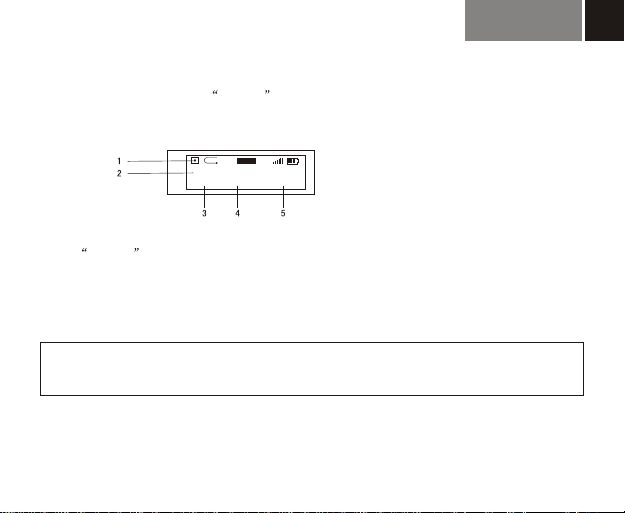
LCD overview
1.Playing state
2.Playing mode display
3.Repeat A-B display
4.EQ
11
5.Volume
6.Power
7.Function
8.Song No.
9.Current Music playing time
10.Total playing time
11.Song s informations
12.Holding state
1
Earphone overview
1.Ear
2
2.USB cable
Page 5

Accessories
1 USB cable
2 EARPHONE
3 Manual
4. CD-ROM
5. Strip hang
Features
Playback Mp3/ WMA multi-format files.
Equalizer mode options: Normal, Class, Jazz, Pop, Rock, DBB.
LCD display, blue light background.
A-B repeat, Selected content repeat function.
10 hours recording time (128M).
12MB full speed USB internal Flash memory.
Low power consumption, 7# (AAA) battery (12hrs continuous playback time)
No driver required for windows me/2000/xp(except windows 98)
Compact and light in weight ,Stylish appearance.
Multi- languages version
4
Page 6

TECHNICAL SPECIFICATIONS
SIZE ( L x W x H ) 86*31*18.2mm
WEIGHT 29 g
POWER AAA BATTERY X 1
DECODE ISO11172-3(MPEG1.0 Layer 3),ADPCM
BIT RATE 64Kdps-320Kdps
SAMPLE FREQUENCY 8KHz-48KHz
FREQUENCY RANGE 20Hz-20KHz
DISTORTION (1KHz) 0.1%
SNR >80db with 20KHz LPF
MP3 sound track separation >80db
MP3 dynamic range >93db
O
REC RDER LENGTH 16bit
TRANSFER SPEED 12Mbps USB
DELIVERY SPEED 4Mbps
POWER OUT >5mW*2
Page 7

Operational Notes
If the Mp3 player is not operated for a prolonged period, remove the battery to avoid
possible damage caused by electrical leakage.
The Mp3 player should be kept in areas free from extreme temperature changes, moisture
and dust.
Set the HOLD switch to the release position before operation.
Do not drop the player, which probably cause battery fall off or damage its surface.
Battery life may vary with different using condition, manufacturer and manufacture date.
Please change the battery under following conditions :
1. Indicator appears and display the Low Battery then shut down.
2. All buttons make no response and are not workable even after the battery is taken out
and reinstalled.
To avoid static electricity, please If possible, avoid operating the player in extremely dry
environment.
If the player stops running under proper operation, please reset it by taking out battery.
Do not use player when riding, driving .
6
Page 8
7
OPERATION NOTES
Page 9
OPERATION NOTES
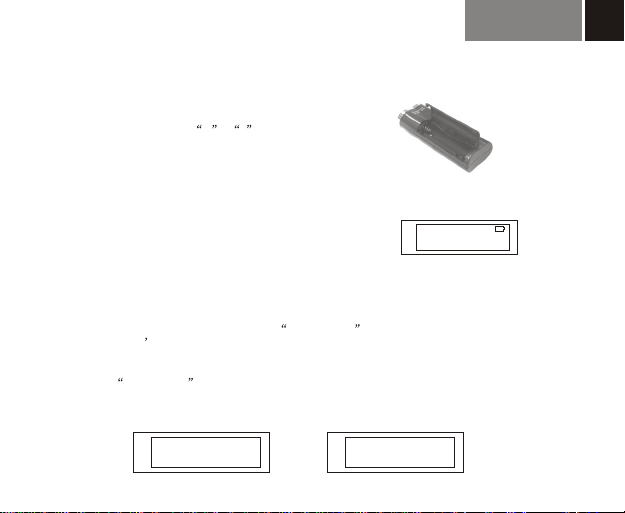
Load battery
Open the battery compartment, and load one AAA battery
as the direction of marked + , -
Change battery
When power is not enough, machine display as illustration, that means you must change
battery, it is a good suggestion for you that you had better turn off machine before change new
battery .
Turning the power on/off
with blue backlight appears
The OSD when PLAY/STOP button is pressed ,
The backlight will last different seconds by user setting seconds.
.
Pressing PLAY/STOP button continuing , Power OFF appears on
the screen, then it s safe to turn the power off without any operation
The machine can be auto-off if no operation during the period which user had set.
You can set prohibition fuction to let machine cancel this function.
(Reference page: 20 )
8
Foxda
power off
Page 10

OPERATION NOTES
9
Function optional
music playing, voice playing & recording, radio function
Press menu to select music mode, press menu to confirm playing music ( machine
auto back to playing music mode if no operation more than 3 seconds), LCD display music
mode as :
Press menu button into music mode, press + button to select voice mode and press
menu button to confirm this mode. It is same with transfer from voice mode to music
mode. LCD display voice mode as:
Press menu button into music mode, press + button two times to select FM Tuner
Press menu to confirm FM Tuner
Press menu button into music mode , press + - button to select music, voice, radio,
settings, erase files, about ,exit mode circularly and press menu comfirmed.
A-B
A-B
A-B
JAZZ
23
JAZZ
23
JAZZ
23
MUSIC function mode
VOICE function mode
FM Tuner function mode
Page 11
OPERATION NOTES
Music playing functions
JAZZ
A-B
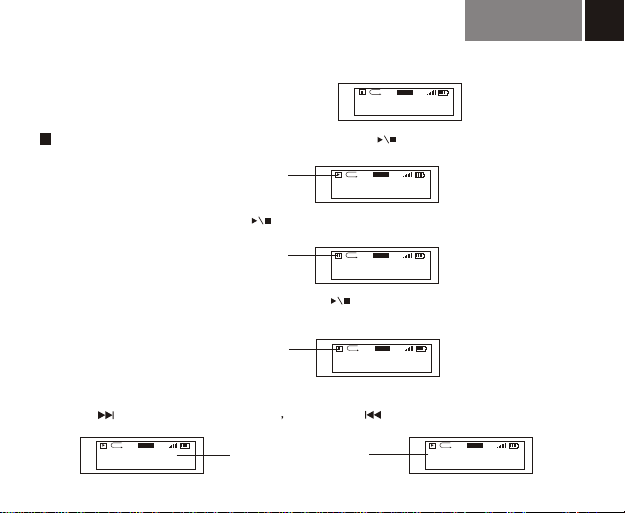
The default OSD is stop state under music mode
TRYING MUSIC.MP3
Play / Pause / Stop / FF / FW
Under playing music mode, LCD
displays music mode
Press Play/Stop button to play, LCD display as:
TRYING MUSIC.MP3
Song 001-01:05/04:47
Press Play/Stop button again to pause playing, you can cycle to operate. LCD display as:
LCD displays pause mode when
music is pause playing
Under pause mode, press Play/Stop button long time into stop mode, and press
Play/Stop button again into playing music mode,LCD display as:
LCD displays stop mode when
music is stopped playing
TRYING MUSIC.MP3
Song 001-01:05/04:47
TRYING MUSIC.MP3
Song 001-01:05/04:47
Note: Only on stop mode, press play/stop button long time to turn off machine, if machine is playing, please stop playing first, then turn off.
Press FF button to select next song Press FW button to select upper song.
JAZZ
A-
TRYING MUSIC.MP3
Song 001-01:05/04:47
23
FW / FF operation cause
song's information change
23
Song 001-01:05/04:47
JAZZ
A-B
23
JAZZ
A-B
23
JAZZ
A-B
23
JAZZ
A-B
2TRYING MUSIC.MP3
Song 002-00:01/05:12
23
10
Page 12
OPERATION NOTES
11
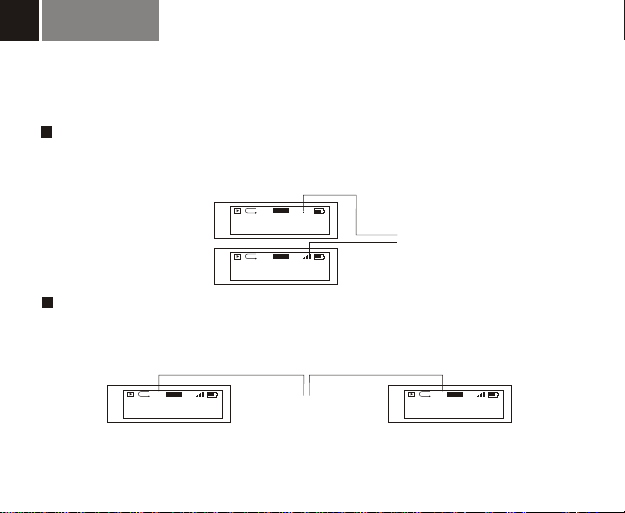
VOL+/VOLBy pressing VOL+/VOL-button ,you could control the volume under either PLAY or PAUSE
status. The volume steps (see illustration)will increase or decrease when the VOL+/VOL-button
is pressed correspondingly
JAZZ
A-B
TRYING MUSIC.MP3
Song 001-01:05/04:47
TRYING MUSIC.MP3
Song 001-01:05/04:47
5
Volume adjustment can be displayed
JAZZ
A-B
23
by digit change
Repeat A-B function
Under music/voice mode, you can press A-B/EQ button to select A and B, then play A-B music
or voice again and again, press A-B/EQ button to cancel, LCD display as:
JAZZ
A-
TRYING MUSIC.MP3
Song 001-01:05/04:47
23
Repeat A-B setting display
JAZZ
A-B
TRYING MUSIC.MP3
Song 001-01:05/04:47
23
Remark : Under stop mode,this function is out of work. Press A-B/EQ/REC long time into EQ setting (Ref page: 17)
Page 13
OPERATION NOTES
EQ setting
Under the playing mode press A-B/EQ button long time to select 6 modes of different music
Normal,DBB,Jazz,Rock,Classical,Pop, you cycle to select ( ref. Page ),and LCD display as:
12
Normal
DOBB
Rock
Jazz
Class
Selected EQ display relative change
JAZZ
A-B
TRYING MUSIC.MP3
Song 001-01:05/04:47
Press this button long time for EQ set,short time for repeat A-B set
23
Pop
Music / voice information display:
Under playing/stopping mode,LCD is rolling to display as:
JAZZ
A-B
TRYING MUSIC.MP3
Song 001-01:05/04:47
2 3
23
4
1
5
Ref.page18,Description of another set method
1.information of song,
2.voice/music
3.song/music No.
4.playing time,
5.Toatl playing time
Page 14
13
Advanced function
Page 15
Advanced function
Advanced function
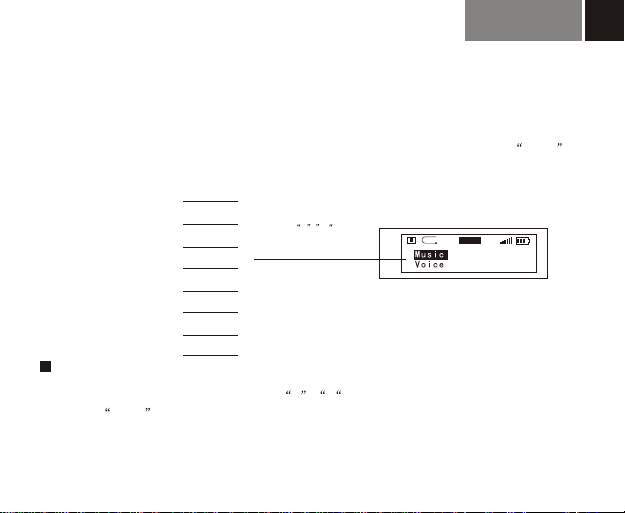
Followed is the more advanced functions of our MP3 player for you,you can press menu
button to select 6 functions
14
Music
Voice
FM tuner
Settings
Erase Files
About
Exit
press + - button
cycling to select above
item, LCD display as:
A-B
JAZZ
23
Menu function
Press MENU button into this mode, press + , - to cycle selecting above 6 item of function,
and press menu button again to confirm your selecting, and into relative display.
Note: No operation in 5 seconds, machine return to latest setting mode.
Page 16
Advanced function
15
Music Function:
This mode is default mode when machine is used first time.
Function description: playing/stopping/FF/FW/V+,-/EQ setting/repeat A-B ( Ref. Page10 )
Voice Function:
Under music mode, press menu button,and + button to select voice mode ,press
menu button to confirm (Ref. Page 9) .under voice mode, you can select playing/recording
/repeating A-B/FW/FF/ V+,-/EQ setting ( Ref. Page 20 )
1.Playing /FW/FF/ V+,- ( Ref. Page 10 )
2.Recording:
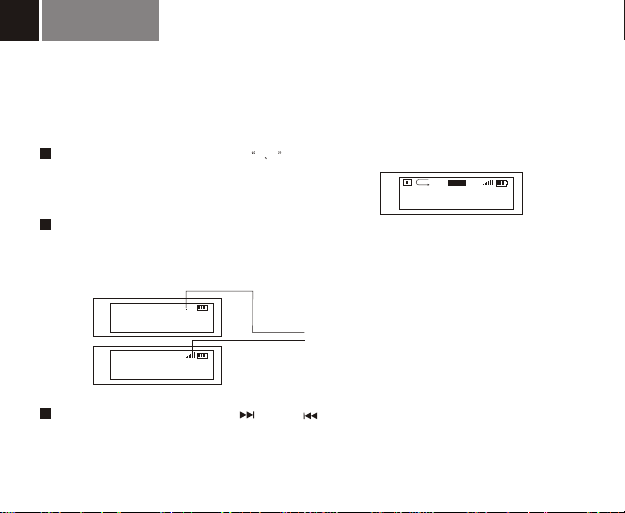
Under voice mode, LCD display as
JAZZ
A-B
/V001.WAV
Voice 001-00:05/01:00
23
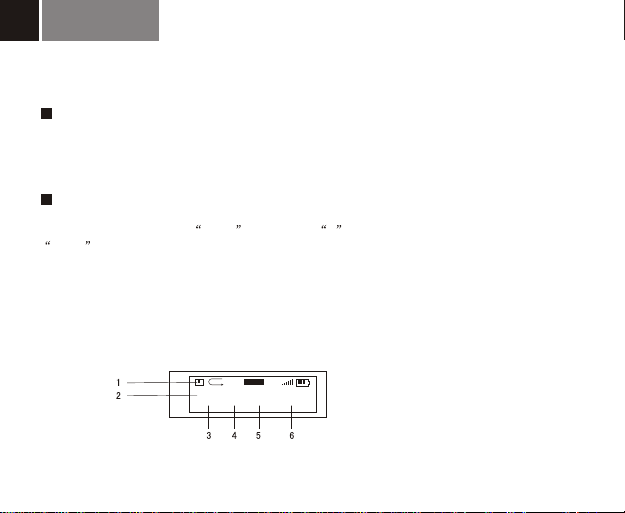
1.Stop State
2.Name and track of voice
3.Voice mode
4.No.of voice file
5.time of voice file
6.Total time of voice file
Page 17
Advanced function
Start Recording
Under Voice Function, press A-B/EQ button to start recording (enclosed internal
Microphone), LCD display as:
16
JAZZ
A-B
/VOICE/V001.WAV
REC 00:00:05/07:58:00
23
1.Recording Function display
2.Name and track of recorded file
3.REC Function
4.Time of recorded file
5.Total time of recorded file
Stop recording
Press A-B/EQ button again to stop recording, LCD display as ( Ref. Page 15 )
Play recording
It is same operation as music playing ( Ref. Page 10 ),LCD display ( Ref. Page 15)
Repeat A-B function only be operated under playing/pausing mode, no response under recording/stopping mode
EQ function only be worked by pressing A-B/EQ/REC button long time under playing/pausing/stopping mode,
NOTE
no response under recording mode
Name your recorded files
You can name your recorded files for your convenience ( Ref. Page 27 )
Page 18
Advanced function
17
FM tuner function
press menu button and press +-to select FM tuner,press menu to confirm
( Adjust the direction of earphone line to get good radio effect )
VOL+/VOL
By pressing VOL+/VOL-button ,you could control the volume. The volume steps (see illustration)
will increase or decrease when the VOL+/VOL-button is pressed correspondingly
5
87.6 Mhz
Mono(Stereo)
87.6 Mhz
Mono(Stereo)
P01
23
P01
Volume adjustment can be displayed by digit change
FM
FM
FM tuner
JAZZ
A-B
23
FM inching tuner
Press " " or " to inching tuner ."
Press "A-B/EQ" button long time, machine would memorize the radio frequence
Page 19

Advanced function
Auto search
Press button to auto search radio and memorize, mark.
( Note : press long time would power off )
Selecting the memorized radio circularly
Press A-B/EQ and MENU button to select the memorized radio circularly .
Exit FM tuner
Press MENU button long time, machine return to latest setting mode.
18
Page 20
Advanced function
19
Settings
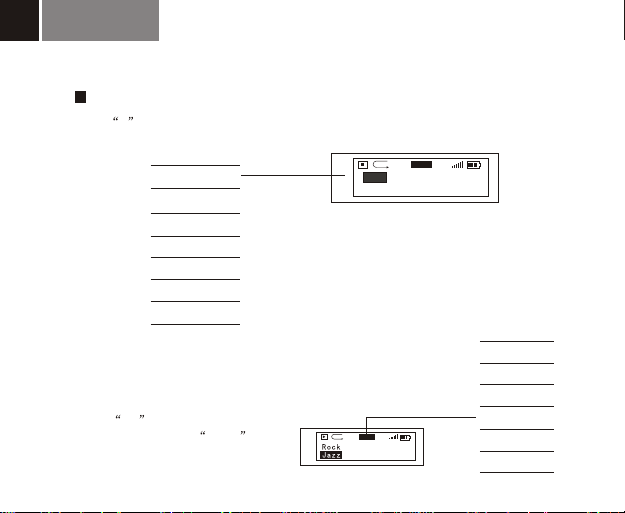
press + to select setting mode, it include functions displayed as:
EQ
PlayMode
Contrast
PowerSaving
Backlignt
Language
Exit
NOTE: Except in recording mode, you can select setting function both
in playing and stopping mode.5 min standby time later, machine
automatically return to music/voice playing mode( latest setting mode)
EQ
Playmode
A-B
JAZZ
23
1. EQ
Ref.page12,another set method
6 EQ mode included:,Normal,
DBB,Rock,Jazz,Classical, Pop,
press +,- button to cycle
selecting, and press menu
to confirm.
Normal
DBB
Rock
Jazz
JAZZ
A-B
23
Classical
Pop
Page 21
2. PlayMode
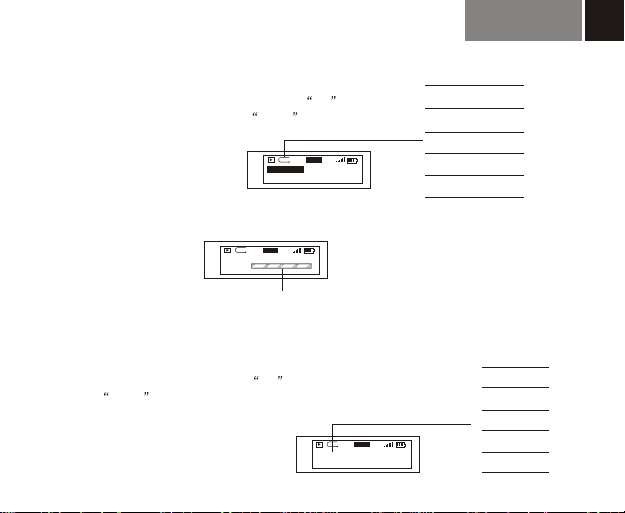
5 playing mode included: normal, repeat single song,
repeat all, play, repeat.,press +,-
Shuffle Shuffle
button to cycle selecting, and press menu to confirm.
JAZZ
A-B
Repeat All
Shuffle
23
3. Contrast
User can self-set to get good contrast, LCD display as :
JAZZ
A-B
23
Contrast
Level
Press "+/-"button to display relative change,and press "menu"button to confirm
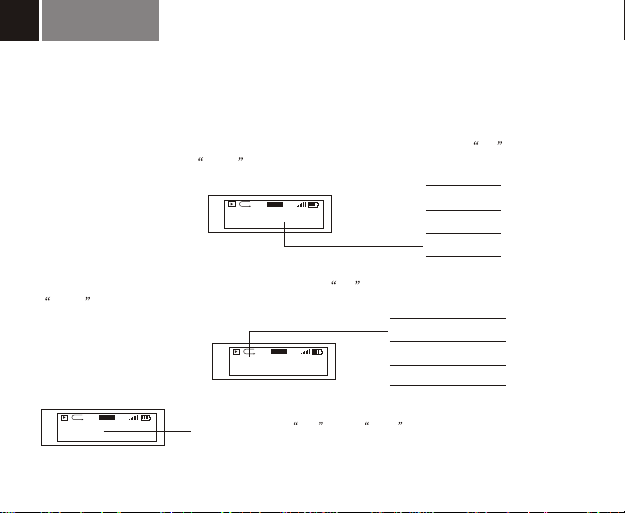
3. Power Saving
Under voice and music mode, machine include 5 auto-power off time:
prohibition,1 min,2 min,5 min,10 min, machine can auto-turn off
in setting time, to save power, press +,- button to cycle selecting,
and press menu to confirm, LCD display as
JAZZ
A-B
23
2Mins
Advanced function
Normal
Repeat Track
Repeat All
Shuffle
Shuffle Repeat
Disable
1Mins
Mins
2
Mins
5
Mins
10
20
Page 22
Advanced function
21
4. BackLignt
3 backlight mode included: prohibition,3 SEC,10 Secretary, machine backlight can last above
setting time when you operate machine, special using in the night, press +,- button to
cycle selecting, and press menu to confirm, LCD display as
Disables
3Sec
10Sec
5. Language
10Sec
JAZZ
A-B
23
English and Chinese, Traditional Chinese, press +,- button to cycle selecting, and press
menu to confirm, LCD display as :
CHINESE
Traditional Chinese
ENGLISH
6. Exit
JAZZ
A-B
CHINESE
JAZZ
A-B
Exit
23
When LCD display Exit ,press menu to confirm, and return to setting
mode, LCD display as ( Ref. Page 19 )
23
Page 23
Advanced function
22
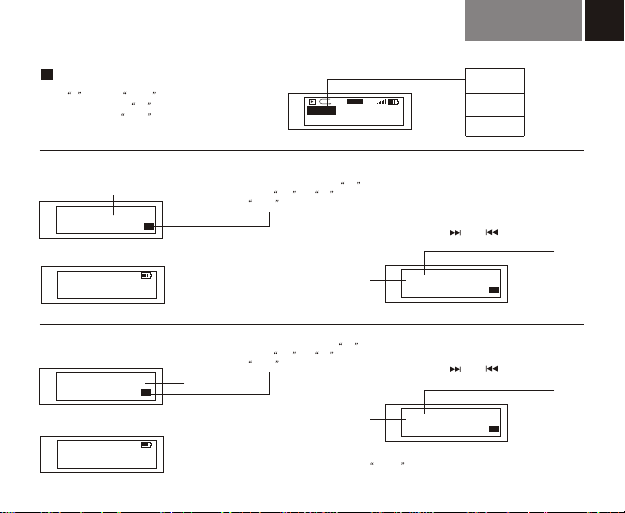
Earas Files
Press + to select delete mode,LCD display
music/voice file, press +,- button to cycle
selecting, and press menu to confirm, LCD
display as :
Delete Music
File name
TRYING MUSIC.MP3
Delete the file?
Yes No
When file deleted, LCD display as, and return last mode
File deleted
Delete Voice
/VOICE/V001.WAV
Delete the file?
When file deleted, LCD display as, and return last mode
File deleted
Yes No
Fil name and pathe
JAZZ
A-B
Music
Voice
Delete music file: press +,- button to
select yes or no ,and press
menu to confirm, LCD display as
23
Fil namee
Delete voice file: press +,- button to
select yes or no ,and press
menu to confirm, LCD display as
Fil namee
Note : Under delete mode,5 min standby time can cause
machine to return to voice/music mode ( the latest setting mode )
Music
Voice
Exit
Press FF/ FW to button to cycle
selecting file, LCD display as
2TRYING MUSIC.MP3
Delete the file?
/VOICE/V002.WAV
Delete the file?
Yes No
Press FF/ FW to button to cycle
selecting file, LCD display as
Yes No
Page 24
23
Advanced function
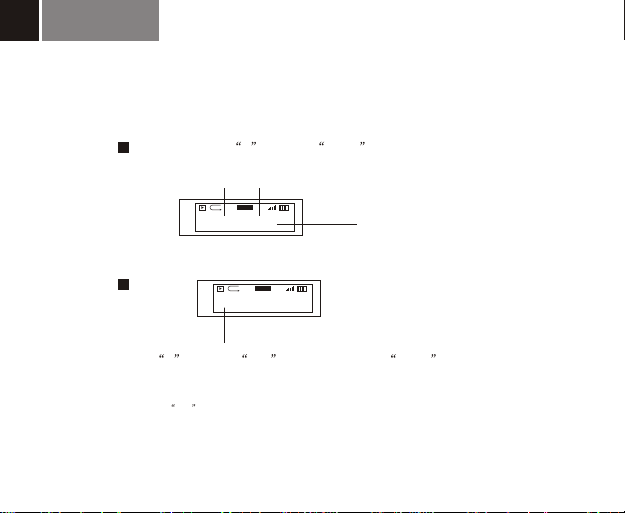
About
1.Production Model
Exit
Press + to select about mode,LCD display as
2.Firmware VER.
JAZZ
A-B
23
Fm6602 VER 2.313
MEMORY 128MB
A-B
Exit
JAZZ
23
3.Capacity
Press + to select exit mode,then press menu
button to return voice/music mode,LCD display
Note: Under exit mode,5 min standby time can cause machine to return to voice/music mode
( the latest setting mode )
Page 25
COMMUNICATION WITH COMPUTER
24
Page 26
COMMUNICATION WITH COMPUTER
25
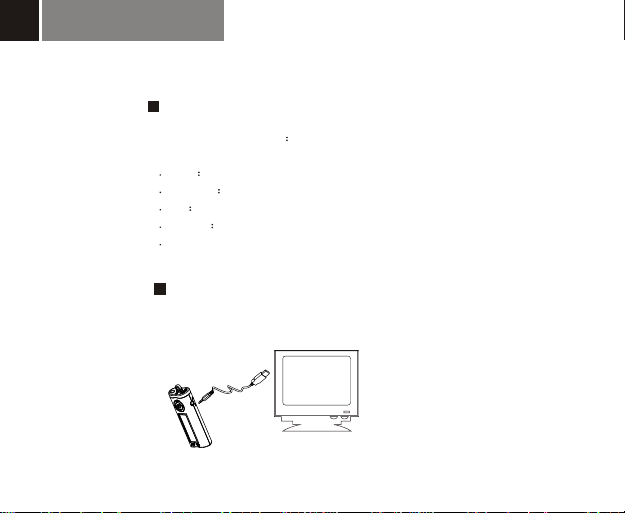
Requirements for computer system
1 Operating systems: Microsoft Windows 98, Windows Me,
Windows 2000,Windows NT, Windows XP.
2 CPU Intel Pentium 3,Pentium 4 or above CPU
3 Memory 32 MB and above
4 HD 200MB idle memory and above
5 Intface full speed USB
6 CD-ROM
Connection with computer
Put the USB cable into computer USB port
Page 27
COMMUNICATION WITH COMPUTER
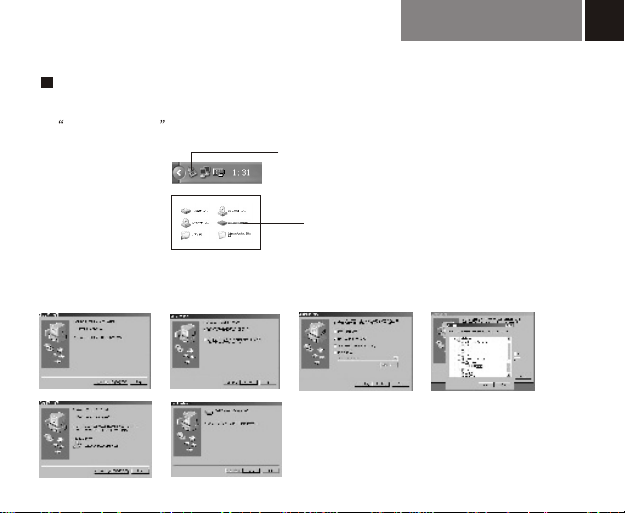
Installation of communication software
After good connection with computer, computer can auto install to use, and appear the mark
of removable drive , Windows 98 Operation system need additional CD-ROM.
The mark will be displayed here after installation
The mark will be displayed in "my computer"
after installation
Windows 98 CD-ROM installation
Put attached CD-ROM into computer, and install to finish according to computer direction
Computer difference can display some changes
26
Page 28
COMMUNICATION WITH COMPUTER
27
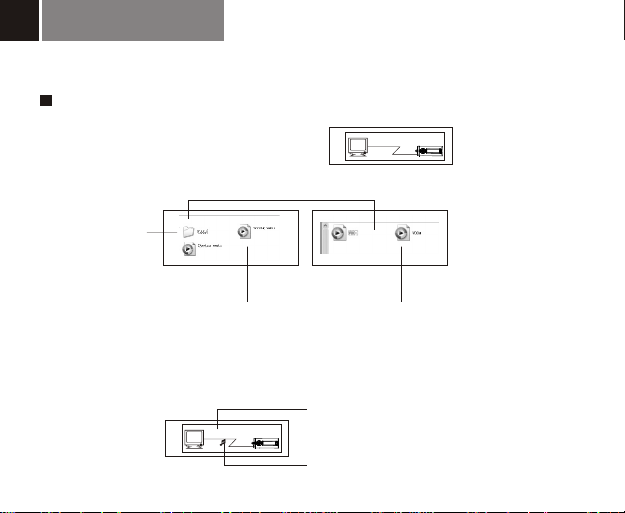
Save and rename downloaded music and voice files
After successful connection between the
machine and computer, it is displayed as
Double-click removable disk, it is displayed as
Open
1.voice box
Ready
2.music file information
3.voice file information
Note : This machine as USB drive is the same operation as normal USB drive, you can
select copy/rename/download/delete functions for your inquiry.
When Writing Display as
Write
Moving logo when writing or deleting
Page 29
COMMUNICATION WITH COMPUTER
Disconnection with computer
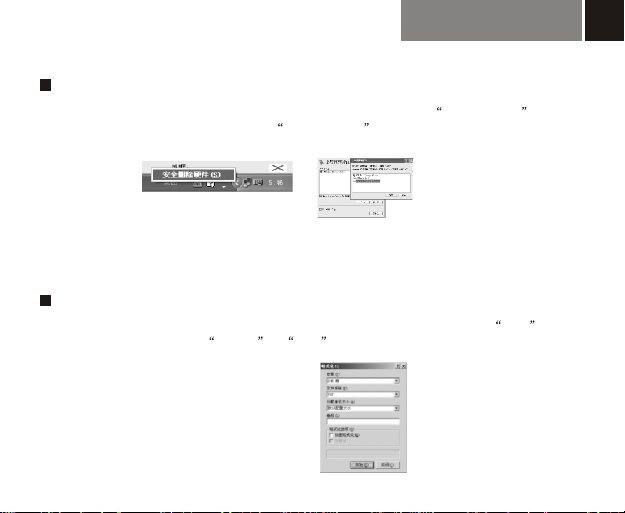
The play/Stop button is out of work when connecting with PC. Click plug and play mark
by touching right key, and when appear safe to delete mark,cut off connection in order.
Note: you could not open machine when read/written/deleted,data damage or lose
caused by any illegal operation Is out of our responsibilityFirst take off the USB port
then take off the earphone.
Formating
Click the removable disk icon in the computer by touching right key, select the FAT mode
to format .If you mis-select FAT32 or NTF mode, please format again as above
procedure.
28
Page 30

29
Check quickly
General question answer
1. How to turn on machine? Ref page 8
2. What is meaning of LCD s display ? Ref page 3
3. Why return to initial music playing mode? Ref page 9
4. How record and repeat? Ref page 16
5. How download and delete song in computer? Ref page 27
Page 31
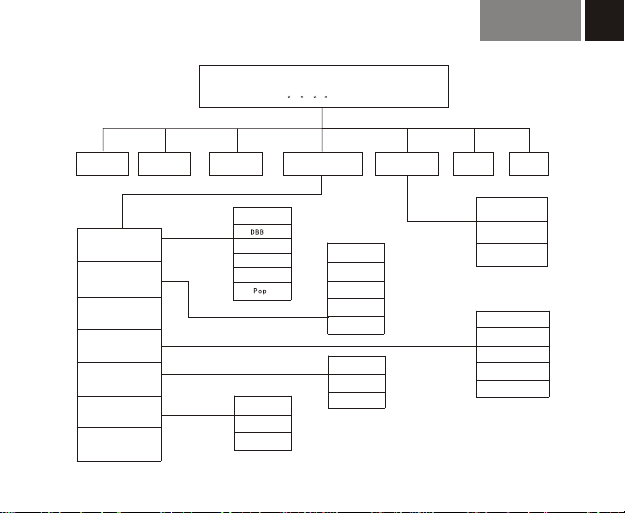
MENU
Press + - button to select
Menu overview
30
MUSIC
EQ
Play Mode
Contrast
PowerSaving
BackLight
Language
Exit
VOICE
FM Tuner
CHINESE
Traditional
ENGLISH
Normal
Rock
Jazz
Classical
CHINESE
Settings
Normal
Repeat Track
Repeat All
Shuffle
Shuffle Repeat
Disables
3Sec
10Sec
Erase Files
About Exit
Music
Voice
Exit
Disable
1 Mins
2 Mins
5 Mins
10Mins
Page 32
Foxda Technology Industrial (shenzhen) co.,Ltd.
Sales office :
Add:6/F,Fuxing Bldg, Binlang Road, Futian Free Duty Zone,
Shenzhen, 518038, CHINA.
Tel:86-755-83599807 Fax:86-755-83599990
Factory :
Add:E/Flat,New Century industrial Park,Longgang Large Industrial Zone,
Shenzhen,518118,China
Tel: 86-755-84637555 Fax: 86-755-84637700
Foxda (U.S.A) INC.
Add:9480 TELSTAR AVE.SUITE 200, EL MONTE , CA91731
Service Tel: 8005678081
Tel: 001-626-3508081 Fax: 001-626-3501932
Foxda Technology (HK) Company Limited
Add:Rm 1205, Tower 1, Lippo Centre , Admiralty. Hong Kong
Tel : (852) 2521-6669 Fax : (852) 2521-2229
 Loading...