

Page 1
ENGLISH
www.foxint.com
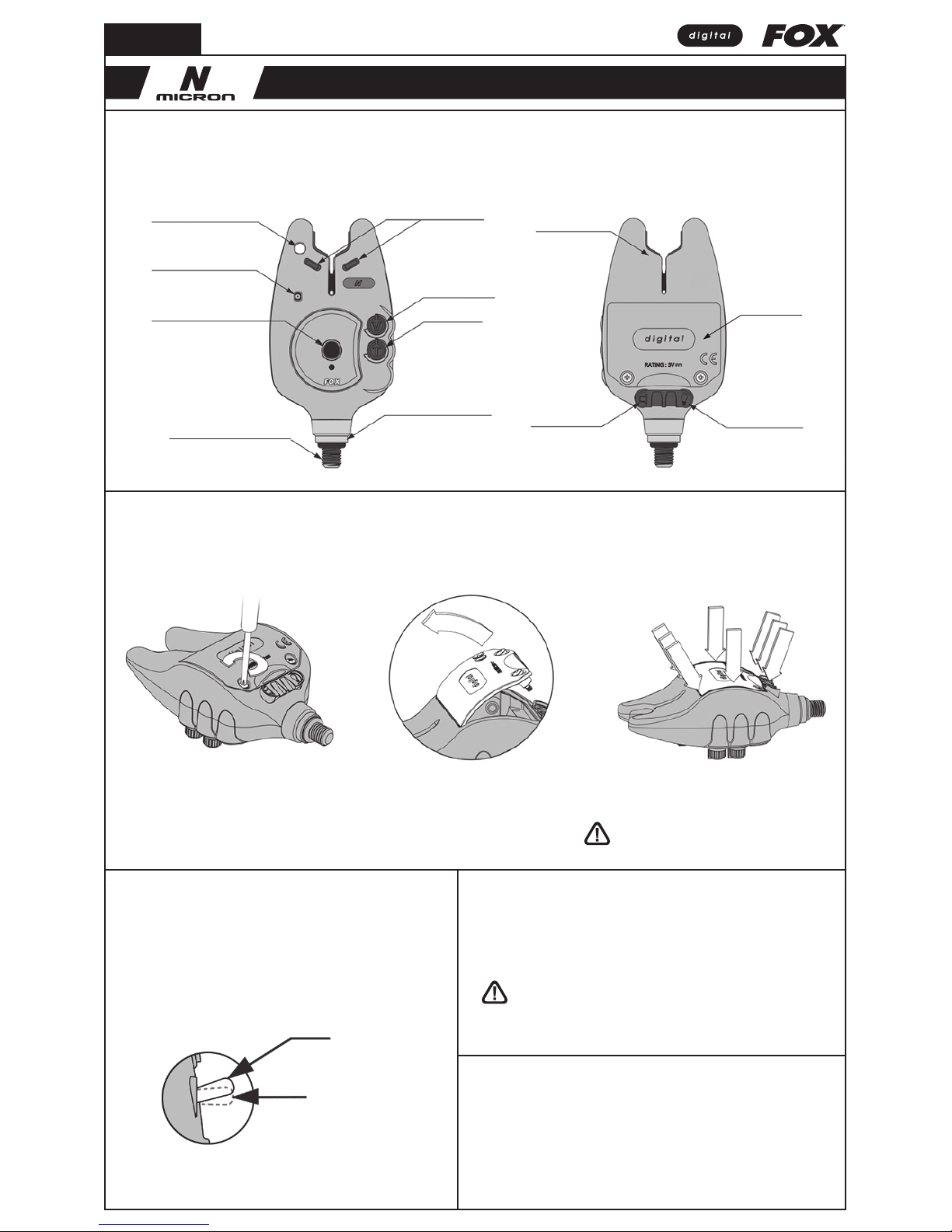
Features
Fitting the Batteries
BLUE LED
On / Off
Micro Light Slots
Battery Cover
Power Out Socket
(2.5mm)
Volume Control
Tone Control
Buzzer Bar Locking Screw
High Quality Cone Speaker
Rigid 3/8” Stainless Steel Thread
Extension Socket
(2.5mm)
D-Tec Sensing System™
(DTSS)
• Weatherproof Sealed Case
• Digital Circuitry
• See-Saw Effect Elimination Feature
• Audible & Visual Backdrop Indication
• Low Battery Drain
• CNC Machined Rollerwheel - Tru-Run™
1. Turn off unit prior to fitting or
replacing batteries.
3. Pull the lower tab up to remove
the battery cover.
5. For best weatherproofing, ensure
battery cover has a good seal by firmly
pushing the edging of the battery cover.
2. Using the supplied screwdriver
unscrew the two battery cover screws.
4. Take care removing the batteries.
Insert new batteries and ensure
correct polarity.
6. Re-fit cover and screws.
DO NOT over tighten the battery compartment screws,
excessive force will damage the screw threads.
Switching On / Off
Power Off
Power On
• Push down and release the power switch to activate the unit.
• Push up and release the power switch to deactivate the unit.
(LED will briefly flash red)
Please note:
The unit does not beep when
switched on or off.
Battery Requirements
The Microns require 2 x LR6 AA 1.5V Alkaline batteries. The use of good quality
batteries is essential for maximum battery life. To reduce the risk of battery leakage:
• DO NOT mix old and new batteries
• DO NOT mix different battery types
• The use of rechargeable batteries is NOT recommended
Buzzer Bar Locking Screw
This allows infinite alignment adjustability for the Micron facing position. If the Micron is
not facing the desired position, unscrew the micron until you can reach the locking screw.
Back the locking screw a quarter to half a turn, then screw the Micron back on.
Controls Additional Extras
Sockets
When the Micron detects that its batteries are failing, the main LED colour
changes to purple. When this occurs, batteries should be replaced at the earliest
opportunity, although the unit may continue to work for some time in this
condition, particularly if the volume setting is reduced. No audible indication of
low battery is given. It is not possible to change the LED colour once it has
changed to purple.
Low Battery Warning
Warranty & Product Registration
Register your Fox product online at www.foxint.com. You will be given a
Customer Reference Number and a Warranty Reference Number, please make
a note of these numbers. You can view warranty details online using the
Customer Reference number.
Alternatively fill out the Warranty Card enclosed in the box and post to:
Customer Care Department
Fox International Group Ltd, UK Headquarters,
56-58 Fowler Road, Hainault Business Park,
Hainault, Essex, IG6 3UT
Micron is a Registered Trade Mark
NTX-R, NX, N & NTX Receiver are Registered Trade Marks
We reserve the right to alter or modify the contents of this manual.
Drying Out After Use in Heavy Rain
These Microns have been designed to be weatherproof. However, after use in
heavy rain, it is important to allow the unit to dry out properly by bringing the
unit indoors and removing the hard case cover.
• Do not trigger LED or speaker in close proximity to human or animal eyes and ears.
• Store this equipment out of reach of children and infants.
• Avoid dropping or subjecting the Micron to severe impacts.
• Use only recommended batteries and accessories.
MICRON USER GUIDE
Page 2
Controls Additional Extras
Notes
Volume Control
Turn the knob clockwise to increase volume, anti-clockwise to lower volume.
There are eight different volume settings available.
Tone Control
Turn the knob clockwise to raise pitch, anti-clockwise to lower pitch.
There are eight different tone settings available.
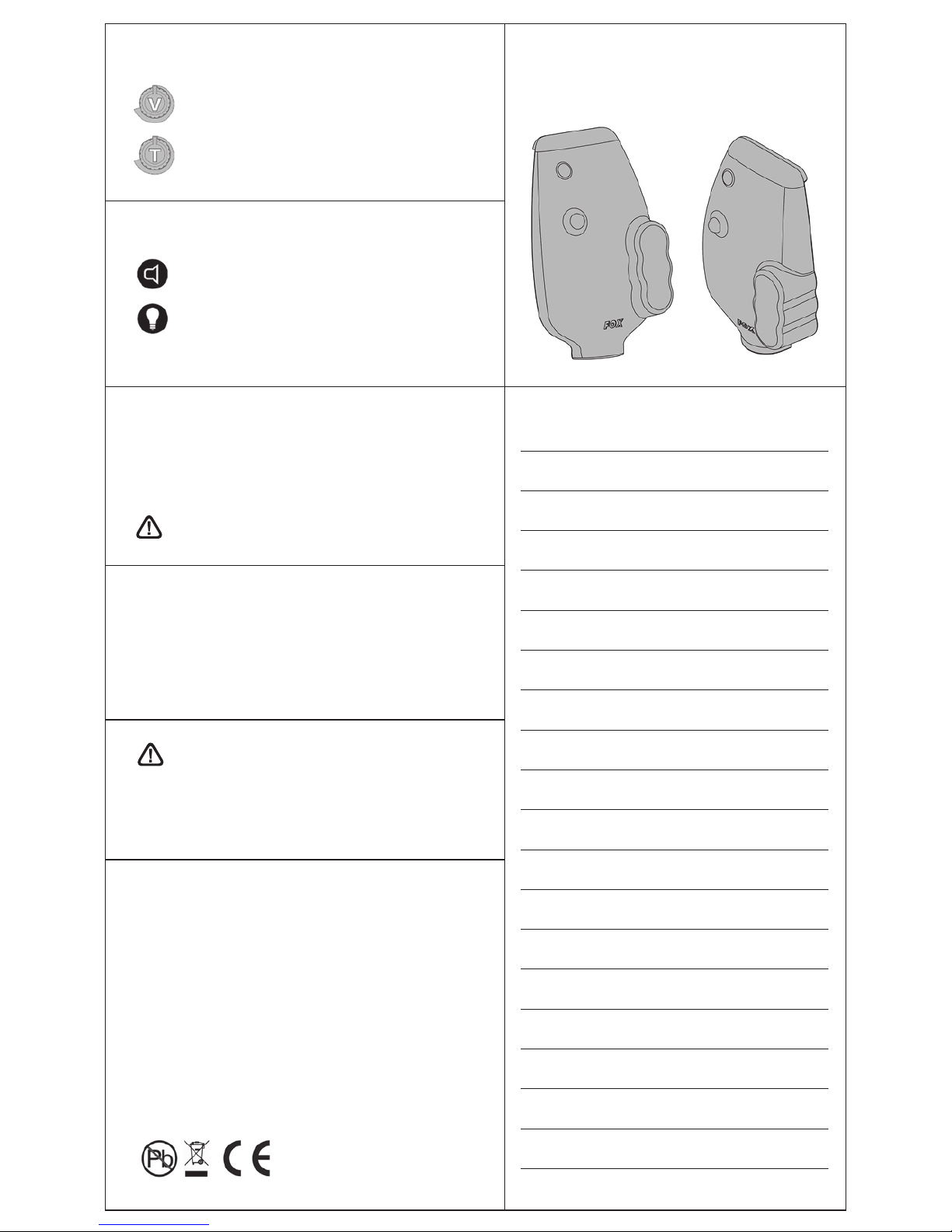
Micron N Series Hardcase
Product Code: CEI102
Sockets
Extension Socket
Extension socket for wired extension boxes or remote system.
Power Out Socket
Allows Fox Illuminated Bite Indicators to be powered directly
from the Micron. The Illuminated Indicator will then light up
when the Micron is activated and latch for approximately
20 seconds.
When the Micron detects that its batteries are failing, the main LED colour
changes to purple. When this occurs, batteries should be replaced at the earliest
opportunity, although the unit may continue to work for some time in this
condition, particularly if the volume setting is reduced. No audible indication of
low battery is given. It is not possible to change the LED colour once it has
changed to purple.
Low Battery Warning
Warranty & Product Registration
Register your Fox product online at www.foxint.com. You will be given a
Customer Reference Number and a Warranty Reference Number, please make
a note of these numbers. You can view warranty details online using the
Customer Reference number.
Alternatively fill out the Warranty Card enclosed in the box and post to:
Customer Care Department
Fox International Group Ltd, UK Headquarters,
56-58 Fowler Road, Hainault Business Park,
Hainault, Essex, IG6 3UT
Micron is a Registered Trade Mark
NTX-R, NX, N & NTX Receiver are Registered Trade Marks
We reserve the right to alter or modify the contents of this manual.
NEVER place batteries in a hot environment (e.g. on a radiator).
Drying Out After Use in Heavy Rain
These Microns have been designed to be weatherproof. However, after use in
heavy rain, it is important to allow the unit to dry out properly by bringing the
unit indoors and removing the hard case cover.
Warnings
• Do not trigger LED or speaker in close proximity to human or animal eyes and ears.
• Store this equipment out of reach of children and infants.
• Avoid dropping or subjecting the Micron to severe impacts.
• Use only recommended batteries and accessories.
 Loading...